turn signal MERCEDES-BENZ GL 2012 Owners Manual
[x] Cancel search | Manufacturer: MERCEDES-BENZ, Model Year: 2012, Model line: GL, Model: MERCEDES-BENZ GL 2012Pages: 384, PDF Size: 15.71 MB
Page 8 of 384
Cargo compartment floor ................. 314
Cargo net Attaching ....................................... 275
Important safety information .........274
Cargo tie down rings ......................... 272
Car wash (care) ................................. 306
CD player/CD changer (on-board
computer) .......................................... 221
Cell phone see Mobile phone
Center console
Lower section .................................. 34
Upper section .................................. 32
Central locking
Automatic locking (on-board
computer) ...................................... 226
Locking/unlocking (SmartKey) ........76
Changing bulbs
Backup lamp (LEDs) .......................127
High-beam headlamps ...................125
Important safety notes ..................123
License plate lighting .....................127
Low-beam headlamps ....................125
Overview of bulb types ..................124
Parking lamps ................................ 126
Rear fog lamp (LEDs) .....................127
Side marker lamps (front) ..............126
Standing lamps (front) ...................126
Turn signals (front) ......................... 126
Child-proof locks
Important safety notes ....................66
Rear doors ....................................... 66
Children
In the vehicle ................................... 61
Restraint systems ............................ 61
Child seat
Automatic recognition .....................50
Automatic recognition/air bag
deactivation, self-test ......................52
Display message ............................ 237
LATCH-type (ISOFIX ) child seat
anchors ............................................ 63
Special seat belt retractor ...............63
Top Tether ....................................... 64
Troubleshooting ............................... 53
Cigarette lighter ................................ 284Classification system for
occupants (OCS) Faults ............................................... 49
Operation ......................................... 45
System self-test ............................... 48
Climate control
Automatic climate control (3-
zone) .............................................. 136
Controlling automatically ...............140
Cooling with air dehumidification ..139
Defrosting the windshield ..............142
Demisting the windows .................. 143
Dual-zone automatic climate
control ........................................... 135
Important safety notes ..................134
Indicator lamp ................................ 140
Notes on using automatic climate
control ................................... 135, 138
Overview of systems ......................134
Problems with cooling with air
dehumidification ............................ 140
Problem with the rear window
defroster ........................................ 143
Rear control panel .........................136
Refrigerant ..................................... 375
Setting the air distribution .............142
Setting the airflow .........................142
Setting the air vents ......................145
Setting the temperature ................141
Switching air-recirculation mode
on/off ............................................ 144
Switching on/off ........................... 138
Switching residual heat on/off ......144
Switching the MONO function on/
off .................................................. 142
Switching the rear window
heating on/off ............................... 143
Clock (on-board computer) ............... 224
Cockpit Overview .......................................... 28
see Instrument cluster
COMAND
see separate operating instructions
Combination switch .......................... 121
Compass Calling up ....................................... 296
Consumption statistics (on-board
computer) .......................................... 2296Index
Page 14 of 384
Switching the daytime running
lamps on/off (on-board
computer) ...................................... 224
Switching the daytime running
lamps on/off (switch) ....................119
Switching the surround lighting
on/off (on-board computer) ..........225
Turn signals ................................... 121
see Changing bulbs
see Interior lighting
Light sensor (display message) ....... 244
LIM indicator lamp Cruise control ................................ 180
DISTRONIC .................................... 184
Loading guidelines ............................ 268
Locking see Central locking
Locking (doors)
Automatic ........................................ 84
Emergency locking ........................... 85
From inside (central locking
button) ............................................. 84
Locking centrally
see Central locking
Locking verification signal (on-
board computer) ............................... 226
Low-beam headlamps Changing bulbs .............................. 125
Display message ............................ 241
Setting for driving abroad
(symmetrical) ................................. 118
Switching on/off ........................... 119
LOW RANGE
Display message ............................ 249
Off-road gear ................................. 206
LOW RANGE off-road gear ................ 206
Luggage net ....................................... 270
Lumbar support Adjusting the 4-way lumbar
support .......................................... 108
Luxury head restraints ..................... 101
M
M+S tires ................................... 172, 340
Maintenance see ASSYST PLUS service interval
display
Malfunction message
see Display messages
Malfunctions relevant to safety
Reporting ......................................... 25
Matte finish (cleaning
instructions) ...................................... 308
mbrace Call priority .................................... 291
Display message ............................ 236
Downloading destinations
(COMAND) ..................................... 292
Emergency call .............................. 288
Important safety notes ..................287
Locating a stolen vehicle ...............293
MB info call button ........................290
Roadside Assistance button ..........290
Search & Send ............................... 292
Self-test ......................................... 288
System .......................................... 288
Vehicle remote unlocking ..............292
Mechanical key
Function/notes ................................ 79
Unlocking the driver's door ..............85
Memory card (audio) ......................... 221
Memory function ............................... 114
Messages see Display messages
Mirrors
see Exterior mirrors
see Rear-view mirror
see Vanity mirror
Mobile phone
Menu (on-board computer) ............230
Modifying the programming
(SmartKey) ........................................... 79
MOExtended run-flat system ........... 325
MP3 Operating ....................................... 221
see separate operating instructions
Multicontour seat .............................. 107
Multifunction display ........................ 218
Multifunction steering wheel Operating the on-board computer . 217
Overview .......................................... 3112Index
Page 21 of 384

Lights display message ..................241
Power supply ................................. 213
Shift range ..................................... 157
Towing away
With both axles on the ground .......332
Tow-starting
Emergency engine starting ............333
Important safety notes ..................331
Trailer
Towing ........................................... 211
Trailer loads and drawbar
noseweights ...................................... 213
Trailer towing Blind Spot Assist ............................ 203
ESP ®
................................................ 71
PARKTRONIC ................................. 198
Permissible trailer loads and
drawbar noseweights .....................213
Towing a trailer .............................. 211
Transmission
see Automatic transmission
Transporting the vehicle .................. 332
Traveling uphill
Brow of hill ..................................... 179
Driving downhill ............................. 179
Maximum gradient-climbing
capability ....................................... 179
Trim pieces (cleaning instructions) . 311
Trip computer (on-board
computer) .......................................... 229
Trip meter see Trip odometer
Trip odometer
Calling up ....................................... 220
Resetting (on-board computer) ......229
Trunk
see Tailgate
Turn signals
Changing bulbs (front) ...................126
Display message ............................ 241
Switching on/off ........................... 121
see Turn signals
TWR (Tongue Weight Rating)
(definition) ......................................... 361
Type identification plate see Vehicle identification plate U
Unlocking Emergency unlocking .......................85
From inside the vehicle (central
unlocking button) ............................. 84
V
Vanity mirror (in sun visor) .............. 283
Vehicle Correct use ...................................... 24
Data acquisition ............................... 25
Display message ............................ 254
Equipment ....................................... 21
Individual settings ..........................223
Limited Warranty ............................. 25
Loading .......................................... 349
Locking (in an emergency) ...............85
Locking (SmartKey) .......................... 77
Lowering ........................................ 325
Maintenance .................................... 22
Parking for a long period ................ 167
Pulling away ................................... 151
Raising ........................................... 322
Reporting problems .........................24
Towing away .................................. 331
Transporting .................................. 332
Unlocking (in an emergency) ...........85
Unlocking (SmartKey) ......................77
Vehicle battery
see Battery (vehicle)
Vehicle dimensions
see Technical data
Vehicle emergency locking ................ 85
Vehicle identification number see VIN
Vehicle identification plate .............. 369
Vehicle level (display message) ....... 248
Vehicle tool kit .................................. 314
Vehicle weights see Technical data
Video (DVD) ........................................ 222
Video DVD (on-board computer) ...... 222
VIN ...................................................... 369
Index19
Page 32 of 384
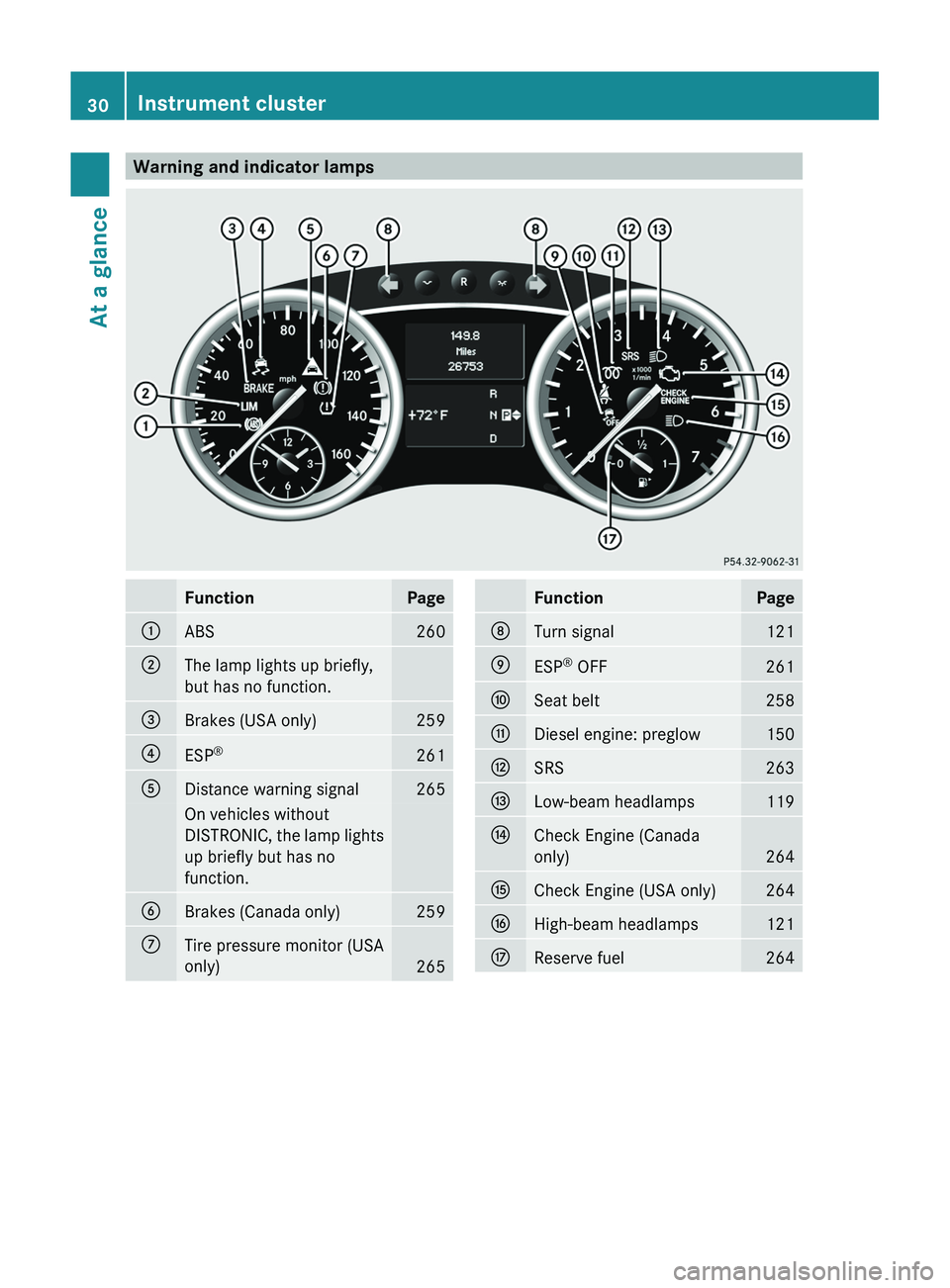
Warning and indicator lampsFunctionPage:ABS260;The lamp lights up briefly,
but has no function.=Brakes (USA only)259?ESP ®261ADistance warning signal265On vehicles without
DISTRONIC, the lamp lights
up briefly but has no
function.BBrakes (Canada only)259CTire pressure monitor (USA
only)
265
FunctionPageDTurn signal121EESP ®
OFF261FSeat belt258GDiesel engine: preglow150HSRS263ILow-beam headlamps119JCheck Engine (Canada
only)
264
KCheck Engine (USA only)264LHigh-beam headlamps121MReserve fuel26430Instrument clusterAt a glance
Page 54 of 384
The system does not disable:
R the side impact air bag
R the window curtain air bag
R the Emergency Tensioning Devices/belt
buckle tensioners
System self-test
The 42 indicator lamp
illuminates when you:
R turn the SmartKey to position 1 or 2 in the
ignition lock
R on vehicles with KEYLESS-GO, press the
Start/Stop button once or twice
The 42 indicator lamp goes out
again after approximately six seconds.
If the 42 indicator lamp does not
illuminate or is lit continuously, the system is
malfunctioning. Have the BabySmart™
system checked at an authorized Mercedes-
Benz Center before transporting a child on
the front-passenger seat.
For further information, see "Problems with
air bag deactivation system" ( Y page 53).
GWARNING
Do not place powered-on laptops, mobile
phones, electronic tags such as those used in
ski passes or similar electronic devices on the
front passenger seat. Signals from such
devices may interfere with the BabySmart™
air bag deactivation system. Such signal
interference may cause the 42
indicator lamp not to come on during self-test.
The + SRS indicator lamp and/or the
42 indicator lamp could be
continuously lit, indicating that the system is
not functioning. The front-passenger front air
bag could deploy inadvertently or fail to
deploy in an accident.
52Occupant safetySafety
Page 79 of 384
Any unauthorized modification to this
device could void the user’s authority to
operate the equipment.
The product label with FCC ID and IC
certification number can be found in the
battery case of the SmartKey.
i Canada only:
This device complies with RSS-210 of
Industry Canada. Operation is subject to
the following two conditions:
1. This device may not cause interference,
and
2. this device must accept any interference
received, including interference that may
cause undesired operation of the device.
Any unauthorized modification to this
device could void the user’s authority to
operate the equipment.
The product label with FCC ID and IC
certification number can be found in the
battery case of the SmartKey.
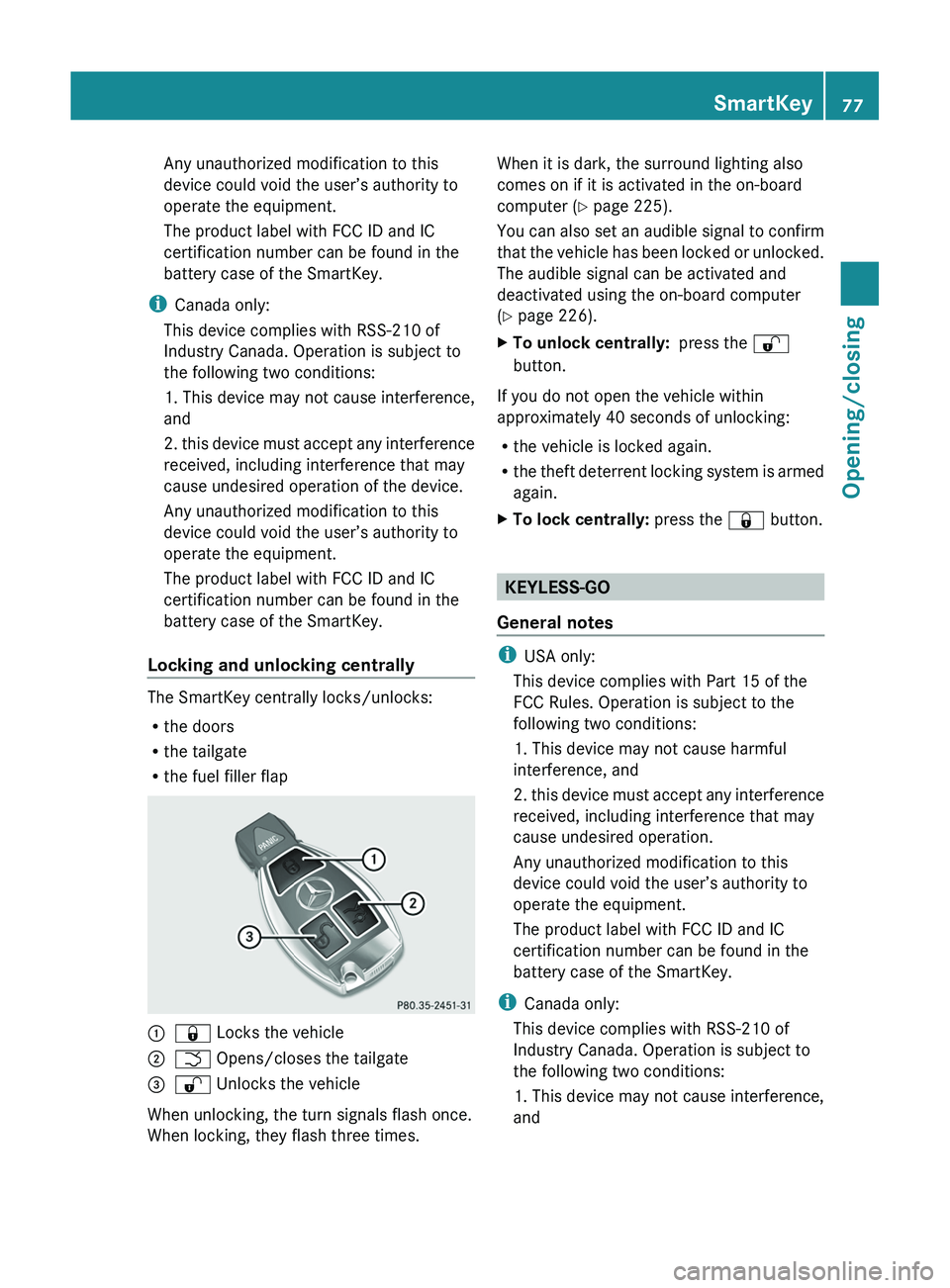
Locking and unlocking centrally
The SmartKey centrally locks/unlocks:
R the doors
R the tailgate
R the fuel filler flap
:& Locks the vehicle;F Opens/closes the tailgate=% Unlocks the vehicle
When unlocking, the turn signals flash once.
When locking, they flash three times.
When it is dark, the surround lighting also
comes on if it is activated in the on-board
computer ( Y page 225).
You can also set an audible signal to confirm
that the vehicle has been locked or unlocked.
The audible signal can be activated and
deactivated using the on-board computer
( Y page 226).XTo unlock centrally: press the %
button.
If you do not open the vehicle within
approximately 40 seconds of unlocking:
R the vehicle is locked again.
R the theft deterrent locking system is armed
again.
XTo lock centrally: press the & button.
KEYLESS-GO
General notes
i USA only:
This device complies with Part 15 of the
FCC Rules. Operation is subject to the
following two conditions:
1. This device may not cause harmful
interference, and
2. this device must accept any interference
received, including interference that may
cause undesired operation.
Any unauthorized modification to this
device could void the user’s authority to
operate the equipment.
The product label with FCC ID and IC
certification number can be found in the
battery case of the SmartKey.
i Canada only:
This device complies with RSS-210 of
Industry Canada. Operation is subject to
the following two conditions:
1. This device may not cause interference,
and
SmartKey77Opening/closingZ
Page 81 of 384
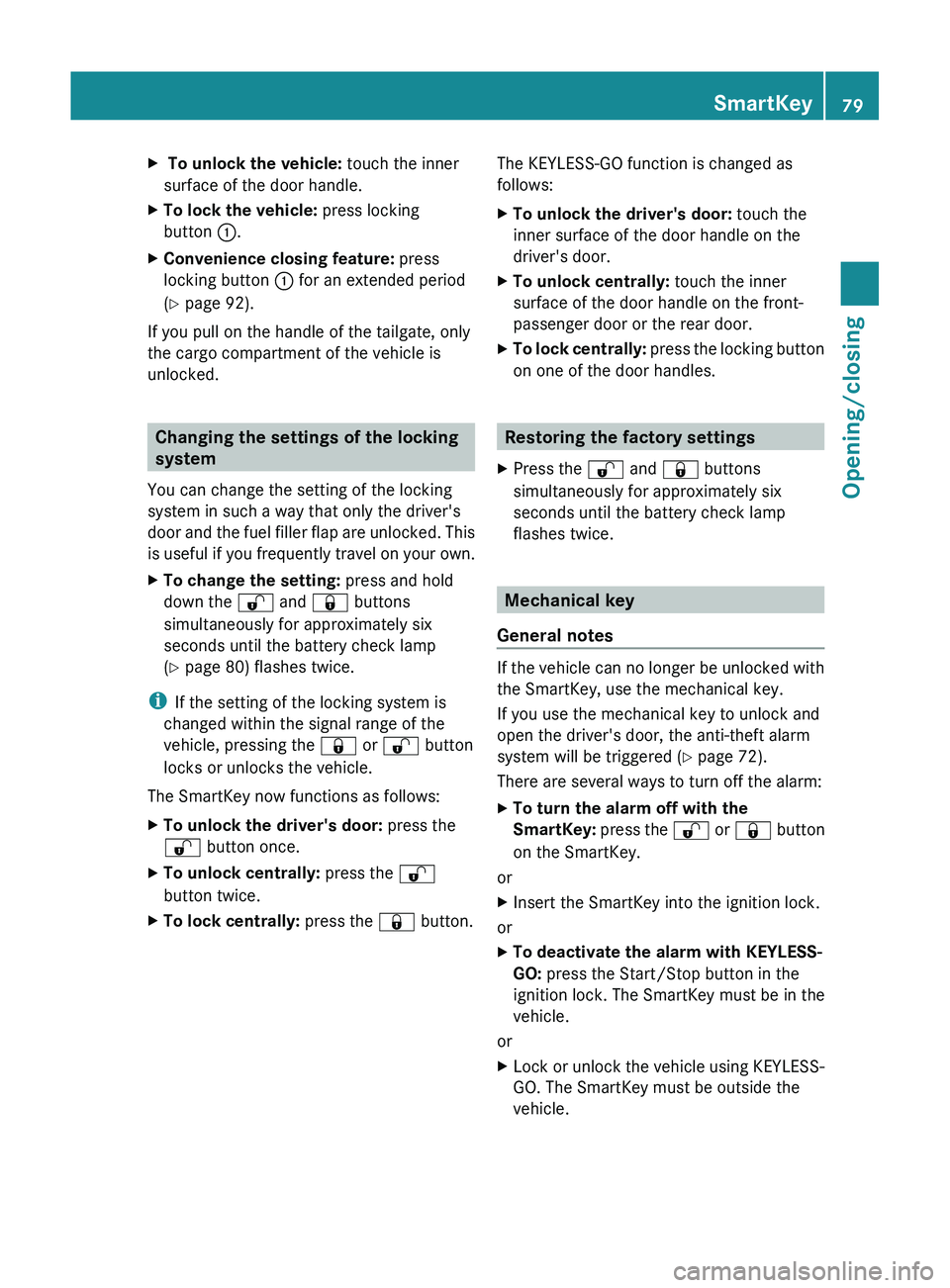
X To unlock the vehicle: touch the inner
surface of the door handle.XTo lock the vehicle: press locking
button :.XConvenience closing feature: press
locking button : for an extended period
( Y page 92).
If you pull on the handle of the tailgate, only
the cargo compartment of the vehicle is
unlocked.
Changing the settings of the locking
system
You can change the setting of the locking
system in such a way that only the driver's
door and the fuel filler flap are unlocked. This
is useful if you frequently travel on your own.
XTo change the setting: press and hold
down the % and & buttons
simultaneously for approximately six
seconds until the battery check lamp
( Y page 80) flashes twice.
i
If the setting of the locking system is
changed within the signal range of the
vehicle, pressing the & or % button
locks or unlocks the vehicle.
The SmartKey now functions as follows:
XTo unlock the driver's door: press the
% button once.XTo unlock centrally: press the %
button twice.XTo lock centrally: press the & button.The KEYLESS-GO function is changed as
follows:XTo unlock the driver's door: touch the
inner surface of the door handle on the
driver's door.XTo unlock centrally: touch the inner
surface of the door handle on the front-
passenger door or the rear door.XTo lock centrally: press the locking button
on one of the door handles.
Restoring the factory settings
XPress the % and & buttons
simultaneously for approximately six
seconds until the battery check lamp
flashes twice.
Mechanical key
General notes
If the vehicle can no longer be unlocked with
the SmartKey, use the mechanical key.
If you use the mechanical key to unlock and
open the driver's door, the anti-theft alarm
system will be triggered ( Y page 72).
There are several ways to turn off the alarm:
XTo turn the alarm off with the
SmartKey: press the % or & button
on the SmartKey.
or
XInsert the SmartKey into the ignition lock.
or
XTo deactivate the alarm with KEYLESS-
GO: press the Start/Stop button in the
ignition lock. The SmartKey must be in the
vehicle.
or
XLock or unlock the vehicle using KEYLESS-
GO. The SmartKey must be outside the
vehicle.SmartKey79Opening/closingZ
Page 120 of 384
Useful information
i This Operator's Manual describes all
models and all standard and optional
equipment of your vehicle available at the
time of publication of the Operator's
Manual. Country-specific differences are
possible. Please note that your vehicle may
not be equipped with all features
described. This also applies to safety-
related systems and functions.
i Please read the information on qualified
specialist workshops ( Y page 24).
Exterior lighting
Important safety notes
For reasons of safety, Mercedes-Benz
recommends that you drive with the lights
switched on even during the daytime. In some
countries, operation of the headlamps varies
due to legal requirements and self-imposed
obligations.
Information about driving abroad
Converting to symmetrical low beam
when driving abroad: switch the headlamps
to symmetrical low beam in countries in
which traffic drives on the opposite side of the
road to the country where the vehicle is
registered. This prevents glare to oncoming
traffic. Symmetrical lights do not illuminate
as large an area of the edge of the road.
Have the headlamps converted at a qualified
specialist workshop, e.g. an authorized
Mercedes-Benz Center, as close to the border
as possible before driving in these countries.
Converting to asymmetrical low beam
after returning: have the headlamps
converted back to asymmetrical low beam at
a qualified specialist workshop, e.g. an
authorized Mercedes-Benz Center, as soon as
possible after crossing the border again.
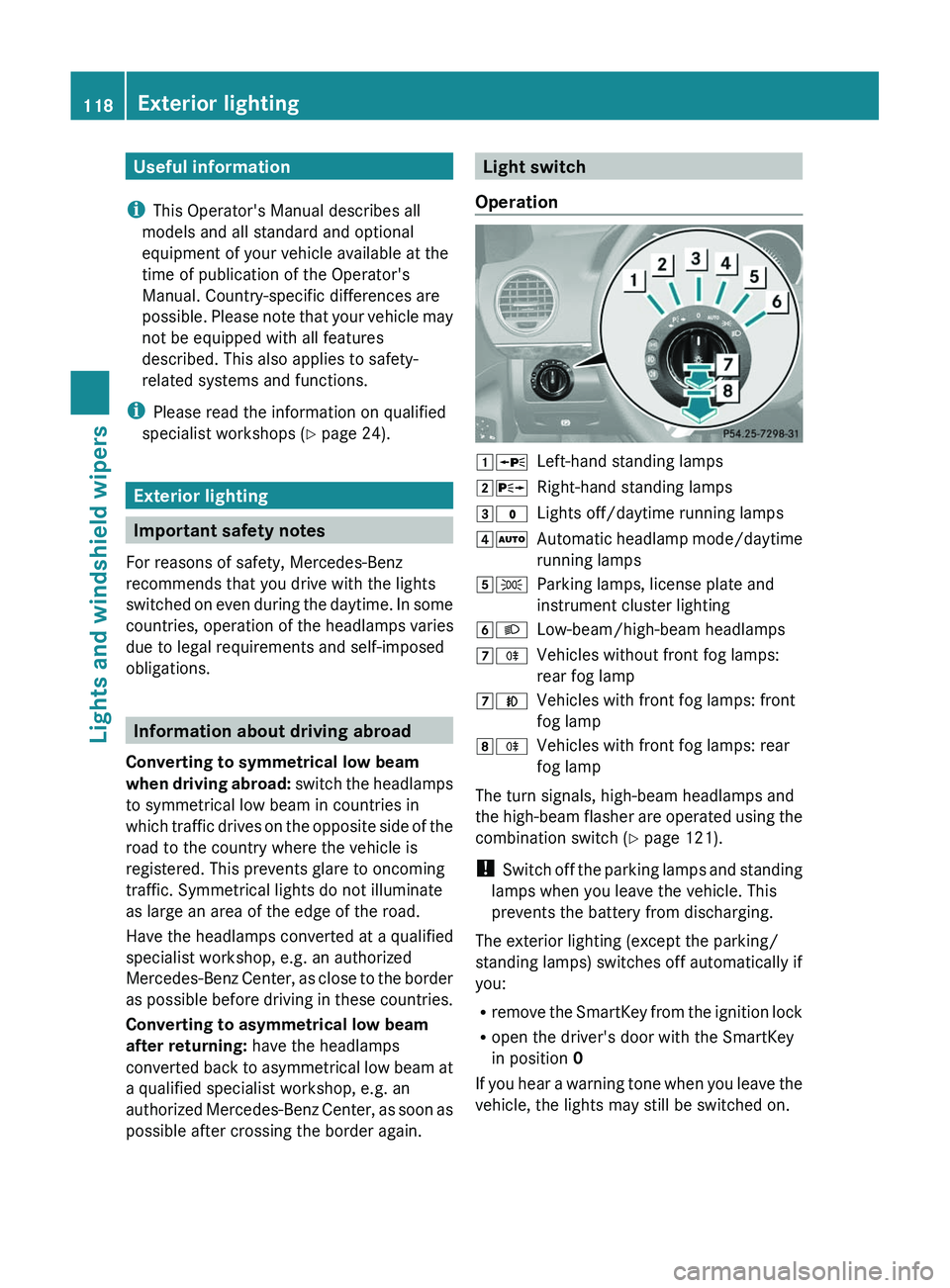
Light switch
Operation1 WLeft-hand standing lamps2XRight-hand standing lamps3$Lights off/daytime running lamps4ÃAutomatic headlamp mode/daytime
running lamps5 TParking lamps, license plate and
instrument cluster lighting6 LLow-beam/high-beam headlamps7RVehicles without front fog lamps:
rear fog lamp7 NVehicles with front fog lamps: front
fog lamp8 RVehicles with front fog lamps: rear
fog lamp
The turn signals, high-beam headlamps and
the high-beam flasher are operated using the
combination switch ( Y page 121).
! Switch off the parking lamps and standing
lamps when you leave the vehicle. This
prevents the battery from discharging.
The exterior lighting (except the parking/
standing lamps) switches off automatically if
you:
R remove the SmartKey from the ignition lock
R open the driver's door with the SmartKey
in position 0
If you hear a warning tone when you leave the
vehicle, the lights may still be switched on.
118Exterior lightingLights and windshield wipers
Page 123 of 384
XTo switch off the rear fog lamp: press the
light switch in as far as it will go.
The yellow R indicator lamp on the light
switch goes out.XTo switch off the rear fog lamp: press the
light switch in as far as it will go.
The yellow R indicator lamp in the
instrument cluster goes out.
Headlamp cleaning system
The headlamps are cleaned automatically if
the "Wipe with washer fluid" function is
operated five times while the lights are on and
the engine is running (Y page 128). When you
switch off the ignition, the automatic
headlamp cleaning system is reset and
counting is resumed from 0.
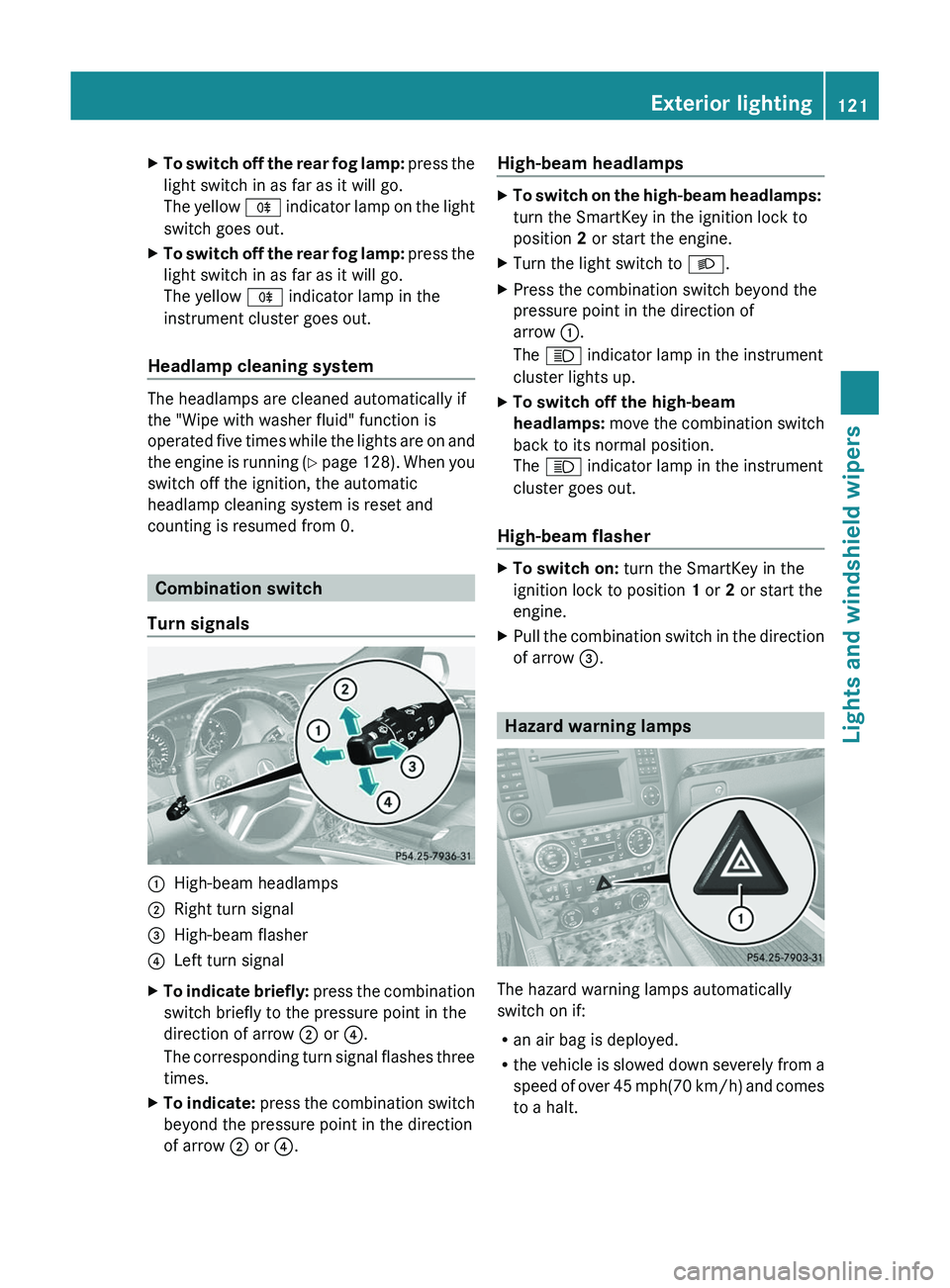
Combination switch
Turn signals
:High-beam headlamps;Right turn signal=High-beam flasher?Left turn signalXTo indicate briefly: press the combination
switch briefly to the pressure point in the
direction of arrow ; or ?.
The corresponding turn signal flashes three
times.XTo indicate: press the combination switch
beyond the pressure point in the direction
of arrow ; or ?.High-beam headlampsXTo switch on the high-beam headlamps:
turn the SmartKey in the ignition lock to
position 2 or start the engine.XTurn the light switch to L.XPress the combination switch beyond the
pressure point in the direction of
arrow :.
The K indicator lamp in the instrument
cluster lights up.XTo switch off the high-beam
headlamps: move the combination switch
back to its normal position.
The K indicator lamp in the instrument
cluster goes out.
High-beam flasher
XTo switch on: turn the SmartKey in the
ignition lock to position 1 or 2 or start the
engine.XPull the combination switch in the direction
of arrow =.
Hazard warning lamps
The hazard warning lamps automatically
switch on if:
R an air bag is deployed.
R the vehicle is slowed down severely from a
speed of over 45 mph (70 km/h) and comes
to a halt.
Exterior lighting121Lights and windshield wipersZ
Page 124 of 384
XTo switch on the hazard warning lamps:
press button :.
All turn signals flash. If you now switch on
a turn signal using the combination switch,
only the turn signal lamp on the
corresponding side of the vehicle will flash.XTo switch off the hazard warning
lamps: press button :.
The hazard warning lamps are deactivated
automatically if the vehicle returns to a speed
of over 6 mph(10 km/h) after a full
application of the brakes.
i The hazard warning lamps still operate if
the ignition is switched off.
Active light function
The active light function is a system that
moves the headlamps according to the
steering movements of the front wheels. In
this way, relevant areas remain illuminated
while driving. This allows you to recognize
pedestrians, cyclists and animals.
Active: when the lights are switched on.
Headlamps fogged up on the inside
The headlamps may fog up on the inside if
there is high atmospheric humidity.
XDrive with the headlamps switched on.
The level of moisture diminishes,
depending on the length of the journey and
the weather conditions (humidity and
temperature).If the level of moisture does not diminish:XHave the headlamps checked at a qualified
specialist workshop.
Interior lighting
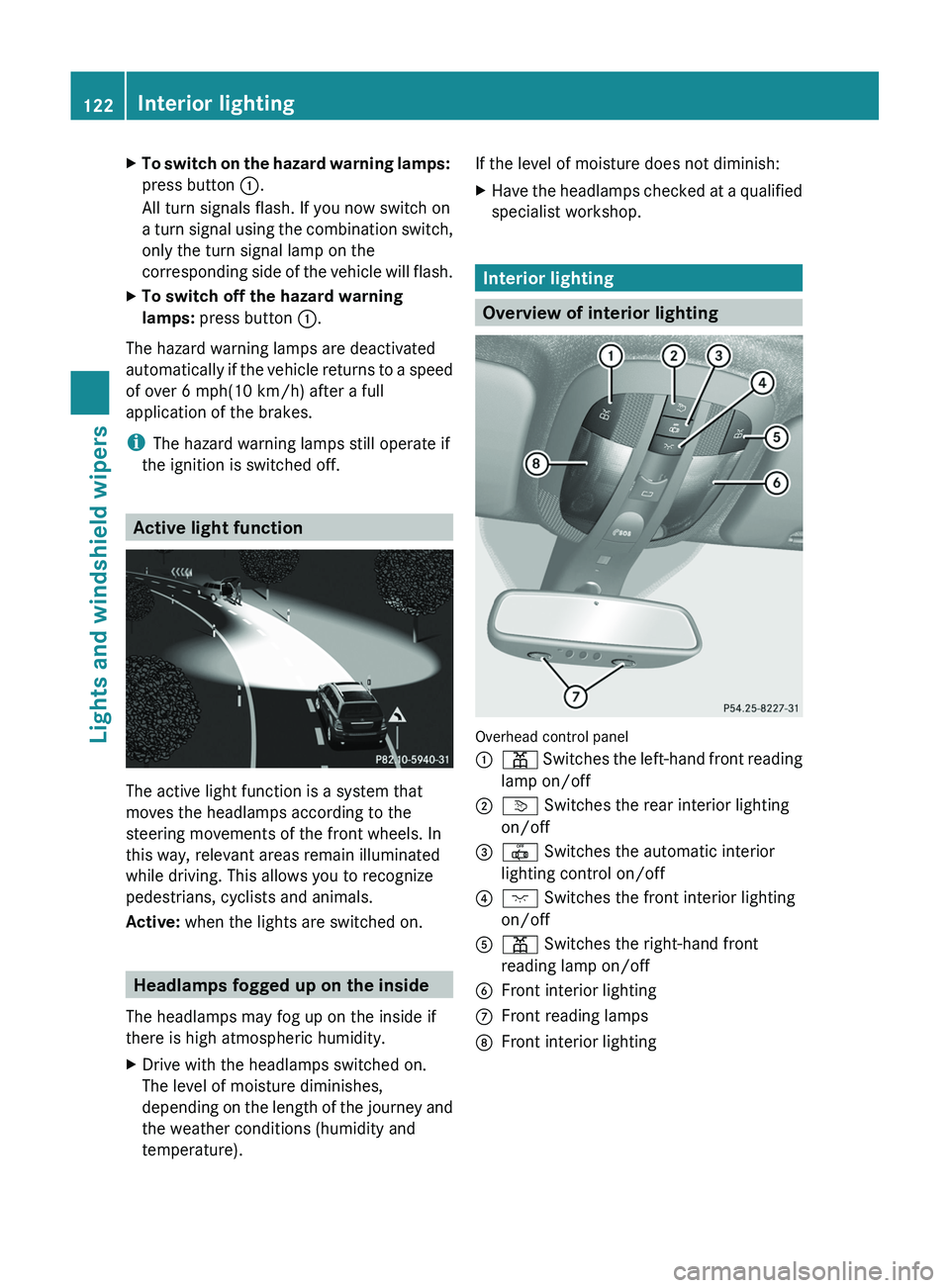
Overview of interior lighting
Overhead control panel
:p Switches the left-hand front reading
lamp on/off;v Switches the rear interior lighting
on/off=| Switches the automatic interior
lighting control on/off?c Switches the front interior lighting
on/offAp Switches the right-hand front
reading lamp on/offBFront interior lightingCFront reading lampsDFront interior lighting122Interior lightingLights and windshield wipers