wheel MERCEDES-BENZ GL 2013 Owners Manual
[x] Cancel search | Manufacturer: MERCEDES-BENZ, Model Year: 2013, Model line: GL, Model: MERCEDES-BENZ GL 2013Pages: 454, PDF Size: 6.31 MB
Page 228 of 454
view camera messages in the COMAND
display.
Activating/deactivating the rear view
camera X
To activate: make sure that the SmartKey
is in position 2in the ignition lock.
X Make sure that the function "show rear
view camera display" is selected in
COMAND.
X Engage reverse gear.
The area behind the vehicle is show ninthe
COMAND display with guide lines.
X To change the function mode for
vehicles with trailer tow hitch: using the
COMAND controller, select symbol 0002for
the "Reverse parking" function or
symbol 0003for "Coupling up a trailer" (see
the separate COMAND operating
instructions).
The symbol of the selected function is
highlighted.
To deactivate: the rear view camera is
deactivated if you:
R shift the transmission to position P
R drive forwards 33 ft (10 m)
R shift the transmission from Rto another
position (after 15 seconds)
R drive forwards at a speed of over 5mph
(10km/h) Displays in the COMAND display The rear view camera may show a distorted
view of obstacles, show them incorrectly or
not at all. The rear view camera does not show
objects in the following positions:
R
very close to the rear bumper
R under the rear bumper
R in the area immediately above the tailgate
handle
! Objects not at ground level may appear to
be further away than they actually are, e.g.:
R the bumper of a parked vehicle
R the drawbar of a trailer
R the ball coupling of a trailer tow hitch
R the rear section of an HGV
R a slanted post
Use the guidelines only for orientation.
Approach objects no further than the
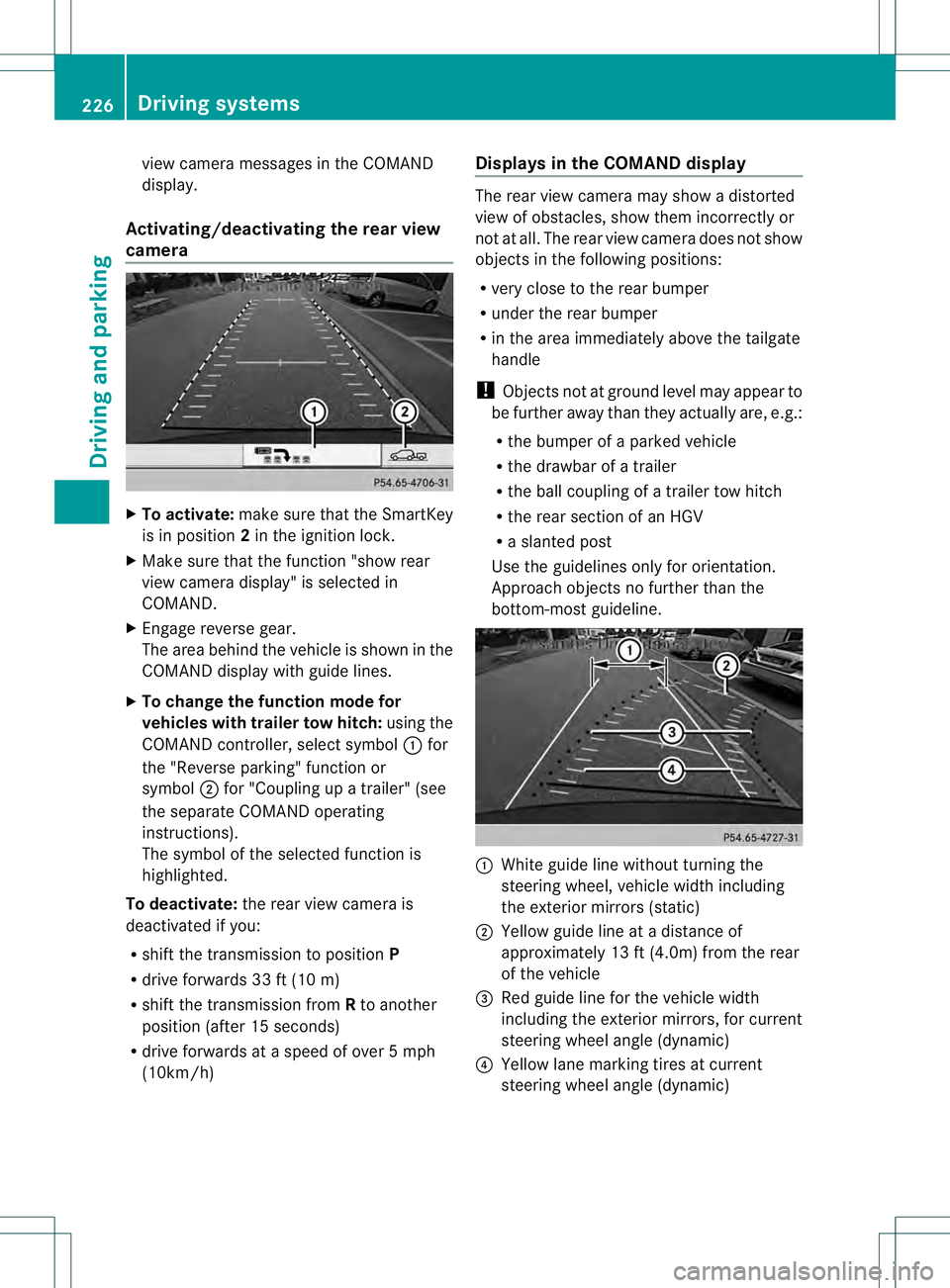
bottom-most guideline. 0002
White guide line without turning the
steering wheel, vehicle width including
the exterior mirrors (static)
0003 Yellow guide line at a distance of
approximately 13 ft (4.0m) from the rear
of the vehicle
0021 Red guide line for the vehicle width
including the exterior mirrors, for current
steering wheel angle (dynamic)
0020 Yellow lane marking tires at current
steering wheel angle (dynamic) 226
Driving systemsDriving and parking
Page 229 of 454
001E
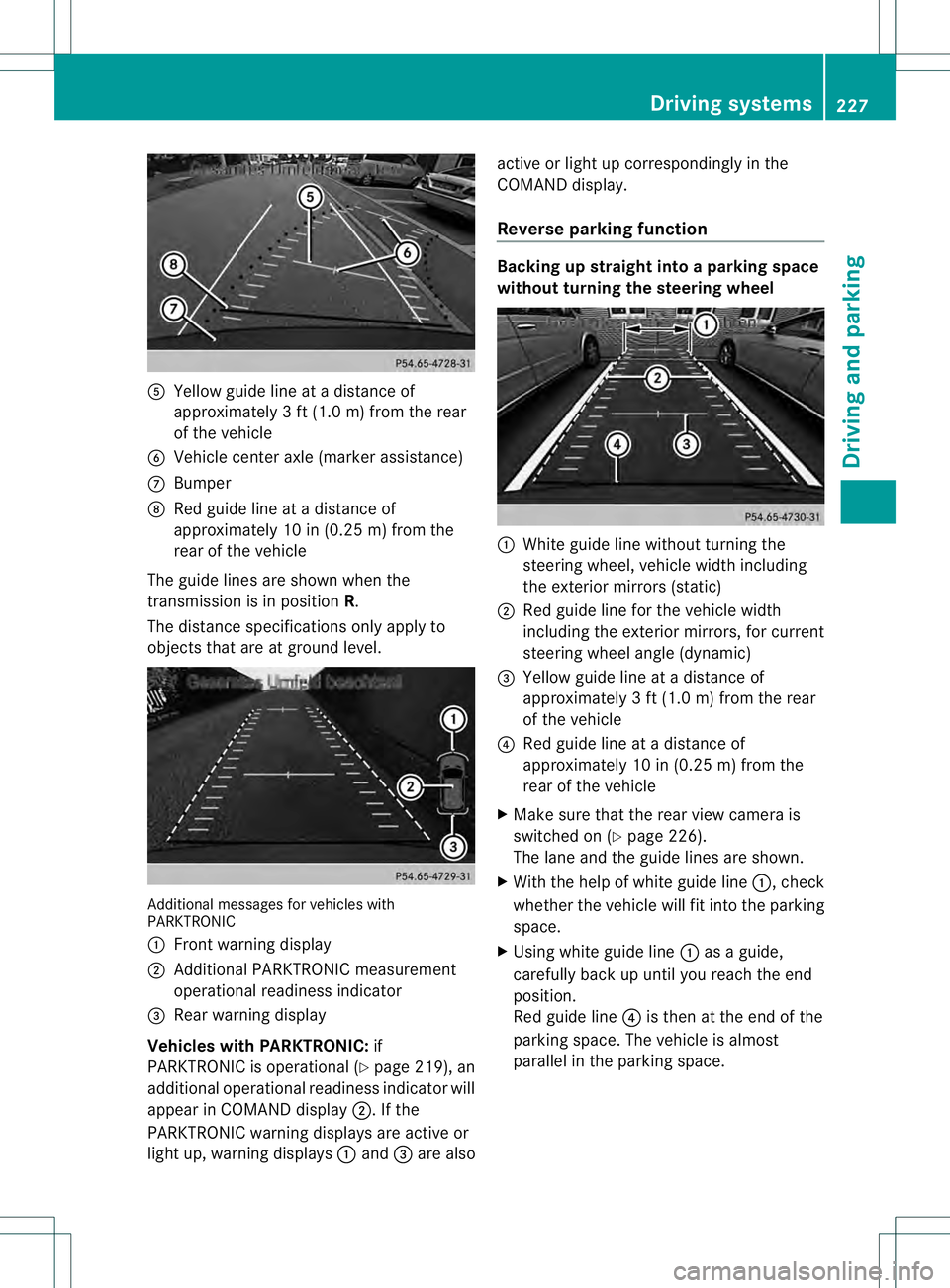
Yellow guide line at a distance of
approximately 3 ft (1.0 m) from the rear
of the vehicle
001F Vehicle center axle (marker assistance)
0013 Bumper
0014 Red guide line at a distanc eof
approximately 10 in (0.25 m) from the
rear of the vehicle
The guide lines are shown when the
transmission is in position R.
The distance specifications only apply to
objects that are at ground level. Additional messages for vehicle
swith
PARKTRONIC
0002 Front warning display
0003 Additional PARKTRONIC measurement
operational readiness indicator
0021 Rear warning display
Vehicles with PARKTRONIC: if
PARKTRONIC is operational (Y page 219), an
additional operational readiness indicator will
appear in COMAN Ddisplay 0003. If the
PARKTRONIC warning displays are active or
light up, warning displays 0002and 0021are also active or light up correspondingly in the
COMAND display.
Reverse parking function Backing up straight into a parking space
withou
tturning the steering wheel 0002
White guide line without turning the
steering wheel, vehicle width including
the exterior mirrors (static)
0003 Red guide line for the vehicle width
including the exterior mirrors, for current
steering wheel angle (dynamic)
0021 Yellow guide line at a distance of
approximately 3 ft (1.0 m) from the rear
of the vehicle
0020 Red guide line at a distance of
approximately 10 in (0.25 m) from the
rear of the vehicle
X Make sure that the rear view camera is
switched on (Y page 226).
The lane and the guide lines are shown.
X With the help of white guide line 0002, check
whether the vehicle will fit into the parking
space.
X Using white guide line 0002as a guide,
carefully back up until you reach the end
position.
Red guide line 0020is then at the end of the
parking space. The vehicle is almost
parallel in the parking space. Driving systems
227Driving and parking Z
Page 230 of 454
Reverse perpendicular parking with the
steering wheel at an angle
Turning the steering wheel
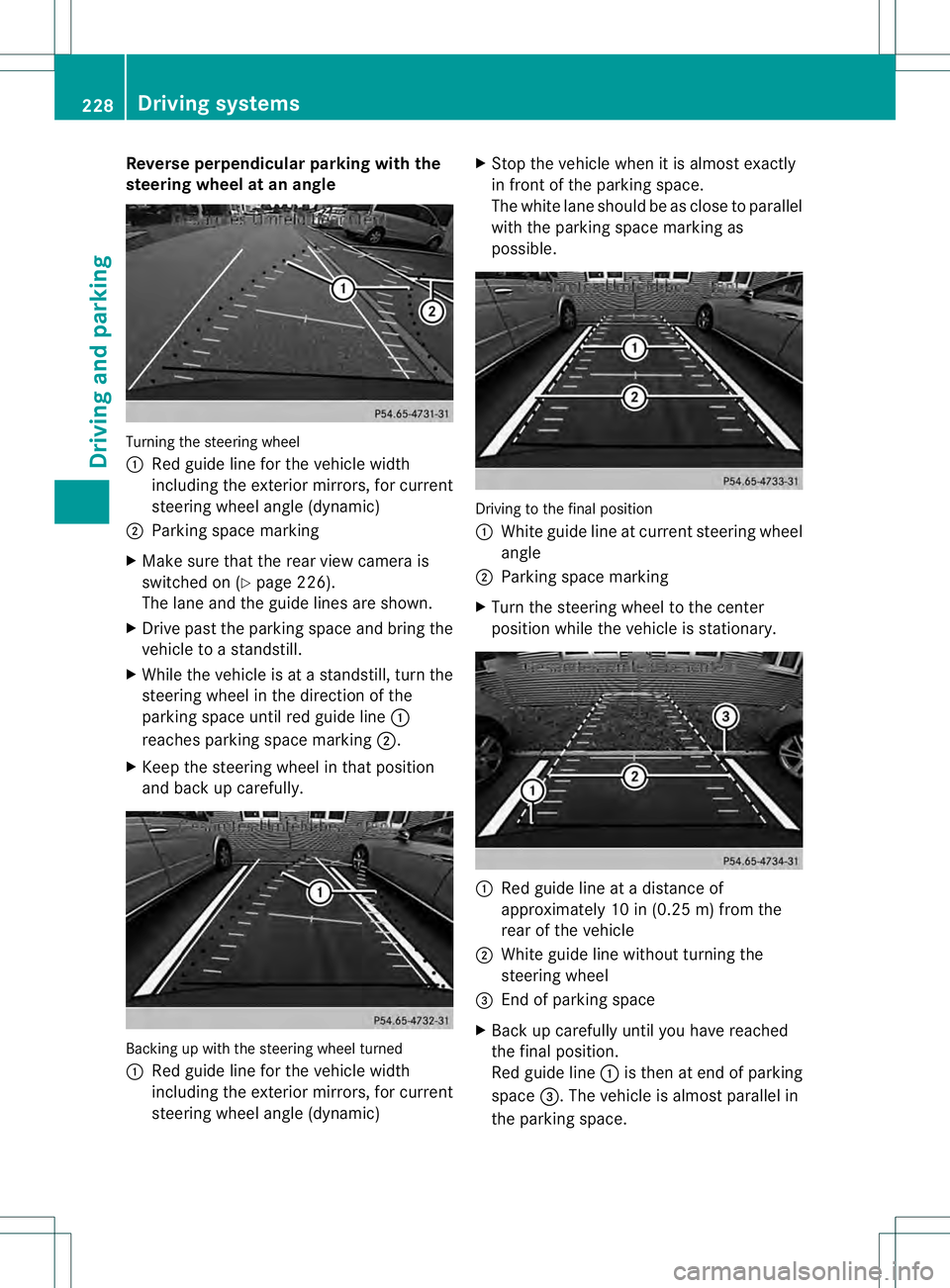
0002
Red guide line for the vehicle width
including the exterior mirrors, for current
steering wheel angle (dynamic)
0003 Parking space marking
X Make sure that the rea rview camera is
switched on (Y page 226).
The lane and the guide lines are shown.
X Drive past the parking space and bring the
vehicle to a standstill.
X While the vehicle is at a standstill, tur nthe
steering wheel in the direction of the
parking space until red guide line 0002
reaches parking space marking 0003.
X Keep the steering wheel in that position
and back up carefully. Backing up with the steering wheel turned
0002
Red guide line for the vehicle width
including the exterior mirrors, for current
steering wheel angle (dynamic) X
Stop the vehicle when it is almost exactly
in front of the parking space.
The white lane should be as close to parallel
with the parking space marking as
possible. Driving to the final position
0002
White guide line at current steering wheel
angle
0003 Parking space marking
X Turn the steering wheel to the center
position while the vehicle is stationary. 0002
Red guide line at a distance of
approximately 10 in (0.25 m) from the
rear of the vehicle
0003 White guide line without turning the
steering wheel
0021 End of parking space
X Back up carefully until you have reached
the final position.
Red guide line 0002is then at end of parking
space 0021.The vehicle is almost parallel in
the parking space. 228
Driving systemsDriving and parking
Page 232 of 454
objects in the area in which you are
maneuvering.
The 360° camera may show a distorted view
of obstacles, show them incorrectly or not at
all. It cannot show objects in the following
areas:
R
under the front bumper
R very close to the front bumper
R very close to the rear bumper
R under the rear bumper
R in close range above the handle on the
trunk lid
R very close to the exterior mirrors
You are always responsible for safety, and
must always pay attention to your
surroundings when parking and
maneuvering. This applies to the areas
behind, in front of and beside the vehicle. You
could otherwise endanger yourself and
others.
The rear view camera will not function or will
function in a limited manner:
R if the doors are open
R if the exterior mirrors are folded in
R if the trunk lid is open
R in heavy rain, snow or fog
R at night or in very dark places
R if the cameras are exposed to very bright
light
R if the area is lit by fluorescent light or LED
lighting (the display may flicker)
R if you exit a heated garage in winter,
resulting in a rapid change in temperature
R if the camera lenses are dirty or covered
R if the vehicle components in which the
cameras are installed are damaged. In this
event, have the camera position and setting
checked at a qualified specialist workshop.
Do not use the 360° camera in this case. You
can otherwise injure others or cause damage
to objects or the vehicle. General notes The 360° camera is a system consisting of
four cameras.
The system analyzes images from the
following cameras:
R
Rear view camera
R Front camera
R Two cameras in the exterior rear view
mirrors
The cameras capture the immediate
surroundings of the vehicle. The system
supports you, e.g. when parking or if vision is
restricted at an exit.
The 360° camera images can be shown in full
screen mode or in seven different split-screen
views on the COMAND display .Asplit-screen
view also includes a top view of the vehicle.
This view is calculated from the data supplied
by the installed cameras (virtual camera).
The seven split-scree nviews are:
R top view and picture from the rear view
camera (130° viewin gangle)
R top view and picture from the front camera
(withou tdisplaying the maximum steering
wheel angle)
R top view and enlarged rear view
R top view and enlarged front view
R top view and trailer view (vehicles with
trailer tow hitch)
R top view and pictures fro mthe rearward
facing mirror cameras (rear wheel view)
R top view and pictures from the forward
facing mirror cameras (front wheel view)
i The top view and trailer view are available
for vehicles equipped with a trailer tow
hitch.
When the function is active and you shift the
transmission from position Dor Rto N, you
see the previous view in the COMAND
display. The dynamic guidelines are hidden.
When you change between transmission
positions Dand R, you see the previously
selected front or rear view. 230
Driving systemsDriving and parking
Page 234 of 454
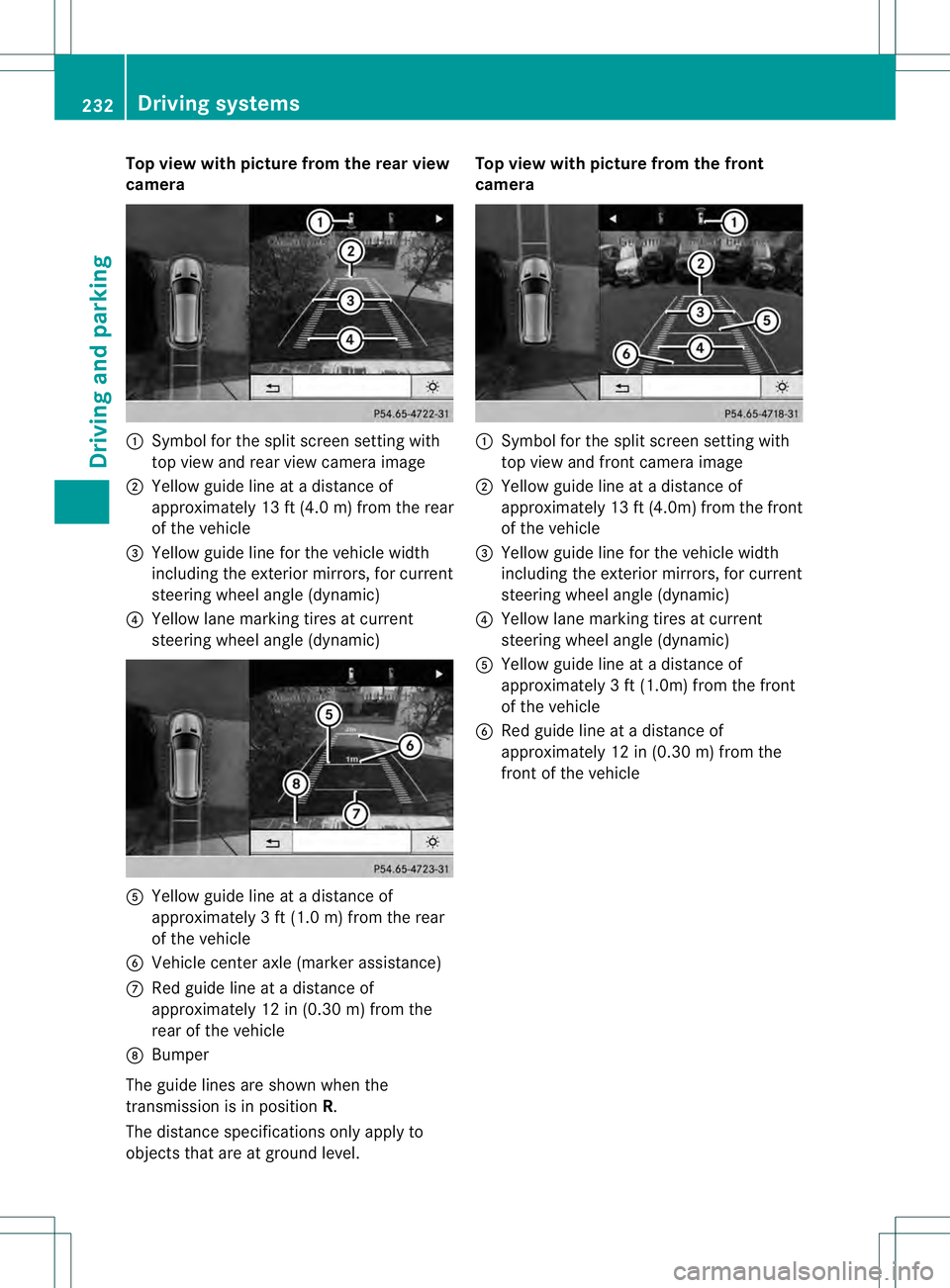
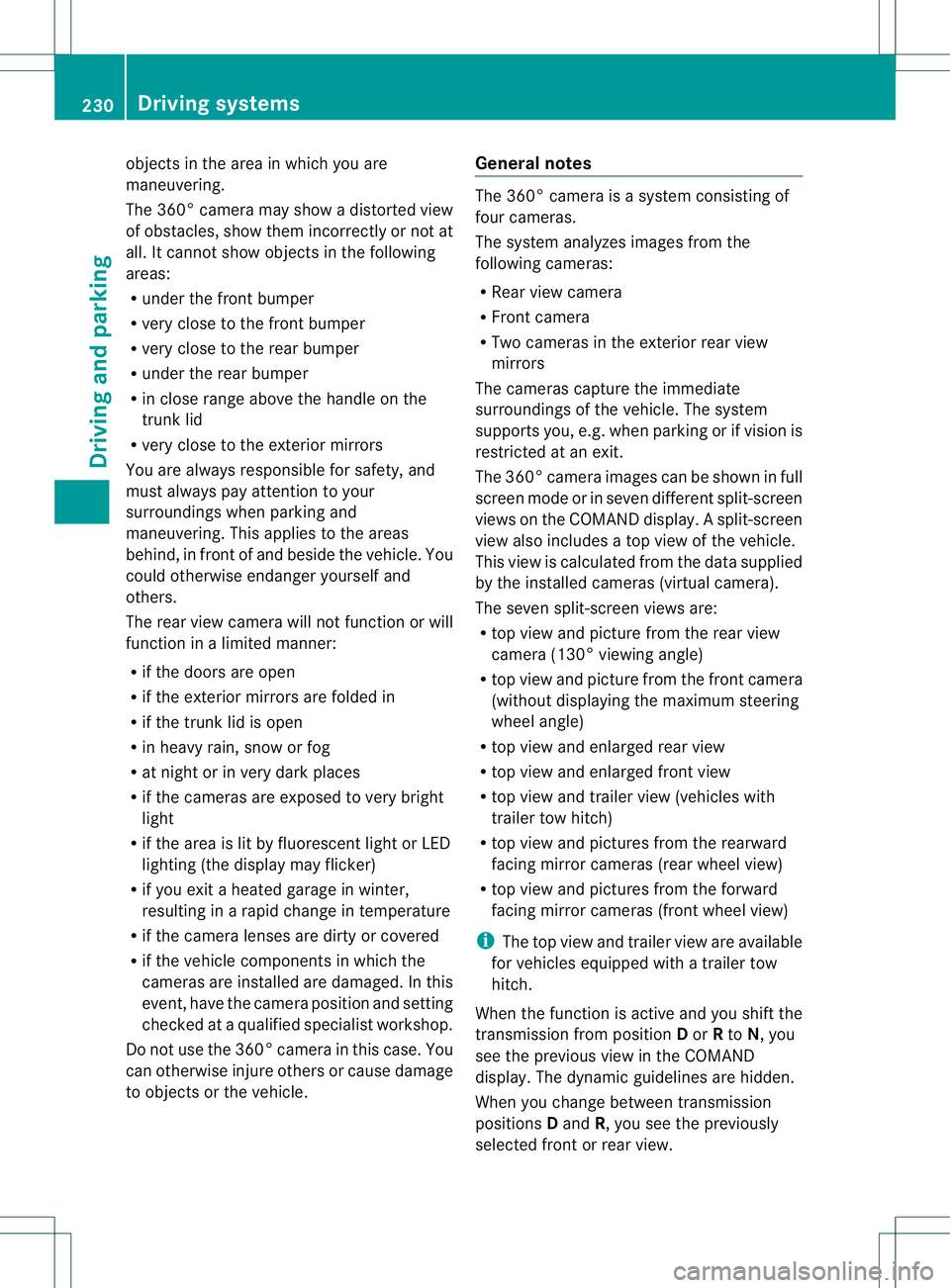
Top view with picture from the rear view
camera
0002
Symbol for the split screen setting with
top view and rea rview camera image
0003 Yellow guide line at a distance of
approximately 13 ft (4.0 m) from the rear
of the vehicle
0021 Yellow guide line for the vehicle width
including the exterior mirrors, for current
steering wheel angle (dynamic)
0020 Yellow lane marking tires at current
steering wheel angle (dynamic) 001E
Yellow guide line at a distance of
approximately 3 ft (1.0 m) from the rear
of the vehicle
001F Vehicle center axle (marker assistance)
0013 Red guide line at a distance of
approximately 12 in (0.30 m) from the
rear of the vehicle
0014 Bumper
The guide lines are show nwhen the
transmission is in position R.
The distance specifications only apply to
objects that are at ground level. Top view with picture from the front
camera
0002
Symbol for the split screen setting with
top view and front camera image
0003 Yellow guide line at a distance of
approximately 13 ft (4.0m) from the front
of the vehicle
0021 Yellow guide line for the vehicle width
including the exterior mirrors, for current
steering wheel angle (dynamic)
0020 Yellow lane marking tires at current
steering wheel angle (dynamic)
001E Yellow guide line at a distance of
approximatel y3ft (1.0m) from the front
of the vehicle
001F Red guide line at a distance of
approximately 12 in (0.30 m) from the
front of the vehicle 232
Driving systemsDriving and parking
Page 242 of 454
G
WARNING
The Lane Keeping Assist warning does not
return the vehicle to the original lane. There
is a risk of an accident.
You should always steer, brake or accelerate
yourself, in particular if warned by Lane
Keeping Assist.
If you fail to adapt yourd riving style, Lane
Keeping Assist can neither reduce the risk of
an accident nor overrid ethe laws of physics.
Lane Keeping Assist cannot take into account
the road, traffic and weather conditions. Lane
Keeping Assist is merely an aid. You are
responsible for the distance to the vehicle in
front, for vehicle speed, for braking in good
time and for staying in your lane.
The Lane Keeping Assist does not keep the
vehicle in the lane.
The system may be impaired or may not
function if:
R there is poor visibility, e.g. due to
insufficient illumination of the road, or due
to snow, rain, fog or spray
R there is glare, e.g. from oncoming traffic,
the sun or reflections (e.g. when the road
surface is wet)
R the windshield is dirty, fogged up, damaged
or covered, for instance by a sticker, in the
vicinity of the camera
R there are no, several or unclear lane
markings for a lane, e.g. in areas with road
construction work
R the lane markings are worn away, dark or
covered up, e.g. by dirt or snow
R the distance to the vehicle in front is too
small and the lane markings thus cannot be
detected
R the lane markings change quickly, e.g.
lanes branch off, cross one another or
merge
R the road is narrow and winding
R there are strong shadows cast on the lane General notes
Lane Keeping Assist monitors the area in
front of your vehicle by means of a camera at
the top of the windshield. Lane Keeping Assist
detects lane markings on the road and warns
you before you leave your lane
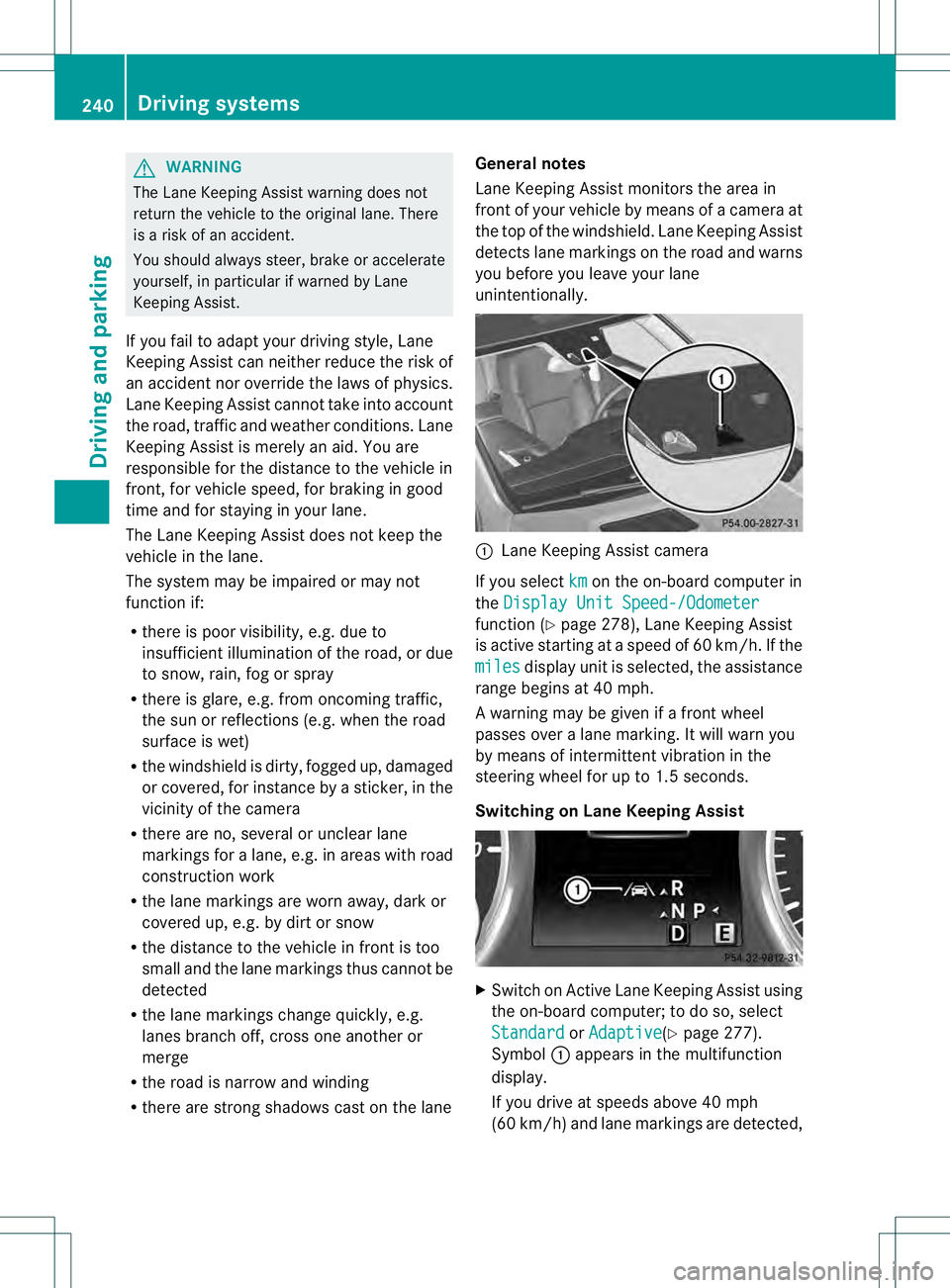
unintentionally. 0002
Lane Keeping Assist camera
If you select km on the on-board computer in
the Display Unit Speed-/Odometer function (Y
page 278), Lane Keeping Assist
is active starting at aspeed of 60 km/h. If the
miles display unit is selected, the assistance
range begins at 40 mph.
A warning may be given if a front wheel
passes over a lane marking. It will warn you
by means of intermittent vibration in the
steering wheel for up to 1.5 seconds.
Switching on Lane Keeping Assist X
Switch on Active Lane Keeping Assist using
the on-board computer; to do so, select
Standard or
Adaptive (Y
page 277).
Symbol 0002appears in the multifunction
display.
If you drive at speeds above 40 mph
(60 km/h) and lane markings are detected, 240
Driving systemsDriving and parking
Page 247 of 454
Active Lane Keeping Assist
General notes
Active Lane Keeping Assis
tmonitors the area
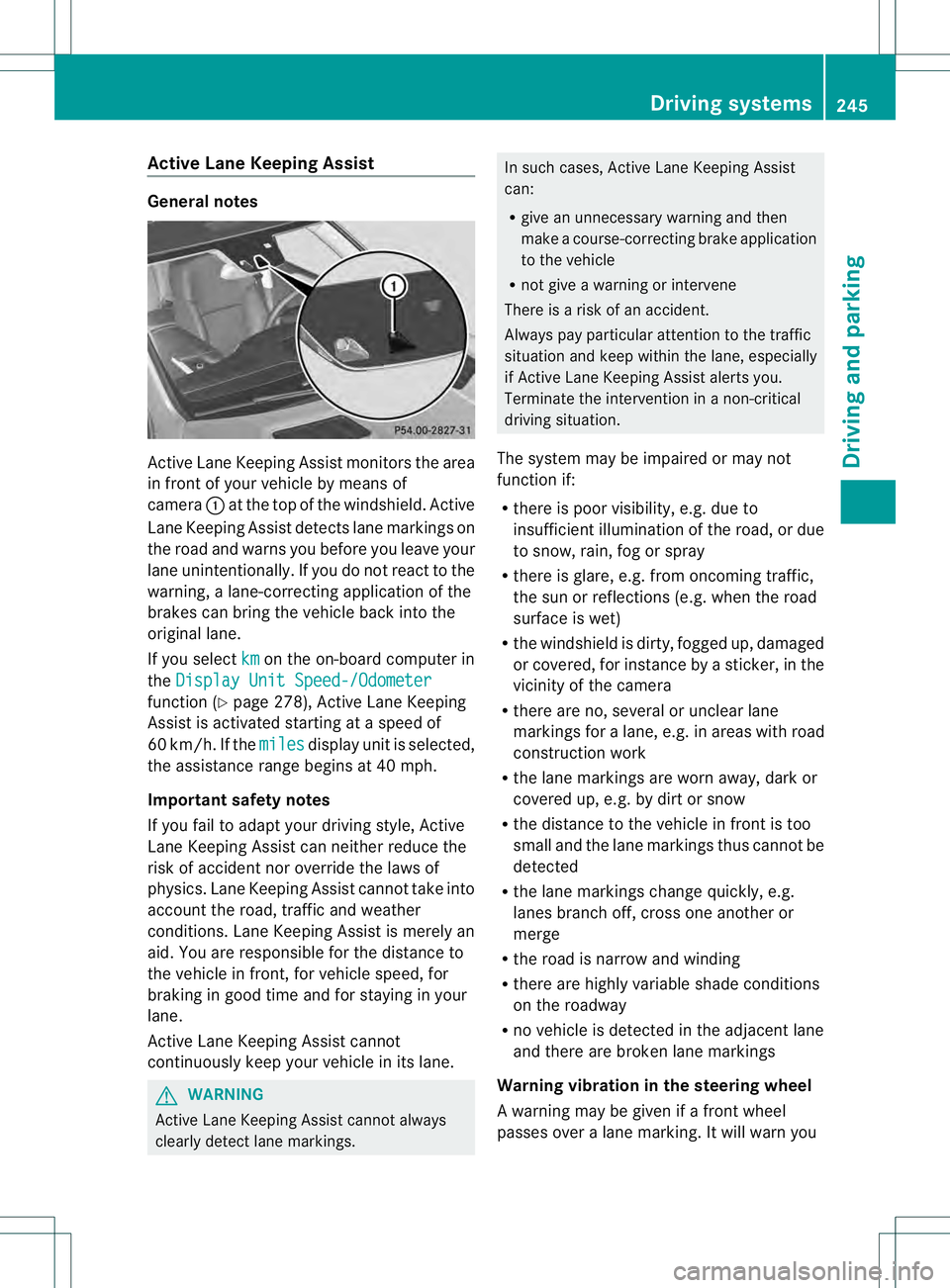
in front of your vehicle by means of
camera 0002at the top of the windshield. Active
Lane Keeping Assist detect slane markings on
the road and warns you before you leave your
lane unintentionally. If you do no treact to the
warning, a lane-correcting application of the
brakes can bring the vehicle back into the
original lane.
If you select km on the on-board computer in
the Display Unit Speed-/Odometer function (Y
page 278), Active Lane Keeping
Assist is activated starting at a speed of
60 km/h. If the miles display unit is selected,
the assistance range begins at 40 mph.
Important safety notes
If you fail to adapt your driving style, Active
Lane Keeping Assist can neither reduce the
risk of acciden tnor override the laws of
physics. Lane Keeping Assist cannot take into
account the road, traffic and weather
conditions. Lane Keeping Assist is merely an
aid. You are responsible for the distance to
the vehicle in front, for vehicle speed, for
braking in good time and for staying in your
lane.
Active Lane Keeping Assist cannot
continuously keep your vehicle in its lane. G
WARNING
Active Lane Keeping Assist cannot always
clearly detect lane markings. In such cases, Active Lane Keeping Assist
can:
R
give an unnecessary warning and then
make a course-correcting brake application
to the vehicle
R not give a warning or intervene
There is a risk of an accident.
Always pay particular attention to the traffic
situation and keep within the lane, especially
if Active Lane Keeping Assist alerts you.
Terminate the intervention in a non-critical
driving situation.
The system may be impaired or may not
function if:
R there is poor visibility, e.g. due to
insufficient illumination of the road, or due
to snow, rain, fog or spray
R there is glare, e.g. from oncoming traffic,
the sun or reflections (e.g. when the road
surface is wet)
R the windshield is dirty, fogged up, damaged
or covered, for instance by a sticker, in the
vicinity of the camera
R there are no, several or unclear lane
markings for a lane, e.g. in areas with road
construction work
R the lane markings are worn away, dark or
covered up, e.g. by dirt or snow
R the distance to the vehicle in front is too
small and the lane markings thus cannot be
detected
R the lane markings change quickly, e.g.
lanes branch off, cross one another or
merge
R the road is narrow and winding
R there are highly variable shade conditions
on the roadway
R no vehicle is detected in the adjacent lane
and there are broken lane markings
Warning vibration in the steering wheel
A warning may be given if a front wheel
passes over a lane marking. It will warn you Driving systems
245Driving and parking Z
Page 248 of 454
by means of intermittent vibration in the
steering wheel for up to 1.5 seconds.
In order that you are warned only when
necessary and in good time if you cross the
lane marking, the system recognizes certain
conditions and warns you accordingly.
The warning vibration occurs earlier if:
R
you approach the outer lane marking on a
bend.
R the road has very wide lanes, e.g. a
freeway.
R the system recognizes solid lane markings.
The warning vibration occurs later if:
R the road has narrow lanes.
R you cut the corner on a bend.
Lane-correcting brake application G
WARNING
A lane-correcting brake application cannot
always bring the vehicle back into the original
lane. There is a risk of an accident.
Always steer, brake or accelerate yourself,
especially if Active Lane Keeping Assist warns
you or makes a lane-correcting brake
application. G
WARNING
Active Lane Keeping Assist does not detect
traffic conditions or road users. In very rare
cases, the system may make an inappropriate
brake application, e.g. after intentionally
driving over a solid lane marking. There is a
risk of an accident.
An inappropriate brake application may be
interrupted at any time if you steer slightly in
the opposite direction. Always make sure that
there is sufficient distance on the side for
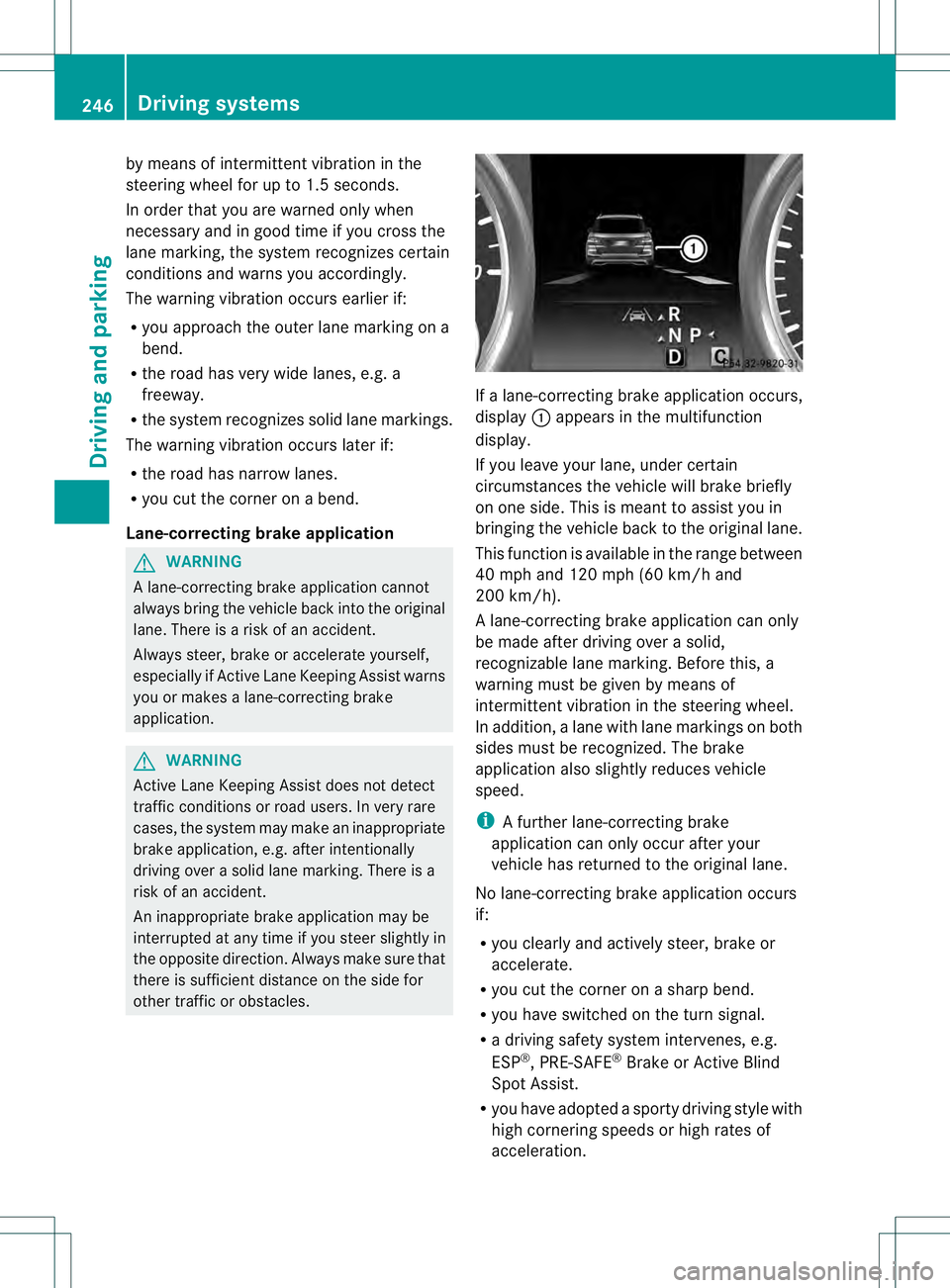
other traffic or obstacles. If a lane-correcting brake application occurs,
display 0002appears in the multifunction
display.
If you leave your lane, under certain
circumstances the vehicle will brake briefly
on one side. This is meant to assist you in
bringing the vehicle back to the original lane.
This function is available in the range between
40 mph and 120 mph (60 km/h and
200 km/h).
A lane-correcting brake application can only
be made after driving over a solid,
recognizable lane marking. Before this, a
warning must be given by means of
intermitten tvibration in the steering wheel.
In addition, a lane with lane markings on both
sides must be recognized. The brake
application also slightly reduces vehicle
speed.
i A further lane-correcting brake
application can only occur after your
vehicle has returned to the original lane.
No lane-correcting brak eapplication occurs
if:
R you clearly and actively steer, brake or
accelerate.
R you cut the corner on a sharp bend.
R you have switched on the turn signal.
R a driving safety system intervenes, e.g.
ESP ®
, PRE-SAFE ®
Brake or Active Blind
Spot Assist.
R you have adopted a sporty driving style with
high cornering speeds or high rates of
acceleration. 246
Driving systemsDriving and parking
Page 249 of 454
R
ESP ®
is switched off.
R the transmission is not in position D.
R on vehicles with a trailer tow hitch, the
electrical connectio nto the trailer has been
correctly established.
R the off-road program is activated (vehicles
without the ON&OFFROAD package).
R off-road program 1 or 2 is activated
(vehicles with the ON&OFFROAD package).
R the LOW RANGE off-road gear is activated
(vehicles with the ON&OFFROAD package).
R a loss of tire pressure or a defective tire has
been detected and displayed.
Active Lane Keeping Assist does not detect
traffic situations or road users. An
inappropriate brake application may be
interrupted at any time if you:
R steer slightly in the opposite direction
R switch on the turn signal
R clearly brake or accelerate
Al ane-correcting brake applicatio nis
interrupted automatically if:
R a driving safety system intervenes, e.g.
ESP ®
, PRE-SAFE ®
Brake or Active Blind
Spot Assist.
R lane markings can no longer be recognized.
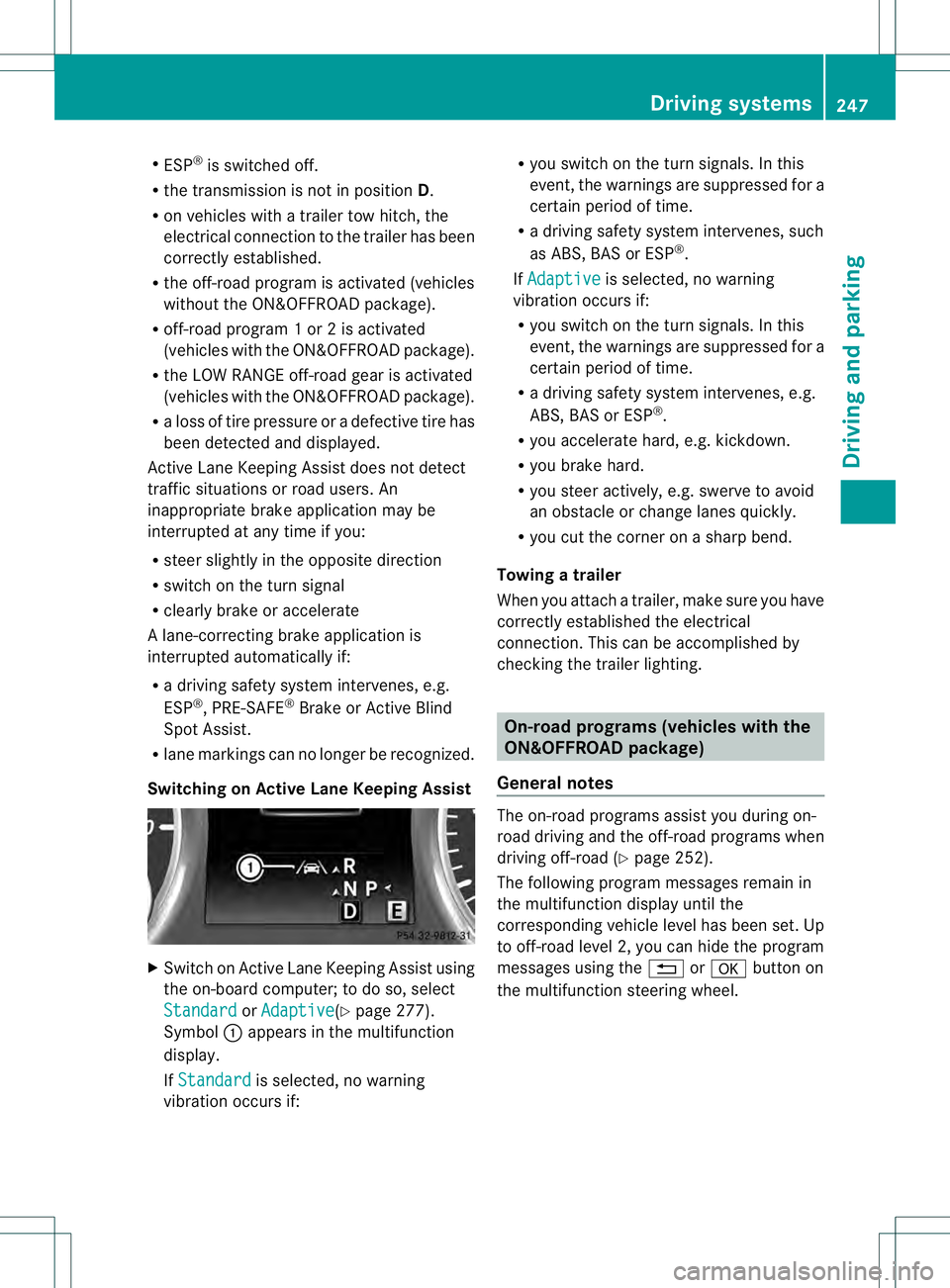
Switching on Active Lane Keeping Assist X
Switch on Active Lane Keeping Assist using
the on-board computer; to do so, select
Standard or
Adaptive (Y
page 277).
Symbol 0002appears in the multifunction
display.
If Standard is selected, no warning
vibration occurs if: R
you switch on the tur nsignals .Inthis
event, the warnings are suppressed for a
certain period of time.
R a driving safety system intervenes, such
as ABS, BAS or ESP ®
.
If Adaptive is selected, no warning
vibration occurs if:
R you switch on the turn signals. In this
event, the warnings are suppressed for a
certain period of time.
R a driving safety system intervenes, e.g.
ABS, BAS or ESP ®
.
R you accelerate hard, e.g. kickdown.
R you brake hard.
R you steer actively, e.g. swerve to avoid
an obstacle or change lanes quickly.
R you cut the corner on a sharp bend.
Towing atrailer
When you attach a trailer, make sure you have
correctly established the electrical
connection. This can be accomplished by
checking the trailer lighting. On-road programs (vehicles with the
ON&OFFROAD package)
General notes The on-road programs assist you during on-
road driving and the off-road programs when
driving off-road (Y
page 252).
The following progra mmessages remain in
the multifunction display until the
corresponding vehicle level has been set. Up
to off-road level 2, you can hide the program
messages using the 0007or000B button on
the multifunction steering wheel. Driving systems
247Driving and parking Z
Page 250 of 454
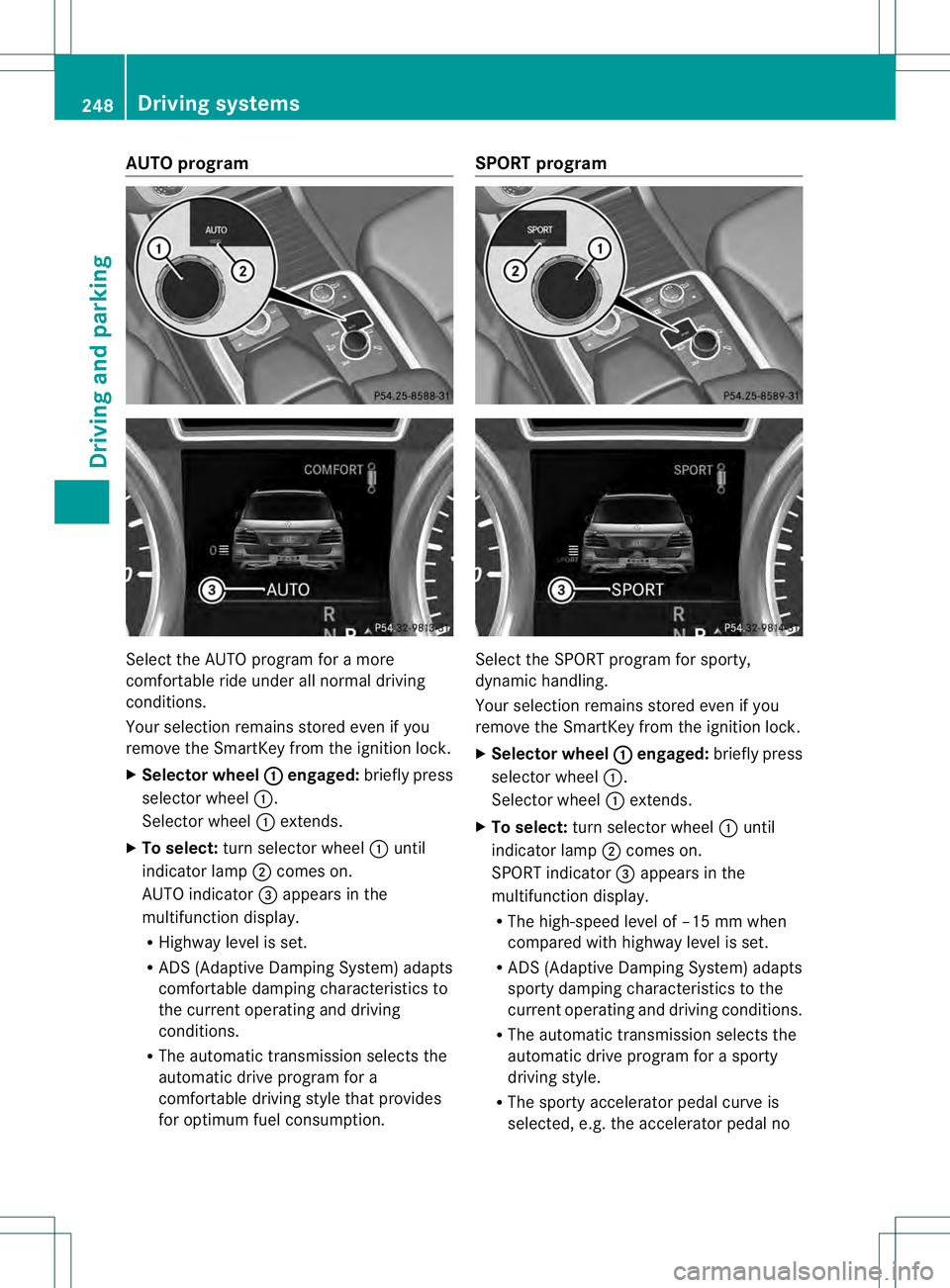
AUTO program
Select the AUTO program for a more
comfortable ride under all normal driving
conditions.
Your selection remains store
deven if you
remove the SmartKey from the ignition lock.
X Selector wheel 0002 engaged:
briefly press
selector wheel 0002.
Selector wheel 0002extends.
X To select: turn selector wheel 0002until
indicator lamp 0003comes on.
AUTO indicator 0021appears in the
multifunction display.
R Highway level is set.
R ADS (Adaptive Damping System) adapts
comfortable damping characteristics to
the current operating and driving
conditions.
R The automatic transmission selects the
automatic drive program for a
comfortable driving style that provides
for optimu mfuel consumption. SPORT program
Selec
tthe SPORT program for sporty,
dynamic handling.
Your selection remains stored even if you
remove the SmartKey from the ignition lock.
X Selector wheel 0002 engaged:
briefly press
selector wheel 0002.
Selector wheel 0002extends.
X To select: turn selector wheel 0002until
indicator lamp 0003comes on.
SPORT indicator 0021appears in the
multifunction display.
R The high-speed level of –15 mm when
compared with highway level is set.
R ADS (Adaptive Damping System) adapts
sporty damping characteristics to the
current operating and driving conditions.
R The automatic transmission selects the
automatic drive program for a sporty
driving style.
R The sporty accelerator pedal curve is
selected, e.g. the accelerator pedal no 248
Driving systemsDriving and parking