lock MERCEDES-BENZ GL 2013 Owners Manual
[x] Cancel search | Manufacturer: MERCEDES-BENZ, Model Year: 2013, Model line: GL, Model: MERCEDES-BENZ GL 2013Pages: 454, PDF Size: 6.31 MB
Page 218 of 454
message disappears from the multifunction
display.
The vehicle automatically adjusts to highway
level when you:
R drive faster than 50 mph (80 km/h)
R drive between 40 mph (64 km/h) and
50 mph (80 km/h) for approximately
20 seconds
Depending on the ADS mode selected
(Y page 212), the vehicle is lowered to high-
speed level at high speeds. AMG adaptive sport suspension
system
Important safety notes G
WARNING
When the vehicle is being lowered, people
could become trapped if their limbs are
betwee nthe vehicle body and the wheels or
underneath the vehicle. There is a risk of
injury.
Make sure no one is underneath the vehicle
or in the immediate vicinity of the wheel
arches when the vehicle is being lowered. G
WARNING
The vehicle is lowered if:
R you have selected the Comfort or Sport
suspension tuning and
R lock the vehicle after switching off the
engine
Persons in the vicinity of the wheel arch or the
underbody may thus become trapped. There
is a risk of injury.
Make sure that nobody is in the vicinity of the
wheel arch or the underbody when you switch
off the engine. !
The vehicle is lowered by approximately
10 mm if:
R you have selected the Sport or Comfort
suspension tuning and
R you switch off the engine and then
R lock the vehicle
When parking, position your vehicle so that
it does not make contact with the curb as
the vehicle is lowered. Your vehicle could
otherwise be damaged.
Vehicle level Level control adapts the vehicle level
automatically to the current operating and
driving situation. Level control ensures the
best possible suspension and constant
ground clearance, even with a laden vehicle.
This improves driving safety and fuel
consumption.
The AIRMATIC package and ACTIVE CURVE
SYSTEM are always components of AMG
adaptive suspension system (Y
page 212).
Due to the sportier suspension settings
compared to standard vehicles, the levels and
speed thresholds for sinking and raising the
vehicle are different.
In Comfort and Sport driving modes, after
locking the vehicle it lowers to the Sport+
level. When locking the vehicle at the raised
level, the vehicle does not lower.
The settings will remain stored after you
switch off the engine. When starting the
engine, the selected setting, e.g. AMG
adaptive suspension system Comfort, is
restored.
i The vehicle level may change visibly if you
park the vehicle and the outside
temperature changes. If the temperature
drops, the vehicle level lowers; with an
increase in temperature, the vehicle level
rises. 216
Driving systemsDriving and parking
Page 219 of 454

Suspension tuning
General notes
The electronically controlled damping system
works continuously
.This improves driving
safety and ride comfort.
The damping is tuned individually to each
wheel and depends on:
R your driving style
R the road surface conditions
R your individual selection of Sport, Sport +
or Comfort
Your selection remains stored even if you
remove the SmartKey from the ignition lock.
Sport mode The firmer suspension tuning in Sport mode
ensures even better contact with the road.
Select this mode when employing a sporty
driving style, e.g. on winding country roads.
X Press button 0002once.
Indicator lamp 0003lights up. You have
selected Sport mode.
The AMG Ride Control SPORT message
appears in the multifunction display.
Sport + mode
The very firm setting of the suspension tuning
in Sport +mode ensures the best possible
contact with the road. Select this mode
preferably when driving on race circuits. If indicator lamps
0021and 0003are off:
X Press button 0002twice.
Indicator lamps 0021and 0003light up. You
have selected Sport +mode. The vehicle is
lowered by 10 mm.
The AMG Ride Control SPORT + message
appears in the multifunction display.
If indicator lamp 0003lights up:
X Press button 0002once.
Second indicator lamp 0021lights up. You
have selected Sport +mode. The vehicle is
lowered by 10 mm.
The AMG Ride Control SPORT + message
appears in the multifunction display.
Comfort mode
In comfort mode, the driving characteristics
of your vehicle are more comfortable. Select
this mode if you prefer a comfortable driving
style. Select comfor tmode also when driving
fast on straight roads, e.g. on straight
stretches of freeway.
X Press button 0002repeatedly until indicator
lamps 0021and 0003go out.
You have selected Comfort mode. The
vehicle is raised by 10 mm compared with
Sport +suspension tuning.
The AMG Ride Control COMFORT message appears in the multifunction
display.
PARKTRONIC
Important safety notes PARKTRONIC is an electronic parking aid with
ultrasonic sensors. It indicates visually and
audibly the distance between your vehicle
and an object.
PARKTRONIC is only an aid. It is not a
replacement for your attention to your
immediate surroundings. You are always
responsible for safe maneuvering, parking
and exiting a parking space. When Driving systems
217Driving and parking Z
Page 222 of 454
i
PARKTRONIC is automatically activated
when you turn the SmartKey to position 2
in the ignition lock.
Towing atrailer !
Fold in the ball coupling if the trailer tow
hitch is not required .PARKTRONIC
measures the minimu mdetection range to
an obstacle from the bumper, not the ball
coupling.
PARKTRONIC is deactivated for the rear area
when you establish an electrical connection
between your vehicle and a trailer. 220
Driving systemsDriving and parking
Page 228 of 454
view camera messages in the COMAND
display.
Activating/deactivating the rear view
camera X
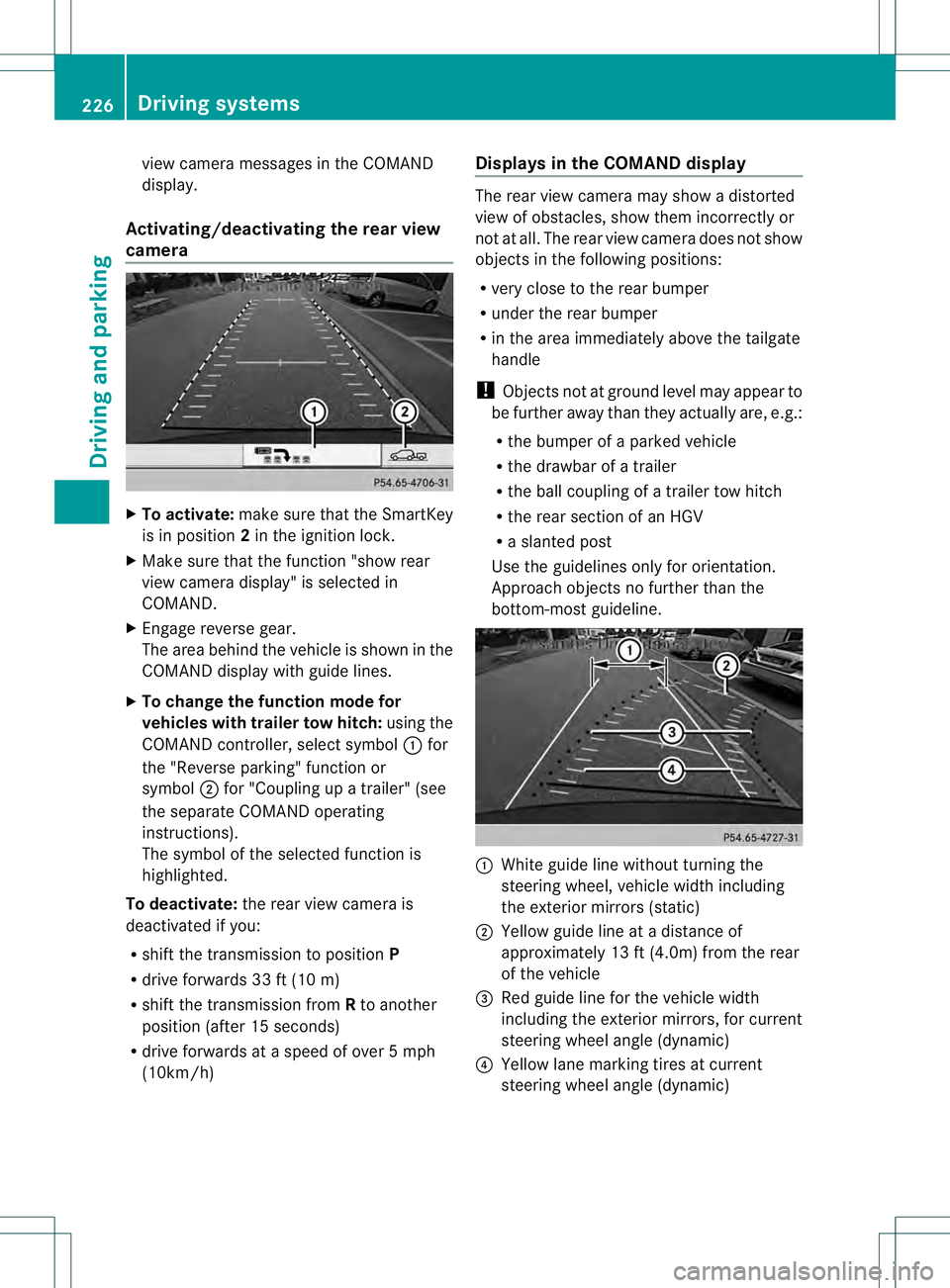
To activate: make sure that the SmartKey
is in position 2in the ignition lock.
X Make sure that the function "show rear
view camera display" is selected in
COMAND.
X Engage reverse gear.
The area behind the vehicle is show ninthe
COMAND display with guide lines.
X To change the function mode for
vehicles with trailer tow hitch: using the
COMAND controller, select symbol 0002for
the "Reverse parking" function or
symbol 0003for "Coupling up a trailer" (see
the separate COMAND operating
instructions).
The symbol of the selected function is
highlighted.
To deactivate: the rear view camera is
deactivated if you:
R shift the transmission to position P
R drive forwards 33 ft (10 m)
R shift the transmission from Rto another
position (after 15 seconds)
R drive forwards at a speed of over 5mph
(10km/h) Displays in the COMAND display The rear view camera may show a distorted
view of obstacles, show them incorrectly or
not at all. The rear view camera does not show
objects in the following positions:
R
very close to the rear bumper
R under the rear bumper
R in the area immediately above the tailgate
handle
! Objects not at ground level may appear to
be further away than they actually are, e.g.:
R the bumper of a parked vehicle
R the drawbar of a trailer
R the ball coupling of a trailer tow hitch
R the rear section of an HGV
R a slanted post
Use the guidelines only for orientation.
Approach objects no further than the
bottom-most guideline. 0002
White guide line without turning the
steering wheel, vehicle width including
the exterior mirrors (static)
0003 Yellow guide line at a distance of
approximately 13 ft (4.0m) from the rear
of the vehicle
0021 Red guide line for the vehicle width
including the exterior mirrors, for current
steering wheel angle (dynamic)
0020 Yellow lane marking tires at current
steering wheel angle (dynamic) 226
Driving systemsDriving and parking
Page 233 of 454
Activation conditions
The 360° camera imag
ecan be displayed if:
R your vehicle is equipped with a 360°
camera
R COMAND is switched on, see the separate
COMAND operating instructions
R the 360° camera function is activated
Activating the 360° camera using the
SYS button X
Press and hold the 0003button for longer
than 2seconds, see the separate COMAND
operating instructions.
Depending on whether position Dor Ris
engaged, the following is shown:
R full screen display with the image from
the front camera
R full screen display with the image from
the rear camera
Activating the 360° camer awith
COMAND X
Press the 0003button, see the separate
COMAN Doperating instructions.
X Select System by turning
000E0002000Fthe
COMAND controller and press 000Cto
confirm.
X Select 360° camera and press
000Cto
confirm.
Depending on whether position Dor Ris
engaged, the following is shown:
R a split screen with top view and the
image from the front camera or
R a split screen with top view and the
image from the rear view camera
For further information about the COMAND
Controller, see the separate COMAND
operating instructions. Activating the 360° camer
ausing
reverse gear The 360° camera images can be
automatically displayed by engaging reverse
gear.
X
Make sure that the SmartKey is in position
2in the ignition lock.
X Make sure that the Activation by R gear setting is active in COMAND, see the
separate COMAND operating instructions.
X To show the 360° camer aimage: engage
reverse gear.
The COMAND display shows the area
behind the vehicle in spli tscreen:
R vehicle with guide lines
R top view of the vehicle
Selecting the split-screen and full
screen displays X
To switc hbetween spli tscreen views:
switch to the line with the vehicle icons by
sliding 000B0002the COMAND controller.
X Turn 000E0002000F the COMAND controller and
selec tone of the vehicle symbols.
X To switc hto full screen mode: select
Full screen by turning
000E0002000Fthe
COMAND controller and press 000Cto
confirm.
Displays in the COMAND display Important safety notes
!
Objects not at ground level may appear to
be further away than they actually are, e.g.:
R the bumper of a parked vehicle
R the drawbar of a trailer
R the ball coupling of a trailer tow hitch
R the rear section of an HGV
R a slanted post
Use the guidelines only for orientation.
Approach objects no further than the
bottom-mos tguideline. Driving systems
231Driving and parking Z
Page 237 of 454
ATTENTION ASSIST is reset when you
continue your journey and starts assessing
your tiredness agai nif:
R you switch off the engine.
R you take off you rseat belt and open the
driver's door, e.g. for a change of drivers or
to take a break. Night View Assist Plus
Important safety notes Night View Assist Plus is only an aid and is not
a substitute for attentive driving. Do not rely
on the Night View Assist Plus display. You are
responsible for the distance to the vehicle in
front, for vehicle speed and for braking in
good time. Drive carefully and always adapt
your driving style to suit the prevailing road
and traffic conditions.
The system may be impaired or may not
function if:
R there is poor visibility, e.g. due to snow,
rain, fog or spray
R the windshield is dirty, fogged up or
covered, for instance by a sticker, in the
vicinity of the camera
R on bends, on uphill gradient sordownhill
gradients
Pedestrian recognition may be impaired or
inoperative if:
R pedestrians are partially or entirely
obscured by objects, e.g. parked vehicles
R the silhouette of the pedestrian in the Night
View Assist Plus display is incomplete or
interrupted, e.g. by powerful light
reflections
R pedestrians do not contrast adequately
from the background
R pedestrians are not in an upright position,
e.g. sitting, squatting or lying General notes
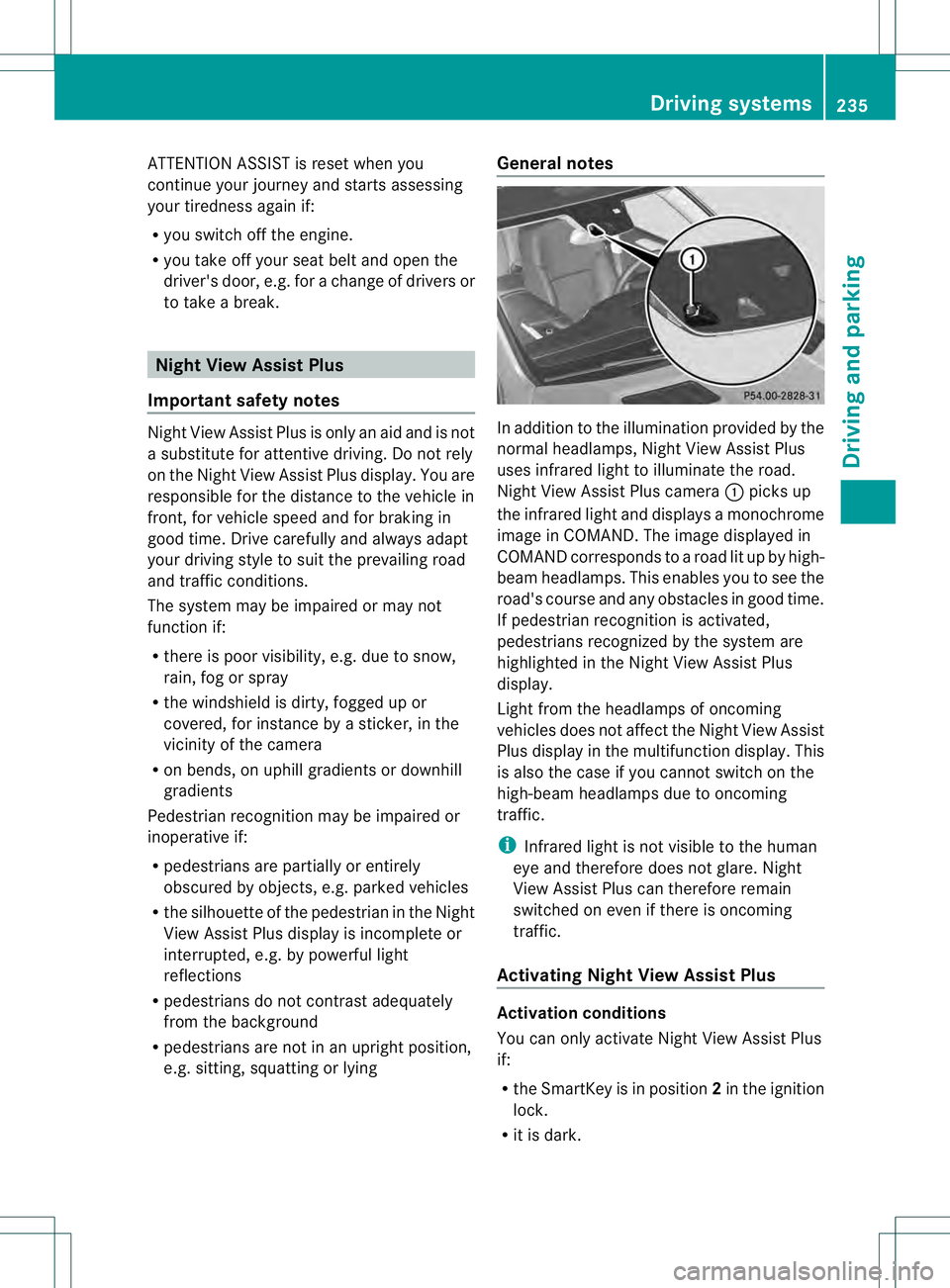
In addition to the illumination provided by the
normal headlamps, Night View Assist Plus
uses infrared light to illuminate the road.
Night View Assist Plus camera
0002picks up
the infrared light and displays a monochrome
image in COMAND. The image displayed in
COMAND corresponds to a road lit up by high-
beam headlamps. This enables you to see the
road's course and any obstacles in good time.
If pedestrian recognition is activated,
pedestrians recognized by the system are
highlighted in the Night View Assist Plus
display.
Light from the headlamps of oncoming
vehicles does not affect the Night View Assist
Plus display in the multifunction display .This
is also the case if you cannot switch on the
high-beam headlamps due to oncoming
traffic.
i Infrared light is not visible to the human
eye and therefore does not glare. Night
View Assist Plus can therefore remain
switched on even if there is oncoming
traffic.
Activating Night View Assist Plus Activation conditions
You can only activate Night View Assist Plus
if:
R
the SmartKey is in position 2in the ignition
lock.
R it is dark. Driving systems
235Driving and parking Z
Page 241 of 454
indicator lamp goes out and Blind Spot Assist
is operational.
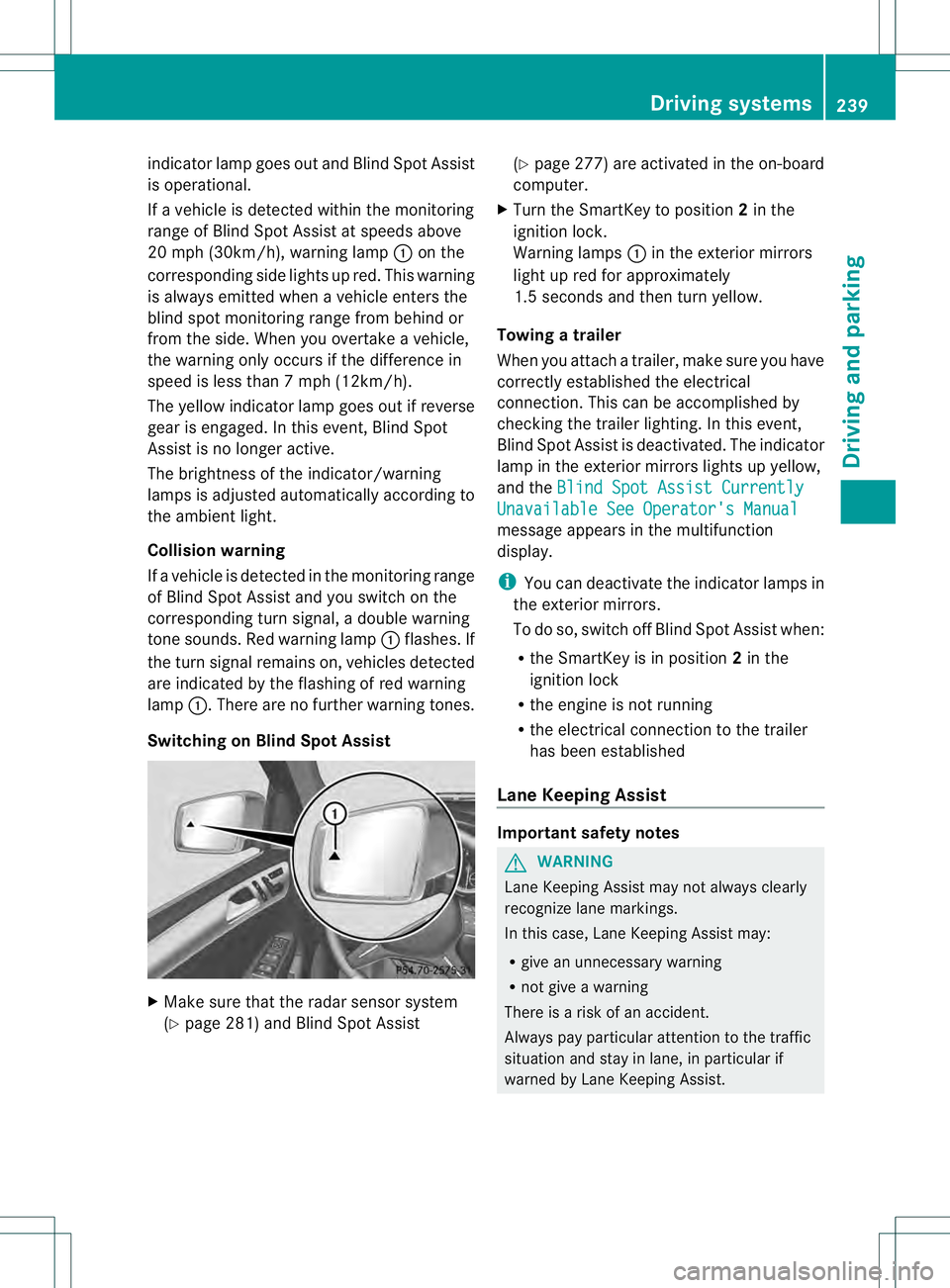
If a vehicle is detected within the monitoring
range of Blind Spot Assist at speeds above
20 mph (30km/h), warning lamp 0002on the
corresponding side lights up red. This warning
is always emitted when a vehicle enters the
blind spot monitoring rang efrom behind or
from the side .When you overtake a vehicle,
the warning only occurs if the difference in
speed is less than 7mph (12km/h).
The yellow indicator lamp goes out if reverse
gear is engaged. In this event, Blind Spot
Assist is no longer active.
The brightness of the indicator/warning
lamps is adjusted automatically according to
the ambient light.
Collision warning
If a vehicle is detected in the monitoring range
of Blind Spot Assist and you switch on the
corresponding turn signal, a double warning
tone sounds. Red warning lamp 0002flashes. If
the turn signal remains on, vehicles detected
are indicated by the flashing of red warning
lamp 0002.There are no further warning tones.
Switching on Blind Spot Assist X
Make sure that the radar sensor system
(Y page 281) and Blind Spot Assist (Y
page 277) are activated in the on-board
computer.
X Turn the SmartKey to position 2in the
ignition lock.
Warning lamps 0002in the exterior mirrors
light up red for approximately
1.5 seconds and then turn yellow.
Towing atrailer
When you attach a trailer, make sure you have
correctly established the electrical
connection. This can be accomplished by
checking the trailer lighting. In this event,
Blind Spo tAssist is deactivated. The indicator
lamp in the exterior mirrors lights up yellow,
and the Blind Spot Assist Currently Unavailable See Operator's Manual
message appears in the multifunction
display.
i
You can deactivate the indicator lamps in
the exterior mirrors.
To do so, switch off Blind Spot Assist when:
R the SmartKey is in position 2in the
ignition lock
R the engine is not running
R the electrical connection to the trailer
has been established
Lane Keeping Assist Important safety notes
G
WARNING
Lane Keeping Assist may not always clearly
recognize lane markings.
In this case, Lane Keeping Assist may:
R give an unnecessary warning
R not give a warning
There is a risk of an accident.
Always pay particular attention to the traffic
situation and stay in lane, in particular if
warned by Lane Keeping Assist. Driving systems
239Driving and parking Z
Page 246 of 454
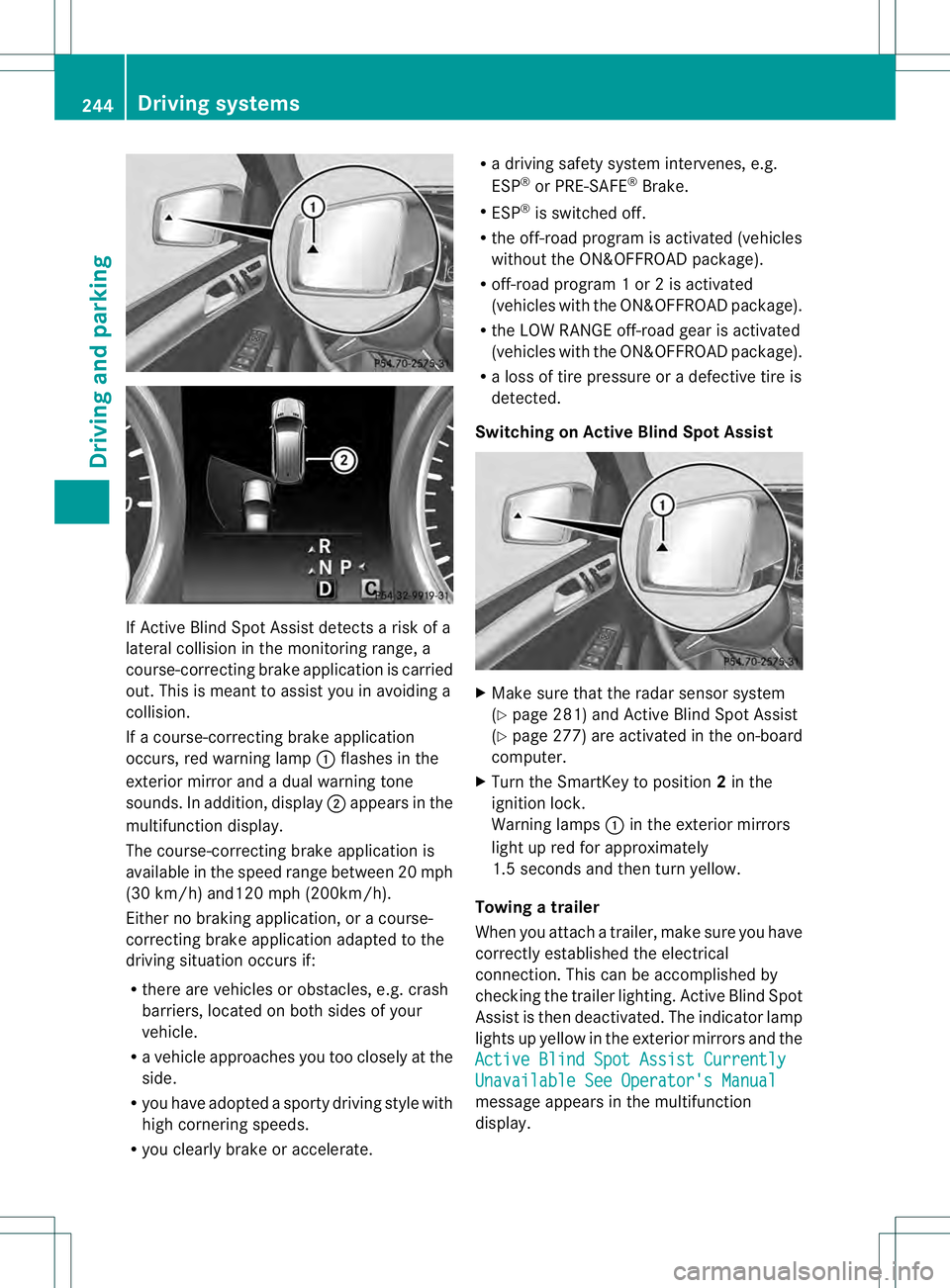
If Active Blind Spot Assist detects a risk of a
lateral collision in the monitoring range, a
course-correcting brake application is carried
out. This is meant to assist you in avoiding a
collision.
If a course-correcting brake application
occurs, red warning lamp 0002flashes in the
exterior mirror and a dual warning tone
sounds. In addition, display 0003appears in the
multifunction display.
The course-correcting brake application is
available in the speed range betwee n20m ph
(30 km/h) and120 mph (200km/h).
Either no braking application, or a course-
correcting brake application adapted to the
driving situation occurs if:
R there are vehicles or obstacles, e.g. crash
barriers, located on both sides of your
vehicle.
R a vehicle approaches you too closely at the
side.
R you have adopted a sporty driving style with
high cornering speeds.
R you clearly brake or accelerate. R
a driving safety system intervenes, e.g.
ESP ®
or PRE-SAFE ®
Brake.
R ESP ®
is switched off.
R the off-road program is activated (vehicles
without the ON&OFFROA Dpackage).
R off-road program 1 or 2 is activated
(vehicles with the ON&OFFROAD package).
R the LOW RANGE off-road gear is activated
(vehicles with the ON&OFFROAD package).
R a loss of tire pressure or a defective tire is
detected.
Switching on Active Blind Spot Assist X
Make sure that the radar sensor system
(Y page 281) and Active Blind Spot Assist
(Y page 277) are activated in the on-board
computer.
X Turn the SmartKey to position 2in the
ignition lock.
Warning lamps 0002in the exterior mirrors
light up red for approximately
1.5 seconds and then turn yellow.
Towing atrailer
When you attach a trailer, make sure you have
correctly established the electrical
connection. This can be accomplished by
checking the trailer lighting .Active Blind Spot
Assist is then deactivated. The indicator lamp
lights up yellow in the exterior mirrors and the
Active Blind Spot Assist Currently Unavailable See Operator's Manual
message appears in the multifunction
display. 244
Driving systemsDriving and parking
Page 250 of 454
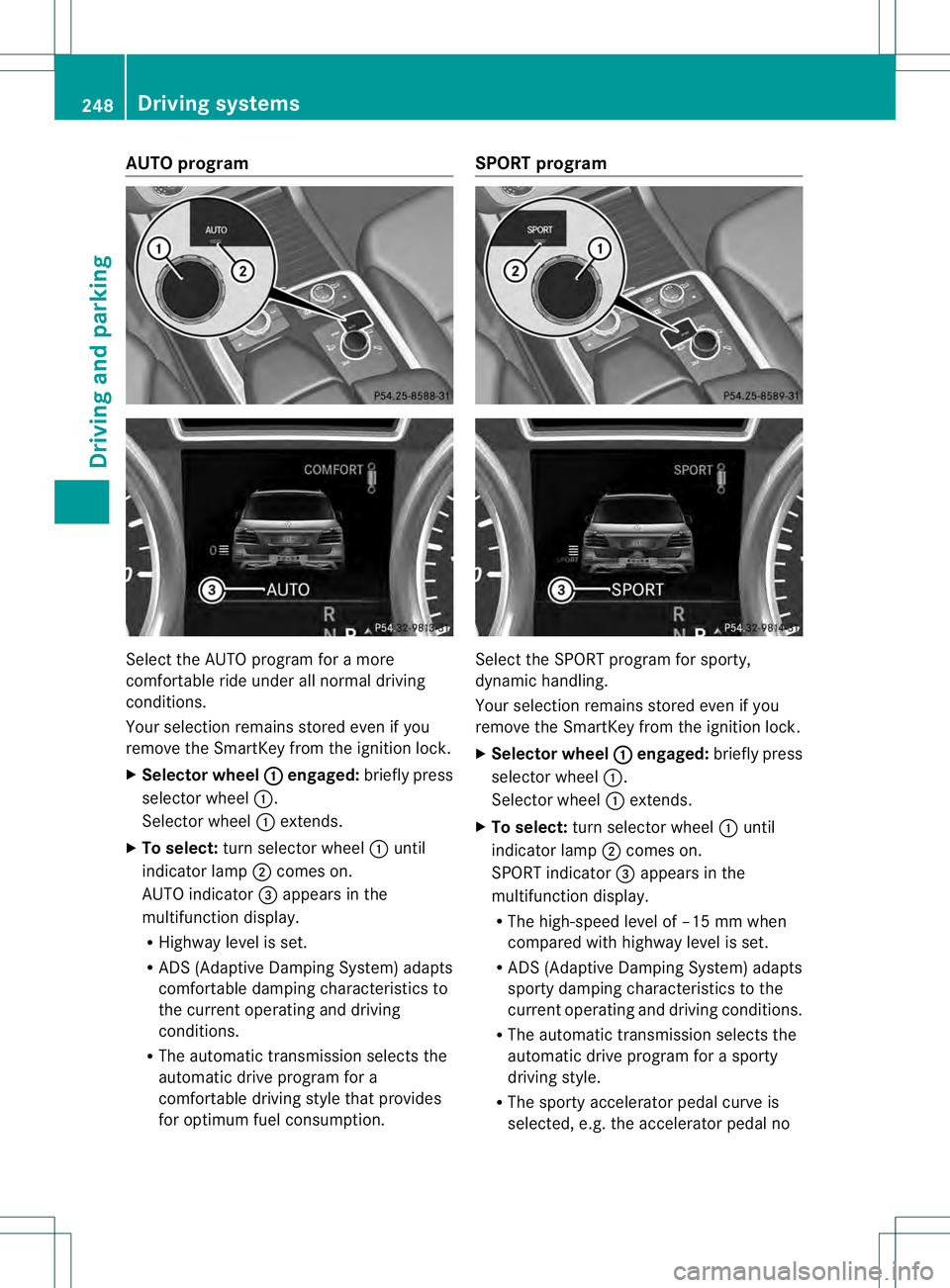
AUTO program
Select the AUTO program for a more
comfortable ride under all normal driving
conditions.
Your selection remains store
deven if you
remove the SmartKey from the ignition lock.
X Selector wheel 0002 engaged:
briefly press
selector wheel 0002.
Selector wheel 0002extends.
X To select: turn selector wheel 0002until
indicator lamp 0003comes on.
AUTO indicator 0021appears in the
multifunction display.
R Highway level is set.
R ADS (Adaptive Damping System) adapts
comfortable damping characteristics to
the current operating and driving
conditions.
R The automatic transmission selects the
automatic drive program for a
comfortable driving style that provides
for optimu mfuel consumption. SPORT program
Selec
tthe SPORT program for sporty,
dynamic handling.
Your selection remains stored even if you
remove the SmartKey from the ignition lock.
X Selector wheel 0002 engaged:
briefly press
selector wheel 0002.
Selector wheel 0002extends.
X To select: turn selector wheel 0002until
indicator lamp 0003comes on.
SPORT indicator 0021appears in the
multifunction display.
R The high-speed level of –15 mm when
compared with highway level is set.
R ADS (Adaptive Damping System) adapts
sporty damping characteristics to the
current operating and driving conditions.
R The automatic transmission selects the
automatic drive program for a sporty
driving style.
R The sporty accelerator pedal curve is
selected, e.g. the accelerator pedal no 248
Driving systemsDriving and parking
Page 251 of 454
longer has to be pressed as far to
accelerate.
R The sporty steering curve is selected,
e.g. greater force is required when
steering.
i You cannot selec tthe SPORT program if
LOW RANGE has been selected. The
Drive Program SPORT Not in LOW RANGE message then appears in the
multifunction display.
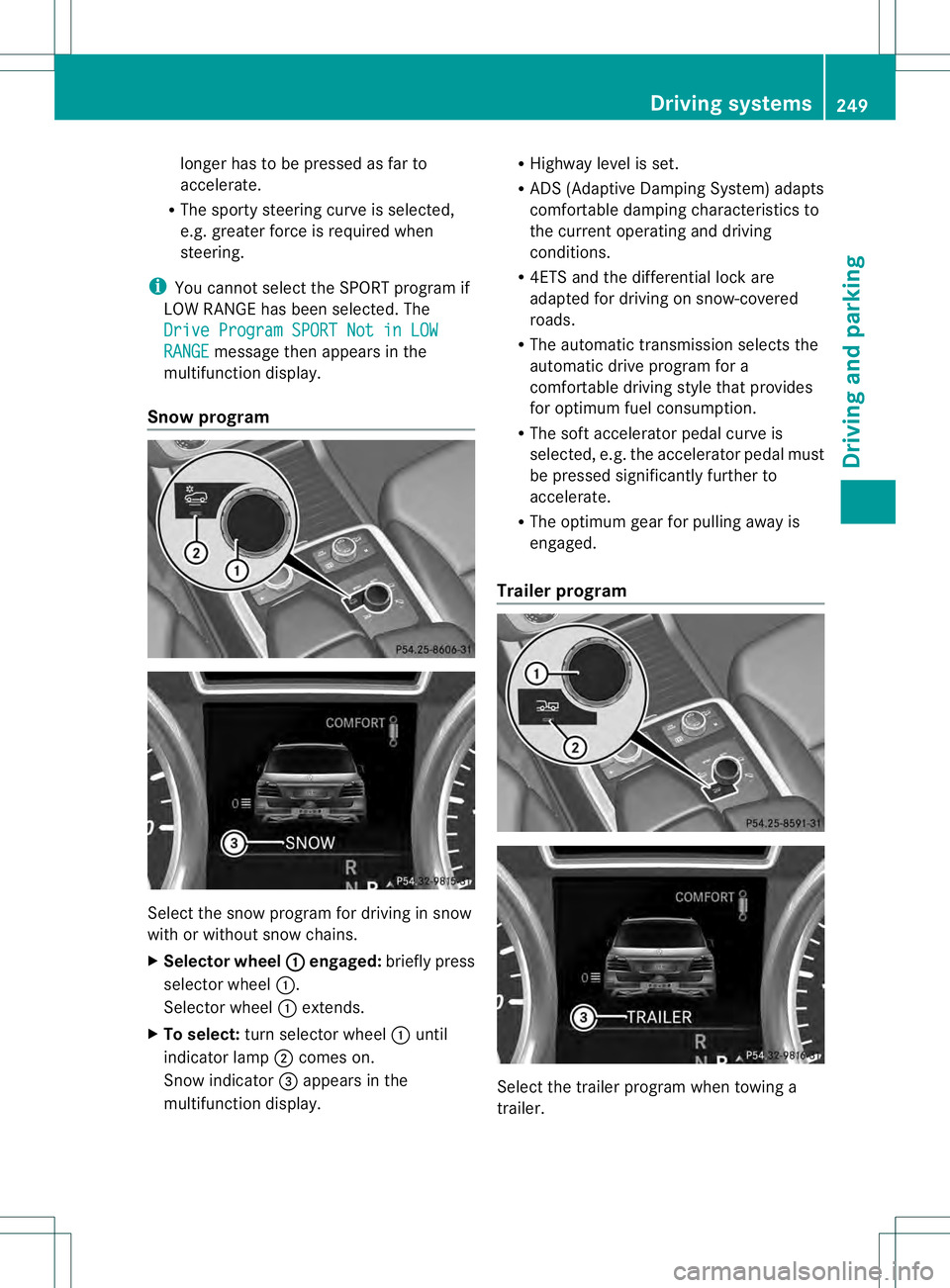
Snow program Select the snow program for driving in snow
with or without snow chains.
X Selector wheel 0002 engaged:
briefly press
selector wheel 0002.
Selector wheel 0002extends.
X To select: turn selector wheel 0002until
indicator lamp 0003comes on.
Snow indicator 0021appears in the
multifunction display. R
Highway level is set.
R ADS (Adaptive Damping System) adapts
comfortable damping characteristics to
the current operating and driving
conditions.
R 4ETS and the differential lock are
adapted for driving on snow-covered
roads.
R The automatic transmission selects the
automatic drive program for a
comfortable driving style that provides
for optimum fuel consumption.
R The soft accelerator pedal curve is
selected, e.g. the accelerator pedal must
be pressed significantly further to
accelerate.
R The optimum gear for pulling away is
engaged.
Trailer program Select the trailer program when towing a
trailer. Driving systems
249Driving and parking Z