light MERCEDES-BENZ GL 2013 Owners Manual
[x] Cancel search | Manufacturer: MERCEDES-BENZ, Model Year: 2013, Model line: GL, Model: MERCEDES-BENZ GL 2013Pages: 454, PDF Size: 6.31 MB
Page 269 of 454
Displays and operation
Instrument cluster
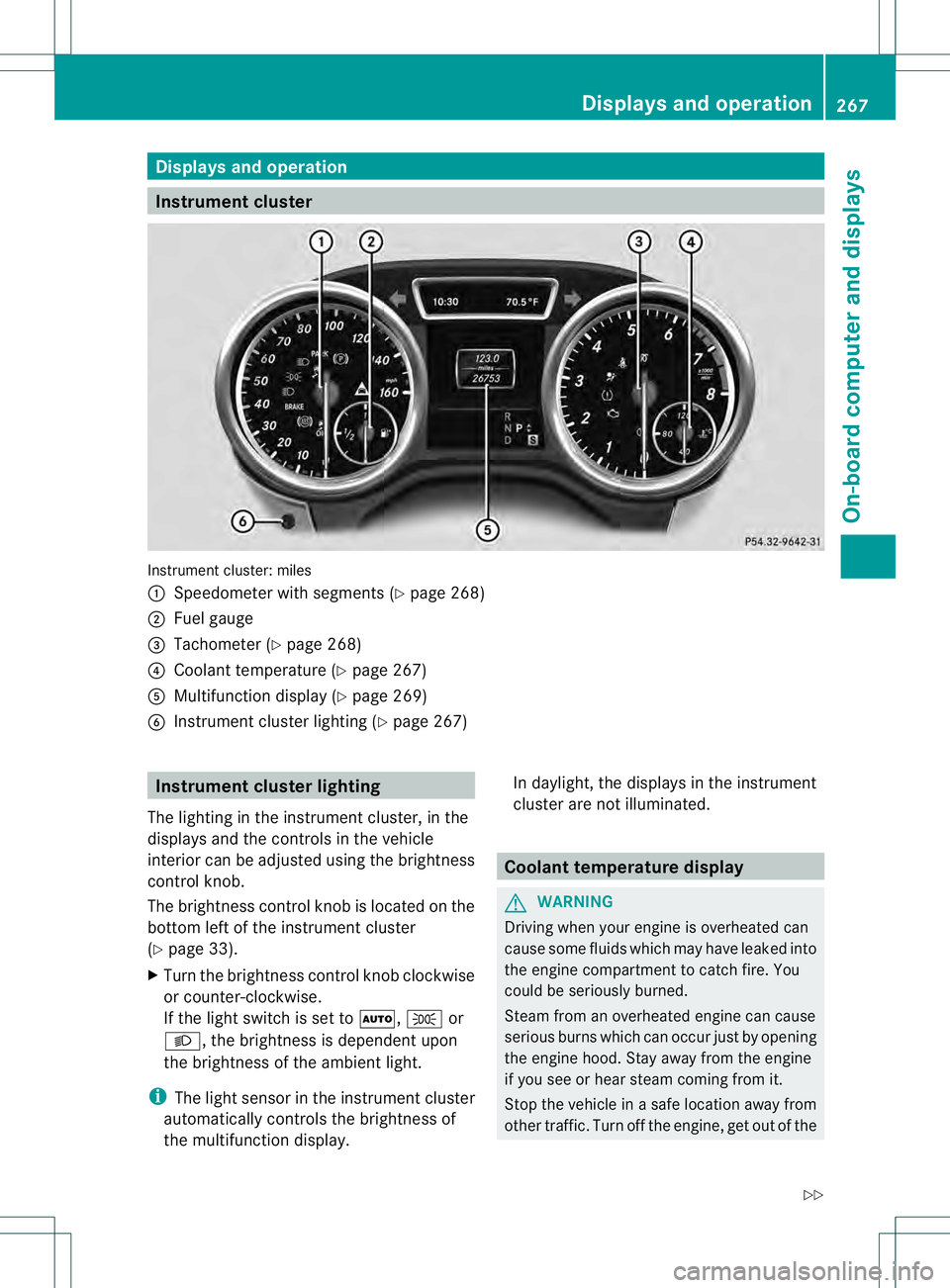
Instrument cluster: miles
0002
Speedometer with segments (Y page 268)
0003 Fuel gauge
0021 Tachometer (Y page 268)
0020 Coolant temperature ( Ypage 267)
001E Multifunction display (Y page 269)
001F Instrumen tcluster lighting (Y page 267) Instrument cluster lighting
The lighting in the instrumen tcluster, in the
displays and the controls in the vehicle
interior can be adjusted using the brightness
control knob.
The brightness control knob is located on the
bottom left of the instrument cluster
(Y page 33).
X Turn the brightness control knob clockwise
or counter-clockwise.
If the light switch is set to 0006,0016or
000D, the brightness is dependent upon
the brightness of the ambien tlight.
i The light sensor in the instrumen tcluster
automatically controls the brightness of
the multifunction display. In daylight, the displays in the instrument
cluster are not illuminated. Coolant temperature display
G
WARNING
Driving when your engine is overheated can
cause some fluids which may have leaked into
the engine compartment to catch fire. You
could be seriously burned.
Steam from an overheated engine can cause
serious burns which can occur just by opening
the engine hood. Stay away fro mthe engine
if you see or hear steam coming from it.
Stop the vehicle in a safe location away from
other traffic. Turn off the engine, get out of the Displays and operation
267On-board computer and displays
Z
Page 270 of 454
vehicle and do not stand near the vehicle until
the engine has cooled down.
! Adisplay message is shown if the coolant
temperature is too high.
If the coolant temperature is over
248 ‡(120 †), do not continue driving. The
engine will otherwise be damaged.
The coolan ttemperature gauge is in the
instrument cluster on the right-hand side
(Y page 33).
Under normal operating conditions and with
the specified coolant level, the coolant
temperature may rise to 248 ‡ (120 †). Tachometer
! Do not drive in the overrevving range, as
this could damage the engine.
The red band in the tachometer indicates the
engine's overrevving range.
The fuel supply is interrupted to protec tthe
engine when the red band is reached. Outside temperature display
You should pay special attention to road
conditions when temperatures are around
freezing point.
The outside temperature display is in the
multifunction display (Y page 269).
Changes in the outside temperature are
displayed after a short delay. Speedometer with segments
The segments in the speedometer indicate
which speed range is available.
R Cruise control activated (Y page 195):
The segments light up from the stored
speed to the maximum speed.
R DISTRONIC PLUS activated (Y page 198):One or two segments in the set speed
range light up.
R DISTRONIC PLUS detectsav ehicle in front:
The segments between the speed of the
vehicle in fron tand the stored speed light
up. Operating the on-board computer
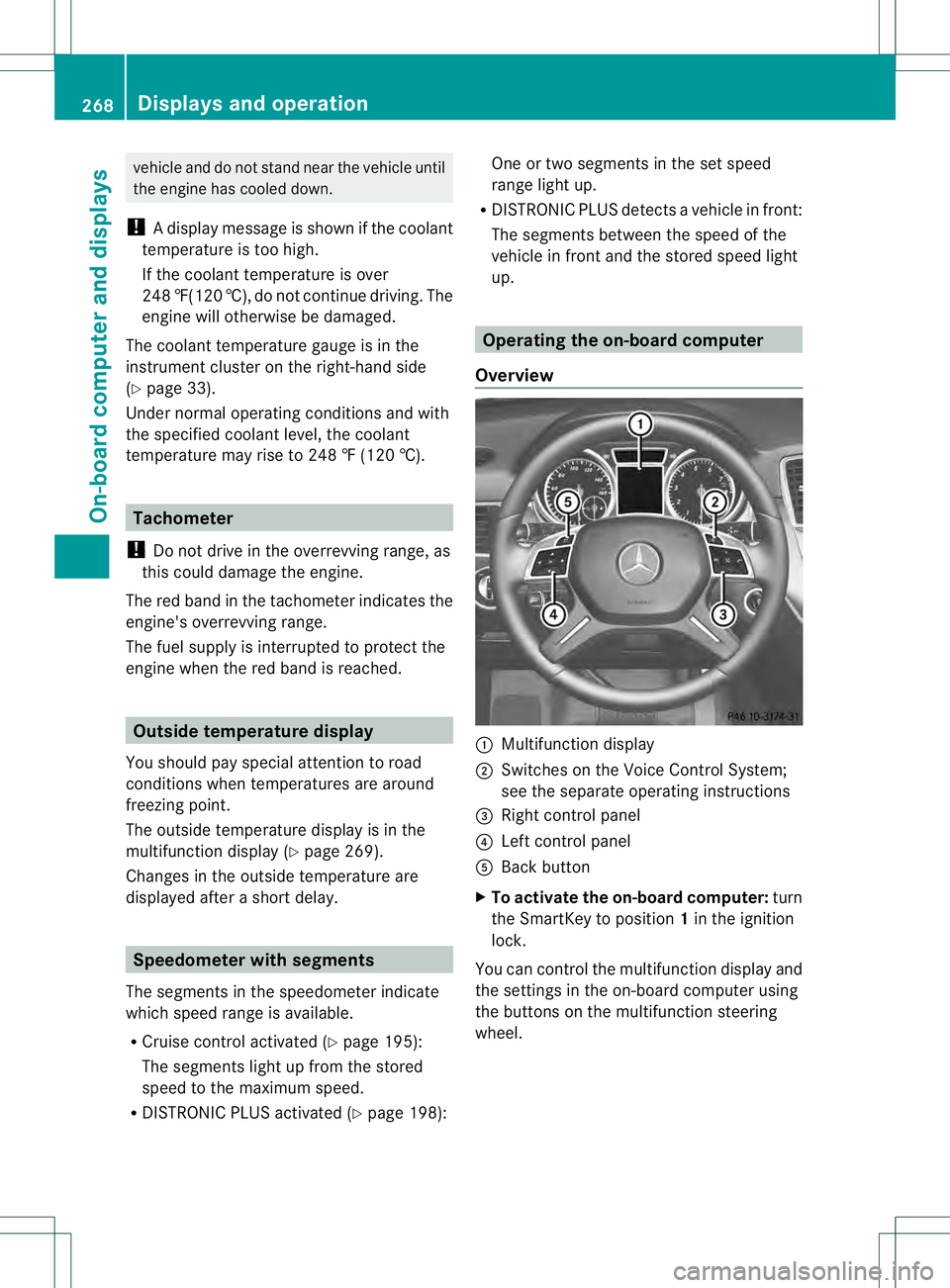
Overview 0002
Multifunctio ndisplay
0003 Switches on the Voice Control System;
see the separate operating instructions
0021 Right control panel
0020 Left control panel
001E Back button
X To activat ethe on-board computer: turn
the SmartKey to position 1in the ignition
lock.
You can control the multifunction display and
the settings in the on-board computer using
the buttons on the multifunction steering
wheel. 268
Displays and operationOn-board computer and displays
Page 280 of 454
R
check the tire pressure electronically
(Y page 408)
R call up service due date (Y page 371)Settings menu
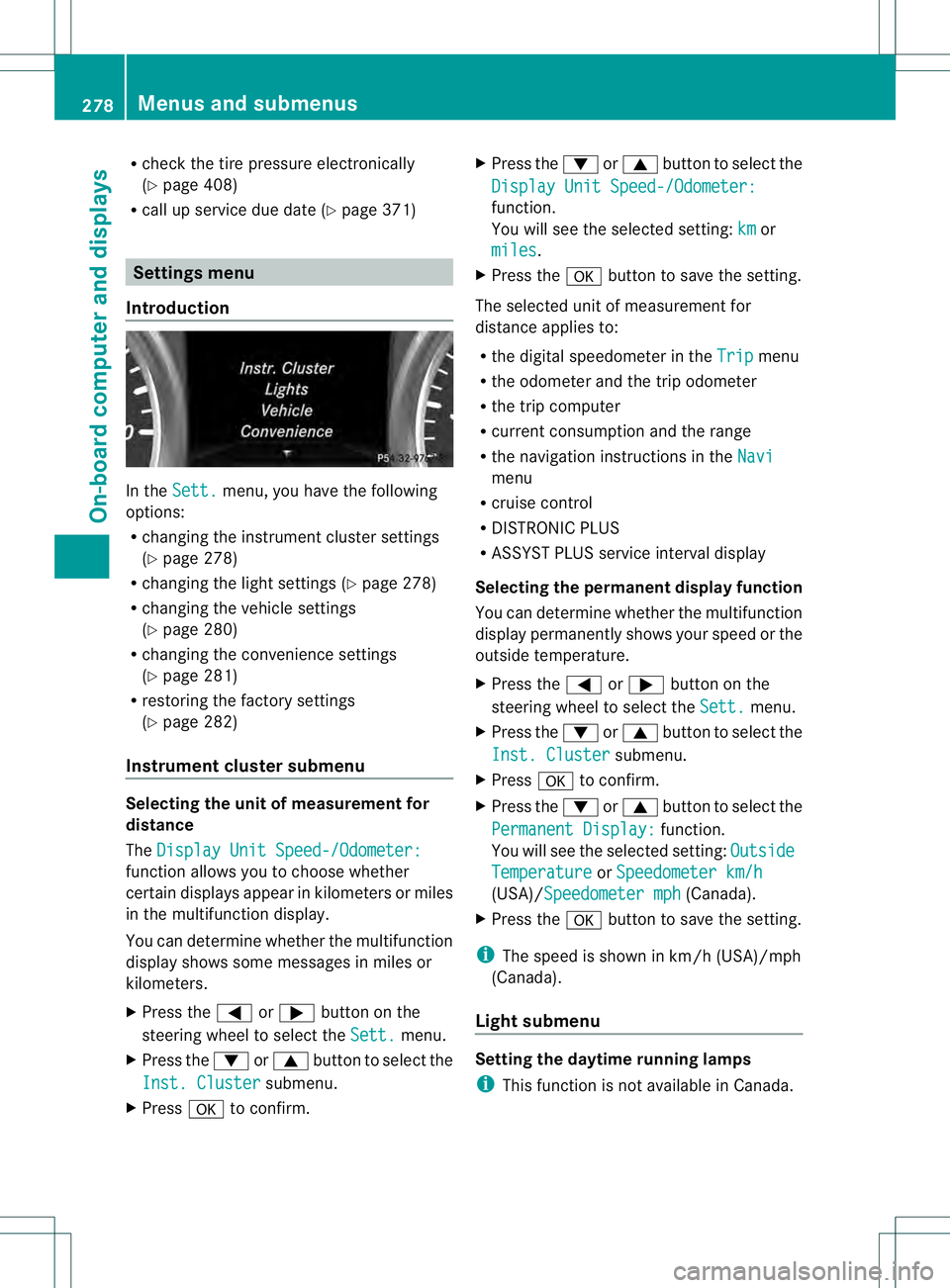
Introduction In the
Sett. menu, you have the following
options:
R changing the instrument cluster settings
(Y page 278)
R changing the light settings (Y page 278)
R changing the vehicle settings
(Y page 280)
R changing the convenience settings
(Y page 281)
R restoring the factory settings
(Y page 282)
Instrumen tcluster submenu Selecting the unit of measurement for
distance
The
Display Unit Speed-/Odometer: function allows you to choose whether
certain displays appear in kilometers or miles
in the multifunction display.
You can determine whether the multifunction
display shows some messages in miles or
kilometers.
X
Press the 0002or0005 button on the
steering wheel to selec tthe Sett. menu.
X Press the 0004or0003 button to select the
Inst. Cluster submenu.
X Press 000Bto confirm. X
Press the 0004or0003 button to select the
Display Unit Speed-/Odometer: function.
You will see the selected setting:
km or
miles .
X Press the 000Bbutton to save the setting.
The selected unit of measurement for
distance applies to:
R the digital speedometer in the Trip menu
R the odometer and the trip odometer
R the trip computer
R current consumption and the range
R the navigation instructions in the Navi menu
R cruise control
R DISTRONIC PLUS
R ASSYST PLUS service interval display
Selecting the permanent display function
You can determine whether the multifunction
display permanently shows your speed or the
outside temperature.
X Press the 0002or0005 button on the
steering wheel to select the Sett. menu.
X Press the 0004or0003 button to select the
Inst. Cluster submenu.
X Press 000Bto confirm.
X Press the 0004or0003 button to select the
Permanent Display: function.
You will see the selected setting: Outside Temperature or
Speedometer km/h (USA)/Speedometer mph (Canada).
X Press the 000Bbutton to save the setting.
i The speed is shown in km/h (USA)/mph
(Canada).
Light submenu Setting the daytime running lamps
i
This function is not available in Canada. 278
Menus and submenusOn-board computer and displays
Page 281 of 454
X
Press the 0002or0005 button on the
steering wheel to select the Sett. menu.
X Press the 0004or0003 button to select the
Lights submenu.
X Press 000Bto confirm.
X Press 0004or0003 to select the Daytime Running Lights: function.
If the Daytime Running Lights: have
been switched on, the cone of light and the
0004 symbol in the multifunction display
are shown in red.
X Press the 000Bbutton to save the setting.
Further information on daytime running
lamps (Y page 124).
Switching Adaptive Highbeam Assist on/
off
X Press the 0002or0005 button on the
steering wheel to select the Sett. menu.
X Press the 0004or0003 button to select the
Lights submenu.
X Press 000Bto confirm.
X Press the 0004or0003 button to select the
Adaptive Highbeam function.
If the Adaptive Highbeam function has
been switched on, the cone of light and the
0005 symbol in the upper multifunction
display are shown in red.
X Press the 000Bbutton to save the setting.
For further information about Adaptive
Highbeam Assist, see (Y page 130).
Setting the brightness of the ambient
lighting
X Press the 0002or0005 button on the
steering wheel to select the Sett. menu.
X Press the 0004or0003 button to select the
Lights submenu.
X Press 000Bto confirm.
X Press the 0004or0003 button to select the
Amb. Light +/-. function.
You will see the selected setting.
X Press 000Bto confirm. X
Press the 0004or0003 button to adjust the
brightness to any level from Off to
Level 5 (bright).
X Press the 000Bor0007 button to save the
setting.
Setting the ambient lighting color
X Press the 0002or0005 button on the
steering wheel to select the Sett. menu.
X Press the 0004or0003 button to select the
Lights submenu.
X Press 000Bto confirm.
X Press the 0004or0003 button to select the
Ambient Light Color function.
X Press 000Bto confirm.
X Press the 0004or0003 button to set the
color to SOLAR ,
NEUTRAL or
POLAR .
X Press the 000Bor0007 button to save the
setting.
Surround lighting and exterior lighting
delayed switch-off
X Press the 0002or0005 button on the
steering wheel to select the Sett. menu.
X Press the 0004or0003 button to select the
Light submenu.
X Press 000Bto confirm.
X Press 0004or0003 to select the
Surround Lighting function.
When the Surround Lighting function is
activated, the light cone and the area
around the vehicle are displayed in red in
the multifunction display.
X Press the 000Bbutton to save the setting.
Deactivating delayed switch-off of the
exterior lighting temporarily:
X Before leaving the vehicle, turn the
SmartKey to position 0in the ignition lock.
X Turn the SmartKey to position 2in the
ignition lock.
The exterior lighting delayed switch-off is
deactivated. Menus and submenus
279On-board computer and displays Z
Page 282 of 454
Delayed switch-off of the exterior lighting is
reactivated the next time you start the
engine.
If you have activated the
SurroundLighting functio
nand the light switch is set
to 0006, the following functions are activated
when it is dark:
R Surround lighting: the exteriorlighting
remains lit for 40 seconds after unlocking
with the SmartKey. If you start the engine,
the surround lighting is switched off and
the automatic headlamp mode is activated
(Y page 124).
R Exterior lighting delayed switch-off: the
exterior lighting remains lit for
60 seconds after the engine is switched off.
If you close all the doors and the tailgate,
the exterior lighting goes off after
5s econds.
i Depending on your vehicle's equipment,
when the surround lighting and delayed
switch-off exterior lighting are on, the
following light up:
R Parking lamps
R Daytime running lamps
R Side marker lamps
R Surround lighting in the exterior mirrors
Activating/deactivating the interior
lighting delayed switch-off
If you activate the Interior LightingDelay function, the interior lighting remains
on for 20seconds after you remove the
SmartKey from the ignition lock.
X Press the 0002or0005 button on the
steering wheel to select the Sett. menu.
X Press the 0004or0003 button to select the
Lights submenu.
X Press 000Bto confirm.
X Press 0004or0003 to select the
Interior Lighting Delay function.
When the Interior Lighting Delay function is activated, the vehicle interior is displayed in red in the multifunction
display.
X Press the 000Bbutton to save the setting.
Vehicle submenu Activating/deactivating the automatic
door locking mechanism
If you activate the
Automatic Door Lock function, the vehicle is centrally locked above
a speed of around 9 mph (15 km/h).
X Press the 0002or0005 button on the
steering wheel to select the Sett. menu.
X Press 0004or0003 to select the Vehicle submenu.
X Press 000Bto confirm.
X Press 0004or0003 to select the
Automatic Door Lock function.
When the Automatic Door Lock function
is activated, the vehicle doors are displayed
in red in the multifunction display.
X Press the 000Bbutton to save the setting.
For further information on the automatic
locking feature, see (Y page 86).
Activating/deactivating the acoustic
locking verification signal
If you switch on the Acoustic Lock function,
an acoustic signal sounds when you lock the
vehicle.
X Press the 0002or0005 button on the
steering wheel to select the Sett. menu.
X Press 0004or0003 to select the Vehicle submenu.
X Press 000Bto confirm.
X Press the 0004or0003 button to select the
Acoustic Lock function.
If the Acoustic Lock function is activated,
the 000C symbol in the multifunction
display lights up red.
X Press the 000Bbutton to save the setting. 280
Menus and submenusOn-board computer and displays
Page 284 of 454
X
Press 0004or0003 to select the Auto. Mirror Folding function.
If the Auto. Mirror Folding function is
activated, the vehicle's exterior mirror is
displayed in red in the multifunction
display.
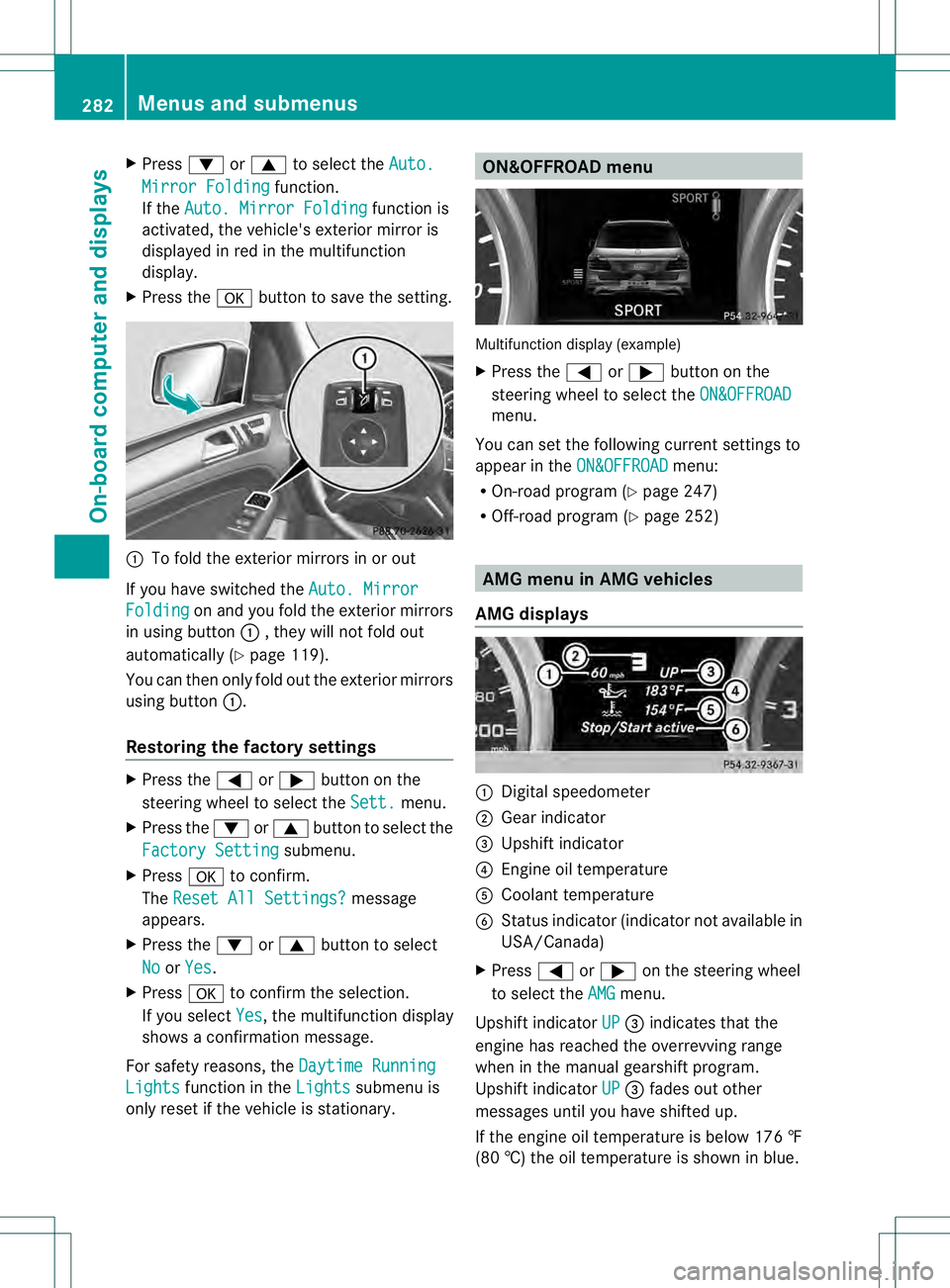
X Press the 000Bbutton to save the setting. 0002
To fold the exterior mirrors in or out
If you have switched the Auto. MirrorFolding on and you fold the exterior mirrors
in using button 0002, they will not fold out
automatically (Y page 119).
You can then only fold out the exterior mirrors
using button 0002.
Restoring the factory settings X
Press the 0002or0005 button on the
steering wheel to select the Sett. menu.
X Press the 0004or0003 button to select the
Factory Setting submenu.
X Press 000Bto confirm.
The Reset All Settings? message
appears.
X Press the 0004or0003 button to select
No or
Yes .
X Press 000Bto confirm the selection.
If you select Yes , the multifunction display
shows a confirmation message.
For safety reasons, the Daytime RunningLights function in the
Lights submenu is
only reset if the vehicle is stationary. ON&OFFROAD menu
Multifunction display (example)
X
Press the 0002or0005 button on the
steering wheel to select the ON&OFFROAD menu.
You can set the following curren tsettings to
appear in the ON&OFFROAD menu:
R On-road program (Y page 247)
R Off-road program (Y page 252) AMG menu in AMG vehicles
AMG displays 0002
Digital speedometer
0003 Gear indicator
0021 Upshift indicator
0020 Engine oil temperature
001E Coolant temperature
001F Status indicator (indicator not available in
USA/Canada)
X Press 0002or0005 on the steering wheel
to select the AMG menu.
Upshift indicator UP 0021
indicates that the
engine has reached the overrevving range
when in the manual gearshift program.
Upshift indicator UP 0021
fades out other
messages until you have shifted up.
If the engine oil temperature is below 176 ‡
(80 †) the oil temperature is shown in blue. 282
Menus and submenusOn-board computer and displays
Page 289 of 454
Safety systems
Display messages Possible causes/consequences and
0001 Solutions
0019000F
Currently
Unavailable See
Operator's Manual ABS (Anti-lock Braking System), ESP
®
(Electronic Stability
Program), BAS (Brake Assist), PRE-SAFE ®
, the HOLD function, hill
start assist, the adaptive brake lights, crosswind driving
assistance and ESP ®
trailer stabilization are temporarily
unavailable.
COLLISION PREVENTION ASSIST, BAS PLUS and
PRE-SAFE ®
Brake may also have failed.
In addition, the 000F,0017and0019 warning lamps light up in
the instrument cluster.
ATTENTION ASSIST is deactivated.
Possible causes are:
R self-diagnosis is not yet complete.
R the on-board voltage may be insufficient.
G WARNING
The brake system continues to function normally, but without the
functions listed above. The wheels could therefore lock if you
brake hard, for example.
The steerability and braking characteristics may be severely
affected. The braking distance in an emergency braking situation
can increase.
If ESP ®
is not operational, ESP ®
is unable to stabilize the vehicle.
There is an increased risk of skidding and an accident.
X Carefully drive on a suitable stretch of road, making slight
steering movements at a speed above 12 mph (20 km/h).
If the display message disappears, the functions mentioned
above are available again.
If the display message continues to be displayed:
X Drive on carefully.
X Visit a qualified specialist workshop. 0019000F
Inoperative See
Operator's Manual ABS, ESP
®
, BAS, PRE-SAFE ®
, HOLD, hill start assist, crosswind
driving assistance and ESP ®
trailer stabilization are unavailable
due to a malfunction.
COLLISION PREVENTION ASSIST, BAS PLUS and
PRE-SAFE ®
Brake may also have failed.
The 0012 (USA only)/0009 (Canada only),000F,0017and0019
warning lamps in the instrumen tcluster also light up.
ATTENTION ASSIST is deactivated. Display messages
287On-board computer and displays Z
Page 290 of 454
Display messages Possible causes/consequences and
0001 Solutions
G
WARNING
The brake system continues to function normally, but without the
functions listed above. The wheels could therefore loc kifyou
brake hard, for example.
The steerability and braking characteristics may be severely
affected. The braking distance in an emergency braking situation
can increase.
If ESP ®
is not operational, ESP ®
is unable to stabilize the vehicle.
There is an increased risk of skidding and an accident.
X Drive on carefully.
X Visit a qualified specialist workshop immediately. 000F
Currently
Unavailable See
Operator's Manual ESP
®
, BAS, PRE-SAFE ®
, HOLD, hill start assist, crosswind driving
assistance and ESP ®
trailer stabilization are unavailable due to a
malfunction.
COLLISION PREVENTION ASSIST, BAS PLUS and
PRE-SAFE ®
Brake may also have failed.
In addition, the 000Fand0017 warning lamps light up in the
instrument cluster.
The self-diagnosis function might not be complete, for example.
ATTENTION ASSIST is deactivated.
G WARNING
The brake system continues to function normally, but without the
functions listed above. The wheels could therefore lock if you
brake hard, for example.
The braking distance in an emergency braking situation can thus
increase.
If ESP ®
is not operational, ESP ®
is unable to stabilize the vehicle.
There is an increased risk of skidding and an accident.
X Carefully drive on a suitable stretch of road, making slight
steering movements at a speed above 12 mph (20 km/h).
If the display message disappears, the functions mentioned
above are available again.
If the display message continues to be displayed:
X Drive on carefully.
X Visit a qualified specialist workshop. 288
Display messagesOn-board computer and displays
Page 291 of 454
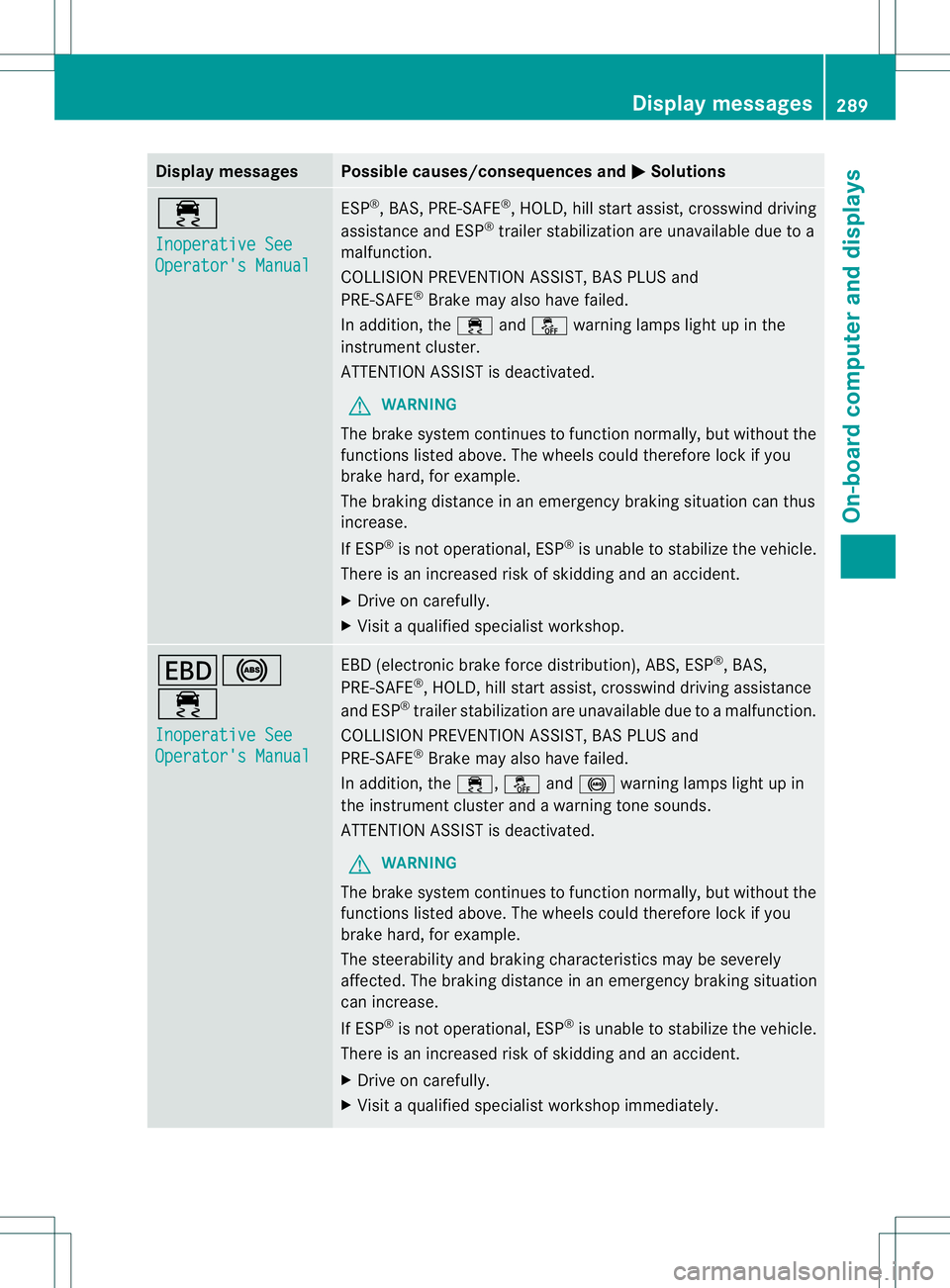
Display messages Possible causes/consequences and
0001 Solutions
000F
Inoperative See
Operator's Manual ESP
®
, BAS, PRE-SAFE ®
, HOLD, hill start assist, crosswind driving
assistance and ESP ®
trailer stabilization are unavailable due to a
malfunction.
COLLISION PREVENTION ASSIST, BAS PLUS and
PRE-SAFE ®
Brake may also have failed.
In addition, the 000Fand0017 warning lamps ligh tup in the
instrument cluster.
ATTENTION ASSIST is deactivated.
G WARNING
The brake system continues to function normally, but without the
functions listed above. The wheels could therefore lock if you
brake hard, for example.
The braking distance in an emergency braking situation can thus
increase.
If ESP ®
is not operational, ESP ®
is unable to stabilize the vehicle.
There is an increased risk of skidding and an accident.
X Drive on carefully.
X Visit a qualified specialist workshop. 000D0019
000F
Inoperative See
Operator's Manual EBD (electronic brake force distribution), ABS, ESP
®
, BAS,
PRE-SAFE ®
, HOLD, hill start assist, crosswind driving assistance
and ESP ®
trailer stabilization are unavailable due to a malfunction.
COLLISION PREVENTION ASSIST, BAS PLUS and
PRE-SAFE ®
Brake may also have failed.
In addition, the 000F,0017and0019 warning lamps light up in
the instrument cluster and a warning tone sounds.
ATTENTION ASSIST is deactivated.
G WARNING
The brake system continues to function normally, but without the
functions listed above. The wheels could therefore lock if you
brake hard, for example.
The steerability and braking characteristics may be severely
affected. The braking distance in an emergency braking situation
can increase.
If ESP ®
is not operational, ESP ®
is unable to stabilize the vehicle.
There is an increased risk of skidding and an accident.
X Drive on carefully.
X Visit a qualified specialist workshop immediately. Display messages
289On-board computer and displays Z
Page 292 of 454
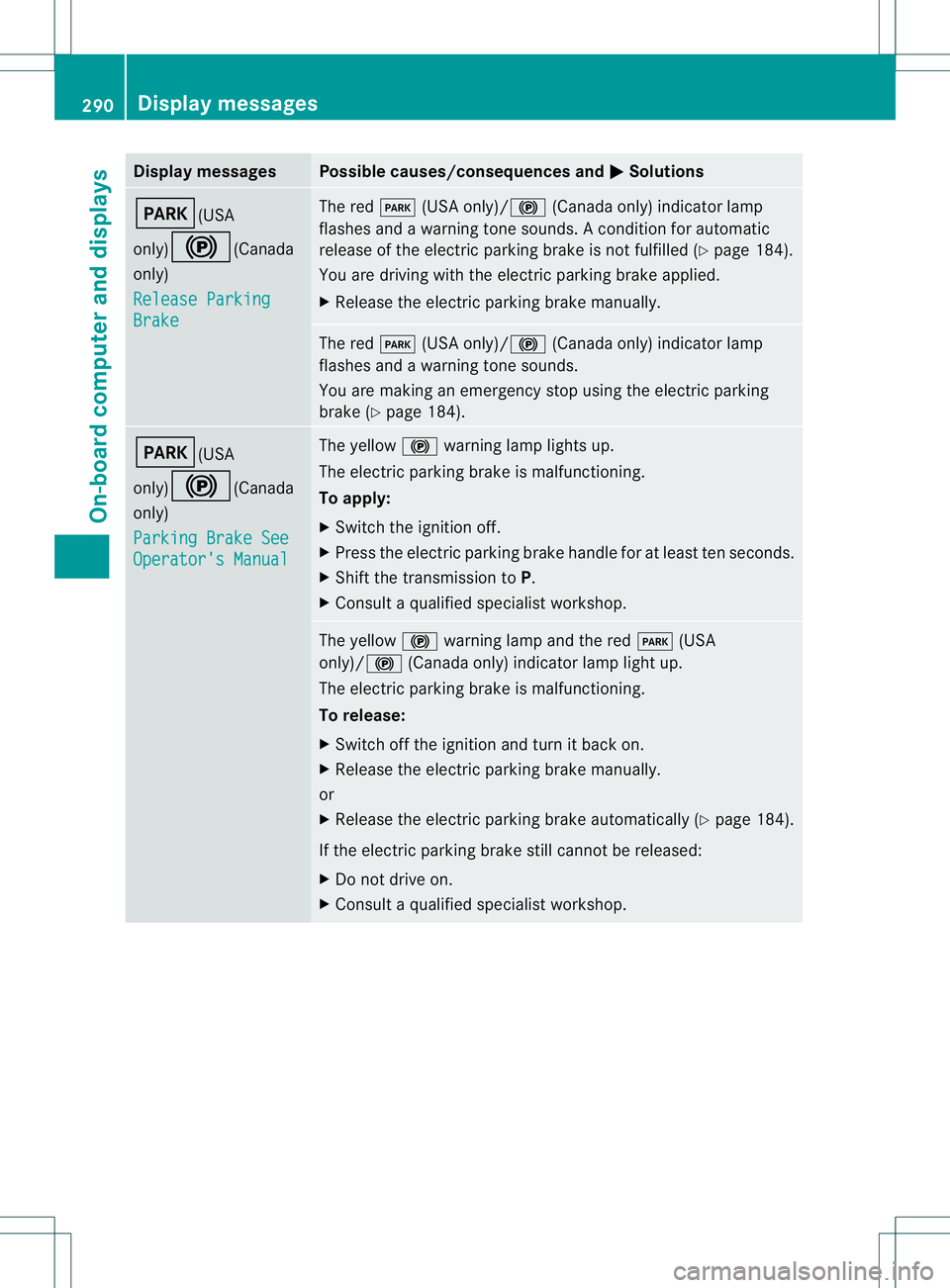
Display messages Possible causes/consequences and
0001 Solutions
0008(USA
only)
000D(Canada
only)
Release Parking Brake The red
0008(USA only)/ 000D(Canada only) indicato rlamp
flashes and a warning tone sounds. Acondition for automatic
release of the electric parking brake is not fulfilled (Y page 184).
You are driving with the electric parking brake applied.
X Release the electric parking brake manually. The red
0008(USA only)/000D (Canada only) indicator lamp
flashes and a warning tone sounds.
You are making an emergency stop using the electric parking
brake (Y page 184). 0008(USA
only)000D(Canada
only)
Parking Brake See
Operator's Manual The yellow
000Dwarning lamp lights up.
The electric parking brake is malfunctioning.
To apply:
X Switch the ignition off.
X Press the electric parking brake handle for at least ten seconds.
X Shift the transmission to P.
X Consult a qualified specialist workshop. The yellow
000Dwarning lamp and the red 0008(USA
only)/000D (Canada only) indicator lamp light up.
The electric parking brake is malfunctioning.
To release:
X Switch off the ignition and turn it back on.
X Release the electric parking brake manually.
or
X Release the electric parking brake automatically (Y page 184).
If the electric parking brake still cannot be released:
X Do not drive on.
X Consult a qualified specialist workshop. 290
Display messagesOn-board computer and displays