ABS MERCEDES-BENZ GL 2013 User Guide
[x] Cancel search | Manufacturer: MERCEDES-BENZ, Model Year: 2013, Model line: GL, Model: MERCEDES-BENZ GL 2013Pages: 454, PDF Size: 6.31 MB
Page 84 of 454
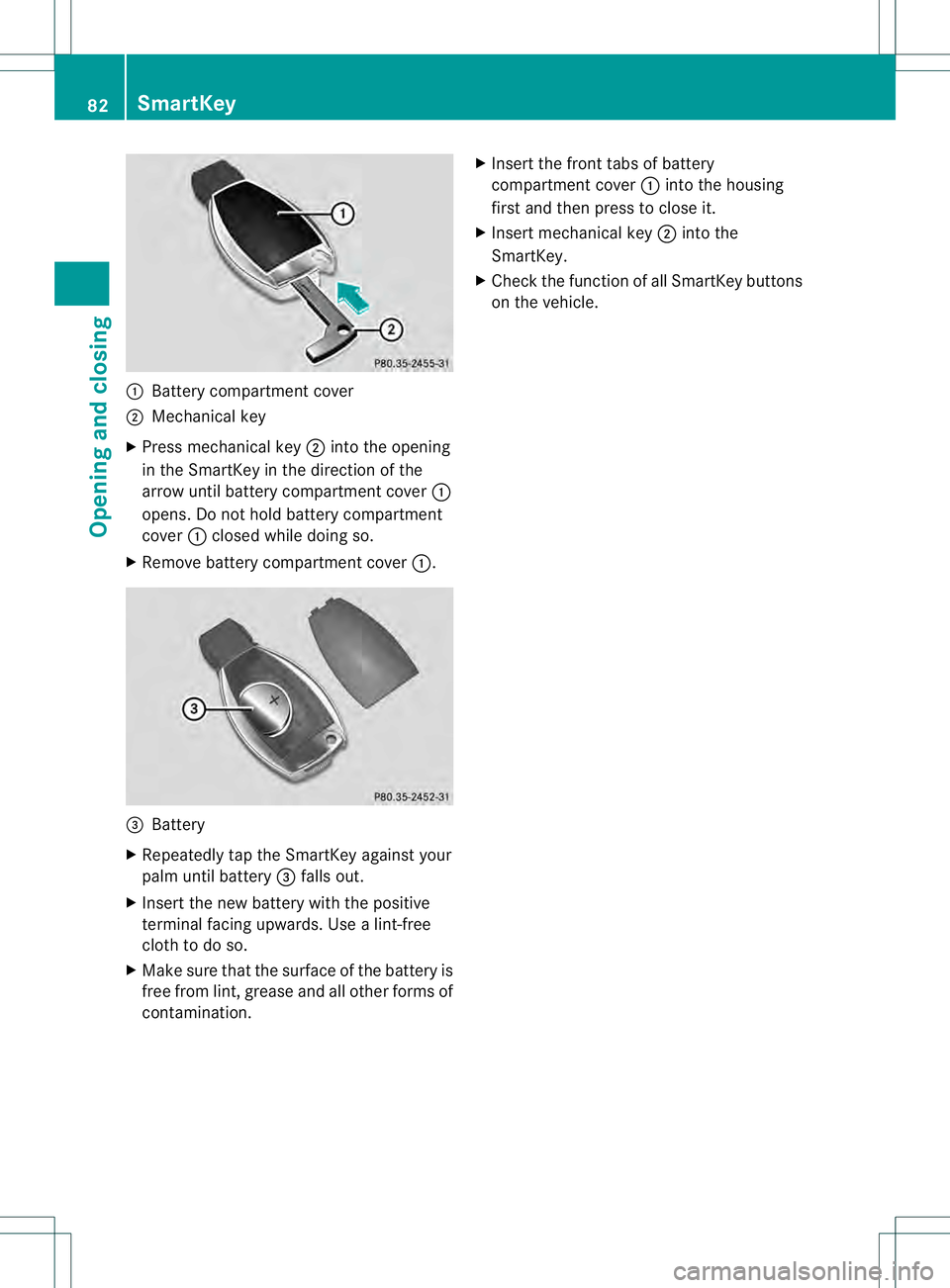
0002
Battery compartment cover
0003 Mechanical key
X Press mechanical key 0003into the opening
in the SmartKey in the direction of the
arrow until battery compartment cover 0002
opens. Do not hold battery compartment
cover 0002closed while doing so.
X Remove battery compartment cover 0002.0021
Battery
X Repeatedly tap the SmartKey against your
palm until battery 0021falls out.
X Inser tthe new battery with the positive
terminal facing upwards. Use a lint-free
cloth to do so.
X Make sure that the surface of the battery is
free from lint, grease and all other forms of
contamination. X
Insert the front tabs of battery
compartment cover 0002into the housing
first and then press to close it.
X Insert mechanical key 0003into the
SmartKey.
X Check the function of all SmartKey buttons
on the vehicle. 82
SmartKeyOpening and closing
Page 193 of 454
i
For more information on driving with
snow chains, see (Y page 403).
Drive particularly carefully on slippery road
surfaces. Avoid sudde nacceleration, steering
and braking maneuvers. Do not use the cruise
control or DISTRONIC PLUS.
The outside temperature indicator is not
designed to serve as an ice-warning device
and is therefore unsuitable for that purpose.
Changes in the outside temperature are
displayed afte rashort delay.
Indicated temperatures just above the
freezing point do not guarantee that the road
surface is free of ice. The road may still be icy,
especially in wooded areas or on bridges. You
should pay special attention to road
conditions when temperatures are around
freezing point. Off-road driving
Important safety notes G
WARNING
If you drive on a steep incline at an angle or
turn when driving on an incline, the vehicle
could slip sideways, tip and rollover. There is
a risk of an accident.
Always drive on a steep incline in the line of
fall (straight up or down) and do not turn the
vehicle. G
WARNING
If the vehicle level is high, the vehicle center
of gravity is raised. This could cause the
vehicle to tip over more easily on uphill or
downhill gradients. There is arisk of an
accident.
Selec tthe lowest possible vehicle level.
When driving off-road, sand, mud and water,
possibly mixed with oil, for example, could get
into the brakes. This could result in a reduced
braking effect or in total brake failure and also
in increased wear and tear. The braking
characteristics change depending on the material ingressing the brakes. Cleant
he
brakes after driving off-road. If you detect a
reduced braking effect or grinding noises,
have the brake system checked in a qualified
specialist workshop as soon as possible.
Adapt your driving style to the different
braking characteristics.
Driving off-road increases the likelihood of
damage to the vehicle, which, in turn, can lead
to failure of the mechanical assembly or
systems. Adapt your driving style to suit the
terrain conditions. Drive carefully. Have
damage to the vehicle rectified immediately
at a qualified specialist workshop.
Do not switch to transmission position N
when driving off-road. You could lose control
of the vehicle if you attempt to brake using
the service brake. If the gradient is too steep,
drive backwards in reverse gear.
General notes Read this section carefully before driving your
vehicle off-road. Practice by driving over more
gentle off-road terrain first.
Familiarize yourself with the characteristics
of your vehicle and the gear shift operation
before driving through difficult terrain.
The following driving systems are specially
adapted to off-road driving:
R
Off-road ABS (Y page 67)
R AIRMATIC package (vehicle level)
(Y page 212)
R DSR (Downhill Speed Regulation)
(Y page 250)
Observe the following notes:
R Stop the vehicle before starting to drive
along an off-road route.
R For vehicles with the AIRMATIC
package: select a vehicle level that is
suitable for the off-road terrain. To avoid
damaging the vehicle, make sure there is
always sufficient ground clearance.
R Check that items of luggage and loads are
stowed safely and are well secured
(Y page 341). Driving tips
191Driving and parking Z
Page 197 of 454

R
When driving down an incline, make use of
the engine's braking effect. Observe the
engine speed; do not overrev the engine.
R Check the brakes after prolonged off-road
driving.
i Hill start assist will aid you when pulling
away on a hill.
For more information, see "Hill start assist"
(Y page 166).
Do not switch to transmission position N
when driving off-road. If you try to brake the
vehicle using the service brake, you could
lose control of the vehicle. If the gradient is
too steep for your vehicle, drive back down in
reverse gear.
Maximum gradient-climbing capability On good road surfaces the maximum
gradient-climbing capability of your vehicle is
100%, which corresponds to an approach/
departure angle of 45°. Note that the
vehicle's gradient-climbing capability
depends on the off-road conditions.
Accelerate carefully and make sure that the
wheels do not spin when driving on steep
terrain.
i If the load on the front axle is reduced
when pulling away on a steep uphill slope,
the fron twheels have a tendency to spin.
4ETS recognizes this and brakes the
wheels accordingly. The rear wheel torque
is increased, making it easier to drive off.
Hilltops When driving up an uphill gradient, slightly
reduce pressure on the accelerator
immediately before reaching the brow of the
hill. Use the vehicle's own impetus to drive
over the top of the hill.
This style of driving prevents:
R the vehicle from lifting off the ground on the
brow of a hill
R the vehicle from traveling too quickly down
the other side Driving downhill R
Drive slowly.
R Do not drive at an angle down steep
inclines. Steer into the line of fall and drive
with the front wheels aligned straight.
Otherwise, the vehicle could slip sideways,
tip and rollover.
R Before tackling steep downhill gradients,
select shift range 1.
R Activate DSR. If this is not sufficient, brake
gently. When doing so, make sure that the
vehicle is facing in the direction of the line
of fall.
R Check that the brakes are working normally
after a long downhill stretch.
i The special off-road ABS setting enables
a precise, brief and repeated locking of the
front wheels. This causes them to dig into
loose earth. Be aware that the front wheels
easily skid across the ground surface if
completely braked and therefore lose their
ability to steer. Driving systems
Cruise control
Important safety notes If you fail to adapt your driving style, cruise
control can neither reduce the risk of an
accident nor override the laws of physics.
Cruise control cannot take into account the
road, traffic and weather conditions. Cruise
control is only an aid. You are responsible for
the distance to the vehicle in front, for vehicle
speed, for braking in good time and for
staying in your lane.
Do not use cruise control:
R in road and traffic conditions which do not
allow you to maintain a constant speed e.g.
in heavy traffic or on winding roads
R on slippery road surfaces. Braking or
accelerating could cause the drive wheels Driving systems
195Driving and parking Z
Page 220 of 454
maneuvering, parking or pulling out of a
parking space, make sure that there are no
persons, animals or objects in the area in
which you are maneuvering.
! When parking, pay particular attention to
objects above or below the sensors, such
as flower pots or trailer drawbars.
PARKTRONIC does not detect such objects
when they are in the immediate vicinity of
the vehicle. You could damage the vehicle
or the objects.
The sensors may not detect snow and other
objects that absorb ultrasonic waves.
Ultrasonic sources such as an automatic
car wash, the compressed-air brakes on a
truck or a pneumatic drill could cause
PARKTRONIC to malfunction.
PARKTRONIC may not function correctly on
uneven terrain.
PARKTRONIC is activated automatically when
you:
R switch on the ignition
R shift the transmission to position D,Ror N
R release the electric parking brake
PARKTRONIC is deactivated at speeds above
11 mph (18km/h). It is reactivated at lower
speeds.
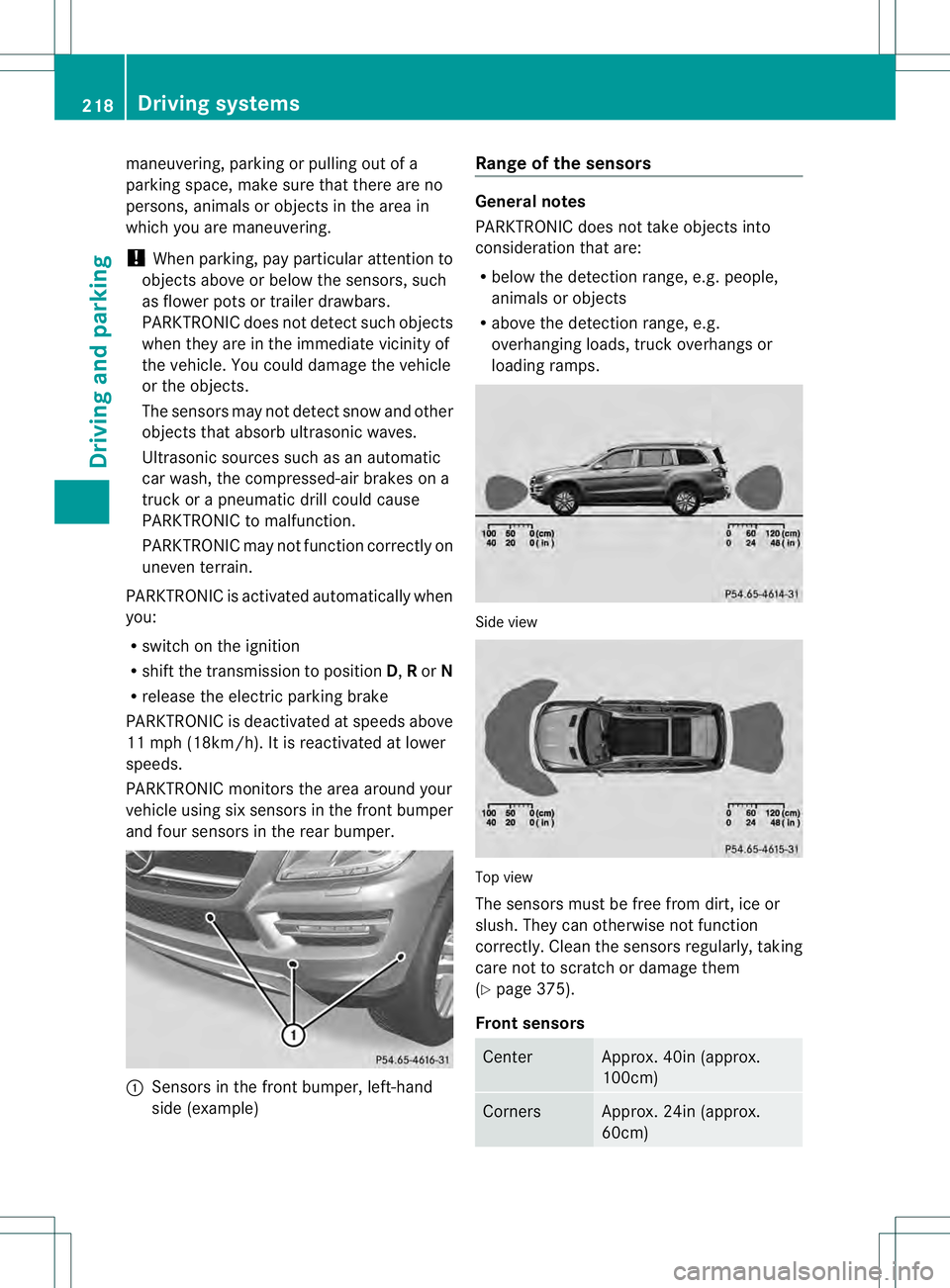
PARKTRONIC monitors the area around your
vehicle using six sensors in the front bumper
and four sensors in the rear bumper. 0002
Sensors in the front bumper, left-hand
side (example) Range of the sensors General notes
PARKTRONIC does not take objects into
consideration that are:
R
below the detection range, e.g. people,
animals or objects
R above the detection range, e.g.
overhanging loads, truck overhangs or
loading ramps. Side view
Top view
The sensors must be free from dirt, ice or
slush. They can otherwise not function
correctly. Clean the sensors regularly, taking
care not to scratch or damage them
(Y
page 375).
Front sensors Center Approx. 40i
n(approx.
100cm) Corners Approx. 24in (approx.
60cm)218
Driving systemsDriving and parking
Page 243 of 454
symbol
0002is shown in green. Lane Keeping
Assist is ready for use.
Standard
If Standard is selected, no warning vibration
occurs if:
R you switch on the turn signals. In this event,
the warnings are suppressed for a certain
period of time.
R a driving safety system intervenes, such as
ABS, BAS or ESP ®
.
Adaptive
If Adaptive is selected, no warning vibration
occurs if:
R you switch on the turn signals. In this event,
the warnings are suppressed for a certain
period of time.
R a driving safety system intervenes, e.g.
ABS, BAS or ESP ®
.
R you accelerate hard, e.g. kickdown.
R you brake hard.
R you steer actively, e.g. swerve to avoid an
obstacle or change lanes quickly.
R you cut the corner on a sharp bend.
In order that you are warned only when
necessary and in good time if you cross the
lane marking, the system recognizes certain
conditions and warns you accordingly.
The warning vibration occurs earlieri f:
R you approach the outer lane marking on a
bend.
R the road has very wide lanes, e.g. a
highway.
R the system recognizes soli dlane markings.
The warning vibratio noccurs later if:
R the road has narrow lanes.
R you cut the corner on a bend. Active Driving Assistance package
General notes The Active Driving Assistance package
consists of DISTRONIC PLUS (Y
page 198),
Active Blind Spot Assist (Y page 241) and
Active Lane Keeping Assist (Y page 245).
Active Blind Spo tAssist General notes
Active Blind Spot Assist uses a radar sensor
system to monitor the side areas of your
vehicle which are behind the driver.
Awarning
display in the exterior mirrors draws your
attentio nto vehicles detected in the
monitored area. If you then switch on the
corresponding turn signal to change lane, you
will also receive an optical and audible
warning. If a risk of lateral collision is
detected, corrective braking may help you
avoid a collision. To support the course-
correcting brake application, Active Blind
Spot Assist uses the forward-facing radar
sensor system. The free space in the direction
of travel is then evaluated.
Active Blind Spot Assist supports you from a
speed of approximately 20 mph (30 km/h).
For Active Blind Spot Assist to assist you
when driving, the radar sensor system must
be:
R activated (Y page 281)
R operational
Important safety notes
Active Blind Spot Assist is only an aid. It may
fail to detect some vehicles and is no
substitute for attentive driving. G
WARNING
Active Blind Spot Assist does not react to:
R vehicles overtaken too closely on the side,
placing them in the blind spot area
R vehicles approaching and driving by with a
speed difference of more than
approximately 6.8 mph (11 km/h) Driving systems
241Driving and parking
Z
Page 249 of 454
R
ESP ®
is switched off.
R the transmission is not in position D.
R on vehicles with a trailer tow hitch, the
electrical connectio nto the trailer has been
correctly established.
R the off-road program is activated (vehicles
without the ON&OFFROAD package).
R off-road program 1 or 2 is activated
(vehicles with the ON&OFFROAD package).
R the LOW RANGE off-road gear is activated
(vehicles with the ON&OFFROAD package).
R a loss of tire pressure or a defective tire has
been detected and displayed.
Active Lane Keeping Assist does not detect
traffic situations or road users. An
inappropriate brake application may be
interrupted at any time if you:
R steer slightly in the opposite direction
R switch on the turn signal
R clearly brake or accelerate
Al ane-correcting brake applicatio nis
interrupted automatically if:
R a driving safety system intervenes, e.g.
ESP ®
, PRE-SAFE ®
Brake or Active Blind
Spot Assist.
R lane markings can no longer be recognized.
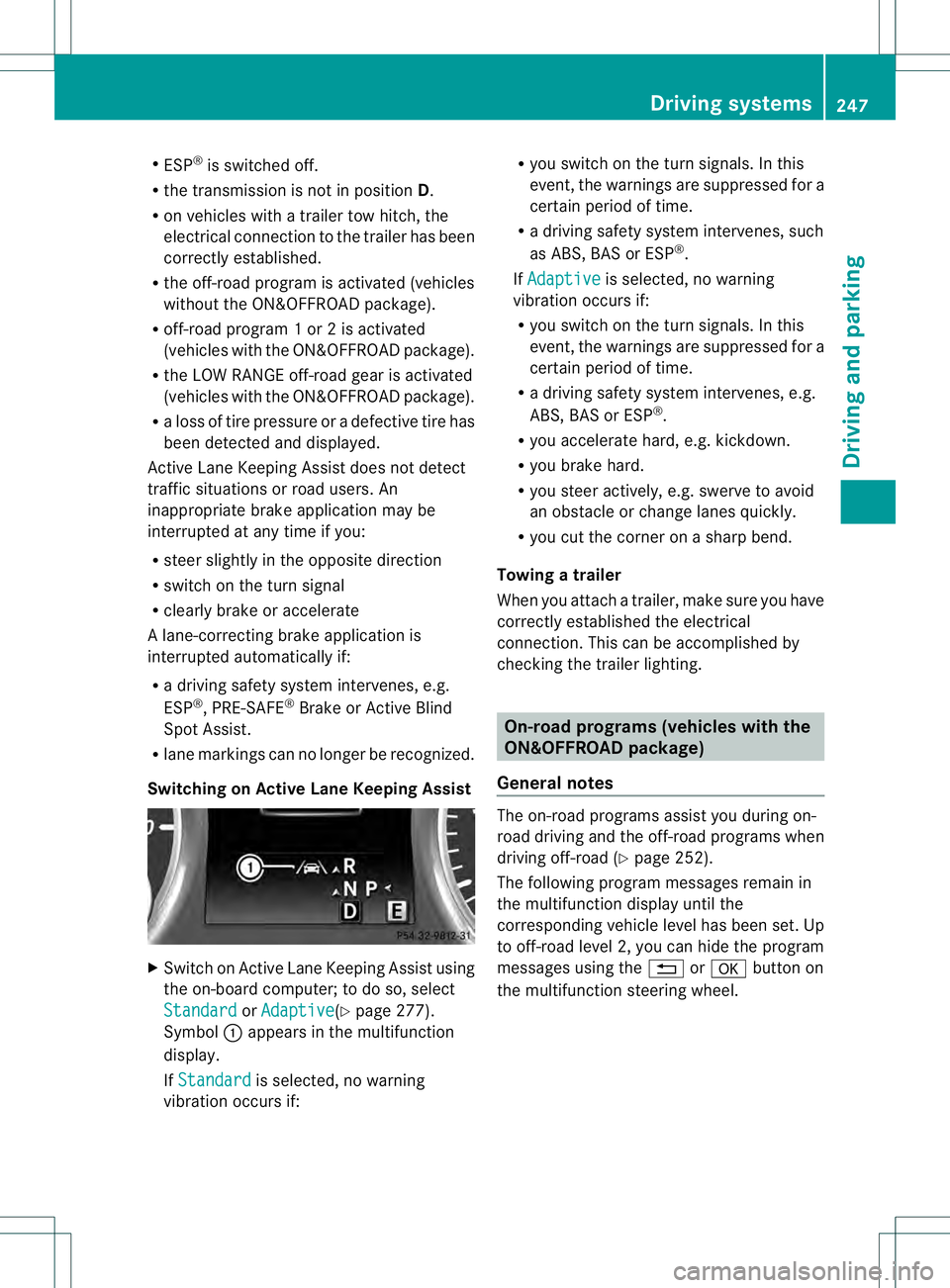
Switching on Active Lane Keeping Assist X
Switch on Active Lane Keeping Assist using
the on-board computer; to do so, select
Standard or
Adaptive (Y
page 277).
Symbol 0002appears in the multifunction
display.
If Standard is selected, no warning
vibration occurs if: R
you switch on the tur nsignals .Inthis
event, the warnings are suppressed for a
certain period of time.
R a driving safety system intervenes, such
as ABS, BAS or ESP ®
.
If Adaptive is selected, no warning
vibration occurs if:
R you switch on the turn signals. In this
event, the warnings are suppressed for a
certain period of time.
R a driving safety system intervenes, e.g.
ABS, BAS or ESP ®
.
R you accelerate hard, e.g. kickdown.
R you brake hard.
R you steer actively, e.g. swerve to avoid
an obstacle or change lanes quickly.
R you cut the corner on a sharp bend.
Towing atrailer
When you attach a trailer, make sure you have
correctly established the electrical
connection. This can be accomplished by
checking the trailer lighting. On-road programs (vehicles with the
ON&OFFROAD package)
General notes The on-road programs assist you during on-
road driving and the off-road programs when
driving off-road (Y
page 252).
The following progra mmessages remain in
the multifunction display until the
corresponding vehicle level has been set. Up
to off-road level 2, you can hide the program
messages using the 0007or000B button on
the multifunction steering wheel. Driving systems
247Driving and parking Z
Page 254 of 454
X
To increase or decrease in 1 mph
increments (Canada: 1 km/h
increments): briefly press the cruise
control lever up 0002for a highe rset speed
or down 0003for a lower set speed.
The set speed appears in the multifunction
display with the 0001DSR symbol. It is also
displayed in status indicator 0021.
When DSR is activated, you can change the
set speed to a value between 1mph and
11 mph (Canada: between 2 km/h and
18 km/h).
i The DSR set speed is always changed in
1 mph increments (Canada: 1 km/h
increments). This is regardless of whether
you press the cruise control lever to or
beyond the pressure point.
Off-road program (vehicles without the
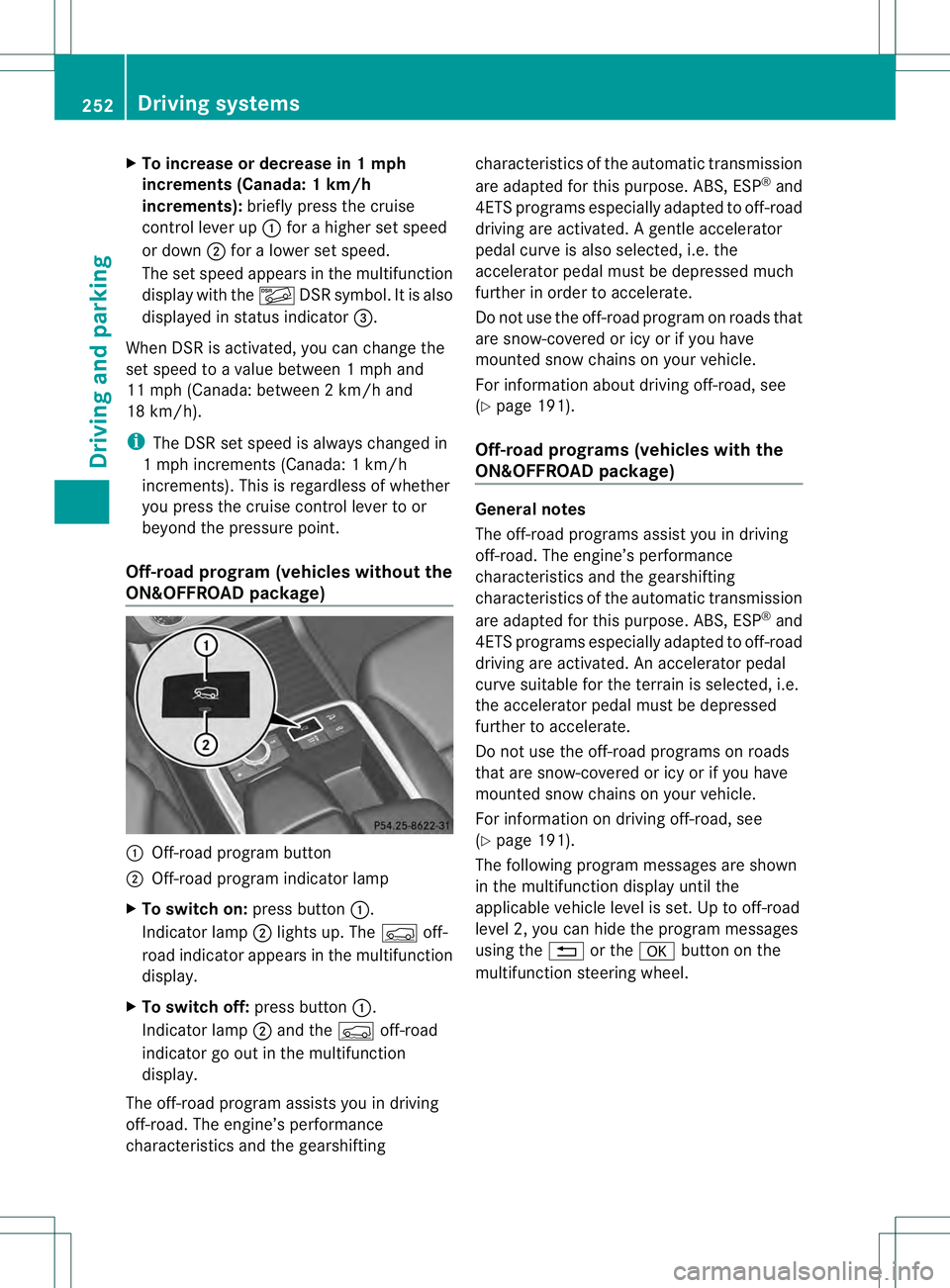
ON&OFFROAD package) 0002
Off-road program button
0003 Off-road program indicator lamp
X To switch on: press button0002.
Indicator lamp 0003lights up. The 0006off-
road indicator appears in the multifunction
display.
X To switch off: press button0002.
Indicator lamp 0003and the 0006off-road
indicator go out in the multifunction
display.
The off-road program assists you in driving
off-road. The engine’s performance
characteristics and the gearshifting characteristics of the automatic transmission
are adapted for this purpose. ABS, ESP
®
and
4ET Sprograms especially adapted to off-road
driving are activated .Agentle accelerator
pedal curve is also selected, i.e. the
accelerator pedal must be depressed much
further in order to accelerate.
Do not use the off-road program on roads that
are snow-covered or icy or if you have
mounted snow chains on your vehicle.
For information about driving off-road, see
(Y page 191).
Off-road programs (vehicles with the
ON&OFFROAD package) General notes
The off-road programs assist you in driving
off-road. The engine’s performance
characteristics and the gearshifting
characteristics of the automatic transmission
are adapted for this purpose. ABS, ESP
®
and
4ETS programs especially adapted to off-road
driving are activated. An accelerator pedal
curve suitable for the terrain is selected, i.e.
the accelerator pedal must be depressed
further to accelerate.
Do not use the off-road programs on roads
that are snow-covered or icy or if you have
mounted snow chains on your vehicle.
For information on driving off-road, see
(Y page 191).
The following program messages are shown
in the multifunction display until the
applicable vehicle level is set. Up to off-road
level 2, you can hide the program messages
using the 0007or the 000Bbutton on the
multifunction steering wheel. 252
Driving systemsDriving and parking
Page 256 of 454
The differential lock improves the vehicle’s
traction. 4ETS (Y
page 71) controls the
balance between both wheels on an axle.
You can only activate off-road program 2
when driving at speeds below 25 mph
(40 km/h).
LOW RANGE off-road gear (vehicles
with the ON&OFFROAD package) Important safety notes
G
WARNING
If you select the LOW RANGE off-road gear on
a slippery road surface, the wheels could lose
traction:
R if you remove your foot from the
accelerator pedal when driving
R if off road ABS intervenes when braking
If the wheels lose traction. the vehicle can no
longer be steered. There is an increased
danger of skidding and accidents.
Never select the LOW RANGE off-road gear
when driving on slippery road surfaces. G
WARNING
If you do not wait for the transfer case gear
change process to complete, the transfer
case could remain in the neutral position. The
power transmission to the driven wheels is
then interrupted. There is a danger of the
vehicle rolling away unintentionally. There is
a risk of an accident.
Wait until the transfer case shift process is
completed.
Do not turn off the engine while changing gear
and do not shift the automatic transmission
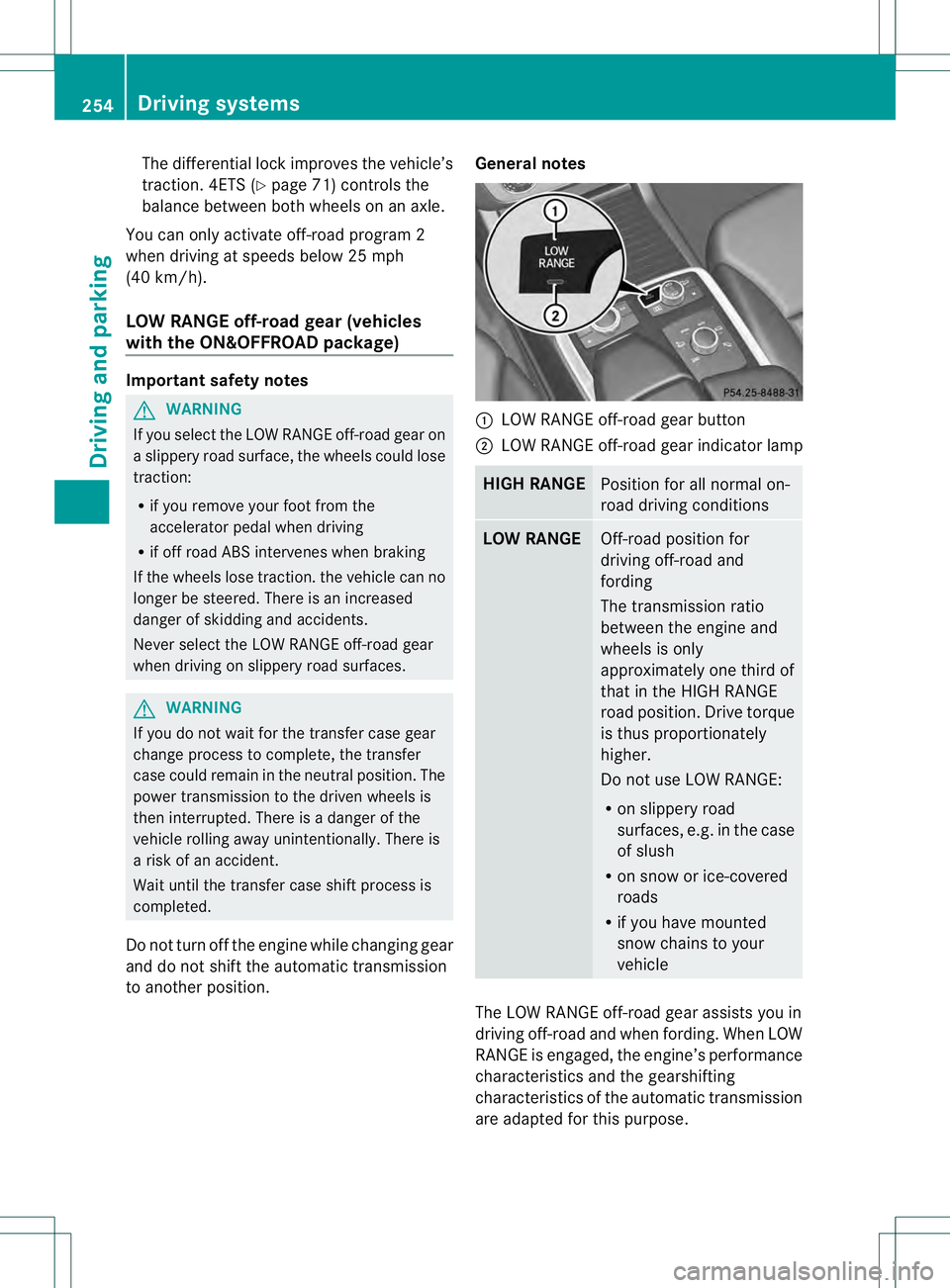
to another position. General notes 0002
LOW RANGE off-road gear button
0003 LOW RANGE off-road gear indicator lamp HIGH RANGE
Position for all normal on-
road driving conditions
LOW RANGE
Off-road position for
driving off-road and
fording
The transmission ratio
between the engine and
wheels is only
approximately one third of
that in the HIGH RANGE
road position. Drive torque
is thus proportionately
higher.
Do not use LOW RANGE:
R
on slippery road
surfaces, e.g. in the case
of slush
R on snow or ice-covered
roads
R if you have mounted
snow chains to your
vehicle The LOW RANGE off-road gear assists you in
driving off-road and when fording. When LOW
RANGE is engaged, the engine’s performance
characteristics and the gearshifting
characteristics of the automatic transmission
are adapted for this purpose.254
Driving systemsDriving and parking
Page 289 of 454
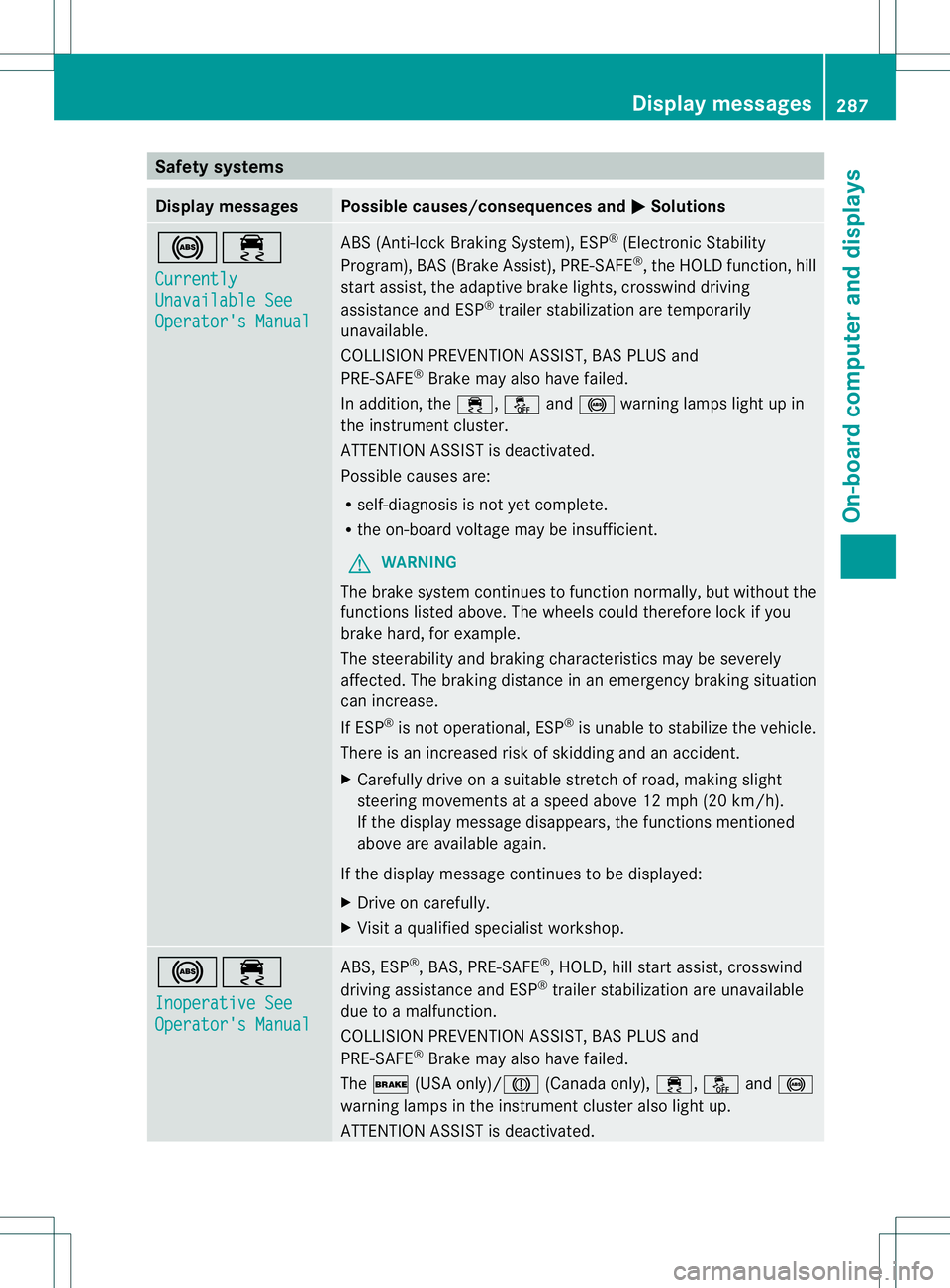
Safety systems
Display messages Possible causes/consequences and
0001 Solutions
0019000F
Currently
Unavailable See
Operator's Manual ABS (Anti-lock Braking System), ESP
®
(Electronic Stability
Program), BAS (Brake Assist), PRE-SAFE ®
, the HOLD function, hill
start assist, the adaptive brake lights, crosswind driving
assistance and ESP ®
trailer stabilization are temporarily
unavailable.
COLLISION PREVENTION ASSIST, BAS PLUS and
PRE-SAFE ®
Brake may also have failed.
In addition, the 000F,0017and0019 warning lamps light up in
the instrument cluster.
ATTENTION ASSIST is deactivated.
Possible causes are:
R self-diagnosis is not yet complete.
R the on-board voltage may be insufficient.
G WARNING
The brake system continues to function normally, but without the
functions listed above. The wheels could therefore lock if you
brake hard, for example.
The steerability and braking characteristics may be severely
affected. The braking distance in an emergency braking situation
can increase.
If ESP ®
is not operational, ESP ®
is unable to stabilize the vehicle.
There is an increased risk of skidding and an accident.
X Carefully drive on a suitable stretch of road, making slight
steering movements at a speed above 12 mph (20 km/h).
If the display message disappears, the functions mentioned
above are available again.
If the display message continues to be displayed:
X Drive on carefully.
X Visit a qualified specialist workshop. 0019000F
Inoperative See
Operator's Manual ABS, ESP
®
, BAS, PRE-SAFE ®
, HOLD, hill start assist, crosswind
driving assistance and ESP ®
trailer stabilization are unavailable
due to a malfunction.
COLLISION PREVENTION ASSIST, BAS PLUS and
PRE-SAFE ®
Brake may also have failed.
The 0012 (USA only)/0009 (Canada only),000F,0017and0019
warning lamps in the instrumen tcluster also light up.
ATTENTION ASSIST is deactivated. Display messages
287On-board computer and displays Z
Page 291 of 454
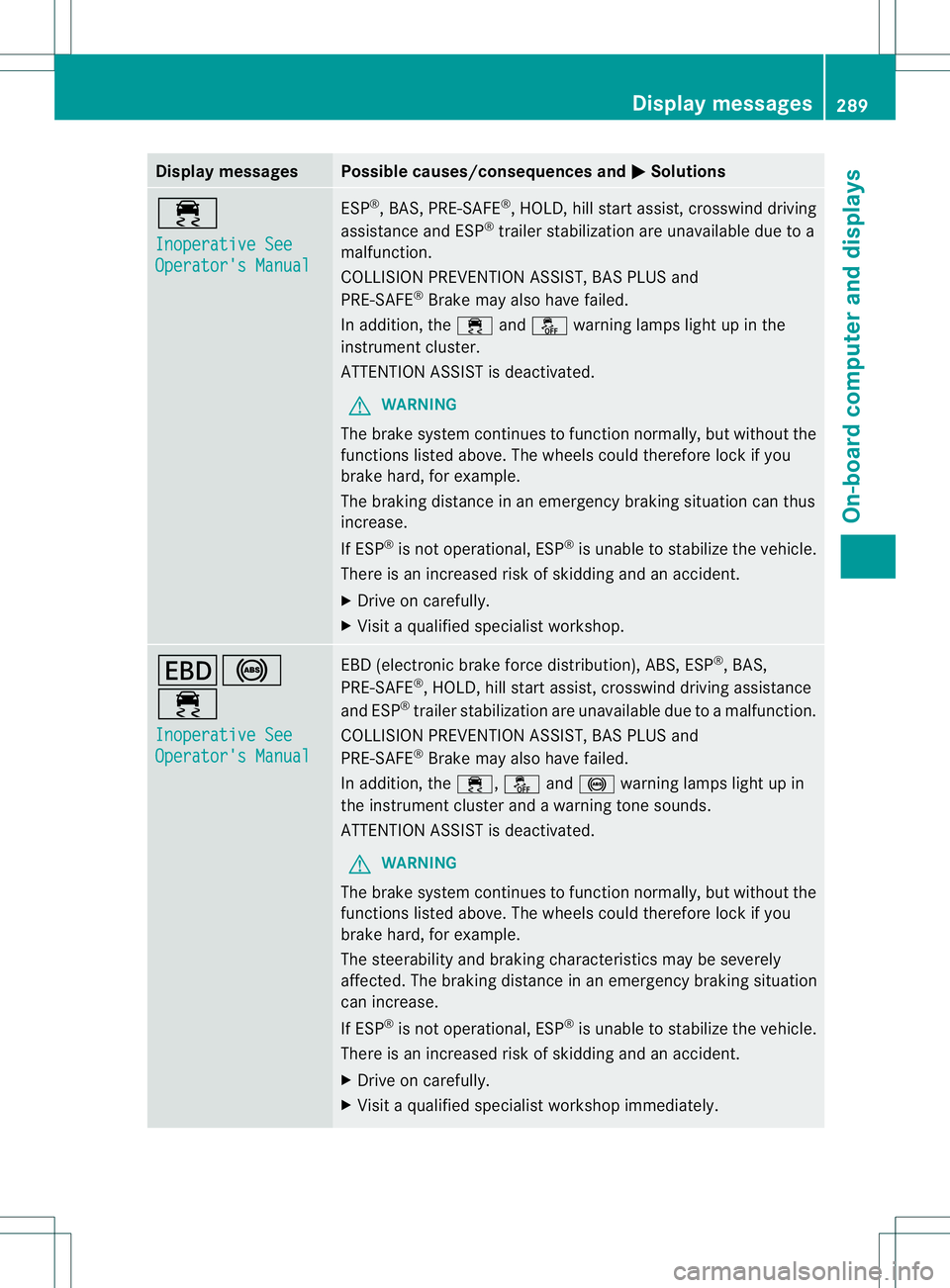
Display messages Possible causes/consequences and
0001 Solutions
000F
Inoperative See
Operator's Manual ESP
®
, BAS, PRE-SAFE ®
, HOLD, hill start assist, crosswind driving
assistance and ESP ®
trailer stabilization are unavailable due to a
malfunction.
COLLISION PREVENTION ASSIST, BAS PLUS and
PRE-SAFE ®
Brake may also have failed.
In addition, the 000Fand0017 warning lamps ligh tup in the
instrument cluster.
ATTENTION ASSIST is deactivated.
G WARNING
The brake system continues to function normally, but without the
functions listed above. The wheels could therefore lock if you
brake hard, for example.
The braking distance in an emergency braking situation can thus
increase.
If ESP ®
is not operational, ESP ®
is unable to stabilize the vehicle.
There is an increased risk of skidding and an accident.
X Drive on carefully.
X Visit a qualified specialist workshop. 000D0019
000F
Inoperative See
Operator's Manual EBD (electronic brake force distribution), ABS, ESP
®
, BAS,
PRE-SAFE ®
, HOLD, hill start assist, crosswind driving assistance
and ESP ®
trailer stabilization are unavailable due to a malfunction.
COLLISION PREVENTION ASSIST, BAS PLUS and
PRE-SAFE ®
Brake may also have failed.
In addition, the 000F,0017and0019 warning lamps light up in
the instrument cluster and a warning tone sounds.
ATTENTION ASSIST is deactivated.
G WARNING
The brake system continues to function normally, but without the
functions listed above. The wheels could therefore lock if you
brake hard, for example.
The steerability and braking characteristics may be severely
affected. The braking distance in an emergency braking situation
can increase.
If ESP ®
is not operational, ESP ®
is unable to stabilize the vehicle.
There is an increased risk of skidding and an accident.
X Drive on carefully.
X Visit a qualified specialist workshop immediately. Display messages
289On-board computer and displays Z