center console MERCEDES-BENZ GL 2013 User Guide
[x] Cancel search | Manufacturer: MERCEDES-BENZ, Model Year: 2013, Model line: GL, Model: MERCEDES-BENZ GL 2013Pages: 454, PDF Size: 6.31 MB
Page 49 of 454
Front-passenger front air bag
0003will only
deploy if:
R the system, based on the OCS weight
senso rreadings, has detected that the
front-passenger seat is occupied.
R the 001A001C indicator lamp on the center
console is not lit (Y page 48).
R the air bag control unit predicts a high
impact severity.
Driver's knee bag Driver's knee bag
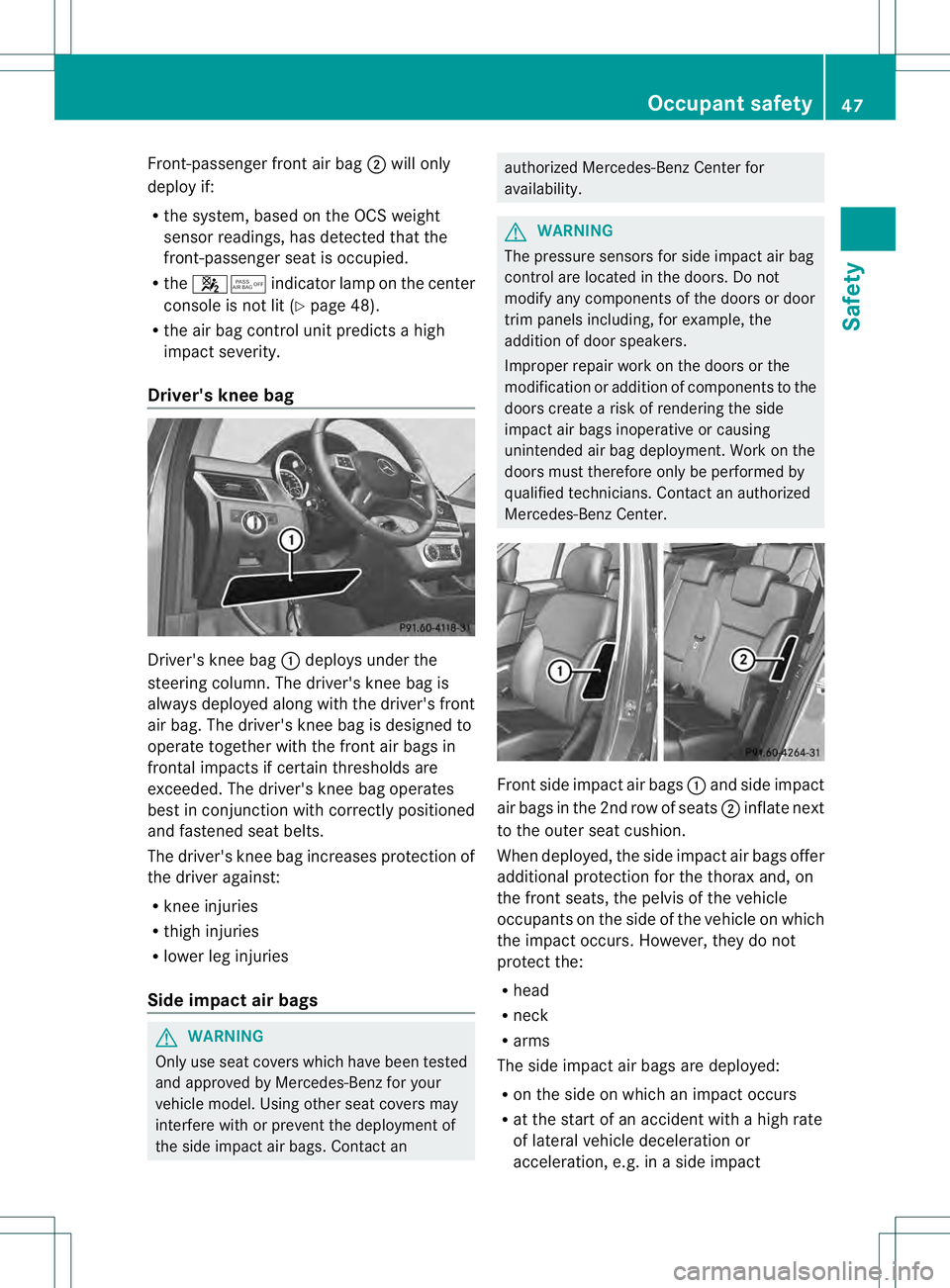
0002deploys under the
steering column. The driver's knee bag is
always deployed along with the driver's front
air bag. The driver's knee bag is designed to
operate together with the fron tair bags in
frontal impacts if certain thresholds are
exceeded. The driver's knee bag operates
best in conjunction with correctly positioned
and fastened seat belts.
The driver's knee bag increases protection of
the drive ragainst:
R knee injuries
R thigh injuries
R lower leg injuries
Side impact air bags G
WARNING
Only use seat covers which have been tested
and approved by Mercedes-Benz for your
vehicle model. Using other seat covers may
interfere with or prevent the deployment of
the side impact air bags. Contact an authorized Mercedes-Benz Center for
availability.
G
WARNING
The pressure sensors for side impact air bag
control are located in the doors. Do not
modify any components of the doors or door
trim panels including, for example, the
addition of door speakers.
Improper repair work on the doors or the
modification or addition of components to the
doors create a risk of rendering the side
impact air bags inoperative or causing
unintended air bag deployment. Work on the
doors must therefore only be performed by
qualified technicians. Contact an authorized
Mercedes-Benz Center. Fronts
ide impac tair bags 0002and side impact
air bags in the 2nd row of seats 0003inflate next
to the outer seat cushion.
When deployed, the side impac tair bags offer
additional protection for the thorax and, on
the front seats, the pelvis of the vehicle
occupants on the side of the vehicle on which
the impac toccurs .However, they do not
protect the:
R head
R neck
R arms
The side impact air bags are deployed:
R on the side on which an impact occurs
R at the start of an accident with a high rate
of lateral vehicle deceleration or
acceleration, e.g. in aside impact Occupant safety
47Safety Z
Page 227 of 454
message appears in the multifunction
display.
or
X Press the PARKTRONIC button on the
center console (Y page 219).
PARKTRONIC is switched off and Active
Parking Assist is immediatel ycanceled.
The Park Assist Canceled message
appears in the multifunction display.
Active Parking Assist is canceled
automatically if:
R parking using Active Parking Assist is no
longer possible.
R you are driving faster than 6mph
(10 km/h).
R a wheel spins, ESP ®
intervenes or fails .The
000F warning lamp lights up in the
instrument cluster.
Aw arning tone sounds. The parking symbol
disappears and the multifunction display
shows the Park Assist Canceled message.
When Active Parking Assist is canceled, you
must steer again yourself.
Towing
atrailer For vehicles with a trailer tow hitch, the
minimum length for parking spaces is slightly
increased.
If you have attached a trailer to your vehicle,
you should not use Active Parking Assist.
Once the electrical connectio nis established
between your vehicle and the trailer, Active
Parking Assist is no longer available.
PARKTRONIC is deactivated for the rear area. Rear view camera
Important safety notes The rear view camera is only an aid. It is not
a replacement for your attention to your
immediate surroundings. You are always
responsible for safe maneuvering and
parking. When maneuvering or parking, make sure that there are no persons, animals or
objects in the area in which you are
maneuvering.
Under the following circumstances, the rear
view camera will not function, or will function
in a limited manner:
R the tailgate is open
R in heavy rain, snow or fog
R at night or in very dark places
R if the camera is exposed to very bright light
R if the area is lit by fluorescent light or LED
lighting (the display may flicker)
R if there is a sudden change in temperature,
e.g. when driving into a heated garage in
winter
R if the camera lens is dirty or obstructed
R if the rear of your vehicle is damaged.In
this event, have the camera positio nand
setting checked at a qualified specialist
workshop.
General notes Rear view camera
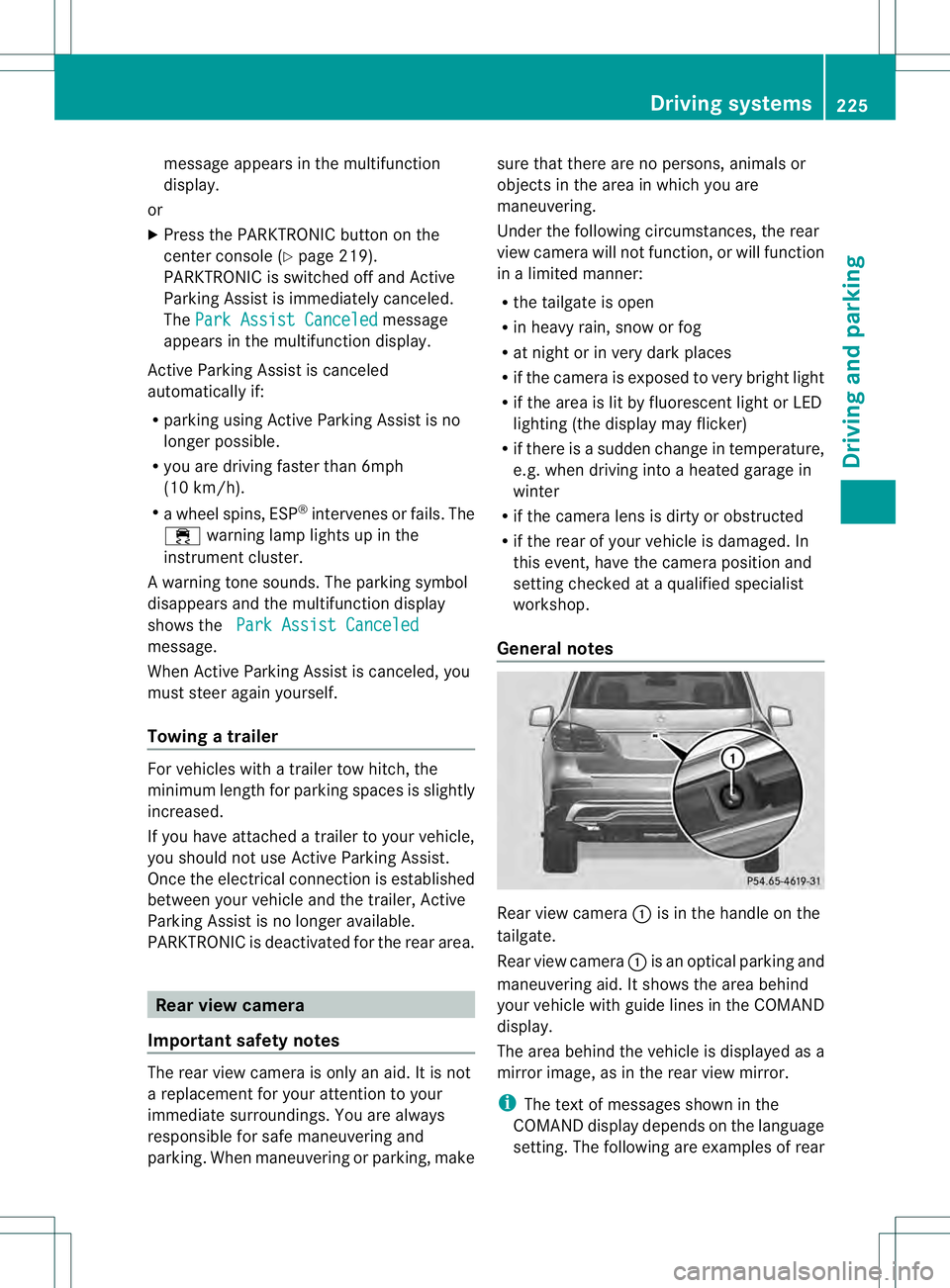
0002is in the handle on the
tailgate.
Rear view camera 0002is an optical parking and
maneuvering aid. It shows the area behind
your vehicle with guide lines in the COMAND
display.
The area behind the vehicle is displayed as a
mirror image, as in the rear view mirror.
i The text of messages shown in the
COMAND display depends on the language
setting. The following are examples of rear Driving systems
225Driving and parking Z
Page 258 of 454
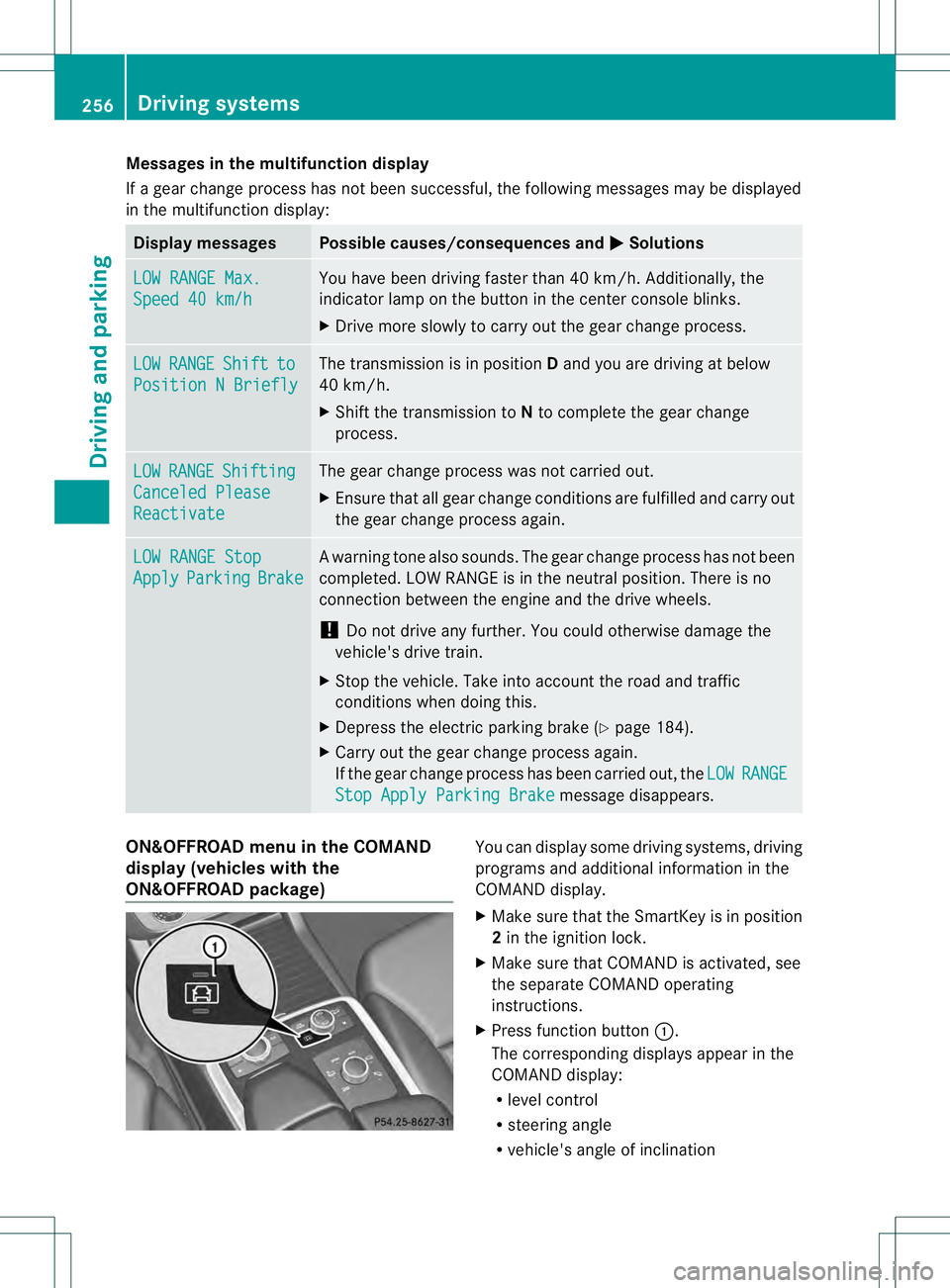
Messages in the multifunction display
If a gearc
hange process has not been successful, the following messages may be displayed
in the multifunction display: Display messages Possible causes/consequences and
0001 Solutions
LOW RANGE Max.
Speed 40 km/h You have been driving faster than 40 km/h. Additionally, the
indicator lamp on the button in the center console blinks.
X
Drive more slowly to carry out the gear change process. LOW RANGE Shift to
Position N Briefly The transmission is in position
Dand you are driving at below
40 km/h.
X Shift the transmission to Nto complete the gear change
process. LOW RANGE Shifting
Canceled Please
Reactivate The gear change process was not carried out.
X
Ensure that all gear change conditions are fulfilled and carry out
the gear change process again. LOW RANGE Stop
Apply Parking Brake Aw
arning tone also sounds. The gear change proces shas no tbeen
completed. LOW RANGE is in the neutral position .There is no
connection between the engine and the drive wheels.
! Do not drive any further. You could otherwise damage the
vehicle's drive train.
X Stop the vehicle. Take into account the road and traffic
conditions when doing this.
X Depress the electric parking brake (Y page 184).
X Carry out the gear change process again.
If the gear change process has been carried out, the LOW RANGE
Stop Apply Parking Brake message disappears.
ON&OFFROAD menu in the COMAND
display (vehicles with the
ON&OFFROAD package) You can display some driving systems, driving
programs and additional information in the
COMAND display.
X Make sure that the SmartKey is in position
2in the ignition lock.
X Make sure that COMAND is activated, see
the separate COMAND operating
instructions.
X Press function button 0002.
The corresponding displays appearint he
COMAND display:
R level control
R steering angle
R vehicle's angle of inclination 256
Driving systemsDriving and parking
Page 299 of 454
Display messages Possible causes/consequences and
0001 Solutions
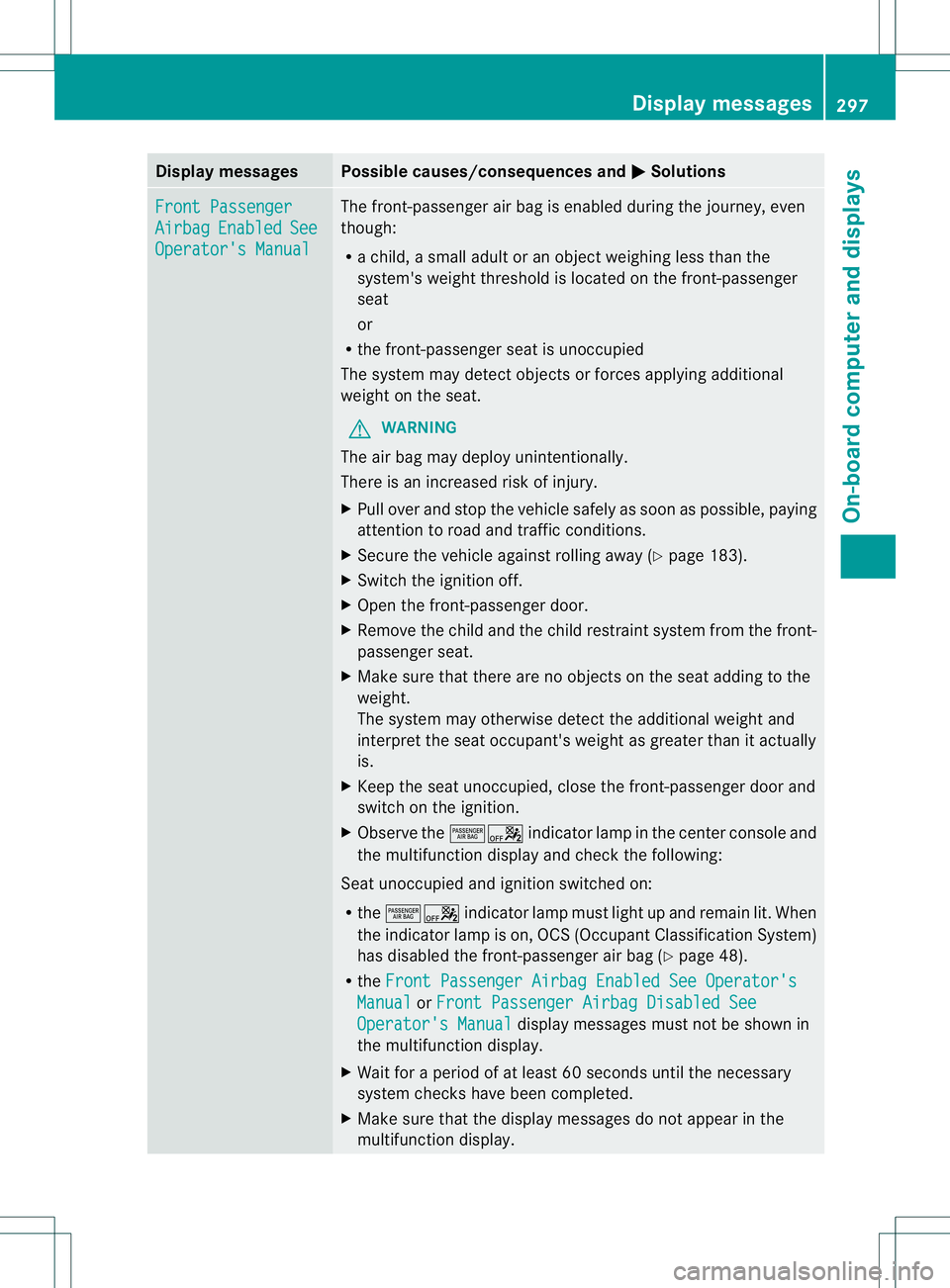
Front Passenger
Airbag Enabled See
Operator's Manual The front-passenger air bag is enabled during the journey, even
though:
R
a child, a small adult or an objec tweighing less than the
system's weight threshold is located on the front-passenger
seat
or
R the front-passenger seat is unoccupied
The system may detec tobjects or forces applying additional
weight on the seat.
G WARNING
The air bag may deploy unintentionally.
There is an increased risk of injury.
X Pull over and stop the vehicle safely as soon as possible, paying
attention to road and traffic conditions.
X Secure the vehicle against rolling away (Y page 183).
X Switch the ignition off.
X Open the front-passenger door.
X Remove the child and the child restraint system from the front-
passenger seat.
X Make sure that there are no objects on the seat adding to the
weight.
The system may otherwise detec tthe additional weight and
interpret the seat occupant's weight as greater than it actually
is.
X Keep the seat unoccupied, close the front-passenger door and
switch on the ignition.
X Observe the 00050006indicator lamp in the center console and
the multifunction display and check the following:
Seat unoccupied and ignition switched on:
R the 00050006 indicator lamp must light up and remain lit. When
the indicator lamp is on, OCS (Occupant Classification System)
has disabled the front-passenger air bag (Y page 48).
R the Front Passenger Airbag Enabled See Operator's Manual or
Front Passenger Airbag Disabled See Operator's Manual display messages must not be shown in
the multifunction display.
X Wait for a period of at least 60 seconds until the necessary
system checks have been completed.
X Make sure that the display messages do not appearint he
multifunction display. Display messages
297On-board computer and displays Z
Page 300 of 454
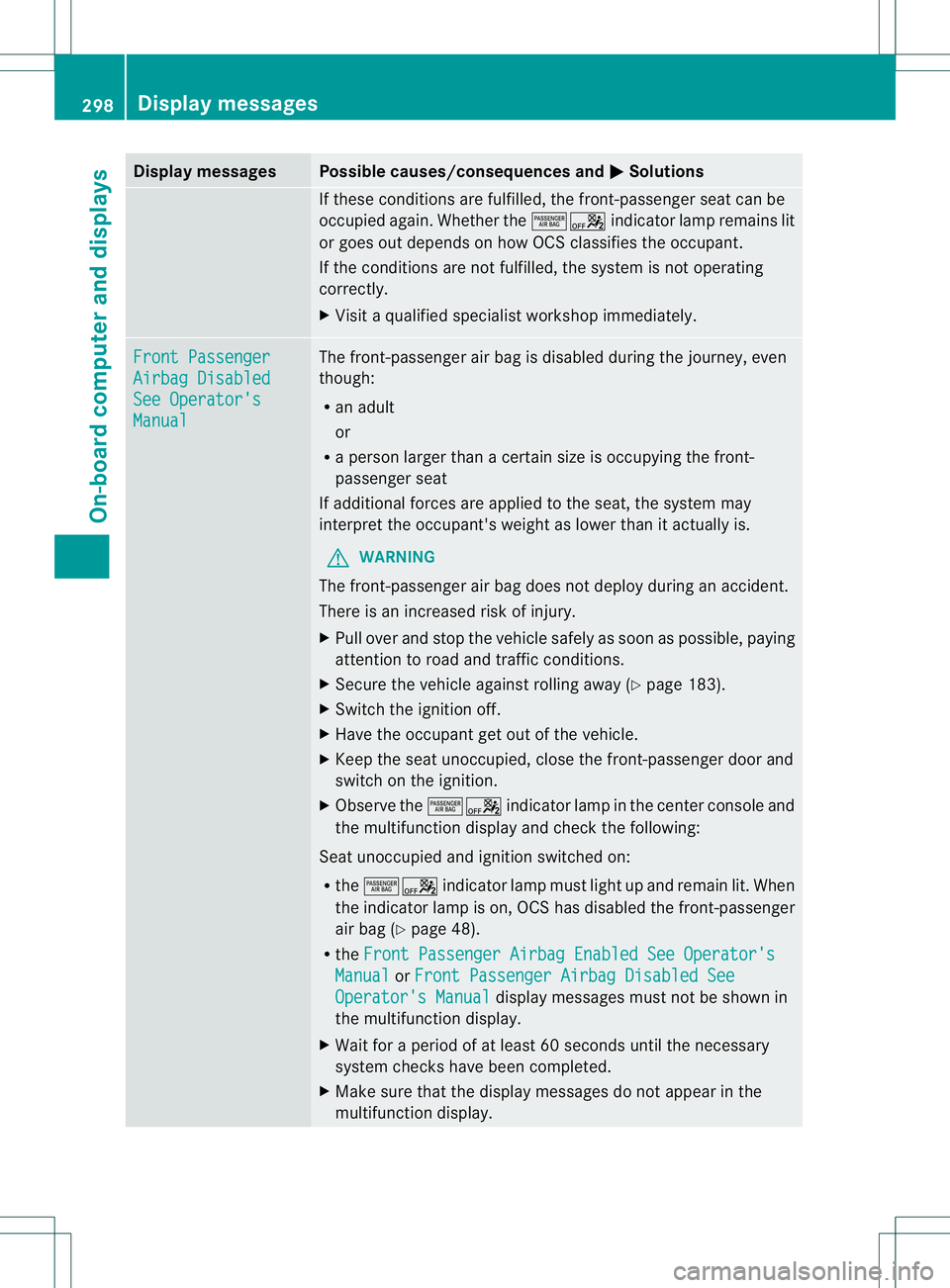
Display messages Possible causes/consequences and
0001 Solutions
If these conditions are fulfilled, the front-passenger seat can be
occupied again
.Whether the 00050006 indicator lamp remains lit
or goes out depends on how OCS classifies the occupant.
If the conditions are not fulfilled, the system is not operating
correctly.
X Visit a qualified specialist workshop immediately. Front Passenger
Airbag Disabled
See Operator's
Manual The front-passenger air bag is disabled during the journey, even
though:
R
an adult
or
R a person larger than a certain size is occupying the front-
passenger seat
If additional forces are applied to the seat, the system may
interpret the occupant's weight as lower than it actually is.
G WARNING
The front-passenger air bag does not deploy during an accident.
There is an increased risk of injury.
X Pull over and stop the vehicle safely as soon as possible, paying
attention to road and traffic conditions.
X Secure the vehicle against rolling away (Y page 183).
X Switch the ignition off.
X Have the occupant get out of the vehicle.
X Keep the seat unoccupied, close the front-passenger door and
switch on the ignition.
X Observe the 00050006indicator lamp in the center console and
the multifunction display and check the following:
Seat unoccupied and ignition switched on:
R the 00050006 indicator lamp must light up and remain lit. When
the indicator lamp is on, OCS has disabled the front-passenger
air bag (Y page 48).
R the Front Passenger Airbag Enabled See Operator's Manual or
Front Passenger Airbag Disabled See Operator's Manual display messages must not be shown in
the multifunction display.
X Wait for a period of at least 60 seconds until the necessary
system checks have been completed.
X Make sure that the display messages do not appearint he
multifunction display. 298
Display messagesOn-board computer and displays
Page 340 of 454
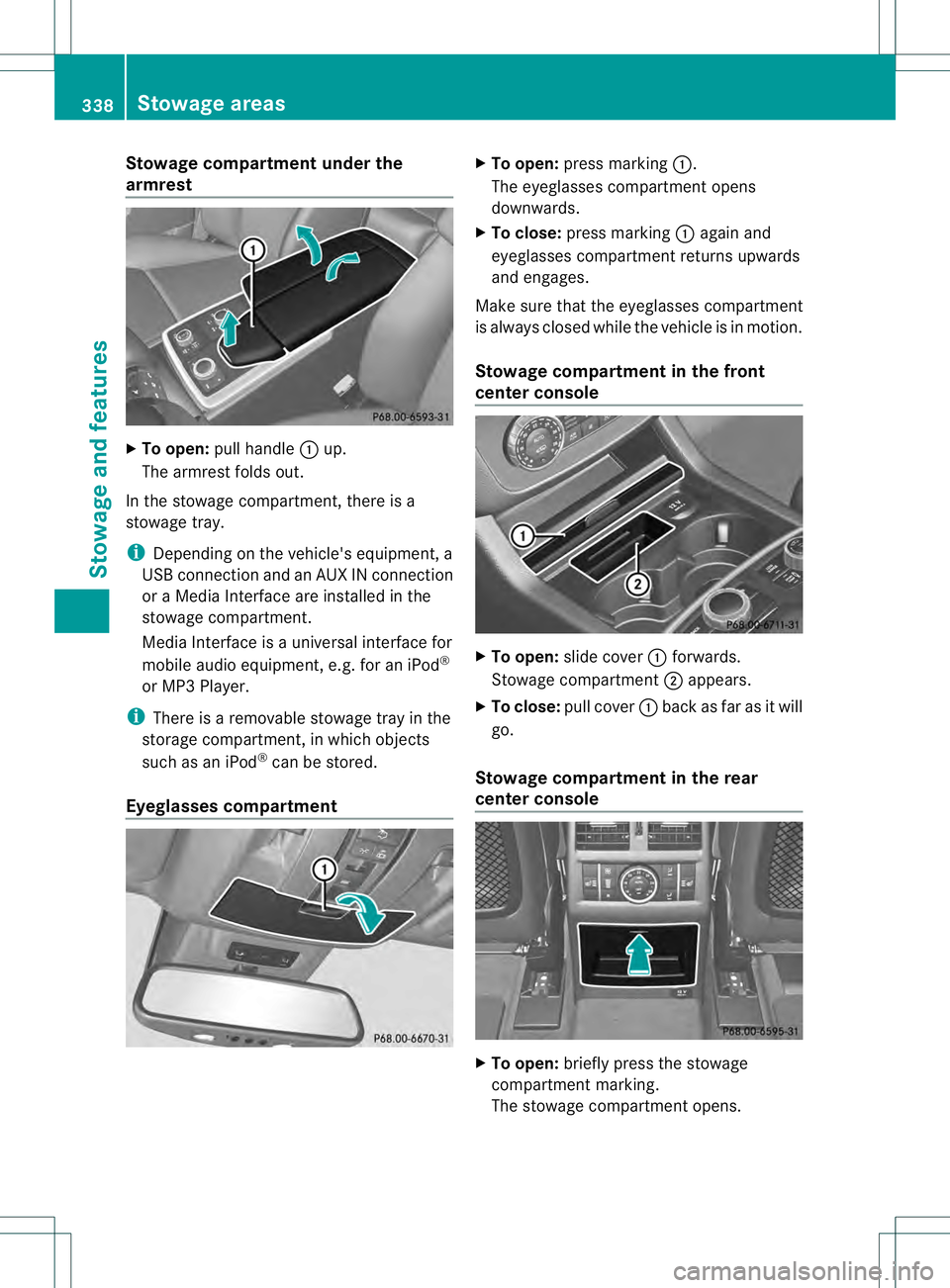
Stowage compartment under the
armrest
X
To open: pull handle 0002up.
The armrest folds out.
In the stowage compartment, there is a
stowage tray.
i Depending on the vehicle's equipment, a
USB connection and an AUX IN connection
or a Media Interface are installed in the
stowage compartment.
Media Interface is a universal interface for
mobile audio equipment, e.g. for an iPod ®
or MP3 Player.
i There is a removable stowage tray in the
storage compartment, in which objects
such as an iPod ®
can be stored.
Eyeglasses compartment X
To open: press marking 0002.
The eyeglasses compartmen topens
downwards.
X To close: press marking 0002again and
eyeglasses compartment returns upwards
and engages.
Make sure that the eyeglasses compartment
is always closed while the vehicle is in motion.
Stowage compartment in the front
center console X
To open: slide cover 0002forwards.
Stowage compartment 0003appears.
X To close: pull cover 0002back as far as it will
go.
Stowage compartment in the rear
center console X
To open: briefly press the stowage
compartment marking.
The stowage compartment opens. 338
Stowage areasStowage and features
Page 347 of 454
R
Always stow objects so tha tthey cannot be
thrown around in such situations.
R Always make sure that objects do not
protrude from stowage spaces, parcel nets
or stowage nets.
R Close the lockable stowage spaces while
driving.
R Stow and secure objects that are heavy,
hard, pointy, sharp-edged, fragile or too
large in the cargo compartment.
! Only use the cup holders for containers of
the right size and which have lids. The
drinks could otherwise spill.
The stowage compartments in the doors
provide space for bottles with a capacity of
up to 34 fl. oz. (1.0 liter).
The bottles are not secured or prevented from
tipping over. Therefore, do not place any open
drink containers in the stowage
compartments.
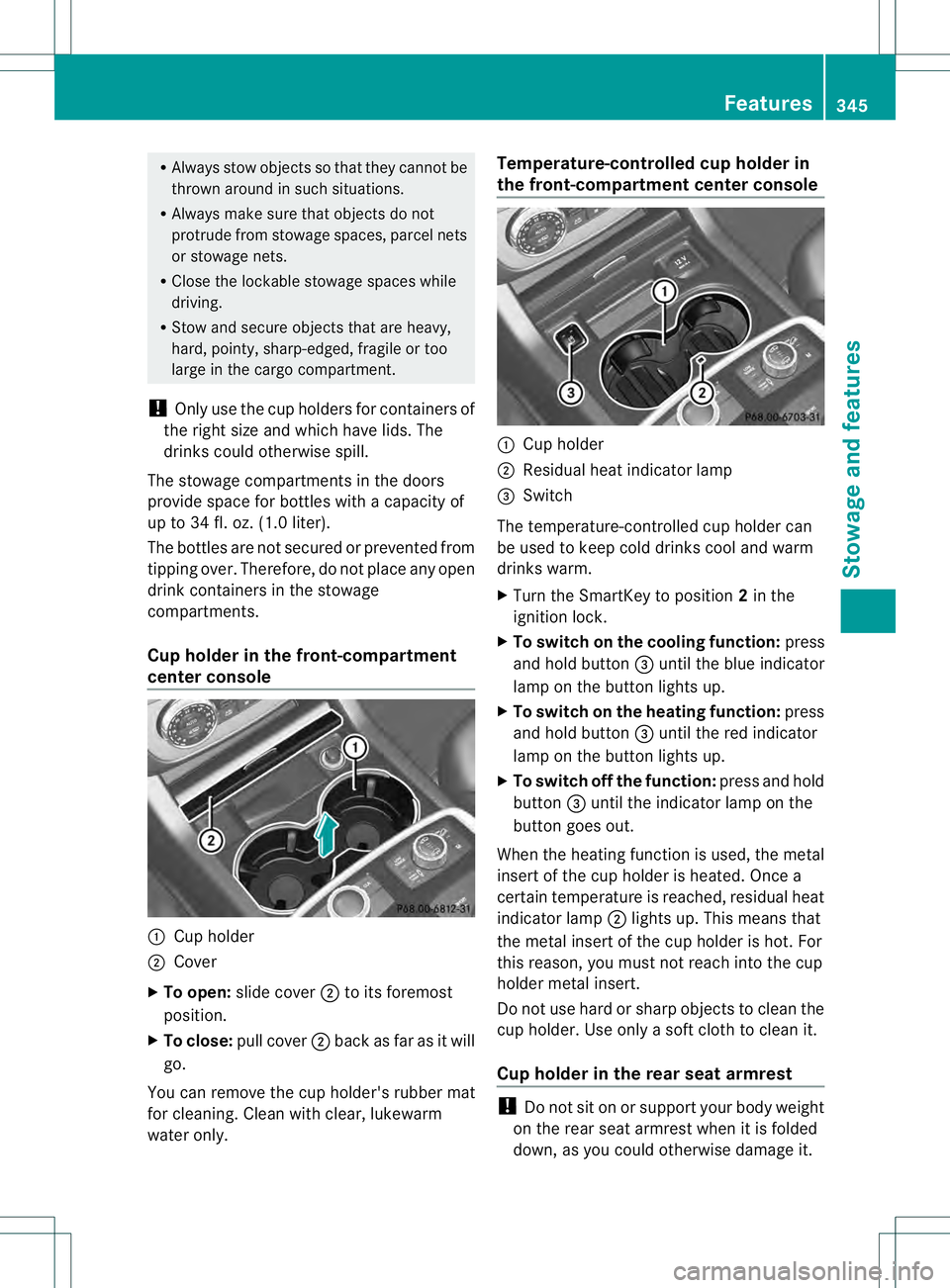
Cup holder in the front-compartment
center console 0002
Cup holder
0003 Cover
X To open: slide cover 0003to its foremost
position.
X To close: pull cover 0003back as far as it will
go.
You can remove the cup holder's rubber mat
for cleaning. Cleanw ith clear, lukewarm
water only. Temperature-controlled cup holder in
the front-compartment center console
0002
Cup holder
0003 Residual heat indicator lamp
0021 Switch
The temperature-controlled cup holder can
be used to keep cold drinks cool and warm
drinks warm.
X Turn the SmartKey to position 2in the
ignition lock.
X To switch on the cooling function: press
and hold button 0021until the blue indicator
lamp on the button lights up.
X To switch on the heating function: press
and hold button 0021until the red indicator
lamp on the button lights up.
X To switch off the function: press and hold
button 0021until the indicator lamp on the
button goes out.
When the heating function is used, the metal
insert of the cup holder is heated. Once a
certain temperature is reached, residual heat
indicator lamp 0003lights up. This means that
the metal insert of the cup holder is hot .For
this reason, you must not reach into the cup
holder metal insert.
Do not use hard or sharp objects to clean the
cup holder. Use only a soft cloth to clean it.
Cup holder in the rear seat armrest !
Do not sit on or support your body weight
on the rear seat armrest when it is folded
down, as you could otherwise damage it. Features
345Stowage and features Z
Page 350 of 454
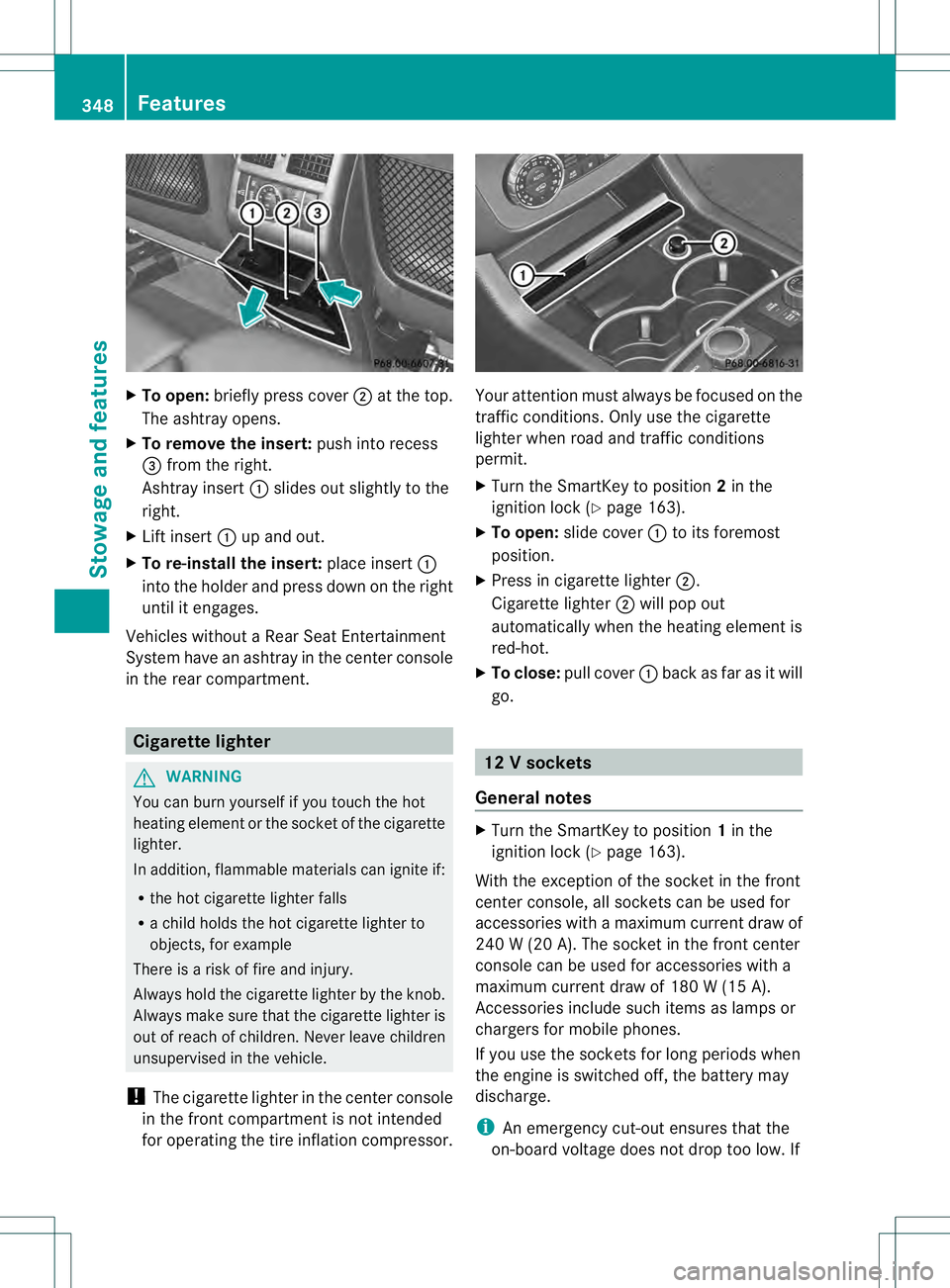
X
To open: briefly press cover 0003at the top.
The ashtray opens.
X To remove the insert: push into recess
0021 from the right.
Ashtray insert 0002slides ou tslightly to the
right.
X Lift insert 0002up and out.
X To re-install the insert: place insert0002
into the holder and press down on the right
until it engages.
Vehicles without a Rear Seat Entertainment
System have an ashtray in the center console
in the rear compartment. Cigarette lighter
G
WARNING
You can burn yourself if you touch the hot
heating elemen torthe socket of the cigarette
lighter.
In addition, flammable materials can ignite if:
R the hot cigarette lighter falls
R a child holds the hot cigarette lighter to
objects, for example
There is a risk of fire and injury.
Always hold the cigarette lighter by the knob.
Always make sure that the cigarette lighter is
out of reach of children. Never leave children
unsupervised in the vehicle.
! The cigarette lighter in the center console
in the front compartment is not intended
for operating the tire inflation compressor. Your attention must always be focused on the
traffic conditions. Only use the cigarette
lighter when road and traffic conditions
permit.
X
Turn the SmartKey to position 2in the
ignition lock (Y page 163).
X To open: slide cover 0002to its foremost
position.
X Press in cigarette lighter 0003.
Cigarette lighter 0003will pop out
automatically when the heating element is
red-hot.
X To close: pull cover 0002back as far as it will
go. 12
Vsockets
General notes X
Turn the SmartKey to position 1in the
ignitio nlock (Y page 163).
With the exception of the socket in the front
center console, all socket scan be used for
accessories with a maximum curren tdraw of
240 W (20 A). The socket in the front center
console can be used for accessories with a
maximum current draw of 180 W (15 A).
Accessories include such items as lamps or
chargers for mobile phones.
If you use the sockets for long periods when
the engine is switched off, the battery may
discharge.
i An emergency cut-out ensures that the
on-board voltage does not drop too low.If 348
FeaturesStowage and features
Page 351 of 454
the on-board voltage is too low, the power
to the sockets is automatically cut. This
ensures tha tthere is sufficient power to
start the engine.
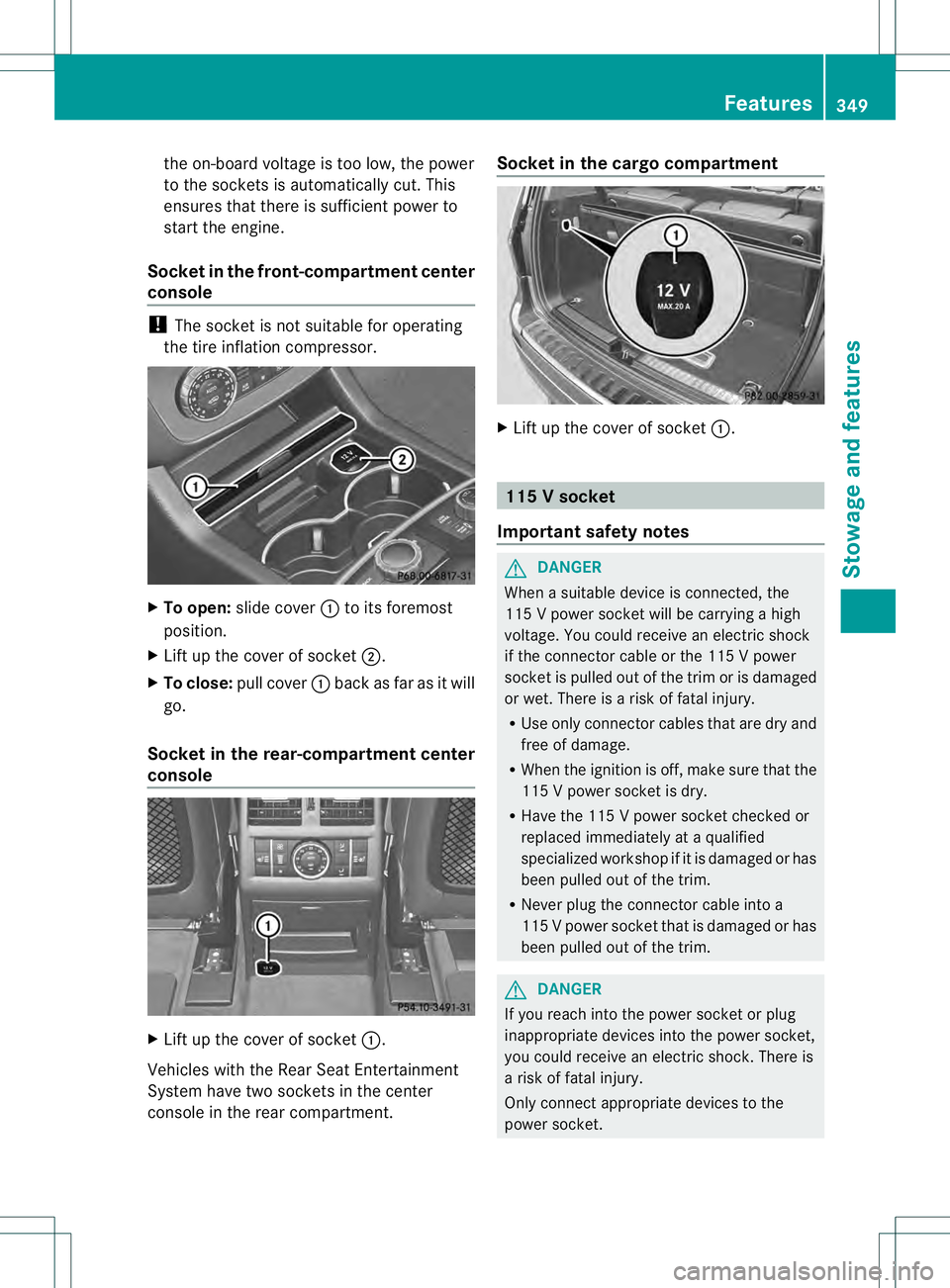
Socket in the front-compartment center
console !
The socket is not suitable for operating
the tire inflation compressor. X
To open: slide cover 0002to its foremost
position.
X Lift up the cover of socket 0003.
X To close: pull cover 0002back as far as it will
go.
Socket in the rear-compartment center
console X
Lift up the cover of socket 0002.
Vehicles with the Rear Seat Entertainment
System have two sockets in the center
console in the rear compartment. Socket in the cargo compartment
X
Lift up the cover of socket 0002. 115
Vsocket
Important safety notes G
DANGER
When a suitable device is connected, the
11 5Vp ower socket will be carrying a high
voltage. You could receive an electric shock
if the connector cable or the 115 V power
socket is pulled out of the trim or is damaged
or wet. There is a risk of fatal injury.
R Use only connector cables that are dry and
free of damage.
R When the ignition is off, make sure that the
115 V power socket is dry.
R Have the 115 V power socket checked or
replaced immediately at a qualified
specialized workshop if it is damaged or has
been pulled out of the trim.
R Never plug the connector cable into a
115 Vpower socket that is damaged or has
been pulled out of the trim. G
DANGER
If you reach into the power socket or plug
inappropriate devices into the power socket,
you could receive an electric shock. There is
a risk of fatal injury.
Only connect appropriate devices to the
power socket. Features
349Stowage and features Z