fuel MERCEDES-BENZ GL 2013 User Guide
[x] Cancel search | Manufacturer: MERCEDES-BENZ, Model Year: 2013, Model line: GL, Model: MERCEDES-BENZ GL 2013Pages: 454, PDF Size: 6.31 MB
Page 36 of 454
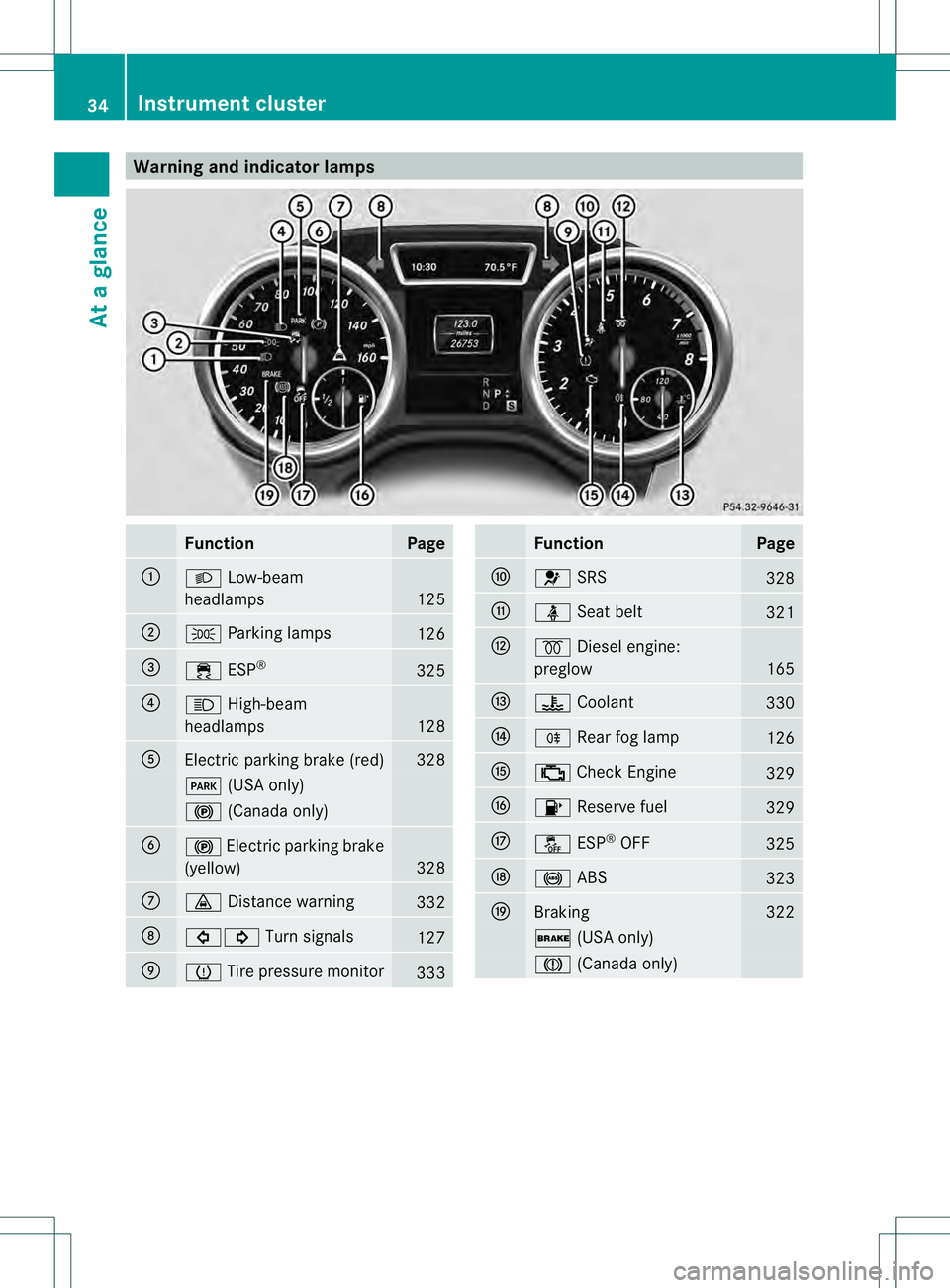
Warning and indicator lamps
Function Page
0002
000D
Low-beam
headlamps 125
0003
0016
Parking lamps 126
0021
000F
ESP® 325
0020
000C
High-beam
headlamps 128
001E
Electric parking brake (red) 328
0008
(USA only) 000D
(Canada only) 001F
000D
Electric parking brake
(yellow) 328
0013
000F
Distance warning 332
0014
00070006
Turn signals 127
0015
0013
Tire pressure monitor 333 Function Page
0016
001F
SRS 328
0017
0014
Seat belt 321
0018
0010
Diesel engine:
preglow 165
0019
000E
Coolant 330
001A
0010
Rearfog lamp 126
001B
0010
Check Engine 329
001C
0012
Reserve fuel 329
001D
0017
ESP®
OFF 325
0023
0019
ABS 323
0024
Braking 322
0012
(USA only) 0009
(Canada only) 34
Instrument clusterAt a glance
Page 81 of 454
Strong magnetic fields can occur in the
vicinity of powerful electrical installations.
R Do not keep the SmartKey:
- with electronic devices, e.g. a mobile
phone or another SmartKey
- with metallic objects, e.g. coins or metal
foil
- inside metallic objects, e.g. a metal case
This can affect the functionality of the
SmartKey.
Do not keep the KEYLESS-GO key in the
temperature-controlled cup holder.
Otherwise, the KEYLESS-GO key will not be
recognized. SmartKey functions
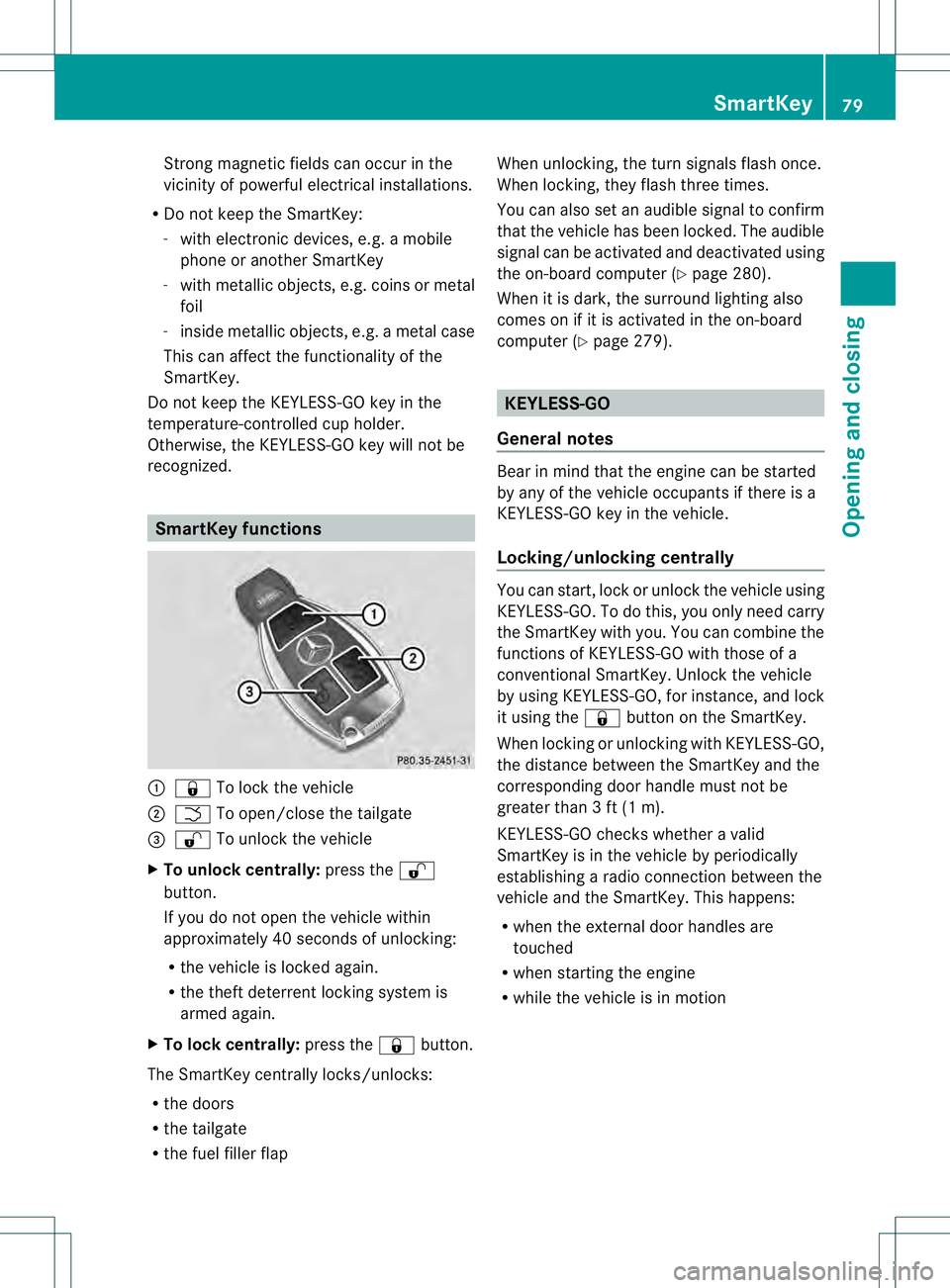
0002
000C To lock the vehicle
0003 0004 To open/close the tailgate
0021 000D To unlock the vehicle
X To unloc kcentrally: press the 000D
button.
If you do not open th evehicle within
approximately 40 seconds of unlocking:
R the vehicle is locked again.
R the theft deterrent locking system is
armed again.
X To lock centrally: press the000Cbutton.
The SmartKey centrally locks/unlocks:
R the doors
R the tailgate
R the fuel filler flap When unlocking, the turn signals flash once.
When locking, they flash three times.
You can also set an audible signal to confirm
that the vehicle has been locked. The audible
signal can be activated and deactivated using
the on-board computer (Y
page 280).
When it is dark, the surround lighting also
comes on if it is activated in the on-board
computer (Y page 279). KEYLESS-GO
General notes Bear in mind that the engine can be started
by any of the vehicle occupants if there is a
KEYLESS-GO key in the vehicle.
Locking/unlocking centrally
You can start, lock or unlock the vehicle using
KEYLESS-GO. To do this, you only need carry
the SmartKey with you. You can combine the
functions of KEYLESS-GO with those of a
conventional SmartKey. Unlock the vehicle
by using KEYLESS-GO, for instance, and lock
it using the
000Cbutton on the SmartKey.
When locking or unlocking with KEYLESS-GO,
the distance between the SmartKey and the
corresponding door handle must not be
greater than 3 ft (1 m).
KEYLESS-GO checks whether a valid
SmartKey is in the vehicle by periodically
establishing a radio connection between the
vehicle and the SmartKey. This happens:
R when the external door handles are
touched
R when starting the engine
R while the vehicle is in motion SmartKey
79Opening and closing Z
Page 82 of 454
X
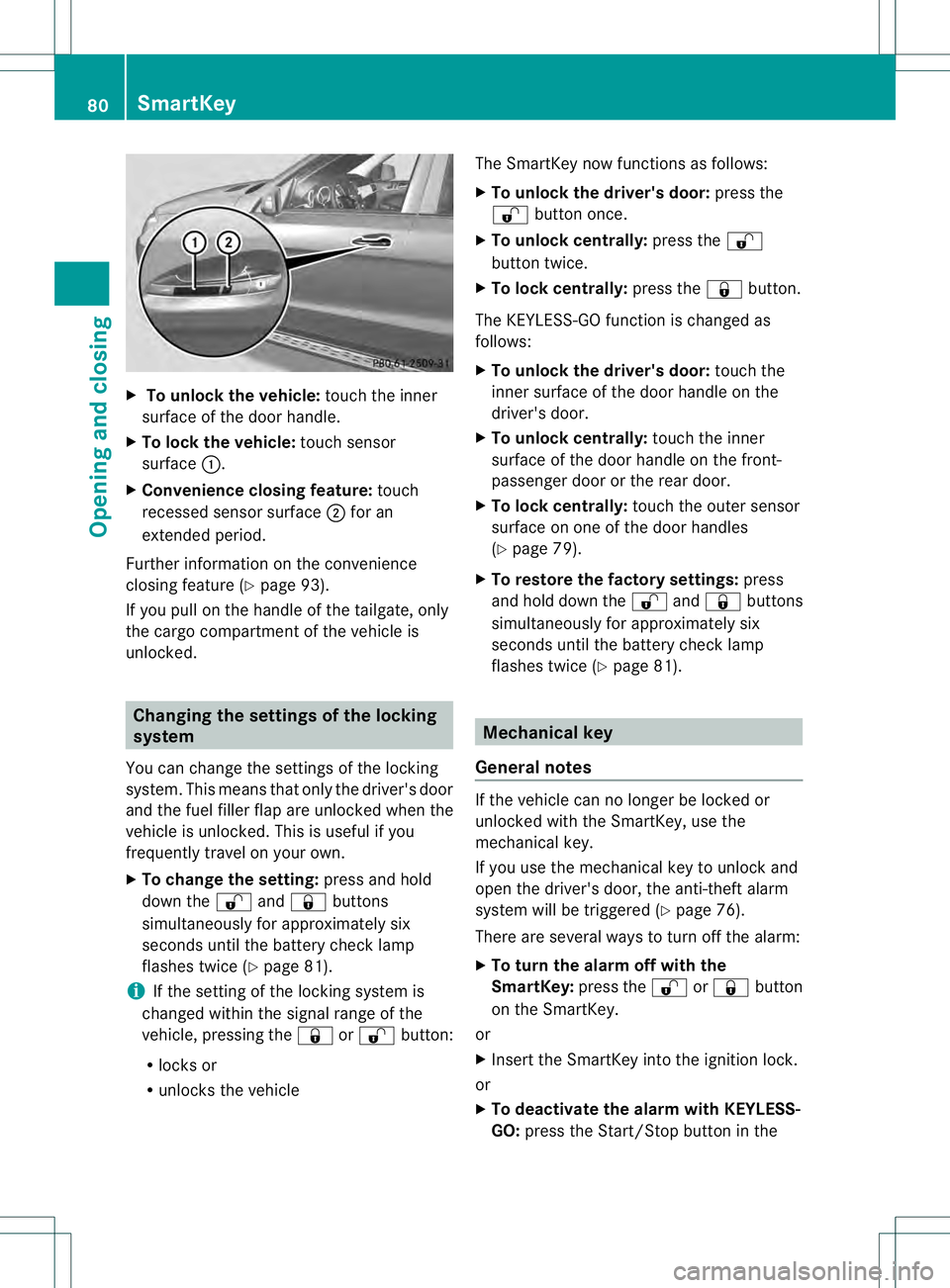
To unloc kthe vehicle: touch the inner
surface of the door handle.
X To loc kthe vehicle: touch sensor
surface 0002.
X Convenience closing feature: touch
recessed sensor surface 0003for an
extended period.
Further information on the convenience
closing feature (Y page 93).
If you pull on the handl eofthe tailgate, only
the cargo compartment of the vehicle is
unlocked. Changing the settings of the locking
system
You can change the settings of the locking
system. This means that only the driver's door
and the fuel filler flap are unlocked when the
vehicle is unlocked. This is useful if you
frequently travel on your own.
X To change the setting: press and hold
down the 000Dand000C buttons
simultaneously for approximately six
seconds until the battery check lamp
flashes twice (Y page 81).
i If the setting of the locking system is
changed within the signal range of the
vehicle, pressing the 000Cor000D button:
R locks or
R unlocks the vehicle The SmartKey now functions as follows:
X
To unlock the driver's door: press the
000D button once.
X To unlock centrally: press the000D
button twice.
X To lock centrally: press the000Cbutton.
The KEYLESS-GO function is changed as
follows:
X To unlock the driver's door: touch the
inner surface of the door handle on the
driver's door.
X To unlock centrally: touch the inner
surface of the door handle on the front-
passenger door or the rear door.
X To lock centrally: touch the outer sensor
surface on one of the door handles
(Y page 79).
X To restore the factory settings: press
and hold down the 000Dand000C buttons
simultaneously for approximately six
seconds until the battery check lamp
flashes twice (Y page 81). Mechanical key
General notes If the vehicle can no longer be locked or
unlocked with the SmartKey, use the
mechanical key.
If you use the mechanical key to unlock and
open the driver's door, the anti-theft alarm
system will be triggered (Y
page 76).
There are several ways to turn off the alarm:
X To turn the alarm off with the
SmartKey: press the000Dor000C button
on the SmartKey.
or
X Insert the SmartKey into the ignition lock.
or
X To deactivate the alarm with KEYLESS-
GO: press the Start/Stop button in the 80
SmartKeyOpening and closing
Page 83 of 454
ignition lock. The SmartKey must be in the
vehicle.
or
X Loc koru nlock the vehicle using KEYLESS-
GO .The SmartKey must be outside the
vehicle.
If you unlock the vehicle using the mechanical
key, the fuel filler flap will not be unlocked
automatically.
X To unlock the fuel filler flap: insert the
SmartKey into the ignition lock.
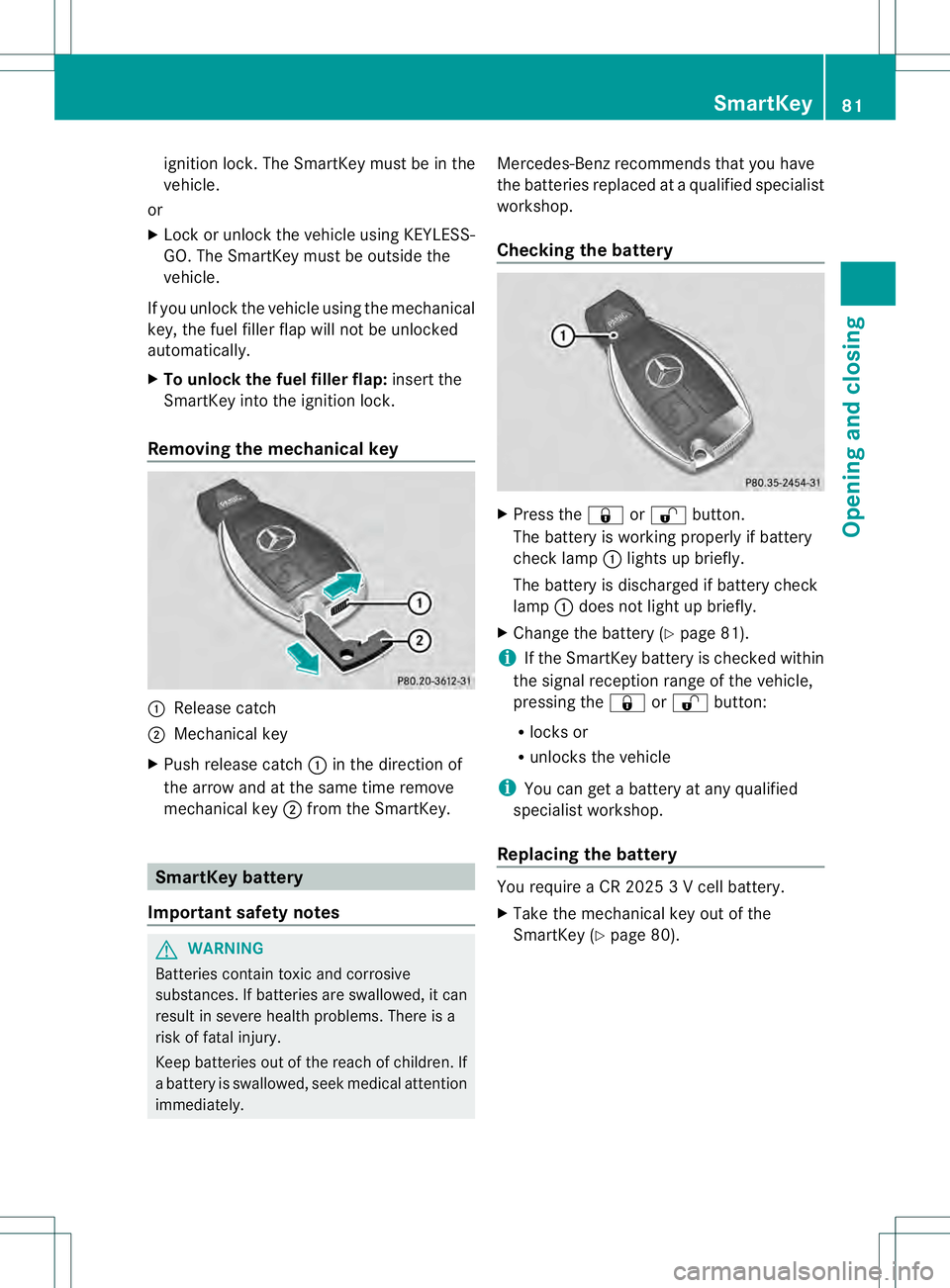
Removing the mechanical key 0002
Release catch
0003 Mechanical key
X Push release catch 0002in the direction of
the arrow and at the same time remove
mechanical key 0003from the SmartKey. SmartKey battery
Important safety notes G
WARNING
Batteries contain toxic and corrosive
substances. If batteries are swallowed, it can
result in severe health problems. There is a
risk of fatal injury.
Keep batteries out of the reach of children. If
a battery is swallowed, seek medical attention
immediately. Mercedes-Ben
zrecommends that you have
the batteries replaced at a qualified specialist
workshop.
Checking the battery X
Press the 000Cor000D button.
The battery is working properly if battery
chec klamp 0002lights up briefly.
The battery is discharged if battery check
lamp 0002does no tlight up briefly.
X Change the battery (Y page 81).
i If the SmartKey battery is checked within
the signal receptio nrange of the vehicle,
pressing the 000Cor000D button:
R locks or
R unlocks the vehicle
i You can get a battery at any qualified
specialist workshop.
Replacing the battery You require a CR 2025 3 V cell battery.
X
Take the mechanical key out of the
SmartKey (Y page 80). SmartKey
81Opening and closing Z
Page 87 of 454
themselves when doing so or be seriously or
eve nfatally injured by any passing traffic.
Do not expose the child restraint system to
direct sunlight .The child restraint system's
metal parts, for example, could become very
hot, and a child could be burned on these
parts. G
WARNING
Do not carry heavy or hard objects in the
passenger compartment or cargo
compartmentu nless they are firmly secured
in place.
Unsecured or improperly positioned cargo
increases a child's risk of injury in the event
of
R strong braking maneuvers
R sudden changes of direction
R an accident Unlocking and opening doors from
the inside
You can open a door from inside the vehicle
eve nifith as been locked. You can only open
the rear doors from inside the vehicle if they
are no tsecured by the child-proof locks
(Y page 65).
If the vehicle has been locked with the
SmartKey or with KEYLESS-GO, opening a
door from the inside will trigger the anti-theft
alarm system. Switch off the alarm
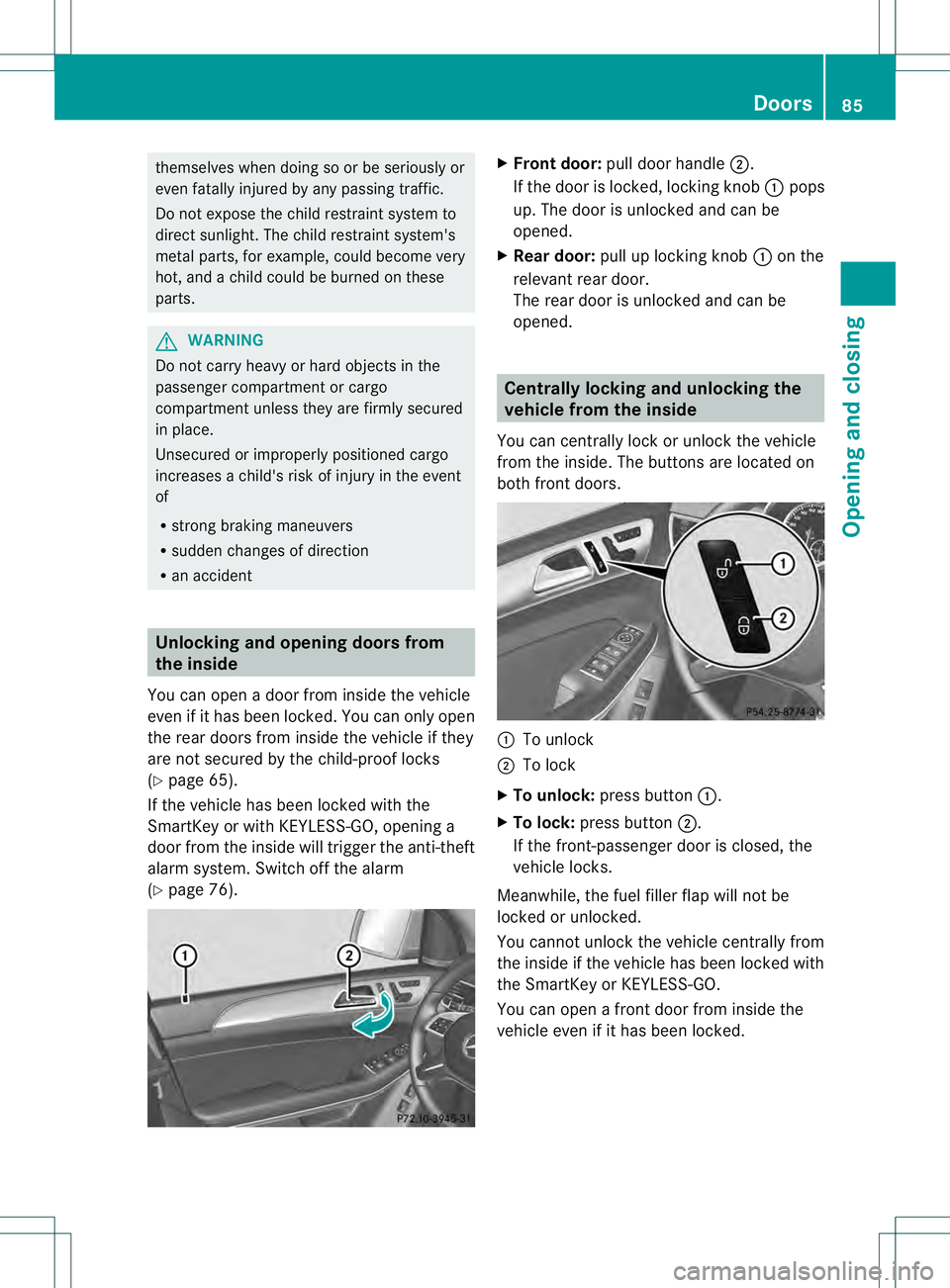
(Y page 76). X
Front door: pull door handle 0003.
If the door is locked, locking knob 0002pops
up. The door is unlocked and can be
opened.
X Rear door: pull up locking knob 0002on the
relevant rear door.
The rear door is unlocked and can be
opened. Centrally locking and unlocking the
vehicle from the inside
You can centrally lock or unlock the vehicle
from the inside. The buttons are located on
both fron tdoors. 0002
To unlock
0003 To lock
X To unlock: press button 0002.
X To lock: press button 0003.
If the front-passenger door is closed, the
vehicle locks.
Meanwhile, the fuel filler flap will not be
locked or unlocked.
You cannot unlock the vehicle centrally from
the inside if the vehicle has been locked with
the SmartKey or KEYLESS-GO.
You can open a front door from inside the
vehicle even if it has been locked. Doors
85Opening and closing Z
Page 89 of 454
Locking the vehicle (mechanical key)
If the vehicle can no longer be locked with the
SmartKey, use the mechanical key.
X Open the driver's door.
X Close the front-passenger door, the rear
doors and the tailgate.
X Press the locking button (Y page 85).
X Chec kwhether the locking knobs on the
front-passenger door and the rear doors
are still visible. Press down the locking
knobs manually, if necessary (Y page 85).
X Close the driver's door.
X Take the mechanical key out of the
SmartKey (Y page 80).
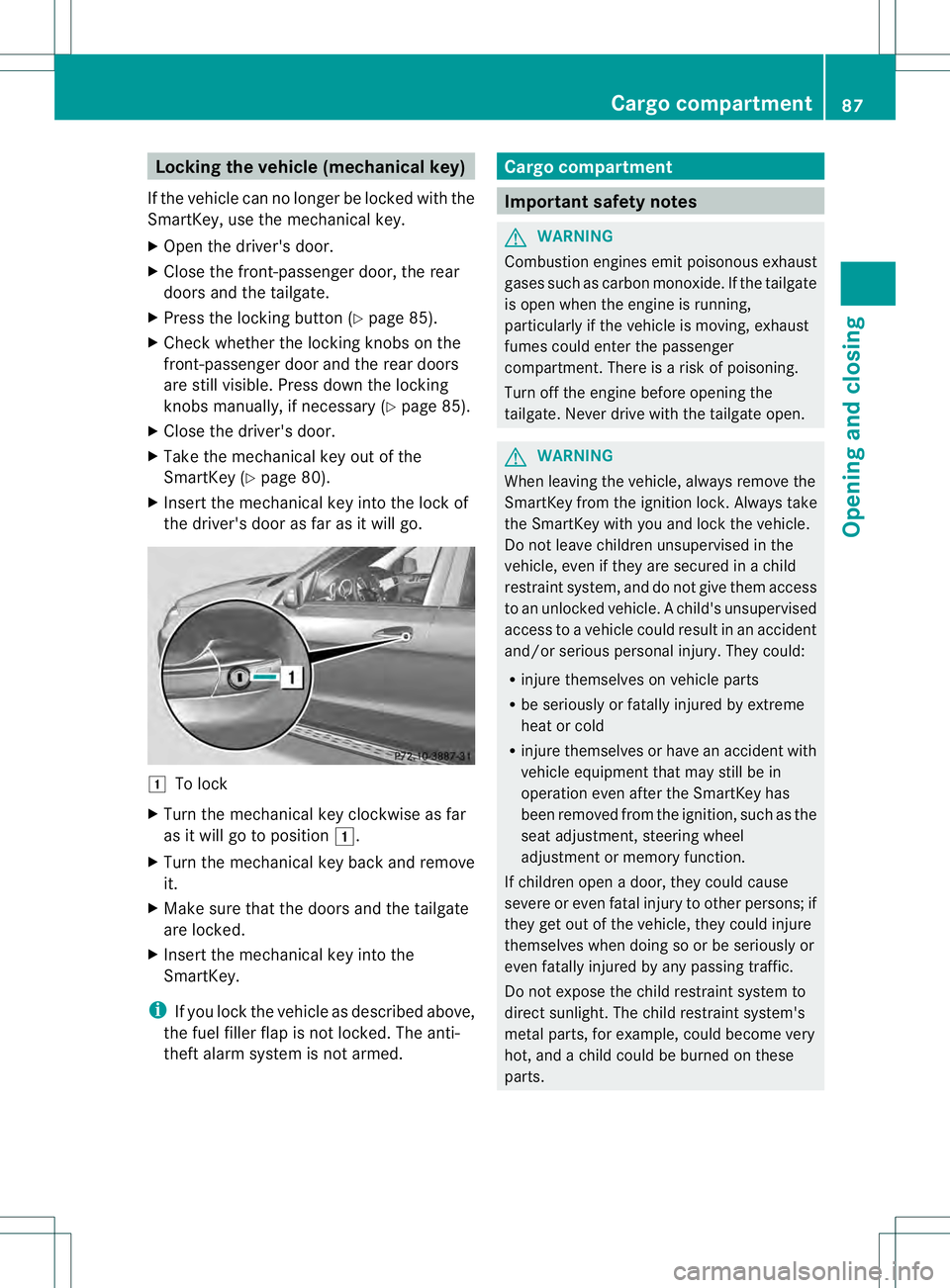
X Insert the mechanical key into the lock of
the driver's door as far as it will go. 0004
To lock
X Turn the mechanical key clockwise as far
as it will go to position 0004.
X Turn the mechanical key back and remove
it.
X Make sure that the doors and the tailgate
are locked.
X Insert the mechanical key into the
SmartKey.
i If you lock the vehicle as described above,
the fuel filler flap is not locked. The anti-
theft alarm system is not armed. Cargo compartment
Important safety notes
G
WARNING
Combustion engines emit poisonous exhaust
gases such as carbon monoxide. If the tailgate
is open when the engine is running,
particularly if the vehicle is moving, exhaust
fumes could enter the passenger
compartment. There is a risk of poisoning.
Turn off the engine before opening the
tailgate. Never drive with the tailgate open. G
WARNING
When leaving the vehicle, always remove the
SmartKey from the ignition lock. Always take
the SmartKey with you and lock the vehicle.
Do not leave children unsupervised in the
vehicle, even if they are secured in a child
restraint system, and do not give them access
to an unlocked vehicle. Achild's unsupervised
access to a vehicle could result in an accident
and/or serious personal injury. They could:
R injure themselves on vehicle parts
R be seriously or fatally injured by extreme
heat or cold
R injure themselves or have an accident with
vehicle equipment that may still be in
operation even after the SmartKey has
been removed from the ignition, such as the
seat adjustment, steering wheel
adjustment or memory function.
If children open a door, they could cause
severe or even fatal injury to other persons; if
they get out of the vehicle, they could injure
themselves when doing so or be seriously or
even fatally injured by any passing traffic.
Do not expose the child restraint system to
direct sunlight. The child restraint system's
metal parts, for example, could become very
hot, and a child could be burned on these
parts. Cargo compartment
87Opening and closing Z
Page 163 of 454
Useful information
............................162
Notes on breaking-in anew vehicle 162
Driving ............................................... 162
Automatic transmission ...................169
Refueling ............................................ 177
Parking ............................................... 183
Driving tips ........................................ 186
Driving systems ................................ 195
Towing atrailer ................................. 257 161Driving and parking
Page 170 of 454
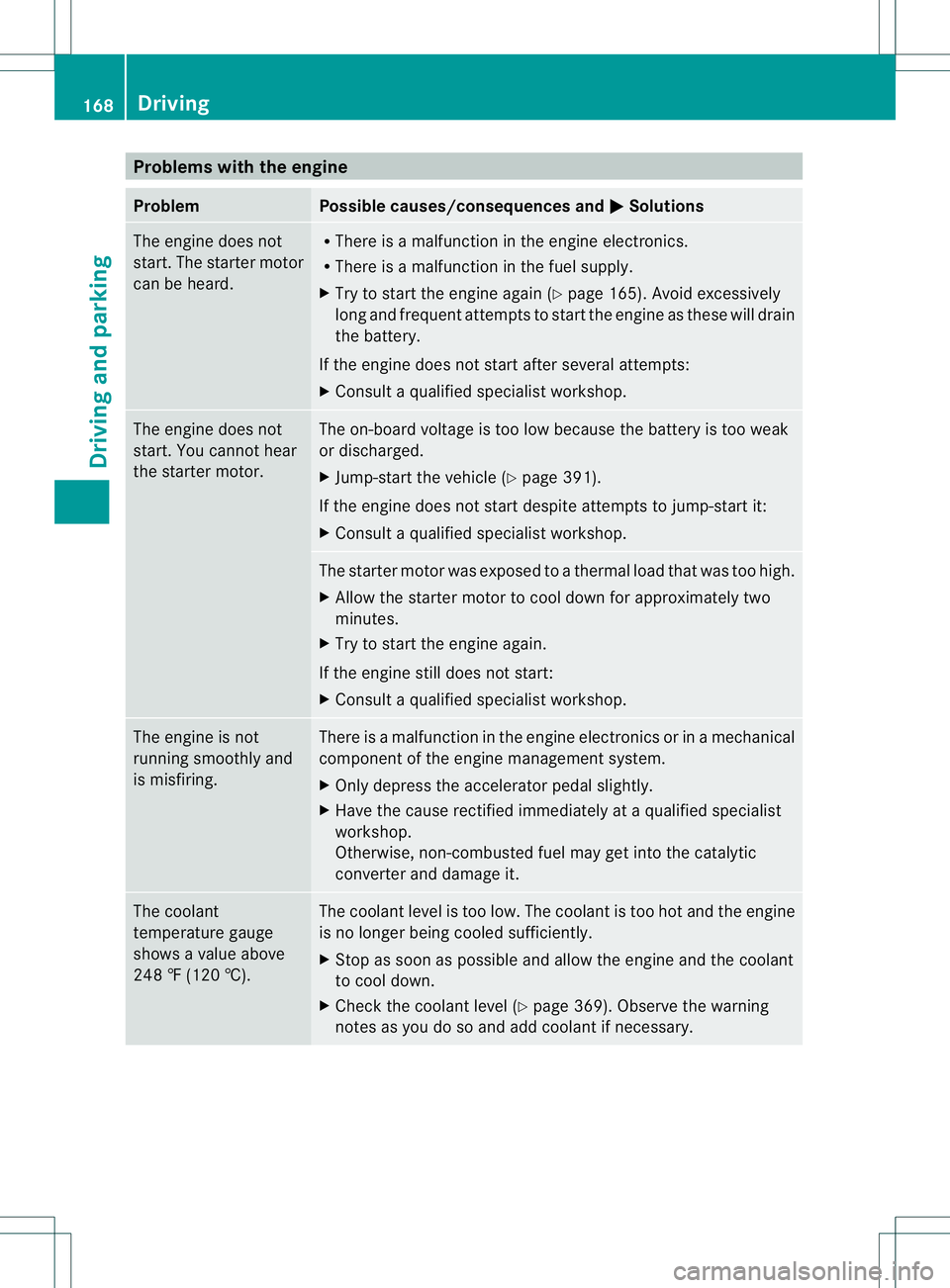
Problems with the engine
Problem Possible causes/consequences and
0001 Solutions
The engine does not
start. The starter motor
can be heard. R
There is a malfunction in the engine electronics.
R There is a malfunction in the fuel supply.
X Try to start the engine again (Y page 165). Avoid excessively
long and frequent attempts to start the engine as these will drain
the battery.
If the engine does not start after several attempts:
X Consult a qualified specialist workshop. The engine does not
start. You cannot hear
the starter motor. The on-board voltage is too low because the battery is too weak
or discharged.
X
Jump-start the vehicle (Y page 391).
If the engine does not start despite attempts to jump-start it:
X Consult a qualified specialist workshop. The starter motor was exposed to a thermal load that was too high.
X
Allow the starter motor to cool down for approximately two
minutes.
X Try to start the engine again.
If the engine still does not start:
X Consult a qualified specialist workshop. The engine is not
running smoothly and
is misfiring. There is a malfunction in the engine electronics or in a mechanical
component of the engine management system.
X
Only depress the accelerator pedal slightly.
X Have the cause rectified immediately at a qualified specialist
workshop.
Otherwise, non-combusted fuel may get into the catalytic
converter and damage it. The coolant
temperature gauge
shows a value above
248 ‡ (120 †). The coolant level is too low. The coolant is too hot and the engine
is no longer being cooled sufficiently.
X
Stop as soon as possible and allow the engine and the coolant
to cool down.
X Check the coolant level (Y page 369). Observe the warning
notes as you do so and add coolant if necessary. 168
DrivingDriving and parking
Page 176 of 454
R
comfort-oriented engine and automatic
transmissio nsettings
R optimal fuel consumption resulting from
the automatic transmission shifting up
sooner
R the vehicle pulling away more gently in
forward and reverse gears, unless the
accelerator pedal is depressed fully
R increased sensitivity. This improves driving
stability on slippery road surfaces, for
example
R the automatic transmission shifting up
sooner .This results in the vehicle being
driven at lower engine speeds and the
wheels being less likely to spin
Drive program Sis characterized by the
following:
R sporty engine and transmission settings
R the automatic transmission shifting up
later
R the fuel consumption possibly being higher
as a result of the later automatic
transmission shift points Shift ranges
Introduction In transmission position
D, you can use the
steering wheel paddle shifters to restrict or
derestrict the shift range for the automatic
transmission (Y page 173).
The shift range selected is shown in the
multifunction display. The automatic
transmission shifts only as far as the selected
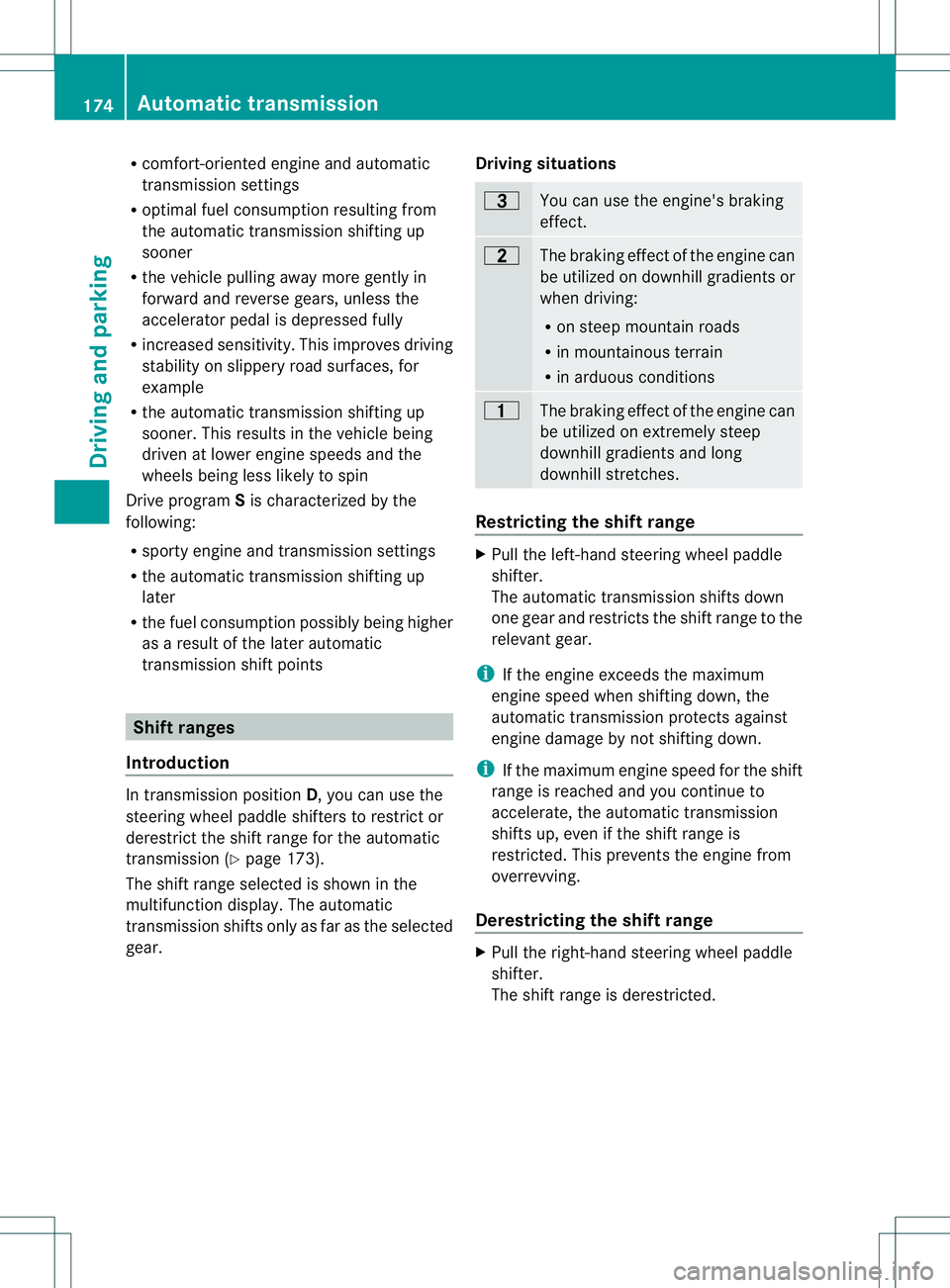
gear. Driving situations 000B
You can use the engine's braking
effect.
000E
The braking effect of the engine can
be utilized on downhill gradients or
when driving:
R
on steep mountain roads
R in mountainous terrain
R in arduous conditions 0014
The braking effect of the engine can
be utilized on extremely steep
downhill gradients and long
downhill stretches.
Restricting the shift range
X
Pull the left-hand steering wheel paddle
shifter.
The automatic transmission shifts down
one gear and restricts the shift range to the
relevant gear.
i If the engine exceeds the maximum
engine speed when shifting down, the
automatic transmission protects against
engine damage by not shifting down.
i If the maximum engine speed for the shift
range is reached and you continue to
accelerate, the automatic transmission
shifts up, even if the shift range is
restricted. This prevents the engine from
overrevving.
Derestricting the shift range X
Pull the right-hand steering wheel paddle
shifter.
The shift range is derestricted. 174
Automatic transmissionDriving and parking
Page 177 of 454
Clearing the shif
trange restriction X
Pull and hold the right-hand steering wheel
paddle shifte runtil Dis shown agai ninthe
multifunction display.
The automatic transmission shifts from the
current shift range directly to D.
or
X Use the DIRECT SELECT lever to shift the
transmission to position D.
The automatic transmission shifts from the
current shift range directly to D.
Selecting the ideal shift range X
Pull the left-hand steering wheel paddle
shifter and hold it in position.
The automatic transmission shifts to the
gear which allows optimum acceleration
and deceleration. To do this, the automatic
transmission shifts down one or more
gears. Manual drive program
Switching on the manual drive program In manual drive program
M, you can change
gear using the steering wheel paddle shifters
if the transmission is in position D.You can
see the currently selected drive program and
which gear is engaged in the multifunction
display.
X AMG vehicles: press the program selector
button (Y page 173) until Mappears in the
multifunction display.
X Vehicles with the ON&OFFROAD
package: press the program selector
button (Y page 173).
The letter Mappears in the multifunction
display. Shifting up (all vehicles except AMG
vehicles) X
Pull the right-hand steerin gwheel paddle
shifter (Y page 173).
The automatic transmission shifts up to the
next gear.
Shifting up (AMG vehicles) !
In manual drive program M, the automatic
transmission does not shift up
automatically even when the engine
limiting speed for the current gear is
reached. When the engine limiting speed is
reached, the fuel supply is cut to prevent
the engine from overrevving. Always make
sure that the engine speed does not reach
the red area of the tachometer. There is
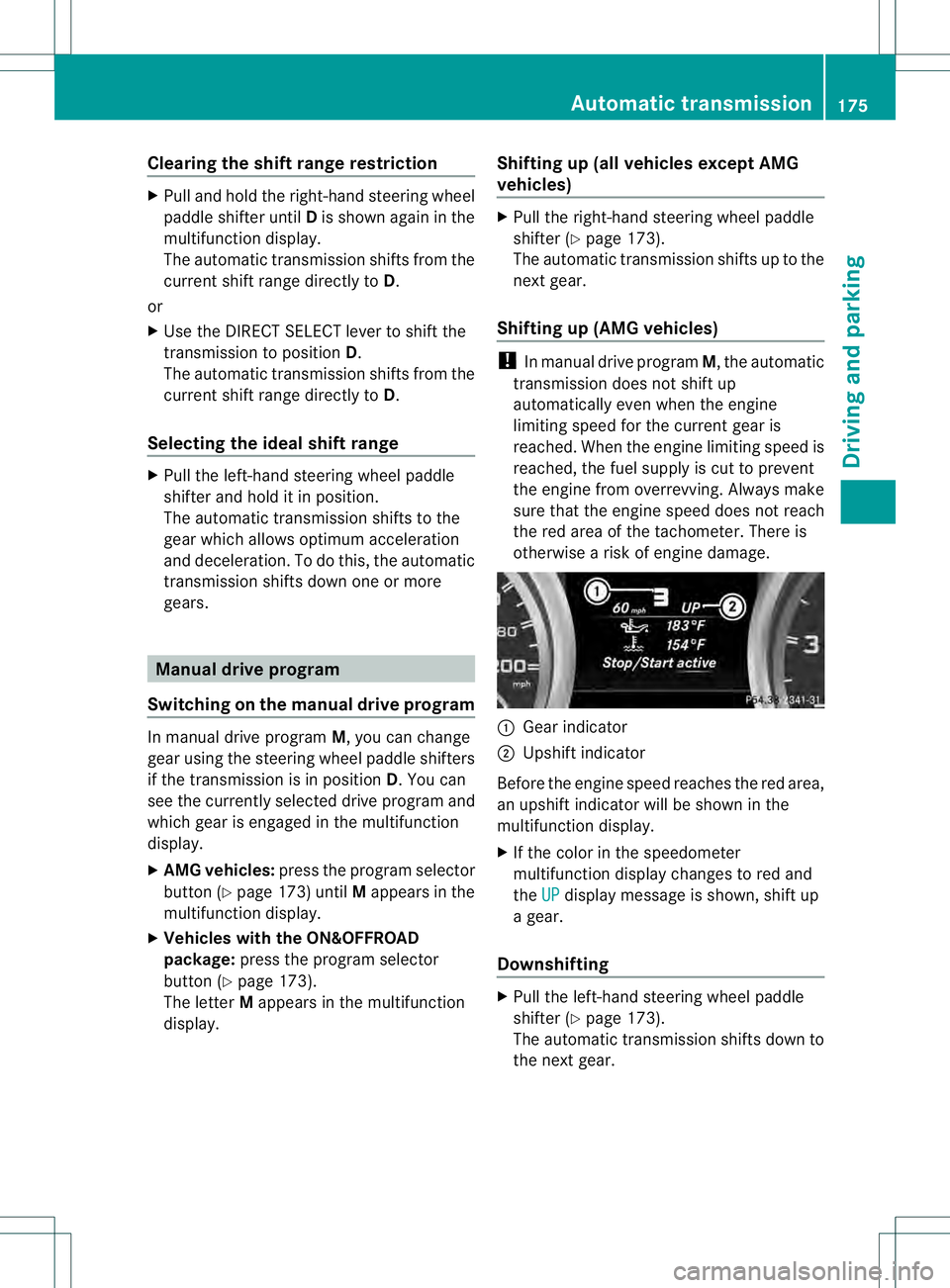
otherwise a risk of engine damage. 0002
Gear indicator
0003 Upshift indicator
Before the engine speed reaches the red area,
an upshift indicator will be shown in the
multifunction display.
X If the color in the speedometer
multifunction display changes to red and
the UP display message is shown, shift up
a gear.
Downshifting X
Pull the left-hand steering wheel paddle
shifter (Y page 173).
The automatic transmission shifts down to
the next gear. Automatic transmission
175Driving and parking Z