key battery MERCEDES-BENZ GL 2013 User Guide
[x] Cancel search | Manufacturer: MERCEDES-BENZ, Model Year: 2013, Model line: GL, Model: MERCEDES-BENZ GL 2013Pages: 454, PDF Size: 6.31 MB
Page 116 of 454
Problems with the seat heating
Problem Possible causes/consequences and
0001 Solutions
The seat heating has
switched off
prematurely or cannot
be switched on. The on-board voltage is too low because too many electrical
consumers are switched on.
X
Switch off electrical consumers that you do not need, such as
the rear window defroster or interior lighting.
Once the battery is sufficiently charged, the seat heating will
switch back on automatically. Switching the seat ventilation on/off
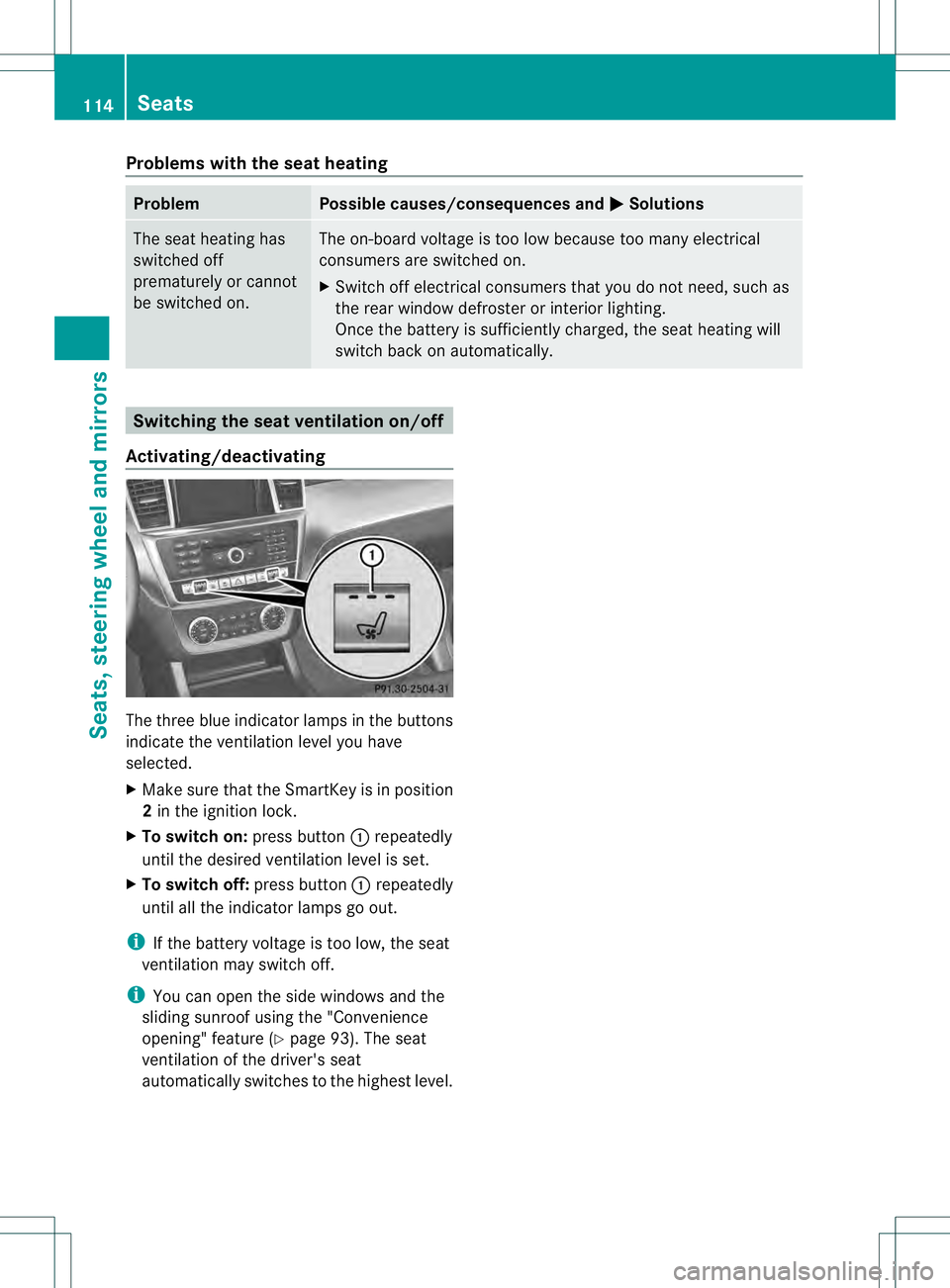
Activating/deactivating The three blue indicator lamps in the buttons
indicate the ventilation level you have
selected.
X
Make sure that the SmartKey is in position
2in the ignition lock.
X To switch on: press button0002repeatedly
until the desired ventilation level is set.
X To switch off: press button0002repeatedly
until all the indicator lamps go out.
i If the battery voltage is too low, the seat
ventilation may switch off.
i You can open the side windows and the
sliding sunroof using the "Convenience
opening" feature (Y page 93). The seat
ventilation of the driver's seat
automatically switches to the highest level. 114
SeatsSeats, steering wheel and mirrors
Page 117 of 454
Problems with the seat ventilation
Problem Possible causes/consequences and
0001 Solutions
The seat ventilation has
switched off
prematurely or cannot
be switched on. The on-board voltage is too low because too many electrical
consumers are switched on.
X
Switch off electrical consumers that you do not need, such as
the rear window defroster or interior lighting.
Once the battery is sufficiently charged, the seat ventilation will
switch back on automatically. Steering wheel
Important safety notes
G
WARNING
You could lose control of your vehicle if you
do the following while driving:
R adjust the driver's seat, head restraint,
steering wheel or mirrors
R fasten the seat belt
There is a risk of an accident.
Adjust the driver's seat, head restraint,
steering wheel and mirror and fasten your
seat belt before starting the engine. G
WARNING
Children could injure themselves if they
adjust the steering wheel. There is a risk of
injury.
When leaving the vehicle, always take the
SmartKey with you and lock the vehicle. Never
leave children unsupervised in the vehicle. Adjusting the steering wheel
manually
G
WARNING
If the steering wheel is unlocked while the
vehicle is in motion, it could change position
unexpectedly. This could cause you to lose
control of the vehicle. There is a risk of an
accident. Before starting off, make sure the steering
wheel is locked. Never unlock the steering
wheel while the vehicle is in motion.
0002
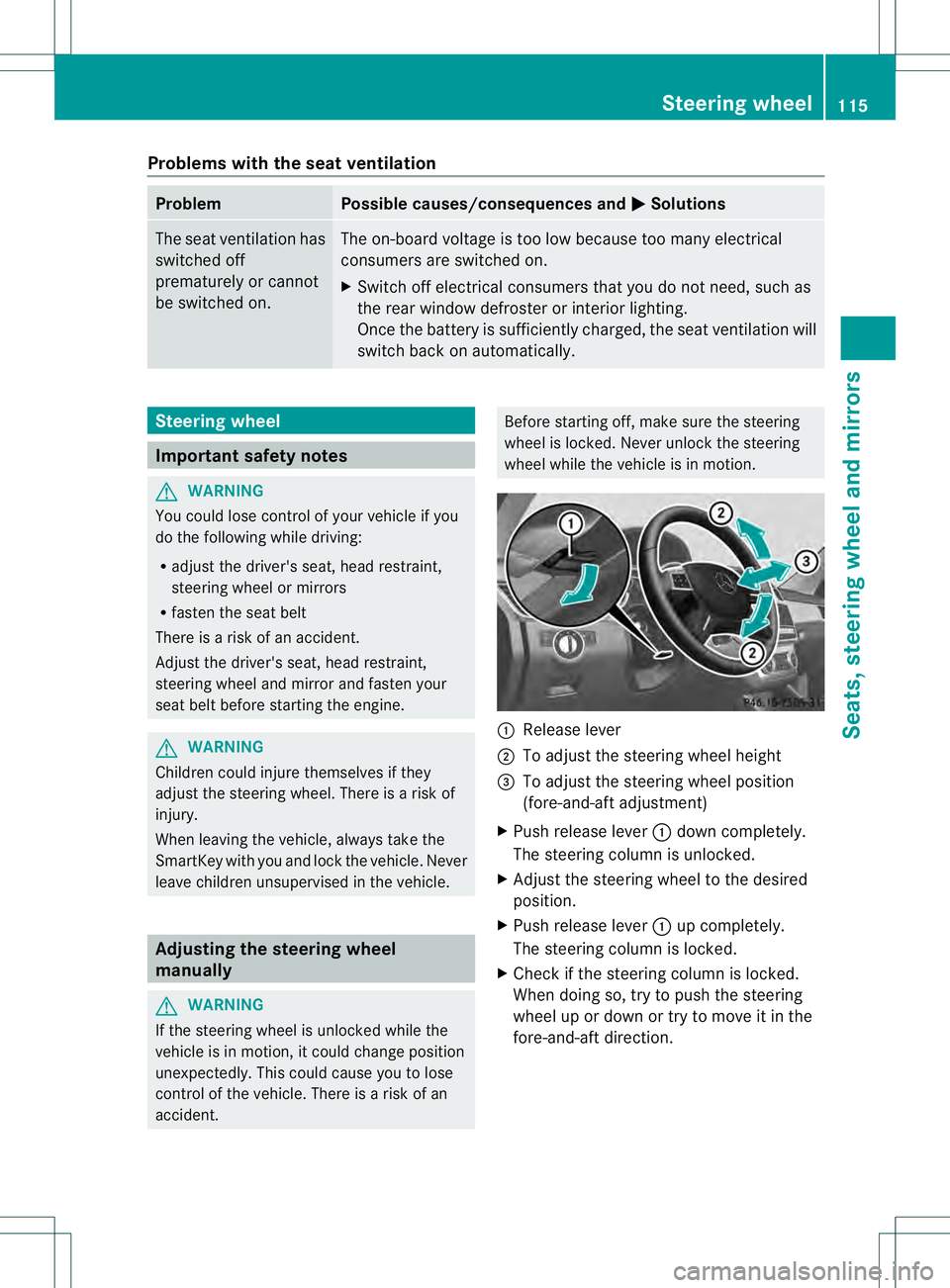
Release lever
0003 To adjust the steering wheel height
0021 To adjust the steering wheel position
(fore-and-aft adjustment)
X Push release lever 0002down completely.
The steering column is unlocked.
X Adjust the steering wheel to the desired
position.
X Push release lever 0002up completely.
The steering column is locked.
X Check if the steering column is locked.
When doing so, try to push the steering
wheel up or down or try to move it in the
fore-and-aft direction. Steering wheel
115Seats, steering wheel and mirrors Z
Page 121 of 454

Folding the exterior mirrors in or out
electrically X
Make sure that the SmartKey is in position
1 or 2in the ignition lock.
X Briefly press button 0002.
Both exterior mirrors fold in or out.
i Make sure that the exterior mirrors are
always folded out fully while driving .They
could otherwise vibrate.
i If you are driving faster than
30 mph (47 km/h), you can no longer fold
in the exterior mirrors.
Setting the exterior mirrors If the battery has been disconnected or
completely discharged, the exterior mirrors
must be reset. The exterior mirrors will
otherwise not fold in when you select the
"Fold in mirrors when locking" function in the
on-board computer (Y page 281).
X Make sure that the SmartKey is in
position 1in the ignition lock.
X Briefly press button 0002.
Folding the exterior mirrors in or out
automatically If the "Fold in mirrors when locking" function
is activated in the on-board computer:
(Y page 281) R
the exterior mirrors fold in automatically as
soon as you lock the vehicle from the
outside.
R the exterior mirrors fold out again
automatically as soon as you unlock the
vehicle and then open the driver's or front-
passenger door.
Exterior mirror pushed out of position If an exterior mirror has been pushed out of
position, proceed as follows:
X
Vehicles without electrically folding
exterior mirrors: move the exterior mirror
into the correct position manually.
X Vehicles with electrically folding
exterior mirrors: press and hold button for
folding the mirrors 0002(Ypage 119) until you
hear a click and then the mirror engage in
position.
The mirror housing is engaged again and
you can adjust the exterior mirrors as usual
(Y page 118). Automatic anti-glare mirrors
The rear-view mirror and the exterior mirror
on the driver's side automatically go into anti-
glare mode if the following conditions are met
simultaneously:
R the ignition is switched on and
R incident light from headlamps strikes the
sensor in the rear-view mirror.
i The mirrors do not go into anti-glare mode
if reverse gear is engaged or if the interior
lighting is switched on. Mirrors
119Seats, steering wheel and mirrors Z
Page 128 of 454

00040011
Left-hand standing lamps
00050013 Right-hand standing lamps
00060016 Parking lamps, license plate and
instrument cluster lighting
000B0006 Automatic headlamp mode,
controlled by the lights ensor
000C000D Low-beam/high-beam headlamps
001F0010 Rear fog lamp
Even if the light sensor does not detec tthat
it is dark, the parking lamps and low-beam
headlamps switch on when the ignition is
switched on and the light switch is set to the
000D position. This is a particularly useful
function in the event of rain and fog.
X To switch on the low-beam headlamps:
turn the SmartKey in the ignition lock to
position 2or start the engine.
X Turn the light switch to 000D.
The green 000Dindicator lamp in the
instrumentc luster lights up.
Rear fog lamp 00040011
Left-hand standing lamps
00050013 Right-hand standing lamps 00060016
Parking lamps, license plate and
instrumen tcluste rlighting
000B0006 Automatic headlamp mode,
controlled by the light sensor
000C000D Low-beam/high-beam headlamps
001F0010 Rear fog lamp
The rear fog lamp improves visibility of your
vehicle for the traffic behind in the event of
thick fog. Please take note of the country-
specific regulations for the use of rear fog
lamps.
X To switch on the rea rfog lamps: turn the
SmartKey in the ignition lock to position 2
or start the engine.
X Turn the light switch to 000Dor0006.
X Press the 0010button.
The yellow 0010indicator lamp in the
instrumen tcluster lights up.
X To switch off th erear fog lamp: press the
0010 button.
The yellow 0010indicator lamp in the
instrumen tcluster goes out.
Parking lamps
! If the battery has been excessively
discharged, the parking lamps or standing
lamps are automatically switched off to
enable the nex tengine start. Always park
your vehicle safely and sufficiently lit
according to legal standards .Avoid the
continuous use of the 0016parking lamps
for several hours .Ifpossible, switch on the
0013 right or the 0011left standing lamp. 126
Exterior lightingLights and windshiel
dwipers
Page 133 of 454
The high-beam headlamps are switched off
automatically. The 000Cindicator lamp in
the instrument cluster goes out. The 0005
indicator lamp in the multifunction display
remains lit.
X To deactivate: move the combination
switch back to its normal position.
The 0005 indicator lamp in the instrument
cluster goes out. Headlamps fogged up on the inside
The headlamps may fog up on the inside if
there is high atmospheric humidity.
X Switch on the lights and drive off.
The level of moisture diminishes,
depending on the length of the journey and
the weather conditions (humidity and
temperature).
If the level of moisture does not diminish:
X Have the headlamps checked at a qualified
specialist workshop. Interior lighting
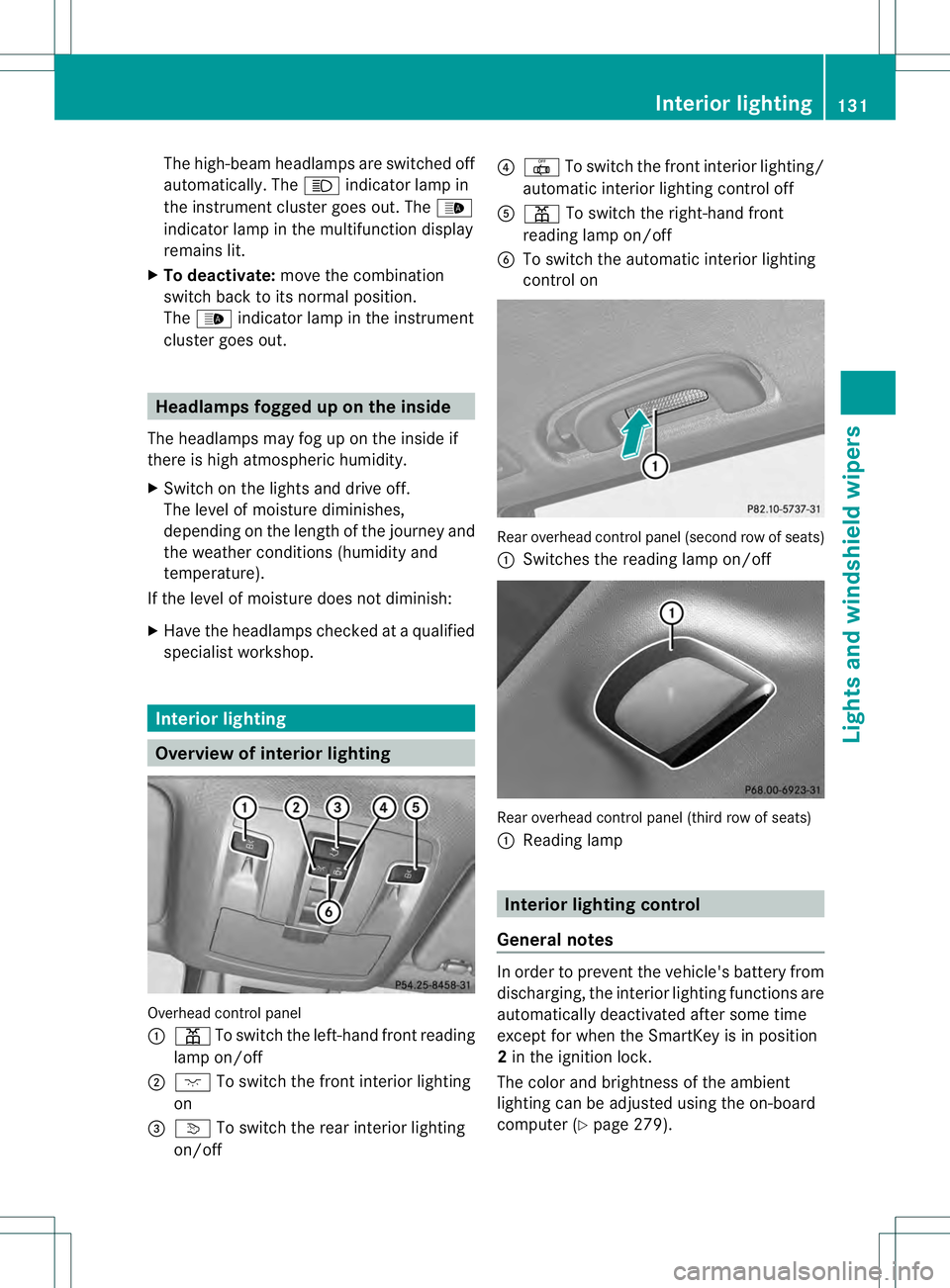
Overview of interior lighting
Overhead control panel
0002
0015 To switch the left-hand frontr eading
lamp on/off
0003 0006 To switch the front interior lighting
on
0021 0003 To switch the rear interior lighting
on/off 0020
001D To switch the fron tinterior lighting/
automatic interio rlighting control off
001E 0015 To switch the right-han dfront
reading lamp on/off
001F To switch the automatic interior lighting
control on Rearo
verhead control panel (second row of seats)
0002 Switches the reading lamp on/off Rearo
verhead control panel (third row of seats)
0002 Reading lamp Interior lighting control
General notes In order to prevent the vehicle's battery from
discharging, the interior lighting functions are
automatically deactivated after some time
except for when the SmartKey is in position
2
in the ignition lock.
The color and brightness of the ambient
lighting can be adjusted using the on-board
computer (Y page 279). Interior lighting
131Lights and windshield wipers Z
Page 158 of 454
X
To activate: press the0001button.
The indicator lamp in the button lights up.
X To activate: press off-road button 0001
again.
The indicator lamp goes out. The previously
selected settings are restored.
Whe nyou activate MAX COOL, climate
control switches to the following functions:
R maximum cooling
R maximum airflow
R air-recirculation mode on Defrosting the windows
Windows fogged up on the inside X
Activate the 0007/0005 cooling with air
dehumidification function.
X Activate automatic mode 0006.
X If the windows continue to fog up, activate
the defrosting function (Y page 155).
i You should only select this setting until
the windshield is clear again.
Windows fogged up on the outside X
Press the 0017button repeatedly until the
001C or001B symbol appears in the
display.
i You should only select this setting until
the windshield is clear again. Rear window defroster
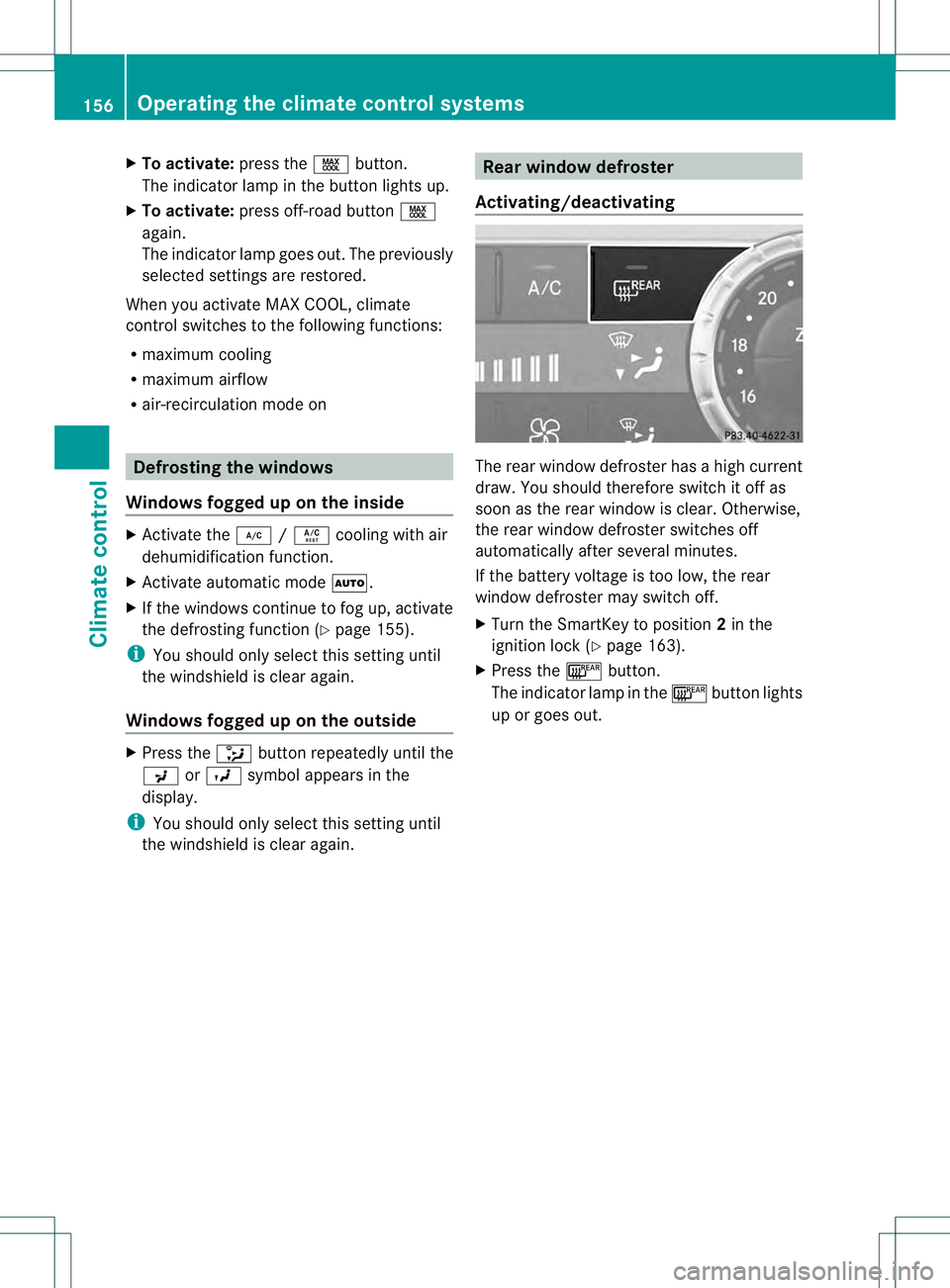
Activating/deactivating The rear window defroster has a high current
draw. You should therefore switch it off as
soon as the rear window is clear. Otherwise,
the rear window defroster switches off
automatically after several minutes.
If the battery voltage is too low, the rear
window defroster may switch off.
X
Turn the SmartKey to position 2in the
ignition lock (Y page 163).
X Press the 000Dbutton.
The indicator lamp in the 000Dbutton lights
up or goes out. 156
Operating the climate control systemsClimate control
Page 159 of 454
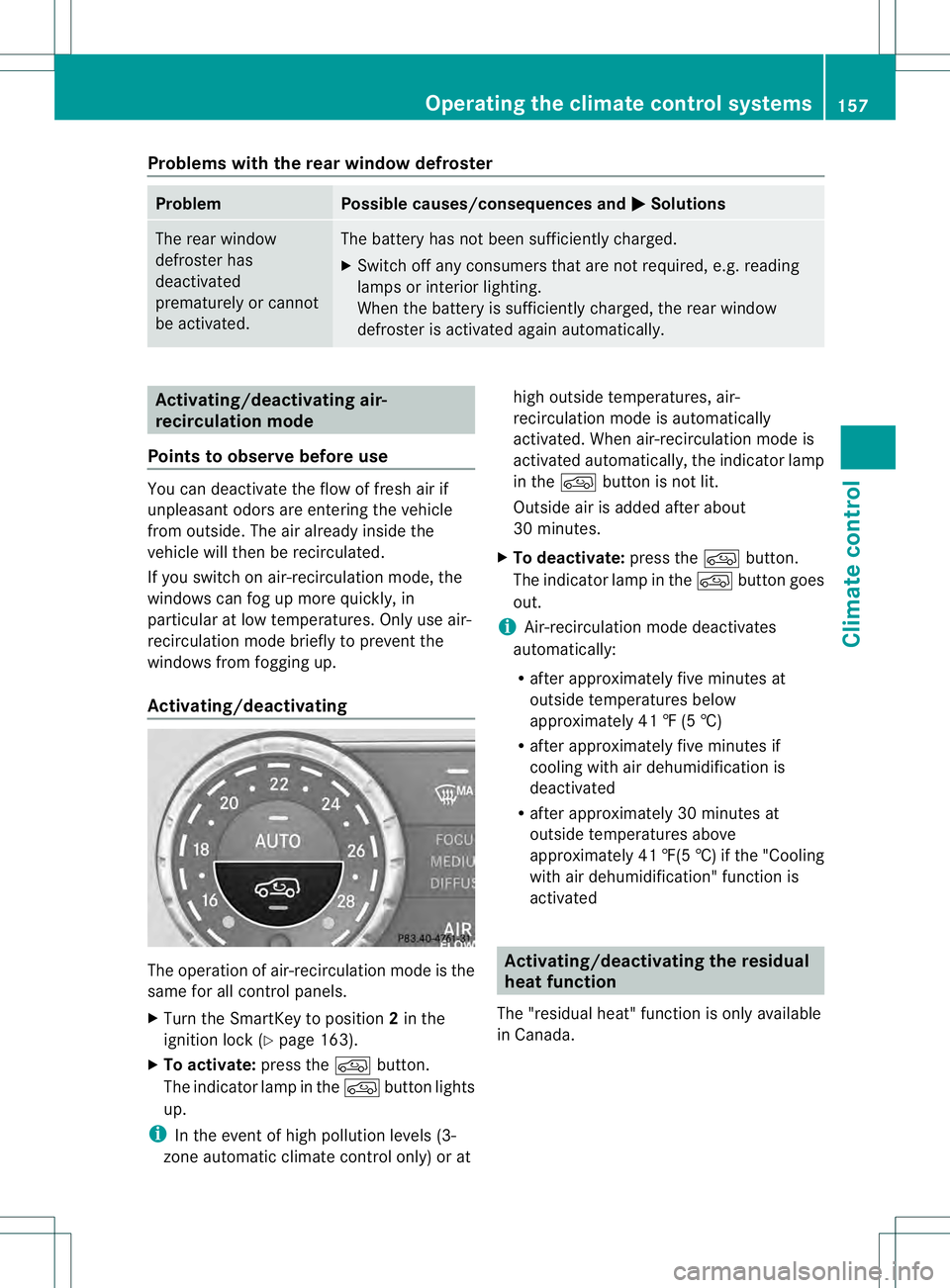
Problems with the rear window defroster
Problem Possible causes/consequences and
0001 Solutions
The rear window
defroster has
deactivated
prematurely or cannot
be activated. The battery has not been sufficiently charged.
X
Switch off any consumers that are not required, e.g. reading
lamps or interior lighting.
When the battery is sufficiently charged, the rear window
defroster is activated again automatically. Activating/deactivating air-
recirculation mode
Points to observe before use You can deactivate the flow of fresh air if
unpleasant odors are enteringt he vehicle
from outside. The air already inside the
vehicle will then be recirculated.
If you switch on air-recirculation mode, the
windows can fog up more quickly, in
particular at low temperatures. Only use air-
recirculation mode briefly to prevent the
windows from fogging up.
Activating/deactivating The operation of air-recirculation mode is the
same for all control panels.
X Turn the SmartKey to position 2in the
ignition lock (Y page 163).
X To activate: press the0016button.
The indicator lamp in the 0016button lights
up.
i In the event of high pollution levels (3-
zone automatic climate control only) or at high outside temperatures, air-
recirculation mode is automatically
activated. When air-recirculation mode is
activated automatically, the indicator lamp
in the
0016button is not lit.
Outside air is added after about
30 minutes.
X To deactivate: press the0016button.
The indicator lamp in the 0016button goes
out.
i Air-recirculation mode deactivates
automatically:
R after approximately five minutes at
outside temperatures below
approximately 41 ‡ (5 †)
R after approximately five minutes if
cooling with air dehumidification is
deactivated
R after approximately 30 minutes at
outside temperatures above
approximately 41 ‡(5 †)if the "Cooling
with air dehumidification" function is
activated Activating/deactivating the residual
heat function
The "residual heat" function is only available
in Canada. Operating the climate control systems
157Climate control
Page 182 of 454
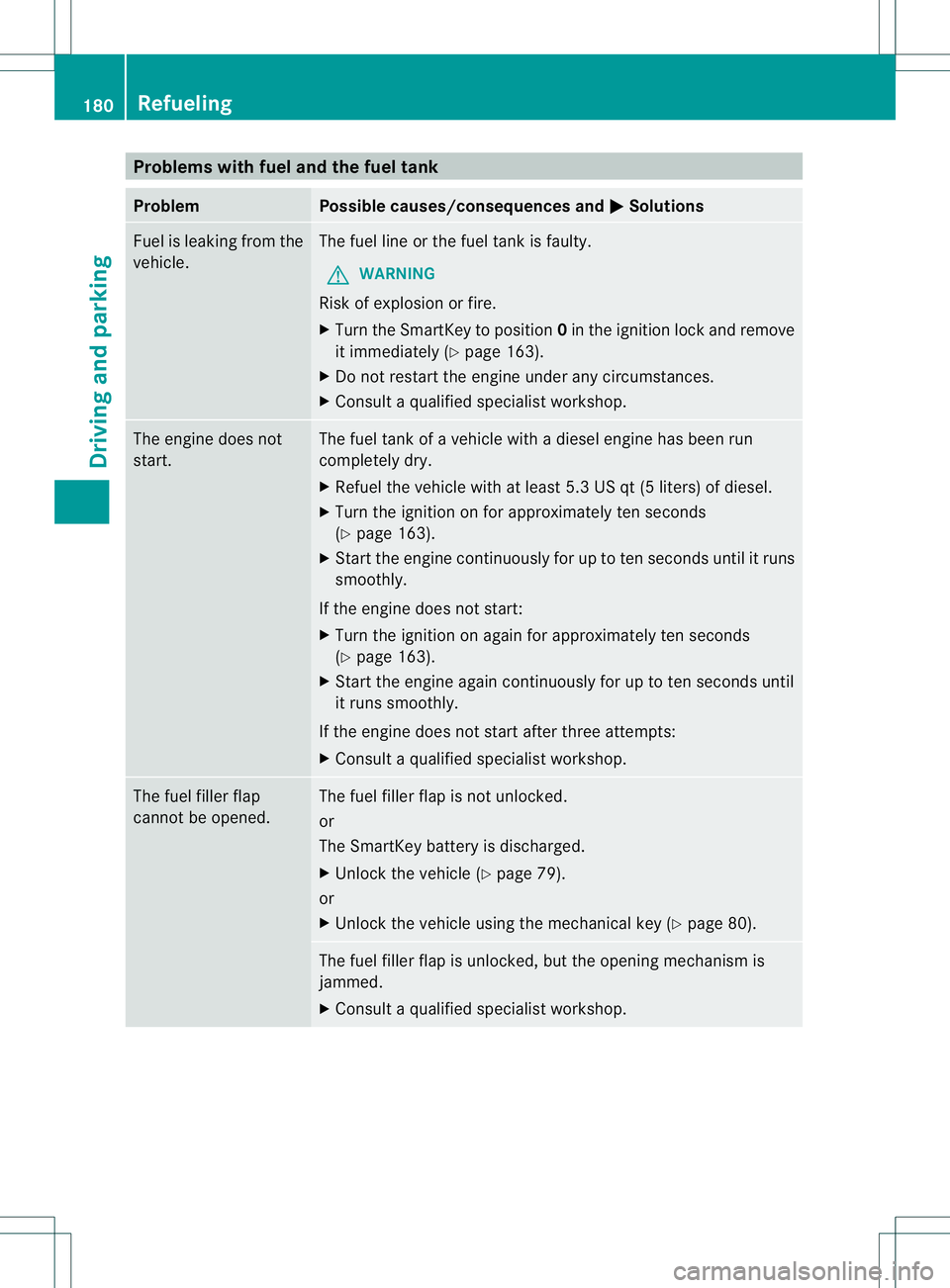
Problems with fuel and the fuel tank
Problem Possible causes/consequences and
0001 Solutions
Fuel is leaking from the
vehicle. The fuel line or the fuel tank is faulty.
G WARNING
Risk of explosion or fire.
X Turn the SmartKey to position 0in the ignition lock and remove
it immediately (Y page 163).
X Do not restart the engine under any circumstances.
X Consult a qualified specialist workshop. The engine does not
start. The fuel tank of a vehicle with a diesel engine has been run
completely dry.
X
Refuel the vehicle with at least 5.3 US qt (5 liters) of diesel.
X Turn the ignition on for approximately ten seconds
(Y page 163).
X Start the engine continuously for up to ten seconds until it runs
smoothly.
If the engine does not start:
X Turn the ignition on again for approximately ten seconds
(Y page 163).
X Start the engine again continuously for up to ten seconds until
it runs smoothly.
If the engine does not start after three attempts:
X Consult a qualified specialist workshop. The fuel filler flap
cannot be opened. The fuel filler flap is not unlocked.
or
The SmartKey battery is discharged.
X
Unlock the vehicle (Y page 79).
or
X Unlock the vehicle using the mechanical key (Y page 80).The fuel filler flap is unlocked, but the opening mechanism is
jammed.
X
Consult a qualified specialist workshop. 180
RefuelingDriving and parking
Page 294 of 454
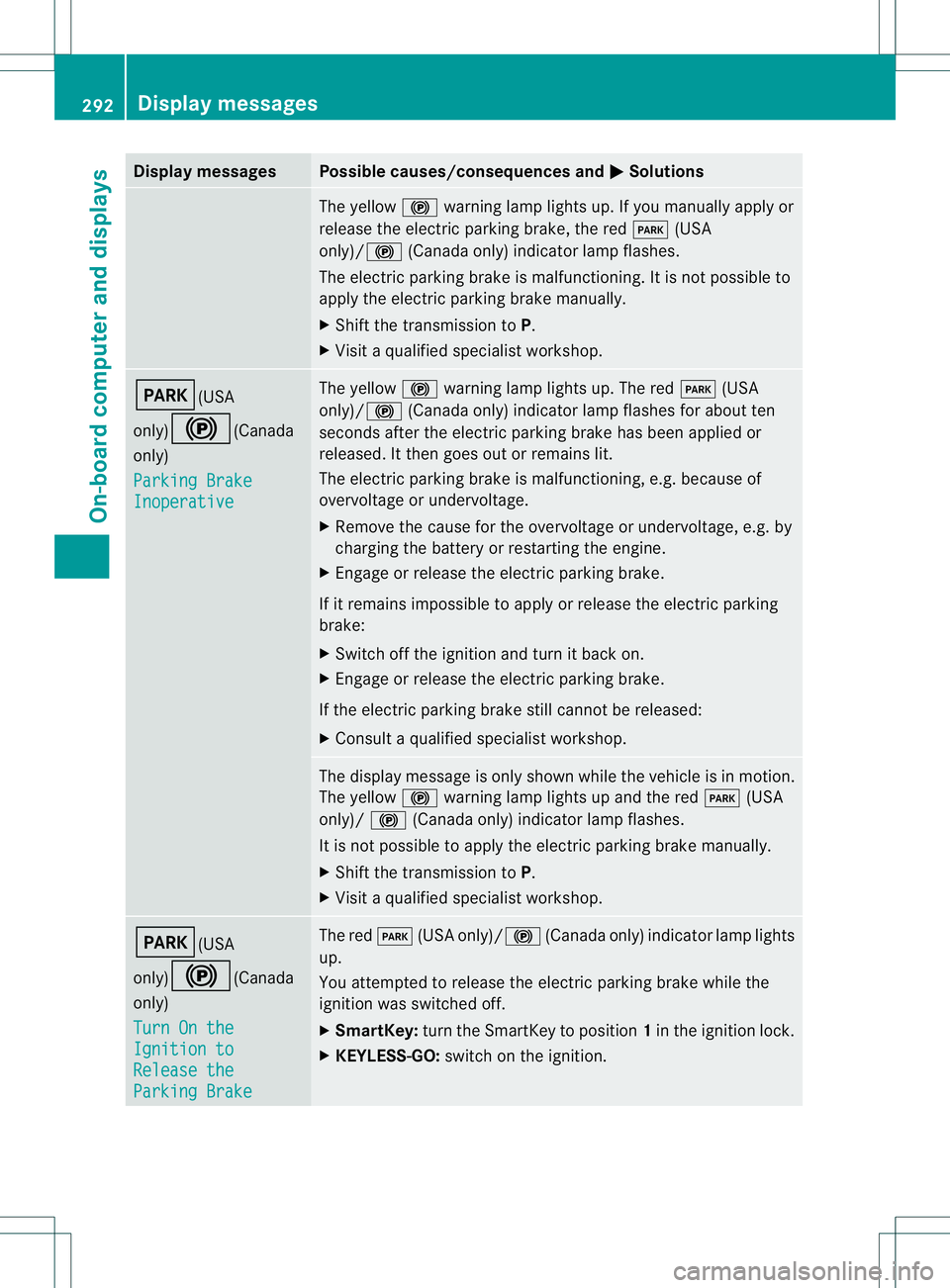
Display messages Possible causes/consequences and
0001 Solutions
The yellow
000Dwarning lamp lights up. If you manually apply or
release the electric parkin gbrake, the red 0008(USA
only)/000D (Canada only) indicator lamp flashes.
The electric parking brake is malfunctioning. It is not possible to
apply the electric parking brake manually.
X Shift the transmission to P.
X Visi taqualified specialist workshop. 0008(USA
only)000D
(Canada
only)
Parking Brake Inoperative The yellow
000Dwarning lamp lights up. The red 0008(USA
only)/ 000D(Canada only) indicator lamp flashes for about ten
seconds after the electric parking brake has been applied or
released. It then goes out or remains lit.
The electric parking brake is malfunctioning, e.g. because of
overvoltage or undervoltage.
X Remove the cause for the overvoltage or undervoltage, e.g. by
charging the battery or restarting the engine.
X Engage or release the electric parking brake.
If it remains impossible to apply or release the electric parking
brake:
X Switch off the ignition and turn it back on.
X Engage or release the electric parking brake.
If the electric parking brake still cannot be released:
X Consult a qualified specialist workshop. The display message is only shown while the vehicle is in motion.
The yellow
000Dwarning lamp lights up and the red 0008(USA
only)/ 000D(Canada only) indicator lamp flashes.
It is not possible to apply the electric parking brake manually.
X Shift the transmission to P.
X Visit a qualified specialist workshop. 0008(USA
only)000D
(Canada
only)
Turn On the Ignition to
Release the
Parking Brake The red
0008(USA only)/000D (Canada only) indicator lamp lights
up.
You attempted to release the electric parking brake while the
ignition was switched off.
X SmartKey: turn the SmartKey to position 1in the ignition lock.
X KEYLESS-GO: switch on the ignition.292
Display messagesOn-board computer and displays
Page 321 of 454
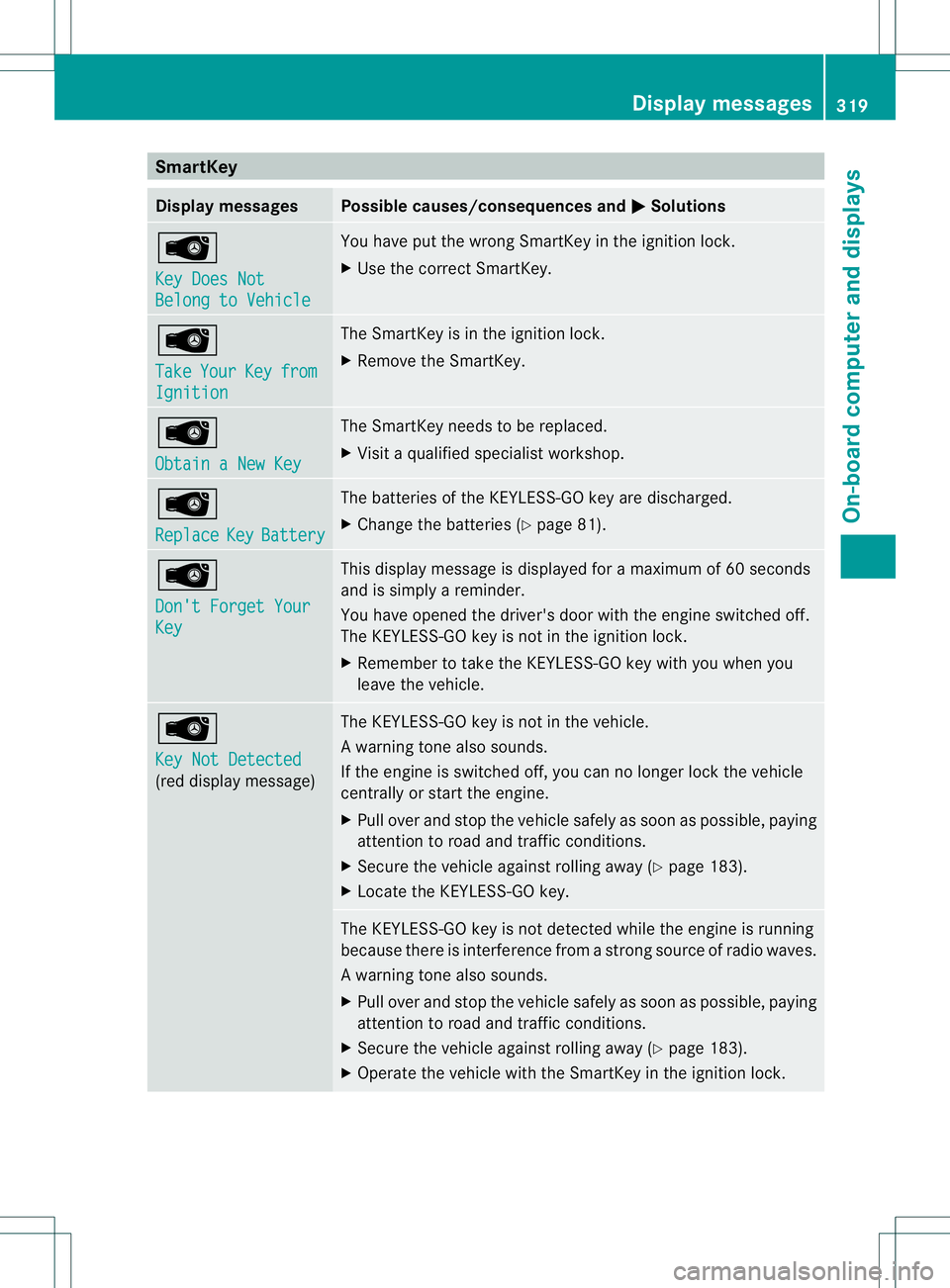
SmartKey
Display messages Possible causes/consequences and
0001 Solutions
0002
Key Does Not
Belong to Vehicle You have put the wrong SmartKey in the ignition lock.
X
Use the correct SmartKey. 0002
Take
Your Key from
Ignition The SmartKey is in the ignition lock.
X
Remove the SmartKey. 0002
Obtain a New Key The SmartKey needs to be replaced.
X
Visit a qualified specialist workshop. 0002
Replace
Key Battery The batteries of the KEYLESS-GO key are discharged.
X
Change the batteries (Y page 81).0002
Don't Forget Your
Key This display message is displayed for a maximum of 60 seconds
and is simply a reminder.
You have opened the driver's door with the engine switched off.
The KEYLESS-GO key is not in the ignition lock.
X Remember to take the KEYLESS-GO key with you when you
leave the vehicle. 0002
Key Not Detected
(red display message) The KEYLESS-GO key is not in the vehicle.
Aw
arning tone also sounds.
If the engine is switched off, you can no longer loc kthe vehicle
centrally or start the engine.
X Pull over and stop the vehicle safely as soon as possible, paying
attention to road and traffic conditions.
X Secure the vehicle against rolling away (Y page 183).
X Locate the KEYLESS-GO key. The KEYLESS-GO key is not detected while the engine is running
because there is interference from a strong source of radio waves.
Aw
arning tone also sounds.
X Pull ove rand stop the vehicle safely as soo nas possible, paying
attention to road and traffic conditions.
X Secure the vehicle against rolling away (Y page 183).
X Operate the vehicle with the SmartKey in the ignition lock. Display messages
319On-board computer and displays Z