low beam MERCEDES-BENZ GL 2013 User Guide
[x] Cancel search | Manufacturer: MERCEDES-BENZ, Model Year: 2013, Model line: GL, Model: MERCEDES-BENZ GL 2013Pages: 454, PDF Size: 6.31 MB
Page 131 of 454
The hazard warning lamps automatically
switch on if:
R
an air bag is deployed.
R the vehicle decelerates rapidly from a
speed of more than 45mph (70 km/h) and
comes to a standstill.
The hazard warning lamps switch off
automatically if the vehicle reaches a speed
of over 6mph (10km/h) again after a full
brake application.
i The hazard warning lamps still operate if
the ignition is switched off. Headlamp cleaning system
The headlamps are cleaned automatically if
the "Wipe with washer fluid" function is
operated five times (Y page 136) while the
lights are on and the engine is running. When
you switch off the ignition, the automatic
headlamp cleaning system is reset and
counting is resumed from 0. Active light function
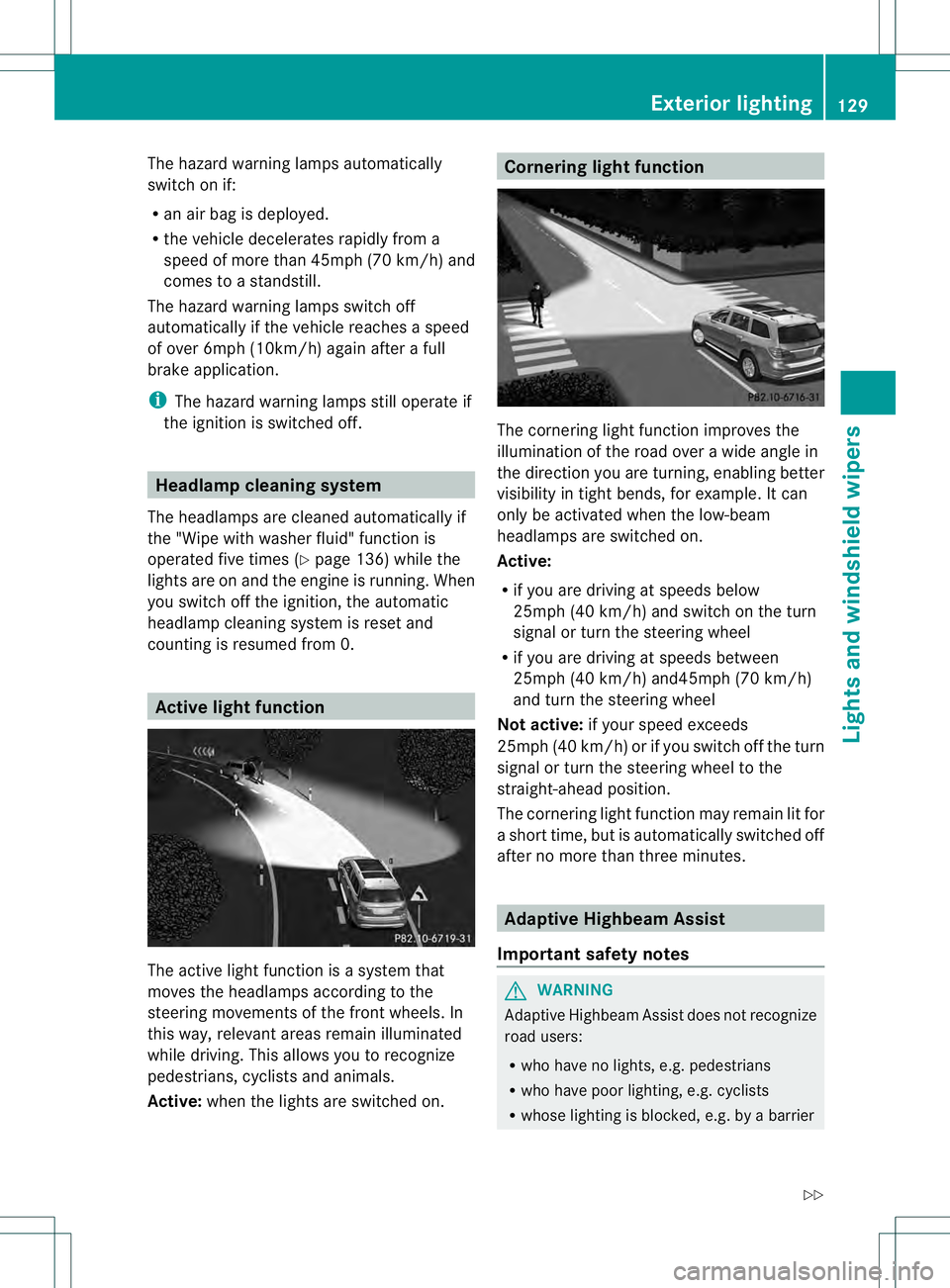
The active light function is a system that
moves the headlamps according to the
steering movements of the front wheels. In
this way, relevant areas remain illuminated
while driving. This allows you to recognize
pedestrians, cyclists and animals.
Active: whenthe lights are switched on. Cornering light function
The cornering light function improves the
illumination of the road over a wide angle in
the direction you are turning, enabling better
visibility in tight bends, for example. It can
only be activated when the low-beam
headlamps are switched on.
Active:
R
if you are driving at speeds below
25mph (40 km/h) and switch on the turn
signal or turn the steering wheel
R if you are driving at speeds between
25mph (40 km/h) and45mph (70 km/h)
and turn the steering wheel
Not active: if your speed exceeds
25mph (40 km/h) or if you switch off the turn
signal or turn the steering wheel to the
straight-ahead position.
The cornering light function may remain lit for
a short time, but is automatically switched off
after no more than three minutes. Adaptive Highbeam Assist
Important safety notes G
WARNING
Adaptive Highbeam Assist does not recognize
road users:
R who have no lights, e.g. pedestrians
R who have poor lighting, e.g. cyclists
R whose lighting is blocked, e.g. by a barrier Exterior lighting
129Lights and windshield wipers
Z
Page 132 of 454
In very rare cases, Adaptive Highbea
mAssist
may fail to recognize other road users that
have lights, or may recognize them too late.
In this or similar situations, the automatic
high-beam headlamps will not be deactivated
or activated regardless. There is a risk of an
accident.
Always carefully observe the traffic conditions
and switch off the high-beam headlamps in
good time. You can use this function to set the
headlamps to change between low beam and
high beam automatically. The system
recognizes vehicles with their lights on, either
approaching from the opposite direction or
traveling in front of your vehicle, and
consequently switches the headlamps from
high beam to low beam.
The system automatically adapts the low-
beam headlamp range depending on the
distance to the other vehicle. Once the
system no longer detects any other vehicles,
it reactivates the high-beam headlamps.
The system's optical sensor is located behind
the windshield near the overhead control
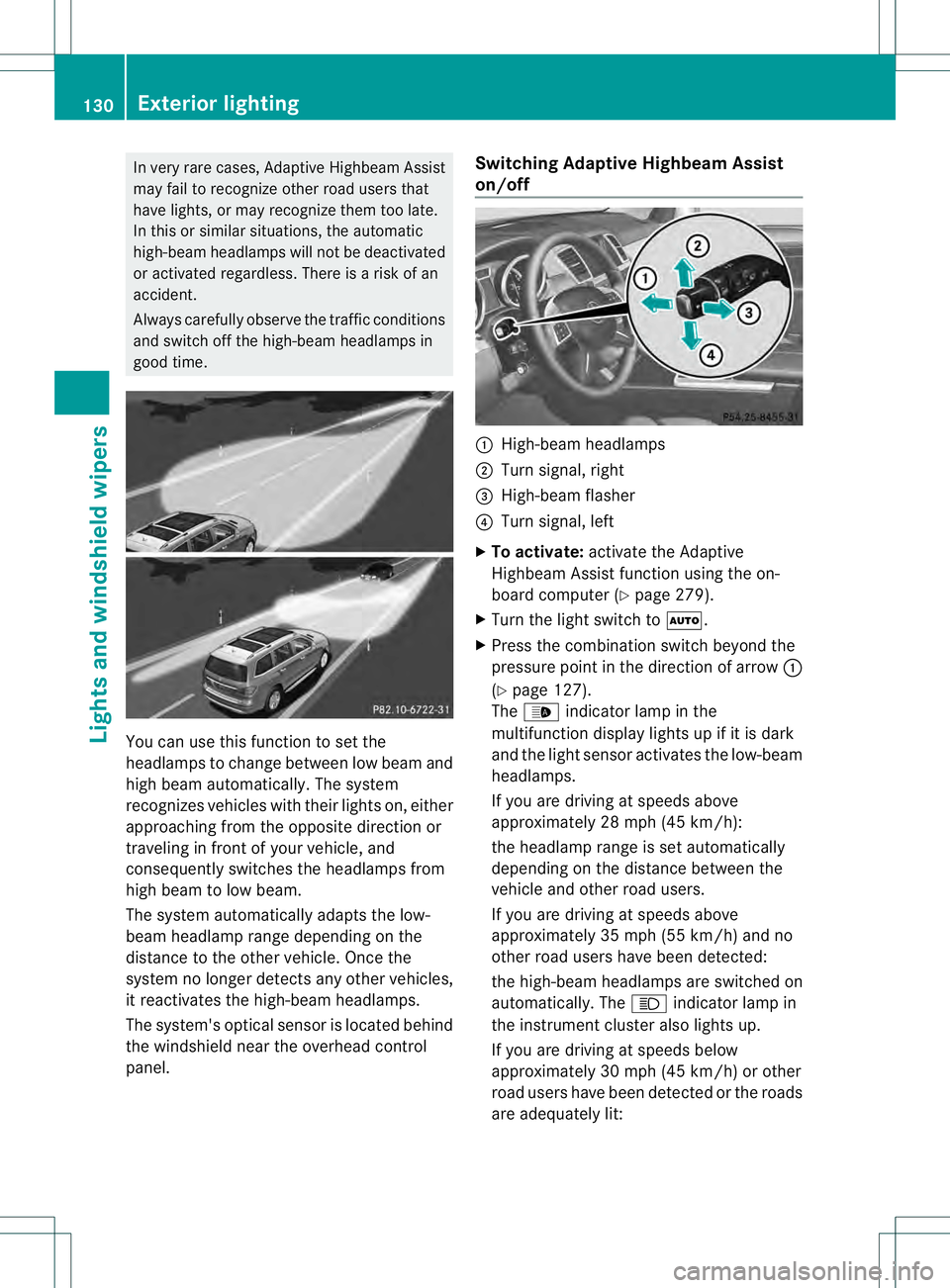
panel. Switching Adaptive Highbeam Assist
on/off
0002
High-beam headlamps
0003 Turn signal, right
0021 High-beam flasher
0020 Turn signal, left
X To activate: activate the Adaptive
Highbeam Assist function using the on-
board computer (Y page 279).
X Turn the light switch to 0006.
X Press the combination switch beyond the
pressure point in the direction of arrow 0002
(Y page 127).
The 0005 indicator lamp in the
multifunction display lights up if it is dark
and the light sensor activates the low-beam
headlamps.
If you are driving at speeds above
approximately 28 mph (45 km/h):
the headlamp range is set automatically
depending on the distance between the
vehicle and other road users.
If you are driving at speeds above
approximately 35 mph (55 km/h) and no
other road users have been detected:
the high-beam headlamps are switched on
automatically. The 000Cindicator lamp in
the instrument cluster also lights up.
If you are driving at speeds below
approximately 30 mph (45 km/h) or other
road users have been detected or the roads
are adequately lit: 130
Exterior lightingLights and windshield wipers
Page 135 of 454
Crash-responsive emergency lighting
The interio rlighting is activated automatically
if the vehicle is involved in an accident.
X To switch off the crash-responsive
emergency lighting: press the hazard
warning lamp button.
or
X Loc kand then unlock the vehicle using the
SmartKey. Replacing bulbs
Important safety notes
Xenon bulbs G
DANGER
Xeno nbulbs carry a high voltage. You can get
an electric shock if you remove the cover of
the Xenon bulb and touch the electrical
contacts. There is a risk of fatal injury.
Never touch the parts or the electrical
contacts of the Xenon bulb. Always have work
on the Xenon bulbs carried out at a qualified
specialist workshop.
If your vehicle is equipped with Xenon bulbs,
you can recognize this by the following: the
cone of light from the Xenon bulbs moves
from the top to the bottom and back again
when you start the engine. For this to be
observed, the lights must be switched on
before starting the engine.
Bulbs and lamps are an important aspec tof
vehicle safety .You must therefore make sure
that these function correctly at all times.
Have the headlamp setting checked regularly.
Other bulbs G
WARNING
Bulbs, lamps and connectors can get very hot
when operating. If you change a bulb, you
could burn yourself on these components.
There is a risk of injury. Allow these components to cool down before
changing a bulb.
There are bulbs other than the Xenon bulbs
that you cannot replace. Replace only the
bulbs listed (Y page 133). Have the bulbs that
you cannot replace yourself changed at a
qualified specialist workshop.
If you require assistance changing bulbs,
consult a qualified specialist workshop.
Do not touch the glass tube of new bulbs with
your bare hands. Even minor contamination
can burn into the glass surface and reduce
the service life of the bulbs. Always use a lint-
free cloth or only touch the base of the bulb
when installing.
Only use bulbs of the correc ttype.
If the new bulb still does no tlight up, consult
a qualified specialist workshop.
Bulbs and lamps are an importan taspect of
vehicle safety. You must therefore make sure
that these function correctly at all times.
Have the headlamp setting checked regularly. Overview:c
hanging bulbs/bulb types
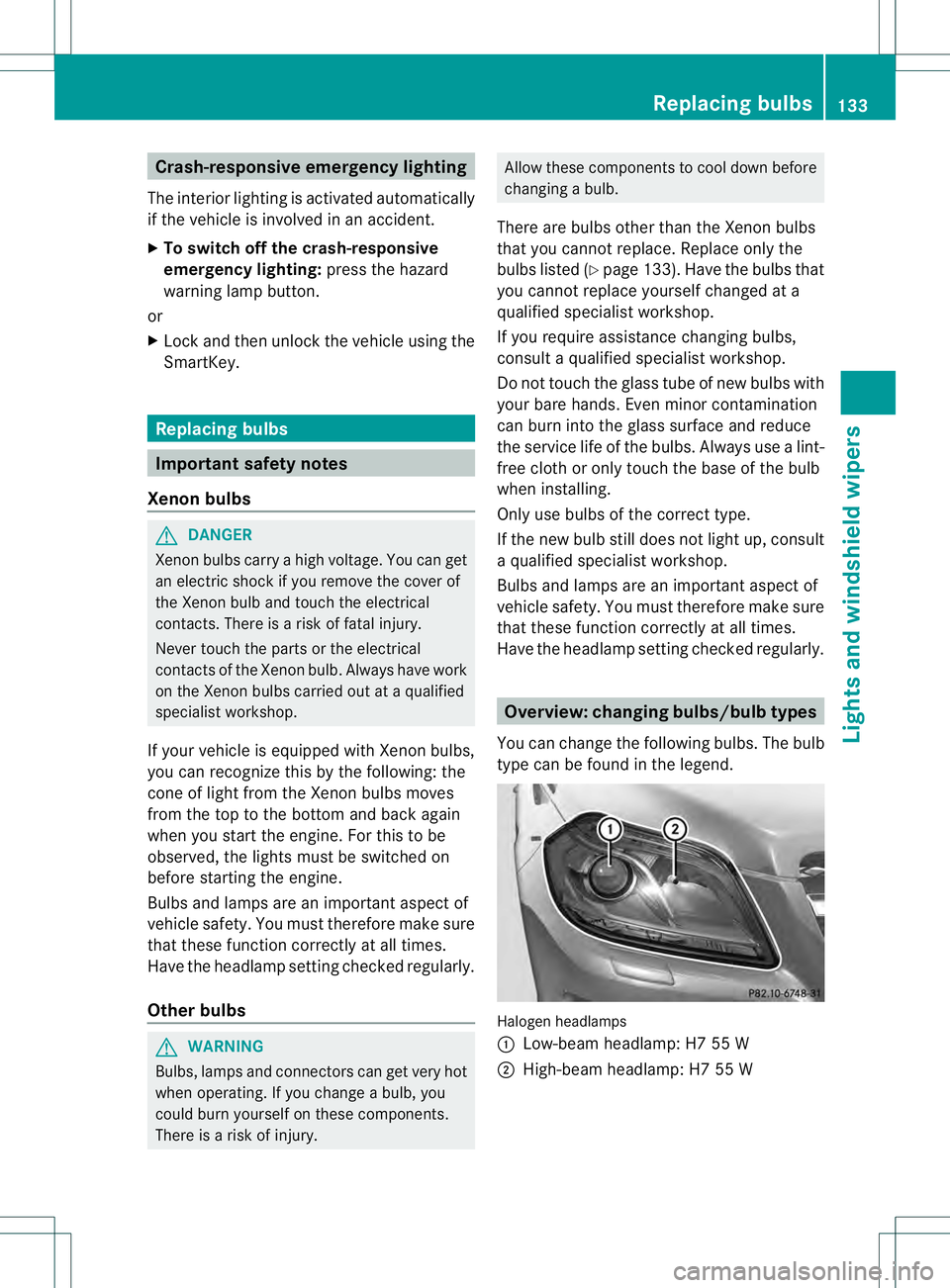
You can change the following bulbs. The bulb
type can be found in the legend. Halogen headlamps
0002
Low-beam headlamp: H7 55 W
0003 High-beam headlamp: H7 55 W Replacing bulbs
133Lights and windshield wipers Z
Page 136 of 454
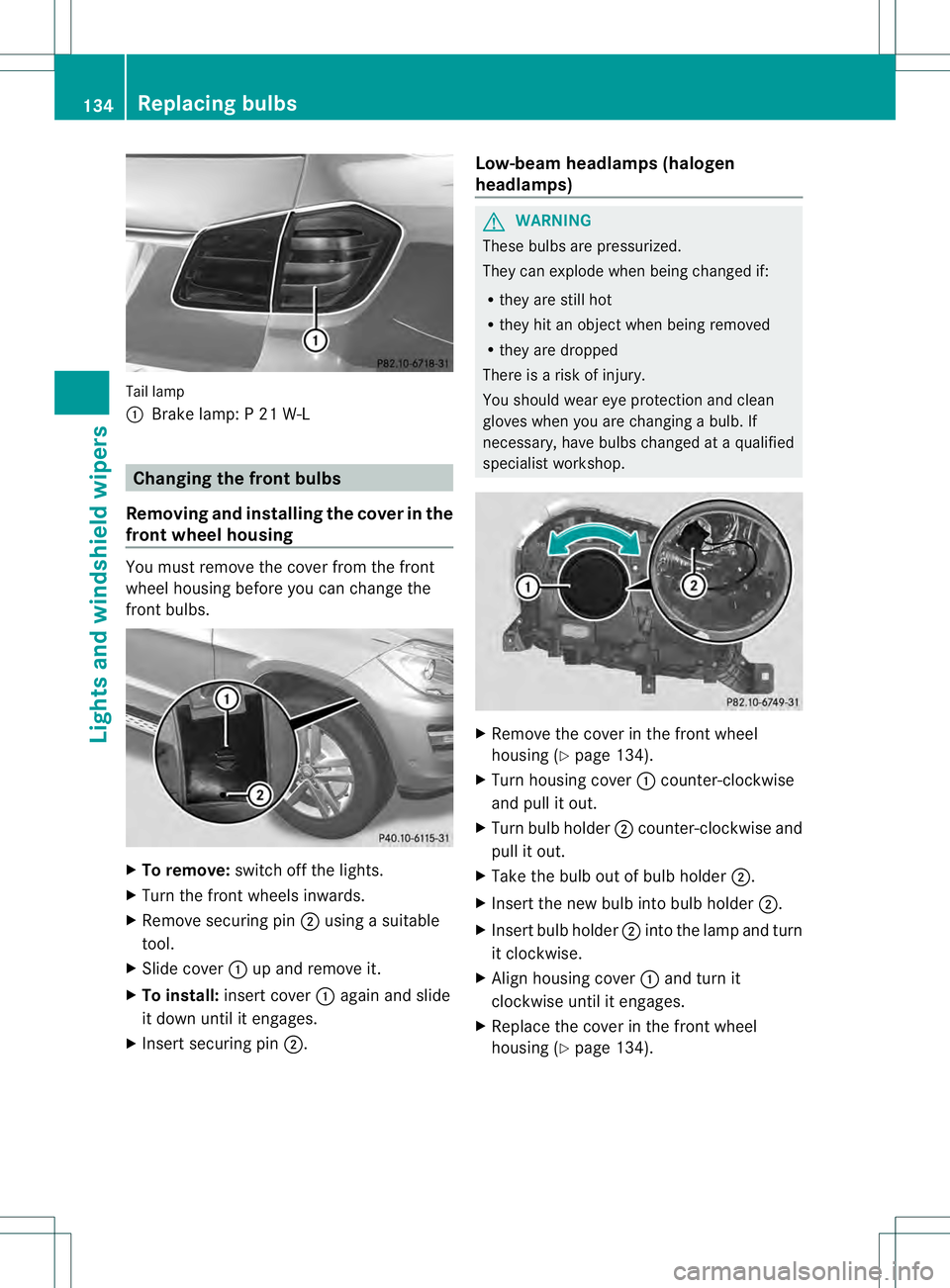
Tail lamp
0002
Brake lamp: P 21 W-L Changing the front bulbs
Removing and installing the cover in the
front wheel housing You must remove the cover from the front
wheel housing before you can change the
front bulbs. X
To remove: switch off the lights.
X Turn the front wheels inwards.
X Remove securing pin 0003using a suitable
tool.
X Slide cover 0002up and remove it.
X To install: insert cover 0002again and slide
it down until it engages.
X Insert securing pin 0003. Low-beam headlamps (halogen
headlamps) G
WARNING
These bulbs are pressurized.
They can explode when being changed if:
R they are still hot
R they hit an object when being removed
R they are dropped
There is a risk of injury.
You should wear eye protection and clean
gloves when you are changing a bulb. If
necessary, have bulbs changed at a qualified
specialist workshop. X
Remove the cover in the front wheel
housing (Y page 134).
X Turn housing cover 0002counter-clockwise
and pull it out.
X Turn bulb holder 0003counter-clockwise and
pull it out.
X Take the bulb out of bulb holder 0003.
X Insert the new bulb into bulb holder 0003.
X Insert bulb holder 0003into the lamp and turn
it clockwise.
X Align housing cover 0002and turn it
clockwise until it engages.
X Replace the cover in the front wheel
housing (Y page 134).134
Replacing bulbsLights and windshield wipers
Page 272 of 454
001E
Drive program (Y page 169)
001F Transmission positio n(Ypage 169)
X To show menu bar 0020:press the 0002
or 0005 button on the steering wheel.
Menu bar 0020disappears after a few seconds.
Text field 0021shows the selected menu or
submenu as well as display messages.
i You can set the time using the audio
system or COMAND; see the separate
operating instructions.
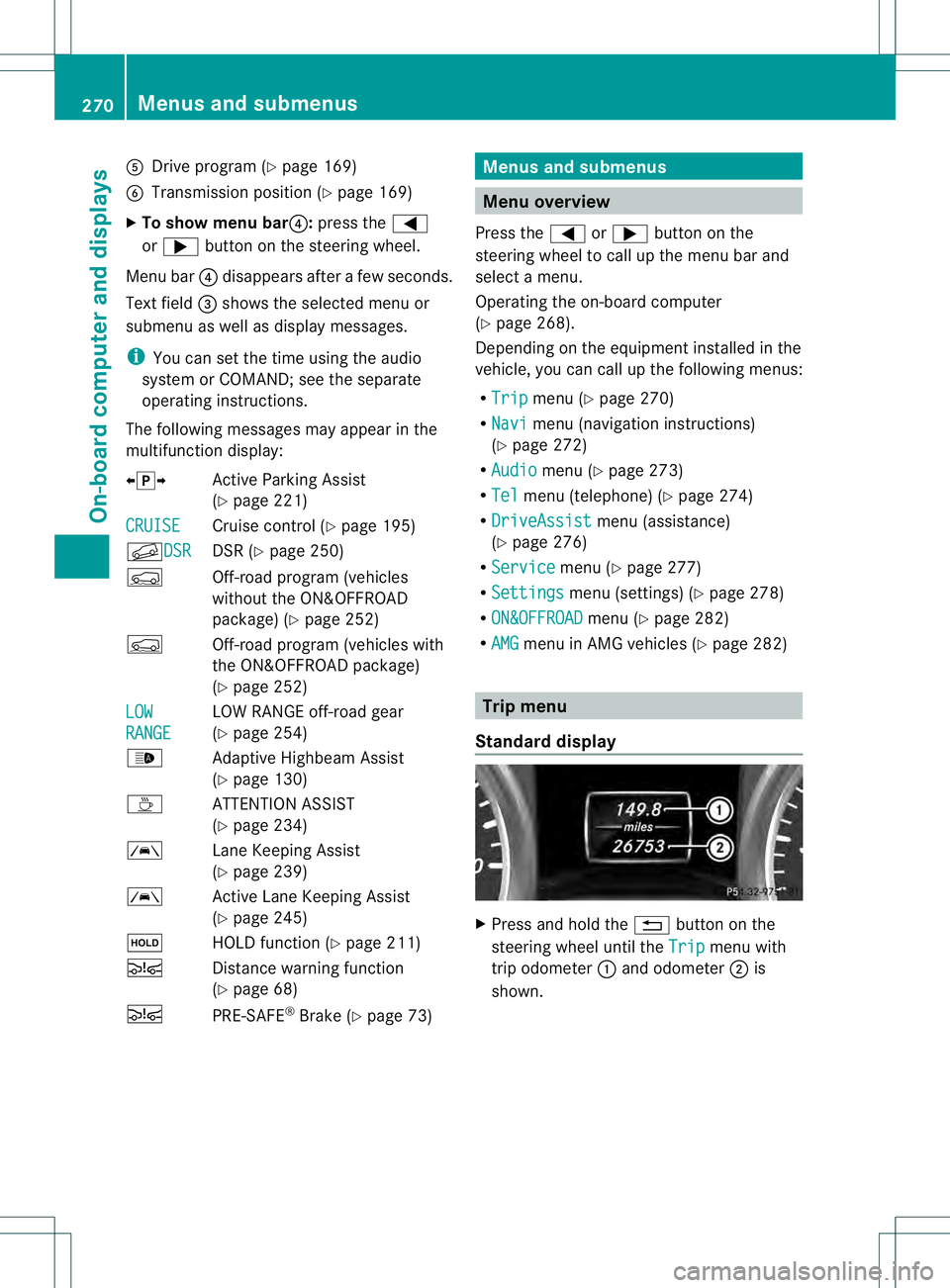
The following messages may appear in the
multifunction display:
00090011000A Active Parking Assist
(Ypage 221)
CRUISE Cruise control (Y
page 195)
000BDSR DSR (Y
page 250)
0006 Off-road program (vehicles
without the ON&OFFROAD
package) (Y page 252)
0006 Off-road program (vehicles with
the ON&OFFROA Dpackage)
(Y page 252)
LOW RANGE LOW RANGE off-road gear
(Y
page 254)
0005 Adaptive Highbeam Assist
(Ypage 130)
0003 ATTENTION ASSIST
(Ypage 234)
0001 Lane Keeping Assist
(Ypage 239)
0001 Active Lane Keeping Assist
(Ypage 245)
0001 HOLD function (Y page 211)
0003 Distance warning function
(Ypage 68)
0003 PRE-SAFE®
Brake (Y page 73) Menus and submenus
Menu overview
Press the 0002or0005 button on the
steering wheel to call up the menu bar and
selec tamenu.
Operating the on-board computer
(Y page 268).
Depending on the equipment installed in the
vehicle, you can call up the following menus:
R Trip menu (Y
page 270)
R Navi menu (navigatio
ninstructions)
(Y page 272)
R Audio menu (Y
page 273)
R Tel menu (telephone) (Y
page 274)
R DriveAssist menu (assistance)
(Y page 276)
R Service menu (Y
page 277)
R Settings menu (settings) (Y
page 278)
R ON&OFFROAD menu (Y
page 282)
R AMG menu in AMG vehicles (Y
page 282) Trip menu
Standard display X
Press and hold the 0007button on the
steering wheel until the Trip menu with
trip odometer 0002and odometer 0003is
shown. 270
Menus and submenusOn-board computer and displays
Page 301 of 454
Display messages Possible causes/consequences and
0001 Solutions
If these conditions are fulfilled, the front-passenger seat can be
occupied again .Whether the 00050006 indicator lamp remains lit
or goes out depends on how OCS classifies the occupant.
If the conditions are not fulfilled, the system is not operating
correctly.
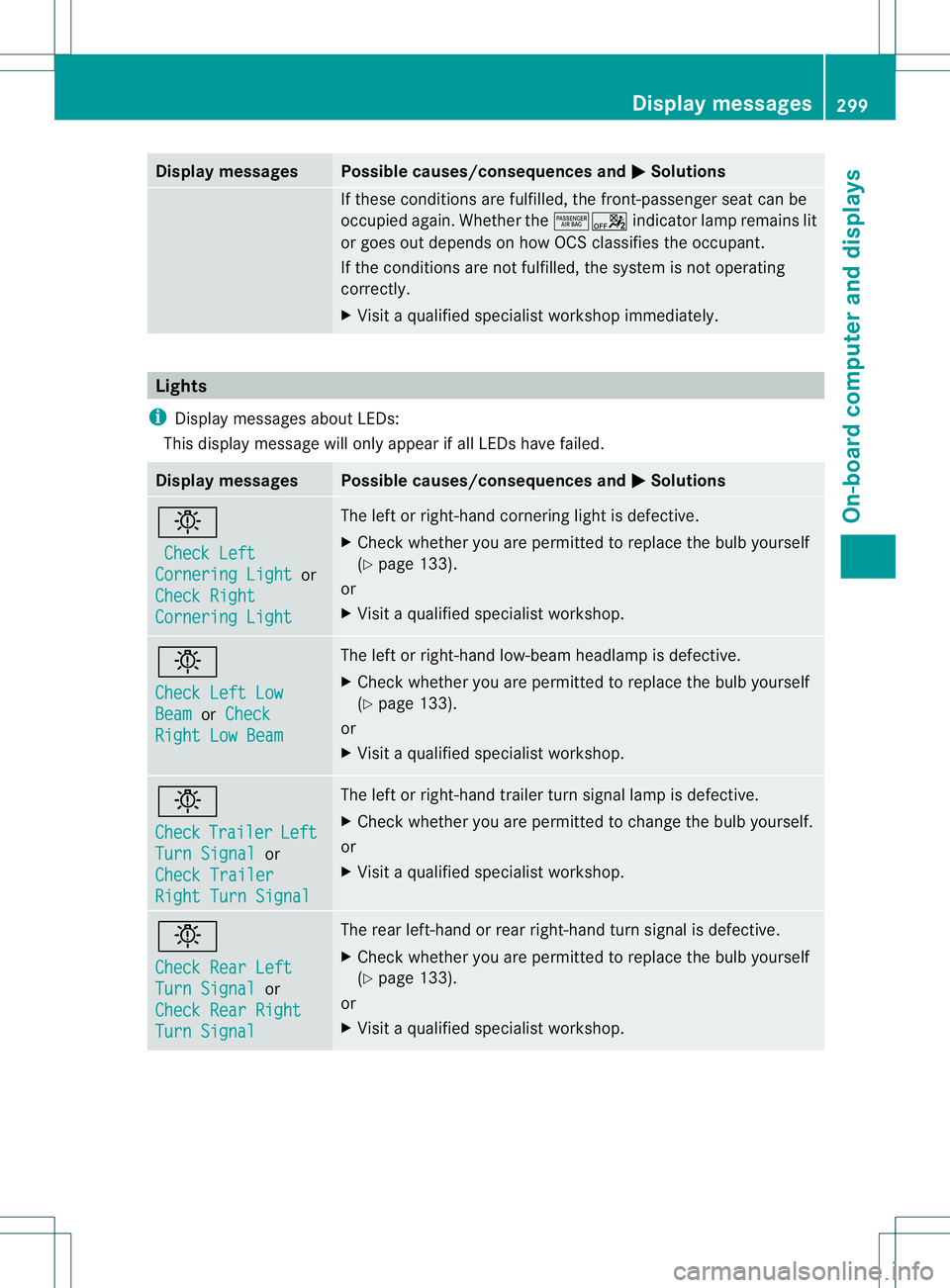
X Visit a qualified specialist workshop immediately. Lights
i Display messages about LEDs:
This display message will only appearifa ll LEDs have failed.Displa
ymessages Possible causes/consequences and
0001 Solutions
0004
Check Left Cornering Light or
Check Right Cornering Light The left or right-hand cornering light is defective.
X
Chec kwhether you are permitted to replace the bulb yourself
(Y page 133).
or
X Visit a qualified specialist workshop. 0004
Check Left Low
Beam or
Check Right Low Beam The left or right-hand low-beam headlamp is defective.
X
Check whether you are permitted to replace the bulb yourself
(Y page 133).
or
X Visit a qualified specialist workshop. 0004
Check
Trailer Left
Turn Signal or
Check Trailer Right Turn Signal The left or right-hand trailer turn signal lamp is defective.
X
Check whether you are permitted to change the bulb yourself.
or
X Visit a qualified specialist workshop. 0004
Check Rear Left
Turn Signal or
Check Rear Right Turn Signal The rear left-hand or rear right-hand turn signal is defective.
X
Check whether you are permitted to replace the bulb yourself
(Y page 133).
or
X Visit a qualified specialist workshop. Display messages
299On-board computer and displays Z
Page 304 of 454
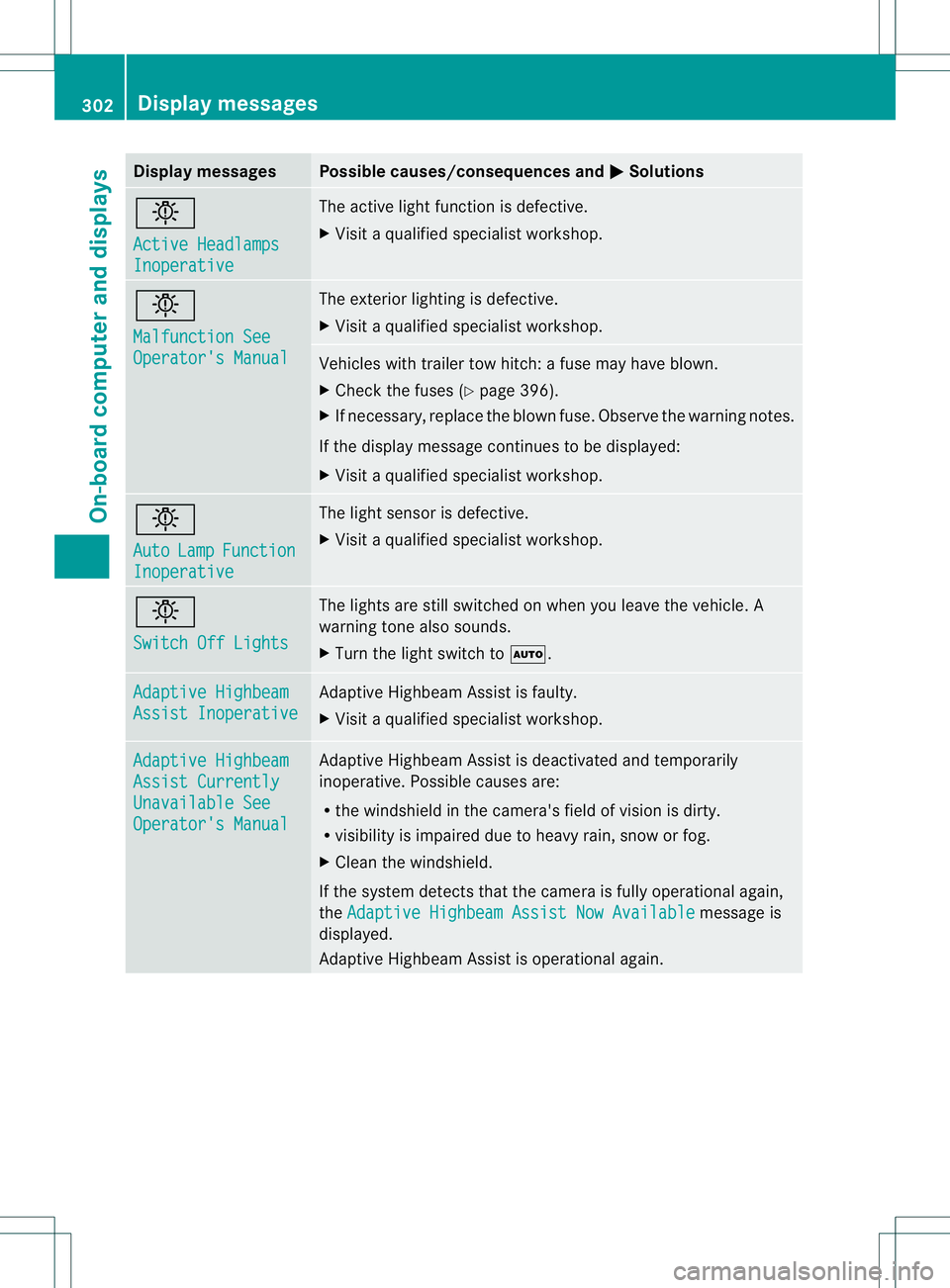
Display messages Possible causes/consequences and
0001 Solutions
0004
Active Headlamps
Inoperative The active ligh
tfunction is defective.
X Visi taqualified specialist workshop. 0004
Malfunction See
Operator's Manual The exterior lighting is defective.
X
Visit a qualified specialist workshop. Vehicles with trailer tow hitch: a fuse may have blown.
X
Check the fuses (Y page 396).
X If necessary, replace the blown fuse. Observe the warning notes.
If the display message continues to be displayed:
X Visit a qualified specialist workshop. 0004
Auto
Lamp Function
Inoperative The light senso
ris defective.
X Visit a qualified specialist workshop. 0004
Switch Off Lights The lights are still switched on when you leave the vehicle. A
warning tone also sounds.
X
Turn the light switch to 0006.Adaptive Highbeam
Assist Inoperative Adaptive Highbeam Assist is faulty.
X
Visit a qualified specialist workshop. Adaptive Highbeam
Assist Currently
Unavailable See
Operator's Manual Adaptive Highbeam Assist is deactivated and temporarily
inoperative. Possible causes are:
R
the windshield in the camera's field of vision is dirty.
R visibility is impaired due to heavy rain, snow or fog.
X Cleant he windshield.
If the system detects that the camera is fully operational again,
the Adaptive Highbeam Assist Now Available message is
displayed.
Adaptive Highbeam Assist is operational again. 302
Display messagesOn-board computer and displays
Page 322 of 454
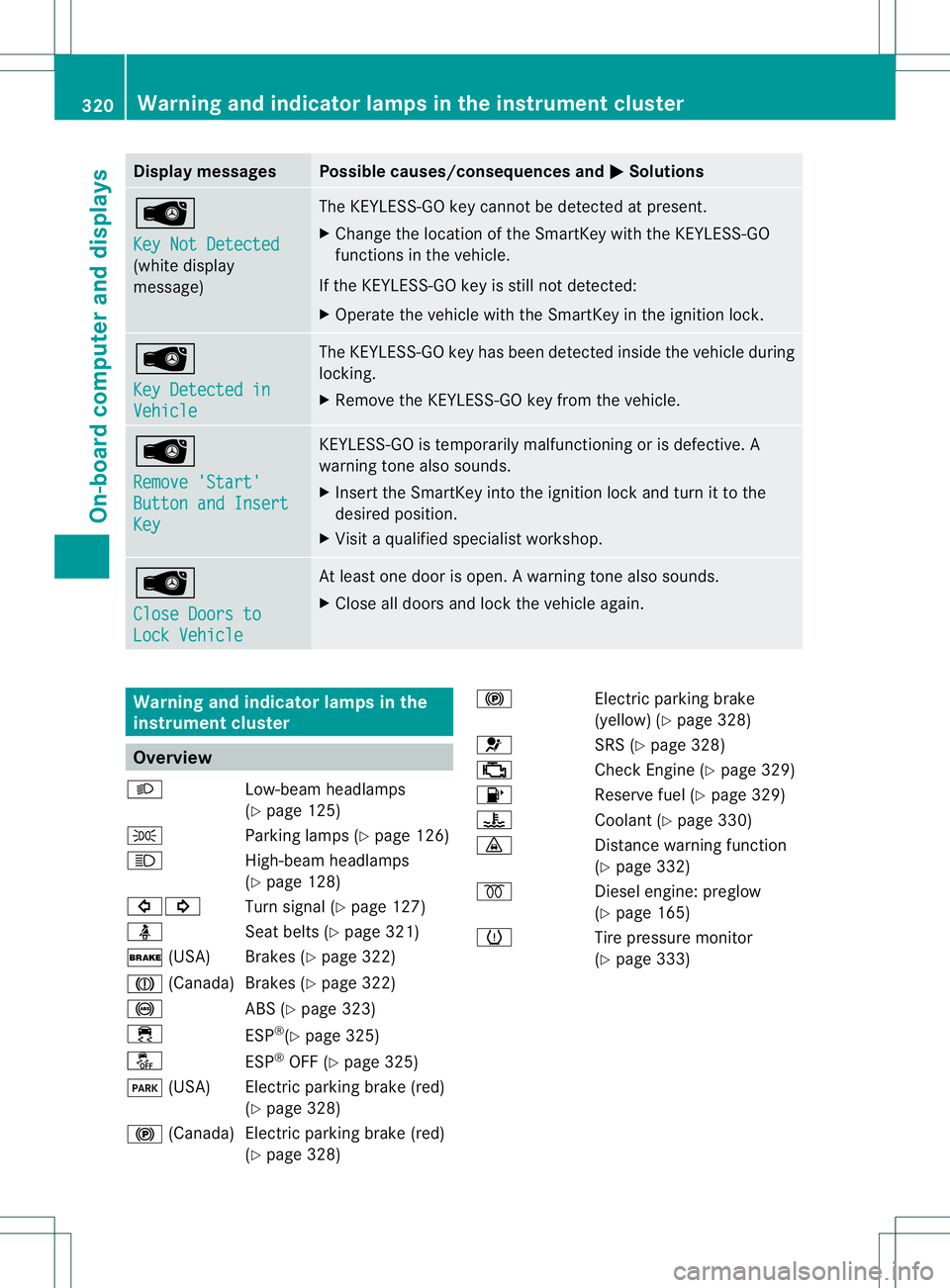
Display messages Possible causes/consequences and
0001 Solutions
0002
Key Not Detected
(white display
message) The KEYLESS-GO key cannot be detected at present.
X
Change the location of the SmartKey wit hthe KEYLESS-GO
functions in the vehicle.
If the KEYLESS-GO key is still not detected:
X Operate the vehicle with the SmartKey in the ignition lock. 0002
Key Detected in
Vehicle The KEYLESS-GO key has been detected inside the vehicle during
locking.
X
Remove the KEYLESS-GO key from the vehicle. 0002
Remove 'Start'
Button and Insert
Key KEYLESS-GO is temporarily malfunctioning or is defective. A
warning tone also sounds.
X
Insert the SmartKey into the ignition lock and turn it to the
desired position.
X Visit a qualified specialist workshop. 0002
Close Doors to
Lock Vehicle At least one door is open.
Awarning tone also sounds.
X Close all doors and loc kthe vehicle again. Warning and indicator lamps in the
instrument cluster
Overview
000D Low-beam headlamps
(Ypage 125)
0016 Parking lamps (Y page 126)
000C High-beam headlamps
(Ypage 128)
00070006 Turn signal (Ypage 127)
0014 Seat belts (Ypage 321)
0012 (USA) Brakes (Y page 322)
0009 (Canada)B rakes (Ypage 322)
0019 ABS (Ypage 323)
000F ESP®
(Y page 325)
0017 ESP®
OFF (Y page 325)
0008 (USA) Electric parking brake (red)
(Ypage 328)
000D (Canada )Electric parking brake (red)
(Y page 328) 000D
Electric parking brake
(yellow) (Ypage 328)
001F SRS (Ypage 328)
0010 Check Engine (Y page 329)
0012 Reserve fuel (Ypage 329)
000E Coolant (Ypage 330)
000F Distance warning function
(Ypage 332)
0010 Diesel engine: preglow
(Ypage 165)
0013 Tire pressure monitor
(Ypage 333) 320
Warning and indicator lamps in the instrument clusterOn-board computer and displays