windshield wipers MERCEDES-BENZ GL 2013 User Guide
[x] Cancel search | Manufacturer: MERCEDES-BENZ, Model Year: 2013, Model line: GL, Model: MERCEDES-BENZ GL 2013Pages: 454, PDF Size: 6.31 MB
Page 135 of 454
Crash-responsive emergency lighting
The interio rlighting is activated automatically
if the vehicle is involved in an accident.
X To switch off the crash-responsive
emergency lighting: press the hazard
warning lamp button.
or
X Loc kand then unlock the vehicle using the
SmartKey. Replacing bulbs
Important safety notes
Xenon bulbs G
DANGER
Xeno nbulbs carry a high voltage. You can get
an electric shock if you remove the cover of
the Xenon bulb and touch the electrical
contacts. There is a risk of fatal injury.
Never touch the parts or the electrical
contacts of the Xenon bulb. Always have work
on the Xenon bulbs carried out at a qualified
specialist workshop.
If your vehicle is equipped with Xenon bulbs,
you can recognize this by the following: the
cone of light from the Xenon bulbs moves
from the top to the bottom and back again
when you start the engine. For this to be
observed, the lights must be switched on
before starting the engine.
Bulbs and lamps are an important aspec tof
vehicle safety .You must therefore make sure
that these function correctly at all times.
Have the headlamp setting checked regularly.
Other bulbs G
WARNING
Bulbs, lamps and connectors can get very hot
when operating. If you change a bulb, you
could burn yourself on these components.
There is a risk of injury. Allow these components to cool down before
changing a bulb.
There are bulbs other than the Xenon bulbs
that you cannot replace. Replace only the
bulbs listed (Y page 133). Have the bulbs that
you cannot replace yourself changed at a
qualified specialist workshop.
If you require assistance changing bulbs,
consult a qualified specialist workshop.
Do not touch the glass tube of new bulbs with
your bare hands. Even minor contamination
can burn into the glass surface and reduce
the service life of the bulbs. Always use a lint-
free cloth or only touch the base of the bulb
when installing.
Only use bulbs of the correc ttype.
If the new bulb still does no tlight up, consult
a qualified specialist workshop.
Bulbs and lamps are an importan taspect of
vehicle safety. You must therefore make sure
that these function correctly at all times.
Have the headlamp setting checked regularly. Overview:c
hanging bulbs/bulb types
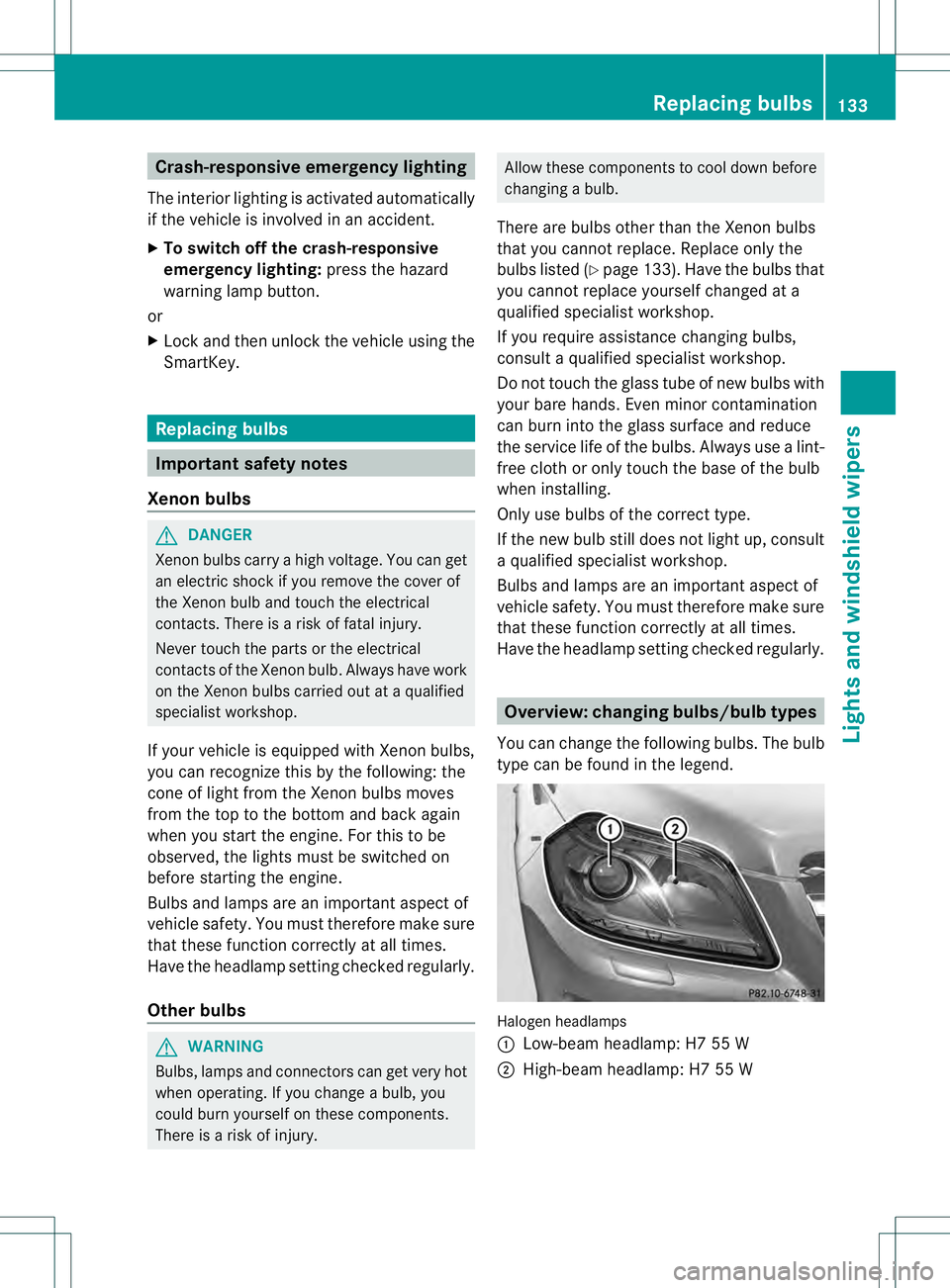
You can change the following bulbs. The bulb
type can be found in the legend. Halogen headlamps
0002
Low-beam headlamp: H7 55 W
0003 High-beam headlamp: H7 55 W Replacing bulbs
133Lights and windshield wipers Z
Page 136 of 454
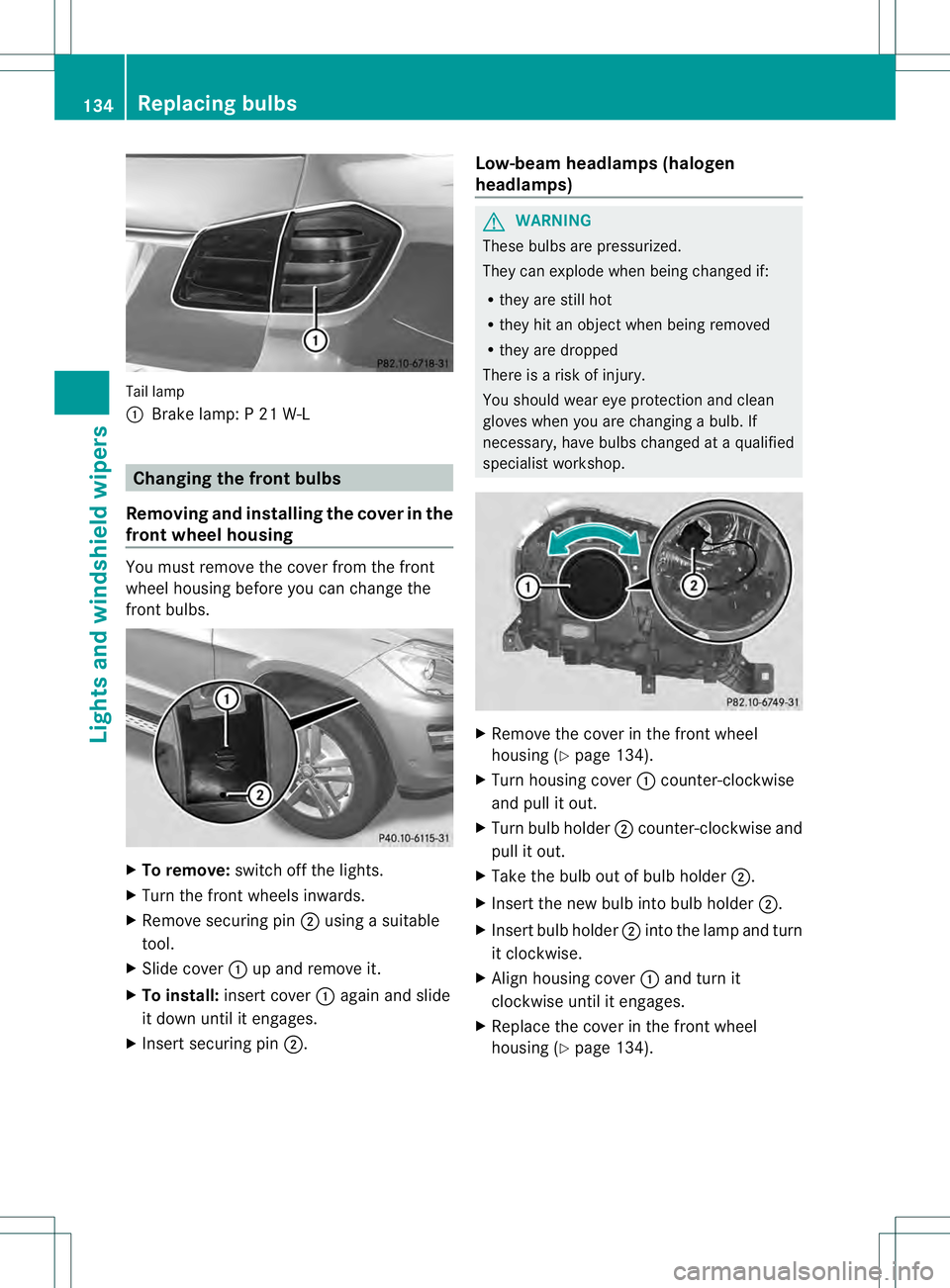
Tail lamp
0002
Brake lamp: P 21 W-L Changing the front bulbs
Removing and installing the cover in the
front wheel housing You must remove the cover from the front
wheel housing before you can change the
front bulbs. X
To remove: switch off the lights.
X Turn the front wheels inwards.
X Remove securing pin 0003using a suitable
tool.
X Slide cover 0002up and remove it.
X To install: insert cover 0002again and slide
it down until it engages.
X Insert securing pin 0003. Low-beam headlamps (halogen
headlamps) G
WARNING
These bulbs are pressurized.
They can explode when being changed if:
R they are still hot
R they hit an object when being removed
R they are dropped
There is a risk of injury.
You should wear eye protection and clean
gloves when you are changing a bulb. If
necessary, have bulbs changed at a qualified
specialist workshop. X
Remove the cover in the front wheel
housing (Y page 134).
X Turn housing cover 0002counter-clockwise
and pull it out.
X Turn bulb holder 0003counter-clockwise and
pull it out.
X Take the bulb out of bulb holder 0003.
X Insert the new bulb into bulb holder 0003.
X Insert bulb holder 0003into the lamp and turn
it clockwise.
X Align housing cover 0002and turn it
clockwise until it engages.
X Replace the cover in the front wheel
housing (Y page 134).134
Replacing bulbsLights and windshield wipers
Page 137 of 454
High-beam headlamps (halogen
headlamps)
G
WARNING
These bulbs are pressurized.
They can explode when being changed if:
R they are still hot
R they hit an object when being removed
R they are dropped
There is a risk of injury.
You should wea reye protection and clean
gloves when you are changin gabulb. If
necessary, have bulbs changed at a qualified
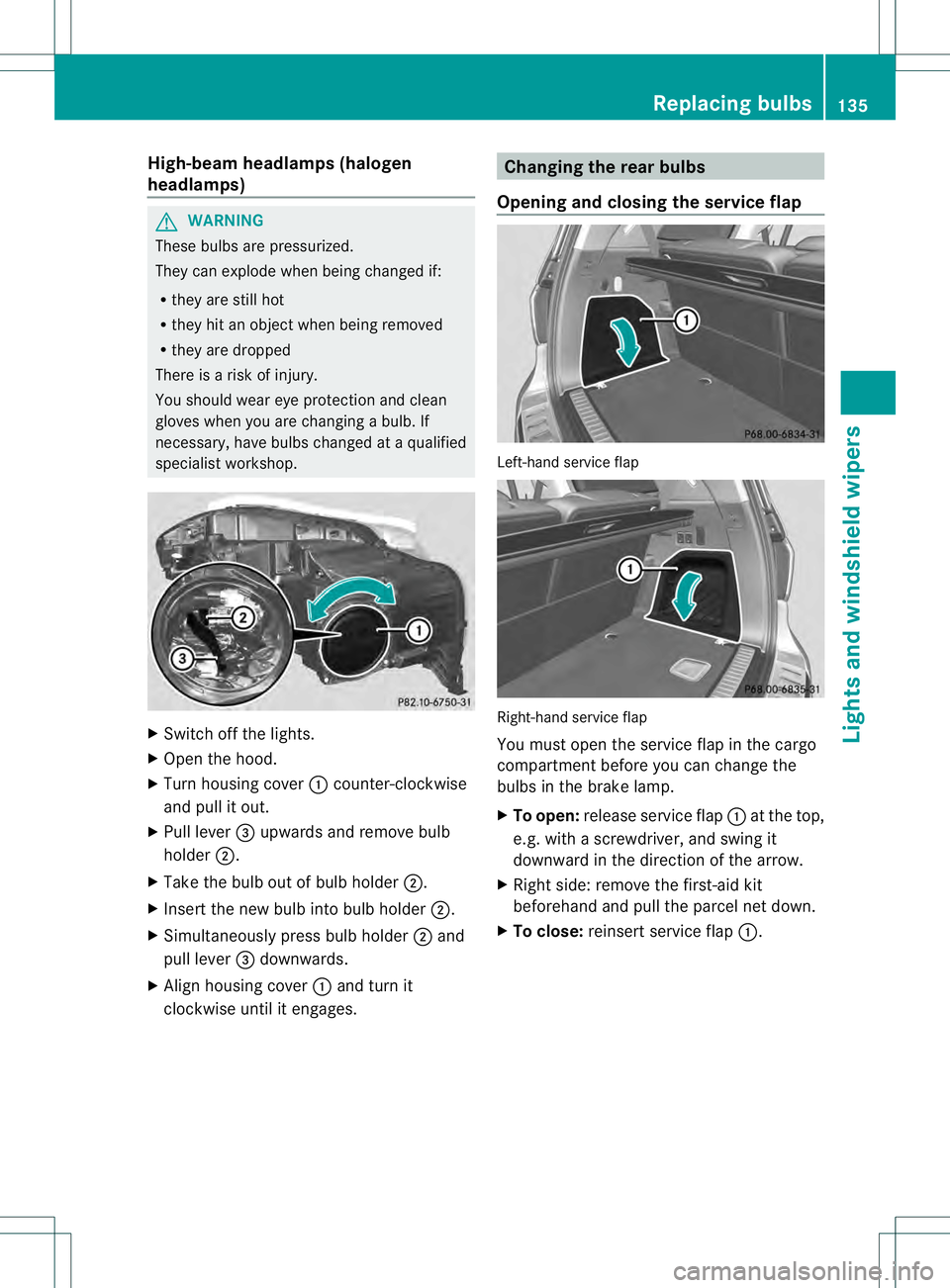
specialist workshop. X
Switch off the lights.
X Open the hood.
X Turn housing cover 0002counter-clockwise
and pull it out.
X Pull lever 0021upwards and remove bulb
holder 0003.
X Take the bulb out of bulb holder 0003.
X Inser tthe new bulb into bulb holder 0003.
X Simultaneously press bulb holder 0003and
pull lever 0021downwards.
X Align housing cover 0002and turn it
clockwise until it engages. Changing the rear bulbs
Opening and closing the service flap Left-hand service flap
Right-hand service flap
You must open the service flap in the cargo
compartment before you can change the
bulbs in the brake lamp.
X
To open: release service flap 0002at the top,
e.g. with a screwdriver, and swing it
downward in the direction of the arrow.
X Right side: remove the first-aid kit
beforehand and pull the parcel net down.
X To close: reinsert service flap 0002. Replacing bulbs
135Lights and windshield wipers Z
Page 138 of 454
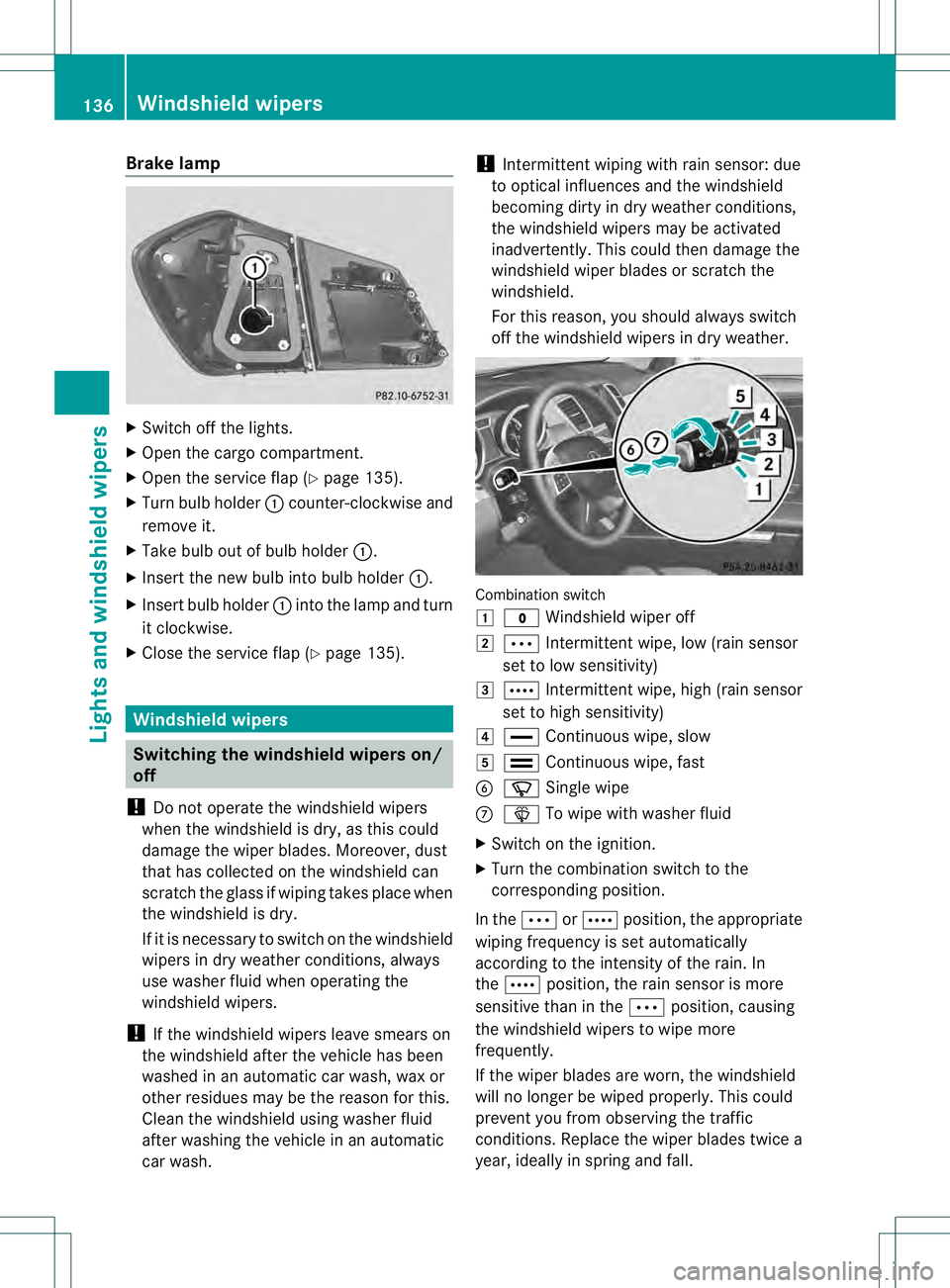
Brake lamp
X
Switch off the lights.
X Open the cargo compartment.
X Ope nthe service flap (Y page 135).
X Turn bulb holder 0002counter-clockwise and
remove it.
X Take bulb out of bulb holder 0002.
X Insert the new bulb into bulb holder 0002.
X Insert bulb holder 0002into the lamp and turn
it clockwise.
X Close the service flap (Y page 135).Windshield wipers
Switching the windshield wipers on/
off
! Do not operate the windshield wipers
when the windshield is dry, as this could
damage the wiper blades. Moreover, dust
that has collected on the windshield can
scratch the glass if wiping takes place when
the windshield is dry.
If it is necessary to switch on the windshield
wipers in dry weather conditions, always
use washer fluid when operating the
windshield wipers.
! If the windshield wipers leave smears on
the windshield after the vehicle has been
washed in an automatic car wash, wax or
other residues may be the reason for this.
Cleant he windshield using washer fluid
after washing the vehicle in an automatic
car wash. !
Intermittent wiping with rain sensor: due
to optical influences and the windshield
becoming dirty in dry weather conditions,
the windshield wipers may be activated
inadvertently. This could then damage the
windshield wiper blades or scratch the
windshield.
For this reason, you should always switch
off the windshield wipers in dry weather. Combination switch
0004
0008 Windshield wiper off
0005 0001 Intermittent wipe, low (rain sensor
set to low sensitivity)
0006 0002 Intermittent wipe, high (rain sensor
set to high sensitivity)
000B 0018 Continuous wipe, slow
000C 0012 Continuous wipe, fast
001F 0007 Single wipe
0013 0008 To wipe with washer fluid
X Switch on the ignition.
X Turn the combination switch to the
corresponding position.
In the 0001or0002 position, the appropriate
wiping frequency is set automatically
according to the intensity of the rain. In
the 0002 position, the rain sensor is more
sensitive than in the 0001position, causing
the windshield wipers to wipe more
frequently.
If the wiper blades are worn, the windshield
will no longer be wiped properly. This could
prevent you from observing the traffic
conditions. Replace the wiper blades twice a
year, ideally in spring and fall. 136
Windshield wipersLights and windshield wipers
Page 139 of 454
Switching the rear window wiper on/
off
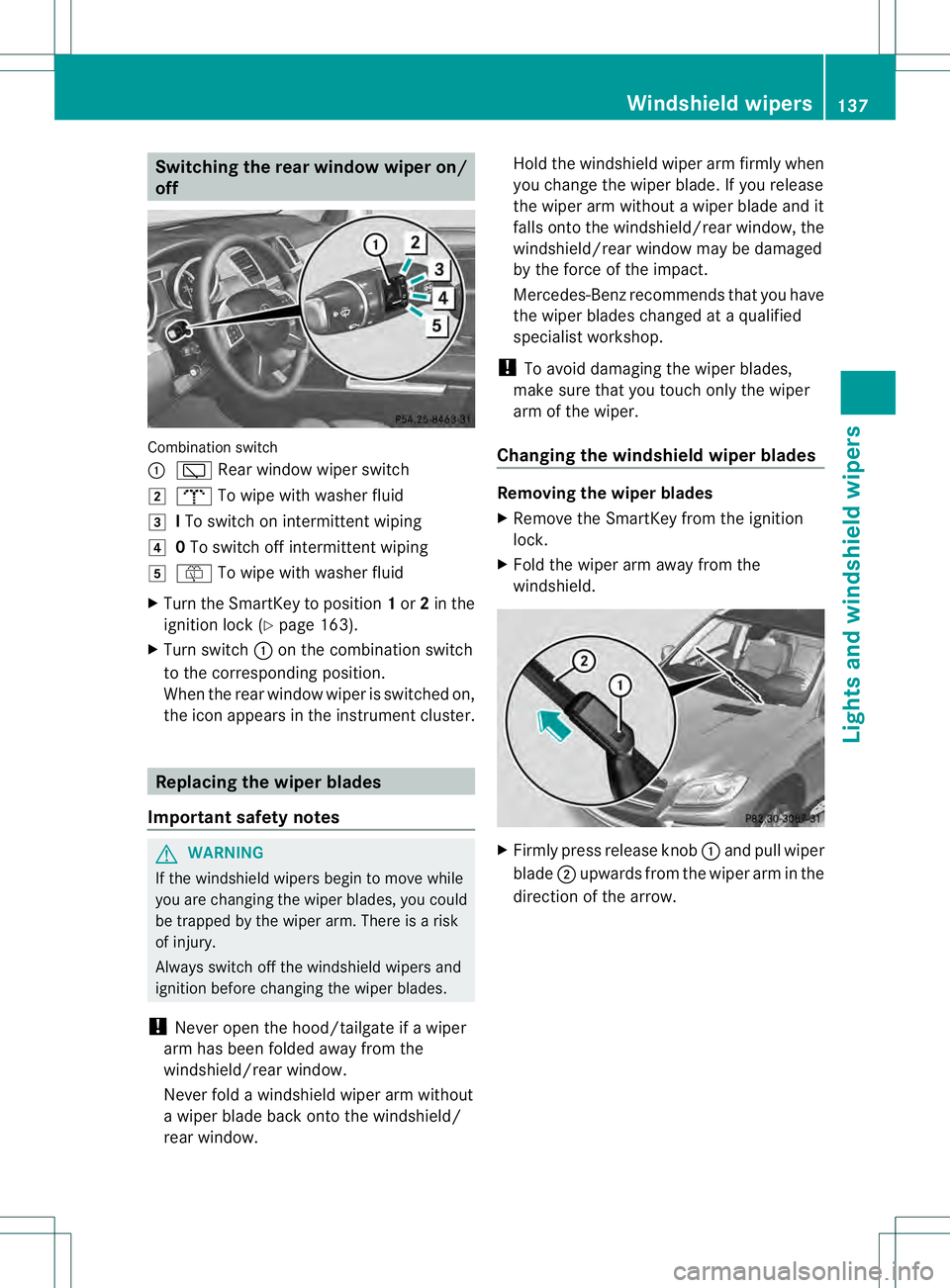
Combination switch
0002
0001 Rear window wiper switch
0005 0007 To wipe with washer fluid
0006 ITo switch on intermittent wiping
000B 0To switch off intermittent wiping
000C 000E To wipe with washer fluid
X Turn the SmartKey to position 1or 2in the
ignition lock (Y page 163).
X Turn switch 0002on the combination switch
to the corresponding position.
When the rear window wiper is switched on,
the icon appears in the instrumen tcluster. Replacing the wiper blades
Important safety notes G
WARNING
If the windshield wipers begin to move while
you are changing the wiper blades, you could
be trapped by the wiper arm. There is a risk
of injury.
Always switch off the windshield wipers and
ignition before changing the wiper blades.
! Neve ropen the hood/tailgate if a wiper
arm has been folded away from the
windshield/rear window.
Never fold a windshield wiper arm without
a wiper blade back onto the windshield/
rear window. Hold the windshield wiper arm firmly when
you change the wiper blade. If you release
the wiper arm without a wiper blade and it
falls onto the windshield/rear window, the
windshield/rear window may be damaged
by the force of the impact.
Mercedes-Benz recommends that you have
the wiper blades changed at
aqualified
specialist workshop.
! To avoid damaging the wiper blades,
make sure that you touch only the wiper
arm of the wiper.
Changing the windshield wiper blades Removing the wiper blades
X
Remove the SmartKey from the ignition
lock.
X Fold the wiper arm away from the
windshield. X
Firmly press release knob 0002and pull wiper
blade 0003upwards from the wiper arm in the
direction of the arrow. Windshiel
dwipers
137Lights and windshield wipers Z
Page 140 of 454
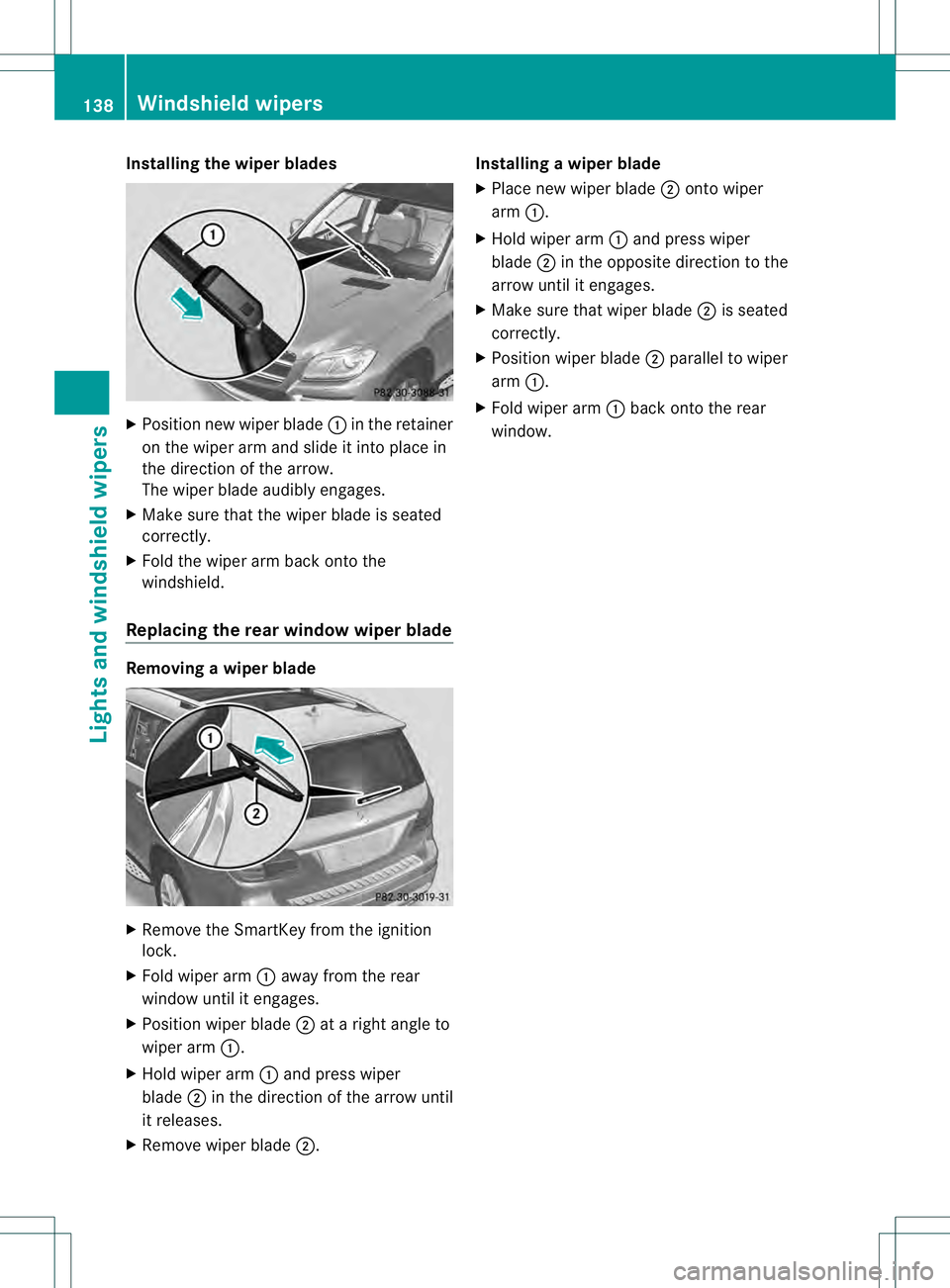
Installing the wiper blades
X
Positio nnew wiper blade 0002in the retainer
on the wiper arm and slide it into place in
the direction of the arrow.
The wiper blade audibly engages.
X Make sure that the wiper blade is seated
correctly.
X Fold the wiper arm back onto the
windshield.
Replacing the rear window wiper blade Removing
awiper blade X
Remove the SmartKey from the ignition
lock.
X Fold wiper arm 0002away from the rear
window until it engages.
X Position wiper blade 0003at a right angle to
wiper arm 0002.
X Hold wiper arm 0002and press wiper
blade 0003in the direction of the arrow until
it releases.
X Remove wiper blade 0003. Installing
awiper blade
X Place new wiper blade 0003onto wiper
arm 0002.
X Hold wiper arm 0002and press wiper
blade 0003in the opposite direction to the
arrow until it engages.
X Make sure that wiper blade 0003is seated
correctly.
X Position wiper blade 0003parallel to wiper
arm 0002.
X Fold wiper arm 0002back onto the rear
window. 138
Windshield wipersLights and windshield wipers
Page 141 of 454
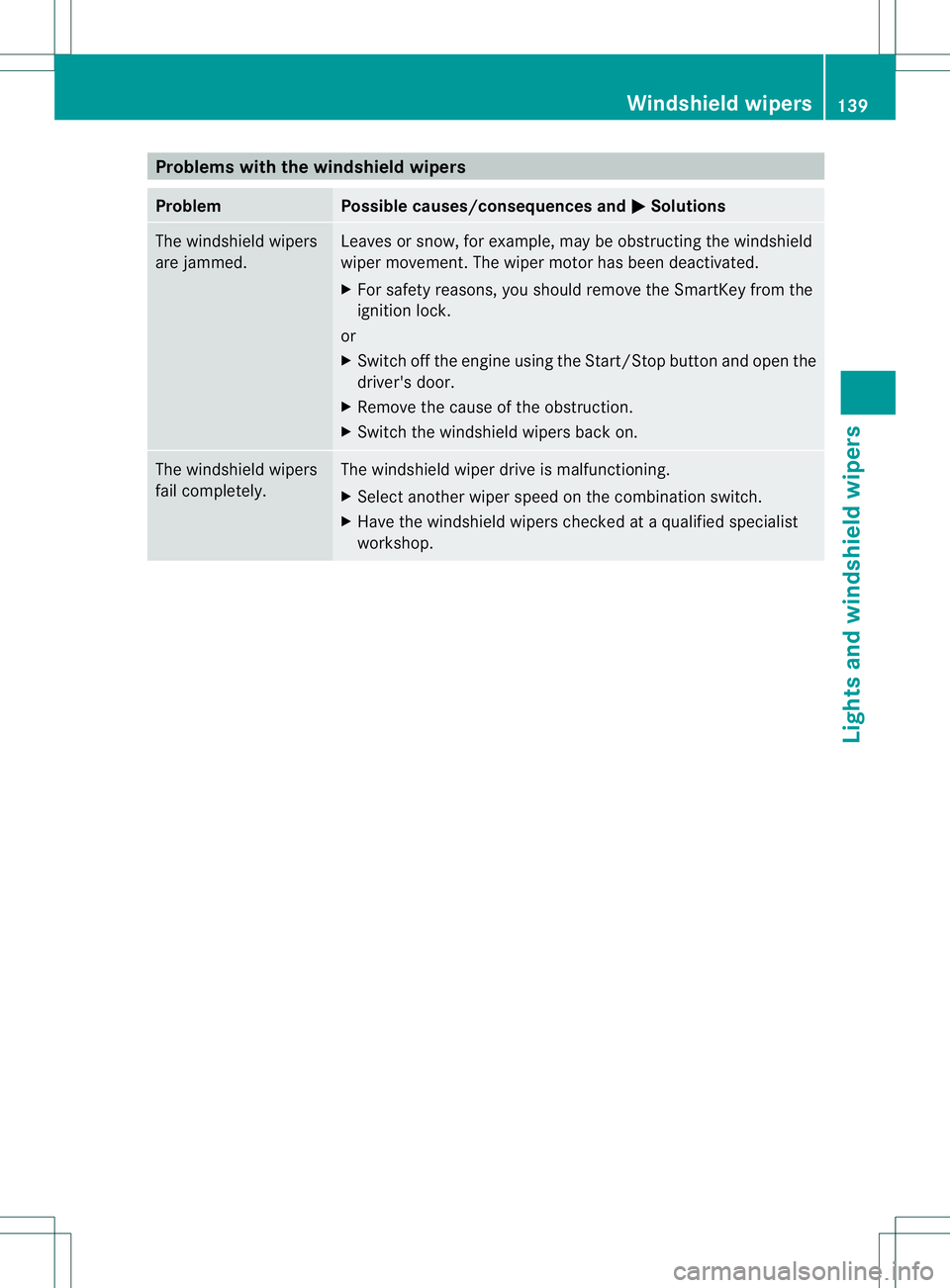
Problems with the windshield wipers
Problem Possible causes/consequences and
0001 Solutions
The windshield wipers
are jammed. Leaves or snow, for example, may be obstructing the windshield
wiper movement.T
he wiper motor has been deactivated.
X For safety reasons, you should remove the SmartKey from the
ignition lock.
or
X Switch off the engine using the Start/Stop button and open the
driver's door.
X Remove the cause of the obstruction.
X Switch the windshield wipers back on. The windshield wipers
fail completely. The windshield wiper drive is malfunctioning.
X
Select another wiper speed on the combination switch.
X Have the windshield wipers checked at a qualified specialist
workshop. Windshield wipers
139Lights and windshield wipers Z
Page 165 of 454
Wear suitable footwear to ensure correct
usage of the pedals.
G
WARNING
If you switch off the ignition while driving,
safety-relevant functions are only available
with limitations, or not at all. This could affect,
for example, the power steering and the brake
boosting effect .You will require considerably
more effort to steer and brake. There is a risk
of an accident.
Do not switch off the ignition while driving. G
WARNING
If the parking brake has not been fully
released when driving, the parking brake can:
R overheat and cause a fire
R lose its hold function.
There is a risk of fire and an accident .Release
the parking brake fully before driving off.
! Warm up the engine quickly. Do not use
the engine's full performance until it has
reached operating temperature.
Only shift the automatic transmission to
the desired drive position when the vehicle
is stationary.
Where possible, avoid spinning the drive
wheels when pulling away on slippery
roads. You could otherwise damage the
drive train.
! AMG vehicles: at low engine oil
temperatures below 68 ‡(+20 †), the
maximu mengine speed is restricted in
order to protect the engine .To protec tthe
engine and maintain smooth engine
operation, avoid driving at full throttle when
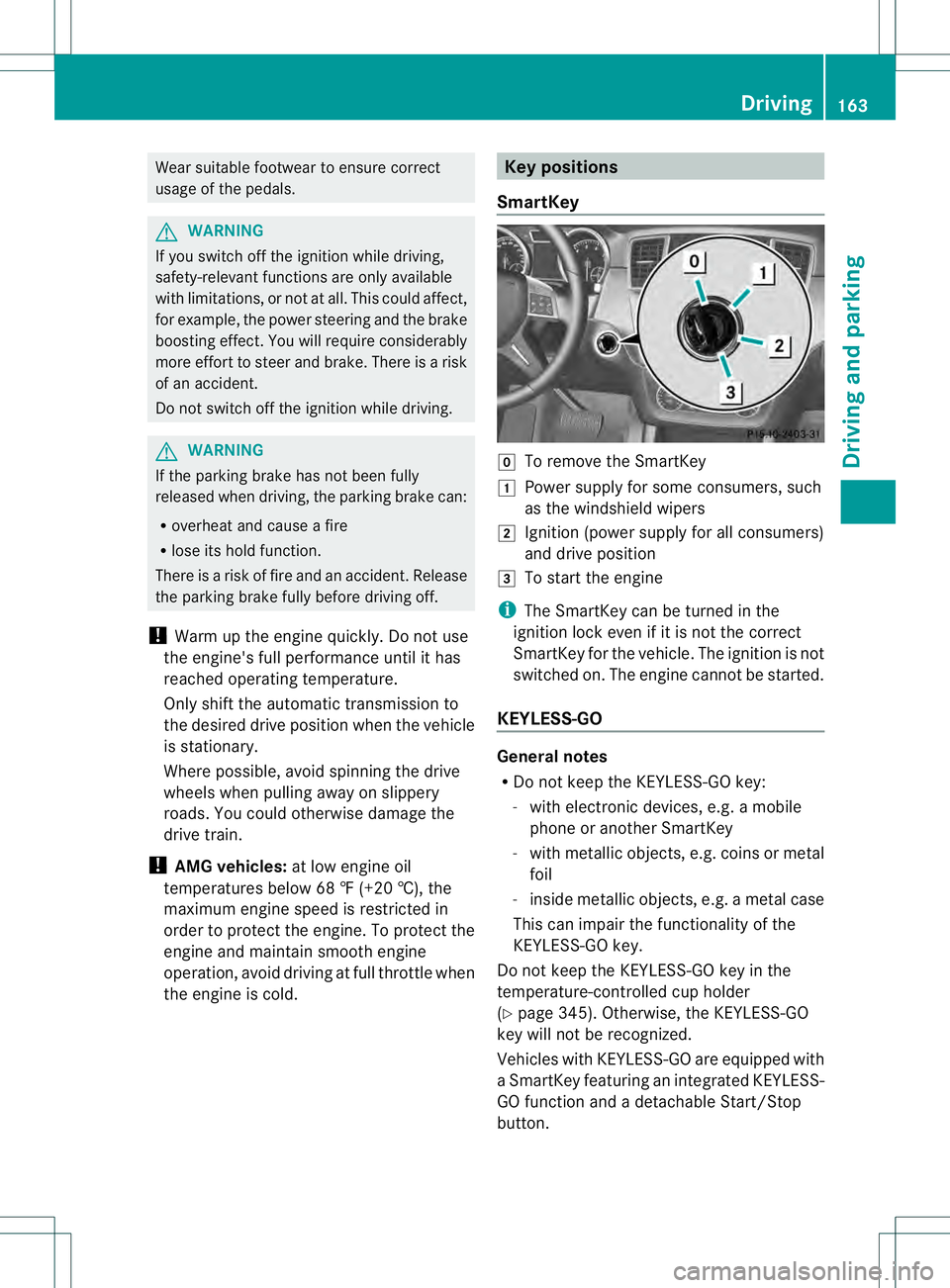
the engine is cold. Key positions
SmartKey 000D
To remove the SmartKey
0004 Power supply for some consumers, such
as the windshield wipers
0005 Ignition (power supply for all consumers)
and drive position
0006 To start the engine
i The SmartKey can be turned in the
ignition lock even if it is not the correct
SmartKey for the vehicle. The ignition is not
switched on. The engine cannot be started.
KEYLESS-GO General notes
R
Do not keep the KEYLESS-GO key:
- with electronic devices, e.g. a mobile
phone or another SmartKey
- with metallic objects, e.g. coins or metal
foil
- inside metallic objects, e.g. a metal case
This can impair the functionality of the
KEYLESS-GO key.
Do not keep the KEYLESS-GO key in the
temperature-controlled cup holder
(Y page 345). Otherwise, the KEYLESS-GO
key will not be recognized.
Vehicles with KEYLESS-GO are equipped with
aS martKey featuring an integrated KEYLESS-
GO function and a detachable Start/Stop
button. Driving
163Driving and parking Z
Page 166 of 454
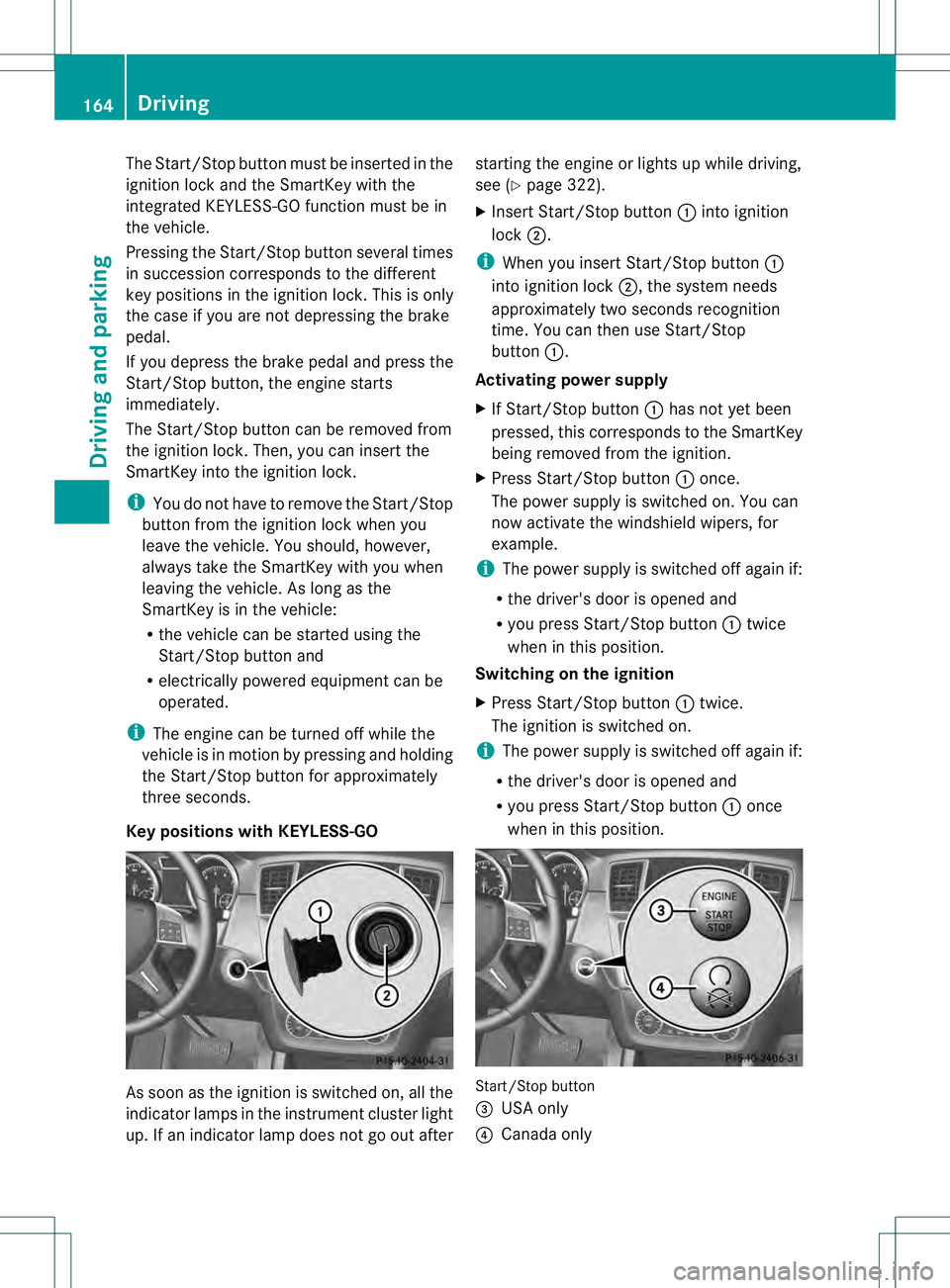
The Start/Stop button must be inserted in the
ignition lock and the SmartKey with the
integrated KEYLESS-GO function must be in
the vehicle.
Pressing the Start/Stop button several times
in succession corresponds to the different
key positions in the ignition lock. This is only
the case if you are not depressing the brake
pedal.
If you depress the brake pedal and press the
Start/Stop button, the engine starts
immediately.
The Start/Stop button can be removed from
the ignition lock. Then, you can insert the
SmartKey into the ignition lock.
i
You do not have to remove the Start/Stop
button from the ignition lock when you
leave the vehicle. You should, however,
always take the SmartKey with you when
leaving the vehicle. As long as the
SmartKey is in the vehicle:
R the vehicle can be started using the
Start/Stop button and
R electrically powered equipment can be
operated.
i The engine can be turned off while the
vehicle is in motion by pressing and holding
the Start/Stop button for approximately
three seconds.
Key positions with KEYLESS-GO As soon as the ignition is switched on, all the
indicator lamps in the instrument cluster light
up. If an indicator lamp does not go out after starting the engine or lights up while driving,
see (Y
page 322).
X Insert Start/Stop button 0002into ignition
lock 0003.
i When you insert Start/Stop button 0002
into ignition lock 0003, the system needs
approximately two seconds recognition
time. You can then use Start/Stop
button 0002.
Activating power supply
X If Start/Stop button 0002has not yet been
pressed, this corresponds to the SmartKey
being removed from the ignition.
X Press Start/Stop button 0002once.
The power supply is switched on. You can
now activate the windshield wipers, for
example.
i The power supply is switched off again if:
R the driver's door is opened and
R you press Start/Stop button 0002twice
when in this position.
Switching on the ignition
X Press Start/Stop button 0002twice.
The ignition is switched on.
i The power supply is switched off again if:
R the driver's door is opened and
R you press Start/Stop button 0002once
when in this position. Start/Stop button
0021
USA only
0020 Canada only 164
DrivingDriving and parking
Page 239 of 454
Problems with Night View Assist Plus
Problem Possible causes/consequences and
0001 Solutions
The picture quality of
Night View Assist Plus
has deteriorated. The windshield wipers are smearing the windshield.
X
Replace the wiper blades (Y page 137). The windshield is smeared after the vehicle has been cleaned in a
car wash.
X
Cleant he windshield (Y page 374). There is windshield chip damage in the camera's field of vision.
X
Replace the windshield. The windshield is fogged up on the inside.
X
Defrost the windshield (Y page 156). The windshield is iced up.
X
De-ice the windshield (Y page 155). There is dirt on the inside of the windshield.
X
Cleant he inside of the windshield (Y page 374).Lane Tracking package
General notes The Lane Tracking package consists of Blind
Spot Assist (Y page 237) and Lane Keeping
Assist (Y page 239).
Blind Spot Assist Important safety notes
G
WARNING
Blind Spot Assist does not react to:
R vehicles overtaken too closely on the side,
placing them in the blind spot area
R vehicles approaching and driving by with a
speed difference of more than
approximately 6.8 mph (11 km/h)
As a result, Blind Spot Assist may not give
warnings in such situations. There is a risk of
an accident.
Always observe the traffic conditions
carefully, and maintain a safe lateral distance. Blind Spot Assist is only an aid. It may fail to
detect some vehicles and is no substitute for
attentive driving.
i
USA only:
This device has been approved by the FCC
as a "VehicularR adar System". The radar
sensor is intended for use in an automotive
radar system only. Removing, tampering
with, or altering the device will void any
warranties, and is no tpermitted by the
FCC. Do not tamper with, alter, or use in
any non-approved way.
Any unauthorized modification to this
device could void the user’s authority to
operate the equipment.
General notes
Blind Spot Assist uses a radar sensor system
to monitor the areas on both sides of your
vehicle. It supports you from a speed of
approximately 20 mph (30 km/h). A warning
display in the exterio rmirrors draws your
attention to vehicles detected in the Driving systems
237Driving and parking Z