ESP MERCEDES-BENZ GL 2013 Owner's Manual
[x] Cancel search | Manufacturer: MERCEDES-BENZ, Model Year: 2013, Model line: GL, Model: MERCEDES-BENZ GL 2013Pages: 454, PDF Size: 6.31 MB
Page 76 of 454
An intermittent warning tone will then sound
and the 000Fdistance warning lamp will light
up in the instrument cluster.
X Brake immediately in order to increase the
distance from the vehicle in front.
or
X Take evasive action provided it is safe to do
so.
From a speed of approximately
4 mph (7 km/h), if the driver and front
passenge rhave fastened their seat belts,
PRE-SAFE ®
Brake can brake the vehicle
automatically at speeds up to approximately
124 mph (200 km/h).
Due to the nature of the system, particularly
complicated driving condition smay cause
unnecessary warnings or th eunnecessary
intervention of PRE-SAFE ®
Brake.
You can prevent the intervention of the PRE-
SAFE ®
Brake at any time by:
R depressing the accelerator peda lfurther
R activating kickdown
R releasing the brake pedal
The braking action of PRE-SAFE ®
Brake is
ended automatically if:
R you maneuve rto avoid the obstacle.
R there is no longer any danger of a rear-end
collision.
R there is no longer an obstacle detected in
front of your vehicle.
If you have activated DSR (Y page 250), PRE-
SAFE ®
Brake is deactivated.
At speeds of up to approximately 40 mph
(70 km/h) ,PRE-SAFE ®
Brake can also detect
stationary objects .Examples of stationary
objects are stopped or parked vehicles.
If you approach an obstacle and PRE-SAFE ®
Brake detects a ris kofacollision, the system
will alert you both visuall yand acoustically. If
you do not brake or take evasive action, the
system will warn you by automatically braking
the vehicle gently .Ifthere is an increased risk
of collision, preventative passenger
protection measures (PRE-SAFE ®
) are activated (Y
page 54). If, at speeds over
20 mph (30 km/h), a risk of collision remains
and you do not brake, take evasive action or
significantly accelerate, automatic braking
may be performed up to alevel of automatic
emergency braking. Automatic emergency
braking is not performed until immediately
prior to an accident that can no longer be
avoided. G
WARNING
PRE-SAFE ®
Brake will initially brake your
vehicle by a partial application of the brakes
if a danger of collision is detected. There may
be a collision unless you also brake.
Automatic emergency brakin gcannot prevent
a collision .There is a risk of an accident.
Always apply the brakes yourself and try to
take evasive action. G
WARNING
PRE-SAFE ®
Brake cannot always clearly
identify objects and complex traffic
conditions.
In these cases, PRE-SAFE ®
Brake may:
R give an unnecessary warning and then
brake the vehicle
R not give a warning or intervene
There is a risk of an accident.
Always pay particular attention to the traffic
situation and be ready to brake, especially if
PRE-SAFE ®
Brake warns you. Terminate the
intervention in a non-critical driving situation.
In particular, the detection of obstacles can
be impaired if:
R there is dirt on the sensors or anything else
covering the sensors
R snow or heavy rain
R interference by other radar sources
R there are strong radar reflections, for
example in parking garages 74
Driving safety systemsSafety
Page 77 of 454
R
a narrow vehicle traveling in front, e.g. a
motorbike
R a vehicle traveling in fron tonadifferent line
relative to the center of your vehicle G
WARNING
PRE-SAFE ®
Brake does not react:
R to people or animals
R to oncoming vehicles
R to crossing traffic
R when cornering
As a result, PRE-SAFE ®
Brake may neither
give warnings nor intervene in all critical
situations. There is a risk of an accident.
Always pay careful attention to the traffic
situation and be ready to brake.
In order to maintain an appropriate distance
from the vehicle in front and thus prevent a
collision, you must apply the brakes yourself.
X To activate/deactivate: activate or
deactivate PRE-SAFE ®
Brake in the on-
board computer (Y page 276).
When PRE-SAFE ®
Brake is activated, the
0003 symbol appears in the multifunction
display as long as the HOLD function is
deactivated (Y page 211). On vehicles with
Active Parking Assist, the 0003symbol is
displayed when Pis engaged or you are
driving faster than 22 mph (35 km/h).
Following damage to the fron tend of the
vehicle, have the configuratio nand operation
of the rada rsensors checked at a qualified
specialist workshop. This also applies to
collisions at low speeds where there is no
visible damage to the fron tofthe vehicle. STEER CONTROL
i Observe the "Important safety notes"
section (Y page 66).
STEER CONTROL helps you by transmitting a
noticeable steering force to the steering
wheel in the direction required for vehicle
stabilization. This steering assistance is provided in
particular if:
R
both right wheels or both left wheels are on
a wet or slippery road surface when you
brake
R the vehicle starts to skid
If ESP ®
is malfunctioning, you will not receive
steering support from STEER CONTROL.
Power steering will, however, continue to
function. Theft deterrent locking system
Immobilizer
X To activate with the SmartKey: remove
the SmartKey from the ignition lock.
X To activate with KEYLESS-GO: switch the
ignition off and open the driver's door.
X To deactivate: switch on the ignition.
The immobilizer prevents your vehicle from
being started without the correct SmartKey.
When leaving the vehicle, always take the
SmartKey with you and lock the vehicle.
Anyone can start the engine if a valid
SmartKey has been left inside the vehicle.
i The immobilizer is always deactivated
when you start the engine.
In the event that the engine cannot be
started when the starter battery is fully
charged, the immobilizer may be faulty.
Contact an authorized Mercedes-Benz
Center or call 1-800-FOR-MERCedes (in the
USA) or 1-800-387-0100 (in Canada). Theft deterrent locking system
75Safety Z
Page 81 of 454
Strong magnetic fields can occur in the
vicinity of powerful electrical installations.
R Do not keep the SmartKey:
- with electronic devices, e.g. a mobile
phone or another SmartKey
- with metallic objects, e.g. coins or metal
foil
- inside metallic objects, e.g. a metal case
This can affect the functionality of the
SmartKey.
Do not keep the KEYLESS-GO key in the
temperature-controlled cup holder.
Otherwise, the KEYLESS-GO key will not be
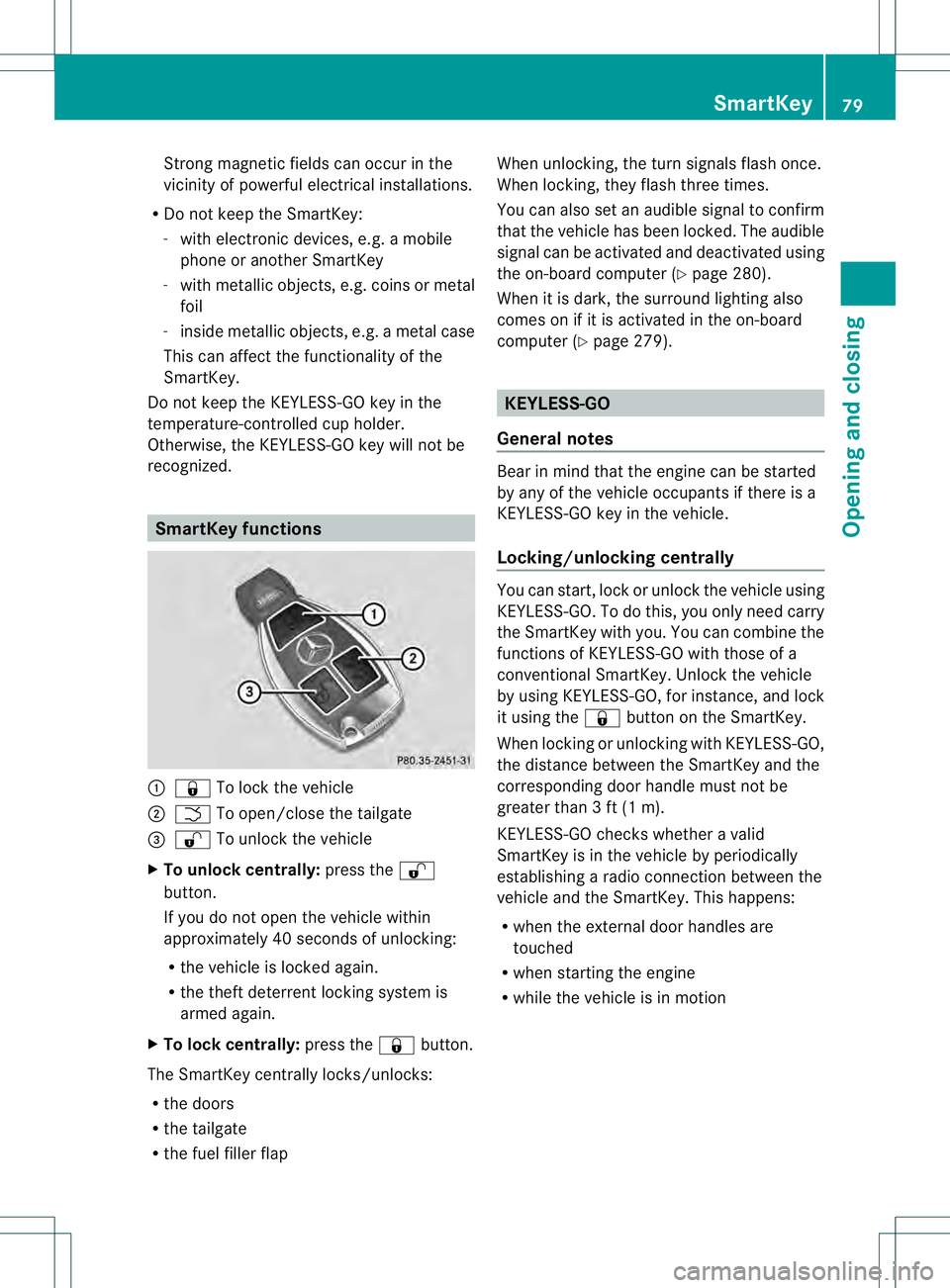
recognized. SmartKey functions
0002
000C To lock the vehicle
0003 0004 To open/close the tailgate
0021 000D To unlock the vehicle
X To unloc kcentrally: press the 000D
button.
If you do not open th evehicle within
approximately 40 seconds of unlocking:
R the vehicle is locked again.
R the theft deterrent locking system is
armed again.
X To lock centrally: press the000Cbutton.
The SmartKey centrally locks/unlocks:
R the doors
R the tailgate
R the fuel filler flap When unlocking, the turn signals flash once.
When locking, they flash three times.
You can also set an audible signal to confirm
that the vehicle has been locked. The audible
signal can be activated and deactivated using
the on-board computer (Y
page 280).
When it is dark, the surround lighting also
comes on if it is activated in the on-board
computer (Y page 279). KEYLESS-GO
General notes Bear in mind that the engine can be started
by any of the vehicle occupants if there is a
KEYLESS-GO key in the vehicle.
Locking/unlocking centrally
You can start, lock or unlock the vehicle using
KEYLESS-GO. To do this, you only need carry
the SmartKey with you. You can combine the
functions of KEYLESS-GO with those of a
conventional SmartKey. Unlock the vehicle
by using KEYLESS-GO, for instance, and lock
it using the
000Cbutton on the SmartKey.
When locking or unlocking with KEYLESS-GO,
the distance between the SmartKey and the
corresponding door handle must not be
greater than 3 ft (1 m).
KEYLESS-GO checks whether a valid
SmartKey is in the vehicle by periodically
establishing a radio connection between the
vehicle and the SmartKey. This happens:
R when the external door handles are
touched
R when starting the engine
R while the vehicle is in motion SmartKey
79Opening and closing Z
Page 90 of 454
G
WARNING
Do not carry heavy or hard objects in the
passenger compartment or cargo
compartment unless they are firmly secured
in place.
Unsecured or improperly positioned cargo
increases a child's risk of injury in the event
of
R strong braking maneuvers
R sudden changes of direction
R an accident
! The tailgate swings upwards and to the
rear when opened .Therefore, make sure
that there is sufficient clearance above and
behind the tailgate.
i Tailgate opening dimensions
(Y page 446).
Do not leave the SmartKey in the cargo
compartment. You could otherwise lock
yourself out.
You can:
R close the tailgate manually from outside
R open and close the tailgate automatically
from outside
R open and close the tailgate automatically
from inside
R limit the opening angle of the tailgate
R unlock the tailgate from inside with the
emergency release Opening/closing from outside
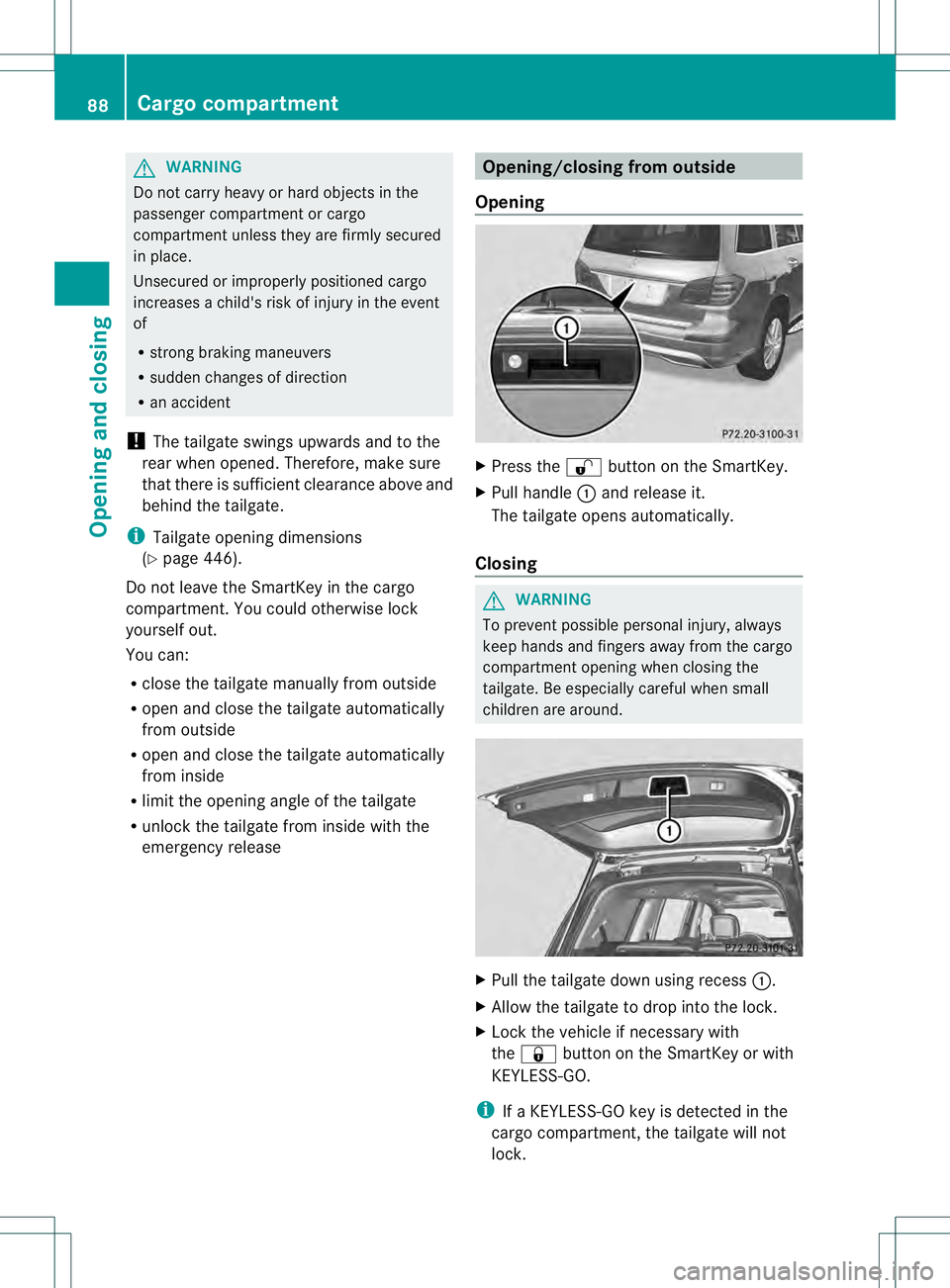
Opening X
Press the 000Dbutton on the SmartKey.
X Pull handle 0002and release it.
The tailgate opens automatically.
Closing G
WARNING
To prevent possible personal injury, always
keep hands and fingers away from the cargo
compartmento pening when closing the
tailgate. Be especially careful when small
children are around. X
Pull the tailgate down using recess 0002.
X Allow the tailgate to drop into the lock.
X Lock the vehicle if necessary with
the 000C button on the SmartKey or with
KEYLESS-GO.
i If a KEYLESS-GO key is detected in the
cargo compartment, the tailgate will not
lock. 88
Cargo compartmentOpening and closing
Page 94 of 454
somebody becomes trapped, release the
switch or pull the switch to close the side
window again.
G
WARNING
While opening the side windows, body parts
in the closing area could become trapped.
There is a risk of injury.
Make sure that no body parts are in close
proximity during the closing procedure. If
somebody becomes trapped, release the
switch or press the switch to open the side
window again. G
WARNING
If children operate the side windows they
could become trapped, particularly if they are
left unsupervised. There is a risk of injury.
Activate the override feature for the rear side
windows. When leaving the vehicle, always
take the SmartKey with you and lock the
vehicle. Never leave children unsupervised in
the vehicle.
The side windows are equipped with an
automatic reversing feature. If an object
blocks or restricts a side window during the
closing process, the side window opens again
automatically. G
WARNING
The reversing feature does not react:
R to soft, light and thin objects, e.g. small
fingers
R over the last 4mmofthe closing movement
R during resetting
R when closing the side window again
manually immediately after automatic
reversing
This means that the reversing feature cannot
prevent someone being trapped in these
situations. There is a risk of injury.
Make sure that no body parts are in close
proximity during the closing procedure. If
someone becomes trapped, press the switch
to open the side window again. Opening and closing the side
windows
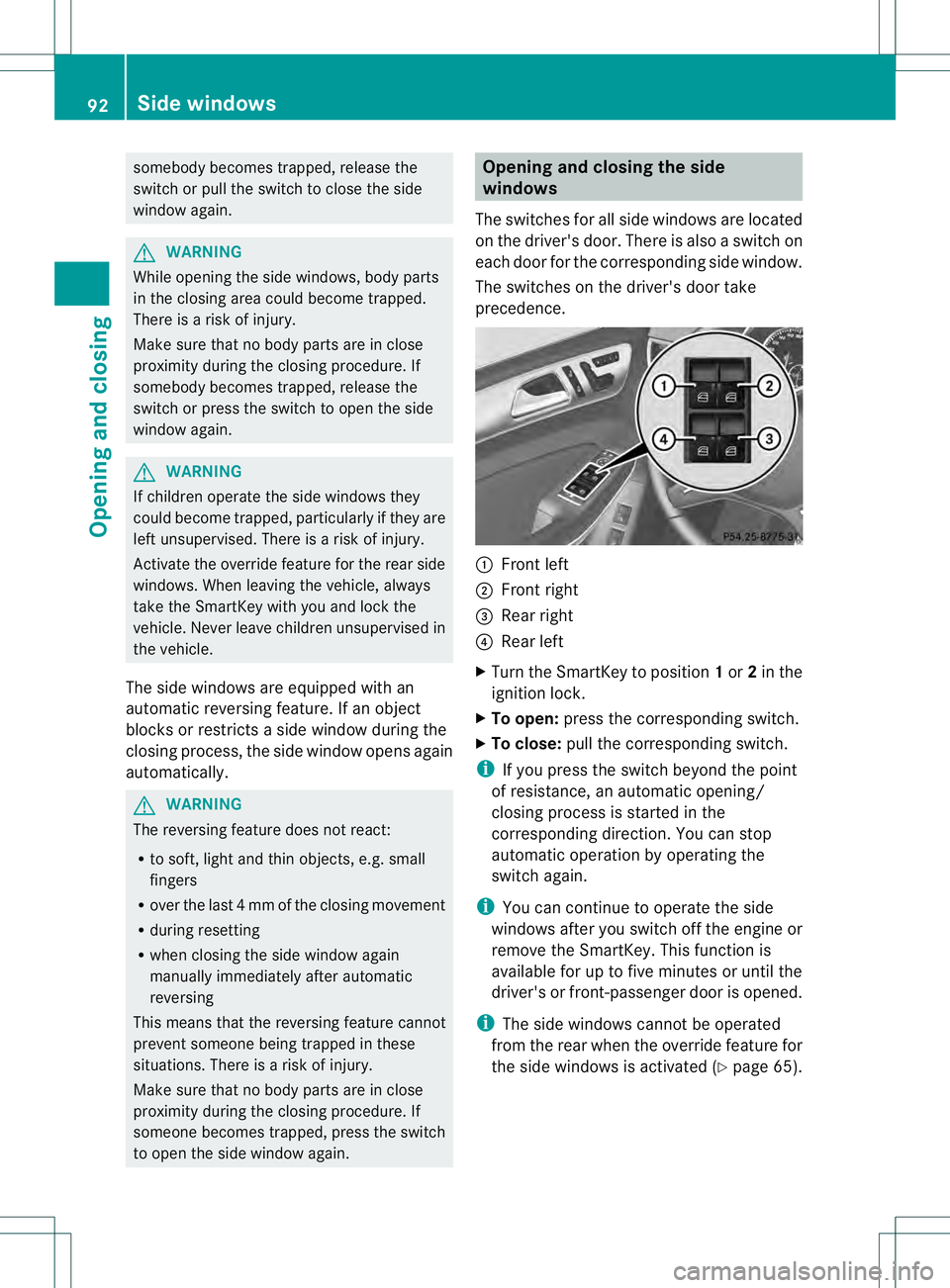
The switches for all side windows are located
on the driver's door. There is also a switch on
each door for the corresponding side window.
The switches on the driver's door take
precedence. 0002
Front left
0003 Front right
0021 Rear right
0020 Rear left
X Turn the SmartKey to position 1or 2in the
ignition lock.
X To open: press the corresponding switch.
X To close: pull the corresponding switch.
i If you press the switch beyond the point
of resistance, an automatic opening/
closing process is started in the
corresponding direction. You can stop
automatic operation by operating the
switch again.
i You can continue to operate the side
windows after you switch off the engine or
remove the SmartKey. This function is
available for up to five minutes or until the
driver's or front-passenger door is opened.
i The side windows cannot be operated
from the rear when the override feature for
the side windows is activated (Y page 65).92
Side windowsOpening and closing
Page 97 of 454
X
To interrupt convenience closing:
release recessed sensor surface 0002on the
door handle. Resetting the side windows
If a side window can no longe rbe closed fully,
you must reset it.
X Close all the doors.
X Turn the SmartKey to position 1or 2in the
ignition lock.
X Pull the corresponding switch on the door
control panel until the side window is
completely closed. (Y page 92)
X Hold the switch for an additional second.
If the side window opens again slightly:
X Immediately pull the corresponding switch
on the door control panel until the side
window is completely closed (Y page 92).
X Hold the switch for an additional second.
X If the corresponding side window remains
closed after the button has been released,
the side window has been reset correctly.
If this is not the case, repeat the steps
above again. Side windows
95Opening and closing Z
Page 98 of 454
Problems with the side windows
G
WARNING
Closing the side windows with increased force or without the anti-entrapment feature could lead
to serious or even fatal injury. Make sure that nobody can become trapped when closing the side
windows. Problem Possible causes/consequences and
0001 Solutions
As
ide window cannot
be closed because it is
blocked by objects, e.g.
leaves in the window
guide. X
Remove the objects.
X Close the side window. As
ide window cannot
be closed and you
cannot see the cause. If a side window is obstructed during closing and reopens again
slightly:
X
Immediately after the window blocks, pull the corresponding
switch again until the side window has closed.
The side window is closed with increased force.
If a side window is obstructed again during closing and reopens
again slightly:
X Immediately after the window blocks, pull the corresponding
switch again until the side window has closed.
The side window is closed without the anti-entrapmen tfeature. Sliding sunroof
Important safety notes
Your vehicle may be equipped with a sliding
sunroof or a panorama roof with power tilt/
sliding panel. In this section, the term "sliding
sunroof" refers to both types of sliding
sunroof. G
WARNING
While opening and closing the sliding sunroof,
body parts in close proximity could become
trapped. There is a risk of injury.
Make sure that no body parts are in close
proximity during the opening and closing
procedures. If somebody becomes trapped:
R
release the switch immediately, or
R during automatic operation, push the
switch briefly in any direction
The opening or closing procedure will be
stopped. G
WARNING
If children operate the sliding sunroof they
could become trapped, particularly if they are
left unsupervised. There is a risk of injury.
When leaving the vehicle, always take the
SmartKey with you and lock the vehicle. Never
leave children unsupervised in the vehicle.
The sliding sunroof is equipped with an
automatic reversing feature. If an object
blocks or restricts the sliding sunroof during 96
Sliding sunroofOpening and closing
Page 99 of 454
the closing process, the sliding sunroo
fopens
again automatically. G
WARNING
The reversing feature does not react:
R to soft, light and thin objects, e.g. small
fingers
R over the last 4mmofthe closing movement
R during resetting
R when closing the sliding sunroof again
manually immediately after automatic
reversing
This means that the reversing feature cannot
prevent someone being trapped in these
situations. There is a risk of injury.
Make sure that no body parts are in close
proximity during the closing procedure.
If somebody becomes trapped:
R release the switch immediately, or
R during automatic operation, push the
switch briefly in any direction
The closing process is stopped.
! Only open the sliding sunroof if it is free
of snow and ice. Otherwise, malfunctions
may occur.
Do not allow anything to protrude from the
sliding sunroof. Otherwise, the seals could
be damaged.
i Resonance noises can occur in addition
to the usual airflow noises when the sliding
sunroof is open. They are caused by minor
pressure fluctuations in the vehicle interior.
Change the position of the sliding sunroof
or open a side window. The noise will be
reduced or eliminated. Operating the sliding sunroof
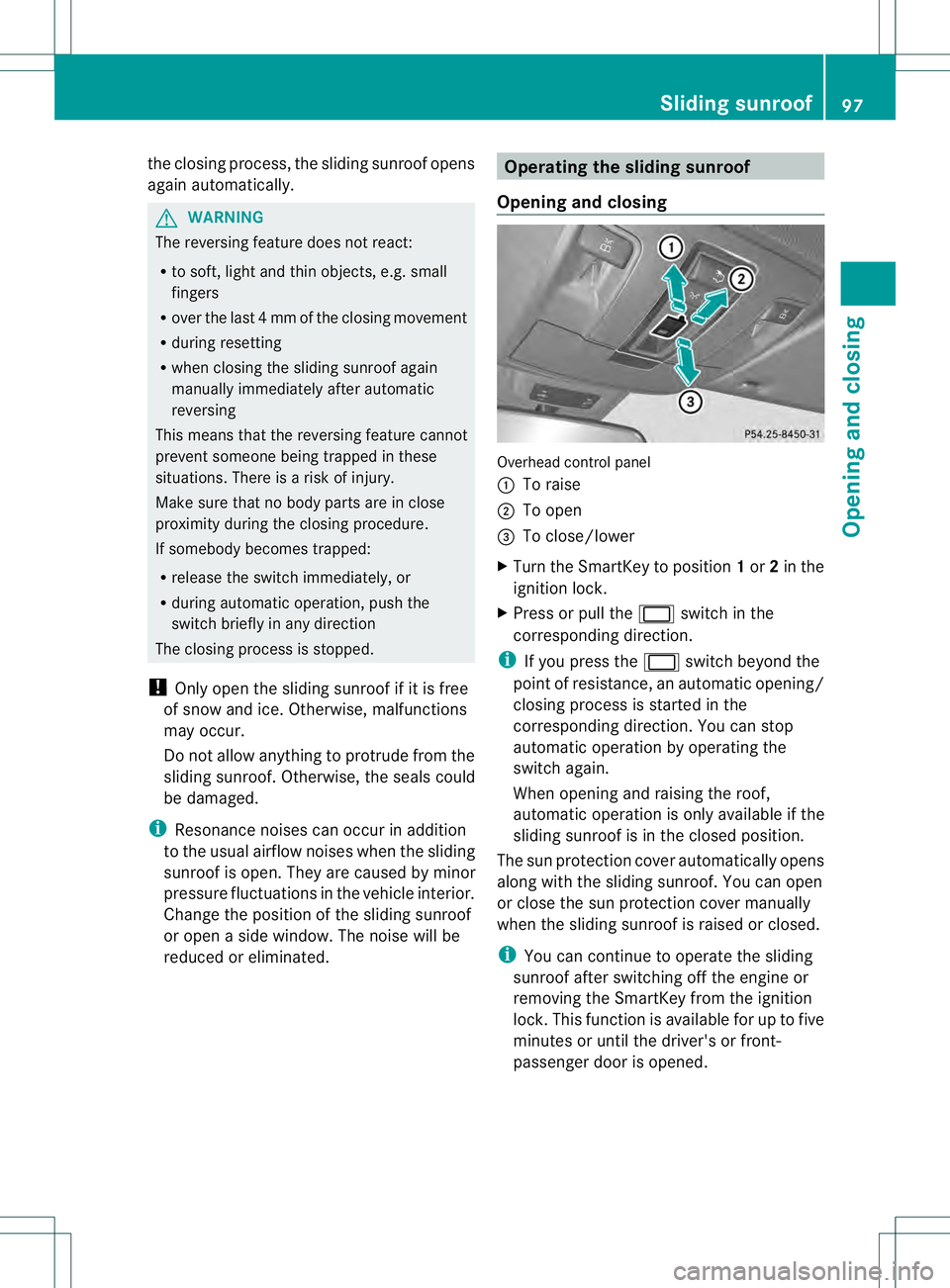
Opening and closing Overhead control panel
0002
To raise
0003 To open
0021 To close/lower
X Turn the SmartKey to position 1or 2in the
ignition lock.
X Press or pull the 0002switch in the
corresponding direction.
i If you press the 0002switch beyond the
point of resistance, an automatic opening/
closing process is started in the
corresponding direction. You can stop
automatic operation by operating the
switch again.
When opening and raising the roof,
automatic operation is only available if the
sliding sunroof is in the closed position.
The sun protection cover automatically opens
along with the sliding sunroof. You can open
or close the sun protection cover manually
when the sliding sunroof is raised or closed.
i You can continue to operate the sliding
sunroof after switching off the engine or
removing the SmartKey from the ignition
lock. This function is available for up to five
minutes or until the driver's or front-
passenger door is opened. Sliding sunroof
97Opening and closing Z
Page 100 of 454
Resetting
!
If the sliding sunroof still canno tbe
opened or closed fully after resetting,
contact a qualified specialist workshop.
Reset the sliding sunroof if it does not move
smoothly.
X Turn the SmartKey to position 1or 2in the
ignition lock.
X Raise the sliding sunroof fully at the rear
(Y page 97).
X Keep the 0002switch pressed for another
second.
X Make sure that the sliding sunroof can be
fully opened and closed again (Y page 97).
X If this is not the case, repeat the steps
above again. Operating the panorama roof with
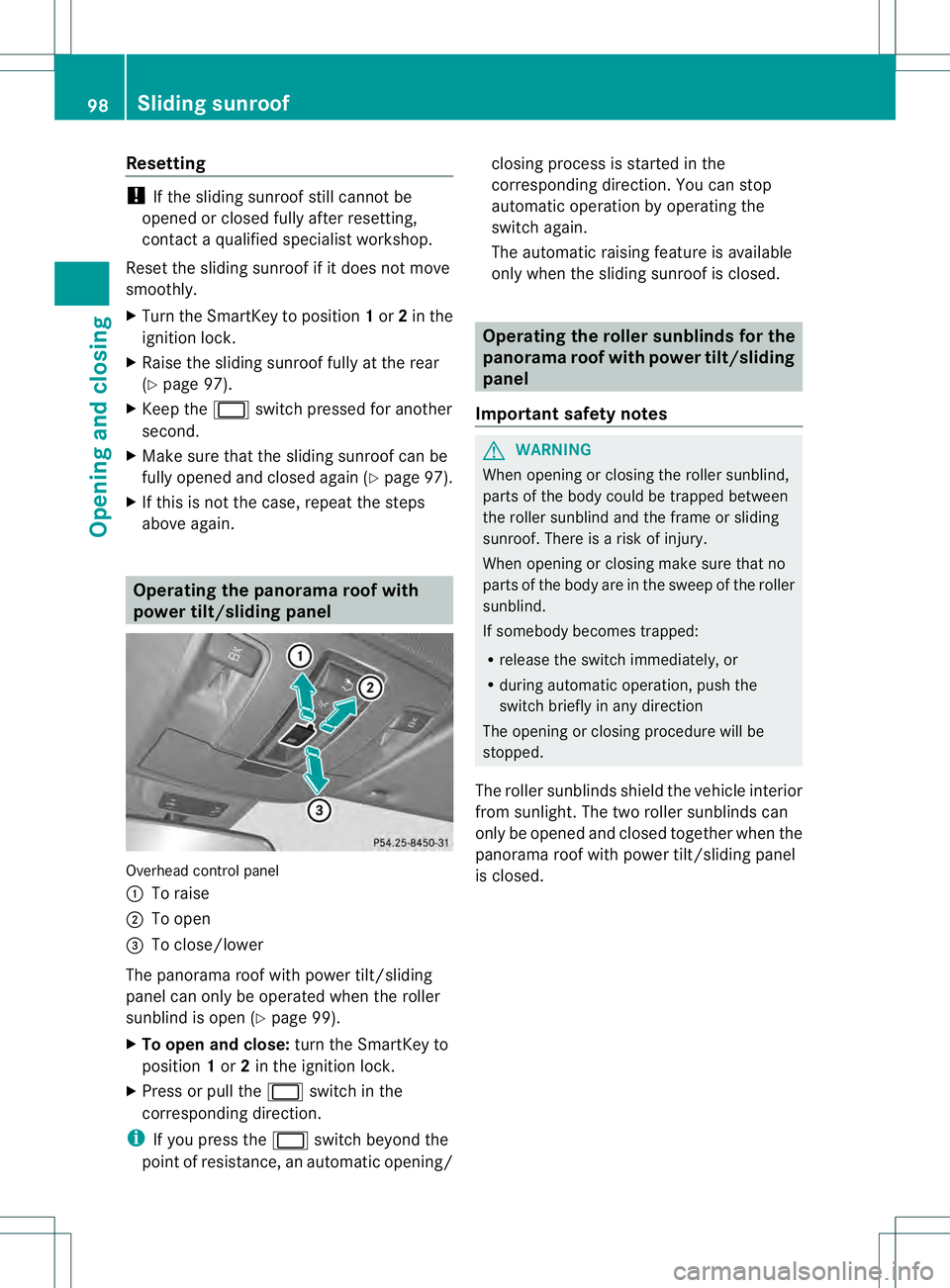
power tilt/sliding panel
Overhead control panel
0002
To raise
0003 To open
0021 To close/lower
The panorama roof with power tilt/sliding
panel can only be operated when the roller
sunblind is open (Y page 99).
X To open and close: turn the SmartKey to
position 1or 2in the ignition lock.
X Press or pull the 0002switch in the
corresponding direction.
i If you press the 0002switch beyond the
point of resistance, an automatic opening/ closing process is started in the
corresponding direction
.You can stop
automatic operation by operating the
switch again.
The automatic raising feature is available
only when the sliding sunroof is closed. Operating the roller sunblinds for the
panorama roof with power tilt/sliding
panel
Important safety notes G
WARNING
When opening or closing the roller sunblind,
parts of the body could be trapped between
the roller sunblind and the frame or sliding
sunroof. There is a risk of injury.
When opening or closing make sure that no
parts of the body are in the sweep of the roller
sunblind.
If somebody becomes trapped:
R release the switch immediately, or
R during automatic operation, push the
switch briefly in any direction
The opening or closing procedure will be
stopped.
The roller sunblinds shield the vehicle interior
from sunlight. The two roller sunblinds can
only be opened and closed together when the
panorama roof with power tilt/sliding panel
is closed. 98
Sliding sunroofOpening and closing
Page 101 of 454
Opening and closing the roller
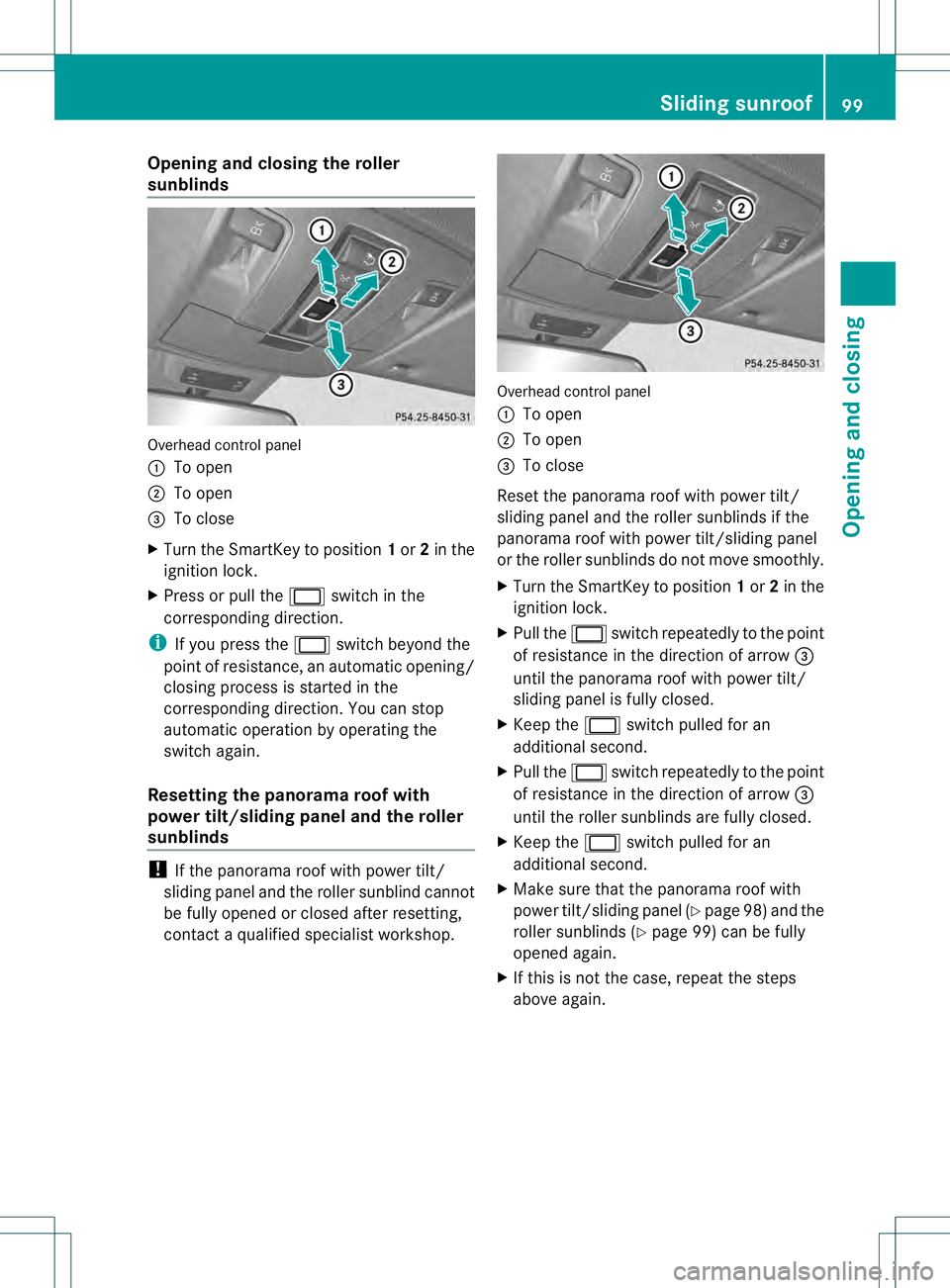
sunblinds
Overhead control panel
0002
To open
0003 To open
0021 To close
X Turn the SmartKey to position 1or 2in the
ignition lock.
X Press or pull the 0002switch in the
corresponding direction.
i If you press the 0002switch beyond the
point of resistance, an automatic opening/
closing process is started in the
corresponding direction. You can stop
automatic operation by operating the
switch again.
Resetting the panorama roof with
power tilt/sliding panel and the roller
sunblinds !
If the panorama roof with power tilt/
sliding panel and the roller sunblind cannot
be fully opened or closed after resetting,
contact a qualified specialist workshop. Overhead control panel
0002
To open
0003 To open
0021 To close
Reset the panorama roof with power tilt/
sliding panel and the roller sunblinds if the
panorama roof with power tilt/sliding panel
or the roller sunblinds do not move smoothly.
X Turn the SmartKey to position 1or 2in the
ignition lock.
X Pull the 0002switch repeatedly to the point
of resistance in the direction of arrow 0021
until the panorama roof with power tilt/
sliding panel is fully closed.
X Keep the 0002switch pulled for an
additional second.
X Pull the 0002switch repeatedly to the point
of resistance in the direction of arrow 0021
until the roller sunblinds are fully closed.
X Keep the 0002switch pulled for an
additional second.
X Make sure that the panorama roof with
power tilt/sliding panel (Y page 98) and the
roller sunblinds (Y page 99) can be fully
opened again.
X If this is not the case, repeat the steps
above again. Sliding sunroof
99Opening and closing Z