service MERCEDES-BENZ GL 2013 Owner's Manual
[x] Cancel search | Manufacturer: MERCEDES-BENZ, Model Year: 2013, Model line: GL, Model: MERCEDES-BENZ GL 2013Pages: 454, PDF Size: 6.31 MB
Page 197 of 454

R
When driving down an incline, make use of
the engine's braking effect. Observe the
engine speed; do not overrev the engine.
R Check the brakes after prolonged off-road
driving.
i Hill start assist will aid you when pulling
away on a hill.
For more information, see "Hill start assist"
(Y page 166).
Do not switch to transmission position N
when driving off-road. If you try to brake the
vehicle using the service brake, you could
lose control of the vehicle. If the gradient is
too steep for your vehicle, drive back down in
reverse gear.
Maximum gradient-climbing capability On good road surfaces the maximum
gradient-climbing capability of your vehicle is
100%, which corresponds to an approach/
departure angle of 45°. Note that the
vehicle's gradient-climbing capability
depends on the off-road conditions.
Accelerate carefully and make sure that the
wheels do not spin when driving on steep
terrain.
i If the load on the front axle is reduced
when pulling away on a steep uphill slope,
the fron twheels have a tendency to spin.
4ETS recognizes this and brakes the
wheels accordingly. The rear wheel torque
is increased, making it easier to drive off.
Hilltops When driving up an uphill gradient, slightly
reduce pressure on the accelerator
immediately before reaching the brow of the
hill. Use the vehicle's own impetus to drive
over the top of the hill.
This style of driving prevents:
R the vehicle from lifting off the ground on the
brow of a hill
R the vehicle from traveling too quickly down
the other side Driving downhill R
Drive slowly.
R Do not drive at an angle down steep
inclines. Steer into the line of fall and drive
with the front wheels aligned straight.
Otherwise, the vehicle could slip sideways,
tip and rollover.
R Before tackling steep downhill gradients,
select shift range 1.
R Activate DSR. If this is not sufficient, brake
gently. When doing so, make sure that the
vehicle is facing in the direction of the line
of fall.
R Check that the brakes are working normally
after a long downhill stretch.
i The special off-road ABS setting enables
a precise, brief and repeated locking of the
front wheels. This causes them to dig into
loose earth. Be aware that the front wheels
easily skid across the ground surface if
completely braked and therefore lose their
ability to steer. Driving systems
Cruise control
Important safety notes If you fail to adapt your driving style, cruise
control can neither reduce the risk of an
accident nor override the laws of physics.
Cruise control cannot take into account the
road, traffic and weather conditions. Cruise
control is only an aid. You are responsible for
the distance to the vehicle in front, for vehicle
speed, for braking in good time and for
staying in your lane.
Do not use cruise control:
R in road and traffic conditions which do not
allow you to maintain a constant speed e.g.
in heavy traffic or on winding roads
R on slippery road surfaces. Braking or
accelerating could cause the drive wheels Driving systems
195Driving and parking Z
Page 205 of 454
DISTRONIC PLU
Suses additional information
from your navigation system so that it can
react appropriately to certain traffic
situations. This is the case if, while following
a vehicle, DISTRONIC PLUS is active and you:
R approach or drive through a traffic circle
R approach a T-intersection
R turn off at a highway exit
Even if the vehicle in front leaves the
detection range, DISTRONIC PLUS
temporarily maintains the current driving
speed and does not accelerate. This is based
on the current map data in the navigation
system.
The current speed is maintained:
R approximately 10 seconds before the
traffic circle/T intersection and
approximately 1.5 seconds when driving on
a traffic circle.
R approximately 12 seconds before reaching
a highway exit and approximately
4s econds after the highway exit.
Afterwards, the vehicle accelerates back to
the set speed you specified.
Stopping G
WARNING
When leaving the vehicle, even if it is braked
only by DISTRONIC PLUS, it could roll away if:
R there is a malfunction in the system or in
the voltage supply.
R DISTRONIC PLUS has been deactivated
with the cruise control lever, e.g. by a
vehicle occupan torfrom outside the
vehicle.
R the electrical system in the engine
compartment, the battery or the fuses have
been tampered with.
R the battery is disconnected.
R the accelerator pedal has been depressed,
e.g. by a vehicle occupant.
There is a risk of an accident. If you wish to exit the vehicle, always turn off
DISTRONIC PLUS and secure the vehicle
against rolling away.
If DISTRONIC PLUS detects that the vehicle
in front is stopping, it brakes yourv ehicle until
it is stationary.
Once your vehicle is stationary, it remains
stationary and you do not need to depress the
brake.
After a time, the electric parking brake
secures the vehicle and relieves the service
brake.
Depending on the specified minimum
distance, your vehicle will come to a standstill
at a sufficien tdistance behind the vehicle in
front .The specified minimum distance is set
using the control on the cruise control lever.
The electric parking brake automatically
secures the vehicle if DISTRONIC PLUS is
activated and:
R the driver's door is open and the driver's
seat belt is unfastened.
R the engine is switched off, unless it is
automatically switched off by the ECO
start/stop function.
R a system malfunction occurs.
R the power supply is not sufficient.
On steep uphill or downhill inclines or if there
is a malfunction, the transmission may also
automatically be shifted into position P.
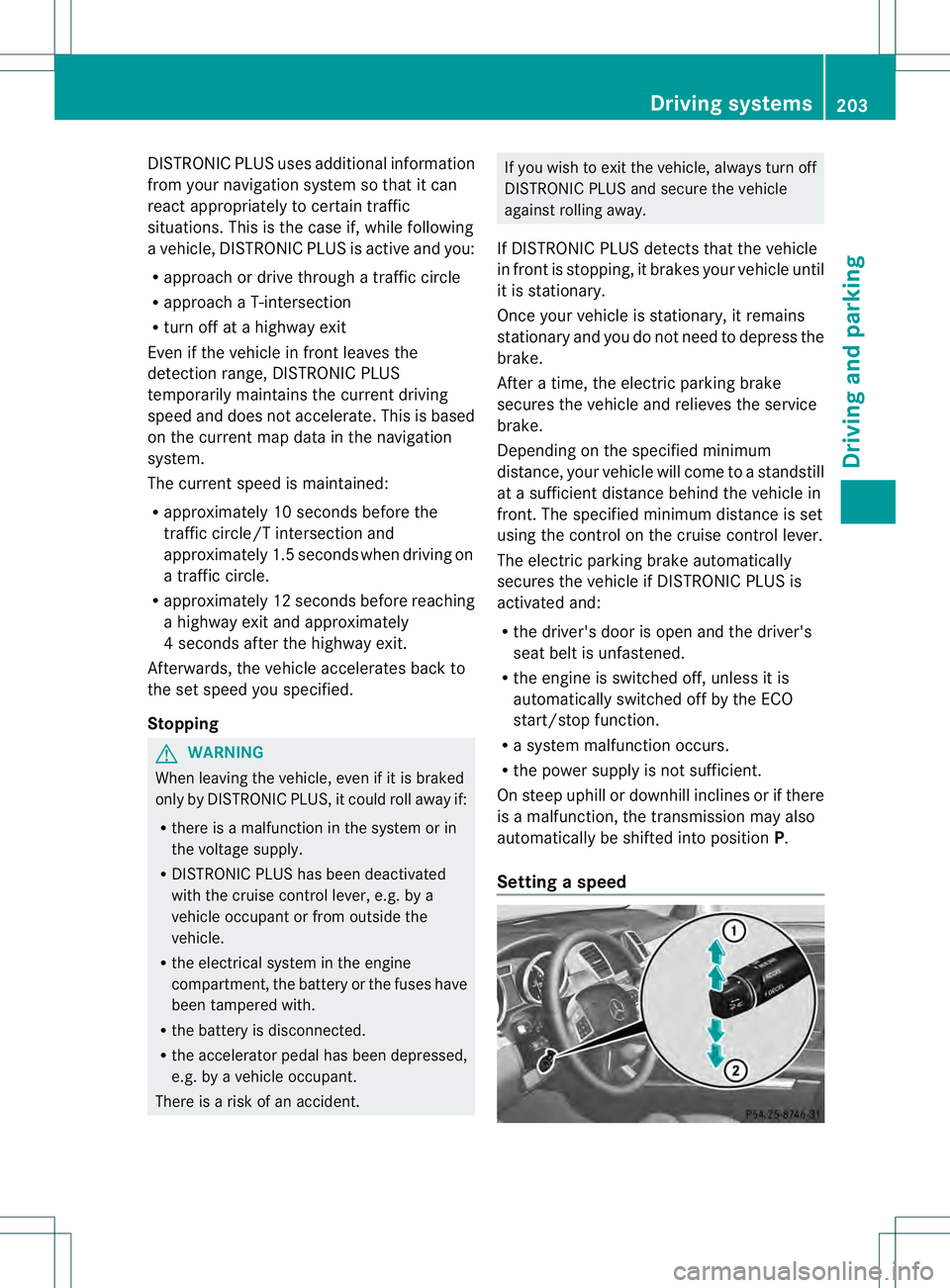
Setting aspeed Driving systems
203Driving and parking Z
Page 214 of 454
Activating the HOLD function
X
Make sure that the activation conditions
are met.
X Depress the brake pedal.
X Quickly depress the brake pedal further
until 0001 appears in the multifunction
display.
The HOLD function is activated. You can
release the brake pedal.
i If depressing the brake pedal the first
time does not activate the HOLD function,
wait briefly and then try again.
Deactivating the HOLD function The HOLD function is deactivated
automatically if:
R you accelerate and the transmission is in
position Dor R
R you shif tthe transmission to position P
R you depress the brake pedal again with a
certain amount of pressure until 0001
disappears from the multifunction display
R you secure the vehicle using the electric
parking brake
R you activate DISTRONIC PLUS
i After a time, the electric parking brake
secures the vehicle and relieves the service
brake.
The electric parking brake automatically
secures the vehicle if the HOLD function is
activated and:
R the driver's door is open and the driver's
seat belt is unfastened.
R the engine is switched off.
R a system malfunction occurs.
R the power supply is not sufficient.
On steep uphill or downhill inclines or if there
is a malfunction, the transmission may also
be automatically shifted into position P. AIRMATIC package
General notes AIRMATIC regulates the level of your vehicle.
As well as level control (Y
page 213), your
vehicle can be equipped with ADS (Adaptive
Damping System) (Y page 212) and ACTIVE
CURVE SYSTEM (Y page 213).
Observe the notes on driving with a trailer
(Y page 257).
ADS (Adaptive Damping System) General notes
ADS adapts the damping characteristics to
the current operating and driving situation.
This depends on:
R
your driving style
R the road surface conditions
R the ADS setting
R the vehicle level setting
Your selection remains stored even if you
remove the SmartKey from the ignition lock.
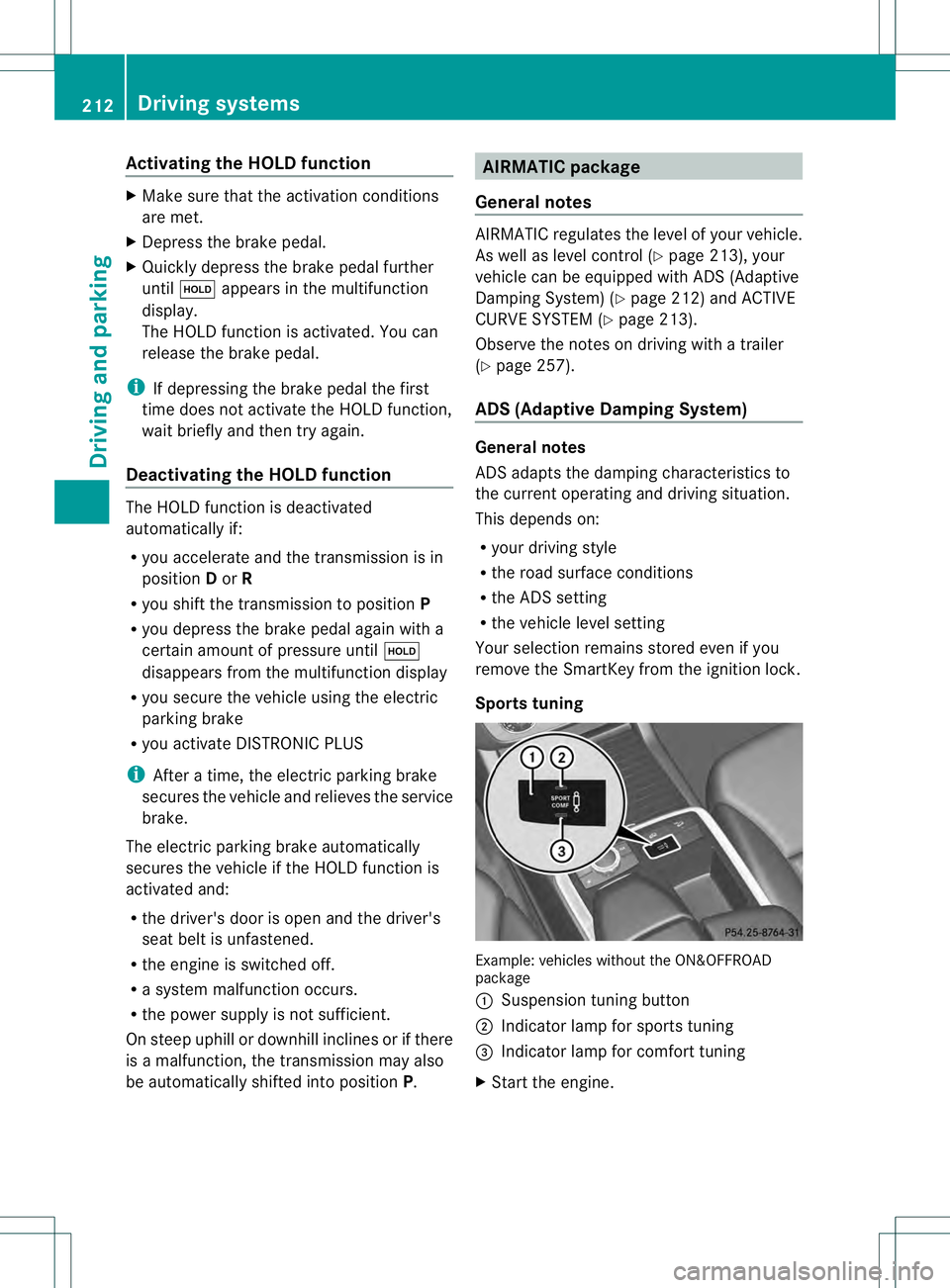
Sports tuning Example: vehicles without the ON&OFFROAD
package
0002
Suspension tuning button
0003 Indicator lamp for sports tuning
0021 Indicator lamp for comfort tuning
X Start the engine. 212
Driving systemsDriving and parking
Page 272 of 454
001E
Drive program (Y page 169)
001F Transmission positio n(Ypage 169)
X To show menu bar 0020:press the 0002
or 0005 button on the steering wheel.
Menu bar 0020disappears after a few seconds.
Text field 0021shows the selected menu or
submenu as well as display messages.
i You can set the time using the audio
system or COMAND; see the separate
operating instructions.
The following messages may appear in the
multifunction display:
00090011000A Active Parking Assist
(Ypage 221)
CRUISE Cruise control (Y
page 195)
000BDSR DSR (Y
page 250)
0006 Off-road program (vehicles
without the ON&OFFROAD
package) (Y page 252)
0006 Off-road program (vehicles with
the ON&OFFROA Dpackage)
(Y page 252)
LOW RANGE LOW RANGE off-road gear
(Y
page 254)
0005 Adaptive Highbeam Assist
(Ypage 130)
0003 ATTENTION ASSIST
(Ypage 234)
0001 Lane Keeping Assist
(Ypage 239)
0001 Active Lane Keeping Assist
(Ypage 245)
0001 HOLD function (Y page 211)
0003 Distance warning function
(Ypage 68)
0003 PRE-SAFE®
Brake (Y page 73) Menus and submenus
Menu overview
Press the 0002or0005 button on the
steering wheel to call up the menu bar and
selec tamenu.
Operating the on-board computer
(Y page 268).
Depending on the equipment installed in the
vehicle, you can call up the following menus:
R Trip menu (Y
page 270)
R Navi menu (navigatio
ninstructions)
(Y page 272)
R Audio menu (Y
page 273)
R Tel menu (telephone) (Y
page 274)
R DriveAssist menu (assistance)
(Y page 276)
R Service menu (Y
page 277)
R Settings menu (settings) (Y
page 278)
R ON&OFFROAD menu (Y
page 282)
R AMG menu in AMG vehicles (Y
page 282) Trip menu
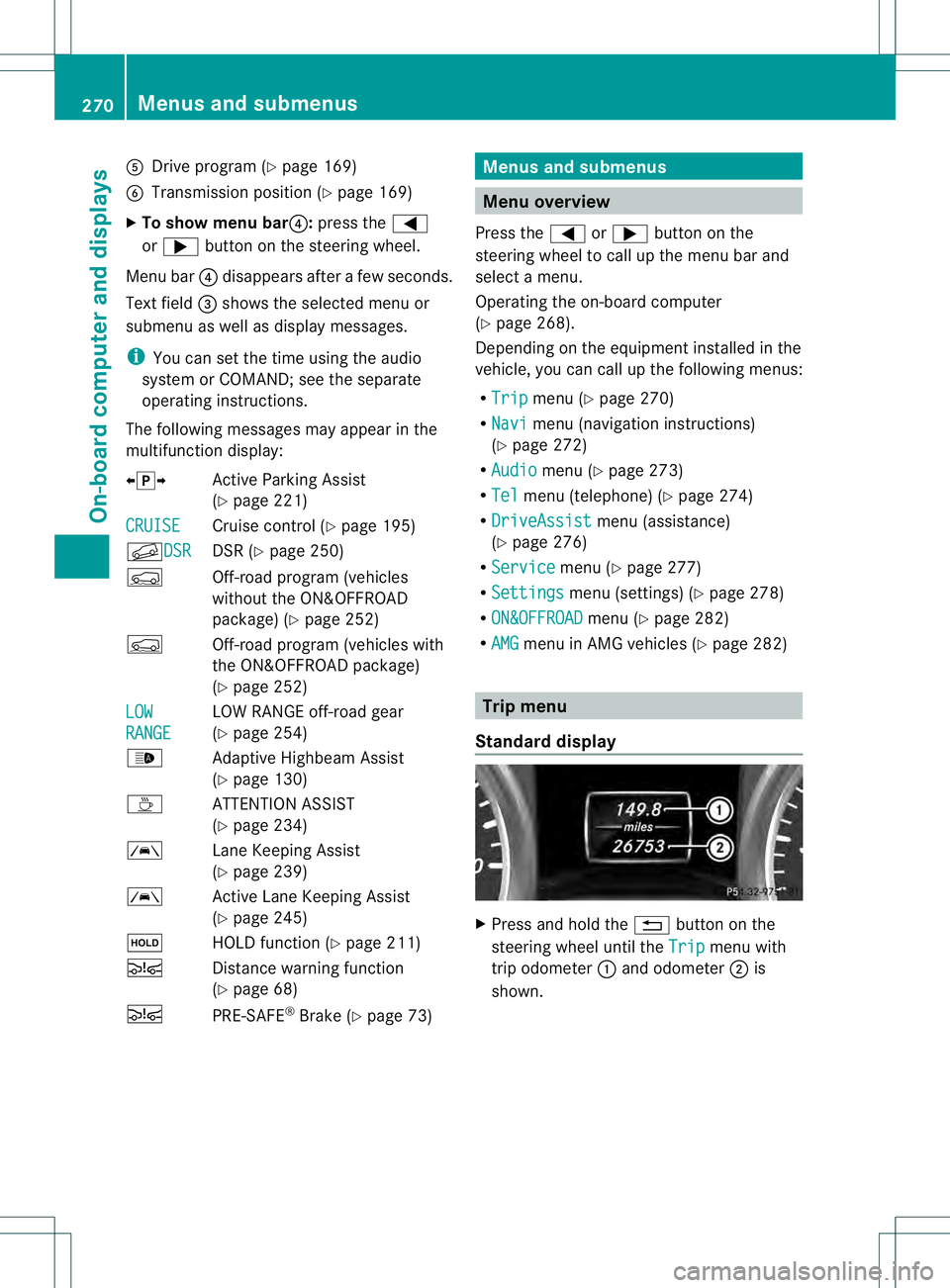
Standard display X
Press and hold the 0007button on the
steering wheel until the Trip menu with
trip odometer 0002and odometer 0003is
shown. 270
Menus and submenusOn-board computer and displays
Page 277 of 454
X
Switch on the mobile phone (see the
separate operating instructions).
X Switch on COMAND (see the separate
operating instructions).
X Establish a Bluetooth ®
connection to
COMAND; see the separate operating
instructions.
X Press the 0002or0005 button on the
steering wheel to select the Tel menu.
You will see one of the following display
messages in the multifunction display:
R Phone READY or the name of the network
provider: the mobile phone has found a
network and is ready to receive.
R Telephone No Service : there is no
network available or the mobile phone is
searching for a network.
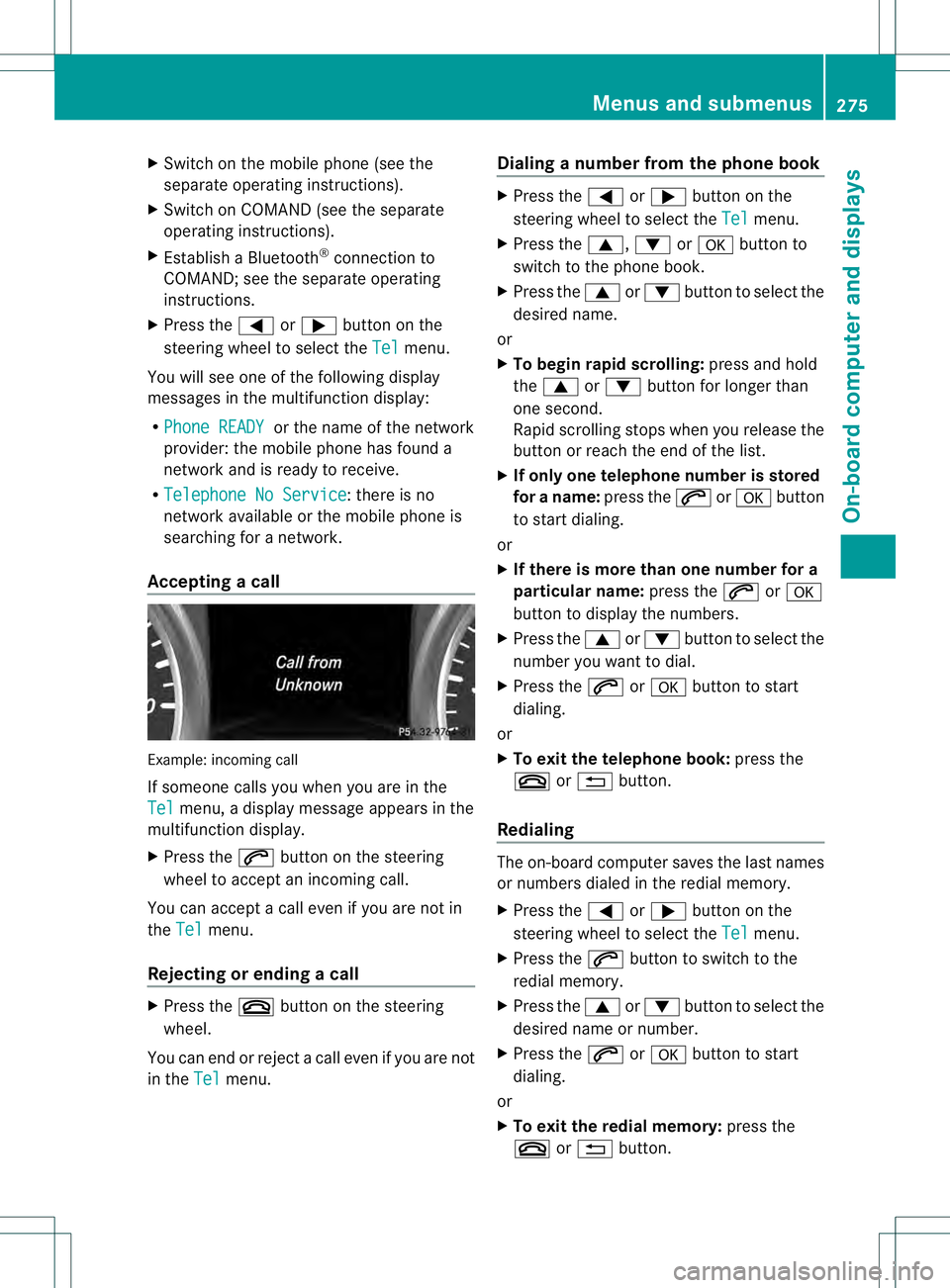
Accepting acall Example: incoming call
If someone calls you whe
nyou are in the
Tel menu, a display message appears in the
multifunction display.
X Press the 0004button on the steering
wheel to accept an incoming call.
You can accept a call even if you are not in
the Tel menu.
Rejecting or ending acall X
Press the 000Dbutton on the steering
wheel.
You can end or reject a call even if you are not
in the Tel menu. Dialing a number from the phone book X
Press the 0002or0005 button on the
steering wheel to select the Tel menu.
X Press the 0003,0004or000B button to
switch to the phone book.
X Press the 0003or0004 button to select the
desired name.
or
X To begin rapid scrolling: press and hold
the 0003 or0004 button for longer than
one second.
Rapid scrolling stops whe nyou release the
button or reach the end of the list.
X If only one telephone number is stored
for a name: press the0004or000B button
to start dialing.
or
X If there is more than one number for a
particular name: press the0004or000B
button to display the numbers.
X Press the 0003or0004 button to select the
number you want to dial.
X Press the 0004or000B button to start
dialing.
or
X To exit the telephone book: press the
000D or0007 button.
Redialing The on-board computer saves the last names
or numbers dialed in the redial memory.
X
Press the 0002or0005 button on the
steering wheel to select the Tel menu.
X Press the 0004button to switch to the
redial memory.
X Press the 0003or0004 button to select the
desired name or number.
X Press the 0004or000B button to start
dialing.
or
X To exit the redial memory: press the
000D or0007 button. Menus and submenus
275On-board computer and displays Z
Page 280 of 454
R
check the tire pressure electronically
(Y page 408)
R call up service due date (Y page 371)Settings menu
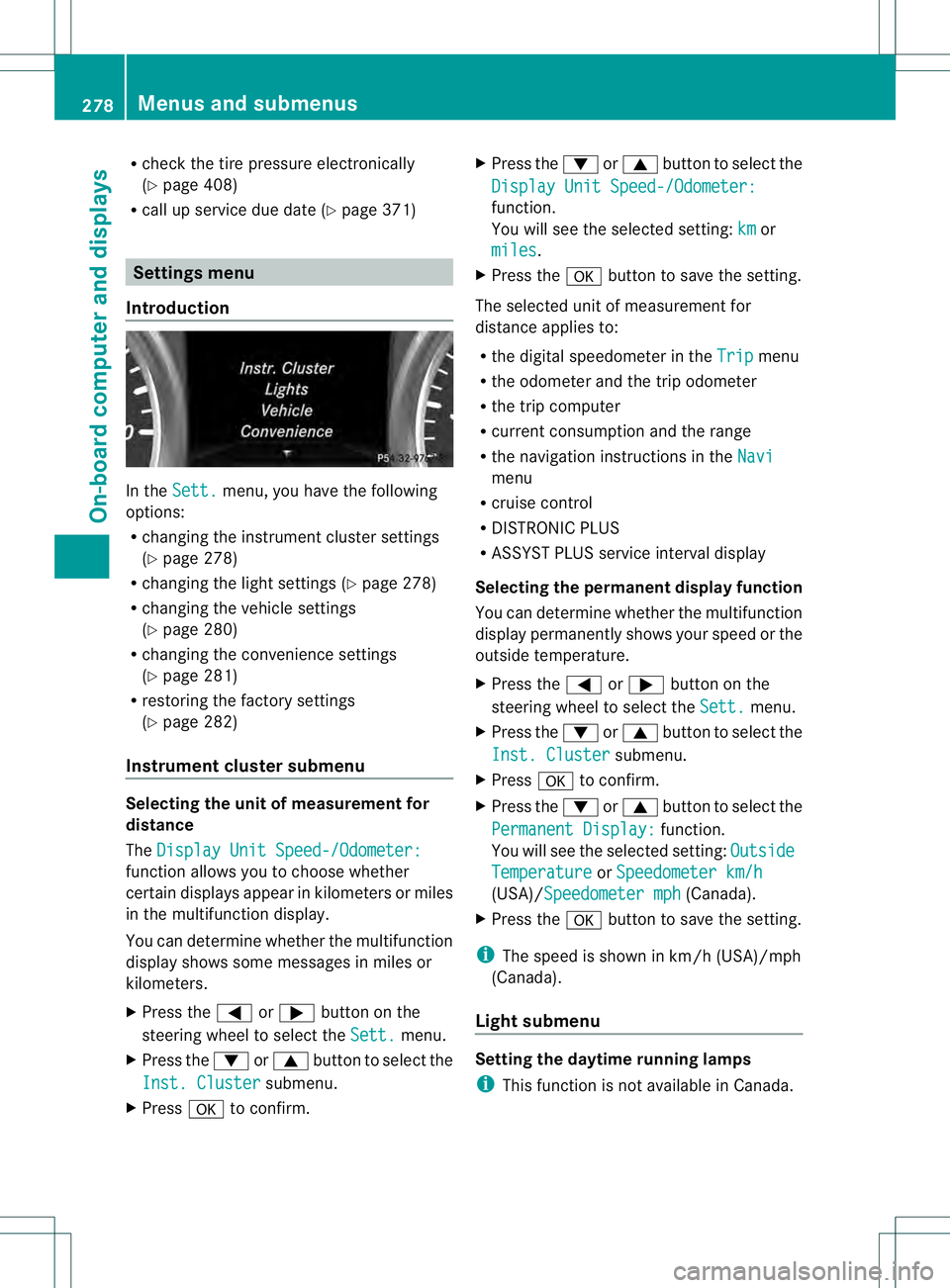
Introduction In the
Sett. menu, you have the following
options:
R changing the instrument cluster settings
(Y page 278)
R changing the light settings (Y page 278)
R changing the vehicle settings
(Y page 280)
R changing the convenience settings
(Y page 281)
R restoring the factory settings
(Y page 282)
Instrumen tcluster submenu Selecting the unit of measurement for
distance
The
Display Unit Speed-/Odometer: function allows you to choose whether
certain displays appear in kilometers or miles
in the multifunction display.
You can determine whether the multifunction
display shows some messages in miles or
kilometers.
X
Press the 0002or0005 button on the
steering wheel to selec tthe Sett. menu.
X Press the 0004or0003 button to select the
Inst. Cluster submenu.
X Press 000Bto confirm. X
Press the 0004or0003 button to select the
Display Unit Speed-/Odometer: function.
You will see the selected setting:
km or
miles .
X Press the 000Bbutton to save the setting.
The selected unit of measurement for
distance applies to:
R the digital speedometer in the Trip menu
R the odometer and the trip odometer
R the trip computer
R current consumption and the range
R the navigation instructions in the Navi menu
R cruise control
R DISTRONIC PLUS
R ASSYST PLUS service interval display
Selecting the permanent display function
You can determine whether the multifunction
display permanently shows your speed or the
outside temperature.
X Press the 0002or0005 button on the
steering wheel to select the Sett. menu.
X Press the 0004or0003 button to select the
Inst. Cluster submenu.
X Press 000Bto confirm.
X Press the 0004or0003 button to select the
Permanent Display: function.
You will see the selected setting: Outside Temperature or
Speedometer km/h (USA)/Speedometer mph (Canada).
X Press the 000Bbutton to save the setting.
i The speed is shown in km/h (USA)/mph
(Canada).
Light submenu Setting the daytime running lamps
i
This function is not available in Canada. 278
Menus and submenusOn-board computer and displays
Page 297 of 454
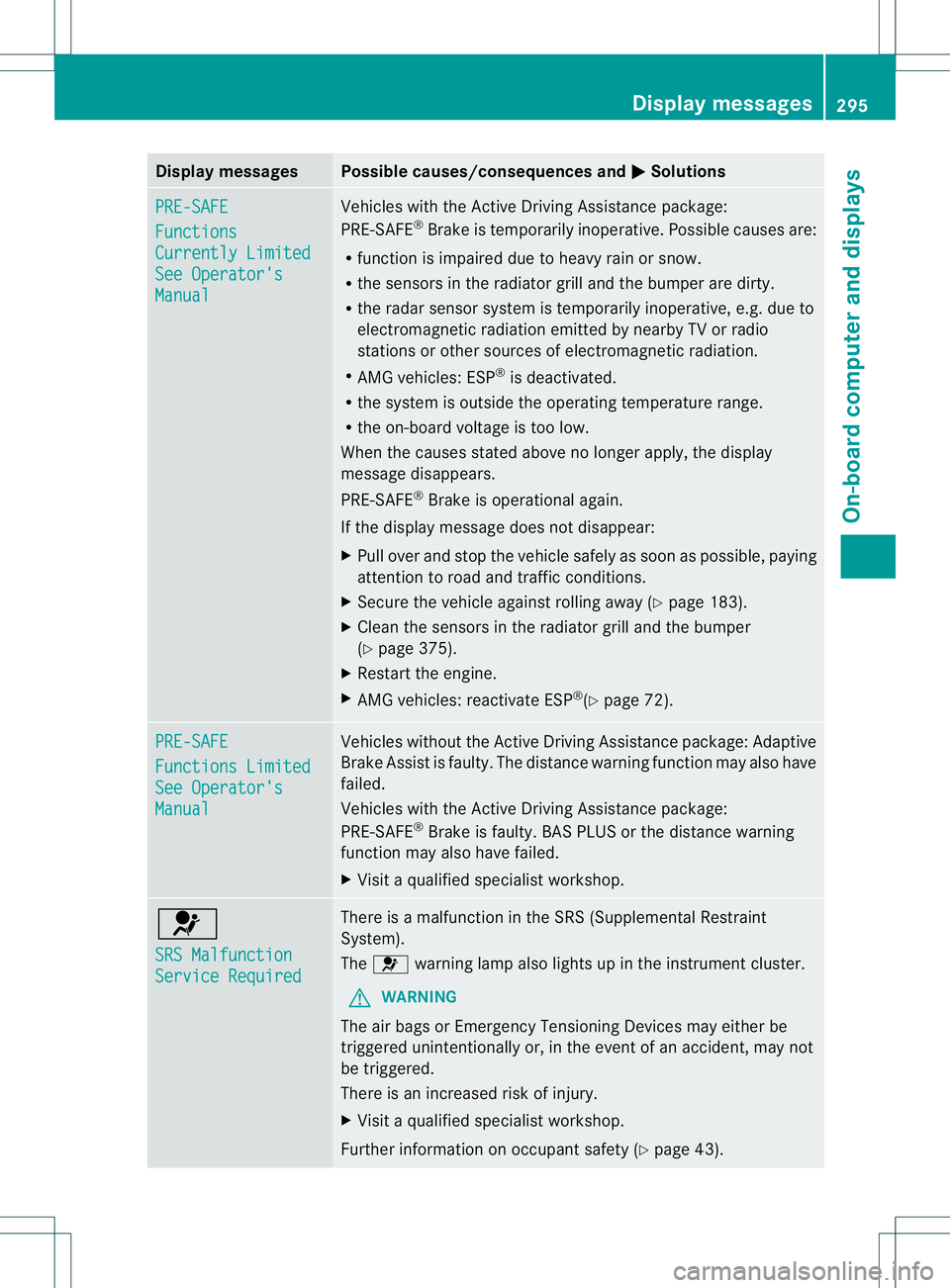
Display messages Possible causes/consequences and
0001 Solutions
PRE-SAFE
Functions
Currently Limited
See Operator's
Manual Vehicles with the Active Driving Assistance package:
PRE-SAFE
®
Brake is temporarily inoperative. Possible causes are:
R function is impaired due to heavy rain or snow.
R the sensors in the radiato rgrill and the bumper are dirty.
R the rada rsensor system is temporarily inoperative, e.g. due to
electromagnetic radiation emitted by nearby TV or radio
stations or other sources of electromagnetic radiation.
R AMG vehicles: ESP ®
is deactivated.
R the system is outside the operating temperature range.
R the on-board voltage is too low.
When the causes stated above no longer apply, the display
message disappears.
PRE-SAFE ®
Brake is operational again.
If the display message does not disappear:
X Pull over and stop the vehicle safely as soon as possible, paying
attention to road and traffic conditions.
X Secure the vehicle against rolling away (Y page 183).
X Clean the sensors in the radiator grill and the bumper
(Y page 375).
X Restart the engine.
X AMG vehicles: reactivate ESP ®
(Y page 72). PRE-SAFE
Functions Limited
See Operator's
Manual Vehicles without the Active Driving Assistance package: Adaptive
Brake Assist is faulty. The distance warning function may also have
failed.
Vehicles with the Active Driving Assistance package:
PRE-SAFE
®
Brake is faulty. BAS PLUS or the distance warning
function may also have failed.
X Visit a qualified specialist workshop. 001F
SRS Malfunction
Service Required There is a malfunction in the SRS (Supplemental Restraint
System).
The
001F warning lamp also lights up in the instrument cluster.
G WARNING
The air bags or Emergency Tensioning Devices may either be
triggered unintentionally or, in the event of an accident, may not
be triggered.
There is an increased risk of injury.
X Visit a qualified specialist workshop.
Further information on occupant safety (Y page 43). Display messages
295On-board computer and displays Z
Page 298 of 454
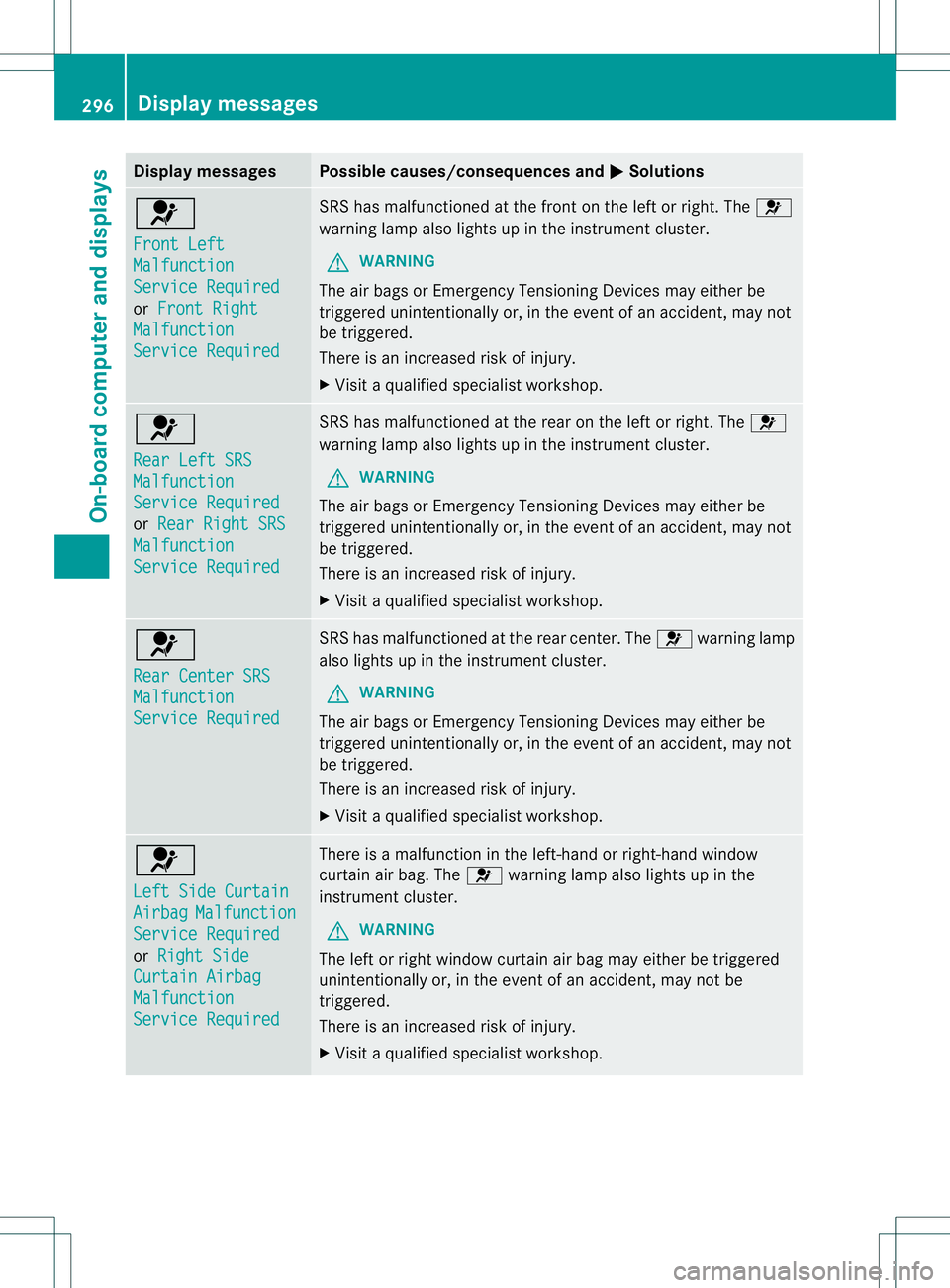
Display messages Possible causes/consequences and
0001 Solutions
001F
Front Left
Malfunction
Service Required
or
Front Right Malfunction
Service Required SRS has malfunctioned at the front on the left or right. The
001F
warning lamp also lights up in the instrumen tcluster.
G WARNING
The air bags or Emergency Tensioning Devices may either be
triggered unintentionally or, in the event of an accident, may not
be triggered.
There is an increased risk of injury.
X Visit a qualified specialist workshop. 001F
Rear Left SRS
Malfunction
Service Required
or
Rear Right SRS Malfunction
Service Required SRS has malfunctione
dat the rear on the left or right. The 001F
warning lamp also lights up in the instrument cluster.
G WARNING
The ai rbags or Emergency Tensioning Devices may either be
triggered unintentionally or, in the event of an accident, may not
be triggered.
There is an increased ris kofinjury.
X Visi taqualified specialist workshop. 001F
Rear Center SRS
Malfunction
Service Required SRS has malfunctioned at the rear center. The
001Fwarning lamp
also lights up in the instrument cluster.
G WARNING
The air bags or Emergency Tensioning Devices may either be
triggered unintentionally or, in the event of an accident, may not
be triggered.
There is an increased risk of injury.
X Visit a qualified specialist workshop. 001F
Left Side Curtain
Airbag Malfunction
Service Required
or
Right Side Curtain Airbag
Malfunction
Service Required There is a malfunction in the left-hand or right-hand window
curtain air bag. The
001Fwarning lamp also lights up in the
instrument cluster.
G WARNING
The left or right window curtain air bag may either be triggered
unintentionally or, in the event of an accident, may not be
triggered.
There is an increased risk of injury.
X Visit a qualified specialist workshop. 296
Display messagesOn-board computer and displays
Page 319 of 454
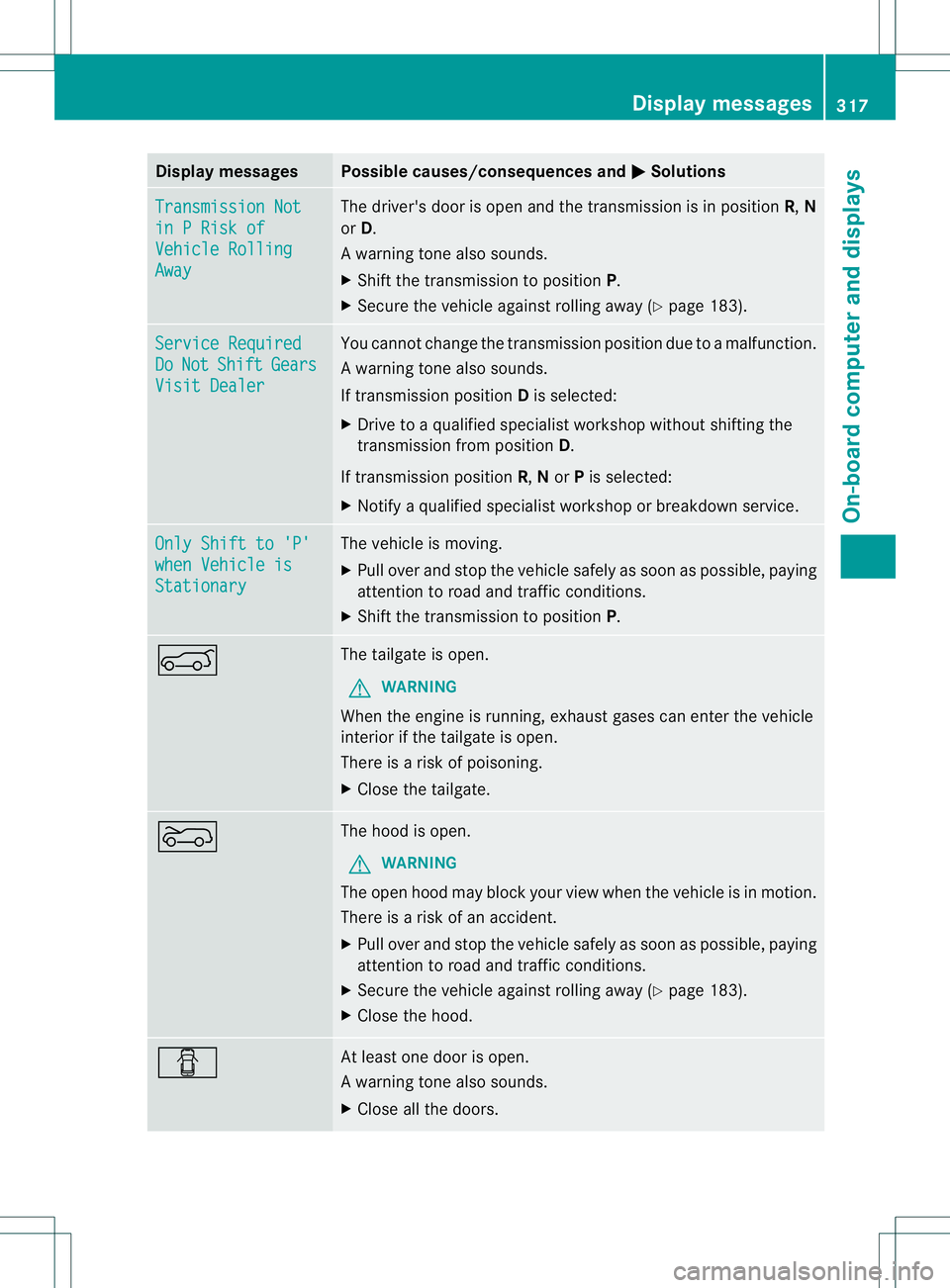
Display messages Possible causes/consequences and
0001 Solutions
Transmission Not
in P Risk of
Vehicle Rolling
Away The driver's doo
ris open and the transmission is in position R,N
or D.
Aw arning tone also sounds.
X Shift the transmission to position P.
X Secure the vehicle against rolling away ( Ypage 183). Service Required
Do Not Shift Gears
Visit Dealer You canno
tchange the transmission position due to a malfunction.
Aw arning tone also sounds.
If transmission position Dis selected:
X Drive to a qualified specialist workshop without shifting the
transmission from position D.
If transmission position R,Nor Pis selected:
X Notify a qualified specialist workshop or breakdown service. Only Shift to 'P'
when Vehicle is
Stationary The vehicle is moving.
X
Pull ove rand stop the vehicle safely as soo nas possible, paying
attention to road and traffic conditions.
X Shift the transmission to position P.0006 The tailgate is open.
G WARNING
When the engine is running, exhaust gases can enter the vehicle
interior if the tailgate is open.
There is a risk of poisoning.
X Close the tailgate. 0007 The hood is open.
G WARNING
The open hood may block your view when the vehicle is in motion.
There is a risk of an accident.
X Pull over and stop the vehicle safely as soon as possible, paying
attention to road and traffic conditions.
X Secure the vehicle against rolling away (Y page 183).
X Close the hood. 0003 At least one door is open.
Aw
arning tone also sounds.
X Close all the doors. Display messages
317On-board computer and displays Z
Page 320 of 454
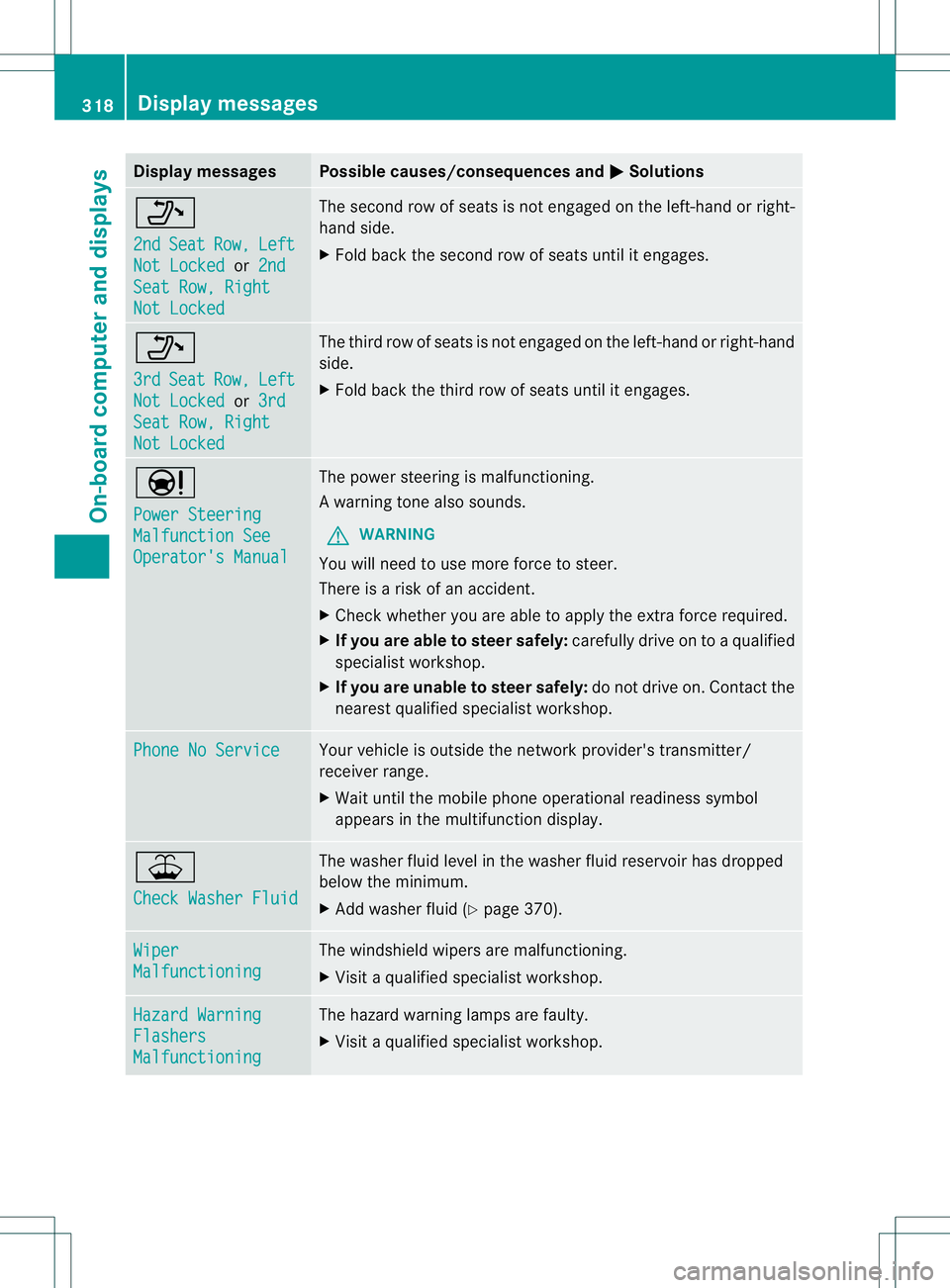
Display messages Possible causes/consequences and
0001 Solutions
0008
2nd
Seat Row, Left
Not Locked or
2nd Seat Row, Right
Not Locked The second row of seats is no
tengaged on the left-hand or right-
hand side.
X Fold back the second row of seats until it engages. 0008
3rd
Seat Row, Left
Not Locked or
3rd Seat Row, Right
Not Locked The third row of seats is not engaged on the left-hand or right-hand
side.
X
Fold back the third row of seats until it engages. 0001
Power Steering
Malfunction See
Operator's Manual The powe
rsteering is malfunctioning.
Aw arning tone also sounds.
G WARNING
You will need to use more force to steer.
There is a ris kofanaccident.
X Check whethe ryou are able to apply the extra force required.
X If you are able to steer safely: carefully drive on to a qualified
specialist workshop.
X If you are unable to steer safely: do not drive on. Contact the
nearest qualified specialist workshop. Phone No Service Your vehicle is outside the network provider's transmitter/
receiver range.
X
Wait until the mobile phone operational readiness symbol
appears in the multifunction display. 001E
Check Washer Fluid The washer fluid level in the washer fluid reservoir has dropped
below the minimum.
X
Add washer fluid (Y page 370).Wiper
Malfunctioning The windshield wipers are malfunctioning.
X
Visit a qualified specialist workshop. Hazard Warning
Flashers
Malfunctioning The hazard warning lamps are faulty.
X
Visit a qualified specialist workshop. 318
Display messagesOn-board computer and displays