belt MERCEDES-BENZ GL 2013 Owner's Guide
[x] Cancel search | Manufacturer: MERCEDES-BENZ, Model Year: 2013, Model line: GL, Model: MERCEDES-BENZ GL 2013Pages: 454, PDF Size: 6.31 MB
Page 111 of 454
belt can no longer offer the intended level
of protection and could even cause injuries.
R Ac hild restraint system would no longer be
anchored or positioned correctly and would
not be able to perform its required function.
R The seat backrests cannot restrain objects
or loads in the cargo compartment.
There is an increased risk of injury.
Always make sure that the seat and backrest
are engaged as described:
R before traveling with a passenger on a seat
with the EASY-ENTRY/EXIT feature
R after you have adjusted the seat
R after the EASY-ENTRY/EXIT feature has
been used
R after the cargo compartment enlargement
has been folded forwards G
WARNING
The seat does not engage in the entry/exit
position. The seat could fold back suddenly,
e.g. when accelerating, braking, changing
direction suddenly or in the event of an
accident. Persons in the sweep of the seat
could become trapped. There is a risk of
injury.
Always fold back a seat which has been folded
forwards before you pull away.M ake sure that
the seat and backres tengage fully.
General notes
To enter or exi tthe 3rd row of seats: the outer
left and right seats of the 2nd row can be
folded down.
One of the outer seats of the 2nd row is in the
entry/exit position: the multifunction display
shows, e.g. the 2nd Seat Row, Right Not
Locked display message.
If you fold the seat back until it engages, the
display message disappears.
Pull the backrest firmly to ensure that it is fully
engaged. i
Further related subjects:
R Cargo compartmente nlargement
(folding the 2nd row of seats forwards)
(Y page 340)
R Folding the seats in the 3rd row
forwards/back (Y page 107)
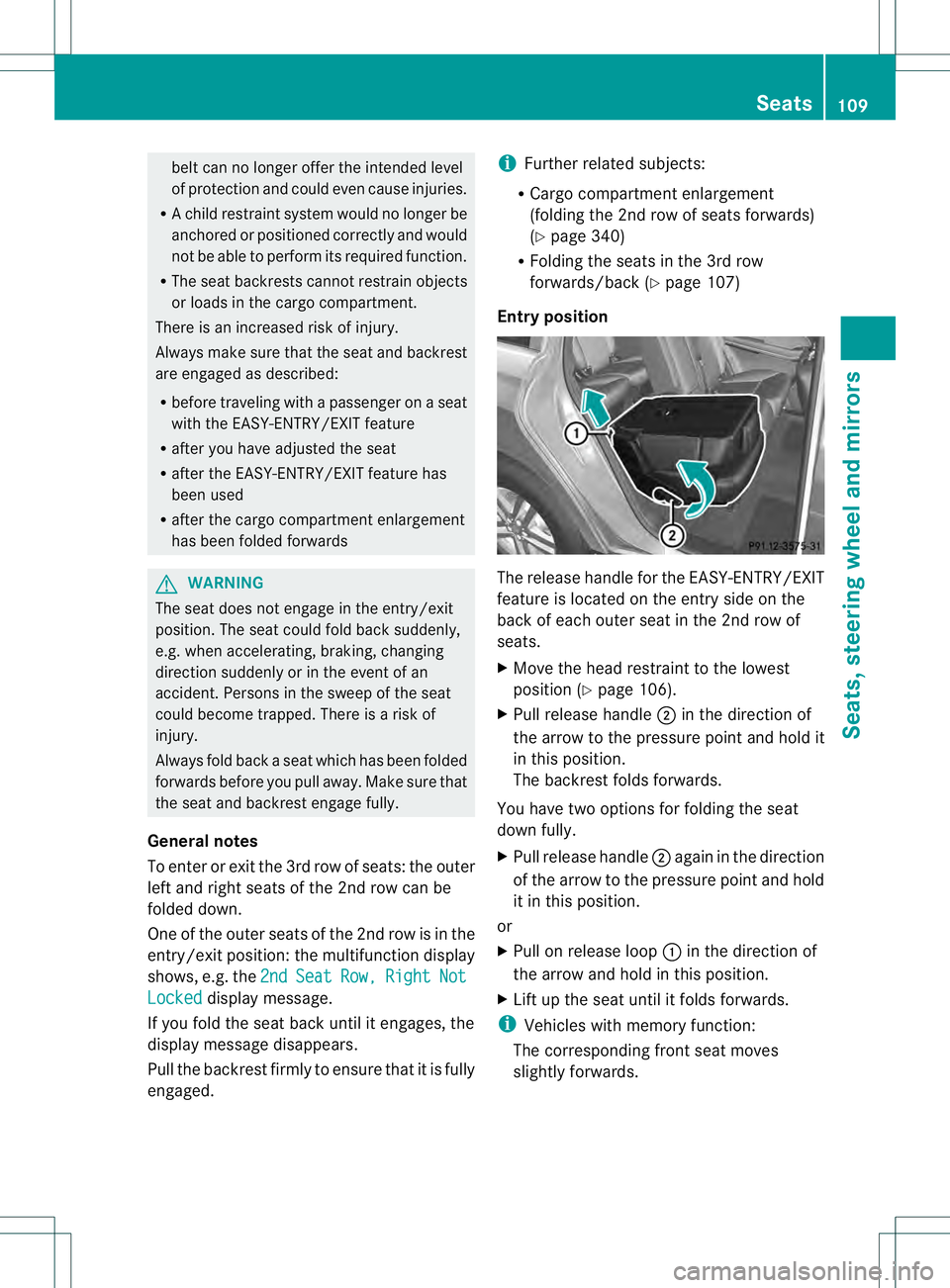
Entry position The release handle for the EASY-ENTRY/EXIT
feature is located on the entry side on the
back of each outer seat in the 2nd row of
seats.
X
Move the head restraint to the lowest
positio n(Ypage 106).
X Pull release handle 0003in the direction of
the arrow to the pressure point and hold it
in this position.
The backrest folds forwards.
You have two options for folding the seat
down fully.
X Pull release handle 0003again in the direction
of the arrow to the pressure point and hold
it in this position.
or
X Pull on release loop 0002in the direction of
the arrow and hold in this position.
X Lift up the seat until it folds forwards.
i Vehicles with memory function:
The corresponding fron tseat moves
slightly forwards. Seats
109Seats, steering wheel and mirrors Z
Page 112 of 454
Entry position
Exit position
G
WARNING
Whe nyou adjust a seat, you or other vehicle
occupants could become trapped, e.g. on the
seat guide rail. There is arisk of injury.
Make sure when adjusting aseat that no one
has any body parts in the sweep of the seat.
i Further related subjects:
R Important safety notes on air bags
(Y page 44)
R Securing children in the vehicle
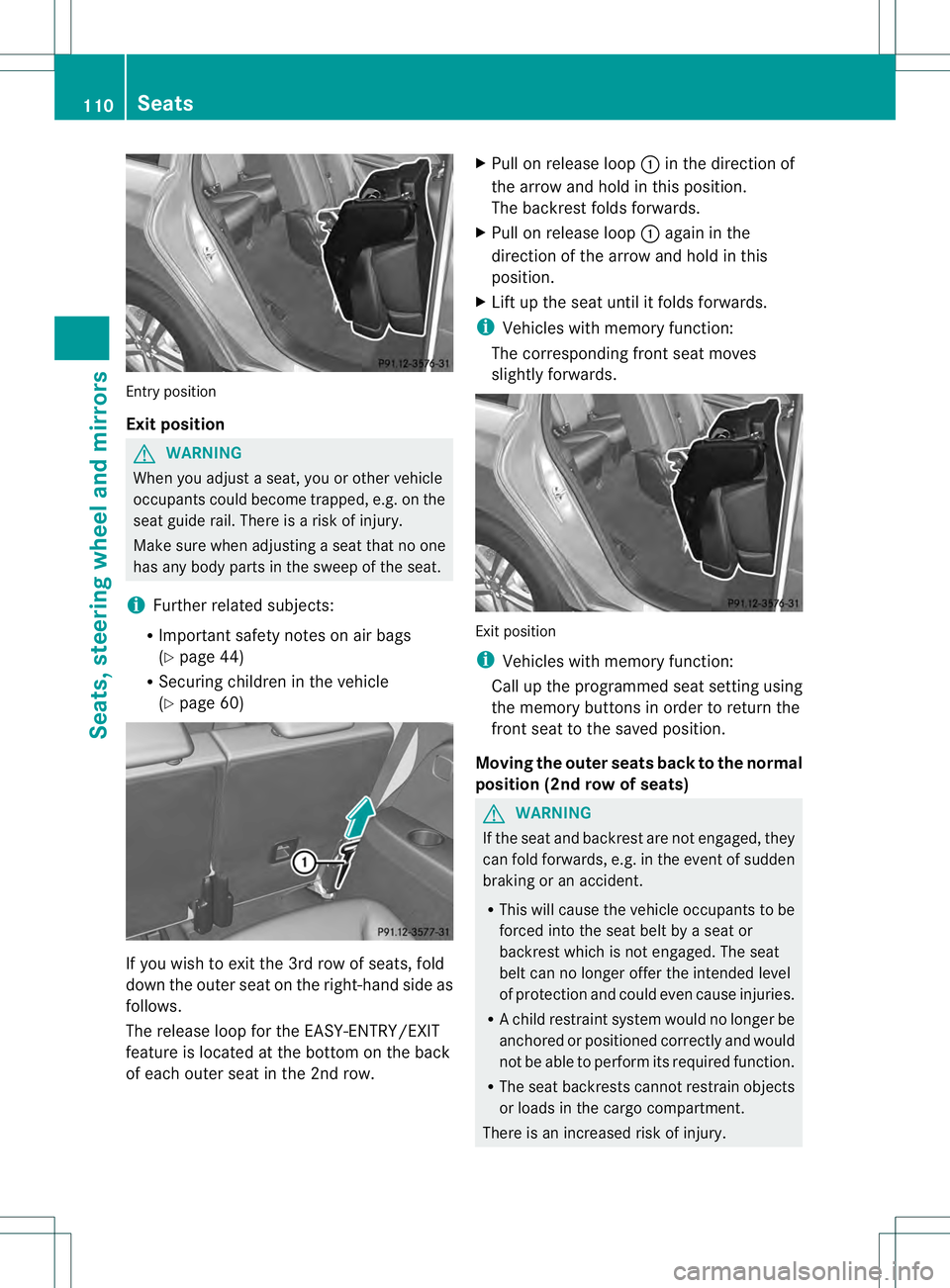
(Y page 60) If you wish to exit the 3rd row of seats, fold
down the outer seat on the right-hand side as
follows.
The release loop for the EASY-ENTRY/EXIT
feature is located at the bottom on the back
of each outer seat in the 2nd row. X
Pull on release loop 0002in the direction of
the arrow and hold in this position.
The backrest folds forwards.
X Pull on release loop 0002again in the
direction of the arrow and hold in this
position.
X Lift up the seat until it folds forwards.
i Vehicles with memory function:
The corresponding fron tseat moves
slightly forwards. Exit position
i
Vehicles with memory function:
Call up the programmed seat setting using
the memory buttons in order to return the
fron tseat to the saved position.
Moving the outer seats back to the normal
position (2nd row of seats) G
WARNING
If the seat and backrest are not engaged, they
can fold forwards, e.g. in the event of sudden
braking or an accident.
R This will cause the vehicle occupants to be
forced into the seat belt by a seat or
backrest which is not engaged. The seat
belt can no longer offer the intended level
of protection and could even cause injuries.
R Ac hild restraint system would no longer be
anchored or positioned correctly and would
not be able to perform its required function.
R The seat backrests cannot restrain objects
or loads in the cargo compartment.
There is an increased risk of injury. 110
SeatsSeats, steering wheel and mirrors
Page 113 of 454
Always make sure tha
tthe seat and backrest
are engaged as described:
R before traveling with a passenger on a seat
with the EASY-ENTRY/EXIT feature
R after you have adjusted the seat
R after the EASY-ENTRY/EXIT feature has
been used
R after the cargo compartment enlargement
has been folded forwards G
WARNING
The seat does not engage in the entry/exit
position. The seat could fold back suddenly,
e.g. when accelerating, braking, changing
direction suddenly or in the event of an
accident. Persons in the sweep of the seat
could become trapped. There is a risk of
injury.
Always fold back a seat which has been folded
forwards before you pull away.M ake sure that
the seat and backres tengage fully.
X To lock the seat: fold back the seatuntil
it engages.
X Fold back the backres tuntil it engages.
Folding down the seats in the 2n drow
electrically Important safety notes
G
WARNING
If the seat and backres tare not engaged, they
can fold forwards, e.g. in the event of sudden
braking or an accident.
R This will cause the vehicle occupants to be
forced into the seat belt by a seat or
backrest which is not engaged. The seat
belt can no longer offer the intended level
of protection and could even cause injuries.
R Ac hild restraint system would no longer be
anchored or positioned correctly and would
not be able to perform its required function.
R The seat backrests cannot restrain objects
or loads in the cargo compartment. There is an increased risk of injury.
Always make sure that the seat and backrest
are engaged as described:
R
before traveling with a passenger on a seat
with the EASY-ENTRY/EXIT feature
R after you have adjusted the seat
R after the EASY-ENTRY/EXIT feature has
been used
R after the cargo compartment enlargement
has been folded forwards G
WARNING
The seat does not engage in the entry/exit
position. The seat could fold back suddenly,
e.g. when accelerating, braking, changing
direction suddenly or in the event of an
accident. Persons in the sweep of the seat
could become trapped. There is a risk of
injury.
Always fold back a seat which has been folded
forwards before you pull away.M ake sure that
the seat and backres tengage fully.
General notes
To enter or exi tthe 3rd row of seats: the outer
left and right seats of the 2nd row can be
folded down electrically.
One of the outer seats of the 2nd row is in the
entry/exit position: the multifunction display
shows, e.g. the 2nd Seat Row, Right Not
locked display message.
If you fold the seat back until it engages, the
display message disappears.
Pull the backrest firmly to ensure that it is fully
engaged.
i Further related subjects:
R Cargo compartmente nlargement
(folding the 2nd row of seats forwards)
(Y page 340)
R Folding the seats in the 3rd row
forwards/back (Y page 107) Seats
111Seats, steering wheel and mirrors Z
Page 117 of 454
Problems with the seat ventilation
Problem Possible causes/consequences and
0001 Solutions
The seat ventilation has
switched off
prematurely or cannot
be switched on. The on-board voltage is too low because too many electrical
consumers are switched on.
X
Switch off electrical consumers that you do not need, such as
the rear window defroster or interior lighting.
Once the battery is sufficiently charged, the seat ventilation will
switch back on automatically. Steering wheel
Important safety notes
G
WARNING
You could lose control of your vehicle if you
do the following while driving:
R adjust the driver's seat, head restraint,
steering wheel or mirrors
R fasten the seat belt
There is a risk of an accident.
Adjust the driver's seat, head restraint,
steering wheel and mirror and fasten your
seat belt before starting the engine. G
WARNING
Children could injure themselves if they
adjust the steering wheel. There is a risk of
injury.
When leaving the vehicle, always take the
SmartKey with you and lock the vehicle. Never
leave children unsupervised in the vehicle. Adjusting the steering wheel
manually
G
WARNING
If the steering wheel is unlocked while the
vehicle is in motion, it could change position
unexpectedly. This could cause you to lose
control of the vehicle. There is a risk of an
accident. Before starting off, make sure the steering
wheel is locked. Never unlock the steering
wheel while the vehicle is in motion.
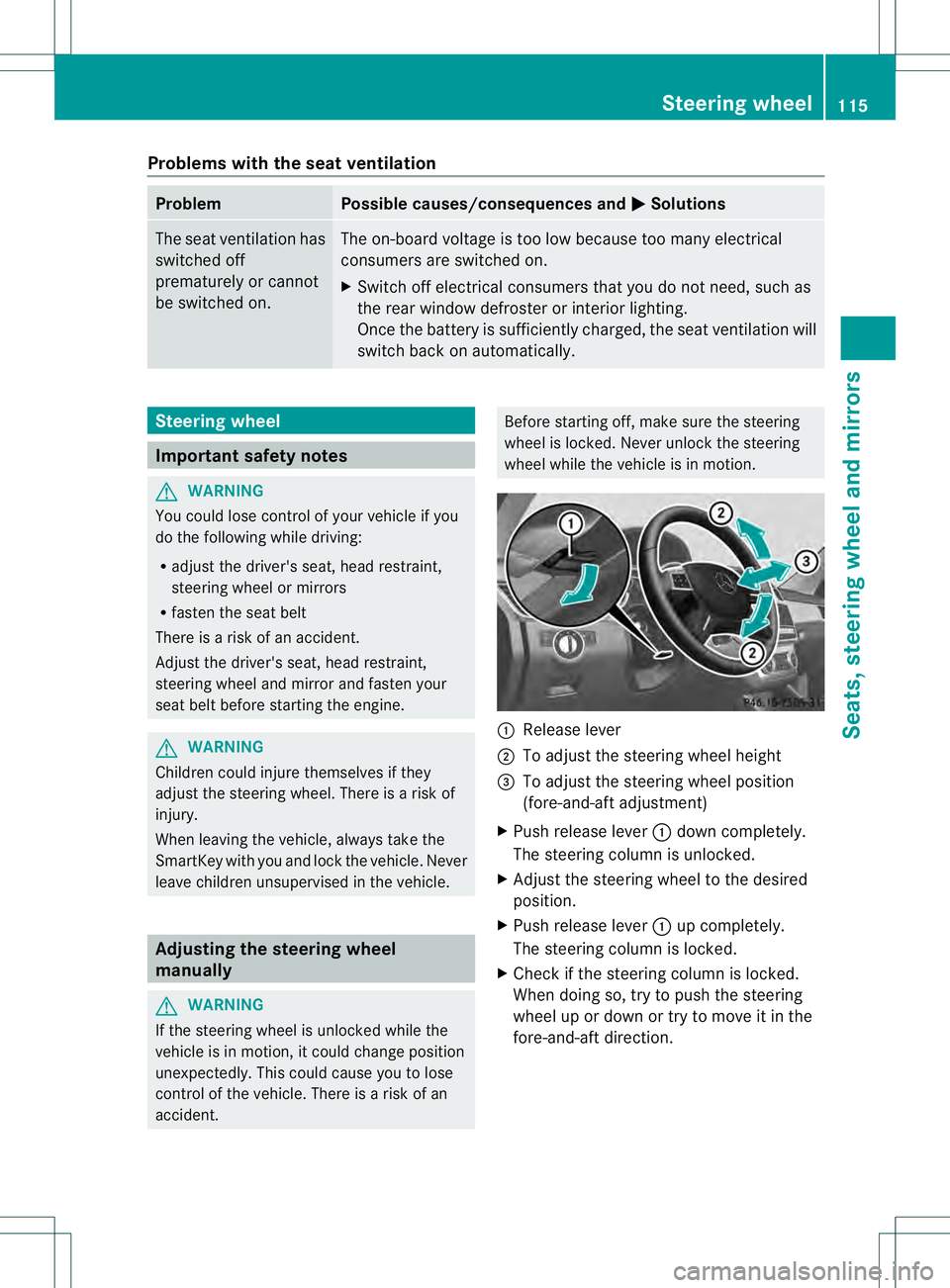
0002
Release lever
0003 To adjust the steering wheel height
0021 To adjust the steering wheel position
(fore-and-aft adjustment)
X Push release lever 0002down completely.
The steering column is unlocked.
X Adjust the steering wheel to the desired
position.
X Push release lever 0002up completely.
The steering column is locked.
X Check if the steering column is locked.
When doing so, try to push the steering
wheel up or down or try to move it in the
fore-and-aft direction. Steering wheel
115Seats, steering wheel and mirrors Z
Page 187 of 454
(Canada only) red indicator lamp lights up
in the instrument cluster.
i The electric parking brake can also be
applied when the SmartKey is removed.
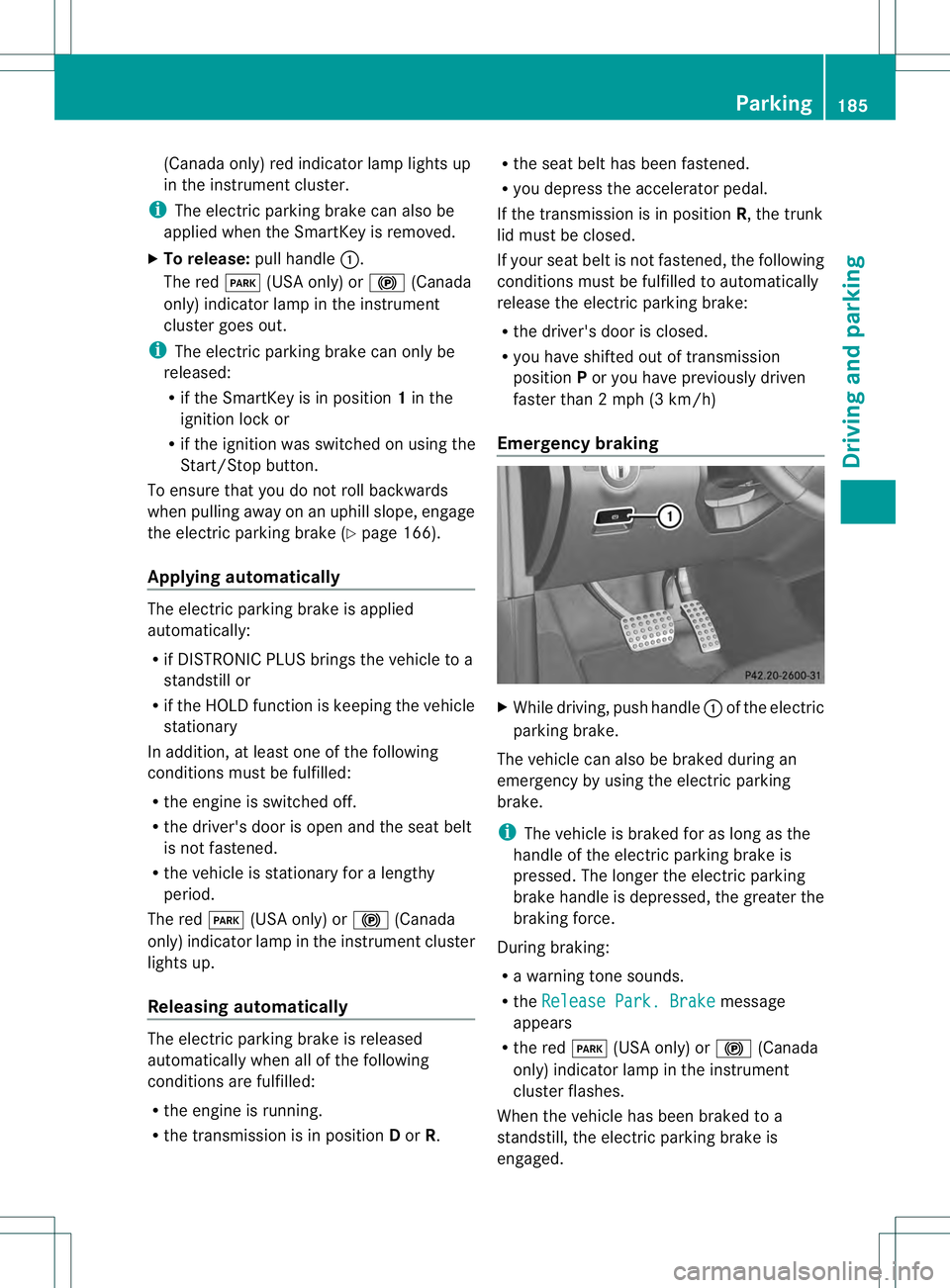
X To release: pull handle0002.
The red 0008(USA only) or 000D(Canada
only) indicator lamp in the instrument
cluster goes out.
i The electric parking brake can only be
released:
R if the SmartKey is in position 1in the
ignition lock or
R if the ignition was switched on using the
Start/Stop button.
To ensure that you do not roll backwards
when pulling away on an uphill slope, engage
the electric parking brake (Y page 166).
Applying automatically The electric parking brake is applied
automatically:
R
if DISTRONIC PLUS brings the vehicle to a
standstill or
R if the HOL Dfunction is keeping the vehicle
stationary
In addition, at least on eofthe following
conditions must be fulfilled:
R the engine is switched off.
R the driver's door is open and the seat belt
is not fastened.
R the vehicle is stationary for a lengthy
period.
The red 0008(USA only) or 000D(Canada
only) indicator lamp in the instrumentc luster
lights up.
Releasing automatically The electric parking brake is released
automatically when all of the following
conditions are fulfilled:
R the engine is running.
R the transmission is in position Dor R. R
the seat belt has been fastened.
R you depress the accelerator pedal.
If the transmission is in position R, the trunk
lid must be closed.
If your seat belt is not fastened, the following
conditions must be fulfilled to automatically
release the electric parking brake:
R the driver's door is closed.
R you have shifted out of transmission
position Por you have previously driven
faster than 2 mph (3 km/h)
Emergency braking X
While driving, push handle 0002of the electric
parking brake.
The vehicle can also be braked during an
emergency by using the electric parking
brake.
i The vehicle is braked for as long as the
handle of the electric parking brake is
pressed. The longer the electric parking
brake handle is depressed, the greater the
braking force.
During braking:
R a warning tone sounds.
R the Release Park. Brake message
appears
R the red 0008(USA only) or 000D(Canada
only) indicator lamp in the instrument
cluster flashes.
When the vehicle has been braked to a
standstill, the electric parking brake is
engaged. Parking
185Driving and parking Z
Page 202 of 454
This device has been approved by the FCC
as a "Vehicular RadarS
ystem". The radar
sensor is intended fo ruse in an automotive
radar system only. Removing, tampering
with, or altering the device will void any
warranties, and is not permitted by the
FCC. Do not tamper with, alter, or use in
any non-approved way.
Any unauthorized modification to this
device could void the user’s authority to
operate the equipment.
i Canada only: This device complies with
RSS-210 of Industry Canada. Operation is
subject to the following two conditions:
1. This device may not cause harmful
interference, and
2. this device must accept any interference
received, including interference that may
cause undesired operation of the device.
Removal, tampering, or altering of the
device will void any warranties, and is not
permitted. Do not tamper with, alter, or use
in any non-approved way.
Any unauthorized modification to this
device could void the user's authority to
operate the equipment.
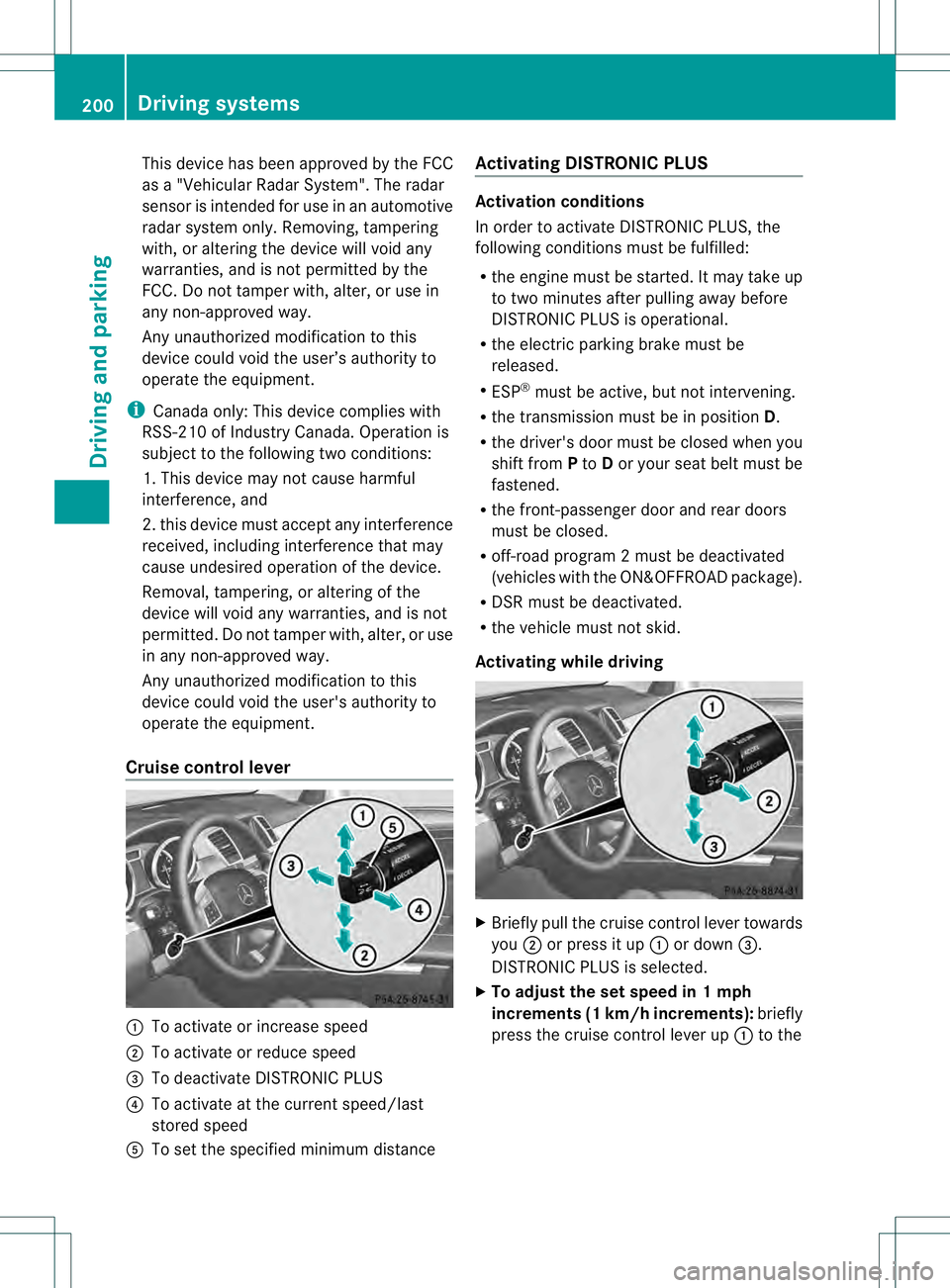
Cruise control lever 0002
To activate or increase speed
0003 To activate or reduce speed
0021 To deactivate DISTRONIC PLUS
0020 To activate at the current speed/last
stored speed
001E To set the specified minimum distance Activating DISTRONIC PLUS Activation conditions
In order to activate DISTRONIC PLUS, the
following conditions must be fulfilled:
R
the engine must be started. It may take up
to two minutes after pulling away before
DISTRONIC PLUS is operational.
R the electric parking brake must be
released.
R ESP ®
must be active, but not intervening.
R the transmission must be in position D.
R the driver's door must be closed when you
shift from Pto Dor your seat belt must be
fastened.
R the front-passenger door and rear doors
must be closed.
R off-road program 2 must be deactivated
(vehicles with the ON&OFFROAD package).
R DSR must be deactivated.
R the vehicle must not skid.
Activating while driving X
Briefly pull the cruise control lever towards
you 0003or press it up 0002or down 0021.
DISTRONIC PLUS is selected.
X To adjust the set speed in 1 mph
increments (1 km/h increments): briefly
press the cruise control lever up 0002to the 200
Driving systemsDriving and parking
Page 205 of 454
DISTRONIC PLU
Suses additional information
from your navigation system so that it can
react appropriately to certain traffic
situations. This is the case if, while following
a vehicle, DISTRONIC PLUS is active and you:
R approach or drive through a traffic circle
R approach a T-intersection
R turn off at a highway exit
Even if the vehicle in front leaves the
detection range, DISTRONIC PLUS
temporarily maintains the current driving
speed and does not accelerate. This is based
on the current map data in the navigation
system.
The current speed is maintained:
R approximately 10 seconds before the
traffic circle/T intersection and
approximately 1.5 seconds when driving on
a traffic circle.
R approximately 12 seconds before reaching
a highway exit and approximately
4s econds after the highway exit.
Afterwards, the vehicle accelerates back to
the set speed you specified.
Stopping G
WARNING
When leaving the vehicle, even if it is braked
only by DISTRONIC PLUS, it could roll away if:
R there is a malfunction in the system or in
the voltage supply.
R DISTRONIC PLUS has been deactivated
with the cruise control lever, e.g. by a
vehicle occupan torfrom outside the
vehicle.
R the electrical system in the engine
compartment, the battery or the fuses have
been tampered with.
R the battery is disconnected.
R the accelerator pedal has been depressed,
e.g. by a vehicle occupant.
There is a risk of an accident. If you wish to exit the vehicle, always turn off
DISTRONIC PLUS and secure the vehicle
against rolling away.
If DISTRONIC PLUS detects that the vehicle
in front is stopping, it brakes yourv ehicle until
it is stationary.
Once your vehicle is stationary, it remains
stationary and you do not need to depress the
brake.
After a time, the electric parking brake
secures the vehicle and relieves the service
brake.
Depending on the specified minimum
distance, your vehicle will come to a standstill
at a sufficien tdistance behind the vehicle in
front .The specified minimum distance is set
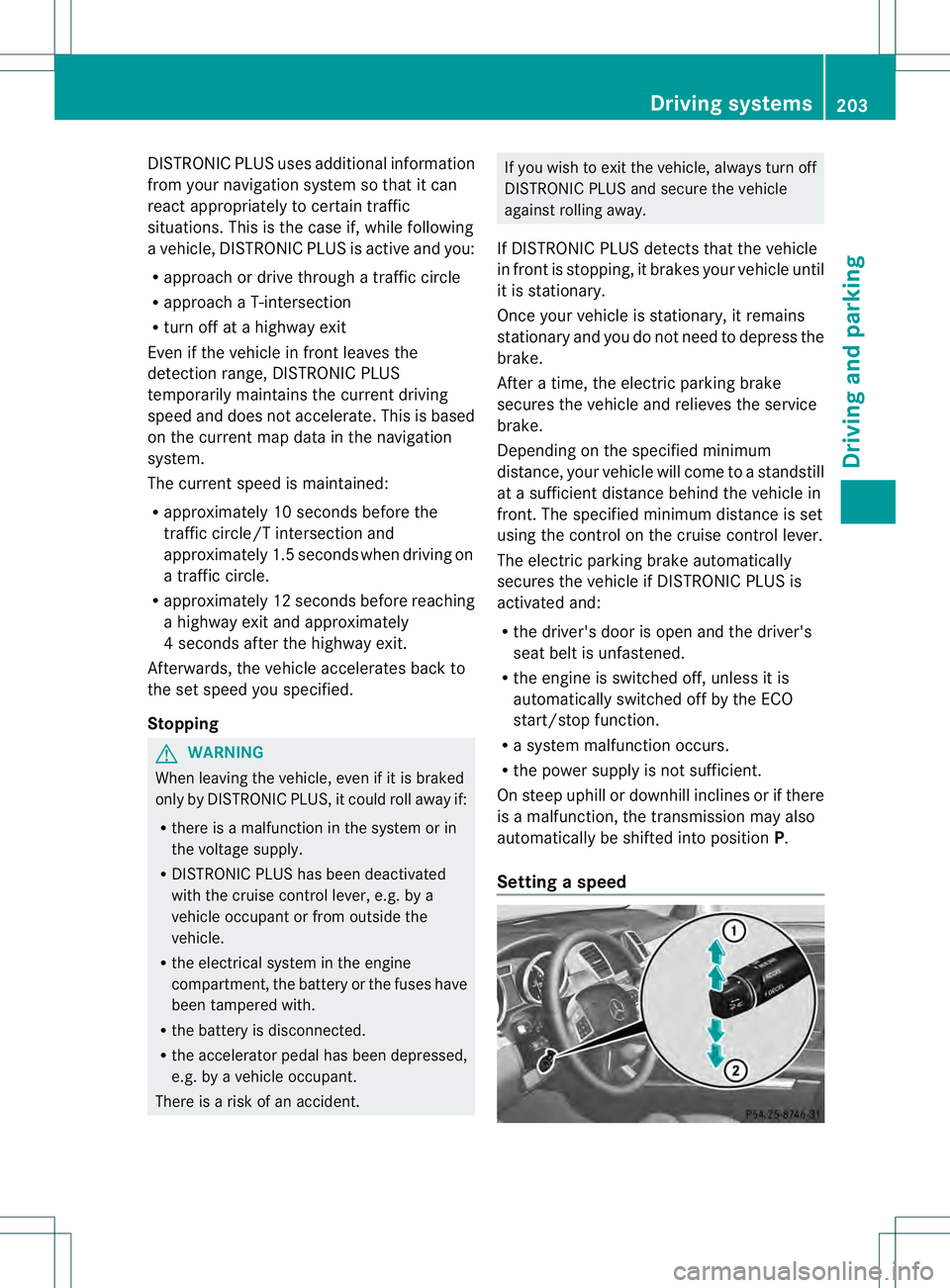
using the control on the cruise control lever.
The electric parking brake automatically
secures the vehicle if DISTRONIC PLUS is
activated and:
R the driver's door is open and the driver's
seat belt is unfastened.
R the engine is switched off, unless it is
automatically switched off by the ECO
start/stop function.
R a system malfunction occurs.
R the power supply is not sufficient.
On steep uphill or downhill inclines or if there
is a malfunction, the transmission may also
automatically be shifted into position P.
Setting aspeed Driving systems
203Driving and parking Z
Page 210 of 454
G
WARNING
When you drive with the chassis lowered or
raised, the vehicle's braking and driving
characteristics can be significantly impaired.
You could also exceed the permissible vehicle
height if the chassis is raised. There is a risk
of an accident.
Adjust the vehicle level before pulling away. G
WARNING
Due to the high center of gravity, the vehicle
may start to skid and roll over in the event of
an abrupt steering maneuver and/or when
the vehicle's speed is not adapted to the road
conditions. There is a risk of an accident.
Always adapt yours peed and driving style to
the vehicle's driving characteristics and to the
prevailing road and weather conditions.
! When driving on extremely rough terrain,
select a high vehicle level in good time.
Make sure there is always sufficien tground
clearance. You will otherwise damage the
vehicle.
R Utility vehicles have a significantly higher
rollover rate than other types of vehicles.
Failure to operate this vehicle safely may
result in an accident, rollover of the vehicle,
and severe or fatal injury.
R In a rollover crash, an unbelted person is
significantly more likely to die than a
person wearing a seat belt.
You and all vehicle occupants should
always weary our seat belts.
Level control adapts the vehicle level
automatically to the current operating and
driving situation. This results in reduced fuel
consumption and improved handling.
Make changes to the vehicle level while the
vehicle is in motion .This enables the vehicle
to adjust to the new level as quickly as
possible.
The vehicle level may change visibly if you
park the vehicle and the outside temperature
changes. If the temperature drops, the vehicle level is lower; with an increase in
temperature, the vehicle level rises.
If you unlock the vehicle or open a door, the
vehicle begins to compensate for load
discrepancies while still parked. However, for
significant level changes, such as after the
vehicle has been stationary for a long period,
the engine must be on. For safety reasons,
the vehicle is only lowered when the doors are
closed. Lowering is interrupted if a door is
opened, and it continues once the door has
been closed.
For information about driving off-road, see
(Y
page 191).
Basic settings The extentt
o which the vehicle is raised or
lowered depends on the basic setting
selected.
Select:
R highway/high-speed level for driving on
normal roads
R off-road level 1for driving on easily
negotiable off-road terrain
R off-road level 2 for driving on normal off-
road terrain
R off-road level 3for freeing the vehicle in
particularly rough terrain at low speeds
only
The individual vehicle levels differ from
highway level as follows:
R highway level: +/–0 in (+/–0 mm)
R high-speed level: –0.6 in (–15 mm)
R off-road level 1: + 1.2 in (+30 mm)
R off-road level 2: + 2.3 in (+60 mm)
R off-road level 3: + 3.6 in (+ 90 mm)
Highway/high-speed level !
Make sure that there is enough ground
clearance when the vehicle is being
lowered. It could otherwise hit the ground,
damaging the underbody. 208
Driving systemsDriving and parking
Page 213 of 454
You can selec
tfrom the following:
R Off-road level 1atspeeds up to 60 mph
(100 km/h)
R Off-road level 2atspeeds up to 40 mph
(65 km/h)
R Off-road level 3atspeeds up to 12 mph
(20 km/h)
If you are driving above 50 mph (80 km/ h)or
drive between 40 mph (65 km/h) and
50 mph (80 km/h) for longer than
20 seconds, off-road level 2will be canceled.
The vehicle is lowered to off-road level 1.
You will see a message in the multifunction
display, for example: Lowering .
If you are driving above 70 mph (115 km/h)
or drive between 62 mph (100 km/h) and
70 mph (115 km/h) for longer than
20 seconds, off-road level 1will be canceled.
Depending on the vehicle's speed and the
AD Sm ode selected (Y page 212), the vehicle
is automatically lowered to highway or high-
speed level.
You will see a message in the multifunction
display, for example: Lowering .
HOLD function
Important safety notes G
WARNING
When leaving the vehicle, it can still roll away
despite being braked by the HOLD function if:
R there is a malfunction in the system or in
the voltage supply.
R the HOLD function has been deactivated by
pressing the accelerator pedal or the brake
pedal, e.g. by a vehicle occupant.
R the electrical system in the engine
compartment, the battery or the fuses have
been tampered with.
R the battery is disconnected
There is a risk of an accident. If you wish to exit the vehicle, always turn off
the HOLD function and secure the vehicle
against rolling away.
! If DISTRONIC PLUS or the HOLD function
is activated, the vehicle brakes
automatically in certain situations. To
prevent damage to the vehicle, deactivate
DISTRONIC PLUS and the HOLD function in
the following or other similar situations:
R when towing the vehicle
R in the car wash
Deactivate the HOLD function (Y page 212).
General notes The HOLD function can assist the driver in the
following situations:
R
when pulling away, especially on steep
slopes
R when maneuvering on steep slopes
R when waiting in traffic
The vehicle is kept stationary without the
driver having to depress the brake pedal.
The braking effect is canceled and the HOLD
function deactivated when you depress the
accelerator pedal to pull away.
i Do not use the HOLD function when
driving off-road, on steep uphill or downhill
gradients or on slippery or loose surfaces.
The HOLD function cannot hold the vehicle
on such surfaces.
Activation conditions You can activate the HOLD function if:
R
the vehicle is stationary
R the engine is running
R the driver's door is closed or your seat belt
is fastened
R the electric parking brake is released
R the transmission is in position D,Ror N
R DISTRONIC PLUS is deactivated Driving systems
211Driving and parking Z
Page 214 of 454
Activating the HOLD function
X
Make sure that the activation conditions
are met.
X Depress the brake pedal.
X Quickly depress the brake pedal further
until 0001 appears in the multifunction
display.
The HOLD function is activated. You can
release the brake pedal.
i If depressing the brake pedal the first
time does not activate the HOLD function,
wait briefly and then try again.
Deactivating the HOLD function The HOLD function is deactivated
automatically if:
R you accelerate and the transmission is in
position Dor R
R you shif tthe transmission to position P
R you depress the brake pedal again with a
certain amount of pressure until 0001
disappears from the multifunction display
R you secure the vehicle using the electric
parking brake
R you activate DISTRONIC PLUS
i After a time, the electric parking brake
secures the vehicle and relieves the service
brake.
The electric parking brake automatically
secures the vehicle if the HOLD function is
activated and:
R the driver's door is open and the driver's
seat belt is unfastened.
R the engine is switched off.
R a system malfunction occurs.
R the power supply is not sufficient.
On steep uphill or downhill inclines or if there
is a malfunction, the transmission may also
be automatically shifted into position P. AIRMATIC package
General notes AIRMATIC regulates the level of your vehicle.
As well as level control (Y
page 213), your
vehicle can be equipped with ADS (Adaptive
Damping System) (Y page 212) and ACTIVE
CURVE SYSTEM (Y page 213).
Observe the notes on driving with a trailer
(Y page 257).
ADS (Adaptive Damping System) General notes
ADS adapts the damping characteristics to
the current operating and driving situation.
This depends on:
R
your driving style
R the road surface conditions
R the ADS setting
R the vehicle level setting
Your selection remains stored even if you
remove the SmartKey from the ignition lock.
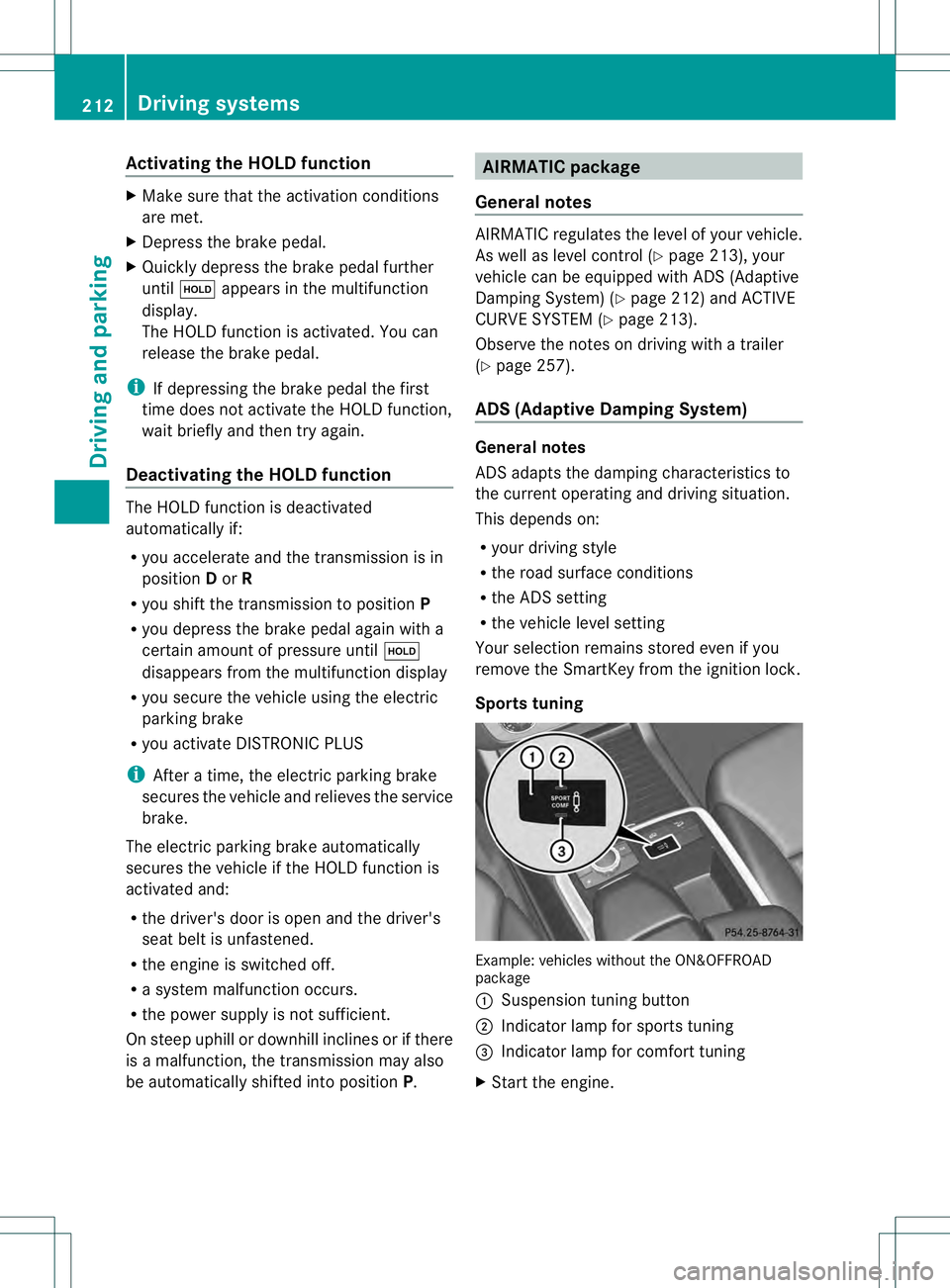
Sports tuning Example: vehicles without the ON&OFFROAD
package
0002
Suspension tuning button
0003 Indicator lamp for sports tuning
0021 Indicator lamp for comfort tuning
X Start the engine. 212
Driving systemsDriving and parking