mirror MERCEDES-BENZ GL 2013 Workshop Manual
[x] Cancel search | Manufacturer: MERCEDES-BENZ, Model Year: 2013, Model line: GL, Model: MERCEDES-BENZ GL 2013Pages: 454, PDF Size: 6.31 MB
Page 348 of 454
X
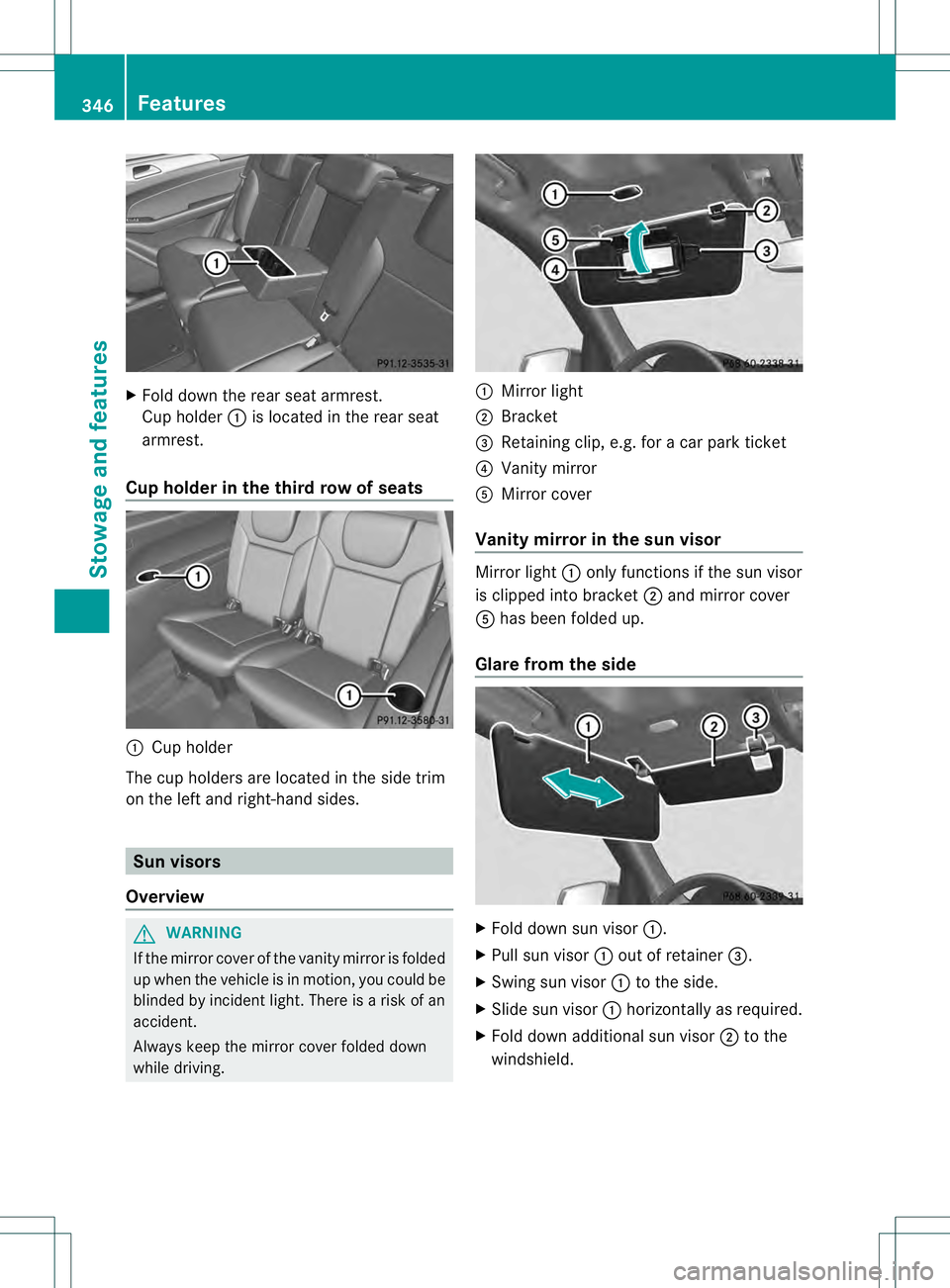
Fold dow nthe rear seat armrest.
Cup holder 0002is located in the rear seat
armrest.
Cup holder in the third row of seats 0002
Cup holder
The cup holders are located in the side trim
on the left and right-hand sides. Sun visors
Overview G
WARNING
If the mirror cover of the vanity mirror is folded
up when the vehicle is in motion, you could be
blinded by incident light. There is a risk of an
accident.
Always keep the mirror cover folded down
while driving. 0002
Mirror light
0003 Bracket
0021 Retaining clip, e.g. for a car park ticket
0020 Vanity mirror
001E Mirror cover
Vanity mirror in the sun visor Mirror light
0002only functions if the sun visor
is clipped into bracket 0003and mirror cover
001E has been folded up.
Glare from the side X
Fold down sun visor 0002.
X Pull sun visor 0002out of retainer 0021.
X Swing sun visor 0002to the side.
X Slide sun visor 0002horizontally as required.
X Fold down additional sun visor 0003to the
windshield. 346
FeaturesStowage and features
Page 362 of 454
Triggering the vehicle alarm
With this function, you can trigge
rthe
vehicle's panic alarm via SMS. An alarm
sounds and the exterior lighting flashes.
Depending on the setting, the panic alarm
lasts five or ten seconds. Afterwards, the
alarm switches off. Garage door opener
Important safety notes G
WARNING
When you operate or program the garage door
with the integrated garage door opener,
persons in the range of movement of the
garage door can become trapped or struck by
the garage door. There is arisk of injury.
When using the integrated garage door
opener, always make sure that nobody is
within the range of movement of the garage
door. G
WARNING
Combustion engines emit poisonous exhaust
gases such as carbo nmonoxide. Inhaling
these exhaust gases leads to poisoning. There
is a risk of fatal injury. Therefore never leave
the engine running in enclosed spaces
without sufficient ventilation.
The HomeLink ®
garage door opener
integrated in the rear-view mirror allows you
to operate up to three different door and gate
systems.
Only operate garage doors using the
integrated garage door opener if:
R they are equipped with a safety stop and
reverse feature, and
R they conform to the current U.S. safety
standards.
When programming a garage door opener,
park vehicle outside the garage.
i Certain garage door drives are
incompatible with the integrated garage door opener. If you have difficulty
programming the integrated garage door
opener, contact an authorized Mercedes-
Benz Center.
Alternatively, you can call the following
telephone assistance services:
R
USA: Mercedes-Benz Customer
Assistance Center at
1-800-FOR-MERCedes
R Canada: Customer Service at
1-800-387-0100
R HomeLink ®
hotline 1-800-355-3515
(free of charge)
More information on HomeLink ®
and/or
compatible products is also available
online at http://www.homelink.com.
i Notes on the declaration of conformity
(Y page 27).
Programming Programming buttons
Observe the "Important safety notes"
(Y
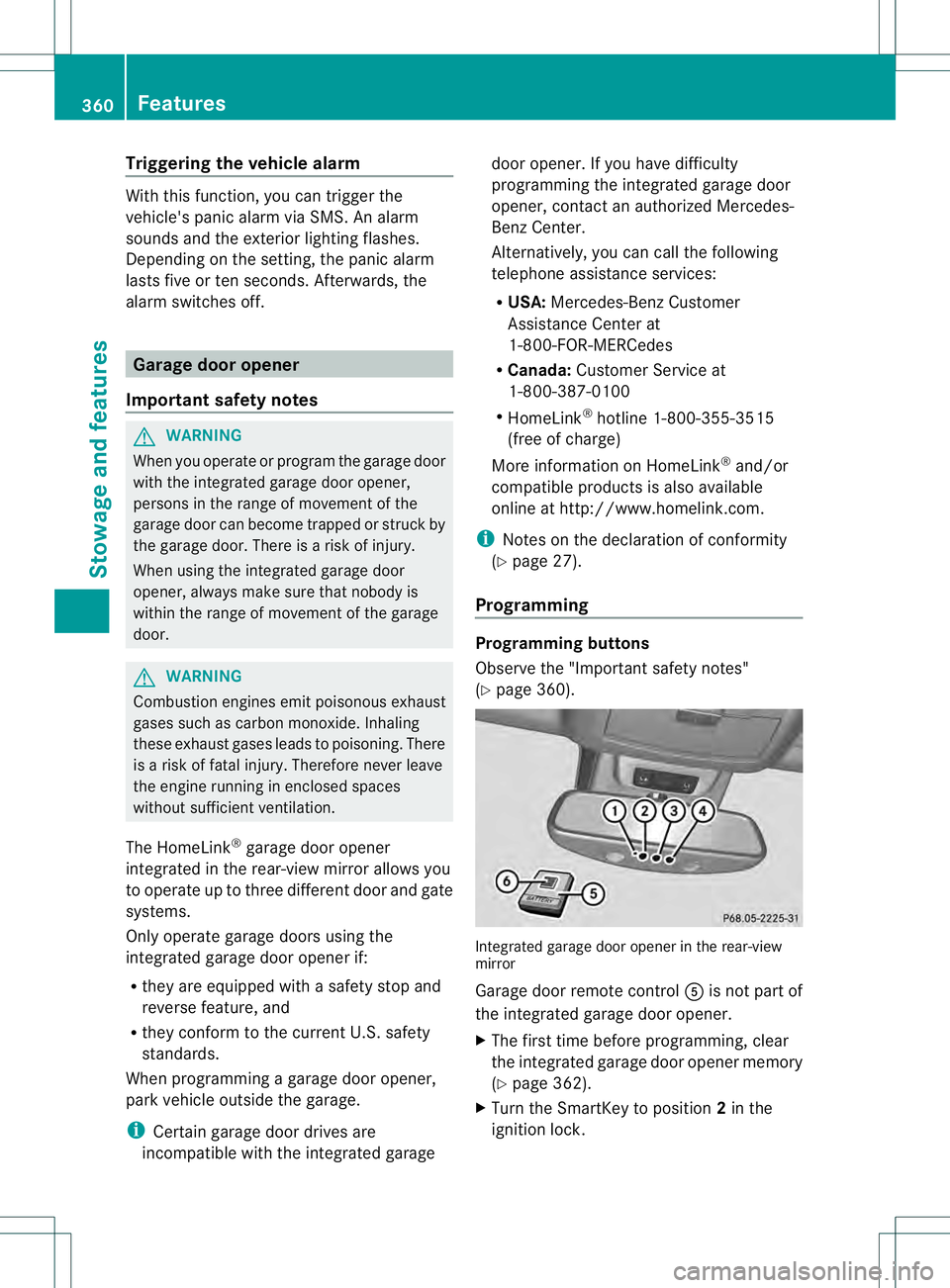
page 360). Integrated garage door opener in the rear-view
mirror
Garage door remote control
001Eis not part of
the integrated garage door opener.
X The first time before programming, clear
the integrated garage door opener memory
(Y page 362).
X Turn the SmartKey to position 2in the
ignition lock. 360
FeaturesStowage and features
Page 363 of 454
X
Press and hold one of buttons 0003to0020 on
the integrated garage door opener.
After a short time, indicator lamp 0002lights
up yellow.
i Indicator lamp 0002lights up yellow as soon
as button 0003,0021or0020 is programmed for
the first time. If the selected button has
already been programmed, indicator
lamp 0002will only light up yellow after ten
seconds have elapsed.
X Release button 0003,0021or0020. Indicator
lamp 0002flashes yellow.
X Point garage door remote control 001E
towards buttons 0003to0020 on the rear-view
mirror at a distance of 2 to 8 inches (5 to
20 cm).
i The required distance between remote
control 001Eand the integrated garage door
opener depends on the garage door drive
system. Several attempts might be
necessary. You should test every position
for at least 25 seconds before trying
another position.
X Press and hold button 001Fon remot econtrol
001E until indicator lamp 0002lights up green.
If indicator lamp 0002lights up green or
flashes, then programming has been
successful.
X Release button 001Fon remote control 001Efor
the garage door drive system.
X If indicator lamp 0002lights up red: repeat
the programming procedure for the
corresponding button on the rear-view
mirror. When doing so, vary the distance
between remote control 001Eand the rear-
view mirror.
i If the indicator lamp flashes green after
successful programming, the garage door
system is using a rolling code. After
programming, you must synchronize the
garage door opener integrated in the rear-
view mirror with the receiver of the garage
door system. Synchronizing the rolling code
Observe the "Important safety notes"
(Y
page 360).
Your vehicle must be within reach of the
garage door or exterior gate drive. Make sure
that neither your vehicle nor any persons/
objects are present within the sweep of the
door or gate.
X Turn the SmartKey to position 2in the
ignition lock.
X Press the program button of the door or
gate drive (see the door or gate drive
operating instructions, e.g. under
"programming of additional remote
controls").
i Usually, you now have 30seconds to
initiate the next step.
X Press previously programmed button 0003,
0021 or0020 of the integrated garage door
opener until the door closes.
The rolling code synchronization is then
complete.
Notes on programming the remote
control
Canadia nradio frequency laws require a
"break" (or interruption) of the transmission
signals after broadcasting for a few seconds.
Therefore, these signals may no tlast long
enough for the integrated garage door
opener. The signal is no trecognized during
programming. Comparable with Canadian
law, some U.S.g arage door openers also
feature a "break".
Proceed as follows:
R if you live in Canada
R if you have difficulties programming the
garage door opener (regardless of where
you live) when using the programming
steps Features
361Stowage and features Z
Page 364 of 454
X
Press and hold one of buttons 0003to0020 on
the integrated garage door opener.
After a short time, indicator lamp 0002lights
up yellow.
X Release the button.
Indicator lamp 0002flashes yellow.
X Press button 001Fof garage door remote
control 001Efor two seconds, then release it
for two seconds.
X Press button 001Fagain for two seconds.
X Repeat this sequence on button 001Fof
remote control 001Euntil indicator lamp 0002
lights up green.
If indicator lamp 0002turns red, repeat the
process.
X Continue with the other programming
steps (see above).
Problems when programming
If you are experiencing problems
programming the integrated garage door
opener on the rear-view mirror, take note of
the following instructions:
R Check the transmitter frequency of garage
door drive remote control 001E.This can
usually be found on the back of the remote
control.
The integrated garage door opener is
compatible with devices that have units
which operate in the frequency range of
280to 433MHz.
R Replace the batteries in garage door
remote control 001E.This increases the
likelihood that garage door remote control
001E will transmit a stronga nd precise signal
to the integrated garage door opene rinthe
rear-view mirror.
R When programming, hold remote control
001E at varying distances and angles from the
button that you are programming. Try
various angles at a distance between 2and
12 inches (5to 30 cm) or at the same angle
but at varying distances.
R If another remote control for the same
garage door drive is available, repeat the same programming steps with this remote
control. Before performing these steps,
make sure that new batteries have been
installed in garage door drive remote
control
001E.
R Note that some remote controls only
transmit for a limited amount of time (the
indicator lamp on the remote control goes
out). Press button 001Fon remote control
001E again before transmission ends.
R Align the antenna cable of the garage door
opener unit. This can improve signal
reception/transmission.
Opening/closing the garage door After it has been programmed, the integrated
garage door opener performs the function of
the garage door system remote control.
Please also read the operating instructions
for the garage door system.
X
Turn the SmartKey to position 2in the
ignition lock.
X Press button 0003,0021or0020 which you have
programmed to operate the garage door.
Garage door system with a fixed code:
indicator lamp 0002lights up green.
Garage door system with a rolling code:
indicator lamp 0002flashes green.
i The transmitter will transmit a signal as
long as the button is pressed. The
transmission is halted after a maximum of
ten seconds and indicator lamp 0002lights
up yellow. Press button 0003,0021or0020 again
if necessary.
Clearing the memory X
Turn the SmartKey to position 2in the
ignition lock.
X Press buttons 0003and 0020.
The indicator lamp lights up yellow.
X Press and hold buttons 0003and 0020until the
indicator lamp turns green. 362
FeaturesStowage and features
Page 377 of 454
away. This can lead to corrosio
ndamage
and damage to electronic components.
X Clean the inside and outside of the
windows with a damp cloth and a cleaning
product that is recommended and
approved by Mercedes-Benz.
Cleaning wiper blades G
WARNING
You could become trapped by the windshield
wipers if they start moving while cleaning the
windshield or wiper blades .There is a risk of
injury.
Always switch off the windshield wipers and
the ignition before cleaning the windshield or
wiper blades.
! Do not pull the wiper blade. Otherwise,
the wiper blade could be damaged.
! Do not clean wiper blades too often and
do not rub them too hard. Otherwise, the
graphite coating could be damaged. This
could cause wiper noise.
! Hold the wiper arm securely when folding
back. The windshield could be damaged if
the wiper arm smacks against it suddenly.
X Fold the windshield wiper arms away from
the windshield.
X Carefully clean the wiper blades with a
damp cloth.
X Fold the windshield wiper arms back again
before switching on the ignition.
Cleaning the exterior lighting !
Only use cleaning agents or cleaning
cloths which are suitable for plastic light
lenses. Unsuitable cleaning agents or
cleaning cloths could scratch or damage
the plastic light lenses.
X Cleant he plastic lenses of the exterior
lighting using a wet sponge and a mild
cleaning agent, e.g. Mercedes-Ben zcar
shampoo or cleaning cloths. Mirror turn signals !
Only use cleaning agents or cleaning
cloths that are suitable for plastic lenses.
Unsuitable cleaning agents or cleaning
cloths could scratch or damage the plastic
lenses of the mirror tur nsignals.
X Clean the plasti clenses of the mirror turn
signals in the exterior mirror housing using
a wet sponge and mild cleaning agent, e.g.
Mercedes-Benzc ar shampoo or cleaning
cloths.
Cleaning the sensors !
If you clean the sensor swith a power
washer, make sure that you keep a
distance of at least 11. 8in(30 cm) between
the vehicle and the power washer nozzle.
Information about the correct distance is
available from the equipment
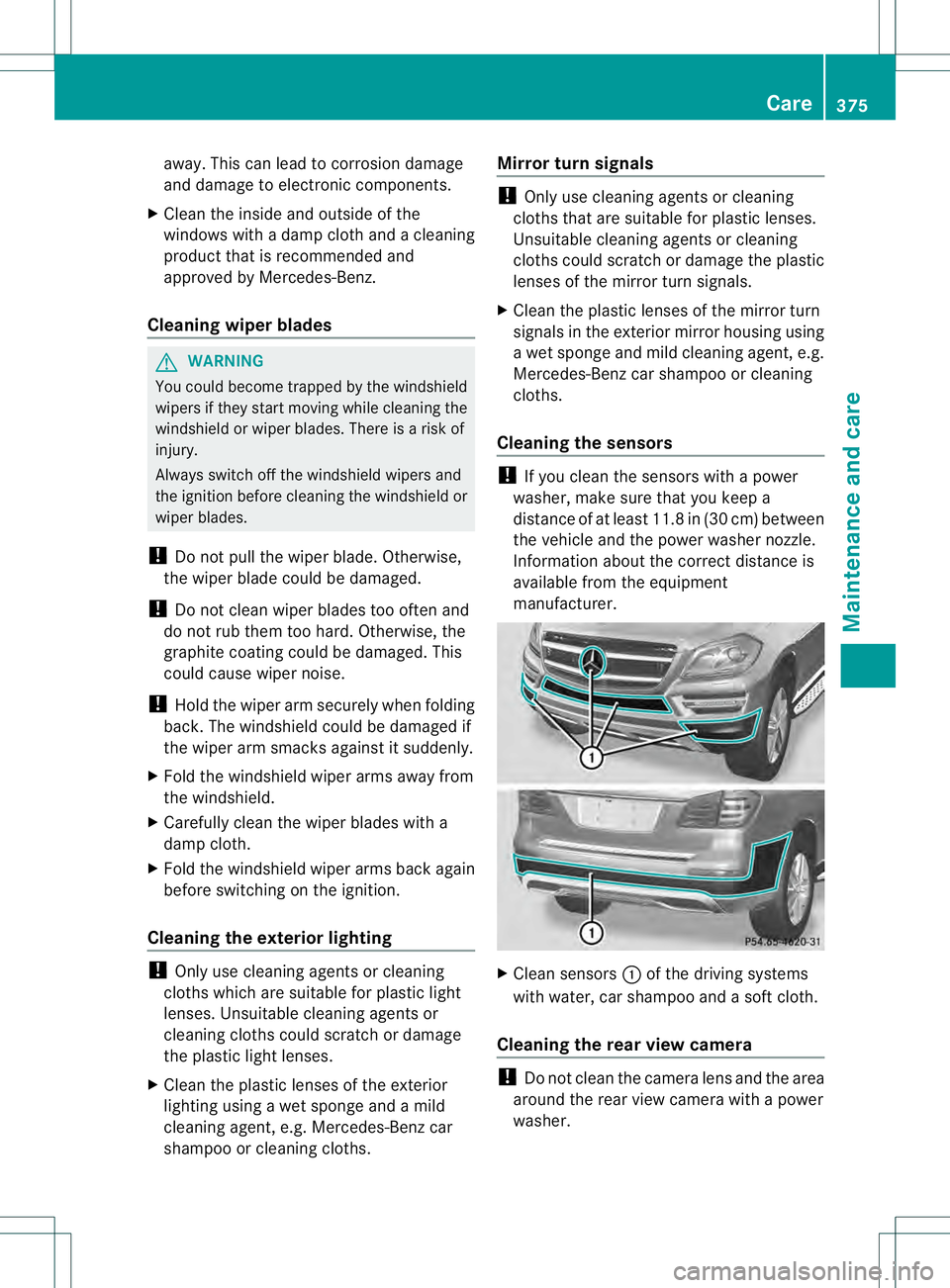
manufacturer. X
Clean sensors 0002of the driving systems
with water, car shampoo and a soft cloth.
Cleaning the rear view camera !
Do not clea nthe camera lens and the area
around the rear view camera with a power
washer. Care
375Maintenance and care Z
Page 392 of 454
i
If the powers upply has been interrupted,
e.g. if you reconnect the battery, you will
have to:
R set the clock. Information on setting the
clock can be found in the separate
operating instructions.
On vehicles with COMAND and a
navigation system, the clock is set
automatically.
R reset the function for folding the exterior
mirrors in/out automatically, by folding
the mirrors out once (Y page 119).Charging the battery
G
WARNING
During charging and jump-starting, explosive
gases can escape from th ebattery. There is a
risk of an explosion.
Particularly avoid fire, open flames, creating
sparks and smoking. Ensure there is sufficient
ventilatio nwhile charging and jump-starting.
Do not lean over a battery. G
WARNING
Battery acid is caustic. There is a risk of injury.
Avoid contact with the skin, eyes or clothing.
Do not inhale any battery gases. Do not lean
over the battery. Keep children away from
batteries. Wash battery acid immediately with
water and seek medical attention. G
WARNING
Ad ischarged battery can freeze at
temperatures below freezing point .When
jump-starting the vehicle or charging the
battery, gases can escape from the battery.
There is a risk of an explosion.
Allow the frozen battery to thaw out before
charging it or jump-starting.
! Only use battery chargers with a
maximum charging voltage of 14.8 V.
! Only charge the battery using the jump-
starting connection point. Never charge a battery still installed in the
vehicle unless a battery charger unit
approved by Mercedes-Ben
zis being used. A
battery charger unit specially adapted for
Mercedes-Benz vehicles and tested and
approved by Mercedes-Benz is available as an
accessory. It permits the charging of the
battery in its installed position. Contact an
authorized Mercedes-Benz Center for further
information and availability. Charge the
battery in accordance with the separate
instructions for the battery charger.
The jump-starting connection point is in the
engine compartment (Y page 391).
Read the battery charger's operating
instructions before charging the battery.
X Open the hood (Y page 366).
X Connect the battery charger to the positive
terminal and ground point in the same
order as when connecting the donor
battery in the jump-starting procedure
(Y page 391). 390
Battery (vehicle)Breakdown assistance
Page 449 of 454
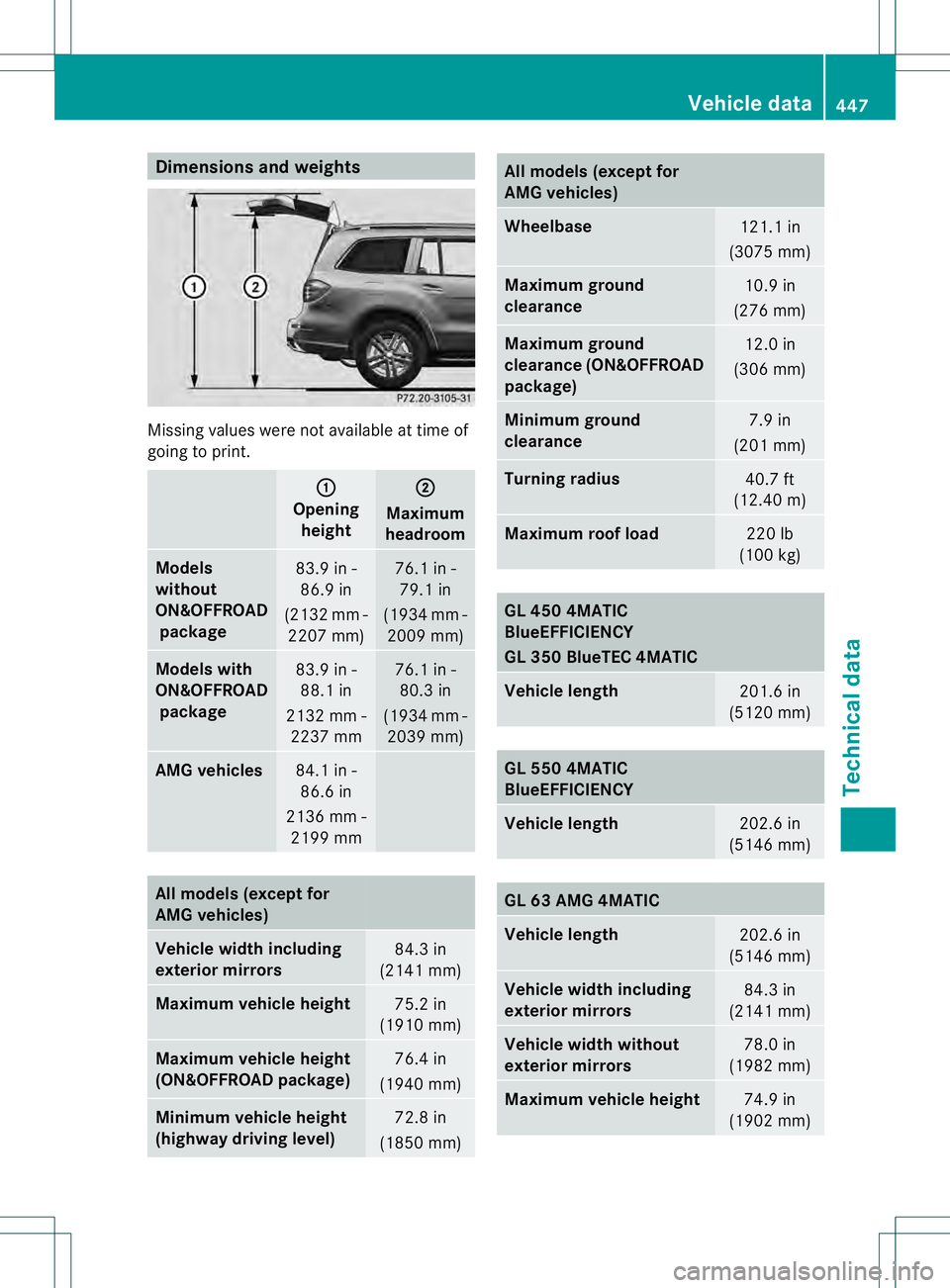
Dimensions an
dweights Missing values were no
tavailableatt ime of
going to print. 0002
Opening
height 0003
Maximum
headroom Models
without
ON&OFFROAD
package 83.9 in -
86.9 in
(2132 mm - 2207 mm) 76.1 in -
79.1 in
(1934 mm - 2009 mm) Models with
ON&OFFROAD
package 83.9 in -
88.1 in
2132 mm - 2237 mm 76.1 in -
80.3 in
(1934 mm - 2039 mm) AMG vehicles
84.1 in -
86.6 in
2136 mm - 2199 mm All models (except for
AMG vehicles)
Vehicle widt
hincluding
exterior mirrors 84.3 in
(2141 mm) Maximum vehicle height
75.2 in
(1910 mm) Maximum vehicle height
(ON&OFFROAD package)
76.4 in
(1940 mm) Minimum vehicle height
(highway driving level)
72.8 in
(1850 mm) All models (except for
AMG vehicles)
Wheelbase
121.1 in
(3075 mm) Maximum ground
clearance
10.9 in
(276 mm) Maximum ground
clearance (ON&OFFROAD
package)
12.0 in
(306 mm) Minimum ground
clearance
7.9 in
(201 mm) Turning radius
40.7 ft
(12.40 m) Maximum roof load
220 lb
(100 kg) GL 450 4MATIC
BlueEFFICIENCY
GL 350 BlueTEC 4MATIC
Vehicle length
201.6 in
(5120 mm) GL 550 4MATIC
BlueEFFICIENCY
Vehicle length
202.6 in
(5146 mm) GL 63 AMG 4MATIC
Vehicle length
202.6 in
(5146 mm) Vehicle width including
exterior mirrors
84.3 in
(2141 mm) Vehicle width without
exterior mirrors
78.0 in
(1982 mm) Maximum vehicle height
74.9 in
(1902 mm) Vehicle data
447Technical data Z