ECO mode MERCEDES-BENZ GL 2014 User Guide
[x] Cancel search | Manufacturer: MERCEDES-BENZ, Model Year: 2014, Model line: GL, Model: MERCEDES-BENZ GL 2014Pages: 462, PDF Size: 8.98 MB
Page 223 of 462
The vehicle automatically adjusts to highway
level when you:
Rdrive faster than 50 mph (80 km/h).
Rdrive between 40 mph (64 km/h) and
50 mph (80 km/h) for approximately
20 seconds.
Depending on the ADS mode selected
(Ypage 217), the vehicle is lowered to high-
speed level at high speeds.
AMG adaptive sport suspension
system
Important safety notes
GWARNING
When the vehicle is being lowered, people
could become trapped if their limbs are
between the vehicle body and the wheels or
underneath the vehicle. There is a risk of
injury.
Make sure no one is underneath the vehicle
or in the immediate vicinity of the wheel
arches when the vehicle is being lowered.
GWARNING
The vehicle is lowered if:
Ryou have selected the Comfort or Sport
suspension tuning and
Rlock the vehicle after switching off the
engine
Persons in the vicinity of the wheel arch or the
underbody may thus become trapped. There
is a risk of injury.
Make sure that nobody is in the vicinity of the
wheel arch or the underbody when you switch
off the engine.
!The vehicle is lowered by approximately
10 mm if:
Ryou have selected the Sport or Comfort
suspension tuning and
Ryou switch off the engine and then
Rlock the vehicle
When parking, position your vehicle so that
it does not make contact with the curb as
the vehicle is lowered. Your vehicle could
otherwise be damaged.
Vehicle level
Level control adapts the vehicle level
automatically to the current operating and
driving situation. Level control ensures the
best possible suspension and constant
ground clearance, even with a laden vehicle.
This improves driving safety and fuel
consumption.
The AIRMATIC package and ACTIVE CURVE
SYSTEM are always components of AMG
adaptive suspension system (Ypage 217).
Due to the sportier suspension settings
compared to standard vehicles, the levels and
speed thresholds for sinking and raising the
vehicle are different.
In Comfort and Sport driving modes, after
locking the vehicle it lowers to the Sport+
level. When locking the vehicle at the raised
level, the vehicle does not lower.
The settings will remain stored after you
switch off the engine. When starting the
engine, the selected setting, e.g. AMG
adaptive suspension system Comfort, is
restored.
iThe vehicle level may change visibly if you
park the vehicle and the outside
temperature changes. If the temperature
drops, the vehicle level lowers; with an
increase in temperature, the vehicle level
rises.
Suspension tuning
General notes
The electronically controlled damping system
works continuously. This improves driving
safety and ride comfort.
Driving systems221
Driving and parking
Z
Page 233 of 462
parking. When maneuvering or parking, make
sure that there are no persons, animals or
objects in the area in which you are
maneuvering.
Under the following circumstances, the rear
view camera will not function, or will function
in a limited manner:
Rthe tailgate is open
Rin heavy rain, snow or fog
Rat night or in very dark places
Rif the camera is exposed to very bright light
Rif the area is lit by fluorescent light or LED
lighting (the display may flicker)
Rif there is a sudden change in temperature,
e.g. when driving into a heated garage in
winter
Rif the camera lens is dirty or obstructed
Rif the rear of your vehicle is damaged. In
this event, have the camera position and
setting checked at a qualified specialist
workshop
Activating/deactivating the rear view
camera
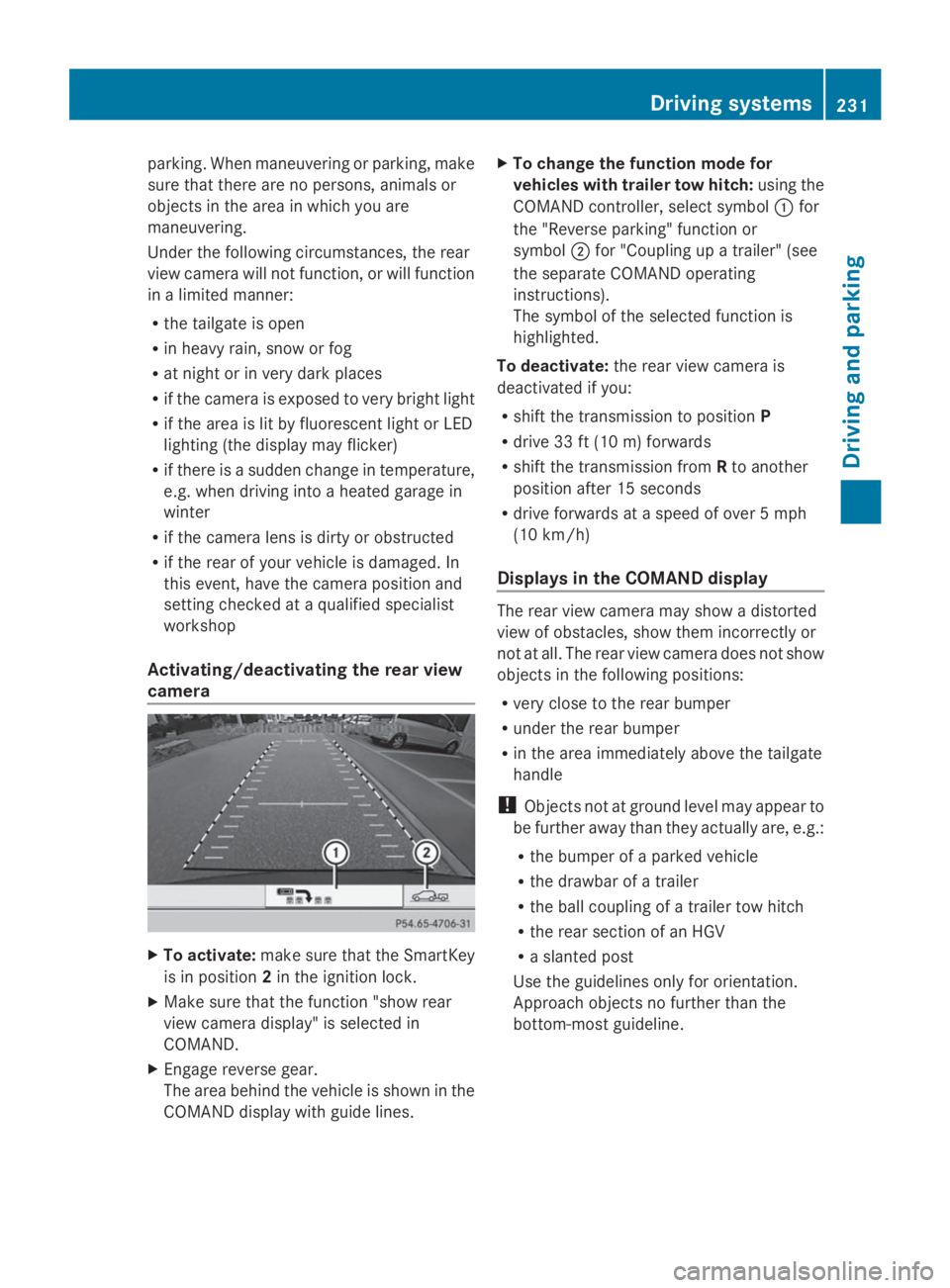
XTo activate:make sure that the SmartKey
is in position2in the ignition lock.
XMake sure that the function "show rear
view camera display" is selected in
COMAND.
XEngage reverse gear.
The area behind the vehicle is shown in the
COMAND display with guide lines.
XTo change the function mode for
vehicles with trailer tow hitch:using the
COMAND controller, select symbolCfor
the "Reverse parking" function or
symbolDfor "Coupling up a trailer" (see
the separate COMAND operating
instructions).
The symbol of the selected function is
highlighted.
To deactivate:the rear view camera is
deactivated if you:
Rshift the transmission to positionP
Rdrive 33 ft (10 m) forwards
Rshift the transmission fromRto another
position after 15 seconds
Rdrive forwards at a speed of over 5 mph
(10 km/h)
Displays in the COMAND display
The rear view camera may show a distorted
view of obstacles, show them incorrectly or
not at all. The rear view camera does not show
objects in the following positions:
Rvery close to the rear bumper
Runder the rear bumper
Rin the area immediately above the tailgate
handle
!Objects not at ground level may appear to
be further away than they actually are, e.g.:
Rthe bumper of a parked vehicle
Rthe drawbar of a trailer
Rthe ball coupling of a trailer tow hitch
Rthe rear section of an HGV
Ra slanted post
Use the guidelines only for orientation.
Approach objects no further than the
bottom-most guideline.
Driving systems231
Driving and parking
Z
Page 270 of 462
RSecure any objects on the trailer to prevent
the cargo from slipping when the vehicle is
in motion.
RIf you couple up a trailer, regularly check
that the cargo is securely fastened and
make sure that the trailer lamps and (if
applicable) the trailer brakes are
functioning correctly.
RBear in mind that the handling will be less
stable when towing a trailer than when
driving without one. Avoid sudden steering
movements.
RThe vehicle/trailer combination is heavier,
accelerates more slowly, has a decreased
gradient climbing capability and a longer
braking distance.
It is more susceptible to side winds and
requires more careful steering.
RIf possible, avoid abrupt braking. Depress
the brake pedal moderately at first, so that
the trailer can activate its own brakes. Then
increase the pressure on the brake pedal.
RIf the automatic transmission repeatedly
shifts between gears on uphill or downhill
gradients, shift to a lower gear using the
left-hand steering wheel paddle shifter.
A lower gear and lower speed reduce the
risk of engine failure.
RWhen driving downhill, shift to a lower gear
to utilize the engine's braking effect.
Avoid continuous brake application as this
may overheat the vehicle brakes and, if
installed, the trailer brakes.
RIf the coolant temperature increases
dramatically while the air-conditioning
system is switched on, switch off the air-
conditioning system.
Coolant heat can additionally be dissipated
by opening the windows and by setting the
blower fan and the interior temperature to
maximum.
RWhen overtaking, pay particular attention
to the extended length of your vehicle/
trailer combination.
Due to the length of your vehicle/trailer
combination, you will have to travel an
additional distance beyond the vehicle you
are overtaking before returning to the
previous lane.
Decoupling a trailer
GWARNING
If you uncouple a trailer with the overrun
brake engaged, you could trap your hand
between the vehicle and the trailer drawbar.
There is a risk of injury.
Do not uncouple a trailer if the overrun brake
is engaged.
GWARNING
Vehicles with level control:
The vehicle is lowered as soon as you
disconnect the trailer cable. This could result
in your limbs or those of other people that are
between the vehicle body and tires or
underneath the vehicle being trapped. There
is a risk of injury.
Make sure that nobody is in the immediate
vicinity of the wheel housings or under the
vehicle when you disconnect the trailer cable.
!Do not disconnect a trailer with an
engaged overrun brake. Otherwise, your
vehicle could be damaged by the
rebounding of the overrun brake.
XMake sure that the automatic transmission
is set to positionP.
XApply the vehicle's electric parking brake.
XStart the engine.
XClose all doors and the tailgate.
XApply the trailer's parking brake.
XDetach the trailer cable and decouple the
trailer.
XSwitch off the engine.
268Towing a trailer
Driving and parking
Page 274 of 462
Useful information
iThis Operator's Manual describes all
models and all standard and optional
equipment of your vehicle available at the
time of publication of the Operator's
Manual. Country-specific differences are
possible. Please note that your vehicle may
not be equipped with all features
described. This also applies to safety-
related systems and functions.
iRead the information on qualified
specialist workshops: (Ypage 28).
Important safety notes
GWARNING
If you operate information systems and
communication equipment integrated in the
vehicle while driving, you will be distracted
from traffic conditions. You could also lose
control of the vehicle. There is a risk of an
accident.
Only operate the equipment when the traffic
situation permits. If you are not sure that this
is possible, park the vehicle paying attention
to traffic conditions and operate the
equipment when the vehicle is stationary.
GWARNING
If the instrument cluster has failed or
malfunctioned, you may not recognize
function restrictions in systems relevant to
safety. The operating safety of your vehicle
may be impaired. There is a risk of an
accident.
Drive on carefully. Have the vehicle checked
at a qualified specialist workshop
immediately.
You must observe the legal requirements for
the country in which you are currently driving
when operating the on-board computer.
The on-board computer only shows messages
or warnings from certain systems in the
multifunction display. You should therefore
make sure your vehicle is operating safely at
all times. Otherwise, a vehicle that is not
operating safely may cause an accident.
For an overview, see the instrument panel
illustration (Ypage 33).
Displays and operation
Instrument cluster lighting
The lighting in the instrument cluster, in the
displays and the controls in the vehicle
interior can be adjusted using the brightness
control knob.
The brightness control knob is located on the
bottom left of the instrument cluster
(Ypage 33).
XTurn the brightness control knob clockwise
or counter-clockwise.
If the light switch is set toX,`or
X, the brightness is dependent upon
the brightness of the ambient light.
iThe light sensor in the instrument cluster
automatically controls the brightness of
the multifunction display.
In daylight, the displays in the instrument
cluster are not illuminated.
Coolant temperature display
GWARNING
Opening the hood when the engine is
overheated or when there is a fire in the
engine compartment could expose you to hot
gases or other service products. There is a
risk of injury.
Let an overheated engine cool down before
opening the hood. If there is a fire in the
engine compartment, keep the hood closed
and contact the fire department.
!A display message is shown if the coolant
temperature is too high.
272Displays and operation
On-board computer and displays
Page 280 of 462
Lane recommendations are only displayed if
the relevant data is available on the digital
map.
Other status indicators of the
navigation system
RK: you have reached the destination or an
intermediate destination.
RNew Route...New Route...orCalculating RouteCalculating Route:
calculating a new route
ROff MapOff MaporOffOffMappedMappedRoadRoad: the vehicle
position is outside the area of the digital
map (off-map position).
RNo RouteNo Route: no route could be calculated to
the selected destination.
Audio menu
Selecting a radio station
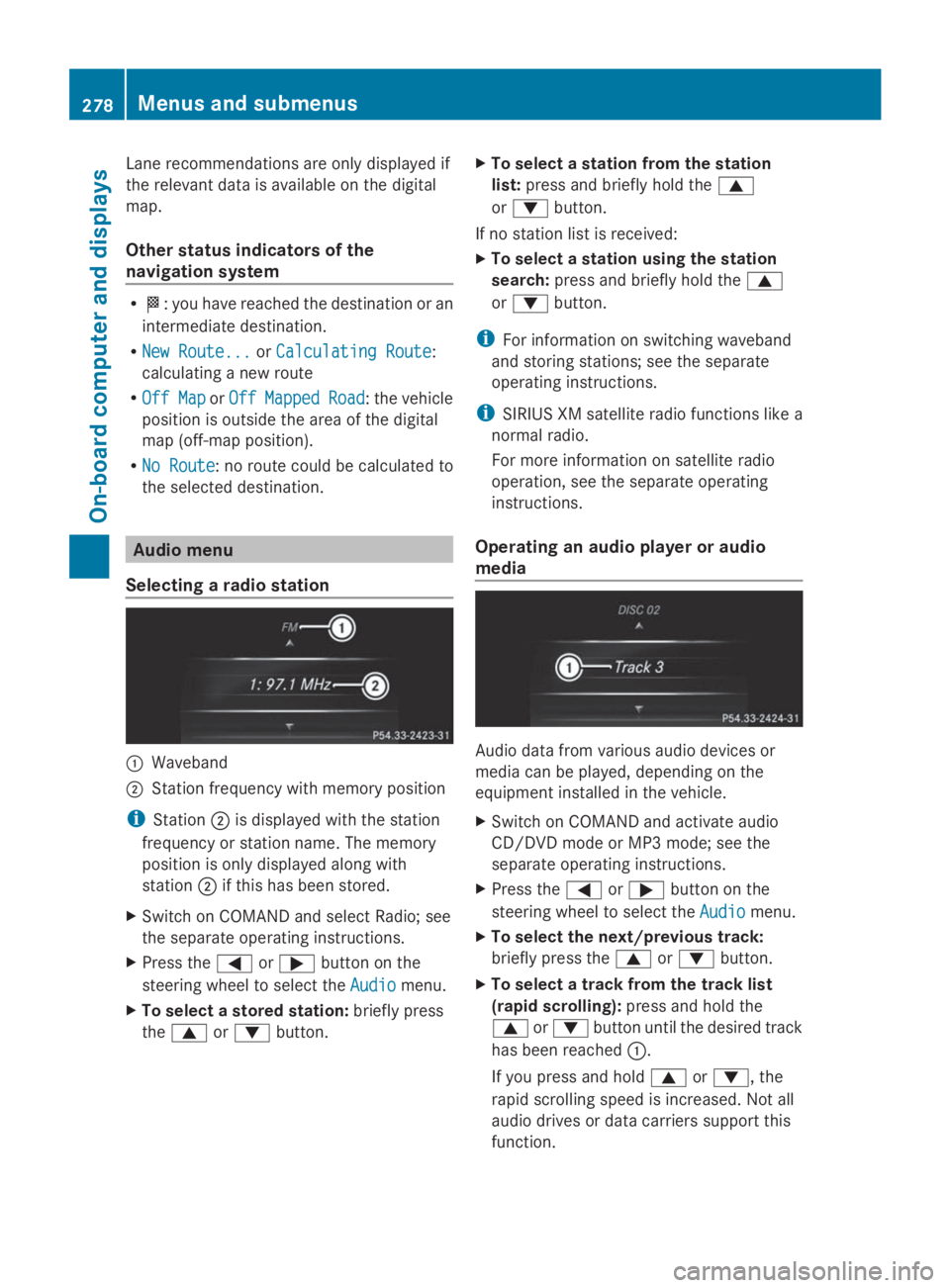
CWaveband
DStation frequency with memory position
iStationDis displayed with the station
frequency or station name. The memory
position is only displayed along with
stationDif this has been stored.
XSwitch on COMAND and select Radio; see
the separate operating instructions.
XPress theYorebutton on the
steering wheel to select theAudioAudiomenu.
XTo select a stored station:briefly press
thecordbutton.
XTo select a station from the station
list:press and briefly hold thec
ordbutton.
If no station list is received:
XTo select a station using the station
search:press and briefly hold thec
ordbutton.
iFor information on switching waveband
and storing stations; see the separate
operating instructions.
iSIRIUS XM satellite radio functions like a
normal radio.
For more information on satellite radio
operation, see the separate operating
instructions.
Operating an audio player or audio
media
Audio data from various audio devices or
media can be played, depending on the
equipment installed in the vehicle.
XSwitch on COMAND and activate audio
CD/DVD mode or MP3 mode; see the
separate operating instructions.
XPress theYorebutton on the
steering wheel to select theAudioAudiomenu.
XTo select the next/previous track:
briefly press thecordbutton.
XTo select a track from the track list
(rapid scrolling):press and hold the
cordbutton until the desired track
has been reachedC.
If you press and holdcord, the
rapid scrolling speed is increased. Not all
audio drives or data carriers support this
function.
278Menus and submenus
On-board computer and displays
Page 286 of 462
Surround lighting and exterior lighting
delayed switch-off
XPress theYorebutton on the
steering wheel to select theSett.Sett.menu.
XPress thedorcbutton to select the
LightsLightssubmenu.
XPressvto confirm.
XPressdorcto select the
Surround LightingSurround Lightingfunction.
When theSurround LightingSurround Lightingfunction is
activated, the light cone and the area
around the vehicle are displayed in orange
in the multifunction display.
XPress thevbutton to save the setting.
Deactivating delayed switch-off of the
exterior lighting temporarily:
XBefore leaving the vehicle, turn the
SmartKey to position0in the ignition lock.
XTurn the SmartKey to position2in the
ignition lock.
The exterior lighting delayed switch-off is
deactivated.
Delayed switch-off of the exterior lighting is
reactivated the next time you start the
engine.
If you have activated theSurroundSurround
LightingLightingfunction and the light switch is set
toX, the following functions are activated
when it is dark:
Rsurround lighting:the exterior lighting
remains lit for 40 seconds after unlocking
with the SmartKey. If you start the engine,
the surround lighting is switched off and
automatic headlamp mode is activated
(Ypage 128).
Rexterior lighting delayed switch-off:the
exterior lighting remains lit for
60 seconds after the engine is switched off.
If you close all the doors and the tailgate,
the exterior lighting goes off after
5 seconds.
iDepending on your vehicle's equipment,
when the surround lighting and delayed
switch-off exterior lighting are on, the
following light up:
RParking lamps
RDaytime running lamps
RSide marker lamps
RSurround lighting in the exterior mirrors
Activating/deactivating the interior
lighting delayed switch-off
If you activate theInterior LightingInterior Lighting
DelayDelayfunction, the interior lighting remains
on for 20 seconds after you remove the
SmartKey from the ignition lock.
XPress theYorebutton on the
steering wheel to select theSettSettmenu.
XPress thedorcbutton to select the
LightLightsubmenu.
XPressvto confirm.
XPress thedorcbutton to select the
Interior Lighting DelayfInterior Lighting Delayffunction.
If theInteriorInteriorLightingLightingDelayDelayfunction
has been switched on, the vehicle interior
is displayed in orange in the multifunction
display.
XPress thevbutton to save the setting.
Vehicle submenu
Activating/deactivating the automatic
door locking mechanism
If you activate theAutomatic Door LockAutomatic Door Lock
function, the vehicle is centrally locked above
a speed of approximately 9 mph (15 km/h).
XPress theYorebutton on the
steering wheel to select theSettSettmenu.
XPress thedorcbutton to select the
VehicleVehiclesubmenu.
XPressvto confirm.
XPress thedorcbutton to select the
Automatic Door LockAutomatic Door Lockfunction.
When theAutomaticAutomaticDoorDoorLockLockfunction
is activated, the vehicle doors are displayed
in orange in the multifunction display.
XPress thevbutton to save the setting.
284Menus and submenus
On-board computer and displays
Page 372 of 462
Useful information
iThis Operator's Manual describes all
models and all standard and optional
equipment of your vehicle available at the
time of publication of the Operator's
Manual. Country-specific differences are
possible. Please note that your vehicle may
not be equipped with all features
described. This also applies to safety-
related systems and functions.
iRead the information on qualified
specialist workshops: (Ypage 28).
Engine compartment
Hood
Important safety notes
GWARNING
If the hood is unlatched, it may open up when
the vehicle is in motion and block your view.
There is a risk of an accident.
Never unlatch the hood while driving.
GWARNING
When opening and closing the hood, it may
suddenly fall into the closed position. There is
a risk of injury to persons within range of
movement of the hood.
Open and close the hood only when no one is
within its range of movement.
GWARNING
Opening the hood when the engine is
overheated or when there is a fire in the
engine compartment could expose you to hot
gases or other service products. There is a
risk of injury.
Let an overheated engine cool down before
opening the hood. If there is a fire in the
engine compartment, keep the hood closed
and contact the fire department.
GWARNING
The engine compartment contains moving
components. Certain components, such as
the radiator fan, may continue to run or start
again suddenly when the ignition is off. There
is a risk of injury.
If you need to do any work inside the engine
compartment:
Rswitch off the ignition
Rnever reach into the area where there is a
risk of danger from moving components,
such as the fan rotation area
Rremove jewelery and watches
Rkeep items of clothing and hair, for
example, away from moving parts
GWARNING
The ignition system and the fuel injection
system work under high voltage. If you touch
components which are under voltage, you
could get an electric shock. There is a risk of
injury.
Never touch components of the ignition
system or fuel injection system when the
ignition is switched on.
Opening the hood
GWARNING
Certain components in the engine
compartment, such as the engine, radiator
and parts of the exhaust system, can become
very hot. Working in the engine compartment
poses a risk of injury.
Where possible, let the engine cool down and
touch only the components described in the
following.
GWARNING
When the hood is open and the windshield
wipers are set in motion, you can be injured
by the wiper linkage. There is a risk of injury.
Always switch off the windshield wipers and
the ignition before opening the hood.
370Engine compartment
Maintenance and care
Page 390 of 462
If the pressure loss warning message
appears in the multifunction display:
RObserve the instructions in the display
messages (Ypage 318).
RCheck the tire for damage.
RIf driving on, observe the following notes.
The maximum driving distance is
approximately 50 miles (80 km) when the
vehicle is partially laden and approximately
18 miles (30 km) when the vehicle is fully
laden.
In addition to the vehicle load, the driving
distance possible depends upon:
RSpeed
RRoad condition
ROutside temperature
The driving distance possible in run-flat mode
may be reduced by extreme driving
conditions/maneuvers, or it can be increased
through a moderate style of driving.
The maximum permissible distance which
can be driven in run-flat mode is counted from
the moment the tire pressure loss warning
appears in the multifunction display.
You must not exceed a maximum speed of
50 mph (80 km/h).
iWhen replacing one or all tires, make sure
that you use only tires:
Rof the size specified for the vehicle and
Rmarked "MOExtended"
If a tire has gone flat and cannot be
replaced with a MOExtended tire, a
standard tire may be used as a temporary
measure. Make sure that you use the
proper size and type (summer or winter
tire).
iVehicles equipped with MOExtended tires
are not equipped with a TIREFIT kit at the
factory. It is therefore recommended that
you additionally equip your vehicle with a
TIREFIT kit if you mount tires that do not
feature run-flat properties, e.g. winter tires.
A TIREFIT kit may be obtained from a
qualified specialist workshop.
Important safety notes
GWARNING
When driving in emergency mode, the driving
characteristics deteriorate, e.g. when
cornering, accelerating quickly and when
braking. There is a risk of an accident.
Do not exceed the stated maximum speed.
Avoid abrupt steering and driving maneuvers,
and driving over obstacles (curbs, potholes,
off-road). This applies in particular to a laden
vehicle.
Stop driving in emergency mode if:
Ryou hear banging noises.
Rthe vehicle starts to shake.
Ryou see smoke and smell rubber.
RESP®is intervening constantly.
Rthere are tears in the sidewalls of the tire.
After driving in emergency mode, have the
wheel rims checked at a qualified specialist
workshop with regard to their further use. The
defective tire must be replaced in every case.
TIREFIT kit
Important safety notes
TIREFIT is a tire sealant.
You can use TIREFIT to seal punctures of up
to 0.16 in (4 mm), particularly those in the tire
tread. You can use TIREFIT at outside
temperatures down to
Page 400 of 462
!Make sure that the electric parking brake
is released. If the electric parking brake is
faulty, visit a qualified specialist workshop.
!Only secure the tow rope or tow bar at the
towing eyes, or the trailer tow hitch, if
available. You could otherwise damage the
vehicle.
!Do not use the towing eye for recovery,
this could damage the vehicle. If in doubt,
recover the vehicle with a crane.
!When towing, pull away slowly and
smoothly. If the tractive power is too high,
the vehicles could be damaged.
!When towing vehicles with KEYLESS-GO,
use the key instead of the Start/Stop
button. Otherwise, the automatic
transmission may shift to positionPwhen
the driver's or front-passenger door are
opened, which could lead to damage to the
transmission.
!Do not tow with sling-type equipment.
This could damage the vehicle.
!Vehicles with differential locks: make
sure the differential locks are in automatic
mode. When towing, the differential locks
must not be switched on. The transmission
may otherwise be damaged.
!The vehicle can be towed a maximum of
30 miles (50km). The towing speed of
30 mph (50 km/h) must not be exceeded.
If the vehicle has to be towed more than
30 miles(50km), the entire vehicle must be
raised and transported.
!If you tow or tow-start another vehicle, its
weight must not exceed the maximum
permissible gross vehicle weight of your
vehicle.
Information on your vehicle's gross vehicle
weight rating can be found on the vehicle
identification plate (Ypage 444).
iInformation on your vehicle's gross
vehicle weight rating can be found on the
vehicle identification plate; see the printed
Operator's Manual.
It is better to have the vehicle transported
than to have it towed.
If the vehicle has suffered transmission
damage, have it transported on a transporter
or trailer.
The automatic transmission must be in
positionNwhen the vehicle is being towed.
The battery must be connected and charged.
Otherwise, you:
Rcannot turn the SmartKey to position2in
the ignition lock
Rcannot release the electric parking brake
Rcannot shift the automatic transmission to
positionN
iDisarm the automatic locking feature
before the vehicle is towed (Ypage 284).
You could otherwise be locked out when
pushing or towing the vehicle.
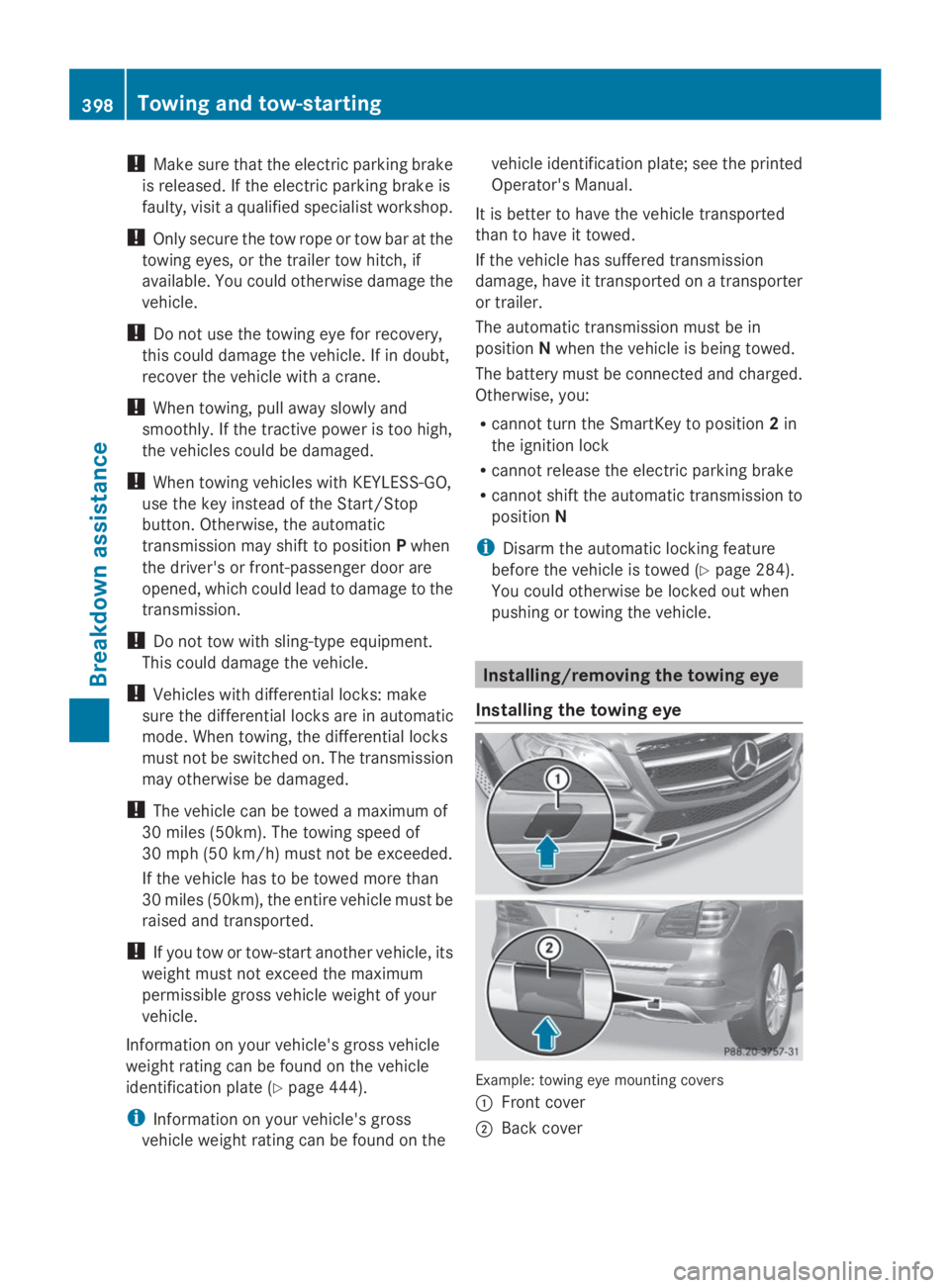
Installing/removing the towing eye
Installing the towing eye
Example: towing eye mounting covers
CFront cover
DBack cover
398Towing and tow-starting
Breakdown assistance
Page 406 of 462
Useful information
iThis Operator's Manual describes all
models and all standard and optional
equipment of your vehicle available at the
time of publication of the Operator's
Manual. Country-specific differences are
possible. Please note that your vehicle may
not be equipped with all features
described. This also applies to safety-
related systems and functions.
iRead the information on qualified
specialist workshops: (Ypage 28).
Important safety notes
GWARNING
If wheels and tires of the wrong size are used,
the wheel brakes or suspension components
may be damaged. There is a risk of an
accident.
Always replace wheels and tires with those
that fulfill the specifications of the original
part.
When replacing wheels, make sure to use the
correct:
Rdesignation
Rmodel
When replacing tires, make sure to use the
correct:
Rdesignation
Rmanufacturer
Rmodel
GWARNING
A flat tire severely impairs the driving,
steering and braking characteristics of the
vehicle. There is a risk of accident.
Tires without run-flat characteristics:
Rdo not drive with a flat tire.
Rimmediately replace the flat tire with your
emergency spare wheel or spare wheel, or
consult a qualified specialist workshop.
Tires with run-flat characteristics:
Rpay attention to the information and
warning notices on MOExtended tires (tires
with run-flat characteristics).
Accessories that are not approved for your
vehicle by Mercedes-Benz or that are not
being used correctly can impair operating
safety.
Before purchasing and using non-approved
accessories, visit a qualified specialist
workshop and inquire about:
Rsuitability
Rlegal stipulations
Rfactory recommendations
Information on the dimensions and types of
wheels and tires for your vehicle can be found
in the "Wheel/tire combinations" section
(Ypage 432).
Information on air pressure for the tires on
your vehicle can be found:
Ron the vehicle's Tire and Loading
Information placard on the B-pillar
(Ypage 415)
Ron the tire pressure label on the fuel filler
flap (Ypage 184)
Rin the "Tire pressure" section
Operation
Information on driving
If the vehicle is heavily loaded, check the tire
pressures and correct them if necessary.
While driving, pay attention to vibrations,
noises and unusual handling characteristics,
e.g. pulling to one side. This may indicate that
the wheels or tires are damaged. If you
suspect that a tire is defective, reduce your
speed immediately. Stop the vehicle as soon
as possible to check the wheels and tires for
damage. Hidden tire damage could also be
causing the unusual handling characteristics.
If you find no signs of damage, have the tires
404Operation
Wheels and tires