buttons MERCEDES-BENZ GL 2014 User Guide
[x] Cancel search | Manufacturer: MERCEDES-BENZ, Model Year: 2014, Model line: GL, Model: MERCEDES-BENZ GL 2014Pages: 462, PDF Size: 8.98 MB
Page 287 of 462
For further information on the automatic
locking feature, see (Ypage 88).
Activating/deactivating the acoustic
locking verification signal
If you switch on theAcousticAcousticLockLockfunction,
an acoustic signal sounds when you lock the
vehicle.
XPress theYorebutton on the
steering wheel to select theSett.Sett.menu.
XPressdorcto select theVehicleVehicle
submenu.
XPressvto confirm.
XPress thedorcbutton to select the
Acoustic LockAcoustic Lockfunction.
If theAcousticAcousticLockLockfunction is activated,
the7symbol in the multifunction
display lights up orange.
XPress thevbutton to save the setting.
Activating/deactivating the radar sensor
system
XPress theYorebutton on the
steering wheel to select theSett.Sett.menu.
XPressdorcto select theVehicleVehicle
submenu.
XPressvto confirm.
XPress thecordbutton to select
Radar Sensor (See Oper. Manual):Radar Sensor (See Oper. Manual):.
You will see the selected setting:EnabledEnabled
orDisabledDisabled.
XPress thevbutton to save the setting.
The following systems are switched off when
the radar sensor system is deactivated:
RDISTRONIC PLUS (Ypage 203)
RBAS PLUS (Ypage 68)
RPRE-SAFE®Brake (Ypage 75)
RBlind Spot Assist (Ypage 243)
RActive Blind Spot Assist (Ypage 247)
Convenience submenu
Activating/deactivating the EASY-
ENTRY/EXIT feature
GWARNING
When the EASY-ENTRY/EXIT feature adjusts
the steering wheel, you and other vehicle
occupants – particularly children – could
become trapped. There is a risk of injury.
While the EASY-ENTRY/EXIT feature is
making adjustments, make sure that no one
has any body parts in the sweep of the
steering wheel.
If somebody becomes trapped:
Rpress one of the memory function position
buttons, or
Rmove the switch for steering wheel
adjustment in the opposite direction to that
in which the steering wheel is moving.
The adjustment process is stopped.
XPress theYorebutton on the
steering wheel to select theSettSettmenu.
XPress thedorcbutton to select the
ConvenienceConveniencesubmenu.
XPressvto confirm.
XPress thedorcbutton to select the
Easy Entry/Exit:Easy Entry/Exit:function.
If theEasy Entry/ExitEasy Entry/Exitfunction is
activated, the vehicle steering wheel is
displayed in orange in the multifunction
display.
XPress thevbutton to save the setting.
Further information on the EASY-ENTRY/EXIT
feature (Ypage 121).
Switching the belt adjustment on/off
XPress theYorebutton on the
steering wheel to select theSett.Sett.menu.
XPress thedorcbutton to select the
ConvenienceConveniencesubmenu.
XPressvto confirm.
Menus and submenus285
On-board computer and displays
Z
Page 366 of 462
Triggering the vehicle alarm
With this function, you can trigger the
vehicle's panic alarm via text message. An
alarm sounds and the exterior lighting
flashes. Depending on the setting, the panic
alarm lasts five or ten seconds. Afterwards,
the alarm switches off.
Garage door opener
General notes
The HomeLink®garage door opener
integrated in the rear-view mirror allows you
to operate up to three different door and gate
systems.
Use the integrated garage door opener only
on garage doors that:
Rhave safety stop and reverse features and
Rmeet current U.S. federal safety standards
Once programed, the integrated garage door
opener in the rear-view mirror will assume the
function of the garage door system's remote
control. Please also read the operating
instructions for the garage door system.
When programing a garage door opener, park
the vehicle outside the garage. Do not run the
engine while programing.
Certain garage door drives are incompatible
with the integrated garage door opener. If you
have difficulty programing the integrated
garage door opener, contact an authorized
Mercedes-Benz Center.
Alternatively, you can call the following
telephone assistance services:
RUSA:Mercedes-Benz Customer Assistance
Center at 1-800-FOR-MERCedes
RCanada:Customer Service at
1-800-387-0100
RHomeLink®hotline 1-800-355-3515 (free
of charge)
More information on HomeLink®and/or
compatible products is also available online
at http://www.homelink.com.
Notes on the declaration of conformity
(Ypage 27).
USA: FCC ID: CB2HMIHL4
Canada: IC: 279B-HMIHL4
Important safety notes
GWARNING
When you operate or program the garage door
with the integrated garage door opener,
persons in the range of movement of the
garage door can become trapped or struck by
the garage door. There is a risk of injury.
When using the integrated garage door
opener, always make sure that nobody is
within the range of movement of the garage
door.
GWARNING
Combustion engines emit poisonous exhaust
gases such as carbon monoxide. Inhaling
these exhaust gases leads to poisoning. There
is a risk of fatal injury. Therefore never leave
the engine running in enclosed spaces
without sufficient ventilation.
Programming
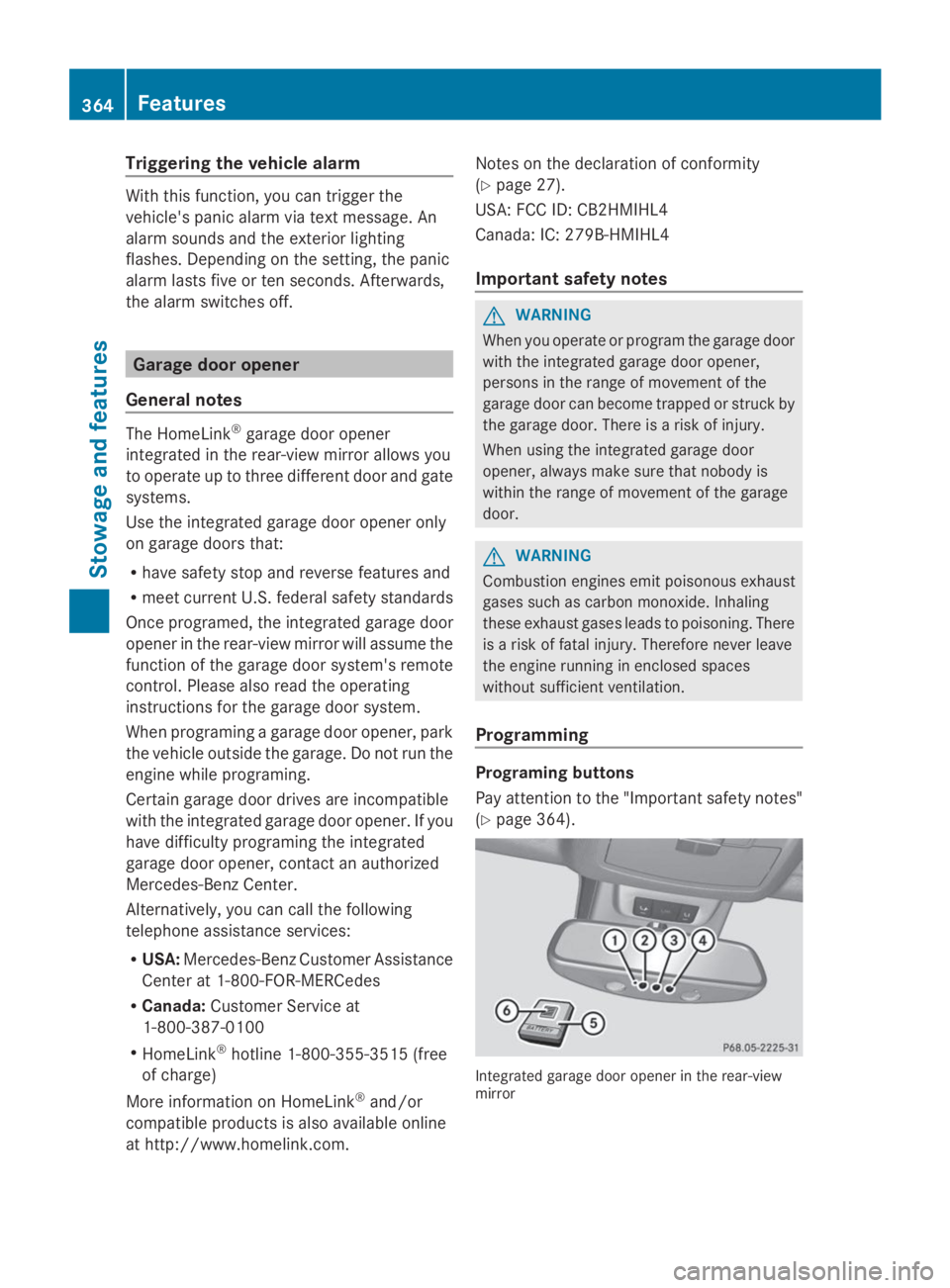
Programing buttons
Pay attention to the "Important safety notes"
(Ypage 364).
Integrated garage door opener in the rear-viewmirror
364Features
Sto wage an d features
Page 368 of 462
opener. The signal is not recognized during
programing. Comparable with Canadian law,
some U.S. garage door openers also feature
a "break".
Proceed as follows:
Rif you live in Canada
Rif you have difficulties programing the
garage door opener (regardless of where
you live) when using the programing steps
XPress and hold one of buttonsDto