reset MERCEDES-BENZ GL 2014 Owner's Manual
[x] Cancel search | Manufacturer: MERCEDES-BENZ, Model Year: 2014, Model line: GL, Model: MERCEDES-BENZ GL 2014Pages: 462, PDF Size: 8.98 MB
Page 206 of 462
You must select a lower gear in good time on
long and steep downhill gradients, especially
if the vehicle is laden or towing a trailer. By
doing so, you will make use of the braking
effect of the engine. This relieves the load on
the brake system and prevents the brakes
from overheating and wearing too quickly.
If DISTRONIC PLUS detects a slower-moving
vehicle in front, your vehicle is braked in order
to maintain the preset distance to the vehicle
in front.
If DISTRONIC PLUS detects that there is a risk
of a collision, you will be warned visually and
acoustically. DISTRONIC PLUS cannot
prevent a collision without your intervention.
An intermittent warning tone will then sound
and the distance warning lamp will light up in
the instrument cluster. Brake immediately in
order to increase the distance to the vehicle
in front or take evasive action provided it is
safe to do so.
For DISTRONIC PLUS to assist you, the radar
sensor system must be operational.
If there is no vehicle in front, DISTRONIC
PLUS operates in the same way as cruise
control in the speed range between 20 mph
(Canada: 30 km/h) and 120 mph (Canada:
200 km/h). If a vehicle is driving in front of
you, it operates in the speed range between
0 mph (0 km/h) and 120 mph (Canada:
200 km/h).
Do not use DISTRONIC PLUS while driving on
roads with steep gradients.
As DISTRONIC PLUS transmits radar waves,
it can resemble the radar detectors of the
responsible authorities. You can refer to the
relevant chapter in the Operator's Manual if
questions are asked about this.
iUSA only:
This device has been approved by the FCC
as a "Vehicular Radar System". The radar
sensor is intended for use in an automotive
radar system only. Removing, tampering
with, or altering the device will void any
warranties, and is not permitted by the
FCC. Do not tamper with, alter, or use in
any non-approved way.
Any unauthorized modification to this
device could void the user’s authority to
operate the equipment.
iCanada only: This device complies with
RSS-210 of Industry Canada. Operation is
subject to the following two conditions:
1. This device may not cause harmful
interference, and
2. this device must accept any interference
received, including interference that may
cause undesired operation of the device.
Removal, tampering, or altering of the
device will void any warranties, and is not
permitted. Do not tamper with, alter, or use
in any non-approved way.
Any unauthorized modification to this
device could void the user's authority to
operate the equipment.
Important safety notes
GWARNING
DISTRONIC PLUS does not react to:
Rpeople or animals
Rstationary obstacles on the road, e.g.
stopped or parked vehicles
Roncoming and crossing traffic
As a result, DISTRONIC PLUS may neither give
warnings nor intervene in such situations.
There is a risk of an accident.
Always pay careful attention to the traffic
situation and be ready to brake.
GWARNING
DISTRONIC PLUS cannot always clearly
identify other road users and complex traffic
situations.
In such cases, DISTRONIC PLUS may:
Rgive an unnecessary warning and then
brake the vehicle
Rneither give a warning nor intervene
Raccelerate unexpectedly
204Driving systems
Driving and parking
Page 242 of 462
Warning and display messages in the
multifunction display
XActivate ATTENTION ASSIST using the on-
board computer (Ypage 281).
XIf ATTENTION ASSIST is active, it will not
warn you until at least 20 minutes after
your journey has begun. You then hear an
intermittent warning tone twice and the
Attention Assist: Take a Break!Attention Assist: Take a Break!
message appears in the multifunction
display.
If necessary, take a break.
XPress thevor8button to confirm
the message.
On long journeys, take regular breaks in good
time to allow yourself to rest properly. If you
do not take a break and ATTENTION ASSIST
still detects increasing lapses in
concentration, you will be warned again after
15 minutes at the earliest.
ATTENTION ASSIST is reset when you
continue your journey and starts assessing
your tiredness again if:
Ryou switch off the engine.
Ryou take off your seat belt and open the
driver's door, e.g. for a change of drivers or
to take a break.
Night View Assist Plus
General notes
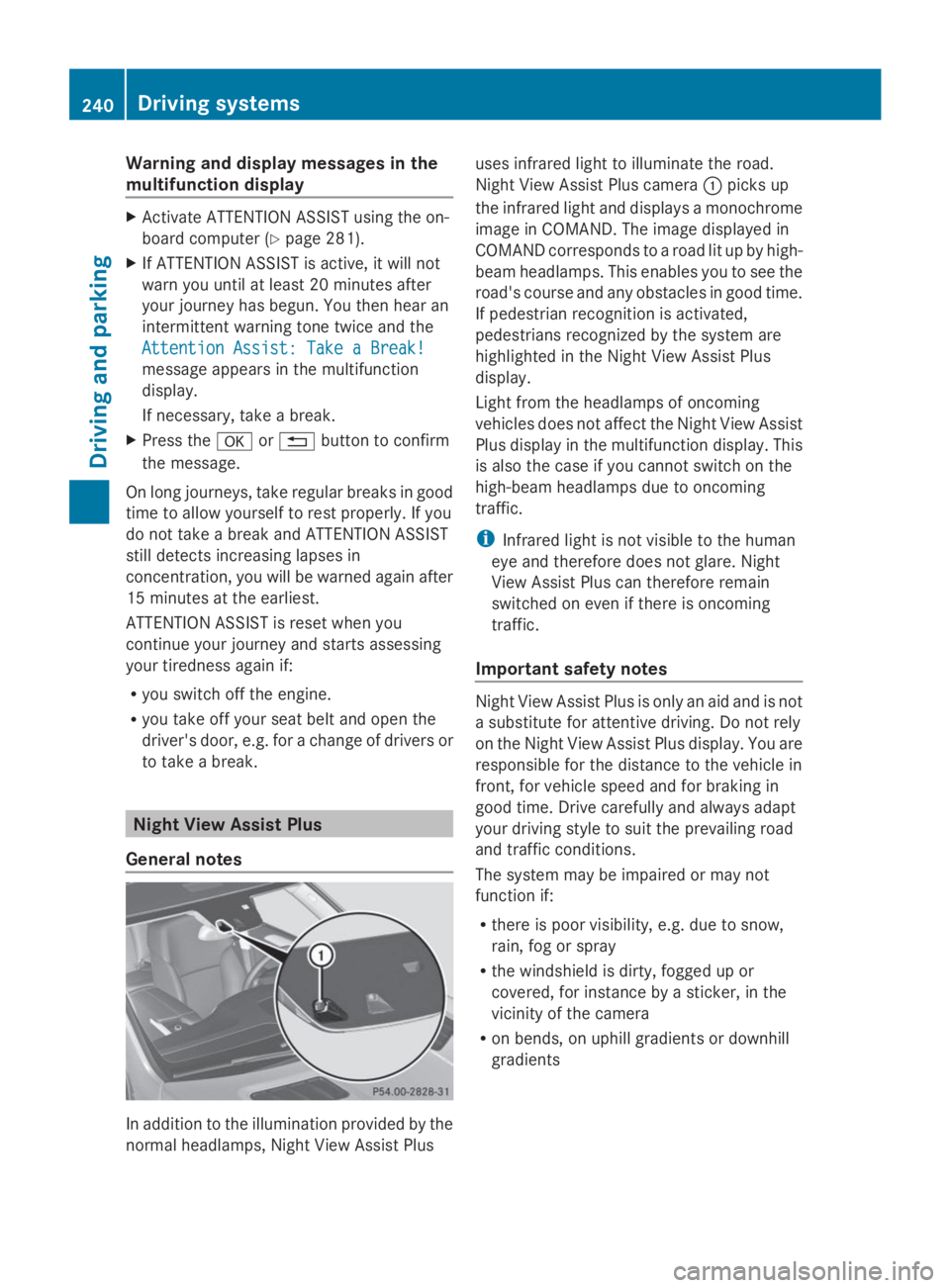
In addition to the illumination provided by the
normal headlamps, Night View Assist Plus
uses infrared light to illuminate the road.
Night View Assist Plus cameraCpicks up
the infrared light and displays a monochrome
image in COMAND. The image displayed in
COMAND corresponds to a road lit up by high-
beam headlamps. This enables you to see the
road's course and any obstacles in good time.
If pedestrian recognition is activated,
pedestrians recognized by the system are
highlighted in the Night View Assist Plus
display.
Light from the headlamps of oncoming
vehicles does not affect the Night View Assist
Plus display in the multifunction display. This
is also the case if you cannot switch on the
high-beam headlamps due to oncoming
traffic.
iInfrared light is not visible to the human
eye and therefore does not glare. Night
View Assist Plus can therefore remain
switched on even if there is oncoming
traffic.
Important safety notes
Night View Assist Plus is only an aid and is not
a substitute for attentive driving. Do not rely
on the Night View Assist Plus display. You are
responsible for the distance to the vehicle in
front, for vehicle speed and for braking in
good time. Drive carefully and always adapt
your driving style to suit the prevailing road
and traffic conditions.
The system may be impaired or may not
function if:
Rthere is poor visibility, e.g. due to snow,
rain, fog or spray
Rthe windshield is dirty, fogged up or
covered, for instance by a sticker, in the
vicinity of the camera
Ron bends, on uphill gradients or downhill
gradients
240Driving systems
Driving and parking
Page 278 of 462
Rthe ignition has been switched off for more
than four hours.
R999 hours have been exceeded.
R9,999 miles have been exceeded.
TheFrom ResetFrom Resettrip computer is
automatically reset if the value exceeds
9,999 hours or 99,999 miles.
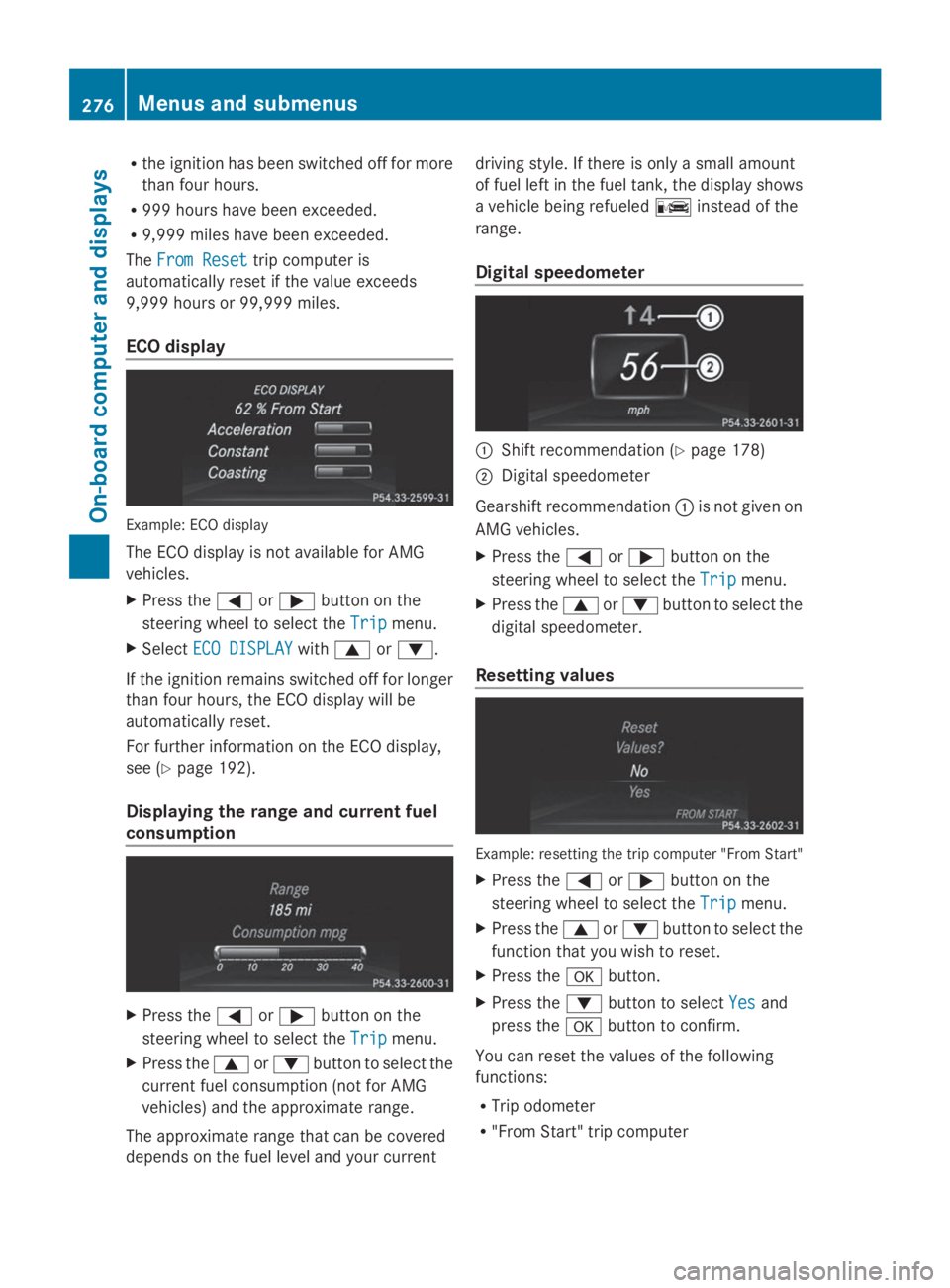
ECO display
Example: ECO display
The ECO display is not available for AMG
vehicles.
XPress theYorebutton on the
steering wheel to select theTripTripmenu.
XSelectECO DISPLAYECO DISPLAYwithcord.
If the ignition remains switched off for longer
than four hours, the ECO display will be
automatically reset.
For further information on the ECO display,
see (Ypage 192).
Displaying the range and current fuel
consumption
XPress theYorebutton on the
steering wheel to select theTripTripmenu.
XPress thecordbutton to select the
current fuel consumption (not for AMG
vehicles) and the approximate range.
The approximate range that can be covered
depends on the fuel level and your current
driving style. If there is only a small amount
of fuel left in the fuel tank, the display shows
a vehicle being refueled
Page 279 of 462
R"From Reset" trip computer
RECO display
iIf you reset the values in the ECO display,
the values in the "From start" trip computer
are also reset. If you reset the values in the
"From start" trip computer, the values in
the ECO display are also reset.
Navigation system menu
Displaying navigation instructions
In theNaviNavimenu, the multifunction display
shows navigation instructions.
For more information, see the separate
operating instructions.
XSwitch on the audio system with Becker®
MAP PILOT or COMAND; see the separate
operating instructions.
XPress theYorebutton on the
steering wheel to select theNaviNavimenu.
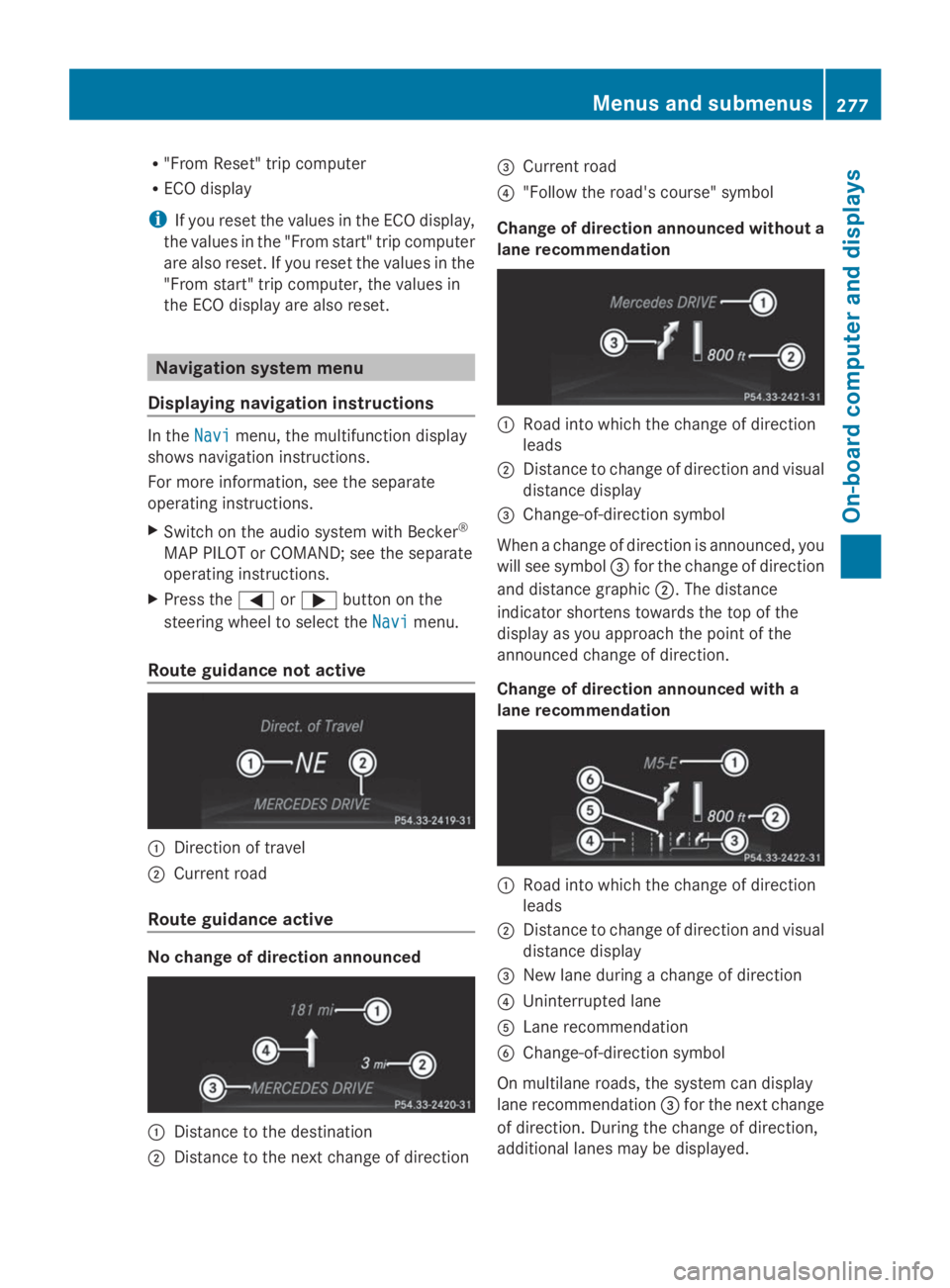
Route guidance not active
CDirection of travel
DCurrent road
Route guidance active
No change of direction announced
CDistance to the destination
DDistance to the next change of direction
Page 288 of 462
XPress thedorcbutton to select the
Belt AdjustmentBelt Adjustmentfunction.
If theBelt AdjustmentBelt Adjustmentfunction is
activated, the vehicle seat belt is shown in
orange in the multifunction display.
XPress thevbutton to save the setting.
For further information on belt adjustment,
see (Ypage 57).
Switching the fold-in mirrors with the
locking feature on/off
This function is only available on vehicles with
the memory function (Ypage 125).
When you activate theAuto. MirrorAuto. Mirror
FoldingFoldingfunction, the exterior mirrors are
folded in when the vehicle is locked. If you
unlock the vehicle and then open a door, the
exterior mirrors fold out again.
XPress theYorebutton on the
steering wheel to select theSett.Sett.menu.
XPress thedorcbutton to select the
ConvenienceConveniencesubmenu.
XPressvto confirm.
XPressdorcto select theAuto.Auto.
Mirror FoldingMirror Foldingfunction.
If theAuto. Mirror FoldingAuto. Mirror Foldingfunction is
activated, the vehicle's exterior mirror is
displayed in orange in the multifunction
display.
XPress thevbutton to save the setting.
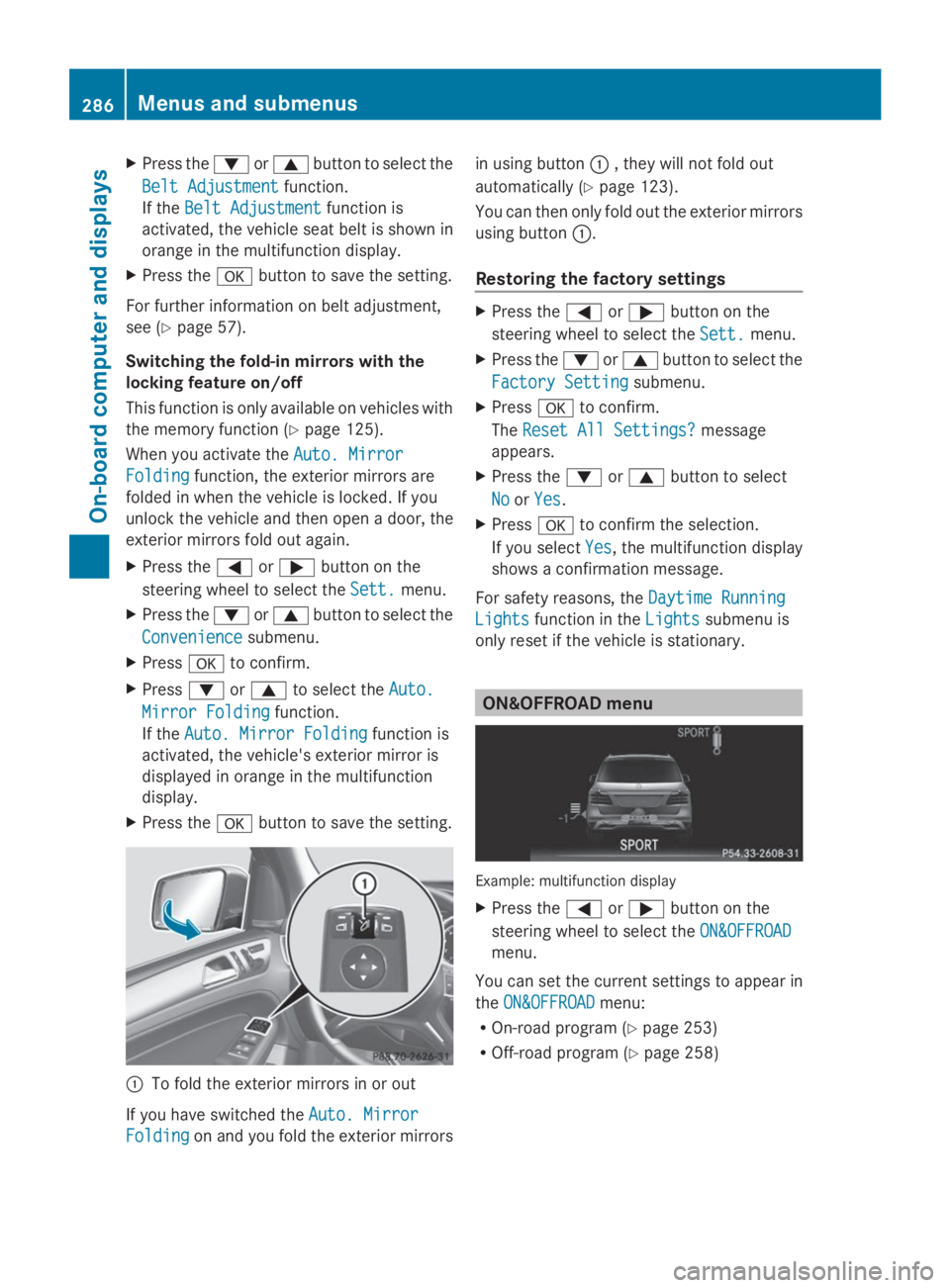
CTo fold the exterior mirrors in or out
If you have switched theAuto. MirrorAuto. Mirror
FoldingFoldingon and you fold the exterior mirrors
in using buttonC, they will not fold out
automatically (Ypage 123).
You can then only fold out the exterior mirrors
using buttonC.
Restoring the factory settings
XPress theYorebutton on the
steering wheel to select theSett.Sett.menu.
XPress thedorcbutton to select the
Factory SettingFactory Settingsubmenu.
XPressvto confirm.
TheReset All Settings?Reset All Settings?message
appears.
XPress thedorcbutton to select
NoNoorYesYes.
XPressvto confirm the selection.
If you selectYesYes, the multifunction display
shows a confirmation message.
For safety reasons, theDaytime RunningDaytime Running
LightsLightsfunction in theLightsLightssubmenu is
only reset if the vehicle is stationary.
ON&OFFROAD menu
Example: multifunction display
XPress theYorebutton on the
steering wheel to select theON&OFFROADON&OFFROAD
menu.
You can set the current settings to appear in
theON&OFFROADON&OFFROADmenu:
ROn-road program (Ypage 253)
ROff-road program (Ypage 258)
286Menus and submenus
On-board computer and displays
Page 377 of 462
You can obtain further information from an
authorized Mercedes-Benz Center or at
http://www.mbusa.com (USA only).
iThe ASSYST PLUS service interval display
does not show any information on the
engine oil level. Observe the notes on the
engine oil level (Ypage 371).
The multifunction display shows a service
message for several seconds, e.g.:
RService A in .. DaysService A in .. Days
RService A DueService A Due
RService A Exceeded by .. DaysService A Exceeded by .. Days
Depending on the operating conditions of the
vehicle, the remaining time or distance until
the next service due date is displayed.
The letterAAorBB, possibly in connection with
a number or another letter, shows the type of
service.AAstands for a minor service andBBfor
a major service.
You can obtain further information from an
authorized Mercedes-Benz Center.
The ASSYST PLUS service interval display
does not take into account any periods of
time during which the battery is
disconnected.
Maintaining the time-dependent service
schedule:
XNote down the service due date displayed
in the multifunction display before
disconnecting the battery.
or
XAfter reconnecting the battery, subtract
the battery disconnection periods from the
service date shown on the display.
Hiding a service message
XPress the8orvbutton on the
steering wheel.
Displaying service messages
XSwitch on the ignition.
XPress theYorebutton on the
steering wheel to select theServ.Serv.menu.
XPress thecordbutton to select the
ASSYST PLUSASSYST PLUSsubmenu and confirm by
pressing thevbutton.
The service due date appears in the
multifunction display.
Information about Service
Resetting the ASSYST PLUS service
interval display
!If the ASSYST PLUS service interval
display has been inadvertently reset, this
setting can be corrected at a qualified
specialist workshop.
Have service work carried out as described
in the Maintenance Booklet. This may
otherwise lead to increased wear and
damage to the major assemblies or the
vehicle.
A qualified specialist workshop, e.g. an
authorized Mercedes-Benz Center, will reset
the ASSYST PLUS service interval display
after the service work has been carried out.
You can also obtain further information on
maintenance work, for example.
Special service requirements
The specified maintenance interval takes only
the normal operation of the vehicle into
account. Under arduous operating conditions
or increased load on the vehicle,
maintenance work must be carried out more
frequently, for example:
Rregular city driving with frequent
intermediate stops
Rif the vehicle is primarily used to travel
short distances
ASSYST PLUS375
Maintenance and care
Z
Page 396 of 462
little energy, thus conserving battery
power.
iIf the power supply has been interrupted,
e.g. if you reconnect the battery, you will
have to:
Rset the clock. Information on setting the
clock can be found in the separate
operating instructions.
On vehicles with COMAND and a
navigation system, the clock is set
automatically.
Rreset the function for folding the exterior
mirrors in/out automatically, by folding
the mirrors out once (Ypage 123).
Charging the battery
GWARNING
During charging and jump-starting, explosive
gases can escape from the battery. There is a
risk of an explosion.
Particularly avoid fire, open flames, creating
sparks and smoking. Ensure there is sufficient
ventilation while charging and jump-starting.
Do not lean over a battery.
GWARNING
Battery acid is caustic. There is a risk of injury.
Avoid contact with the skin, eyes or clothing.
Do not inhale any battery gases. Do not lean
over the battery. Keep children away from
batteries. Wash battery acid immediately with
water and seek medical attention.
GWARNING
A discharged battery can freeze at
temperatures below freezing point. When
jump-starting the vehicle or charging the
battery, gases can escape from the battery.
There is a risk of an explosion.
Allow the frozen battery to thaw out before
charging it or jump-starting.
!Only use battery chargers with a
maximum charging voltage of 14.8 V.
!Only charge the battery using the jump-
starting connection point.
If, at low temperatures, the indicator lamps/
warning lamps in the instrument cluster do
not light up, it is highly likely that the
discharged battery has frozen. In this case
you may neither jump-start the vehicle nor
charge the battery. The service life of a
thawed-out battery may be shorter. The
starting characteristics can be impaired,
particularly at low temperatures. Have the
thawed-out battery checked at a qualified
specialist workshop.
Never charge a battery still installed in the
vehicle unless a battery charger unit
approved by Mercedes-Benz is being used. An
accessory battery charge unit specially
adapted for Mercedes-Benz vehicles and
tested and approved by Mercedes-Benz is
available. It permits the charging of the
battery in its installed position. Contact an
authorized Mercedes-Benz Center for further
information and availability. Charge the
battery in accordance with the separate
instructions for the battery charger.
The jump-starting connection point is in the
engine compartment (Ypage 395).
Read the battery charger's operating
instructions before charging the battery.
XOpen the hood.
XConnect the battery charger to the positive
terminal and ground point in the same
order as when connecting the donor
battery in the jump-starting procedure
(Ypage 395).
394Battery (vehicle)
Breakdown assistance
Page 401 of 462
Vehicles with a trailer tow hitch: if possible,
connect the towbar to the trailer tow hitch
(Ypage 264).
The brackets for the screw-in towing eyes are
located in the bumpers. They are at the front
and at the rear, behind the covers.
XRemove the towing eye from the vehicle
tool kit (Ypage 386).
XTo open the cover at the front:press the
mark on coverCinwards in the direction
of the arrow.
XTo open the cover at the rear:insert a
flat, blunt object into the cutout and lever
coverDout of the bumper.
XTake coverCorDoff the opening.
XScrew in and tighten the towing eye
clockwise to the stop.
Removing the towing eye
XUnscrew and remove the towing eye.
XAttach coverCorDto the bumper and
press until it engages.
XPlace the towing eye in the vehicle tool kit.
Towing a vehicle with both axles on
the ground
It is important that you observe the safety
instructions when towing away your vehicle
(Ypage 397).
The automatic transmission automatically
shifts to positionPwhen you open the driver's
or front-passenger door or when you remove
the SmartKey from the ignition lock.
In order to ensure that the automatic
transmission stays in positionNwhen towing
the vehicle, you must observe the following
points:
XMake sure that the vehicle is stationary and
the SmartKey in the ignition lock is in
position0.
XTurn the SmartKey to position2in the
ignition lock.
On vehicles with KEYLESS-GO, use the
SmartKey instead of the Start/Stop button
(Ypage 167).
XDepress and hold the brake pedal.
XShift the automatic transmission to
positionN.
XRelease the brake pedal.
XRelease the electric parking brake.
XLeave the SmartKey in position2in the
ignition lock.
XSwitch on the hazard warning lamps
(Ypage 132).
iIn order to signal a change of direction
when towing the vehicle with the hazard
warning lamps switched on, use the
combination switch as usual. In this case,
only the indicator lamps for the direction of
travel flash. After resetting the
combination switch, the hazard warning
lamp starts flashing again.
Transporting the vehicle
!You may only secure the vehicle by the
wheels, not by parts of the vehicle such as
axle or steering components. Otherwise,
the vehicle could be damaged.
The towing eyes or trailer tow hitch can be
used to pull the vehicle onto a trailer or
transporter if you wish to transport it.
XTurn the SmartKey to position2in the
ignition lock.
XShift the automatic transmission to
positionN.
As soon as the vehicle has been loaded:
XPrevent the vehicle from rolling away by
applying the electric parking brake.
XShift the automatic transmission to
positionP.
XTurn the SmartKey to position0in the
ignition lock and remove it.
XSecure the vehicle.
Towing and tow-starting399
Breakdown assistance
Z
Page 411 of 462
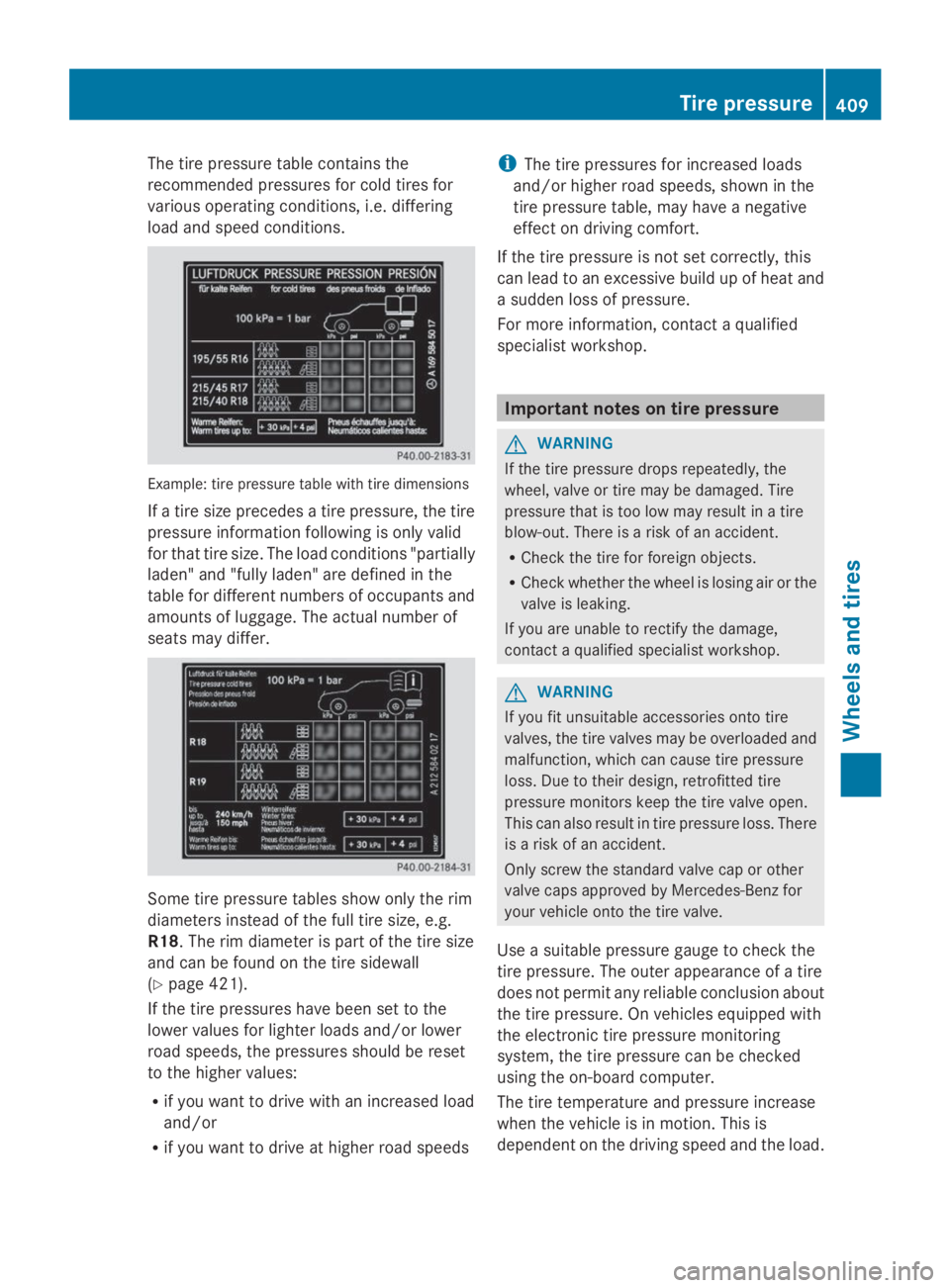
The tire pressure table contains the
recommended pressures for cold tires for
various operating conditions, i.e. differing
load and speed conditions.
Example: tire pressure table with tire dimensions
If a tire size precedes a tire pressure, the tire
pressure information following is only valid
for that tire size. The load conditions "partially
laden" and "fully laden" are defined in the
table for different numbers of occupants and
amounts of luggage. The actual number of
seats may differ.
Some tire pressure tables show only the rim
diameters instead of the full tire size, e.g.
R18. The rim diameter is part of the tire size
and can be found on the tire sidewall
(Ypage 421).
If the tire pressures have been set to the
lower values for lighter loads and/or lower
road speeds, the pressures should be reset
to the higher values:
Rif you want to drive with an increased load
and/or
Rif you want to drive at higher road speeds
iThe tire pressures for increased loads
and/or higher road speeds, shown in the
tire pressure table, may have a negative
effect on driving comfort.
If the tire pressure is not set correctly, this
can lead to an excessive build up of heat and
a sudden loss of pressure.
For more information, contact a qualified
specialist workshop.
Important notes on tire pressure
GWARNING
If the tire pressure drops repeatedly, the
wheel, valve or tire may be damaged. Tire
pressure that is too low may result in a tire
blow-out. There is a risk of an accident.
RCheck the tire for foreign objects.
RCheck whether the wheel is losing air or the
valve is leaking.
If you are unable to rectify the damage,
contact a qualified specialist workshop.
GWARNING
If you fit unsuitable accessories onto tire
valves, the tire valves may be overloaded and
malfunction, which can cause tire pressure
loss. Due to their design, retrofitted tire
pressure monitors keep the tire valve open.
This can also result in tire pressure loss. There
is a risk of an accident.
Only screw the standard valve cap or other
valve caps approved by Mercedes-Benz for
your vehicle onto the tire valve.
Use a suitable pressure gauge to check the
tire pressure. The outer appearance of a tire
does not permit any reliable conclusion about
the tire pressure. On vehicles equipped with
the electronic tire pressure monitoring
system, the tire pressure can be checked
using the on-board computer.
The tire temperature and pressure increase
when the vehicle is in motion. This is
dependent on the driving speed and the load.
Tire pressure409
Wheels and tires
Z