trailer MERCEDES-BENZ GL 2014 Owner's Manual
[x] Cancel search | Manufacturer: MERCEDES-BENZ, Model Year: 2014, Model line: GL, Model: MERCEDES-BENZ GL 2014Pages: 462, PDF Size: 8.98 MB
Page 233 of 462
parking. When maneuvering or parking, make
sure that there are no persons, animals or
objects in the area in which you are
maneuvering.
Under the following circumstances, the rear
view camera will not function, or will function
in a limited manner:
Rthe tailgate is open
Rin heavy rain, snow or fog
Rat night or in very dark places
Rif the camera is exposed to very bright light
Rif the area is lit by fluorescent light or LED
lighting (the display may flicker)
Rif there is a sudden change in temperature,
e.g. when driving into a heated garage in
winter
Rif the camera lens is dirty or obstructed
Rif the rear of your vehicle is damaged. In
this event, have the camera position and
setting checked at a qualified specialist
workshop
Activating/deactivating the rear view
camera
XTo activate:make sure that the SmartKey
is in position2in the ignition lock.
XMake sure that the function "show rear
view camera display" is selected in
COMAND.
XEngage reverse gear.
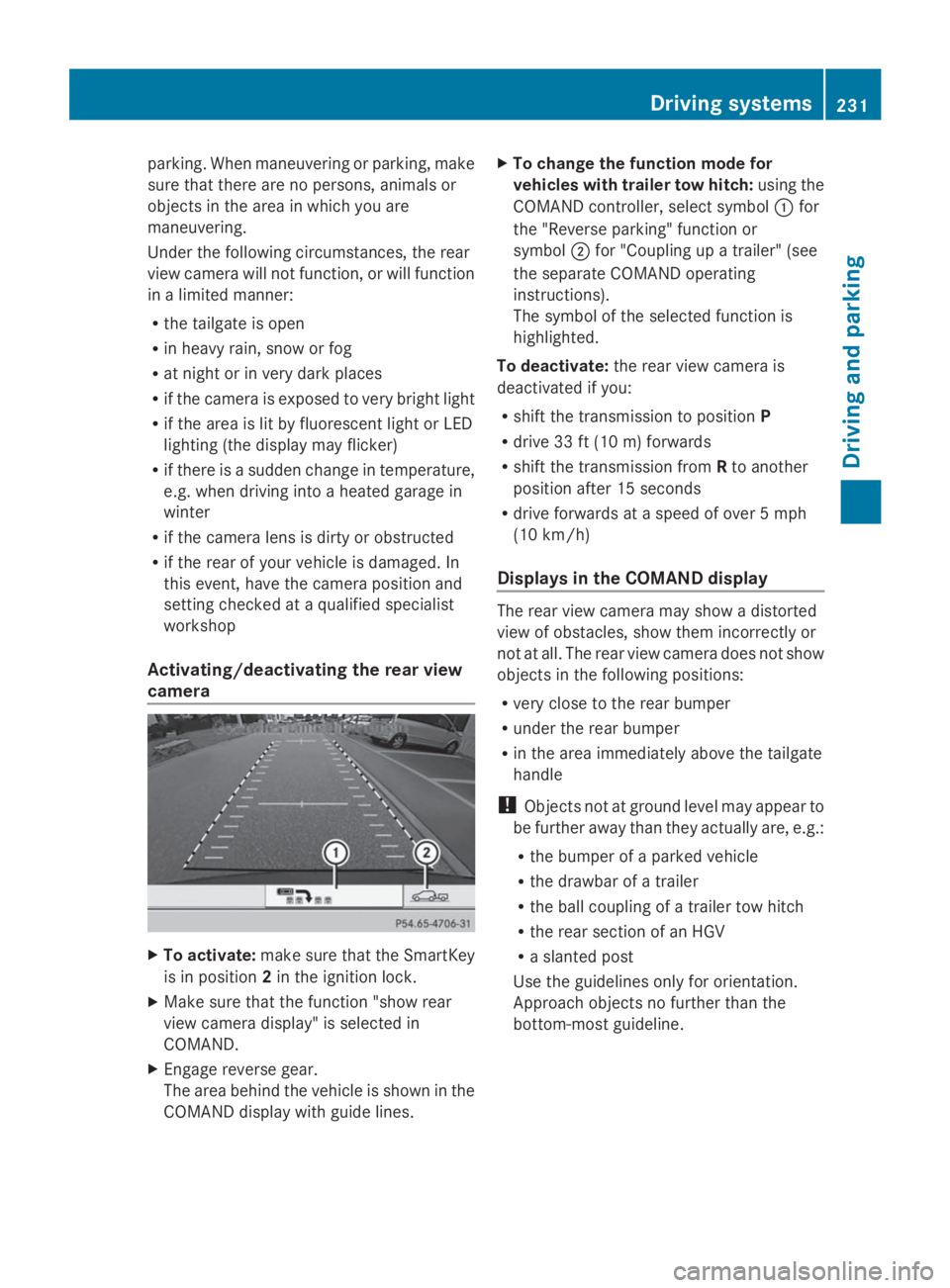
The area behind the vehicle is shown in the
COMAND display with guide lines.
XTo change the function mode for
vehicles with trailer tow hitch:using the
COMAND controller, select symbolCfor
the "Reverse parking" function or
symbolDfor "Coupling up a trailer" (see
the separate COMAND operating
instructions).
The symbol of the selected function is
highlighted.
To deactivate:the rear view camera is
deactivated if you:
Rshift the transmission to positionP
Rdrive 33 ft (10 m) forwards
Rshift the transmission fromRto another
position after 15 seconds
Rdrive forwards at a speed of over 5 mph
(10 km/h)
Displays in the COMAND display
The rear view camera may show a distorted
view of obstacles, show them incorrectly or
not at all. The rear view camera does not show
objects in the following positions:
Rvery close to the rear bumper
Runder the rear bumper
Rin the area immediately above the tailgate
handle
!Objects not at ground level may appear to
be further away than they actually are, e.g.:
Rthe bumper of a parked vehicle
Rthe drawbar of a trailer
Rthe ball coupling of a trailer tow hitch
Rthe rear section of an HGV
Ra slanted post
Use the guidelines only for orientation.
Approach objects no further than the
bottom-most guideline.
Driving systems231
Driving and parking
Z
Page 247 of 462
corresponding side lights up red. This warning
is always emitted when a vehicle enters the
blind spot monitoring range from behind or
from the side. When you overtake a vehicle,
the warning only occurs if the difference in
speed is less than 7 mph (12 km/h).
The yellow indicator lamp goes out if reverse
gear is engaged. In this event, Blind Spot
Assist is no longer active.
The brightness of the indicator/warning
lamps is adjusted automatically according to
the ambient light.
Collision warning
If a vehicle is detected in the monitoring range
of Blind Spot Assist and you switch on the
corresponding turn signal, a double warning
tone sounds. Red warning lampCflashes. If
the turn signal remains on, vehicles detected
are indicated by the flashing of red warning
lampC. There are no further warning tones.
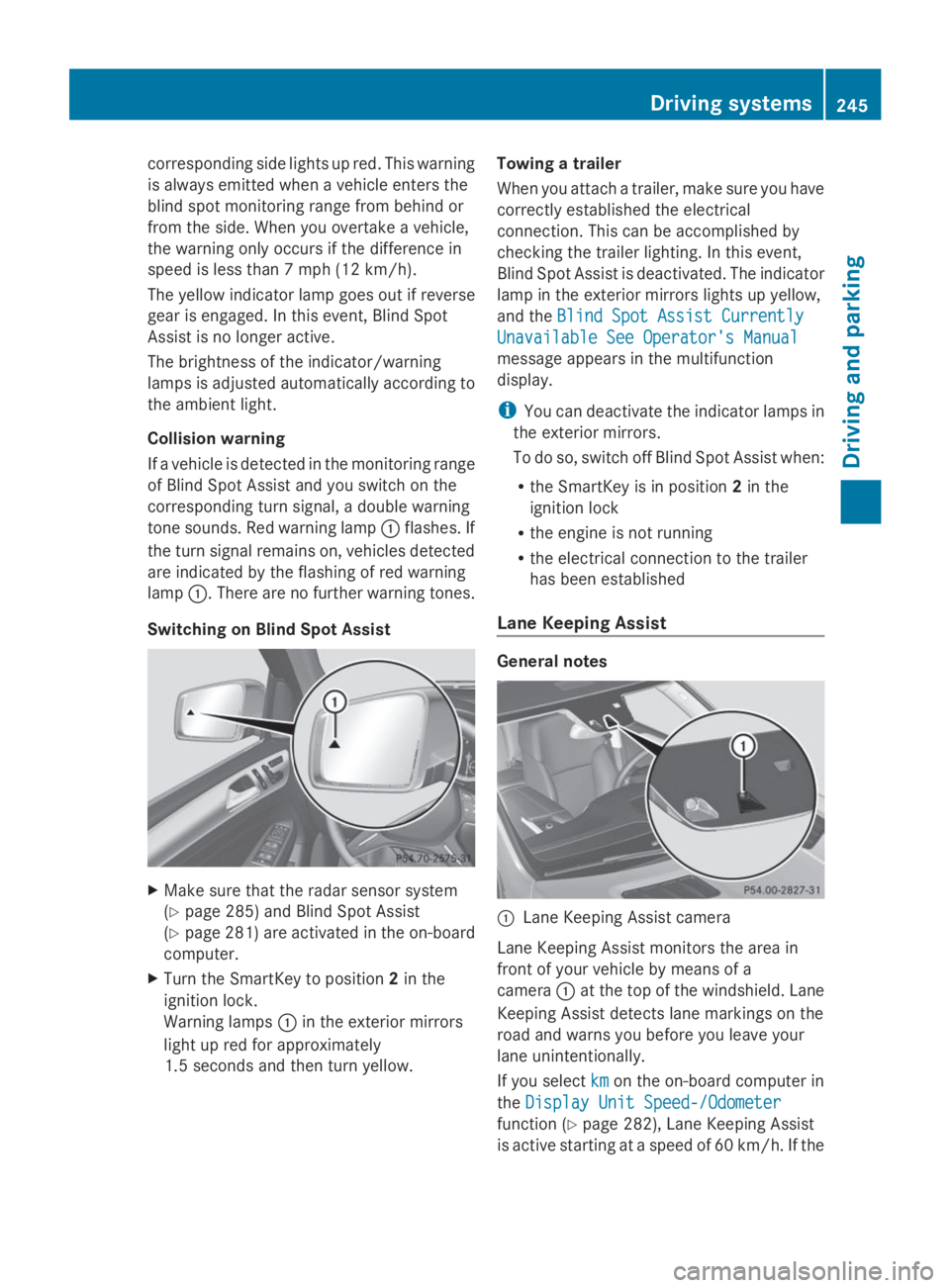
Switching on Blind Spot Assist
XMake sure that the radar sensor system
(Ypage 285) and Blind Spot Assist
(Ypage 281) are activated in the on-board
computer.
XTurn the SmartKey to position2in the
ignition lock.
Warning lampsCin the exterior mirrors
light up red for approximately
1.5 seconds and then turn yellow.
Towing a trailer
When you attach a trailer, make sure you have
correctly established the electrical
connection. This can be accomplished by
checking the trailer lighting. In this event,
Blind Spot Assist is deactivated. The indicator
lamp in the exterior mirrors lights up yellow,
and theBlind Spot Assist CurrentlyBlind Spot Assist Currently
Unavailable See Operator's ManualUnavailable See Operator's Manual
message appears in the multifunction
display.
iYou can deactivate the indicator lamps in
the exterior mirrors.
To do so, switch off Blind Spot Assist when:
Rthe SmartKey is in position2in the
ignition lock
Rthe engine is not running
Rthe electrical connection to the trailer
has been established
Lane Keeping Assist
General notes
CLane Keeping Assist camera
Lane Keeping Assist monitors the area in
front of your vehicle by means of a
cameraCat the top of the windshield. Lane
Keeping Assist detects lane markings on the
road and warns you before you leave your
lane unintentionally.
If you selectkmkmon the on-board computer in
theDisplay Unit Speed-/OdometerDisplay Unit Speed-/Odometer
function (Ypage 282), Lane Keeping Assist
is active starting at a speed of 60 km/h. If the
Driving systems245
Driving and parking
Z
Page 252 of 462
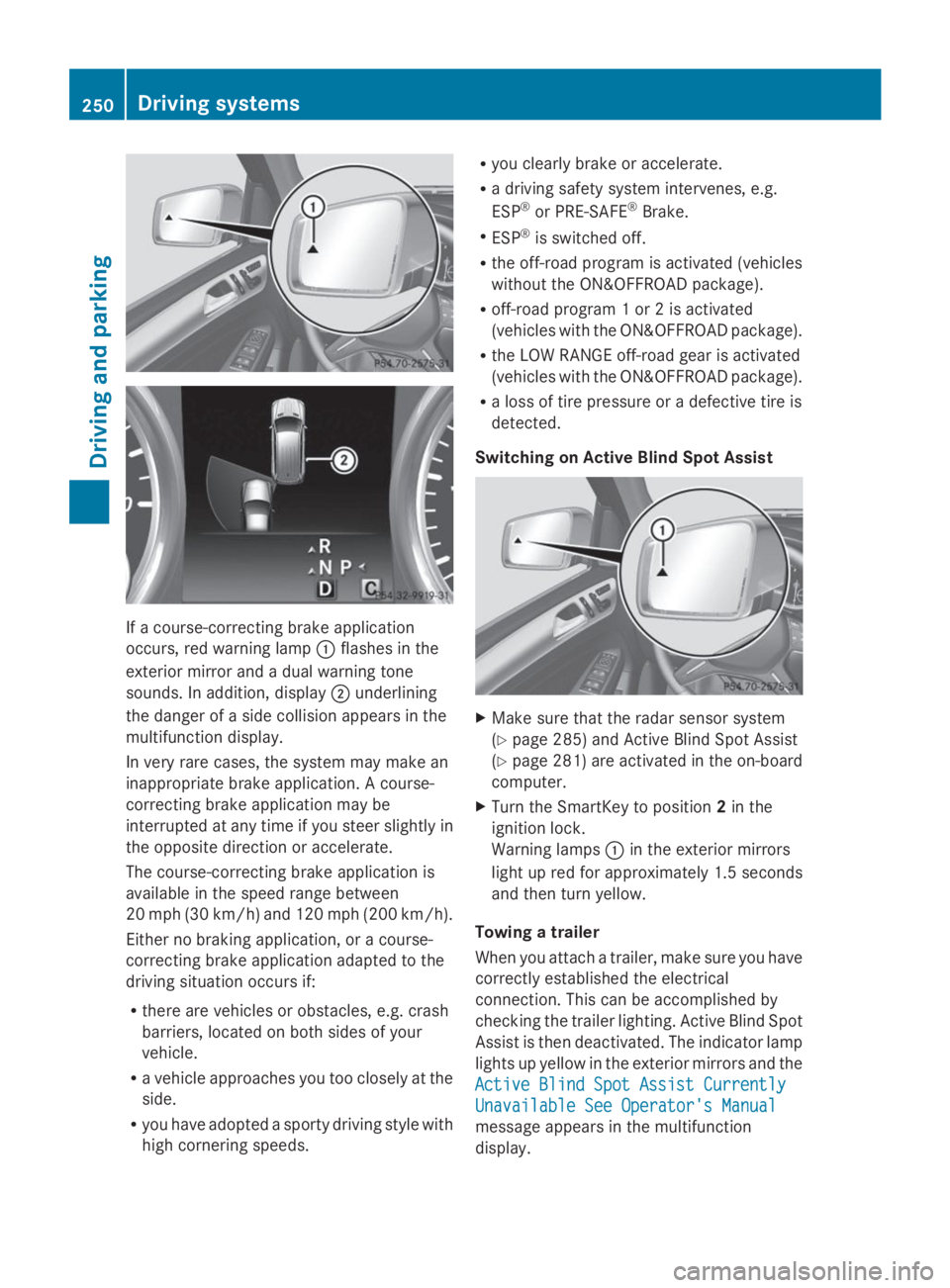
If a course-correcting brake application
occurs, red warning lampCflashes in the
exterior mirror and a dual warning tone
sounds. In addition, displayDunderlining
the danger of a side collision appears in the
multifunction display.
In very rare cases, the system may make an
inappropriate brake application. A course-
correcting brake application may be
interrupted at any time if you steer slightly in
the opposite direction or accelerate.
The course-correcting brake application is
available in the speed range between
20 mph (30 km/h) and 120 mph (200 km/h).
Either no braking application, or a course-
correcting brake application adapted to the
driving situation occurs if:
Rthere are vehicles or obstacles, e.g. crash
barriers, located on both sides of your
vehicle.
Ra vehicle approaches you too closely at the
side.
Ryou have adopted a sporty driving style with
high cornering speeds.
Ryou clearly brake or accelerate.
Ra driving safety system intervenes, e.g.
ESP®or PRE-SAFE®Brake.
RESP®is switched off.
Rthe off-road program is activated (vehicles
without the ON&OFFROAD package).
Roff-road program 1 or 2 is activated
(vehicles with the ON&OFFROAD package).
Rthe LOW RANGE off-road gear is activated
(vehicles with the ON&OFFROAD package).
Ra loss of tire pressure or a defective tire is
detected.
Switching on Active Blind Spot Assist
XMake sure that the radar sensor system
(Ypage 285) and Active Blind Spot Assist
(Ypage 281) are activated in the on-board
computer.
XTurn the SmartKey to position2in the
ignition lock.
Warning lampsCin the exterior mirrors
light up red for approximately 1.5 seconds
and then turn yellow.
Towing a trailer
When you attach a trailer, make sure you have
correctly established the electrical
connection. This can be accomplished by
checking the trailer lighting. Active Blind Spot
Assist is then deactivated. The indicator lamp
lights up yellow in the exterior mirrors and the
Active Blind Spot Assist CurrentlyActive Blind Spot Assist Currently
Unavailable See Operator's ManualUnavailable See Operator's Manual
message appears in the multifunction
display.
250Driving systems
Driving and parking
Page 255 of 462
RESP®is switched off.
Rthe transmission is not in positionD.
Ron vehicles with a trailer tow hitch, the
electrical connection to the trailer has been
correctly established.
Rthe off-road program is activated (vehicles
without the ON&OFFROAD package).
Roff-road program 1 or 2 is activated
(vehicles with the ON&OFFROAD package).
Rthe LOW RANGE off-road gear is activated
(vehicles with the ON&OFFROAD package).
Ra loss of tire pressure or a defective tire has
been detected and displayed.
Active Lane Keeping Assist does not detect
traffic situations or road users. An
inappropriate brake application may be
interrupted at any time if you:
Rsteer slightly in the opposite direction
Rswitch on the turn signal
Rclearly brake or accelerate
A lane-correcting brake application is
interrupted automatically if:
Ra driving safety system intervenes, e.g.
ESP®, PRE-SAFE®Brake or Active Blind
Spot Assist.
Rlane markings can no longer be recognized.
Switching on Active Lane Keeping Assist
XSwitch on Active Lane Keeping Assist using
the on-board computer; to do so, select
StandardStandardorAdaptiveAdaptive(Ypage 282).
If you drive at speeds above 40 mph
(60 km/h) and lane markings are detected,
the lines in the assistance graphics display
(Ypage 280) are shown in green. Lane
Keeping Assist is ready for use.
WhenStandardStandardis selected, no warning
vibration occurs if:
Ryou switch on the turn signals. In this
event, the warnings are suppressed for a
certain period of time.
Ra driving safety system intervenes, such
as ABS, BAS or ESP®.
WhenAdaptiveAdaptiveis selected, no warning
vibration occurs if:
Ryou switch on the turn signals. In this
event, the warnings are suppressed for a
certain period of time.
Ra driving safety system intervenes, e.g.
ABS, BAS or ESP®.
Ryou accelerate hard, e.g. kickdown.
Ryou brake hard.
Ryou steer actively, e.g. swerve to avoid
an obstacle or change lanes quickly.
Ryou cut the corner on a sharp bend.
Towing a trailer
When you attach a trailer, make sure you have
correctly established the electrical
connection. This can be accomplished by
checking the trailer lighting.
On-road programs (vehicles with the
ON&OFFROAD package)
General notes
The on-road programs assist you during on-
road driving and the off-road programs when
driving off-road (Ypage 258).
The following program messages remain in
the multifunction display until the
corresponding vehicle level has been set. Up
to off-road level 2, you can hide the program
messages using the8orvbutton on
the multifunction steering wheel.
Driving systems253
Driving an d parking
Z
Page 258 of 462
XSelector wheelCCengaged:briefly press
selector wheelC.
Selector wheelCextends.
XTo select:turn selector wheelCuntil
indicator lampDcomes on.
Trailer indicator
Page 265 of 462
Ruphill or downhill gradient in percentage
Ron-road/off-road program selected
Rcondition of the differential lock for the
transfer case
Rthe LOW RANGE off-road gear is selected
Rcondition of the LOW RANGE off-road
gear
Rthe on-road trailer program is selected
Towing a trailer
Important safety notes
GWARNING
Installing an unsuitable ball coupling may
result in overloading of the trailer tow hitch
and the rear axle. This applies especially if the
ball coupling in question is longer or angled
differently. This could seriously impair the
driving characteristics and the trailer can
come loose. There is a risk of an accident.
You should only ever install a ball coupling
that has the permissible dimensions and that
is designed to meet your trailer-towing
requirements. Do not modify the ball coupling
or the trailer tow hitch.
You will find the values approved by the
manufacturer on the vehicle identification
plates and those for the towing vehicle under
"Technical data" (Ypage 457).
GWARNING
If the ball coupling is not installed correctly or
not secured with the bolt provided and the
corresponding spring cotter, the trailer may
come loose. There is a risk of an accident.
Always install and secure the ball coupling as
described. Before every journey, ensure that
the ball coupling is secured with the bolt and
the corresponding spring cotter.
GWARNING
If you rest your foot on the brake pedal while
driving, the braking system can overheat. This
increases the stopping distance and can even
cause the braking system to fail. There is a
risk of an accident.
Never use the brake pedal as a footrest. Never
depress the brake pedal and the accelerator
pedal at the same time.
GWARNING
When the vehicle/trailer combination begins
to lurch, you could lose control of it. The
vehicle/trailer combination could even
rollover. There is a risk of an accident.
On no account should you attempt to
straighten up the vehicle/trailer combination
by increasing the speed. Reduce vehicle
speed and do not countersteer. Apply the
brake as necessary.
!Depressing the brake pedal constantly
results in excessive and premature wear to
the brake pads.
Please observe the manufacturer's operating
instructions for the trailer coupling if a
detachable trailer coupling is used.
Couple and uncouple the trailer carefully. If
you do not couple the trailer to the towing
vehicle correctly, the trailer could become
detached.
Make sure that the following values are not
exceeded:
Rthe permissible trailer drawbar noseweight
Rthe permissible trailer load
Rthe permissible rear axle load of the towing
vehicle
Rthe maximum permissible gross vehicle
weight of both the towing vehicle and the
trailer
The applicable permissible values, which
must not be exceeded, can be found:
Rin the vehicle documents
Ron the identification plates for the trailer
tow hitch and the trailer
Ron the vehicle identification plate
If the values differ, the lowest value applies.
Towing a trailer263
Driving and pa rking
Z
Page 266 of 462
When towing a trailer, your vehicle's handling
characteristics will be different in comparison
with when driving without a trailer.
The vehicle/trailer combination:
Ris heavier
Ris restricted in its acceleration and
gradient-climbing capability
Rhas an increased braking distance
Ris affected more by strong crosswinds
Rdemands more sensitive steering
Rhas a larger turning radius
This could impair the handling
characteristics.
When towing a trailer, always adjust your
speed to the current road and weather
conditions. Do not exceed the maximum
permissible speed for your vehicle/trailer
combination.
Notes on towing a trailer
General notes
RDo not exceed the legally prescribed
maximum speed for vehicle/trailer
combinations in the relevant country.
This lowers the risk of an accident.
ROnly install an approved trailer coupling on
your vehicle.
Further information on availability and on
installation is available from any authorized
Mercedes-Benz Center.
RThe bumpers of your vehicle are not
suitable for installing detachable trailer
couplings.
RDo not install hired trailer couplings or
other detachable trailer couplings on the
bumpers of your vehicle.
RIf you no longer need the ball coupling,
remove it from the ball coupling recess.
This will reduce the risk of damage to the
ball coupling.
iWhen towing a trailer, set the tire
pressure on the rear axle of the towing
vehicle for a maximum load; see the tire
pressure table in the fuel filler flap
(Ypage 425).
Please note that when towing a trailer,
PARKTRONIC (Ypage 222) and Blind Spot
Assist (Ypage 243) are only available with
limitations, or not at all.
You will find installing dimensions and loads
under "Technical data" (Ypage 456).
Driving tips
iObserve the information on ESP®trailer
stabilization (Ypage 74) and on pulling
away with a trailer (Ypage 170).
The maximum permissible speed for vehicle/
trailer combinations depends on the type of
trailer. Before beginning the journey, check
the trailer's documents to see what the
maximum permissible speed is. Observe the
legally prescribed maximum speed in the
relevant country.
For certain Mercedes-Benz vehicles, the
maximum permissible rear axle load is
increased when towing a trailer. See
"Technical data" to find out whether this
applies to your vehicle (Ypage 457). If you
utilize any of the added maximum rear axle
load when towing a trailer, the vehicle/trailer
combination may not exceed a maximum
speed of 60 mph (100 km/h) for reasons
concerning the operating permit. This also
applies in countries in which the permissible
maximum speed for vehicle/trailer
combinations is above 60 mph (100 km/h).
When towing a trailer, your vehicle's handling
characteristics will be different in comparison
with when driving without a trailer.
Use the left-hand paddle shifter to shift into
a lower gear in good time on long and steep
downhill gradients.
iThis also applies if you have activated
cruise control or DISTRONIC PLUS.
This will use the braking effect of the engine,
so that less braking will be required to
maintain the speed. This relieves the load on
264Towing a trailer
Driving and parking
Page 267 of 462
the brake system and prevents the brakes
from overheating and wearing too quickly. If
you need additional braking, depress the
brake pedal repeatedly rather than
continuously.
Driving tips
If the trailer swings from side to side:
XDo not accelerate.
XDo not counter-steer.
XBrake if necessary.
RMaintain a greater distance from the
vehicle in front than when driving without a
trailer.
RAvoid braking abruptly. If possible, brake
gently at first to allow the trailer to run on.
Then, increase the braking force rapidly.
RThe values given for gradient-climbing
capabilities from a standstill refer to sea
level. When driving in mountainous areas,
note that the power output of the engine
and, consequently, the vehicle's gradient-
climbing capability, decreases with
increasing altitude.
Installing the ball coupling
GWARNING
If the ball coupling is not correctly installed
and secured, it can come loose during the
journey and endanger other road users. There
is a risk of an accident and injury.
Always install and secure the ball coupling as
described. Before every journey, ensure that
the ball coupling is secured with the bolt and
the corresponding spring cotter.
GWARNING
If the ball coupling is not installed correctly or
not secured with the bolt provided and the
corresponding spring cotter, the trailer may
come loose. There is a risk of an accident.
Always install and secure the ball coupling as
described. Before every journey, ensure that
the ball coupling is secured with the bolt and
the corresponding spring cotter.
GWARNING
If the ball coupling is not installed and secured
correctly the trailer may come loose. There is
a risk of an accident.
Install and secure the ball coupling as
described in the ball coupling installation
instructions. Make sure that the ball coupling
is installed and secured correctly before every
journey.
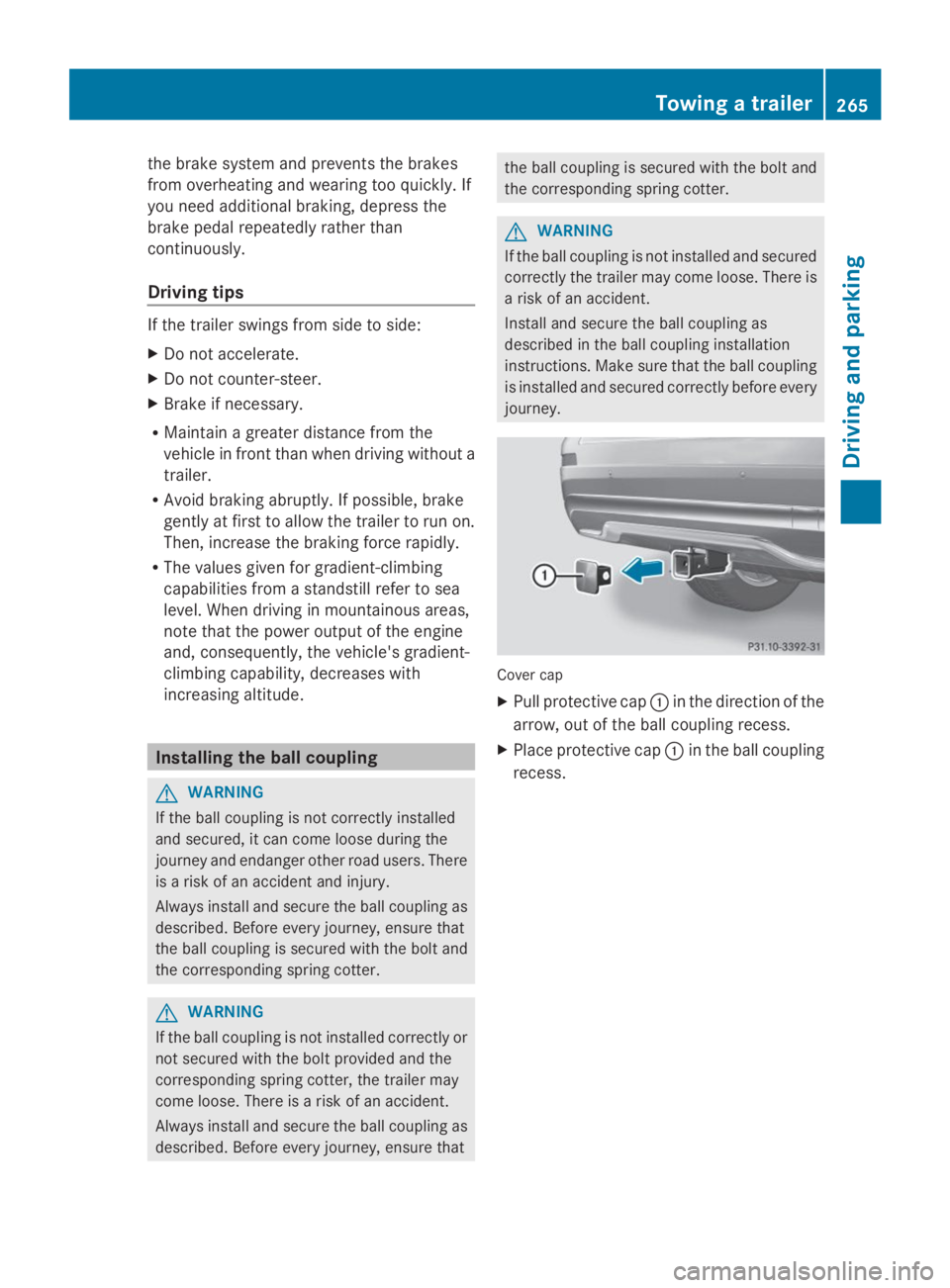
Cover cap
XPull protective capCin the direction of the
arrow, out of the ball coupling recess.
XPlace protective capCin the ball coupling
recess.
Towing a trailer265
Driving an d parking
Z
Page 269 of 462
of the towing vehicle, as the latter is
equipped with an anti-lock brake system.
Doing so will result in a loss of function of
the brake systems of both the vehicle and
the trailer.
XMake sure that the automatic transmission
is set to positionP.
XApply the vehicle's electric parking brake.
XStart the engine.
XVehicles with the AIRMATIC package:
select highway level.
XVehicles with ADS:set ADS toAUTOor
COMF.
XSwitch off the engine.
XClose all doors and the tailgate.
XCouple up the trailer.
XEstablish all electrical connections.
XCheck that the trailer lighting system is
working.
iVehicles with the AIRMATIC package:
with a trailer attached, the vehicle will
always remain at highway level. When
coupling up a trailer, please observe the
following:
RUnless highway level has been set
manually, the vehicle is automatically
lowered to highway level. This is the case
if a speed of 5 mph(8km/h) is reached.
RHigh-speed level is not available.
These restrictions apply to all accessories
powered through a connection to the trailer
power socket of your vehicle, e.g. a bicycle
carrier.
Observe the maximum permissible trailer
dimensions (width and length).
Most U.S. states and all Canadian provinces
require by law:
RSafety chains between the towing vehicle
and the trailer. The chains should be cross-
wound under the trailer drawbar. They must
be fastened to the vehicle's trailer
coupling, not to the bumper or the axle.
Leave enough play in the chains to make
tight cornering possible.
RA separate brake system for certain types
of trailer.
RA safety switch for braked trailers. Check
the specific legal requirements applicable
to your state.
If the trailer detaches from the towing
vehicle, the safety switch applies the
trailer's brakes.
Towing a trailer
There are numerous legal requirements
concerning the towing of a trailer, e.g. speed
restrictions. Make sure that your vehicle/
trailer combination complies with the local
requirements not only in your area of
residence but also at any location to which
you are traveling. The police and local
authorities can provide reliable information.
Please observe the following when towing a
trailer:
RIn order to accumulate driving experience
and accustom yourself to the new handling
characteristics, practice the following at a
location where there is no traffic:
-Cornering
-Stopping
-Backing up
RBefore driving, check:
-the trailer tow hitch
-the safety switch for braked trailers
-the safety chains
-electrical connections
-the lights
-the wheels
RAdjust the exterior mirrors to provide an
unobstructed view of the rear section of the
trailer.
RIf the trailer has electronically controlled
brakes, pull away carefully. Brake manually
using the brake controller and check
whether the brakes function correctly.
Towing a trailer267
Driving an d parking
Z
Page 270 of 462
RSecure any objects on the trailer to prevent
the cargo from slipping when the vehicle is
in motion.
RIf you couple up a trailer, regularly check
that the cargo is securely fastened and
make sure that the trailer lamps and (if
applicable) the trailer brakes are
functioning correctly.
RBear in mind that the handling will be less
stable when towing a trailer than when
driving without one. Avoid sudden steering
movements.
RThe vehicle/trailer combination is heavier,
accelerates more slowly, has a decreased
gradient climbing capability and a longer
braking distance.
It is more susceptible to side winds and
requires more careful steering.
RIf possible, avoid abrupt braking. Depress
the brake pedal moderately at first, so that
the trailer can activate its own brakes. Then
increase the pressure on the brake pedal.
RIf the automatic transmission repeatedly
shifts between gears on uphill or downhill
gradients, shift to a lower gear using the
left-hand steering wheel paddle shifter.
A lower gear and lower speed reduce the
risk of engine failure.
RWhen driving downhill, shift to a lower gear
to utilize the engine's braking effect.
Avoid continuous brake application as this
may overheat the vehicle brakes and, if
installed, the trailer brakes.
RIf the coolant temperature increases
dramatically while the air-conditioning
system is switched on, switch off the air-
conditioning system.
Coolant heat can additionally be dissipated
by opening the windows and by setting the
blower fan and the interior temperature to
maximum.
RWhen overtaking, pay particular attention
to the extended length of your vehicle/
trailer combination.
Due to the length of your vehicle/trailer
combination, you will have to travel an
additional distance beyond the vehicle you
are overtaking before returning to the
previous lane.
Decoupling a trailer
GWARNING
If you uncouple a trailer with the overrun
brake engaged, you could trap your hand
between the vehicle and the trailer drawbar.
There is a risk of injury.
Do not uncouple a trailer if the overrun brake
is engaged.
GWARNING
Vehicles with level control:
The vehicle is lowered as soon as you
disconnect the trailer cable. This could result
in your limbs or those of other people that are
between the vehicle body and tires or
underneath the vehicle being trapped. There
is a risk of injury.
Make sure that nobody is in the immediate
vicinity of the wheel housings or under the
vehicle when you disconnect the trailer cable.
!Do not disconnect a trailer with an
engaged overrun brake. Otherwise, your
vehicle could be damaged by the
rebounding of the overrun brake.
XMake sure that the automatic transmission
is set to positionP.
XApply the vehicle's electric parking brake.
XStart the engine.
XClose all doors and the tailgate.
XApply the trailer's parking brake.
XDetach the trailer cable and decouple the
trailer.
XSwitch off the engine.
268Towing a trailer
Driving and parking