engine MERCEDES-BENZ GL 2016 Owners Manual
[x] Cancel search | Manufacturer: MERCEDES-BENZ, Model Year: 2016, Model line: GL, Model: MERCEDES-BENZ GL 2016Pages: 462, PDF Size: 12.66 MB
Page 271 of 462
X
Detach the trailer cable and decouple the
trailer. X
Switch off the engine.
Permissible trailer loads and drawbar
loads
Weight specifications Maximum permissible gross vehicle
weight rating
The gross trailer weight is calculated by add-
ing the weight of the trailer to the weight of
the load and equipment on the trailer.
You will find installing dimensions and loads
under "Technical data" ( Y
page 457).
Permissible noseweight
You will find installing dimensions and loads
under "Technical data" ( Y
page 457).
Loading a trailer R
When loading the trailer, make sure that
neither the permissible gross weight of the
trailer nor the gross vehicle weight is
exceeded. The permissible gross vehicle
weight is indicated on the identification
plate on the B-pillar on the driver's side of
the vehicle.
You can find the maximum permissible val-
ues on the type plates of your vehicle and
the trailer. When calculating how much
weight the vehicle and trailer may carry,
pay attention to the respective lowest val-
ues. R
The trailer drawbar load on the ball coupling
must be added to the rear axle load to avoid
exceeding the permissible gross axle
weight. The permissible gross vehicle
weight is indicated on the identification
plate on the B-pillar on the driver's side of
the vehicle.
i Mercedes-Benz recommends a trailer
load where the trailer drawbar noseweight accounts for 8% to 15% of the trailer's per-
missible gross weight.
i The weight of additional accessories, pas-
sengers, and cargo reduces the permissi-
ble trailer load and drawbar load for your
vehicle.
Checking the vehicle and trailer weight R
To check that the weights of the towing
vehicle and the trailer comply with the max-
imum permissible values, have the vehicle/
trailer combination (including the driver,
passengers, and cargo with a fully laden
trailer) weighed on a calibrated weigh-
bridge. R
Check the gross axle weight rating of the
front and rear axles, the gross weight of the
trailer and trailer drawbar load.
Removing the ball coupling X
Remove the spring cotter. X
Remove the bolt from the ball coupling
recess. X
Remove the ball coupling from the ball cou-
pling recess. X
Clean the ball coupling if it is dirty. X
Stow the ball coupling so that it cannot be
thrown around.
Observe the loading guidelines ( Y
page 340)
and the safety notes regarding stowage
spaces ( Y
page 341).
Information on cleaning and care of the trailer
tow hitch ( Y
page 381).
Trailer power supply
! You can connect accessories with a max-
imum power consumption of 240 W to the
permanent power supply.
You must not charge a trailer battery using
the power supply.
The trailer socket of your vehicle is equipped
at the factory with a permanent power supply. Towing a trailer 269
Driving an d parking Z
Page 275 of 462
Tachometer
! Do not drive in the overrevving range, as
this could damage the engine.
The red band in the tachometer indicates the
engine's overrevving range.
The fuel supply is interrupted to protect the
engine when the red band is reached.
Outside temperature display You should pay special attention to road con-
ditions when temperatures are around freez-
ing point.
Bear in mind that the outside temperature
display indicates the temperature measured
and does not record the road temperature.
The outside temperature display is in the mul-
tifunction display ( Y
page 275).
Changes in the outside temperature are dis-
played after a short delay.
Coolant temperature display
G WARNING
Opening the hood when the engine is over-
heated or when there is a fire in the engine
compartment could expose you to hot gases
or other service products. There is a risk of
injury.
Let an overheated engine cool down before
opening the hood. If there is a fire in the
engine compartment, keep the hood closed
and contact the fire department.
! A display message is shown if the coolant
temperature is too high.
If the coolant temperature is over 248 ‡
(120 †), do not continue driving. The
engine will otherwise be damaged.
The coolant temperature gauge is in the
instrument cluster on the right-hand side
( Y
page 35). Under normal operating conditions and with
the specified coolant level, the coolant tem-
perature may rise to 248 ‡ (120 †).
Operating the on-board computer
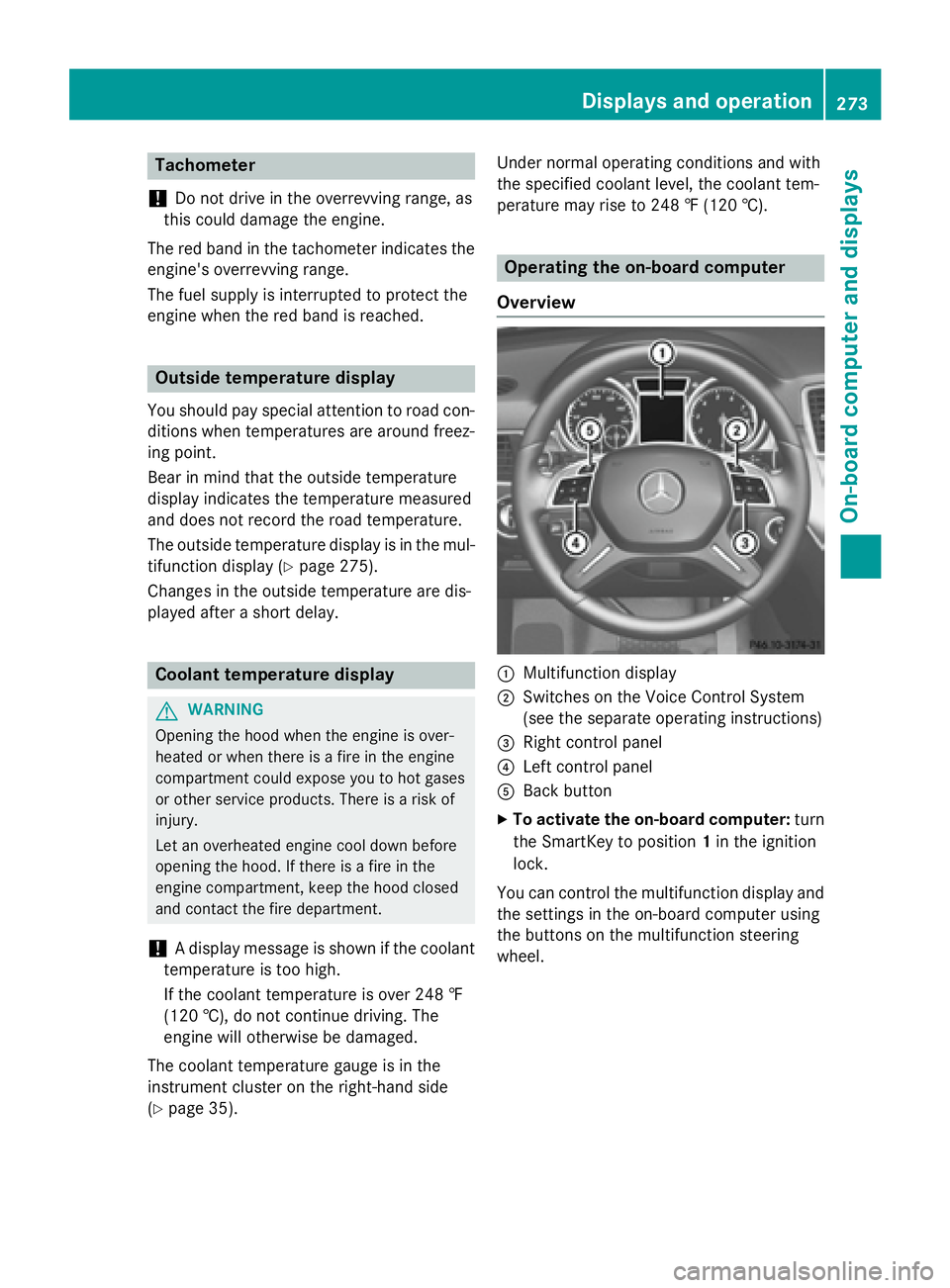
Overview
C
Multifunction display D
Switches on the Voice Control System
(see the separate operating instructions)
Page 287 of 462
R
surround lighting: the exterior lighting
remains lit for 40 seconds after unlocking
with the SmartKey. If you start the engine,
the surround lighting is switched off and
automatic headlamp mode is activated
( Y
page 130). R
exterior lighting delayed switch-off: the
exterior lighting remains lit for 60 seconds
after the engine is switched off. If you close
all the doors and the tailgate, the exterior
lighting goes off after 15 seconds.
i Depending on your vehicle's equipment,
when the surround lighting and delayed
switch-off exterior lighting are on, the fol-
lowing light up: R
Parking lamps R
Daytime running lamps R
Side marker lamps R
Surround lighting in the exterior mirrors
Activating/deactivating the interior light-
ing delayed switch-off
If you activate the Light. Delay
function,
the interior lighting remains on for
20 seconds after you remove the SmartKey
from the ignition lock. X
Press the Y or e button on the steer-
ing wheel to select the Settings
menu.X
Press the d or c button to select the
Lights
submenu.X
Press v to confirm.X
Press the d or c button to select the
Lighting delayed sw.-off
function.
If the Interior
Lighting Delay function
has been switched on, the vehicle interior is
displayed in orange in the multifunction
display. X
Press the v button to save the setting. Vehicle submenu Activating/deactivating the automatic
door locking mechanism
If you activate the Automatic Door Lock
function, the vehicle is centrally locked above
a speed of approximately 9 mph (15 km/h). X
Press the Y or e button on the steer-
ing wheel to select the Sett
menu.X
Press the d or c button to select the
Vehicle
submenu. X
Press v to confirm. X
Press the d or c button to select the
Automatic Door Lock
function.
When the Automatic
Door Lock function
is activated, the vehicle doors are displayed
in orange in the multifunction display. X
Press the v button to save the setting.
For further information on the automatic lock-
ing feature, see ( Y
page 91).
Activating/deactivating the acoustic
locking verification signal
If you switch on the Acoustic
Lock function,
an acoustic signal sounds when you lock the
vehicle. X
Press the Y or e button on the steer-
ing wheel to select the Sett.
menu.X
Press d or c to select the Vehicle
submenu. X
Press v to confirm. X
Press the d or c button to select the
Acoustic Lock
function.
If the Acoustic
Lock function is activated,
the 7 symbol in the multifunction dis-
play lights up orange. X
Press the v button to save the setting.
Convenience submenu
Activating/deactivating the EASY-
ENTRY/EXIT feature
G WARNING
When the EASY-ENTRY/EXIT feature adjusts
the steering wheel, you and other vehicleMenus and submenus 285
On-board computer and displays Z
Page 290 of 462
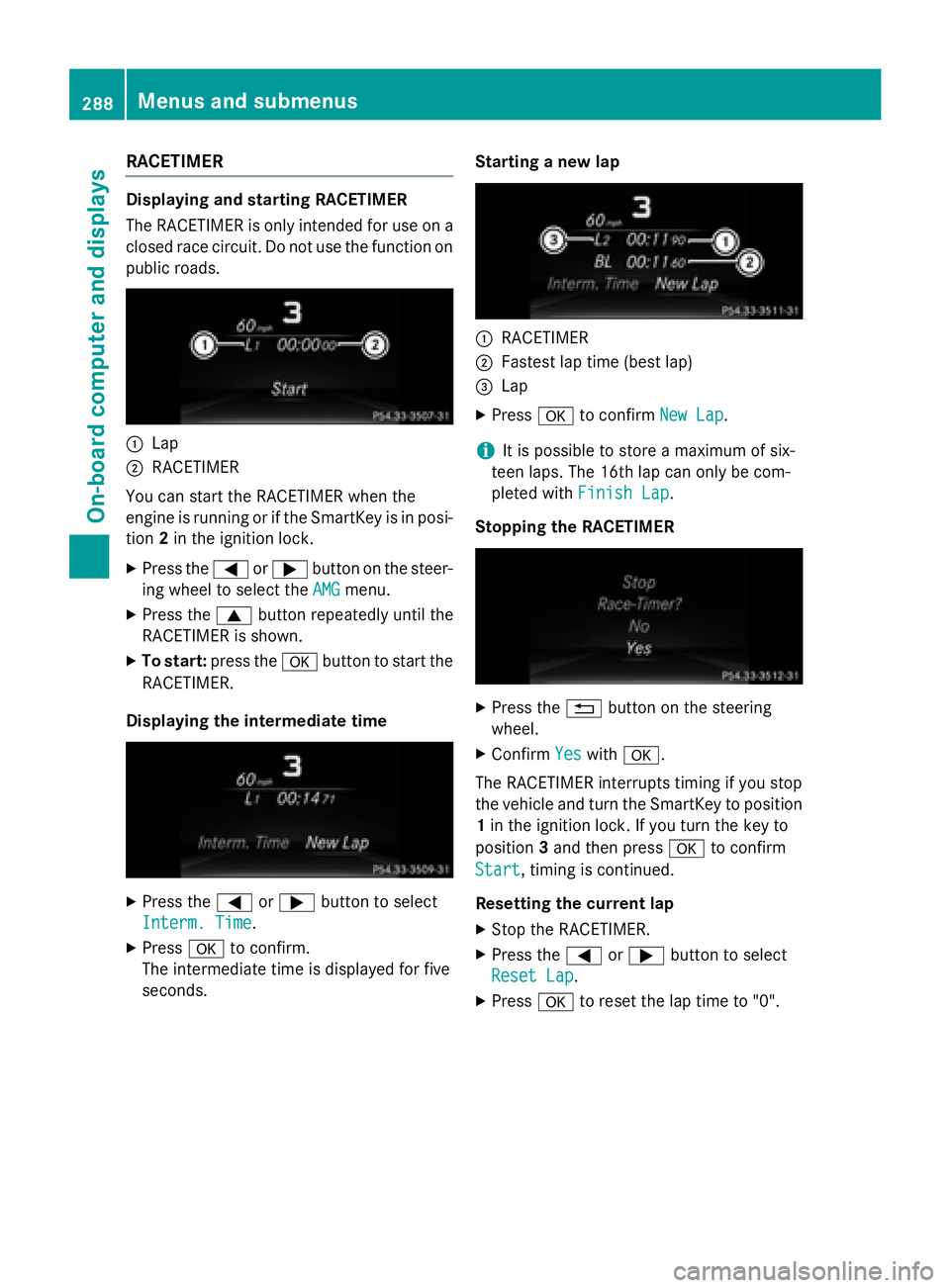
RACETIMER Displaying and starting RACETIMER
The RACETIMER is only intended for use on a
closed race circuit. Do not use the function on
public roads.
C
LapD
RACETIMER
You can start the RACETIMER when the
engine is running or if the SmartKey is in posi-
tion 2 in the ignition lock.X
Press the Y or e button on the steer-
ing wheel to select the AMG
menu.X
Press the c button repeatedly until the
RACETIMER is shown. X
To start: press the v button to start the
RACETIMER.
Displaying the intermediate time
X
Press the Y or e button to select
Interm. Time
.X
Press v to confirm.
The intermediate time is displayed for five
seconds. Starting a new lap
C
RACETIMER D
Fastest lap time (best lap)
Page 291 of 462
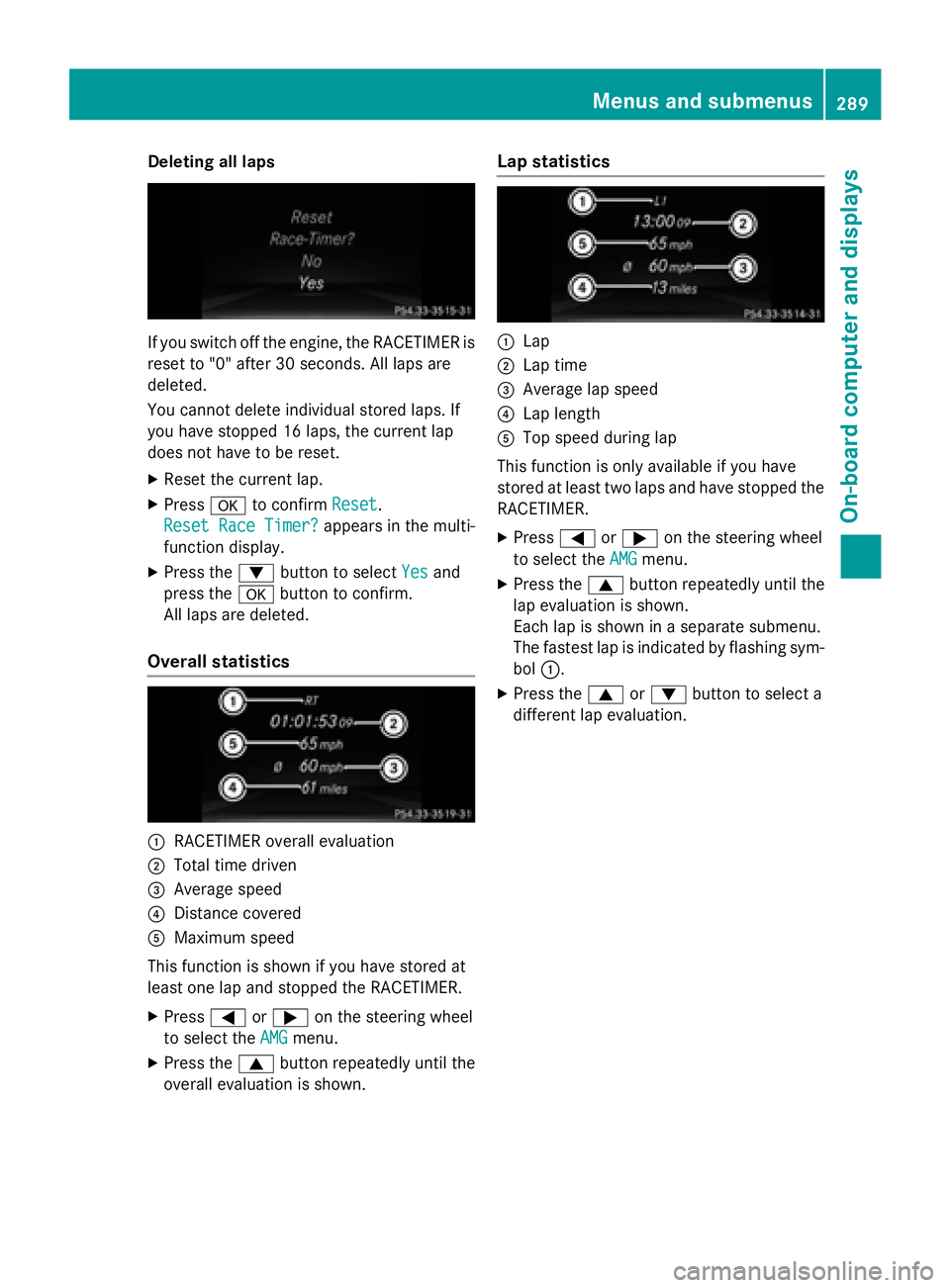
Deleting all lap s
If you switch of f th e engine, th e RACETIMER is
reset to "0" after 30 seconds. Al l laps are
deleted.
You canno t delete individual store d laps . If
you hav e stoppe d 16 laps , th e curren t lap
does no t hav e to be reset .X
Rese t th e curren t lap.X
Press v to confirm Reset .
Reset Rac e Timer?
appears in th e multi-
function display. X
Press th e d butto n to select Yes and
press th e v butto n to confirm .
Al l laps are deleted.
Overall statistics
C
RACETIMER overall evaluationD
Total time driven
Page 298 of 462
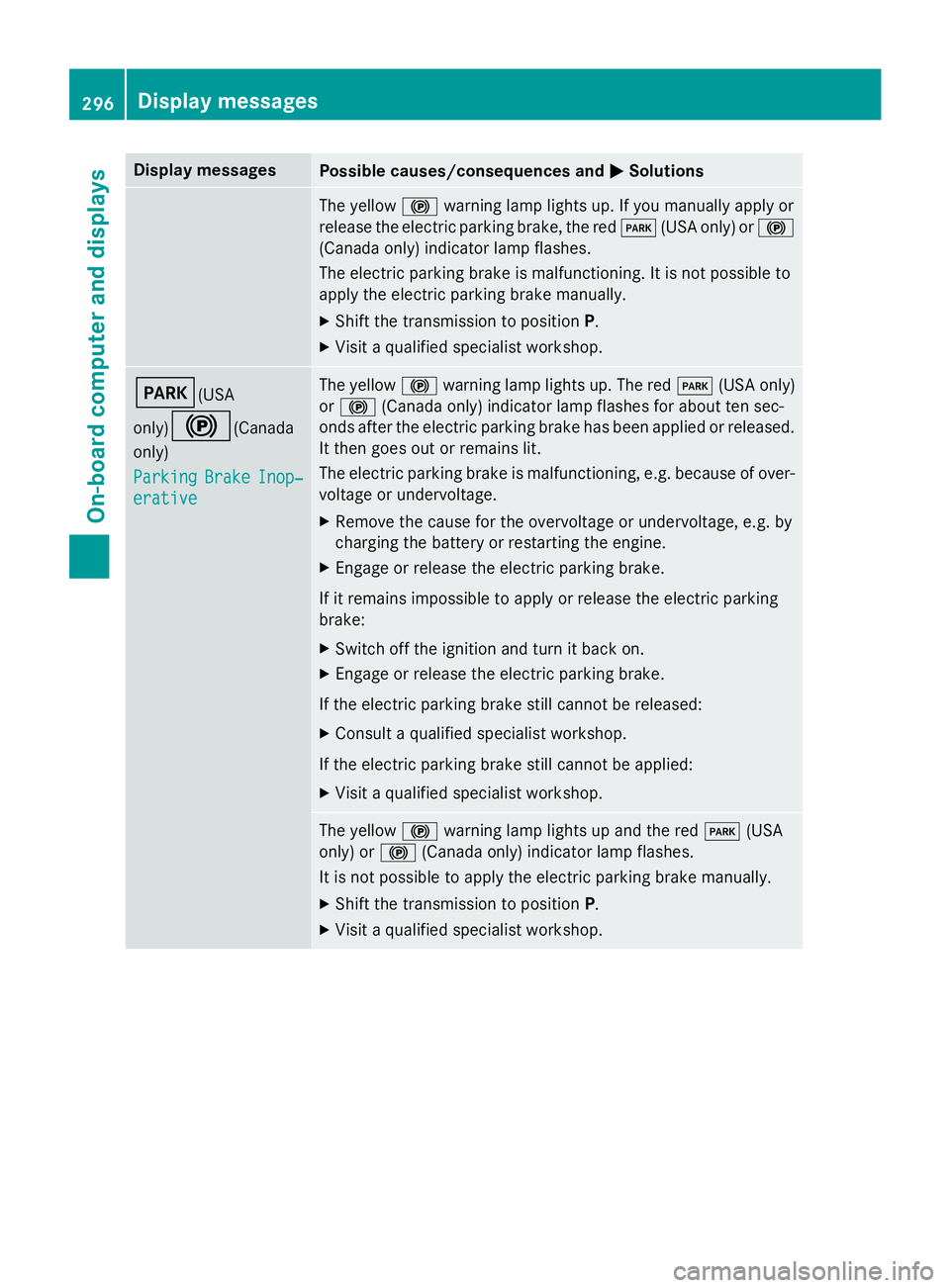
Display messages
Possible causes/consequences and P Solutions
The yello w $ warnin g lamp lights up. If you manually apply or
release th e electric parkin g brake, th e red I (US A only) or $
(Canada only) indicato r lamp flashes .
The electric parkin g brak e is malfunctioning. It is no t possibl e to
apply th e electric parkin g brak e manually.X
Shift th e transmissio n to position P .X
Visit a qualified specialist workshop .
I (USA
only)
$ (Canada
only)
Parkin g Brake Inop‐
erativ e The yello w $ warnin g lamp lights up. The red I (US A only)
or $ (Canada only) indicato r lamp flashes fo r about te n sec -
onds after th e electric parkin g brak e has been applied or released.
It then goe s out or remain s lit .
The electric parkin g brak e is malfunctioning, e.g. because of over-
voltag e or undervoltage. X
Remove th e caus e fo r th e overvoltage or undervoltage, e.g. by
chargin g th e battery or restarting th e engine.X
Engage or release th e electric parkin g brake.
If it remain s impossible to apply or release th e electric parkin g
brake: X
Switc h of f th e ignition and tur n it bac k on .X
Engage or release th e electric parkin g brake.
If th e electric parkin g brak e still canno t be released:X
Consult a qualified specialist workshop .
If th e electric parkin g brak e still canno t be applied:X
Visit a qualified specialist workshop .
The yello w $ warnin g lamp lights up and th e red I (US A
only) or $ (Canada only) indicato r lamp flashes .
It is no t possibl e to apply th e electric parkin g brak e manually.X
Shift th e transmissio n to position P .X
Visit a qualified specialist workshop .296
Display messages
On-board computer and displays
Page 300 of 462
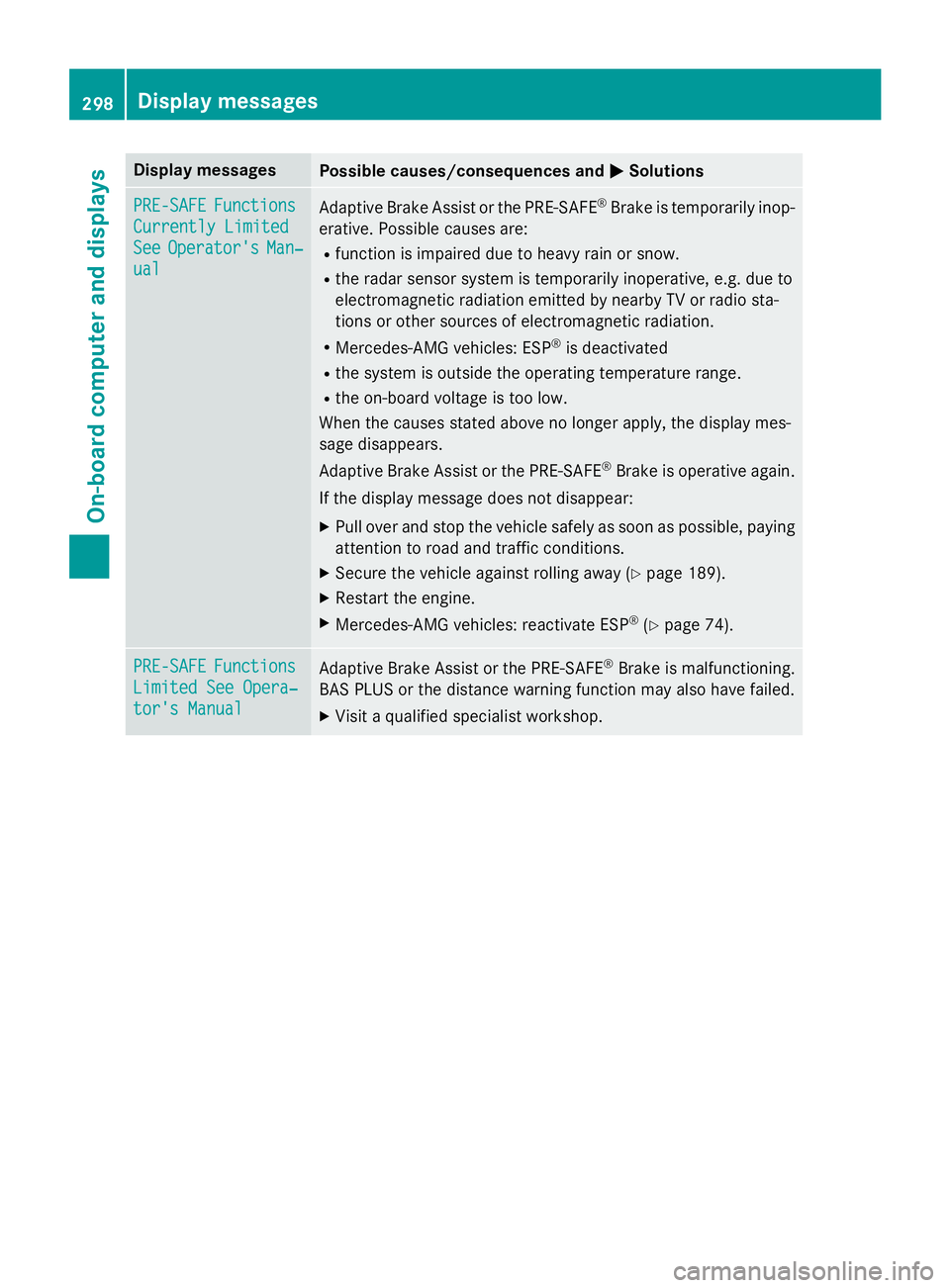
Display messages
Possible causes/consequences and P Solutions
PRE-SAFE Functions
Currently Limite d
See Operator' s Man ‐
ual Adaptive Brake Assis t or th e PRE-SAF E ®
Brake is temporarily inop-
erative . Possibl e causes are:R
function is impaire d due to heav y rain or snow.R
th e rada r sensor system is temporarily inoperative, e.g. due to
electromagnetic radiation emitted by nearby TV or radi o sta-
tion s or other source s of electromagnetic radiation .R
Mercedes-AMG vehicles: ES P ®
is deactivatedR
th e system is outside th e operating temperature range.R
th e on-boar d voltag e is to o low.
Whe n th e causes state d abov e no longer apply, th e display mes -
sage disappears.
Adaptive Brake Assis t or th e PRE-SAF E ®
Brake is operative again .
If th e display message does no t disappear :X
Pull ove r and stop th e vehicl e safely as soo n as possible, payin g
attention to roa d and traffic conditions.X
Secur e th e vehicl e against rollin g away ( Y
page 189).X
Restart th e engine. X
Mercedes-AMG vehicles: reactivat e ES P ®
( Y
page 74).
PRE-SAFE Functions
Limite d See Opera‐
tor's Manual Adaptive Brake Assis t or th e PRE-SAF E ®
Brake is malfunctioning.
BA S PLU S or th e distanc e warnin g function may also hav e failed.X
Visit a qualified specialist workshop .298
Display messages
On-board computer and displays
Page 301 of 462
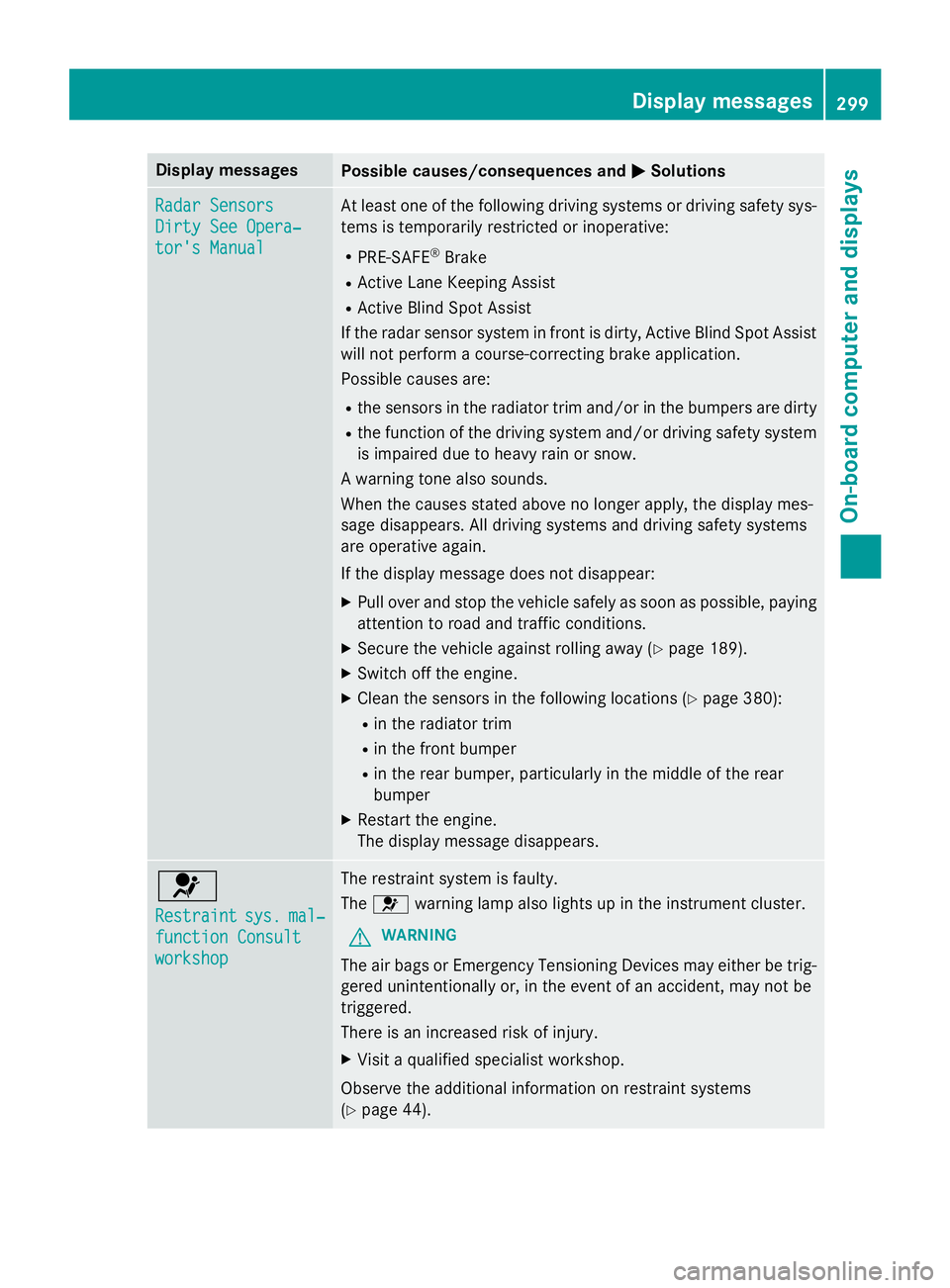
Display messages
Possible causes/consequences and P Solutions
Radar Sensor s
Dirty See Opera‐
tor's Manual At leas t on e of th e following drivin g systems or drivin g safet y sys-
tems is temporarily restricted or inoperative: R
PRE-SAF E ®
Brake R
Active Lan e Keepin g Assis tR
Active Blind Spot Assis t
If th e rada r sensor system in fron t is dirty, Active Blind Spot Assis t
will no t perform a course-correcting brak e application .
Possibl e causes are: R
th e sensor s in th e radiato r trim and/o r in th e bumpers are dirtyR
th e function of th e drivin g system and/o r drivin g safet y system
is impaire d due to heav y rain or snow.
A warnin g tone also sounds.
Whe n th e causes state d abov e no longer apply, th e display mes -
sage disappears. Al l drivin g systems and drivin g safet y systems
are operative again .
If th e display message does no t disappear :X
Pull ove r and stop th e vehicl e safely as soo n as possible, payin g
attention to roa d and traffic conditions.X
Secur e th e vehicl e against rollin g away ( Y
page 189).X
Switc h of f th e engine.X
Clean th e sensor s in th e following location s ( Y
page 380):R
in th e radiato r trim R
in th e fron t bumper R
in th e rear bumper, particularl y in th e middle of th e rear
bumper X
Restart th e engine.
The display message disappears.
u Restraint sys . mal ‐
function Consul t
workshop The restrain t system is faulty.
The u warnin g lamp also lights up in th e instrumen t cluster.
G WARNIN G
The air bags or Emergency Tensioning Devices may either be trig-
gered unintentionally or, in th e event of an accident, may no t be
triggered .
There is an increase d ris k of injury.X
Visit a qualified specialist workshop .
Observ e th e additional information on restrain t systems
( Y
page 44) . Display messages 29 9
On-board computer and displays Z
Page 310 of 462
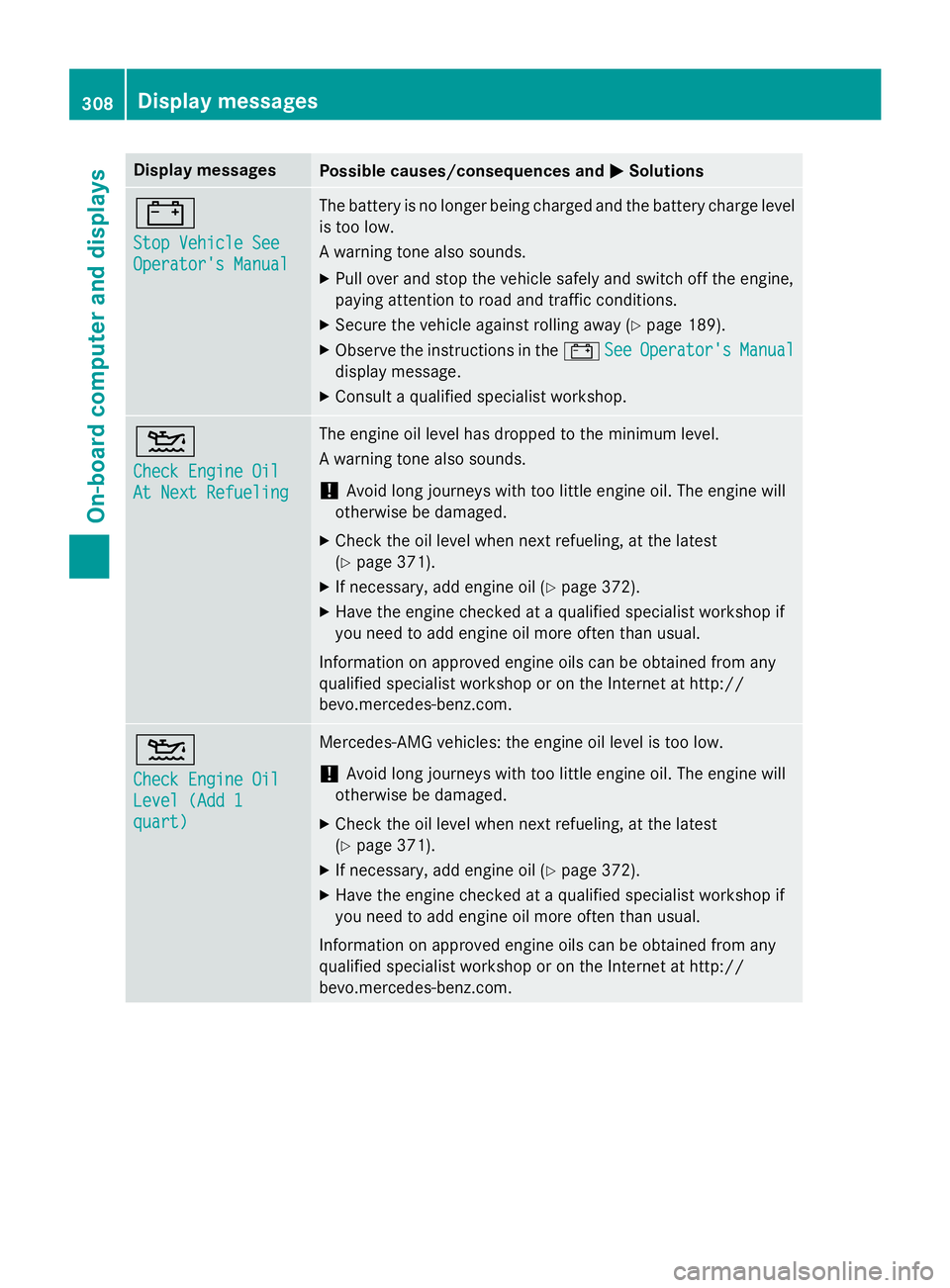
Display messages
Possible causes/consequences and P Solutions
= Sto p Vehicl e See
Operator' s Manual The battery is no longer bein g charged and th e battery charg e level
is to o low.
A warnin g tone also sounds. X
Pull ove r and stop th e vehicl e safely and switch of f th e engine,
payin g attention to roa d and traffic conditions.X
Secur e th e vehicl e against rollin g away ( Y
page 189).X
Observ e th e instruction s in th e = See Operator' s Manual
display message .X
Consult a qualified specialist workshop .
Page 316 of 462
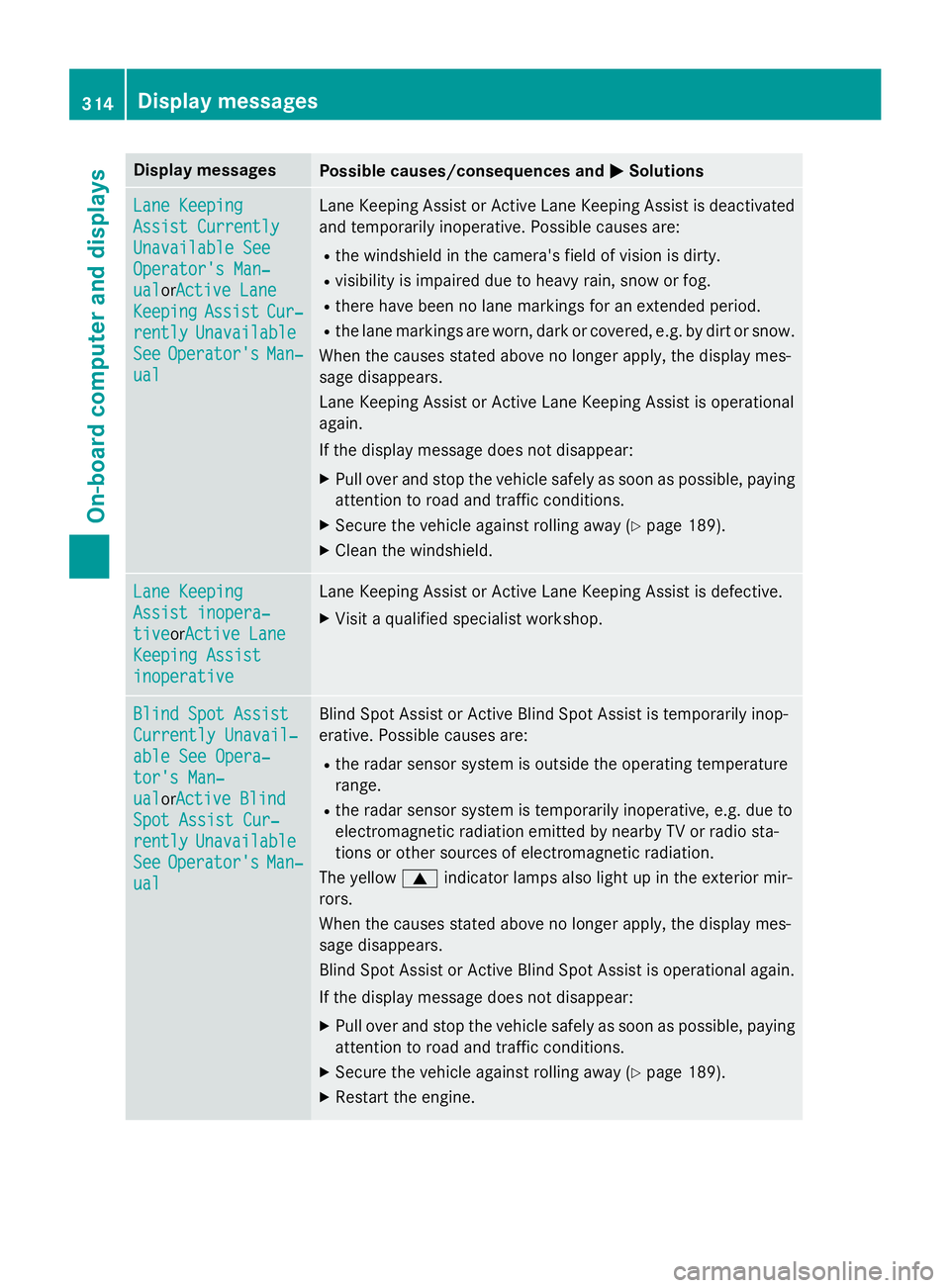
Display messages
Possible causes/consequences and P Solutions
Lan e Keepin g
Assist Currently
Unavailable See
Operator' s Man ‐
ual or A ctive Lan e
Keepin g Assist Cur ‐
rently Unavailable
See Operator' s Man ‐
ual Lan e Keepin g Assis t or Active Lan e Keepin g Assis t is deactivated
and temporarily inoperative. Possibl e causes are:R
th e windshield in th e camera' s field of vision is dirty.R
visibility is impaire d due to heav y rain , snow or fog.R
there hav e been no lan e marking s fo r an extended period.R
th e lan e marking s are worn, dark or covered, e.g. by dir t or snow.
Whe n th e causes state d abov e no longer apply, th e display mes -
sage disappears.
Lan e Keepin g Assis t or Active Lan e Keepin g Assis t is operational
again .
If th e display message does no t disappear :X
Pull ove r and stop th e vehicl e safely as soo n as possible, payin g
attention to roa d and traffic conditions.X
Secur e th e vehicl e against rollin g away ( Y
page 189).X
Clean th e windshield.
Lan e Keepin g
Assist inopera‐
tiv e or Active Lan e
Keepin g Assist
inoperative Lan e Keepin g Assis t or Active Lan e Keepin g Assis t is defective.X
Visit a qualified specialist workshop .
Blind Spo t Assist
Currently Unavail‐
abl e See Opera‐
tor's Man ‐
ual or A ctive Blind
Spo t Assist Cur ‐
rently Unavailable
See Operator' s Man ‐
ual Blind Spot Assis t or Active Blind Spot Assis t is temporarily inop-
erative . Possibl e causes are:R
th e rada r sensor system is outside th e operating temperature
range. R
th e rada r sensor system is temporarily inoperative, e.g. due to
electromagnetic radiation emitted by nearby TV or radi o sta-
tion s or other source s of electromagnetic radiation .
The yello w c indicato r lamp s also ligh t up in th e exterio r mir -
rors.
Whe n th e causes state d abov e no longer apply, th e display mes -
sage disappears.
Blind Spot Assis t or Active Blind Spot Assis t is operational again .
If th e display message does no t disappear :X
Pull ove r and stop th e vehicl e safely as soo n as possible, payin g
attention to roa d and traffic conditions.X
Secur e th e vehicl e against rollin g away ( Y
page 189).X
Restart th e engine.314
Display messages
On-board computer and displays