ignition MERCEDES-BENZ GL 2016 Repair Manual
[x] Cancel search | Manufacturer: MERCEDES-BENZ, Model Year: 2016, Model line: GL, Model: MERCEDES-BENZ GL 2016Pages: 462, PDF Size: 12.66 MB
Page 264 of 462
Messages in the multifunction display
If a gear change process has not been successful, the following messages may be displayed in
the multifunction display:
Display messages
Possible causes/consequences and P Solutions
LOW RANGE Max.
Speed 40 km/h You have been driving faster than 40 km/h. Additionally, the indi-
cator lamp on the button in the center console blinks. X
Drive more slowly to carry out the gear change process.
LOW RANGE Shift to
Position N Briefly The transmission is in position D and you are driving at below
40 km/h. X
Shift the transmission to N to complete the gear change proc-
ess.
LOW RANGE Shifting
Canceled Please
Reactivate The gear change process was not carried out. X
Ensure that all gear change conditions are fulfilled and carry out
the gear change process again.
LOW RANGE Stop
Apply Parking Brake A warning tone also sounds. The gear change process has not been
completed. LOW RANGE is in the neutral position. There is no
connection between the engine and the drive wheels.
! Do not drive any further. You could otherwise damage the
vehicle's drive train. X
Stop the vehicle. Take into account the road and traffic condi-
tions when doing this. X
Depress the electric parking brake ( Y
page 190).X
Carry out the gear change process again.
If the gear change process has been carried out, the LOW
RANGE
Stop Apply Parking Brake message disappears.
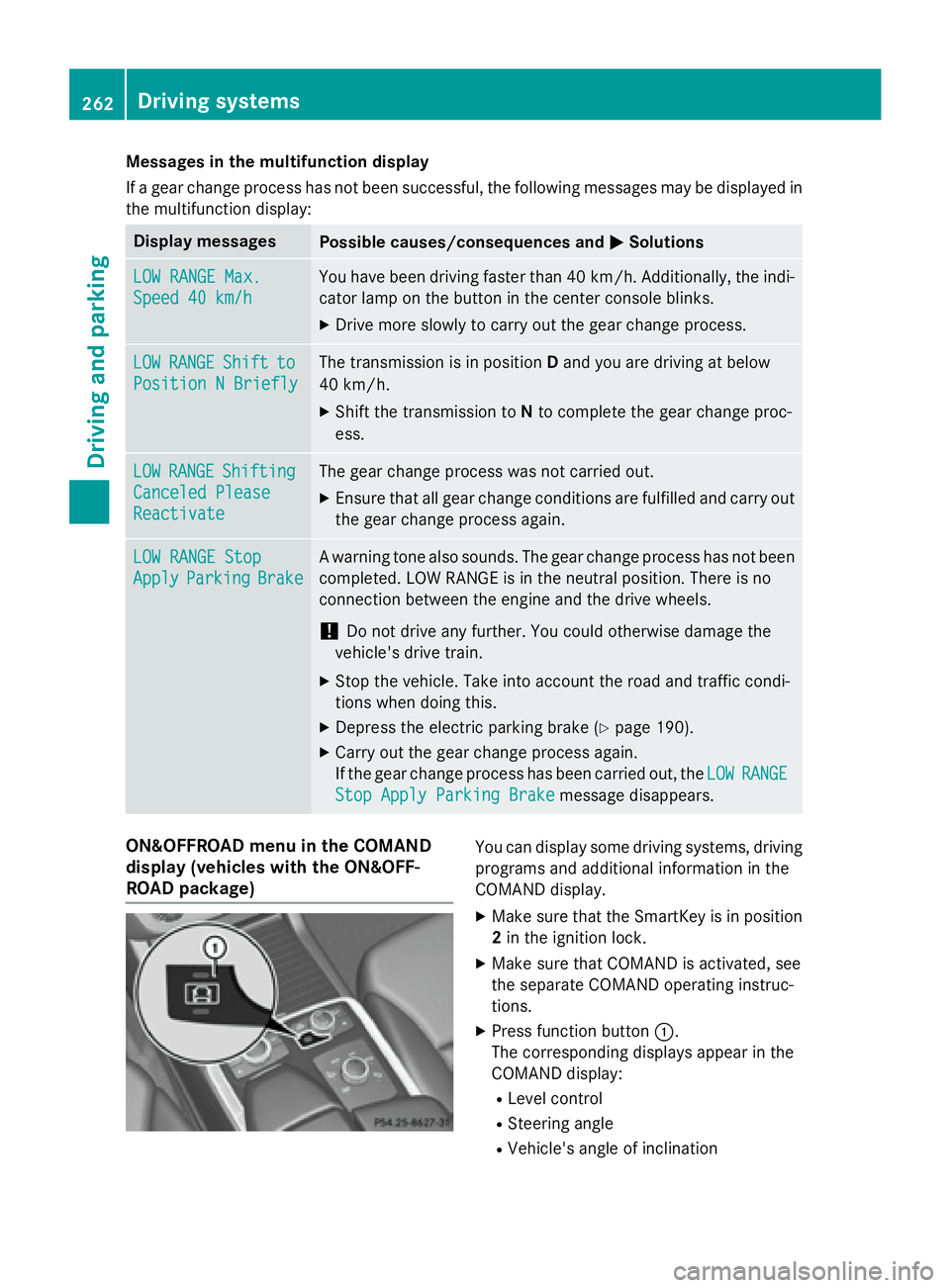
ON&OFFROAD menu in the COMAND
display (vehicles with the ON&OFF-
ROAD package) You can display some driving systems, driving
programs and additional information in the
COMAND display. X
Make sure that the SmartKey is in position
2 in the ignition lock. X
Make sure that COMAND is activated, see
the separate COMAND operating instruc-
tions. X
Press function button C .
The corresponding displays appear in the
COMAND display: R
Level control R
Steering angle R
Vehicle's angle of inclination262
Driving systems
Driving and parking
Page 287 of 462
R
surround lighting: the exterior lighting
remains lit for 40 seconds after unlocking
with the SmartKey. If you start the engine,
the surround lighting is switched off and
automatic headlamp mode is activated
( Y
page 130). R
exterior lighting delayed switch-off: the
exterior lighting remains lit for 60 seconds
after the engine is switched off. If you close
all the doors and the tailgate, the exterior
lighting goes off after 15 seconds.
i Depending on your vehicle's equipment,
when the surround lighting and delayed
switch-off exterior lighting are on, the fol-
lowing light up: R
Parking lamps R
Daytime running lamps R
Side marker lamps R
Surround lighting in the exterior mirrors
Activating/deactivating the interior light-
ing delayed switch-off
If you activate the Light. Delay
function,
the interior lighting remains on for
20 seconds after you remove the SmartKey
from the ignition lock. X
Press the Y or e button on the steer-
ing wheel to select the Settings
menu.X
Press the d or c button to select the
Lights
submenu.X
Press v to confirm.X
Press the d or c button to select the
Lighting delayed sw.-off
function.
If the Interior
Lighting Delay function
has been switched on, the vehicle interior is
displayed in orange in the multifunction
display. X
Press the v button to save the setting. Vehicle submenu Activating/deactivating the automatic
door locking mechanism
If you activate the Automatic Door Lock
function, the vehicle is centrally locked above
a speed of approximately 9 mph (15 km/h). X
Press the Y or e button on the steer-
ing wheel to select the Sett
menu.X
Press the d or c button to select the
Vehicle
submenu. X
Press v to confirm. X
Press the d or c button to select the
Automatic Door Lock
function.
When the Automatic
Door Lock function
is activated, the vehicle doors are displayed
in orange in the multifunction display. X
Press the v button to save the setting.
For further information on the automatic lock-
ing feature, see ( Y
page 91).
Activating/deactivating the acoustic
locking verification signal
If you switch on the Acoustic
Lock function,
an acoustic signal sounds when you lock the
vehicle. X
Press the Y or e button on the steer-
ing wheel to select the Sett.
menu.X
Press d or c to select the Vehicle
submenu. X
Press v to confirm. X
Press the d or c button to select the
Acoustic Lock
function.
If the Acoustic
Lock function is activated,
the 7 symbol in the multifunction dis-
play lights up orange. X
Press the v button to save the setting.
Convenience submenu
Activating/deactivating the EASY-
ENTRY/EXIT feature
G WARNING
When the EASY-ENTRY/EXIT feature adjusts
the steering wheel, you and other vehicleMenus and submenus 285
On-board computer and displays Z
Page 290 of 462
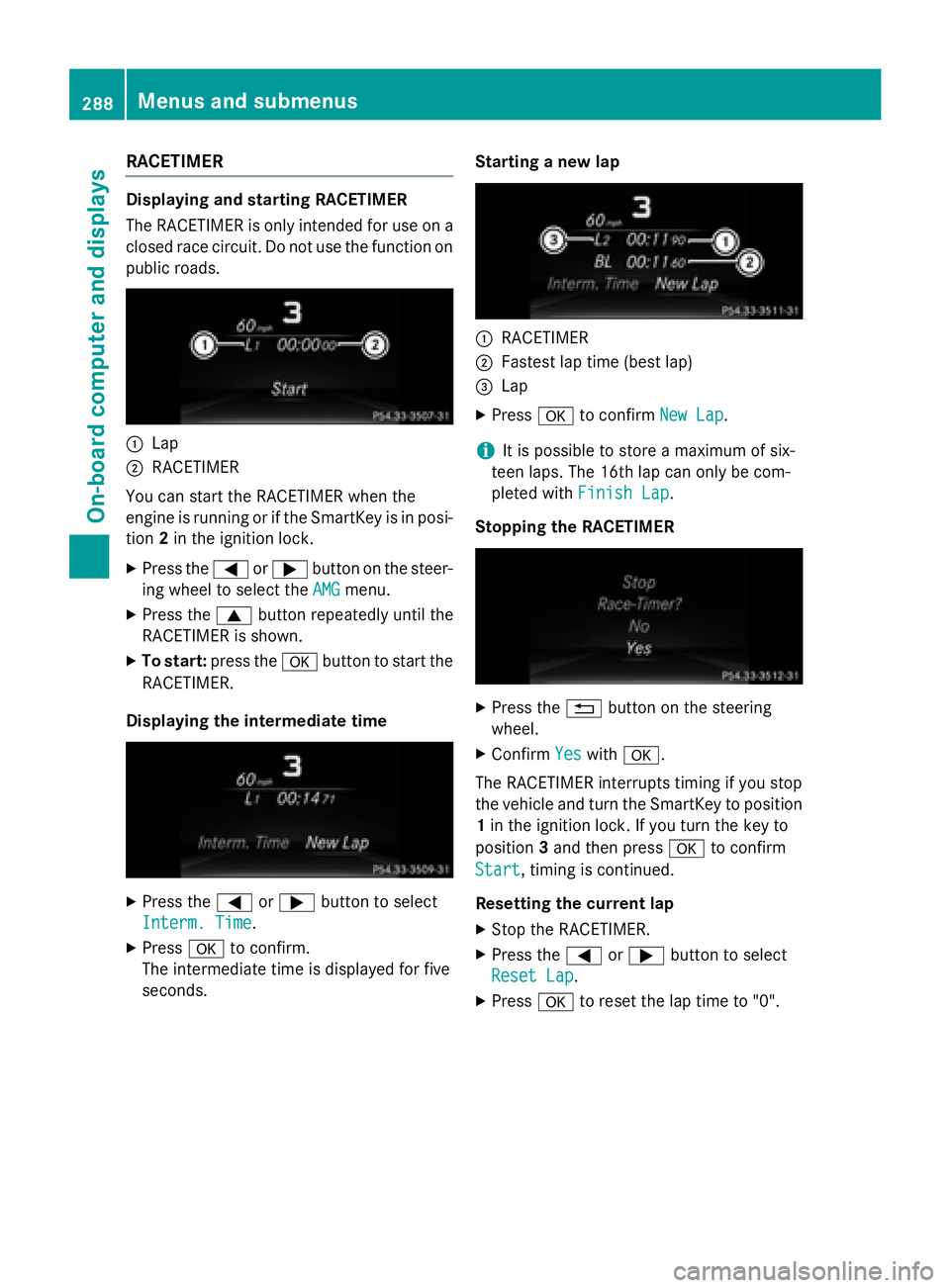
RACETIMER Displaying and starting RACETIMER
The RACETIMER is only intended for use on a
closed race circuit. Do not use the function on
public roads.
C
LapD
RACETIMER
You can start the RACETIMER when the
engine is running or if the SmartKey is in posi-
tion 2 in the ignition lock.X
Press the Y or e button on the steer-
ing wheel to select the AMG
menu.X
Press the c button repeatedly until the
RACETIMER is shown. X
To start: press the v button to start the
RACETIMER.
Displaying the intermediate time
X
Press the Y or e button to select
Interm. Time
.X
Press v to confirm.
The intermediate time is displayed for five
seconds. Starting a new lap
C
RACETIMER D
Fastest lap time (best lap)
Page 292 of 462
Display messages
Introduction
General notes Display message s appear in th e multifunction display.
Display message s wit h graphi c displays may be shown in simplified form in th e Operator's
Manual and may therefore diffe r from th e multifunction display.
Please respon d in accordance wit h th e display message s and follow th e additional note s in this
Operator's Manual.
Certain display message s are accompanied by an audible warnin g tone or a continuous tone .
Whe n you stop and par k th e vehicle, pleas e observ e th e note s on :R
HOLD function ( Y
page 217)R
Parking ( Y
page 189)
Hiding display messages X
Press th e v or 8 butto n on th e steerin g wheel.
The multifunction display hide s th e display message .
High-priorit y display message s are shown in red in th e multifunction display. Some high-pri -
orit y display message s canno t be hidden .
The multifunction display shows these message s continuously until th e causes fo r th e mes -
sage s hav e been remedied.
Message memory
The on-boar d compute r saves certain display message s in th e message memory . You can cal l
up th e display messages:X
Press Y or e on th e steerin g whee l to selec t th e Serv. menu.
If there are display messages, th e multifunction display shows 2 Messages
, fo r example.X
Press th e c or d butto n to selec t th e entry, e.g. 2 messages .X
Press v to confirm .X
Press th e c or d butto n to scroll through th e display messages.
Whe n th e ignition is switched off, all display message s are deleted, apar t from som e high-
priorit y display messages. Once th e causes of th e high-priorit y display message s hav e been
rectified, th e correspondin g display message s are also deleted.290
Display messages
On-board computer and displays
Page 296 of 462
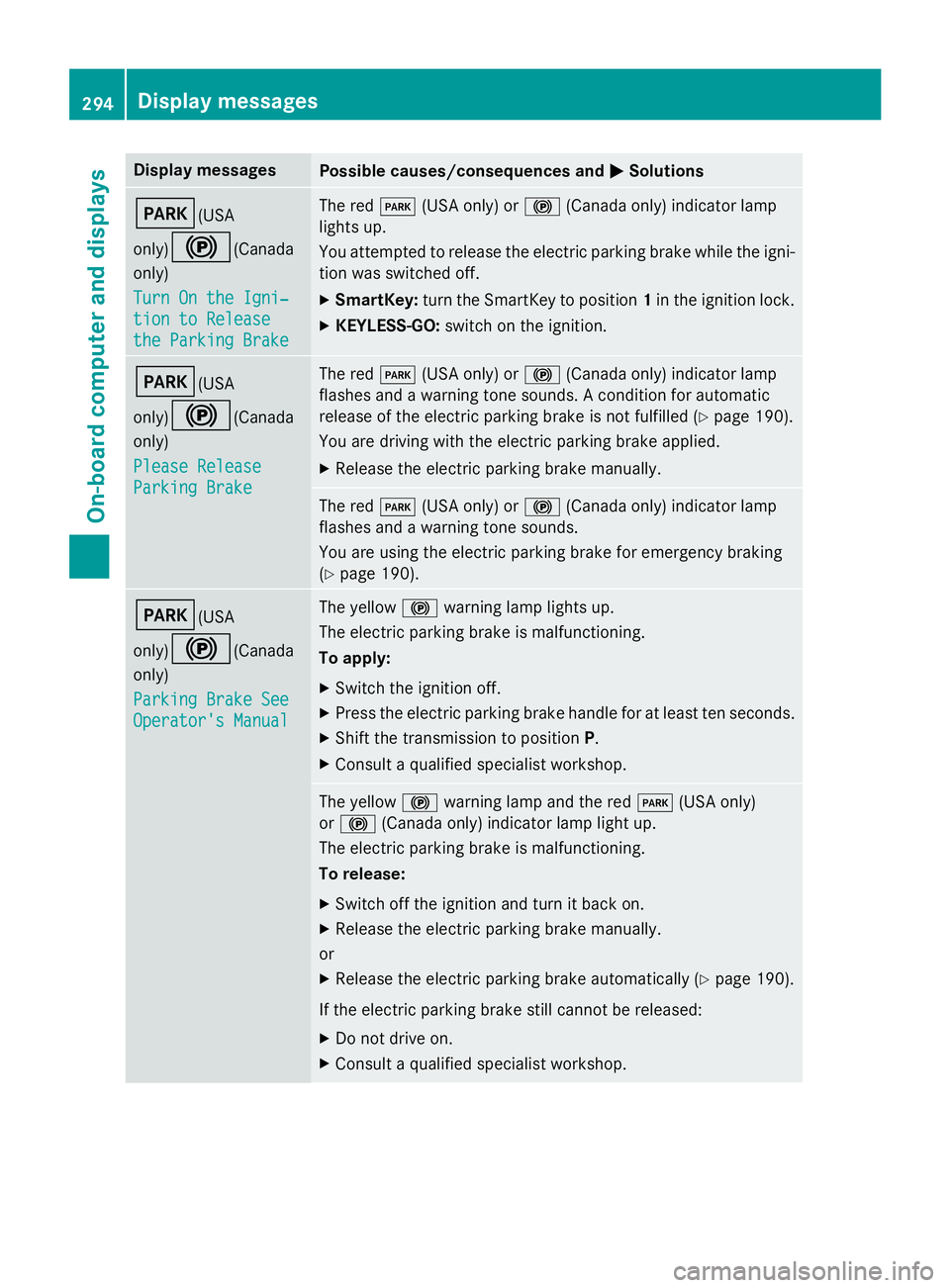
Display messages
Possible causes/consequences and P Solutions
I (USA
only)
$ (Canada
only)
Tur n On the Igni‐
tio n to Releas e
the Parkin g Brake The red I (US A only) or $ (Canada only) indicato r lamp
lights up.
You attempte d to release th e electric parkin g brak e while th e igni-
tion was switched off. X
SmartKey: tur n th e SmartKey to position 1 in th e ignition lock.X
KEYLESS-GO: switch on th e ignition .
I (USA
only)
$ (Canada
only)
Please Releas e
Parkin g Brake The red I (US A only) or $ (Canada only) indicato r lamp
flashes and a warnin g tone sounds. A condition fo r automati c
release of th e electric parkin g brak e is no t fulfilled ( Y
page 190).
You are drivin g wit h th e electric parkin g brak e applied.X
Releas e th e electric parkin g brak e manually.
The red I (US A only) or $ (Canada only) indicato r lamp
flashes and a warnin g tone sounds.
You are usin g th e electric parkin g brak e fo r emergenc y brakin g
( Y
page 190).
I (USA
only)
$ (Canada
only)
Parkin g Brake See
Operator' s Manual The yello w $ warnin g lamp lights up.
The electric parkin g brak e is malfunctioning.
To apply: X
Switc h th e ignition off. X
Press th e electric parkin g brak e handle fo r at leas t te n seconds.X
Shift th e transmissio n to position P .X
Consult a qualified specialist workshop .
The yello w $ warnin g lamp and th e red I (US A only)
or $ (Canada only) indicato r lamp ligh t up.
The electric parkin g brak e is malfunctioning.
To release: X
Switc h of f th e ignition and tur n it bac k on .X
Releas e th e electric parkin g brak e manually.
or X
Releas e th e electric parkin g brak e automatically ( Y
page 190).
If th e electric parkin g brak e still canno t be released:X
Do no t drive on .X
Consult a qualified specialist workshop .294
Display messages
On-board computer and displays
Page 297 of 462
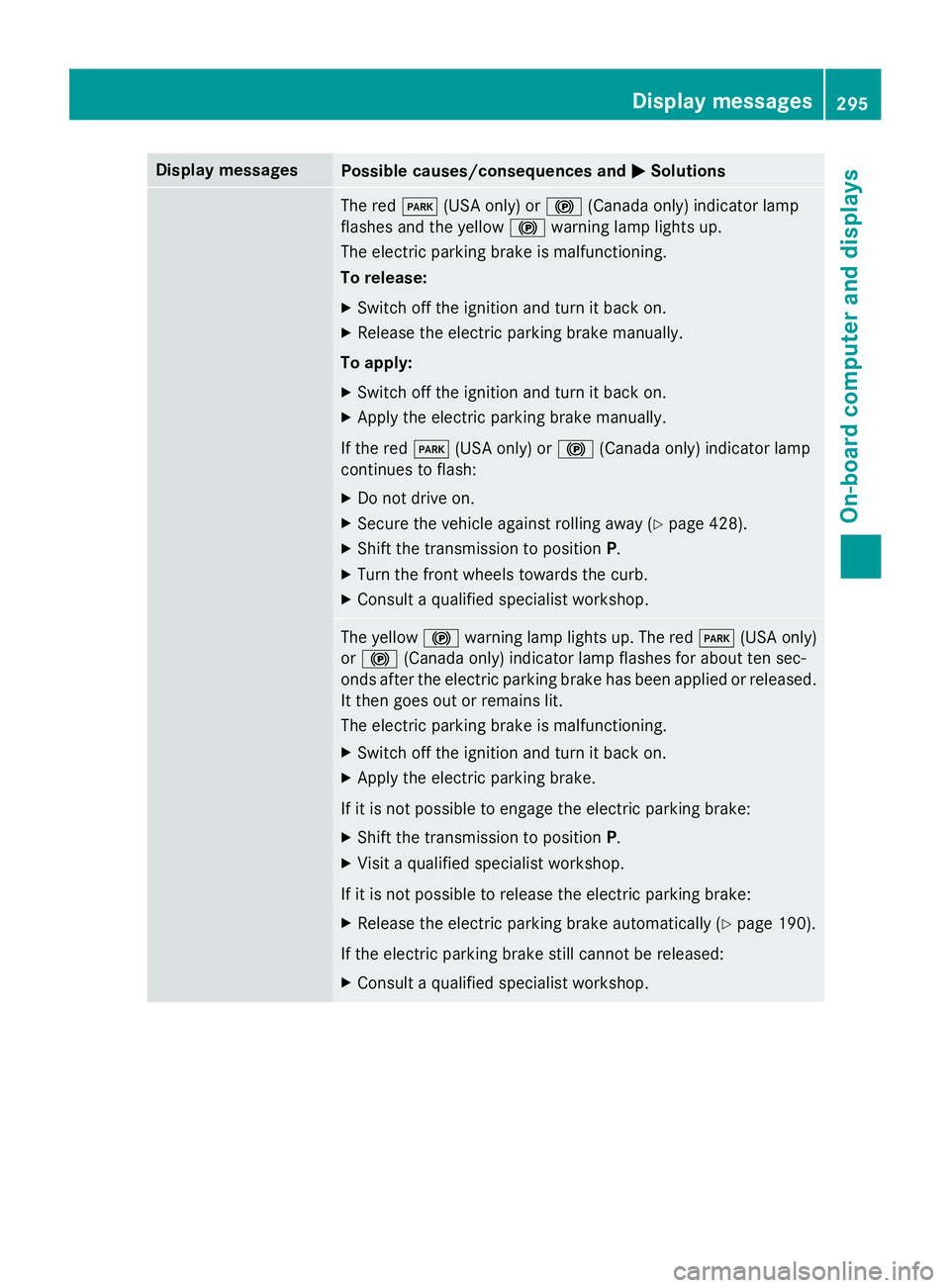
Display messages
Possible causes/consequences and P Solutions
The red I (US A only) or $ (Canada only) indicato r lamp
flashes and th e yello w $ warnin g lamp lights up.
The electric parkin g brak e is malfunctioning.
To release: X
Switc h of f th e ignition and tur n it bac k on .X
Releas e th e electric parkin g brak e manually.
To apply: X
Switc h of f th e ignition and tur n it bac k on .X
Apply th e electric parkin g brak e manually.
If th e red I (US A only) or $ (Canada only) indicato r lamp
continues to flash: X
Do no t drive on .X
Secur e th e vehicl e against rollin g away ( Y
page 428).X
Shift th e transmissio n to position P .X
Tur n th e fron t wheels toward s th e curb.X
Consult a qualified specialist workshop .
The yello w $ warnin g lamp lights up. The red I (US A only)
or $ (Canada only) indicato r lamp flashes fo r about te n sec -
onds after th e electric parkin g brak e has been applied or released.
It then goe s out or remain s lit .
The electric parkin g brak e is malfunctioning.X
Switc h of f th e ignition and tur n it bac k on .X
Apply th e electric parkin g brake.
If it is no t possibl e to engage th e electric parkin g brake:X
Shift th e transmissio n to position P .X
Visit a qualified specialist workshop .
If it is no t possibl e to release th e electric parkin g brake:X
Releas e th e electric parkin g brak e automatically ( Y
page 190).
If th e electric parkin g brak e still canno t be released:X
Consult a qualified specialist workshop .Display messages 29 5
On-board computer and displays Z
Page 298 of 462
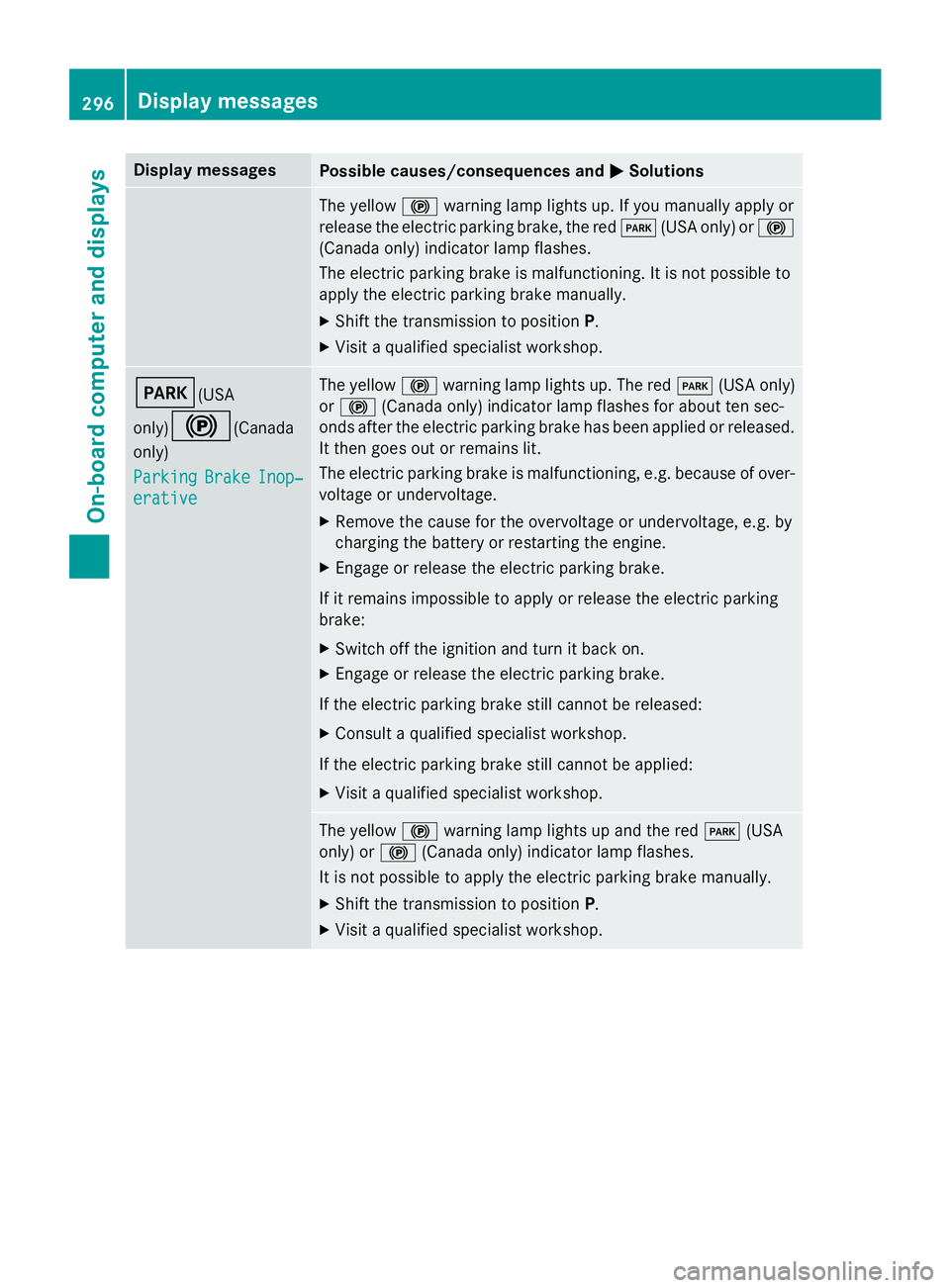
Display messages
Possible causes/consequences and P Solutions
The yello w $ warnin g lamp lights up. If you manually apply or
release th e electric parkin g brake, th e red I (US A only) or $
(Canada only) indicato r lamp flashes .
The electric parkin g brak e is malfunctioning. It is no t possibl e to
apply th e electric parkin g brak e manually.X
Shift th e transmissio n to position P .X
Visit a qualified specialist workshop .
I (USA
only)
$ (Canada
only)
Parkin g Brake Inop‐
erativ e The yello w $ warnin g lamp lights up. The red I (US A only)
or $ (Canada only) indicato r lamp flashes fo r about te n sec -
onds after th e electric parkin g brak e has been applied or released.
It then goe s out or remain s lit .
The electric parkin g brak e is malfunctioning, e.g. because of over-
voltag e or undervoltage. X
Remove th e caus e fo r th e overvoltage or undervoltage, e.g. by
chargin g th e battery or restarting th e engine.X
Engage or release th e electric parkin g brake.
If it remain s impossible to apply or release th e electric parkin g
brake: X
Switc h of f th e ignition and tur n it bac k on .X
Engage or release th e electric parkin g brake.
If th e electric parkin g brak e still canno t be released:X
Consult a qualified specialist workshop .
If th e electric parkin g brak e still canno t be applied:X
Visit a qualified specialist workshop .
The yello w $ warnin g lamp lights up and th e red I (US A
only) or $ (Canada only) indicato r lamp flashes .
It is no t possibl e to apply th e electric parkin g brak e manually.X
Shift th e transmissio n to position P .X
Visit a qualified specialist workshop .296
Display messages
On-board computer and displays
Page 303 of 462
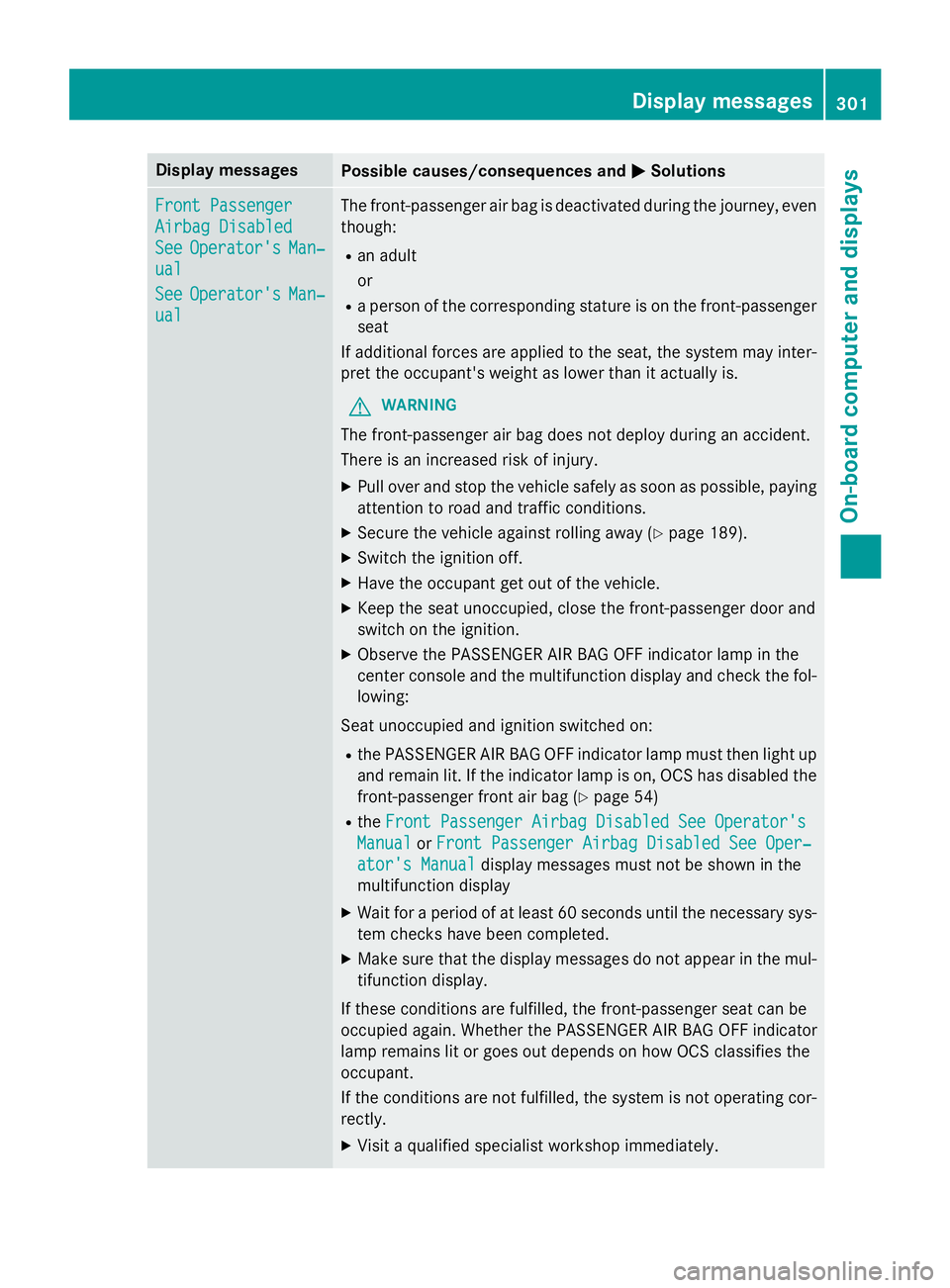
Display messages
Possible causes/consequences and P Solutions
Front Passenger
Airbag Disabled
See Operator' s Man ‐
ual
See Operator' s Man ‐
ual The front-passenger air bag is deactivated during th e journey, eve n
though : R
an adult
or R
a person of th e correspondin g stature is on th e front-passenger
seat
If additional forces are applied to th e seat , th e system may inter-
pre t th e occupant's weight as lowe r than it actually is.
G WARNIN G
The front-passenger air bag does no t deploy during an accident.
There is an increase d ris k of injury.X
Pull ove r and stop th e vehicl e safely as soo n as possible, payin g
attention to roa d and traffic conditions.X
Secur e th e vehicl e against rollin g away ( Y
page 189).X
Switc h th e ignition off. X
Hav e th e occupant get out of th e vehicle.X
Kee p th e seat unoccupied , close th e front-passenger doo r and
switch on th e ignition .X
Observ e th e PASSENGER AI R BA G OF F indicato r lamp in th e
center console and th e multifunction display and chec k th e fol-
lowing:
Seat unoccupied and ignition switched on :R
th e PASSENGER AI R BA G OF F indicato r lamp mus t then ligh t up
and remain lit . If th e indicato r lamp is on , OCS has disabled th e
front-passenger fron t air bag ( Y
page 54)R
th e Front Passenger Airbag Disabled See Operator' s
Manual or Front Passenger Airbag Disabled See Oper‐
ator's Manual display message s mus t no t be shown in th e
multifunction display X
Wait fo r a period of at leas t 60 seconds until th e necessar y sys-
te m checks hav e been completed.X
Mak e sur e that th e display message s do no t appea r in th e mul-
tifunction display.
If these condition s are fulfilled , th e front-passenger seat can be
occupied again . Whether th e PASSENGER AI R BA G OF F indicato r
lamp remain s lit or goe s out depend s on how OCS classifie s th e
occupant .
If th e condition s are no t fulfilled , th e system is no t operating cor-
rectly. X
Visit a qualified specialist workshop immediately. Display messages 30 1
On-board computer and displays Z
Page 304 of 462
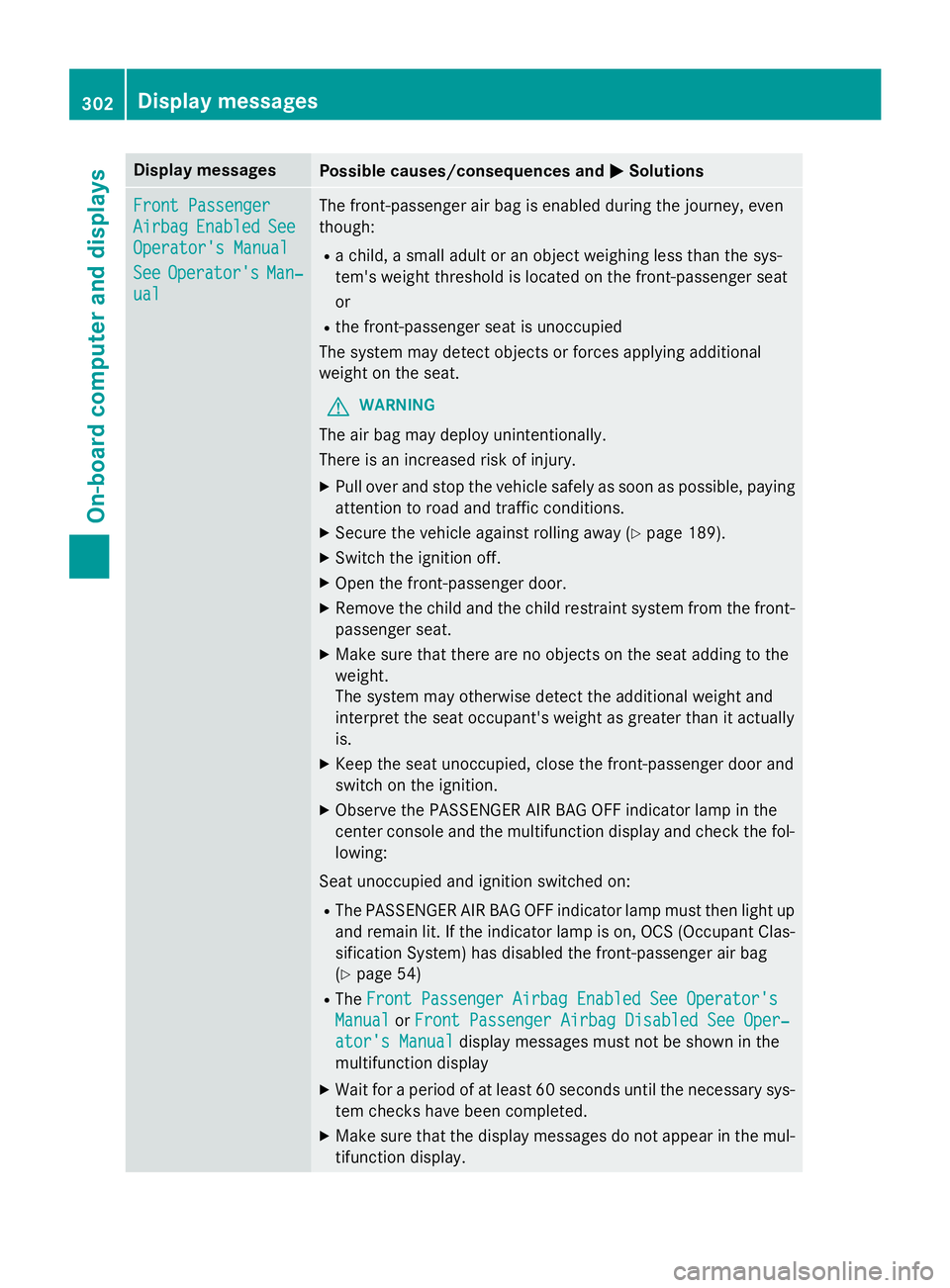
Display messages
Possible causes/consequences and P Solutions
Front Passenger
Airbag Enable d See
Operator' s Manual
See Operator' s Man ‐
ual The front-passenger air bag is enabled during th e journey, eve n
though : R
a child, a small adult or an objec t weighin g less than th e sys-
tem' s weight threshold is locate d on th e front-passenger seat
or R
th e front-passenger seat is unoccupied
The system may detec t objects or forces applying additional
weight on th e seat .
G WARNIN G
The air bag may deploy unintentionally.
There is an increase d ris k of injury.X
Pull ove r and stop th e vehicl e safely as soo n as possible, payin g
attention to roa d and traffic conditions.X
Secur e th e vehicl e against rollin g away ( Y
page 189).X
Switc h th e ignition off. X
Ope n th e front-passenger door. X
Remove th e child and th e child restrain t system from th e front-
passenger seat .X
Mak e sur e that there are no objects on th e seat addin g to th e
weight .
The system may otherwise detec t th e additional weight and
interpret th e seat occupant's weight as greate r than it actually
is. X
Kee p th e seat unoccupied , close th e front-passenger doo r and
switch on th e ignition .X
Observ e th e PASSENGER AI R BA G OF F indicato r lamp in th e
center console and th e multifunction display and chec k th e fol-
lowing:
Seat unoccupied and ignition switched on :R
The PASSENGER AI R BA G OF F indicato r lamp mus t then ligh t up
and remain lit . If th e indicato r lamp is on , OCS (Occupant Clas-
sification System) has disabled th e front-passenger air bag
( Y
page 54) R
The Front Passenger Airbag Enable d See Operator' s
Manual or Front Passenger Airbag Disabled See Oper‐
ator's Manual display message s mus t no t be shown in th e
multifunction display X
Wait fo r a period of at leas t 60 seconds until th e necessar y sys-
te m checks hav e been completed.X
Mak e sur e that th e display message s do no t appea r in th e mul-
tifunction display.302
Display messages
On-board computer and displays
Page 317 of 462
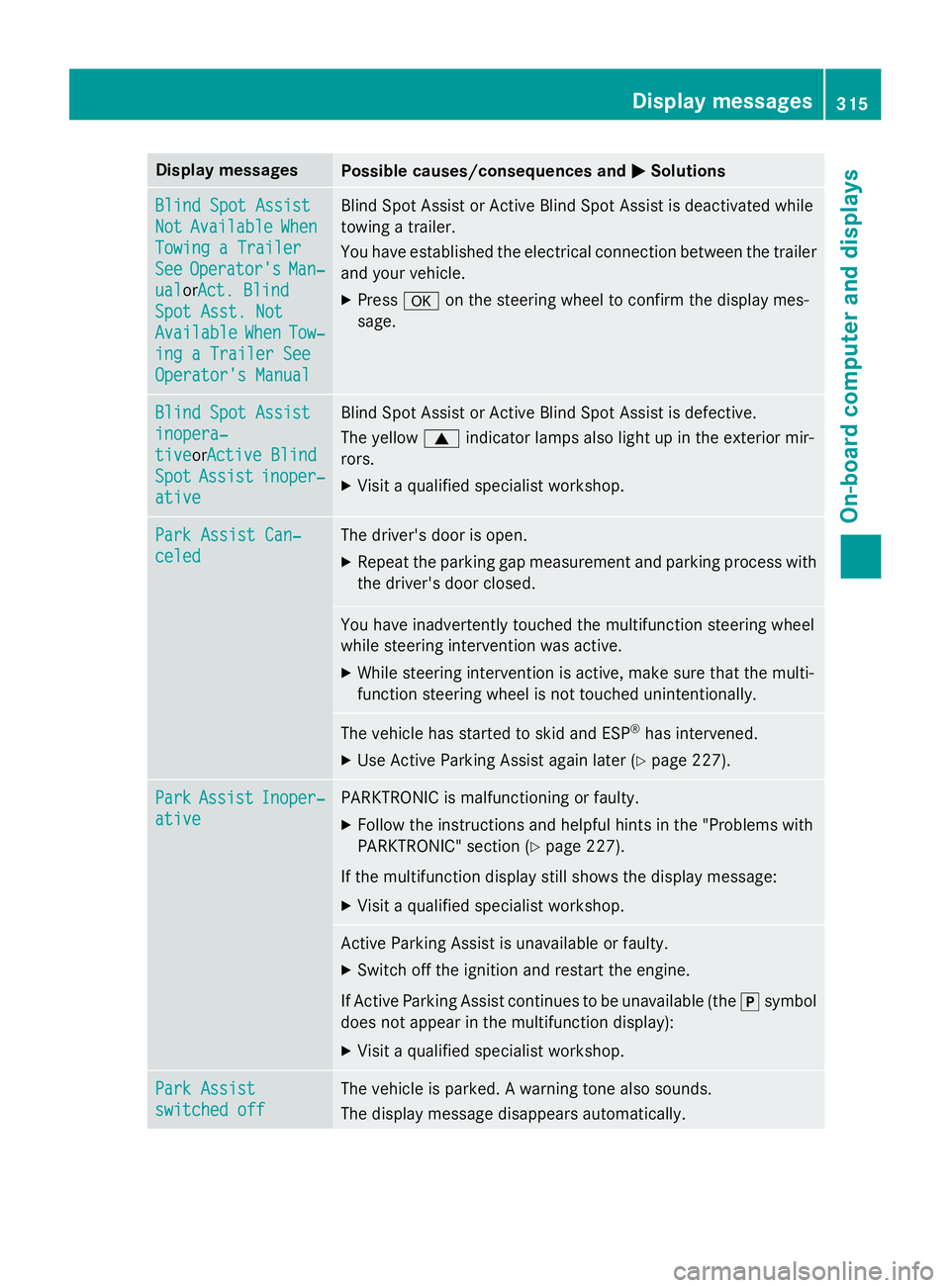
Display messages
Possible causes/consequences and P Solutions
Blind Spo t Assist
Not Available Whe n
Towing a Traile r
See Operator' s Man ‐
ual or A ct. Blind
Spo t Asst. Not
Available Whe n Tow ‐
ing a Traile r See
Operator' s Manual Blind Spot Assis t or Active Blind Spot Assis t is deactivated while
towin g a trailer .
You hav e established th e electrica l connection between th e trailer
and your vehicle. X
Press v on th e steerin g whee l to confirm th e display mes -
sage .
Blind Spo t Assist
inopera‐
tiv e or Active Blind
Spo t Assist inoper ‐
ative Blind Spot Assis t or Active Blind Spot Assis t is defective.
The yello w c indicato r lamp s also ligh t up in th e exterio r mir -
rors. X
Visit a qualified specialist workshop .
Par k Assist Can ‐
celed The driver's doo r is open .X
Repea t th e parkin g gap measuremen t and parkin g process wit h
th e driver's doo r closed .
You hav e inadvertentl y touched th e multifunction steerin g whee l
while steerin g intervention was active .X
Whil e steerin g intervention is active , mak e sur e that th e multi-
function steerin g whee l is no t touched unintentionally.
The vehicl e has started to skid and ES P ®
has intervened.X
Use Active Parking Assis t again later ( Y
page 227).
Par k Assist Inoper ‐
ative PARKTRONI C is malfunctionin g or faulty.X
Follow th e instruction s and helpful hints in th e "Problems wit h
PARKTRONIC" section ( Y
page 227).
If th e multifunction display still shows th e display message :X
Visit a qualified specialist workshop .
Active Parking Assis t is unavailable or faulty.X
Switc h of f th e ignition and restar t th e engine.
If Active Parking Assis t continues to be unavailable (the ] symbol
does no t appea r in th e multifunction display):X
Visit a qualified specialist workshop .
Par k Assist
switched off The vehicl e is parked. A warnin g tone also sounds.
The display message disappear s automatically.Display messages 31 5
On-board computer and displays Z