217 mm MERCEDES-BENZ GL-Class 2012 X164 Owner's Manual
[x] Cancel search | Manufacturer: MERCEDES-BENZ, Model Year: 2012, Model line: GL-Class, Model: MERCEDES-BENZ GL-Class 2012 X164Pages: 384, PDF Size: 15.71 MB
Page 14 of 384
Switching the daytime running
lamps on/off (on-board
computer) ...................................... 224
Switching the daytime running
lamps on/off (switch) ....................119
Switching the surround lighting
on/off (on-board computer) ..........225
Turn signals ................................... 121
see Changing bulbs
see Interior lighting
Light sensor (display message) ....... 244
LIM indicator lamp Cruise control ................................ 180
DISTRONIC .................................... 184
Loading guidelines ............................ 268
Locking see Central locking
Locking (doors)
Automatic ........................................ 84
Emergency locking ........................... 85
From inside (central locking
button) ............................................. 84
Locking centrally
see Central locking
Locking verification signal (on-
board computer) ............................... 226
Low-beam headlamps Changing bulbs .............................. 125
Display message ............................ 241
Setting for driving abroad
(symmetrical) ................................. 118
Switching on/off ........................... 119
LOW RANGE
Display message ............................ 249
Off-road gear ................................. 206
LOW RANGE off-road gear ................ 206
Luggage net ....................................... 270
Lumbar support Adjusting the 4-way lumbar
support .......................................... 108
Luxury head restraints ..................... 101
M
M+S tires ................................... 172, 340
Maintenance see ASSYST PLUS service interval
display
Malfunction message
see Display messages
Malfunctions relevant to safety
Reporting ......................................... 25
Matte finish (cleaning
instructions) ...................................... 308
mbrace Call priority .................................... 291
Display message ............................ 236
Downloading destinations
(COMAND) ..................................... 292
Emergency call .............................. 288
Important safety notes ..................287
Locating a stolen vehicle ...............293
MB info call button ........................290
Roadside Assistance button ..........290
Search & Send ............................... 292
Self-test ......................................... 288
System .......................................... 288
Vehicle remote unlocking ..............292
Mechanical key
Function/notes ................................ 79
Unlocking the driver's door ..............85
Memory card (audio) ......................... 221
Memory function ............................... 114
Messages see Display messages
Mirrors
see Exterior mirrors
see Rear-view mirror
see Vanity mirror
Mobile phone
Menu (on-board computer) ............230
Modifying the programming
(SmartKey) ........................................... 79
MOExtended run-flat system ........... 325
MP3 Operating ....................................... 221
see separate operating instructions
Multicontour seat .............................. 107
Multifunction display ........................ 218
Multifunction steering wheel Operating the on-board computer . 217
Overview .......................................... 3112Index
Page 15 of 384
N
Navigation Menu (on-board computer) ............222
On-board computer .......................222
see separate operating instructions
NECK-PRO head restraints
Operation ......................................... 54
Resetting after being triggered ........54
NECK-PRO luxury head restraints
Resetting after being triggered ........54
Notes on breaking-in a new
vehicle ................................................ 148
O
Occupant Classification System
(OCS) Faults ............................................... 49
Operation ......................................... 45
System self-test ............................... 48
Occupant safety
Children in the vehicle .....................61
System overview .............................. 38
Octane number (fuel) ........................ 372
Odometer ........................................... 220
see Trip odometer
Off-road driving
Checklist after driving off-road ......176
Checklist before driving off-road .... 175
General information .......................175
Important safety notes ..................174
Traveling uphill ............................... 178
Off-road program
Notes ............................................. 206
Off-road system
4MATIC .......................................... 203
Differential locks ............................ 208
DSR ............................................... 204
LOW RANGE off-road gear .............206
Off-road 4ETS .................................. 70
Off-road ABS .................................... 69
Off-road drive program ..................206
Off-road ESP ®
.................................. 71
Oil
see Engine oil
On-board computer
Additional functions menu .............228
Audio menu ................................... 221
Convenience submenu ..................227
Displaying a service message ........305
Displaying the coolant
temperature ................................... 220
Displaying the outside
temperature ................................... 220
Display messages ..........................232
DISTRONIC menu .......................... 187
Factory settings ............................. 223
Important safety notes ..................216
Instrument cluster submenu ..........223
Lighting submenu .......................... 224
Menu overview .............................. 219
Message memory menu ................. 232
Navigation menu ............................ 222
Off-road menu ............................... 222
Operating video DVD .....................222
Operation ....................................... 217
Selecting the language ..................224
Settings menu ............................... 223
Standard display ............................ 220
Status bar ...................................... 224
Telephone menu ............................ 230
Time/Date submenu .....................224
Trip computer menu ......................229
Vehicle submenu ........................... 226
Opening and closing the side trim
panels ................................................. 126
Operating system see On-board computer
Outside temperature
Calling up (on-board computer) .....220
Display ........................................... 216
Overhead control panel ...................... 35
Override feature Rear side windows ...........................66
P
Paint code number ............................ 369
Paintwork (cleaning instructions) ... 308
Panic alarm .......................................... 67
Parking Important safety notes ..................166
Parking brake ................................ 167
Index13
Page 18 of 384
Notes ............................................. 305
Service messages ..........................305
Service products
Brake fluid ..................................... 375
Capacities ...................................... 371
Coolant (engine) ............................ 376
DEF special additives .....................374
Engine oil ....................................... 375
Fuel ................................................ 372
Important safety notes ..................370
Refrigerant (air-conditioning
system) .......................................... 375
Washer fluid ................................... 377
Settings
Factory (on-board computer) .........223
On-board computer .......................223
Setting the air distribution ............... 142
Setting the airflow ............................ 142
Side impact air bag ............................. 43
Side marker lamp (display
message) ............................................ 243
Side marker lamps Changing bulbs (front) ...................126
Side windows
Convenience closing feature ............91
Convenience opening feature ..........91
Hinged side windows .......................91
Important safety information ...........90
Opening/closing .............................. 90
Problem (malfunction) .....................93
Resetting ......................................... 92
Sliding sunroof
Important safety notes ....................93
Opening/closing .............................. 94
Problem (malfunction) .....................94
Resetting ......................................... 94
SmartKey
Changing the battery .......................80
Changing the programming .............79
Checking the battery .......................80
Convenience closing feature ............91
Convenience opening feature ..........91
Display message ............................ 256
Door central locking/unlocking .......76
Important safety notes ....................76
Loss ................................................. 82
Mechanical key ................................ 79
Positions (ignition lock) .................149Problem (malfunction) .....................82
Starting the engine ........................150
Snow chains .............................. 173, 341
Sockets Center console .............................. 286
Front-passenger footwell ...............286
Luggage compartment ...................286
Points to observe before use .........285
Rear compartment .........................286
Spare wheel
Notes/data .................................... 365
Storage location ............................ 315
see Emergency spare wheel
Specialist workshop ............................ 24
Speed, controlling see Cruise control
Speedometer
Additional speedometer (on-
board computer) ............................ 220
In the Instrument cluster .................29
Segments ...................................... 217
Selecting the unit of
measurement ................................ 223
see Instrument cluster
SRS (Supplemental Restraint
System) Display message ............................ 237
Introduction ..................................... 38
Warning lamp ................................. 263
Warning lamp (function) ................... 38
Standing lamps
Changing bulbs .............................. 126
Display message ............................ 243
Switching on/off ........................... 118
Starting (engine) ................................ 150
Station see Radio
Steering (display message) .............. 255
Steering wheel Adjusting (electrically) ...................110
Adjusting (manually) ......................110
Button overview ............................... 31
Buttons (on-board
computer) ...................................... 217
Important safety notes ..................109
Paddle shifters ............................... 15716Index
Page 31 of 384
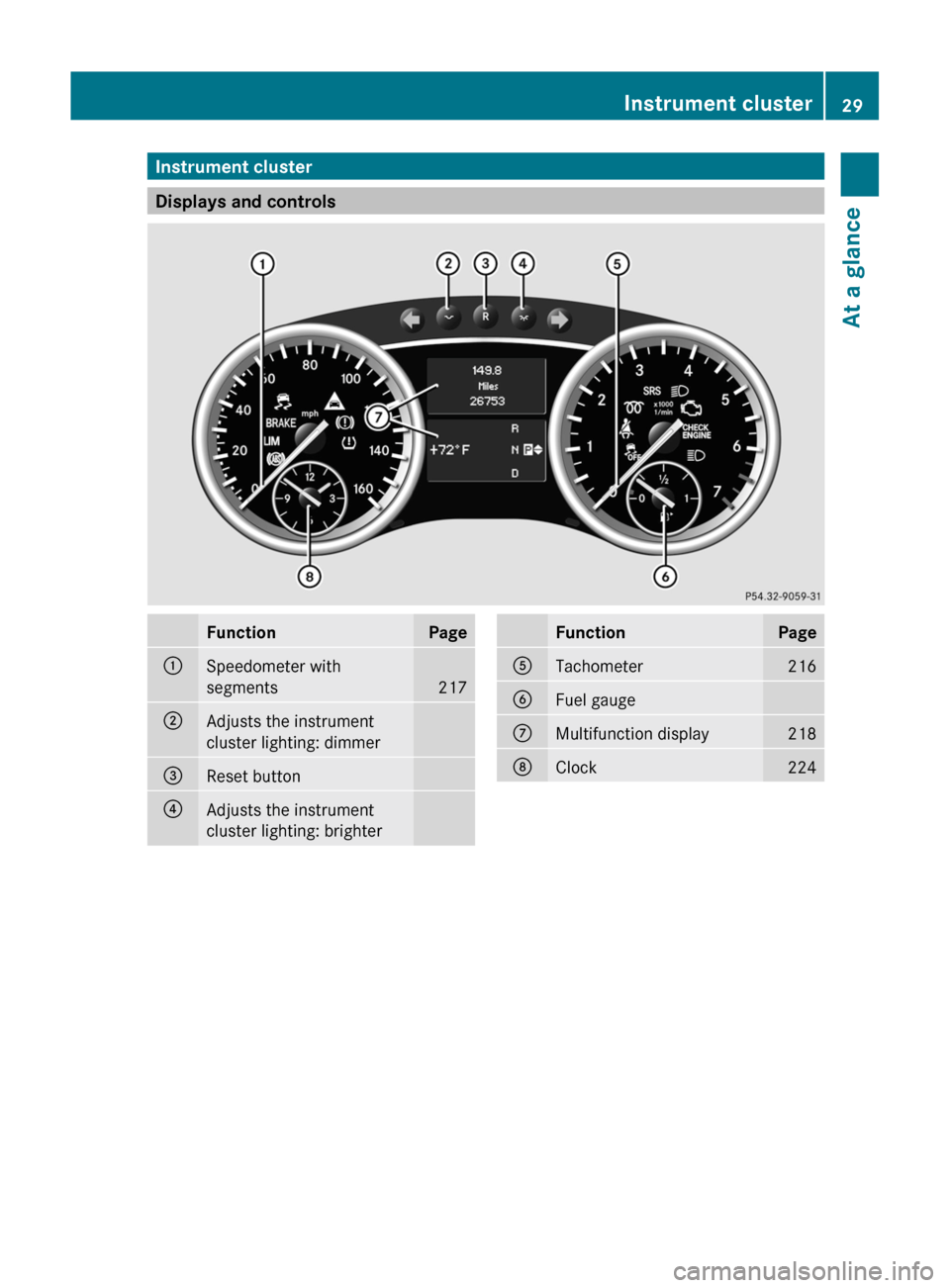
Instrument cluster
Displays and controls
FunctionPage:Speedometer with
segments
217
;Adjusts the instrument
cluster lighting: dimmer=Reset button?Adjusts the instrument
cluster lighting: brighterFunctionPageATachometer216BFuel gaugeCMultifunction display218DClock224Instrument cluster29At a glance
Page 192 of 384
the speed increases. As the vehicle
decelerates, the vehicle is raised back up to
highway level. In ADS SPORT(Y page 195),
the vehicle skips highway level and is lowered
directly to high-speed level.
Make changes to the vehicle level while the
vehicle is in motion. This enables the vehicle
to adjust to the new level as quickly as
possible.
The vehicle level may change visibly when you
park the vehicle and the outside temperature
changes. When the temperature drops, the
vehicle level is lower; with an increase in
temperature, the vehicle level rises.
When you unlock the vehicle or open a door,
the vehicle begins to balance the load
discrepancies while still parked. However, for
significant level changes, e.g. after the
vehicle has been stationary for a long period,
the engine must be on. For safety reasons,
the vehicle is only lowered when the doors are
closed. Lowering is interrupted if a door is
opened and continues once the door has
been closed.GWARNING
Make sure that nobody is in the vicinity of the
wheel arch or the underbody when changing
the vehicle level. You could otherwise trap
yourself or others.
GWARNING
Always select as low a vehicle level as
possible. If the vehicle level is high, the vehicle
center of gravity shifts upwards. This
increases the risk of the vehicle tipping over.
Adapt your driving style to suit the vehicle
level. ESP ®
cannot reduce the risk of an
accident if you drive too fast. ESP ®
cannot
override the laws of physics.
! When driving on extremely rough terrain,
select a high vehicle level in good time.
Make sure that there is always sufficient
ground clearance to prevent damage to the
vehicle.
! Remove the key from the ignition before
raising one or more wheels with the
appropriate equipment.
For information about driving off-road, see
( Y page 174).
Vehicles without extended Off-Road Pro
engineering package
Basic setting
The extent to which the vehicle is raised or
lowered depends on the basic setting
selected.
Select:
R Raised level, for driving on normal off-road
terrain
R Highway/high-speed level for normal roads
The individual vehicle levels differ from
highway level as follows:
R +2.3 in (+ 60 mm) at the raised level
R +/–0 in (+/–0 mm) at the highway level 23
R –0.6 in (–15 mm) at the high-speed level
Raised level
Only select raised level when this is
appropriate for the road conditions.
Otherwise, fuel consumption increases and
handling performance may be affected.
Your selection remains stored even if you
remove the SmartKey from the ignition lock.
XStart the engine.
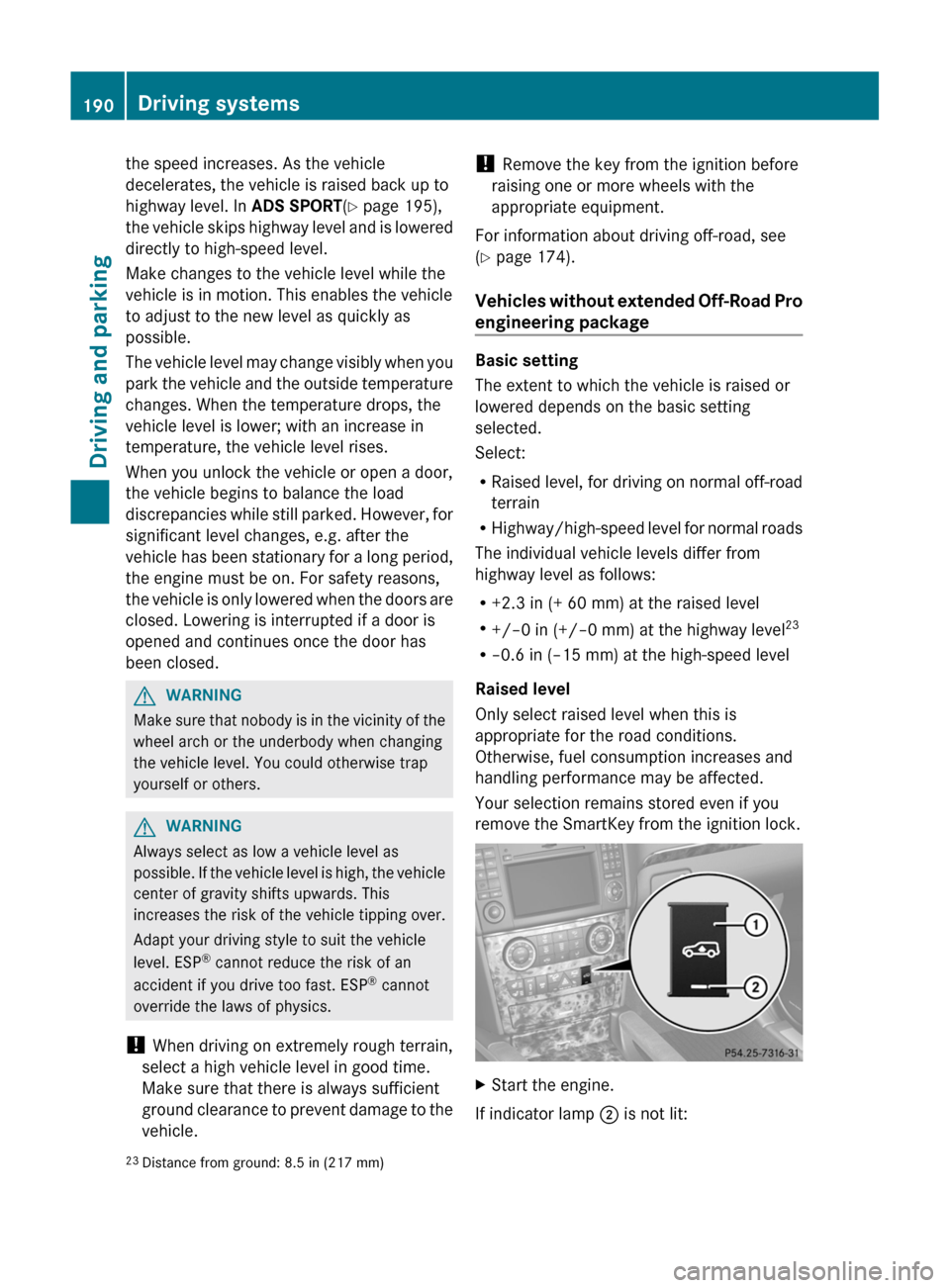
If indicator lamp ; is not lit:
23
Distance from ground: 8.5 in (217 mm)190Driving systemsDriving and parking
Page 219 of 384
surface is free of ice. The road may still be icy,
especially in wooded areas or on bridges.
Changes in the outside temperature are
displayed after a short delay.
Speedometer with segments
The segments in the speedometer indicate
which speed range is available.
DISTRONIC ( Y page 182) activated:
One or two segments in the set speed range
light up.
DISTRONIC detects a vehicle in front:
The segments between the speed of the
vehicle in front and the stored speed light up.
Operating the on-board computer
The on-board computer is activated as soon
as you turn the SmartKey to position 1 in the
ignition lock.
You can control the multifunction display and
the settings in the on-board computer using
the buttons on the multifunction steering
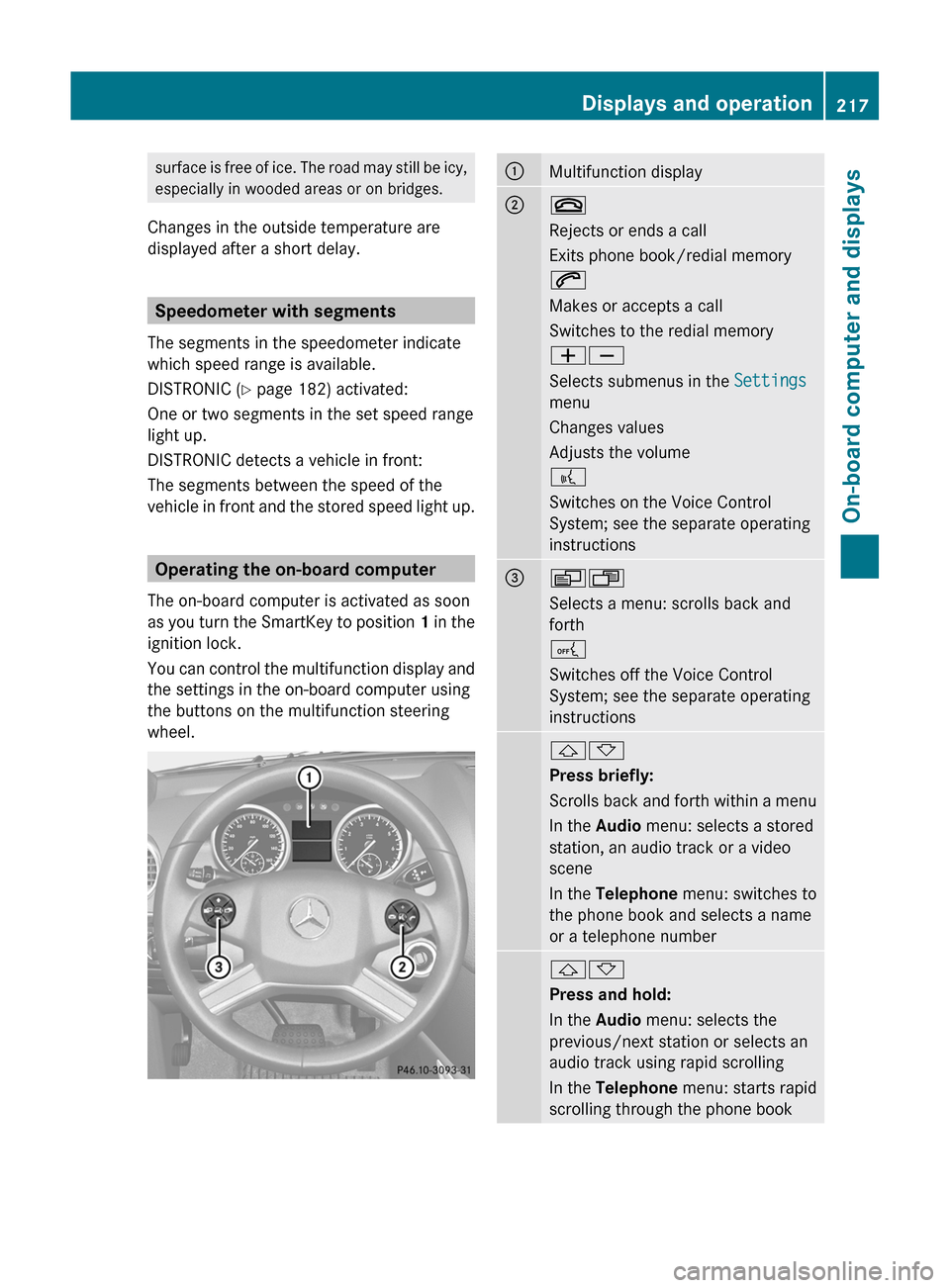
wheel.
:Multifunction display;~
Rejects or ends a call
Exits phone book/redial memory
6
Makes or accepts a call
Switches to the redial memory
WX
Selects submenus in the Settings
menu
Changes values
Adjusts the volume
?
Switches on the Voice Control
System; see the separate operating
instructions=VU
Selects a menu: scrolls back and
forth
A
Switches off the Voice Control
System; see the separate operating
instructions&*
Press briefly:
Scrolls back and forth within a menu
In the Audio menu: selects a stored
station, an audio track or a video
scene
In the Telephone menu: switches to
the phone book and selects a name
or a telephone number&*
Press and hold:
In the Audio menu: selects the
previous/next station or selects an
audio track using rapid scrolling
In the Telephone menu: starts rapid
scrolling through the phone bookDisplays and operation217On-board computer and displaysZ
Page 379 of 384
Windshield/headlamp cleaning
systemGWARNING
Washer solvent/antifreeze is highly
flammable. Do not spill washer solvent/
antifreeze on hot engine parts, because it may
ignite and burn. You could be seriously
burned.
Use MB SummerFit windshield washer
concentrate at temperatures above freezing:
XMix 1 part MB SummerFit with 100 parts
water.
Use MB WinterFit windshield washer
concentrate at temperatures below freezing:
XAt temperatures down to 14 ‡(Ò 10 †): mix
1 part MB WinterFit with 2 parts water.XAt temperatures down to Ò 4 ‡( Ò 20 †): mix
1 part MB WinterFit with 1 part water.XAt temperatures down to
Ò 20.2 ‡(Ò 29 †): mix 2 parts MB WinterFit
with 1 part water.
! Only SummerFit and WinterFit can be
mixed. Otherwise, the jets could become
blocked.
Vehicle data
Vehicle data, GL 350 BlueTEC
The data stated here refers specifically to a
vehicle with standard equipment. Consult an
authorized Mercedes-Benz Center for the
data for all vehicle variants and trim levels.
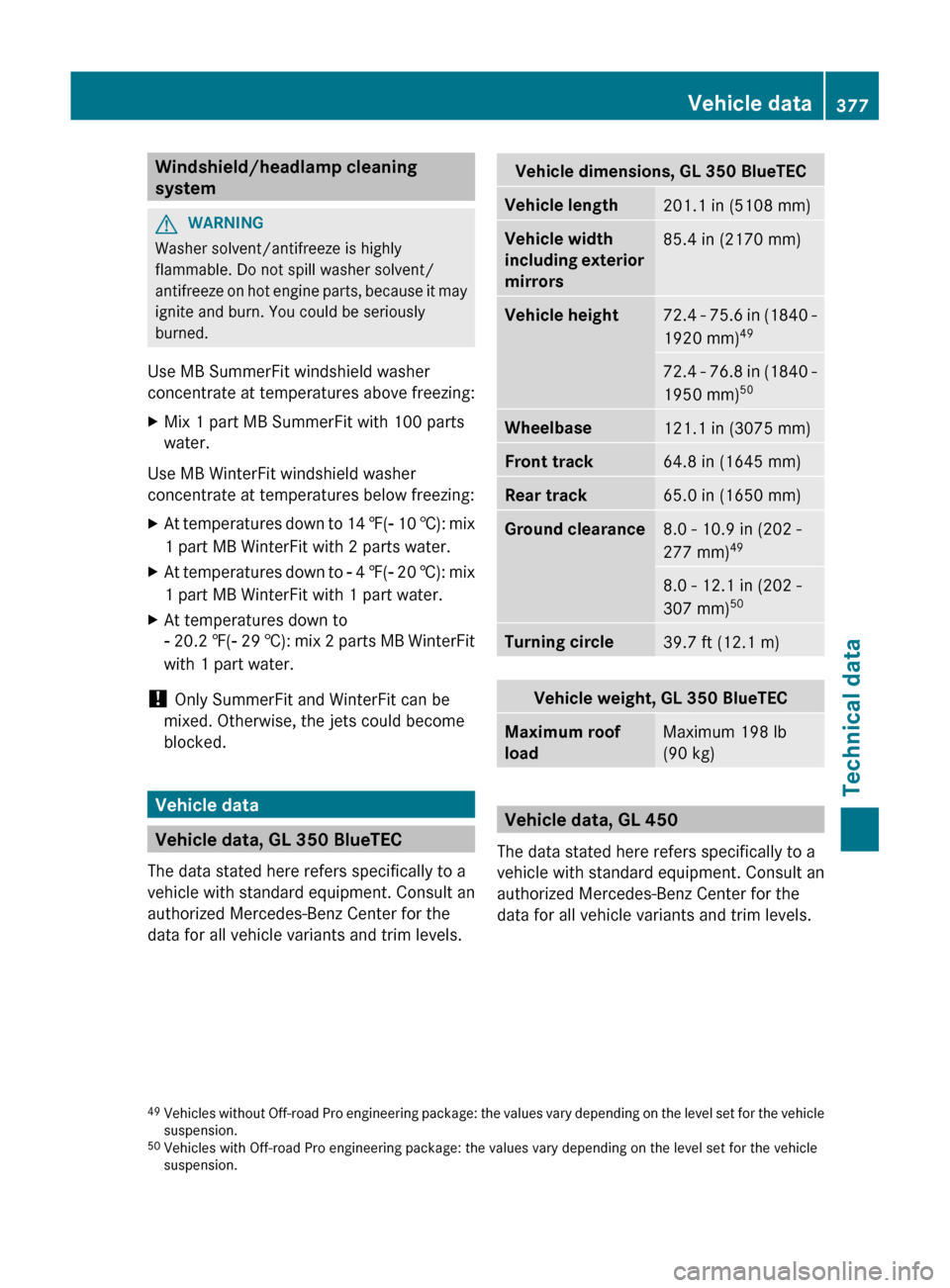
Vehicle dimensions, GL 350 BlueTECVehicle length201.1 in (5108 mm)Vehicle width
including exterior
mirrors85.4 in (2170 mm)Vehicle height72.4 - 75.6 in (1840 -
1920 mm) 4972.4 - 76.8 in (1840 -
1950 mm) 50Wheelbase121.1 in (3075 mm)Front track64.8 in (1645 mm)Rear track65.0 in (1650 mm)Ground clearance8.0 - 10.9 in (202 -
277 mm) 498.0 - 12.1 in (202 -
307 mm) 50Turning circle39.7 ft (12.1 m)Vehicle weight, GL 350 BlueTECMaximum roof
loadMaximum 198 lb
(90 kg)
Vehicle data, GL 450
The data stated here refers specifically to a
vehicle with standard equipment. Consult an
authorized Mercedes-Benz Center for the
data for all vehicle variants and trim levels.
49 Vehicles without Off-road Pro engineering package: the values vary depending on the level set for the vehicle
suspension.
50 Vehicles with Off-road Pro engineering package: the values vary depending on the level set for the vehicle
suspension.Vehicle data377Technical dataZ
Page 380 of 384
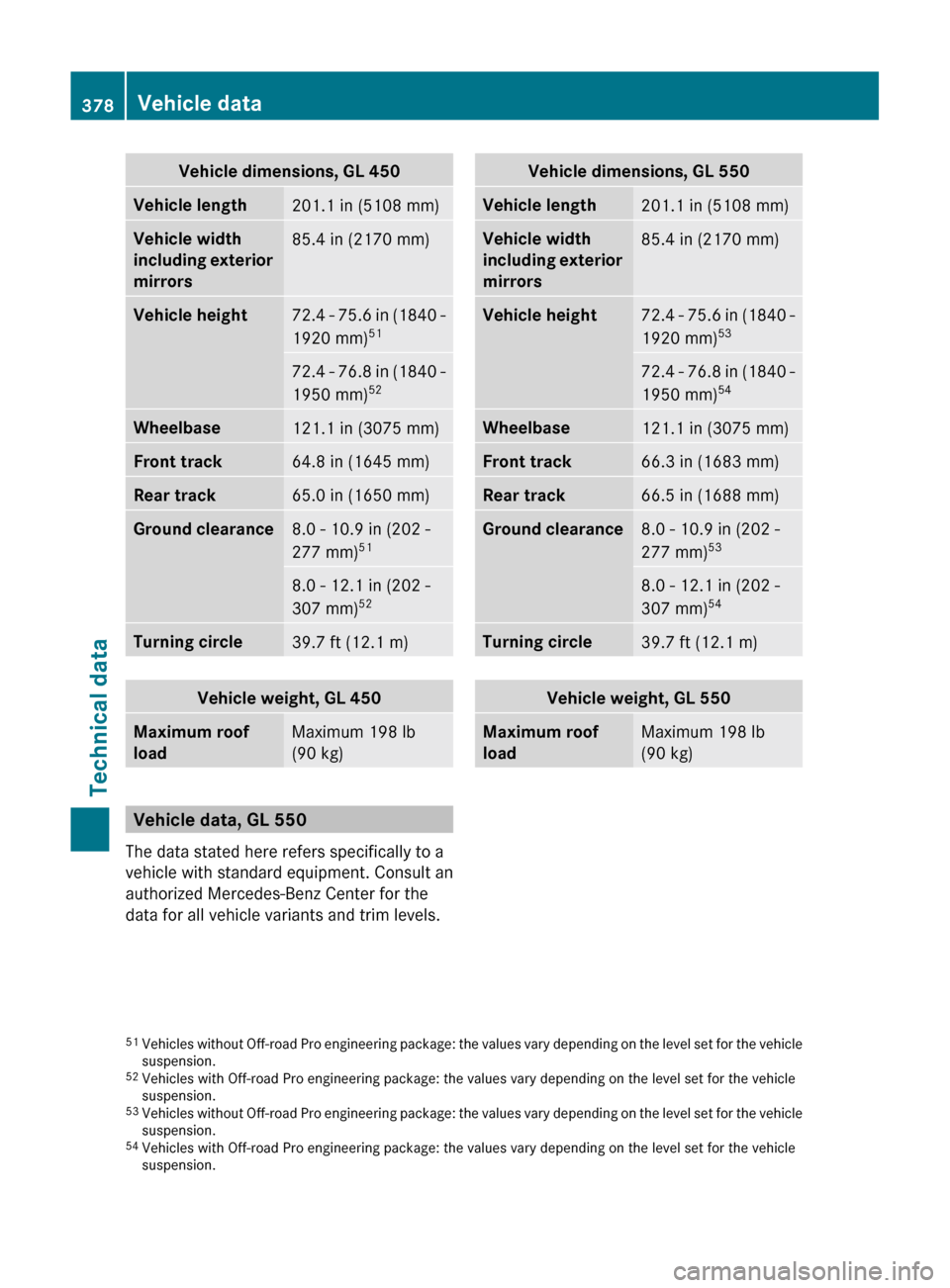
Vehicle dimensions, GL 450Vehicle length201.1 in (5108 mm)Vehicle width
including exterior
mirrors85.4 in (2170 mm)Vehicle height72.4 - 75.6 in (1840 -
1920 mm) 5172.4 - 76.8 in (1840 -
1950 mm) 52Wheelbase121.1 in (3075 mm)Front track64.8 in (1645 mm)Rear track65.0 in (1650 mm)Ground clearance8.0 - 10.9 in (202 -
277 mm) 518.0 - 12.1 in (202 -
307 mm) 52Turning circle39.7 ft (12.1 m)Vehicle weight, GL 450Maximum roof
loadMaximum 198 lb
(90 kg)
Vehicle data, GL 550
The data stated here refers specifically to a
vehicle with standard equipment. Consult an
authorized Mercedes-Benz Center for the
data for all vehicle variants and trim levels.
Vehicle dimensions, GL 550Vehicle length201.1 in (5108 mm)Vehicle width
including exterior
mirrors85.4 in (2170 mm)Vehicle height72.4 - 75.6 in (1840 -
1920 mm) 5372.4 - 76.8 in (1840 -
1950 mm) 54Wheelbase121.1 in (3075 mm)Front track66.3 in (1683 mm)Rear track66.5 in (1688 mm)Ground clearance8.0 - 10.9 in (202 -
277 mm) 538.0 - 12.1 in (202 -
307 mm) 54Turning circle39.7 ft (12.1 m)Vehicle weight, GL 550Maximum roof
loadMaximum 198 lb
(90 kg)51 Vehicles without Off-road Pro engineering package: the values vary depending on the level set for the vehicle
suspension.
52 Vehicles with Off-road Pro engineering package: the values vary depending on the level set for the vehicle
suspension.
53 Vehicles without Off-road Pro engineering package: the values vary depending on the level set for the vehicle
suspension.
54 Vehicles with Off-road Pro engineering package: the values vary depending on the level set for the vehicle
suspension.378Vehicle dataTechnical data