Manual shift MERCEDES-BENZ GL-Class 2013 X166 User Guide
[x] Cancel search | Manufacturer: MERCEDES-BENZ, Model Year: 2013, Model line: GL-Class, Model: MERCEDES-BENZ GL-Class 2013 X166Pages: 454, PDF Size: 6.31 MB
Page 201 of 454
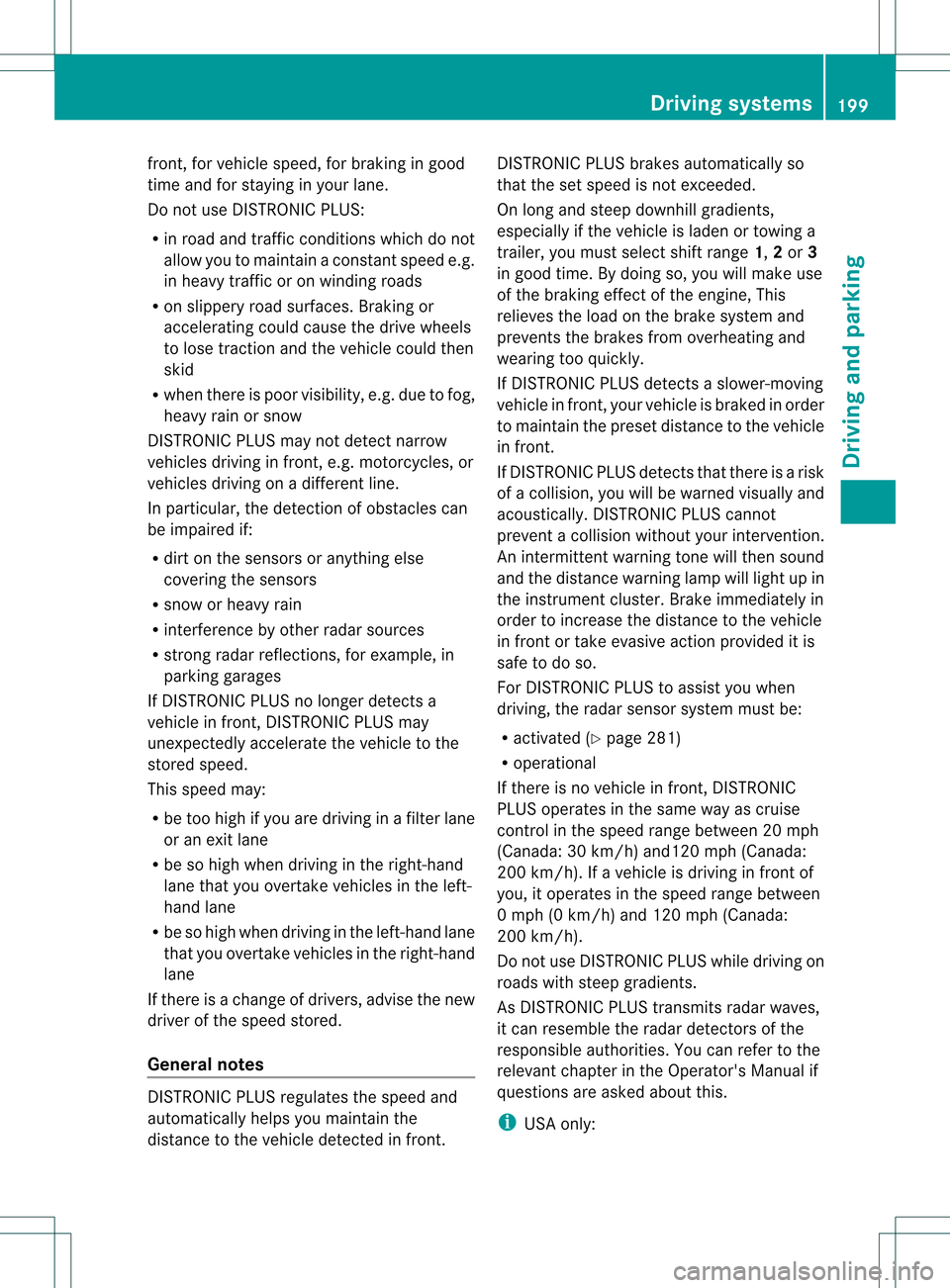
front, for vehicle speed, for braking in good
time and for staying in you
rlane.
Do not use DISTRONIC PLUS:
R in road and traffic conditions which do not
allow you to maintain a constan tspeed e.g.
in heavy traffic or on winding roads
R on slippery road surfaces .Braking or
accelerating could cause the drive wheels
to lose traction and the vehicle could then
skid
R when there is poor visibility, e.g. due to fog,
heavy rain or snow
DISTRONIC PLUS may not detect narrow
vehicles driving in front, e.g. motorcycles, or
vehicles driving on a different line.
In particular, the detection of obstacles can
be impaired if:
R dirt on the sensors or anything else
covering the sensors
R snow or heavy rain
R interference by other rada rsources
R strong radar reflections, for example, in
parking garages
If DISTRONIC PLUS no longer detects a
vehicle in front, DISTRONIC PLUS may
unexpectedly accelerate the vehicle to the
stored speed.
This speed may:
R be too high if you are driving in a filter lane
or an exit lane
R be so high when driving in the right-hand
lane that you overtake vehicles in the left-
hand lane
R be so high when driving in the left-hand lane
that you overtake vehicles in the right-hand
lane
If there is a change of drivers, advise the new
driver of the speed stored.
General notes DISTRONIC PLUS regulates the speed and
automatically helps you maintain the
distance to the vehicle detected in front. DISTRONIC PLUS brakes automatically so
that the set speed is not exceeded.
On long and steep downhill gradients,
especially if the vehicle is laden or towing a
trailer, you must select shift range
1,2or 3
in good time. By doing so, you will make use
of the braking effect of the engine, This
relieves the load on the brake system and
prevents the brakes from overheating and
wearing too quickly.
If DISTRONIC PLUS detects a slower-moving
vehicle in front, your vehicle is braked in order
to maintain the preset distance to the vehicle
in front.
If DISTRONIC PLUS detects that there is a risk
of a collision, you will be warned visually and
acoustically. DISTRONIC PLUS cannot
prevent a collision without your intervention.
An intermittent warning tone will then sound
and the distance warning lamp will light up in
the instrument cluster. Brake immediately in
order to increase the distance to the vehicle
in front or take evasive action provided it is
safe to do so.
For DISTRONIC PLUS to assist you when
driving, the radar sensor system must be:
R activated (Y page 281)
R operational
If there is no vehicle in front, DISTRONIC
PLUS operates in the same way as cruise
control in the speed range between 20 mph
(Canada: 30 km/h) and120 mph (Canada:
200 km/h). If a vehicle is driving in front of
you, it operates in the speed range between
0 mph (0 km/h) and 120 mph (Canada:
200 km/h).
Do not use DISTRONIC PLUS while driving on
roads with steep gradients.
As DISTRONIC PLUS transmits radar waves,
it can resemble the radar detectors of the
responsible authorities. You can refer to the
relevant chapter in the Operator's Manual if
questions are asked about this.
i USA only: Driving systems
199Driving and parking Z
Page 284 of 454

X
Press 0004or0003 to select the Auto. Mirror Folding function.
If the Auto. Mirror Folding function is
activated, the vehicle's exterior mirror is
displayed in red in the multifunction
display.
X Press the 000Bbutton to save the setting. 0002
To fold the exterior mirrors in or out
If you have switched the Auto. MirrorFolding on and you fold the exterior mirrors
in using button 0002, they will not fold out
automatically (Y page 119).
You can then only fold out the exterior mirrors
using button 0002.
Restoring the factory settings X
Press the 0002or0005 button on the
steering wheel to select the Sett. menu.
X Press the 0004or0003 button to select the
Factory Setting submenu.
X Press 000Bto confirm.
The Reset All Settings? message
appears.
X Press the 0004or0003 button to select
No or
Yes .
X Press 000Bto confirm the selection.
If you select Yes , the multifunction display
shows a confirmation message.
For safety reasons, the Daytime RunningLights function in the
Lights submenu is
only reset if the vehicle is stationary. ON&OFFROAD menu
Multifunction display (example)
X
Press the 0002or0005 button on the
steering wheel to select the ON&OFFROAD menu.
You can set the following curren tsettings to
appear in the ON&OFFROAD menu:
R On-road program (Y page 247)
R Off-road program (Y page 252) AMG menu in AMG vehicles
AMG displays 0002
Digital speedometer
0003 Gear indicator
0021 Upshift indicator
0020 Engine oil temperature
001E Coolant temperature
001F Status indicator (indicator not available in
USA/Canada)
X Press 0002or0005 on the steering wheel
to select the AMG menu.
Upshift indicator UP 0021
indicates that the
engine has reached the overrevving range
when in the manual gearshift program.
Upshift indicator UP 0021
fades out other
messages until you have shifted up.
If the engine oil temperature is below 176 ‡
(80 †) the oil temperature is shown in blue. 282
Menus and submenusOn-board computer and displays
Page 292 of 454
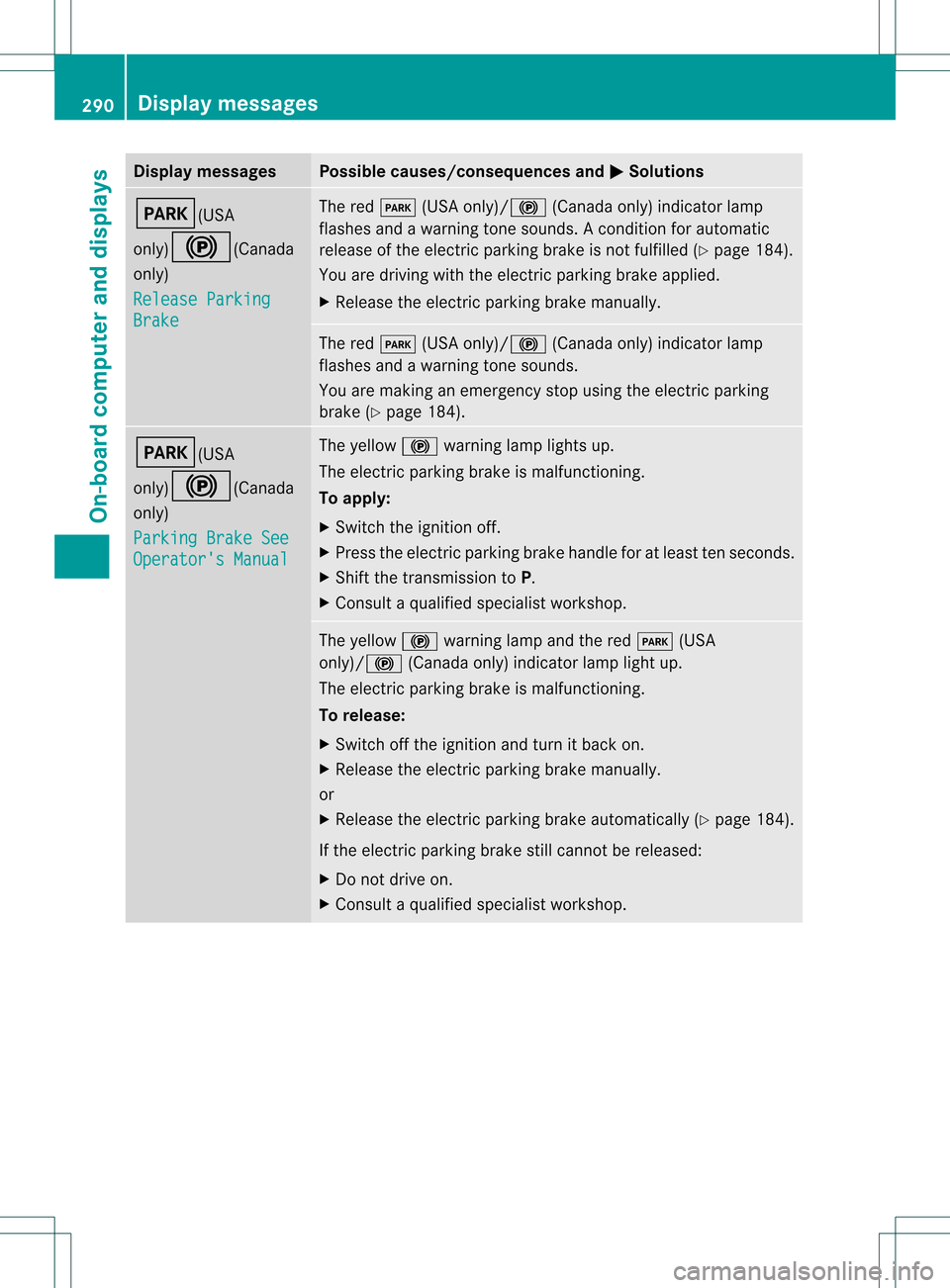
Display messages Possible causes/consequences and
0001 Solutions
0008(USA
only)
000D(Canada
only)
Release Parking Brake The red
0008(USA only)/ 000D(Canada only) indicato rlamp
flashes and a warning tone sounds. Acondition for automatic
release of the electric parking brake is not fulfilled (Y page 184).
You are driving with the electric parking brake applied.
X Release the electric parking brake manually. The red
0008(USA only)/000D (Canada only) indicator lamp
flashes and a warning tone sounds.
You are making an emergency stop using the electric parking
brake (Y page 184). 0008(USA
only)000D(Canada
only)
Parking Brake See
Operator's Manual The yellow
000Dwarning lamp lights up.
The electric parking brake is malfunctioning.
To apply:
X Switch the ignition off.
X Press the electric parking brake handle for at least ten seconds.
X Shift the transmission to P.
X Consult a qualified specialist workshop. The yellow
000Dwarning lamp and the red 0008(USA
only)/000D (Canada only) indicator lamp light up.
The electric parking brake is malfunctioning.
To release:
X Switch off the ignition and turn it back on.
X Release the electric parking brake manually.
or
X Release the electric parking brake automatically (Y page 184).
If the electric parking brake still cannot be released:
X Do not drive on.
X Consult a qualified specialist workshop. 290
Display messagesOn-board computer and displays
Page 293 of 454
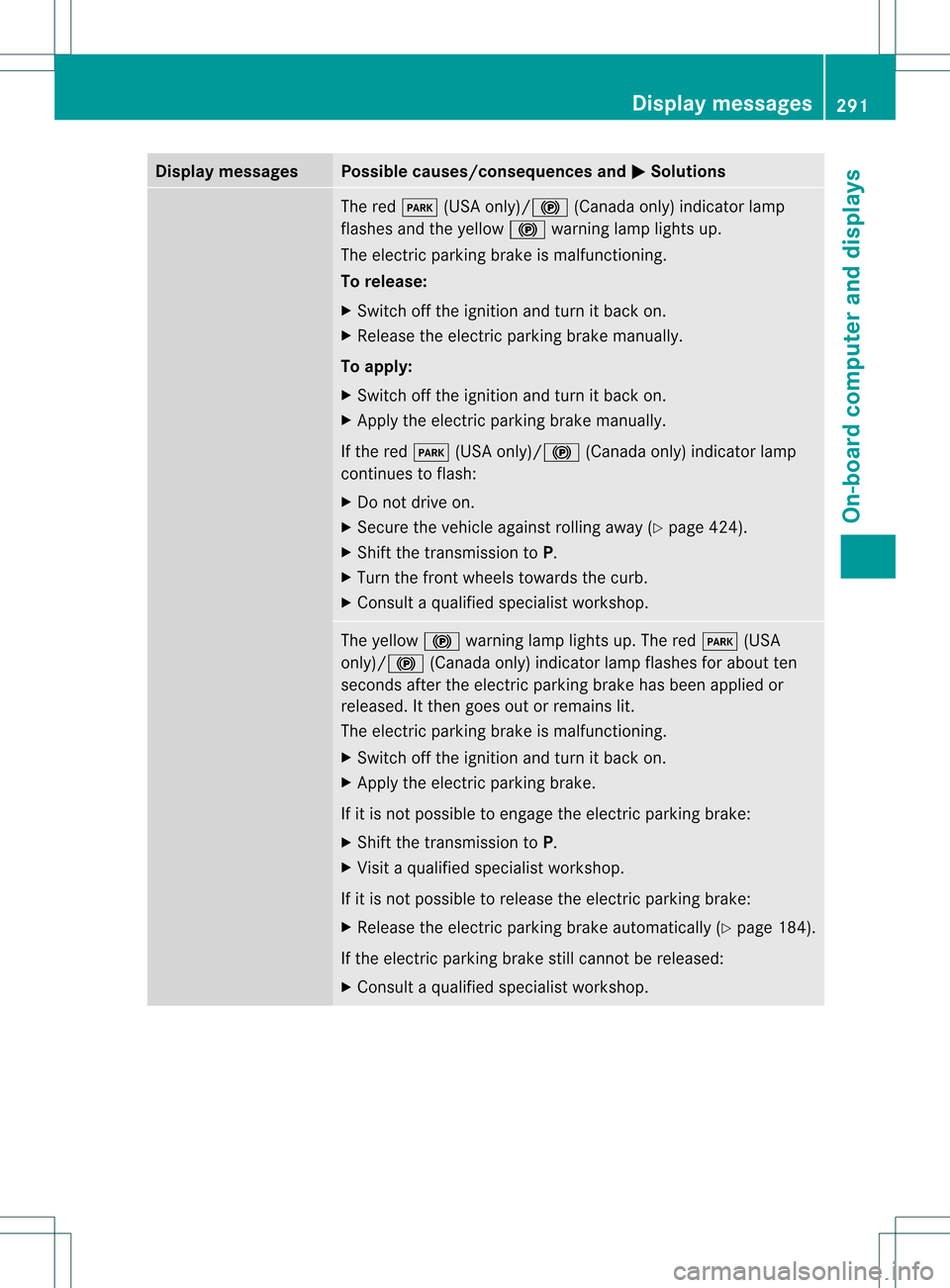
Display messages Possible causes/consequences and
0001 Solutions
The red
0008(USA only)/ 000D(Canada only) indicato rlamp
flashes and the yellow 000Dwarning lamp lights up.
The electric parking brake is malfunctioning.
To release:
X Switch off the ignition and turn it back on.
X Release the electric parking brake manually.
To apply:
X Switch off the ignition and turn it back on.
X Apply the electric parking brake manually.
If the red 0008(USA only)/000D (Canada only) indicator lamp
continues to flash:
X Do not drive on.
X Secure the vehicle against rolling away ( Ypage 424).
X Shift the transmission to P.
X Turn the fron twheels towards the curb.
X Consult a qualified specialist workshop. The yellow
000Dwarning lamp lights up. The red 0008(USA
only)/000D (Canada only) indicator lamp flashes for about ten
seconds after the electric parking brake has been applied or
released. It then goes out or remains lit.
The electric parking brake is malfunctioning.
X Switch off the ignition and turn it back on.
X Apply the electric parking brake.
If it is not possible to engage the electric parking brake:
X Shift the transmission to P.
X Visit a qualified specialist workshop.
If it is not possible to release the electric parking brake:
X Release the electric parking brake automatically (Y page 184).
If the electric parking brake still cannot be released:
X Consult a qualified specialist workshop. Display messages
291On-board computer and displays Z
Page 294 of 454
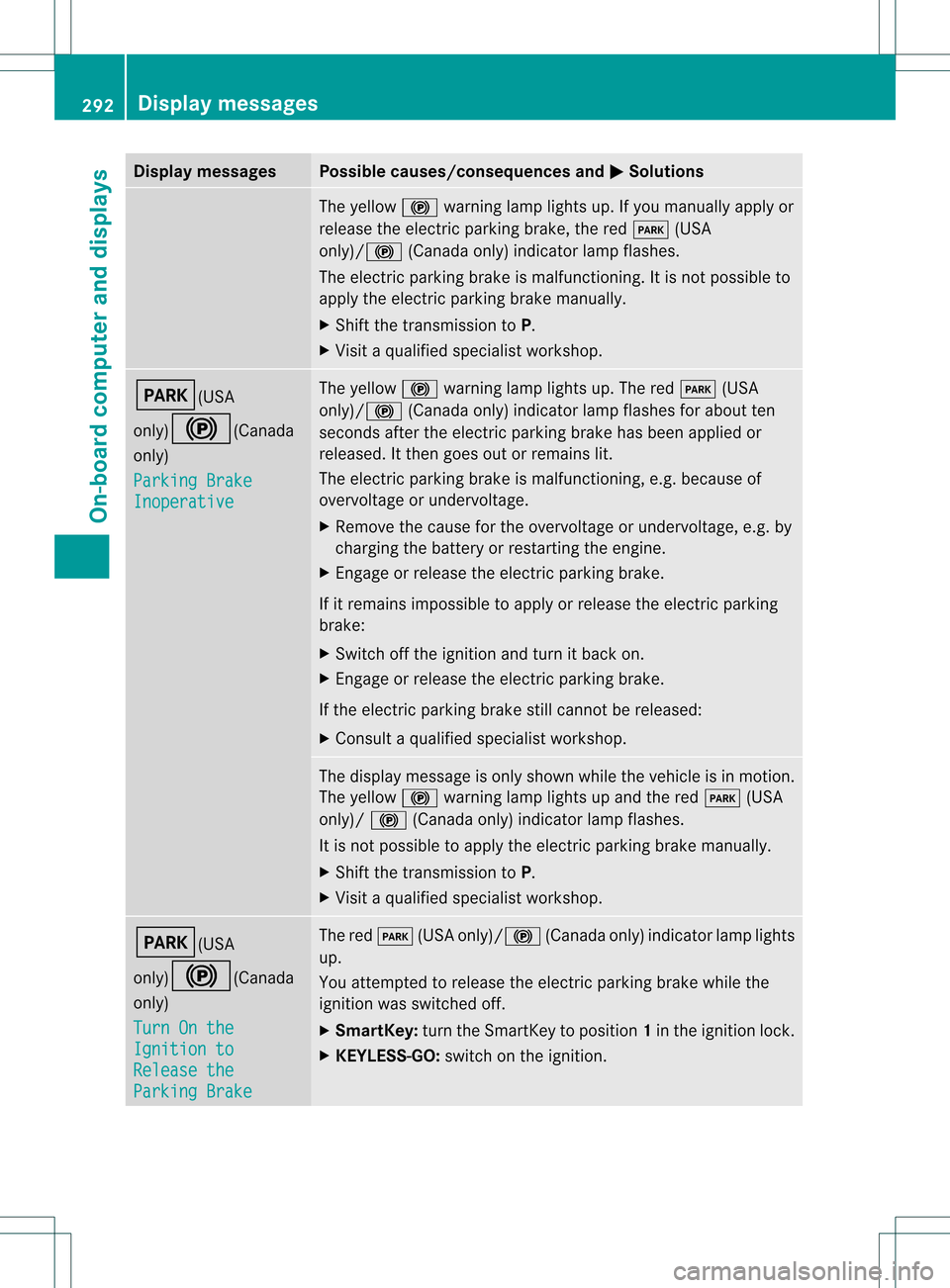
Display messages Possible causes/consequences and
0001 Solutions
The yellow
000Dwarning lamp lights up. If you manually apply or
release the electric parkin gbrake, the red 0008(USA
only)/000D (Canada only) indicator lamp flashes.
The electric parking brake is malfunctioning. It is not possible to
apply the electric parking brake manually.
X Shift the transmission to P.
X Visi taqualified specialist workshop. 0008(USA
only)000D
(Canada
only)
Parking Brake Inoperative The yellow
000Dwarning lamp lights up. The red 0008(USA
only)/ 000D(Canada only) indicator lamp flashes for about ten
seconds after the electric parking brake has been applied or
released. It then goes out or remains lit.
The electric parking brake is malfunctioning, e.g. because of
overvoltage or undervoltage.
X Remove the cause for the overvoltage or undervoltage, e.g. by
charging the battery or restarting the engine.
X Engage or release the electric parking brake.
If it remains impossible to apply or release the electric parking
brake:
X Switch off the ignition and turn it back on.
X Engage or release the electric parking brake.
If the electric parking brake still cannot be released:
X Consult a qualified specialist workshop. The display message is only shown while the vehicle is in motion.
The yellow
000Dwarning lamp lights up and the red 0008(USA
only)/ 000D(Canada only) indicator lamp flashes.
It is not possible to apply the electric parking brake manually.
X Shift the transmission to P.
X Visit a qualified specialist workshop. 0008(USA
only)000D
(Canada
only)
Turn On the Ignition to
Release the
Parking Brake The red
0008(USA only)/000D (Canada only) indicator lamp lights
up.
You attempted to release the electric parking brake while the
ignition was switched off.
X SmartKey: turn the SmartKey to position 1in the ignition lock.
X KEYLESS-GO: switch on the ignition.292
Display messagesOn-board computer and displays
Page 310 of 454
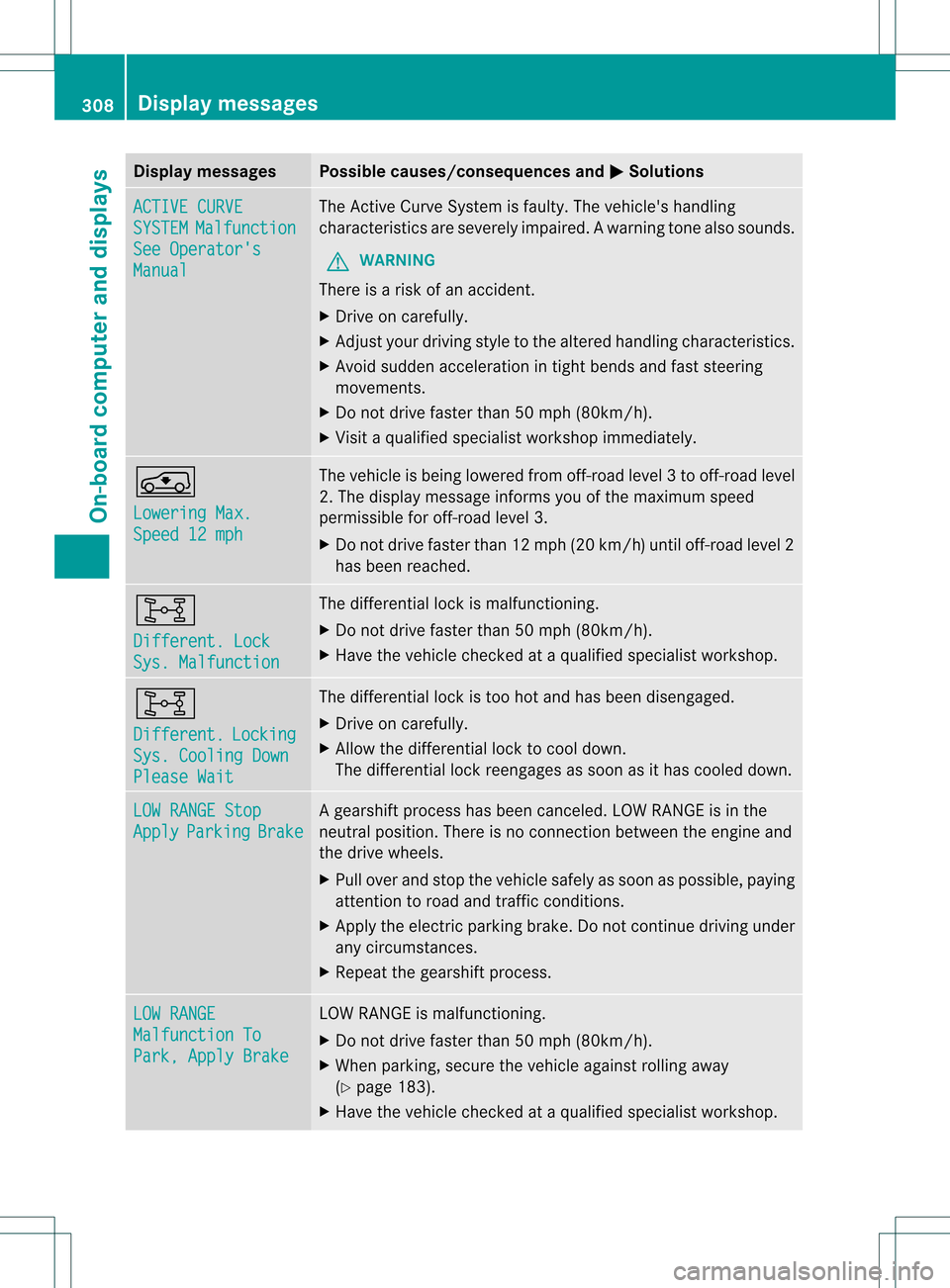
Display messages Possible causes/consequences and
0001 Solutions
ACTIVE CURVE
SYSTEM Malfunction
See Operator's
Manual The Active Curve Syste
mis faulty. The vehicle's handling
characteristics are severely impaired.Aw arning tone also sounds.
G WARNING
There is a ris kofanaccident.
X Drive on carefully.
X Adjust your driving style to the altered handling characteristics.
X Avoid sudde nacceleration in tigh tbends and fast steering
movements.
X Do not drive faster than 50 mph (80km/h).
X Visit a qualified specialist workshop immediately. 000C
Lowering
Max.
Speed 12 mph The vehicle is being lowered from off-road level
3to off-road level
2. The display message informs you of the maximum speed
permissible for off-road level 3.
X Do not drive faster than 12 mph (20 km/h) until off-road level 2
has been reached. 0013
Different. Lock
Sys. Malfunction The differential loc
kis malfunctioning.
X Do not drive faster than 50 mph (80km/h).
X Have the vehicle checked at a qualified specialist workshop. 0013
Different.
Locking
Sys. Cooling Down
Please Wait The differential lock is too hot and has been disengaged.
X
Drive on carefully.
X Allow the differential lock to cool down.
The differential lock reengages as soon as it has cooled down. LOW RANGE Stop
Apply Parking Brake Ag
earshift process has been canceled. LOW RANGE is in the
neutral position .There is no connection between the engine and
the drive wheels.
X Pull over and stop the vehicle safely as soon as possible, paying
attention to road and traffic conditions.
X Apply the electric parking brake. Do not continue driving under
any circumstances.
X Repeatt he gearshift process. LOW RANGE
Malfunction To
Park, Apply Brake LOW RANGE is malfunctioning.
X
Do not drive faster than 50 mph (80km/h).
X When parking, secure the vehicle against rolling away
(Y page 183).
X Have the vehicle checked at a qualified specialist workshop. 308
Display messagesOn-board computer and displays
Page 311 of 454
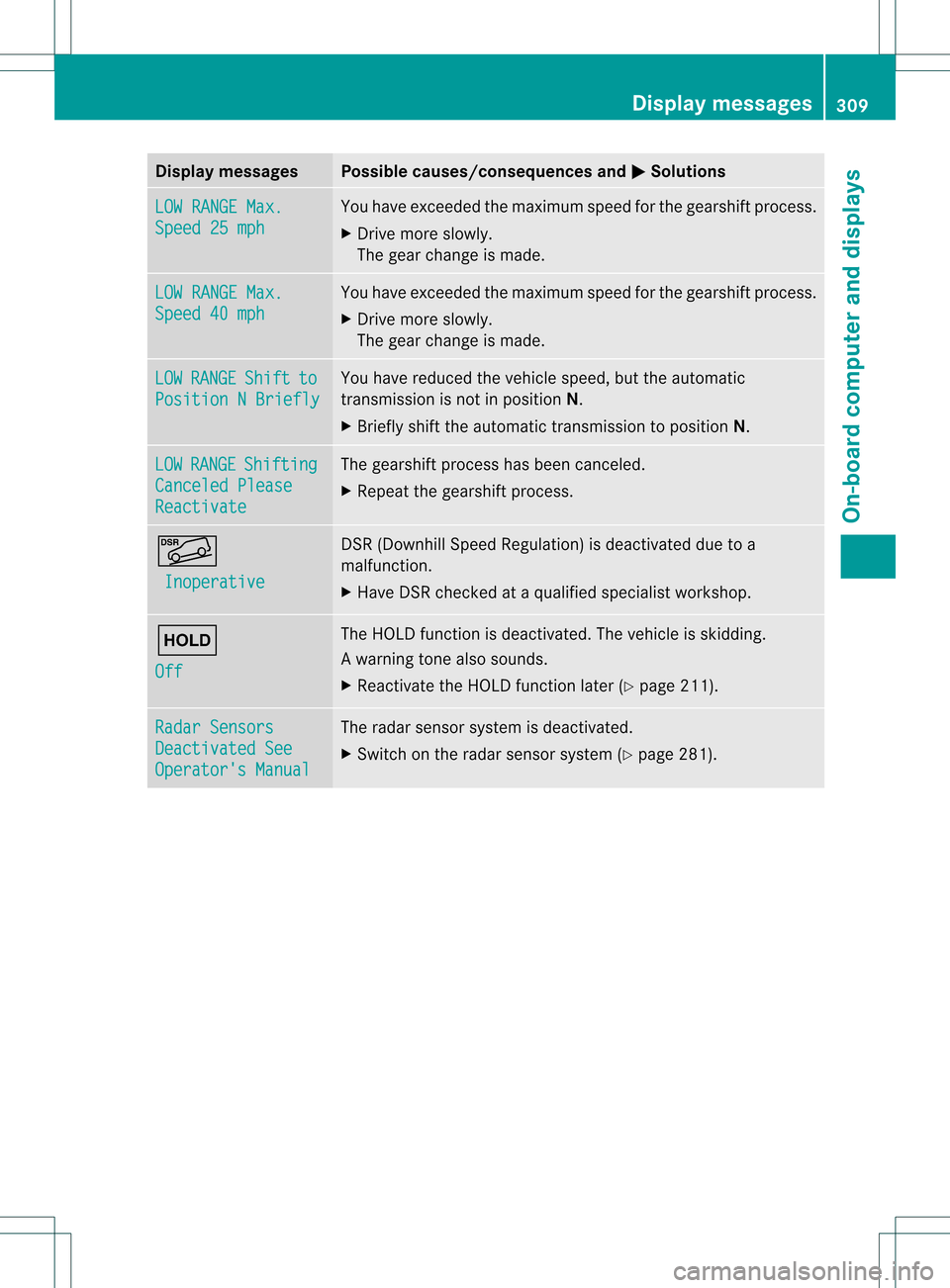
Display messages Possible causes/consequences and
0001 Solutions
LOW RANGE Max.
Speed 25 mph You have exceeded the maximum speed fo
rthe gearshift process.
X Drive more slowly.
The gear change is made. LOW RANGE Max.
Speed 40 mph You have exceeded the maximum speed for the gearshift process.
X
Drive more slowly.
The gear change is made. LOW RANGE Shift to
Position N Briefly You have reduced the vehicle speed, but the automatic
transmission is not in position
N.
X Briefly shift the automatic transmission to position N.LOW RANGE Shifting
Canceled Please
Reactivate The gearshift process has been canceled.
X
Repeatt he gearshift process. 0001
Inoperative DSR (Downhill Speed Regulation) is deactivated due to a
malfunction.
X
Have DSR checked at a qualified specialist workshop. 0001
Off The HOLD function is deactivated. The vehicle is skidding.
Aw
arning tone also sounds.
X Reactivate the HOLD function later (Y page 211).Radar Sensors
Deactivated See
Operator's Manual The radar sensor system is deactivated.
X
Switch on the radar sensor system (Y page 281). Display messages
309On-board computer and displays Z
Page 426 of 454

Direction of rotation
Tires with a specified direction of rotation
have additional benefits, e.g. if there is a risk
of hydroplaning .You will only gain these
benefits if the correct direction of rotation is
observed.
An arrow on the sidewall of the tire indicates
its correct direction of rotation. Storing wheels
Store wheels that are not being used in a cool,
dry and preferably dark place. Protec tthe
tires from oil, grease, gasoline and diesel. Cleaning the wheels
G
WARNING
The water jet from a circular jet nozzle (dirt
blasters) can cause invisible exterior damage
to the tires or chassis components.
Components damaged in this way may fail
unexpectedly. There is a risk of an accident.
Do not use power washers with circular jet
nozzles to clean the vehicle. Have damaged
tires or chassis components replaced
immediately. Mounting
awheel
Preparing the vehicle X
Vehicle with emergency spare wheel:
whe nmounting the emergency spare
wheel in the event of a flat tire, follow the
additional notes on vehicle preparation
under "Flat tire" (Y page 383).
X Park the vehicle on firm, non-slippery and
level ground.
X Unload heavy luggage.
X Apply the electric parking brake manually.
X Bring the front wheels into the straight-
ahead position.
X Shift the transmission to position P.X
Switch off the engine.
X Vehicles without KEYLESS-GO: remove
the SmartKey from the ignition lock.
X Vehicles with KEYLESS-GO: open the
driver's door.
The on-board electronics have status 0,
which is the same as the SmartKey having
been removed.
X Vehicles with KEYLESS-GO: remove the
Start/Stop button from the ignition lock
(Y page 163).
X If included in the vehicle equipment, take
the tire-change tool kit out of the vehicle.
X Secure the vehicle to prevent it from rolling
away.
i Apart from certain country-specific
variations, vehicles are not equipped with
a tire-change tool kit. For information on
which tools are required to perform a wheel
change on your vehicle, consult an
authorized Mercedes-Benz Center.
Necessary wheel-changing tools can
include, for example:
R Jack
R Wheel chock
R Lug wrench
Securing the vehicle to prevent it from
rolling away If your vehicle is equipped with a wheel chock,
it can be found in the tire-change tool kit
(Y
page 382). 424
Changing
awheelWheels and tires