236 MERCEDES-BENZ GL-Class 2014 X166 Comand Manual
[x] Cancel search | Manufacturer: MERCEDES-BENZ, Model Year: 2014, Model line: GL-Class, Model: MERCEDES-BENZ GL-Class 2014 X166Pages: 270, PDF Size: 5.76 MB
Page 6 of 270
1, 2, 3 ...
360° camera Displaying images ............................ 56
Switching on/off .............................. 56
911 emergency call ..........................125A
Active partition (USB devices
only) Selecting ........................................ 198
Address book
Browsing ........................................ 147
Calling up ....................................... 147
Changing an entry .......................... 150
Connecting a call ........................... 150
Creating an entry ........................... 148
Deleting an entry ........................... 149
Deleting contacts ........................... 154
Details about an entry ...................149
Entering characters .........................34
Entry as a home address ...............103
Hiding contact details ....................155
Importing contacts ........................152
Introduction ................................... 147
Receiving vCards ........................... 153
Searching for an entry ...................148
Starting route guidance .................151
Voice tag ....................................... 151
Address entry menu ............................ 64
Adjusting the sound settings Balance ............................................ 30
Alternative Route ................................ 93
Audio Radio mode ................................... 178
Audio CD/DVD and MP3 mode
Switching to (Rear Seat Entertain-
ment System) ................................ 243
Audio DVD
Mode, switching to ........................191
Pause function ............................... 193
Playback options ........................... 198
Safety notes .................................. 187
Setting the audio format ................197
Stop function ................................. 193Audio format, setting
Audio DVD ..................................... 197
Video DVD ..................................... 229
Autostore ........................................... 181
AUX (audio) Notes/socket ................................ 220
Switching to ................................... 220
AUX (video)
Setting the volume and sound .......230
Showing/hiding the menu .............230
Switching to ................................... 230
AUX jacks
CD/DVD drive ............................... 236
Avoiding an area ................................ 115 B
Back button ......................................... 27
Balance, adjusting ............................... 30
Bass, setting ........................................ 30
Bird's-eye view (navigation) .............109
Bluetooth ®
Activating/deactivating ...................45
Activating audio mode ...................211
Conditions (telephone) ..................125
Connecting another mobile
phone ............................................ 129
Connecting audio devices ..............208
Device list ...................................... 208
Entering the passcode ...................128
External authorization ....................129
General information .........................44
Interface ........................................ 124
Introduction ................................... 124
Reconnecting an audio device .......210
Searching for a mobile phone ........127
Settings ........................................... 44
Telephone basic menu ...................131
Telephony ...................................... 125
Telephony notes ............................ 124
Bluetooth ®
audio basic display ........211
Brightness, setting (TV, video) .........224
Buttons on the COMAND control-
ler .......................................................... 27 4
Index
Page 12 of 270
Rear Seat Entertainment System
Active COMAND source .................250
Adjusting sound settings ...............240
Adjusting the brightness ................241
Adjusting the color ........................241
Adjusting the contrast ...................241
AUX mode ...................................... 252
CD/DVD audio and MP3 mode ...... 242
Changing the batteries ..................238
Changing the picture format ..........241
Cordless headphones ....................237
Multiple users ................................ 240
Operating with the headphones .....240
Picture settings .............................. 241
System settings ............................. 241
Using the main loudspeaker ..........240
Video DVD mode ........................... 246
Rear view camera
Displaying the image ........................ 55
Receiving vCards ............................... 153
Redialing (telephone) ........................133
Remote control Button lighting ............................... 236
Rear Seat Entertainment System ...235
Reset function ..................................... 47
Resetting (factory settings) ...............47
Route Estimated time of arrival ..................94
Route (navigation)
Calling up the "Routes" menu ..........96
Displaying the distance to the des-
tination ............................................ 94
Recording ........................................ 95
Route overview ................................ 94
Selecting an alternative route ..........93
Setting route options (avoiding:
highways, toll roads, tunnels, fer-
ries) ................................................. 62
Setting the route type (short
route, fast route, dynamic route or
economic route) ............................... 62
Starting calculation ..........................69
Route demonstration ..........................95
Route guidance Canceling ......................................... 92
Continuing ....................................... 92
Destination reached ......................... 92
General notes .................................. 87Lane recommendations
...................90
Off-road ........................................... 97
Traffic reports .................................. 99 S
Safety notes Audio CD/DVD and MP3 mode .....187
Using the telephone ....................... 124
Video DVD mode ........................... 224
SatRadio
Displaying information ...................187
Notes ............................................. 182
Registering .................................... 183
Selecting a category ......................184
Switching to ................................... 183
Saving the crosshair position ..........109
Screen Selecting for remote operation ......235
SD memory card
Ejecting .......................................... 191
Inserting ........................................ 191
Search & Send ...................................... 86
Seats Active multicontour sea t.................. 52
Adjusting the lumbar support
(COMAND) ....................................... 53
Balance (seat heating) .....................54
Multicontour seat ............................ 52
Resetting settings ............................ 55
Seat functions (COMAND) ...............52
Selecting for adjustment
(COMAND) ....................................... 52
Selecting a province ...........................64
Selecting a state .................................. 64
Selecting stations Radio ............................................. 180
Sending DTMF tones .........................134
Settings Menu overview ................................. 22
Picture (COMAND) .........................224
Sound settings ................................. 30
Setting the audio format
Rear Seat Entertainment System ...249
Setting the language
COMAND ......................................... 45
Rear Seat Entertainment System ...249
Setting the night design .....................4210
Index
Page 237 of 270
Rear-compartment screens
0043
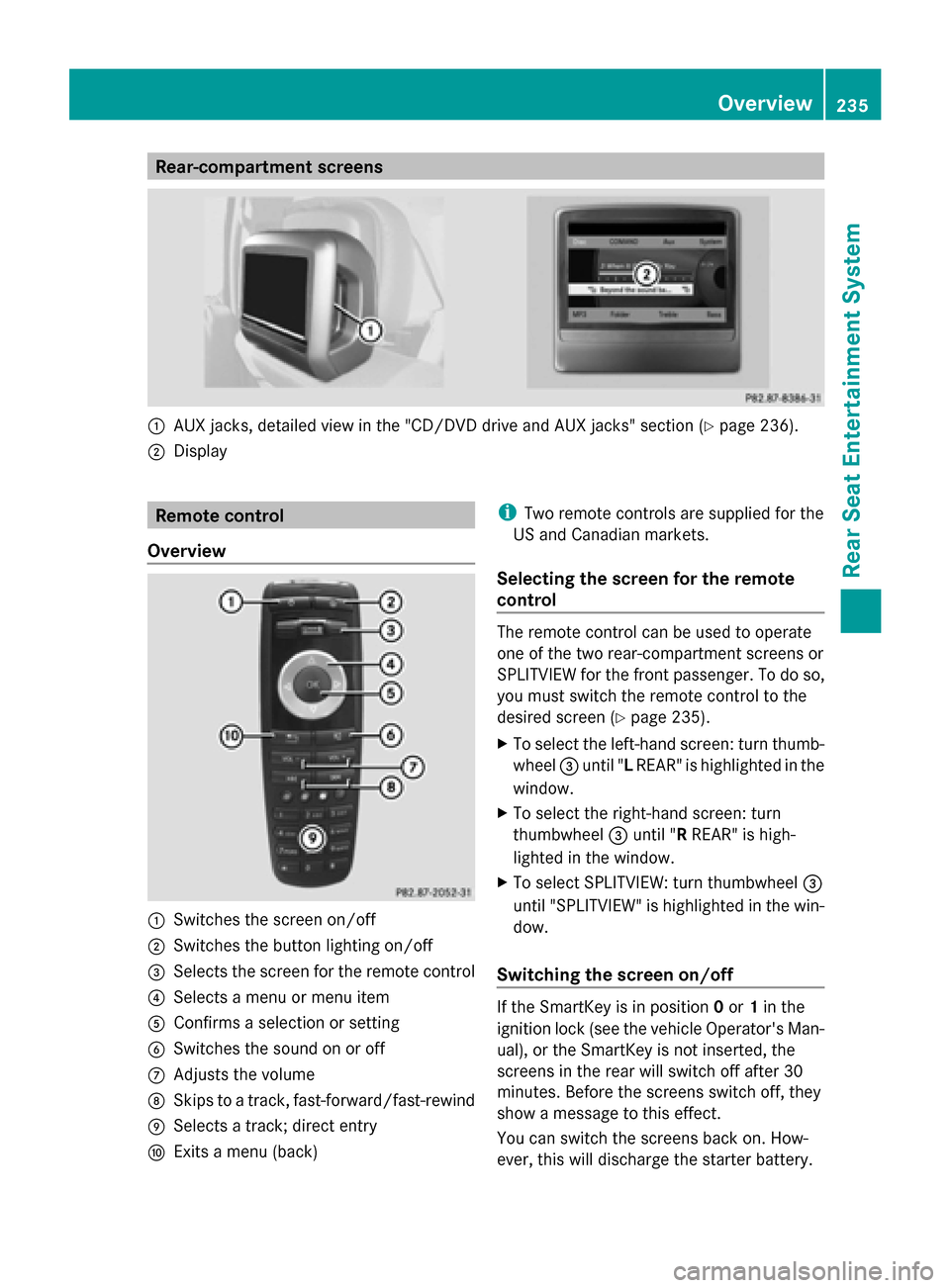
AUX jacks, detailed view in the "CD/DVD drive and AUX jacks" section (Y page 236).
0044 Display Remote control
Overview 0043
Switches the screen on/off
0044 Switches the button lighting on/off
0087 Selects the screen for the remote control
0085 Selects a menu or menu item
0083 Confirms a selection or setting
0084 Switches the sound on or off
006B Adjusts the volume
006C Skips to a track, fast-forward/fast-rewind
006D Selects a track; direct entry
006E Exits a menu (back) i
Two remote controls are supplied for the
US and Canadian markets.
Selecting the screen for the remote
control The remote control can be used to operate
one of the two rear-compartment screens or
SPLITVIEW for the front passenger. To do so,
you must switch the remote control to the
desired screen (Y
page 235).
X To select the left-hand screen: turn thumb-
wheel 0087until " LREAR" is highlighted in the
window.
X To select the right-hand screen: turn
thumbwheel 0087until "R REAR" is high-
lighted in the window.
X To select SPLITVIEW: turn thumbwheel 0087
until "SPLITVIEW" is highlighted in the win-
dow.
Switching the screen on/off If the SmartKey is in position
0or 1in the
ignition lock (see the vehicle Operator's Man-
ual), or the SmartKey is not inserted, the
screens in the rear will switch off after 30
minutes. Before the screens switch off, they
show a message to this effect.
You can switch the screens back on. How-
ever, this will discharge the starter battery. Overview
235Rear Seat Entertainment System Z
Page 238 of 270
X
Point the remote control at the rear-com-
partment screen which has been selected
for remote operation.
X Press button 0043on the remote control
(Y page 235).
The respective rear-compartment screen
switches on or off.
i You can only switch the screens on using
the remote control if the ignition is
switched on.
Switching the button lighting on/off X
Press button 0044on the remote control
(Y page 235).
Depending on the previous status, the but-
ton lighting is switched on or off.
i If you do not use the remote control for
about 15 seconds, the button lighting
switches off automatically.
Switching the sound on or off X
Press button 0084on the remote control
(Y page 235).
The sound is switched on/off.
Selecting a menu/menu item and con-
firming your selection X
Select a menu/menu item using the
0059006500630064 buttons on the
remote control and press the 008Bbutton to
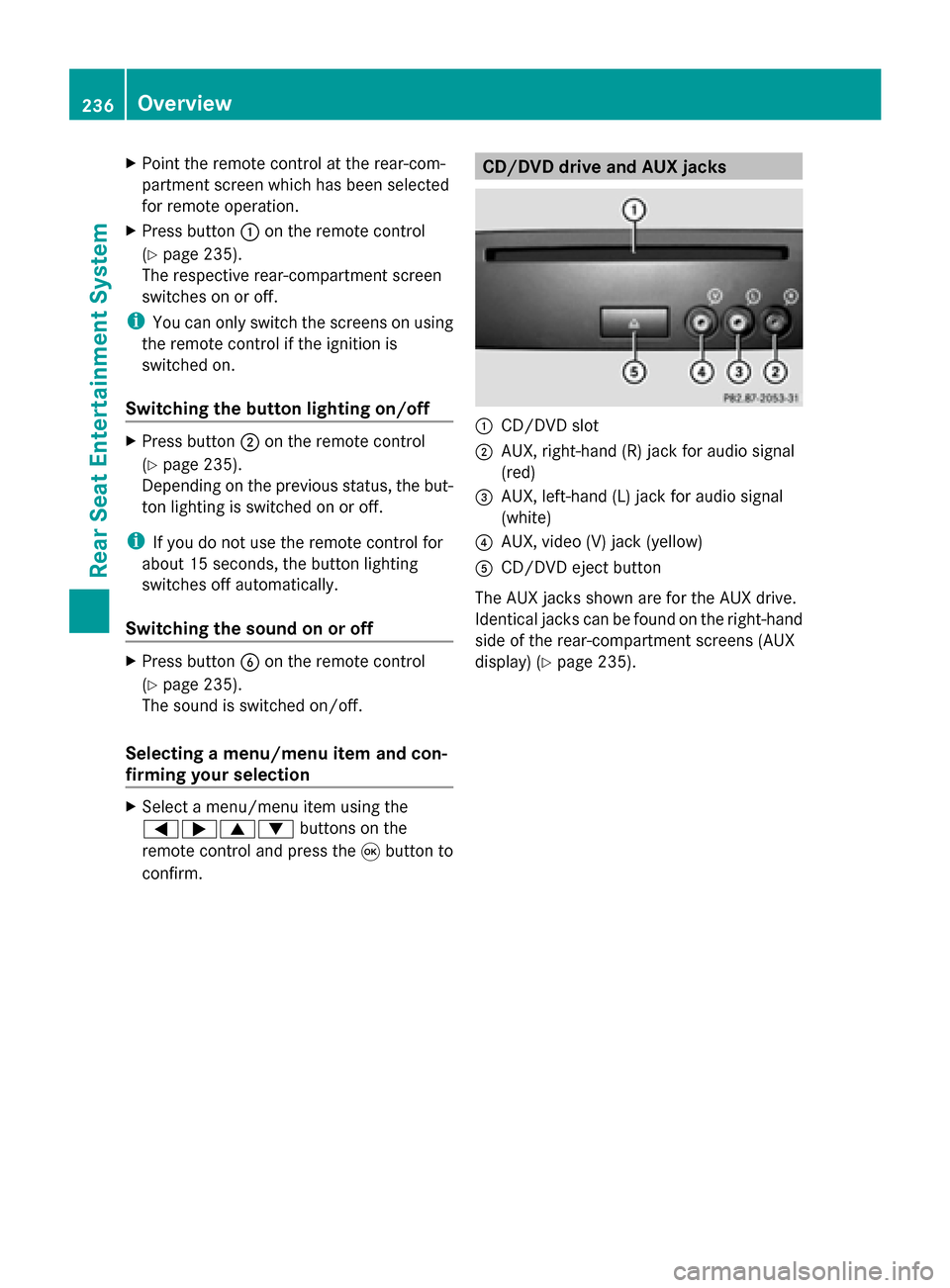
confirm. CD/DVD drive and AUX jacks
0043
CD/DVD slot
0044 AUX, right-hand (R) jack for audio signal
(red)
0087 AUX, left-hand (L) jack for audio signal
(white)
0085 AUX, video (V) jack (yellow)
0083 CD/DVD eject button
The AUX jacks shown are for the AUX drive.
Identical jacks can be found on the right-hand
side of the rear-compartment screens (AUX
display) (Y page 235).236
OverviewRear Seat Entertainment System
Page 254 of 270
X
To select a folder: press the0064button
on the remote control.
X Highlight one of the two folder symbols
with the 0059or0065 button and press
008B to confirm.
Depending on your selection, the previous
or next folder is selected and the first track
is played.
Additional setting option:
R Adjusting the sound settings (Y page 240)
Video DVD mode X
To hide a menu: confirmMenu Menuwith the
008B button.
The video image is played in full screen
mode.
Additional setting options:
R Adjusting the brightness, contrast and
color (Y page 241)
R Changing the picture format (Y page 241)
R Adjusting the sound settings (Y page 240)AUX mode
Introduction
You can connect one external video source to
each of the displays of the Rear Seat Enter-
tainment System (AUX display) and also one
external video source to the rear-compart-
ment CD/DVD drive (AUX drive) with a sound
and video signal.
Please see the corresponding operating
instructions for information on how to oper-
ate the external video source.
For further details about external video sour-
ces, please consult an authorized Mercedes-
Benz Center. Connecting AUX equipment
AUX drive The AUX drive jacks are located on the CD/
DVD drive next to the CD/DVD eject button
(Y
page 236).
Displaying AUX The AUX display jacks are on the side of the
screen (Y
page 235).
Audio and video connection X
Insert the audio plugs for the left and right
signals into the corresponding Land R
jacks.
X Insert the video plug into the Vjack. Activating AUX mode
AUX drive X
Select Aux Auxin the menu using the
006300590065 buttons on the remote
control and press the 008Bbutton to confirm.
The AUX menu appears.
X Select Source
Source from the AUX menu and
press the 008Bbutton to confirm.
X Select Disc Drive Aux
Disc Drive Aux and press the008B
button to confirm.
You will hear and see the content of the
external video source if it is connected to
the CD/DVD drive and switched to play-
back. If no video image is available from the
AUX source connected, you will see an
audio menu.
Displaying AUX X
Select the screen by turning the scroll
wheel on the remote control ( Ypage 235) 252
AUX modeRear Seat Entertainment System