phone MERCEDES-BENZ GL-Class 2014 X166 Owner's Manual
[x] Cancel search | Manufacturer: MERCEDES-BENZ, Model Year: 2014, Model line: GL-Class, Model: MERCEDES-BENZ GL-Class 2014 X166Pages: 462, PDF Size: 32.46 MB
Page 16 of 462
Media Interface
see Separate operating instructions
Memory card (audio) .........................278
Memory function ............................... 125
Message memory (on-board
computer) .......................................... 290
Mirrors see Exterior mirrors
see Rear-view mirror
see Vanity mirror (in the sun visor)
Mobile phone
Menu (on-board computer) ............279
Modifying the programming
(SmartKey) ........................................... 81
MOExtended tires .............................. 387
Mounting wheels Lowering the vehicle ......................432
Mounting a new wheel ...................431
Preparing the vehicle .....................428
Raising the vehicle .........................429
Removing a wheel ..........................431
Securing the vehicle against
rolling away ................................... 428
MP3
Operation ....................................... 278
see separate operating instructions
Multifunction display
Function/notes ............................. 274
Permanent displa y......................... 283
Multifunction steering wheel
Operating the on-board computer .273
Overview .......................................... 35N
Navigation Menu (on-board computer) ............277
see separate operating instructions
Night View Assist Plus
Activating/deactivating .................241
Cleaning ......................................... 381
Problem (malfunction) ...................243
Notes on breaking-in a new vehicle 166 O
Occupant Classification System
(OCS) Faults ............................................... 53
Operation ........................................ .49
System self-test ............................... 51
Occupant safety
Air bags ........................................... 44
Important safety notes ....................42
PRE-SAFE ®
(anticipatory
occupant protection) .......................54
SRS (Supplemental Restraint
System) ........................................... 43
OCS
Faults ............................................... 53
Operation ........................................ .49
System self-test ............................... 51
Odometer ........................................... 275
Off-road driving Approach/departure angl e............ 455
Checklist after driving off-road ......198
Checklist before driving off-road .... 198
Fording depth ................................ 454
General information .......................197
Important safety notes ..................197
Maximum gradient climbing ability 455
Traveling uphill ............................... 200
Off-road programs (vehicles with
the ON&OFFROAD package)
Displays in the COMAND displa y... 262
Function/notes ............................. 258
Off-road program 1 ........................258
Off-road program 2 ........................259
Off-road system
4MATIC .......................................... 256
DSR ............................................... 256
LOW RANGE off-road gear .............259
Off-road 4ETS .................................. 72
Off-road ABS .................................... 68
Off-road ESP ®
.................................. 74
Off-road programs (vehicles with
the ON&OFFROAD package) ..........258
Oil
see Engine oil
On and Offroad menu (on-board
computer) .......................................... 28614
Index
Page 17 of 462
On-board computer
AMG menu .................................... .287
Assistance menu ........................... 280
Audio menu ................................... 278
Convenience submenu ..................285
Displaying a service message ........375
Display messages ..........................290
DISTRONIC PLUS ........................... 210
Factory settings submenu .............286
Important safety notes ..................272
Instrument cluster submenu ..........282
Lighting submenu .......................... 283
Menu overview .............................. 275
Message memory .......................... 290
Navigation menu ............................ 277
On and Offroad menu ....................286
Operation ....................................... 273
RACETIMER ................................... 287
Service menu ................................. 282
Settings menu ............................... 282
Standard displa y............................ 275
Telephone menu ............................ 279
Trip menu ...................................... 275
Vehicle submenu ........................... 284
Video DVD operation .....................279
On-road programs
AUTO program ............................... 254
Function/notes ............................. 253
Snow program ............................... 255
SPORT program ............................. 254
Trailer program .............................. 255
Opening and closing the side trim
panels ................................................. 139
Operating safety Declaration of conformity ................27
Important safety notes ....................26
Operating system
see On-board computer
Operator's Manual
Vehicle equipment ...........................24
Outside temperature display ...........273
Overhead control panel ......................39
Override feature Rear side windows ...........................66 P
Paint code number ............................444
Paintwork (cleaning instructions) ...378
Panic alarm .......................................... 42
Panorama roof with power tilt/
sliding panel
Opening/closing ............................ 100
Opening/closing the roller
sunblind ......................................... 101
Problem (malfunction) ...................103
Resetting ....................................... 101
Panorama sliding sunroof
Important safety notes ....................98
Parking ............................................... 188
Important safety notes ..................188
Parking brake ................................ 189
Position of exterior mirror, front-
passenger side ............................... 124
Rear view camera .......................... 230
see PARKTRONIC
Parking aid
Active Parking Assist .....................226
see Exterior mirrors
see PARKTRONIC
Parking assistance
see PARKTRONIC
Parking brake
Display message ............................ 294
Electric parking brake ....................189
Warning lamp ................................. 332
Parking lamps
Switching on/off ........................... 130
PARKTRONIC
Deactivating/activating .................224
Driving system ............................... 222
Function/notes ............................. 222
Important safety notes ..................222
Problem (malfunction) ...................226
Range of the sensors .....................223
Trailer towing ................................. 225
Warning displa y............................. 224
PASSENGER AIR BAG OFF
Problem (malfunction) .....................53
Problems (malfunction) .................. 301
PASSENGER AIR BAG OFF indicator
lamp ...................................................... 49
Plastic trim (cleaning instructions) .382 Index
15
Page 21 of 462
Switching air-recirculation mode
on/off
................................................. 161T
Tachometer ........................................ 273
Tailgate Display message ............................ 321
Emergency unlocking .......................93
Important safety notes ....................89
Limiting the opening angle ...............92
Opening/closing (automatically
from inside) ...................................... 92
Opening/closing (automatically
from outside) ................................... 90
Opening/closing (from outside) .......90
Opening dimensions ......................453
Power closing .................................. 88
Tail lamps
Display message ............................ 304
Tank
see Fuel tank
Tank content
Fuel gauge ....................................... 33
Technical data
Capacities ...................................... 445
Emergency spare wheel .................441
Information .................................... 444
Tires/wheels ................................. 432
Trailer loads ................................... 457
Vehicle data ................................... 453
TELEAID
Call priority .................................... 359
Downloading destinations
(COMAND) ..................................... 359
Downloading routes .......................363
Emergency call .............................. 356
Geo fencing ................................... 363
Locating a stolen vehicle ...............362
MB info call button ........................358
Remote vehicle locking ..................361
Roadside Assistance button ..........358
Search & Send ............................... 360
Self-test ......................................... 356
Speed alert .................................... 363
System .......................................... 356
Triggering the vehicle alarm ........... 364 Vehicle remote malfunction
diagnosis
....................................... 362
Vehicle remote unlocking ..............361
Tele Aid
General notes ................................ 355
Telephone
Accepting a call ............................. 279
Display message ............................ 322
Menu (on-board computer) ............279
Number from the phone book ....... .280
Redialing ........................................ 280
Rejecting/ending a call .................279
Temperature
Coolant .......................................... 272
Coolant (on-board computer) ......... 287
Engine oil (on-board computer) ...... 287
Outside temperature ..................... .273
Setting (climate control) ................157
Theft deterrent systems
ATA (Anti-Theft Alarm system) .........77
Immobilizer ...................................... 77
Through-loading ................................ 343
Time see separate operating instructions
Timing (RACETIMER) .........................287
TIREFIT kit .......................................... 388
Tire pressure Calling up (on-board computer) .....412
Checking manually ........................411
Display message ............................ 318
Important safety notes ..................412
Maximum ....................................... 410
Notes ............................................. 409
Not reached (TIREFIT) ....................390
Reached (TIREFIT) ..........................390
Recommended ............................... 408
Tire pressure loss warning
system General notes ................................ 411
Important safety notes ..................411
Restarting ...................................... 412
Tire pressure monitoring system
Checking the tire pressure
electronically ................................. 414
Function/notes ............................. 412
General notes ................................ 412
Important safety notes ..................413
Restarting ...................................... 415 Index
19
Page 37 of 462
Multifunction steering wheel
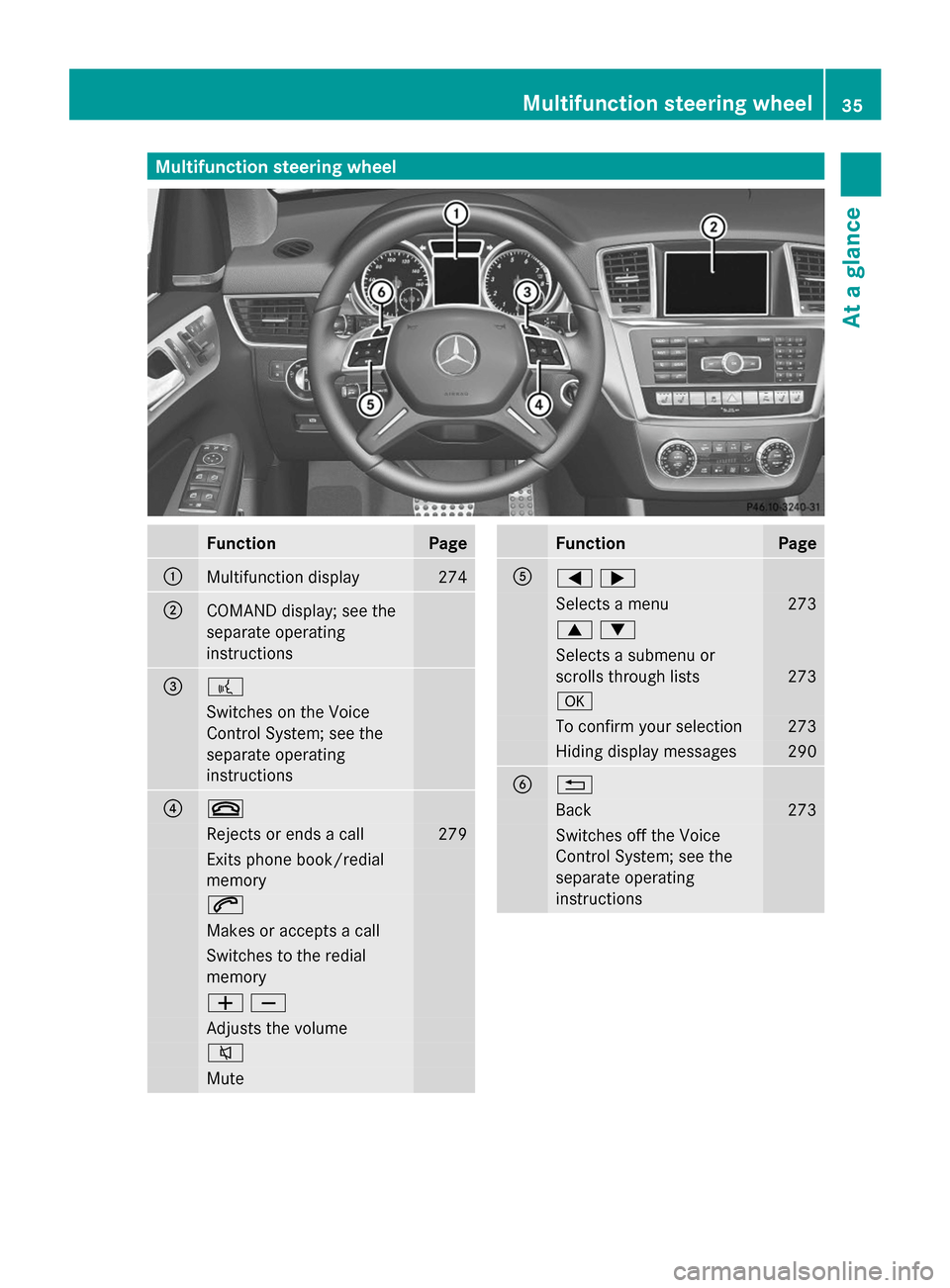
Function Page
:
Multifunction display 274
;
COMAND display; see the
separate operating
instructions
=
?
Switches on the Voice
Control System; see the
separate operating
instructions ?
~
Rejects or ends a call 279
Exits phone book/redial
memory
6
Makes or accepts a call
Switches to the redial
memory
WX
Adjusts the volume
8
Mute Function Page
A
=;
Selects a menu 273
9:
Selects a submenu or
scrolls through lists
273
a
To confirm your selection 273
Hiding display messages 290
B
%
Back 273
Switches off the Voice
Control System; see the
separate operating
instructionsMultifunction steering wheel
35At a glance
Page 41 of 462
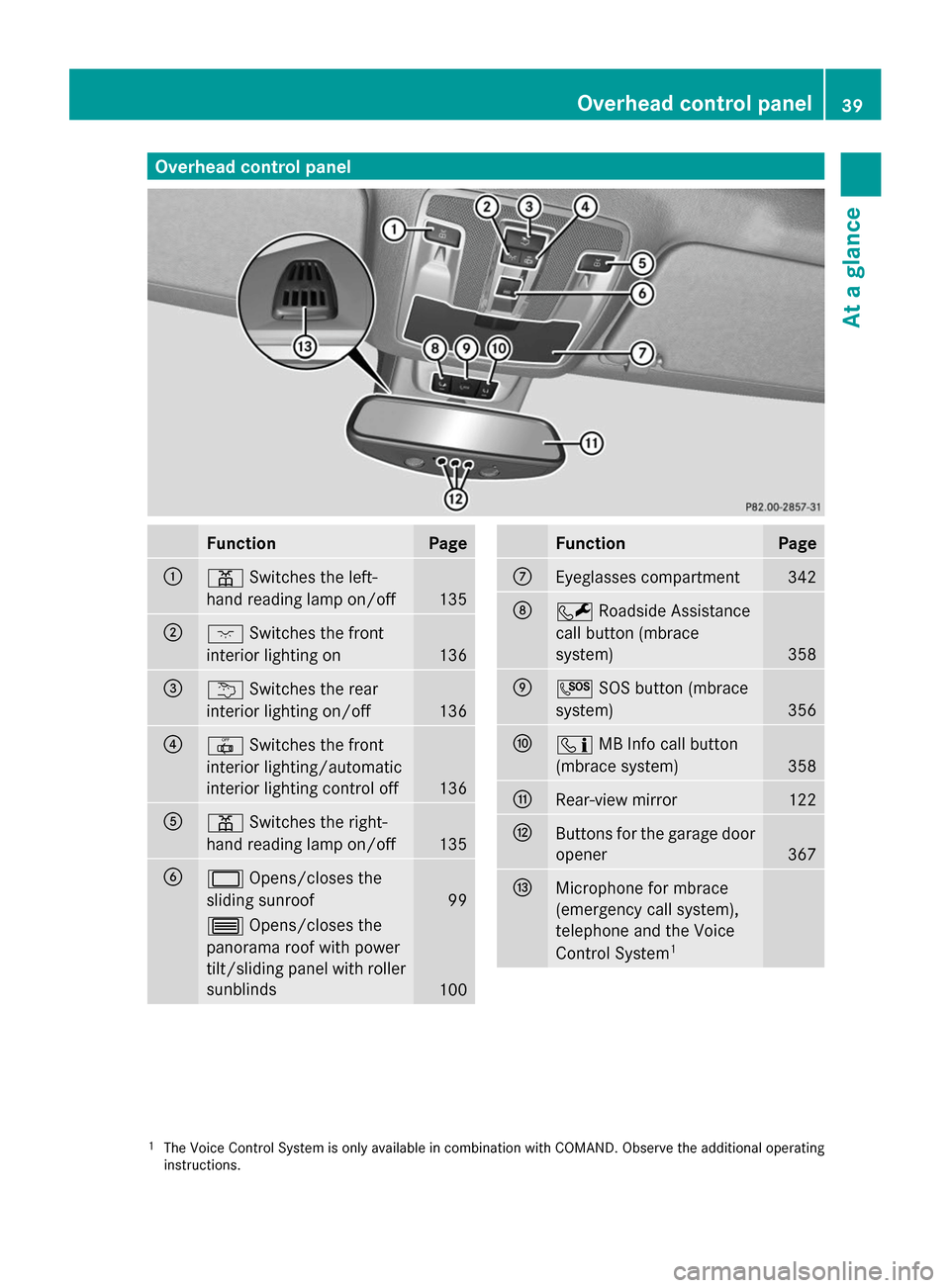
Overhead control panel
Function Page
:
p
Switches the left-
hand reading lamp on/off 135
;
c
Switches the front
interior lighting on 136
=
u
Switches the rear
interior lighting on/off 136
?
|
Switches the front
interior lighting/automatic
interior lighting control off 136
A
p
Switches the right-
hand reading lamp on/off 135
B
2
Opens/closes the
sliding sunroof 99
3
Opens/closes the
panorama roof with power
tilt/sliding panel with roller
sunblinds 100 Function Page
C
Eyeglasses compartment 342
D
F
Roadside Assistance
call button (mbrace
system) 358
E
G
SOS button (mbrace
system) 356
F
ï
MB Info call button
(mbrace system) 358
G
Rear-view mirror 122
H
Buttons for the garage door
opener
367
I
Microphone for mbrace
(emergency call system),
telephone and the Voice
Control System
1 1
The Voice Control System is only available in combination with COMAND. Observe the additional operating
instructions. Overhead control panel
39At a glance
Page 80 of 462
X
To stop the alarm using KEYLESS-GO:
grasp the outside door handle. The
SmartKey must be outside the vehicle.
The alarm is switched off.
or
X Press the Start/Stop button on the
dashboard. The SmartKey must be inside
the vehicle.
The alarm is switched off.
The alarm is not switched off, even if you
close the open door that triggered it, for
example.
i If the alarm continues for more than
30 seconds, the mbrace emergency call
system automatically notifies the
Customer Assistance Center. This is done
either by text message or data connection.
The emergency call system sends the
message or data provided that:
R you have subscribed to the mbrace
service.
R the mbrace service has been activated
properly.
R the necessary mobile phone network is
available. 78
Theft deterrent locking systemSafety
Page 82 of 462
Useful information
i This Operator's Manual describes all
models and all standard and optional
equipment of your vehicle available at the
time of publication of the Operator's
Manual. Country-specific differences are
possible. Please note that your vehicle may
not be equipped with all features
described. This also applies to safety-
related systems and functions.
i Read the information on qualified
specialist workshops: (Y page 28).SmartKey
Important safety notes
G
WARNING
If children are left unsupervised in the vehicle,
they could:
R open the doors, thus endangering other
people or road users.
R get out and disrupt traffic.
R operate the vehicle's equipment.
Additionally, children could set the vehicle in
motion if, for example, they:
R release the parking brake.
R shifting the automatic transmission out of
park position P
R Start the engine.
There is a risk of an accident and injury.
When leaving the vehicle, always take the
SmartKey with you and lock the vehicle. Never
leave children or animals unattended in the
vehicle. Always keep the SmartKey out of
reach of children. G
WARNING
If persons, particularly children are subjected
to prolonged exposure to extreme heat or
cold, there is a risk of injury, possibly even
fatal. Never leave children unattended in the
vehicle. G
WARNING
If you attach heavy or large objects to the
SmartKey, the SmartKey could be
unintentionally turned in the ignition lock. This
could cause the engine to be switched off.
There is a risk of an accident.
Do not attach any heavy or large objects to
the SmartKey. Remove any bulky key rings
before inserting the SmartKey into the
ignition lock.
! Keep the SmartKey away from strong
magnetic fields. Otherwise, the remote
control function could be affected.
Strong magnetic fields can occur in the
vicinity of powerful electrical installations.
Do not keep the SmartKey:
R with electronic devices, e.g. a mobile
phone or another SmartKey
R with metallic objects, e.g. coins or metal
foil
R inside metallic objects, e.g. a metal case
This can affect the functionality of the
SmartKey.
Do not keep the KEYLESS-GO key in the
temperature-controlled cup holder.
Otherwise, the KEYLESS-GO key will not be
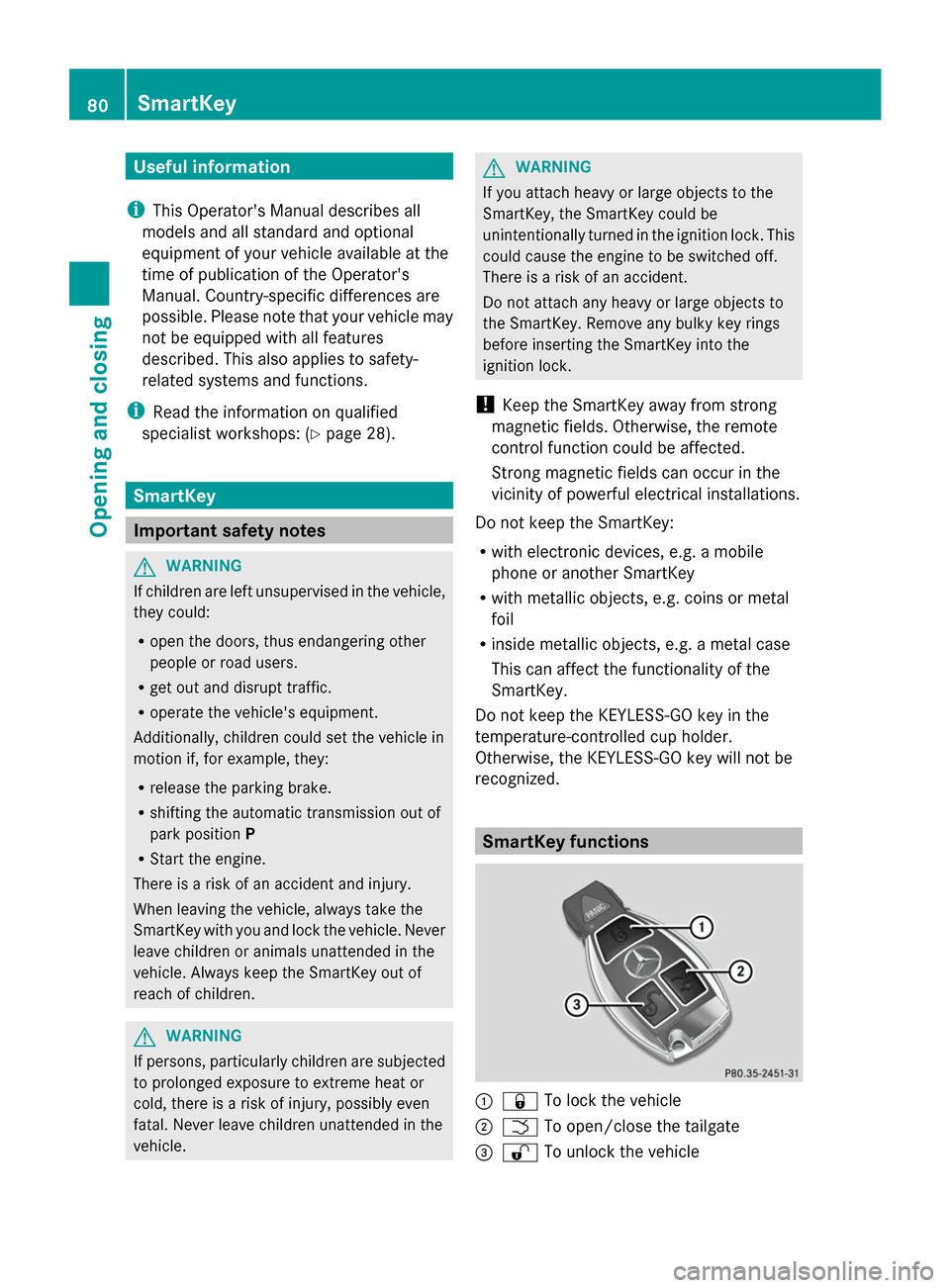
recognized. SmartKey functions
:
& To lock the vehicle
; F To open/close the tailgate
= % To unlock the vehicle 80
SmartKeyOpening and closing
Page 169 of 462
G
WARNING
Unsuitable footwear can hinder correct usage
of the pedals, e.g.:
R shoes with thick soles
R shoes with high heels
R slippers
There is a risk of an accident.
Wear suitable footwear to ensure correct
usage of the pedals. G
WARNING
If you switch off the ignition while driving,
safety-relevant functions are only available
with limitations, or not at all. This could affect,
for example, the power steering and the brake
boosting effect. You will require considerably
more effort to steer and brake. There is a risk
of an accident.
Do not switch off the ignition while driving. G
WARNING
If the parking brake has not been fully
released when driving, the parking brake can:
R overheat and cause a fire
R lose its hold function.
There is a risk of fire and an accident. Release
the parking brake fully before driving off.
! Warm up the engine quickly. Do not use
the engine's full performance until it has
reached operating temperature.
Only shift the automatic transmission to
the desired drive position when the vehicle
is stationary.
Where possible, avoid spinning the drive
wheels when pulling away on slippery
roads. You could otherwise damage the
drive train.
! AMG vehicles: at low engine oil
temperatures below 68 ‡ (+20 †), the
maximum engine speed is restricted in
order to protect the engine. To protect the
engine and maintain smooth engine operation, avoid driving at full throttle when
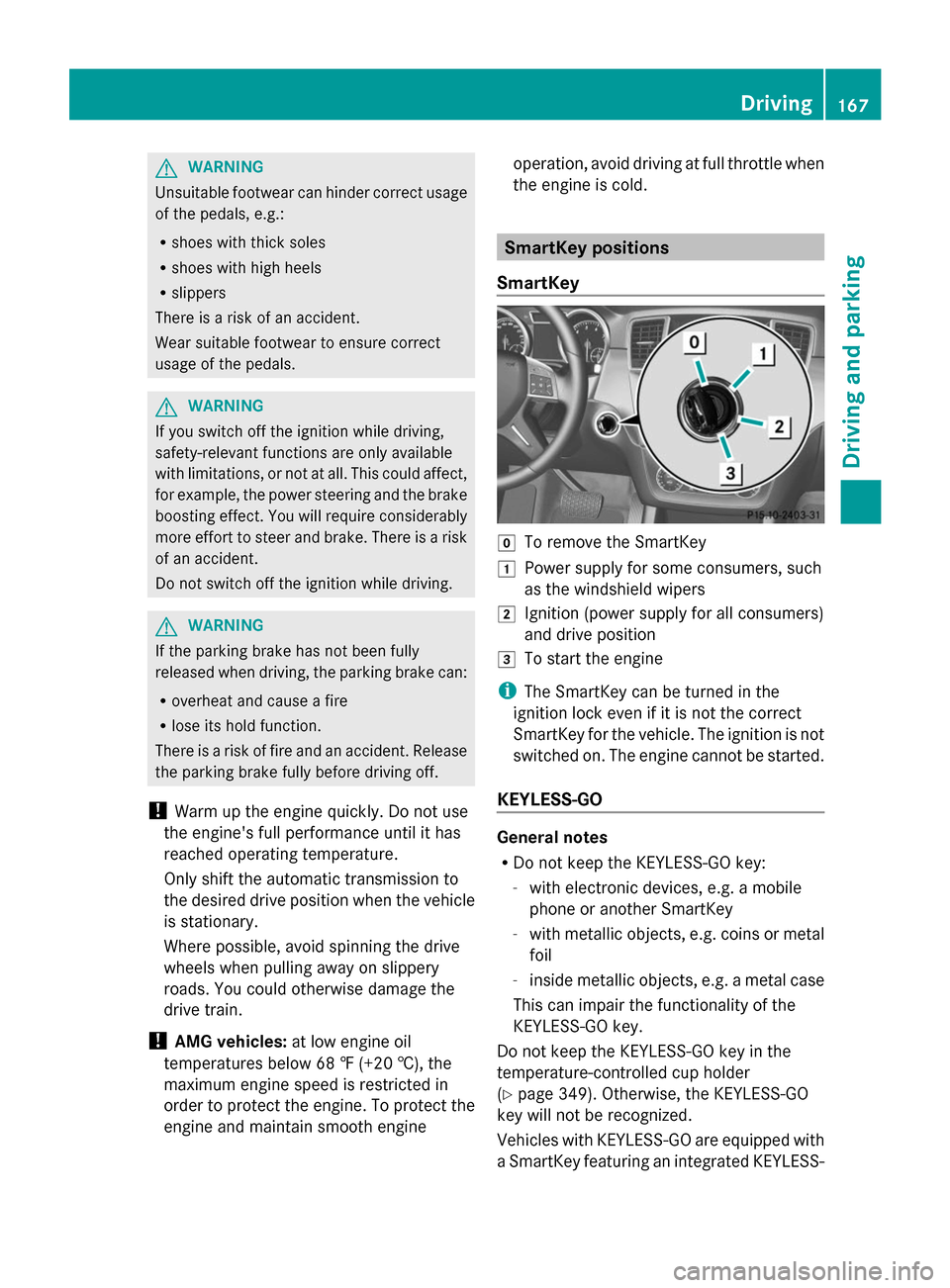
the engine is cold. SmartKey positions
SmartKey g
To remove the SmartKey
1 Power supply for some consumers, such
as the windshield wipers
2 Ignition (power supply for all consumers)
and drive position
3 To start the engine
i The SmartKey can be turned in the
ignition lock even if it is not the correct
SmartKey for the vehicle. The ignition is not
switched on. The engine cannot be started.
KEYLESS-GO General notes
R
Do not keep the KEYLESS-GO key:
-with electronic devices, e.g. a mobile
phone or another SmartKey
- with metallic objects, e.g. coins or metal
foil
- inside metallic objects, e.g. a metal case
This can impair the functionality of the
KEYLESS-GO key.
Do not keep the KEYLESS-GO key in the
temperature-controlled cup holder
(Y page 349). Otherwise, the KEYLESS-GO
key will not be recognized.
Vehicles with KEYLESS-GO are equipped with
a SmartKey featuring an integrated KEYLESS- Driving
167Driving and parking Z
Page 193 of 462
i
Ensure that you do not depress the
accelerator pedal unintentionally.
Otherwise the parking brake will be
released and the vehicle will start to move.
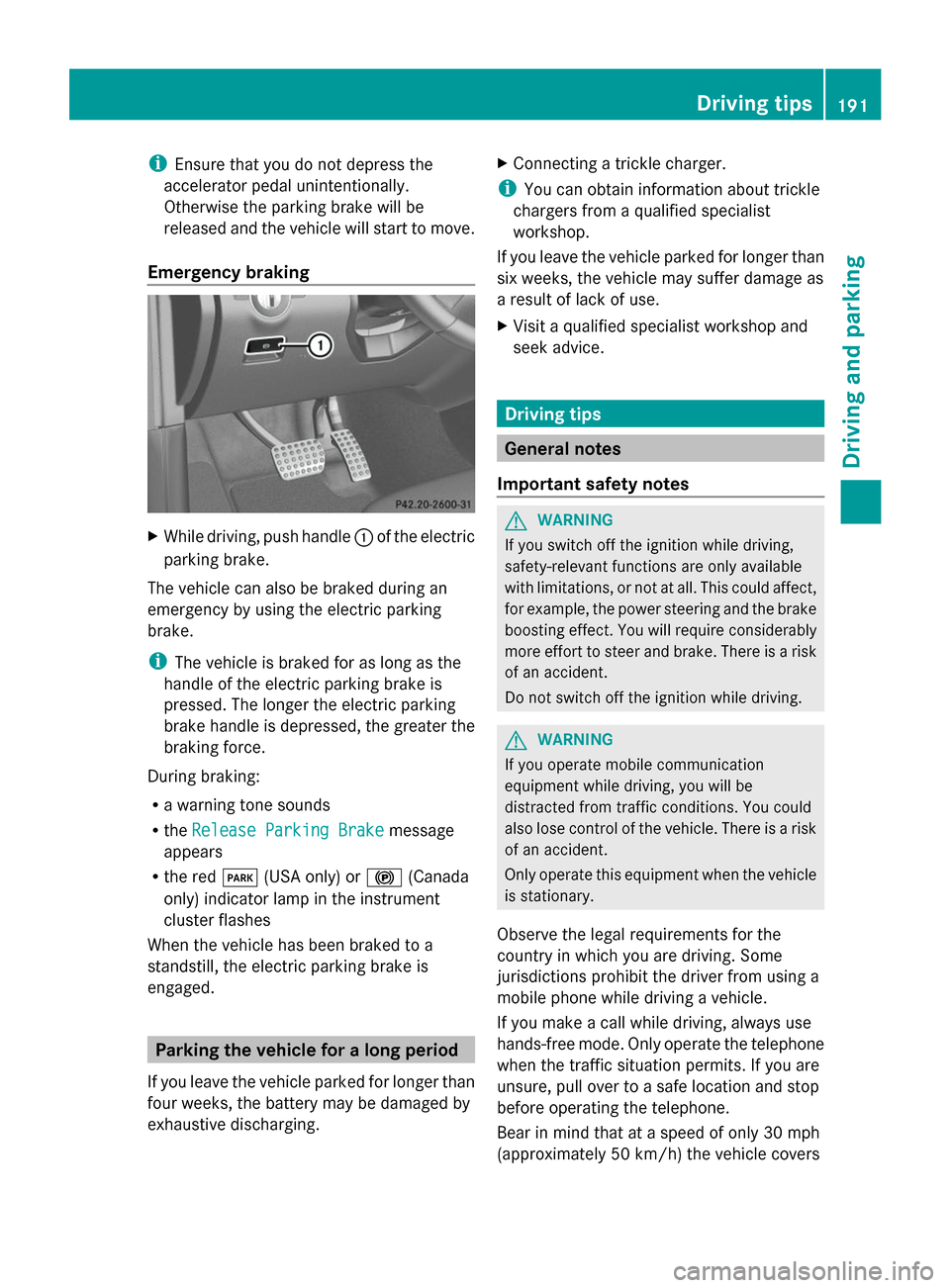
Emergency braking X
While driving, push handle :of the electric
parking brake.
The vehicle can also be braked during an
emergency by using the electric parking
brake.
i The vehicle is braked for as long as the
handle of the electric parking brake is
pressed. The longer the electric parking
brake handle is depressed, the greater the
braking force.
During braking:
R a warning tone sounds
R the Release Parking Brake
Release Parking Brake message
appears
R the red F(USA only) or !(Canada
only) indicator lamp in the instrument
cluster flashes
When the vehicle has been braked to a
standstill, the electric parking brake is
engaged. Parking the vehicle for a long period
If you leave the vehicle parked for longer than
four weeks, the battery may be damaged by
exhaustive discharging. X
Connecting a trickle charger.
i You can obtain information about trickle
chargers from a qualified specialist
workshop.
If you leave the vehicle parked for longer than
six weeks, the vehicle may suffer damage as
a result of lack of use.
X Visit a qualified specialist workshop and
seek advice. Driving tips
General notes
Important safety notes G
WARNING
If you switch off the ignition while driving,
safety-relevant functions are only available
with limitations, or not at all. This could affect,
for example, the power steering and the brake
boosting effect. You will require considerably
more effort to steer and brake. There is a risk
of an accident.
Do not switch off the ignition while driving. G
WARNING
If you operate mobile communication
equipment while driving, you will be
distracted from traffic conditions. You could
also lose control of the vehicle. There is a risk
of an accident.
Only operate this equipment when the vehicle
is stationary.
Observe the legal requirements for the
country in which you are driving. Some
jurisdictions prohibit the driver from using a
mobile phone while driving a vehicle.
If you make a call while driving, always use
hands-free mode. Only operate the telephone
when the traffic situation permits. If you are
unsure, pull over to a safe location and stop
before operating the telephone.
Bear in mind that at a speed of only 30 mph
(approximately 50 km/h) the vehicle covers Driving
tips
191Driving an d parking Z
Page 241 of 462
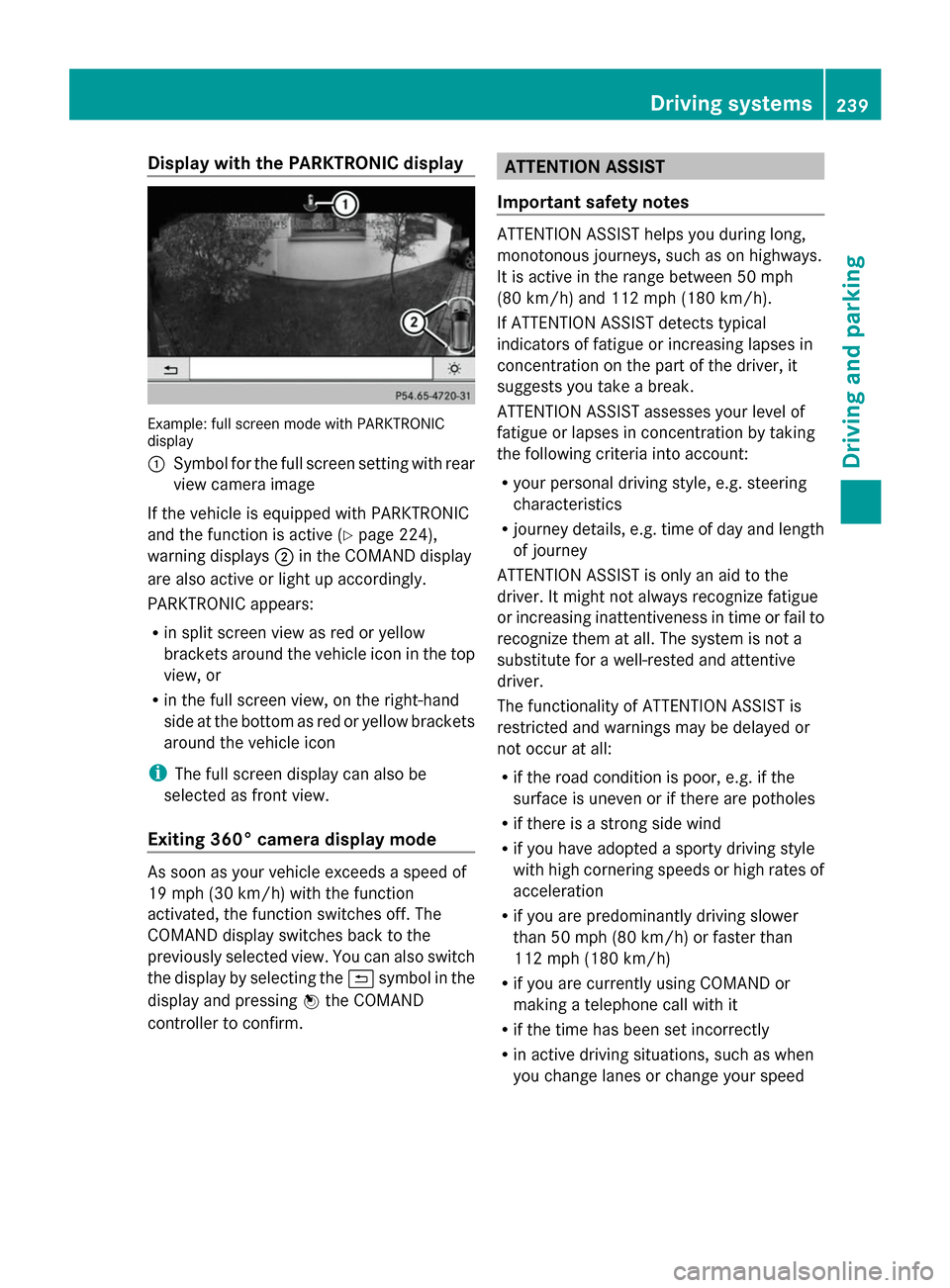
Display with the PARKTRONIC display
Example: full screen mode with PARKTRONIC
display
: Symbol for the full screen setting with rear
view camera image
If the vehicle is equipped with PARKTRONIC
and the function is active (Y page 224),
warning displays ;in the COMAND display
are also active or light up accordingly.
PARKTRONIC appears:
R in split screen view as red or yellow
brackets around the vehicle icon in the top
view, or
R in the full screen view, on the right-hand
side at the bottom as red or yellow brackets
around the vehicle icon
i The full screen display can also be
selected as front view.
Exiting 360° camera display mode As soon as your vehicle exceeds a speed of
19 mph (30 km/h) with the function
activated, the function switches off. The
COMAND display switches back to the
previously selected view. You can also switch
the display by selecting the &symbol in the
display and pressing Wthe COMAND
controller to confirm. ATTENTION ASSIST
Important safety notes ATTENTION ASSIST helps you during long,
monotonous journeys, such as on highways.
It is active in the range between 50 mph
(80 km/h) and 112 mph (180 km/h).
If ATTENTION ASSIST detects typical
indicators of fatigue or increasing lapses in
concentration on the part of the driver, it
suggests you take a break.
ATTENTION ASSIST assesses your level of
fatigue or lapses in concentration by taking
the following criteria into account:
R your personal driving style, e.g. steering
characteristics
R journey details, e.g. time of day and length
of journey
ATTENTION ASSIST is only an aid to the
driver. It might not always recognize fatigue
or increasing inattentiveness in time or fail to
recognize them at all. The system is not a
substitute for a well-rested and attentive
driver.
The functionality of ATTENTION ASSIST is
restricted and warnings may be delayed or
not occur at all:
R if the road condition is poor, e.g. if the
surface is uneven or if there are potholes
R if there is a strong side wind
R if you have adopted a sporty driving style
with high cornering speeds or high rates of
acceleration
R if you are predominantly driving slower
than 50 mph (80 km/h) or faster than
112 mph (180 km/h)
R if you are currently using COMAND or
making a telephone call with it
R if the time has been set incorrectly
R in active driving situations, such as when
you change lanes or change your speed Driving syste
ms
239Driving an d parking Z