reverse MERCEDES-BENZ GL-Class 2016 X166 User Guide
[x] Cancel search | Manufacturer: MERCEDES-BENZ, Model Year: 2016, Model line: GL-Class, Model: MERCEDES-BENZ GL-Class 2016 X166Pages: 462, PDF Size: 10.44 MB
Page 201 of 462
specialist workshop as soon as possible.
Adapt your driving style to the different brak-
ing characteristics.
Driving off-road increases the likelihood of
damage to the vehicle, which, in turn, can lead
to failure of the mechanical assembly or sys-
tems. Adapt your driving style to suit the ter-
rain conditions. Drive carefully. Have damage
to the vehicle rectified immediately at a quali-
fied specialist workshop.
Do not switch to transmission positionN
when driving off-road. If you try to brake the
vehicle using the service brake, you could
lose control of the vehicle. If the gradient is
too steep for your vehicle, drive back down in
reverse gear.
General notes
Read this section carefully before driving your
vehicle off-road. Practice by driving over more
gentle off-road terrain first.
Familiarize yourself with the characteristics
of your vehicle and the gear shift operation
before driving through difficult terrain.
The following driving systems are specially
adapted to off-road driving:
ROff-road program 1 and 2 (vehicles with the
ON&OFFROAD package) (
Ypage 258)
RLOW RANGE off-road gear (vehicles with
the ON&OFFROAD package)
(
Ypage 259)
RDifferential lock (vehicles with the
ON&OFFROAD package) (
Ypage 259)
ROff-road ABS (Ypage 69)
ROff-road 4ETS (Ypage 73)
RAIRMATIC package (vehicle level)
(
Ypage 218)
RDSR (Downhill Speed Regulation)
(
Ypage 257)
Observe the following notes:
RStop the vehicle before starting to drive
along an off-road route.
RSelect a vehicle level that is suitable for the
terrain. To avoid damaging the vehicle, make sure there is always sufficient ground
clearance.
RCheck that items of luggage and loads are
stowed safely and are well secured
(
Ypage 345).
RAlways keep the engine running and in gear
when driving on a downhill gradient. Acti-
vate DSR (
Ypage 257).
RAlways keep the engine running and in gear
when driving on a slope.
RAdapt your speed to the terrain. The
rougher, steeper or more ruts on the ter-
rain, the slower your speed should be.
RDo not jump with the vehicle as this will
interrupt the vehicle's propulsion.
RDrive with extreme care on unfamiliar off-
road routes where visibility is poor. For
safety reasons, get out of the vehicle first
and survey the off-road route.
RLook out for obstacles, such as rocks,
holes, tree stumps and furrows.
RAlways keep the doors, the tailgate, the
side windows and the sliding sunroof
closed while the vehicle is in motion.
RDo not shift the automatic transmission to
transmission position N.
RObserve the notes on off-road fording
(
Ypage 197).
iDo not use the HOLD function when driv-
ing off-road, on steep uphill or downhill gra-
dients or on slippery or loose surfaces. The
HOLD function cannot hold the vehicle on
such surfaces.
Checklist before driving off-road
!If the engine oil warning lamp lights up
while the vehicle is in motion, stop the vehi- cle in a safe place as soon as possible.
Check the engine oil level. The engine oil
warning lamp warning must not be ignored.
Continuing the journey while the symbol is
displayed could lead to engine damage.
XEngine oil level: check the engine oil level
and add oil if necessary.
Driving tips199
Driving and parking
Z
Page 204 of 462
RBefore driving on extreme uphill and down-
hill gradients, select the LOW RANGE off-
road gear (
Ypage 259).
RDrive slowly.
RAvoid high engine speeds. Drive at appro-
priate engine speeds (maximum
3,000 rpm).
RUse the left-hand steering wheel paddle
shifter to shift into a lower gear in good time
on long and steep downhill gradients.
RCheck the brakes after prolonged off-road
driving.
Hill start assist will aid you when pulling away
on a hill. For further information about hill
start assist, see (
Ypage 168).
Do not switch to transmission position N
when driving off-road. If you try to brake the
vehicle using the service brake, you could
lose control of the vehicle. If the gradient is
too steep for your vehicle, drive back down in
reverse gear.
Always observe the approach/departure
angle values (
Ypage 456).
Maximum gradient-climbing capability
Always observe the maximum gradient climb- ing ability values (
Ypage 456).
Hilltops
When driving up an uphill gradient, slightly
reduce pressure on the accelerator immedi-
ately before reaching the brow of the hill.
Make use of the vehicle's own impetus to
travel over the brow.
This style of driving prevents:
Rthe vehicle from lifting off the ground on thebrow of a hill
Rthe vehicle from traveling too quickly downthe other side
Driving downhill
RDrive slowly.
RDo not drive at an angle down steep
inclines. Steer into the line of fall and drive with the front wheels aligned straight. Oth-
erwise, the vehicle could slip sideways, tip
and rollover.
RShift to a lower gear using the left-hand
paddle shifter before tackling steep down-
hill gradients.
RActivate DSR. If this is not sufficient, brake
gently. When doing so, make sure that the
vehicle is facing in the direction of the line
of fall.
RCheck that the brakes are working normally
after a long downhill stretch.
iThe special off-road ABS setting enables a
precise, brief and repeated locking of the
front wheels. This causes them to dig into
loose earth. Be aware that the front wheels
easily skid across the ground surface if
completely braked and therefore lose their
ability to steer.
Driving systems
Intelligent Drive
Mercedes-Benz Intelligent Drive stands for
innovative driver assistance and safety sys-
tems which enhance comfort and support the
driver in critical situations. With these intelli-
gent co-ordinated systems Mercedes-Benz
has set a milestone on the path towards
autonomous driving.
Mercedes-Benz Intelligent Drive embraces all
elements of active and passive safety in one
well thought out system – for the safety of the vehicle occupants and that of other road
users.
Further information on driving safety systems
(
Ypage 68).
Cruise control
General notes
Cruise control maintains a constant road
speed for you. It brakes automatically in order to avoid exceeding the set speed. You must
202Driving systems
Driving and parking
Page 232 of 462
some cases, it may also lead you across or
onto the curb. If necessary, you should can-
cel the parking procedure with Active Park-
ing Assist.
RYou can also select preselect transmission
positionD. The vehicle redirects and does
not drive as far into the parking space.
Should the gear change occur too soon to
achieve a sensible parking position, the
parking procedure will be aborted.
Exiting a parking space
In order that Active Parking Assist can sup-
port you when you exit the parking space:
Ryou need to have parked using Active Park-
ing Assist.
Rthe border of the parking space must be
high enough at the front and the rear. A
curb stone is too small, for example.
Rthe border of the parking space must not be
too wide, as the position of the vehicle must
not exceed an angle of 45° to the starting
position as it is maneuvered into the park-
ing space.
Ra maneuvering distance of at least 3.3 ft
(1.0 m) must be available.
XStart the engine.
XRelease the electric parking brake.
XSwitch on the turn signal in the direction
you are pulling away.
XShift the transmission to position Dor R.
The Start Park Assist? Yes: OK No:
% message appears in the multifunction
display.
XTo cancel the procedure: press the%
button on the multifunction steering wheel
or pull away.
or
XTo exit a parking space using Active
Parking Assist: press theabutton on
the multifunction steering wheel.
The Park Assist Active Accelerate
andBrakeObserveSurroundingsmes-
sage appears in the multifunction display.
XLet go of the multifunction steering wheel.
XReverse the vehicle or drive forwards, being
ready to brake at all times. Do not exceed a
maximum speed of approximately 6 mph
(10 km/h) when exiting a parking space.
Otherwise Active Parking Assist will be can-
celed.
XStop as soon as PARKTRONIC sounds the
continuous warning tone, if not before.
XShift the transmission to position Dor Ras
required while the vehicle is stationary.
Active Parking Assist immediately steers in
the other direction.
iYou will achieve the best results by wait-
ing for the steering procedure to complete
before pulling away.
If you back up after activation, the steering
wheel is moved to the straight-ahead posi-
tion.
XDrive forwards or back up the vehicle, being
ready to brake at all times.
XStop as soon as PARKTRONIC sounds the
continuous warning tone, if not before.
XDrive forwards and back up as prompted by
the PARKTRONIC warning displays, several
times if necessary.
Once you have exited the parking space com-
pletely, the steering wheel is moved to the
straight-ahead position. You hear a tone and
the Park Assist Finished
message
appears in the multifunction display. You will
then have to steer and merge into traffic on
your own. PARKTRONIC is still available. You
can take over the steering, before the vehicle
has exited the parking space completely. This
is useful, for example when you recognize
that it is already possible to pull out of the
parking space.
230Driving systems
Driving and parking
Page 234 of 462
Rif there is a sudden change in temperature,
e.g. when driving into a heated garage in
winter
Rif the camera lens is dirty or obstructed.
Observe the notes on cleaning
(
Ypage 380)
Rif the rear of your vehicle is damaged. In this
event, have the camera position and setting
checked at a qualified specialist workshop
The field of vision and other functions of the
rear view camera may be restricted due to
additional accessories on the rear of the vehi-
cle (e.g. license plate holder, bicycle rack).
For technical reasons, leaving the standard
height can result in inaccuracies in the guide
lines on vehicles with a height-adjustable
chassis.
Activating/deactivating the rear view
camera
XTo activate: make sure that the SmartKey
is in position 2in the ignition lock.
XMake sure that the "Show rear view camera
display" function is selected in COMAND
(see the Digital Operator's Manual).
XEngage reverse gear.
The area behind the vehicle is shown in the
COMAND display with guide lines.
XTo change the function mode for vehi-
cles with trailer tow hitch: using the
COMAND controller, select symbol :for
the "Reverse parking" function or sym- bol
;for "Coupling up a trailer" (see the
separate COMAND operating instructions).
The symbol of the selected function is high-
lighted.
To deactivate: the rear view camera deacti-
vates if you shift the transmission to Por after
driving forwards a short distance.
Displays in the COMAND display
The rear view camera may show a distorted
view of obstacles, show them incorrectly or
not at all. The rear view camera does not show
objects in the following positions:
Rvery close to the rear bumper
Runder the rear bumper
Rin the area immediately above the tailgate
handle
!Objects not at ground level may appear to
be further away than they actually are, e.g.:
Rthe bumper of a parked vehicle
Rthe drawbar of a trailer
Rthe ball coupling of a trailer tow hitch
Rthe rear section of an HGV
Ra slanted post
Use the guidelines only for orientation.
Approach objects no further than the bot-
tom-most guideline.
:White guide line without turning the steer-
ing wheel, vehicle width including the
exterior mirrors (static)
;Yellow guide line at a distance of approx-
imately 13 ft (4.0m) from the rear of the
vehicle
232Driving system s
Driving an d parking
Page 235 of 462
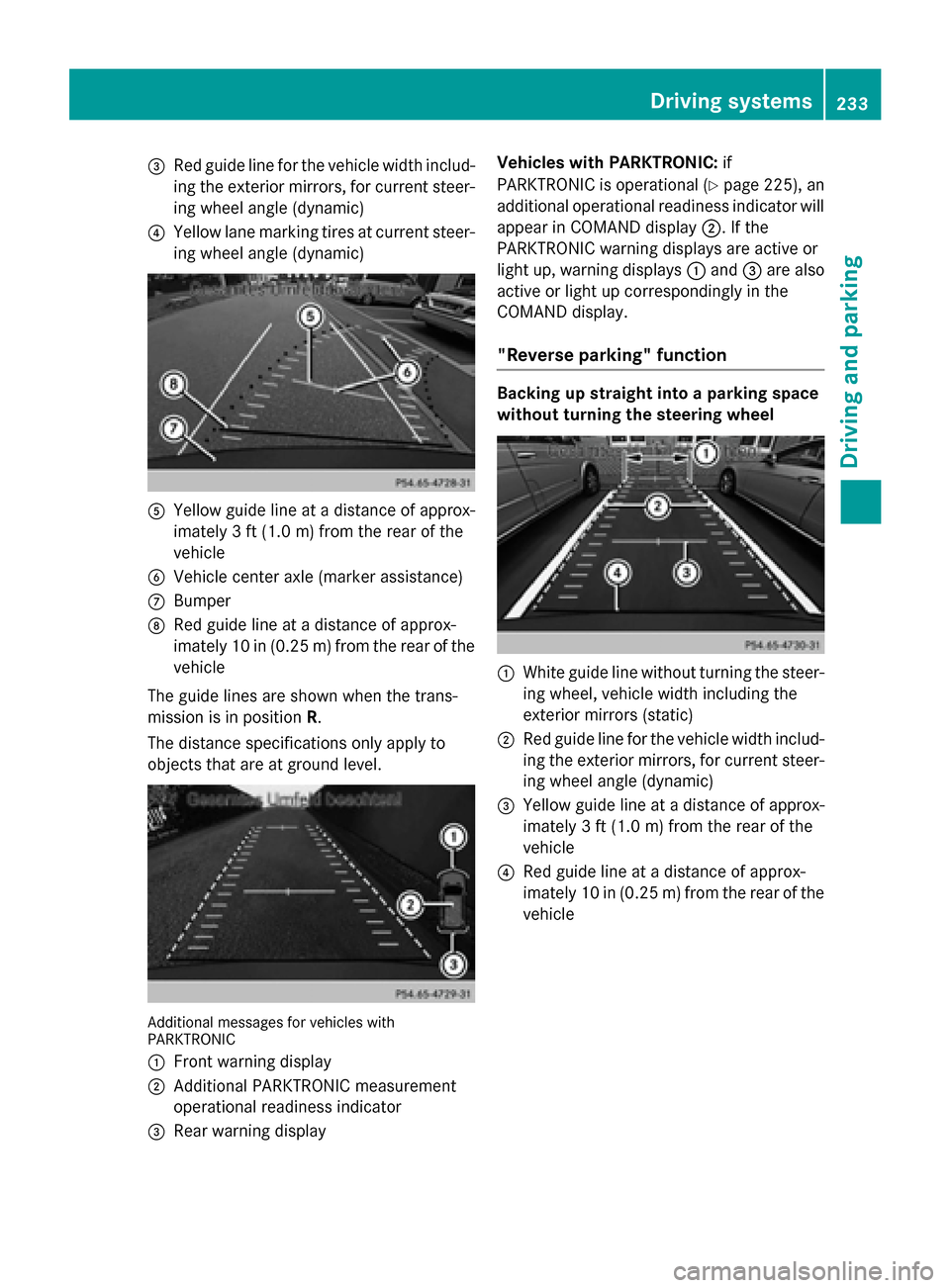
=Red guide linefor th evehicl ewidt hinclud -
in gth eexterio rmirrors, for curren tsteer -
in g whee langle (dynamic )
?Yellowlan emarking tires at curren tsteer -
in g whee langle (dynamic )
AYellowguide lin eat adistanc eof approx -
imately 3ft (1.0 m) from the rear of the
vehicle
BVehicle center axle (marker assistance)
CBumper
DRed guide line at a distance of approx-
imately 10 in (0.25 m) fromthe rear of the
vehicle
The guide lines are shown when the trans-
mission is in position R.
The distance specifications only apply to
objects that are at ground level.
Additional messages for vehicles with
PARKTRONIC
:
Front warning display
;Additional PARKTRONIC measurement
operational readiness indicator
=Rear warning display Vehicles with PARKTRONIC:
if
PARKTRONIC is operational (
Ypage 225), an
additional operational readiness indicator will
appear in COMAND display ;. If the
PARKTRONIC warning displays are active or
light up, warning displays :and =are also
active or light up correspondingly in the
COMAND display.
"Reverse parking" function
Backing up straight into a parking space
without turning the steering wheel
:White guide line without turning the steer-
ing wheel, vehicle width including the
exterior mirrors (static)
;Red guide line for the vehicle width includ-
ing the exterior mirrors, for current steer-
ing wheel angle (dynamic)
=Yellow guide line at a distance of approx-
imately 3 ft (1.0 m) fromthe rear of the
vehicle
?Red guide line at a distance of approx-
imately 10 in (0.25 m) fromthe rear of the
vehicle
Driving system s233
Driving an d parking
Z
Page 236 of 462
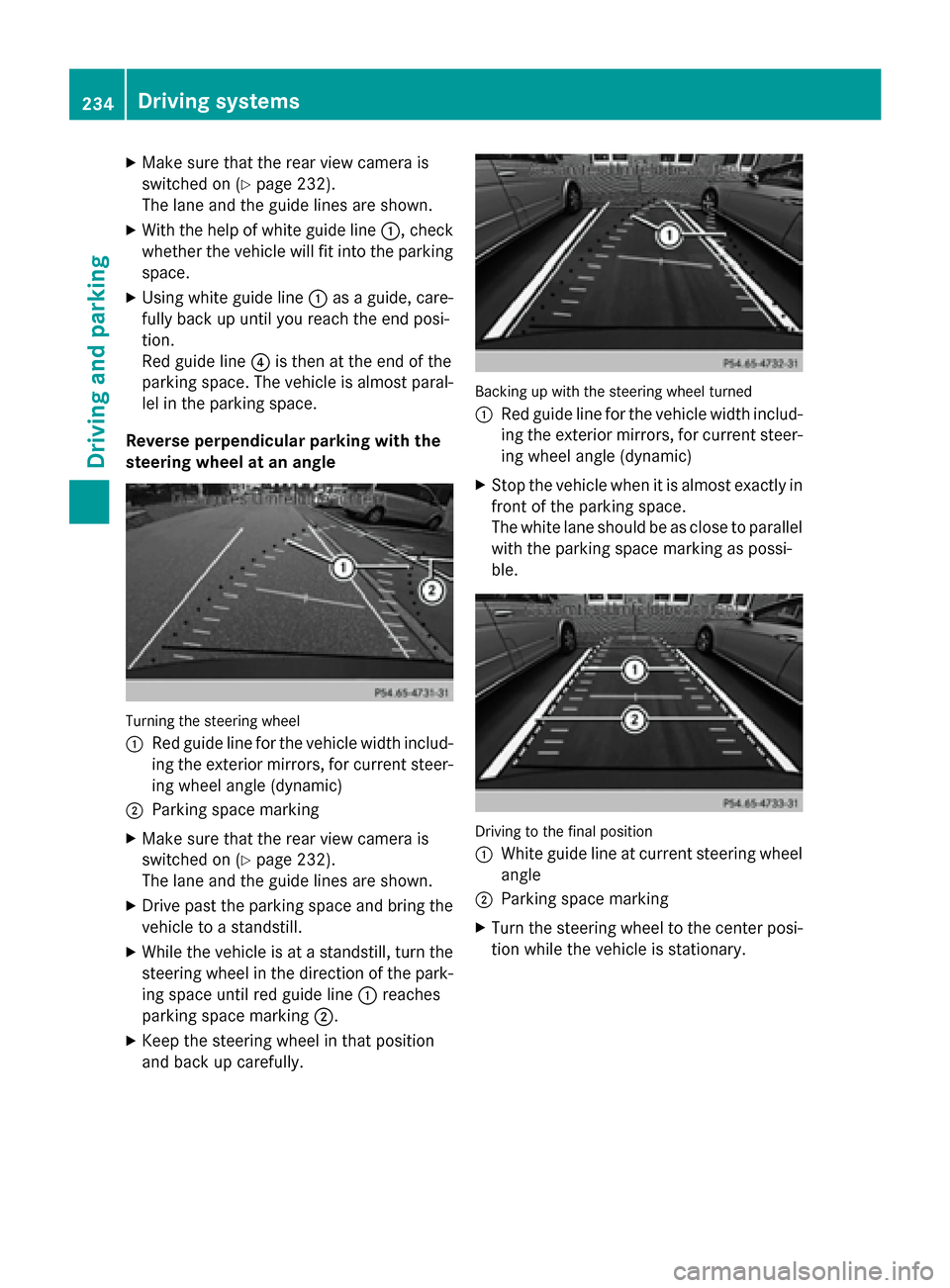
XMake sure that the rear view camera is
switched on (
Ypage 232).
The lane and the guide lines are shown.
XWith the help of white guide line :, check
whether the vehicle will fit into the parking
space.
XUsing white guide line :as a guide, care-
fully back up until you reach the end posi-
tion.
Red guide line ?is then at the end of the
parking space. The vehicle is almost paral-
lel in the parking space.
Reverse perpendicular parking with the
steering wheel at an angle
Turning the steering wheel
:
Red guide line for the vehicle width includ-
ing the exterior mirrors, for current steer-
ing wheel angle (dynamic)
;Parking space marking
XMake sure that the rear view camera is
switched on (
Ypage 232).
The lane and the guide lines are shown.
XDrive past the parking space and bring the vehicle to a standstill.
XWhile the vehicle is at a standstill, turn the
steering wheel in the direction of the park-
ing space until red guide line :reaches
parking space marking ;.
XKeep the steering wheel in that position
and back up carefully.
Backing up with the steering wheel turned
:
Red guide line for the vehicle width includ-
ing the exterior mirrors, for current steer-
ing wheel angle (dynamic)
XStop the vehicle when it is almost exactly in
front of the parking space.
The white lane should be as close to parallel
with the parking space marking as possi-
ble.
Driving to the final position
:
White guide line at current steering wheel
angle
;Parking space marking
XTurn the steering wheel to the center posi-
tion while the vehicle is stationary.
234Driving systems
Driving and parking
Page 239 of 462
Rif the tailgate is open
Rin heavy rain, snow or fog
Rat night or in very dark places
Rif the cameras are exposed to very bright
light
Rif the area is lit by fluorescent bulbs or LED
lighting (the display may flicker)
Rif there is a sudden change in temperature,
e.g. when driving into a heated garage in
winter
Rif the camera lenses are dirty or covered
Rif the vehicle components in which the
cameras are installed are damaged. In this
event, have the camera position and setting
checked at a qualified specialist workshop.
Do not use the 360° camera in this case. You
can otherwise injure others or cause damage to objects or the vehicle.
Activation conditions
The 360° camera image can be displayed if:
Ryour vehicle is equipped with a 360° cam-
era
RCOMAND is switched on, see the separate
COMAND operating instructions
Rthe 360° Camerafunction is activated
Activating the 360° camera using the
SYS button
XPress and hold the Wbutton for longer
than 2 seconds, see the separate COMAND
operating instructions.
Depending on whether position Dor Ris
engaged, the following is shown:
Rfull screen display with the image from
the front camera
Rfull screen display with the image from
the rear view camera
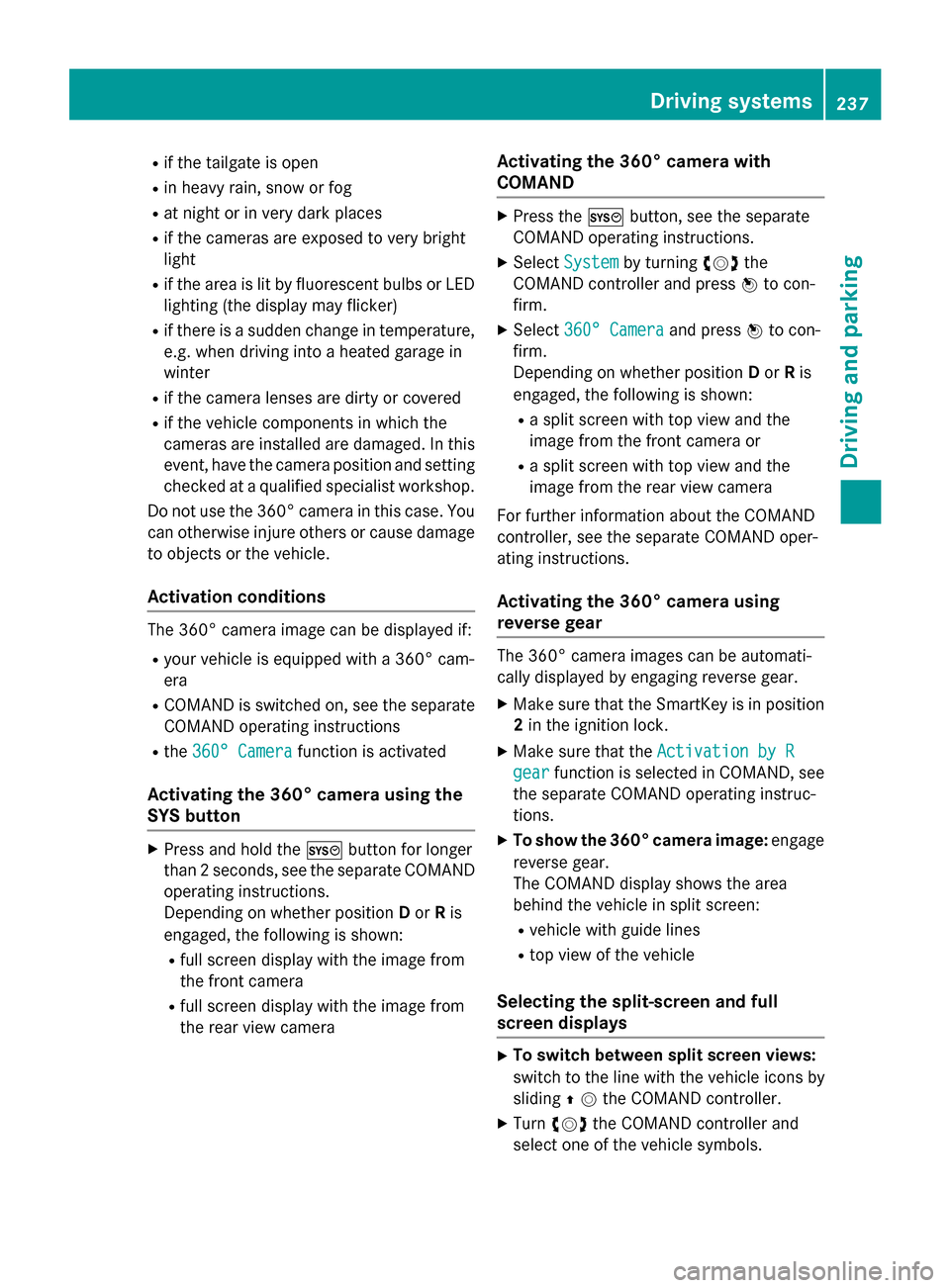
Activating the 360° camera with
COMAND
XPress the Wbutton, see the separate
COMAND operating instructions.
XSelect Systemby turning cVdthe
COMAND controller and press Wto con-
firm.
XSelect 360° Cameraand press Wto con-
firm.
Depending on whether position Dor Ris
engaged, the following is shown:
Ra split screen with top view and the
image from the front camera or
Ra split screen with top view and the
image from the rear view camera
For further information about the COMAND
controller, see the separate COMAND oper-
ating instructions.
Activating the 360° camera using
reverse gear
The 360° camera images can be automati-
cally displayed by engaging reverse gear.
XMake sure that the SmartKey is in position
2 in the ignition lock.
XMake sure that the Activation by R
gearfunction is selected in COMAND, see
the separate COMAND operating instruc-
tions.
XTo show the 360° camera image: engage
reverse gear.
The COMAND display shows the area
behind the vehicle in split screen:
Rvehicle with guide lines
Rtop view of the vehicle
Selecting the split-screen and full
screen displays
XTo switch between split screen views:
switch to the line with the vehicle icons by
sliding ZVthe COMAND controller.
XTurncVd the COMAND controller and
select one of the vehicle symbols.
Driving system s237
Driving an d parking
Z
Page 244 of 462
Pedestrian recognition may be impaired or
inoperative if:
Rpedestrians are partially or entirely
obscured by objects, e.g. parked vehicles
Rthe silhouette of the pedestrian in the NightView Assist Plus display is incomplete or
interrupted, e.g. by powerful light reflec-
tions
Rpedestrians do not contrast adequately
from the background
Rpedestrians are not in an upright position,
e.g. sitting, squatting or lying
Activating Night View Assist Plus
Activation conditions
You can only activate Night View Assist Plus
if:
Rthe SmartKey is in position 2in the ignition
lock.
Rit is dark.
Rthe light switch is in the ÃorL posi-
tion.
Rreverse gear has not been engaged.
Activating Night View Assist Plus
XMake sure that COMAND is switched on.
XPress button :.
The Night View Assist Plus display appears
in the COMAND display.
You can read about how to adjust the bright-
ness of the COMAND display in the COMAND
operating instructions.
iThe infrared headlamps only switch on
when the vehicle is being driven at speeds
of approximately 6 mph (10 km/h). This
means that you do not have the full visual
range while the vehicle is stationary and
cannot check whether Night View Assist
Plus is working.
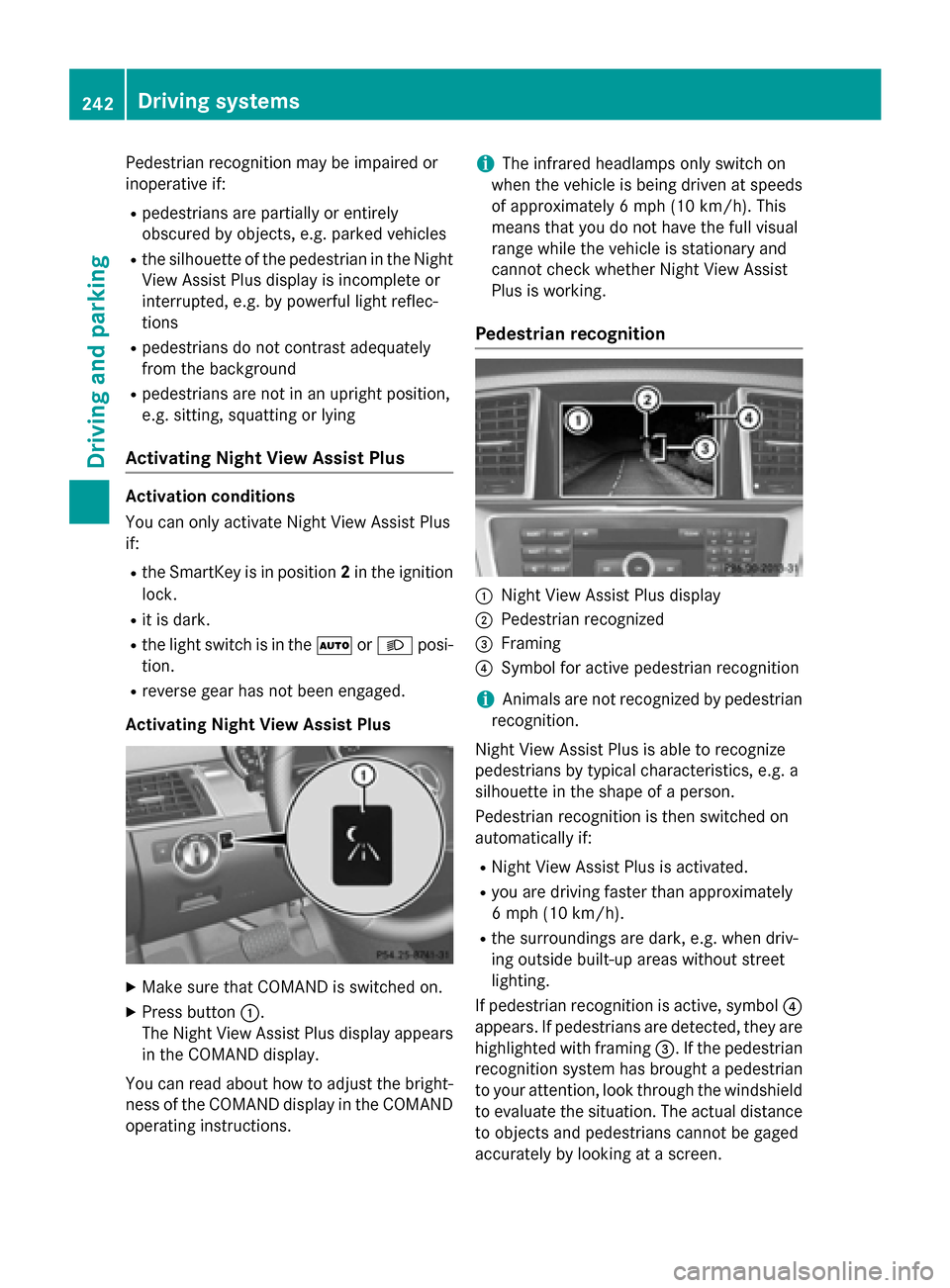
Pedestrian recognition
:Night View Assist Plus display
;Pedestrian recognized
=Framing
?Symbol for active pedestrian recognition
iAnimals are not recognized by pedestrian
recognition.
Night View Assist Plus is able to recognize
pedestrians by typical characteristics, e.g. a
silhouette in the shape of a person.
Pedestrian recognition is then switched on
automatically if:
RNight View Assist Plus is activated.
Ryou are driving faster than approximately
6 mph (10 km/ h).
Rthe surroundings are dark, e.g. when driv-
ing outside built-up areas without street
lighting.
If pedestrian recognition is active, symbol ?
appears. If pedestrians are detected, they are
highlighted with framing =. If the pedestrian
recognition system has brought a pedestrian to your attention, look through the windshield
to evaluate the situation. The actual distance
to objects and pedestrians cannot be gaged
accurately by looking at a screen.
242Driving system s
Driving an d parking
Page 248 of 462

:Yellow indicator lamp/red warning lamp
When Blind Spot Assist is activated, indicator
lamp :in the exterior mirrors lights up yel-
low at speeds of up to 20 mph (30 km/h). At
speeds above 20 mph (30 km/h), the indica-
tor lamp goes out and Blind Spot Assist is
operational.
If a vehicle is detected within the blind spot
monitoring range at speeds above 20 mph
(30 km/h), warning lamp :on the corre-
sponding side lights up red. This warning is
always emitted when a vehicle enters the
blind spot monitoring range from behind or
from the side. When you overtake a vehicle,
the warning only occurs if the difference in
speed is less than 7 mph (12 km/h).
The yellow indicator lamp goes out if reverse
gear is engaged. In this event, Blind Spot
Assist is no longer active.
The brightness of the indicator/warning
lamps is adjusted automatically according to
the ambient light.
Collision warning
If a vehicle is detected in the monitoring range
of Blind Spot Assist and you switch on the
corresponding turn signal, a double warning
tone sounds. Red warning lamp :flashes. If
the turn signal remains on, detected vehicles
are indicated by the flashing of red warning
lamp :. There are no further warning tones.
Switching on Blind Spot Assist
XMake sure that Blind Spot Assist is activa-
ted in the on-board computer
(
Ypage 282).
XTurn the SmartKey to position 2in the igni-
tion lock.
Warning lamps :in the exterior mirrors
light up red for approximately 1.5 seconds
and then turn yellow.
Towing a trailer
When you attach a trailer, make sure you have
cor rect
ly established the electrical connec-
tion. This can be accomplished by checking
the trailer lighting. In this event, Blind Spot
Assist is deactivated. The indicator lamp in
the exterior mirrors lights up yellow, and the
Blind
SpotAssistCurrentlyUnavail‐
able See Operator's Manualmessage
appears in the multifunction display.
iYou can deactivate the indicator lamps in
the exterior mirrors.
To do so, switch off Blind Spot Assist when:
Rthe SmartKey is in position 2in the igni-
tion lock
Rthe engine is not running
Lane Keeping Assist
General notes
:Lane Keeping Assist camera
Lane Keeping Assist monitors the area in
front of your vehicle with camera :, which is
mounted at the top of the windshield. Active
Lane Keeping Assist detects lane markings on
246Driving systems
Driving and parking
Page 252 of 462
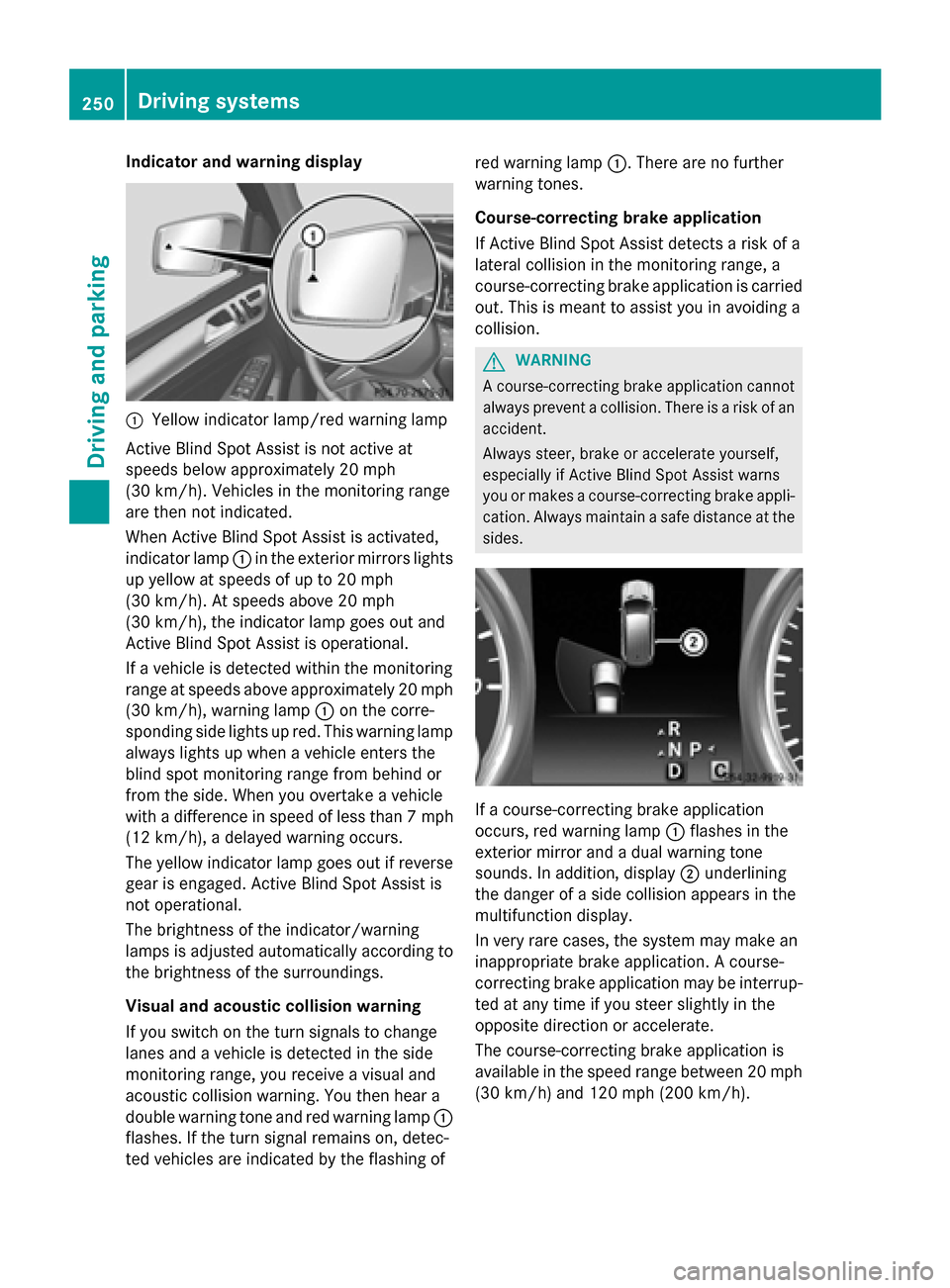
Indicator and warning display
:Yellow indicator lamp/red warning lamp
Active Blind Spot Assist is not active at
speeds below approximately 20 mph
(30 km/h). Vehicles in the monitoring range
are then not indicated.
When Active Blind Spot Assist is activated,
indicator lamp :in the exterior mirrors lights
up yellow at speeds of up to 20 mph
(30 km/h). At speeds above 20 mph
(30 km/h), the indicator lamp goes out and
Active Blind Spot Assist is operational.
If a vehicle is detected within the monitoring
range at speeds above approximately 20 mph
(30 km/h), warning lamp :on the corre-
sponding side lights up red. This warning lamp
always lights up when a vehicle enters the
blind spot monitoring range from behind or
from the side. When you overtake a vehicle
with a difference in speed of less than 7 mph
(12 km/h), a delayed warning occurs.
The yellow indicator lamp goes out if reverse
gear is engaged. Active Blind Spot Assist is
not operational.
The brightness of the indicator/warning
lamps is adjusted automatically according to
the brightness of the surroundings.
Visual and acoustic collision warning
If you switch on the turn signals to change
lanes and a vehicle is detected in the side
monitoring range, you receive a visual and
acoustic collision warning. You then hear a
double warning tone and red warning lamp
:
f
lashes. If the turn signal remains on, detec-
ted vehicles are indicated by the flashing of red warning lamp
:. There are no further
warning tones.
Course-correcting brake application
If Active Blind Spot Assist detects a risk of a
lateral collision in the monitoring range, a
course-correcting brake application is carried
out. This is meant to assist you in avoiding a
collision.
GWARNING
A course-correcting brake application cannot always prevent a collision. There is a risk of an
accident.
Always steer, brake or accelerate yourself,
especially if Active Blind Spot Assist warns
you or makes a course-correcting brake appli-
cation. Always maintain a safe distance at the
sides.
If a course-correcting brake application
occurs, red warning lamp :flashes in the
exterior mirror and a dual warning tone
sounds. In addition, display ;underlining
the danger of a side collision appears in the
multifunction display.
In very rare cases, the system may make an
inappropriate brake application. A course-
correcting brake application may be interrup-
ted at any time if you steer slightly in the
opposite direction or accelerate.
The course-correcting brake application is
available in the speed range between 20 mph (30 km/h) and 120 mph (200 km/h).
250Driving systems
Driving and parking