sensor MERCEDES-BENZ GL-Class 2016 X166 User Guide
[x] Cancel search | Manufacturer: MERCEDES-BENZ, Model Year: 2016, Model line: GL-Class, Model: MERCEDES-BENZ GL-Class 2016 X166Pages: 462, PDF Size: 10.44 MB
Page 74 of 462
Adaptive Brake Assist
iObserveth e"Importan tsafet ynotes" sec -
tion (
Ypage 68) .
Adaptive Brake Assis tprovide sbraking assis-
tance in hazardous situation sat speeds
abov e 4mph (7 km/h). It uses radar sensor
technology to assess th etraffic situation .
GWARNING
Adaptive Brake Assis tcanno talways clearly
identify objects and complex traffic situa-
tions.
In suc hcases, Adaptive Brake Assis tcan :
Rinterven eunnecessarily
Rno tinterven e
There is aris kof an accident.
Always pay careful attention to th etraffic sit -
uation and be read yto brake. Terminate th e
intervention in anon-critical drivin gsituation .
GWARNIN G
Adaptive Brake Assis tdoes no treact:
Rto people or animals
Rto oncomin gvehicles
Rto crossing traffic
Rto stationary obstacles
Rwhen cornering
As aresult ,th eAdaptive Brake Assis tmay no t
interven ein all critical conditions. There is a
ris kof an accident.
Always pay careful attention to th etraffic sit -
uation and be read yto brake.
Due to th enature of th esystem, particularly
complicated but non-critical driving condi-
tion smay also caus eBrake Assis tto inter-
vene.
Wit hth ehelp of Adaptive Brake Assist, th e
distanc ewarning signal can detec tobstacles
that are in th epat hof your vehicl efor an
extended period of time.
If adaptive Brake Assis thas detecte dthat
there is aris kof acollision ,it calculates th e
braking force necessar yto avoi d acollision .Should you apply th
ebrakes vigorously,
Adaptive Brake As sistwill automatically
increas eth ebraking force to alevel suitable
for th etraffic conditions.
XKee pth ebrak epedal depressed until th e
emergenc ybraking situation is over.
AB Sprevents th ewheels from locking .
The brakes will wor knormally again if:
Ryou release th ebrak epedal .
Rthere is no longer any danger of acollision .
Rno obstacle is detecte din fron tof your
vehicle.
Adaptive Brake As sistis then deactivated.
Vehicles wit hPRE-SAFE
®:if adaptive Brake
Assis trequire sparticularly high brak epre s-
sure, preventive passenger protection meas -
ures (PRE-SAF E
®)are deployed simultane-
ously.
Up to vehicl espeeds of aroun d15 5mph
(25 0km/h), adaptive Brake Assis tis capable
of reacting to moving objects that hav e
already been recognized as suc hat least once
ove rth eperiod of observation .Adaptive
Brake Assis tdoes no treac tto stationary
obstacles.
If Adaptive Brake As sistis no tavailable due to
a malfunction in th eradar sensor system, th e
brak esystem remain savailable wit hfull
brak eboosting effec tand BAS.
In particular, th edetection of obstacles can
be impaire dif there is:
Rthere is dirt on th e sensorsor anythingelse
covering th e sensors
Rthere issnow or heav yrain
Rthere is interferenc eby other radar source s
Rthere arestrongradar reflections, for
exampl ein parking garages
Ranarrow vehicl etraveling in front, e.g. a
motorbik e
Ravehicl etraveling in fron ton adifferen tlin e
relative to th ecenter of your vehicl e
Rnewvehicles or after th eCOLLISION PRE -
VENTION ASSIST system has been serv-
ice d
72Driving safety systems
Safety
Page 75 of 462
Observe the notes in the section on break-ing-in (
Ypage 164).
Following damage to the front end of the vehi-
cle, have the configuration and operation of
the radar sensor checked at a qualified spe-
cialist workshop. This also applies to colli-
sions at low speeds where there is no visible
damage to the front of the vehicle.
ESP®(Electronic Stability Program)
General notes
iObserve the "Important safety notes" sec-
tion (
Ypage 68).
ESP
®monitors driving stability and traction,
i.e. power transmission between the tires and
the road surface.
If ESP
®detects that the vehicle is deviating
from the direction desired by the driver, one
or more wheels are braked to stabilize the
vehicle. The engine output is also modified to
keep the vehicle on the desired course within
physical limits. ESP
®assists the driver when
pulling away on wet or slippery roads. ESP®
can also stabilize the vehicle during braking.
ETS/4ETS (Electronic Traction System)
4ETS traction control is part of ESP®.
Traction control brakes the drive wheels indi-
vidually if they spin. This enables you to pull
away and accelerate on slippery surfaces, for
example if the road surface is slippery on one
side. In addition, more drive torque is trans-
ferred to the wheel or wheels with traction.
Traction control remains active, even if you
deactivate ESP
®.
In appropriate driving situations, activate the
off-road program (
Ypage 258).
Off-road 4ETS (Electronic Traction Sys-
tem)
A 4ETS system specifically suited to off-road
terrain is activated automatically once the off-
road program is activated (
Ypage 258).
Important safety notes
GWARNING
If ESP
®is malfunctioning, ESP®is unable to
stabilize the vehicle. Additionally, further driv-
ing safety systems are deactivated. This
increases the risk of skidding and an accident.
Drive on carefully. Have ESP
®checked at a
qualified specialist workshop.
!Only operate the vehicle for a maximum of
ten seconds on a brake test dynamometer.
Switch off the ignition.
Application of the brakes by ESP
®may oth-
erwise destroy the brake system.
!A function or performance test should
only be carried out on a two-axle dyna-
mometer. Before you operate the vehicle
on such a dynamometer, please consult a
qualified workshop. You could otherwise
damage the drive train or the brake system.
ESP
®is only deactivated if the åwarning
lamp is lit continuously.
If the ÷ warning lamp and the åwarn-
ing lamp are lit continuously, ESP
®is not
available due to a malfunction.
Observe the information on warning lamps
(
Ypage 330) and display messages which
may be shown in the instrument cluster
(
Ypage 291).
iOnly use wheels with the recommended
tire sizes. Only then will ESP®function
properly.
Driving safety systems73
Safety
Z
Page 78 of 462
ADAPTIVE BRAKE
ADAPTIVEBRAKE enhance sbraking safet y
and offers increased braking comfort .In addi-
tion to th ebraking function ,ADAPTIV EBRAKE
also has th eHOLD function (
Ypage 217) and
hill start assist (
Ypage 168).
PRE-SAFE®Brake
Gene ral inform ation
PRE-SAF E®Brake can help you to minimiz e
th eris kof acollision wit h avehicl eahead ,and
reduce th eeffects of suc h acollision .If PRE -
SAFE
®Brake has detecte d ariskof collision ,
you will be warned visually and acoustically as
well as by automatic braking .PRE-SAF E
®
Brake canno tpreven t acollision without your
intervention .
iPay attention to th eimportant safet y
note sin th e"Drivin gsafet ysystems "sec -
tion (
Ypage 68) .
PRE ‑S AF E
®Brake is only available for vehi-
cle swit hth eDrivin gAssistance package.
Fo rPRE-SAF E
®Brake to assist you when driv -
ing ,th eradar sensor system mus tbe opera-
tional.
Wit hth ehelp of th eradar sensor system,
PRE-SAF E
®Brake can detec tobstacles that
are in fron tof your vehicl efor an extended
period of time.
Import ant safety notes
GWARNIN G
PRE-SAF E
®Brake will initially brak eyour vehi-
cle by apartial application of th ebrakes if a
danger of collision is detected. There may be
a collision unless you also brake. Automatic
emergenc ybraking canno tpreven t acolli-
sion .There is aris kof an accident.
Always apply th ebrakes yourself and tr yto
tak eevasive action .
In theevent of apartial application of th e
brakes, th evehicl eis braked wit hup to 50 %of
th efull braking pressure.
GWARNIN G
PRE-SAF E
®Brake canno talways clearly iden -
tify objects and comple xtraffic conditions.
In these cases, PRE-SAF E
®Brake may:
Rgivean unnecessary warning and then
brak eth evehicl e
Rnotgiv e a warning or interven e
There is aris kof an accident.
Always pay particular attention to th etraffic
situation and be read yto brake, especially if
PRE-SAF E
®Brake warn syou. Terminate th e
intervention in anon-critical drivin gsituation .
In order to maintai nth eappropriat edistanc e
to th evehicl ein fron tand thus preven t acol-
lision, you mus tapply th ebrakes yourself .
At speeds of up to approximately 40 mph
(70 km/h )PRE-SAF E
®Brake can also detec t
stationary objects .Examples of stationary
objects are stoppedor parked vehicles.
GWARNIN G
PRE-SAF E
®Brake does no treact:
Rto people or animals
Rto oncomin gvehicles
Rto crossing traffic
Rwhen cornering
As aresult ,PRE-SAF E
®Brake may neither
giv ewarning sno rinterven ein all critical sit -
uations. There is aris kof an accident.
Always pay careful attention to th etraffic sit -
uation and be read yto brake.
In th eevent of snowfall or heav yrain ,th erec -
ognition can be impaired.
Recognition by th eradar sensor system is
also impaire din th eevent of:
Rthere is dirt on th e sensorsor anythingelse
covering th e sensors
Rthere is interferenc eby other radar source s
76Driving safety systems
Safety
Page 79 of 462
Rthere are strong radar reflections, for
example in parking garages
Ra narrow vehicle traveling in front, e.g. a
motorbike
Ra vehicle traveling in front on a different line
relative to the center of your vehicle
Following damage to the front end of the vehi-
cle, have the configuration and operation of
the radar sensors checked at a qualified spe-
cialist workshop. This also applies to colli-
sions at low speeds where there is no visible
damage to the front of the vehicle.
Function
XTo activate/deactivate: activate or deac-
tivate PRE-SAFE®Brake in the on-board
computer (
Ypage 282).
If the PRE-SAFE®Brake is not activated, the
æ symbol appears in the multifunction
display.
If you have activated DSR (
Ypage 257), PRE-
SAFE®Brake is deactivated.
Starting at a speed of around 4 mph (7 km/h),
this function warns you if you rapidly
approach a vehicle in front. An intermittent
warning tone will then sound and the ·
distance warning lamp will light up in the
instrument cluster.
XBrake immediately to defuse the situation.
or
XTake evasive action provided it is safe to do so.
PRE-SAFE
®Brake can also brake the vehicle
automatically under the following conditions:
Rthe driver and front-passenger have their
seat belts fastened
and
Rthe vehicle speed is between approx-
imately 4 mph (7 km/h) and 124 mph
(200 km/h)
iIf there is an increased risk of collision,
preventive passenger protection measures
(PRE-SAFE
®) are activated. If the risk of collision with the vehicle in front
remains and you do not brake, take evasive
action or accelerate significantly, the vehicle
may perform automatic emergency braking,
u
p to the point of full brake application. Auto-
matic emergency braking is not performed
until immediately prior to an imminent acci-
dent.
You can prevent the intervention of the PRE-
SAFE
®Brake at any time by:
Rdepressing the accelerator pedal further.
Ractivating kickdown.
Rreleasing the brake pedal.
The braking action of PRE-SAFE
®Brake is
ended automatically if:
Ryou maneuver to avoid the obstacle.
Rthere is no longer any danger of a collision.
Rthere is no longer an obstacle detected in
front of your vehicle.
STEER CONTROL
General information
STEER CONTROL helps you by transmitting a noticeable steering force to the steering
wheel in the direction required for vehicle
stabilization.
This steering assistance is provided in partic-
ular if:
Rboth right wheels or both left wheels are on
a wet or slippery road surface when you
brake.
Rthe vehicle starts to skid.
Important safety notes
iObserve the "Important safety notes" sec-
tion (
Ypage 68).
No steering support is provided by STEER
CONTROL, if:
RESP®is malfunctioning.
Rthe lighting is faulty.
Driving safet ysystem s77
Safety
Z
Page 85 of 462
If you do not open the vehicle within
approximately 40 seconds of unlocking:
Rthe vehicle is locked again.
Rprotection against theft is reactivated.
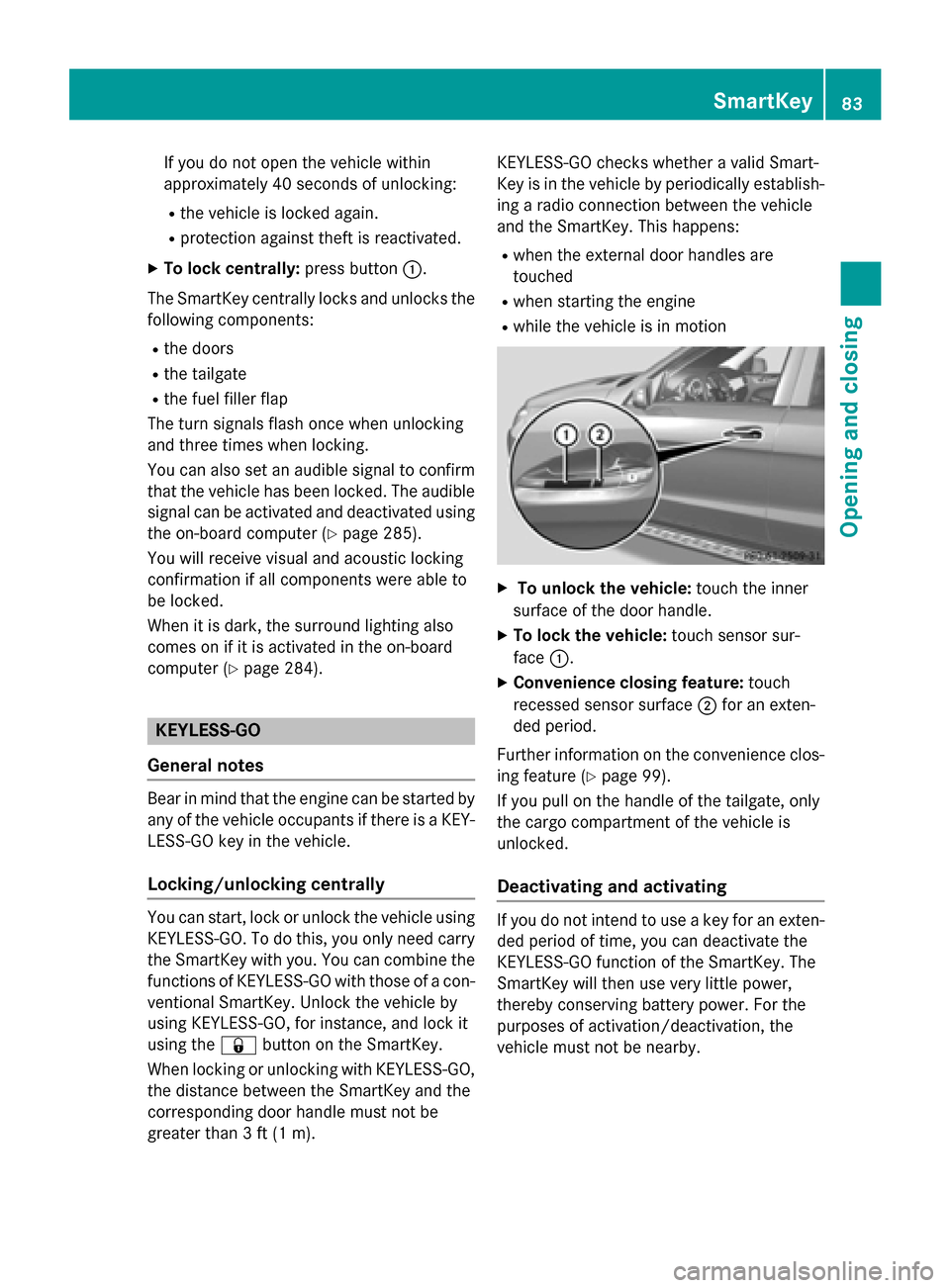
XTo lock centrally:press button:.
The SmartKey centrally locks and unlocks the following components:
Rthe doors
Rthe tailgate
Rthe fuel filler flap
The turn signals flash once when unlocking
and three times when locking.
You can also set an audible signal to confirm
that the vehicle has been locked. The audible
signal can be activated and deactivated using
the on-board computer (
Ypage 285).
You will receive visual and acoustic locking
confirmation if all components were able to
be locked.
When it is dark, the surround lighting also
comes on if it is activated in the on-board
computer (
Ypage 284).
KEYLESS-GO
General notes
Bear in mind that the engine can be started by
any of the vehicle occupants if there is a KEY-
LESS-GO key in the vehicle.
Locking/unlocking centrally
You can start, lock or unlock the vehicle using
KEYLESS-GO. To do this, you only need carry
the SmartKey with you. You can combine the functions of KEYLESS-GO with those of a con-
ventional SmartKey. Unlock the vehicle by
using KEYLESS-GO, for instance, and lock it
using the &button on the SmartKey.
When locking or unlocking with KEYLESS-GO,
the distance between the SmartKey and the
corresponding door handle must not be
greater than 3 ft (1 m). KEYLESS-GO checks whether a valid Smart-
Key is in the vehicle by periodically establish-
ing a radio connection between the vehicle
and the SmartKey. This happens:
Rwhen the external door handles are
touched
Rwhen starting the engine
Rwhile the vehicle is in motion
XTo unlock the vehicle:
touch the inner
surface of the door handle.
XTo lock the vehicle: touch sensor sur-
face :.
XConvenience closing feature: touch
recessed sensor surface ;for an exten-
ded period.
Further information on the convenience clos-
ing feature (
Ypage 99).
If you pull on the handle of the tailgate, only
the cargo compartment of the vehicle is
unlocked.
Deactivating and activating
If you do not intend to use a key for an exten-
ded period of time, you can deactivate the
KEYLESS-GO function of the SmartKey. The
SmartKey will then use very little power,
thereby conserving battery power. For the
purposes of activation/deactivation, the
vehicle must not be nearby.
SmartKey83
Opening and closing
Z
Page 86 of 462
XTo deactivate:press the&button on
the SmartKey twice in rapid succession.
The battery check lamp (
Ypage 85) of the
SmartKey flashes twice briefly and lights up
once, then KEYLESS-GO is deactivated.
XTo activate: press any button on the
SmartKey or insert the SmartKey into the
ignition lock.
KEYLESS-GO and all of its associated fea-
tures are available again.
KEYLESS-GO start function
Bear in mind that the engine can be started by
any of the vehicle occupants if there is a
SmartKey in the vehicle.
Changing the settings of the locking
system
You can change the settings of the locking
system. This means that only the driver's door
and the fuel filler flap are unlocked when the
vehicle is unlocked. This is useful if you fre-
quently travel on your own.
XTo change the setting: press and hold
down the %and& buttons simulta-
neously for approximately six seconds until
the battery check lamp flashes twice
(
Ypage 85).
iIf the setting of the locking system is
changed within the signal range of the vehi-
cle, pressing the &or% button:
Rlocks or
Runlocks the vehicle
The SmartKey now functions as follows:
XTo unlock the driver's door: press the
% button once.
XTo unlock centrally: press the%but-
ton twice.
XTo lock centrally: press the&button. The KEYLESS-GO function is changed as fol-
lows:
XTo unlock the driver's door:
touch the
inner surface of the door handle on the
driver's door.
XTo unlock centrally: touch the inner sur-
face of the door handle on the front-
passenger door or the rear door.
XTo lock centrally: touch the outer sensor
surface on one of the door handles
(
Ypage 83).
XTo restore the factory settings: press
and hold d
own the %and& buttons
simultaneously for approximately six sec-
onds until the battery check lamp flashes
twice (
Ypage 85).
Mechanical key
General notes
If the vehicle can no longer be locked or
unlocked with the SmartKey, use the
mechanical key.
If you use the mechanical key to unlock and
open the driver's door, the anti-theft alarm
system will be triggered (
Ypage 78).
There are several ways to turn off the alarm:
XTo turn the alarm off with the SmartKey:
press the %or& button on the
SmartKey.
or
XInsert the SmartKey into the ignition lock.
or
XTo deactivate the alarm with KEYLESS-
GO: press the Start/Stop button in the igni-
tion lock. The SmartKey must be in the
vehicle.
or
XLock or unlock the vehicle using KEYLESS-
GO. The SmartKey must be outside the
vehicle.
84SmartKey
Opening and closing
Page 102 of 462
Proceed as follows if someone is trapped:
RRelease the&button to interrupt the
closing procedure.
RPress and hold the %button to open.
Vehicles with KEYLESS-GO:
RRelease the sensor surfaces on the exterior
door handle to interrupt the closing proce-
dure.
RTo open, pull the same door handle imme-
diately and hold it firmly. The door windows and the sliding sunroof will open for as long
as the door handle is held but the door is
not opened.
iNotes on the automatic reversing feature
for:
Rthe side window (Ypage 98)
Rthe sliding sunroof (Ypage 103)
Using the SmartKey
The SmartKey must be close to the vehicle.
For vehicles without KEYLESS-GO, the Smart- Key must be near the driver's door handle.
XVehicles without KEYLESS-GO: point the
tip of the SmartKey at the door handle on
the driver's door.
XPress and hold the &button until the
side windows and the sliding sunroof or the panorama roof with power tilt/sliding
panel are fully closed.
XMake sure that all the side windows and the
sliding sunroof or panorama roof with
power tilt/sliding panel are closed.
On vehicles with a panorama roof with power
tilt/sliding panel:
XPress and hold the &button again until
the roller sunblinds of the panorama roof
with power tilt/sliding panel close.
XTo interrupt convenience closing:
release the &button.
Using KEYLESS-GO
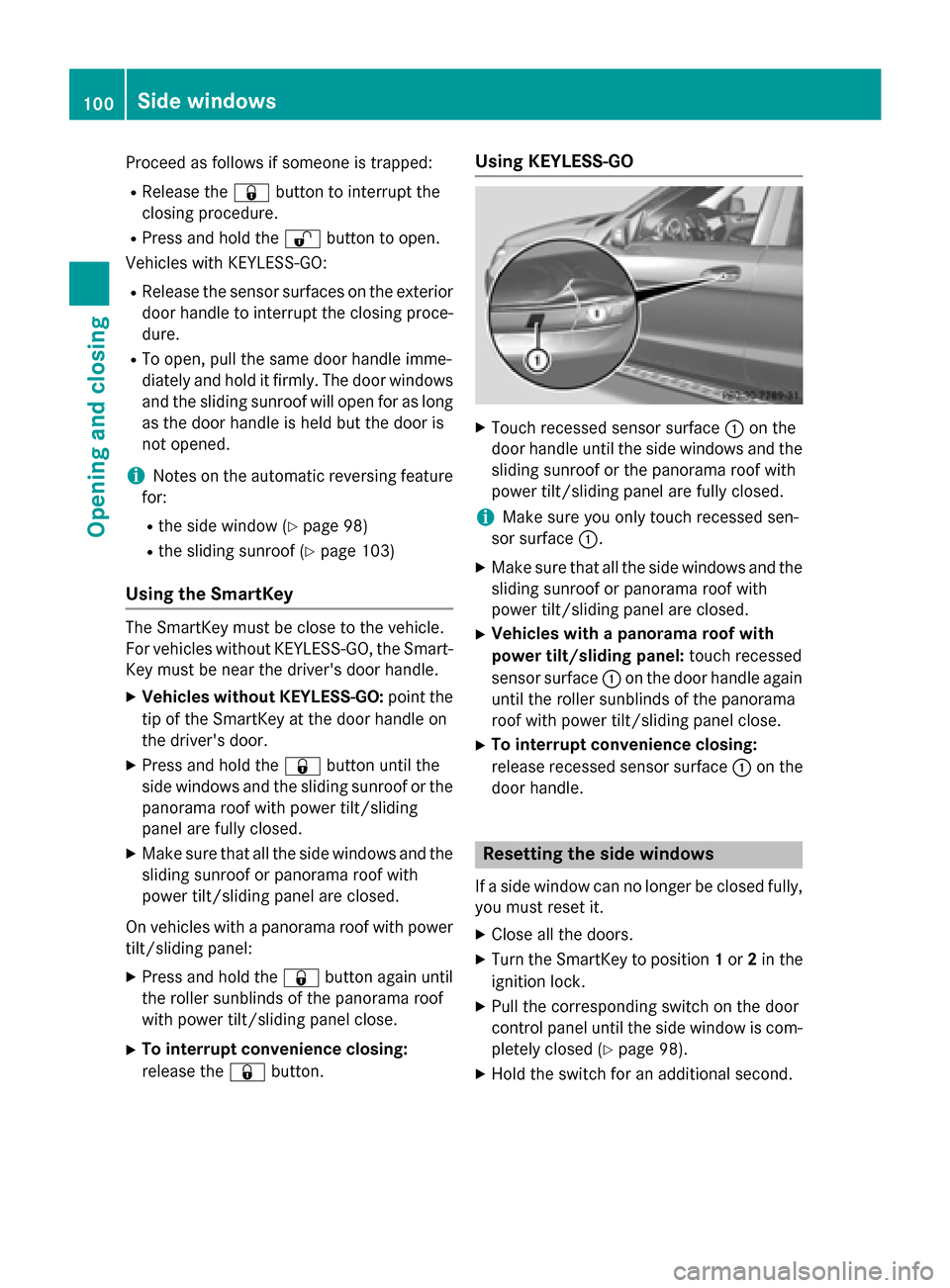
XTouch recessed sensor surface :on the
door handle until the side windows and the
sliding sunroof or the panorama roof with
power tilt/sliding panel are fully closed.
iMake sure you only touch recessed sen-
sor surface :.
XMake sure that all the side windows and the
sliding sunroof or panorama roof with
power tilt/sliding panel are closed.
XVehicles with a panorama roof with
power tilt/sliding panel: touch recessed
sensor surface :on the door handle again
until the roller sunblinds of the panorama
roof with power tilt/sliding panel close.
XTo interrupt convenience closing:
release recessed sensor surface :on the
door handle.
Resetting the side windows
If a side window can no longer be closed fully,
you must reset it.
XClose all the doors.
XTurn the SmartKey to position 1or 2in the
ignition lock.
XPull the corresponding switch on the door
control panel until the side window is com- pletely closed (
Ypage 98).
XHold the switch for an additional second.
100Side windows
Opening and closing
Page 128 of 462
If you come into contact with the electrolyte,
observe the following:
RRinse off the electrolyte from your skin
immediately with water.
RImmediately rinse the electrolyte out of
your eyes thoroughly with clean water.
RIf the electrolyte is swallowed, immediately
rinse your mouth out thoroughly. Do not
induce vomiting.
RIf electrolyte comes into contact with your
skin or hair or is swallowed, seek medical
attention immediately.
RImmediately change out of clothing which
has come into contact with electrolyte.
RIf an allergic reaction occurs, seek medical
attention immediately.
The rear-view mirror and the exterior mirror
on the driver's side automatically go into anti-
glare mode if the following conditions are met
simultaneously:
Rthe ignition is switched on and
Rincident light from headlamps strikes the
sensor in the rear-view mirror
The mirrors do not go into anti-glare mode if
reverse gear is engaged or if the interior light-
ing is switched on.
Parking position for the exterior mir-
ror on the front-passenger side
Setting and storing the parking position
Using reverse gear
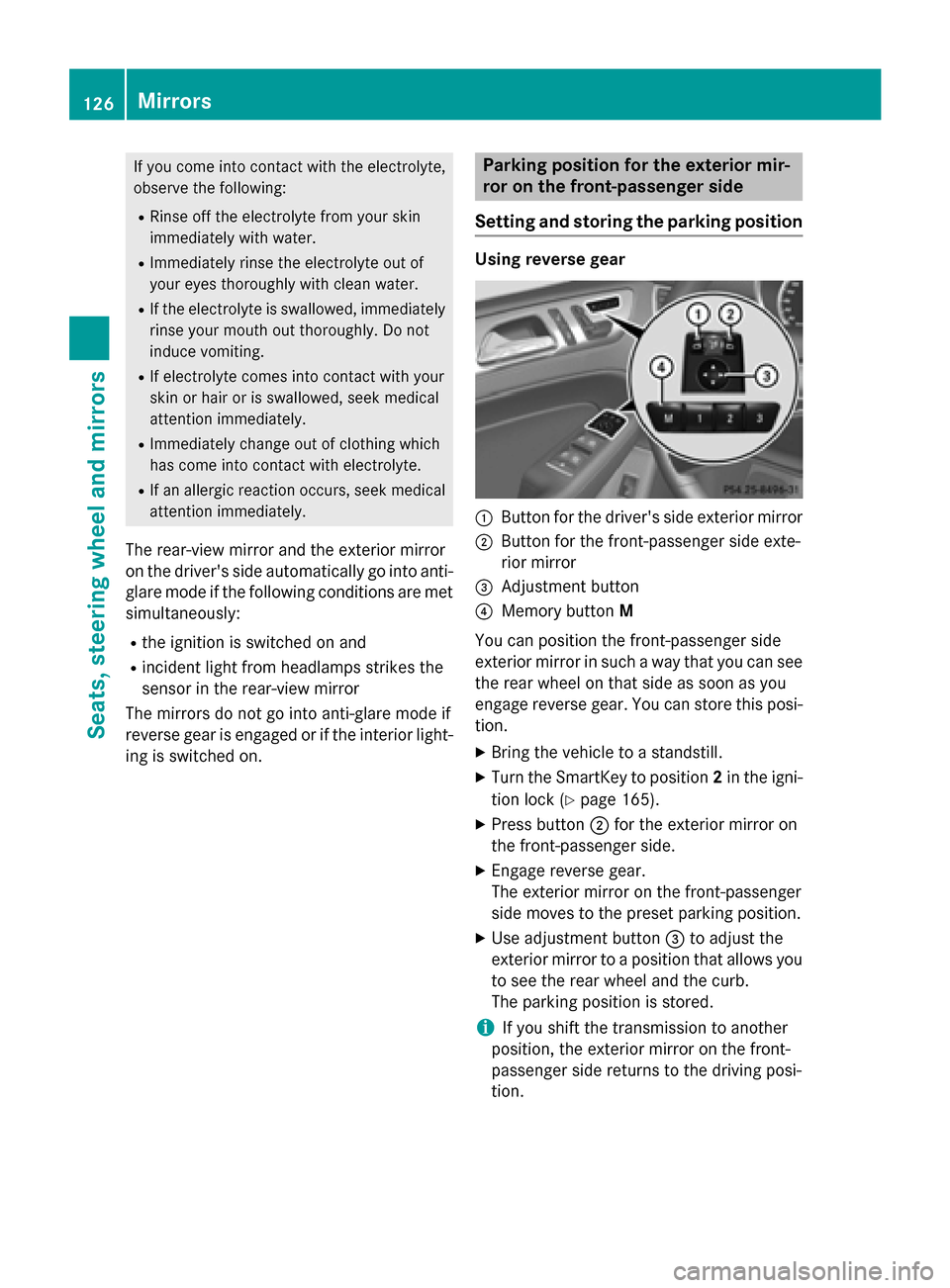
:Button for the driver's side exterior mirror
;Button for the front-passenger side exte-
rior mirror
=Adjustment button
?Memory button M
You can position the front-passenger side
exterior mirror in such a way that you can see
the rear wheel on that side as soon as you
engage reverse gear. You can store this posi-
tion.
XBring the vehicle to a standstill.
XTurn the SmartKey to position 2in the igni-
tion lock (
Ypage 165).
XPress button ;for the exterior mirror on
the front-passenger side.
XEngage reverse gear.
The exterior mirror on the front-passenger
side moves to the preset parking position.
XUse adjustment button =to adjust the
exterior mirror to a position that allows you
to see the rear wheel and the curb.
The parking position is stored.
iIf you shift the transmission to another
position, the exterior mirror on the front-
passenger side returns to the driving posi-
tion.
126Mirrors
Seats, steering wheel and mirrors
Page 132 of 462
Useful information
i
This Operator's Manual describes all
models and all standard and optional equip-
ment of your vehicle available at the time of
publication of the Operator's Manual.
Country-specific differences are possible.
Please note that your vehicle may not be
equipped with all features described. This
also applies to safety-related systems and
functions.
iRead the information on qualified special-
ist workshops (
Ypage 29).
Exterior lighting
General notes
For reasons of safety, Mercedes-Benz recom-
mends that you drive with the lights switched
on even during the daytime. In some coun-
tries, operation of the headlamps varies due
to legal requirements and self-imposed obli-
gations.
Setting the exterior lighting
Setting options
Exterior lighting can be set using:
Rthe light switch
Rthe combination switch (Ypage 132)
Rthe on-board computer (Ypage 284)
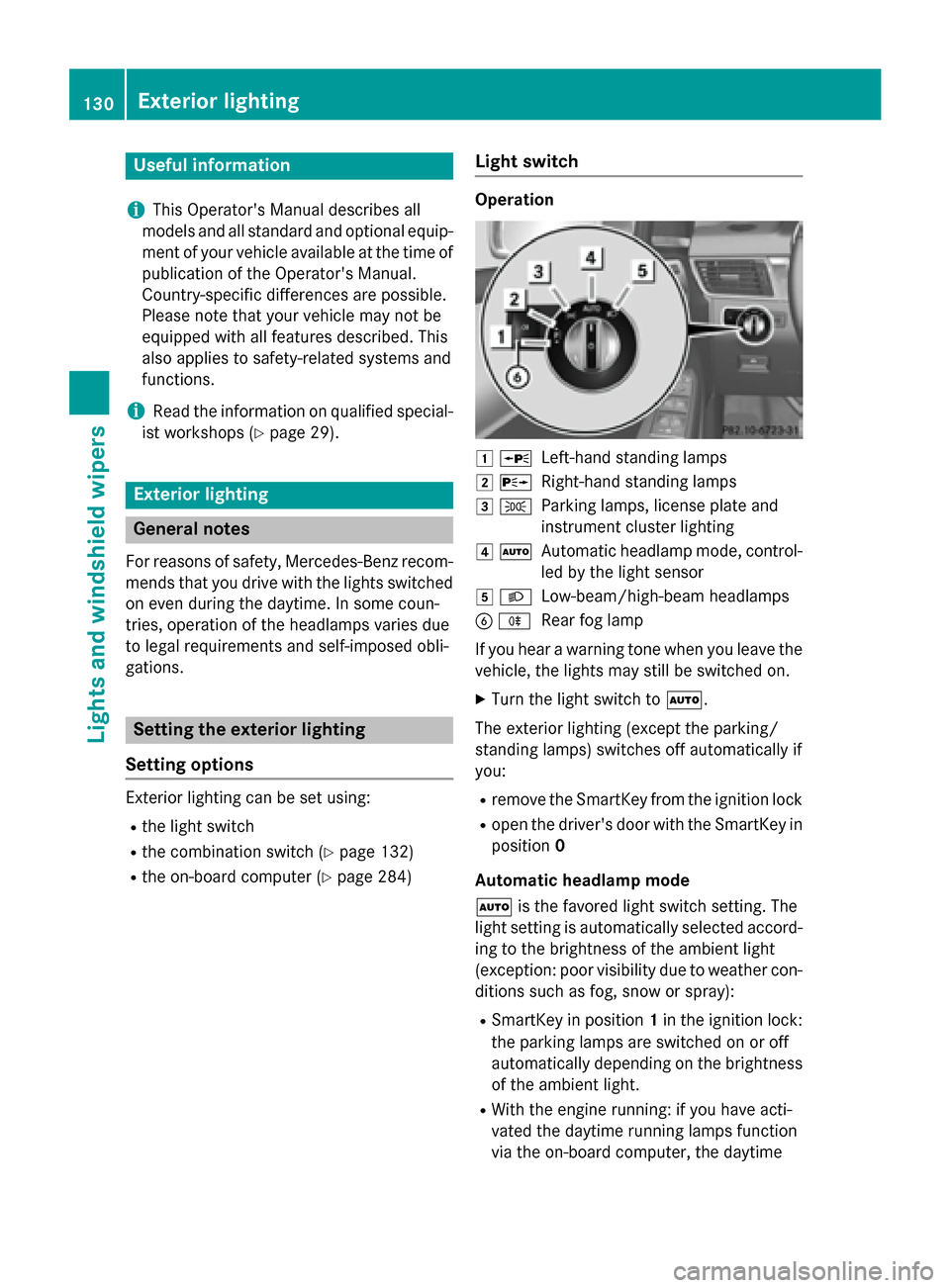
Light switch
Operation
1 WLeft-hand standing lamps
2XRight-hand standing lamps
3TParking lamps, license plate and
instrument cluster lighting
4ÃAutomatic headlamp mode, control-
led by the light sensor
5LLow-beam/high-beam headlamps
BRRear fog lamp
If you hear a warning tone when you leave the
vehicle, the lights may still be switched on.
XTurn the light switch to Ã.
The exterior lighting (except the parking/
standing lamps) switches off automatically if
you:
Rremove the SmartKey from the ignition lock
Ropen the driver's door with the SmartKey in
position 0
Automatic headlamp mode
à is the favored light switch setting. The
light setting is automatically selected accord-
ing to the brightness of the ambient light
(exception: poor visibility due to weather con-
ditions such as fog, snow or spray):
RSmartKey in position 1in the ignition lock:
the parking lamps are switched on or off
automatically depending on the brightness
of the ambient light.
RWith the engine running: if you have acti-
vated the daytime running lamps function
via the on-board computer, the daytime
130Exterior lighting
Lights and windshield wipers
Page 133 of 462
running lamps or the parking lamps and the
low-beam headlamps are switched on or off
automatically depending on the brightness
of the ambient light.
XTo switch on automatic headlamp
mode: turn the light switch to Ã.
GWARNING
When the light switch is set to Ã, the low-
beam headlamps may not be switched on
automatically if there is fog, snow or other
causes of poor visibility due to the weather
conditions such as spray. There is a risk of an
accident.
In such situations, turn the light switch to
L.
The automatic headlamp feature is only an
aid. The driver is responsible for the vehicle's
lighting at all times.
Only for Canada:
The daytime running lamps improve the visi-
bility of your vehicle during the day. The day-
time running lamps function is required by law
in Canada. It cannot therefore be deactivated.
When the engine is running and the vehicle is
stationary: if you move the selector lever from
a drive position to P, the daytime running
lamps/low-beam headlamps go out after
three minutes.
When the engine is running, the vehicle is
stationary and in bright ambient light: if you
turn the light switch to T, the daytime
running lamps and parking lamps switch on.
If the engine is running and you turn the light
switch to L, the manual settings take
precedence over the daytime running lamps.
USA only:
The daytime running lamps improve the visi-
bility of your vehicle during the day. To do this,
the daytime running lamps function must be
switched on using the on-board computer
(
Ypage 284).
If the engine is running and you turn the light
switch to TorL, the manual settings take precedence over the daytime running
lamps.
Low-beam headlamps
Even if the light sensor does not detect that it
is dark, the parking lamps and low-beam
headlamps switch on when the ignition is
switched on and the light switch is set to the
L
position. This is a particul
arly useful
function in the event of rain and fog.
XTo switch on the low-beam headlamps:
turn the SmartKey in the ignition lock to
position 2or start the engine.
XTurn the light switch to L.
The green Lindicator lamp in the instru-
ment cluster lights up.
Rear fog lamp
The rear fog lamp improves visibility of your
vehicle for the traffic behind in the event of
thick fog. Please take note of the country-
specific regulations for the use of rear fog
lamps.
XTo switch on the rear fog lamps: turn the
SmartKey to position 2in the ignition lock
or start the engine.
XTurn the light switch to LorÃ.
XPress the Rbutton.
The yellow Rindicator lamp in the
instrument cluster lights up.
XTo switch off the rear fog lamp: press the
R button.
The yellow Rindicator lamp in the
instrument cluster goes out.
Parking lamps
!If the battery has been excessively dis-
charged, the parking lamps or standing
lamps are automatically switched off to
enable the next engine start. Always park
your vehicle safely and sufficiently lit
according to legal standards. Avoid the
continuous use of the Tparking lamps
for several hours. If possible, switch on the
X right or the Wleft standing lamp.
Exterior lighting131
Lights and windshield wipers
Z