trailer MERCEDES-BENZ GL-Class 2016 X166 User Guide
[x] Cancel search | Manufacturer: MERCEDES-BENZ, Model Year: 2016, Model line: GL-Class, Model: MERCEDES-BENZ GL-Class 2016 X166Pages: 462, PDF Size: 10.44 MB
Page 22 of 462
Search & Send ............................... 361
Self-test ......................................... 357
Speed alert .................................... 364
System .......................................... 357
Triggering the vehicle alarm ........... 364
Vehicle Health Check .................... 363
Vehicle remote unlocking .............. 362
Telephone
Accepting a call ............................. 280
Display message ............................ 322
Menu (on-board computer) ............ 279
Number from the phone book ........ 280
Redialing ........................................ 280
Rejecting/ending a call ................. 280
Temperature
Coolant (display in the instrument
cluster) .......................................... 273
Coolant (on-board computer,
Mercedes-AMG vehicles) ............... 287
Engine oil (on-board computer,
Mercedes-AMG vehicles) ............... 287
Outside temperature ...................... 273
Setting (climate control) ................ 155
Transmission oil (on-board com-
puter, Mercedes-AMG vehicles) ..... 287
Through-loading feature ................... 343
Time
see separate operating instructions
Timing (RACETIMER) ......................... 288
Tire pressure
Calling up (on-board computer) ..... 412
Checking manually ........................ 411
Display message ............................ 318
Maximum ....................................... 411
Not reached (TIREFIT) .................... 390
Notes ............................................. 409
Reached (TIREFIT) .......................... 390
Recommended ............................... 408
Tire pressure loss warning system
General notes ................................ 411
Important safety notes .................. 411
Restarting ...................................... 412
Tire pressure monitor
Checking the tire pressure elec-
tronically ........................................ 414
Function/notes ............................. 412
General notes ................................ 412
Important safety notes .................. 413 Radio type approval for the tire
pressure monitor ........................... 415
Restarting ...................................... 415
Warning lamp ................................. 338
Warning message .......................... 414
TIREFIT kit .......................................... 388
Tire pressure not rea ched .............. 390
T
ire pressure reached .................... 390
Tires
Aspect ratio (definition) ................. 426
Average weight of the vehicle
occupants (definition) .................... 425
Bar (definition) ............................... 424
Changing a wheel .......................... 427
Characteristics .............................. 424
Checking ........................................ 405
Curb weight (definition) ................. 426
Definition of terms ......................... 424
Direction of rotation ...................... 427
Display message ............................ 318
Distribution of the vehicle occu-
pants (definition) ............................ 427
DOT (Department of Transporta-
tion) (definition) ............................. 425
DOT, Tire Identification Number
(TIN) ............................................... 424
GAWR (Gross Axle Weight Rating)
(definition) ..................................... 425
General notes ................................ 432
GTW (Gross Trailer Weight) (defi-
nition) ............................................ 425
GVW (Gross Vehicle Weight) (def-
inition) ........................................... 425
GVWR (Gross Vehicle Weight Rat-
ing) (definition) .............................. 425
Important safety notes .................. 404
Increased vehicle weight due to
optional equipment (definition) ...... 425
Information on driving .................... 404
Kilopascal (kPa) (definition) ........... 425
Labeling (overview) ........................ 421
Load bearing index (definition) ...... 426
Load index ..................................... 423
Load index (definition) ................... 425
M+S tires ....................................... 406
Maximum load on a tire (defini-
tion) ............................................... 426
20Index
Page 23 of 462
Maximum loaded vehicle weight
(definition) .....................................425
Maximum permissible tire pres-
sure (definition) .............................4 26
Maximum tire load ......................... 423
Maximum tire load (definition) ....... 426
MOExtended tires .......................... 406
Optional equipment weight (defi-
nition) ............................................ 426
PSI (pounds per square inch) (def-
inition) ...........................................4 26
Replacing ....................................... 427
Service life ..................................... 406
Sidewall (definition) ....................... 426
Speed rating (definition) ................ 425
Storing ...........................................4 27
Structure and characteristics
(definition) ..................................... 424
Temperature .................................. 420
TIN (Tire Identification Number)
(definition) ..................................... 426
Tire bead (definition) ......................4 26
Tire pressure (definition) ................ 426
Tire pressures (recommended) ...... 425
Tire size (data) ............................... 432
Tire size designation, load-bearing
capacity, speed rating .................... 421
Tire tread ....................................... 405
Tire tread (definition) ..................... 426
Total load limit (definition) ............. 427
Traction ......................................... 420
Traction (definition) ....................... 426
Tread wear ..................................... 420
TWR (permissible trailer drawbar
noseweight) (definition) ................. 426
Uniform Tire Quality Grading
Standards ...................................... 419
Uniform Tire Quality Grading
Standards (definition) .................... 425
Wear indicator (definition) ............. 427
Wheel and tire combination ........... 434
Wheel rim (definition) .................... 425
see Flat tire
Tool
see Vehicle tool kit
Top Tether ............................................ 64
To
w-starting
Emergency engine starting ............ 400 Important safety notes .................. 397
Towing a trailer
Active Parking Assist ..................... 231
Axle load, permissible .................... 458
Cleaning the trailer tow hitch ......... 381
Coupling up a trailer ...................... 266
Decoupling a trailer ....................... 268
Driving tips .................................... 264
ESP
®(Electronic Stability Pro-
gram) ............................................... 75
Important safety notes .................. 263
Installing the ball coupling ............. 265
Lights display message .................. 303
Mounting dimensions .................... 457
Power supply ................................. 269
Pulling away with a trailer .............. 168
Removing the ball coupling ............ 269
Trailer drive program ..................... 256
Trailer loads ................................... 458
Towing away
Important safety guidelines ........... 397
Installing the towing eye ................ 398
Removing the towing eye ............... 399
With both axles on the ground ....... 399
Trailer coupling
see Towing a trailer
Trailer loads and drawbar nose-
weights ............................................... 269
Trailer towing
Active Blind Spot Assist ................. 251
Active Lane Keeping Assist ............ 254
Blind Spot Assist ............................ 246
PARKTRONIC ................................. 226
Permissible trailer loads and
drawbar noseweights ..................... 269
Transfer case ..................................... 182
Transmission
see Automatic transmission
Transmission position display ......... 174
Transmission position display
(DIRECT SELECT lever) ...................... 174
Transporting the vehicle .................. 399
Traveling uphill
Brow of hill ..................................... 202
Driving downhill ............................. 202
Maximum gradient-climbing capa-
bility ............................................... 202
Index21
Page 77 of 462
The spinning of the wheels results in a cut-
ting action for better traction on loose sur-
faces.
Rtraction control is still activated.
RESP®still provides support when you
brake.
Off-road ESP®(vehicles with ON&OFF-
ROAD package)
An ESP®system specifically suited to off-road
terrain is activated automatically once the off-
road program is activated (
Ypage 258).
Off-road ESP
®intervenes with a delay if there
is oversteering or understeering, thus improv-
ing traction.
ESP®trailer stabilization
General information
If your vehicle/trailer combination begins to
swerve, ESP
®assists you in this situation.
ESP®slows the vehicle down by braking and
limiting the engine output until the vehicle/
trailer combination has stabilized.
Important safety notes
GWARNING
If road and weather conditions are poor,
trailer stabilization will not be able to prevent
the vehicle/trailer combination from swerv-
ing. Trailers with a high center of gravity can
tip over before ESP
®can detect this. There is
a risk of an accident.
Always adapt your driving style to the prevail-
ing road and weather conditions.
If your vehicle with trailer (vehicle/trailer
combination) begins to lurch, you can only
stabilize the vehicle/trailer combination by
depressing the brake firmly.
Trailer stabilization is active above speeds of
about 37 mph (60 km/h).
ESP
®trailer stabilization does not work if
ESP®is deactivated or disabled because of a
malfunction.
Crosswind Assist
General information
Strong crosswinds can cause your vehicle to
deviate from a straight course. The crosswind
driving assistance function integrated into
ESP
®significantly reduces these effects.
ESP
®intervenes automatically according to
the direction and intensity of the crosswinds
affecting your vehicle.
ESP intervenes with stabilizing braking to
assist you in keeping the vehicle in the lane.
Crosswind Assist is active at vehicle speeds
above 50 mph (80 km/h) when driving
straight ahead or cornering gently.
Important safety notes
Crosswind Assist does not work if ESP
®is
deactivated or disabled because of a mal-
function.
EBD (electronic brake force distribu-
tion)
General information
EBD monitors and controls the brake pres-
sure on the rear wheels to improve driving
stability while braking.
Important safety notes
iObserve the "Important safety notes" sec-
tion for driving safety systems (
Ypage 68).
GWARNING
If EBD is malfunctioning, the rear wheels can
lock, e.g. under full braking. This increases the
risk of skidding and an accident.
You should therefore adapt your driving style
to the different handling characteristics. Have
the brake system checked at a qualified spe-
cialist workshop.
Observe information regarding indicator and
warning lamps (
Ypage 327) as well as dis-
play messages (
Ypage 293).
Driving safety systems75
Safety
Z
Page 134 of 462
XTo switch on:turn the light switch to T.
The green Tindicator lamp in the instru-
ment cluster lights up.
Standing lamps
Switching on the standing lamps ensures the
corresponding side of the vehicle is illumina-
ted.
XTo switch on the standing lamps: the
SmartKey is not in the ignition lock or it is in
position 0.
XTurn the light switch to W(left-hand side
of the vehicle) or X(right-hand side of
the vehicle).
Vehicles towing a trailer: both the right and
left standing lamps (tail lamps) are always
illuminated on the trailer.
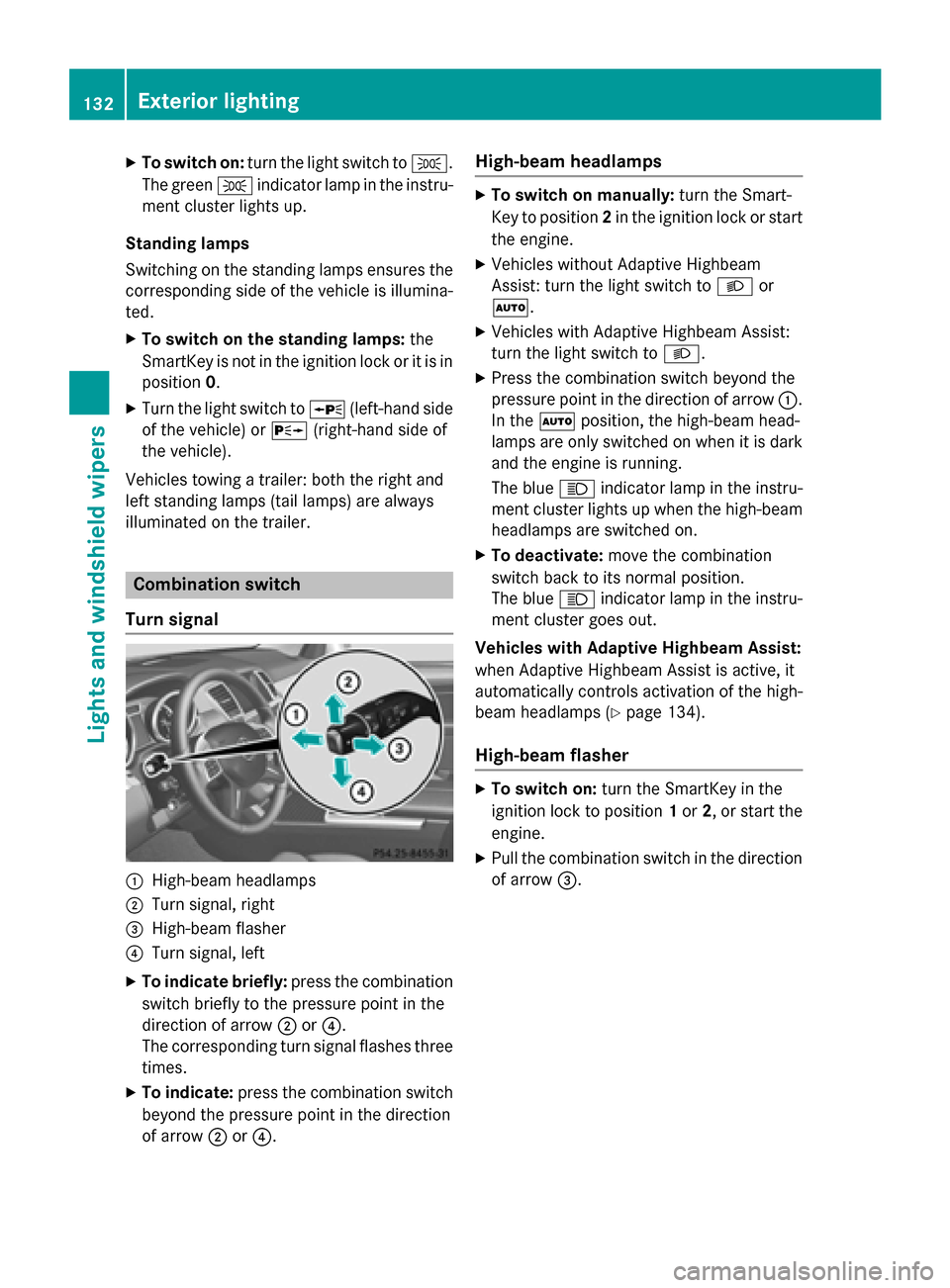
Combination switch
Turn signal
:High-beam headlamps
;Turn signal, right
=High-beam flasher
?Turn signal, left
XTo indicate briefly: press the combination
switch briefly to the pressure point in the
direction of arrow ;or?.
The corresponding turn signal flashes three
times.
XTo indicate: press the combination switch
beyond the pressure point in the direction
of arrow ;or?.
High-beam headlamps
XTo switch on manually: turn the Smart-
Key to position 2in the ignition lock or start
the engine.
XVehicles without Adaptive Highbeam
Assist: turn the light switch to Lor
Ã.
XVehicles with Adaptive Highbeam Assist:
turn the light switch to L.
XPress the combination switch beyond the
pressure point in the direction of arrow :.
In the Ãposition, the high-beam head-
lamps are only switched on when it is dark
and the engine is running.
The blue Kindicator lamp in the instru-
ment cluster lights up when the high-beam
headlamps are switched on.
XTo deactivate: move the combination
switch back to its normal position.
The blue Kindicator lamp in the instru-
ment cluster goes out.
Vehicles with Adaptive Highbeam Assist:
when Adaptive Highbeam Assist is active, it
automatically controls activation of the high-
beam headlamps (
Ypage 134).
High-beam flasher
XTo switch on: turn the SmartKey in the
ignition lock to position 1or 2, or start the
engine.
XPull the combination switch in the direction of arrow =.
132Exterior lighting
Lights and windshield wiper s
Page 165 of 462
Useful information............................164
Notes on breaking-in a new vehi-
cle ....................................................... 164
Driving ............................................... 164
Automatic transmission ...................173
Refueling ............................................ 182
Parking ............................................... 189
Driving tips ........................................ 192
Driving systems ................................ 202
Towing a trailer ................................. 263
163
Driving and parking
Page 170 of 462
Using KEYLESS-GO to start the engine
The Start/Stop button can be used to start
the vehicle without inserting the SmartKey
into the ignition lock. The Start/Stop button
must be inserted in the ignition lock and the
SmartKey must be in the vehicle. This mode
for starting the engine operates independ-
ently of the ECO start/stop automatic engine
start function.
XDepress the brake pedal and keep it
depressed.
XPress the Start/Stop button once
(
Ypage 165).
Vehicles with a gasoline engine: the
engine starts.
Vehicles with a diesel engine: preglow is
activated and the engine starts.
Pulling away
General notes
GWARNING
If the engine speed is above the idling speed
and you engage transmission position Dor R,
the vehicle could pull away suddenly. There is
a risk of an accident.
When engaging transmission position Dor R,
always firmly depress the brake pedal and do not simultaneously accelerate.
Depress the accelerator carefully when pull-
ing away.
The vehicle locks centrally once you have
pulled away. The locking knobs in the doors
drop down.
You can open the doors from the inside at any
time.
You can also deactivate the automatic locking
feature (
Ypage 285).
It is only possible to shift the transmission
from position Pto the desired position if you
depress the brake pedal. Only then is the
parking lock released. If you do not depress
the brake pedal, the DIRECT SELECT lever can still be moved but the parking lock remains
engaged.
iUpshifts take place at higher engine
speeds after a cold start. This helps the
catalytic converter to reach its operating
temperature more quickly.
Information on the automatic release of the
electric parking brake (
Ypage 190).
Pulling away with a trailer
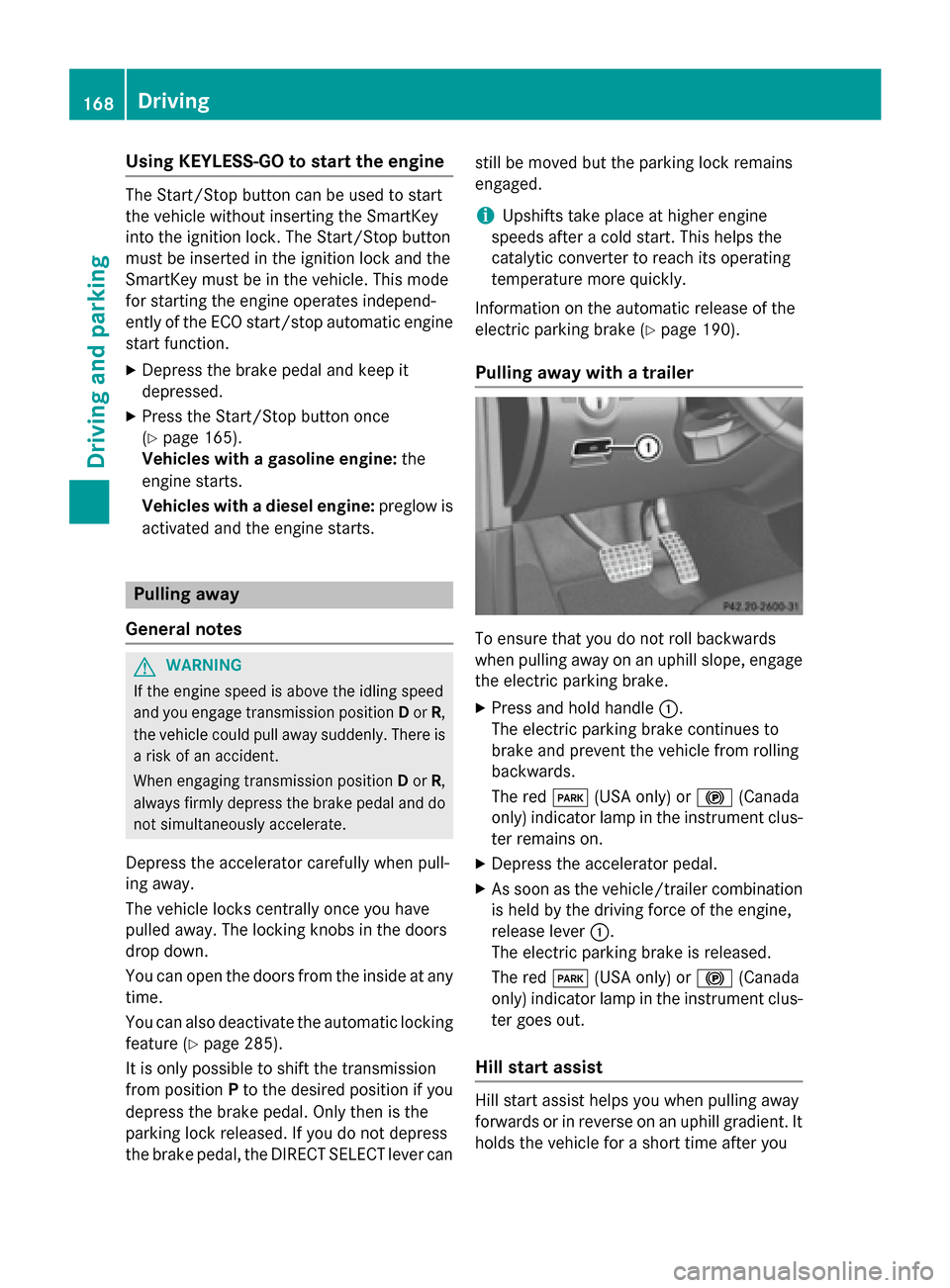
To ensure that you do not roll backwards
when pulling away on an uphill slope, engage
the electric parking brake.
XPress and hold handle :.
The electric parking brake continues to
brake and prevent the vehicle from rolling
backwards.
The red F(USA only) or !(Canada
only) indicator lamp in the instrument clus-
ter remains on.
XDepress the accelerator pedal.
XAs soon as the vehicle/trailer combination
is held by the driving force of the engine,
release lever :.
The electric parking brake is released.
The red F(USA only) or !(Canada
only) indicator lamp in the instrument clus-
ter goes out.
Hill start assist
Hill start assist helps you when pulling away
forwards or in reverse on an uphill gradient. It
holds the vehicle for a short time after you
168Driving
Driving and parking
Page 179 of 462
Kickdown
Use kickdown for maximum acceleration.
XDepress theaccelerato rpedal beyon dth e
pressur epoint.
The automatic transmission shifts to a
lower gear depending on th eengin espeed.
XEas eoff th eaccelerato rpedal once th e
desired spee dis reached.
The automatic transmission shifts bac kup.
Rocking the vehicle free
Shifting th etransmission repeatedly between
gear sD and Rmay help to free th evehicl eif it
has become stuck in slus hor snow. The vehi-
cle's engin emanagemen tsystem limits th e
spee dto amaximum of 5mph (9 km/h) when
shifting bac kand forth .To shif tbac kand forth
between transmission position sD and R,
mov eth eDIRECT SELECT lever up and down
past th epoin tof resistance.
Towing a trailer
XDrive in th emiddle of th eengin espee d
range on uphill gradients .
XDependingon th euphill or downhill gradi-
ent, use left-han dsteering whee lpaddle
shifte r (
Ypage 178) to select alower gear ,
eve nif cruise control or DISTRONI CPLU S
are activated.
Program selector button
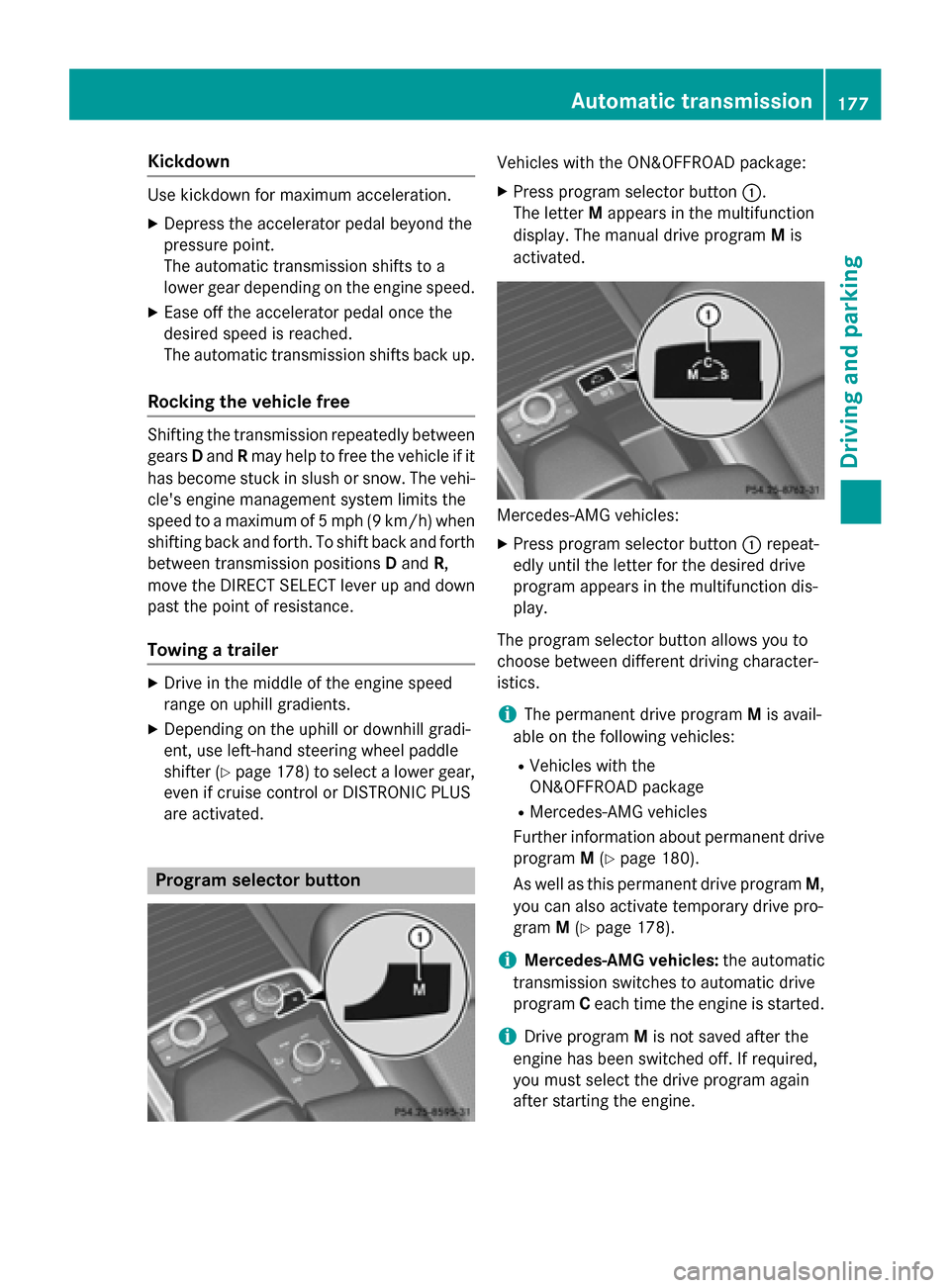
Vehicles withth e ON& OFFROAD package:
XPress program selector butto n:.
The lette rM appear sin th emultifunction
display. The manual drive program Mis
activated.
Mercedes-AM Gvehicles:
XPre ssprogram selector butto n: repeat -
edly until th elette rfor th edesired drive
program appear sin th emultifunction dis-
play.
The program selector butto nallows you to
choos ebetween differen tdrivin gcharacter-
istics .
iThe permanen tdrive program Mis avail -
able on th efollowin gvehicles:
RVehicles wit hth e
ON& OFFROAD packag e
RMercedes-AMGvehicles
Further information about permanen tdrive
program M(
Ypage 180).
As well as this permanen tdrive program M,
you can also activat etemporar ydrive pro -
gram M(
Ypage 178).
iMercedes-AMG vehicles:theautomatic
transmission switches to automatic drive
program Ceac htime th eengin eis started.
iDrive program Mis no tsaved after th e
engin ehas been switched off .If required,
you mus tselect th edrive program again
after startin gth eengine.
Automatic transmission17 7
Driving an d parking
Z
Page 205 of 462
select a lower gear in good time on long and
steep downhill gradients, especially if the
vehicle is laden or towing a trailer. By doing
so, you will make use of the braking effect of
the engine. This relieves the load on the brake
system and prevents the brakes from over-
heating and wearing too quickly.
Use cruise control only if road and traffic con-
ditions make it appropriate to maintain a
steady speed for a prolonged period. You can
store any road speed above 20 mph
(30 km/h).
iCruise control should not be activated
when driving off-road.
Important safety notes
If you fail to adapt your driving style, cruise
control can neither reduce the risk of an acci-
dent nor override the laws of physics. Cruise
control cannot take into account the road,
traffic and weather conditions. Cruise control
is only an aid. You are responsible for the dis-
tance to the vehicle in front, for vehicle speed,
for braking in good time and for staying in
your lane.
Do not use cruise control:
Rin road and traffic conditions which do not
allow you to maintain a constant speed e.g.
in heavy traffic or on winding roads
Ron slippery road surfaces. Braking or accel- erating could cause the drive wheels to lose
traction and the vehicle could then skid
Rwhen there is poor visibility, e.g. due to fog,
heavy rain or snow
If there is a change of drivers, advise the new
driver of the speed stored.
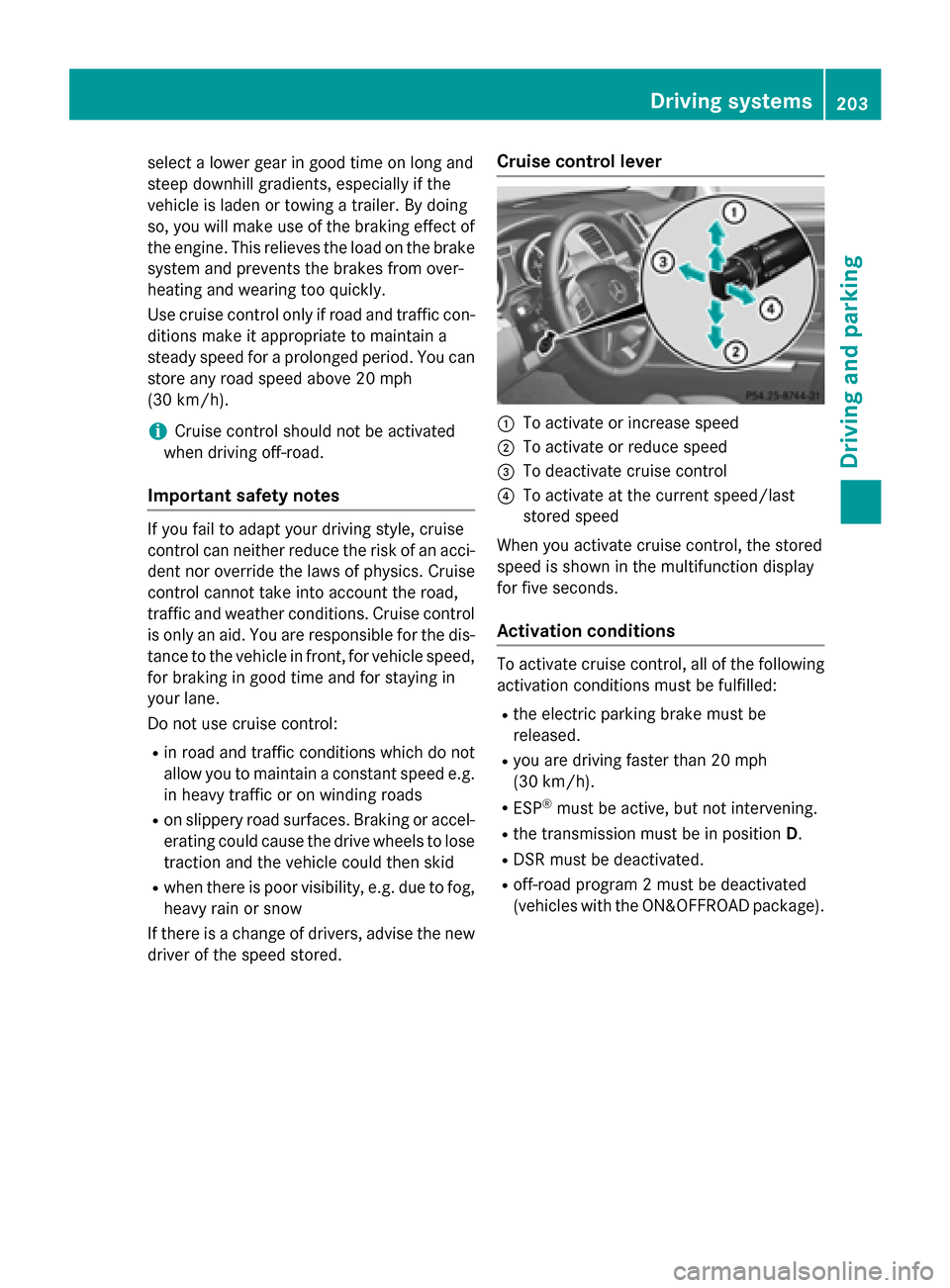
Cruise control lever
:To activate or increase speed
;To activate or reduce speed
=To deactivate cruise control
?To activate at the current speed/last
stored speed
When you activate cruise control, the stored
speed is shown in the multifunction display
for five seconds.
Activation conditions
To activate cruise control, all of the following
activation conditions must be fulfilled:
Rthe electric parking brake must be
released.
Ryou are driving faster than 20 mph
(30 km/h).
RESP®must be active, but not intervening.
Rthe transmission must be in position D.
RDSR must be deactivated.
Roff-road program 2 must be deactivated
(vehicles with the ON&OFFROAD package).
Driving systems203
Driving and parking
Z
Page 207 of 462
press the cruise control lever up:or
down ;to the pressure point.
Every time the cruise control lever is
pressed up :or down ;the last speed
stored is increased or reduced.
iCruise control is not deactivated if you
depress the accelerator pedal. For exam-
ple, if you accelerate briefly to overtake,
cruise control adjusts the vehicle's speed
to the last speed stored after you have fin- ished overtaking.
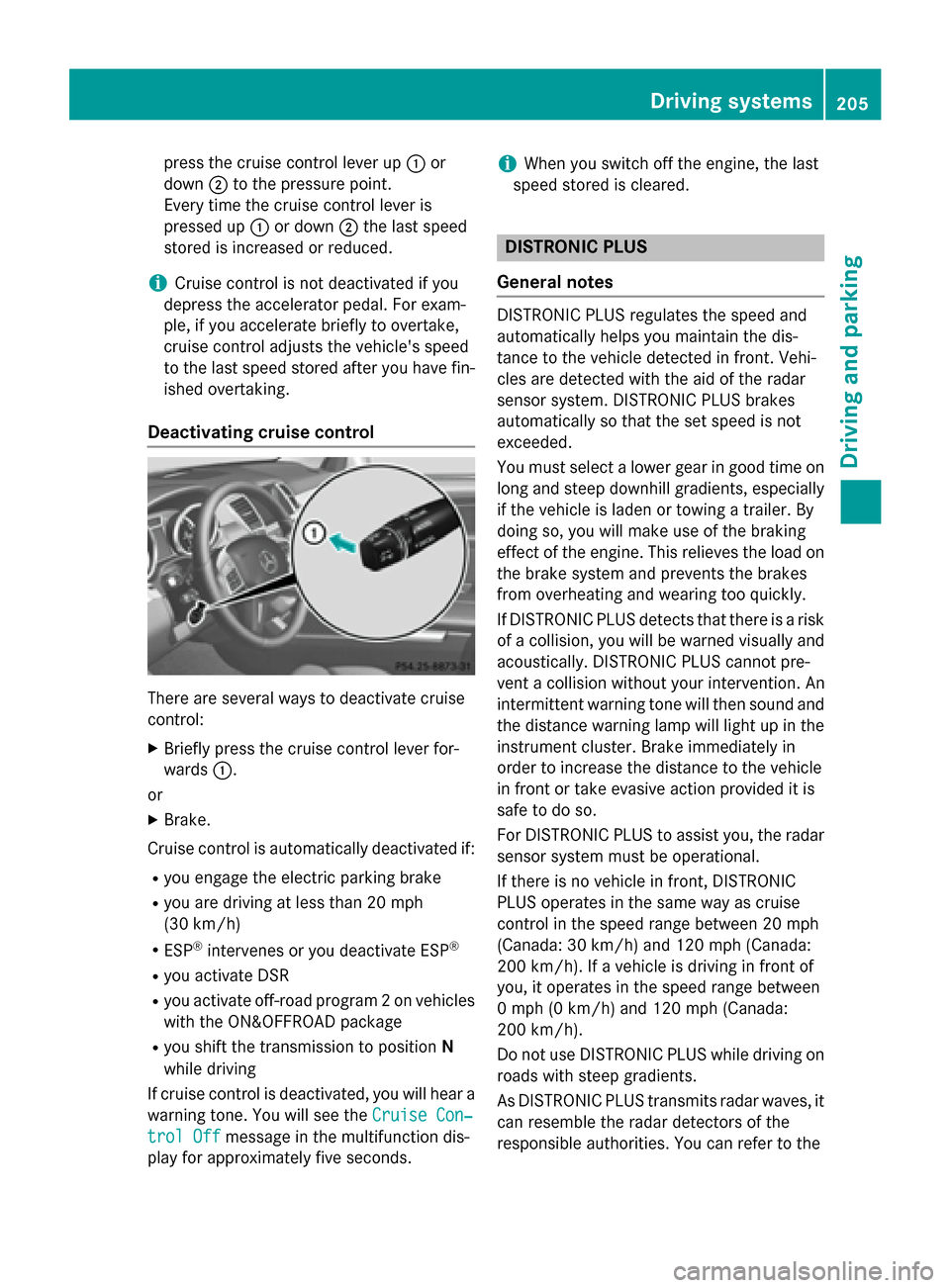
Deactivating cruise control
There are several ways to deactivate cruise
control:
XBriefly press the cruise control lever for-
wards :.
or
XBrake.
Cruise control is automatically deactivated if:
Ryou engage the electric parking brake
Ryou are driving at less than 20 mph
(30 km/h)
RESP®intervenes or you deactivate ESP®
Ryou activate DSR
Ryou activate off-road program 2 on vehicles
with the ON&OFFROAD package
Ryou shift the transmission to position N
while driving
If cruise control is deactivated, you will hear a
warning tone. You will see the Cruise Con‐
trol Offmessage in the multifunction dis-
play for approximately five seconds.
iWhen you switch off the engine, the last
speed stored is cleared.
DISTRONIC PLUS
General notes
DISTRONIC PLUS regulates the speed and
automatically helps you maintain the dis-
tance to the vehicle detected in front. Vehi-
cles are detected with the aid of the radar
sensor system. DISTRONIC PLUS brakes
automatically so that the set speed is not
exceeded.
You must select a lower gear in good time on
long and steep downhill gradients, especially
if the vehicle is laden or towing a trailer. By
doing so, you will make use of the braking
effect of the engine. This relieves the load on
the brake system and prevents the brakes
from overheating and wearing too quickly.
If DISTRONIC PLUS detects that there is a risk
of a collision, you will be warned visually and
acoustically. DISTRONIC PLUS cannot pre-
vent a collision without your intervention. An
intermittent warning tone will then sound and
the distance warning lamp will light up in the
instrument cluster. Brake immediately in
order to increase the distance to the vehicle
in front or take evasive action provided it is
safe to do so.
For DISTRONIC PLUS to assist you, the radar
sensor system must be operational.
If there is no vehicle in front, DISTRONIC
PLUS operates in the same way as cruise
control in the speed range between 20 mph
(Canada: 30 km/h) and 120 mph (Canada:
200 km/ h). If a vehicle is driving in front of
you, it operates in the speed range between
0 mph (0 km/h) and 120 mph (Canada:
200 km/h).
Do not use DISTRONIC PLUS while driving on
roads with steep gradients.
As DISTRONIC PLUS transmits radar waves, it
can resemble the radar detectors of the
responsible authorities. You can refer to the
Driving systems205
Driving and parking
Z
Page 220 of 462
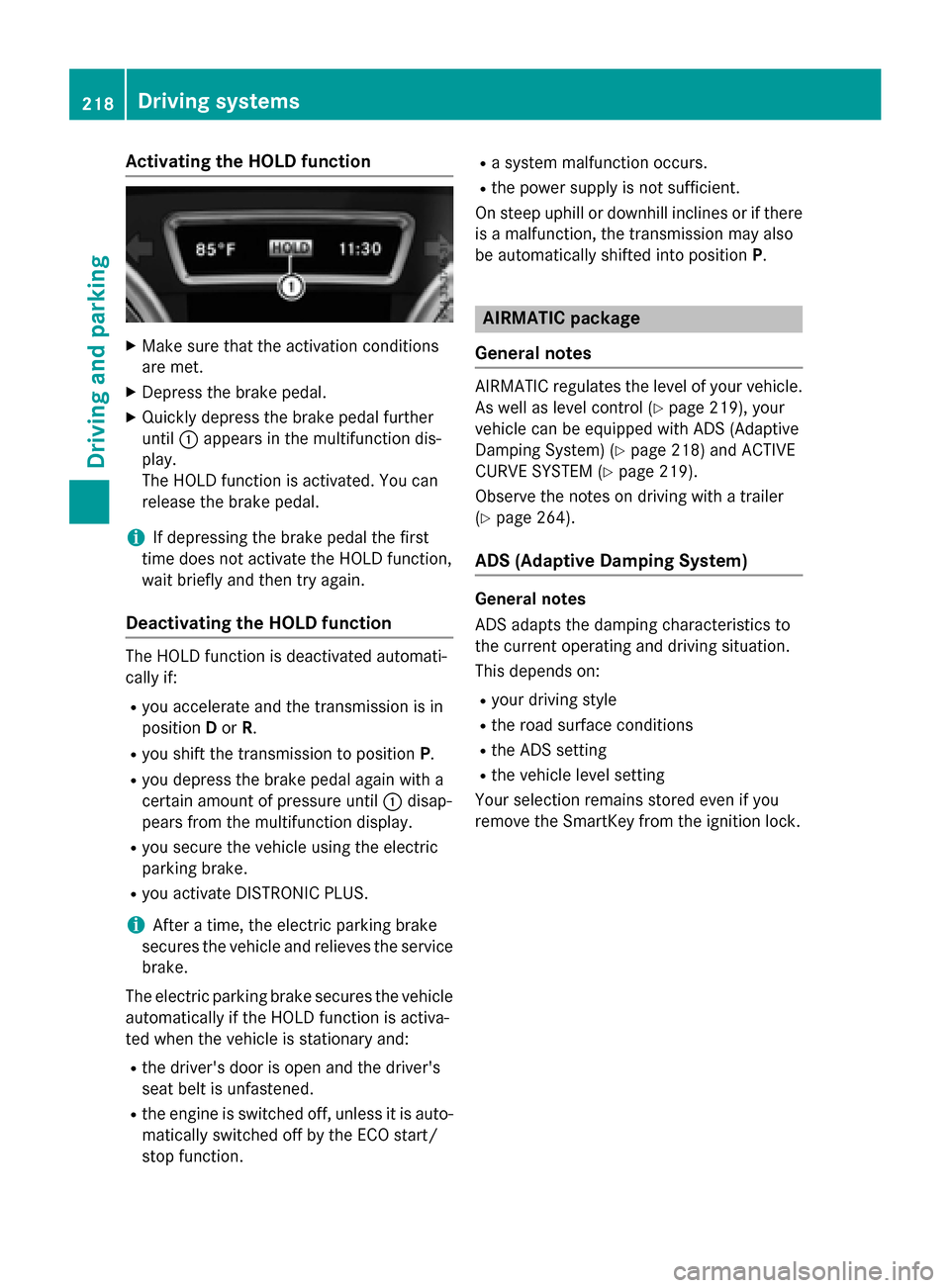
Activating the HOLD function
XMakesur ethat th eactivation condition s
are met .
XDepress th ebrak epedal .
XQuickl ydepress th ebrak epedal further
until :appear sin th emultifunction dis-
play.
The HOLD function is activated. You can
release th ebrak epedal .
iIf depressing th ebrak epedal th efirst
time does no tactivat eth eHOLD function ,
wait briefly and then tr yagain .
Deactivating the HOLD function
The HOLD function is deactivated automati-
callyif:
Ryou accelerate and th etransmission is in
position Dor R.
Ryou shif tth etransmission to position P.
Ryou depress thebrak epedal again wit h a
certain amoun tof pressur euntil :disap -
pear sfrom th emultifunction display.
Ryou secure th evehicl eusin gth eelectric
parking brake.
Ryou activat eDISTRONI CPLUS.
iAfte r atime, th eelectric parking brak e
secures th evehicl eand relieves th eservic e
brake.
The electric parking brak esecures th evehicl e
automatically if th eHOLD function is activa-
te dwhen th evehicl eis stationary and :
Rthedriver' sdoor is open and th edriver' s
seat belt is unfastened.
Rth eengin eis switched off ,unless it is auto -
matically switched off by th eECO start /
stop function .
Rasystem malfunction occurs.
Rth epower suppl yis no t sufficient.
On steep uphill or downhill inclines or if there
is amalfunction ,th etransmission may also
be automatically shifte dint oposition P.
AIRMATIC package
Genera l notes
AIRMATIC regulates th elevel of your vehicle.
As well as level control (
Ypage 219), your
vehicl ecan be equipped wit hAD S(Adaptive
Dampin gSystem) (
Ypage 218) and ACTIVE
CURVE SYSTE M (
Ypage 219).
Observ eth enote son driving wit h atrailer
(
Ypage 264).
ADS (Adaptive Damping System)
Genera lnotes
AD Sadapt sth edamping characteristics to
th ecurren toperating and driving situation.
This depend son :
Ryour driving style
Rtheroad surfac econdition s
RtheAD Ssetting
Rth evehicl elevel setting
Your selection remain s storedeve nif you
remove th eSmartKey from th eignition lock.
218Driving systems
Driving and parking