ignition MERCEDES-BENZ GL SUV 2009 User Guide
[x] Cancel search | Manufacturer: MERCEDES-BENZ, Model Year: 2009, Model line: GL SUV, Model: MERCEDES-BENZ GL SUV 2009Pages: 309, PDF Size: 10.27 MB
Page 58 of 309
X
With KEYLESS GO*: grasp the door han-
dle. The key must be outside the vehicle.
The alarm is deactivated.
or
X Press the Start/Stop button on the dash-
board. The key must be inside the vehicle.
The alarm is deactivated. Tow-away protection*
An audible and visual alarm is triggered if the
vehicle's angle of inclination is altered while
tow-away protection is primed. For example,
this occurs if the vehicle is jacked up on one
side.
Priming tow-away protection X
Make sure that all the doors and the tail-
gate are closed.
X Lock the vehicle with the key or, on vehicles
with KEYLESS GO*, with the locking button
on the door handle.
Tow-away protection is primed after
approximately 30 seconds.
Deactivating tow-away protection When you unlock your vehicle using the key
or KEYLESS GO*, tow-away protection is
automatically deactivated.
Deactivate tow-away protection manually to
prevent a false alarm if your vehicle:
R is being transported
R is being loaded, e.g. onto a ferry or car
transporter
R is parked on a movable surface, e.g. split-
level garages
It is possible to switch off tow-away protec-
tion on the on-board computer for the next
time the vehicle is locked (Y page 109). Tow-
away protection remains deactivated until
you unlock and lock the vehicle again.
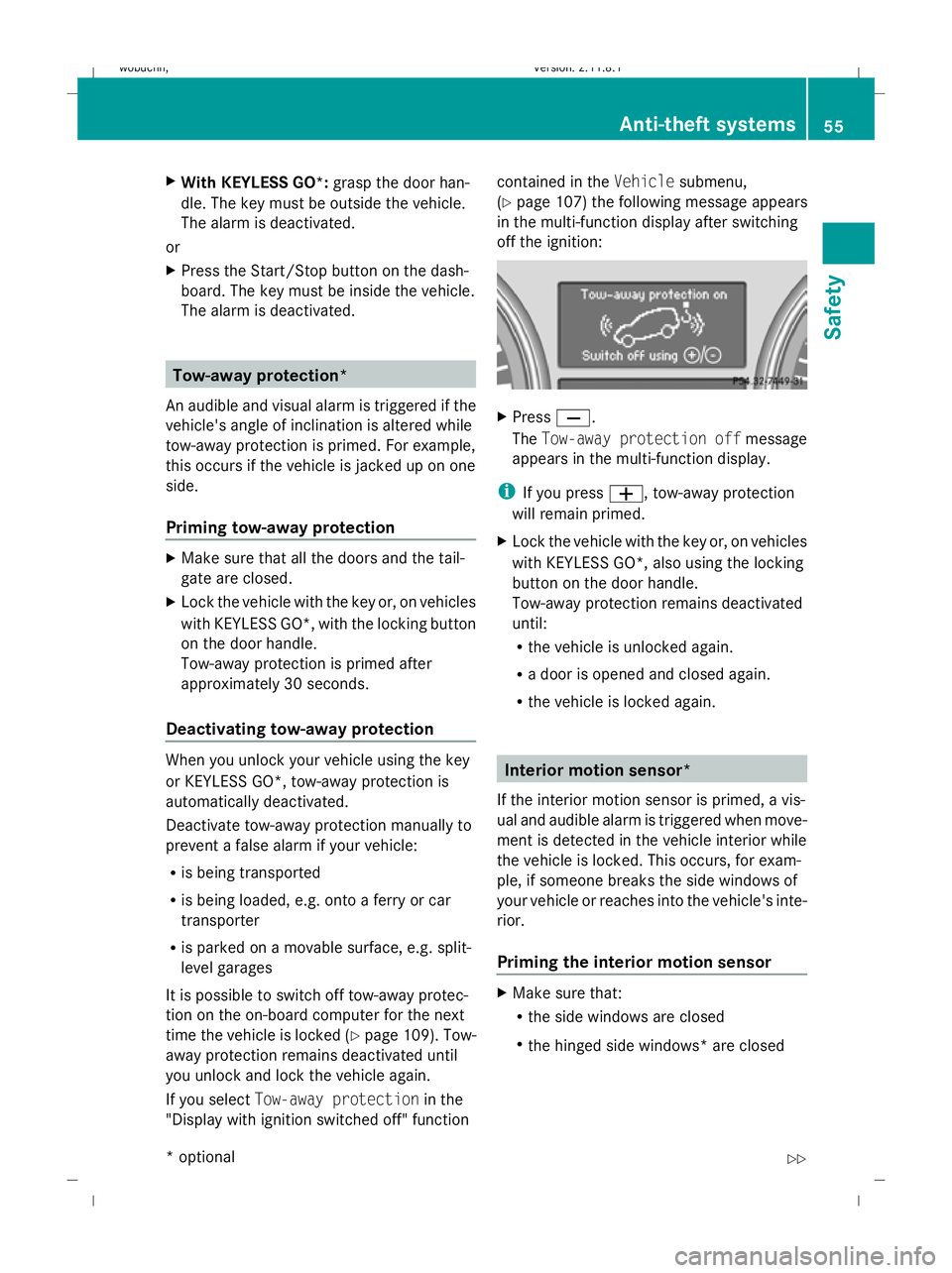
If you select Tow-away protection in the
"Display with ignition switched off" function contained in the
Vehiclesubmenu,
(Y page 107) the following message appears
in the multi-function display after switching
off the ignition: X
Press X.
The Tow-away protection off message
appears in the multi-function display.
i If you press W, tow-away protection
will remain primed.
X Lock the vehicle with the key or, on vehicles
with KEYLESS GO*, also using the locking
button on the door handle.
Tow-away protection remains deactivated
until:
R the vehicle is unlocked again.
R a door is opened and closed again.
R the vehicle is locked again. Interior motion sensor*
If the interior motion sensor is primed, a vis-
ual and audible alarm is triggered when move-
ment is detected in the vehicle interior while
the vehicle is locked. This occurs, for exam-
ple, if someone breaks the side windows of
your vehicle or reaches into the vehicle's inte-
rior.
Priming the interior motion sensor X
Make sure that:
R
the side windows are closed
R the hinged side windows* are closed Anti-theft systems
55Safety
* optional
X164_AKB; 2; 3, en-GB
wobuchh,
Version: 2.11.8.1 2009-03-31T14:14:58+02:00 - Seite 55 Z
Dateiname: 6515431202_buchblock.pdf; erzeugt am 01. Apr 2009 00:16:50; WK
Page 59 of 309
R
the sliding/tilting sunroof* is closed.
R there are no objects, e.g. mascots, hang-
ing on the rear-view mirror or on the grab
handles on the roof trim.
This will prevent false alarms.
X Make sure that all the doors and the tail-
gate are closed.
X Lock the vehicle with the key or, on vehicles
with KEYLESS GO*, also using the locking
button on the door handle.
The interior motion sensor is primed after
approximately 40 seconds.
Deactivating the interior motion sensor When you unlock your vehicle using the key
or KEYLESS GO *,the interior motion sensor
is automatically deactivated.
To prevent a false alarm, deactivate the inte-
rior motion sensor if you lock your vehicle
and:
R people or animals remain in the vehicle.
R a side window remains open.
R a hinged side window* remains open.
R the sliding/tilting sunroof* remains open.
It is possible to deactivate the interior motion
sensor using the on-board computer for the
next time the vehicle is locked
(Y page 109). The interior motion sensor
remains deactivated until you unlock and lock
the vehicle again.
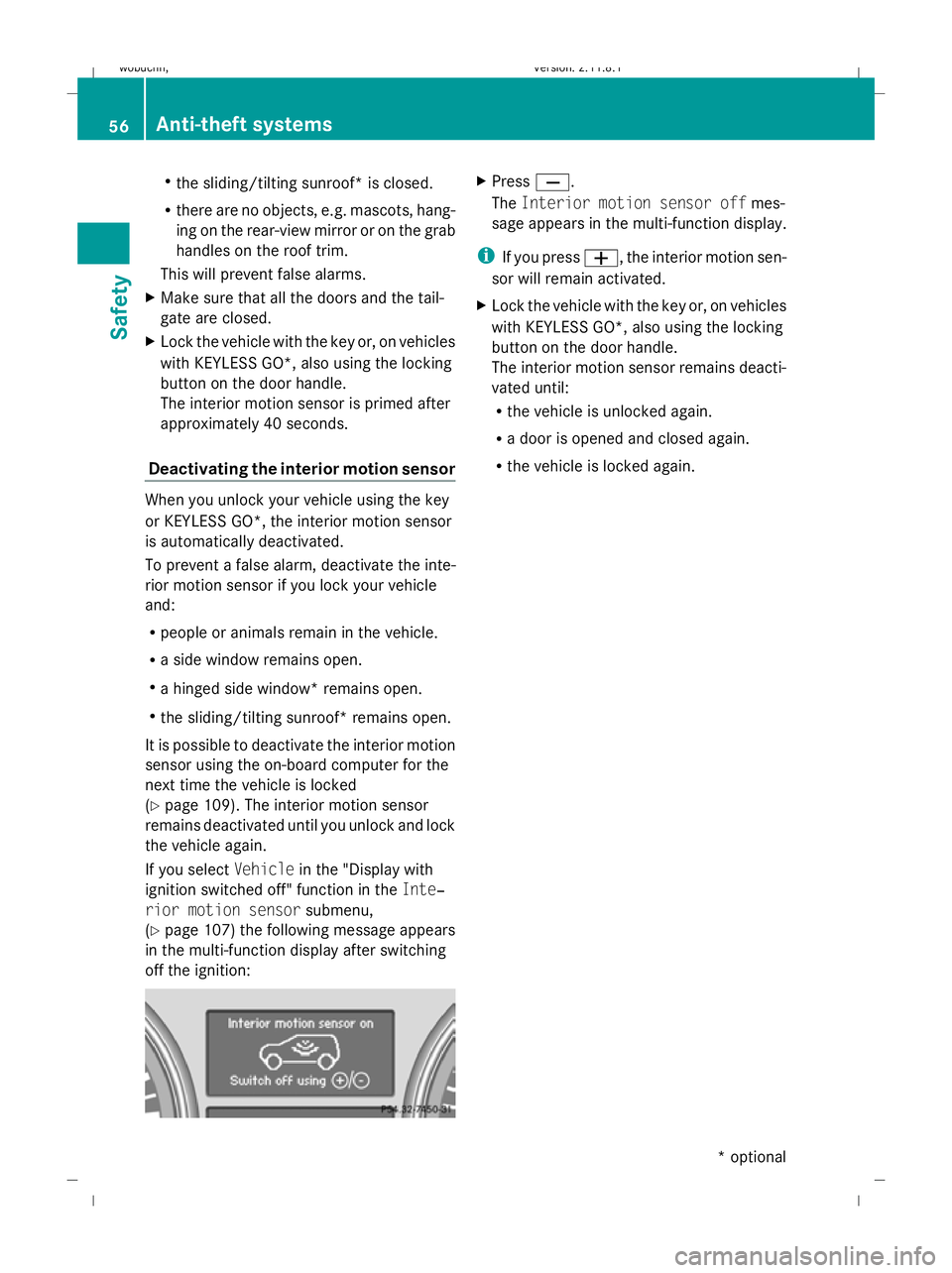
If you select Vehiclein the "Display with
ignition switched off" function in the Inte‐
rior motion sensor submenu,
(Y page 107) the following message appears
in the multi-function display after switching
off the ignition: X
Press X.
The Interior motion sensor off mes-
sage appears in the multi-function display.
i If you press W, the interior motion sen-
sor will remain activated.
X Lock the vehicle with the key or, on vehicles
with KEYLESS GO*, also using the locking
button on the door handle.
The interior motion sensor remains deacti-
vated until:
R
the vehicle is unlocked again.
R a door is opened and closed again.
R the vehicle is locked again. 56
Anti-theft systemsSafety
* optional
X164_AKB; 2; 3, en-GB
wobuchh
,V ersion: 2.11.8.1
2009-03-31T14:14:58+02:00 - Seite 56
Dateiname: 6515431202_buchblock.pdf; erzeugt am 01. Apr 2009 00:16:50; WK
Page 63 of 309
X
To unlock: press button :.
X To lock: press button ;.
Automatic locking The vehicle will lock automatically once you
have pulled away.
You can switch the automatic locking func-
tion on and off using the on-board computer
(Y page 107).
i The vehicle is locked automatically when
the ignition is switched on and the wheels
begin to turn. There is a risk of being locked
out when the vehicle is being pushed or
tested on a dynamometer. Tailgate
Points to remember
G
Risk of poisoning
Exhaust fumes could enter the vehicle interior
if the engine is running and the tailgate is
open. This could poison you. Therefore, you
should make sure that the tailgate is always
closed when the engine is running.
! The tailgate swings up and to the rear
when opened. Therefore, make sure that
there is sufficient clearance above and
behind the tailgate.
Do not leave the key in the luggage compart-
ment. Otherwise, you could lock yourself out.
On vehicles with a spare wheel bracket*, you
can only open the tailgate after first opening
the spare wheel bracket* completely.
i You will find details of the tailgate opening
dimensions in the Technical data section
(Y page 295). The tailgate can be:
R
opened and closed manually
(Y page 61)
R opened and closed* automatically from
outside (Y page 62)
R opened and closed* automatically from
inside (Y page 62) Spare wheel bracket*
G
Risk of accident
While the spare wheel bracket is folded to the
side, the tail lamps may be blocked from view.
Other road users may then fail to see you and
crash into your vehicle. Additionally, secure
your vehicle using a warning lamp or a warn-
ing triangle.
Do not drive with the spare wheel bracket fol-
ded out.
Make sure that the spare wheel bracket is
closed correctly.
Otherwise, the freely moving spare wheel
bracket could injure people or cause an acci-
dent.
! Do not wash vehicles equipped with a
spare wheel bracket in an automatic car
wash.
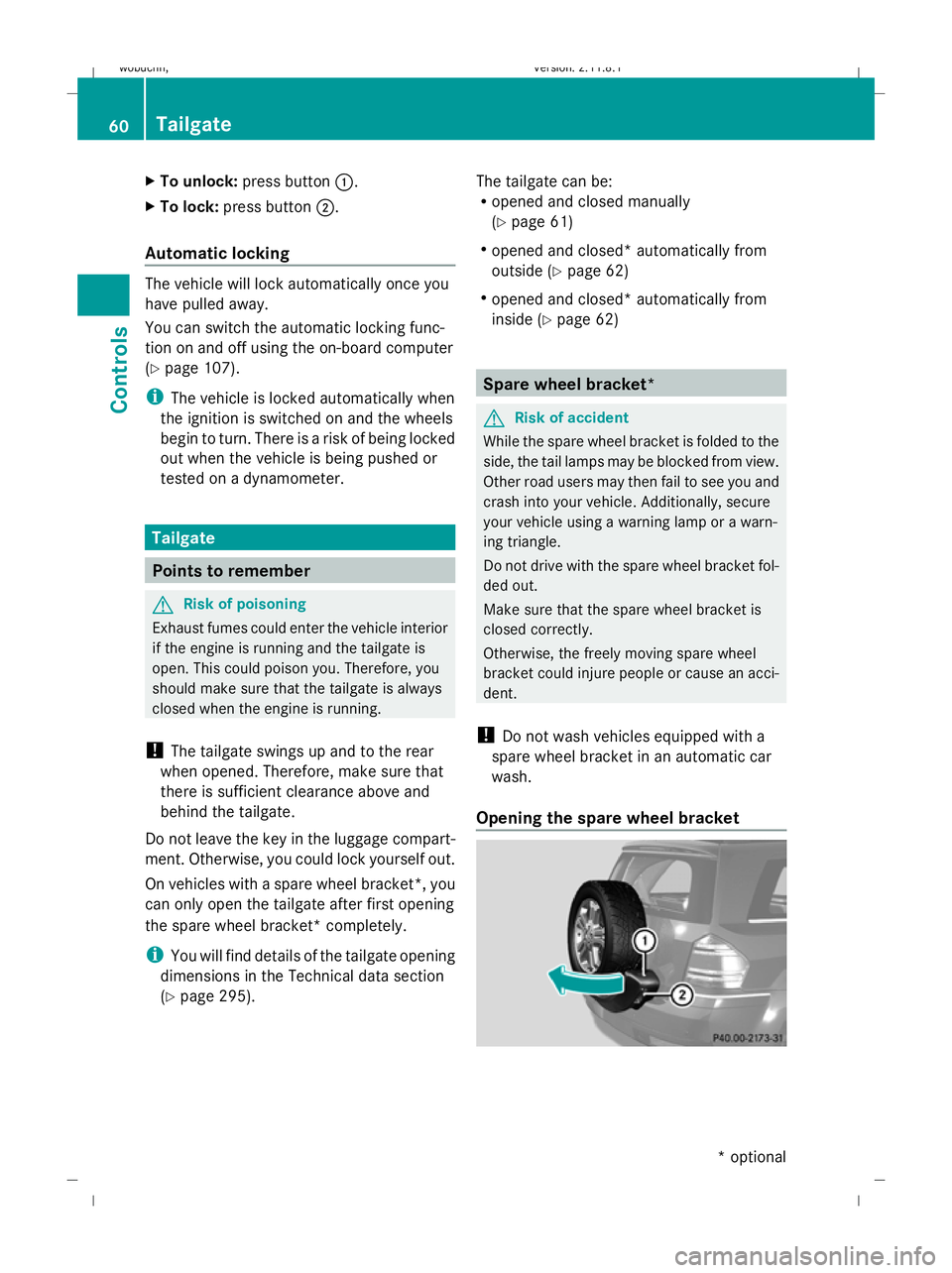
Opening the spare wheel bracket 60
TailgateControls
* optional
X164_AKB; 2; 3, en-GB
wobuchh
,V ersion: 2.11.8.1
2009-03-31T14:14:58+02:00 - Seite 60
Dateiname: 6515431202_buchblock.pdf; erzeugt am 01. Apr 2009 00:16:52; WK
Page 65 of 309
X
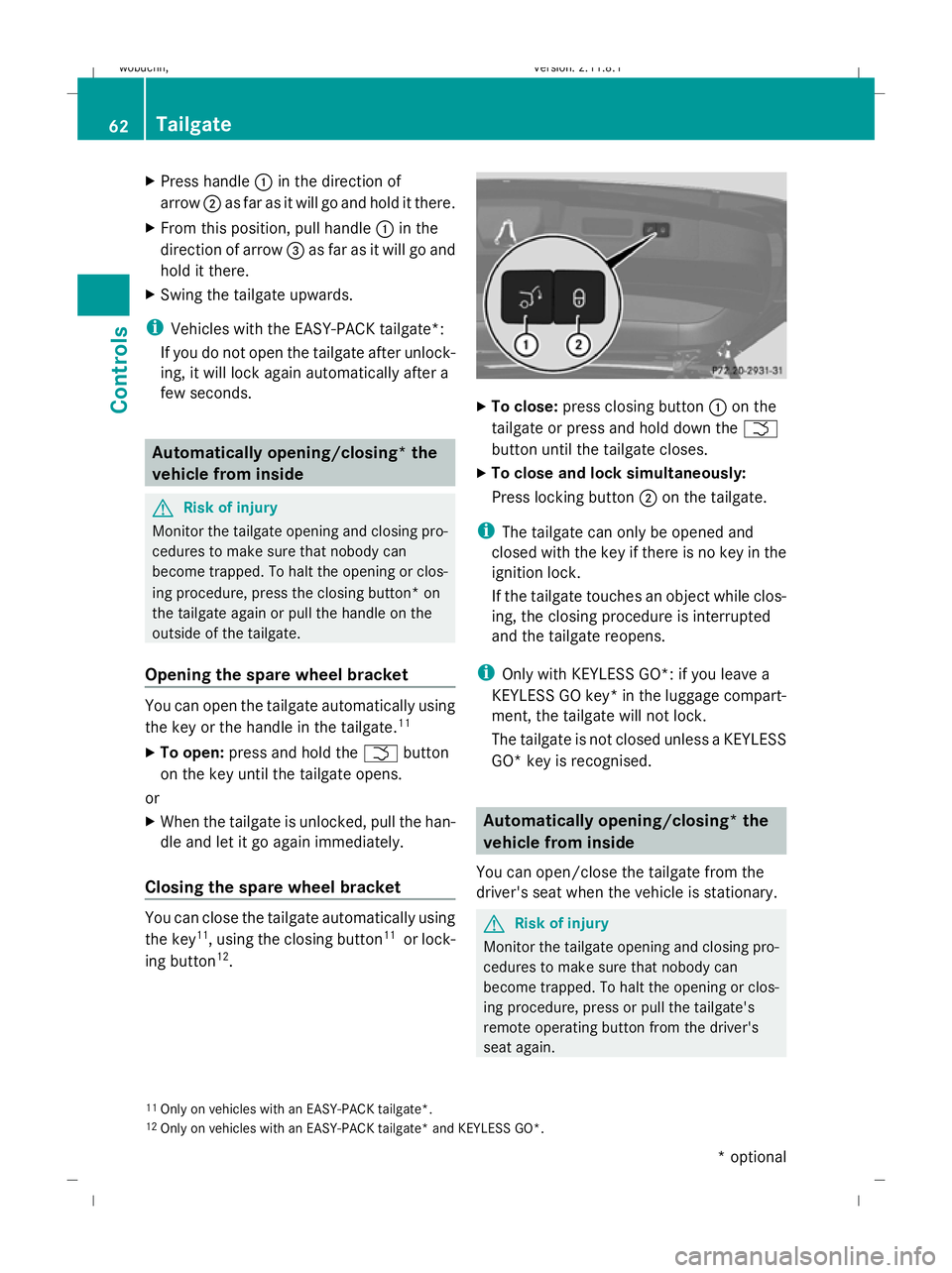
Press handle :in the direction of
arrow ;as far as it will go and hold it there.
X From this position, pull handle :in the
direction of arrow =as far as it will go and
hold it there.
X Swing the tailgate upwards.
i Vehicles with the EASY-PACK tailgate*:
If you do not open the tailgate after unlock-
ing, it will lock again automatically after a
few seconds. Automatically opening/closing* the
vehicle from inside G
Risk of injury
Monitor the tailgate opening and closing pro-
cedures to make sure that nobody can
become trapped. To halt the opening or clos-
ing procedure, press the closing button* on
the tailgate again or pull the handle on the
outside of the tailgate.
Opening the spare wheel bracket You can open the tailgate automatically using
the key or the handle in the tailgate. 11
X To open: press and hold the Fbutton
on the key until the tailgate opens.
or
X When the tailgate is unlocked, pull the han-
dle and let it go again immediately.
Closing the spare wheel bracket You can close the tailgate automatically using
the key 11
, using the closing button 11
or lock-
ing button 12
. X
To close: press closing button :on the
tailgate or press and hold down the F
button until the tailgate closes.
X To close and lock simultaneously:
Press locking button ;on the tailgate.
i The tailgate can only be opened and
closed with the key if there is no key in the
ignition lock.
If the tailgate touches an object while clos-
ing, the closing procedure is interrupted
and the tailgate reopens.
i Only with KEYLESS GO*: if you leave a
KEYLESS GO key* in the luggage compart-
ment, the tailgate will not lock.
The tailgate is not closed unless a KEYLESS
GO* key is recognised. Automatically opening/closing* the
vehicle from inside
You can open/close the tailgate from the
driver's seat when the vehicle is stationary. G
Risk of injury
Monitor the tailgate opening and closing pro-
cedures to make sure that nobody can
become trapped. To halt the opening or clos-
ing procedure, press or pull the tailgate's
remote operating button from the driver's
seat again.
11 Only on vehicles with an EASY-PACK tailgate*.
12 Only on vehicles with an EASY-PACK tailgate* and KEYLESS GO*. 62
TailgateControls
* optional
X164_AKB; 2; 3, en-GB
wobuchh,
Version: 2.11.8.1 2009-03-31T14:14:58+02:00 - Seite 62
Dateiname: 6515431202_buchblock.pdf; erzeugt am 01. Apr 2009 00:16:54; WK
Page 66 of 309
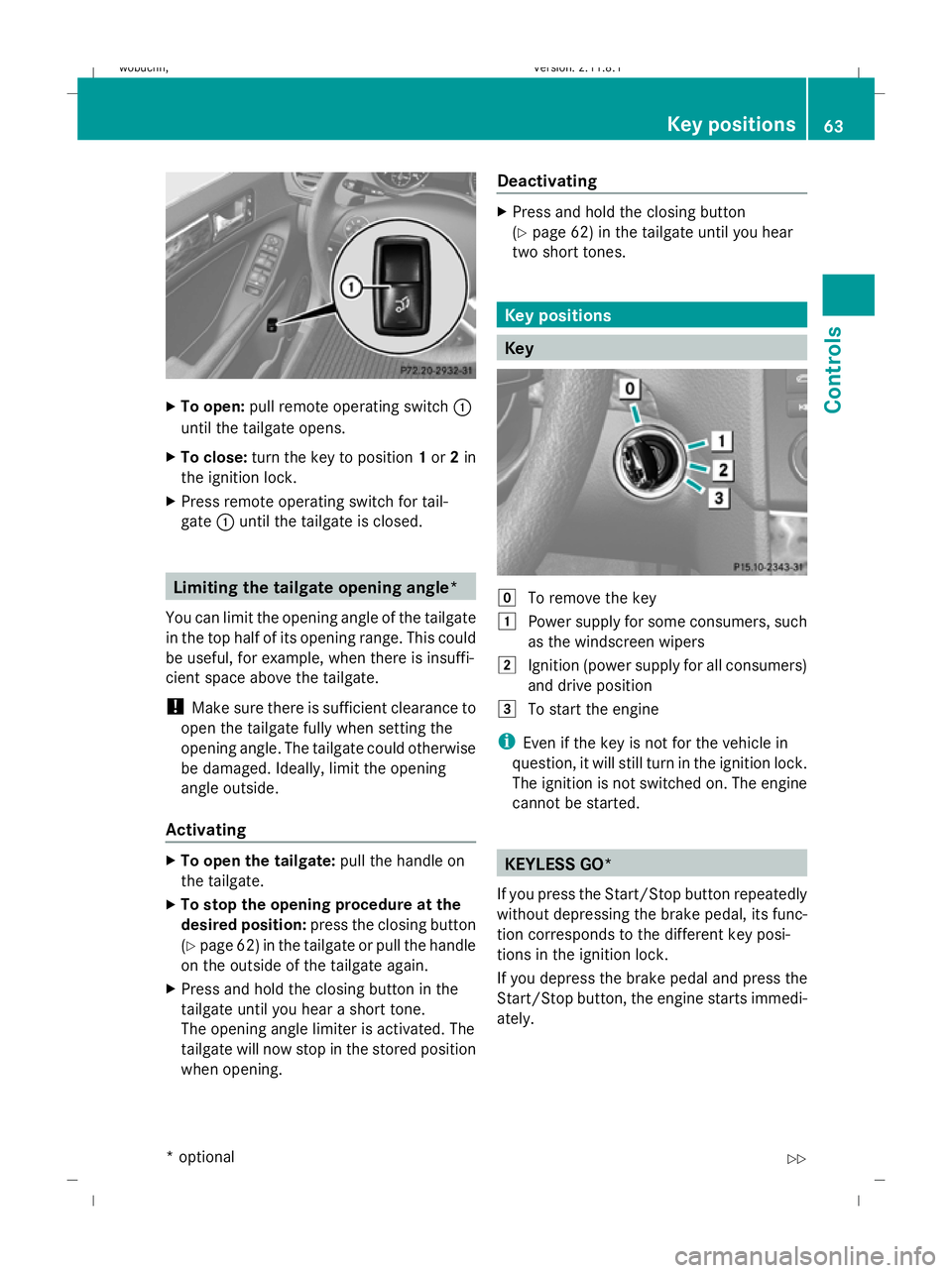
X
To open: pull remote operating switch :
until the tailgate opens.
X To close: turn the key to position 1or 2in
the ignition lock.
X Press remote operating switch for tail-
gate :until the tailgate is closed. Limiting the tailgate opening angle*
You can limit the opening angle of the tailgate
in the top half of its opening range. This could
be useful, for example, when there is insuffi-
cient space above the tailgate.
! Make sure there is sufficient clearance to
open the tailgate fully when setting the
opening angle. The tailgate could otherwise
be damaged. Ideally, limit the opening
angle outside.
Activating X
To open the tailgate: pull the handle on
the tailgate.
X To stop the opening procedure at the
desired position: press the closing button
(Y page 62) in the tailgate or pull the handle
on the outside of the tailgate again.
X Press and hold the closing button in the
tailgate until you hear a short tone.
The opening angle limiter is activated. The
tailgate will now stop in the stored position
when opening. Deactivating X
Press and hold the closing button
(Y page 62) in the tailgate until you hear
two short tones. Key positions
Key
g
To remove the key
1 Power supply for some consumers, such
as the windscreen wipers
2 Ignition (power supply for all consumers)
and drive position
3 To start the engine
i Even if the key is not for the vehicle in
question, it will still turn in the ignition lock.
The ignition is not switched on. The engine
cannot be started. KEYLESS GO*
If you press the Start/Stop button repeatedly
without depressing the brake pedal, its func-
tion corresponds to the different key posi-
tions in the ignition lock.
If you depress the brake pedal and press the
Start/Stop button, the engine starts immedi-
ately. Key positions
63Controls
* optional
X164_AKB; 2; 3, en-GB
wobuchh
,V ersion: 2.11.8.1
2009-03-31T14:14:58+02:00 - Seite 63 Z
Dateiname: 6515431202_buchblock.pdf; erzeugt am 01. Apr 2009 00:16:54; WK
Page 67 of 309
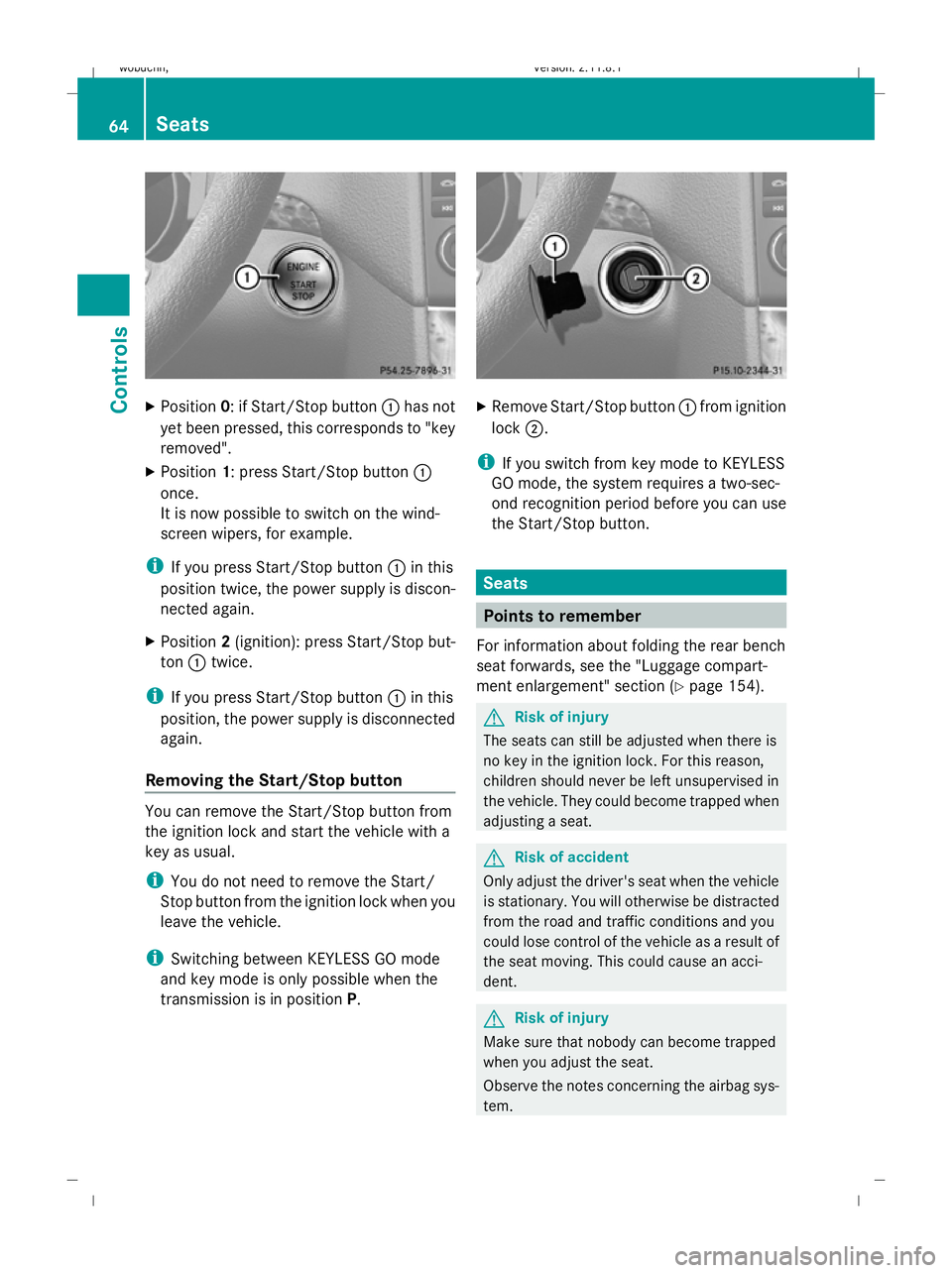
X
Position 0: if Start/Stop button :has not
yet been pressed, this corresponds to "key
removed".
X Position 1: press Start/Stop button :
once.
It is now possible to switch on the wind-
screen wipers, for example.
i If you press Start/Stop button :in this
position twice, the power supply is discon-
nected again.
X Position 2(ignition): press Start/Stop but-
ton :twice.
i If you press Start/Stop button :in this
position, the power supply is disconnected
again.
Removing the Start/Stop button You can remove the Start/Stop button from
the ignition lock and start the vehicle with a
key as usual.
i You do not need to remove the Start/
Stop button from the ignition lock when you
leave the vehicle.
i Switching between KEYLESS GO mode
and key mode is only possible when the
transmission is in position P. X
Remove Start/Stop button :from ignition
lock ;.
i If you switch from key mode to KEYLESS
GO mode, the system requires a two-sec-
ond recognition period before you can use
the Start/Stop button. Seats
Points to remember
For information about folding the rear bench
seat forwards, see the "Luggage compart-
ment enlargement" section (Y page 154). G
Risk of injury
The seats can still be adjusted when there is
no key in the ignition lock. For this reason,
children should never be left unsupervised in
the vehicle. They could become trapped when
adjusting a seat. G
Risk of accident
Only adjust the driver's seat when the vehicle
is stationary. You will otherwise be distracted
from the road and traffic conditions and you
could lose control of the vehicle as a result of
the seat moving. This could cause an acci-
dent. G
Risk of injury
Make sure that nobody can become trapped
when you adjust the seat.
Observe the notes concerning the airbag sys-
tem. 64
SeatsControls
X164_AKB; 2; 3, en-GB
wobuchh,
Version: 2.11.8.1 2009-03-31T14:14:58+02:00 - Seite 64
Dateiname: 6515431202_buchblock.pdf; erzeugt am 01. Apr 2009 00:16:55; WK
Page 69 of 309
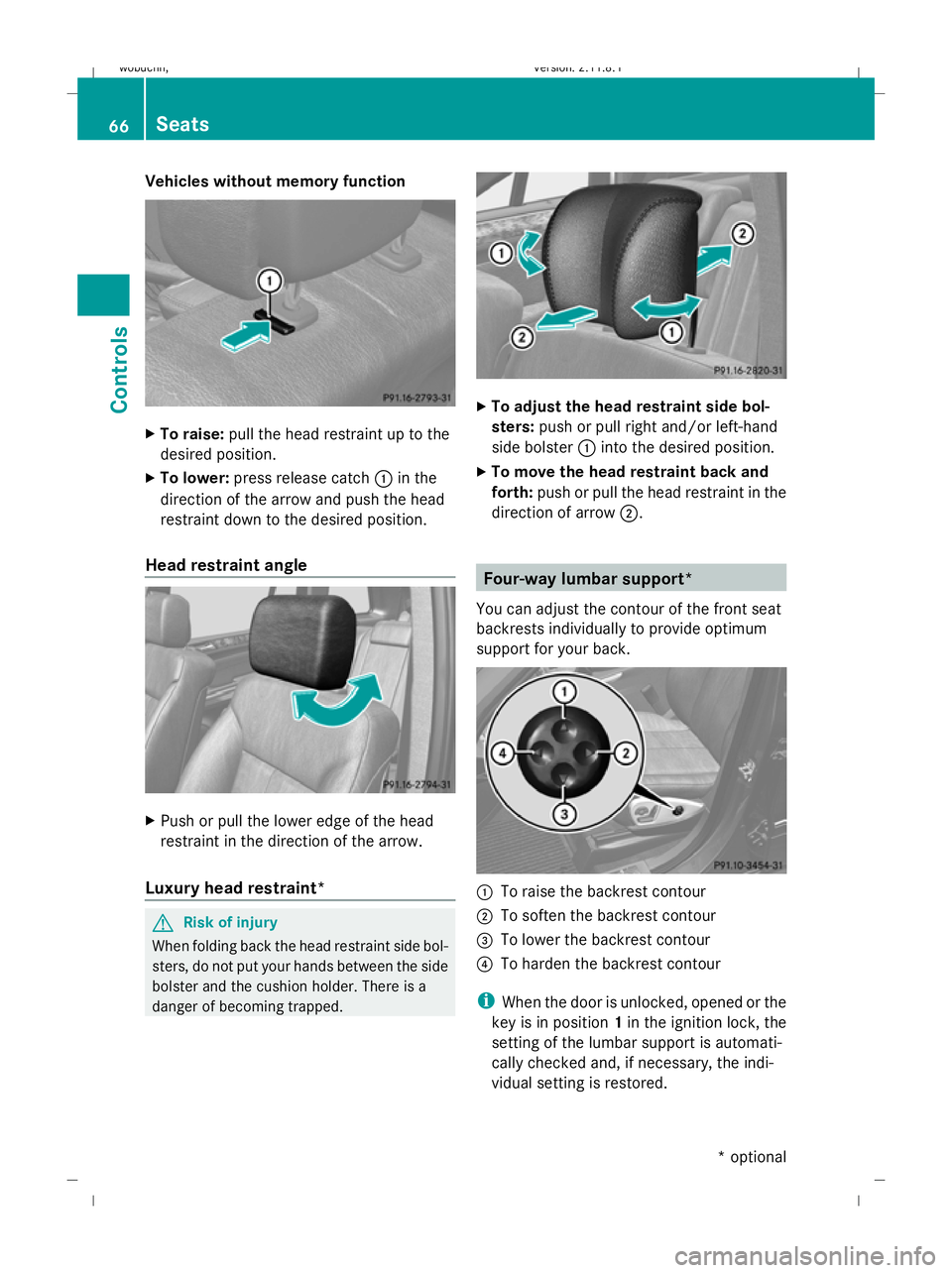
Vehicles without memory function
X
To raise: pull the head restraint up to the
desired position.
X To lower: press release catch :in the
direction of the arrow and push the head
restraint down to the desired position.
Head restraint angle X
Push or pull the lower edge of the head
restraint in the direction of the arrow.
Luxury head restraint* G
Risk of injury
When folding back the head restraint side bol-
sters, do not put your hands between the side
bolster and the cushion holder. There is a
danger of becoming trapped. X
To adjust the head restraint side bol-
sters: push or pull right and/or left-hand
side bolster :into the desired position.
X To move the head restraint back and
forth: push or pull the head restraint in the
direction of arrow ;. Four-way lumbar support*
You can adjust the contour of the front seat
backrests individually to provide optimum
support for your back. :
To raise the backrest contour
; To soften the backrest contour
= To lower the backrest contour
? To harden the backrest contour
i When the door is unlocked, opened or the
key is in position 1in the ignition lock, the
setting of the lumbar support is automati-
cally checked and, if necessary, the indi-
vidual setting is restored. 66
SeatsControls
* optional
X164_AKB; 2; 3, en-GB
wobuchh,
Version: 2.11.8.1 2009-03-31T14:14:58+02:00 - Seite 66
Dateiname: 6515431202_buchblock.pdf; erzeugt am 01. Apr 2009 00:16:57; WK
Page 70 of 309
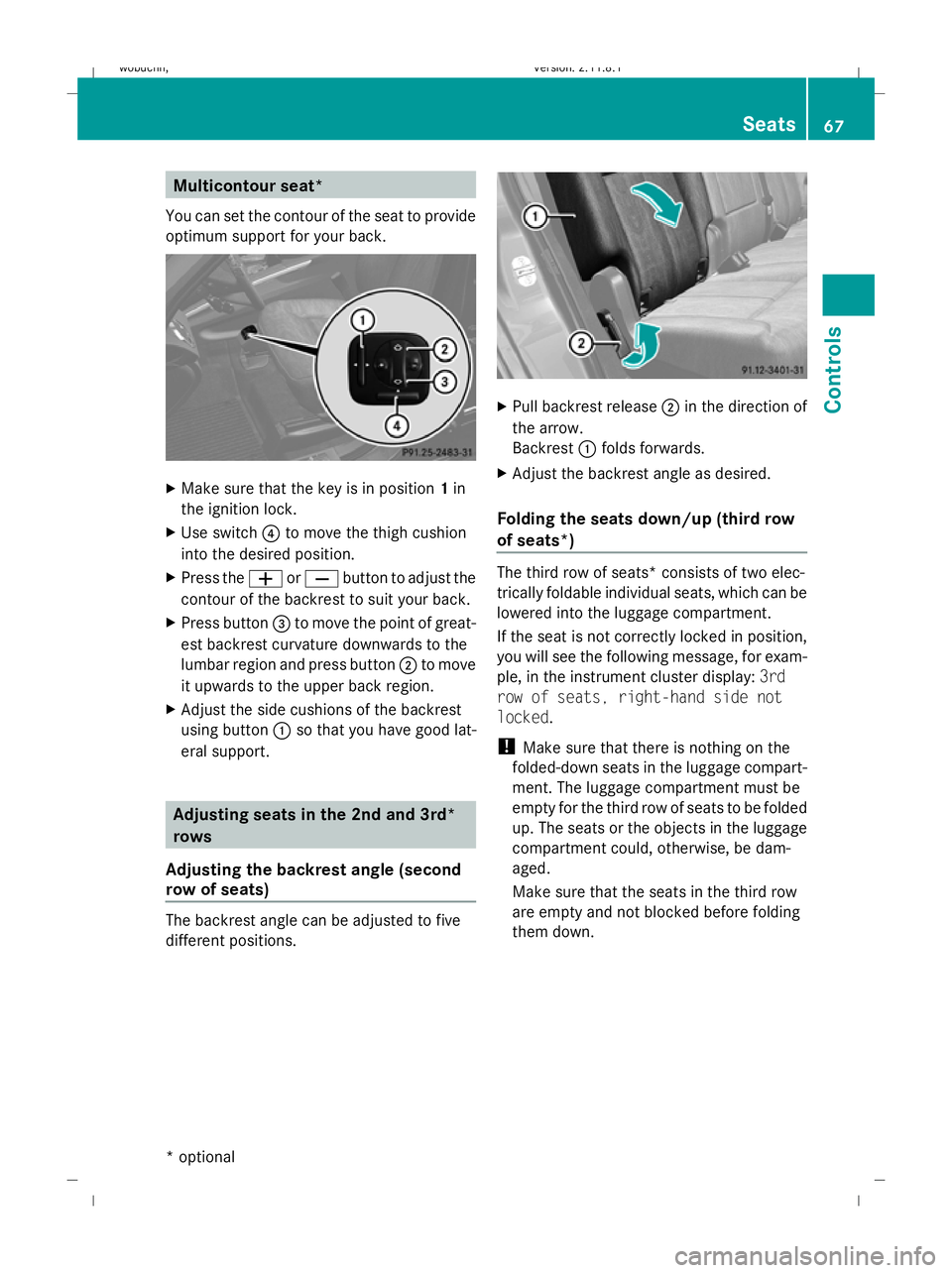
Multicontour seat*
You can set the contour of the seat to provide
optimum support for your back. X
Make sure that the key is in position 1in
the ignition lock.
X Use switch ?to move the thigh cushion
into the desired position.
X Press the WorX button to adjust the
contour of the backrest to suit your back.
X Press button =to move the point of great-
est backrest curvature downwards to the
lumbar region and press button ;to move
it upwards to the upper back region.
X Adjust the side cushions of the backrest
using button :so that you have good lat-
eral support. Adjusting seats in the 2nd and 3rd*
rows
Adjusting the backrest angle (second
row of seats) The backrest angle can be adjusted to five
different positions. X
Pull backrest release ;in the direction of
the arrow.
Backrest :folds forwards.
X Adjust the backrest angle as desired.
Folding the seats down/up (third row
of seats*) The third row of seats* consists of two elec-
trically foldable individual seats, which can be
lowered into the luggage compartment.
If the seat is not correctly locked in position,
you will see the following message, for exam-
ple, in the instrument cluster display:
3rd
row of seats, right-hand side not
locked.
! Make sure that there is nothing on the
folded-down seats in the luggage compart-
ment. The luggage compartment must be
empty for the third row of seats to be folded
up. The seats or the objects in the luggage
compartment could, otherwise, be dam-
aged.
Make sure that the seats in the third row
are empty and not blocked before folding
them down. Seats
67Controls
* optional
X164_AKB; 2; 3, en-GB
wobuchh,
Version: 2.11.8.1 2009-03-31T14:14:58+02:00 - Seite 67 Z
Dateiname: 6515431202_buchblock.pdf; erzeugt am 01. Apr 2009 00:16:58; WK
Page 73 of 309
X
Make sure that the key is in position 1or
2 in the ignition lock.
X To switch on: press button:repeatedly
until the required ventilation level is set.
i If you open the side windows and the slid-
ing/tilting sunroof* using the key
(Y page 87), the seat ventilation of the
driver's seat automatically switches to the
highest level.
X To switch off: press button:repeatedly
until all indicator lamps go out.
i If the battery voltage is too low, the seat
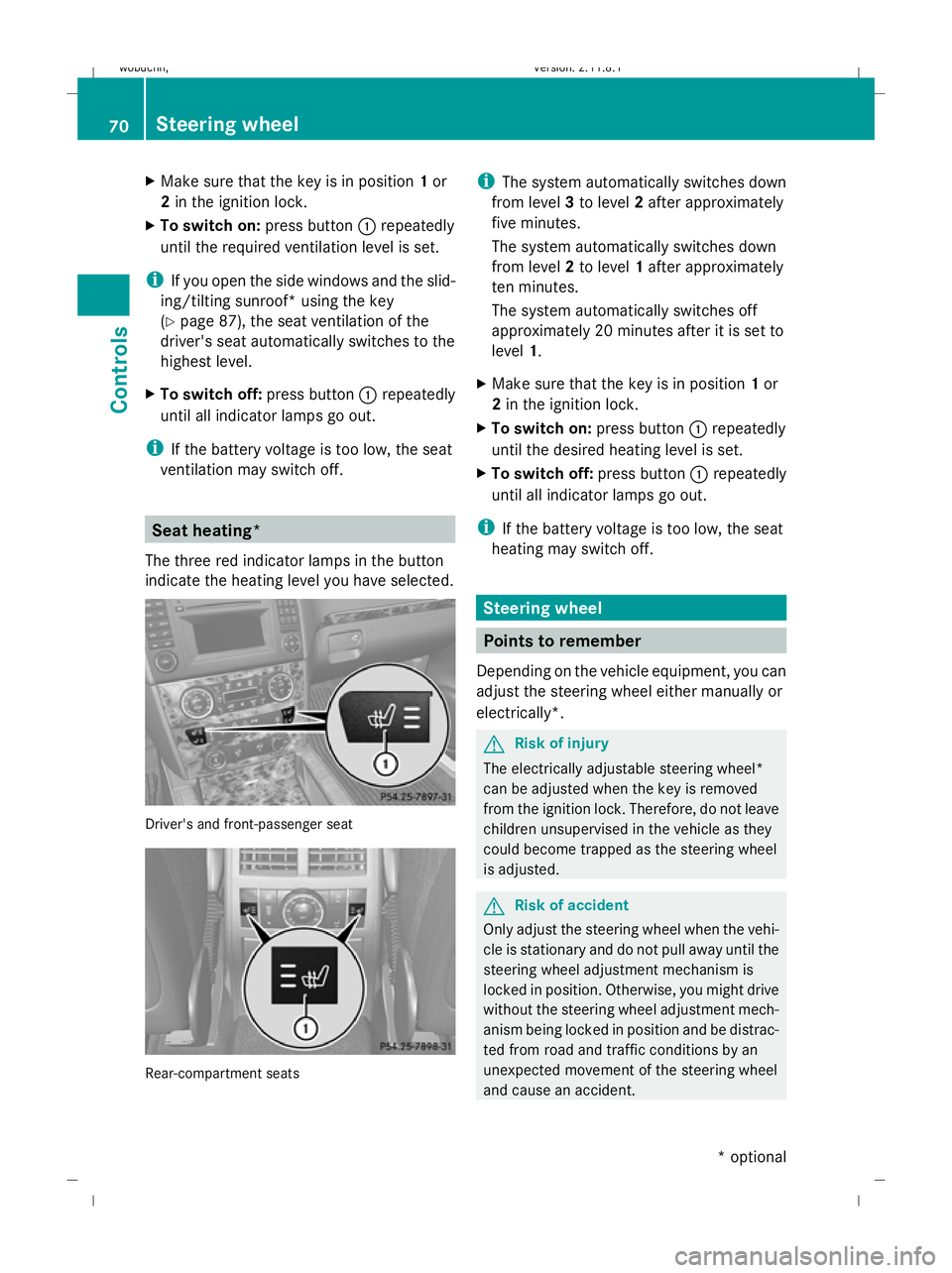
ventilation may switch off. Seat heating*
The three red indicator lamps in the button
indicate the heating level you have selected. Driver's and front-passenger seat
Rear-compartment seats i
The system automatically switches down
from level 3to level 2after approximately
five minutes.
The system automatically switches down
from level 2to level 1after approximately
ten minutes.
The system automatically switches off
approximately 20 minutes after it is set to
level 1.
X Make sure that the key is in position 1or
2 in the ignition lock.
X To switch on: press button:repeatedly
until the desired heating level is set.
X To switch off: press button:repeatedly
until all indicator lamps go out.
i If the battery voltage is too low, the seat
heating may switch off. Steering wheel
Points to remember
Depending on the vehicle equipment, you can
adjust the steering wheel either manually or
electrically*. G
Risk of injury
The electrically adjustable steering wheel*
can be adjusted when the key is removed
from the ignition lock. Therefore, do not leave
children unsupervised in the vehicle as they
could become trapped as the steering wheel
is adjusted. G
Risk of accident
Only adjust the steering wheel when the vehi-
cle is stationary and do not pull away until the
steering wheel adjustment mechanism is
locked in position. Otherwise, you might drive
without the steering wheel adjustment mech-
anism being locked in position and be distrac-
ted from road and traffic conditions by an
unexpected movement of the steering wheel
and cause an accident. 70
Steering wheelControls
* optional
X164_AKB; 2; 3, en-GB
wobuchh,
Version: 2.11.8.1 2009-03-31T14:14:58+02:00 - Seite 70
Dateiname: 6515431202_buchblock.pdf; erzeugt am 01. Apr 2009 00:17:02; WK
Page 74 of 309
However, the steerability of the vehicle is not
affected.
When you adjust the steering wheel, make
sure that:
R the steering wheel can be reached with
your arms slightly bent
R you can move your legs freely
R you can see all the displays in the instru-
ment cluster clearly Adjusting the steering wheel man-
ually
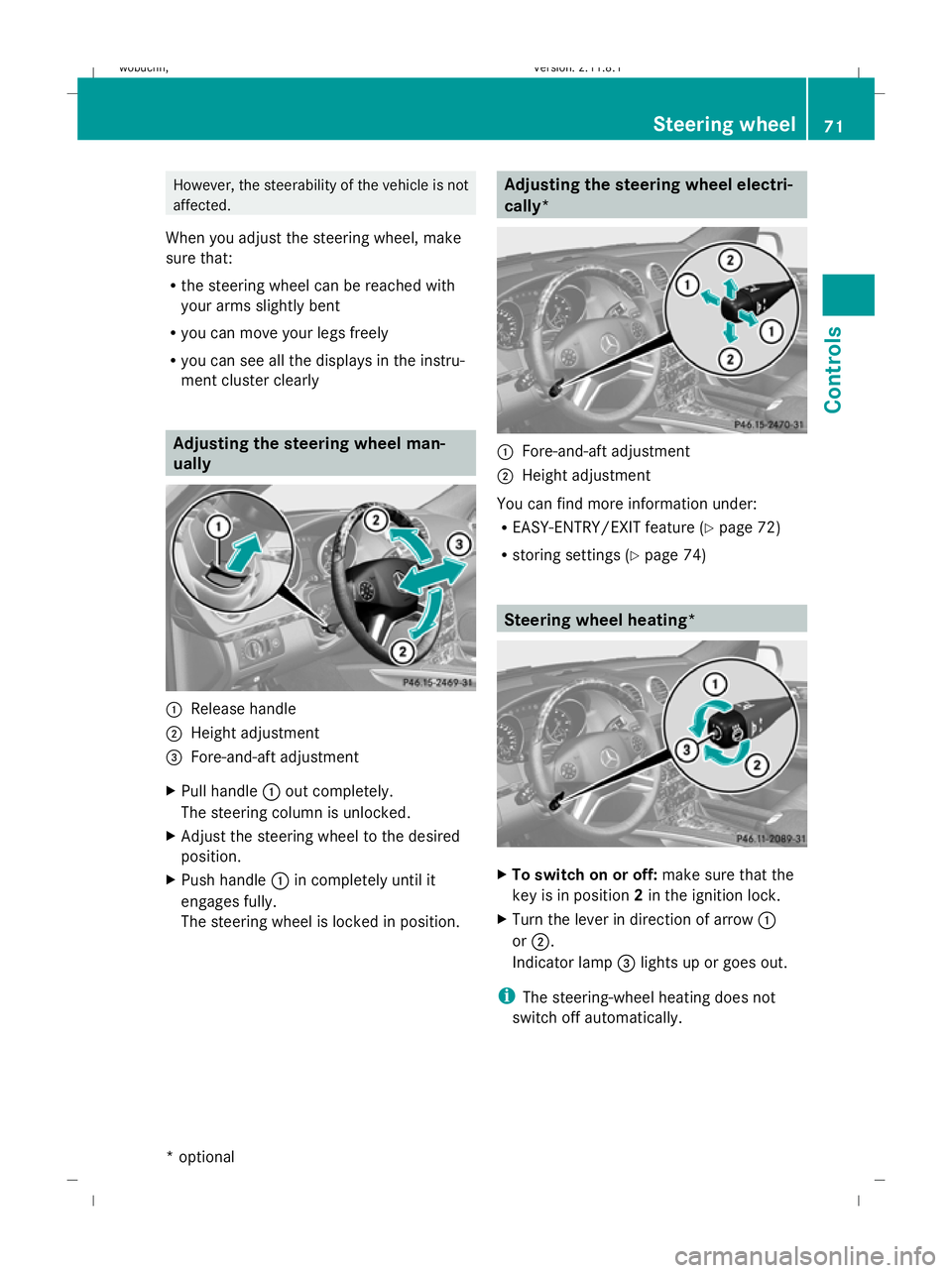
:
Release handle
; Height adjustment
= Fore-and-aft adjustment
X Pull handle :out completely.
The steering column is unlocked.
X Adjust the steering wheel to the desired
position.
X Push handle :in completely until it
engages fully.
The steering wheel is locked in position. Adjusting the steering wheel electri-
cally*
:
Fore-and-aft adjustment
; Height adjustment
You can find more information under:
R EASY-ENTRY/EXIT feature (Y page 72)
R storing settings (Y page 74) Steering wheel heating*
X
To switch on or off: make sure that the
key is in position 2in the ignition lock.
X Turn the lever in direction of arrow :
or ;.
Indicator lamp =lights up or goes out.
i The steering-wheel heating does not
switch off automatically. Steering wheel
71Controls
* optional
X164_AKB; 2; 3, en-GB
wobuchh
,V ersion: 2.11.8.1
2009-03-31T14:14:58+02:00 - Seite 71 Z
Dateiname: 6515431202_buchblock.pdf; erzeugt am 01. Apr 2009 00:17:02; WK