ECU MERCEDES-BENZ GL SUV 2009 Owner's Manual
[x] Cancel search | Manufacturer: MERCEDES-BENZ, Model Year: 2009, Model line: GL SUV, Model: MERCEDES-BENZ GL SUV 2009Pages: 309, PDF Size: 10.27 MB
Page 123 of 309
laden or towing a trailer, you must select shift
range 1,2or 3in good time. By doing so, you
will make use of the braking effect of the
engine, which relieves the load on the brake
system and prevents the brakes from over-
heating and wearing too quickly. G
Risk of accident
The brake pedal is retracted when Distronic
brakes. Do not restrict the movement of the
pedal in any way.
R Do not put any objects in the footwell.
R Ensure that floor mats and carpets are fixed
securely.
R Do not place your foot under the brake
pedal as it could become trapped.
You could otherwise cause an accident and
injure yourself and others. G
Risk of accident
Do not change down for additional engine
braking on a slippery road surface. This could
cause the drive wheels to lose their grip and
the vehicle could skid. G
Risk of accident
Distronic is only an aid designed to assist
driving. The driver is fully responsible for the
vehicle's distance from other vehicles, the
vehicle's speed and for braking in good time.
Distronic does not react to:
R pedestrians
R stationary obstacles on the road, e.g. sta-
tionary or parked vehicles
R oncoming and crossing traffic
Distronic may not detect narrow vehicles driv-
ing in front, e.g. motorcycles, or vehicles driv-
ing on a different line. Therefore, always pay
attention to traffic conditions even when Dis-
tronic is activated. Otherwise, you may fail to
recognise dangers in time, cause an accident
and injure yourself and others.
If a slower-moving vehicle is detected in front,
Distronic causes your vehicle to brake and maintain the preset distance to the vehicle in
front that you have set. G
Risk of accident
Distronic cannot take account of road and
traffic conditions. Deactivate, or do not acti-
vate, Distronic if it does not detect the vehicle
in front, or if it no longer detects it. This is
especially the case:
R before corners
R in filter lanes
R when changing to a lane with faster moving
traffic
R in complex driving situations or where the
lanes are diverted, e.g. at motorway/road-
way construction sites
Otherwise, Distronic maintains the current
speed or accelerates to the set speed.
Distronic cannot take account of weather
conditions. Deactivate, or do not activate,
Distronic:
R if the roads are slippery, snow-covered or
icy. The wheels could lose their grip when
braking or accelerating. The vehicle could
start to skid.
R if the sensors are dirty or there is poor vis-
ibility, e.g. due to snow, rain or fog. Dis-
tance control may be impaired.
Always pay attention to traffic conditions
even when Distronic is activated. Otherwise,
you may fail to recognise dangers in time,
cause an accident and injure yourself and oth-
ers.
If no car is driving in front of you, Distronic
works like cruise control in the speed range
between 30 km/h and 200 km/h. If a vehicle
is driving in front of you, Distronic Plus works
in the speed range between 0 km/h and
200 km/h.
Do not use Distronic while driving on roads
with steep gradients. 120
Driving systemsControls
X164_AKB; 2; 3, en-GB
wobuchh,
Version: 2.11.8.1 2009-03-31T14:14:58+02:00 - Seite 120
Dateiname: 6515431202_buchblock.pdf; erzeugt am 01. Apr 2009 00:17:21; WK
Page 125 of 309
X
Briefly pull the cruise control lever towards
you ?or press it up :or down Ato the
pressure point.
Distronic is activated.
X Keep the cruise control lever pressed
up : or down Auntil the desired speed
is set.
X Remove your foot from the accelerator
pedal.
Your vehicle adapts its speed to that of the
vehicle in front, but only up to the stored
speed.
i You can use the cruise control lever to set
the stored speed and the thumbwheel on
the cruise control lever to set the specified
minimum distance (Y page 123).
i If you do not fully release the accelerator
pedal, the DISTRONIC Override message
appears in the multi-function display. The
distance to a slower-moving vehicle in front
will then not be governed. You will be driv-
ing at the speed you determine by the posi-
tion of the accelerator pedal.
Driving
If there is no vehicle in front, Distronic oper-
ates in the same way as cruise control.
If a slower-moving vehicle is detected in front,
Distronic causes your vehicle to brake and
maintain the preset distance to the vehicle in
front.
If Distronic detects a faster-moving vehicle in
front, it increases the driving speed, but only
as far as the stored speed. G
Risk of accident
If you depress the brake pedal, Distronic is
deactivated. Distronic will then no longer
brake your vehicle. The driver is fully respon-
sible for the vehicle's distance from other
vehicles, its speed and for braking in good
time. Stopping G
Risk of accident
The Distronic braking effect is cancelled and
the vehicle can start moving if:
R Distronic is deactivated using the cruise
control lever.
R you accelerate.
R the system or the power supply is disrup-
ted, e.g. due to battery failure.
R the electrical system in the engine com-
partment or the fuses have been tampered
with.
R the battery is disconnected. G
Risk of accident
Distronic must never be operated or deacti-
vated by a passenger or from outside the vehi-
cle.
If you wish to leave the vehicle or park it,
deactivate Distronic and secure the vehicle
against rolling away.
If Distronic detects that the vehicle in front is
stopping, it brakes your vehicle until it is sta-
tionary.
i Depending on the specified minimum dis-
tance, your vehicle will come to a standstill
about four metres behind the vehicle in
front. The specified minimum distance is
set using the thumbwheel on the cruise-
control lever.
Distronic is deactivated automatically when
stopping:
R on flat stretches of road or on downhill gra-
dients when the vehicle is stationary.
R while the vehicle is still moving on uphill
gradients, to prevent the vehicle from unex-
pectedly rolling back when Distronic is
deactivated.
If Distronic is deactivated, you will hear a
warning tone.
X Secure the vehicle against rolling away. 122
Driving systemsControls
X164_AKB; 2; 3, en-GB
wobuchh,
Version: 2.11.8.1 2009-03-31T14:14:58+02:00 - Seite 122
Dateiname: 6515431202_buchblock.pdf; erzeugt am 01. Apr 2009 00:17:21; WK
Page 154 of 309
direction of arrow
;until the sliding/tilt-
ing sunroof is closed.
The sliding/tilting sunroof is closed with
more force.
If the sliding/tilting sunroof locks up during
closing again:
X Immediately after it locks up, pull the
switch again to the pressure point in the
direction of arrow ;until the sliding/tilt-
ing sunroof is closed.
The sliding/tilting sunroof is closed without
the anti-entrapment feature.
Rain closing feature* The sliding/tilting sunroof closes automati-
cally:
R
if it starts to rain
R after 12 hours
The rear of the sliding/tilting sunroof is then
raised in order to ventilate the interior of the
vehicle.
i The sliding/tilting sunroof is opened
slightly again if it is obstructed while being
closed by the rain closing feature. The rain
closing feature is then deactivated.
The sliding/tilting sunroof does not close if:
R it is raised at the rear
R it is blocked
R no rain is falling on the area of the wind-
screen being monitored by the rain sensor
(e.g. because the vehicle is under a bridge
or in a carport)
Resetting Reset the sliding/tilting sunroof if it does not
open smoothly, or if the battery has been dis-
connected or has become discharged.
X
Switch the ignition off and then on again.
X The sliding/tilting sunroof is raised fully at
the rear. X
Keep the switch pressed for an additional
second.
X Make sure that the sliding/tilting sunroof
can be opened or closed fully again
(Y page 150).
X If this is not the case, consult a qualified
specialist workshop. Loading and stowing
Loading guidelines
G
Risk of injury
Secure and position the load as described in
the loading guidelines.
Otherwise, vehicle occupants could
be injured by the load being thrown around in
the event of sharp braking, a sudden change
in direction or an accident.
You will find further information in the "Secur-
ing a load" section.
Even if you follow all the loading guidelines,
the load will increase the risk of injury in the
event of an accident. G
Risk of poisoning
Keep the tailgate closed when the engine is
running. Otherwise, you could be poisoned by
exhaust fumes entering the vehicle.
The handling characteristics of a laden vehi-
cle are dependent on the distribution of the
load within the vehicle. For this reason, you
should observe the following notes when
transporting a load:
R never exceed the maximum permissible
gross vehicle weight or the permissible axle
loads for the vehicle (including occupants).
R position heavy loads as far forwards and as
low down in the luggage compartment as
possible.
R the load must not protrude above the upper
edge of the seat backrests.
R always place the load against the rear or
front seat backrests. Make sure that the Loading and stowing
151Controls
* optional
X164_AKB; 2; 3, en-GB
wobuchh,
Version: 2.11.8.1 2009-03-31T14:14:58+02:00 - Seite 151 Z
Dateiname: 6515431202_buchblock.pdf; erzeugt am 01. Apr 2009 00:17:32; WK
Page 155 of 309
seat backrests are securely locked into
place.
R always place the load behind unoccupied
seats if possible.
R secure the load with sufficiently strong and
wear-resistant load restraints. Pad sharp
edges for protection.
i Load restraints are available at any quali-
fied specialist workshop, e.g. a Mercedes-
Benz Service Centre. Stowage compartments
G
Risk of injury
The stowage compartments must be closed
when items are stored in them. Luggage nets
are not designed to secure heavy items of
luggage.
You or other vehicle occupants could be
injured by objects being thrown around if you:
R brake sharply
R change direction suddenly
R are involved in an accident
Sharp-edged and fragile objects must not be
placed in the luggage net.
Glove compartment i
Depending on the vehicle's equipment,
there is an AUX-IN connection installed in
the glove compartment, or a Media Inter-
face*, which is a universal interface for
portable audio equipment, e.g. for an iPod
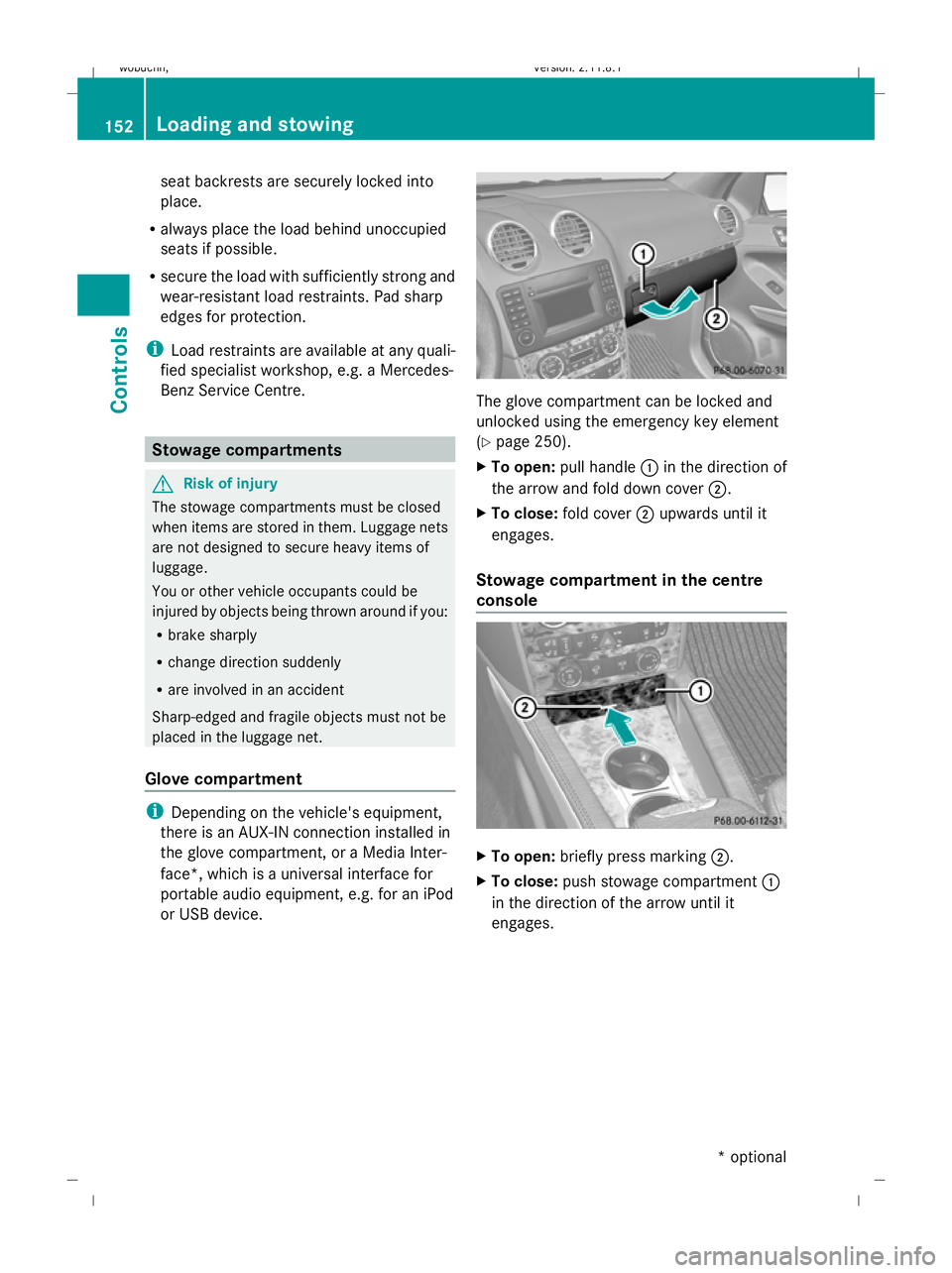
or USB device. The glove compartment can be locked and
unlocked using the emergency key element
(Y
page 250).
X To open: pull handle :in the direction of
the arrow and fold down cover ;.
X To close: fold cover ;upwards until it
engages.
Stowage compartment in the centre
console X
To open: briefly press marking ;.
X To close: push stowage compartment :
in the direction of the arrow until it
engages. 152
Loading and stowingControls
* optional
X164_AKB; 2; 3, en-GB
wobuchh,
Version: 2.11.8.1 2009-03-31T14:14:58+02:00 - Seite 152
Dateiname: 6515431202_buchblock.pdf; erzeugt am 01. Apr 2009 00:17:33; WK
Page 157 of 309
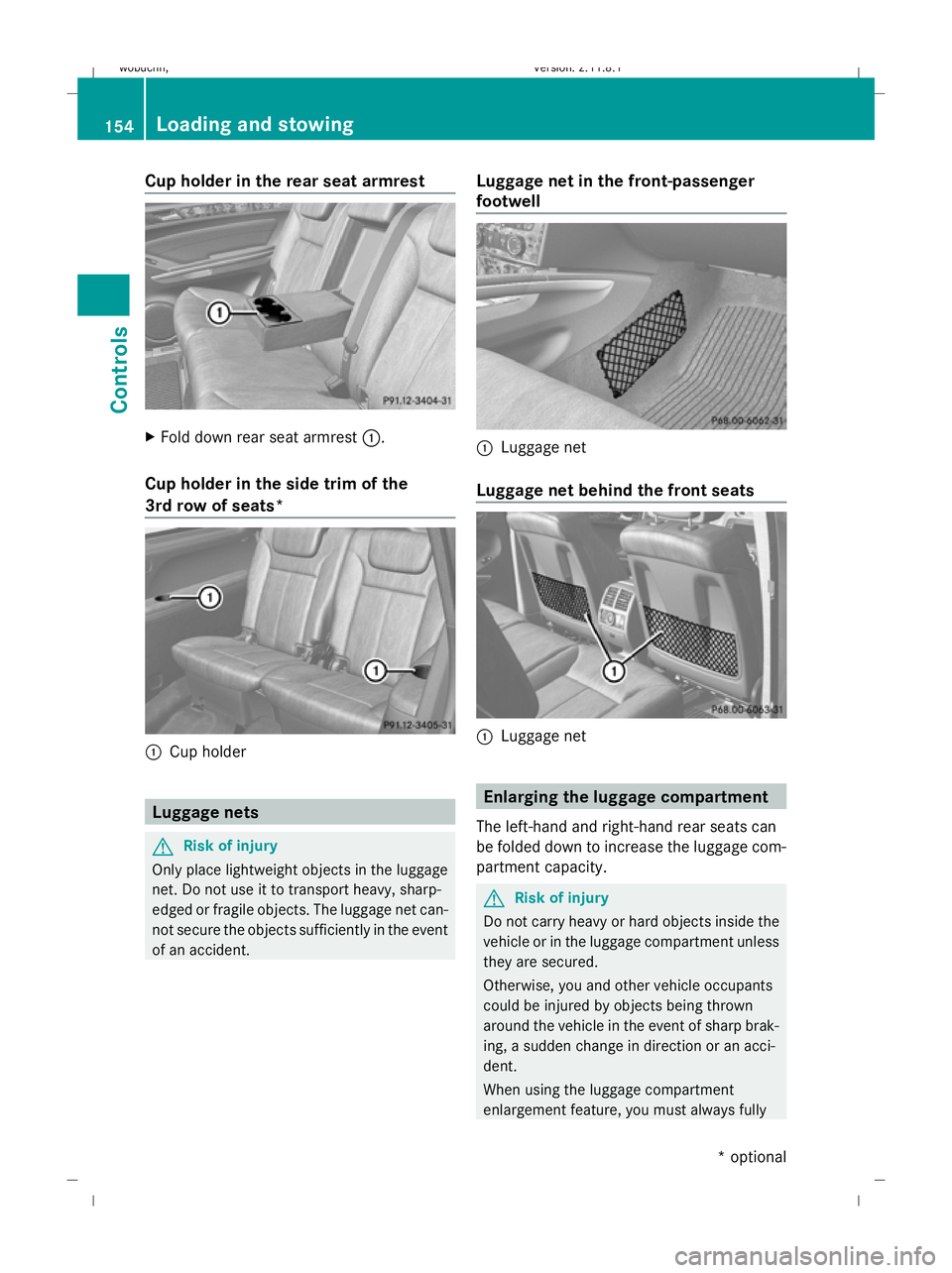
Cup holder in the rear seat armrest
X
Fold down rear seat armrest :.
Cup holder in the side trim of the
3rd row of seats* :
Cup holder Luggage nets
G
Risk of injury
Only place lightweight objects in the luggage
net. Do not use it to transport heavy, sharp-
edged or fragile objects. The luggage net can-
not secure the objects sufficiently in the event
of an accident. Luggage net in the front-passenger
footwell :
Luggage net
Luggage net behind the front seats :
Luggage net Enlarging the luggage compartment
The left-hand and right-hand rear seats can
be folded down to increase the luggage com-
partment capacity. G
Risk of injury
Do not carry heavy or hard objects inside the
vehicle or in the luggage compartment unless
they are secured.
Otherwise, you and other vehicle occupants
could be injured by objects being thrown
around the vehicle in the event of sharp brak-
ing, a sudden change in direction or an acci-
dent.
When using the luggage compartment
enlargement feature, you must always fully 154
Loading and stowingControls
* optional
X164_AKB; 2; 3, en-GB
wobuchh,
Version: 2.11.8.1 2009-03-31T14:14:58+02:00 - Seite 154
Dateiname: 6515431202_buchblock.pdf; erzeugt am 01. Apr 2009 00:17:35; WK
Page 159 of 309
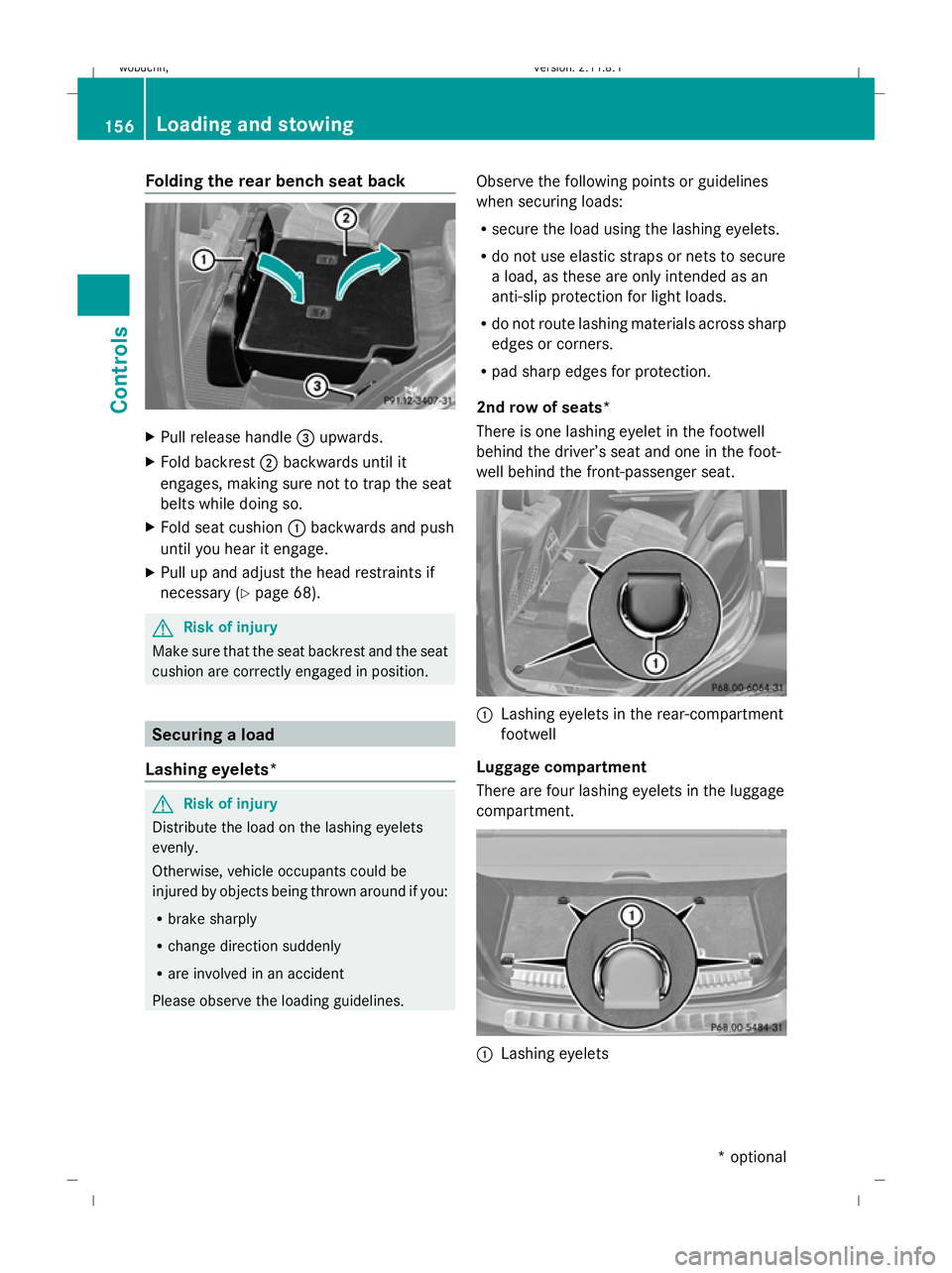
Folding the rear bench seat back
X
Pull release handle =upwards.
X Fold backrest ;backwards until it
engages, making sure not to trap the seat
belts while doing so.
X Fold seat cushion :backwards and push
until you hear it engage.
X Pull up and adjust the head restraints if
necessary (Y page 68). G
Risk of injury
Make sure that the seat backrest and the seat
cushion are correctly engaged in position. Securing a load
Lashing eyelets* G
Risk of injury
Distribute the load on the lashing eyelets
evenly.
Otherwise, vehicle occupants could be
injured by objects being thrown around if you:
R brake sharply
R change direction suddenly
R are involved in an accident
Please observe the loading guidelines. Observe the following points or guidelines
when securing loads:
R
secure the load using the lashing eyelets.
R do not use elastic straps or nets to secure
a load, as these are only intended as an
anti-slip protection for light loads.
R do not route lashing materials across sharp
edges or corners.
R pad sharp edges for protection.
2nd row of seats*
There is one lashing eyelet in the footwell
behind the driver’s seat and one in the foot-
well behind the front-passenger seat. :
Lashing eyelets in the rear-compartment
footwell
Luggage compartment
There are four lashing eyelets in the luggage
compartment. :
Lashing eyelets 156
Loading and stowingCont
rols
* optional
X164_AKB; 2; 3, en-GB
wobuchh,
Version: 2.11.8.1 2009-03-31T14:14:58+02:00 - Seite 156
Dateiname: 6515431202_buchblock.pdf; erzeugt am 01. Apr 2009 00:17:37; WK
Page 160 of 309
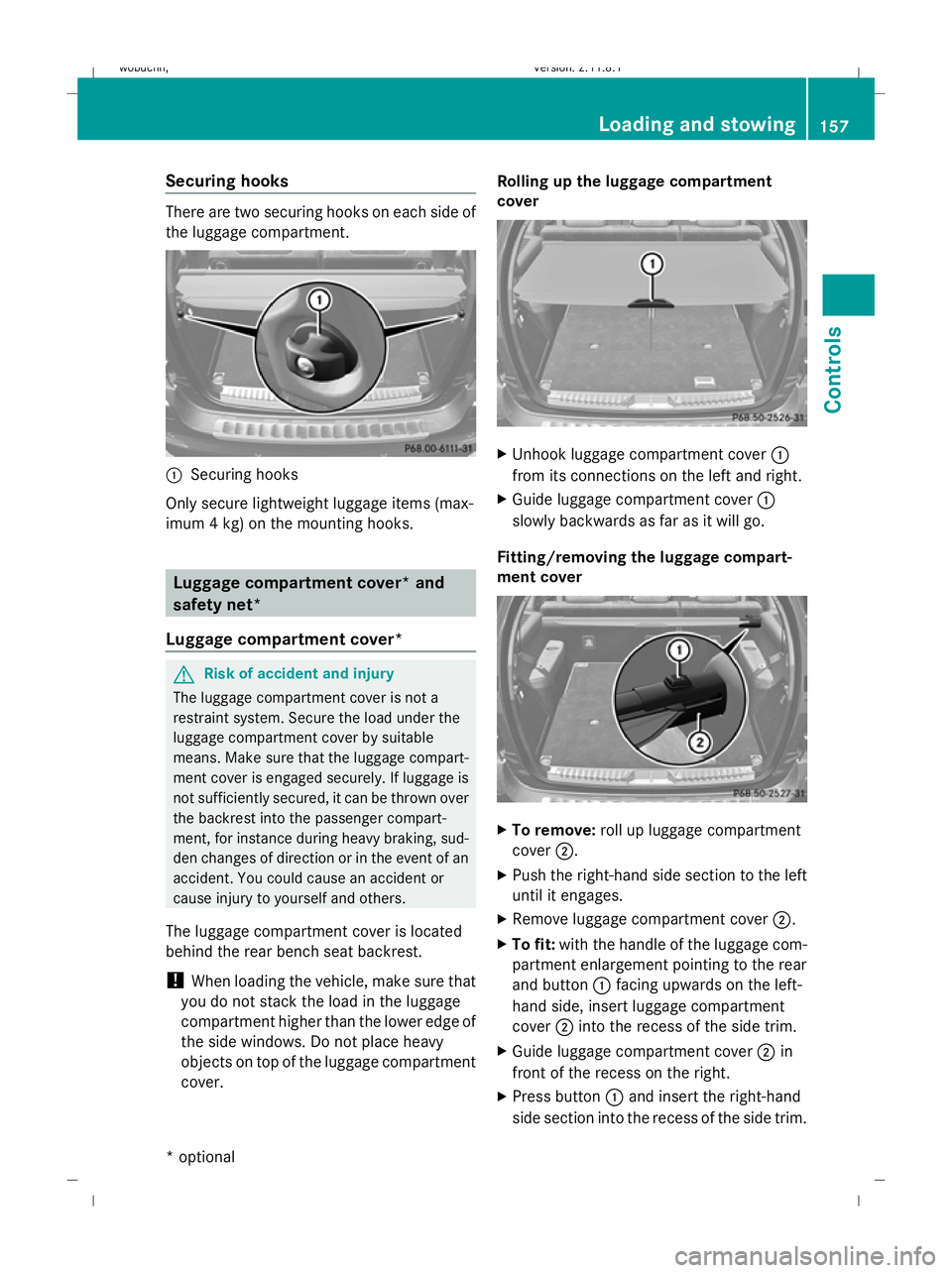
Securing hooks
There are two securing hooks on each side of
the luggage compartment.
:
Securing hooks
Only secure lightweight luggage items (max-
imum 4 kg) on the mounting hooks. Luggage compartment cover* and
safety net*
Luggage compartment cover* G
Risk of accident and injury
The luggage compartment cover is not a
restraint system. Secure the load under the
luggage compartment cover by suitable
means. Make sure that the luggage compart-
ment cover is engaged securely. If luggage is
not sufficiently secured, it can be thrown over
the backrest into the passenger compart-
ment, for instance during heavy braking, sud-
den changes of direction or in the event of an
accident. You could cause an accident or
cause injury to yourself and others.
The luggage compartment cover is located
behind the rear bench seat backrest.
! When loading the vehicle, make sure that
you do not stack the load in the luggage
compartment higher than the lower edge of
the side windows. Do not place heavy
objects on top of the luggage compartment
cover. Rolling up the luggage compartment
cover
X
Unhook luggage compartment cover :
from its connections on the left and right.
X Guide luggage compartment cover :
slowly backwards as far as it will go.
Fitting/removing the luggage compart-
ment cover X
To remove: roll up luggage compartment
cover ;.
X Push the right-hand side section to the left
until it engages.
X Remove luggage compartment cover ;.
X To fit: with the handle of the luggage com-
partment enlargement pointing to the rear
and button :facing upwards on the left-
hand side, insert luggage compartment
cover ;into the recess of the side trim.
X Guide luggage compartment cover ;in
front of the recess on the right.
X Press button :and insert the right-hand
side section into the recess of the side trim. Loading and stowing
157Controls
* optional
X164_AKB; 2; 3, en-GB
wobuchh,
Version: 2.11.8.1 2009-03-31T14:14:58+02:00 - Seite 157 Z
Dateiname: 6515431202_buchblock.pdf; erzeugt am 01. Apr 2009 00:17:38; WK
Page 161 of 309
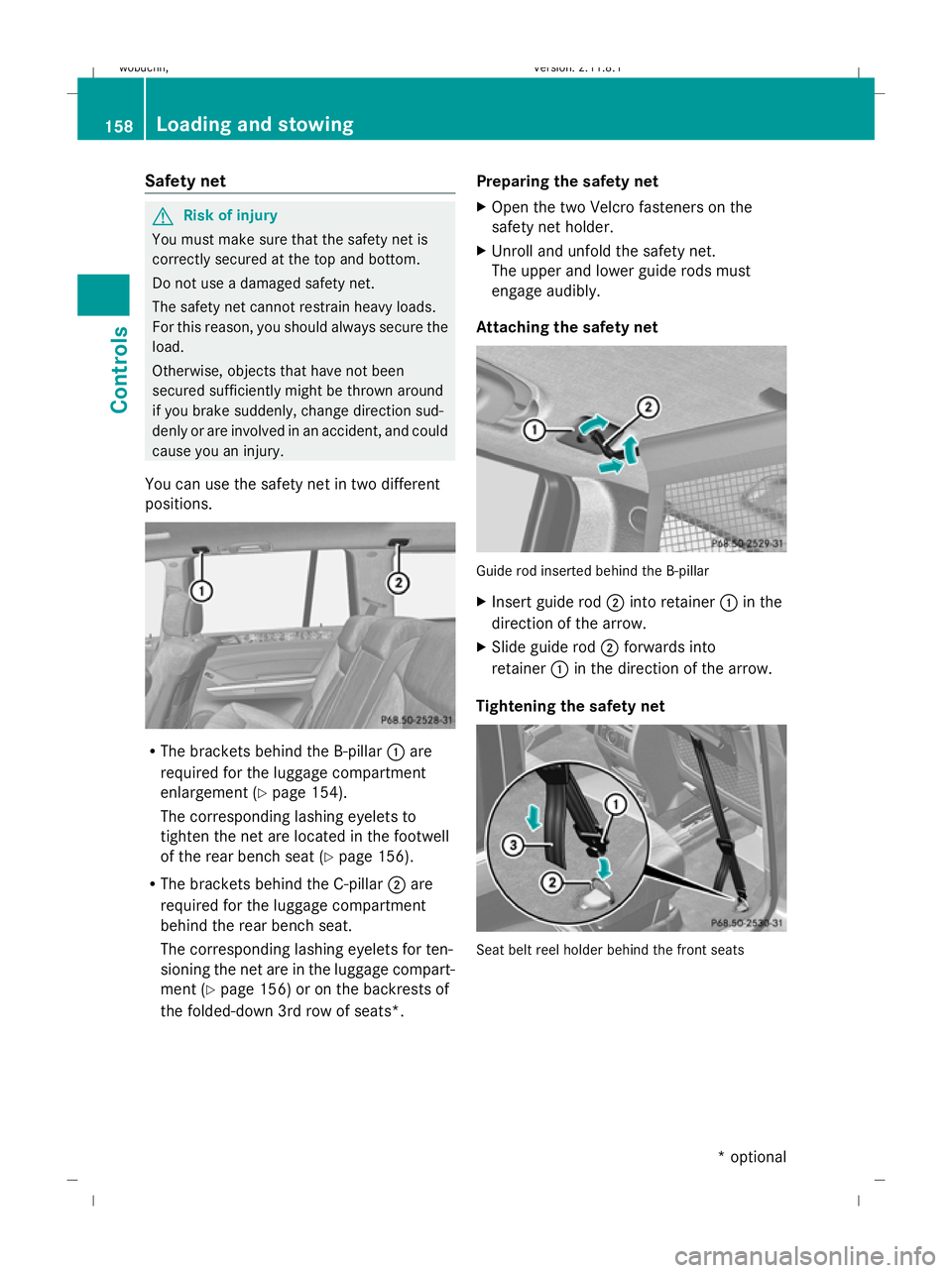
Safety net
G
Risk of injury
You must make sure that the safety net is
correctly secured at the top and bottom.
Do not use a damaged safety net.
The safety net cannot restrain heavy loads.
For this reason, you should always secure the
load.
Otherwise, objects that have not been
secured sufficiently might be thrown around
if you brake suddenly, change direction sud-
denly or are involved in an accident, and could
cause you an injury.
You can use the safety net in two different
positions. R
The brackets behind the B-pillar :are
required for the luggage compartment
enlargement (Y page 154).
The corresponding lashing eyelets to
tighten the net are located in the footwell
of the rear bench seat (Y page 156).
R The brackets behind the C-pillar ;are
required for the luggage compartment
behind the rear bench seat.
The corresponding lashing eyelets for ten-
sioning the net are in the luggage compart-
ment (Y page 156) or on the backrests of
the folded-down 3rd row of seats*. Preparing the safety net
X
Open the two Velcro fasteners on the
safety net holder.
X Unroll and unfold the safety net.
The upper and lower guide rods must
engage audibly.
Attaching the safety net Guide rod inserted behind the B-pillar
X
Insert guide rod ;into retainer :in the
direction of the arrow.
X Slide guide rod ;forwards into
retainer :in the direction of the arrow.
Tightening the safety net Seat belt reel holder behind the front seats158
Loading and stowingControls
* optional
X164_AKB; 2; 3, en-GB
wobuchh,
Version: 2.11.8.1 2009-03-31T14:14:58+02:00 - Seite 158
Dateiname: 6515431202_buchblock.pdf; erzeugt am 01. Apr 2009 00:17:39; WK
Page 162 of 309
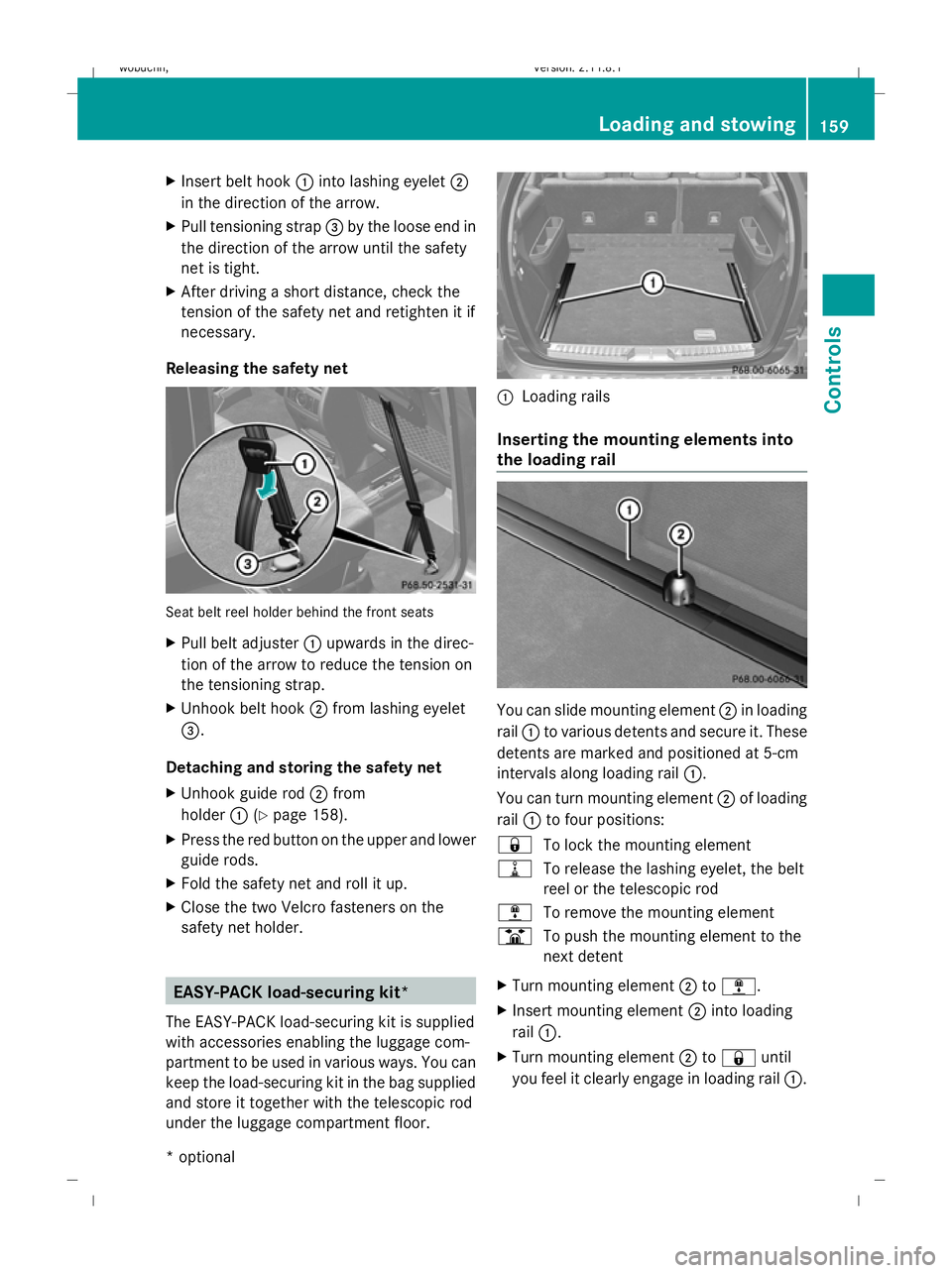
X
Insert belt hook :into lashing eyelet ;
in the direction of the arrow.
X Pull tensioning strap =by the loose end in
the direction of the arrow until the safety
net is tight.
X After driving a short distance, check the
tension of the safety net and retighten it if
necessary.
Releasing the safety net Seat belt reel holder behind the front seats
X
Pull belt adjuster :upwards in the direc-
tion of the arrow to reduce the tension on
the tensioning strap.
X Unhook belt hook ;from lashing eyelet
=.
Detaching and storing the safety net
X Unhook guide rod ;from
holder :(Ypage 158).
X Press the red button on the upper and lower
guide rods.
X Fold the safety net and roll it up.
X Close the two Velcro fasteners on the
safety net holder. EASY-PACK load-securing kit*
The EASY-PACK load-securing kit is supplied
with accessories enabling the luggage com-
partment to be used in various ways. You can
keep the load-securing kit in the bag supplied
and store it together with the telescopic rod
under the luggage compartment floor. :
Loading rails
Inserting the mounting elements into
the loading rail You can slide mounting element
;in loading
rail :to various detents and secure it. These
detents are marked and positioned at 5-cm
intervals along loading rail :.
You can turn mounting element ;of loading
rail :to four positions:
& To lock the mounting element
= To release the lashing eyelet, the belt
reel or the telescopic rod
; To remove the mounting element
B To push the mounting element to the
next detent
X Turn mounting element ;to;.
X Insert mounting element ;into loading
rail :.
X Turn mounting element ;to& until
you feel it clearly engage in loading rail :. Loading and stowing
159Controls
* optional
X164_AKB; 2; 3, en-GB
wobuchh,
Version: 2.11.8.1 2009-03-31T14:14:58+02:00 - Seite 159 Z
Dateiname: 6515431202_buchblock.pdf; erzeugt am 01. Apr 2009 00:17:39; WK
Page 163 of 309
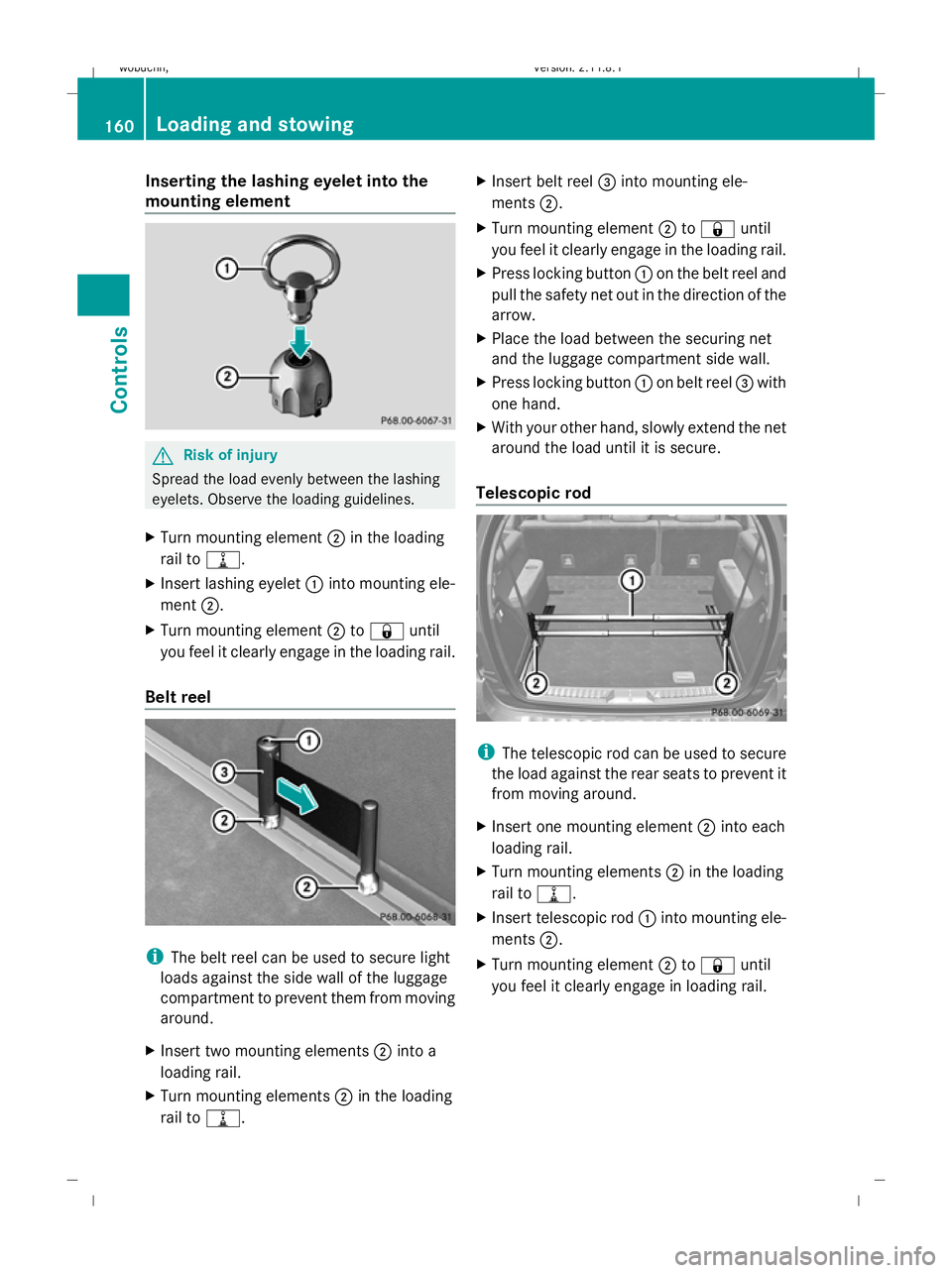
Inserting the lashing eyelet into the
mounting element G
Risk of injury
Spread the load evenly between the lashing
eyelets. Observe the loading guidelines.
X Turn mounting element ;in the loading
rail to =.
X Insert lashing eyelet :into mounting ele-
ment ;.
X Turn mounting element ;to& until
you feel it clearly engage in the loading rail.
Belt reel i
The belt reel can be used to secure light
loads against the side wall of the luggage
compartment to prevent them from moving
around.
X Insert two mounting elements ;into a
loading rail.
X Turn mounting elements ;in the loading
rail to =. X
Insert belt reel =into mounting ele-
ments ;.
X Turn mounting element ;to& until
you feel it clearly engage in the loading rail.
X Press locking button :on the belt reel and
pull the safety net out in the direction of the
arrow.
X Place the load between the securing net
and the luggage compartment side wall.
X Press locking button :on belt reel =with
one hand.
X With your other hand, slowly extend the net
around the load until it is secure.
Telescopic rod i
The telescopic rod can be used to secure
the load against the rear seats to prevent it
from moving around.
X Insert one mounting element ;into each
loading rail.
X Turn mounting elements ;in the loading
rail to =.
X Insert telescopic rod :into mounting ele-
ments ;.
X Turn mounting element ;to& until
you feel it clearly engage in loading rail. 160
Loading and stowingCont
rols
X164_AKB; 2; 3, en-GB
wobuchh, Version: 2.11.8.1 2009-03-31T14:14:58+02:00 - Seite 160
Dateiname: 6515431202_buchblock.pdf; erzeugt am 01. Apr 2009 00:17:40; WK