air condition MERCEDES-BENZ GL SUV 2009 Owners Manual
[x] Cancel search | Manufacturer: MERCEDES-BENZ, Model Year: 2009, Model line: GL SUV, Model: MERCEDES-BENZ GL SUV 2009Pages: 309, PDF Size: 10.27 MB
Page 7 of 309
1, 2, 3 ...
4ETS (Electronic Traction Support) ...53
4MATIC (permanent four-wheel
drive) .................................................. 112A
ABS (Anti-lock Braking System) .........50
Display message .................... 212, 213
Warning lamp ................................. 235
Accident
Notes ............................................. 240
Acoustic warning tone
see Warning tone ........................... 239
Active Service System PLUS
see ASSYST PLUS service interval
displa y........................................... 199
Adaptive brake lamps .........................51
Adaptive Damping System See ADS ....................................... 129
AdBlue ®
Display message ............................ 213
Service indicator ............................ 200
AdBlue ®
service indicator ................200
Additional functions (on-board
computer) .......................................... 109
ADS (Adaptive Damping System) ..... 129
Airbags Activation ......................................... 35
Control unit ...................................... 35
Driver's ............................................ 38
Front ................................................ 38
Front passenger ............................... 38
PASSENGER AIRBAG OFF warning
lamp ............................................. 234
Sidebag ............................................ 39
System ............................................. 37
Windowba g...................................... 39
Air conditioning
Activating/deactivating .................140
Activating/deactivating air-recir-
culation mode ................................ 146
Auxiliary heating/ventilation .......... 147
Controlling automatically ...............141
Convenience opening/closing
(air-recirculation mode )................. 147
Demisting the windscreen .............145 Malfunction indicator lamp
............234
Rear-compartment air condition-
ing ................................................. 139
Rear window heating .....................146
Setting the air distribution .............144
Setting the airflow .........................145
Setting the air vents ......................143
Setting the temperature ................142
Setting the temperature (rear
compartment) ................................ 142
Switching the residual heat func-
tion on/off ..................................... 147
Thermatic 2-zone automatic cli-
mate control .................................. 138
Thermotronic luxury multi-zone
automatic climate control ..............139
Air-conditioning system
see Air conditioning
Air filter
Display message ............................ 228
Air pressure
see Tyre pressure
Ambient lighting
Setting (on-board computer) .......... 106
Anti-glare film .................................... 169
Anti-lock braking system See ABS ........................................... 50
Anti-theft alarm system
See EDW .......................................... 54
Anti-theft systems ............................... 54
Ashtray ............................................... 162
ASSYST PLUS see ASSYST PLUS service interval
displa y........................................... 199
ASSYST PLUS service interval dis-
play ..................................................... 199
Calling up the date (on-board
computer) ...................................... 200
Display message ............................ 199
ATA (anti-theft alarm system) ............54
Switching off the alarm ....................54
AUTO lights
Display message ............................ 225
Automatic car wash ..........................2014
Index X164_AKB; 2; 3, en-GB
wobuchh,
Version: 2.11.8.1 2009-03-31T14:14:58+02:00 - Seite 4Dateiname: 6515431202_buchblock.pdf; erzeugt am 01. Apr 2009 00:16:29; WK
Page 12 of 309
Frequencies
Garage door opener .......................298
Telephone ...................................... 285
Front airbag ......................................... 38
Front-passenger airbag ....................... 38
Fuel ..................................................... 287
Diesel ............................................ 173
Loss ............................................... 241
Petrol ............................................. 173
Fuel consumption
Notes ............................................. 288
Fuel filler flap
Emergency release ........................251
Opening/closing ........................... 172
Fuel filter
Display message ............................ 221
Fuel gauge ............................................ 25
Fuel level Calling up the range (on-board
computer) ...................................... 111
Display ............................................. 25
Fuel line
Malfunction ................................... .241
Fuel tank
Defect ............................................ 241
Fuse allocation chart ........................280
Fuse box Dashboard ..................................... 281
Engine compartment .....................281
Luggage compartment ...................281
Fuses .................................................. 280G
Garage door Opening/closing (with the remote
control) .......................................... 166
Garage door opener ..........................165
Clearing the memory .....................166
Frequencies ................................... 298
Programming the remote control ...165
Gear indicator ...................................... 93
Genuine Mercedes-Benz parts .........284
Glove compartment ..........................152
Gradient-climbing capability (max-
imum) ................................................. 191 H
Handbrake Display message ............................ 221
Headlamp cleaning system ..............178
Headlamps Cleaning ......................................... 203
Cleaning system .............................. 83
Misting up ...................................... 245
Headlamps delayed switch-off
see Exterior lighting delayed switch-off
Head restraints
Adjusting (front) ............................... 65
Adjusting (rear) ................................ 68
Luxury .............................................. 66
NECK-PRO ....................................... 40
Removing (rear) ............................... 69
Resetting triggered NECK-PRO
head restraints .............................. 252
Resetting triggered NECK-PRO
luxury head restraints ....................252
Heating
see Air conditioning
High-pressure cleaners ....................202
Hill start assist .................................... 90
HomeLink ®
see Garage door opener I
Immobiliser .......................................... 54
Indicator and warning lamp Automatic child seat recognition
(malfunction) ................................. 234
Brakes (red) ........................... 235, 236
Engine diagnostics .........................237
ESP ®
.............................................. 235
PASSENGER AIRBAG OFF ........43, 234
Reserve fuel ................................... 239
Seat belt ........................................ 238
SRS .......................................... 35, 236
Thermotronic (malfunction) ...........234
Indicator and warning lamps ...........235
Indicator lamp see Indicator and warning lamp .....235
Instrument cluster .............................. 96
On-board computer .......................103 Index
9 X164_AKB; 2; 3, en-GB
wobuchh,
Version: 2.11.8.1
2009-03-31T14:14:58+02:00 - Seite 9Dateiname: 6515431202_buchblock.pdf; erzeugt am 01. Apr 2009 00:16:29; WK
Page 15 of 309
Oil level
Checking (dipstick) ........................177
Checking (on-board computer) ......176
On-board computer .............................97
Additional functions menu .............109
Audio menu ................................... 100
Convenience submenu ..................108
Display messages ..........................211
DVD menu ..................................... 102
Factory settings ............................. 103
Heating submenu ........................... 107
Instrument cluster submenu ..........103
Lighting submenu .......................... 105
Navi menu ..................................... 102
Off-road menu ............................... 102
Overview .......................................... 99
Settings menu ............................... 103
Standard display menu ....................99
Telephone menu ............................ 111
Time/date submenu ......................104
Trip computer menu ......................110
TV menu ........................................ 101
Vehicle submenu ........................... 106
On-board computer language ..........104
Operating system see On-board computer ...................97
Outside temperature display ............97
On-board computer .......................100
Override feature
Rear side windows ...........................49 P
Paint code .......................................... 286
Paintwork Cleaning ......................................... 202
Panel
Removing (third row of seats) ..........68
Parking ................................................. 90
Parking aid Exterior mirror on the front-
passenger side ................................. 74
PARKTRONIC ................................. 133
Reversing camera ..........................135
Parking brake ...................................... 91
Display message ............................ 221
Parking lamps
Display message ............................ 227Parking position
Exterior mirror on the front-
passenger side ................................. 74
PARKTRONIC ...................................... 133
Activating/deactivating .................135
Malfunction ................................... .244
Range of the sensors .....................134
Trailer towing ................................. 135
Warning displa y............................. 134
PASSENGER AIRBAG OFF warning
lamp ............................................. 43, 234
Permanent four-wheel drive see 4MATIC ................................... 112
Permanent Speedtronic ....................128
Petrol Minimum grade ............................ .173
see Fuel
Plastic trim
Cleaning ......................................... 205
Power supply (trailer) .......................199
Power window switch see Side windows
Pre-emptive occupant safety system
see PRE-SAFE ®
PRE-SAFE ®
system .............................. 40
Display message ............................ 217
Program selector button
Automatic transmission ...................95
Pulling away ......................................... 89 R
Radio Changing a station (on-board
computer) ...................................... 100
see separate operating instructions
Radio-controlled equipment
Installation ..................................... 168
Rain closing feature
Sliding/tilting sunroof ...................151
Range (on-board computer) .............111
Rear bench seat Folding forward/back ....................155
Rear compartment
Activating/deactivating the air
conditioning ........................... 140, 141
Setting the air vents ......................144
Setting the temperature ................142 12
Index X164_AKB; 2; 3, en-GB
wobuchh,
Version: 2.11.8.1 2009-03-31T14:14:58+02:00 - Seite 12Dateiname: 6515431202_buchblock.pdf; erzeugt am 01. Apr 2009 00:16:30; WK
Page 41 of 309
nition*, or your rearward-facing child
restraint system does not have automatic
child seat recognition, children must be
secured in a child restraint system on a
suitable seat in the rear. If you secure a
forward-facing child restraint system to the
front-passenger seat, you must move the
front-passenger seat as far back as possi-
ble.
R make sure there are no heavy or sharp-
edged objects in pockets of clothing.
R do not lean forwards, e.g. over the cover of
the driver's/front-passenger front airbag,
particularly when the vehicle is in motion.
R do not put your feet on the dashboard.
R only hold the steering wheel by the rim. This
allows the airbag to deploy fully. You could
be injured if the airbag is deployed and you
are holding the inside of the steering wheel.
R do not lean on the doors from inside the
vehicle.
R make sure that there are no people, ani-
mals or objects between the vehicle occu-
pants and the area of deployment of the
airbag.
R do not place any objects between the seat
backrest and the door.
R do not hang any hard objects, for example,
coat hangers, on the grab handles or coat
hooks.
R do not attach accessories, e.g. cup holders,
to the doors.
It is not possible to rule out a risk of injuries
caused by an airbag due to the high speed at
which the airbag is required to deploy. G
Risk of injury
The airbag's functionality can only be guaran-
teed if the following parts are not covered and
no badges or stickers are attached to them:
R padded steering wheel boss
R front-passenger front airbag cover
R outer side of seats G
Risk of injury
When an airbag deploys, a small amount of
powder is released. The powder may cause
short-term breathing difficulties to persons
suffering from asthma or other pulmonary
conditions.
In order to prevent potential breathing diffi-
culties, you should leave the vehicle as soon
as it is safe to do so. You can also open the
window to allow fresh air to enter the interior.
The powder generally does not constitute a
health hazard and does not indicate that there
is a fire in the vehicle. G
Risk of injury
The airbag parts are hot after the airbag has
been deployed. Do not touch them; other-
wise, you may burn yourself.
Have the airbags checked at a qualified spe-
cialist workshop. Otherwise, occupants are
not protected by the airbags in the event of
another accident.
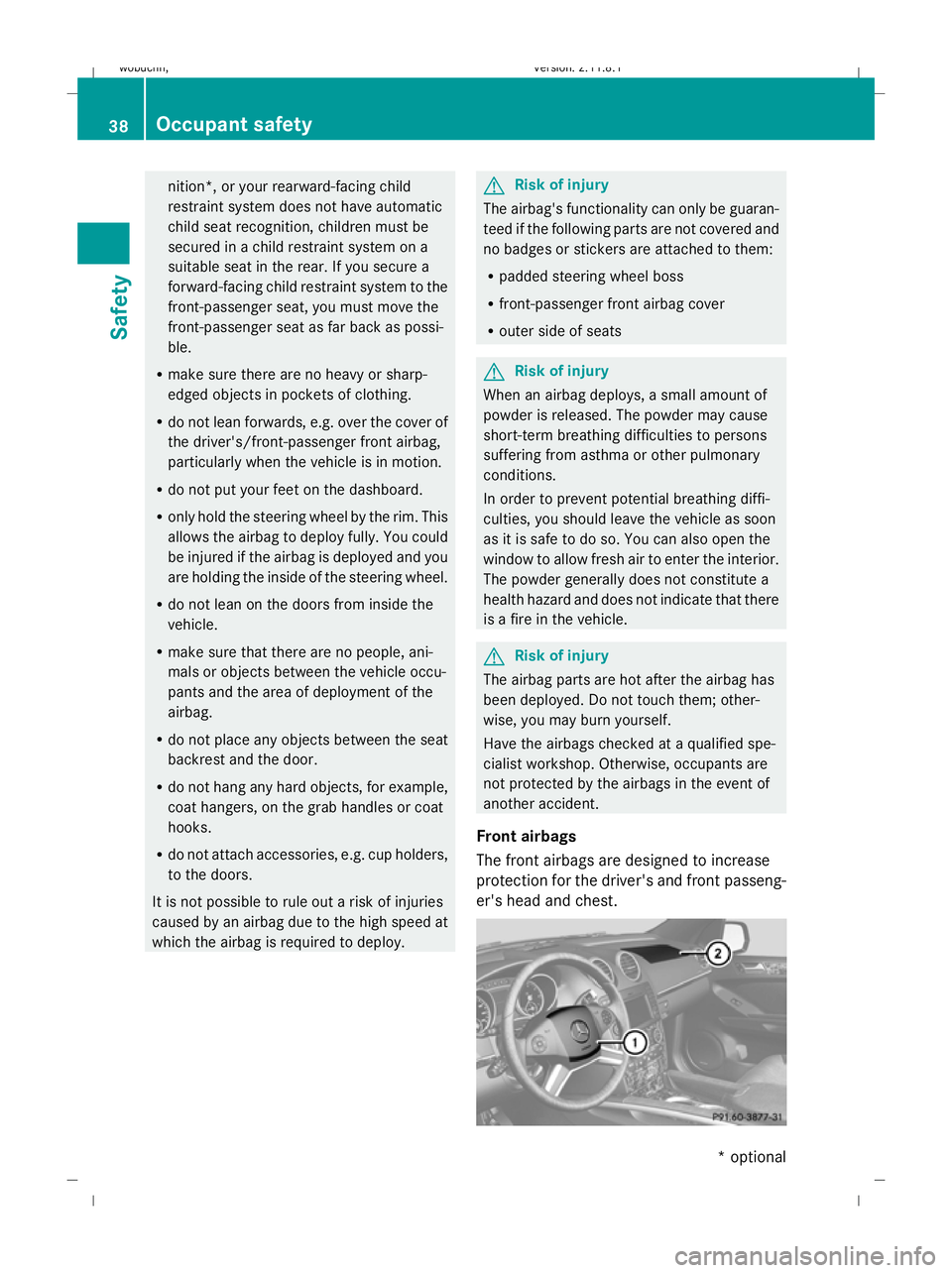
Front airbags
The front airbags are designed to increase
protection for the driver's and front passeng-
er's head and chest. 38
Occupant safetySafety
* optional
X164_AKB; 2; 3, en-GB
wobuchh,
Version: 2.11.8.1 2009-03-31T14:14:58+02:00 - Seite 38
Dateiname: 6515431202_buchblock.pdf; erzeugt am 01. Apr 2009 00:16:44; WK
Page 60 of 309
Opening and closing
...........................58
Tailgate ................................................ 60
Key positions ....................................... 63
Seats .................................................... 64
Steering wheel .................................... 70
Mirrors ................................................. 72
Memory functions* .............................74
Seat belts ............................................. 75
Lights ................................................... 78
Windscreen wipers .............................84
Side windows ...................................... 85
Driving and parking ............................88
Transmission ....................................... 91
Instrument cluster ..............................96
On-board computer .............................97
Off-road driving ................................. 112
Driving systems ................................ 117
Air conditioning ................................. 136
Sliding sunroof .................................. 149
Loading and stowing ........................151
Features ............................................. 161 57Controls
X164_AKB; 2; 3, en-GB
wobuchh,
Version: 2.11.8.1 2009-03-31T14:14:58+02:00 - Seite 57
Dateiname: 6515431202_buchblock.pdf; erzeugt am 01. Apr 2009 00:16:51; WK
Page 67 of 309
X
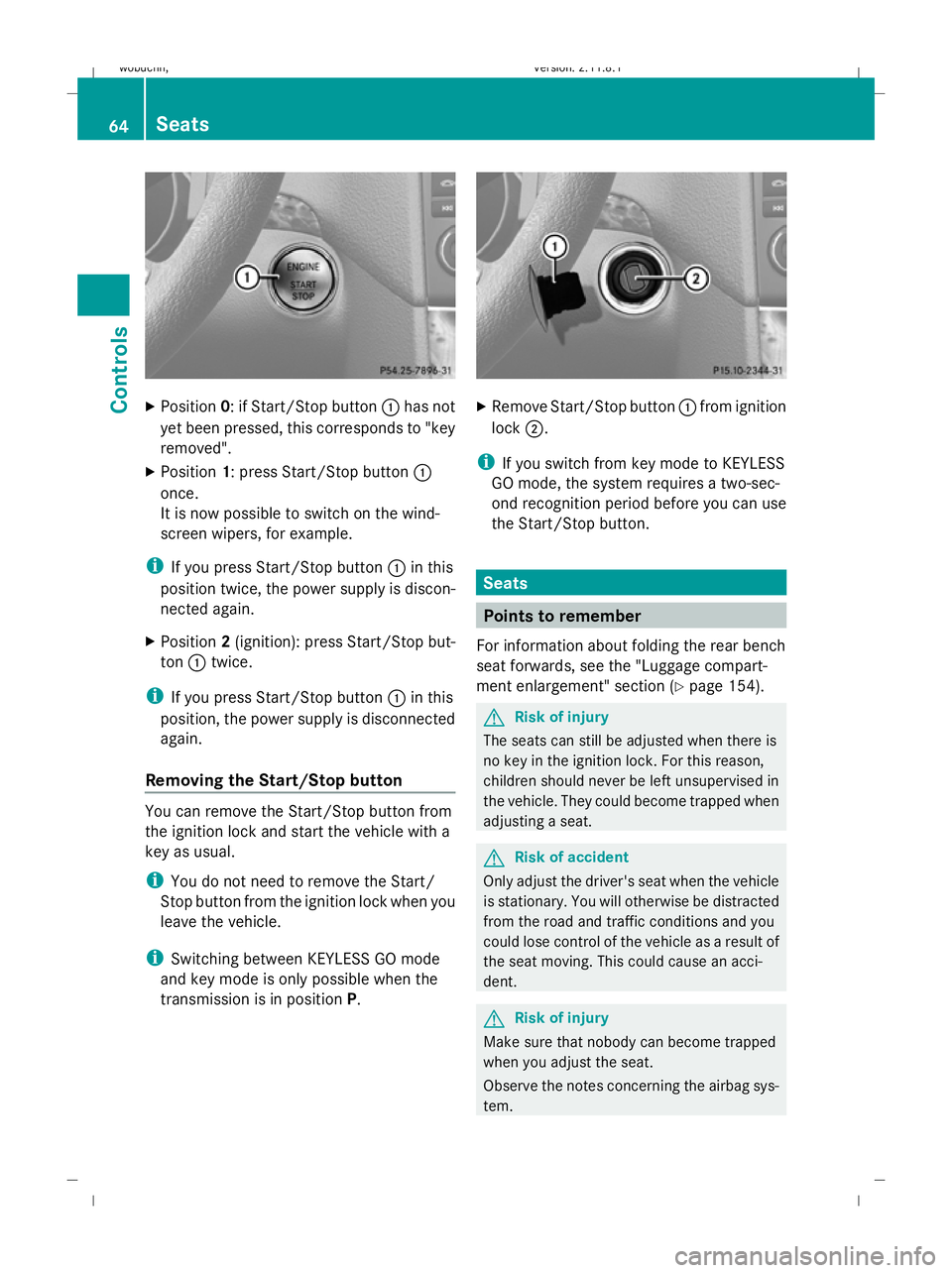
Position 0: if Start/Stop button :has not
yet been pressed, this corresponds to "key
removed".
X Position 1: press Start/Stop button :
once.
It is now possible to switch on the wind-
screen wipers, for example.
i If you press Start/Stop button :in this
position twice, the power supply is discon-
nected again.
X Position 2(ignition): press Start/Stop but-
ton :twice.
i If you press Start/Stop button :in this
position, the power supply is disconnected
again.
Removing the Start/Stop button You can remove the Start/Stop button from
the ignition lock and start the vehicle with a
key as usual.
i You do not need to remove the Start/
Stop button from the ignition lock when you
leave the vehicle.
i Switching between KEYLESS GO mode
and key mode is only possible when the
transmission is in position P. X
Remove Start/Stop button :from ignition
lock ;.
i If you switch from key mode to KEYLESS
GO mode, the system requires a two-sec-
ond recognition period before you can use
the Start/Stop button. Seats
Points to remember
For information about folding the rear bench
seat forwards, see the "Luggage compart-
ment enlargement" section (Y page 154). G
Risk of injury
The seats can still be adjusted when there is
no key in the ignition lock. For this reason,
children should never be left unsupervised in
the vehicle. They could become trapped when
adjusting a seat. G
Risk of accident
Only adjust the driver's seat when the vehicle
is stationary. You will otherwise be distracted
from the road and traffic conditions and you
could lose control of the vehicle as a result of
the seat moving. This could cause an acci-
dent. G
Risk of injury
Make sure that nobody can become trapped
when you adjust the seat.
Observe the notes concerning the airbag sys-
tem. 64
SeatsControls
X164_AKB; 2; 3, en-GB
wobuchh,
Version: 2.11.8.1 2009-03-31T14:14:58+02:00 - Seite 64
Dateiname: 6515431202_buchblock.pdf; erzeugt am 01. Apr 2009 00:16:55; WK
Page 81 of 309
Correct driver's seat position
G
Risk of accident
Only adjust the driver's seat when the vehicle
is stationary. You will otherwise be distracted
from the road and traffic conditions and you
could lose control of the vehicle as a result of
the seat moving. This could cause an acci-
dent. G
Risk of accident
Only adjust the steering wheel when the vehi-
cle is stationary and do not pull away until the
steering wheel adjustment mechanism is
locked in position. Otherwise, you might drive
without the steering wheel adjustment mech-
anism being locked in position and be distrac-
ted from road and traffic conditions by an
unexpected movement of the steering wheel
and cause an accident.
However, the steerability of the vehicle is not
affected.
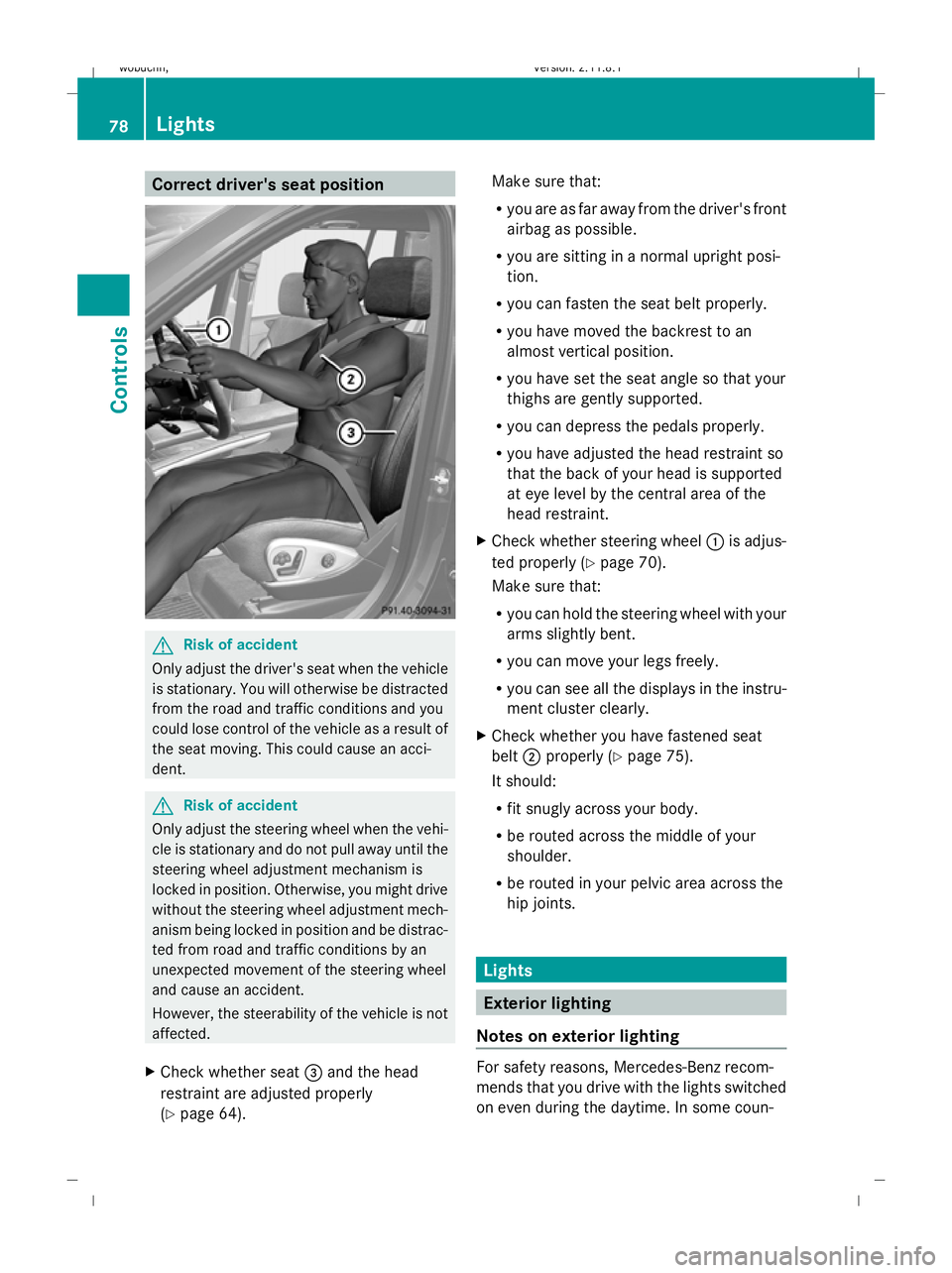
X Check whether seat =and the head
restraint are adjusted properly
(Y page 64). Make sure that:
R
you are as far away from the driver's front
airbag as possible.
R you are sitting in a normal upright posi-
tion.
R you can fasten the seat belt properly.
R you have moved the backrest to an
almost vertical position.
R you have set the seat angle so that your
thighs are gently supported.
R you can depress the pedals properly.
R you have adjusted the head restraint so
that the back of your head is supported
at eye level by the central area of the
head restraint.
X Check whether steering wheel :is adjus-
ted properly (Y page 70).
Make sure that:
R you can hold the steering wheel with your
arms slightly bent.
R you can move your legs freely.
R you can see all the displays in the instru-
ment cluster clearly.
X Check whether you have fastened seat
belt ;properly (Y page 75).
It should:
R fit snugly across your body.
R be routed across the middle of your
shoulder.
R be routed in your pelvic area across the
hip joints. Lights
Exterior lighting
Notes on exterior lighting For safety reasons, Mercedes-Benz recom-
mends that you drive with the lights switched
on even during the daytime. In some coun-78
LightsControls
X164_AKB; 2; 3, en-GB
wobuchh,
Version: 2.11.8.1 2009-03-31T14:14:58+02:00 - Seite 78
Dateiname: 6515431202_buchblock.pdf; erzeugt am 01. Apr 2009 00:17:06; WK
Page 85 of 309
The hazard warning lamp switches on auto-
matically if:
R an airbag is deployed.
R the vehicle is braked to a standstill from a
speed of over 70 km/h.
The hazard warning lamps still operate if the
ignition is switched off.
X To switch on: press button:.
All turn signals flash.
X Hazard warning lights on one side: push
the combination switch in the direction of
arrow ForH past the point of resistance
(Y page 80).
The indicator lamp flashes on the corre-
sponding side of the vehicle.
X To switch off: press button:.
The hazard warning lamp switches off auto-
matically after full brake application if the
vehicle then reaches a speed of over
10 km/h again.
Intelligent Light System* (bi-xenon
headlamps*) The Intelligent Light System is a system which
adjusts the headlamps automatically to suit
the prevailing driving and weather conditions.
The bi-xenon headlamps offer enhanced func-
tions to improve illumination of the road sur-
face, e.g. depending on the vehicle speed or
weather conditions. The system includes the
active light function, motorway mode and
extended range foglamps. The system is only
active when it is dark.
You can activate or deactivate the "Intelligent
Light System" using the on-board computer
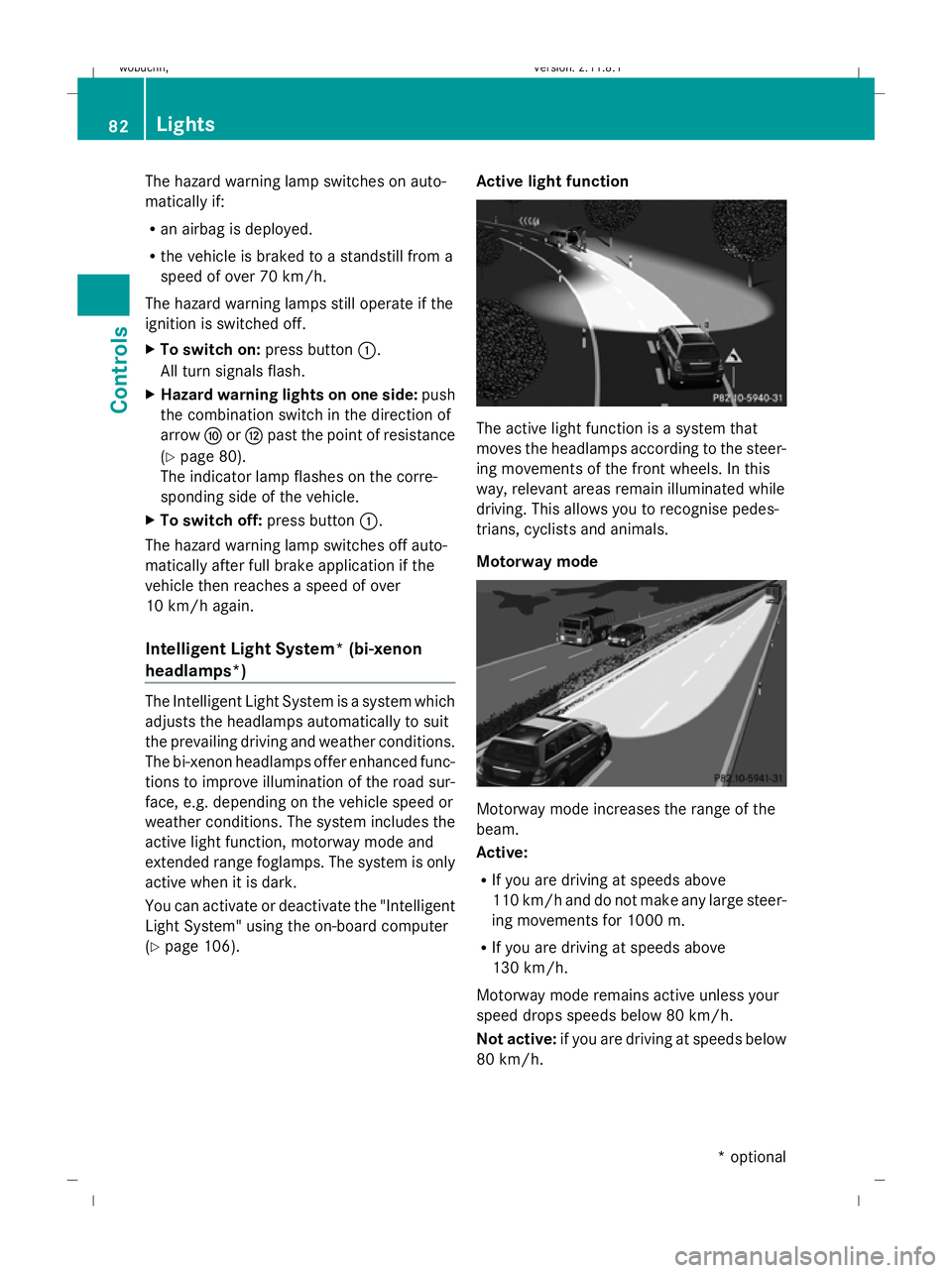
(Y page 106). Active light function The active light function is a system that
moves the headlamps according to the steer-
ing movements of the front wheels. In this
way, relevant areas remain illuminated while
driving. This allows you to recognise pedes-
trians, cyclists and animals.
Motorway mode
Motorway mode increases the range of the
beam.
Active:
R
If you are driving at speeds above
110 km/ha nd do not make any large steer-
ing movements for 1000 m.
R If you are driving at speeds above
130 km/h.
Motorway mode remains active unless your
speed drops speeds below 80 km/h.
Not active: if you are driving at speeds below
80 km/h. 82
LightsControls
* optional
X164_AKB; 2; 3, en-GB
wobuchh
,V ersion: 2.11.8.1
2009-03-31T14:14:58+02:00 - Seite 82
Dateiname: 6515431202_buchblock.pdf; erzeugt am 01. Apr 2009 00:17:07; WK
Page 119 of 309
An acoustic warning will also sound. The
gear change process has not been comple-
ted. LOW RANGE is in the neutral position.
There is no connection between the engine
and the drive wheels.
! Do not drive any further, otherwise you
could damage the vehicle's drive train.
XStop the vehicle. Take into account the
road and traffic conditions when doing
this.
X Depress the parking brake.
X Carry out the gear change process
again.
If the gear change process has been
carried out, the Stop vehicle. Apply
parking brake message disappears. Differential locks
Differential locks improve the vehicle’s trac-
tion.
Your vehicle is equipped with the following:
R A differential lock for the transfer box: this
controls the balance between the front and
rear axles.
R A differential lock for the rear axle: this
controls the balance between the wheels
and the rear axle.
4ETS (Y page 53) controls the compensation
between the wheels and the front axle.
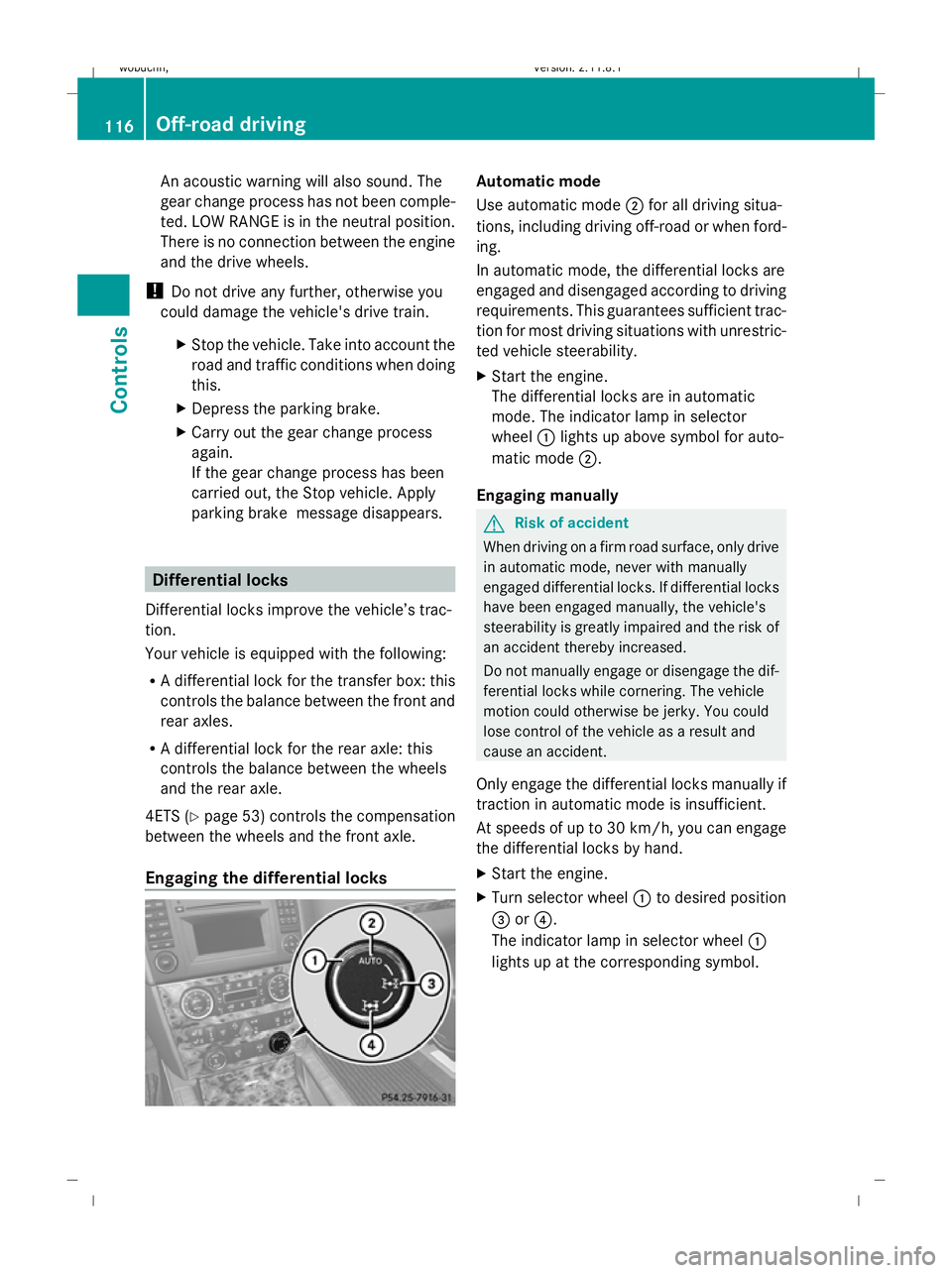
Engaging the differential locks Automatic mode
Use automatic mode
;for all driving situa-
tions, including driving off-road or when ford-
ing.
In automatic mode, the differential locks are
engaged and disengaged according to driving
requirements. This guarantees sufficient trac-
tion for most driving situations with unrestric-
ted vehicle steerability.
X Start the engine.
The differential locks are in automatic
mode. The indicator lamp in selector
wheel :lights up above symbol for auto-
matic mode ;.
Engaging manually G
Risk of accident
When driving on a firm road surface, only drive
in automatic mode, never with manually
engaged differential locks. If differential locks
have been engaged manually, the vehicle's
steerability is greatly impaired and the risk of
an accident thereby increased.
Do not manually engage or disengage the dif-
ferential locks while cornering. The vehicle
motion could otherwise be jerky. You could
lose control of the vehicle as a result and
cause an accident.
Only engage the differential locks manually if
traction in automatic mode is insufficient.
At speeds of up to 30 km/h, you can engage
the differential locks by hand.
X Start the engine.
X Turn selector wheel :to desired position
= or?.
The indicator lamp in selector wheel :
lights up at the corresponding symbol. 116
Off-road drivingControls
X164_AKB; 2; 3, en-GB
wobuchh
,V ersion: 2.11.8.1
2009-03-31T14:14:58+02:00 - Seite 116
Dateiname: 6515431202_buchblock.pdf; erzeugt am 01. Apr 2009 00:17:20; WK
Page 123 of 309
laden or towing a trailer, you must select shift
range 1,2or 3in good time. By doing so, you
will make use of the braking effect of the
engine, which relieves the load on the brake
system and prevents the brakes from over-
heating and wearing too quickly. G
Risk of accident
The brake pedal is retracted when Distronic
brakes. Do not restrict the movement of the
pedal in any way.
R Do not put any objects in the footwell.
R Ensure that floor mats and carpets are fixed
securely.
R Do not place your foot under the brake
pedal as it could become trapped.
You could otherwise cause an accident and
injure yourself and others. G
Risk of accident
Do not change down for additional engine
braking on a slippery road surface. This could
cause the drive wheels to lose their grip and
the vehicle could skid. G
Risk of accident
Distronic is only an aid designed to assist
driving. The driver is fully responsible for the
vehicle's distance from other vehicles, the
vehicle's speed and for braking in good time.
Distronic does not react to:
R pedestrians
R stationary obstacles on the road, e.g. sta-
tionary or parked vehicles
R oncoming and crossing traffic
Distronic may not detect narrow vehicles driv-
ing in front, e.g. motorcycles, or vehicles driv-
ing on a different line. Therefore, always pay
attention to traffic conditions even when Dis-
tronic is activated. Otherwise, you may fail to
recognise dangers in time, cause an accident
and injure yourself and others.
If a slower-moving vehicle is detected in front,
Distronic causes your vehicle to brake and maintain the preset distance to the vehicle in
front that you have set. G
Risk of accident
Distronic cannot take account of road and
traffic conditions. Deactivate, or do not acti-
vate, Distronic if it does not detect the vehicle
in front, or if it no longer detects it. This is
especially the case:
R before corners
R in filter lanes
R when changing to a lane with faster moving
traffic
R in complex driving situations or where the
lanes are diverted, e.g. at motorway/road-
way construction sites
Otherwise, Distronic maintains the current
speed or accelerates to the set speed.
Distronic cannot take account of weather
conditions. Deactivate, or do not activate,
Distronic:
R if the roads are slippery, snow-covered or
icy. The wheels could lose their grip when
braking or accelerating. The vehicle could
start to skid.
R if the sensors are dirty or there is poor vis-
ibility, e.g. due to snow, rain or fog. Dis-
tance control may be impaired.
Always pay attention to traffic conditions
even when Distronic is activated. Otherwise,
you may fail to recognise dangers in time,
cause an accident and injure yourself and oth-
ers.
If no car is driving in front of you, Distronic
works like cruise control in the speed range
between 30 km/h and 200 km/h. If a vehicle
is driving in front of you, Distronic Plus works
in the speed range between 0 km/h and
200 km/h.
Do not use Distronic while driving on roads
with steep gradients. 120
Driving systemsControls
X164_AKB; 2; 3, en-GB
wobuchh,
Version: 2.11.8.1 2009-03-31T14:14:58+02:00 - Seite 120
Dateiname: 6515431202_buchblock.pdf; erzeugt am 01. Apr 2009 00:17:21; WK