climate control MERCEDES-BENZ GL SUV 2009 Owners Manual
[x] Cancel search | Manufacturer: MERCEDES-BENZ, Model Year: 2009, Model line: GL SUV, Model: MERCEDES-BENZ GL SUV 2009Pages: 309, PDF Size: 10.27 MB
Page 7 of 309
1, 2, 3 ...
4ETS (Electronic Traction Support) ...53
4MATIC (permanent four-wheel
drive) .................................................. 112A
ABS (Anti-lock Braking System) .........50
Display message .................... 212, 213
Warning lamp ................................. 235
Accident
Notes ............................................. 240
Acoustic warning tone
see Warning tone ........................... 239
Active Service System PLUS
see ASSYST PLUS service interval
displa y........................................... 199
Adaptive brake lamps .........................51
Adaptive Damping System See ADS ....................................... 129
AdBlue ®
Display message ............................ 213
Service indicator ............................ 200
AdBlue ®
service indicator ................200
Additional functions (on-board
computer) .......................................... 109
ADS (Adaptive Damping System) ..... 129
Airbags Activation ......................................... 35
Control unit ...................................... 35
Driver's ............................................ 38
Front ................................................ 38
Front passenger ............................... 38
PASSENGER AIRBAG OFF warning
lamp ............................................. 234
Sidebag ............................................ 39
System ............................................. 37
Windowba g...................................... 39
Air conditioning
Activating/deactivating .................140
Activating/deactivating air-recir-
culation mode ................................ 146
Auxiliary heating/ventilation .......... 147
Controlling automatically ...............141
Convenience opening/closing
(air-recirculation mode )................. 147
Demisting the windscreen .............145 Malfunction indicator lamp
............234
Rear-compartment air condition-
ing ................................................. 139
Rear window heating .....................146
Setting the air distribution .............144
Setting the airflow .........................145
Setting the air vents ......................143
Setting the temperature ................142
Setting the temperature (rear
compartment) ................................ 142
Switching the residual heat func-
tion on/off ..................................... 147
Thermatic 2-zone automatic cli-
mate control .................................. 138
Thermotronic luxury multi-zone
automatic climate control ..............139
Air-conditioning system
see Air conditioning
Air filter
Display message ............................ 228
Air pressure
see Tyre pressure
Ambient lighting
Setting (on-board computer) .......... 106
Anti-glare film .................................... 169
Anti-lock braking system See ABS ........................................... 50
Anti-theft alarm system
See EDW .......................................... 54
Anti-theft systems ............................... 54
Ashtray ............................................... 162
ASSYST PLUS see ASSYST PLUS service interval
displa y........................................... 199
ASSYST PLUS service interval dis-
play ..................................................... 199
Calling up the date (on-board
computer) ...................................... 200
Display message ............................ 199
ATA (anti-theft alarm system) ............54
Switching off the alarm ....................54
AUTO lights
Display message ............................ 225
Automatic car wash ..........................2014
Index X164_AKB; 2; 3, en-GB
wobuchh,
Version: 2.11.8.1 2009-03-31T14:14:58+02:00 - Seite 4Dateiname: 6515431202_buchblock.pdf; erzeugt am 01. Apr 2009 00:16:29; WK
Page 9 of 309
C
Calling up a fault see Display message .....................211
Care
Automatic car wash .......................201
Care products ................................ 201
Cleaning agents ............................. 201
Dashboard ..................................... 204
Display ........................................... 204
Exterior .......................................... 201
Headlamps ..................................... 203
High-pressure cleaners ..................202
Interior ........................................... 204
Paintwork ...................................... 202
Plastic trim .................................... 205
Reversing camera ..........................203
Seat covers .................................... 204
Sensors ......................................... 203
Steering wheel boss ......................204
Tail pipes ....................................... 203
Trailer tow hitch ............................. 203
Trim strips ..................................... 205
Wheels ........................................... 202
Windows ........................................ 202
Wiper blades .................................. 202
Wooden trim .................................. 205
Care products .................................... 201
CD player/CD changer Operating (on-board computer) .....101
Central locking
Automatic locking (on-board com-
puter) ............................................. 107
Key .................................................. 58
Central locking/unlocking button .....59
Central unlocking Key .................................................. 58
Centre console
Overview .......................................... 29
Changing a wheel
see Flat tyre
Checklist (off-road driving) ..............189
Child-proof locks Rear doors ....................................... 49
Children
in the vehicle ................................... 41
Restraint systems ............................ 41Child seat
Automatic recognition .....................43
Automatic recognition (malfunc-
tion) ............................................... 234
Child seat lock ................................ 47
Display message ............................ 216
ISOFIX .............................................. 47
On the front-passenger sea t............ 42
Recommendations ...........................46
Suitable positions ............................ 44
TopTether ........................................ 48
Child seat lock ..................................... 47
Cigarette lighter ................................ 163
Cleaning agents ................................. 201
Cleaning the sensors ........................203
Climate control Cooling with air dehumidification ..141
Misted up windows ........................146
Cockpit
Overview .......................................... 23
Collapsible wheel
Technical data ............................... 297
COMAND display
Cleaning ......................................... 204
Compass ............................................ 166
Display message ............................ 216
Constant headlamp mode
see Daytime driving lights ..............105
Consumption statistics (on-board
computer) .......................................... 110
Convenience closing ...........................87
Convenience opening ..........................87
Coolant Checking the level .........................177
Display mes-
sage ...................................... .219, 224
Mixture ratio .................................. 291
Temperature gauge ........................ 100
Cornering lights
Display message ............................ 225
Cruise control .................................... 117
Display message .................... 218, 219
Cup holder ......................................... 1536
Index X164_AKB; 2; 3, en-GB
wobuchh,
Version: 2.11.8.1 2009-03-31T14:14:58+02:00 - Seite 6Dateiname: 6515431202_buchblock.pdf; erzeugt am 01. Apr 2009 00:16:29; WK
Page 110 of 309
Setting the display when the ignition is
switched off
The
Display when ignition off function
allows you to set which display you see in the
multi-function display after removing the key
from the ignition lock.
X Press VorU on the steering wheel
to select the Settings... menu.
X Press the &button to select submenus.
X Press the WorX button to select the
Vehicle submenu.
X Press the &button to select Display
when ignition off.
X Press the WorX button to select
Interior motion sensor, Tow-away
protection orMiles/km.
X Press the &,VorU button to
select a different display.
Activating/deactivating the automatic
door locking feature
When you activate the Automatic door
locking function, your vehicle will be cen-
trally locked above a speed of approximately
15 km/h.
i For more information on the automatic
door locking feature, see (Y page 60).
X Press VorU on the steering wheel
to select the Settings... menu.
X Press the &button to select submenus.
X Press the WorX button to select the
Vehicle submenu.
X Press the &button to select Auto‐
matic door locking.
X Press the WorX button to activate
or deactivate the Automatic door lock‐
ing feature.
X Press the &,VorU button to
select a different display. Heating submenu Auxiliary heating* departure time
Only vehicles with auxiliary heating have this
function.
The
Aux.heating departure time function
allows you to select a stored departure time
or change the departure time for which the
vehicle with auxiliary heating is preheated.
The auxiliary heating timer function calcu-
lates the switch-on time according to the out-
side temperature so that the vehicle is pre-
heated by the departure time. When the
departure time is reached, the auxiliary heat-
ing continues to heat for a further five
minutes and then switches off. The auxiliary
heating adopts the temperature settings
selected for Thermatic 2-zone automatic cli-
mate control or Thermotronic luxury multi-
zone automatic climate control*.
You can switch off the auxiliary heating by
using the remote control or the auxiliary heat-
ing button on the centre console. G
Risk of poisoning
Exhaust fumes are produced when the auxili-
ary heating is in operation. Inhaling these
exhaust fumes can be poisonous. You should
therefore switch off the auxiliary heating in
confined spaces without an extraction sys-
tem, e.g. a garage. G
Risk of fire
When the auxiliary heating is in operation,
parts of the vehicle can become very hot.
Make sure that the exhaust system does
not under any circumstances come into con-
tact with highly flammable materials such as
dry grass or fuels. The highly flammable mate-
rial could otherwise ignite and set the vehicle
alight. Select your parking space accordingly.
Operating the auxiliary heating is therefore
prohibited at filling stations or when your vehi-
cle is being refuelled. Always switch off the
auxiliary heating at filling stations. On-board computer
107Controls
* optional
X164_AKB; 2; 3, en-GB
wobuchh,
Version: 2.11.8.1 2009-03-31T14:14:58+02:00 - Seite 107 Z
Dateiname: 6515431202_buchblock.pdf; erzeugt am 01. Apr 2009 00:17:17; WK
Page 139 of 309
the responsibility to pay attention. The cam-
era cannot show objects:
R very near to the rear bumper
R below the rear bumper
R that are located above the tailgate handle
recess
You are always responsible for safety and
must continue to pay attention to your imme-
diate surroundings when parking and
manoeuvring. This applies to the areas
behind, in front of and next to the vehicle. You
could otherwise endanger yourself and oth-
ers. G
Risk of accident
Under the following circumstances, the
reversing camera will not function, or function
in a limited manner:
R if the tailgate is open
R in heavy rain, snow or fog
R at night or in very dark places
R if the camera is exposed to very bright light R
if the area is lit by fluorescent light (the dis-
play may flicker)
R if there is a sudden change in temperature,
e.g. when driving into a heated garage in
winter
R if the camera lens is dirty or obstructed
R if the rear of your vehicle is damaged. In this
event have the camera position and setting
checked at a qualified specialist workshop.
Mercedes-Benz recommends that you use
a Mercedes-Benz Service Centre for this
purpose.
Do not use the reversing camera in these
types of situation. You could, otherwise,
injure others or damage objects and your
vehicle while you are parking.
Activating the reversing camera X
Make sure that the key is in position 2in
the ignition lock.
X Engage reverse gear.
The area behind the vehicle is shown in the
COMAND APS display. Air conditioning
Overview of air-conditioning systems
The vehicle is equipped with one of the following air-conditioning systems: Thermatic 2-zone automatic climate control
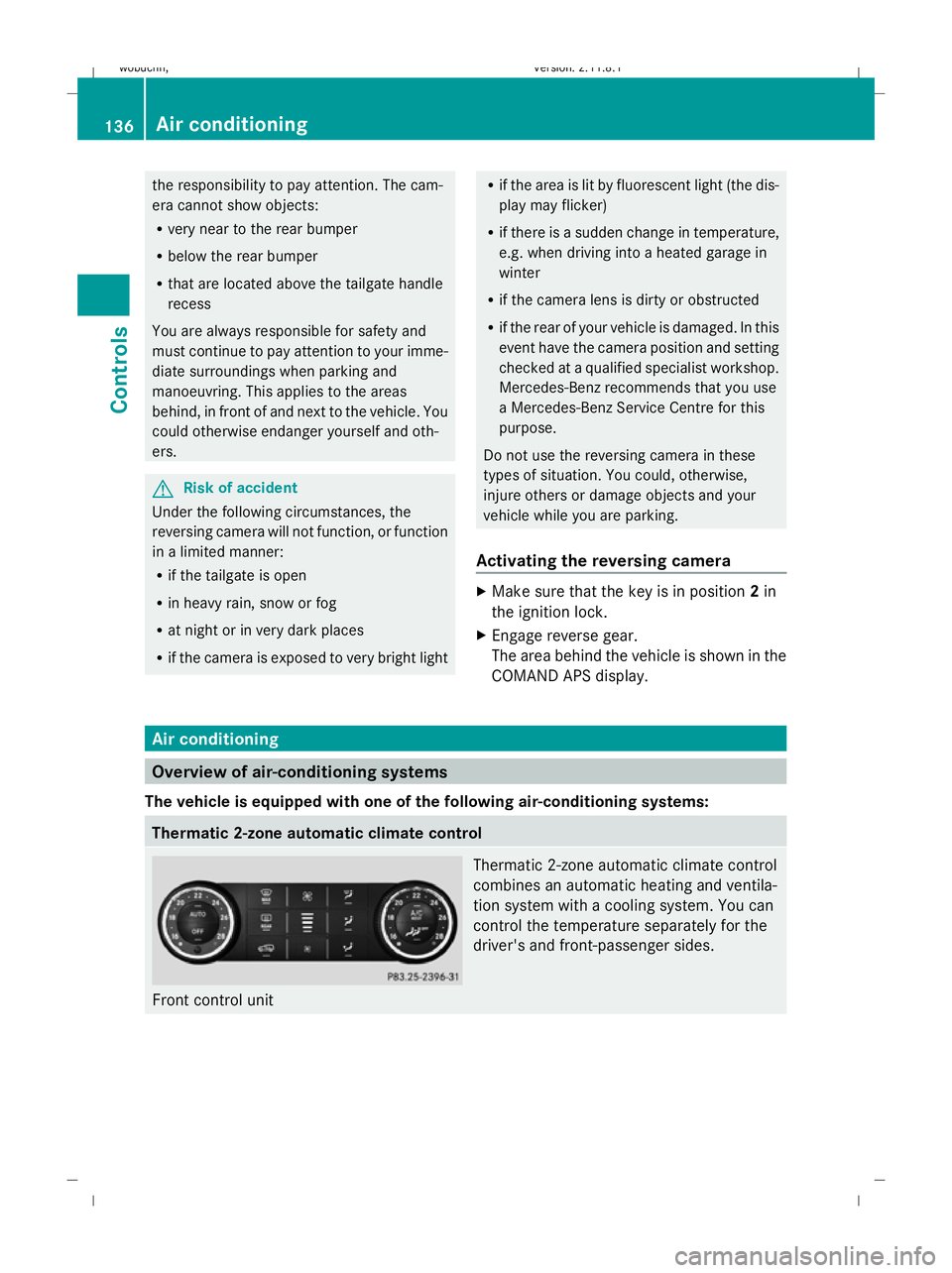
Front control unit Thermatic 2-zone automatic climate control
combines an automatic heating and ventila-
tion system with a cooling system. You can
control the temperature separately for the
driver's and front-passenger sides.136
Air conditioningControls
X164_AKB; 2; 3, en-GB
wobuchh
,V ersion: 2.11.8.1
2009-03-31T14:14:58+02:00 - Seite 136
Dateiname: 6515431202_buchblock.pdf; erzeugt am 01. Apr 2009 00:17:27; WK
Page 140 of 309
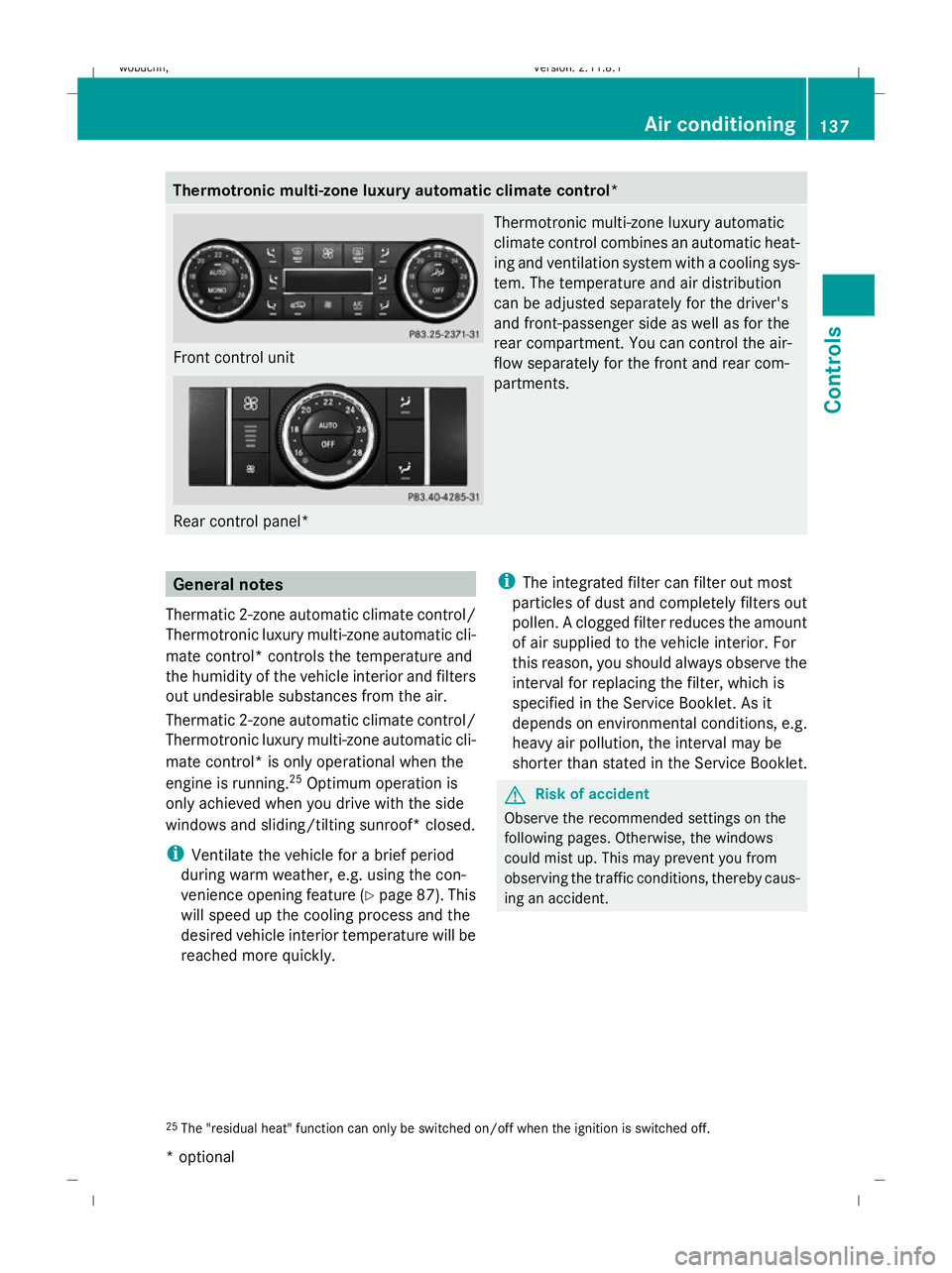
Thermotronic multi-zone luxury automatic climate control*
Front control unit
Rear control panel* Thermotronic multi-zone luxury automatic
climate control combines an automatic heat-
ing and ventilation system with a cooling sys-
tem. The temperature and air distribution
can be adjusted separately for the driver's
and front-passenger side as well as for the
rear compartment. You can control the air-
flow separately for the front and rear com-
partments. General notes
Thermatic 2-zone automatic climate control/
Thermotronic luxury multi-zone automatic cli-
mate control* controls the temperature and
the humidity of the vehicle interior and filters
out undesirable substances from the air.
Thermatic 2-zone automatic climate control/
Thermotronic luxury multi-zone automatic cli-
mate control* is only operational when the
engine is running. 25
Optimum operation is
only achieved when you drive with the side
windows and sliding/tilting sunroof* closed.
i Ventilate the vehicle for a brief period
during warm weather, e.g. using the con-
venience opening feature (Y page 87). This
will speed up the cooling process and the
desired vehicle interior temperature will be
reached more quickly. i
The integrated filter can filter out most
particles of dust and completely filters out
pollen. A clogged filter reduces the amount
of air supplied to the vehicle interior. For
this reason, you should always observe the
interval for replacing the filter, which is
specified in the Service Booklet. As it
depends on environmental conditions, e.g.
heavy air pollution, the interval may be
shorter than stated in the Service Booklet. G
Risk of accident
Observe the recommended settings on the
following pages. Otherwise, the windows
could mist up. This may prevent you from
observing the traffic conditions, thereby caus-
ing an accident.
25 The "residual heat" function can only be switched on/off when the ignition is switched off. Air conditioning
137Controls
* optional
X164_AKB; 2; 3, en-GB
wobuchh
,V ersion: 2.11.8.1
2009-03-31T14:14:58+02:00 - Seite 137 Z
Dateiname: 6515431202_buchblock.pdf; erzeugt am 01. Apr 2009 00:17:28; WK
Page 141 of 309
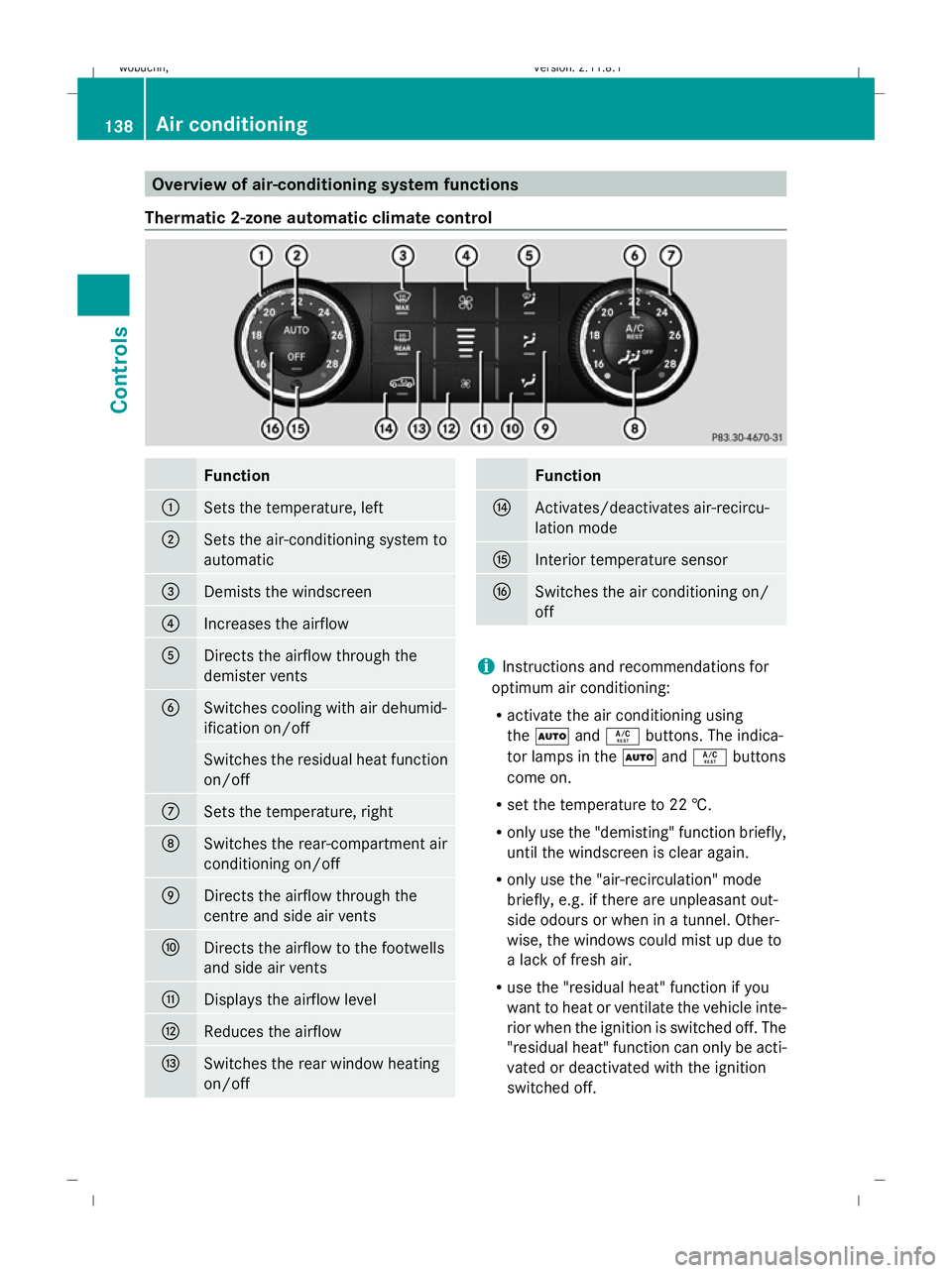
Overview of air-conditioning system functions
Thermatic 2-zone automatic climate control Function
:
Sets the temperature, left
;
Sets the air-conditioning system to
automatic
=
Demists the windscreen
?
Increases the airflow
A
Directs the airflow through the
demister vents
B
Switches cooling with air dehumid-
ification on/off
Switches the residual heat function
on/off
C
Sets the temperature, right
D
Switches the rear-compartment air
conditioning on/off
E
Directs the airflow through the
centre and side air vents
F
Directs the airflow to the footwells
and side air vents
G
Displays the airflow level
H
Reduces the airflow
I
Switches the rear window heating
on/off Function
J
Activates/deactivates air-recircu-
lation mode
K
Interior temperature sensor
L
Switches the air conditioning on/
off
i
Instructions and recommendations for
optimum air conditioning:
R activate the air conditioning using
the à andÁ buttons. The indica-
tor lamps in the ÃandÁ buttons
come on.
R set the temperature to 22 †.
R only use the "demisting" function briefly,
until the windscreen is clear again.
R only use the "air-recirculation" mode
briefly, e.g. if there are unpleasant out-
side odours or when in a tunnel. Other-
wise, the windows could mist up due to
a lack of fresh air.
R use the "residual heat" function if you
want to heat or ventilate the vehicle inte-
rior when the ignition is switched off. The
"residual heat" function can only be acti-
vated or deactivated with the ignition
switched off. 138
Air conditioningControls
X164_AKB; 2; 3, en-GB
wobuchh,
Version: 2.11.8.1 2009-03-31T14:14:58+02:00 - Seite 138
Dateiname: 6515431202_buchblock.pdf; erzeugt am 01. Apr 2009 00:17:28; WK
Page 142 of 309
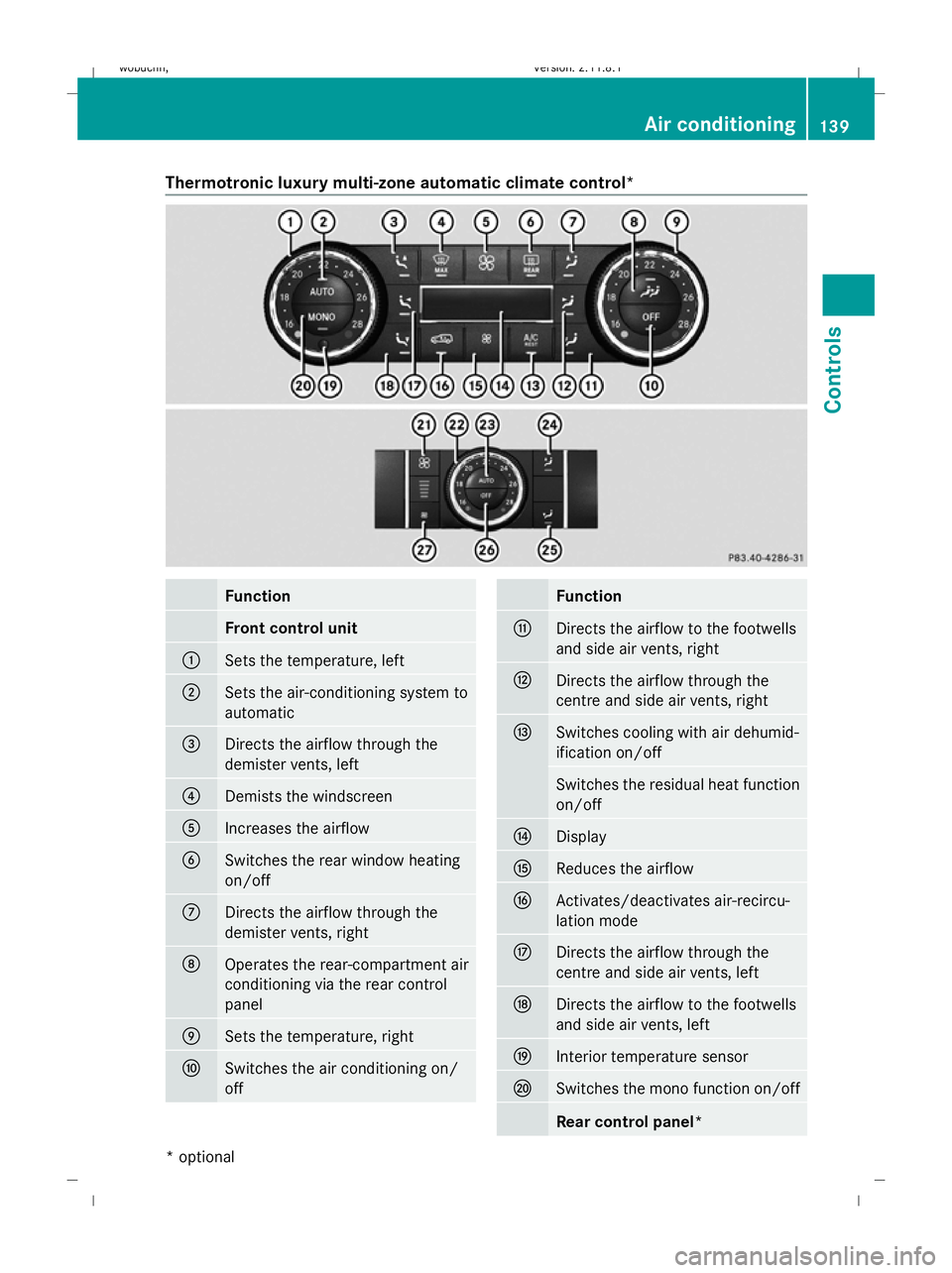
Thermotronic luxury multi-zone automatic climate control*
Function
Front control unit
:
Sets the temperature, left
;
Sets the air-conditioning system to
automatic
=
Directs the airflow through the
demister vents, left
?
Demists the windscreen
A
Increases the airflow
B
Switches the rear window heating
on/off
C
Directs the airflow through the
demister vents, right
D
Operates the rear-compartment air
conditioning via the rear control
panel E
Sets the temperature, right
F
Switches the air conditioning on/
off Function
G
Directs the airflow to the footwells
and side air vents, right
H
Directs the airflow through the
centre and side air vents, right
I
Switches cooling with air dehumid-
ification on/off
Switches the residual heat function
on/off
J
Display
K
Reduces the airflow
L
Activates/deactivates air-recircu-
lation mode
M
Directs the airflow through the
centre and side air vents, left
N
Directs the airflow to the footwells
and side air vents, left
O
Interior temperature sensor
P
Switches the mono function on/off
Rear control panel* Air conditioning
139Controls
* optional
X164_AKB; 2; 3, en-GB
wobuchh
,V ersion: 2.11.8.1
2009-03-31T14:14:58+02:00 - Seite 139 Z
Dateiname: 6515431202_buchblock.pdf; erzeugt am 01. Apr 2009 00:17:29; WK
Page 143 of 309
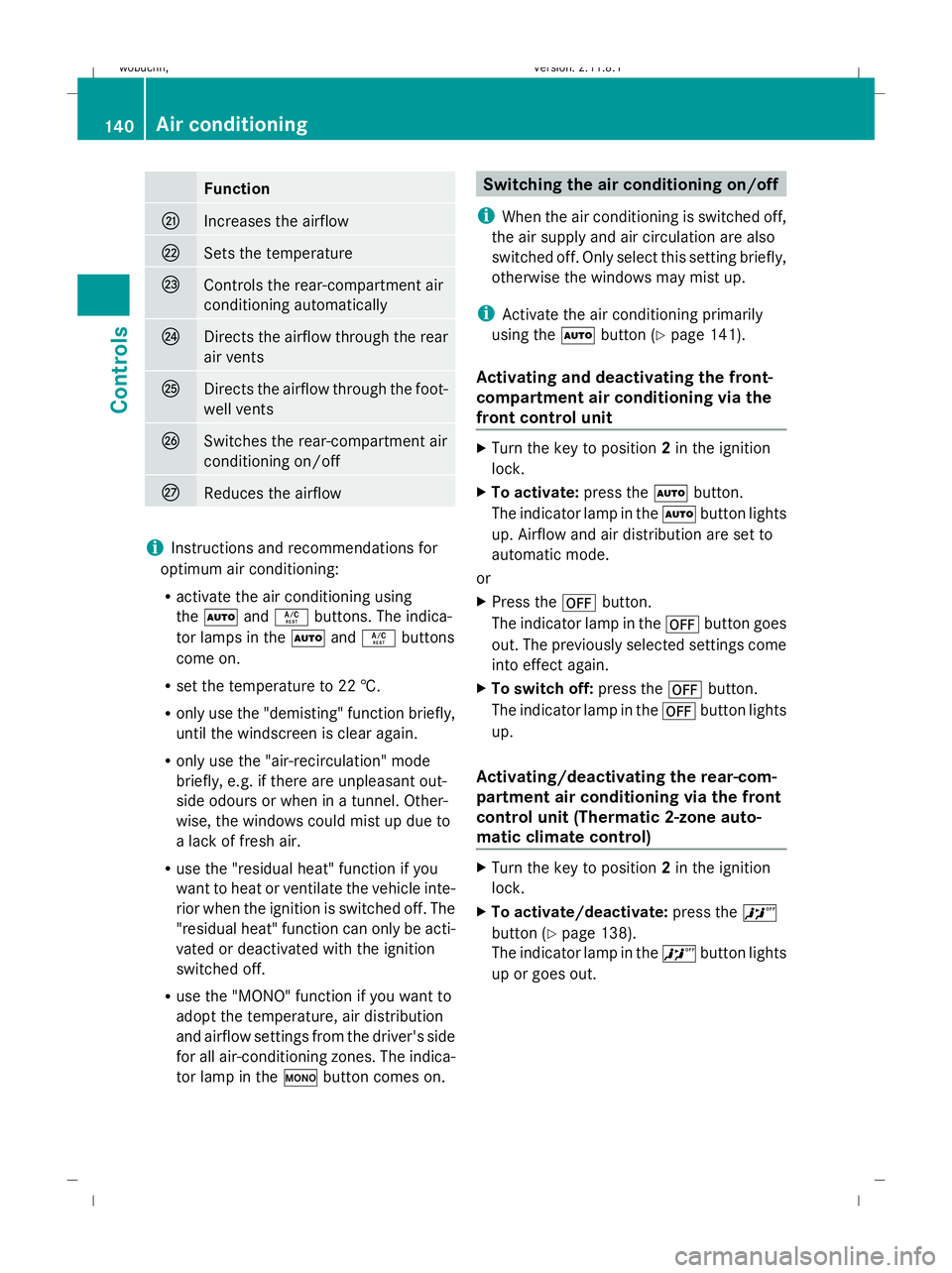
Function
Q
Increases the airflow
R
Sets the temperature
S
Controls the rear-compartment air
conditioning automatically
T
Directs the airflow through the rear
air vents
U
Directs the airflow through the foot-
well vents
V
Switches the rear-compartment air
conditioning on/off
W
Reduces the airflow
i
Instructions and recommendations for
optimum air conditioning:
R activate the air conditioning using
the à andÁ buttons. The indica-
tor lamps in the ÃandÁ buttons
come on.
R set the temperature to 22 †.
R only use the "demisting" function briefly,
until the windscreen is clear again.
R only use the "air-recirculation" mode
briefly, e.g. if there are unpleasant out-
side odours or when in a tunnel. Other-
wise, the windows could mist up due to
a lack of fresh air.
R use the "residual heat" function if you
want to heat or ventilate the vehicle inte-
rior when the ignition is switched off. The
"residual heat" function can only be acti-
vated or deactivated with the ignition
switched off.
R use the "MONO" function if you want to
adopt the temperature, air distribution
and airflow settings from the driver's side
for all air-conditioning zones. The indica-
tor lamp in the ºbutton comes on. Switching the air conditioning on/off
i When the air conditioning is switched off,
the air supply and air circulation are also
switched off. Only select this setting briefly,
otherwise the windows may mist up.
i Activate the air conditioning primarily
using the Ãbutton (Y page 141).
Activating and deactivating the front-
compartment air conditioning via the
front control unit X
Turn the key to position 2in the ignition
lock.
X To activate: press theÃbutton.
The indicator lamp in the Ãbutton lights
up. Airflow and air distribution are set to
automatic mode.
or
X Press the ^button.
The indicator lamp in the ^button goes
out. The previously selected settings come
into effect again.
X To switch off: press the^button.
The indicator lamp in the ^button lights
up.
Activating/deactivating the rear-com-
partment air conditioning via the front
control unit (Thermatic 2-zone auto-
matic climate control) X
Turn the key to position 2in the ignition
lock.
X To activate/deactivate: press the^
button (Y page 138).
The indicator lamp in the ^button lights
up or goes out. 140
Air conditioningControls
X164_AKB; 2; 3, en-GB
wobuchh,
Version: 2.11.8.1 2009-03-31T14:14:58+02:00 - Seite 140
Dateiname: 6515431202_buchblock.pdf; erzeugt am 01. Apr 2009 00:17:29; WK
Page 144 of 309
Activating/deactivating the rear-com-
partment air conditioning via the front
control unit* (Thermotronic multi-zone
luxury automatic climate control*)
X
Turn the key to position 2in the ignition
lock.
X To switch on: press theYbutton
(Y page 139).
ON and MODE are shown in the Thermotronic
multi-zone luxury automatic climate con-
trol* display behind the Ysymbol. The
MODE display goes out after three seconds.
The display switches back to the standard
display.
X To deactivate: press theYbutton
(Y page 139).
MODE is shown in the display behind the
Y symbol.
X Press the ^button (Y page 139).
OFF is shown in the display behind the
Y symbol.
Activating/deactivating the rear-com-
partment air conditioning via the rear
control unit* (Thermotronic multi-zone
luxury automatic climate control*) X
Turn the key to position 2in the ignition
lock.
X Activate Thermotronic multi-zone luxury
automatic climate control*.
X To activate: press theÃbutton.
The indicator lamp in the Ãbutton lights
up.
X To switch off: press the^button.
The indicator lamp in the ^button lights
up. Switching cooling with air dehumidi-
fication on/off
The "cooling with air dehumidification" func-
tion is only available when the engine is run-
ning. The air inside the vehicle is cooled and dehumidified according to the temperature
selected. G
Risk of accident
If you switch off the "Cooling with air dehu-
midification" function, the air inside the vehi-
cle will not be cooled (in warm weather) or
dehumidified. The windows could mist up
more quickly. This may prevent you from
observing the traffic conditions, thereby caus-
ing an accident.
Condensation may drip from the underside of
the vehicle when Thermatic is in cooling
mode.
X To activate: press theÁbutton.
The indicator lamp in the Ábutton
comes on.
X To switch off: press theÁbutton.
The indicator lamp in the Ábutton goes
out. The cooling with air dehumidification
function has a delayed switch-off feature. Controlling the air conditioning auto-
matically
In automatic mode, the set temperature is
maintained automatically at a constant level.
The system automatically regulates the tem-
perature of the dispensed air, the airflow and
the air distribution.
The automatic air conditioning will achieve
optimal operation if "cooling with air dehu-
midification" is also activated. If necessary,
cooling with air dehumidification can be deac-
tivated.
Controlling the front-compartment air
conditioning via the front control unit X
Turn the key to position 2in the ignition
lock.
X Set the desired temperature.
X To switch on: press theÃbutton.
The indicator lamp in the Ãbutton lights
up. Automatic air distribution and airflow
are activated. Air conditioning
141Controls
* optional
X164_AKB; 2; 3, en-GB
wobuchh,
Version: 2.11.8.1 2009-03-31T14:14:58+02:00 - Seite 141 Z
Dateiname: 6515431202_buchblock.pdf; erzeugt am 01. Apr 2009 00:17:29; WK
Page 145 of 309
X
To deactivate: press theKorI
button.
The indicator lamp in the Ãbutton goes
out. Automatic airflow is deactivated and
the airflow is controlled according to the
level set. Automatic air distribution
remains activated.
or
X Press the Z,M,¯,\,P,
c orO button.
The indicator lamp in the Ãbutton goes
out. Automatic air distribution is deactiva-
ted. Air distribution is controlled according
to the position set. Automatic airflow
remains activated.
Controlling the rear-compartment air
conditioning automatically via the rear
control unit* X
Turn the key to position 2in the ignition
lock.
X Activate Thermotronic luxury multi-zone
automatic climate control*.
X Set the desired temperature.
X To switch on: press theÃbutton.
The indicator lamp in the Ãbutton lights
up. Automatic air distribution and airflow
are activated.
X To deactivate: press theKorI
button.
Automatic airflow is deactivated and the
airflow is controlled according to the level
set. Automatic air distribution remains acti-
vated.
or
X Press one of the MorO buttons.
Automatic air distribution is deactivated.
Air distribution is controlled according to
the position set. Automatic airflow remains
activated. Setting the temperature
Thermatic 2-zone automatic climate
control Different temperatures can be set for the
driver's and front-passenger sides.
X
Turn the key to position 2in the ignition
lock.
X To increase/reduce: turn controls:and
C clockwise or anti-clockwise
(Y page 138). Only change the temperature
setting in small increments. Start at 22 †.
Thermotronic multi-zone luxury auto-
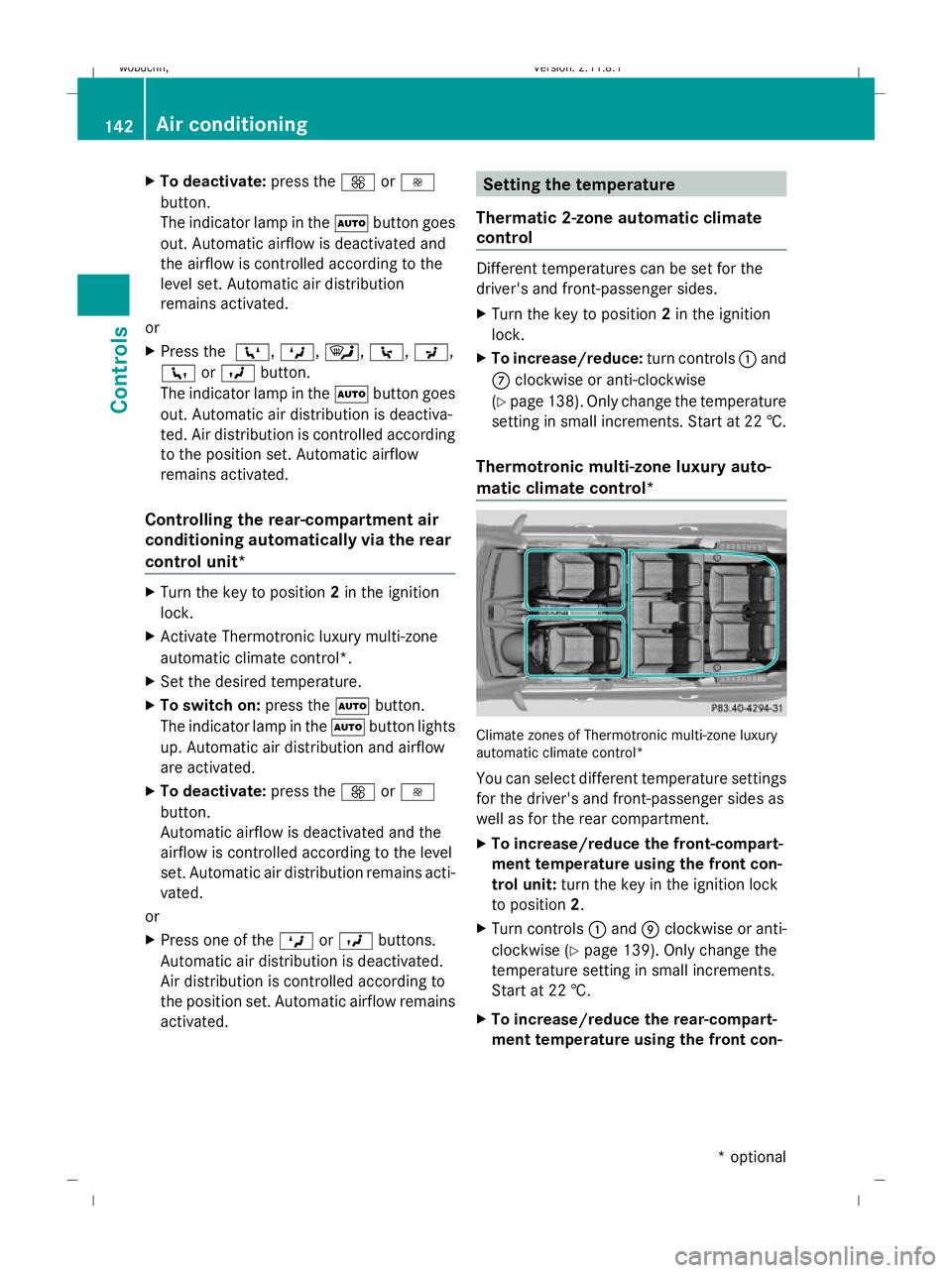
matic climate control* Climate zones of Thermotronic multi-zone luxury
automatic climate control*
You can select different temperature settings
for the driver's and front-passenger sides as
well as for the rear compartment.
X To increase/reduce the front-compart-
ment temperature using the front con-
trol unit: turn the key in the ignition lock
to position 2.
X Turn controls :and Eclockwise or anti-
clockwise (Y page 139). Only change the
temperature setting in small increments.
Start at 22 †.
X To increase/reduce the rear-compart-
ment temperature using the front con- 142
Air conditioningControls
* optional
X164_AKB; 2; 3, en-GB
wobuchh
,V ersion: 2.11.8.1
2009-03-31T14:14:58+02:00 - Seite 142
Dateiname: 6515431202_buchblock.pdf; erzeugt am 01. Apr 2009 00:17:29; WK