trip computer MERCEDES-BENZ GL SUV 2009 Owners Manual
[x] Cancel search | Manufacturer: MERCEDES-BENZ, Model Year: 2009, Model line: GL SUV, Model: MERCEDES-BENZ GL SUV 2009Pages: 309, PDF Size: 10.27 MB
Page 9 of 309
C
Calling up a fault see Display message .....................211
Care
Automatic car wash .......................201
Care products ................................ 201
Cleaning agents ............................. 201
Dashboard ..................................... 204
Display ........................................... 204
Exterior .......................................... 201
Headlamps ..................................... 203
High-pressure cleaners ..................202
Interior ........................................... 204
Paintwork ...................................... 202
Plastic trim .................................... 205
Reversing camera ..........................203
Seat covers .................................... 204
Sensors ......................................... 203
Steering wheel boss ......................204
Tail pipes ....................................... 203
Trailer tow hitch ............................. 203
Trim strips ..................................... 205
Wheels ........................................... 202
Windows ........................................ 202
Wiper blades .................................. 202
Wooden trim .................................. 205
Care products .................................... 201
CD player/CD changer Operating (on-board computer) .....101
Central locking
Automatic locking (on-board com-
puter) ............................................. 107
Key .................................................. 58
Central locking/unlocking button .....59
Central unlocking Key .................................................. 58
Centre console
Overview .......................................... 29
Changing a wheel
see Flat tyre
Checklist (off-road driving) ..............189
Child-proof locks Rear doors ....................................... 49
Children
in the vehicle ................................... 41
Restraint systems ............................ 41Child seat
Automatic recognition .....................43
Automatic recognition (malfunc-
tion) ............................................... 234
Child seat lock ................................ 47
Display message ............................ 216
ISOFIX .............................................. 47
On the front-passenger sea t............ 42
Recommendations ...........................46
Suitable positions ............................ 44
TopTether ........................................ 48
Child seat lock ..................................... 47
Cigarette lighter ................................ 163
Cleaning agents ................................. 201
Cleaning the sensors ........................203
Climate control Cooling with air dehumidification ..141
Misted up windows ........................146
Cockpit
Overview .......................................... 23
Collapsible wheel
Technical data ............................... 297
COMAND display
Cleaning ......................................... 204
Compass ............................................ 166
Display message ............................ 216
Constant headlamp mode
see Daytime driving lights ..............105
Consumption statistics (on-board
computer) .......................................... 110
Convenience closing ...........................87
Convenience opening ..........................87
Coolant Checking the level .........................177
Display mes-
sage ...................................... .219, 224
Mixture ratio .................................. 291
Temperature gauge ........................ 100
Cornering lights
Display message ............................ 225
Cruise control .................................... 117
Display message .................... 218, 219
Cup holder ......................................... 1536
Index X164_AKB; 2; 3, en-GB
wobuchh,
Version: 2.11.8.1 2009-03-31T14:14:58+02:00 - Seite 6Dateiname: 6515431202_buchblock.pdf; erzeugt am 01. Apr 2009 00:16:29; WK
Page 14 of 309
Luggage cover
................................... 157
Luggage net Front-passenger footwell ...............154
Front seats (behind) ....................... 154
Lumbar support
4-way ............................................... 66
Luxury head restraint .........................66 M
Main-beam headlamps Display message ............................ 227
Maintenance
Battery ........................................... 272
Making calls
On-board computer .......................111
Memory card ...................................... 101
Operating (on-board computer) .....101
see separate operating instructions
Memory function ................................. 74
Menu Overview of the menus ....................99
Menu (on-board computer) ................. 99
Additional functions .......................109
Audio ............................................. 100
Distronic ........................................ 124
DVD ............................................... 102
Navi ............................................... 102
Off-road ......................................... 102
Resetting to factory settings ..........103
Settings ......................................... 103
Standard displa y.............................. 99
Telephone ...................................... 111
Trip computer ................................ 110
TV .................................................. 101
Message
see Display message .....................211
see Indicator and warning lamp .....235
Minispare emergency spare wheel
Technical data ............................... 297
Mirrors
Sun visor ........................................ 162
see Exterior mirrors or Rear-view mirror
Mobile phone ..................................... 164
Display message .................... 216, 232
Installation ..................................... 285
Operation (on-board computer) .....111 Mobile telephone
see Mobile phone .......................... 164
Modifying the programming
Key .................................................. 59
MP3 .................................................... 101
Operating (on-board computer) .....101
see separate operating instructions
Multicontour seat ................................ 67
Multi-function display .........................98
Setting the display when the igni-
tion is switched off (on-board
computer) ...................................... 107
Multi-function steering wheel ............97
Overview .......................................... 28 N
Navigation .......................................... 102
On-board computer .......................102
see separate operating instructions
NECK-PRO head restraints .................40
Resetting after being triggered ......252
NECK-PRO luxury head restraints ...... 40
Resetting after being triggered ......252
Notes on running in a new vehicle ..172 O
Odometer see Trip meter ............................... 110
Off-road
4MATIC .......................................... 112
Differential locks ............................ 116
DSR ............................................... 113
LOW RANGE off-road gear .............114
Off-road 4ETS .................................. 53
Off-road ABS .................................... 50
Off-road 4ETS ...................................... .53
Off-road ABS ........................................ 50
Off-road driving Checklist ........................................ 189
Information .................................... 189
Off-road ESP ®
....................................... 52
Off-road terrain Off-road ESP .................................... 52
Oil
Consumption ................................. 176
Topping up ..................................... 177 Index
11 X164_AKB; 2; 3, en-GB
wobuchh,
Version: 2.11.8.1
2009-03-31T14:14:58+02:00 - Seite 11Dateiname: 6515431202_buchblock.pdf; erzeugt am 01. Apr 2009 00:16:30; WK
Page 15 of 309
Oil level
Checking (dipstick) ........................177
Checking (on-board computer) ......176
On-board computer .............................97
Additional functions menu .............109
Audio menu ................................... 100
Convenience submenu ..................108
Display messages ..........................211
DVD menu ..................................... 102
Factory settings ............................. 103
Heating submenu ........................... 107
Instrument cluster submenu ..........103
Lighting submenu .......................... 105
Navi menu ..................................... 102
Off-road menu ............................... 102
Overview .......................................... 99
Settings menu ............................... 103
Standard display menu ....................99
Telephone menu ............................ 111
Time/date submenu ......................104
Trip computer menu ......................110
TV menu ........................................ 101
Vehicle submenu ........................... 106
On-board computer language ..........104
Operating system see On-board computer ...................97
Outside temperature display ............97
On-board computer .......................100
Override feature
Rear side windows ...........................49 P
Paint code .......................................... 286
Paintwork Cleaning ......................................... 202
Panel
Removing (third row of seats) ..........68
Parking ................................................. 90
Parking aid Exterior mirror on the front-
passenger side ................................. 74
PARKTRONIC ................................. 133
Reversing camera ..........................135
Parking brake ...................................... 91
Display message ............................ 221
Parking lamps
Display message ............................ 227Parking position
Exterior mirror on the front-
passenger side ................................. 74
PARKTRONIC ...................................... 133
Activating/deactivating .................135
Malfunction ................................... .244
Range of the sensors .....................134
Trailer towing ................................. 135
Warning displa y............................. 134
PASSENGER AIRBAG OFF warning
lamp ............................................. 43, 234
Permanent four-wheel drive see 4MATIC ................................... 112
Permanent Speedtronic ....................128
Petrol Minimum grade ............................ .173
see Fuel
Plastic trim
Cleaning ......................................... 205
Power supply (trailer) .......................199
Power window switch see Side windows
Pre-emptive occupant safety system
see PRE-SAFE ®
PRE-SAFE ®
system .............................. 40
Display message ............................ 217
Program selector button
Automatic transmission ...................95
Pulling away ......................................... 89 R
Radio Changing a station (on-board
computer) ...................................... 100
see separate operating instructions
Radio-controlled equipment
Installation ..................................... 168
Rain closing feature
Sliding/tilting sunroof ...................151
Range (on-board computer) .............111
Rear bench seat Folding forward/back ....................155
Rear compartment
Activating/deactivating the air
conditioning ........................... 140, 141
Setting the air vents ......................144
Setting the temperature ................142 12
Index X164_AKB; 2; 3, en-GB
wobuchh,
Version: 2.11.8.1 2009-03-31T14:14:58+02:00 - Seite 12Dateiname: 6515431202_buchblock.pdf; erzeugt am 01. Apr 2009 00:16:30; WK
Page 18 of 309
Thermotronic
Malfunction indicator lamp ............234
Third brake lamp
Display message ............................ 226
Tightening torque .............................. 271
Time Setting (on-board computer) .......... 104
Setting the time (on-board com-
puter) ............................................. 104
TIREFIT kit
Using ............................................. 263
TopTether ............................................. 48
Total distance recorder ....................100
Tow-away protection ..........................55
Switching on/off (on-board com-
puter) ............................................. 109
Towing ................................................ 279
Towing eye Fitting ............................................ 278
Removing ....................................... 279
Trailer
7-pin connector ............................. 199
Coupling up .................................. 195
Decoupling ..................................... 196
Display message .................... 225, 226
Power supply ................................. 199
Trailer coupling
see Trailer tow hitch
Trailer loads
Technical data ............................... 298
Trailer tow hitch ................................ 193
Cleaning ......................................... 203
Trailer towing
Driving tips .................................... 196
ESP ®
................................................ 51
Malfunction ................................... .248
Mounting dimensions ....................297
Parktroni c...................................... 135
Transmission
Display message ............................ 216
Transmission output (maximum)
Telephone/two-way radio ..............285
Transmission positions ....................... 93
Transport (vehicle) ............................279
Travelling uphill ................................. 190
Trim strips Cleaning ......................................... 205 Trip computer
Menu (on-board computer) ............110
Trip computer (on-board com-
puter) ................................................. .110
Trip meter ............................................ 99
Resetting (on-board computer) ......110
Turn signal lamps
Display message ............................ 226
TV
Operating (on-board computer) .....101
Two-way radio
Installation ..................................... 285
Type identification plate
see vehicle identification plate ......286
Tyre
Direction of rotatio n...................... 180
Tyre grip ............................................. 188
Tyre pressure ................................... .180
Calling up (on-board computer) ....183
Display message ...........217, 218, 229
Tyre pressure loss warning system
............................................................ 182
Tyre pressure monitor
Warning lamp ................................. 237
Tyres
General notes ................................ 179
Technical data ....................... 296, 297
Tyre tread .......................................... .180 U
Unlocking Emergency unlocking ..................... 250
From the inside (central unlocking
button) ............................................. 59 V
Vanity mirror Sun visor ........................................ 162
Variable Speedtronic ........................126
Vehicle Emergency unlocking ............250, 251
Individual settings (on-board com-
puter) ............................................. 103
Leaving parked up .........................249
Towing ........................................... 279
Transporting .................................. 279 Index
15 X164_AKB; 2; 3, en-GB
wobuchh,
Version: 2.11.8.1
2009-03-31T14:14:58+02:00 - Seite 15Dateiname: 6515431202_buchblock.pdf; erzeugt am 01. Apr 2009 00:16:30; WK
Page 102 of 309
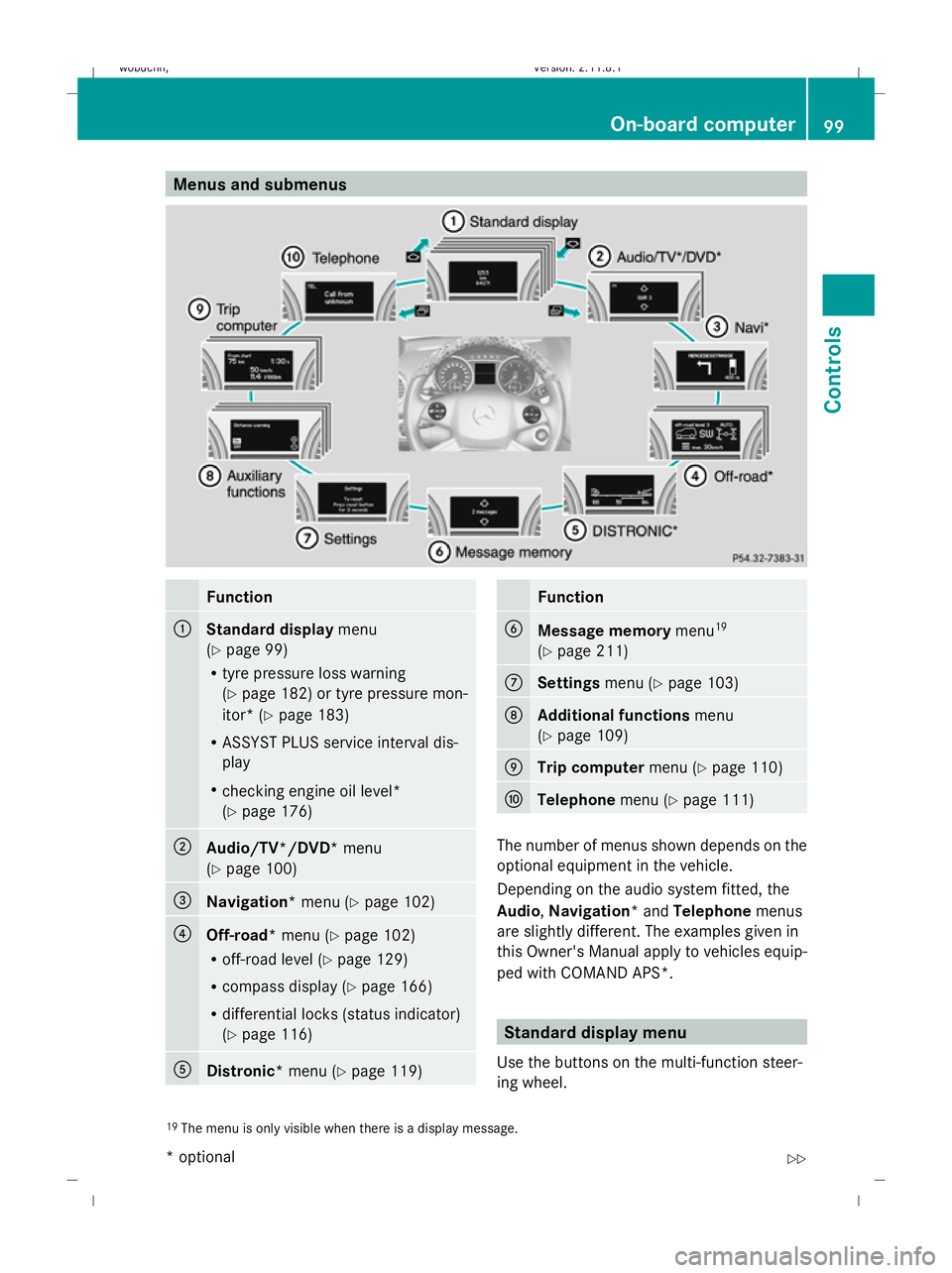
Menus and submenus
Function
:
Standard display
menu
(Y page 99)
R tyre pressure loss warning
(Y page 182) or tyre pressure mon-
itor* (Y page 183)
R ASSYST PLUS service interval dis-
play
R checking engine oil level*
(Y page 176) ;
Audio/TV*/DVD*
menu
(Y page 100) =
Navigation*
menu (Ypage 102) ?
Off-road*
menu (Ypage 102)
R off-road level (Y page 129)
R compass display (Y page 166)
R differential locks (status indicator)
(Y page 116) A
Distronic*
menu (Ypage 119) Function
B
Message memory
menu19
(Y page 211) C
Settings
menu (Ypage 103) D
Additional functions
menu
(Y page 109) E
Trip computer
menu (Ypage 110) F
Telephone
menu (Ypage 111) The number of menus shown depends on the
optional equipment in the vehicle.
Depending on the audio system fitted, the
Audio, Navigation* and Telephonemenus
are slightly different. The examples given in
this Owner's Manual apply to vehicles equip-
ped with COMAND APS*. Standard display menu
Use the buttons on the multi-function steer-
ing wheel.
19 The menu is only visible when there is a display message. On-board computer
99Controls
* optional
X164_AKB; 2; 3, en-GB
wobuchh,
Version: 2.11.8.1 2009-03-31T14:14:58+02:00 - Seite 99 Z
Dateiname: 6515431202_buchblock.pdf; erzeugt am 01. Apr 2009 00:17:15; WK
Page 103 of 309
X
Press the VorU button to select the
standard display. Standard display
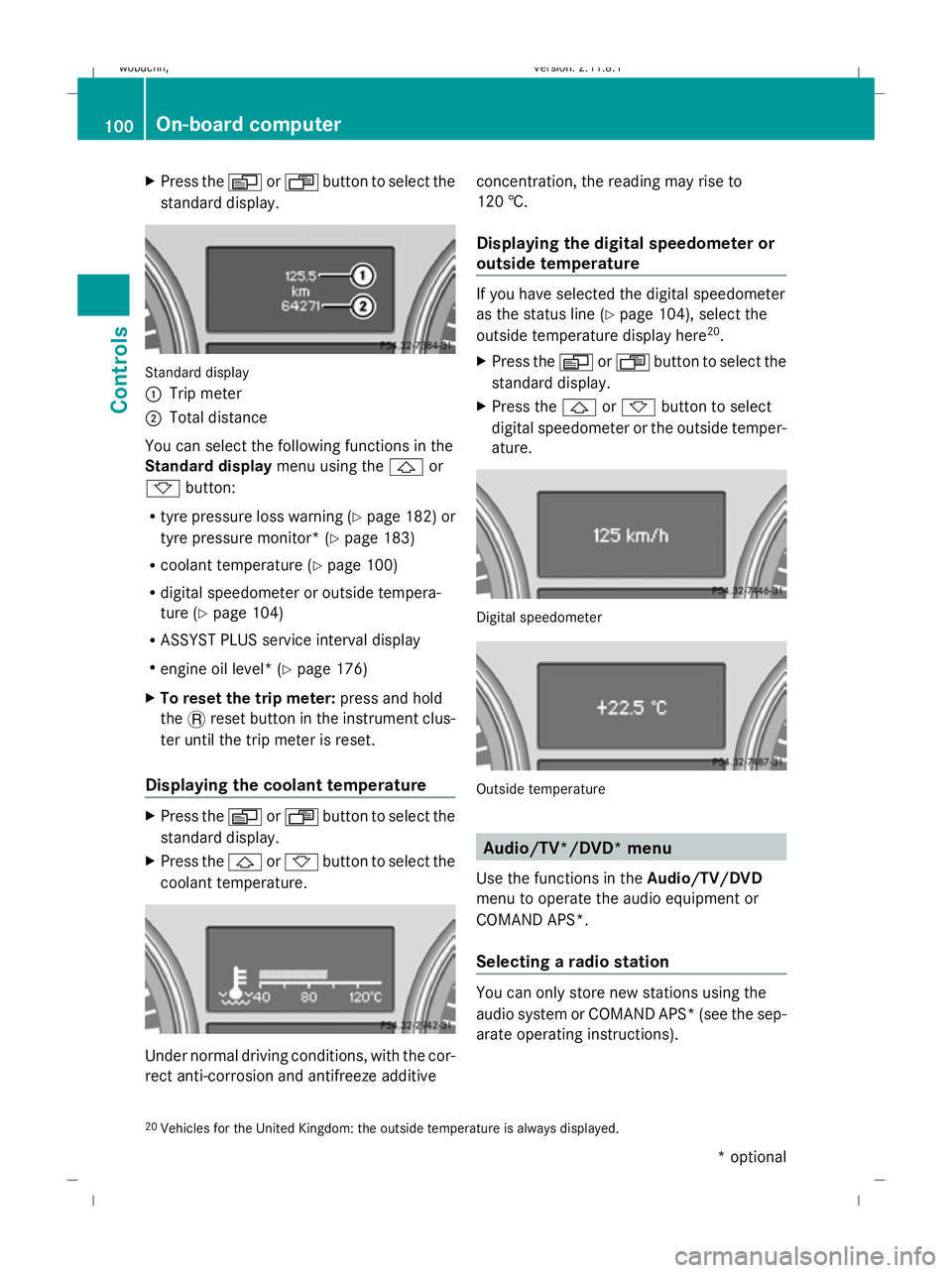
:
Trip meter
; Total distance
You can select the following functions in the
Standard display menu using the&or
* button:
R tyre pressure loss warning (Y page 182) or
tyre pressure monitor* (Y page 183)
R coolant temperature (Y page 100)
R digital speedometer or outside tempera-
ture (Y page 104)
R ASSYST PLUS service interval display
R engine oil level* (Y page 176)
X To reset the trip meter: press and hold
the .reset button in the instrument clus-
ter until the trip meter is reset.
Displaying the coolant temperature X
Press the VorU button to select the
standard display.
X Press the &or* button to select the
coolant temperature. Under normal driving conditions, with the cor-
rect anti-corrosion and antifreeze additive concentration, the reading may rise to
120 †.
Displaying the digital speedometer or
outside temperature If you have selected the digital speedometer
as the status line (Y
page 104), select the
outside temperature display here 20
.
X Press the VorU button to select the
standard display.
X Press the &or* button to select
digital speedometer or the outside temper-
ature. Digital speedometer
Outside temperature
Audio/TV*/DVD* menu
Use the functions in the Audio/TV/DVD
menu to operate the audio equipment or
COMAND APS*.
Selecting a radio station You can only store new stations using the
audio system or COMAND APS* (see the sep-
arate operating instructions).
20 Vehicles for the United Kingdom: the outside temperature is always displayed. 100
On-board computerControls
* optional
X164_AKB; 2; 3, en-GB
wobuchh,
Version: 2.11.8.1 2009-03-31T14:14:58+02:00 - Seite 100
Dateiname: 6515431202_buchblock.pdf; erzeugt am 01. Apr 2009 00:17:15; WK
Page 106 of 309
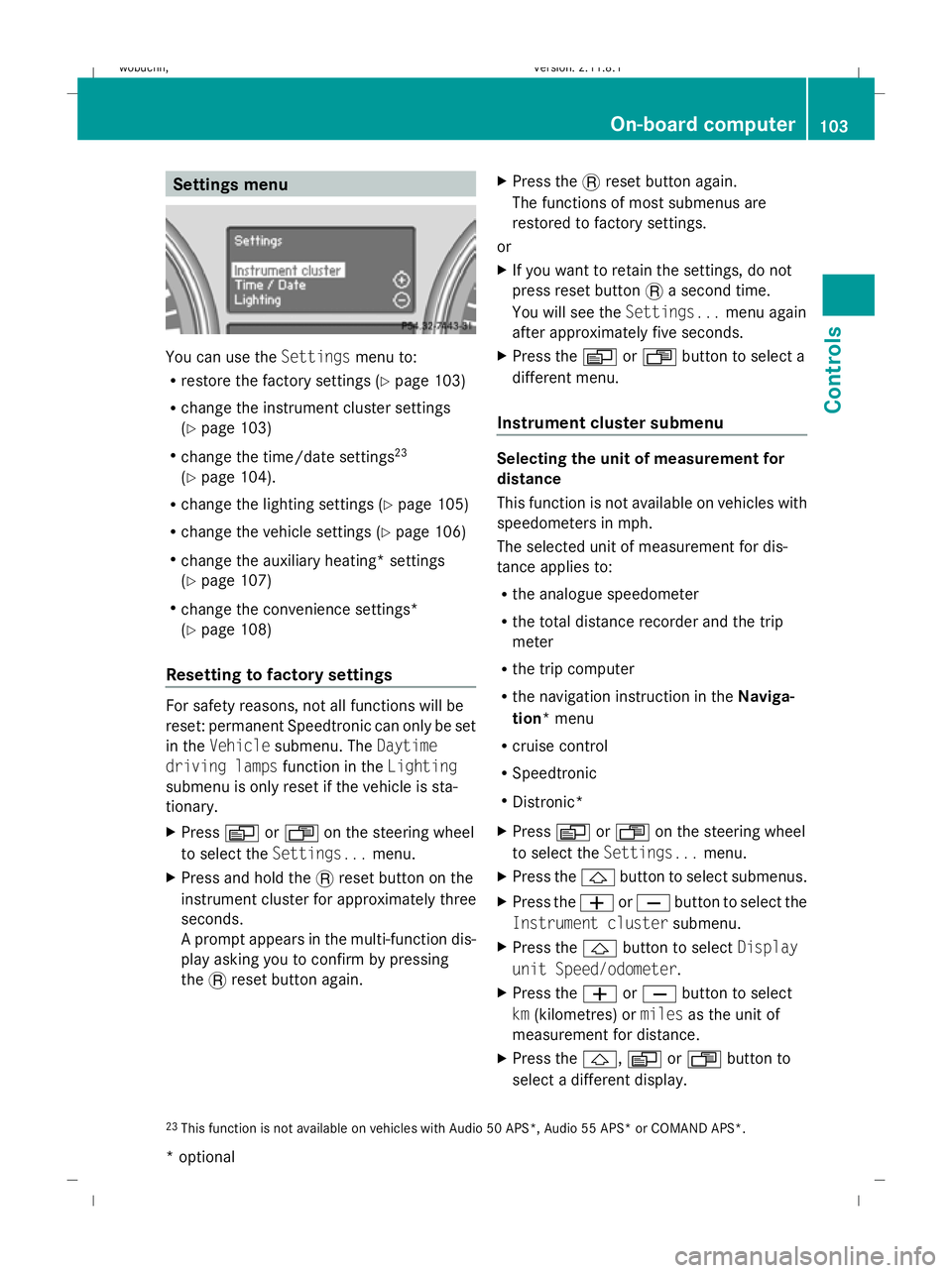
Settings menu
You can use the
Settingsmenu to:
R restore the factory settings (Y page 103)
R change the instrument cluster settings
(Y page 103)
R change the time/date settings 23
(Y page 104).
R change the lighting settings (Y page 105)
R change the vehicle settings (Y page 106)
R change the auxiliary heating* settings
(Y page 107)
R change the convenience settings*
(Y page 108)
Resetting to factory settings For safety reasons, not all functions will be
reset: permanent Speedtronic can only be set
in the Vehicle submenu. The Daytime
driving lamps function in theLighting
submenu is only reset if the vehicle is sta-
tionary.
X Press VorU on the steering wheel
to select the Settings... menu.
X Press and hold the .reset button on the
instrument cluster for approximately three
seconds.
A prompt appears in the multi-function dis-
play asking you to confirm by pressing
the .reset button again. X
Press the .reset button again.
The functions of most submenus are
restored to factory settings.
or
X If you want to retain the settings, do not
press reset button .a second time.
You will see the Settings...menu again
after approximately five seconds.
X Press the VorU button to select a
different menu.
Instrument cluster submenu Selecting the unit of measurement for
distance
This function is not available on vehicles with
speedometers in mph.
The selected unit of measurement for dis-
tance applies to:
R
the analogue speedometer
R the total distance recorder and the trip
meter
R the trip computer
R the navigation instruction in the Naviga-
tion* menu
R cruise control
R Speedtronic
R Distronic*
X Press VorU on the steering wheel
to select the Settings... menu.
X Press the &button to select submenus.
X Press the WorX button to select the
Instrument cluster submenu.
X Press the &button to select Display
unit Speed/odometer.
X Press the WorX button to select
km (kilometres) or milesas the unit of
measurement for distance.
X Press the &,VorU button to
select a different display.
23 This function is not available on vehicles with Audio 50 APS*, Audio 55 APS* or COMAND APS*. On-board computer
103Controls
* optional
X164_AKB; 2; 3, en-GB
wobuchh,
Version: 2.11.8.1 2009-03-31T14:14:58+02:00 - Seite 103 Z
Dateiname: 6515431202_buchblock.pdf; erzeugt am 01. Apr 2009 00:17:16; WK
Page 113 of 309
X
Press VorU on the steering wheel
to select the Additional functions menu.
X IfTow-away protection is not displayed,
press the &or* button to select
Tow-away protection.
X Press the WorX button to prime or
deactivate Tow-away protection.
X Press &, VorU to select a dif-
ferent display.
Priming/deactivating the interior
motion sensor* If you deactivate the
Interior motion sen‐
sor, it will not be primed when you next lock
the vehicle.
X Press VorU on the steering wheel
to select the Additional functions menu.
X If the Interior motion sensor function
is not displayed, press the &or*
button to select the Interior motion
sensor.
X Press the WorX button to prime or
deactivate the Interior motion sensor .
X Press &, VorU to select a dif-
ferent display. Trip computer menu
You can use the Trip computermenu to call
up or reset statistical data for your vehicle.
You can select kmormiles as the unit of
measurement for distance (Y page 103).
Trip computer "From start" or "From
reset" The values in the
From startsubmenu are
calculated from the start of a journey whilst
the values in the From resetsubmenu are
calculated from the last time the submenu
was reset. X
Press VorU on the steering wheel
to select the trip computer menu.
X Press &or* to select From start
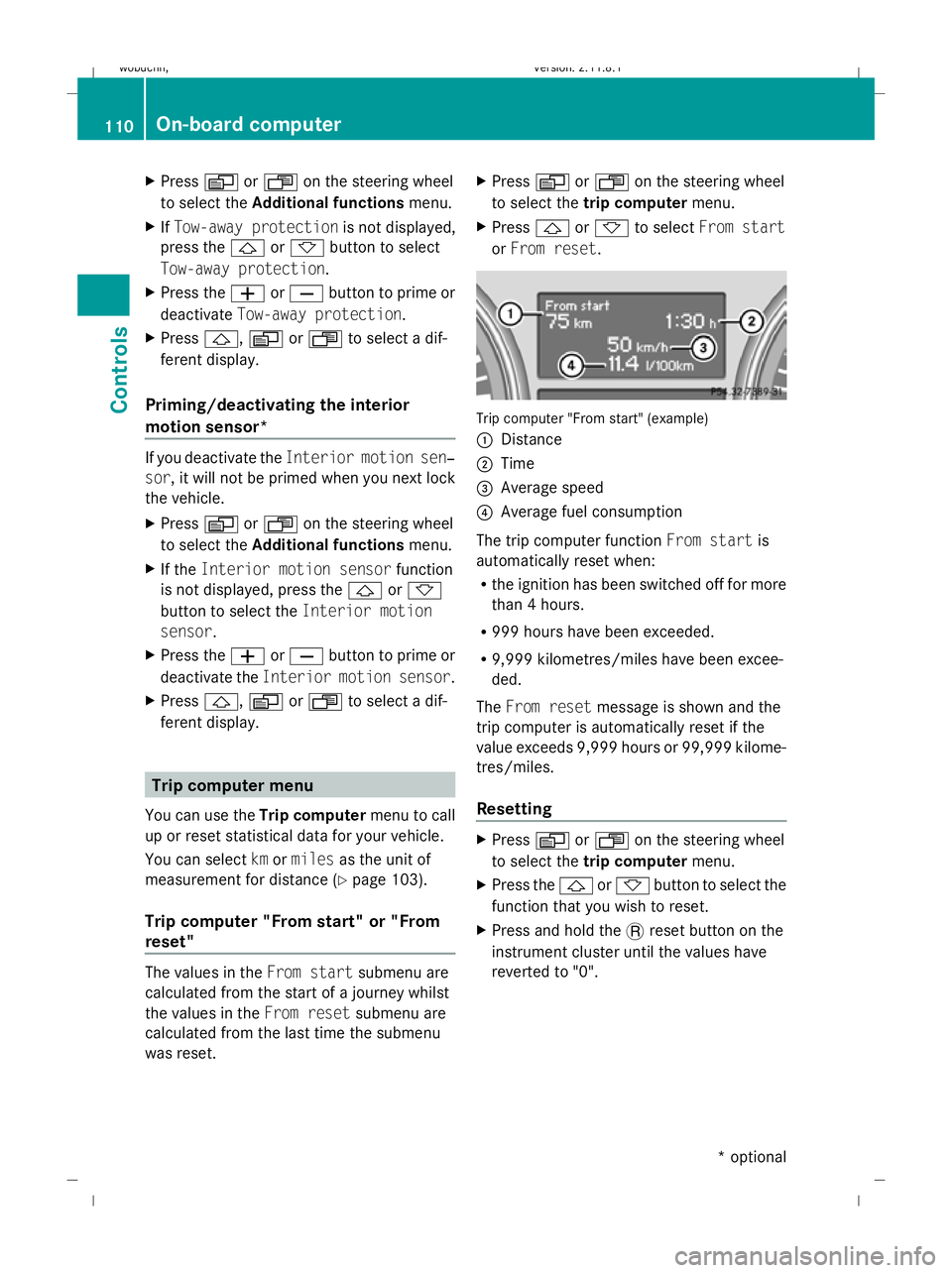
or From reset. Trip computer "From start" (example)
:
Distance
; Time
= Average speed
? Average fuel consumption
The trip computer function From startis
automatically reset when:
R the ignition has been switched off for more
than 4 hours.
R 999 hours have been exceeded.
R 9,999 kilometres/miles have been excee-
ded.
The From reset message is shown and the
trip computer is automatically reset if the
value exceeds 9,999 hours or 99,999 kilome-
tres/miles.
Resetting X
Press VorU on the steering wheel
to select the trip computer menu.
X Press the &or* button to select the
function that you wish to reset.
X Press and hold the .reset button on the
instrument cluster until the values have
reverted to "0". 110
On-board computerControls
* optional
X164_AKB; 2; 3, en-GB
wobuchh,
Version: 2.11.8.1 2009-03-31T14:14:58+02:00 - Seite 110
Dateiname: 6515431202_buchblock.pdf; erzeugt am 01. Apr 2009 00:17:17; WK
Page 114 of 309
Calling up the range
X
Press VorU on the steering wheel
to select the trip computer menu.
X Press &or* to select Range:
The multi-function display shows the esti-
mated range of the vehicle, based on the
current driving style and the fuel level. If
there is only a small amount of fuel remain-
ing in the fuel tank, a vehicle refuelling
C appears instead of the range.
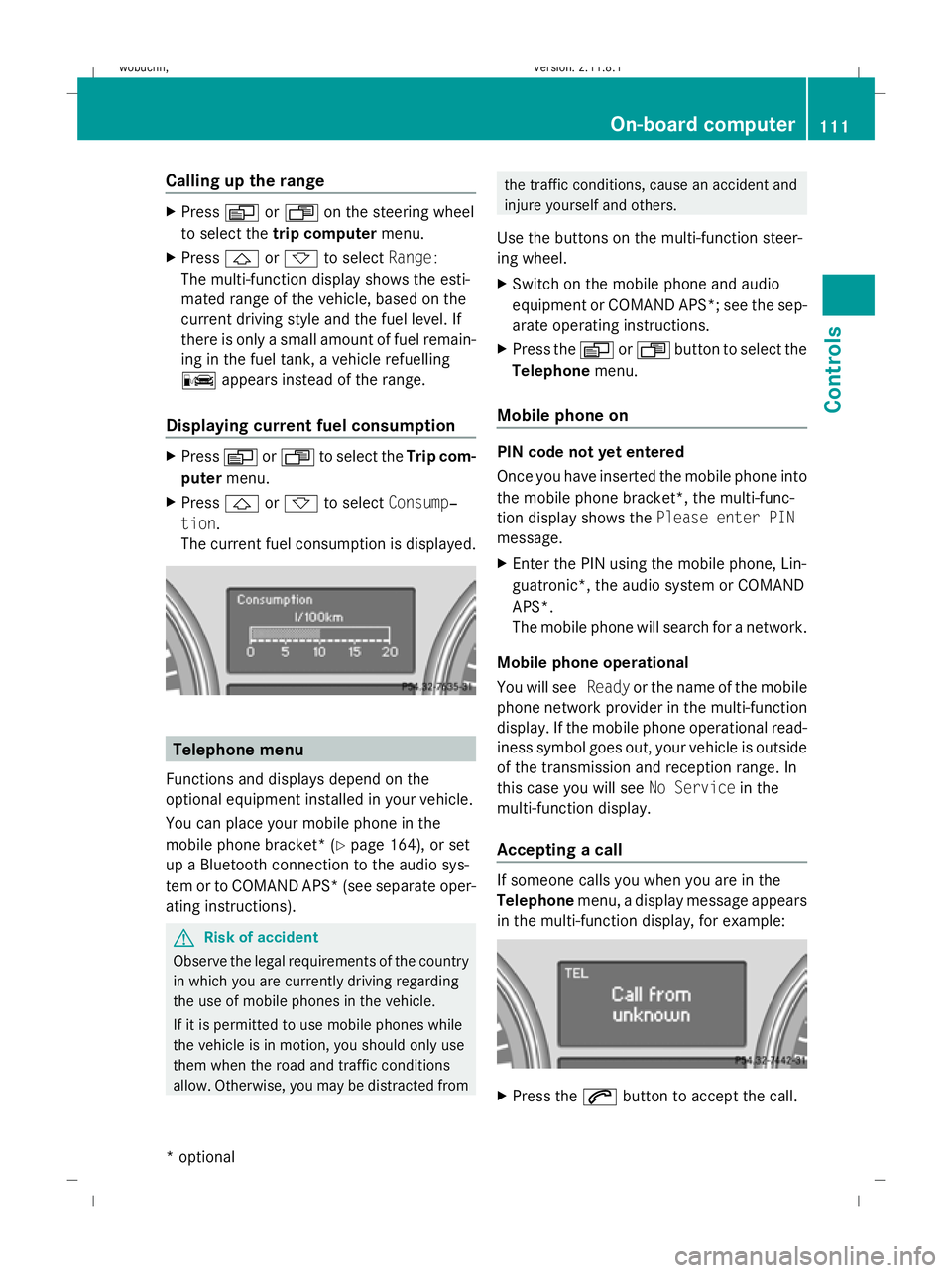
Displaying current fuel consumption X
Press VorU to select the Trip com-
puter menu.
X Press &or* to select Consump‐
tion.
The current fuel consumption is displayed. Telephone menu
Functions and displays depend on the
optional equipment installed in your vehicle.
You can place your mobile phone in the
mobile phone bracket* (Y page 164), or set
up a Bluetooth connection to the audio sys-
tem or to COMAND APS* (see separate oper-
ating instructions). G
Risk of accident
Observe the legal requirements of the country
in which you are currently driving regarding
the use of mobile phones in the vehicle.
If it is permitted to use mobile phones while
the vehicle is in motion, you should only use
them when the road and traffic conditions
allow. Otherwise, you may be distracted from the traffic conditions, cause an accident and
injure yourself and others.
Use the buttons on the multi-function steer-
ing wheel.
X Switch on the mobile phone and audio
equipment or COMAND APS*; see the sep-
arate operating instructions.
X Press the VorU button to select the
Telephone menu.
Mobile phone on PIN code not yet entered
Once you have inserted the mobile phone into
the mobile phone bracket*, the multi-func-
tion display shows the Please enter PIN
message.
X Enter the PIN using the mobile phone, Lin-
guatronic*, the audio system or COMAND
APS*.
The mobile phone will search for a network.
Mobile phone operational
You will see Readyor the name of the mobile
phone network provider in the multi-function
display. If the mobile phone operational read-
iness symbol goes out, your vehicle is outside
of the transmission and reception range. In
this case you will see No Servicein the
multi-function display.
Accepting a call If someone calls you when you are in the
Telephone
menu, a display message appears
in the multi-function display, for example: X
Press the 6button to accept the call. On-board computer
111Controls
* optional
X164_AKB; 2; 3, en-GB
wobuchh,
Version: 2.11.8.1 2009-03-31T14:14:58+02:00 - Seite 111 Z
Dateiname: 6515431202_buchblock.pdf; erzeugt am 01. Apr 2009 00:17:18; WK