light MERCEDES-BENZ GL SUV 2012 Owners Manual
[x] Cancel search | Manufacturer: MERCEDES-BENZ, Model Year: 2012, Model line: GL SUV, Model: MERCEDES-BENZ GL SUV 2012Pages: 441, PDF Size: 10.66 MB
Page 207 of 441
X
To adjust the se tspee din1k m/h incre-
ments: briefly press the cruise control
lever up :or down ;to the pressure
point.
The last stored speed increase sordecrea-
ses in 1km/ hincrements.
X To adjust the set speed in 10 km/h
increments: briefly pressthe cruise con-
trol lever up :or down ;to beyon dthe
pressur epoint.
The last stored speed inc reases or decrea-
ses in 10 km/ hincrements.
i DISTRONIC PLUS is not deactivated if you
depress the accelerator pedal. If you accel-
erate to overtake, DISTRONIC PLUS
adjusts the vehicle's speed to the last
speed sto reda fter you have finished over-
taki ng.
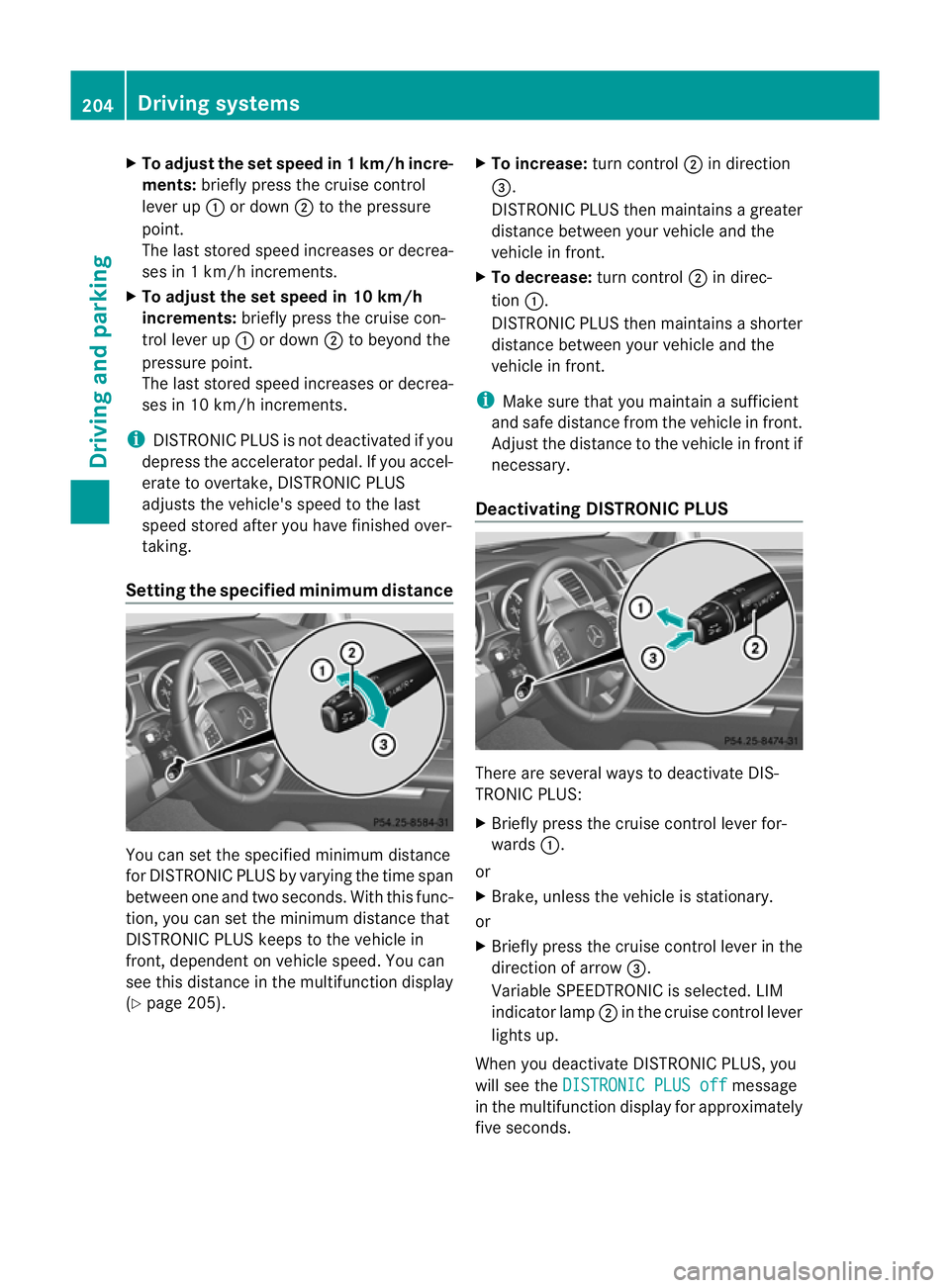
Setting th especified minimum distance Yo
uc an set the specified minimum distance
for DISTRONIC PLUS by varyin gthe tim espan
betwee none and two seconds. With thi sfun c-
tion, yo ucan set the minimum di stancethat
DISTRONIC PLU Skeep stot he vehi clein
front ,dependent on vehicle speed. You can
see this distanc einthe multifunction display
(Y page 20 5). X
To incre ase: tur nc ontrol ;in direction
=.
DISTRONIC PLU Sthenm aintains agreater
distanc ebetween your vehicle and the
vehicle in front.
X To decrease: turnc ontrol ;in direc-
tion :.
DISTRONIC PL US then maintains ashorter
distanc ebetween your vehicle and the
vehicle in front.
i Make sure that you maintai nasufficient
and safe distance from the vehicle in front.
Adjust the distance to the vehicle in front if
necessary.
Deactivating DISTRONIC PLUS There are several way
stodeactivate DI S-
TRONIC PLUS:
X Briefl ypres sthe cruise con trollever for-
wards :.
or
X Brake, unless the vehicle is stationary.
or
X Briefly press the cruise control lever in the
direction of arrow =.
Variable SPEEDTRONIC is selected. LIM
indicator lamp ;in the cruise control lever
lights up.
When you deactivate DI STRONIC PLUS, you
will see the DISTRONIC PLU Soff message
in th emultifunction displa yfor approximately
fiv es econds. 204
Driving systemsDriving and parking
Page 208 of 441
i
The last speed store dremains stored until
you switc hoff th eengine.
i DISTRONIC PLUS is not deactivated if you
depress the accelerator pedal. If you accel-
erate to overtake, DISTRONIC PLUS
adjusts the vehicle's speed to the last
speed stored after you have finished over-
taking.
DISTRONIC PLUS is automatically deactiva-
ted if:
R you engage the electric parking brake or if
the vehicl eisautomatically secured with
the electric parking brake.
R you are driving slowe rthan 25 km /hand
there is no vehicle in front, or if the vehicle
in fron tisnol onger detec ted.
R ESP ®
intervenes or you deactivat eESP®
.
R the transmission is in the P,Ror Nposition.
R the vehicle is near aradio telescop efacility
(Y page 433).
R you switch off the radar senso rsystem
(Y page 283).
R you pull the cruise control lever towards
you in order to pull away ,and the front-
passenger doo rorone of the rear doors is
open.
R you activate DSR.
R you activate off-road program 2onvehicles
with the ON&OFFROA Dpackage.
R the vehicle has skidded.
If DISTRONIC PLUS is deactivated, you will
hear awarning tone. You will see the DIS‐TRONIC PLUS off message in the multifunc-
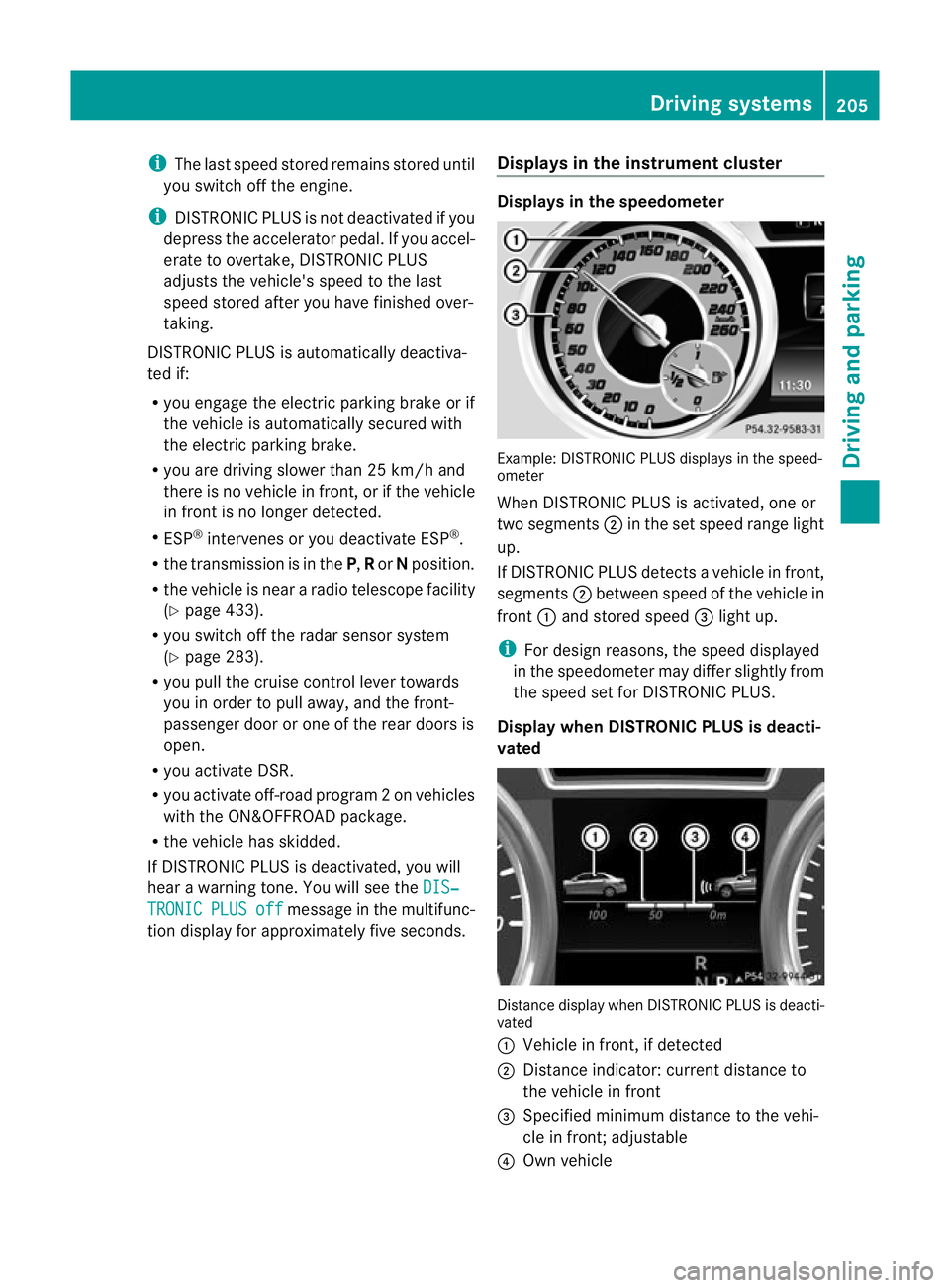
tion display for approximately five seconds. Displays in the instrument cluster Displays in the speedometer
Example: DISTRONIC PLUS displays in the speed-
ometer
When DISTRONIC PLUS is activated, one or
two segments
;in the set spee drange light
up.
If DISTRONIC PLUS detects avehicle in front,
segments ;between speed of the vehicle in
front :and stored speed =light up.
i For design reasons, the speed displayed
in the speedometer may differ slightly from
the speed set for DI STRONIC PLUS.
Display when DISTRONIC PLUS is deacti-
vated Distance display when DISTRONIC PLUS is deacti-
vated
:
Vehicle in front, if detected
; Distance indicator: curren tdistanc eto
the vehicle in front
= Specified minimum distanc etothe vehi-
cle in front; adjustable
? Own vehicle Driving systems
205Driving and parking Z
Page 210 of 441
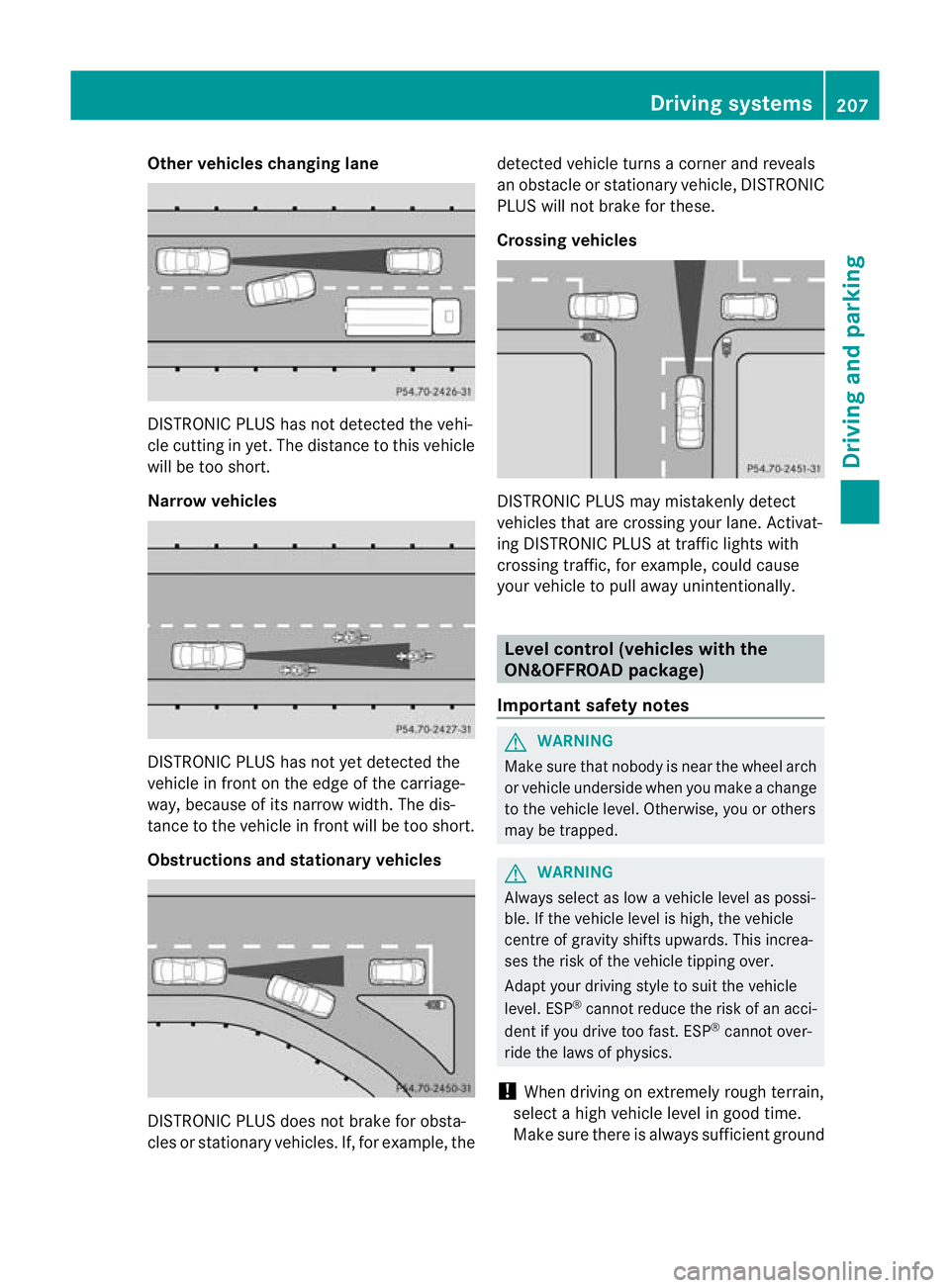
Other vehicles changing lane
DI
ST RONIC PLUS has not detected the vehi-
cle cutting in yet. The distance to this vehicle
will be too short.
Narrow vehicles DISTRONIC PLUS has not yet detected the
vehicle in fron tonthe edge of the carriage-
way, because of its narrow width. The dis-
tance to the vehicle in front will be too short.
Obstruction sand sta tionary vehicles DISTRONIC PLUS does not brake for obsta-
cles or stationary vehicles. If, for example, the detected vehicle turns
acorner and reveals
an obstacle or stationar yvehicle, DI STRONIC
PLUS will not brake for these.
Crossin gvehicles DISTRONIC PLUS may mistakenly detect
vehicles that are crossing your lane. Activat-
ing DISTRONIC PLUS at traffic lights with
crossing traffic, for example, could cause
your vehicle to pull away unintentionally.
Level control (vehicles with the
ON&OFFROAD package)
Important safety notes G
WARNING
Make sure that nobody is near the wheel arch
or vehicle underside when you make achange
to the vehicle level. Otherwise, you or others
ma ybet rapped. G
WARNING
Always select as lo wavehicle level as possi-
ble. If the vehicle level is high, the vehicle
centre of gravity shifts upwards. This increa-
ses the risk of the vehicle tippin gover.
Adapt you rdriving style to suit th evehicle
level. ESP ®
cannot reduc ethe risk of an acci-
dent if you drive too fast. ESP ®
cannot over-
rid ethe laws of physics.
! When driving on extremel yrough terrain,
select ahigh vehicle level in good time.
Make sure there is always sufficient ground Drivin
gsystems
207Drivingand pa rking Z
Page 212 of 441
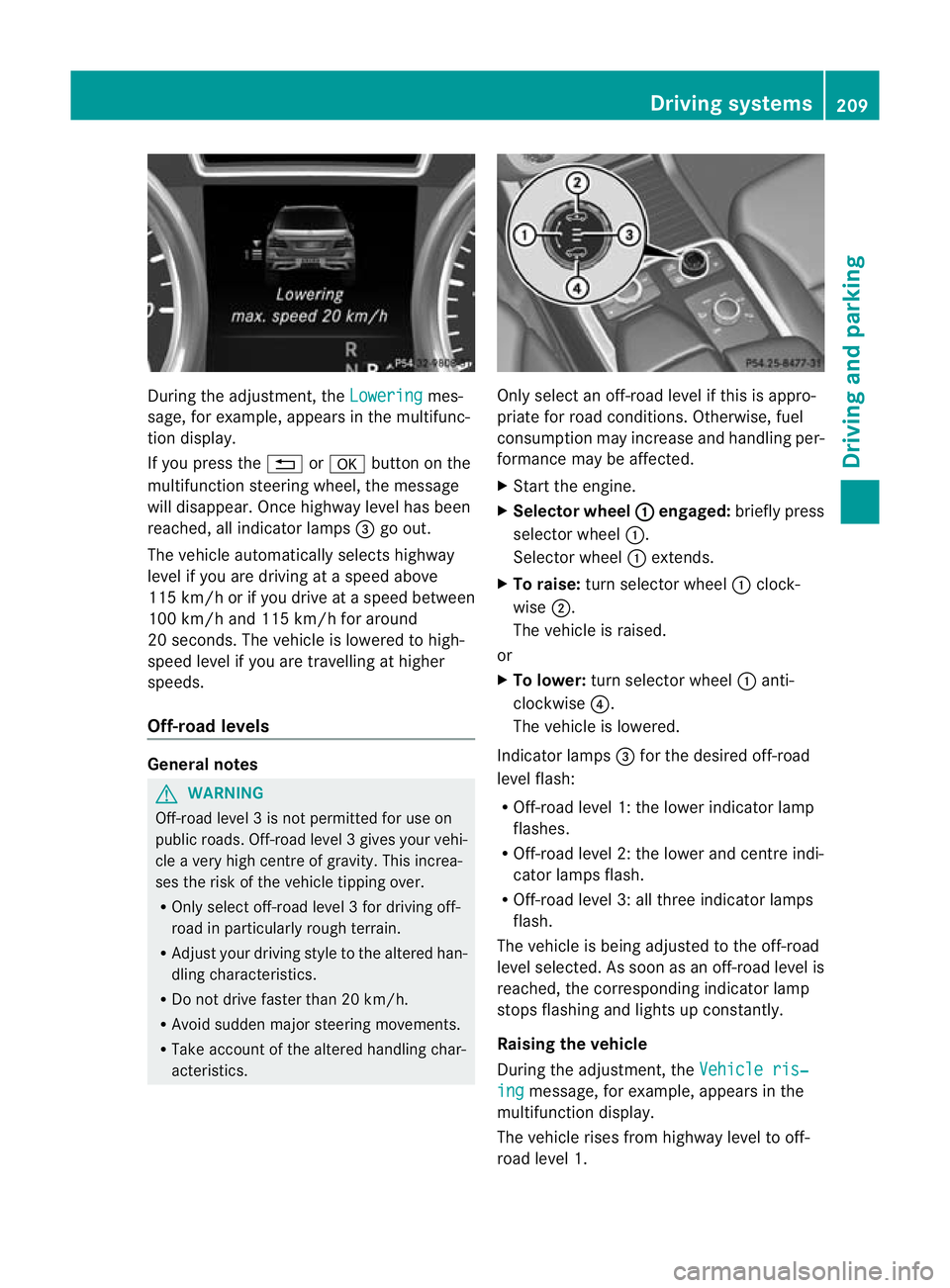
During the adjustment, the
Lowering mes-
sage ,for example, appears in the multifunc-
tion display.
If yo upressthe % ora button on the
multifunction steeri ngwheel, the message
will disappear. Onc ehighway level has been
reached, all indicator lamps =go out.
The vehicle automatically select shighway
level if you are drivin gataspeed above
11 5k m/ horify ou drive at aspeed between
10 0k m/ hand 115 km/h for around
20 seconds. The vehicle is lowered to high-
speed level if you are travelling at higher
speeds.
Off- road levels General notes
G
WARNING
Off-road level 3isn ot permitte dfor use on
public roads. Off -road level 3gives your vehi-
cle avery high centr eofgravity. This increa-
se st he risk of the vehi clet ippin gover.
R Onl yselec toff-road level 3for drivin goff-
road in particularl yrough terrain.
R Adjust your drivin gstyle to the altered han-
dling charac teristics.
R Do not drive faster than 20 km/h.
R Avoid sudden majo rsteering movements.
R Take account of th ealtered handling char-
acteristics. Only select an off-road level if this is appro-
priate for road conditions. Otherwise, fuel
consumption may increase and handling per-
formanc
emay be affected.
X Start the engine.
X Selector wheel : engaged:
briefly press
selector wheel :.
Selector wheel :extends.
X To raise: turn selector wheel :clock-
wise ;.
The vehicle is raised.
or
X To lower: turn selector wheel :anti-
clockwise ?.
The vehicle is lowered.
Indicator lamps =for the desired off-road
level flash:
R Off-road level 1: the lower indicator lamp
flashes.
R Off-road level 2: the lower and centre indi-
cator lamps flash.
R Off-road level 3: all three indicator lamps
flash.
The vehicle is being adjusted to the off-road
level selected .Assoon as an off-road leve lis
reached, th ecorresponding indicator lamp
stops flashing and lights up constantly.
Raising th evehicle
During the adjustment, the Vehicleris‐ ing message
,for example, appear sint he
multifunc tion display.
The vehicle rises from highway leve ltooff-
roa dlevel 1. Driving systems
209Driving and parking Z
Page 215 of 441
R
you depress the brak epedal again wit ha
certain amount of pressure until ëdis-
appears from themultifun ctiondisplay.
R you secur ethe vehi cleu sing the elec tric
parking brake.
R you activat eDISTRONIC PLU S.
i After atime, the electric parking brake
secures the vehicle and relieves the service
brake.
The electric parking brak esecures the vehicle
automatically if the HOL Dfunction is activa-
ted and:
R the driver' sdoor is open and the driver's
seat belt is unfastened.
R the engin eisswitched off, unless it is auto-
matically switched off by the ECO start/
stop function.
R as ystem fault occurs.
R the powe rsupply is not sufficient.
On steep uphill or downhill inclines or if there
is am alfunction, the transmissio nmay also
be automatically shifted int oposition P. AIRMATIC package
Genera lnotes AIRMATI
Cenable sasuspension tuning set-
ting to be selected and regulates the damping
behaviour and level of your vehicle. The sys-
tem comprises aminimum of two compo-
nents. These are AD S(Adaptive Damp ingS ys-
tem) (Y page 212) and level control
(Y page 213) .Your vehicle ma yalso be equip-
ped with the Active Curv eSystem
(Y page 213).
Observe the notes on driving with atrailer
(Y page 257).
ADS (Adaptive Damping System) General notes
ADS adapts th
edamping characteristic sto
the curren toperatin gand driving situation. Thi
sd epends on:
R your drivin gstyle
R the road surface conditions
R the AD Ssetting
R the vehicle level setting
Your selection remains stored even if you
remov ethe key from the igni tion lock.
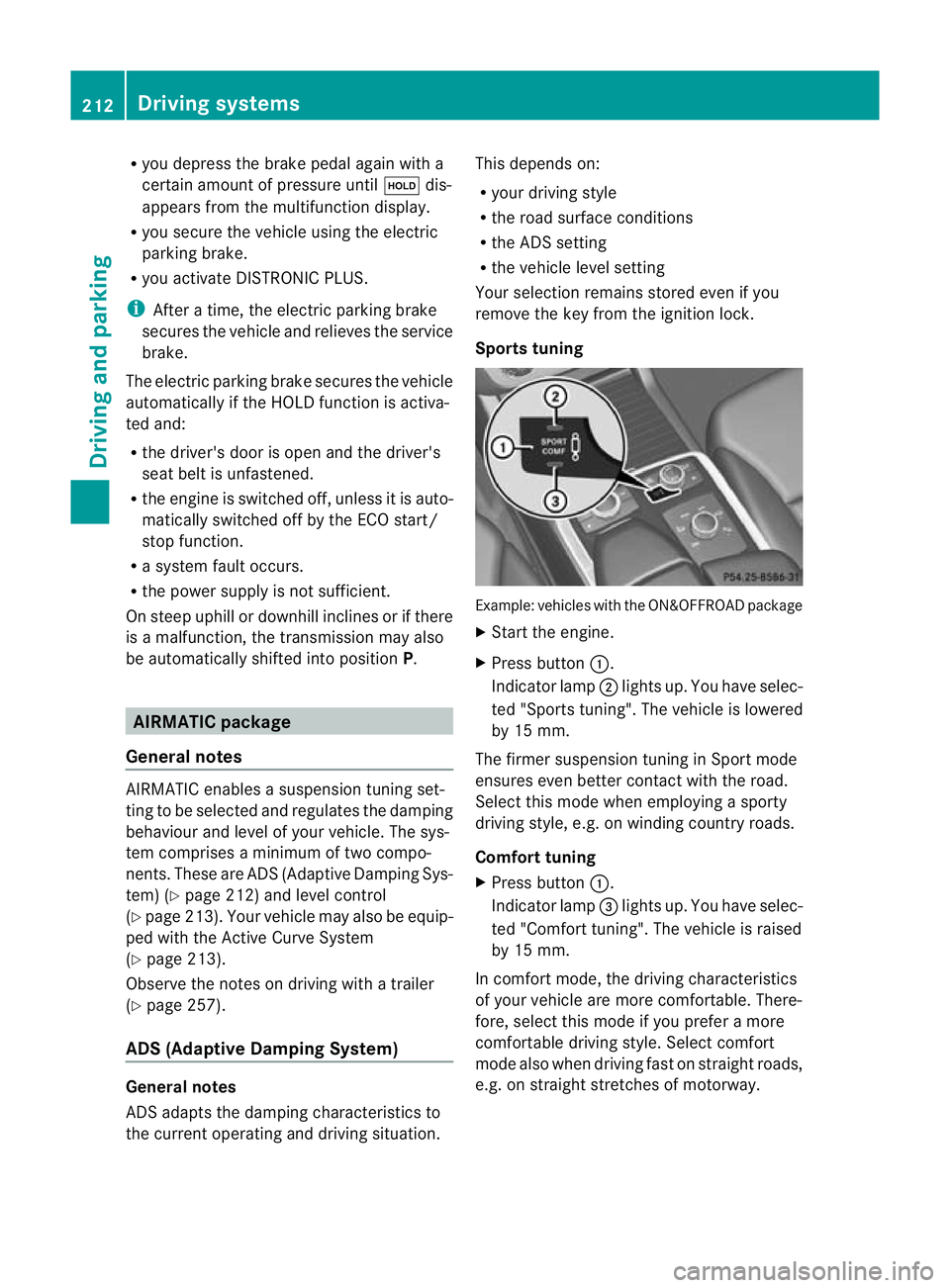
Sports tuning Example: vehicles wit
hthe ON&OFFROA Dpackage
X Start the engine.
X Press button :.
Indicator lamp ;ligh tsup. You have sele c-
ted "Sport stuning". The vehicle is lowered
by 15 mm.
The firmer suspension tuning in Spor tmode
ensures even bette rcontac twith th eroad.
Select this mode when empl oyingasporty
driving style, e.g .onwindingcountr yroads.
Comfor ttun ing
X Press button :.
Indicator lamp =light sup. You have selec-
ted "Comfor ttuning". The vehicle is raised
by 15 mm.
In com fort mode, the dri ving characteristics
of your vehicl eare more comfortable. There-
fore, select this mode if you prefer amore
comfortable drivin gstyle. Select comfort
mode also when driving fast on straigh troads,
e.g. on straight stretches of motorway. 212
Driving systemsDriving and pa
rking
Page 218 of 441
If yo
upressthe % ora button on the
multifunction steering wheel, the messa ge
wil ldisappear.
Once highway level has been reached, indi-
cator lamp ;goes out. The beinglow‐ ered messa
gedisappears from the multi-
function display.
The vehicle autom atically adjusts to highway
level when you:
R drive faster than 80 km/ hor
R driv eatas peed between 65 km/ hand
80 km/h for approximatel y20seconds.
Dependin gonthe ADS setting selected
(Y page 212), the vehicle is lowered to high-
speed level at high speeds. AM
GR IDE CONTROL sports suspen-
sion
Vehicl elevel The vehicle automatically sets the vehicle
level at the rear axle. Rea raxle level control
ensures the best poss iblesuspension and
that the ground clearanc eremains const ant
even when the vehicle is loaded .This
improves drivin gsafety and fuel consump-
tion.
Suspensio ntuning General notes
Th
ee lectronically controlled damping system
works continuously. This improves driving
safety and ride comfort.
The damping is tuned individually to each
wheel and depends on:
R your drivin gstyle, e.g. sporty
R the road surface conditio n,e.g .bum ps
R your individual selection of Sport, Sport +
or Comfort
If you select Sport or Sport +mode and
restar tthe engine, the suspension setting
revert stoComfort mode. Spor
tmode The firmer suspension tuning in Sport mode
ensures even better contact with the road.
Select this mode when employing
asporty
driving style, e.g. on windin gcountry roads.
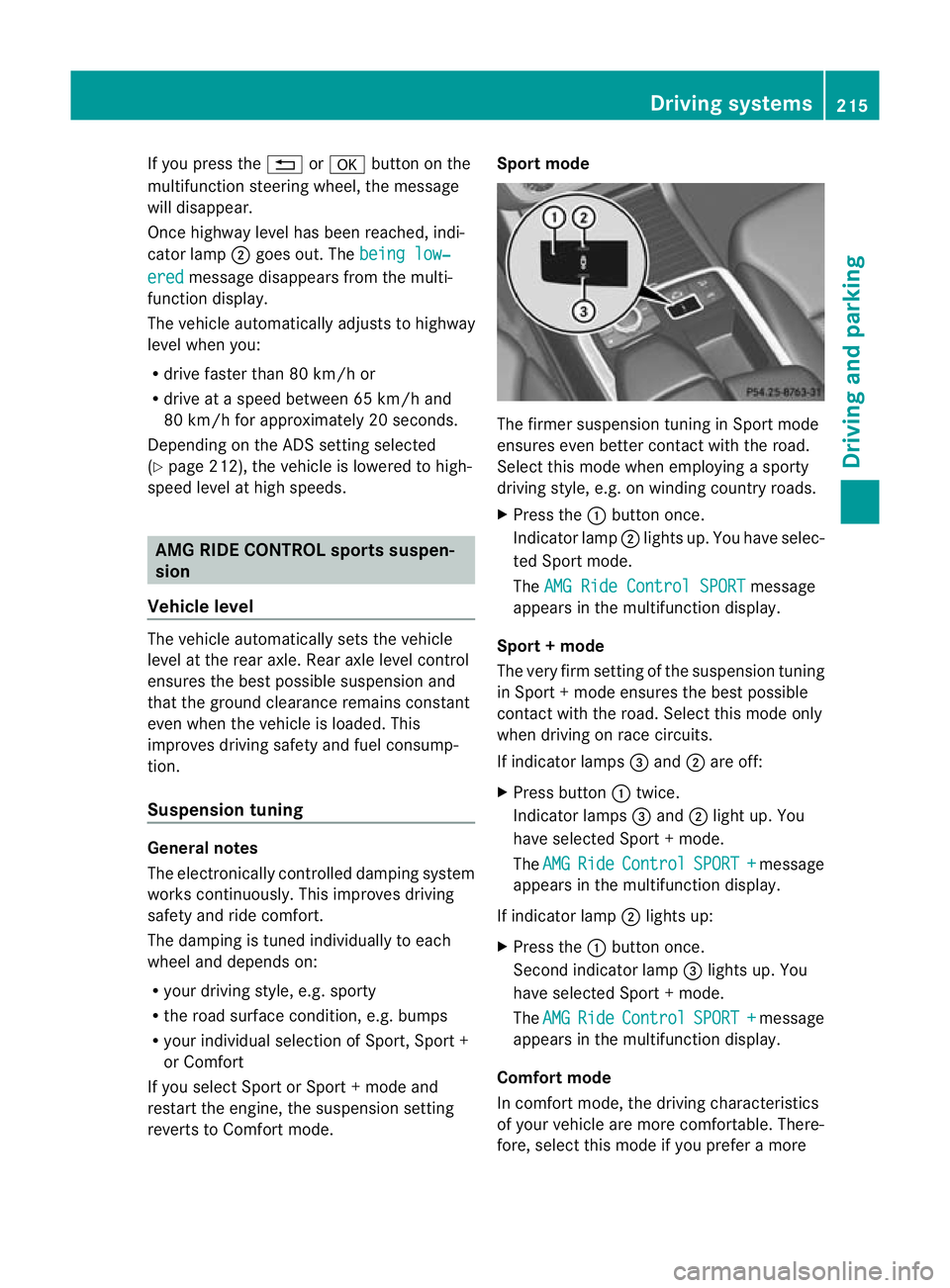
X Press the :button once.
Indica torlamp ;lights up. You have selec-
ted Sport mode.
The AMGR ide Control SPORT message
appears in th emultifunction display.
Sport +mode
The very firm settin gofthe suspension tuning
in Spor t+mode ensures the best possible
con tact with the road .Select this mode only
when driving on rac ecircuits.
If indicator lamps =and ;are off:
X Press button :twice.
Indicator lamps =and ;light up. You
have selected Sport +mode.
The AMG Ride Control SPORT + message
appear sint he multifunc tion display.
If indicator lamp ;lights up:
X Press the :button once.
Secon dindicato rlamp =lights up. You
have selected Sport +mode.
The AMG Ride Control SPORT + message
appear sint he multifunc tion display.
Comfort mode
In comfor tmode, the drivin gcharacteristics
of your vehicle ar emore comfortable .There-
fore, selec tthis mode if you prefer amore Driving systems
215Driving and parking Z
Page 220 of 441
Sid
eview Top view
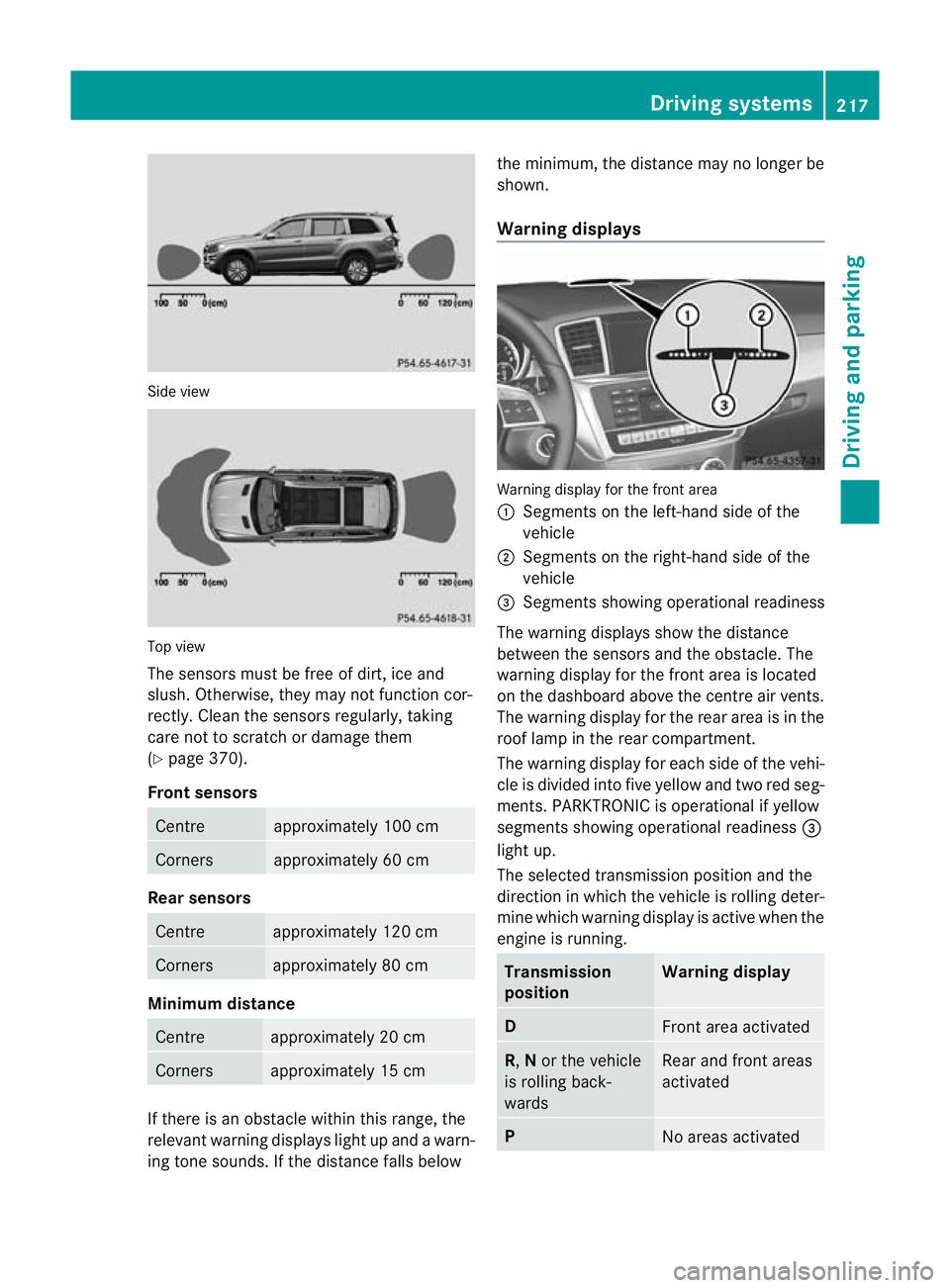
The sensors mus
tbefree of dirt, ice and
slush. Othe rwise, they may not function cor-
rectly. Clean the sensor sregularly, taki ng
care not to scratch or damag ethem
(Y page 37 0).
Front sensors Centre approximately 100 cm
Corners approximately 60 cm
Rear sensors
Centre approximately 120 cm
Corners approximately 80 cm
Minimu
mdistance Centre approximately 20 cm
Corners approximately 15 cm
If ther
eisano bstacle within this range, the
relevant warning displays light up and awarn-
ing ton esounds. If the distan cefall sbelow the minimum, the distanc
emay no longer be
shown.
Warning displays Warning display for th
efront area
: Segment sonthe left-hand side of the
vehicle
; Segment sonthe right-hand side of the
vehicle
= Segment sshowing operational readiness
The warning display sshow the distance
betwe enthe sensor sand the obstacle. The
warning displa yfor the front area is located
on the dashboar dabove the centre air vents.
The warning display for the rear area is in the
roof lamp in the rear compartment.
The warning display for each side of the vehi-
cle is divided into fiv eyellow and two red seg-
men ts.P ARKTRONIC is operational if yellow
segments showing operational readiness =
ligh tup.
The selected transmission position and the
direction in which the vehicle is rollin gdeter-
min ewhich warnin gdispla yisa ctive whe nthe
engin eisrunning. Transmission
position Warning display
D
Front area activated
R,
Nor the vehicle
is rolling back-
wards Rear and front areas
activated
P
No areas activatedDriving systems
217Drivingand pa rking Z
Page 221 of 441
One or mor
esegments light up as the vehicle
approaches an obstacle, dependin gonthe
vehicle' sdistance from the obstacle.
From the:
R sixth segment onwards, you will hear an
intermittent warnin gtone for approx-
imately two seconds.
R seventh segmen tonwards ,you will hear a
warnin gtone for approximately two sec-
onds. This indicates that you have now
reached the minimu mdistance.
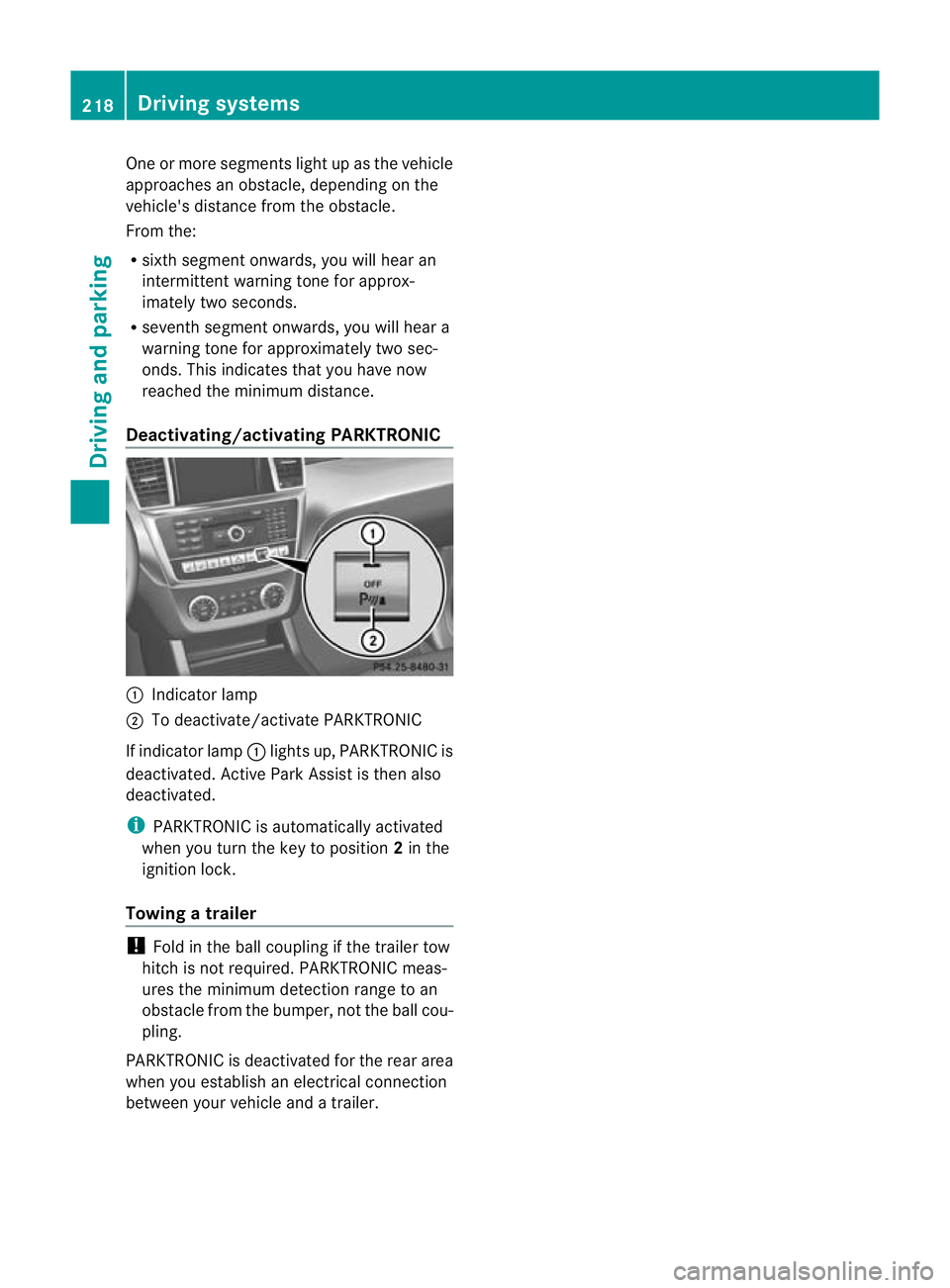
Deactivating/activating PARKTRONIC :
Indicator lamp
; To deactivate/activate PARKTRONIC
If indicator lamp :lights up, PARKTRONIC is
deactivated. Active Park Assist is then also
deactivated.
i PARKTRONIC is automatically activated
when you turn the key to position 2in the
ignition lock.
Towing atrailer !
Foldint he ball coupling if the trailer tow
hitc hisn ot required. PARKTRONIC meas-
ures the min imumdetect ionr ange to an
obstacle from the bumper, no tthe ball cou-
pling.
PARKTRONIC is deactivated for the rea rarea
when yo uestablish an electrica lconnection
between your vehicle and atrailer. 218
Dri
ving systemsDriving and pa rking
Page 222 of 441
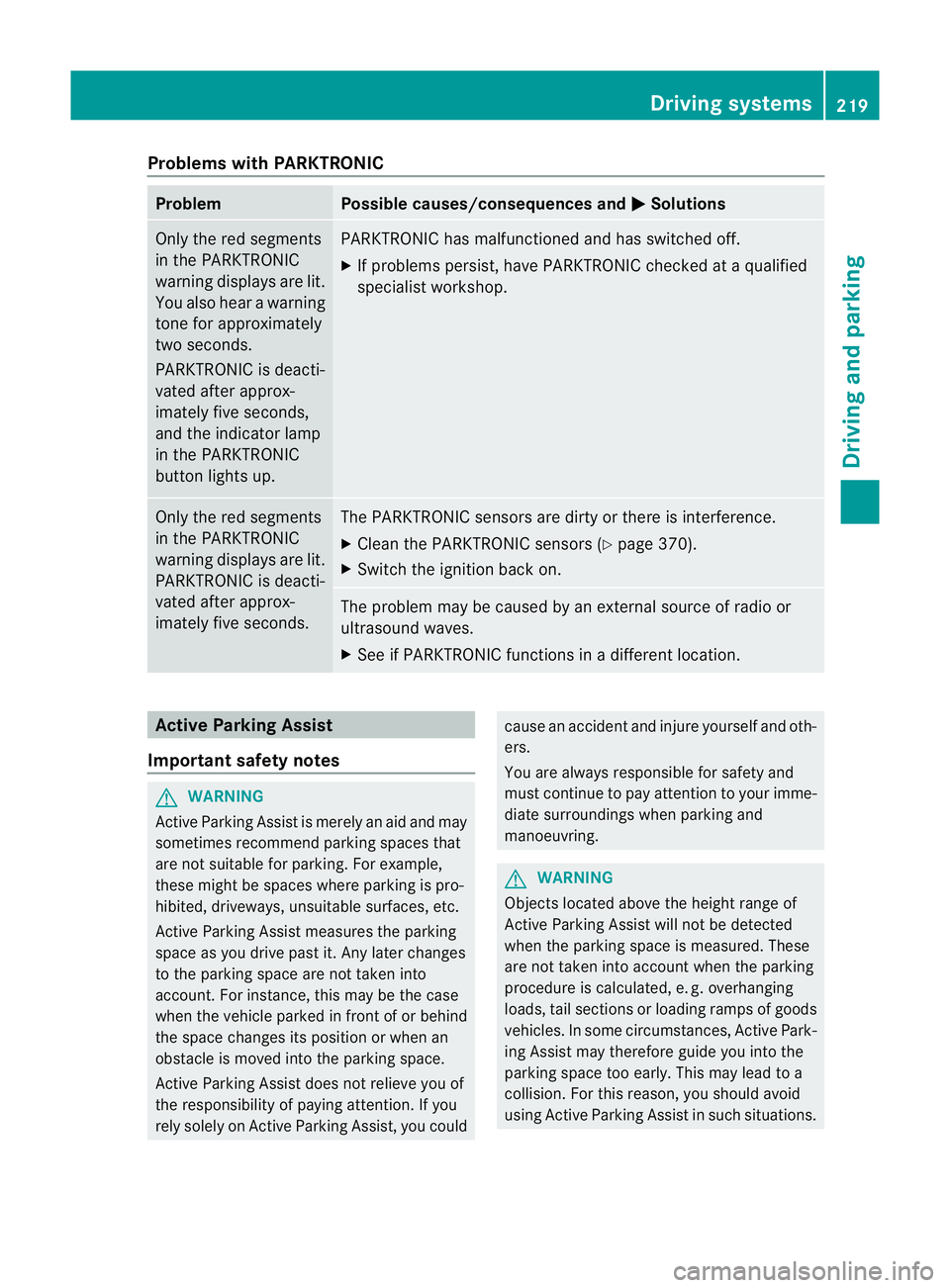
Problems wit
hPARKTRONIC Problem Possible causes/consequences and
M Solutions
Only the red segments
in the PARKTRONIC
warning display
sare lit.
Yo ua lso hear awarning
tone for approximately
two seconds.
PARKTRONIC is deacti-
vated after approx-
imately five seconds,
and the indicator lamp
in the PARKTRONIC
button lights up. PARKTRONIC has malfunctioned and has switched off.
X
If problems persist, have PARKTRONIC checked at aqualified
specialist workshop. Only the red segments
in the PARKTRONIC
warning display
sare lit.
PARKTRONIC is deacti-
vate dafter approx-
imatel yfive seconds. The PARKTRONIC sensors are dirty or there is interference.
X
Clean the PARKTRONIC sensors (Y page 370).
X Switc hthe ignition bac kon. The problem may be cause
dbyanexternal source of radio or
ultrasound waves.
X See if PARKTRONIC functions in adifferent location. Active Parking Assist
Important safet ynotes G
WARNING
Active Parkin gAssist is merely an aid and may
sometimes recommen dparking spaces that
are not suitable for parking. For example,
these might be spaces where parking is pro-
hibited ,driveways, unsuitabl esurfaces, etc.
Active Parking Assis tmeasures the parking
space as you driv epast it. Any later changes
to the parking space are not taken into
account. For instance, this may be the case
when the vehicle parked in front of or behind
the space changes its positio norwhen an
obstacle is moved int othe parkin gspace.
Active Parking Assist does not reliev eyou of
the responsibilit yofpaying attention. If you
rely solel yonA ctive Parkin gAssist, you could cause an acciden
tand injure yourself and oth-
ers.
You are always responsible for safety and
must continue to pay attention to your imme-
diate surroundings whe nparking and
manoeuvring. G
WARNING
Objects located above the heigh trange of
Active Parking Assis twill not be detected
when the parking space is measured. These
are not taken into account when the parking
procedure is calculated, e. g. overhanging
loads, tail sections or loading ramps of goods
vehicles. In some circumstances, Active Park-
ing Assist may therefor eguide you into the
parking space too early. This may lead to a
collision. For this reason, you should avoid
using Active Parking Assis tinsuch situations. Driving systems
219Drivingand pa rking Z
Page 226 of 441
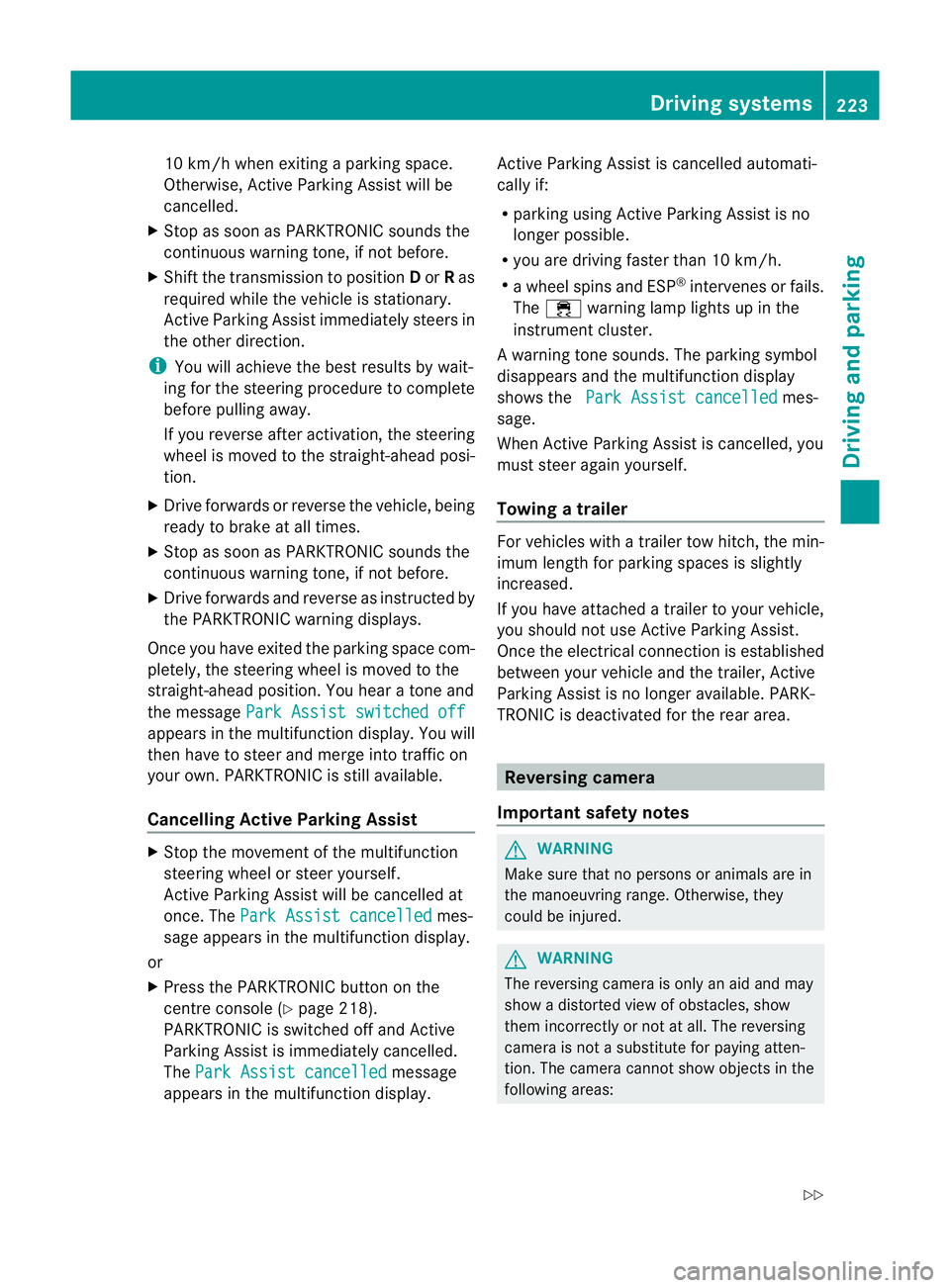
10 km/h wh
enexiting aparking space.
Otherwise ,Active Parking Assist will be
cancel led.
X Stop as soon as PARK TRONIC sounds the
continuous warning tone, if not before.
X Shif tthe transmission to position Dor Ras
req uired wh ilet he vehicle is stationary.
Activ eParking Assis timmediatel ysteers in
the othe rdirection.
i You will achieve the best results by wait-
ing for the steering procedure to complete
before pulling away.
If you rever seafter activation, the steering
wheel is moved to the straight-ahead posi-
tion.
X Drive forwards or reverse the vehicle, being
read ytob rake at al ltimes.
X Stop as soon as PARKTRONIC sounds the
continuou swarning tone, if not before.
X Drive forwards and revers easinstructed by
the PARKTRONI Cwarning displays.
Once you have exite dthe parkin gspace com-
pletely, the steering wheel is moved to the
straight-ahead position. You hea ratonea nd
the message Park Assist switched off appear
sinthe multifuncti on display. You will
then have to steer and merg eintot raffic on
you rown. PARKTRONI Cisstill available.
Cancelling Active Parking Assist X
Stop the movemen tofthe multifunction
steeri ngwheel or steer yourself.
Activ eParking Assist will be cancelled at
once. The Park Assist cancelled mes-
sage appears in the multifunction display.
or
X Press the PARKTRONI Cbutton on the
centr econsole (Y page 218).
PARKTRONI Cisswitched off and Active
Parking Assist is immediately cancelled.
The Park Assist cancelled message
appears in the multifunction display. Activ
eParking Assist is cancelled automati-
cally if:
R parking using Activ eParking Assist is no
longer possible.
R you are drivin gfaster than 10 km/h.
R aw heel spin sand ESP ®
intervenes or fails.
The ÷ warnin glamp lights up in the
instrumen tcluster.
Aw arning ton esounds. The par king symbol
disappears and the multifunction display
shows the ParkA ssist cancelled mes-
sage.
When Activ eParking Assist is cancelled, you
must steer again yourself.
Towing atrailer For vehicles with
atrailer to whitch, the min-
imum length for parking spaces is slightly
increased.
If yo uhavea ttache datrailer to your vehicle,
yo us houl dnot us eActiv eParking Assist.
Once the electrica lconnection is established
between your vehicl eand the trailer, Active
Parking Assist is no longer available .PARK-
TRONIC is deactivated for the rear area. Reversin
gcamera
Important safety notes G
WARNING
Mak esure that no persons or animals are in
the manoeuvring range. Otherwise, they
could be injured. G
WARNING
The reversing camera is only an aid and may
sho wad istorted view of obstacles, show
them incorrectly or not at all. The reversing
camer aisnotas ubstitute for paying atten-
tion. The camera cannot sho wobject sinthe
following areas: Driving systems
223Driving and parking
Z