parking brake MERCEDES-BENZ GL SUV 2012 Service Manual
[x] Cancel search | Manufacturer: MERCEDES-BENZ, Model Year: 2012, Model line: GL SUV, Model: MERCEDES-BENZ GL SUV 2012Pages: 441, PDF Size: 10.66 MB
Page 244 of 441
R
the lane markings on the roa dare unclear,
e.g. near roadworks.
R the lane markings change quickly, e.g.
lanes branc hoff, cros sone another or
merge.
R the road is narrow and winding.
Lane Keeping Assist cannot detect road and
traffic conditions. It is not asubstitute for
attentive driving. You are responsible for the
vehicle's speed, braking in good time, and
steering correctly. Always adapt your driving
style to suit the prevailing road and weather
conditions. Always pay attention to traffic
conditions and your surroundings. Otherwise,
you may fail to recognise dangers in time,
cause an accident and injure yourself and oth-
er s.
General notes :
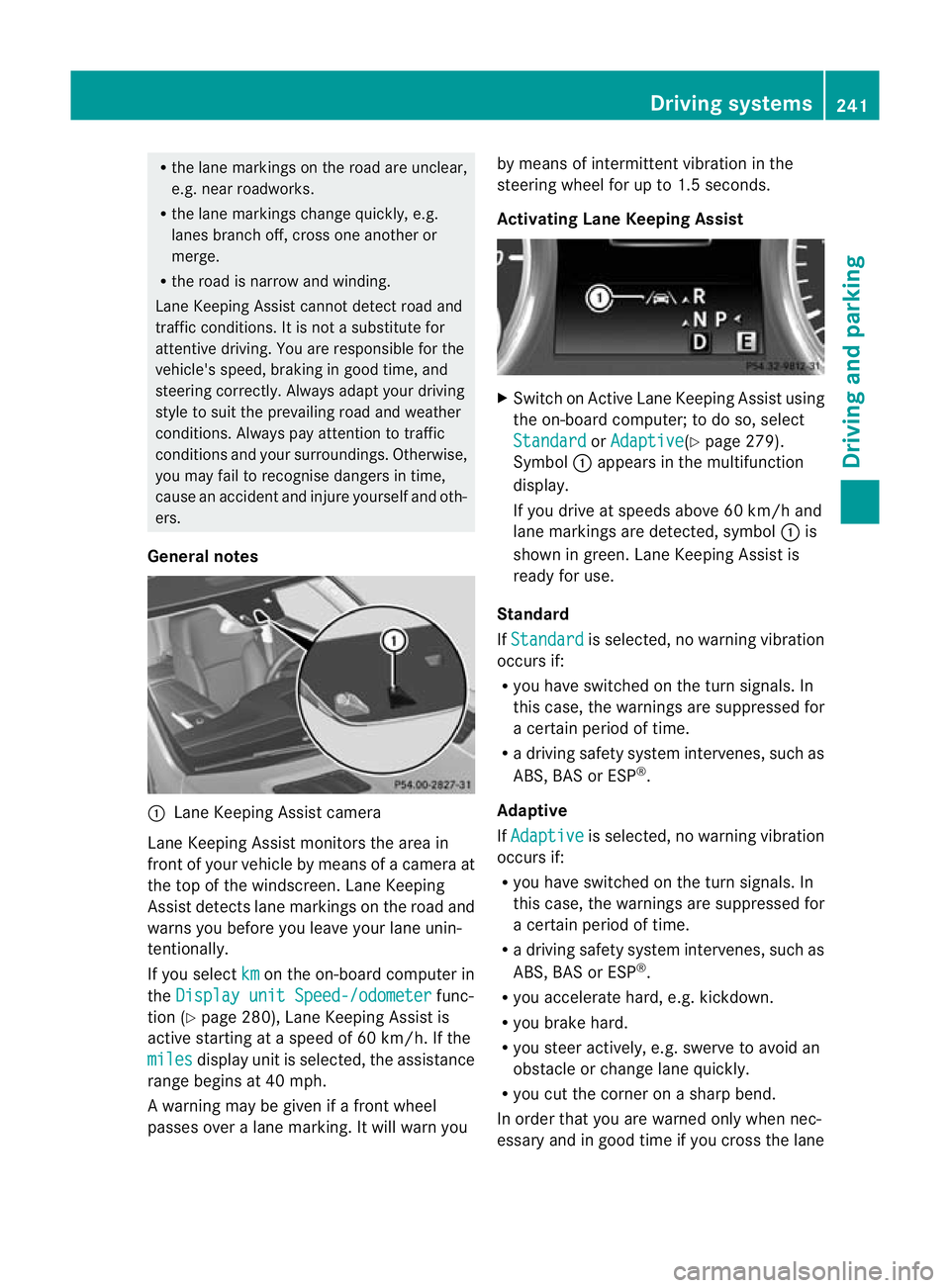
Lane Keeping Assist camera
Lane Keeping Assist mon itors the area in
front of your vehicle by means of acamera at
the top of the windscre en.LaneK eeping
Assist detect slan em arking sont he road and
warns you before you leave your lane unin-
tentionally.
If you select km on the on-board com
puterin
the Display unit Speed-/odometer func-
tio n(Ypage 280), Lane Keeping Assist is
active starting at aspeed of 60 km/ h.If the
miles disp
layu nitiss elected, the assistance
range begins at 40 mph.
Aw arning may be given if afront wheel
passes ove ralane marking. It will warn you by means of intermittent vibration in the
steering wheel for up to 1.5 seconds.
Activating Lane Keeping Assist
X
Switch on Active Lane Keeping Assis tusing
the on-boar dcomputer ;todoso, select
Standard or
Adaptive (Y
page 279).
Symbol :appears in the multifunction
display.
If you drive at speeds abov e60km/h and
lan em arkings are detected, symbol :is
shown in green. Lane Keeping Assis tis
ready for use.
Standard
If Standard is selected, no warning vibration
occurs if:
R yo uh ave switched on the turn signals .In
this case, the warnings are suppressed for
ac ertain period of time.
R ad riving safet ysystem intervenes, such as
ABS ,BAS or ESP ®
.
Adaptive
If Adaptive is selected
,nowarning vibration
occurs if:
R you have switched on the turn signals .In
this case, the warnings are suppressed for
ac ertain period of time.
R ad riving safet ysystem intervenes, such as
ABS ,BAS or ESP ®
.
R you accelerate hard, e.g. kickdown.
R you brake hard.
R you stee ractively, e.g .swerve to avoid an
obstacle or change lane quickly.
R you cut the corner on ashar pbend.
In order that you are warned only when nec-
essary and in good tim eifyou cross the lane Driving systems
241Driving and parking Z
Page 247 of 441
The yellow indicator lam
pgoes out if reverse
gear is engaged. Active Blin dSpot Assist is
then no longer active.
The brightness of the indicator/warning
lamps is adjusted automatically accordin gto
the ambient light.
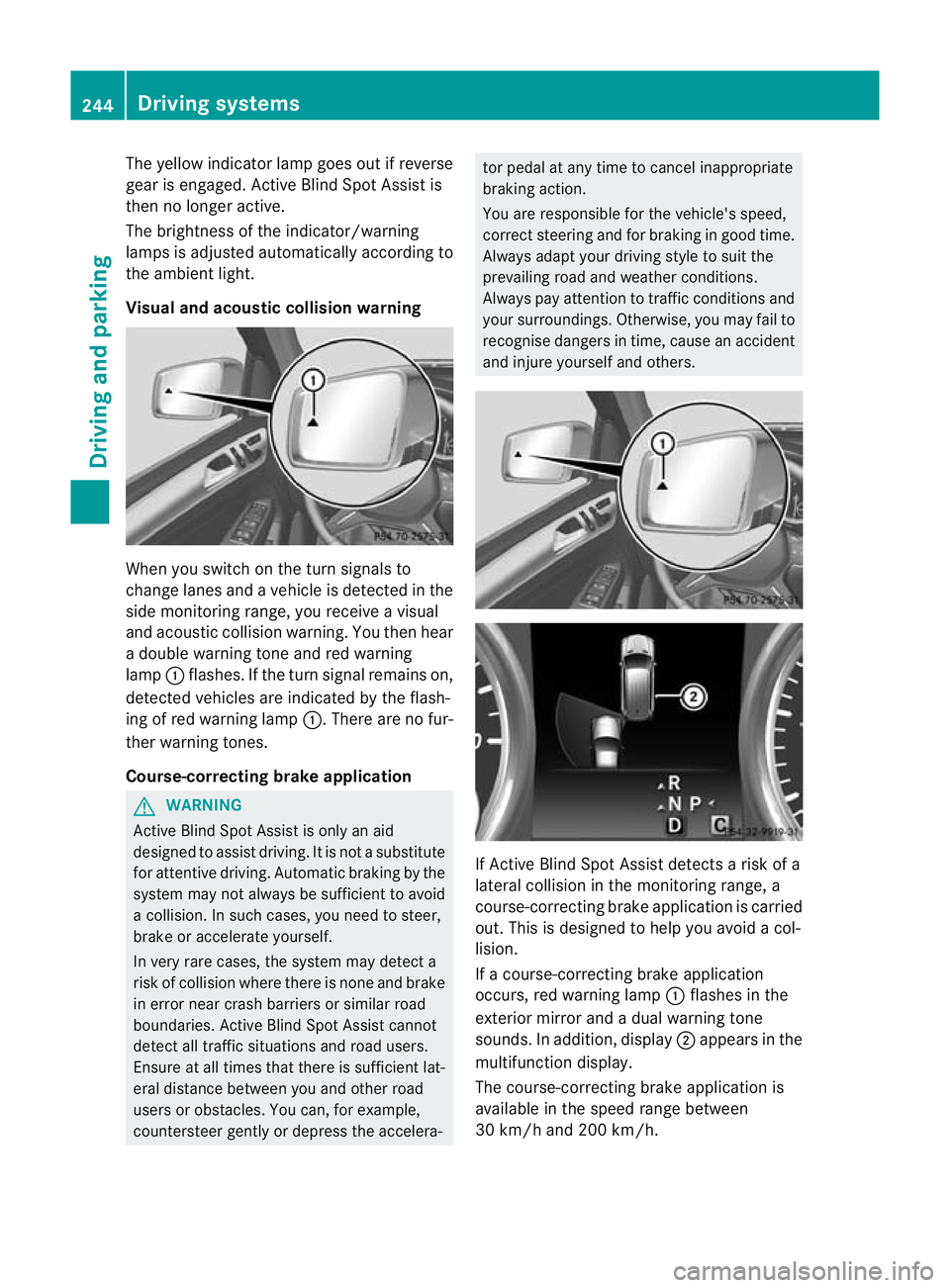
Visual and acoustic collision warning Whe
nyou switc honthe tur nsignals to
change lanes and avehicle is detected in the
side monitorin grange, you receive avisual
and acoustic collision warning. You then hear
ad ouble warnin gtonea nd red warning
lamp :flashes. If the turn signal remains on,
detected vehicles are indicated by the flash-
ing of red warning lamp :.There ar enofur-
ther warning tones.
Course-correcting brake application G
WARNING
Active Blind Spot Assis tiso nly an aid
designe dtoassist driving. It is not asubstitute
for attentive driving. Automatic braking by the
system may not always be sufficient to avoid
ac ollision .Insuch cases, you need to steer,
brake or accelerate yourself.
In very rare cases, the system may detect a
risk of collision where there is none and brake
in error near crash barriers or similar road
boundaries .Active Blind Spot Assist cannot
detect all traffic situations and road users.
Ensure at all times that there is sufficient lat-
eral distance betwee nyou and other road
users or obstacles. You can ,for example,
countersteer gentl yordepress the accelera- tor pedal at any tim
etocancel inappropriate
braking action.
You are responsible for the vehicle's speed,
correct steering and for braking in good time.
Always adapt your driving style to suit the
prevailing road and weather conditions.
Always pay attention to traffic conditions and
your surroundings. Otherwise ,you may fai lto
recognise dangers in time ,cause an accident
and injure yourself and others. If Active Blind Spot Assis
tdetect sarisk of a
lateral collision in the monitorin grange, a
course-correcting brake application is carried
out. This is designed to help you avoid acol-
lision.
If ac ourse-cor recting brake application
occurs ,red warning lamp :flashes in the
exterior mirror and adual warning tone
sounds .Inaddition, display ;appears in the
multifunction display.
The course-cor recting brake applicatio nis
available in the spee drange between
30 km/h and 200 km/h. 244
Driving systemsDriving and parking
Page 259 of 441
Mes
sages in the multifunction display
If ag ear change process has not been successful, the following messages may be displayed
in the multifunction display: Display messages Possibl
ecauses/ consequence sand M Solutions
LO
WR ANGE max. speed 40 km/h Yo
uh ave been driving faster than 40 km/h .Additionally, the indi-
cato rlamp on the button in the centre console blinks.
X Driv emore slowly to carry out the gear chan ge process. LOW RANGE Shift to
position
Nbriefly Th
et ransmission is in position Dand yo uare driving at below
40 km/h.
X Shift th etransmission to Nto comple tethe gear change proc-
ess. LOW RANGE Shifting
cancelled Please
reactivate The gear change process was not carried out.
X
Maintain all gear change conditions and carry out the gear
change process again. LOW RANGE Stop
Apply parking brake Aw
arning ton ealso sounds. The gear chang eprocess has not been
comple ted. LOW RANGE is in the neutral position .There is no
con nectio nbetween the engine and the driv ewheels.
! Do not drive any further. You could otherwise damage the
vehicle’ sdrive train.
X Sto pthe vehicle. Take int oaccount the road and traffic condi-
tions whe ndoing so.
X Apply the electric parkin gbrake (Y page 182).
X Repe atthe gear change process.
If th egear change process has been carried out, the LOW RANGE
Stop Appl
yparking brake message disapp
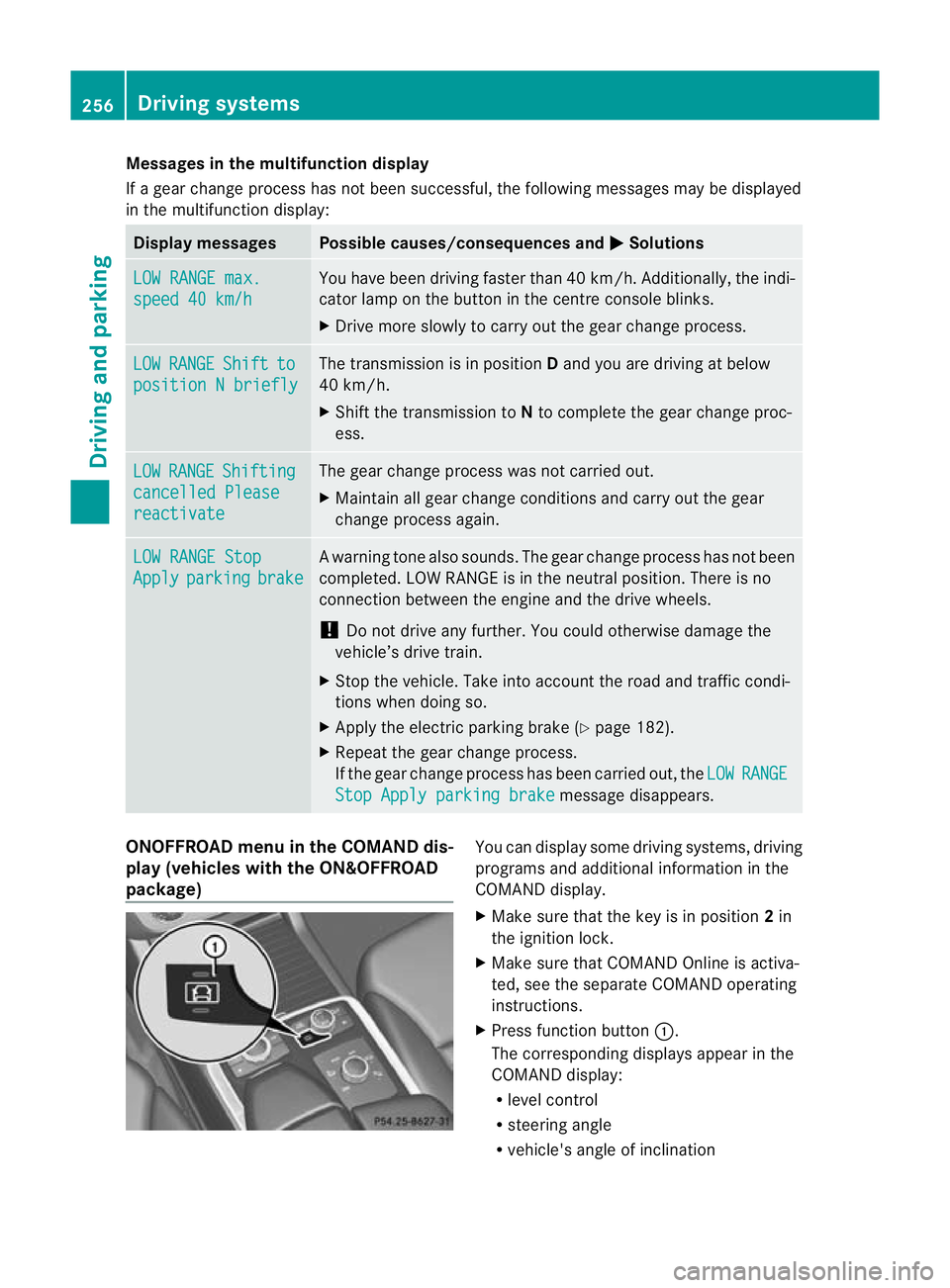
ears. ONOFFROAD men
uint he COMAND dis-
play (vehicles wit hthe ON&OFFROAD
package) Yo
uc an displ ay some driving systems ,driving
programs and additional information in the
COMAND display.
X Make sure that th ekey is in position 2in
the ignition lock.
X Make sure that COMAN DOnline is activa-
ted, see the separate COMAND operating
instructions.
X Pres sfunction button :.
The corresponding displays appea rinthe
COMAN Ddisplay:
R level control
R steering angle
R vehicle' sangle of inclination 256
Drivin
gsystemsDrivin gand pa rking
Page 260 of 441
R
uphill or downhill gradien tinpercentage
R on-road/off-road program selected
R condition of the differential lock for the
transfer case
R the LOW RANGE off -road gear is selected
R condition of the LOW RANGE off -road
gear
R the on-roa dtrailer progra misselected Towing
atrailer Note
sont owingatrailer
Important safety notes G
WARNING
Veh icle sw ithl evel control:
Th ev ehicle level can be change dinadver-
tently, e.g. whe nchanged by anot her person.
If yo uare coupling up or uncoupling atrailer
when this happens ,you coul dbecom etrap-
ped. Bod yparts can also become trapped
between the vehicle body and tyres, or under-
neath the vehicle. This pose sarisk of injury.
When coupling up or uncoupling, make sure
that no-one:
R opens or closes the doors or tailgate
R initiates the level control or presses the
AD Ss witch
R locks or unlock sthe vehicle. G
WARNING
The brakin gsystem can overheat if you leave
your foot on the brake pedal while driving.
This increase sthe brakin gdistanc eand could
even cause the braking system to fail. There
is ar isk of an accident.
Never use the brake pedal as afootrest. Do
not simultaneously depress both the brake
pedal and the accelera torp edal while driving. G
WAR
NING
You could los econtrol of the vehicle/trailer
combination if it begins to swerve. The vehi- cle/
trailer combination could even overturn.
There is arisk of an accident.
On no account should you attempt to
straighten out the vehicle/trailer combina-
tion by increasing speed. Decrease your
speed and do not countersteer .Brake if nec-
essary. G
WARNING
If you excee dthe permissible noseweight
while carrying aload, the carrier system could
detac hfrom th evehicle and fall on the road.
There is arisk of an acciden tand injury.
Always maintain the permissible noseweight
whe ncarrying loads. G
WARNING
If the ball coupling is not correctly engaged ,it
coul ddetac hwhile drivin gand fall on the road.
There is arisk of an acciden tand injury.
Engag ethe ball coupling as described. G
WARNING
If the ball coupling is not cor rectly engaged,
the traile rcan detach. There is arisk of an
accident.
Always engage the ball coupling as described.
! Depressing the brake pedal constantly
results in excessive and premature wear to
the brake pads.
You can use carrier systems, e.g. bicycle
rack sorload-bearing implements, on the ball
coupling. The maximum noseweight of
75 kg applies when using carrier system son
the ball coupling.
Whe nreversin gthe vehicle towards the
trailer ,make sure there is nobody between
the trailer and the vehicle.
Couple and uncouple the trailer carefully. If
you do not couple the trailer to the towing
vehicle correctly, the trailer could become
detached. Towin
gatrailer
257Driving an dparking Z
Page 262 of 441
reasons concerning th
eoperating permit.
This also applie sincountries in which the
permissible maximum speed for vehicle/
trailer combinations is above 100 km/h.
When towing atrailer, your vehicle's handling
characteristics wil lbedifferen tincomparison
to when drivin gwithout atrailer and it will
consume more fuel.
On long and stee pdownhil lgradients ,you
must select shift range 1,2or 3in good time.
i This also applies if you have activated
cruise con trol, SPEEDTRONIC or DI S-
TRONIC PLUS.
This will use the brakin geffect of th eengine,
so les sbraking wil lberequired to prevent the
vehicle from gainin gspeed. This relieves the
load on the brak esystem and prevent sthe
brakes from overheating and wearing too
quickly .Ifyou need additional braking,
depress the brake pedal repeatedly rather
than con tinuously.
Driving tips If the trailer swings from sid
etoside:
X Do not accelerate.
X Do not countersteer.
X Brake if necessary.
R Maintain agreater distance from th evehi-
cle in front than when driving without a
trailer.
R Avoid braking abruptly. If possible, brake
gently at first to allow the trailer to run on.
Then, increase the braking force rapidly.
R The values given for gradient-climbing
capabilities from astandstill refer to sea
level. Whe ndriving in mountainou sareas,
note that th epower outpu tofthe engine,
and consequen tlyt he vehicle' sgradient-
climbing capability ,decrease with increas-
ing altitude. Folding out the ball coupling
G
WARNING
If the ball coupling is not correctly engaged,
the trailer can detach. There is arisk of an
accident.
Always engage the ball coupling as described. G
WARNING
If you release the ball coupling or it does not
engage correctly when folding in, it will swing
out. Within pivoting range of the ball coupling,
there is an increased risk of an accident and
injury.
Only release the ball coupling if the pivoting
range is unobstruc ted. Alway smake sure that
the ball coupling engages when folding in.
! AMG vehicles and vehicles with AMG
bodystyling: remove the cover below the
bumper before you fold out the ball cou-
pling. Otherwise, the ball coupling, the
cover and the bumper could be damaged.
Before you can tow atrailer with your vehicle,
yo um ust fold out the ball coupling.
X Make sure that the vehicle is stationary. X
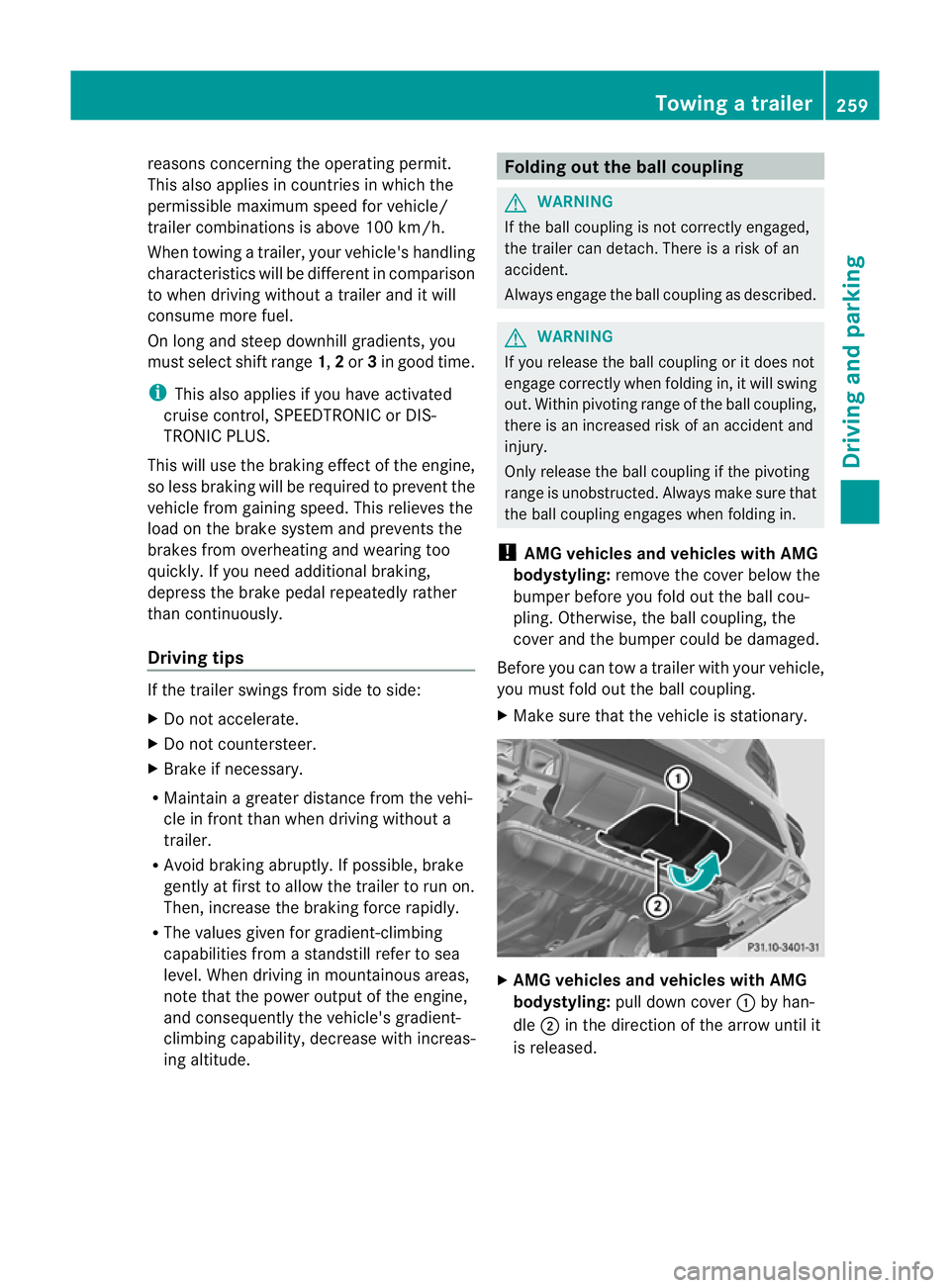
AMG vehicles and vehicles with AMG
bodystyling: pull down cover :by han-
dle ;in the direction of the arrow until it
is released. Towin
gatrailer
259Driving an dparking Z
Page 263 of 441
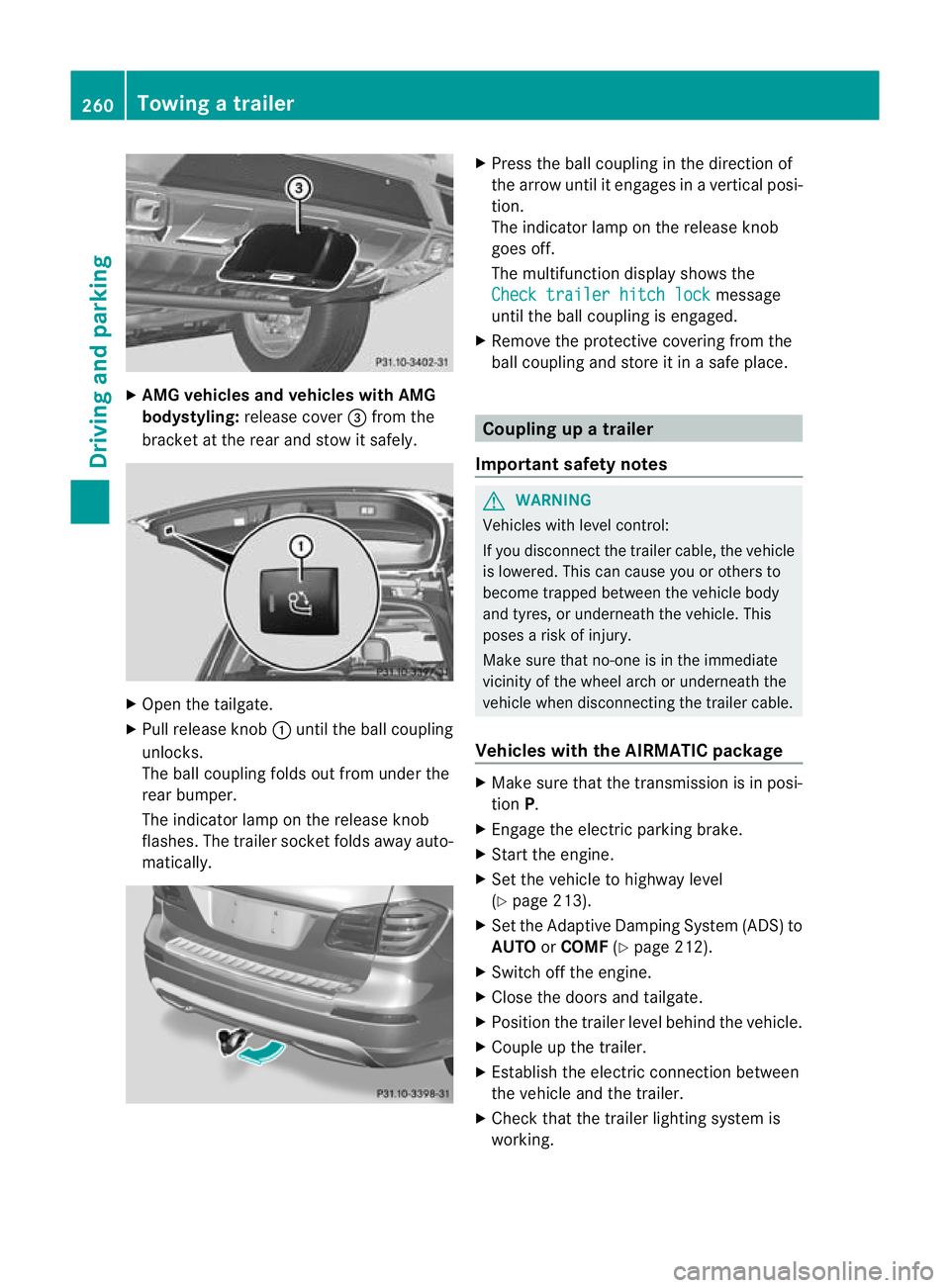
X
AMG vehicles and vehicles with AMG
bodystyling: release cover =from the
bracket at the rea rand sto witsafely. X
Open the tailgate.
X Pull release knob :until the ball coupling
unlocks.
The ball coupling folds out from under the
rear bumper.
The indicator lamp on the release knob
flashes .The trailer socket folds away auto-
matically. X
Press the ball couplin ginthe direction of
the arrow until it engages in avertical posi-
tion.
The indicator lam ponthe release knob
goes off.
The multifunction display shows the
Chec ktrailer hitch lock message
until th eball coupling is engaged.
X Remove the protective covering from the
ball coupling and store it in asafe place. Coupling up
atrailer
Important safety notes G
WARNING
Vehicles with level control:
If you disconnec tthe trailer cable, the vehicle
is lowered. This can cause you or other sto
become trapped between the vehicl ebody
and tyres, or underneat hthe vehicle. This
poses arisk of injury.
Make sure that no-on eisinthe immediate
vicinit yofthe wheel arch or underneath the
vehicle when disconnectin gthe trailer cable.
Vehicles with th eAIRMATIC package X
Make sure that the transmission is in posi-
tion P.
X Engage the electric parking brake.
X Start the engine.
X Set the vehicle to highway level
(Y page 213).
X Set the Adaptive Damping System (ADS )to
AUTO orCOMF (Ypage 212).
X Switch off the engine.
X Close the doors and tailgate.
X Position the trailer level behind the vehicle.
X Coupl eupthe trailer.
X Establish the electric con nectio nbetween
the vehicle and the trailer.
X Check that the trailer lighting system is
working. 260
Towing
atrailerDriving an dparking
Page 264 of 441
i
If yo uhave coupled atrail er,the vehicle
will remain at highwa ylevel.
The vehicle automatically lowers to high-
way level if you driv efaster than 30km/h
with atrailer. The vehicle is not lowered to
high-speed level even if you are travelling
at higher speeds.
This also applies when using accessories
that are plugged int othe socket of the
trailer tow hitc h(e.g .ab icycle rack). Uncoupling
atrailer
Importan tsafety notes G
WARNING
If yo uuncoupl eatrailer with an engaged over-
ru nb rake ,you coul dtrap your hand be tween
th ev ehicle and th etrailer drawbar .This poses
ar isk of injury.
Do not uncouple atrailer wit hanengaged
overrun brake. G
WARNING
Vehicle swith level control:
If you disconnec tthe trailer cable, the vehicle
is lowered. This can cause you or other sto
become trapped between the vehicl ebody
and tyres, or underneat hthe vehicle. This
poses arisk of injury.
Make sure that no-on eisinthe immediate
vicinit yofthe wheel arch or underneath the
vehicle when disconnectin gthe trailer cable.
! Do not disconnec tatrailer with an
engaged overrun brake. Otherwise, your
vehicl ecould be damaged by the rebound-
ing of the overru nbrake.
! Remove th einstalled adapter cable
before folding in the ball coupling. Other-
wise, damage may occur to the rear
bumpe rand the adapter cable. Vehicle
swith the AIRMATIC package X
Make sure that the transmission is in posi-
tion P.
X Engage the electric parking brake.
X Star tthe engine.
X Close the doors and tailgate.
X Secur ethe trailer against rolling away.
X Remove the trailer cable and decouple the
trailer.
X Switc hoff th eengine. Folding in the ball coupling
G
WARNING
If you releas ethe ball coupling or it does not
engage correc tlyw hen folding in, it will swing
out. Within pivotin grange of the ball coupling,
there is an increased risk of an accident and
injury.
Only release the ball coupling if the pivoting
range is unobstructed. Always make sure that
the ball coupling engages when folding in.
Fold the ball coupling back in if you are not
using the trailer tow hitch.
X Make sure that the vehicle is stationary and
the trailer cables are disconnected.
X Place the protective covering on the ball
coupling.
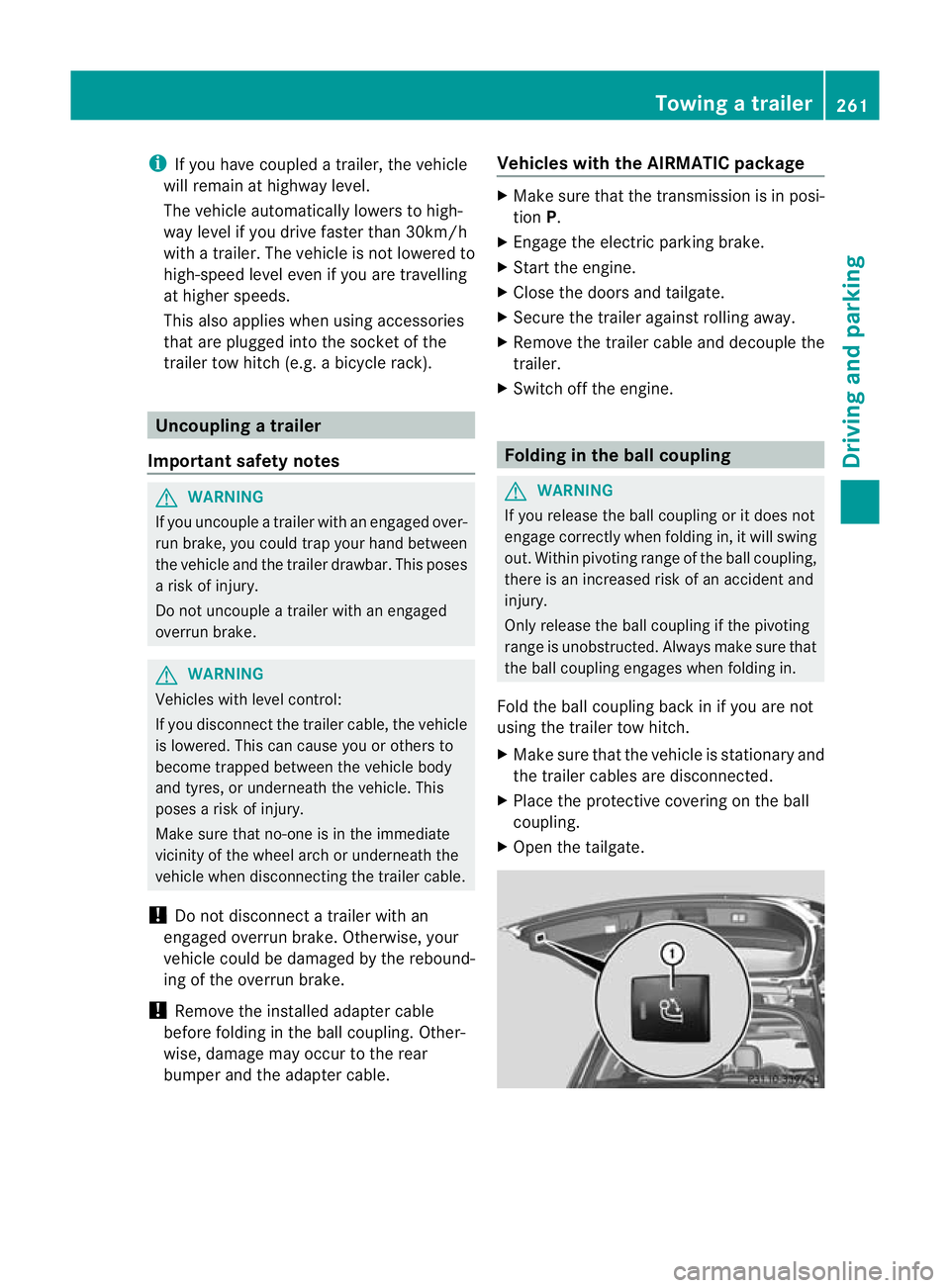
X Open the tailgate. Towin
gatrailer
261Driving an dparking Z
Page 281 of 441
If the
Sensors deactivated messa
ge
appears, the radar senso rsystem is deacti-
vated.
X Check whether or not the radar sensor sys-
tem is permitted to be activated
(Y page 433).
X Switc honthe radar sensor system
(Y page 28 3).
Activating/deactivating distance warn-
ing function X
Press =or; on the steering wheel
to select the Assist. menu.
X Press 9or: to select Dist. warn‐
ing .
X Press the abutton.
The curren tselection is displayed.
X To activate/deac tivate: press the a
button again.
When the distanc ewarning function is acti-
vated, the multifunction display shows the
Ä symbol if the HOLD function is not acti-
vated (Y page 211).
Vehicles with Active Parking Assist: if
PARKTRONIC is activated and you are driving
at as peed under 35 km/h, the jActive
Parkin gAssist symbol is shown instead of the
Ä symbol ( Ypage 21 9).
Further information on the distance warning
function (Y page63).
Activating/deactivatin gPRE-SAFE ®
Brake PRE-SAFE
®
Brake is only available in vehicles
with DISTRONIC PLUS.
X Press =or; on the steering wheel
to select the Assist. menu.
X Pres sthe 9 or: button to select
PRE-SA FEBrake .X
Press the abutton.
The curren tselection is displayed.
X To activate/deac tivate: press the a
button again.
When PRE-SAFE ®
Brak eisa ctivated, the mul-
tifunction displa yshows the Äsymbol as
long as the HOL Dfunction is not activated
(Y page 211).
Vehicles with Active Parking Assist: if
PARKTRONIC is activated and you are driving
at as peed under 35 km/h, the jActive
Parkin gAssist symbol is shown instead of the
Ä symbol ( Ypage 21 9).
If the PRE-SA FEBrake: Sensors deacti‐ vated message appears
,the radar sensor
system is deactivated.
X Chec kwhether or not the radar sensor sys-
tem is permi tted to be activated
(Y page 43 3).
X Switch on the radar senso rsystem
(Y page 283).
For more information on PRE-SAFE ®
Brake,
see (Y page 68).
Activating/deactivating ATTENTION
ASSIST X
Press =or; on the stee ring wheel
to select the Assist. menu.
X Pres sthe 9 or: button to select
Attent ionA sst. X
Press the abutton.
The curren tselection is displayed.
X To activate/deac tivate: press the a
button again.
When ATTENTION ASSI STis activated, the
À symbol appears in the multifunction
display when the ignition is on.
For further information about ATTENTION
ASSIST, see (Y page 232).278
Menus and submenusOn-boar
dcomputer and displays
Page 297 of 441
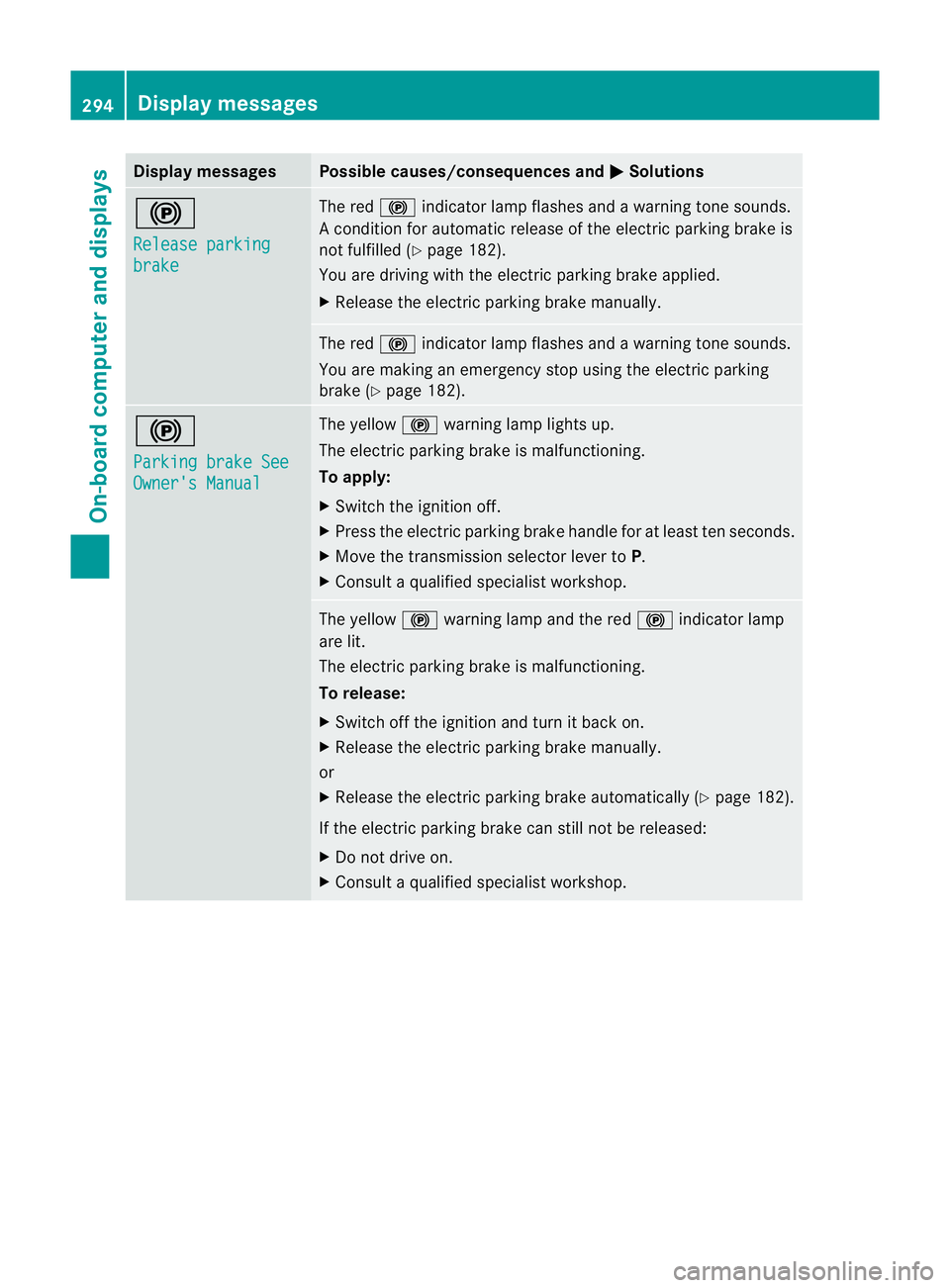
Displa
ymessages Possible causes/consequences and
M Solutions
!
Re
leasep arking brake Th
er ed ! indicato rlamp flashes and awarning ton esounds.
Ac onditio nfor aut omatic relea se of theelectric parking brak eis
not fulfilled (Y page182).
You are driving wit hthe electric parking brak eapplied.
X Releas ethe electric parking brak emanually. The red
!indicator lamp flashes and awarning ton esounds.
You ar emaking an emergenc ystopu singthe electric parking
brak e(Ypage 182). !
Pa
rkingb rake See Owner'
sManual Th
ey ellow !warning lamp light sup.
The electric parking brak eismalfunctioning.
To apply:
X Switch th eignition off.
X Press th eelectric parking brak ehandle for at least ten seconds.
X Move the transmission selector lever to P.
X Consul taqualified specialist workshop. The yellow
!warning lamp and the red !indicator lamp
are lit.
The electric parkin gbrake is malfunctioning.
To release:
X Switch off th eignition and tur nitback on.
X Release the electric parkin gbrake manually.
or
X Releas ethe electric parkin gbrake automaticall y(Ypage 18 2).
If the electric parking brake can still not be released:
X Do not drive on.
X Consul taqualified specialist workshop. 294
Display messagesOn-boar
dcomputer and displays
Page 298 of 441
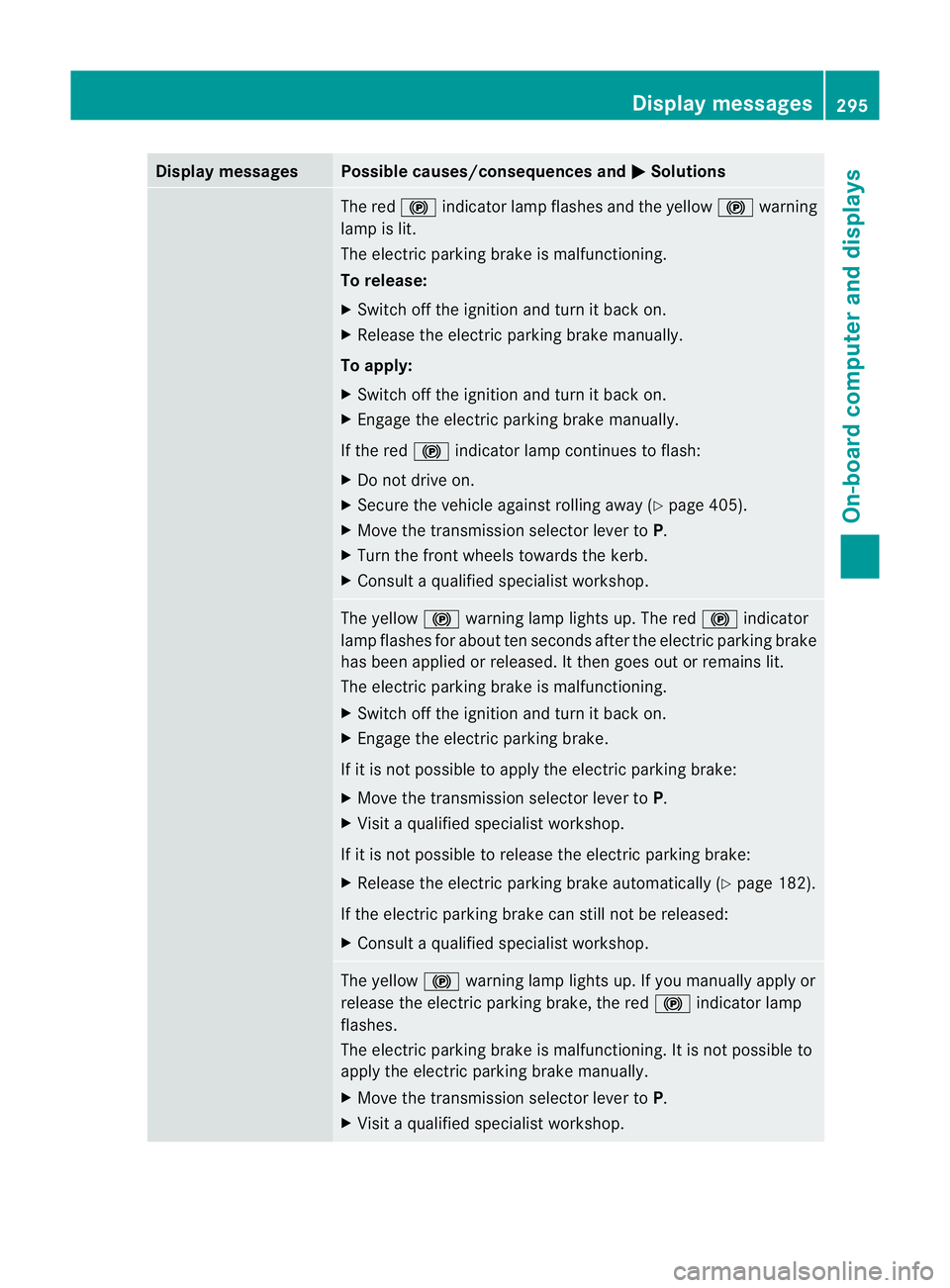
Displa
ymessages Possible causes/consequences and
M Solutions
The red
!indicato rlamp flashes and the yellow !warning
lamp is lit.
The elect ricp arking brak eismalfunctioning.
To release:
X Switch off the ignition and tur nitback on.
X Release the elect ricp arking brak emanually.
To apply:
X Switch off the ignition and tur nitback on.
X Engage the elect ricp arking brak emanually.
If the red !indicator lamp con tinues to flash:
X Do not driv eon.
X Secure the vehicle agai nstrolling away ( Ypage 405).
X Mov ethe transmissio nselecto rlever to P.
X Turn the fron twheels towards the kerb.
X Consult aqualified specialist workshop. The yellow
!warning lamp lights up. The red !indicator
lamp flashes for about ten seconds after the electric parking brake
has been applied or released .Itthen goes out or remain slit.
The electric parkin gbrake is malfunctioning.
X Switch off th eignition and tur nitback on.
X Engage the electric parking brake.
If it is not possible to apply the electric parking brake:
X Move the transmission selector lever to P.
X Visit aqualified specialist workshop.
If it is not possible to release the electric parking brake:
X Release the electric parking brake automatically (Y page 182).
If the electric parking brake can still not be released:
X Consult aqualified specialist workshop. The yellow
!warning lamp lights up. If you manually apply or
release the electric parking brake, the red !indicator lamp
flashes.
The electric parking brake is malfunctioning. It is not possible to
apply the electric parking brake manually.
X Move the transmission selector lever to P.
X Visit aqualified specialist workshop. Display messages
295On-board computer and displays Z