ignition MERCEDES-BENZ GL SUV 2012 Manual Online
[x] Cancel search | Manufacturer: MERCEDES-BENZ, Model Year: 2012, Model line: GL SUV, Model: MERCEDES-BENZ GL SUV 2012Pages: 441, PDF Size: 10.66 MB
Page 325 of 441
Displa
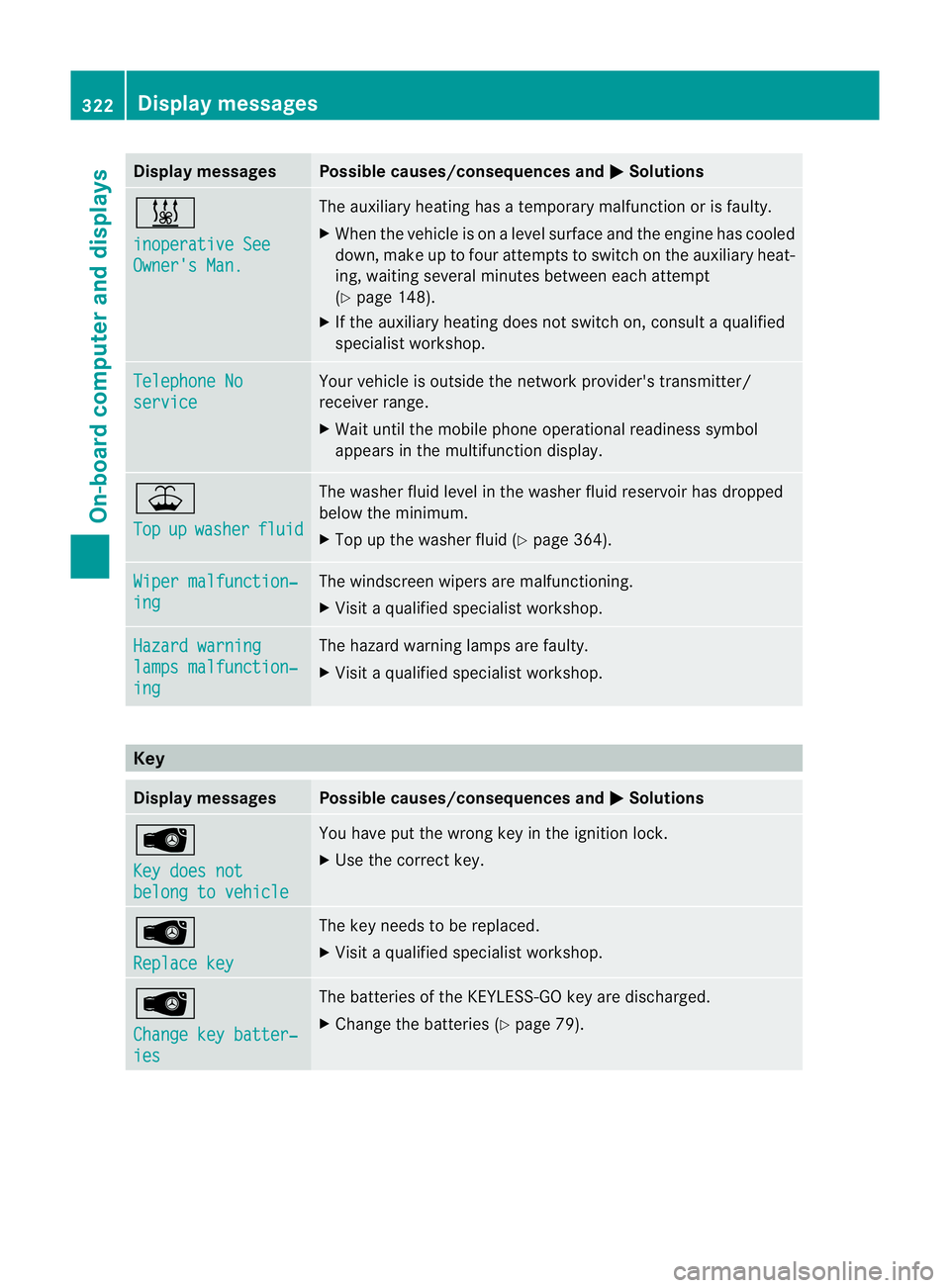
ymessages Possible causes/consequences and
M Solutions
&
in
operative See Owner'
sMan. Th
ea uxiliar yheatin ghasatemporary ma lfunction or is faulty.
X When the vehicl eisonalevel surface and the engin ehas cooled
down, make up to four attempts to switch on the auxiliary heat-
ing, waiting several minutes between each attempt
(Y page 148).
X If the auxiliary heating does not switch on, consult aqualified
specialist workshop. Teleph
oneNo service Your vehicl
eisoutside the network provider's transmitter/
receiver range.
X Wait until the mobile phone operational readiness symbol
appears in the multifunction display. ¥
Top
up washer fluid The washe
rfluid level in the washer fluid reservoir has dropped
below the minimum.
X Top up the washer fluid (Y page 364).Wipe
rmalfunction‐ ing Th
ew indscreen wipers are malfunctioning.
X Visit aqualified specialist workshop. Hazard warning
lamp
smalfunction‐ ing Th
eh azard warning lamps are faulty.
X Visit aqualified specialist workshop. Key
Display messages Possible causes/consequences and
M Solutions
Â
Ke
yd oes not belong to vehicle Yo
uh ave put the wrong key in the ignition lock.
X Use the correct key. Â
Replac
ekey Th
ek ey needs to be replaced.
X Visit aqualified specialist workshop. Â
Change ke
ybatter‐ ies Th
eb atteries of the KEYLESS-GO key are discharged.
X Change the batteries (Y page 79).322
Display messagesOn-board computer and displ
ays
Page 326 of 441
Displa
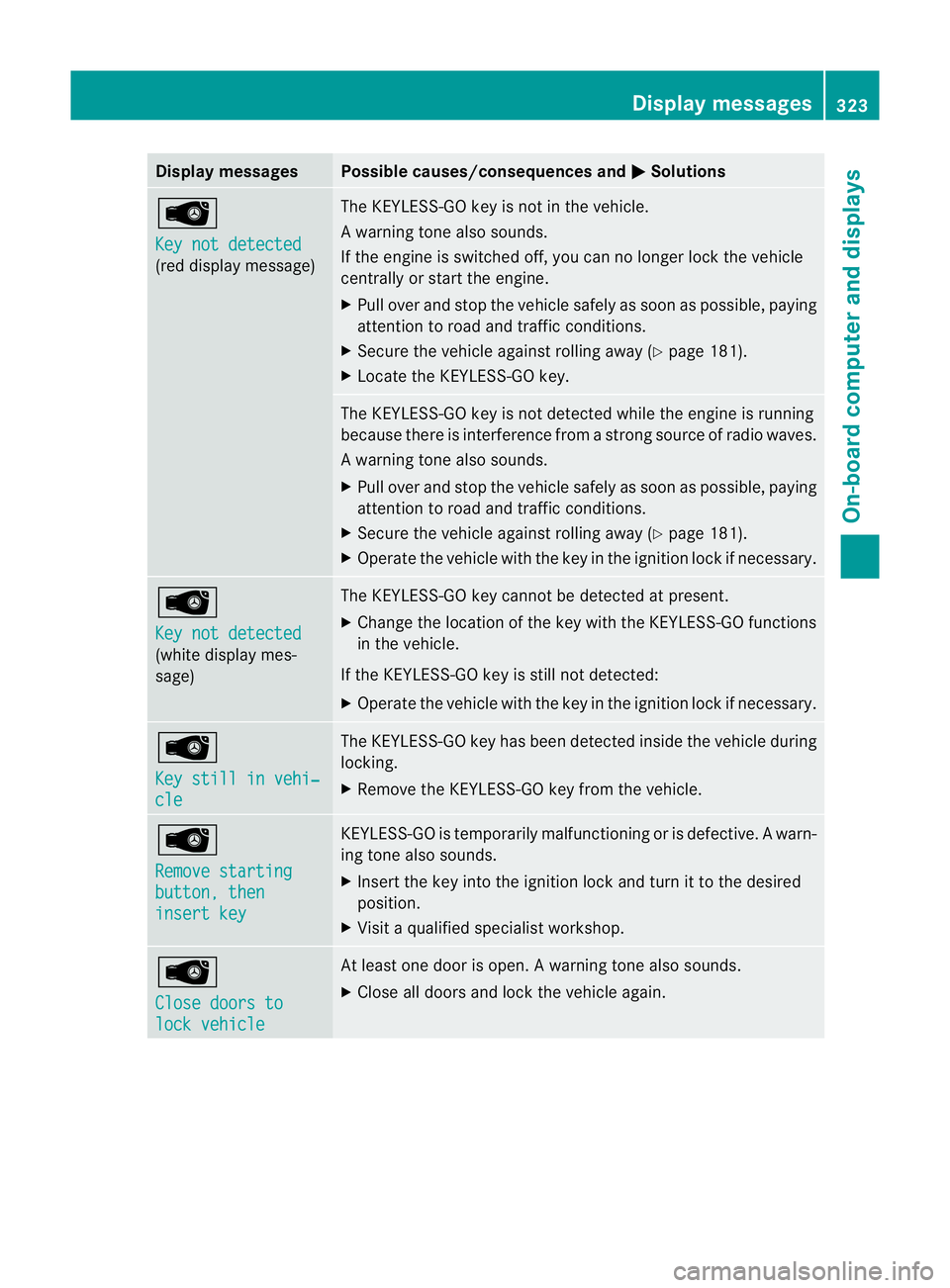
ymessages Possible causes/consequences and
M Solutions
Â
Ke
yn ot detected (red display message) Th
eK EYLESS-GO key is not in the vehicle.
Aw arning ton ealso sounds.
If th eengineiss witched off ,you can no longer loc kthe vehicle
cen trally or start the engine.
X Pull over and stop the vehicle safely as soon as possible ,paying
attention to road and traffic conditions.
X Secure the vehicle against rolling away (Y page 181).
X Locate the KEYLESS-GO key. The KEYLESS-GO key is not detected while the engine is running
because there is interference from
astron gsource of radio waves.
Aw arning ton ealso sounds.
X Pull ove rand sto pthe vehicle safel yassoonasp ossible, paying
attention to roa dand traffic conditions.
X Secure the vehicl eagainst rolling away (Y page 181).
X Operate the vehicle with the key in the ignition lock if necessary. Â
Ke
yn ot detected (white displa
ymes-
sage) The KEYLE
SS-GO key cannot be detected at present.
X Chang ethe location of the key with the KEYLESS-GO functions
in the vehicle.
If the KEYLESS-GO key is still not detected:
X Operate the vehicle with the key in the ignition lock if necessary. Â
Ke
ys till in vehi‐ cle Th
eK EYLESS-GO key has bee ndetected inside the vehicle during
locking.
X Remov ethe KEYLESS-GO key from the vehicle. Â
Remove starting
button
,then insert key KEYLESS-GO is temporarily malfunctionin
gorisdefective. Awarn-
ing ton ealso sounds.
X Inser tthe key in tothe ignition lock and tur nittothedesired
position.
X Visi taq ualifieds pecialist workshop. Â
Clos
edoors to lock vehicle At leas
tone doo riso pen. Awarning ton ealso sounds.
X Close all door sand lock the vehicle again. Display messages
323On-board computer and displays Z
Page 336 of 441
Engine
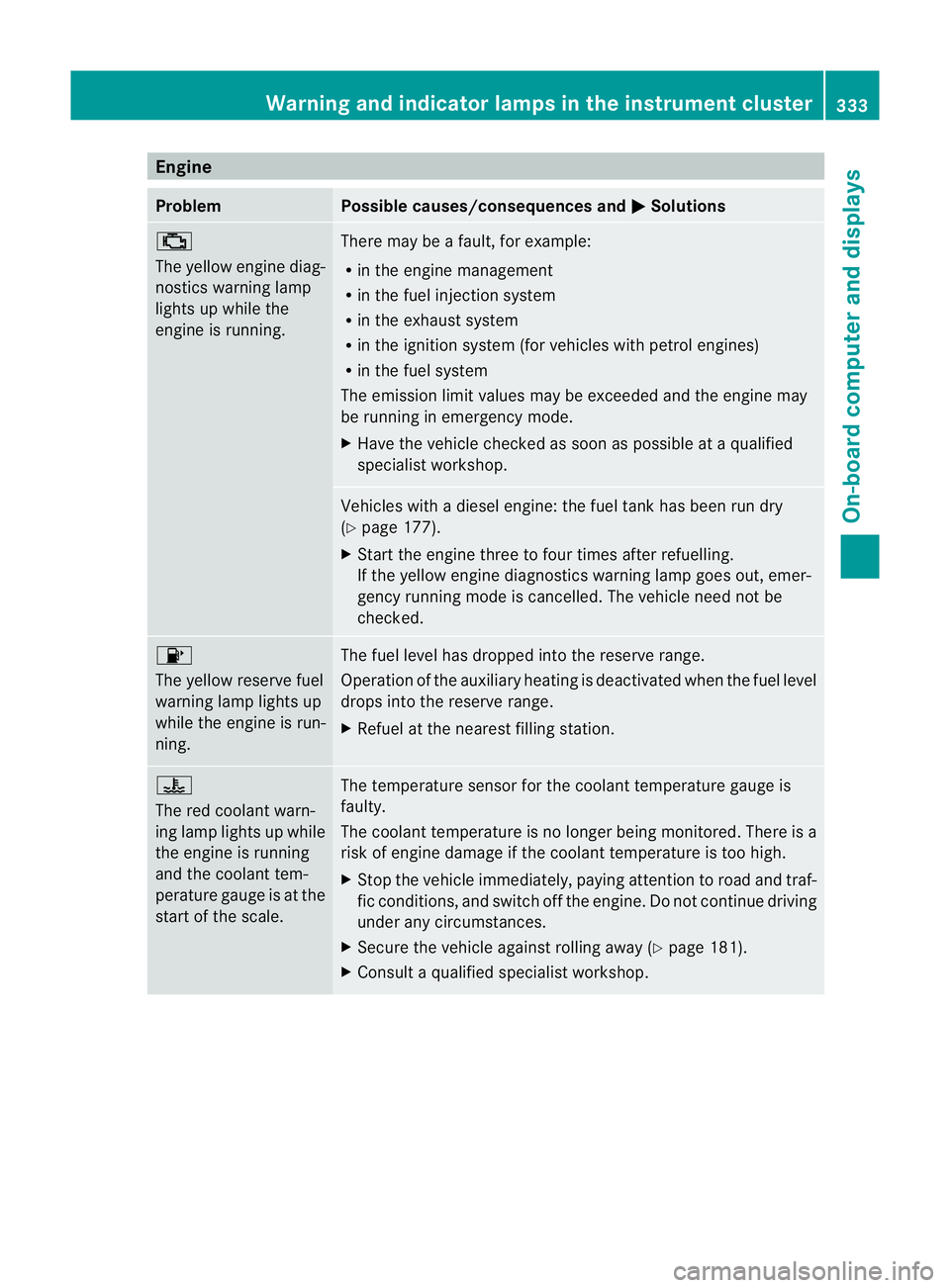
Problem Possible causes/consequences and
M Solutions
;
The yellow engin
ediag-
nostics warning lamp
light supw hile the
engin eisrunning. There may be
afault ,for example:
R in th eenginem anagement
R in the fuel injection system
R in the exhaust system
R in the ignition system (for vehicles with petrol engines)
R in the fuel system
The emission limit values may be exceeded and the engin emay
be runnin gine mergenc ymode.
X Hav ethe vehicl echec kedass oon as possible at aqualified
specialist workshop. Vehicle
swithad iesel engine: th efuel tan khas been run dry
(Y page 177).
X Start the engin ethre etof our times after refuelling.
If th eyellow engin ediagnostics warning lamp goes out ,emer-
ge ncyr unnin gmodeisc ancelled. The vehicle need not be
checked. 8
The yellow
reserve fuel
warnin glam pligh ts up
whil ethe engine is run-
ning. The fu
ellevel ha sdropp edinto the reserv erange.
Operatio nofthe auxiliary heatin gisdeactiv ated when the fuel level
drops into the reserve ran ge.
X Refue latthe nearest filling stat ion. ?
The red coolant warn-
ing lamp light
supwhile
the engine is running
and the coolant tem-
perature gaug eisatthe
start of the scale. The temperature senso
rfor the coolant temperatur egauge is
faulty.
The coolant temperature is no longer being monitored. There is a
risk of engine damage if the coolant temperature is too high.
X Stop the vehicle immediately, paying attention to road and traf-
fic conditions, and switch off the engine. Do not continue driving
under any circumstances.
X Secure the vehicle against rolling away (Y page 181).
X Consult aqualified specialist workshop. Warnin
gand indicator lam psin th einstru ment cluster
333On-board computer and displays Z
Page 350 of 441
You can remove the rubber mat of the cup
holder to clean it. Clean it with clean
,luke-
warm water only.
Temperature-controlled cup holder in
th ef ront-compartment centr econsole G
WARNING
When you use the warmin gfunction ,the metal
insert of thecup holder is heated. Therefore,
do not touch the cup holder inser t.Otherwise,
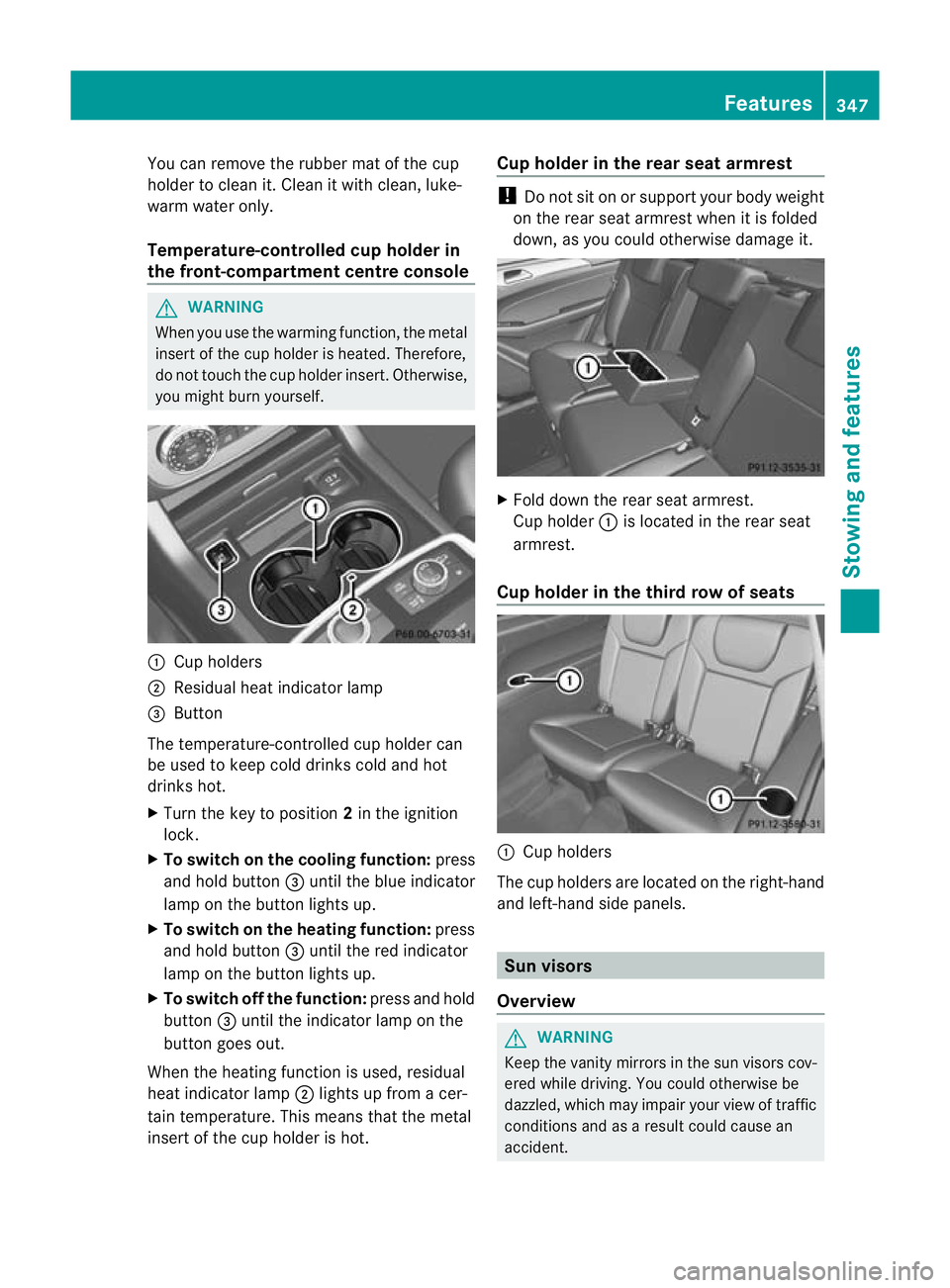
you migh tburny oursel f. :
Cuph olders
; Residual heat indicator lamp
= Button
Th et emperature-c ontrolle dcup holde rcan
be used to keep cold drinks cold and hot
drinks hot.
X Turn the key to position 2in the ignition
lock.
X To switch on th ecooling function: press
and hold button =until th eblue indicator
lamp on th ebutton lights up.
X To switch on th eheating function: press
and hold button =until the red indicator
lamp on the button lights up.
X To switch off th efunc tion: press and hold
button =until the indicator lamp on the
button goes out.
When the heatin gfunction is used, residual
heat indicator lamp ;lights up fro macer-
tain temperature. This mean sthat the metal
insert of the cup holder is hot. Cu
ph older in th erears eat armrest !
Do not sit on or support your body weight
on the rear seat arm rest when it is folded
down ,asy ou coul dotherwise damage it. X
Fold down the rear seat armrest.
Cup holder :is located in the rear seat
armrest.
Cup holder in th ethird row of seats :
Cup holders
The cup holders are located on the right-hand
and left-han dside panels. Sun visors
Overview G
WAR
NING
Keep the vanity mirrors in the sun visors cov-
ered whil edriving.Y ou coul dotherwise be
dazzled, which may impair your view of traffic
conditions and as aresult could cause an
accident. Features
347Stowing and features Z
Page 353 of 441
Make sur
ethat children travellin ginthe vehi-
cle ar enot able to injure themselves on the
hot cigarette lighter or cause afire with it.
! The cigarette lighter in the centre console
in the front compartmen tisn ot intended
for operatin gthe tyr einflation compressor. X
Turn the key to position 2in the ignition
lock.
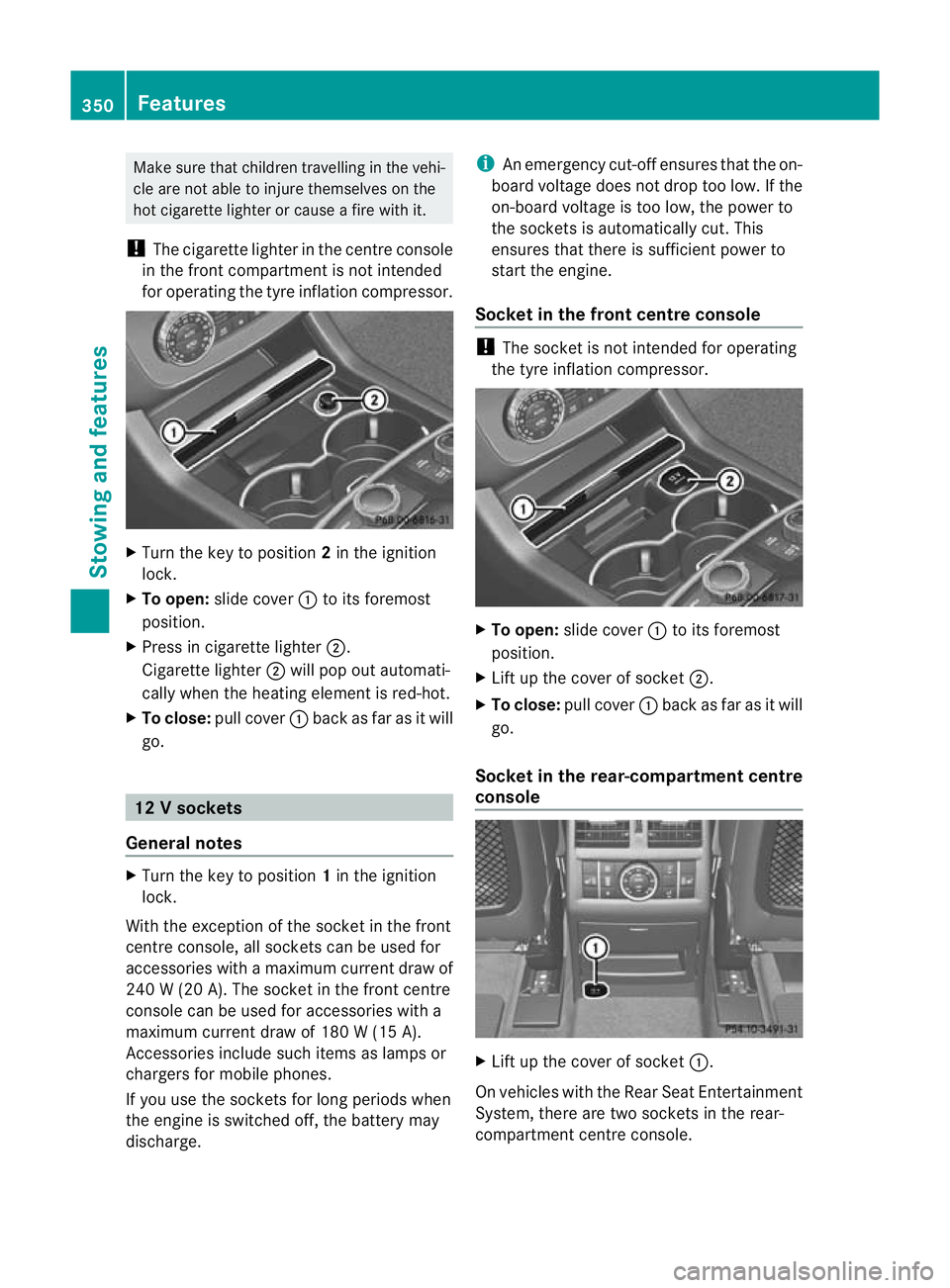
X To open: slide cover :to its foremost
position.
X Pres sinc igarette lighter ;.
Cigarette lighter ;will pop out automati-
cally when the heating element is red-hot.
X To close: pull cover :back as far as it will
go. 12
Vsockets
General notes X
Turn th ekey to position 1in th eignition
lock.
Wit hthe exception of th esocket in th efront
centr econsole, all socket scan be used for
accessories with amaximum curren tdraw of
240 W(20 A) .The socket in the front centre
console can be used for accessories with a
maximum curren tdraw of 180 W(15 A).
Accessories includ esuch items as lamp sor
charg ersf or mobi lephones.
If you use the sockets for long periods when
the engine is switched off ,the battery may
discharge. i
An emergency cut-of fensure sthat the on-
board voltage does not drop too low. If the
on-boar dvoltage is too low, the power to
the socket sisautomatically cut. This
ensures that there is sufficient power to
start the engine.
Socket in the front centre console !
The socket is not intended for operating
the tyre inflation compressor. X
To open: slide cover :to its foremost
position.
X Lift up the cover of socket ;.
X To close: pull cover :back as far as it will
go.
Socket in the rear-compartment centre
console X
Lift up the cover of socket :.
On vehicles with the Rear Seat Entertainment
System, there are two sockets in the rear-
compartmen tcentre console. 350
FeaturesStowing and features
Page 355 of 441
i
On some mobile phone brackets, you first
hav etoc onnect the mobile phone via Blue-
tooth ®
to the mobile phone bracke t(see
the separate operating instructions for the
mobile phone bracket).
If this is the case, the mobile phone does
not hav etobei nsertedinto the bracket for
you to be able to use the telephone func-
tions .However, the charging function and
aerial function ar enot available.
Operating th emobile phone You can operate the telephone using the
6
and~ buttons on the multifunction
steering wheel. You can operate other mobile
phone functions via the on-board computer
(Y page 275).
When you remov ethe key from the ignition
lock ,the mobile phone stay sswitched on.
However, you can no longer use the hands-
free system.
If you have an active call and woul dlike to
take the key out of the ignition lock, first
remov ethe mobile phone from the bracket.
i When usin gabracke tconnected to the
mobile phone via Bluetooth ®
and you wish
to proceed with acall:
Switch to private mode before removing
the key from the ignition lock. Otherwise, it
may take up to 20 seconds before the
mobile phone separates from the system.
Only then can the telephone call continue.
Information on the necessary steps for set-
ting up "private mode" can be found in the
separate mobile phone operating instruc-
tions.
i Not all mobile phones support "private
mode". Garage door opener
Important safety notes The HomeLink
®
garage door opener integra-
ted in the rear-view mirror allows you to oper-
ate up to three different door and gate sys-
tems.
i The garage door opener is only available
for certain countries. Observe the legal
requirements for each individual country.
The HomeLink ®
garage door opener is
compatible with most European garage and
gate opener drives. More information on
HomeLink ®
and/or compatible products is
available from:
R at aq ualified specialised workshop
R the HomeLink ®
hotline
(0) 08000 466 354 65 (free of charge) or
+49 (0) 683 8907 277 (charge sapply)
R on the Internet at:
http://www.homelink.com
Progra mming Programming buttons
G
WARNING
Only press the button on the integrated
garage door opener if there are no persons or
object spresent withi nthe sweep of the
garage door. Person scould otherwise be
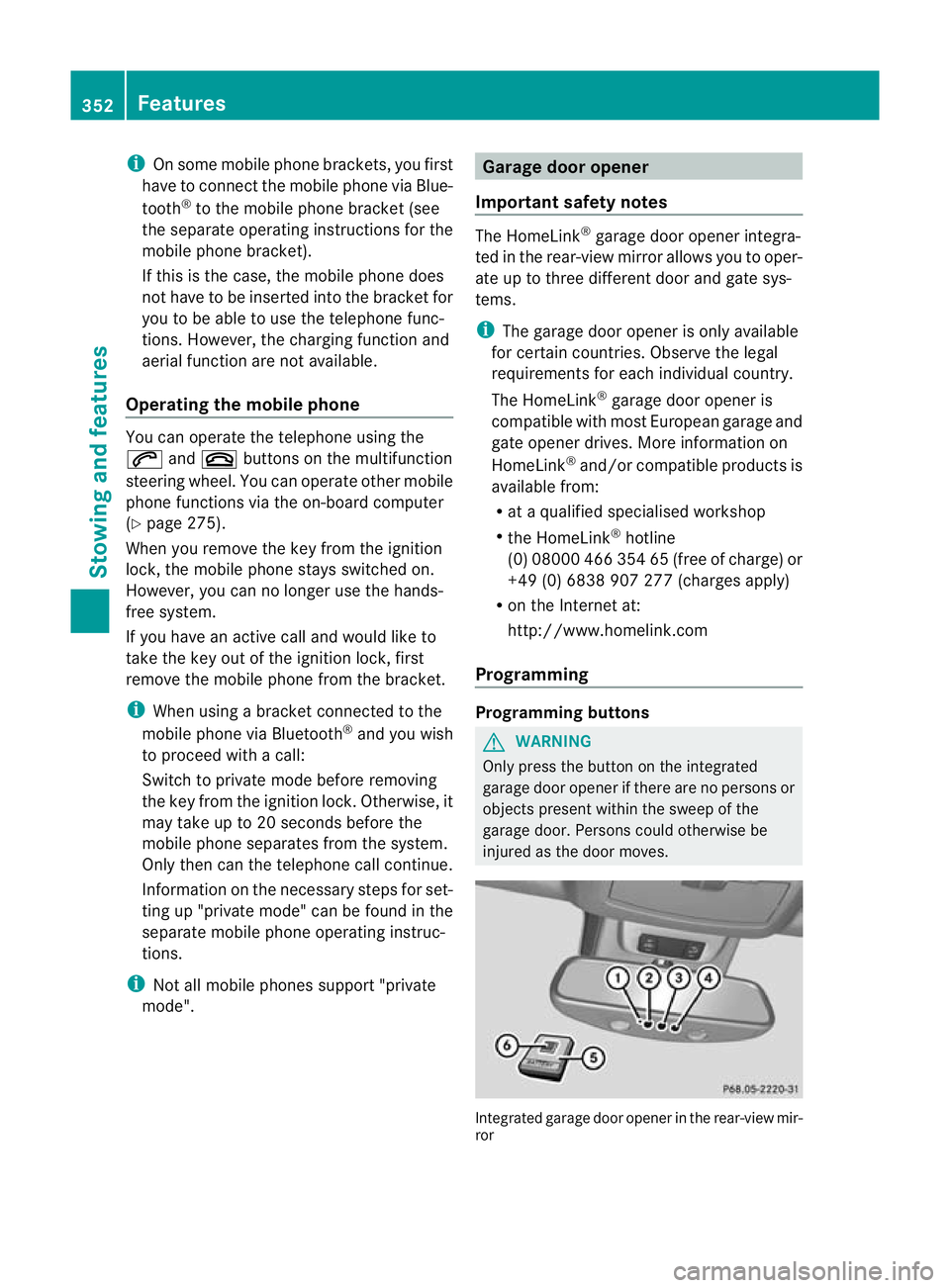
injure dasthe door moves. Integrated garage door opene
rinthe rear-view mir-
ror 352
FeaturesStowin
gand features
Page 356 of 441
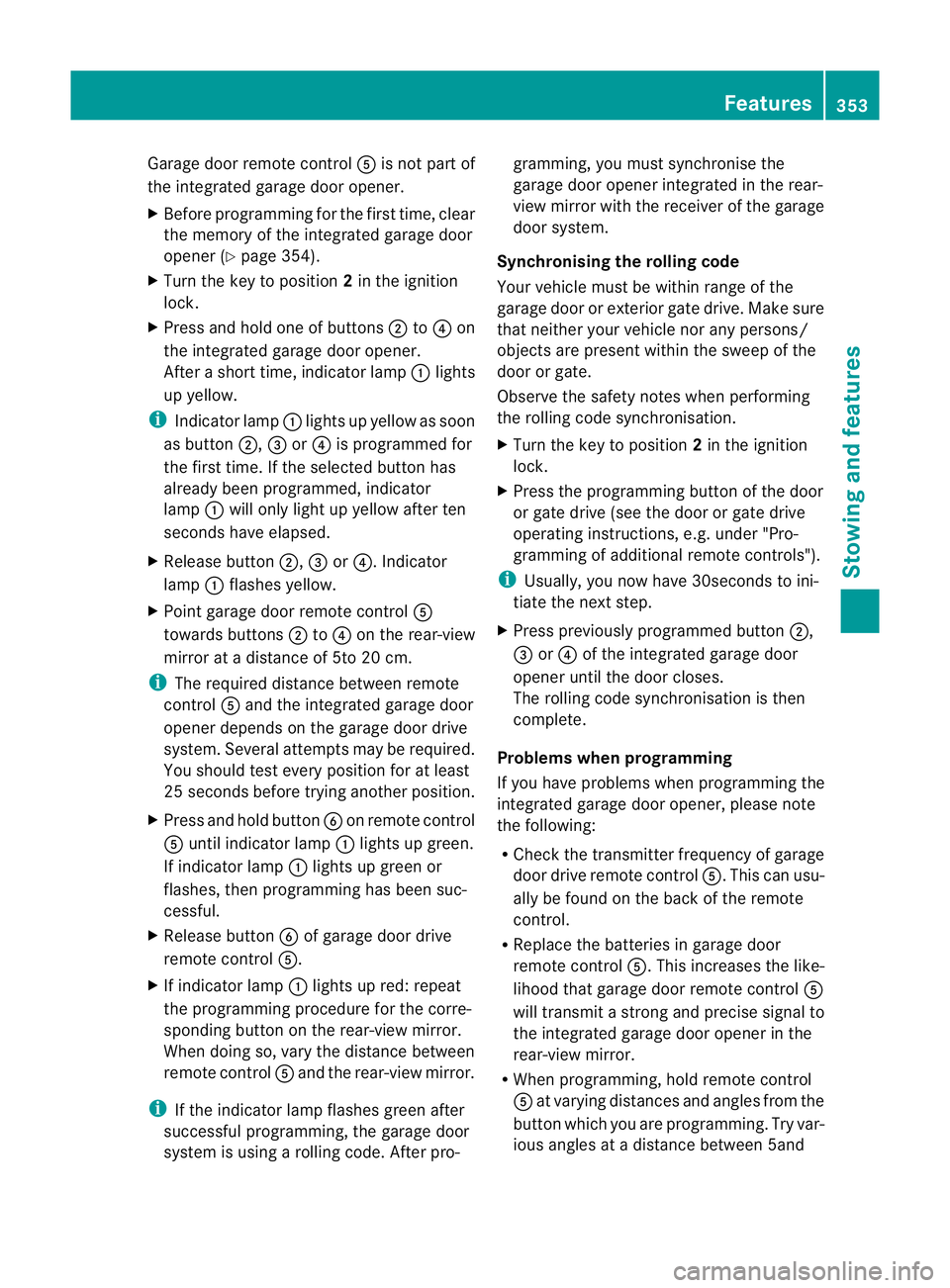
Garage door remote con
trol A is no tpart of
the integrated garage door opener.
X Before programmin gfor th efirst time, clear
th em emory of th eintegrated garage door
ope ner(Ypage 354).
X Turn th ekey to position 2in th eignition
lock.
X Press and hold on eofbuttons ;to? on
the integrate dgarag edoor opener.
Afte ras hort time, indicator lamp :lights
up yellow.
i Indicator lamp :lights up yellow as soon
as button ;,=or? is programmed for
the first time. If the selected button has
already been programmed ,indicator
lamp :will only light up yellow after ten
seconds have elapsed.
X Rele asebutton ;,=or?.I ndicator
lamp :flashes yellow.
X Point garage doo rremote control A
towards buttons ;to? on the rear-view
mirror at adistance of 5to 20 cm.
i The required distance between remote
control Aand the integrated garage door
opener depends on the garage door drive
system. Several attempt smay be required.
You should test every position for at least
25 seconds before trying another position.
X Press and hold button Bon remote control
A until indicator lamp :lights up green.
If indicator lamp :lights up green or
flashes ,then programming has been suc-
cessful.
X Release button Bof garage door drive
remote con trolA.
X Ifindicator lamp :lights up red: repeat
the programming procedur efor the corre-
spondin gbutton on the rear-view mirror.
When doing so, vary the distance between
remote control Aand the rear-view mirror.
i If the indicator lamp flashes green after
successful programming, the garage door
system is using arollin gcode. Af terp ro- gramming
,you must synchronise the
garage door opener integrated in the rear-
view mirror with the receive rofthe garage
door system.
Synchronising th erolling code
Your vehicle must be within range of the
garage door or exterior gate drive. Make sure
that neither your vehicle nor any persons/
objects are present within the sweep of the
door or gate.
Observe the safety notes when performing
the rolling code synchronisation.
X Turn the key to position 2in the ignition
lock.
X Press the programming button of the door
or gate drive (see the door or gate drive
operating instructions, e.g. under "Pro-
gramming of additional remote controls").
i Usually, you now have 30seconds to ini-
tiate the next step.
X Press previousl yprogramme dbutton ;,
= or? of the integrated garage door
opener until the door closes.
The rolling code synchronisatio nist hen
complete.
Problems when progra mming
If you have problems when programming the
integrated garage door opener, please note
the following:
R Check the transmitter frequency of garage
door driv eremote control A.This can usu-
ally be found on the bac kofthe remote
con trol.
R Replace the batteries in garage door
remote control A.This increases the like-
lihood that garage door remote con trolA
will transmit astron gand precis esignal to
the integrated garage door opener in the
rear-view mirror.
R When programming, hold remote control
A at varying distances and angles from the
button which you are programming. Try var-
ious angles at adistance between 5and Features
353Stowingand features Z
Page 357 of 441
30 cm or at the same ang
lebut at var ying
distances.
R If there is another remote control for the
same garage doo rdrive ,perf ormt he pro-
grammin gsteps again using this remote
control. Before performing thes esteps,
make sure that new batteries have been
fitted in garage doo rdrive remote control
A.
R Note that some remote controls transmit
onl yfor alimited perio d(the indicator lamp
on the remote control goe sout).Pres sbut-
ton Bon remote control Aagain before
transmission ends.
R Align the aerial cabl eofthe garage door
opener unit. This can improv esignal recep-
tion/transmission.
Opening or closing the garage door Once programmed, the integrated garage
door opener wil
lassume the function of the
garage door system's remote control. Please
also rea dthe oper ating instructions for the
garage door system.
X Turn the key to position 2in the ignition
lock.
X Press button ;,=or? which you have
programmed to operate the garage door.
Garage door system with afixed code: indi-
cator lamp :lights up green.
Garage door system with arolling code:
indicator lamp :flashes green.
i The transmitter will transmit asignal for
as long as the button is pressed. The trans-
mission is halted after amaximum of ten
seconds and indicator lamp :lights up
yellow. Pres sbutton ;,=or? again if
necessary. Clearing the memory X
Turn the key to position 2in the ignition
lock.
X Press buttons ;and ?.
The indicator lamp lights up yellow.
X Press and hold buttons ;and ?until the
indicator lamp turn sgreen.
i Make sure that yo uclear the memor yof
the integrated garage doo ropener before
selling the vehicle.
Frequencies Europe
Count
ry Radio
typeapproval num-
ber
Frequency range (MHz) AD (Andorra) 20 July
MHz: 27, 30, 40, 433
,868 AT (Aust
ria) Article
6ofDirective
1999/5/E CR&TT E18M ay
05
MHz :27, 40, 433 ,868 BE (Belgium) Articl
e6ofD irective
1999/5/E CR&TT E18M ay
05
MHz :27, 40, 433 ,868 BG (Bulga-
ria) Articl
e6ofD irective
1999/5/E CR&TT E12A pril
07
MHz: 27 ,40, 433, 868 CH (Switzer-
land) Article
6ofDirective
1999/5/EC R&TTE14357
27 May 05
MHz: 27, 40, 433 ,868 CY (Cyprus) Article
6ofDirective
1999/5/EC R&TTE 5May
05
MHz: 27, 40, 433 ,868 354
FeaturesSto
wing and featur es
Page 364 of 441
To avoi
dthe risk of burns, only touc hthose
component sdescribed in the Owner's Manual
and observ ethe relevant safety notes. G
WARNING
The radiator fa nbetween the radiator and the
engine can star tautomatically, even if the key
has been removed from the ignition lock. For
this reason, you must not reach into the fan
rotation area. You could otherwis ebeinjured.
Vehicles with apetrol engine: The elec-
tronic ignition system uses high voltage. For
this reason ,you must never touc hignition
system component s(ignition coil, ignition
cables, spark plug connectors or test socket)
while:
R the engine is running
R the engine is being started
R the ignition is switched on and the engine
is being cranked by hand
You could otherwise suffer an electric shock
and be seriously or even fatally injured.
Vehicles with adiesel engine: The elec-
tronic injection control uses high voltage. For
this reason ,you must never touc hinjection
system components while:
R the engi neis running
R the engin eisbeing started
R the ignition is switched on
You could otherwise suffer an electric shock
and be seriously or even fatally injured. G
WAR
NING
The winds creen wipers and wiper linkage
could be set in motion.
When the bonnet is open, you or others could
be injured by the wiper linkage.
Make sure that the windscreen wipers are
switched off .Remov ethe key or make sure
that no ignition position has been selected
with KEYLESS-GO. All indi cator lamps must be
off in the instrumen tpanel.
! Make sure that the windscreen wipers are
not folded away from the windscreen. Oth- er
wise ,you could damage the windscreen
wipers or the bonnet. X
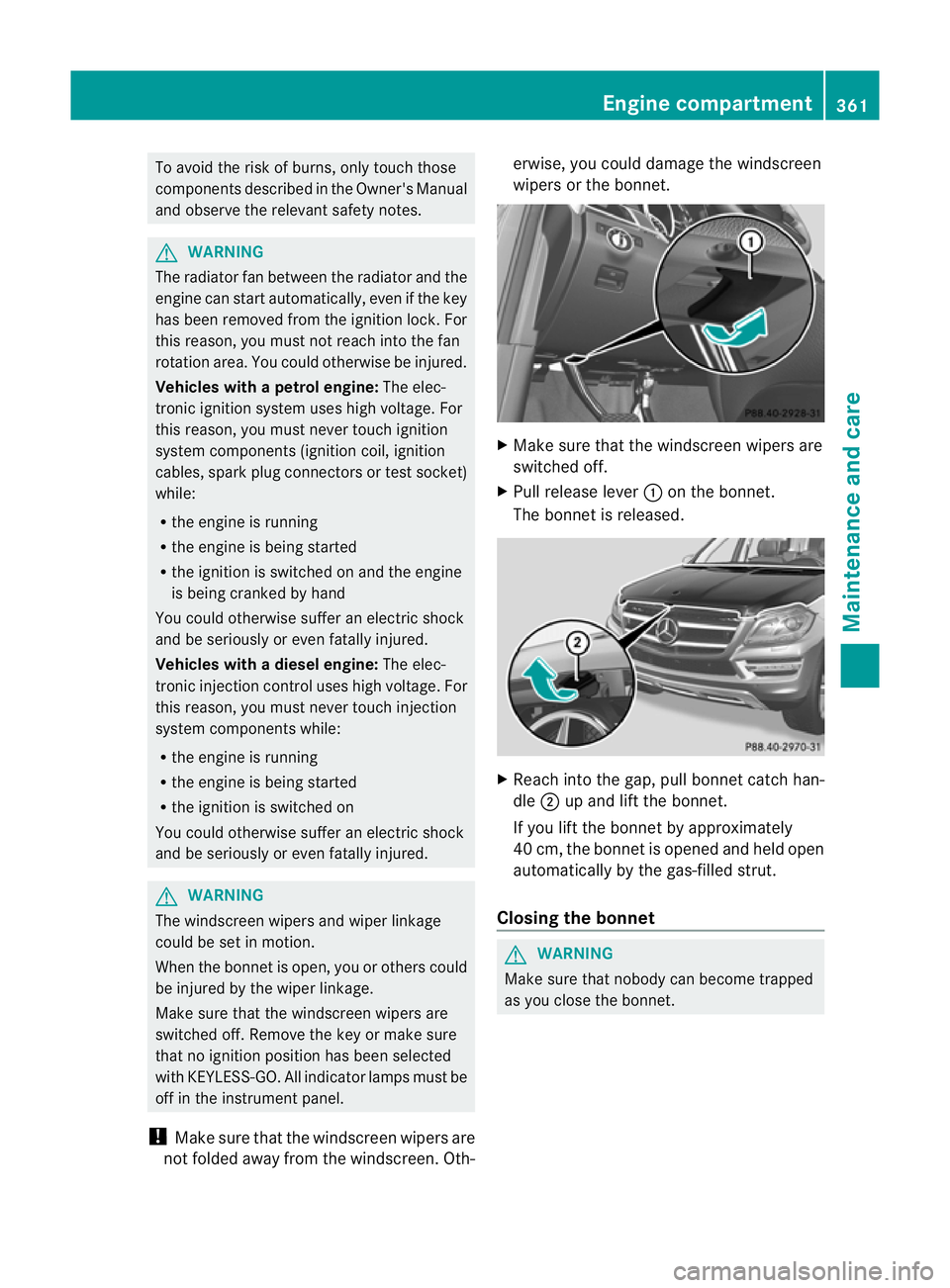
Make sure tha tthe windscreen wiper sare
switche doff.
X Pull release lever :on th ebonnet.
The bonnet is released. X
Reac hinto the gap ,pull bonnet catch han-
dle ;up and lift the bonnet.
If you lift the bonnet by approximately
40 cm, the bonnet is opened and held open
automatically by the gas-filled strut.
Closing the bonnet G
WARNING
Make sure that nobody can become trapped
as you close the bonnet. Eng
inecompartment
361Maintenance and care Z
Page 366 of 441
H
Environmenta
lnote
When toppin guptheoil, tak ecaren ot to spill
any .Ifo il enters th esoil or waterways, it is
harmful to th eenvironment.
! Only use engine oil sand oil filters that
have bee napproved for vehicles with a
servic esystem. You can obtain alist of the
engine oils and oil filters tested and
approved in accordance with the
Mercedes-Ben zSpecification sfor Service
Product satany Mercedes-Ben zService
Centre.
Damage to th eengine or exhaust sys temis
caused by the following:
R using engine oil sand oil filters that have
not bee nspecifically approved for the
servic esystem
R changing the engine oil and oil filter after
missing the change interval required by
the servic esystem
R using engine oil additives
! Do not add too muc hoil. Toppin gupwith
to om uche ngine oil can resul tindamage
to the engine or to the catalytic converter.
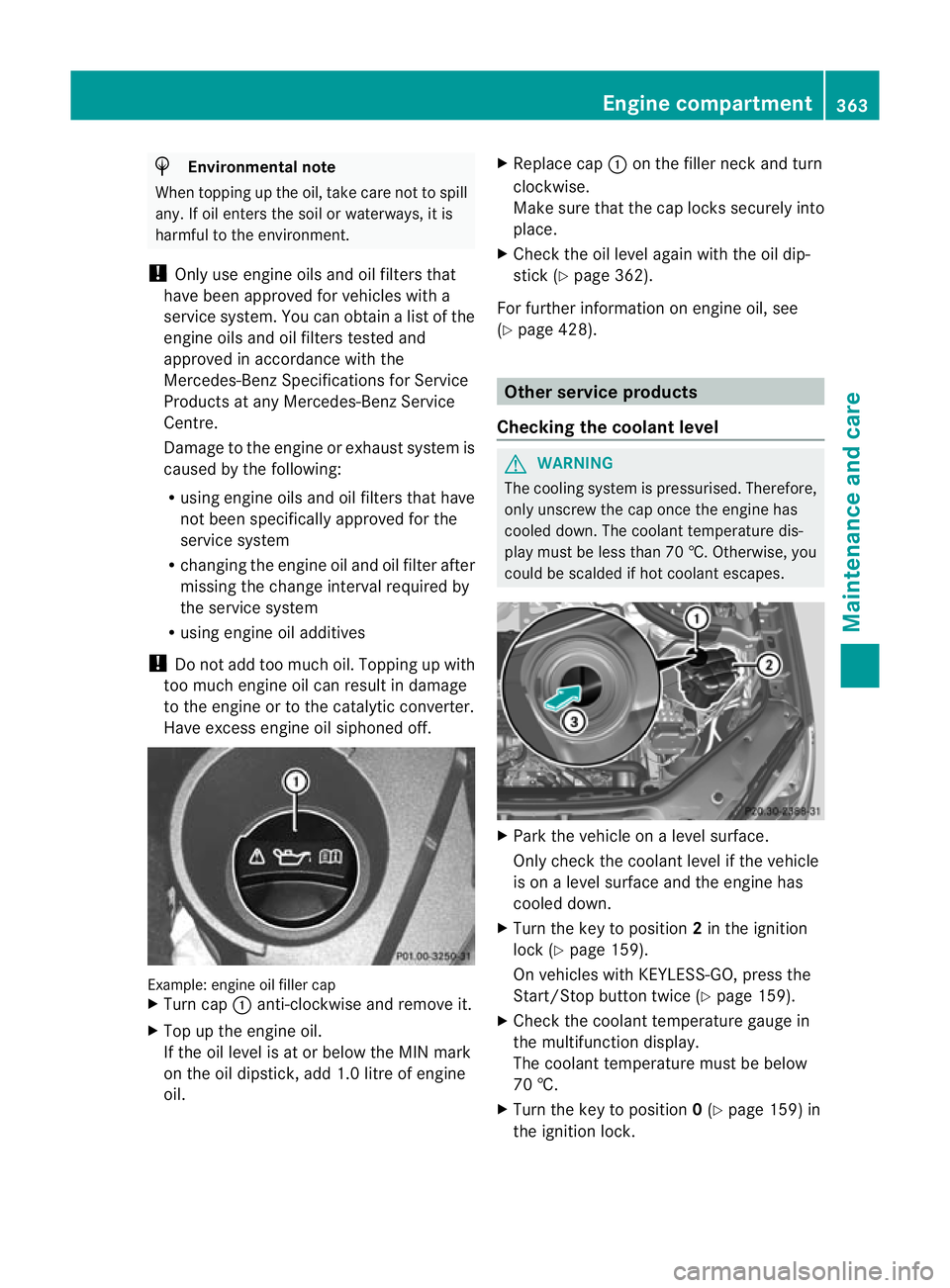
Hav eexcess engine oil siphoned off. Example: engine oil filler cap
X
Turn cap :anti-clockwis eand remove it.
X Top up the engine oil.
If the oil level is at or below the MIN mark
on the oil dipstick ,add 1. 0litreo fengine
oil. X
Replace cap :on the filler nec kand turn
clockwise.
Make sure that the cap locks securely into
place.
X Check the oil level agai nwith the oil dip-
stic k(Ypage 36 2).
For furthe rinformation on engine oil ,see
(Y page 42 8). Other service products
Checking th ecoolant level G
WARNING
The coolin gsystem is pressurised. Therefore,
only unscrew the cap onc ethe engine has
coole ddown. The coolan ttemperatur edis-
play must be less than 70 †. Otherwise, you
could be scalded if hot coolant escapes. X
Park the vehicle on alevel surface.
Only chec kthe coolant level if the vehicle
is on alevel surface and the engine has
cooled down.
X Turn the key to position 2in the ignition
lock (Y page 159).
On vehicles with KEYLESS-GO, press the
Start/Stop button twic e(Ypage 159).
X Check the coolant temperatur egauge in
the multifunction displ ay.
Th ec oolant temperatur emust be below
70 †.
X Turn the key to position 0(Y page 159 )in
the ignition lock. Eng
inecompartment
363Maintenance and care Z