warning MERCEDES-BENZ GLA 2016 Owners Manual
[x] Cancel search | Manufacturer: MERCEDES-BENZ, Model Year: 2016, Model line: GLA, Model: MERCEDES-BENZ GLA 2016Pages: 390, PDF Size: 10.2 MB
Page 208 of 390
Otherwise Active Parking Assist will be can-
celed.
Active Parking Assist brakes the vehicle to
a standstill when the vehicle approaches
the rear border of the parking space.
Maneuvering may be required in tight park-
ing spaces.
The Park Assist Active Select D
Observe Surroundings message appears in
the multifunction display. X
Shift the transmission to position D while
the vehicle is stationary.
Active Parking Assist immediately steers in
the other direction.
The Park Assist Active Accelerate
and Brake Observe Surroundings mes-
sage appears in the multifunction display.
i You will achieve the best results by wait-
ing for the steering procedure to complete
before pulling away. X
Drive forwards and be ready to brake at all
times.
Active Parking Assist brakes the vehicle to
a standstill when the vehicle approaches
the front border of the parking space.
Maneuvering may be required in tight park-
ing spaces.
The Park Assist Active Select R
Observe Surroundings message appears in
the multifunction display.
As soon as the parking procedure is com-
plete, the Park
Assist Switched Off mes-
sage appears and a warning tone sounds. The
vehicle is now parked.
The vehicle is kept stationary without the
driver having to depress the brake pedal. The
braking effect is canceled when you depress
the accelerator pedal.
Active Parking Assist no longer supports you
with steering interventions and brake appli-
cations. When Active Parking Assist is fin-
ished, you must steer and brake again your-
self. PARKTRONIC is still available. Parking tips: R
The way your vehicle is positioned in the
parking space after parking is dependent
on various factors. These include the posi-
tion and shape of the vehicles parked in
front and behind it and the conditions of the
location. It may be the case that Active
Parking Assist guides you too far into a
parking space, or not far enough into it. In
some cases, it may also lead you across or
onto the curb. If necessary, you should can-
cel the parking procedure with Active Park-
ing Assist. R
You can also select preselect transmission
position D . The vehicle redirects and does
not drive as far into the parking space.
Should the transmission change take place
too early, the parking procedure will be
canceled. A sensible parking position can
no longer be achieved from this position.
Exiting a parking space In order that Active Parking Assist can sup-
port you when you exit the parking space: R
you need to have parked using Active Park-
ing Assist. R
the border of the parking space must be
high enough at the front and the rear. A
curb is too small, for example. R
the border of the parking space must not be
too wide, as the position of the vehicle must
not exceed an angle of 45° to the starting
position as it is maneuvering into the park-
ing space. R
a maneuvering distance of at least 3.3 ft
(1.0 m) must be available.
Active Parking Assist can only assist you with
exiting a parking space if you have parked the
vehicle parallel to the direction of travel using
Active Parking Assist.
i If PARKTRONIC detects obstacles, Active
Parking Assist brakes automatically whilst
the vehicle exits the parking space. You are
responsible for braking in good time.206
Driving systems
Driving and parking
Page 209 of 390
X
Start the engine. X
Release the electric parking brake. X
Switch on the turn signal in the direction
you will drive out of the parking space. X
Shift the transmission to position D or R .
The Start Park Assist? Yes: OK No:
message appears in the multifunction dis-
play 8 .X
To cancel the procedure: press the 8
button on the multifunction steering wheel
or pull away.
or X
To exit a parking space using Active
Parking Assist: press the v button on
the multifunction steering wheel.
The Park Assist Active Accelerate
and Brake Observe Surroundings mes-
sage appears in the multifunction display. X
Let go of the multifunction steering wheel. X
Pull away, being ready to brake at all times.
Do not exceed a maximum speed of
approximately 6 mph (10 km/h) when exit-
ing a parking space. Otherwise Active Park-
ing Assist will be canceled. X
Depending on the message or as required,
shift the transmission to position D or R .
Active Parking Assist immediately steers in
the other direction. The Park Assist
Active Accelerate and Brake
Observe Surroundings message appears
in the multifunction display.
i You will achieve the best results by wait-
ing for the steering procedure to complete
before pulling away.
If you back up after activation, the steering
wheel is moved to the straight-ahead posi-
tion. X
Drive forwards and back up as prompted by
the PARKTRONIC warning displays, several
times if necessary.
Once you have exited the parking space com-
pletely, the steering wheel is moved to the
straight-ahead position. You hear a tone and
the Park Assist Finished message
appears in the multifunction display. You will then have to steer and merge into traffic on
your own. PARKTRONIC is still available. You
can take over the steering, before the vehicle
has exited the parking space completely. This
is useful, for example when you recognize
that it is already possible to pull out of the
parking space.
Canceling Active Parking Assist X
Stop the movement of the multifunction
steering wheel or steer yourself.
Active Parking Assist will be canceled at
once. The Park Assist Canceled mes-
sage appears in the multifunction display.
or X
Press the PARKTRONIC button
( Y
page 202).
PARKTRONIC is switched off and Active
Parking Assist is immediately canceled.
The Park Assist Canceled message
appears in the multifunction display.
Active Parking Assist is canceled automati-
cally if: R
the electric parking brake is engaged R
transmission position P is selectedR
parking using Active Parking Assist is no
longer possible R
you are driving faster than 6 mph (10 km/h) R
a wheel spins, ESP ®
intervenes or fails. The
Page 214 of 390
The functionality of ATTENTION ASSIST is
restricted and warnings may be delayed or
not occur at all: R
if the length of the journey is less than
approximately 30 minutes R
if the road condition is poor, e.g. if the sur-
face is uneven or if there are potholes R
if there is a strong side wind R
if you have adopted a sporty driving style
with high cornering speeds or high rates of
acceleration R
if you are predominantly driving slower
than 37 mph (60 km/h) or faster than
125 mph (200 km/h) R
if the time has been set incorrectly R
in active driving situations, such as when
you change lanes or change your speed
ATTENTION ASSIST is reset when you con-
tinue your journey and starts assessing your
tiredness again if: R
you switch off the engine R
you take off your seat belt and open the
driver's door, e.g. for a change of drivers or
to take a break
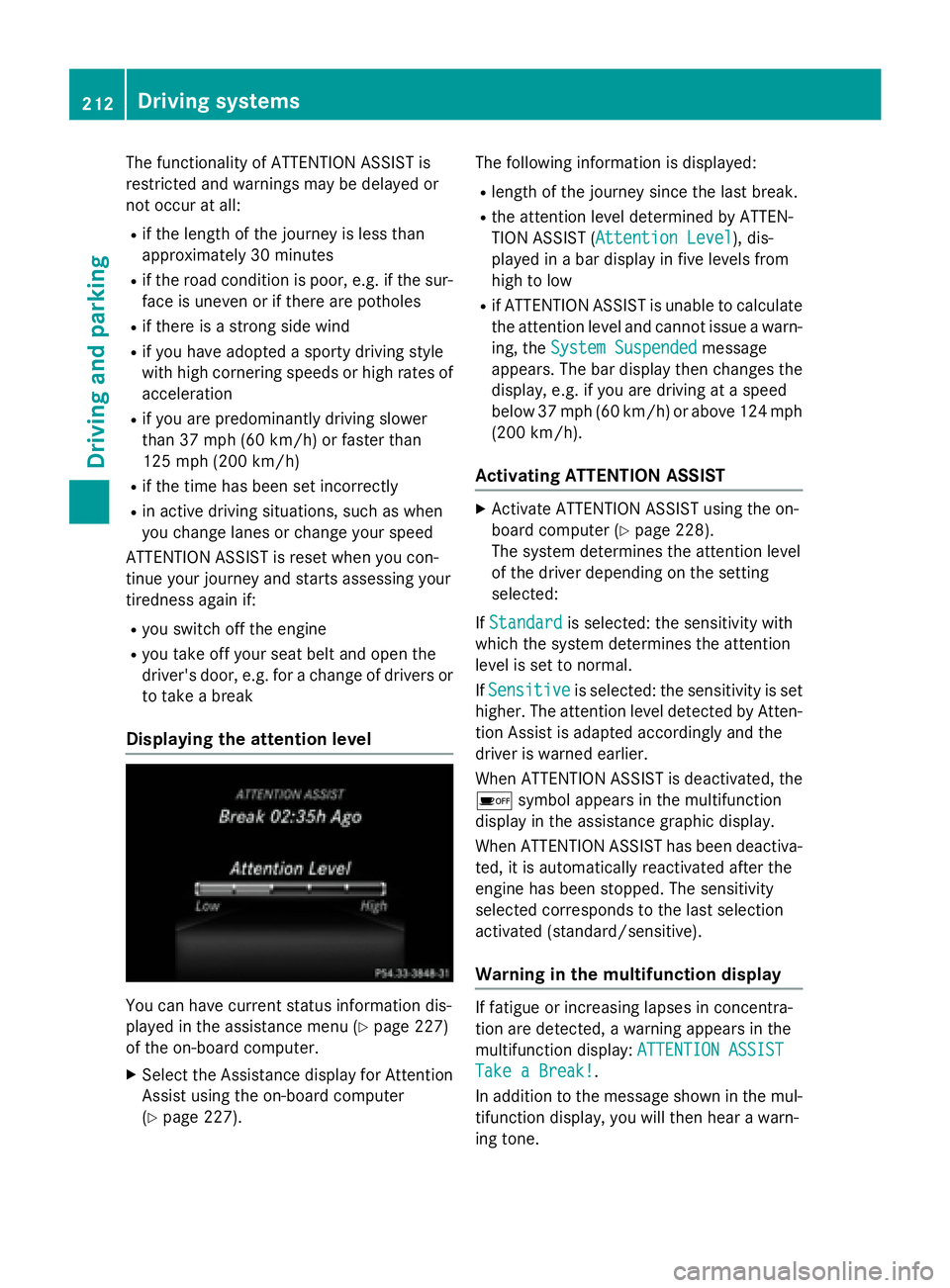
Displaying the attention level
You can have current status information dis-
played in the assistance menu ( Y
page 227)
of the on-board computer. X
Select the Assistance display for Attention
Assist using the on-board computer
( Y
page 227). The following information is displayed: R
length of the journey since the last break. R
the attention level determined by ATTEN-
TION ASSIST ( Attention Level
), dis-
played in a bar display in five levels from
high to low R
if ATTENTION ASSIST is unable to calculate
the attention level and cannot issue a warn-
ing, the System Suspended
message
appears. The bar display then changes the
display, e.g. if you are driving at a speed
below 37 mph (60 km/h) or above 124 mph
(200 km/ h) .
Activating ATTENTION ASSIST X
Activat e ATTENTION ASSIST usin g th e on -
boar d computer ( Y
page 228).
The system determine s th e attention level
of th e driver depending on th e set ting
selected:
If Standard is selected: th e sensitivit y wit h
whic h th e system determine s th e attention
level is set to normal.
If Sensitive is selected: th e sensitivit y is set
higher. The attention level detecte d by Atten-
tion Assis t is adapted accordingly and th e
driver is warned earlier .
When ATTENTI ON ASSIST is deactivated, th e
Page 215 of 390
X
If necessary, take a break. X
Confirm the message by pressing the v
button on the steering wheel.
On long journeys, take regular breaks in good
time to allow yourself to rest properly. If you
do not take a break and ATTENTION ASSIST
still detects increasing lapses in concentra-
tion, you will be warned again after
15 minutes at the earliest. This will only hap-
pen if ATTENTION ASSIST still detects typical
indicators of fatigue or increasing lapses in
concentration.
If a warning is output in the multifunction dis-
play, a service station search is performed in
COMAND. You can select a service station
and navigation to this service station will then
begin. This function can be activated and
deactivated in COMAND.
Lane Tracking package
General notes
The Lane Tracking package consists of Blind
Spot Assist ( Y
page 213) and Lane Keeping
Assist ( Y
page 215).
Blind Spot Assist
General notes
Blind Spot Assist monitors the areas on either
side of the vehicle that are not visible to the
driver with two lateral, rear-facing radar sen-
sors. A warning display in the exterior mirrors
draws your attention to vehicles detected in
the monitored area. If you then switch on the
corresponding turn signal to change lane, you
will also receive an optical and audible warn-
ing.
Blind Spot Assist supports you from a speed
of approximately 20 mph (30 km/h). Important safety notes
G WARNING
Blind Spot Assist does not react to: R
vehicles overtaken too closely on the side,
placing them in the blind spot area R
vehicles which approach with a large speed
differential and overtake your vehicle
As a result, Blind Spot Assist may not give
warnings in such situations. There is a risk of
an accident.
Always observe the traffic conditions care-
fully, and maintain a safe lateral distance.
Blind Spot Assist is only an aid. It may fail to
detect some vehicles and is no substitute for
attentive driving. Always ensure that there is
sufficient distance to the side for other road
users and obstacles.
i USA only:
This device has been approved by the FCC
as a "Vehicular Radar System". The radar
sensor is intended for use in an automotive
radar system only. Removing, tampering
with, or altering the device will void any
warranties, and is not permitted by the
FCC. Do not tamper with, alter, or use in
any non-approved way.
Any unauthorized modification to this
device could void the user’s authority to
operate the equipment.
Radar sensors
The radar sensors for Blind Spot Assist are
integrated into the rear bumper. Make sure
that the bumpers are free from dirt, ice or
slush. The sensors must not be covered, for
example by cycle racks or overhanging loads.
Following a severe impact or in the event of
damage to the bumpers, have the function of
the radar sensors checked at a qualified spe-
cialist workshop. Blind Spot Assist may no
longer work properly. Driving systems 213
Driving and parking Z
Page 216 of 390
Monitoring range of the sensors
In particular, the detection of obstacles can
be impaired if: R
there is dirt on the sensors or anything else
covering the sensors R
there is poor visibility, e.g. due to fog, heavy
rain or snow R
a narrow vehicle traveling in front, e.g. a
motorbike or bicycle R
the road has very wide lanes R
the road has narrow lanes R
you are not driving in the middle of the lane R
there are barriers or similar lane borders
Vehicles in the monitoring range are then not
indicated.
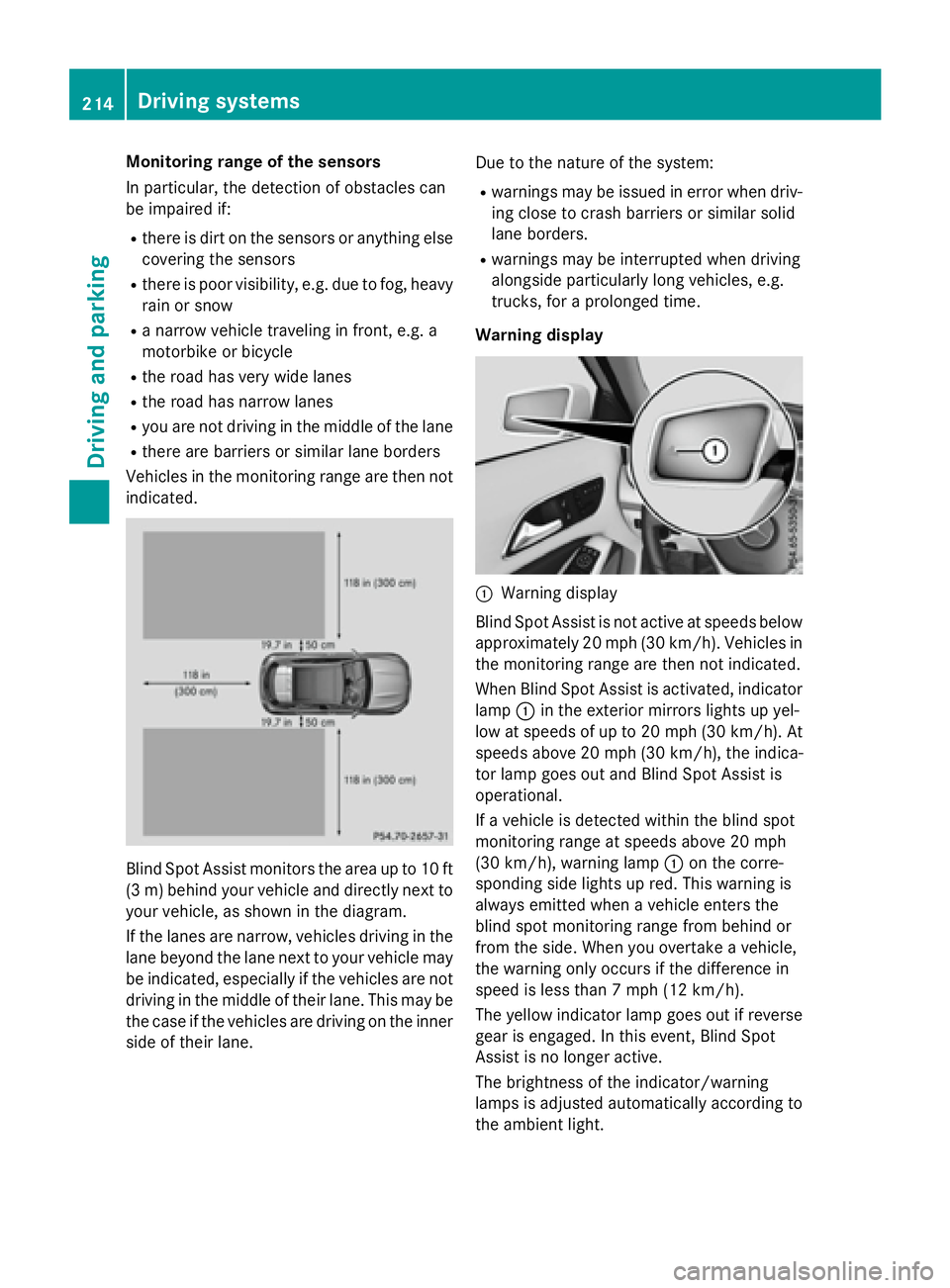
Blind Spot Assist monitors the area up to 10 ft
(3 m) behind your vehicle and directly next to
your vehicle, as shown in the diagram.
If the lanes are narrow, vehicles driving in the
lane beyond the lane next to your vehicle may
be indicated, especially if the vehicles are not
driving in the middle of their lane. This may be
the case if the vehicles are driving on the inner
side of their lane. Due to the nature of the system: R
warnings may be issued in error when driv-
ing close to crash barriers or similar solid
lane borders. R
warnings may be interrupted when driving
alongside particularly long vehicles, e.g.
trucks, for a prolonged time.
Warning display
C
Warning display
Blind Spot Assist is not active at speeds below
approximately 20 mph (30 km/h). Vehicles in
the monitoring range are then not indicated.
When Blind Spot Assist is activated, indicator
lamp C in the exterior mirrors lights up yel-
low at speeds of up to 20 mph (30 km/h). At
speeds above 20 mph (30 km/h), the indica-
tor lamp goes out and Blind Spot Assist is
operational.
If a vehicle is detected within the blind spot
monitoring range at speeds above 20 mph
(30 km/h), warning lamp C on the corre-
sponding side lights up red. This warning is
always emitted when a vehicle enters the
blind spot monitoring range from behind or
from the side. When you overtake a vehicle,
the warning only occurs if the difference in
speed is less than 7 mph (12 km/h).
The yellow indicator lamp goes out if reverse
gear is engaged. In this event, Blind Spot
Assist is no longer active.
The brightness of the indicator/warning
lamps is adjusted automatically according to
the ambient light.214
Driving systems
Driving and parking
Page 217 of 390
Collision warning
If a vehicle is detected in the monitoring range
of Blind Spot Assist and you switch on the
corresponding turn signal, a double warning
tone sounds. Red warning lamp C flashes. If
the turn signal remains on, vehicles detected
are indicated by the flashing of red warning
lamp C . There are no further warning tones.
Switching on Blind Spot Assist X
Make sure that Blind Spot Assist is activa-
ted in the on-board computer
( Y
page 228). X
Turn the SmartKey to position 2 in the igni-
tion lock.
Warning lamps C in the exterior mirrors
light up red for approximately 1.5 seconds
and then turn yellow.
Lane Keeping Assist
General notes
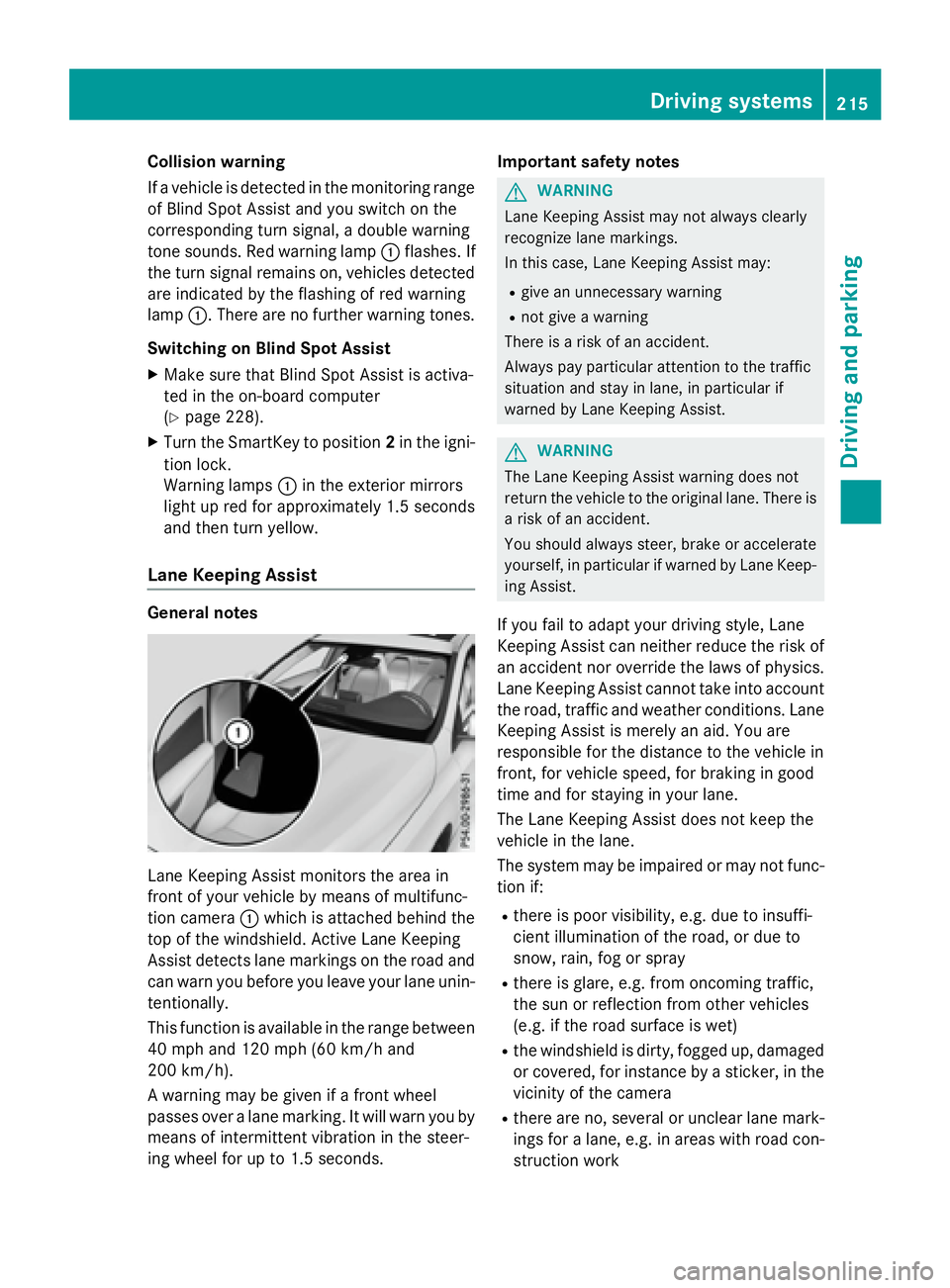
Lane Keeping Assist monitors the area in
front of your vehicle by means of multifunc-
tion camera C which is attached behind the
top of the windshield. Active Lane Keeping
Assist detects lane markings on the road and
can warn you before you leave your lane unin-
tentionally.
This function is available in the range between
40 mph and 120 mph (60 km/h and
200 km/h).
A warning may be given if a front wheel
passes over a lane marking. It will warn you by
means of intermittent vibration in the steer-
ing wheel for up to 1.5 seconds. Important safety notes
G WARNING
Lane Keeping Assist may not always clearly
recognize lane markings.
In this case, Lane Keeping Assist may: R
give an unnecessary warning R
not give a warning
There is a risk of an accident.
Always pay particular attention to the traffic
situation and stay in lane, in particular if
warned by Lane Keeping Assist.
G WARNING
The Lane Keeping Assist warning does not
return the vehicle to the original lane. There is
a risk of an accident.
You should always steer, brake or accelerate
yourself, in particular if warned by Lane Keep-
ing Assist.
If you fail to adapt your driving style, Lane
Keeping Assist can neither reduce the risk of
an accident nor override the laws of physics.
Lane Keeping Assist cannot take into account
the road, traffic and weather conditions. Lane
Keeping Assist is merely an aid. You are
responsible for the distance to the vehicle in
front, for vehicle speed, for braking in good
time and for staying in your lane.
The Lane Keeping Assist does not keep the
vehicle in the lane.
The system may be impaired or may not func-
tion if: R
there is poor visibility, e.g. due to insuffi-
cient illumination of the road, or due to
snow, rain, fog or spray R
there is glare, e.g. from oncoming traffic,
the sun or reflection from other vehicles
(e.g. if the road surface is wet) R
the windshield is dirty, fogged up, damaged
or covered, for instance by a sticker, in the
vicinity of the camera R
there are no, several or unclear lane mark-
ings for a lane, e.g. in areas with road con-
struction work Driving systems 215
Driving and parking Z
Page 218 of 390
R
the lane markings are worn away, dark or
covered up, e.g. by dirt or snow R
the distance to the vehicle in front is too
small and the lane markings thus cannot be
detected R
the lane markings change quickly, e.g.
lanes branch off, cross one another or
merge R
the road is narrow and winding R
there are strong shadows cast on the road
Switching on Lane Keeping Assist X
Activate Lane Keeping Assist using the on-
board computer; to do so, select Standard
or Adaptive ( Y
page 228).
If you drive at speeds above 40 mph
(60 km/h) and lane markings are detected,
the lines in the assistance graphics display
( Y
page 227) are shown in green. Lane
Keeping Assist is ready for use.
When Standard
is selected, no warning vibra-
tion occurs if: R
you have switched on the turn signal. In this
event, the warnings are suppressed for a
certain period of time. R
a driving safety system intervenes, such as
ABS, BAS or ESP ®
.
When Adaptive is selected, no warning vibra-
tion occurs if: R
you have switched on the turn signal. In this
event, the warnings are suppressed for a
certain period of time. R
a driving safety system intervenes, e.g.
ABS, BAS or ESP ®
.R
you accelerate hard, e.g. kickdown. R
you brake hard. R
you steer actively, e.g. swerve to avoid an
obstacle or change lanes quickly. R
you cut the corner on a sharp bend.
In order that you are warned only when nec-
essary and in good time if you cross the lane
marking, the system recognizes certain con-
ditions and warns you accordingly. The warning vibration occurs earlier if: R
you approach the outer lane marking on a
bend. R
the road has very wide lanes, e.g. a free-
way. R
the system recognizes solid lane markings.
The warning vibration occurs later if: R
the road has narrow lanes. R
you cut the corner on a bend.216
Driving system s
Dr ivi ng an d parking
Page 219 of 390
Useful information ............................ 218
Important safety notes ..................... 218
Displays and operation ..................... 218
Menus and submenus ...................... 221
Display messages ............................. 235
Warning and indicator lamps in the
instrument cluster ............................ 266 217
On-board computer and displays
Page 220 of 390
Useful information
i This Operator's Manual describes all
models and all standard and optional equip-
ment of your vehicle available at the time of
publication of the Operator's Manual.
Country-specific differences are possible.
Please note that your vehicle may not be
equipped with all features described. This
also applies to safety-related systems and
functions.
i Read the information on qualified special-
ist workshops ( Y
page 25).
Important safety notes
G WARNING
If you operate information systems and com-
munication equipment integrated in the vehi-
cle while driving, you will be distracted from
traffic conditions. You could also lose control
of the vehicle. There is a risk of an accident.
Only operate the equipment when the traffic
situation permits. If you are not sure that this
is possible, park the vehicle paying attention
to traffic conditions and operate the equip-
ment when the vehicle is stationary.
You must observe the legal requirements for
the country in which you are currently driving
when operating the on-board computer.
G WARNING
If the instrument cluster has failed or mal-
functioned, you may not recognize function
restrictions in systems relevant to safety. The
operating safety of your vehicle may be
impaired. There is a risk of an accident.
Drive on carefully. Have the vehicle checked
at a qualified specialist workshop immedi-
ately.
The on-board computer only shows messages
or warnings from certain systems in the mul-
tifunction display. You should therefore make sure your vehicle is operating safely at all
times.
If the operating safety of your vehicle is
impaired, pull over as soon as it is safe to do
so. Contact a qualified specialist workshop.
For an overview, see the instrument panel
illustration ( Y
page 31).
Displays and operation
Instrument cluster lighting The light sensor in the instrument cluster
automatically controls the brightness of the
multifunction display. In daylight, the displays
in the instrument cluster are not illuminated.
The lighting in the instrument cluster, in the
displays and the controls in the vehicle inte-
rior can be adjusted using the brightness con-
trol knob.
The brightness control knob is located on the
bottom left of the instrument cluster
( Y
page 31). X
Turn the brightness control knob clockwise
or counter-clockwise.
If the light switch is set to the X , ` or
X position, the brightness is dependent
upon the brightness of the ambient light.
Speedometer with segments
The speedometer is divided into segments
only on vehicles with DISTRONIC PLUS.
The segments in the speedometer indicate
which speed range is available. R
DISTRONIC PLUS activated ( Y
page 186):
One or two segments in the set speed
range light up. R
DISTRONIC PLUS detects a vehicle in front
that is driving at a slower speed than the
stored speed:
The segments between the speed of the
vehicle in front and the stored speed light
up.218
Displays and operation
On-board computer and displays
Page 221 of 390
Tachometer
! Do not drive in the overrevving range, as
this could damage the engine.
The red band in the tachometer indicates the
engine's overrevving range.
The engine is limited within a range to protect
the engine when the red band is reached.
Outside temperature display You should pay special attention to road con-
ditions when temperatures are around freez-
ing point.
Bear in mind that the outside temperature
display indicates the temperature measured
and does not record the road temperature.
The outside temperature display is in the mul-
tifunction display ( Y
page 221).
There is a short delay before a change in out-
side temperature appears in the multifunc-
tion display.
Coolant temperature display
G WARNING
Opening the hood when the engine is over-
heated or when there is a fire in the engine
compartment could expose you to hot gases
or other service products. There is a risk of
injury.
Let an overheated engine cool down before
opening the hood. If there is a fire in the
engine compartment, keep the hood closed
and contact the fire department.
! A display message is shown if the coolant
temperature is too high.
If the coolant temperature is over 248 ‡
(120 †), do not continue driving. The
engine will otherwise be damaged.
The coolant temperature gage is in the instru-
ment cluster on the right-hand side
( Y
page 31). Under normal operating conditions and with
the specified coolant level, the coolant tem-
perature may rise to 248 ‡ (120 †).
Operating the on-board computer
Overview
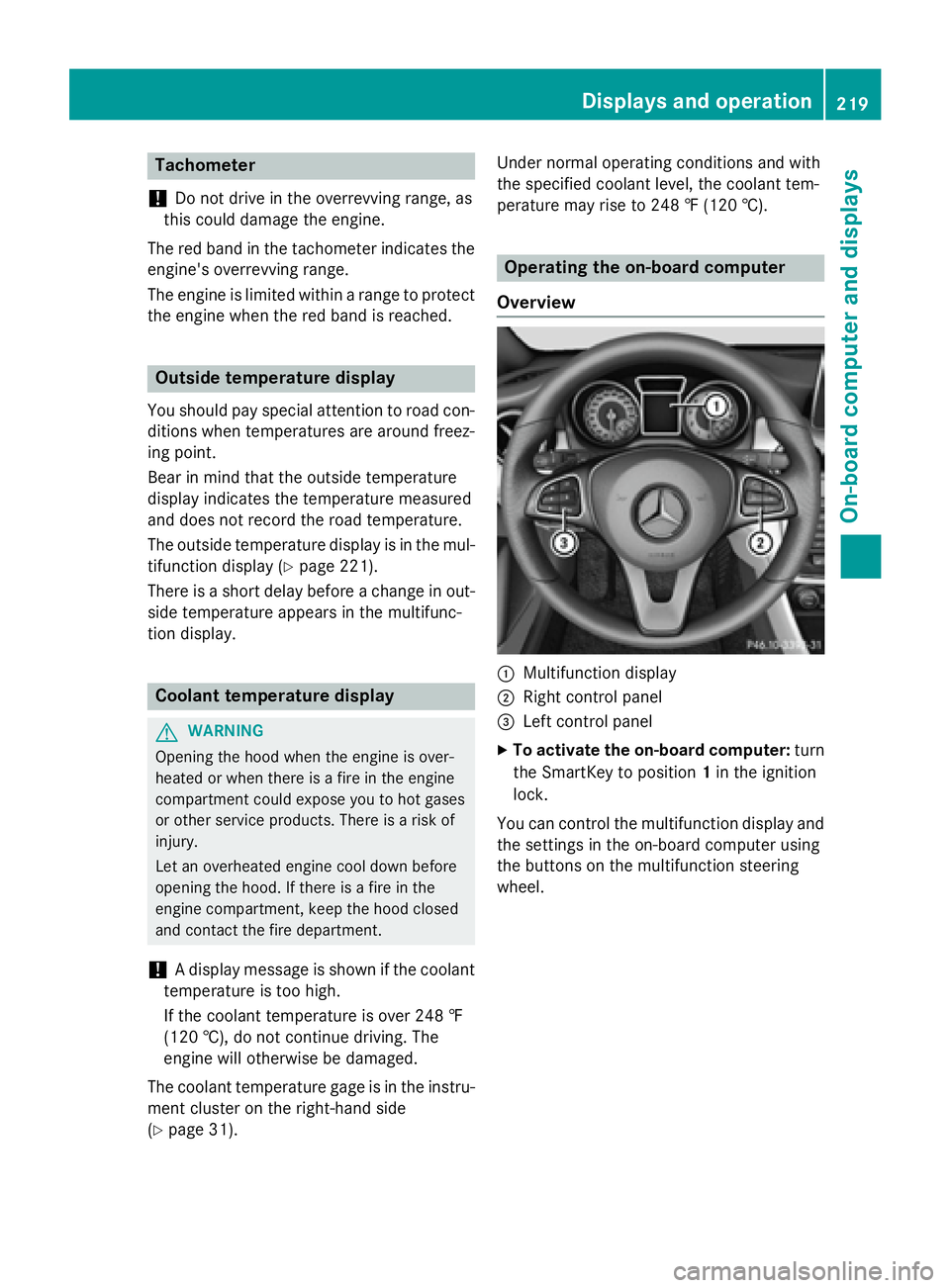
C
Multifunction display D
Right control panel