change time MERCEDES-BENZ GLA 2016 User Guide
[x] Cancel search | Manufacturer: MERCEDES-BENZ, Model Year: 2016, Model line: GLA, Model: MERCEDES-BENZ GLA 2016Pages: 390, PDF Size: 10.2 MB
Page 160 of 390
Available drive programs:
C Comfort Comfortable and econom-
ical driving characteristics
S Spo rt Sporty driving character-
istics
I Indivi dual In dividual settings
Off-road
Optimal driving character-
istics for easily negotiable
off-road terrain
E Economy Particularly economical
driving characteristics
Ad dit ional information for drive programs
( Y
page 164).
You can also change gear yourself using the
steering wheel paddle shifters. For further
information on the manual drive program
( Y
page 166).
DYNAMIC SELECT controller
(Mercedes-AMG vehicles)
Use the DYNAMIC SE LE CT controller to
change the driv e program. Depending on the
driv e program selected the following vehicle
characteristics will change: R
the driv eR
the transmission management R
ESP ®
R
the suspension (vehicles with AMG adap-
tive sport suspension system) R
the availab ilit y of the ECO start /s top func-
tion R
the availab ilit y of gliding mode
Each time you start the engine wit h the
Sm artKey or the St art /S top button, drive pro-
gram C is activated. For further information
about starting the engine, see ( Y
page 151). X
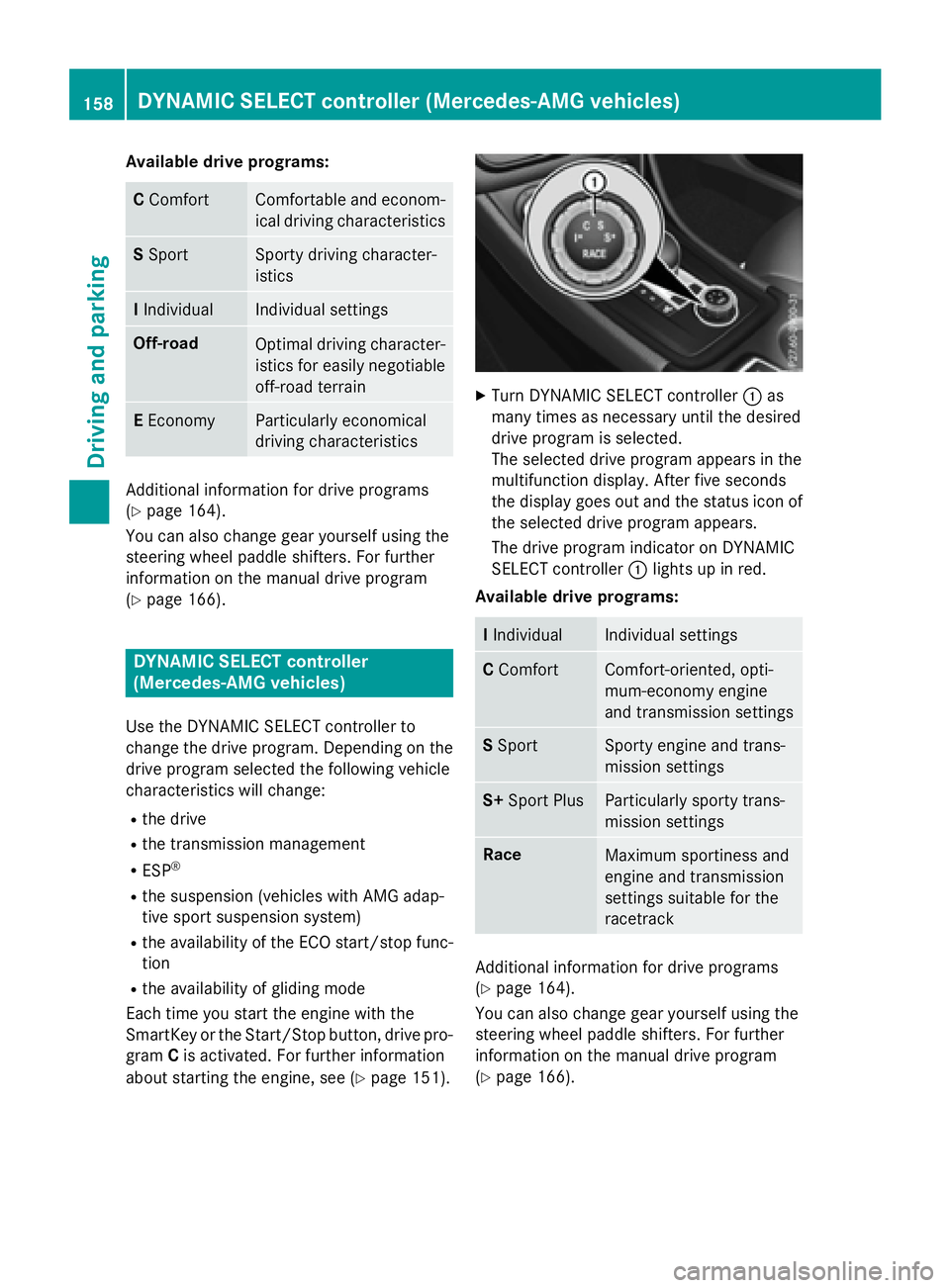
Turn DYNAMIC SE LE CT controller C as
many times as necessary unt il the desired
driv e program is selected.
The selected driv e program appears in the
multifunction display. After five secon ds
the disp lay goes out and the status icon of
the selected drive program appears.
The driv e program indicator on DYNAMIC
SE LE CT controller C lights up in red.
Available drive programs:
I Indivi dual Indivi dual settings
C Comfort Comfort-oriente d, opt i-
mum-economy engine
and transmission settings
S Spo rt Spo rty engine and trans-
mission settings
S+ Sport Plus Particularly sporty trans-
mission settings
Race
Maximum sportiness and
engine and transmission
settings suitable for the
racetrack
Additional information for drive programs
( Y
page 164).
You can also change gear yourself using the
steering wheel paddle shifters. For further
information on the manual drive program
( Y
page 166).158
DYNAMIC SELECT controller (Mercedes-AMG vehicles)
Driving and parking
Page 168 of 390
R
the automatic transmission shifting up
later. R
the fuel consumption possibly being higher
as a result of the later automatic transmis-
sion shift points. R
the suspension exhibits particularly stiff
springing and damping settings (vehicles
with AMG adaptive sport suspension sys-
tem). R
gliding mode is not available. R
the ECO start/stop function is not availa-
ble.
Manual gear shifting
General notes You can change gear yourself using the steer-
ing wheel paddle shifters. The transmission
must be in position D .
Depending on which paddle shifter is pulled,
the automatic transmission immediately
shifts into the next gear down or up, if per-
mitted.
Mercedes-AMG vehicles: to use manual
shifting, you have two options: R
temporary setting R
permanent setting
If you activate manual gearshifting, the mul-
tifunction display will show the current gear
instead of transmission position D .
If manual gearshifting is deactivated, the
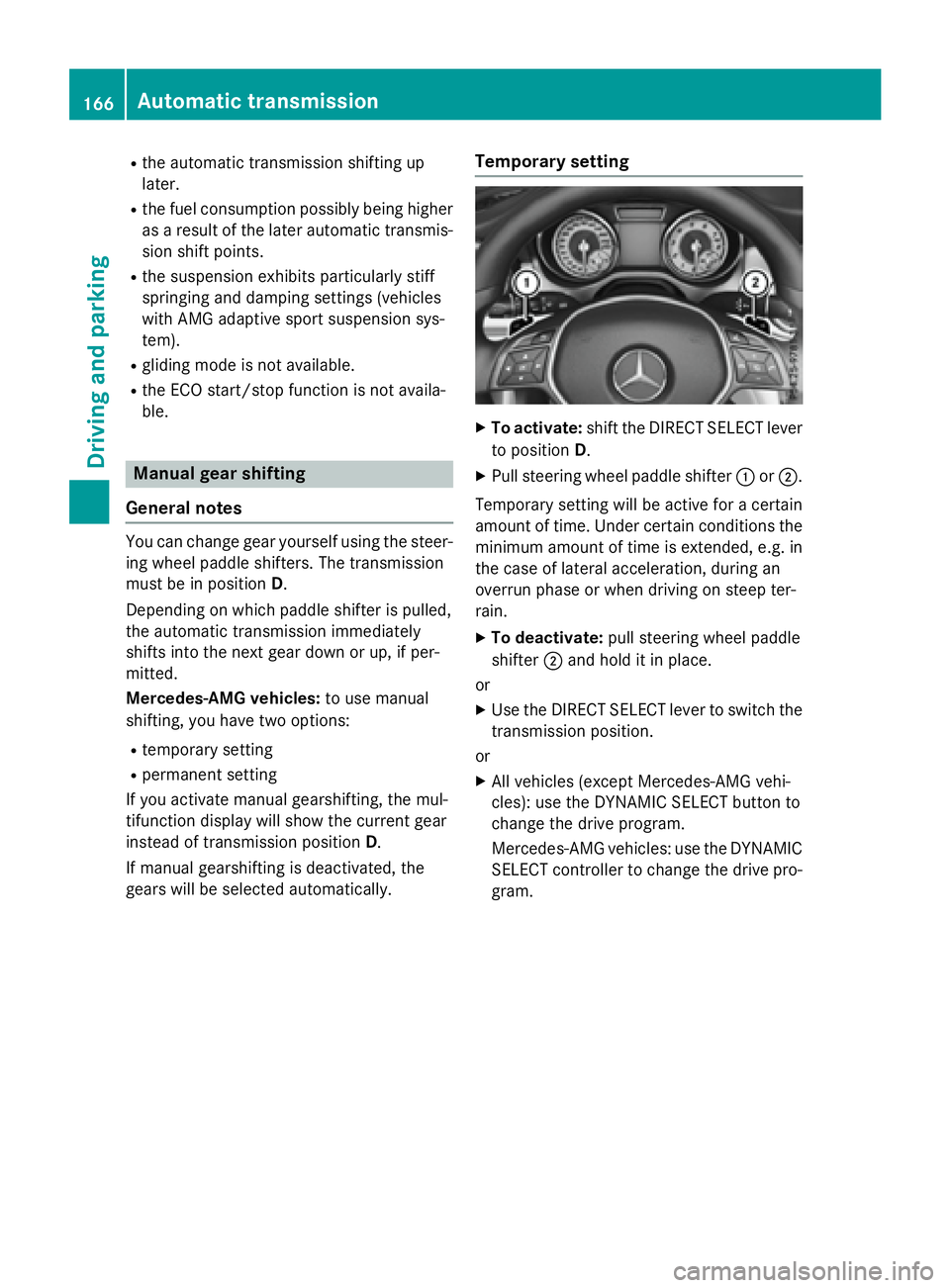
gears will be selected automatically. Temporary setting X
To activate: shift the DIRECT SELECT lever
to position D . X
Pull steering wheel paddle shifter C or D .
Temporary setting will be active for a certain
amount of time. Under certain conditions the
minimum amount of time is extended, e.g. in
the case of lateral acceleration, during an
overrun phase or when driving on steep ter-
rain. X
To deactivate: pull steering wheel paddle
shifter D and hold it in place.
or X
Use the DIRECT SELECT lever to switch the
transmission position.
or X
All vehicles (except Mercedes-AMG vehi-
cles): use the DYNAMIC SELECT button to
change the drive program.
Mercedes-AMG vehicles: use the DYNAMIC
SELECT controller to change the drive pro-
gram.166
Automatic transmission
Driving an d parking
Page 178 of 390
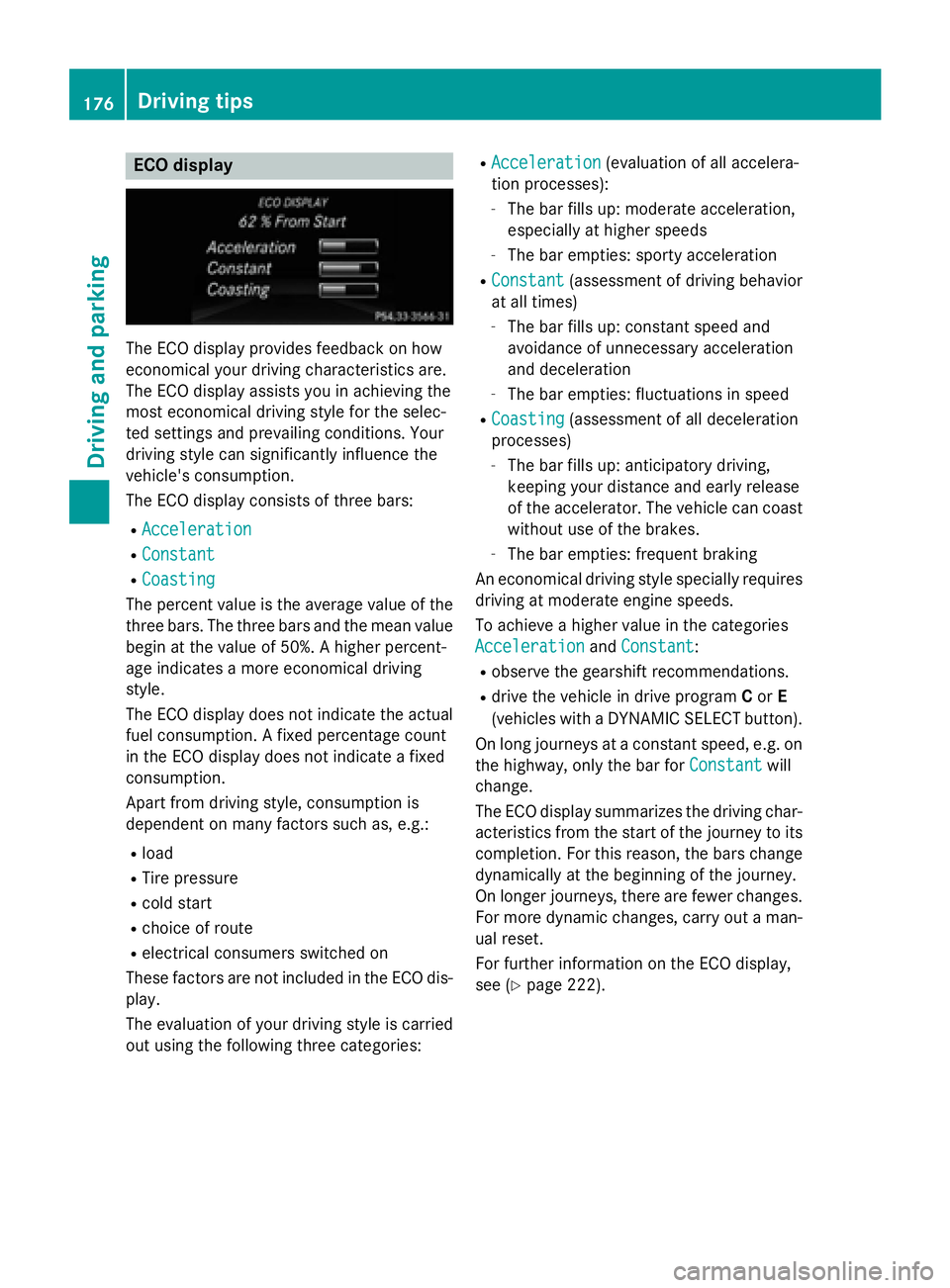
ECO display
The ECO display provides feedback on how
economical your driving characteristics are.
The ECO display assists you in achieving the
most economical driving style for the selec-
ted settings and prevailing conditions. Your
driving style can significantly influence the
vehicle's consumption.
The ECO display consists of three bars: R
Acceleration R
Constant R
Coasting
The percent value is the average value of the
three bars. The three bars and the mean value
begin at the value of 50%. A higher percent-
age indicates a more economical driving
style.
The ECO display does not indicate the actual
fuel consumption. A fixed percentage count
in the ECO display does not indicate a fixed
consumption.
Apart from driving style, consumption is
dependent on many factors such as, e.g.: R
load R
Tire pressure R
cold start R
choice of route R
electrical consumers switched on
These factors are not included in the ECO dis-
play.
The evaluation of your driving style is carried
out using the following three categories: R
Acceleration (evaluation of all accelera-
tion processes): -
The bar fills up: moderate acceleration,
especially at higher speeds -
The bar empties: sporty acceleration R
Constant (assessment of driving behavior
at all times) -
The bar fills up: constant speed and
avoidance of unnecessary acceleration
and deceleration -
The bar empties: fluctuations in speed R
Coasting (assessment of all deceleration
processes) -
The bar fills up: anticipatory driving,
keeping your distance and early release
of the accelerator. The vehicle can coast
without use of the brakes. -
The bar empties: frequent braking
An economical driving style specially requires
driving at moderate engine speeds.
To achieve a higher value in the categories
Acceleration
and Constant :R
observe the gearshift recommendations. R
drive the vehicle in drive program C or E
(vehicles with a DYNAMIC SELECT button).
On long journeys at a constant speed, e.g. on
the highway, only the bar for Constant
will
change.
The ECO display summarizes the driving char-
acteristics from the start of the journey to its
completion. For this reason, the bars change
dynamically at the beginning of the journey.
On longer journeys, there are fewer changes.
For more dynamic changes, carry out a man-
ual reset.
For further information on the ECO display,
see ( Y
page 222).176
Driving tips
Driving and parking
Page 183 of 390
In such situations, have the vehicle
checked and repaired immediately at a
qualified specialist workshop. If on con-
tinuing your journey you notice that driving
safety is impaired, pull over and stop the
vehicle immediately, paying attention to
road and traffic conditions. In such cases,
consult a qualified specialist workshop.
The vehicle is only designed for easily nego-
tiable off-road terrain and poor road surfaces.
When driving off-road, substances such as
sand, mud and water or water mixed with oil
may get into the brakes. This could result in a
reduced braking effect or in total brake failure
and also in increased wear and tear. The brak-
ing characteristics change depending on the
material ingressing the brakes. Clean the
brakes after driving off-road. If you detect a
reduced braking effect or grinding noises,
have the brake system checked in a qualified
specialist workshop as soon as possible.
Adapt your driving style to the different brak-
ing characteristics.
Driving off-road increases the likelihood of
damage to the vehicle, which, in turn, can lead
to failure of the mechanical assembly or sys-
tems. Adapt your driving style to suit the ter-
rain conditions. Drive carefully. Have damage
to the vehicle rectified immediately at a quali-
fied specialist workshop.
Do not switch to transmission position N
when driving off-road. If you try to brake the
vehicle using the service brake, you could
lose control of the vehicle. If the gradient is
too steep for your vehicle, drive back down in
reverse gear.
General notes
H Environmental note
Protection of the environment is of primary
importance. Treat nature with respect.
Observe all prohibiting signs.
Read this section carefully before driving your
vehicle off-road. Off-road driving is only possible with the Off-
Road Engineering package ( Y
page 199).
The following driving systems are specially
adapted for driving over easily negotiable off-
road terrain: R
Off-road program ( Y
page 199) R
Off-road ABS ( Y
page 66) R
Off-road 4ETS ( Y
page 69) R
Off-road ESP ®
( Y
page 72) R
DSR (Downhill Speed Regulation)
( Y
page 197)
Observe the following notes: R
Stop the vehicle before starting to drive
along an off-road route. If necessary, acti-
vate the off-road program ( Y
page 157).R
To avoid damaging the vehicle, make sure
there is always sufficient ground clearance. R
Check that items of luggage and loads are
stowed safely and are well secured
( Y
page 285). R
Always keep the engine running and in gear
when driving on a downhill gradient. Acti-
vate DSR ( Y
page 197). R
Drive slowly and evenly, if necessary at a
walking pace. R
Ensure that the wheels are in contact with
the ground at all times. R
Drive with extreme care on unfamiliar off-
road routes where visibility is poor. For
safety reasons, get out of the vehicle first
and survey the off-road route. R
Check the depth of water before fording
rivers and streams. R
Watch out for obstacles. R
Take care when turning on an uphill or
downhill slope or when driving across a
slope. The vehicle could otherwise tip over. R
Always keep the side windows and the pan-
orama roof with power tilt/sliding panel
closed during the journey. R
Do not deviate from marked routes.
Do not use the HOLD function when driving
off-road, on steep uphill or downhill gradients
or on slippery or loose surfaces. The HOLD Driving tips 181
Driving and parking Z
Page 186 of 390
R
Activate DSR. If this is not sufficient, brake
gently. When doing so, make sure that the
vehicle is facing in the direction of the line
of fall. R
Check that the brakes are working normally
after a long downhill stretch.
Off-road ABS is activated when the off-road
program is selected.
At speeds below 18 mph (30 km/h), the front
wheels lock cyclically during braking. The dig-
ging-in effect achieved in the process reduces
the stopping distance on off-road terrain. The
steerability of the vehicle is considerably
reduced if the wheels lock.
Driving systems
Cruise Control
General notes Cruise control maintains a constant road
speed for you. It brakes automatically in order
to avoid exceeding the set speed. On long and
steep downhill gradients, especially if the
vehicle is laden, you must select a low gear in
good time. You need to have previously selec-
ted manual gearshifting M ( Y
page 166). By
doing so, you will make use of the braking
effect of the engine. This relieves the load on
the brake system and prevents the brakes
from overheating and wearing too quickly.
Use cruise control only if road and traffic con-
ditions make it appropriate to maintain a
steady speed for a prolonged period. You can
store any road speed above 20 mph
(30 km/h).
The speed indicated in the speedometer may
differ slightly from the speed stored.
Important safety notes
If you fail to adapt your driving style, cruise
control can neither reduce the risk of an acci-
dent nor override the laws of physics. Cruise
control cannot take into account the road,
traffic and weather conditions. Cruise control is only an aid. You are responsible for the dis-
tance to the vehicle in front, for vehicle speed,
for braking in good time and for staying in
your lane.
Do not use cruise control: R
in road and traffic conditions which do not
allow you to maintain a constant speed e.g.
in heavy traffic or on winding roads R
on slippery road surfaces. Braking or accel-
erating could cause the drive wheels to lose
traction and the vehicle could then skid R
when there is poor visibility, e.g. due to fog,
heavy rain or snow
If there is a change of drivers, advise the new
driver of the speed stored.
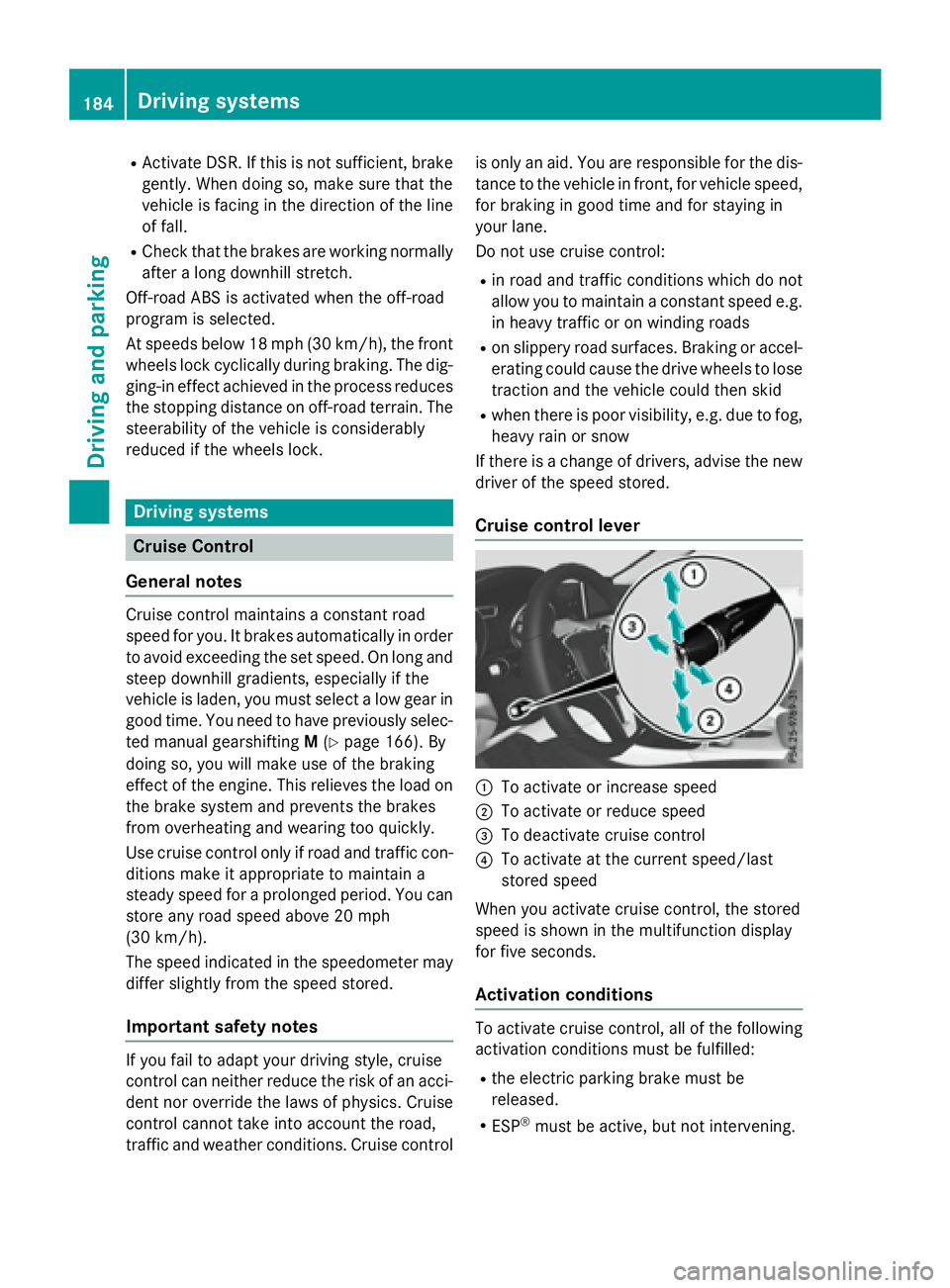
Cruise control lever
C
To activate or increase speed D
To activate or reduce speed
Page 188 of 390
trol Off message in the multifunction dis-
play for approximately five seconds.
i When you switch off the engine, the last
speed stored is cleared.
DISTRONIC PLUS
General notes DISTRONIC PLUS regulates the speed and
automatically helps you maintain the dis-
tance to the vehicle detected in front. Vehi-
cles are detected with the aid of the radar
sensor system. DISTRONIC PLUS brakes
automatically to avoid exceeding the set
speed or to maintain the designated distance
from the vehicle in front.
Change into a lower gear in good time on long
and steep downhill gradients. This is espe-
cially important if the vehicle is laden. By
doing so, you will make use of the braking
effect of the engine. This relieves the load on
the brake system and prevents the brakes
from overheating and wearing too quickly.
If DISTRONIC PLUS detects that there is a risk
of a collision, you will be warned visually and
acoustically. DISTRONIC PLUS cannot pre-
vent a collision without your intervention. An
intermittent warning tone will then sound and
the distance warning lamp will light up in the
instrument cluster. Brake immediately in
order to increase the distance to the vehicle
in front or take evasive action provided it is
safe to do so.
DISTRONIC PLUS operates in range between
0 mph (0 km/h) and 120 mph (200 km/h).
Do not use DISTRONIC PLUS while driving on
roads with steep gradients. Important safety notes
G WARNING
DISTRONIC PLUS does not react to: R
people or animals R
stationary obstacles on the road, e.g. stop-
ped or parked vehicles R
oncoming and crossing traffic
As a result, DISTRONIC PLUS may neither give
warnings nor intervene in such situations.
There is a risk of an accident.
Always pay careful attention to the traffic sit-
uation and be ready to brake.
G WARNING
DISTRONIC PLUS cannot always clearly iden-
tify other road users and complex traffic sit-
uations.
In such cases, DISTRONIC PLUS may: R
give an unnecessary warning and then
brake the vehicle R
neither give a warning nor intervene R
accelerate or brake unexpectedly
There is a risk of an accident.
Continue to drive carefully and be ready to
brake, in particular when warned to do so by
DISTRONIC PLUS.
G WARNING
DISTRONIC PLUS brakes your vehicle with up
to 50% of the maximum possible deceleration.
If this braking force is insufficient, DISTRONIC
PLUS warns you visually and audibly. There is
a risk of an accident.
In such cases, apply the brakes yourself and
try to take evasive action.
! If DISTRONIC PLUS or the HOLD function
is activated, the vehicle brakes automati-
cally in certain situations.186
Driving systems
Driving and parking
Page 189 of 390
To prevent damage to the vehicle, deacti-
vate DISTRONIC PLUS and the HOLD func-
tion in the following or other similar situa-
tions: R
when towing the vehicle R
in the car wash
If you fail to adapt your driving style,
DISTRONIC PLUS can neither reduce the risk
of accident nor override the laws of physics.
DISTRONIC PLUS cannot take into account
the road, traffic and weather conditions.
DISTRONIC PLUS is only an aid. You are
responsible for the distance to the vehicle in
front, for vehicle speed, for braking in good
time and for staying in your lane.
Do not use DISTRONIC PLUS: R
in road and traffic conditions which do not
allow you to maintain a constant speed, e.g.
in heavy traffic or on winding roads R
on slippery road surfaces. Braking or accel-
erating could cause the drive wheels to lose
traction and the vehicle could then skid R
when there is poor visibility, e.g. due to fog,
heavy rain or snow
DISTRONIC PLUS may not detect narrow
vehicles driving in front, e.g. motorcycles, or
vehicles driving on a different line.
In particular, the detection of obstacles can
be impaired if: R
there is dirt on the sensors or anything else
covering the sensors R
there is snow or heavy rain R
there is interference by other radar sources R
there are strong radar reflections, for
example, in parking garages
If DISTRONIC PLUS no longer detects a vehi-
cle in front, DISTRONIC PLUS may unexpect-
edly accelerate the vehicle to the stored
speed. This speed may: R
be too high if you are driving in a filter lane
or an exit lane R
be so high when driving in the right-hand
lane that you overtake vehicles in the left-
hand lane R
be so high when driving in the left-hand lane
that you overtake vehicles in the right-hand
lane
If there is a change of drivers, advise the new
driver of the speed stored.
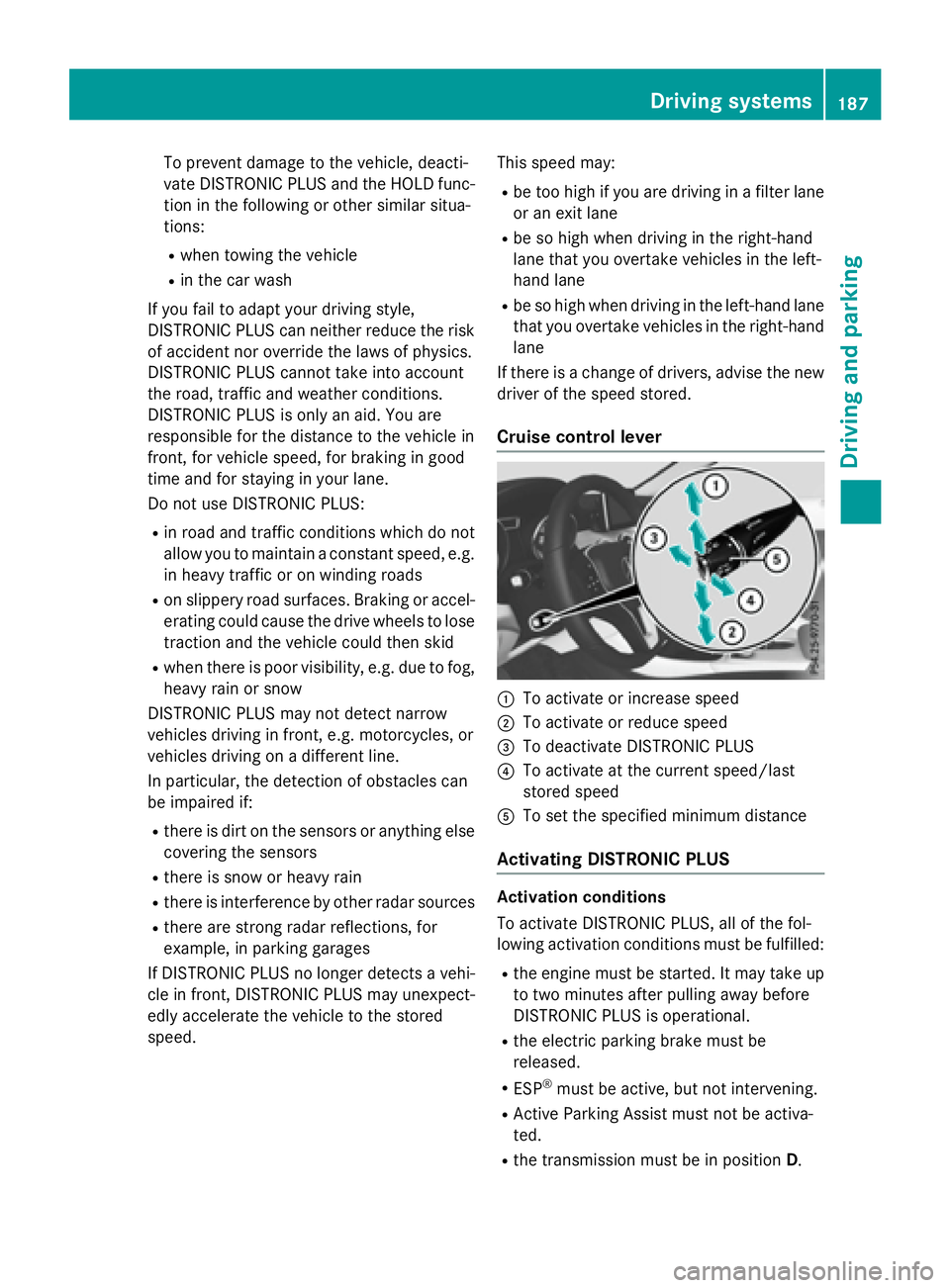
Cruise control lever
C
To activate or increase speed D
To activate or reduce speed
Page 208 of 390
Otherwise Active Parking Assist will be can-
celed.
Active Parking Assist brakes the vehicle to
a standstill when the vehicle approaches
the rear border of the parking space.
Maneuvering may be required in tight park-
ing spaces.
The Park Assist Active Select D
Observe Surroundings message appears in
the multifunction display. X
Shift the transmission to position D while
the vehicle is stationary.
Active Parking Assist immediately steers in
the other direction.
The Park Assist Active Accelerate
and Brake Observe Surroundings mes-
sage appears in the multifunction display.
i You will achieve the best results by wait-
ing for the steering procedure to complete
before pulling away. X
Drive forwards and be ready to brake at all
times.
Active Parking Assist brakes the vehicle to
a standstill when the vehicle approaches
the front border of the parking space.
Maneuvering may be required in tight park-
ing spaces.
The Park Assist Active Select R
Observe Surroundings message appears in
the multifunction display.
As soon as the parking procedure is com-
plete, the Park
Assist Switched Off mes-
sage appears and a warning tone sounds. The
vehicle is now parked.
The vehicle is kept stationary without the
driver having to depress the brake pedal. The
braking effect is canceled when you depress
the accelerator pedal.
Active Parking Assist no longer supports you
with steering interventions and brake appli-
cations. When Active Parking Assist is fin-
ished, you must steer and brake again your-
self. PARKTRONIC is still available. Parking tips: R
The way your vehicle is positioned in the
parking space after parking is dependent
on various factors. These include the posi-
tion and shape of the vehicles parked in
front and behind it and the conditions of the
location. It may be the case that Active
Parking Assist guides you too far into a
parking space, or not far enough into it. In
some cases, it may also lead you across or
onto the curb. If necessary, you should can-
cel the parking procedure with Active Park-
ing Assist. R
You can also select preselect transmission
position D . The vehicle redirects and does
not drive as far into the parking space.
Should the transmission change take place
too early, the parking procedure will be
canceled. A sensible parking position can
no longer be achieved from this position.
Exiting a parking space In order that Active Parking Assist can sup-
port you when you exit the parking space: R
you need to have parked using Active Park-
ing Assist. R
the border of the parking space must be
high enough at the front and the rear. A
curb is too small, for example. R
the border of the parking space must not be
too wide, as the position of the vehicle must
not exceed an angle of 45° to the starting
position as it is maneuvering into the park-
ing space. R
a maneuvering distance of at least 3.3 ft
(1.0 m) must be available.
Active Parking Assist can only assist you with
exiting a parking space if you have parked the
vehicle parallel to the direction of travel using
Active Parking Assist.
i If PARKTRONIC detects obstacles, Active
Parking Assist brakes automatically whilst
the vehicle exits the parking space. You are
responsible for braking in good time.206
Driving systems
Driving and parking
Page 214 of 390
The functionality of ATTENTION ASSIST is
restricted and warnings may be delayed or
not occur at all: R
if the length of the journey is less than
approximately 30 minutes R
if the road condition is poor, e.g. if the sur-
face is uneven or if there are potholes R
if there is a strong side wind R
if you have adopted a sporty driving style
with high cornering speeds or high rates of
acceleration R
if you are predominantly driving slower
than 37 mph (60 km/h) or faster than
125 mph (200 km/h) R
if the time has been set incorrectly R
in active driving situations, such as when
you change lanes or change your speed
ATTENTION ASSIST is reset when you con-
tinue your journey and starts assessing your
tiredness again if: R
you switch off the engine R
you take off your seat belt and open the
driver's door, e.g. for a change of drivers or
to take a break
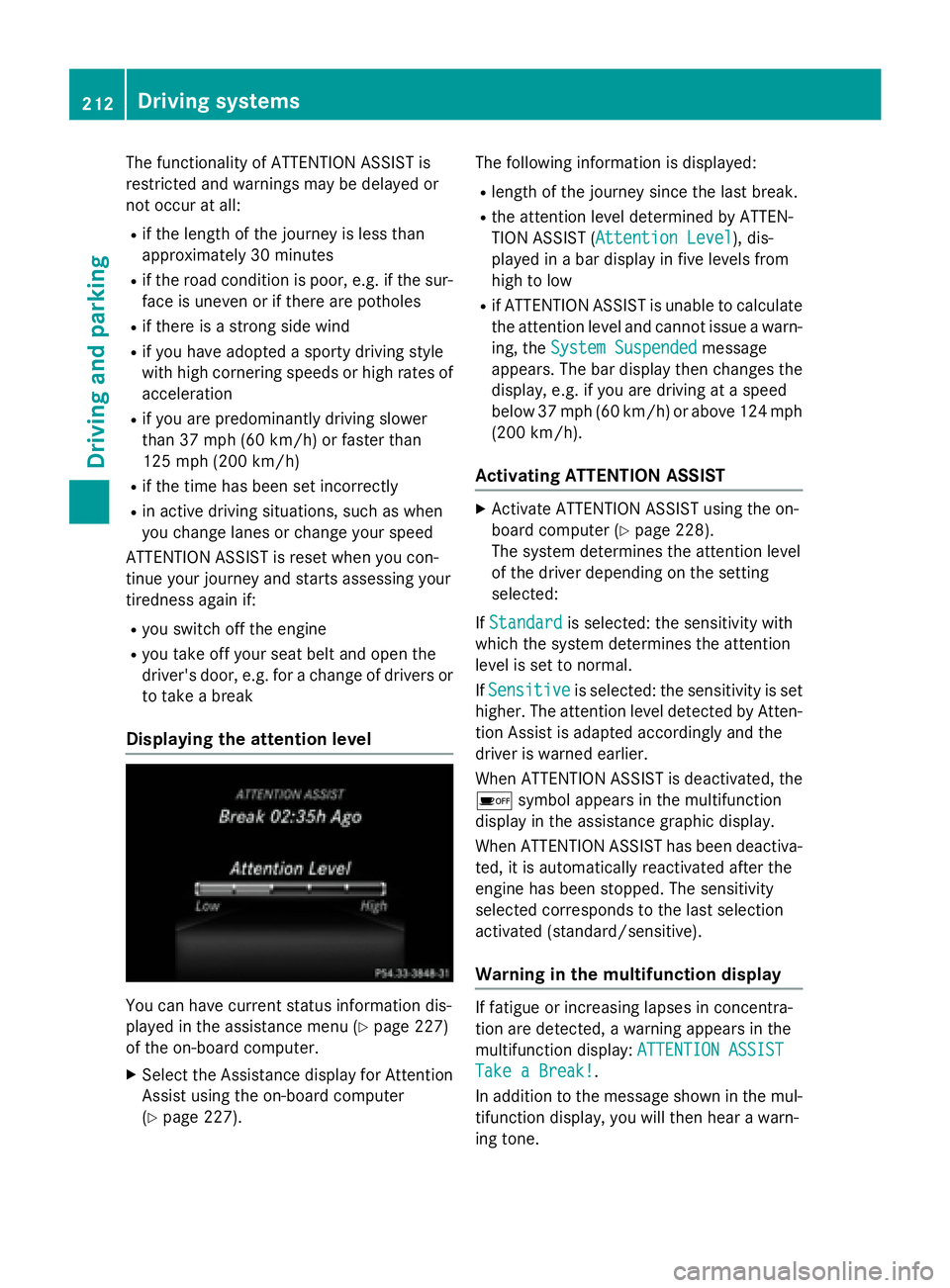
Displaying the attention level
You can have current status information dis-
played in the assistance menu ( Y
page 227)
of the on-board computer. X
Select the Assistance display for Attention
Assist using the on-board computer
( Y
page 227). The following information is displayed: R
length of the journey since the last break. R
the attention level determined by ATTEN-
TION ASSIST ( Attention Level
), dis-
played in a bar display in five levels from
high to low R
if ATTENTION ASSIST is unable to calculate
the attention level and cannot issue a warn-
ing, the System Suspended
message
appears. The bar display then changes the
display, e.g. if you are driving at a speed
below 37 mph (60 km/h) or above 124 mph
(200 km/ h) .
Activating ATTENTION ASSIST X
Activat e ATTENTION ASSIST usin g th e on -
boar d computer ( Y
page 228).
The system determine s th e attention level
of th e driver depending on th e set ting
selected:
If Standard is selected: th e sensitivit y wit h
whic h th e system determine s th e attention
level is set to normal.
If Sensitive is selected: th e sensitivit y is set
higher. The attention level detecte d by Atten-
tion Assis t is adapted accordingly and th e
driver is warned earlier .
When ATTENTI ON ASSIST is deactivated, th e
Page 215 of 390
X
If necessary, take a break. X
Confirm the message by pressing the v
button on the steering wheel.
On long journeys, take regular breaks in good
time to allow yourself to rest properly. If you
do not take a break and ATTENTION ASSIST
still detects increasing lapses in concentra-
tion, you will be warned again after
15 minutes at the earliest. This will only hap-
pen if ATTENTION ASSIST still detects typical
indicators of fatigue or increasing lapses in
concentration.
If a warning is output in the multifunction dis-
play, a service station search is performed in
COMAND. You can select a service station
and navigation to this service station will then
begin. This function can be activated and
deactivated in COMAND.
Lane Tracking package
General notes
The Lane Tracking package consists of Blind
Spot Assist ( Y
page 213) and Lane Keeping
Assist ( Y
page 215).
Blind Spot Assist
General notes
Blind Spot Assist monitors the areas on either
side of the vehicle that are not visible to the
driver with two lateral, rear-facing radar sen-
sors. A warning display in the exterior mirrors
draws your attention to vehicles detected in
the monitored area. If you then switch on the
corresponding turn signal to change lane, you
will also receive an optical and audible warn-
ing.
Blind Spot Assist supports you from a speed
of approximately 20 mph (30 km/h). Important safety notes
G WARNING
Blind Spot Assist does not react to: R
vehicles overtaken too closely on the side,
placing them in the blind spot area R
vehicles which approach with a large speed
differential and overtake your vehicle
As a result, Blind Spot Assist may not give
warnings in such situations. There is a risk of
an accident.
Always observe the traffic conditions care-
fully, and maintain a safe lateral distance.
Blind Spot Assist is only an aid. It may fail to
detect some vehicles and is no substitute for
attentive driving. Always ensure that there is
sufficient distance to the side for other road
users and obstacles.
i USA only:
This device has been approved by the FCC
as a "Vehicular Radar System". The radar
sensor is intended for use in an automotive
radar system only. Removing, tampering
with, or altering the device will void any
warranties, and is not permitted by the
FCC. Do not tamper with, alter, or use in
any non-approved way.
Any unauthorized modification to this
device could void the user’s authority to
operate the equipment.
Radar sensors
The radar sensors for Blind Spot Assist are
integrated into the rear bumper. Make sure
that the bumpers are free from dirt, ice or
slush. The sensors must not be covered, for
example by cycle racks or overhanging loads.
Following a severe impact or in the event of
damage to the bumpers, have the function of
the radar sensors checked at a qualified spe-
cialist workshop. Blind Spot Assist may no
longer work properly. Driving systems 213
Driving and parking Z