warning light MERCEDES-BENZ GLA 2016 Owner's Guide
[x] Cancel search | Manufacturer: MERCEDES-BENZ, Model Year: 2016, Model line: GLA, Model: MERCEDES-BENZ GLA 2016Pages: 390, PDF Size: 10.2 MB
Page 180 of 390
Servicing the brakes
! The brake fluid level may be too low, if: R
if the red brake warning lamp lights up in
the instrument cluster and R
you hear a warning tone while the engine
is running
Observe additional warning messages in
the multifunction display.
The brake fluid level may be too low due to
brake pad wear or leaking brake lines.
Have the brake system checked immedi-
ately. Consult a qualified specialist work-
shop to arrange this.
! A function or performance test should
only be carried out on a 2-axle dynamom-
eter. If you wish to operate the vehicle on
such a dynamometer, please consult a
qualified specialist workshop in advance.
You could otherwise damage the drive train
or the brake system.
! As the ESP ®
system operates automati-
cally, the engine and the ignition must be
switched off (the SmartKey must be in posi-
tion 0 or 1 in the ignition lock) if:R
the electric parking brake is tested on a
brake dynamometer (for a maximum of
ten seconds) R
the vehicle is towed with the front axle
raised.
Braking triggered automatically by ESP ®
may seriously damage the brake system.
All checks and maintenance work on the
brake system must be carried out at a quali-
fied specialist workshop.
Have brake pads installed and brake fluid
replaced at a qualified specialist workshop.
If the brake system has only been subject to
moderate loads, you should test the function-
ality of your brakes at regular intervals.
You can find a description of Brake Assist
(BAS) on ( Y
page 66).
Mercedes-Benz recommends that you only
have brake pads/linings installed on your vehicle which have been approved for
Mercedes-Benz vehicles or which correspond
to an equivalent quality standard. Brake
pads/linings which have not been approved
for Mercedes-Benz vehicles or which are not
of an equivalent quality could affect your vehi-
cle's operating safety.
Mercedes-Benz recommends that you only
use brake fluid that has been specially
approved for your vehicle by Mercedes-Benz,
or which corresponds to an equivalent quality
standard. Brake fluid which has not been
approved for Mercedes-Benz vehicles or
which is not of an equivalent quality could
affect your vehicle's operating safety.
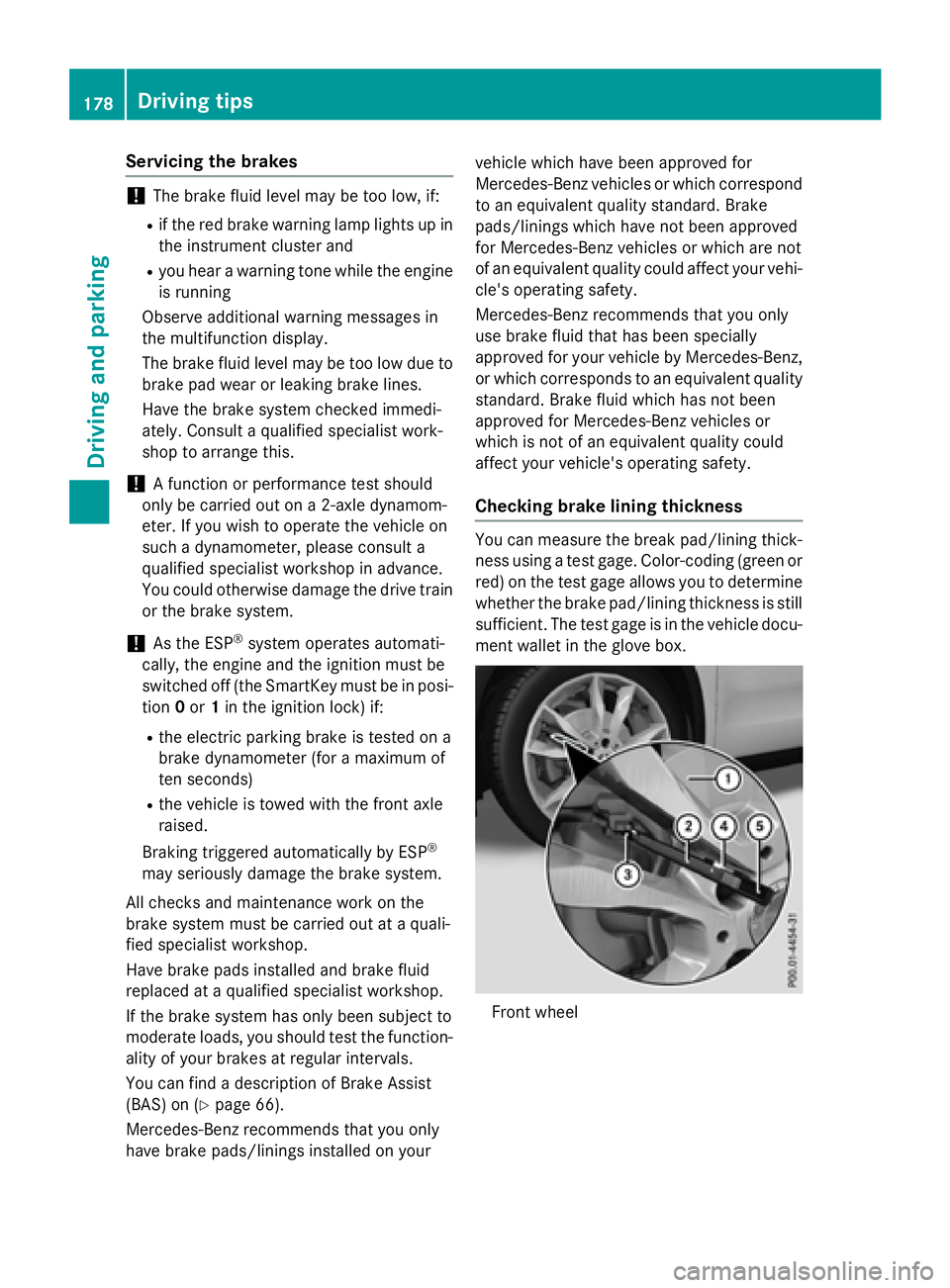
Checking brake lining thickness You can measure the break pad/lining thick-
ness using a test gage. Color-coding (green or
red) on the test gage allows you to determine
whether the brake pad/lining thickness is still
sufficient. The test gage is in the vehicle docu-
ment wallet in the glove box.
Front wheel178
Driving tips
Driving and parking
Page 185 of 390
Otherwise, your vehicle could be damaged
or bottom out and get stuck.
Observe the following rules when driving
along ruts in off-road terrain or on roads with
loose gravel: R
Activate the off-road program
( Y
page 157). R
Avoid high engine speeds. R
Shift to a lower gear using the left-hand
steering wheel paddle shifter. R
Drive slowly. R
Where ruts are too deep, drive with the
wheels of one side on the center grassy
area, if possible.
Traveling uphill
Approach/departure angle
G WARNING
If you drive on a steep incline at an angle or
turn when driving on an incline, the vehicle
could slip sideways, tip and rollover. There is a
risk of an accident.
Always drive on a steep incline in the line of
fall (straight up or down) and do not turn the
vehicle. R
Observe the warnings for off-road driving
( Y
page 180). R
Follow the line of fall when driving on slopes
and steep inclines. R
Before driving on extreme uphill and down-
hill gradients, select the off-road program
( Y
page 157). R
Drive slowly. R
Accelerate gently and make sure that the
wheels are gripping. R
Avoid high engine speeds, except when
driving on sandy and muddy routes with
high driving resistance. R
Use the left-hand steering wheel paddle
shifter to shift to a lower gear appropriate
to the gradient. R
Use the left-hand steering wheel paddle
shifter to shift into a lower gear in good time
on long and steep downhill gradients.
Hill start assist will aid you when pulling away
on a hill. For further information about hill
start assist, see ( Y
page 153).
Do not switch to transmission position N
when driving off-road. If you try to brake the
vehicle using the service brake, you could
lose control of the vehicle. If the gradient is
too steep for your vehicle, drive back down in
reverse gear.
Always observe the approach/departure
angle values ( Y
page 384).
Maximum gradient-climbing capability Always observe the maximum gradient climb-
ing ability values ( Y
page 384).
Hilltops
When driving up an uphill gradient, slightly
reduce pressure on the accelerator immedi-
ately before reaching the brow of the hill.
Make use of the vehicle's own impetus to
travel over the brow.
This style of driving prevents: R
the vehicle from lifting off the ground on the
brow of a hill R
the vehicle from traveling too quickly down
the other side
Driving downhill R
Drive slowly. R
Do not drive at an angle down steep
inclines. Steer into the line of fall and drive
with the front wheels aligned straight. Oth-
erwise, the vehicle could slip sideways, tip
and rollover. R
Shift to a lower gear using the left-hand
steering wheel paddle shifter before tack-
ling steep downhill gradients. Driving tips 183
Driving and parking Z
Page 188 of 390
trol Off message in the multifunction dis-
play for approximately five seconds.
i When you switch off the engine, the last
speed stored is cleared.
DISTRONIC PLUS
General notes DISTRONIC PLUS regulates the speed and
automatically helps you maintain the dis-
tance to the vehicle detected in front. Vehi-
cles are detected with the aid of the radar
sensor system. DISTRONIC PLUS brakes
automatically to avoid exceeding the set
speed or to maintain the designated distance
from the vehicle in front.
Change into a lower gear in good time on long
and steep downhill gradients. This is espe-
cially important if the vehicle is laden. By
doing so, you will make use of the braking
effect of the engine. This relieves the load on
the brake system and prevents the brakes
from overheating and wearing too quickly.
If DISTRONIC PLUS detects that there is a risk
of a collision, you will be warned visually and
acoustically. DISTRONIC PLUS cannot pre-
vent a collision without your intervention. An
intermittent warning tone will then sound and
the distance warning lamp will light up in the
instrument cluster. Brake immediately in
order to increase the distance to the vehicle
in front or take evasive action provided it is
safe to do so.
DISTRONIC PLUS operates in range between
0 mph (0 km/h) and 120 mph (200 km/h).
Do not use DISTRONIC PLUS while driving on
roads with steep gradients. Important safety notes
G WARNING
DISTRONIC PLUS does not react to: R
people or animals R
stationary obstacles on the road, e.g. stop-
ped or parked vehicles R
oncoming and crossing traffic
As a result, DISTRONIC PLUS may neither give
warnings nor intervene in such situations.
There is a risk of an accident.
Always pay careful attention to the traffic sit-
uation and be ready to brake.
G WARNING
DISTRONIC PLUS cannot always clearly iden-
tify other road users and complex traffic sit-
uations.
In such cases, DISTRONIC PLUS may: R
give an unnecessary warning and then
brake the vehicle R
neither give a warning nor intervene R
accelerate or brake unexpectedly
There is a risk of an accident.
Continue to drive carefully and be ready to
brake, in particular when warned to do so by
DISTRONIC PLUS.
G WARNING
DISTRONIC PLUS brakes your vehicle with up
to 50% of the maximum possible deceleration.
If this braking force is insufficient, DISTRONIC
PLUS warns you visually and audibly. There is
a risk of an accident.
In such cases, apply the brakes yourself and
try to take evasive action.
! If DISTRONIC PLUS or the HOLD function
is activated, the vehicle brakes automati-
cally in certain situations.186
Driving systems
Driving and parking
Page 195 of 390
detected vehicle turns a corner and reveals
an obstacle or stationary vehicle, DISTRONIC
PLUS will not brake for these.
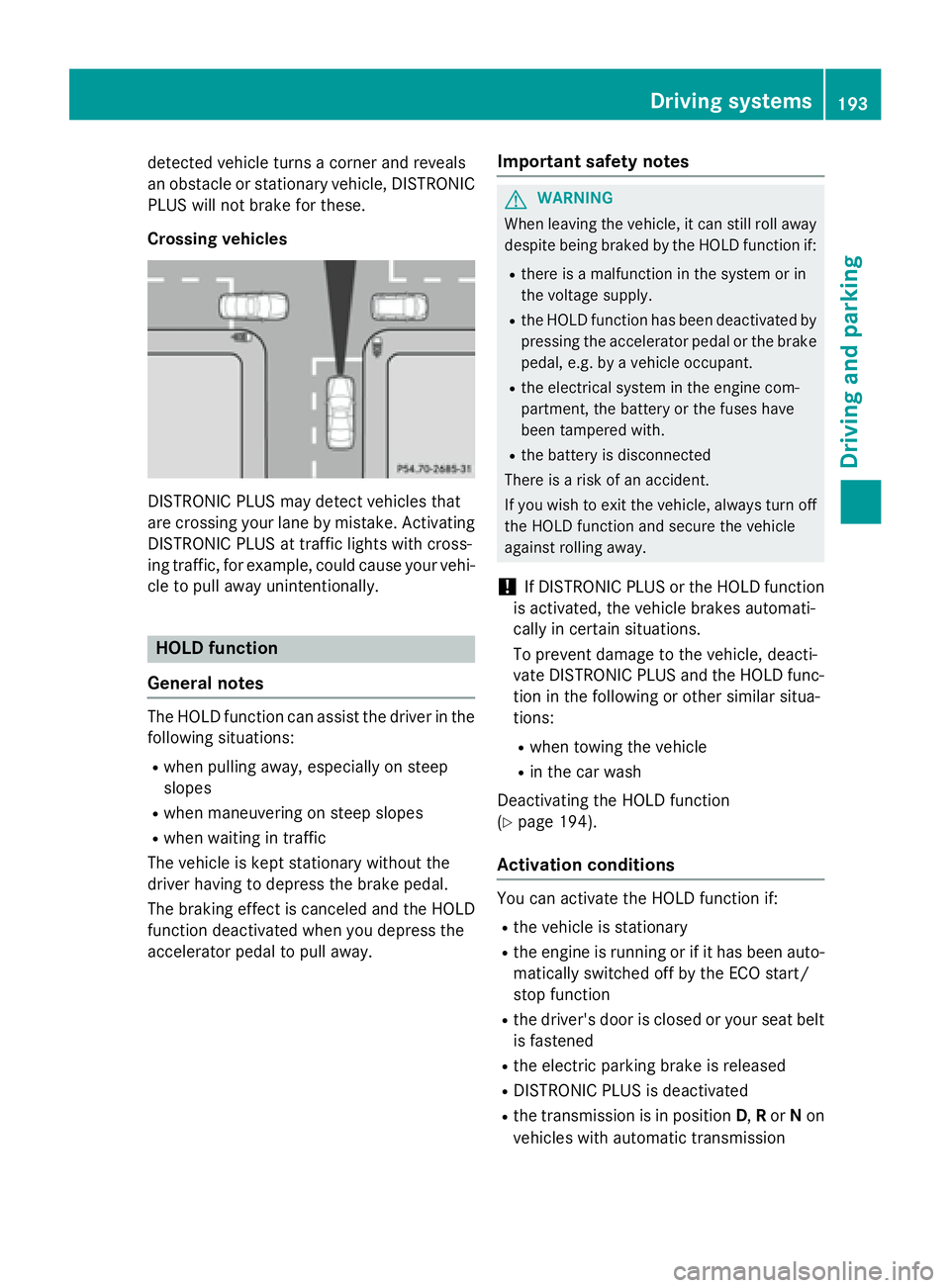
Crossing vehicles
DISTRONIC PLUS may detect vehicles that
are crossing your lane by mistake. Activating
DISTRONIC PLUS at traffic lights with cross-
ing traffic, for example, could cause your vehi-
cle to pull away unintentionally.
HOLD function
General notes
The HOLD function can assist the driver in the
following situations: R
when pulling away, especially on steep
slopes R
when maneuvering on steep slopes R
when waiting in traffic
The vehicle is kept stationary without the
driver having to depress the brake pedal.
The braking effect is canceled and the HOLD
function deactivated when you depress the
accelerator pedal to pull away. Important safety notes
G WARNING
When leaving the vehicle, it can still roll away
despite being braked by the HOLD function if: R
there is a malfunction in the system or in
the voltage supply. R
the HOLD function has been deactivated by
pressing the accelerator pedal or the brake
pedal, e.g. by a vehicle occupant. R
the electrical system in the engine com-
partment, the battery or the fuses have
been tampered with. R
the battery is disconnected
There is a risk of an accident.
If you wish to exit the vehicle, always turn off
the HOLD function and secure the vehicle
against rolling away.
! If DISTRONIC PLUS or the HOLD function
is activated, the vehicle brakes automati-
cally in certain situations.
To prevent damage to the vehicle, deacti-
vate DISTRONIC PLUS and the HOLD func-
tion in the following or other similar situa-
tions: R
when towing the vehicle R
in the car wash
Deactivating the HOLD function
( Y
page 194).
Activation conditions
You can activate the HOLD function if: R
the vehicle is stationary R
the engine is running or if it has been auto-
matically switched off by the ECO start/
stop function R
the driver's door is closed or your seat belt
is fastened R
the electric parking brake is released R
DISTRONIC PLUS is deactivated R
the transmission is in position D , R or N on
vehicles with automatic transmission Driving systems 193
Driving and parking Z
Page 200 of 390
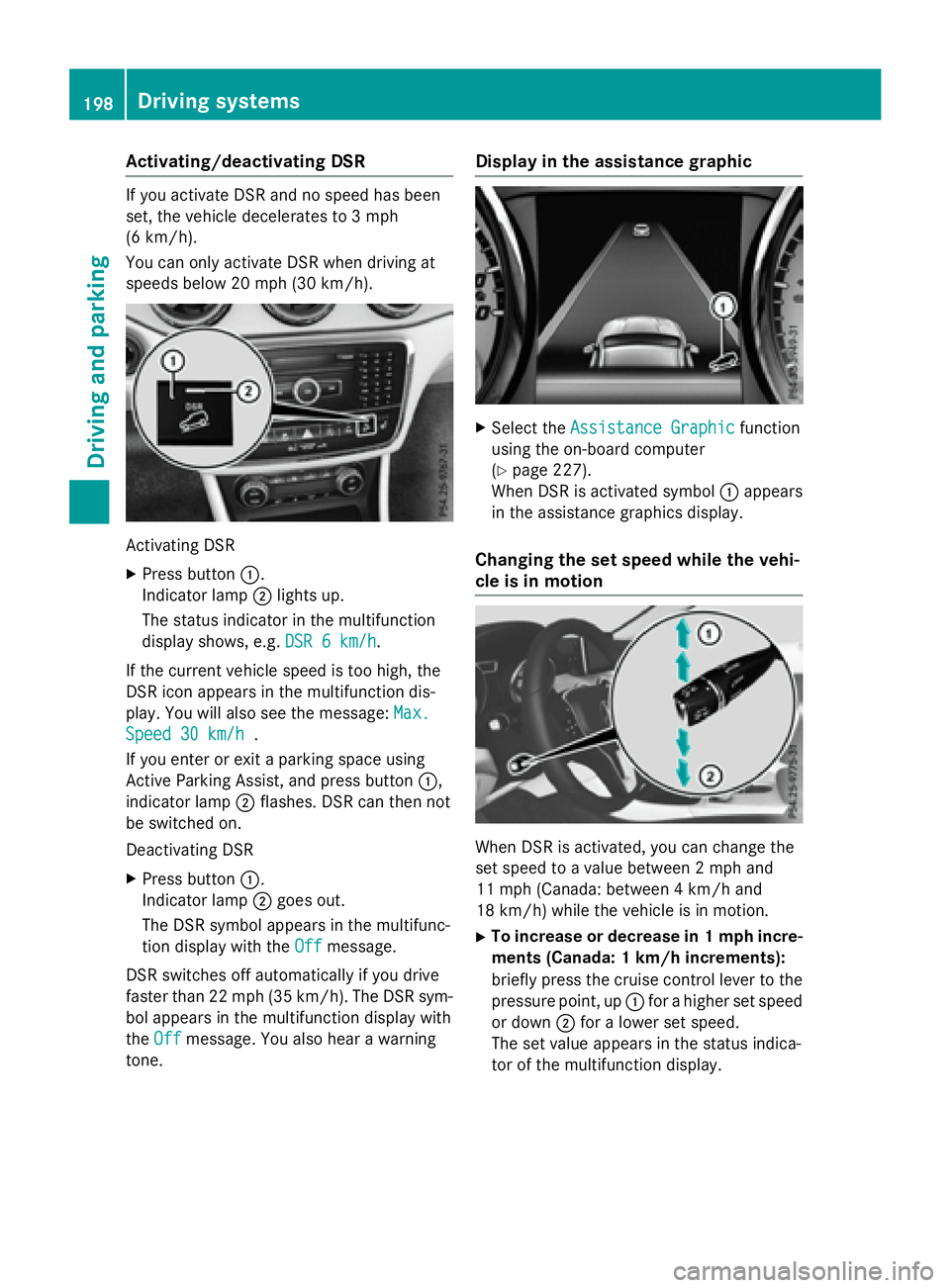
Activating/deactivating DSR If you activat e DS R and no spee d has been
set , th e vehicl e decelerate s to 3 mph
(6 km/ h).
Yo u can only activate DSR when driving at
speeds below 20 mph (30 km/h).
Activating DSR X
Press button C .
Indicator lamp D lights up.
The status indicator in the multifunction
display shows, e.g. DSR 6 km/h
.
If the current vehicle speed is too high, the
DSR icon appears in the multifunction dis-
play. You will also see the message: Max.
Speed 30 km/h .
If you enter or exit a parking space using
Active Parking Assist, and press button C ,
indicator lamp D flashes. DSR can then not
be switched on.
Deactivating DSR X
Press button C .
Indicator lamp D goes out.
The DSR symbol appears in the multifunc-
tion display with the Off
message.
DSR switches off automatically if you drive
faster than 22 mph (35 km/h). The DSR sym-
bol appears in the multifunction display with
the Off message. You also hear a warning
tone. Display in the assistance graphic X
Select the Assistance Graphic function
using the on-board computer
( Y
page 227).
When DSR is activated symbol C appears
in the assistance graphics display.
Changing the set speed while the vehi-
cle is in motion
When DSR is activated, you can change the
set speed to a value between 2 mph and
11 mph (Canada: between 4 km/h and
18 km/h) while the vehicle is in motion. X
To increase or decrease in 1 mph incre-
ments (Canada: 1 km/h increments):
briefly press the cruise control lever to the
pressure point, up C for a higher set speed
or down D for a lower set speed.
The set value appears in the status indica-
tor of the multifunction display.198
Driving systems
Driving and parking
Page 203 of 390
The sensors may not detect snow and other
objects that absorb ultrasonic waves.
Ultrasonic sources such as an automatic
car wash, the compressed-air brakes on a
truck or a pneumatic drill could cause
PARKTRONIC to malfunction.
PARKTRONIC may not function correctly on
uneven terrain.
PARKTRONIC is activated automatically when
you: R
switch on the ignition R
shift the transmission to position D , R or NR
release the electric parking brake
Range of the sensors General notes
PARKTRONIC does not take objects into con-
sideration that are: R
below the detection range, e.g. people, ani-
mals or objects. R
above the detection range, e.g. overhang-
ing loads, truck overhangs or loading
ramps.
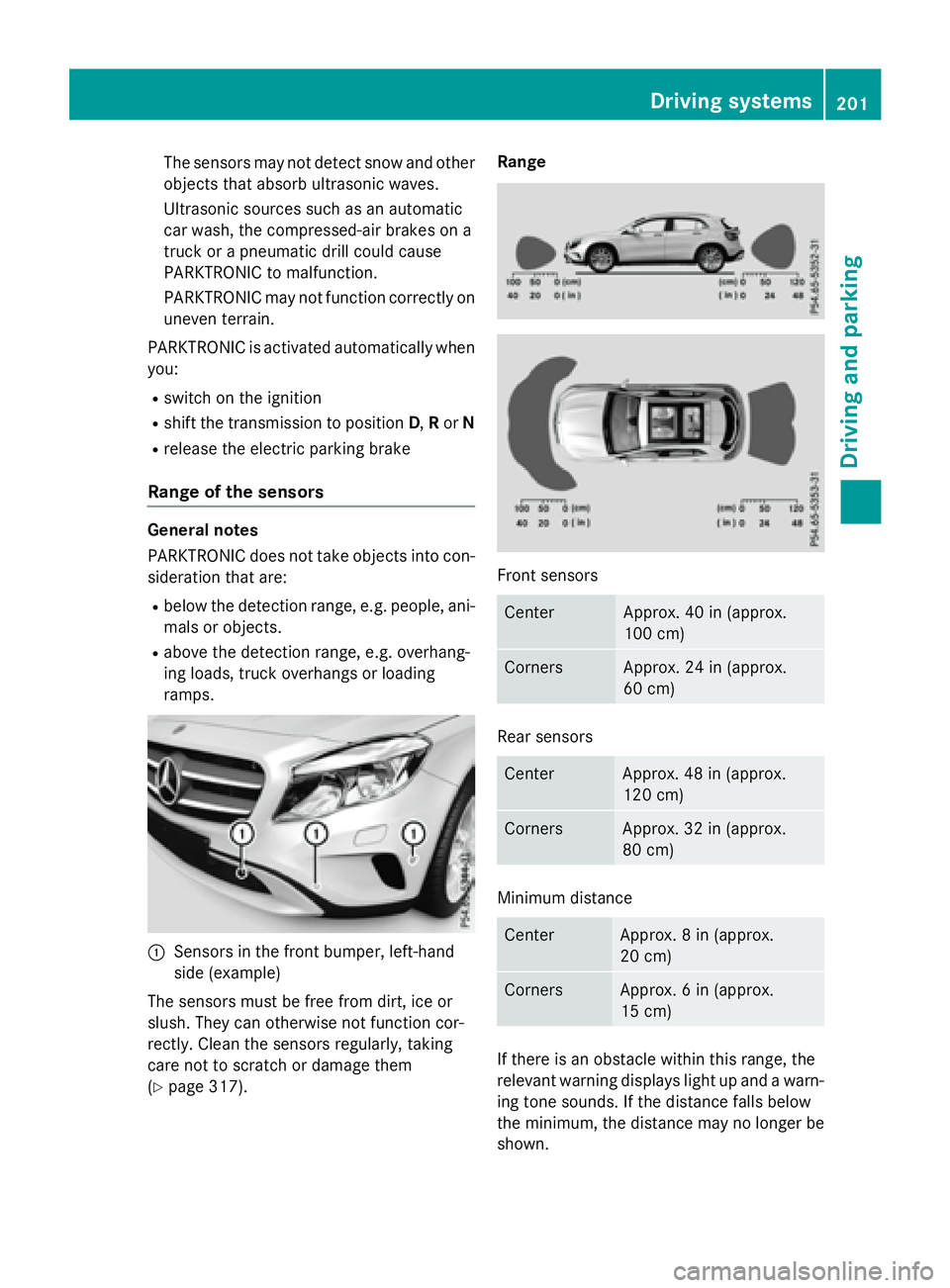
C
Sensors in the front bumper, left-hand
side (example)
The sensors must be free from dirt, ice or
slush. They can otherwise not function cor-
rectly. Clean the sensors regularly, taking
care not to scratch or damage them
( Y
page 317). Range
Front sensors
Center Approx. 40 in (approx.
100 cm)
Corners Approx. 24 in (approx.
60 cm)
Rear sensors
Center Approx. 48 in (approx.
120 cm)
Corners Approx. 32 in (approx.
80 cm)
Minimum distance
Center Approx. 8 in (approx.
20 cm)
Corners Approx. 6 in (approx.
15 cm)
If there is an obstacle within this range, the
relevant warning displays light up and a warn-
ing tone sounds. If the distance falls below
the minimum, the distance may no longer be
shown. Driving systems 201
Driving and parking Z
Page 205 of 390
Problems with PARKTRONIC Problem
Possible causes/consequences and P Solutions
Only the red segments
in the PARKTRONIC
warning displays are lit.
You also hear a warning
tone for approximately
two seconds.
PARKTRONIC is then
deactivated and the
indicator lamp on the
PARKTRONIC button
lights up. PARKTRONIC has malfunctioned and has switched off. X
If problems persist, have PARKTRONIC checked at a qualified
specialist workshop.
Only the red segments
in the PARKTRONIC
warning displays are lit.
PARKTRONIC is then
deactivated. The PARKTRONIC sensors are dirty or there is interference. X
Clean the PARKTRONIC sensors ( Y
page 317).X
Switch the ignition back on.
The problem may be caused by an external source of radio or
ultrasound waves. X
See if PARKTRONIC functions in a different location.
Active Parking Assist
General notes
Active Parking Assist is an electronic parking
aid with ultrasound. It measures the road on
both sides of the vehicle. A parking symbol
indicates a suitable parking space. Active
steering intervention and brake application
can assist you during parking and when exit-
ing a parking space. You may also use
PARKTRONIC ( Y
page 200).
Important safety notes
Active Parking Assist is merely an aid. It is not
a replacement for your attention to your
immediate surroundings. You are always
responsible for safe maneuvering, parking
and exiting a parking space. Make sure that
no persons, animals or objects are in the
maneuvering range.
When PARKTRONIC is switched off, Active
Parking Assist is also unavailable. G WARNING
While parking or pulling out of a parking
space, the vehicle swings out and can drive
onto areas of the oncoming lane. This could
result in a collision with another road user.
There is a risk of an accident.
Pay attention to other road users. Stop the
vehicle if necessary or cancel the Active Park-
ing Assist parking procedure.
! If unavoidable, you should drive over
obstacles such as curbs slowly and not at a
sharp angle. Otherwise, you may damage
the wheels or tires.
Active Parking Assist may possibly indicate
parking spaces which are not suitable for
parking, for example: R
Where parking or stopping is prohibited R
In front of driveways or entrances and exits R
On unsuitable surfaces Driving systems 203
Driving and parking Z
Page 216 of 390
Monitoring range of the sensors
In particular, the detection of obstacles can
be impaired if: R
there is dirt on the sensors or anything else
covering the sensors R
there is poor visibility, e.g. due to fog, heavy
rain or snow R
a narrow vehicle traveling in front, e.g. a
motorbike or bicycle R
the road has very wide lanes R
the road has narrow lanes R
you are not driving in the middle of the lane R
there are barriers or similar lane borders
Vehicles in the monitoring range are then not
indicated.
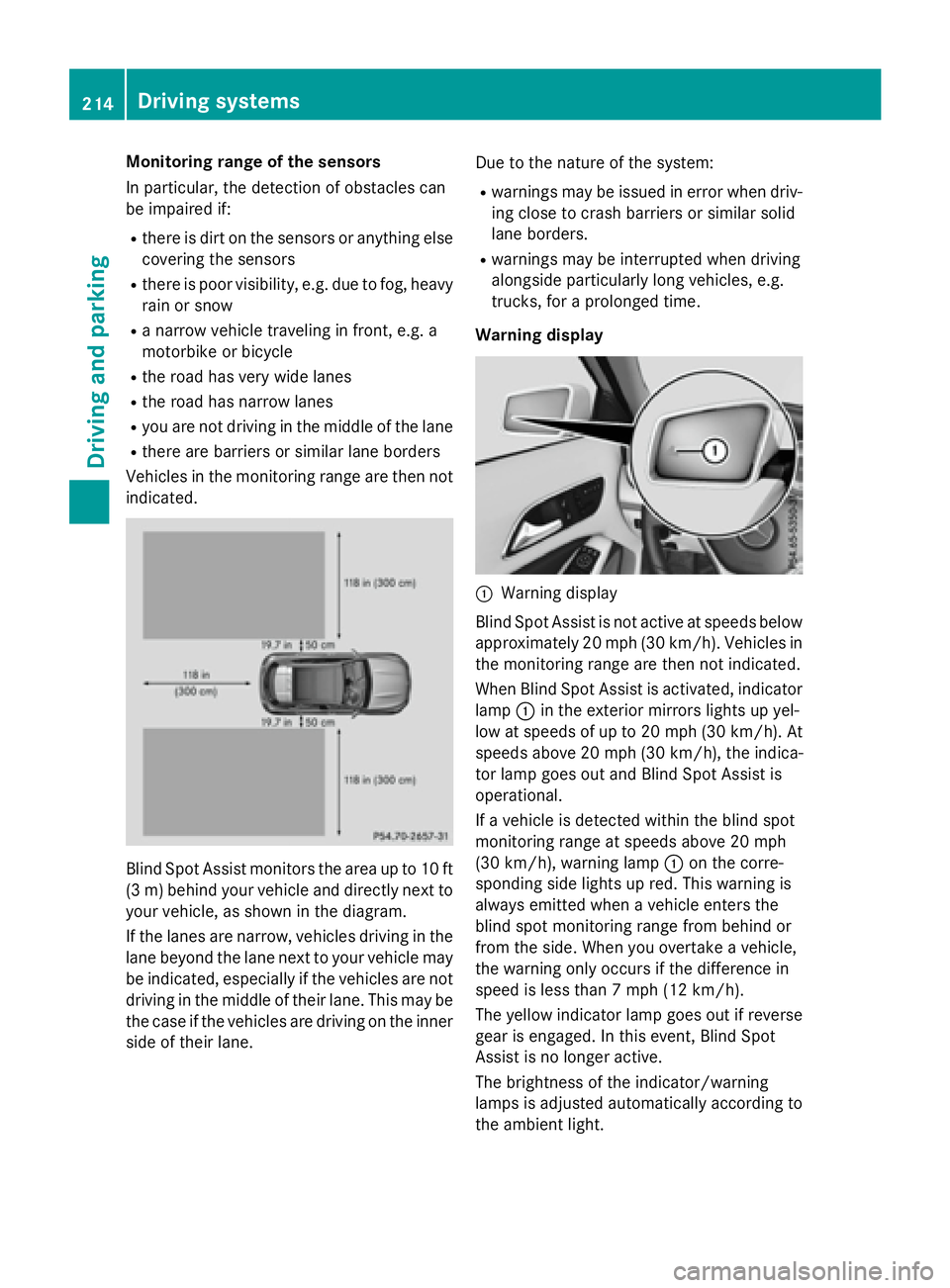
Blind Spot Assist monitors the area up to 10 ft
(3 m) behind your vehicle and directly next to
your vehicle, as shown in the diagram.
If the lanes are narrow, vehicles driving in the
lane beyond the lane next to your vehicle may
be indicated, especially if the vehicles are not
driving in the middle of their lane. This may be
the case if the vehicles are driving on the inner
side of their lane. Due to the nature of the system: R
warnings may be issued in error when driv-
ing close to crash barriers or similar solid
lane borders. R
warnings may be interrupted when driving
alongside particularly long vehicles, e.g.
trucks, for a prolonged time.
Warning display
C
Warning display
Blind Spot Assist is not active at speeds below
approximately 20 mph (30 km/h). Vehicles in
the monitoring range are then not indicated.
When Blind Spot Assist is activated, indicator
lamp C in the exterior mirrors lights up yel-
low at speeds of up to 20 mph (30 km/h). At
speeds above 20 mph (30 km/h), the indica-
tor lamp goes out and Blind Spot Assist is
operational.
If a vehicle is detected within the blind spot
monitoring range at speeds above 20 mph
(30 km/h), warning lamp C on the corre-
sponding side lights up red. This warning is
always emitted when a vehicle enters the
blind spot monitoring range from behind or
from the side. When you overtake a vehicle,
the warning only occurs if the difference in
speed is less than 7 mph (12 km/h).
The yellow indicator lamp goes out if reverse
gear is engaged. In this event, Blind Spot
Assist is no longer active.
The brightness of the indicator/warning
lamps is adjusted automatically according to
the ambient light.214
Driving systems
Driving and parking
Page 217 of 390
Collision warning
If a vehicle is detected in the monitoring range
of Blind Spot Assist and you switch on the
corresponding turn signal, a double warning
tone sounds. Red warning lamp C flashes. If
the turn signal remains on, vehicles detected
are indicated by the flashing of red warning
lamp C . There are no further warning tones.
Switching on Blind Spot Assist X
Make sure that Blind Spot Assist is activa-
ted in the on-board computer
( Y
page 228). X
Turn the SmartKey to position 2 in the igni-
tion lock.
Warning lamps C in the exterior mirrors
light up red for approximately 1.5 seconds
and then turn yellow.
Lane Keeping Assist
General notes
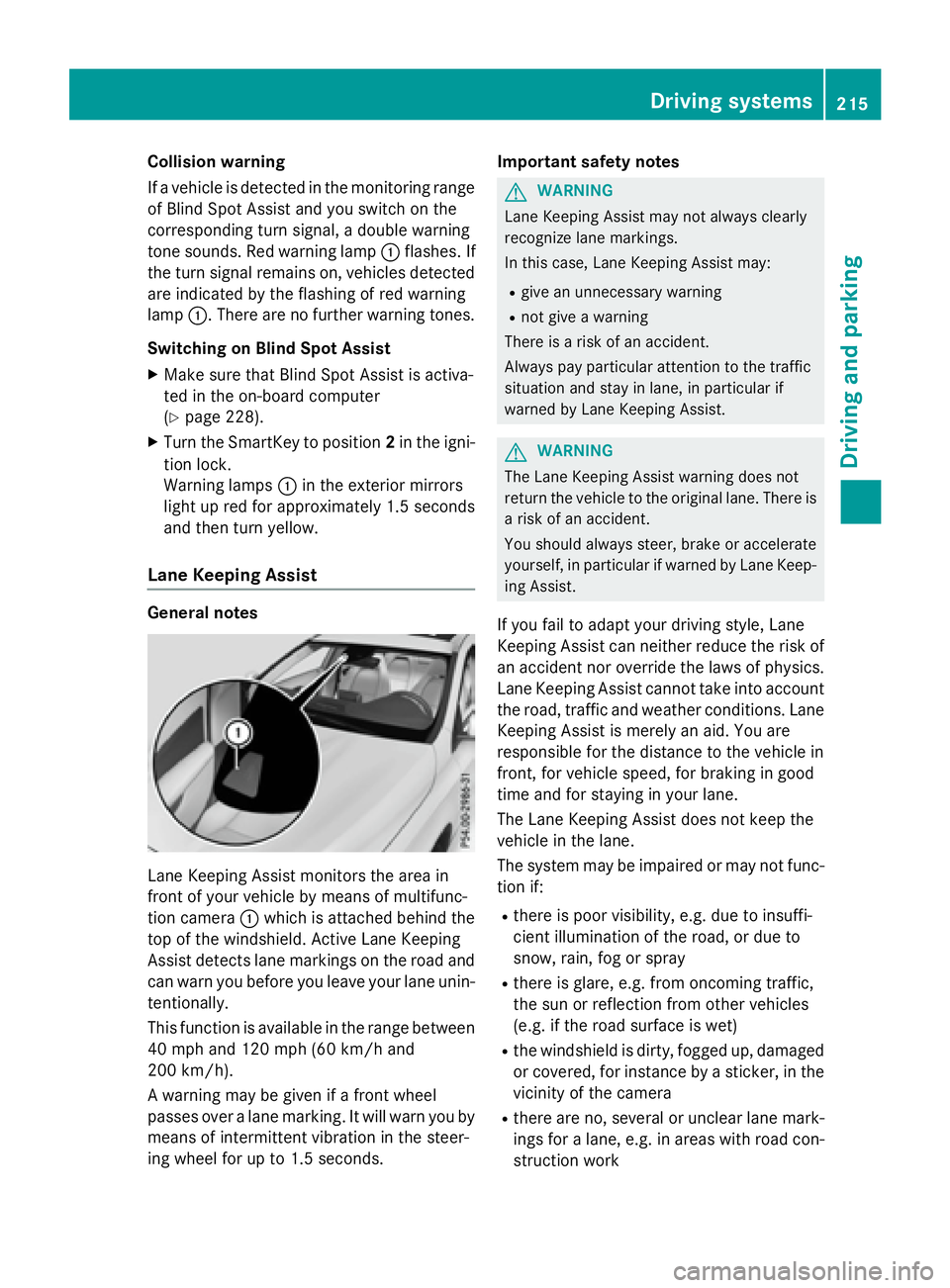
Lane Keeping Assist monitors the area in
front of your vehicle by means of multifunc-
tion camera C which is attached behind the
top of the windshield. Active Lane Keeping
Assist detects lane markings on the road and
can warn you before you leave your lane unin-
tentionally.
This function is available in the range between
40 mph and 120 mph (60 km/h and
200 km/h).
A warning may be given if a front wheel
passes over a lane marking. It will warn you by
means of intermittent vibration in the steer-
ing wheel for up to 1.5 seconds. Important safety notes
G WARNING
Lane Keeping Assist may not always clearly
recognize lane markings.
In this case, Lane Keeping Assist may: R
give an unnecessary warning R
not give a warning
There is a risk of an accident.
Always pay particular attention to the traffic
situation and stay in lane, in particular if
warned by Lane Keeping Assist.
G WARNING
The Lane Keeping Assist warning does not
return the vehicle to the original lane. There is
a risk of an accident.
You should always steer, brake or accelerate
yourself, in particular if warned by Lane Keep-
ing Assist.
If you fail to adapt your driving style, Lane
Keeping Assist can neither reduce the risk of
an accident nor override the laws of physics.
Lane Keeping Assist cannot take into account
the road, traffic and weather conditions. Lane
Keeping Assist is merely an aid. You are
responsible for the distance to the vehicle in
front, for vehicle speed, for braking in good
time and for staying in your lane.
The Lane Keeping Assist does not keep the
vehicle in the lane.
The system may be impaired or may not func-
tion if: R
there is poor visibility, e.g. due to insuffi-
cient illumination of the road, or due to
snow, rain, fog or spray R
there is glare, e.g. from oncoming traffic,
the sun or reflection from other vehicles
(e.g. if the road surface is wet) R
the windshield is dirty, fogged up, damaged
or covered, for instance by a sticker, in the
vicinity of the camera R
there are no, several or unclear lane mark-
ings for a lane, e.g. in areas with road con-
struction work Driving systems 215
Driving and parking Z
Page 220 of 390
Useful information
i This Operator's Manual describes all
models and all standard and optional equip-
ment of your vehicle available at the time of
publication of the Operator's Manual.
Country-specific differences are possible.
Please note that your vehicle may not be
equipped with all features described. This
also applies to safety-related systems and
functions.
i Read the information on qualified special-
ist workshops ( Y
page 25).
Important safety notes
G WARNING
If you operate information systems and com-
munication equipment integrated in the vehi-
cle while driving, you will be distracted from
traffic conditions. You could also lose control
of the vehicle. There is a risk of an accident.
Only operate the equipment when the traffic
situation permits. If you are not sure that this
is possible, park the vehicle paying attention
to traffic conditions and operate the equip-
ment when the vehicle is stationary.
You must observe the legal requirements for
the country in which you are currently driving
when operating the on-board computer.
G WARNING
If the instrument cluster has failed or mal-
functioned, you may not recognize function
restrictions in systems relevant to safety. The
operating safety of your vehicle may be
impaired. There is a risk of an accident.
Drive on carefully. Have the vehicle checked
at a qualified specialist workshop immedi-
ately.
The on-board computer only shows messages
or warnings from certain systems in the mul-
tifunction display. You should therefore make sure your vehicle is operating safely at all
times.
If the operating safety of your vehicle is
impaired, pull over as soon as it is safe to do
so. Contact a qualified specialist workshop.
For an overview, see the instrument panel
illustration ( Y
page 31).
Displays and operation
Instrument cluster lighting The light sensor in the instrument cluster
automatically controls the brightness of the
multifunction display. In daylight, the displays
in the instrument cluster are not illuminated.
The lighting in the instrument cluster, in the
displays and the controls in the vehicle inte-
rior can be adjusted using the brightness con-
trol knob.
The brightness control knob is located on the
bottom left of the instrument cluster
( Y
page 31). X
Turn the brightness control knob clockwise
or counter-clockwise.
If the light switch is set to the X , ` or
X position, the brightness is dependent
upon the brightness of the ambient light.
Speedometer with segments
The speedometer is divided into segments
only on vehicles with DISTRONIC PLUS.
The segments in the speedometer indicate
which speed range is available. R
DISTRONIC PLUS activated ( Y
page 186):
One or two segments in the set speed
range light up. R
DISTRONIC PLUS detects a vehicle in front
that is driving at a slower speed than the
stored speed:
The segments between the speed of the
vehicle in front and the stored speed light
up.218
Displays and operation
On-board computer and displays