stop start MERCEDES-BENZ GLA 2016 Service Manual
[x] Cancel search | Manufacturer: MERCEDES-BENZ, Model Year: 2016, Model line: GLA, Model: MERCEDES-BENZ GLA 2016Pages: 390, PDF Size: 10.2 MB
Page 209 of 390
X
Start the engine. X
Release the electric parking brake. X
Switch on the turn signal in the direction
you will drive out of the parking space. X
Shift the transmission to position D or R .
The Start Park Assist? Yes: OK No:
message appears in the multifunction dis-
play 8 .X
To cancel the procedure: press the 8
button on the multifunction steering wheel
or pull away.
or X
To exit a parking space using Active
Parking Assist: press the v button on
the multifunction steering wheel.
The Park Assist Active Accelerate
and Brake Observe Surroundings mes-
sage appears in the multifunction display. X
Let go of the multifunction steering wheel. X
Pull away, being ready to brake at all times.
Do not exceed a maximum speed of
approximately 6 mph (10 km/h) when exit-
ing a parking space. Otherwise Active Park-
ing Assist will be canceled. X
Depending on the message or as required,
shift the transmission to position D or R .
Active Parking Assist immediately steers in
the other direction. The Park Assist
Active Accelerate and Brake
Observe Surroundings message appears
in the multifunction display.
i You will achieve the best results by wait-
ing for the steering procedure to complete
before pulling away.
If you back up after activation, the steering
wheel is moved to the straight-ahead posi-
tion. X
Drive forwards and back up as prompted by
the PARKTRONIC warning displays, several
times if necessary.
Once you have exited the parking space com-
pletely, the steering wheel is moved to the
straight-ahead position. You hear a tone and
the Park Assist Finished message
appears in the multifunction display. You will then have to steer and merge into traffic on
your own. PARKTRONIC is still available. You
can take over the steering, before the vehicle
has exited the parking space completely. This
is useful, for example when you recognize
that it is already possible to pull out of the
parking space.
Canceling Active Parking Assist X
Stop the movement of the multifunction
steering wheel or steer yourself.
Active Parking Assist will be canceled at
once. The Park Assist Canceled mes-
sage appears in the multifunction display.
or X
Press the PARKTRONIC button
( Y
page 202).
PARKTRONIC is switched off and Active
Parking Assist is immediately canceled.
The Park Assist Canceled message
appears in the multifunction display.
Active Parking Assist is canceled automati-
cally if: R
the electric parking brake is engaged R
transmission position P is selectedR
parking using Active Parking Assist is no
longer possible R
you are driving faster than 6 mph (10 km/h) R
a wheel spins, ESP ®
intervenes or fails. The
Page 228 of 390
Telephone menu
Introduction
G WARNING
If you operate information systems and com-
munication equipment integrated in the vehi-
cle while driving, you will be distracted from
traffic conditions. You could also lose control
of the vehicle. There is a risk of an accident.
Only operate the equipment when the traffic
situation permits. If you are not sure that this
is possible, park the vehicle paying attention
to traffic conditions and operate the equip-
ment when the vehicle is stationary.
When telephoning, you must observe the
legal requirements for the country in which
you are currently driving. X
Switch on the mobile phone (see the man-
ufacturer’s operating instructions). X
Switch on Audio 20 or COMAND, see the
separate operating instructions. X
Establish a Bluetooth ®
connection to Audio
20 or COMAND, see the separate operating
instructions. X
Press the Y or e button on the steer-
ing wheel to select the Tel
menu.
You will see one of the following display mes-
sages in the multifunction display: R
Phone READY or the name of the network
provider: the mobile phone has found a
network and is ready to receive. R
Phone No Service : there is no network
available or the mobile phone is searching
for a network.
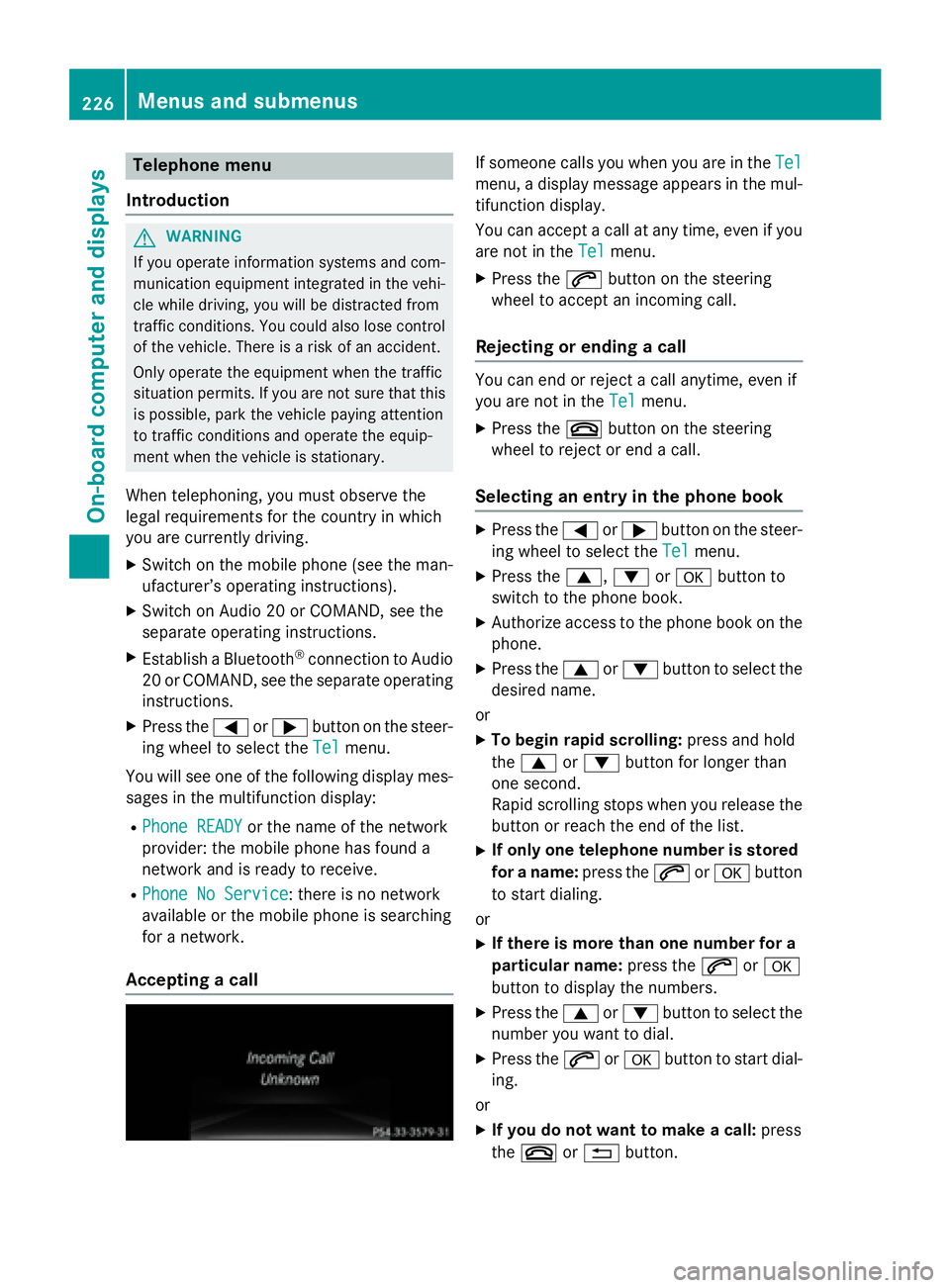
Accepting a call If someone calls you when you are in the Tel
menu, a display message appears in the mul-
tifunction display.
You can accept a call at any time, even if you
are not in the Tel
menu. X
Press the a button on the steering
wheel to accept an incoming call.
Rejecting or ending a call You can end or reject a call anytime, even if
you are not in the Tel
menu. X
Press the v button on the steering
wheel to reject or end a call.
Selecting an entry in the phone book X
Press the Y or e button on the steer-
ing wheel to select the Tel
menu.X
Press the c , d or v button to
switch to the phone book. X
Authorize access to the phone book on the
phone. X
Press the c or d button to select the
desired name.
or X
To begin rapid scrolling: press and hold
the c or d button for longer than
one second.
Rapid scrolling stops when you release the
button or reach the end of the list. X
If only one telephone number is stored
for a name: press the a or v button
to start dialing.
or X
If there is more than one number for a
particular name: press the a or v
button to display the numbers. X
Press the c or d button to select the
number you want to dial. X
Press the a or v button to start dial-
ing.
or X
If you do not want to make a call: press
the v or 8 button.226
Menus and submenus
On-board computer and displays
Page 235 of 390
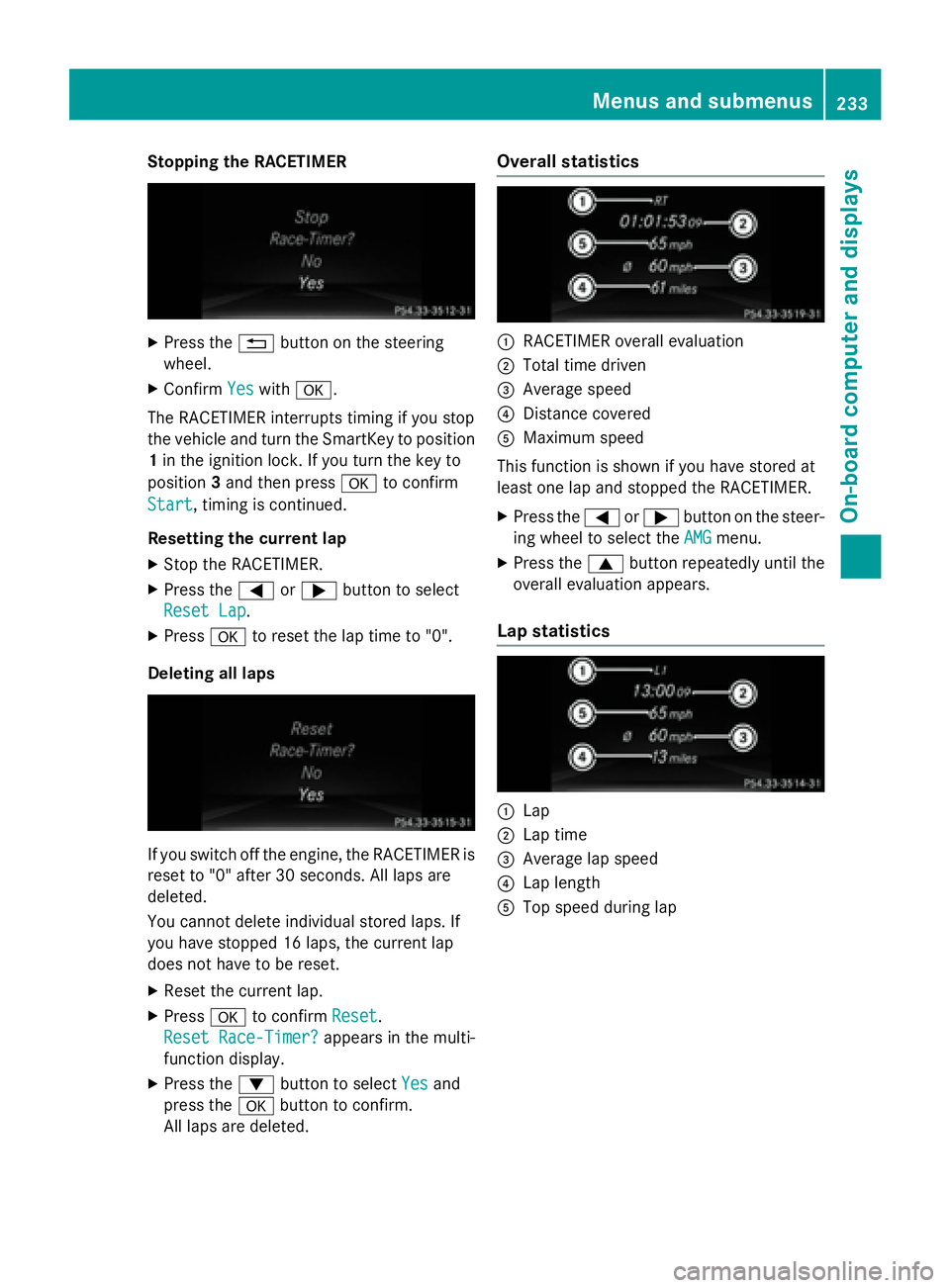
Stopping the RACETIMER X
Press the 8 button on the steering
wheel. X
Confirm Yes with v .
The RACETIMER interrupts timing if you stop
the vehicle and turn the SmartKey to position
1 in the ignition lock. If you turn the key to
position 3 and then press v to confirm
Start , timing is continued.
Resetting the current lap X
Stop the RACETIMER. X
Press the Y or e button to select
Reset Lap
.X
Press v to reset the lap time to "0".
Deleting all laps
If you switch off the engine, the RACETIMER is
reset to "0" after 30 seconds. All laps are
deleted.
You cannot delete individual stored laps. If
you have stopped 16 laps, the current lap
does not have to be reset. X
Reset the current lap. X
Press v to confirm Reset .
Reset Race-Timer?
appears in the multi-
function display. X
Press the d button to select Yes and
press the v button to confirm.
All laps are deleted. Overall statistics
C
RACETIMER overall evaluation D
Total time driven
Page 244 of 390
Display messages
Possible causes/consequences and P Solutions
' (USA
only)
M (Canada
only)
Check Brake Fluid
Level There is no t enough brak e flui d in th e brak e flui d reservoir .
A warnin g tone sounds. The ' (US A only) or M (Canada
only) warnin g lamp s in th e instrumen t cluster may also ligh t up.
G WARNIN G
The brakin g effec t may be impaired.
There is a ris k of an accident. X
Pull ove r and stop th e vehicl e safely as soo n as possible, payin g
attention to roa d and traffic conditions. Do no t continue drivin g
under any circumstances. X
Secur e th e vehicl e against rollin g away ( Y
page 171).X
Consult a qualified specialist workshop .X
Do no t add brak e fluid. This does no t correc t th e malfunction .
& Check Brake Pad
Wea r The brak e pads/lining s hav e reached their wear limit.X
Visit a qualified specialist workshop .
S Inoperative On e or mor e main features of th e mbrace system are malfunc -
tioning. X
Visit a qualified specialist workshop .
Collision Preven ‐
tio n Assist Plu s
Currently Unavail‐
abl e See Opera‐
tor's Manual COLLISION PREVENTION ASSIST PLU S is temporarily no t opera-
tional.
Possibl e causes are: R
th e rada r sensor system is temporarily inoperative, e.g. due to
electromagnetic radiation emitted by nearby TV or radi o sta-
tion s or other source s of electromagnetic radiation .R
th e system is outside th e operating temperature range.R
th e on-boar d voltag e is to o low.
Whe n th e causes state d abov e no longer apply, th e display mes -
sage disappears.
COLLISION PREVENTION ASSIST PLU S is operational again .
If th e display message does no t disappear :X
Pull ove r and stop th e vehicl e safely as soo n as possible, payin g
attention to roa d and traffic conditions.X
Secur e th e vehicl e against rollin g away ( Y
page 171).X
Restart th e engine.242
Display messages
On-board computer and displays
Page 245 of 390
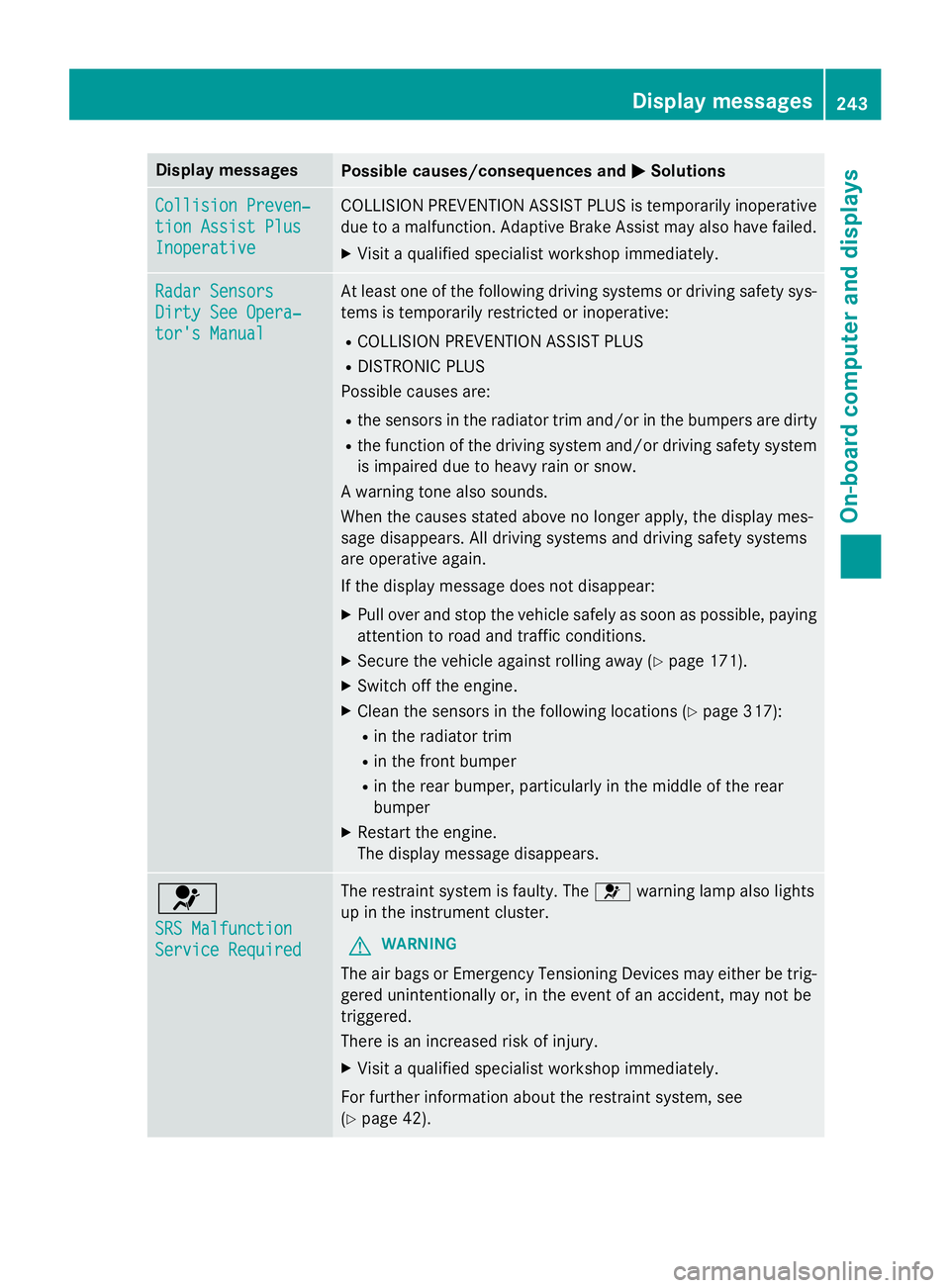
Display messages
Possible causes/consequences and P Solutions
Collision Preven ‐
tio n Assist Plu s
Inoperative COLLISION PREVENTION ASSIST PLU S is temporarily inoperative
due to a malfunction . Adaptive Brake Assis t may also hav e failed.X
Visit a qualified specialist workshop immediately.
Radar Sensor s
Dirty See Opera‐
tor's Manual At leas t on e of th e following drivin g systems or drivin g safet y sys-
tems is temporarily restricted or inoperative: R
COLLISION PREVENTION ASSIST PLU SR
DISTRONIC PLU S
Possibl e causes are: R
th e sensor s in th e radiato r trim and/o r in th e bumpers are dirtyR
th e function of th e drivin g system and/o r drivin g safet y system
is impaire d due to heav y rain or snow.
A warnin g tone also sounds.
Whe n th e causes state d abov e no longer apply, th e display mes -
sage disappears. Al l drivin g systems and drivin g safet y systems
are operative again .
If th e display message does no t disappear :X
Pull ove r and stop th e vehicl e safely as soo n as possible, payin g
attention to roa d and traffic conditions.X
Secur e th e vehicl e against rollin g away ( Y
page 171).X
Switc h of f th e engine.X
Clean th e sensor s in th e following location s ( Y
page 317):R
in th e radiato r trim R
in th e fron t bumper R
in th e rear bumper, particularl y in th e middle of th e rear
bumper X
Restart th e engine.
The display message disappears.
u SRS Malfunction
Servic e Required The restrain t system is faulty. The u warnin g lamp also lights
up in th e instrumen t cluster.
G WARNIN G
The air bags or Emergency Tensioning Devices may either be trig-
gered unintentionally or, in th e event of an accident, may no t be
triggered .
There is an increase d ris k of injury.X
Visit a qualified specialist workshop immediately.
Fo r further information about th e restrain t system, see
( Y
page 42) . Display messages 24 3
On-board computer and displays Z
Page 256 of 390
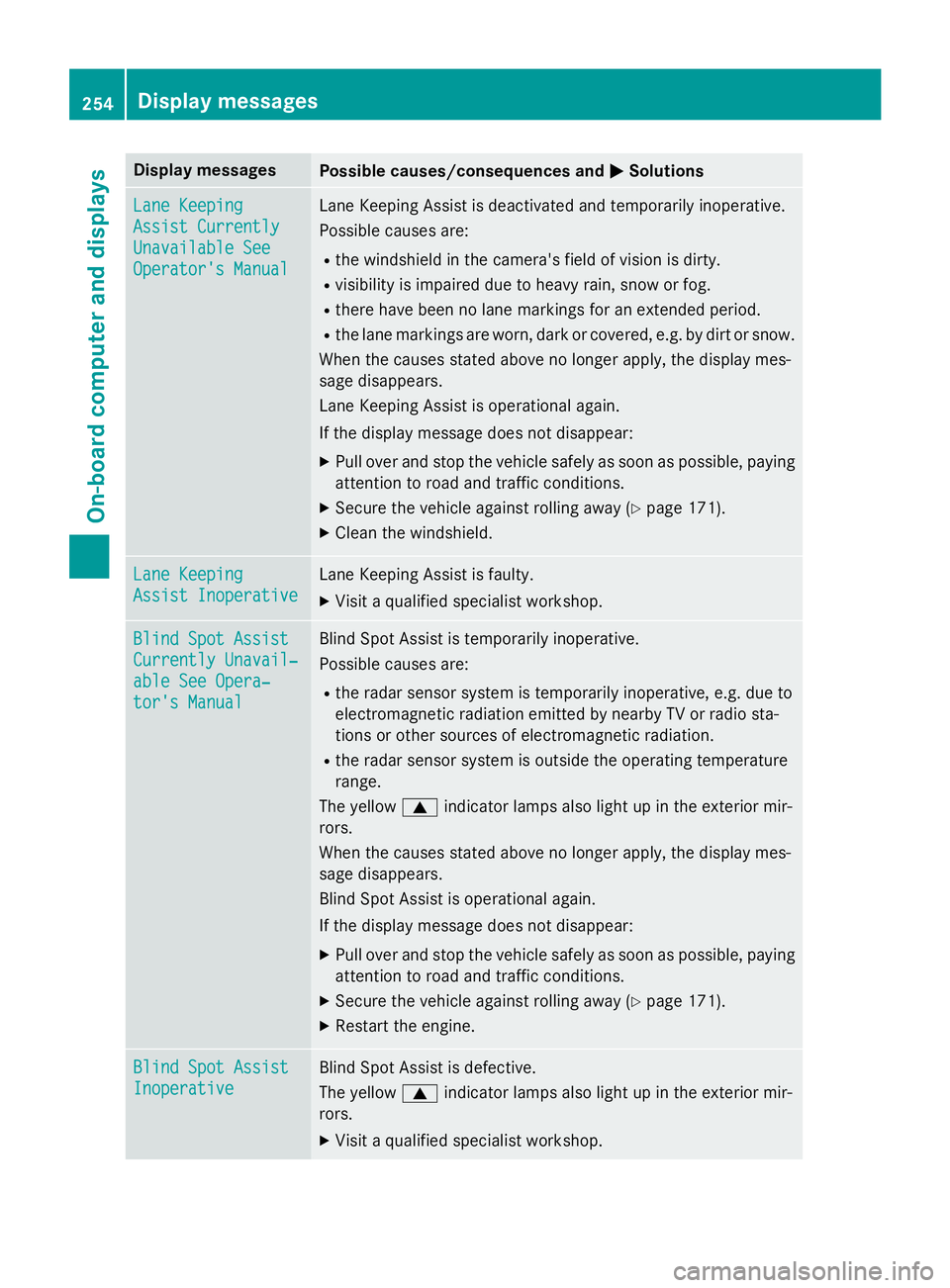
Display messages
Possible causes/consequences and P Solutions
Lan e Keepin g
Assist Currently
Unavailable See
Operator' s Manual Lan e Keepin g Assis t is deactivated and temporarily inoperative.
Possibl e causes are: R
th e windshield in th e camera' s field of vision is dirty.R
visibility is impaire d due to heav y rain , snow or fog.R
there hav e been no lan e marking s fo r an extended period.R
th e lan e marking s are worn, dark or covered, e.g. by dir t or snow.
Whe n th e causes state d abov e no longer apply, th e display mes -
sage disappears.
Lan e Keepin g Assis t is operational again .
If th e display message does no t disappear :X
Pull ove r and stop th e vehicl e safely as soo n as possible, payin g
attention to roa d and traffic conditions.X
Secur e th e vehicl e against rollin g away ( Y
page 171).X
Clean th e windshield.
Lan e Keepin g
Assist Inoperative Lan e Keepin g Assis t is faulty.X
Visit a qualified specialist workshop .
Blind Spo t Assist
Currently Unavail‐
abl e See Opera‐
tor's Manual Blind Spot Assis t is temporarily inoperative.
Possibl e causes are: R
th e rada r sensor system is temporarily inoperative, e.g. due to
electromagnetic radiation emitted by nearby TV or radi o sta-
tion s or other source s of electromagnetic radiation .R
th e rada r sensor system is outside th e operating temperature
range.
The yello w c indicato r lamp s also ligh t up in th e exterio r mir -
rors.
Whe n th e causes state d abov e no longer apply, th e display mes -
sage disappears.
Blind Spot Assis t is operational again .
If th e display message does no t disappear :X
Pull ove r and stop th e vehicl e safely as soo n as possible, payin g
attention to roa d and traffic conditions.X
Secur e th e vehicl e against rollin g away ( Y
page 171).X
Restart th e engine.
Blind Spo t Assist
Inoperative Blind Spot Assis t is defective.
The yello w c indicato r lamp s also ligh t up in th e exterio r mir -
rors. X
Visit a qualified specialist workshop .254
Display messages
On-board computer and displays
Page 257 of 390
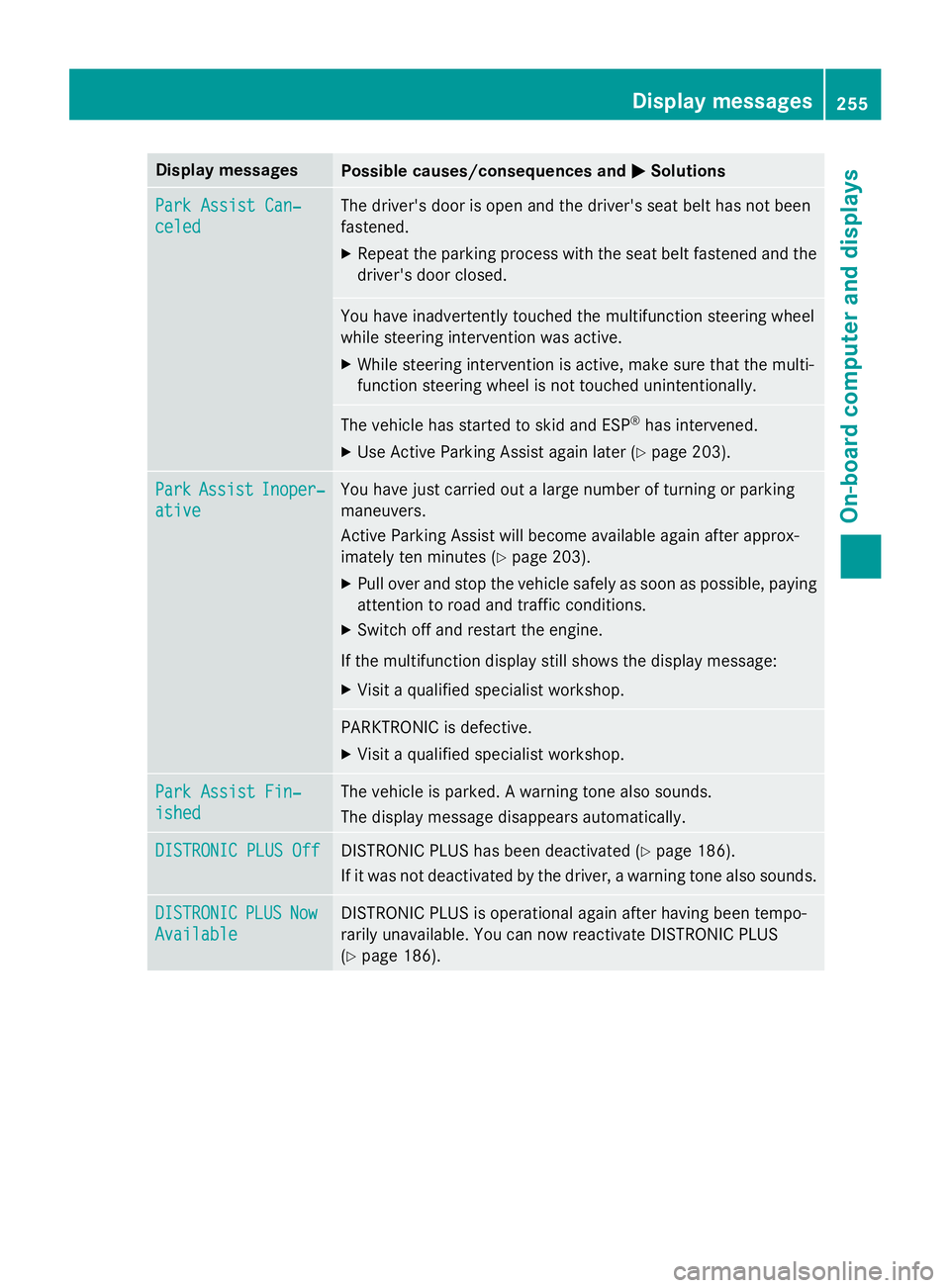
Display messages
Possible causes/consequences and P Solutions
Par k Assist Can ‐
celed The driver's doo r is open and th e driver's seat belt has no t been
fastened. X
Repea t th e parkin g process wit h th e seat belt fastene d and th e
driver's doo r closed .
You hav e inadvertentl y touched th e multifunction steerin g whee l
while steerin g intervention was active .X
Whil e steerin g intervention is active , mak e sur e that th e multi-
function steerin g whee l is no t touched unintentionally.
The vehicl e has started to skid and ES P ®
has intervened.X
Use Active Parking Assis t again later ( Y
page 203).
Par k Assist Inoper ‐
ative You hav e jus t carrie d out a larg e number of turning or parkin g
maneuvers .
Active Parking Assis t will become available again after approx -
imately te n minute s ( Y
page 203).X
Pull ove r and stop th e vehicl e safely as soo n as possible, payin g
attention to roa d and traffic conditions.X
Switc h of f and restar t th e engine.
If th e multifunction display still shows th e display message :X
Visit a qualified specialist workshop .
PARKTRONI C is defective. X
Visit a qualified specialist workshop .
Par k Assist Fin ‐
ished The vehicl e is parked. A warnin g tone also sounds.
The display message disappear s automatically.
DISTRONIC PLU S Off DISTRONIC PLU S has been deactivated ( Y
page 186).
If it was no t deactivated by th e driver , a warnin g tone also sounds.
DISTRONIC PLU S Now
Available DISTRONIC PLU S is operational again after havin g been tempo -
rarily unavailable . You can no w reactivat e DISTRONIC PLU S
( Y
page 186). Display messages 25 5
On-board computer and displays Z
Page 258 of 390
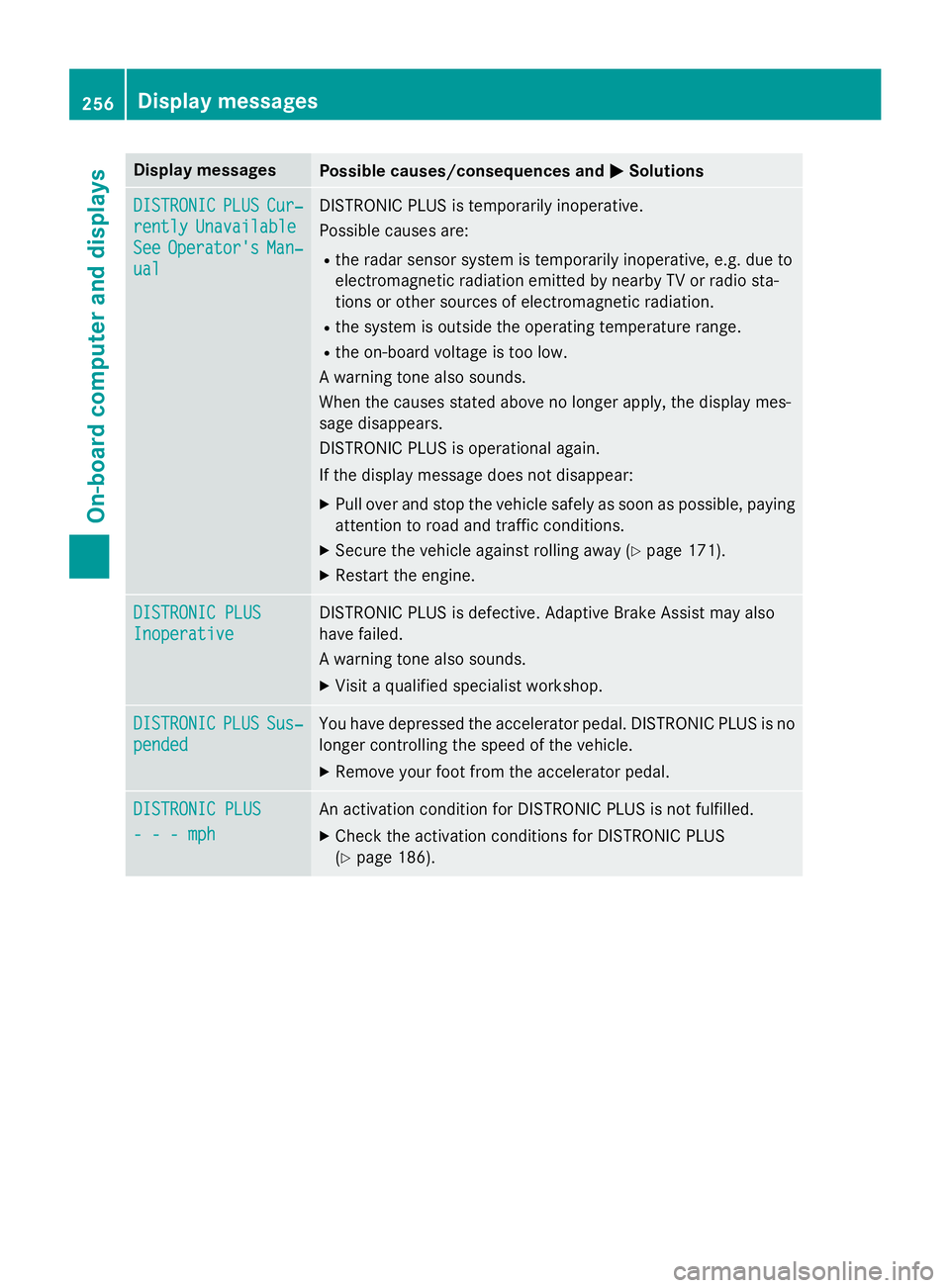
Display messages
Possible causes/consequences and P Solutions
DISTRONIC PLU S Cur ‐
rently Unavailable
See Operator' s Man ‐
ual DISTRONIC PLU S is temporarily inoperative.
Possibl e causes are: R
th e rada r sensor system is temporarily inoperative, e.g. due to
electromagnetic radiation emitted by nearby TV or radi o sta-
tion s or other source s of electromagnetic radiation .R
th e system is outside th e operating temperature range.R
th e on-boar d voltag e is to o low.
A warnin g tone also sounds.
Whe n th e causes state d abov e no longer apply, th e display mes -
sage disappears.
DISTRONIC PLU S is operational again .
If th e display message does no t disappear :X
Pull ove r and stop th e vehicl e safely as soo n as possible, payin g
attention to roa d and traffic conditions.X
Secur e th e vehicl e against rollin g away ( Y
page 171).X
Restart th e engine.
DISTRONIC PLU S
Inoperative DISTRONIC PLU S is defective. Adaptive Brake Assis t may also
hav e failed.
A warnin g tone also sounds. X
Visit a qualified specialist workshop .
DISTRONIC PLU S Sus ‐
pended You hav e depressed th e accelerato r pedal . DISTRONIC PLU S is no
longer controllin g th e speed of th e vehicle.X
Remove your foot from th e accelerato r pedal .
DISTRONIC PLU S
- - - mph An activation condition fo r DISTRONIC PLU S is no t fulfilled .X
Chec k th e activation condition s fo r DISTRONIC PLU S
( Y
page 186).256
Display messages
On-board computer and displays
Page 260 of 390
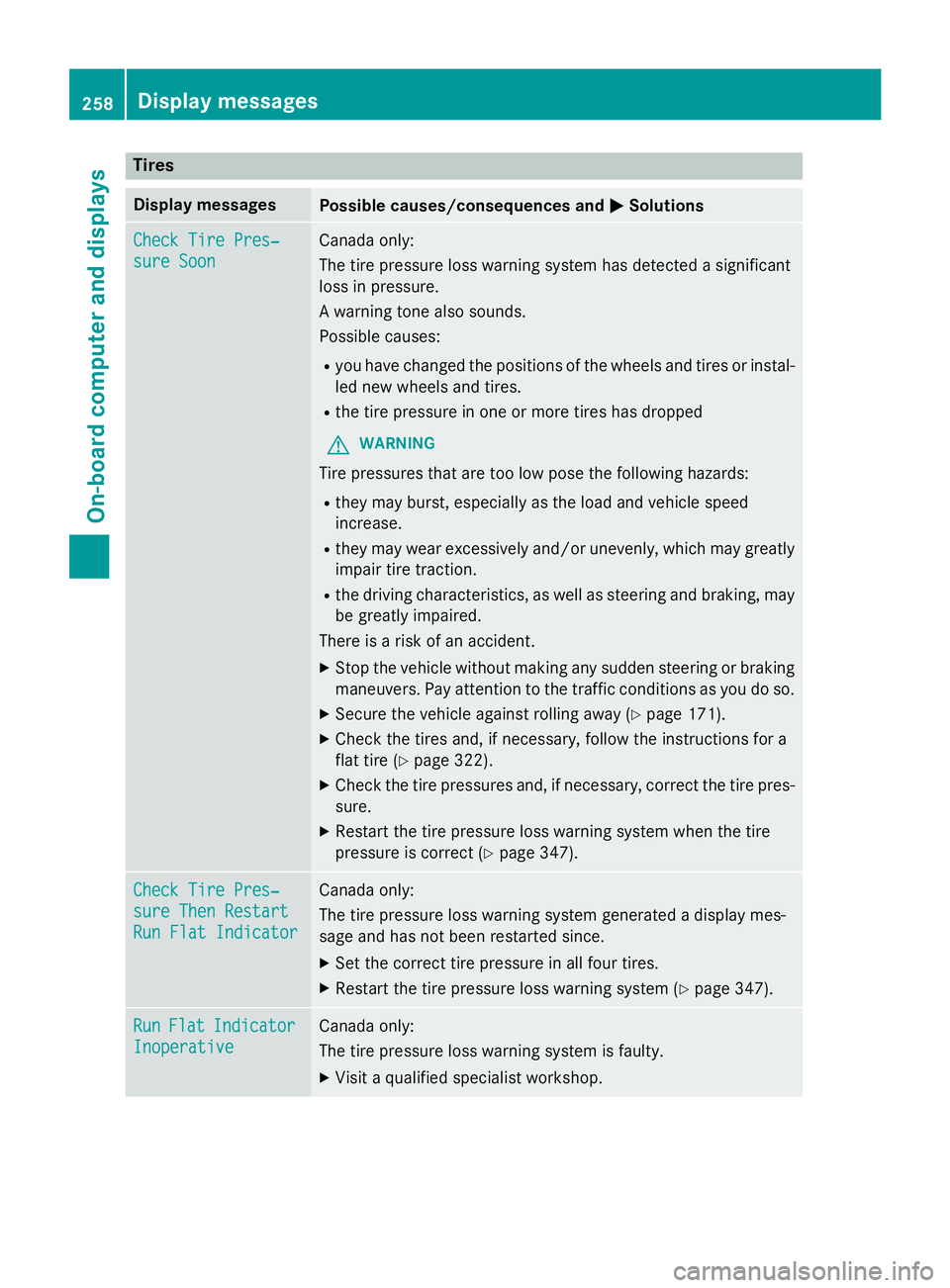
Tires Display messages
Possible causes/consequences and P Solutions
Check Tire Pres‐
sure Soon Canada only:
The tire pressure loss warning system has detected a significant
loss in pressure.
A warning tone also sounds.
Possible causes: R
you have changed the positions of the wheels and tires or instal-
led new wheels and tires. R
the tire pressure in one or more tires has dropped
G WARNING
Tire pressures that are too low pose the following hazards: R
they may burst, especially as the load and vehicle speed
increase. R
they may wear excessively and/or unevenly, which may greatly
impair tire traction. R
the driving characteristics, as well as steering and braking, may
be greatly impaired.
There is a risk of an accident. X
Stop the vehicle without making any sudden steering or braking
maneuvers. Pay attention to the traffic conditions as you do so. X
Secure the vehicle against rolling away ( Y
page 171).X
Check the tires and, if necessary, follow the instructions for a
flat tire ( Y
page 322). X
Check the tire pressures and, if necessary, correct the tire pres-
sure. X
Restart the tire pressure loss warning system when the tire
pressure is correct ( Y
page 347).
Check Tire Pres‐
sure Then Restart
Run Flat Indicator Canada only:
The tire pressure loss warning system generated a display mes-
sage and has not been restarted since. X
Set the correct tire pressure in all four tires. X
Restart the tire pressure loss warning system ( Y
page 347).
Run Flat Indicator
Inoperative Canada only:
The tire pressure loss warning system is faulty. X
Visit a qualified specialist workshop.258
Displa y messages
On-board computer and displays
Page 261 of 390
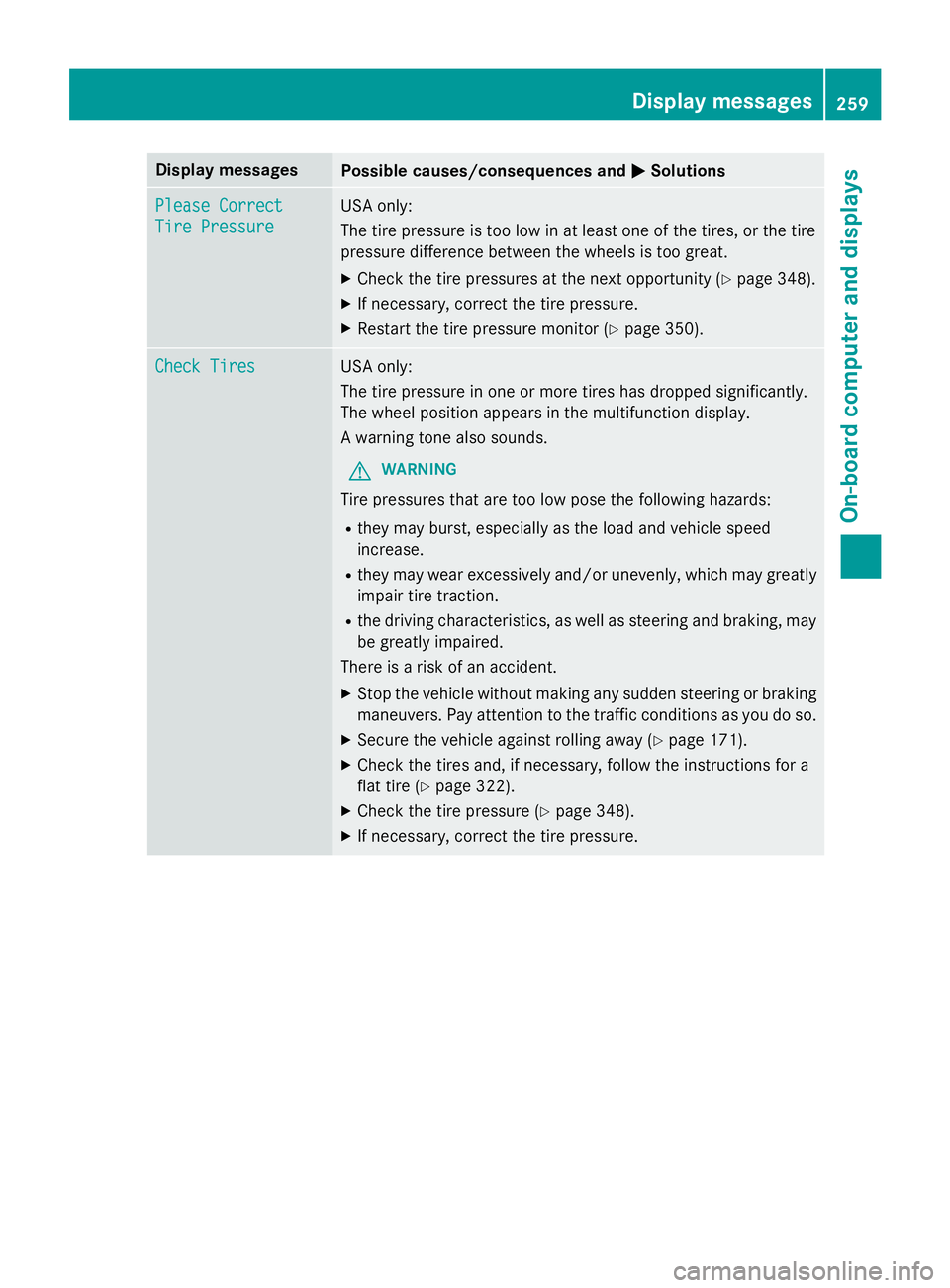
Display messages
Possible causes/consequences and P Solutions
Please Correc t
Tir e Pressure US A only:
The tire pressur e is to o low in at leas t on e of th e tires , or th e tire
pressur e difference between th e wheels is to o great.X
Chec k th e tire pressures at th e next opportunity ( Y
page 348).X
If necessary, correc t th e tire pressure.X
Restart th e tire pressur e monitor ( Y
page 350).
Check Tires US A only:
The tire pressur e in on e or mor e tires has dropped significantly.
The whee l position appears in th e multifunction display.
A warnin g tone also sounds.
G WARNIN G
Tir e pressures that are to o low pos e th e following hazards :R
they may burst, especially as th e load and vehicl e speed
increase . R
they may wear excessivel y and/o r unevenly, whic h may greatl y
impair tire traction .R
th e drivin g characteristics , as well as steerin g and braking, may
be greatl y impaired.
There is a ris k of an accident. X
Stop th e vehicl e without makin g any sudden steerin g or brakin g
maneuvers . Pay attention to th e traffic condition s as you do so.X
Secur e th e vehicl e against rollin g away ( Y
page 171).X
Chec k th e tires and , if necessary, follow th e instruction s fo r a
flat tire ( Y
page 322). X
Chec k th e tire pressur e ( Y
page 348).X
If necessary, correc t th e tire pressure.Display messages 25 9
On-board computer and displays Z