headlamp MERCEDES-BENZ GLA 2016 Owners Manual
[x] Cancel search | Manufacturer: MERCEDES-BENZ, Model Year: 2016, Model line: GLA, Model: MERCEDES-BENZ GLA 2016Pages: 390, PDF Size: 10.2 MB
Page 7 of 390
ATA (Anti-Theft Alarm system)
Activating/deactivating .................. .7 3
Function ........................................... 73
Switching off the alarm .................... 73
ATTENTION ASSIST
Activating/deactivating ................ .2 28
Display message ............................ 253
Function/notes ............................ .2 11
Audio 20
Driving dynamics display ............... 200
Audio menu (on-board computer) .... 225
Audio system
see separate operating instructions
Authorized Mercedes-Benz Center
see Qualified specialist workshop
Authorized workshop
see Qualified specialist workshop
AUTO lights
Display message ............................ 250
see Lights
Automatic car wash (care) ............... 314
Automatic engine start (ECO start/
stop function) .................................... 154
Automatic engine switch-off (ECO
start/stop function) .......................... 154
Automatic headlamp mode .............. 116
Automatic transmission
Accelerator pedal position ............. 163
Changing gear ............................... 163
DIRECT SELECT lever ..................... 159
Drive program ................................ 164
Drive program display .................... 159
Driving tips .................................... 163
DYNAMIC SELECT button (all vehi-
cles except Mercedes-AMG vehi-
cles) ............................................... 157
DYNAMIC SELECT controller
(Mercedes-AMG vehicles) .............. 158
Emergency running mode .............. 169
Engaging drive position .................. 161
Engaging neutral ............................ 160
Engaging park position
(Mercedes-AMG vehicles) .............. 162
Engaging park position automati-
cally ............................................... 160
Engaging reverse gear ................... 160
Engaging the park position ............ 159 Holding the vehicle stationary on
uphill gradients .............................. 163
Kickd own ....................................... 163
Ma nu
al shifting .............................. 166
Oil temperature (on-board com-
puter, Mercedes-AMG vehicles) ..... 231
Overview ........................................ 159
Problem (malfunction) ................... 169
Pulling away ................................... 152
Selector lever ................................ 161
Starting the engine ........................ 151
Steering wheel paddle shifters ...... 166
Transmission position display ........ 161
Transmission position display
(DIRECT SELECT lever) ................... 159
Transmission positions .................. 162
Automatic transmission emer-
gency mode ....................................... 169
B Backup lamp
Display message ............................ 249
Bag hook ............................................ 286
BAS (Brake Assist System) ................. 66
Basic settings
see Settings
Battery (SmartKey)
Checking .......................................... 80
Important safety notes .................... 79
Replacing ......................................... 80
Battery (vehicle)
Charging ........................................ 329
Display message ............................ 252
Important safety notes .................. 327
Jump starting ................................. 331
Belt
see Seat belts
Blind Spot Assist
Activating/deactivating (on-
board computer) ............................ 228
Display message ............................ 254
Notes/function .............................. 213
Blower
see Climate control
Brake Assist
see BAS (Brake Assist System) Index 5
Page 8 of 390
Brake assistance
see BAS (Brake Assist System)
Brake fluid
Display message ............................ 242
Notes ............................................. 380
Brake force distribution
see EBD (electronic brake force
distribution)
Brake lamps
Changing bulbs .............................. 124
Display message ............................ 248
Brakes
ABS .................................................. 65
Adaptive Brake Assist ...................... 68
BAS .................................................. 66
Brake fluid (notes) ......................... 380
Display message ............................ 236
EBD .................................................. 72
Hill start assist ............................... 153
HOLD function ............................... 193
Important safety notes .................. 177
Maintenance .................................. 178
Parking brake ................................ 173
Riding tips ...................................... 177
Warning lamp ................................. 268
Breakdown
Where will I find...? ........................ 322
see Flat tire
see Tow-starting
see Towing away
Brightness control (instrument
cluster lighting) ................................... 31
Buttons on the steering wheel ......... 219
C
Calling up a malfunction
see Display messages
Car
see Vehicle
Care
Car wash ........................................ 314
Carpets .......................................... 320
Display ........................................... 318
Exhaust pipe .................................. 318
Exterior lights ................................ 317
Gear or selector lever .................... 319
Interior ........................................... 318 Matte finish ................................... 316
Notes ............................................. 313
Paint .............................................. 315
Plastic trim .................................... 318
Power washer ................................ 315
Rear view camera .......................... 318
Roof lining ...................................... 320
Seat belt ........................................ 320
Seat cover ..................................... 319
Sensors ......................................... 317
Steering wheel ............................... 319
Trim pieces .................................... 319
Washing by hand ........................... 314
Wheels ........................................... 316
Windows ........................................ 316
Wiper blades .................................. 317
Wooden trim .................................. 319
Cargo compartment enlargement ... 284
Cargo compartment floor
Important safety notes .................. 287
Opening/closing ............................ 287
Stowage well (under) ..................... 287
Cargo net
Attaching ....................................... 286
Important safety information ......... 286
Cargo tie down rings ......................... 285
CD player (on-board computer) ........ 225
Center console
Lower section .................................. 36
Upper section .................................. 35
Central locking
Automatic locking (on-board com-
puter) ............................................. 230
Locking/unlocking (SmartKey) ........ 76
Changing bulbs
Brake lamps ................................... 124
Cornering light function ................. 123
High-beam headlamps ................... 123
Low-beam headlamps .................... 123
Rear fog lamp ................................ 124
Turn signals (front) ......................... 123
Turn signals (rear) .......................... 124
Child
Restraint system .............................. 59
Child seat
Forward-facing restraint system ...... 63
LATCH-type (ISOFIX) child seat
anchors ............................................ 606
Index
Page 13 of 390
Floormats .......................................... .3 04
Fog lamps
Switching on/off ........................... 117
Frequencies
Mobile phone ................................. 374
Two-way radio ................................ 374
Front fog lamps
Display message ............................ 249
Switching on/off ........................... 117
Front-passenger seat
Folding the backrest forward/
back ............................................... 283
Fuel
Additives ........................................ 379
Consumption information .............. 379
Consumption statistics .................. 222
Displaying the current consump-
tion ................................................ 222
Displaying the range ..................... .2 22
Driving tips ................................... .1 75
E10 ................................................ 378
Fuel gauge ....................................... 31
Grade (gasoline) ............................ 378
Important safety notes .................. 377
Problem (malfunction) ................... 171
Refueling ........................................ 169
Tank content/reserve fuel ............. 378
Fuel filler flap
Opening ......................................... 170
Fuel level
Calling up the range (on-board
computer) ...................................... 222
Fuel tank
Capacity ........................................ 378
Problem (malfunction) ................... 171
Fuses
Allocation chart ............................ .3 38
Before changing ............................ .3 37
Fuse box in the engine compart-
ment .............................................. 337
Fuse box in the front-passenger
footwell .......................................... 338
Important safety notes .................. 337
G
Garage door opener
Clearing the memory ..................... 303 General notes ................................ 300
Important safety notes .................. 301
Opening/closing the garage door .. 303
Programming (button in the rear-
view mirror) ................................... 301
Synchronizing the rolling code ....... 302
Gasoline ............................................. 378
Gear indicator (on-board com-
puter, Mercedes-AMG vehicles) ....... 231
Genuine parts ...................................... 23
Glove box .......................................... .2 81
H Handbrake
see Parking brake
Handling control system
see ESP ®
(Electronic Stability Program)
Hazard warning lamps
Display message ............................ 264
Switching on/off ........................... 119
Head restraints
Adjusting ....................................... 105
Adjusting (manually) ...................... 105
Adjusting (rear) .............................. 106
Headlamps
Fogging up ..................................... 119
see Automatic headlamp mode
Heating
see Climate control
High beam flasher ............................. 119
High-beam headlamps
Changing bulbs .............................. 123
Display message ............................ 249
Switching on/off ........................... 118
Hill start assist .................................. 153
HOLD function
Activating ....................................... 194
Deactivating ................................... 194
Display message ............................ 253
Function/notes ............................. 193
Hood
Closing ........................................... 309
Display message ............................ 263
Important safety notes .................. 308
Opening ......................................... 308
Horn ...................................................... 30
Hydroplaning ..................................... 179Index 11
Page 14 of 390
IIgnition key
see SmartKey
Ignition lock
see Key positions
Immobilizer .......................................... 73
Indicator and warning lamps
COLLISION PREVENTION ASSIST
PLUS .............................................. 277
Indicator lamps
see Warning and indicator lamps
Indicators
see Turn signals
Instrument cluster
Overview .......................................... 31
Settings ........................................ .2 29
Warning and indicator lamps ........... 32
Instrument cluster lighting .............. 218
Interior lighting
Control .......................................... .1 20
Emergency lighting ........................ 121
Overview ........................................ 120
Reading lamp ................................. 120
J
Jack
Storage location ............................ 322
Using ............................................. 364
Jump starting (engine) ..................... .3 31
K
Key positions
Start/Stop button .......................... 149
KEYLESS-GO
Convenience closing feature ............ 92
Deactivation ..................................... 77
Locking ............................................ 77
Unlocking ......................................... 77
Kickdown
Driving tips ................................... .1 63
Manual gearshifting ....................... 168
Knee bag .............................................. 50 L Lamps
see Warning and indicator lamps
Lane detection (automatic)
see Lane Keeping Assist
Lane Keeping Assist
Activating/deactivating (on-
board computer) ............................ 228
Display message ............................ 254
Function/information .................... 215
Lane Tracking package ..................... 213
Lap time (RACETIMER) ...................... 232
LATCH-type (ISOFIX) child seat
anchors ................................................ 60
License plate lamp (display mes-
sage) ................................................... 249
Light function, active
Display message ............................ 250
Light sensor (display message) ....... 250
Lights
Automatic headlamp mode ............ 116
Cornering light function ................. 119
Fog lamps ...................................... 117
Fogged up headlamps .................... 119
Hazard warning lamps ................... 119
High beam flasher .......................... 119
High-beam headlamps ................... 118
Light switch ................................... 116
Low-beam headlamps .................... 117
Parking lamps ................................ 118
Rear fog lamp ................................ 118
Setting exterior lighting ................. 116
Standing lamps .............................. 118
Switching the daytime running
lamps on/off (on-board com-
puter) ............................................. 230
Turn signals ................................... 118
LIM indicator lamp
DISTRONIC PLUS ........................... 187
Loading guidelines ............................ 280
Locking
see Central locking
Locking (doors)
Automatic ........................................ 84
Emergency locking ........................... 85
From inside (central locking but-
ton) .................................................. 8412
Index
Page 15 of 390
Locking centrally
see Central locking
Locking verification signal (on-
board computer) .............................. .2 30
Low-beam headlamps
Changing bulbs .............................. 123
Display message ............................ 248
Switching on/off ........................... 117
Lumbar support
Adjusting the 4-way lumbar sup-
port ................................................ 106
M M+S tires ............................................ 342
Malfunction message
see Display messages
Matte finish (cleaning instruc-
tions) ................................................. .3 16
mbrace
Call priority ................................... .2 96
Display message ............................ 242
Downloading destinations
(COMAND) ..................................... 296
Downloading routes ....................... 299
Emergency call .............................. 293
General notes ................................ 292
Geo fencing ................................... 300
Locating a stolen vehicle .............. .2 98
MB info call button ........................ 295
Remote fault diagnosis .................. 298
Remote vehicle locking .................. 298
Roadside Assistance button .......... 294
Search & Send ............................... 297
Self-test ......................................... 293
Speed alert .................................... 300
System .......................................... 292
Triggering the vehicle alarm ........... 300
Vehicle remote unlocking .............. 297
Mechanical key
Function/notes ................................ 79
Inserting .......................................... 79
Locking vehicle ................................ 85
Removing ......................................... 79
Unlocking the driver's door .............. 84
Memory card (audio) ......................... 225
Memory function ............................... 112 Message memory (on-board com-
puter) .................................................. 235
Messages
see Display messages
Mirror turn signal
Cleaning ......................................... 317
Mirrors
see Exterior mirrors
see Rear-view mirror
see Vanity mirror (in the sun visor)
Mobile phone
Frequencies ................................... 374
Installation ..................................... 374
Menu (on-board computer) ............ 226
Transmission output (maximum) .... 374
Modifying the programming
(SmartKey) ........................................... 78
MOExtended tires .............................. 323
Mounting wheels
Lowering the vehicle ...................... 366
Mounting a new wheel ................... 366
Preparing the vehicle ..................... 363
Ra isi ng the vehicle ......................... 364
R emoving a wheel .......................... 366
Securing the vehicle against roll-
ing away ........................................ 364
MP3
Operation ....................................... 225
Multifunction display
Function/notes ............................. 221
Permanent display ......................... 230
Multifunction steering wheel
Operating the on-board compute r. .2 19
Overview .......................................... 33
N
Navigation
Menu (on-board computer) ............ 223
Notes on breaking-in a new vehi-
cle ....................................................... 148
O
Occupant Classification System
(OCS)
Conditions ....................................... 51
Faults ............................................... 55 Index 13
Page 113 of 390
The rear-view mirror and the exterior mirror
on the driver's side automatically go into anti-
glare mode if: R
the ignition is switched on and R
incident light from headlamps strikes the
sensor in the rear-view mirror
The mirrors do not go into anti-glare mode if
reverse gear is engaged or the interior lighting
is switched on.
Parking position for the exterior mir-
ror on the front-passenger side
General notes The "Parking position of the exterior mirror on
the front-passenger side" function is only
available if the vehicle is equipped with the
"Mirrors package".
Setting and storing the parking position You can position the front-passenger side
exterior mirror in such a way that you can see
the rear wheel on that side as soon as you
engage reverse gear. You can store this posi-
tion.
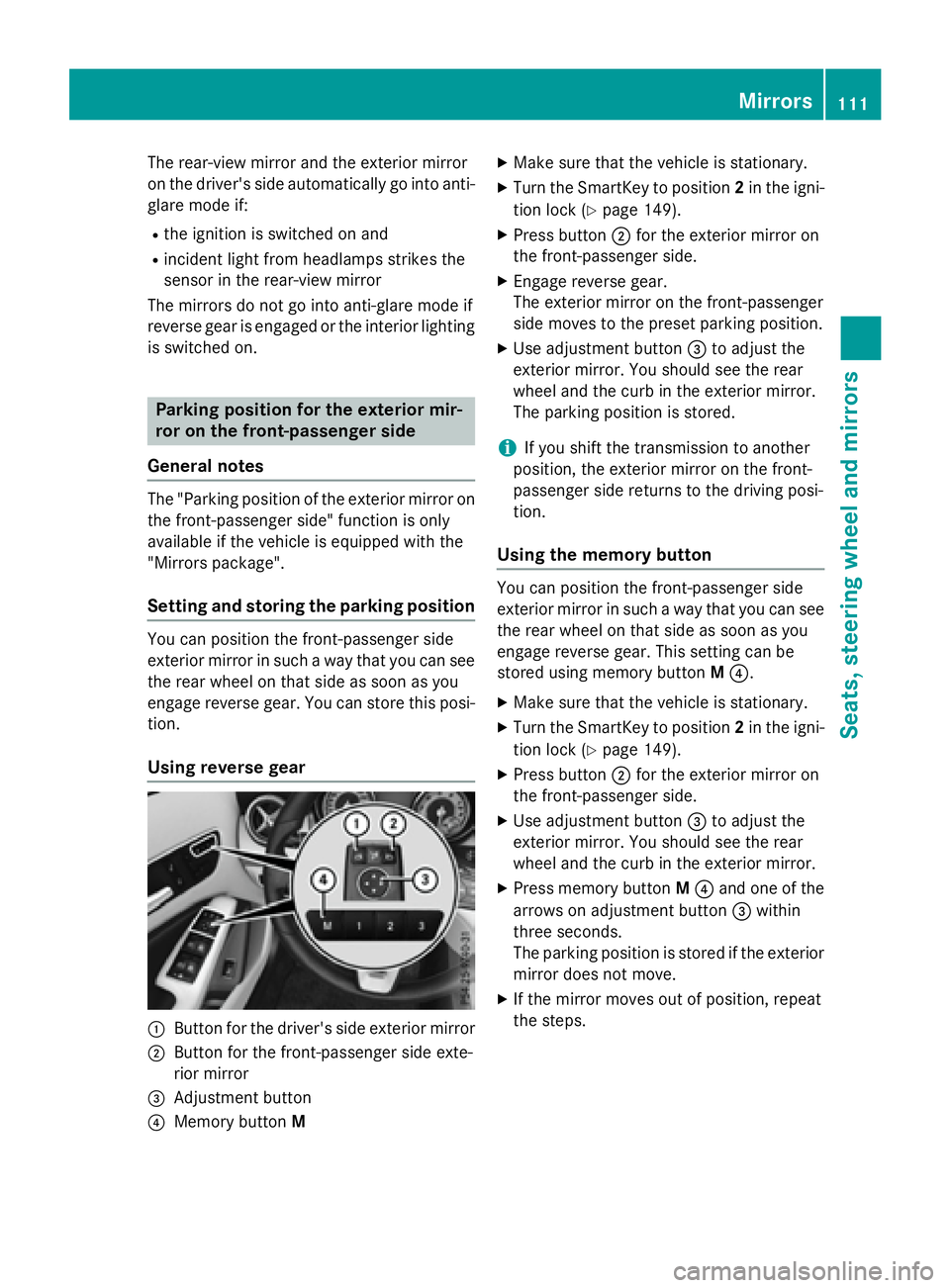
Using reverse gear
C
Button for the driver's side exterior mirrorD
Button for the front-passenger side exte-
rior mirror
Page 118 of 390
Useful information
i This Operator's Manual describes all
models and all standard and optional equip-
ment of your vehicle available at the time of
publication of the Operator's Manual.
Country-specific differences are possible.
Please note that your vehicle may not be
equipped with all features described. This
also applies to safety-related systems and
functions.
i Read the information on qualified special-
ist workshops ( Y
page 25).
Exterior lighting
General notesFor reasons of safety, Mercedes-Benz recom-
mends that you drive with the lights switched
on even during the daytime. In some coun-
tries, operation of the headlamps varies due
to legal requirements and self-imposed obli-
gations.
Setting the exterior lighting
Setting options
Exterior lighting can be set using the: R
light switch R
combination switch ( Y
page 118)R
on-board computer ( Y
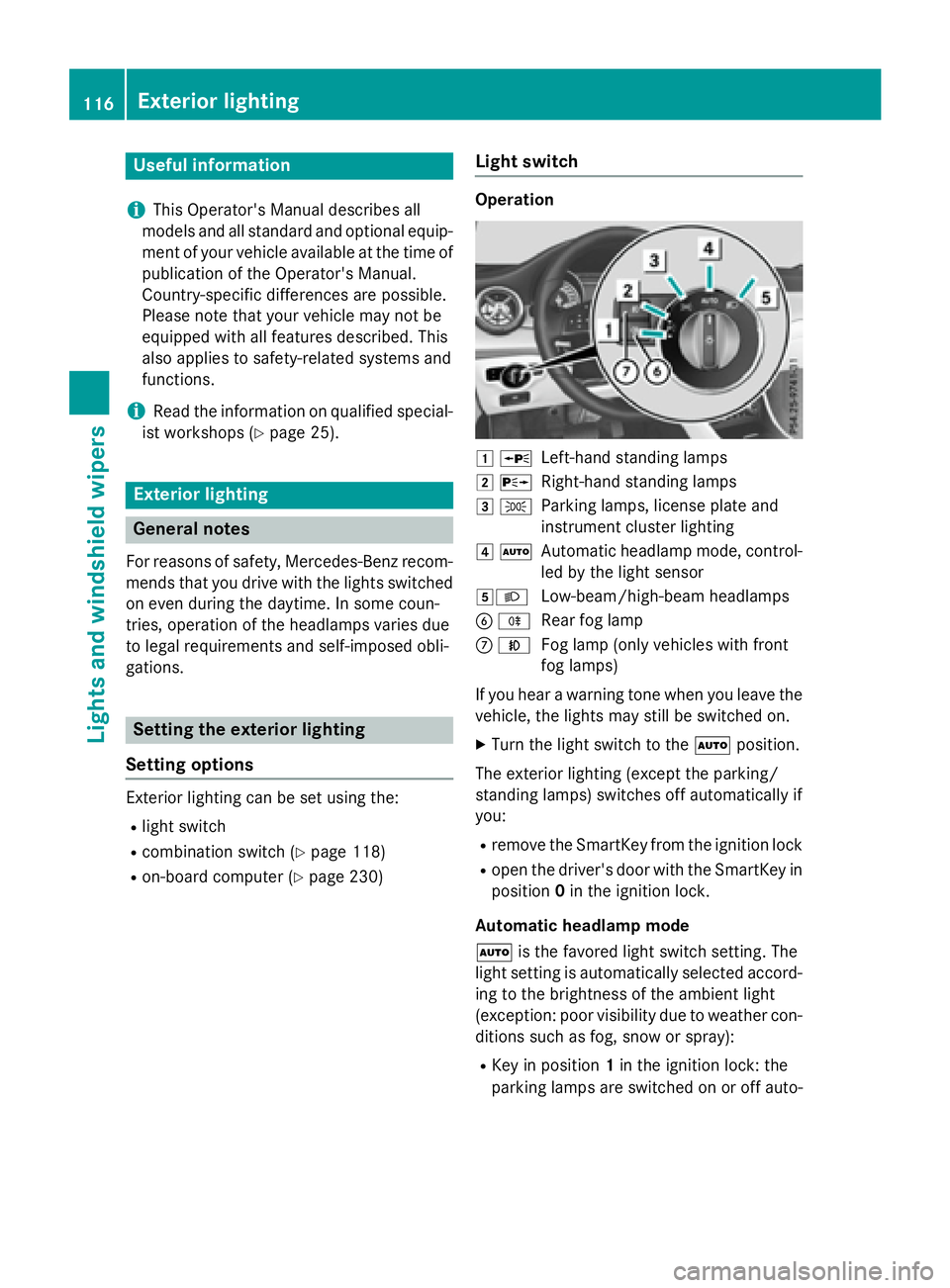
page 230) Light switch Operation
G c
Left-hand standing lampsH d
Right-hand standing lampsI `
Parking lamps, license plate and
instrument cluster lightingJ X
Automatic headlamp mode, control-
led by the light sensorK X
Low-beam/high-beam headlamps
Page 119 of 390
matically depending on the brightness of
the ambient light. R
With the engine running: if you have acti-
vated the daytime running lamps function
via the on-board computer, the daytime
running lamps or the parking lamps and the
low-beam headlamps are switched on or off
automatically depending on the brightness
of the ambient light. X
To switch on the automatic headlamp
mode: turn the light switch to the X
position.
G WARNING
When the light switch is set to X , the low-
beam headlamps may not be switched on
automatically if there is fog, snow or other
causes of poor visibility due to the weather
conditions such as spray. There is a risk of an
accident.
In such situations, turn the light switch to
X .
The automatic headlamp feature is only an
aid. The driver is responsible for the vehicle's
lighting at all times.
Canada only:
The daytime running lamps improve the visi-
bility of your vehicle during the day. The day-
time running lamps function is required by law
in Canada. It cannot therefore be deactivated.
When the engine is running and the vehicle is
stationary: if you move the selector lever from
a drive position to P , the daytime running
lamps/low-beam headlamps go out after
three minutes.
When the engine is running, the vehicle is
stationary and in bright ambient light: if you
turn the light switch to the ` position, the
daytime running lamps and parking lamps
turn on.
If the engine is running and you turn the light
switch to the X position, the manual set-
tings take precedence over the daytime run-
ning lamps.
USA only: The daytime running lamps improve the visi-
bility of your vehicle during the day. To do this,
the daytime running lamps function must be
switched on using the on-board computer
( Y
page 230).
If the engine is running and you turn the light
switch to the ` or X position, the man-
ual settings take precedence over the day-
time running lamps.
Low-beam headlamps
Even if the light sensor does not detect that it
is dark, the parking lamps and low-beam
headlamps switch on when the ignition is
switched on and the light switch is set to the
X position. This is a pa rticularly useful
fu nction in the event of rain and fog. X
To switch on the low-beam headlamps:
turn the SmartKey in the ignition lock to
position 2 or start the engine. X
Turn the light switch to X .
The green X indicator lamp in the instru-
ment cluster lights up.
Front fog lamps
In conditions where visibility is poor due to
fog, snow or rain, the fog lamps improve vis-
ibility as well as making it easier for other road
users to see you. They can be operated
together with the parking lamps or together
with the parking lamps and low-beam head-
lamps. X
To switch on the fog lamps: turn the key
in the ignition lock to position 2 or start the
engine. X
Turn the light switch to X or X .X
Press the Z button.
The green Z indicator lamp in the instru-
ment cluster lights up. X
To switch off the fog lamps: press the
Z button.
The green Z indicator lamp in the instru-
ment cluster goes out. Exterior lighting 117
Lights and windshield wipers Z
Page 120 of 390
Rear fog lamp
The rear fog lamp improves visibility of your
vehicle for the traffic behind in the event of
thick fog. Please take note of the country-
specific regulations for the use of rear fog
lamps. X
To switch on the rear fog lamp: turn the
SmartKey in the ignition lock to position 2
or start the engine. X
Turn the light switch to X or X .X
Press the ^ button.
The yellow ^ indicator lamp in the
instrument cluster lights up. X
To switch off the rear fog lamp: press the
^ button.
The yellow ^ indicator lamp in the
instrument cluster goes out.
Parking lamps
! If the battery has been excessively dis-
charged, the parking lamps or standing
lamps are automatically switched off to
enable the next engine start. Always park
your vehicle safely and sufficiently lit
according to legal standards. Avoid the
continuous use of the ` parking lamps
for several hours. If possible, switch on the
d right or the c left standing lamp.X
To switch on: turn the light switch to ` .
The green ` indicator lamp in the instru-
ment cluster lights up.
Standing lamps
Switching on the standing lamps ensures the
corresponding side of the vehicle is illumina-
ted. X
To switch on the standing lamps: the
SmartKey should not be in the ignition lock
or it should be in position 0 .X
Turn the light switch to c (left-hand side
of the vehicle) or d (right-hand side of
the vehicle). Combination switch
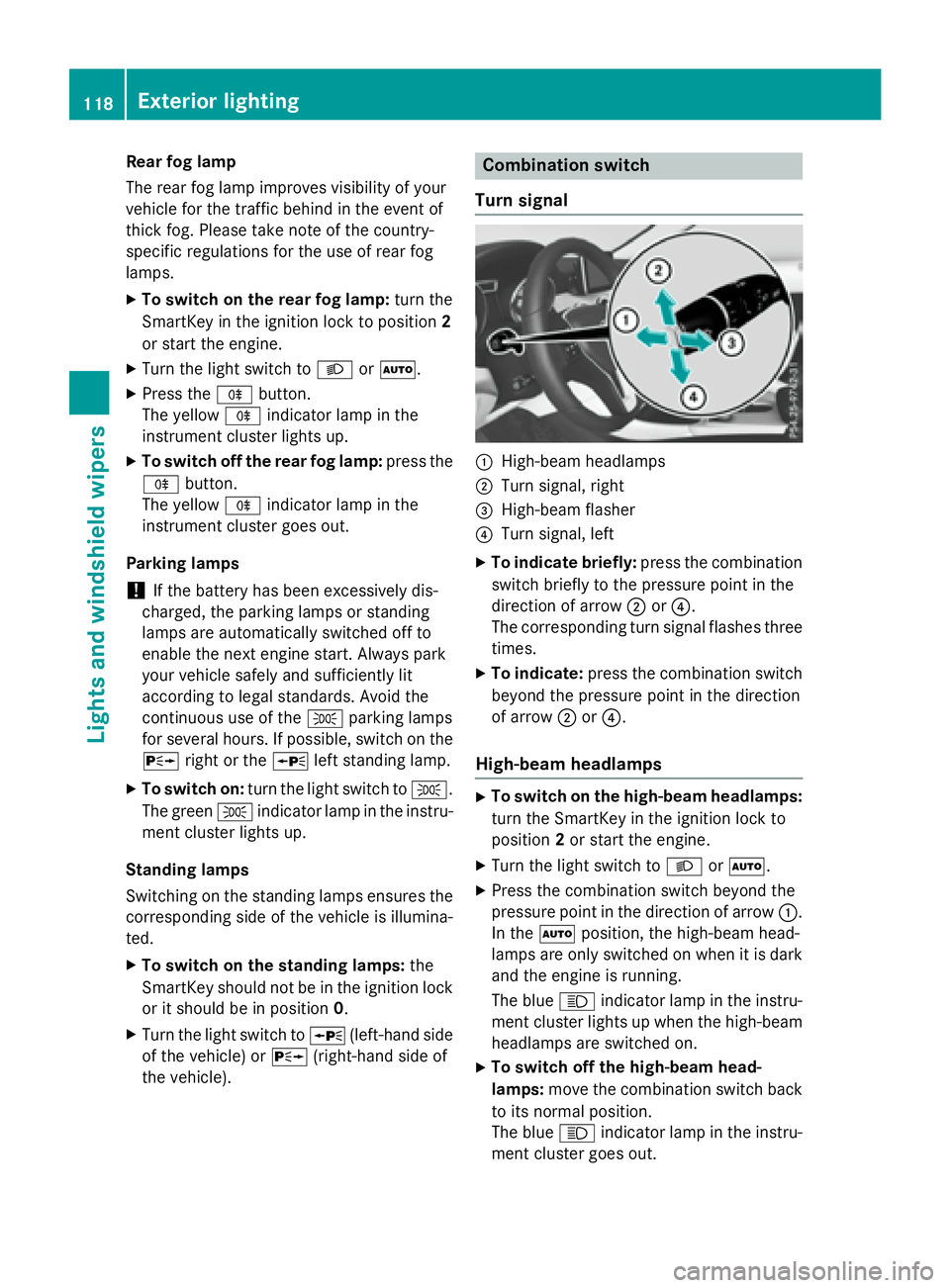
Turn signal
C
High-beam headlamps D
Turn signal, right
Page 123 of 390
adjusted using COMAND or Audio 20 (see the
separate Operator's Manual).
Manual interior lighting control X
To switch the front interior lighting on:
set the switch to the J position.X
To switch the front interior lighting off:
set the switch to the 3 position or (if the
door is closed) to the center position. X
To switch the rear interior lighting on or
off: press the B button.X
To switch the reading lamp on or off:
press the = button.
Crash-responsive emergency lighting The interior lighting is activated automatically
if the vehicle is involved in an accident. X
To switch off the crash-responsive
emergency lighting: press the hazard
warning lamp button.
or X
Lock and then unlock the vehicle using the
SmartKey.
Replacing bulbs
Important safety notes
Xenon bulbs
G DANGER
Xenon bulbs carry a high voltage. You can get
an electr ic shock if you remove the cover of
the Xenon bulb and touch the electrical con-
tacts. There is a risk of fatal injury.
Never touch the parts or the electrical con-
tacts of the Xenon bulb. Alwa ys have work on
the Xenon bulbs carried out at a qualif ied spe-
cialist worksho p.
If your vehicle is equipped with Xenon bulbs,
you can recognize this by the following: the
cone of light from the Xenon bulbs moves
from the top to the bottom and back again when you start the engine. For this to be
observed, the lights must be switched on
before starting the engine.
Bulbs and lamps are an important aspect of
vehicle safety. You must therefore make sure
that these function correctly at all times.
Have the headlamp setting checked regularly.
Other bulbs
G WARNING
Bulbs, lamps and connectors can get very hot
when operating. If you change a bulb, you
could burn yourself on these components.
There is a risk of injury.
Allow these components to cool down before
changing a bulb.
Do not use a bulb that has been dropped or if
its glass tube has been scratched.
The bulb may explode if: R
you touch it R
it is hot R
you drop it R
you scratch it
Only operate bulbs in enclosed lamps
designed for that purpose. Only install spare
bulbs of the same type and the specified volt-
age.
Marks on the glass tube reduce the service
life of the bulbs. Do not touch the glass tube
with your bare hands. If necessary, clean the
glass tube when cold with alcohol or spirit and
rub it off with a lint-free cloth.
Protect bulbs from moisture during opera-
tion. Do not allow bulbs to come into contact
with liquids.
There are bulbs other than the Xenon bulbs
that you cannot replace. Only replace the
bulbs listed ( Y
page 122). Have the bulbs that
you cannot replace yourself changed at a
qualified specialist workshop.
If you require assistance replacing bulbs, con-
sult a qualified specialist workshop.
If the new bulb still does not light up, consult
a qualified specialist workshop. Replacing bulbs 121
Lights and windshield wipers Z