ESP MERCEDES-BENZ GLA 2020 Owners Manual
[x] Cancel search | Manufacturer: MERCEDES-BENZ, Model Year: 2020, Model line: GLA, Model: MERCEDES-BENZ GLA 2020Pages: 346, PDF Size: 17.58 MB
Page 187 of 346
still
detects increasing lapsesinconcen tra-
tion, youwillbewarned againafter 15minutes
at the earliest. Thiswillonly happen ifATTEN-
TION ASSISTstill detects typicalindicators of
fatigue orincreasing lapsesinconcen tration.
Vehicles withtheCOMAND multimedia
system: ifawarning isoutput inthe multi-
function display,aservice stationsearchis
performed inthe multimedia system.Youcan
select aservice stationandnavigation tothis
service stationwillthen begin. Thisfunction
can beactivated ordeactivated inthe multi-
media system; seetheDigital Operator's Man-
ual . Lane
Tracking package
General notes The
Lane Tracking packageconsistsofBlind
Spot Assist (Ypage 185)andLane Keeping
Assist (Ypage 186).
Blind SpotAssis t General
notes
Blind SpotAssist monitors theareas oneither
side ofthe vehicle thatarenot visible tothe
driver withtwolateral, rear-facing radarsen-
sors. Awarning displayin the exterior mirrors
draws yourattent iontovehicles detected in
the monitored area.Ifyou then switch onthe
corresponding turnsignal tochange lane,you
will also receive anoptical andaudiblewarn-
ing.
Blind SpotAssist supports youfrom aspeed of
approximately 20mph (30km/h).
Importa ntsafety notes G
WARNING
Blind SpotAssist doesnotreact to:
R vehicles overtaken tooclosely onthe side,
placing theminthe blind spotarea
R vehicles whichapproach withalarge
speed differential andovertake yourvehi-
cle
As aresult, BlindSpotAssist maynotgive
warnings insuch situations. Thereisarisk
of an accident. Always
observe thetraffic conditions care-
fully ,and maintain asafe lateral distance.
Blind SpotAssist isonly anaid. Itmay failto
detect somevehicles andisno substitute for
attent ivedriving. Alwaysensurethatthere is
sufficient distancetothe side forother road
users andobstacles.
i USA
only:
This device hasbeen approved bythe FCC
as a"Vehicul arRada rSystem". Theradar
sensor isintended foruse inan automotive
radar system only.Removing, tampering
with, oraltering thedevice willvoid anywar-
ranties, andisnot permitted bythe FCC. Do
not tamper with,alter, oruse inany non-
approved way.
Any unauthorized modificationtothis device
could voidtheuser’s authority tooperate
the equip ment.
Rada rsenso rs
The radar sensors forBlind SpotAssist are
integrated intotherear bumper. Makesure
that thebumpers arefree from dirt,iceor
slush. Thesensors mustnotbecovered, for
example bycycle racks oroverhanging loads.
Following asevere impact orinthe event of
damage tothe bumpers, havethefunction of
the radar sensors checked ataqual ified spe-
cialist workshop. BlindSpotAssist maynolon-
ger work properly.
Monitoring rangeofthe senso rs
In particular, thedetection ofobstacles canbe
impaired if:
R there isdirt onthe sensors oranything else
covering thesensors
R there ispoor visibil ity,e.g. due tofog, heavy
rain orsnow
R anarrow vehicle traveling infront ,e.g. a
motorbike orbicycle
R the road hasvery wide lanes
R the road hasnarrow lanes
R you arenot driving inthe middle ofthe lane
R there arebarriers orother roadboundarie s
Vehicles inthe monitoring rangearethen not
indicated.
Blind SpotAssist monitors thearea upto10 ft
(3 m) behind yourvehicle anddirectly nextto
it. Driving
systems
185Drivingandparking Z
Page 188 of 346
If
the lanes arenarrow, vehiclesdriving inthe
lane beyond thelane next toyou rvehicle may
be indicated ,especia llyifthe vehicle sare not
driving inthe middl eof their lane. Thismay be
the case ifthe vehicle sare driving onthe inner
side oftheir lane.
Due tothe nature ofthe system:
R warnings maybeissu edinerror when driv-
ing close tocrash barriersor simil arsolid
lane borders.
R warnings maybeinterrupted whenyouare
driving alongsideparticul arlylong vehicle s,
such astrucks, foraprolonged time.
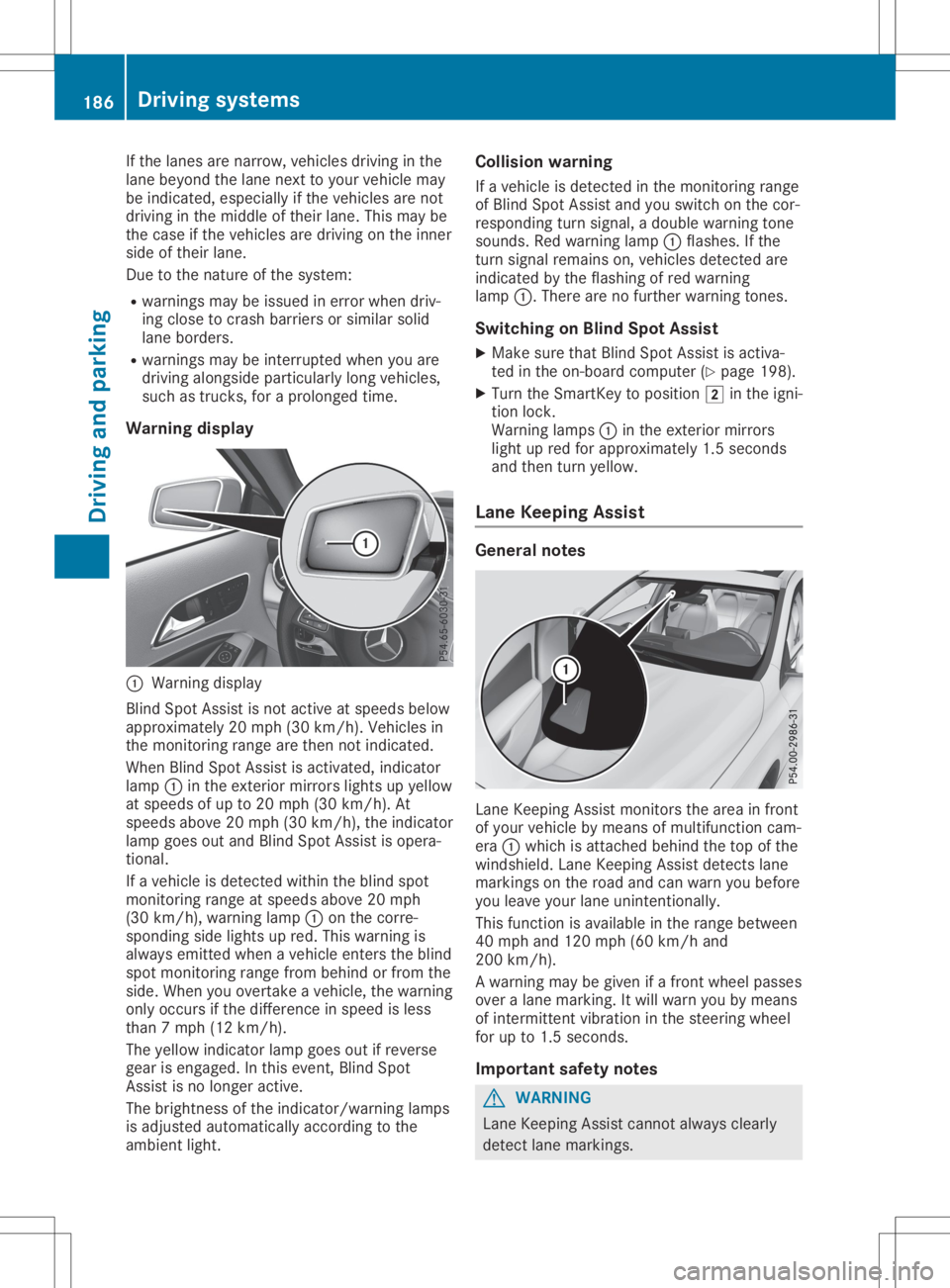
Warning display 0043
Warning display
Blind SpotAssist isnot active atspeed sbelow
appro ximately 20mph (30km/h). Vehiclesin
the monitoring rangearethen notindicated .
When BlindSpotAssist isactivated, indicator
lamp 0043inthe exterior mirrorslightsupyellow
at speed sof up to20 mph (30km/h ).At
speed sabove 20mph (30km/h), theindicator
lamp goesoutand Blind SpotAssist isopera -
tional.
If avehicle isdetected withintheblind spot
monitoring rangeatspeed sabove 20mph
(30 km/h), warning lamp0043onthe corre-
sponding sidelights upred. This warning is
alw ays emitted whenavehicle enterstheblind
spot monitoring rangefrombehind orfrom the
side. When youovertake avehicle ,the warning
only occurs ifthe difference inspeed isless
than 7mph (12km/h ).
The yellow indicator lampgoesoutifreverse
gear isengaged .In this event, BlindSpot
Assist isno longer active.
The brightness ofthe indicator/wa rninglamps
is adjusted automaticallyaccording tothe
ambi entlight. Col
lision warning
If avehicle isdetected inthe monitoring range
of Blind SpotAssist andyouswitch onthe cor-
respondi ngturn signal ,a doub lewarning tone
sounds. Redwarning lamp0043flashe s.Ifthe
turn signal remains on,vehicle sdetected are
indicated bythe flashi ngofred warning
lamp 0043.There arenofurther warning tones.
Swi tching onBlind SpotAssist
X Make surethatBlind SpotAssist isactiva-
ted inthe on-board computer (Ypage 198).
X Turn theSmartKey topositio n0048 inthe igni-
tion lock.
Warning lamps0043 inthe exterior mirrors
light upred forappro ximately 1.5seconds
and then turnyellow.
Lane Keeping Assist Gene
ralnotes Lane
Keepi ngAssist monitors thearea infront
of you rvehicle bymeans ofmultifu nctioncam-
era 0043which isattached behindthetop ofthe
windshi eld.Lane Keepi ngAssist detects lane
markings onthe road andcanwarn youbefore
you leaveyou rlane unintentionally .
This function isavai lablein the range betwee n
40 mph and120 mph (60km/h and
200 km/h).
A warning maybegiven ifafront wheel passes
over alane marking. Itwil lwarn youbymeans
of intermittent vibrationin the steering wheel
for upto1.5 seconds .
Important safetynotes G
WARNING
Lane Keepi ngAssist cannot always clearl y
detect lanemarkings. 186
Drivi
ngsystemsDrivi ngand parking
Page 189 of 346
In
such cases, LaneKeepi ngAssist can:
R give anunnecessary warning
R not give awarning
There isarisk ofan accident.
Alway spay particul arattention tothe traffic
situa tionandkeep within thelane, espe-
ciall yif Lane Keepi ngAssist alerts you . G
WARNING
The Lane Keepi ngAssist warning doesnot
return thevehicle tothe origina llane. There
is arisk ofan accident.
You shoul dalw ays steer, brakeoraccelera te
you rself, inparticul arifwarned byLane
Keepi ngAssist.
If you failtoada ptyou rdriving style,Lane
Keepi ngAssist canneither reducetherisk of
an accident noroverride thelawsof phys ics.
Lane Keepi ngAssist cannot takeintoaccount
the road, traffic andweather conditions. Lane
Keepi ngAssist ismerely anaid.You are
responsib lefor the distance tothe vehicle in
front, forvehicle speed,for braking ingood
time andforstayi nginyou rlane.
The Lane Keepi ngAssist doesnotkeep the
vehicle inthe lane.
The system maybeimpa iredormay notfunc-
tion if:
R there ispoor visibility,e.g. due toinsuffi-
cient illuminatio nof the road, ordue to
snow, rain,fogorspray
R there isglare ,e.g. from oncoming traffic,
the sun orreflection fromother vehicle s
(e.g. ifthe road surface iswet)
R the windshi eldisdirty, fogged up,dama ged
or covered, forinstance byasticker, inthe
vicinity ofthe camera
R there arenoorseveral unclearlane mark-
ings forone lane, e.g.roadw orks
R the lane markings areworn away,dark or
covered up,e.g. bydirt orsnow
R the distance tothe vehicle infront istoo
short andthus thelane markings cannotbe
detected
R the lane markings changequickly, e.g.lanes
branch off,cross oneanother ormerge R
the road isnarrow andwindi ng
R there arehighl yvaria bleshade conditions
on the roadw ay
Swi tching onLane Keeping Assist
X Switch onActive LaneKeepi ngAssist using
the on-board computer; todo so, select
Standard Standard
orAdaptive Adaptive
(Ypage 186).
If you drive atspeed sabove 40mph
(60 km/h) andlane markings aredetected,
the lines inthe assis tance graphi care
shown ingreen (Ypage 197). LaneKeepi ng
Assist isready foruse.
If Standard Standard
isselected, nowarning vibration
occurs if:
R you have switched onthe turn signal .In this
event, thewarnings aresupp ressed fora
certain periodoftime.
R adriving safetysystem intervenes, e.g.ABS,
BAS orESP ®
.
When Adaptive Adaptive
isselected, nowarning vibra-
tion occurs if:
R you have switched onthe turn signal .In this
event, thewarnings aresupp ressed fora
certain periodoftime.
R adriving safetysystem intervenes, e.g.ABS,
BAS orESP ®
.
R you accelera tehard, e.g.kickdown.
R you brake hard.
R you steer actively ,e.g. swerve toavoid an
obstacle orchange lanesquickly.
R you cutthe corner onasharp bend.
In order thatyouarewarned onlywhen neces-
sary andingood timeifyou cross thelane
marking, thesystem detects certaincondi-
tions andwarns youaccordingly .
The warning vibrationoccurs earlierif:
R you appro achtheouter lanemarking ona
bend
R the road hasvery widelanes, e.g.afreewa y
R the system detects solidlanemarkings
The warning vibrationoccurs laterif:
R the road hasnarrow lanes.
R you cutthe corner onabend Drivi
ngsystems
187Drivingand parking Z
Page 190 of 346
Imp
ortant safety notes G
WAR
NING
If you oper ateinform ation syst ems andcom-
mun ication equipm entint egr atedin the
veh iclewhen driving,you may bedist racted
fr om thetraff icsit uati on.You could also
lose control oftheveh icle. Ther eis aris kof
an acc iden t.
On lyoper atethis equipm entwhen thetraff ic
sit uati onper mits.Ifyou arenotsur eth at
th is ispos sible ,park theveh iclepayin g
att ention totraff icco nd ition sand oper ate
th eequipm entwhen theveh icleis stati on-
ary.
You must observeth elegal require men tsfor
th eco unt ryinwhic hyou arecurren tly driv ing
when operating theon -board comput er. G
WAR
NING
If th eins trumen tclus terhas faile dor mal-
fun ction ed, you may notrec ogn izefunction
res trict ion sin syst ems relevantto saf ety.
The oper ating safetyof your vehiclemay be
impa ired.Ther eis aris kof an acc iden t.
Dr ive oncar eful ly.Hav eth eveh iclech ecke d
at aqualif iedspec ialist workshop immedi-
ate ly.
The on-board comput eronlysho wsmes sage s
or warn ingsfrom certain syst ems inthemult i-
fun ction disp lay.You should there foremak e
sur eyour vehicleis oper ating safely atall
ti mes .
If th eoper ating safetyof your vehicleis
impa ired,pull overas soo nas itis saf eto do
so. Con tacta qualif iedspec ialist workshop.
Fo ran ove rview, seetheins trumen tpan el
illust ration (Ypage 32). Disp
laysand oper ation Inst
rumen tclus terligh ting
The lightsen sor intheins trumen tclus terauto -
mat icallyco ntrol sth ebrig htne ss ofthemult i-
fun ction disp lay.Indayligh t,th edisp lays inthe
ins trumen tclus terare notillum inated. The
lighting intheins trumen tclus ter, in the
disp lays andtheco ntrol sin theveh icleint erior
can beadjust edusin gth ebrig htne ss control
kn ob.
The brightne ss control knob isloc ate don the
bot tom leftof theins trumen tclus ter
(Y page 32).
X Turn thebrig htne ss control knob clockwise
or count er-clo ckwise.
If th eligh tswit chisset tothe0058, 0060or
0058 position ,th ebrig htne ss isdepe ndent
upon thebrig htne ss oftheambi entligh t. Sp
eedom eterwith segm ents
The spee dometer ison lydivi ded intoseg -
men tsinveh icles wit hAc tive Distanc eAs sist
DI ST RONI C.
The segmen tsinthespee dometer ind icat e
whic hspee dran geisavaila ble.
R Ac tive Distanc eAs sist DIST RONI Cact ivat ed
(Y page 158):
On eor two segmen tsintheset spee dran ge
ligh tup.
R Ac tive Distanc eAs sist DIST RONI Cdet ects a
veh iclein fron tmov ingmor eslow lythan the
st ore dspee d:
The segmen tsbet ween thespee dof the
veh iclein fron tand thest ore dspee dligh t
up. Ta
chom eter
! Do
notdriv ein theove rrevv ing range, as
th is co uld damag eth een gin e.
The redbandin thetac hom eter ind icat esthe
en gin e's overrevv ing range.
The engin eis limi tedwit hin aran getopro tect
th een gin ewhen thered bandis reac hed. Out
sidetem peratur edis pla y
You should pay spec ialattention toroad con-
dit ion swhen tempe ratures arearoun dfreez ing
poin t.
Bea rin min dth at theout side tempe rature dis-
play indicat esthete mpe rature meas uredand
does notrec ord theroad tempe rature. 188
Disp
laysand oper ationOn- boar dcomp uter and displa ys
Page 191 of 346
The
outside temperat uredisplay isin the mul-
tifunc tiondisplay (Ypage 191).
There isashort delay before achange inout-
side temperat ureappears inthe multifunct ion
display . Coolant
temperaturegauge G
WARNIN
G
Opening thehood when theengine isover-
heated orwhen thereisafire inthe engine
compart mentcould expose youtohot gases
or other service products. Thereisarisk of
injury.
Let anoverheated enginecooldown before
opening thehood. Ifthere isafire inthe engine
compart ment,keep thehood closed
and cont actthe fire department .
! A
display message isshown ifthe coolant
temperat ureistoo high.
If the coolant temperat ureisover 248‡
(120 †),donot cont inue driving. The
engine willotherwise bedamaged.
The coolant temperat uregage isin the instr u-
ment cluster onthe right- hand side
(Y page 32).
The Hmarking inthe coolant temperat ure
gauge correspon dstoacoolant temperat ure
of approximately 248‡(120 †).
Under normal operating conditionsandatthe
correc tcoolant level,thecoolant temperat ure
gauge mayrisetothe Hmarking. Opera
tingtheon-board computer
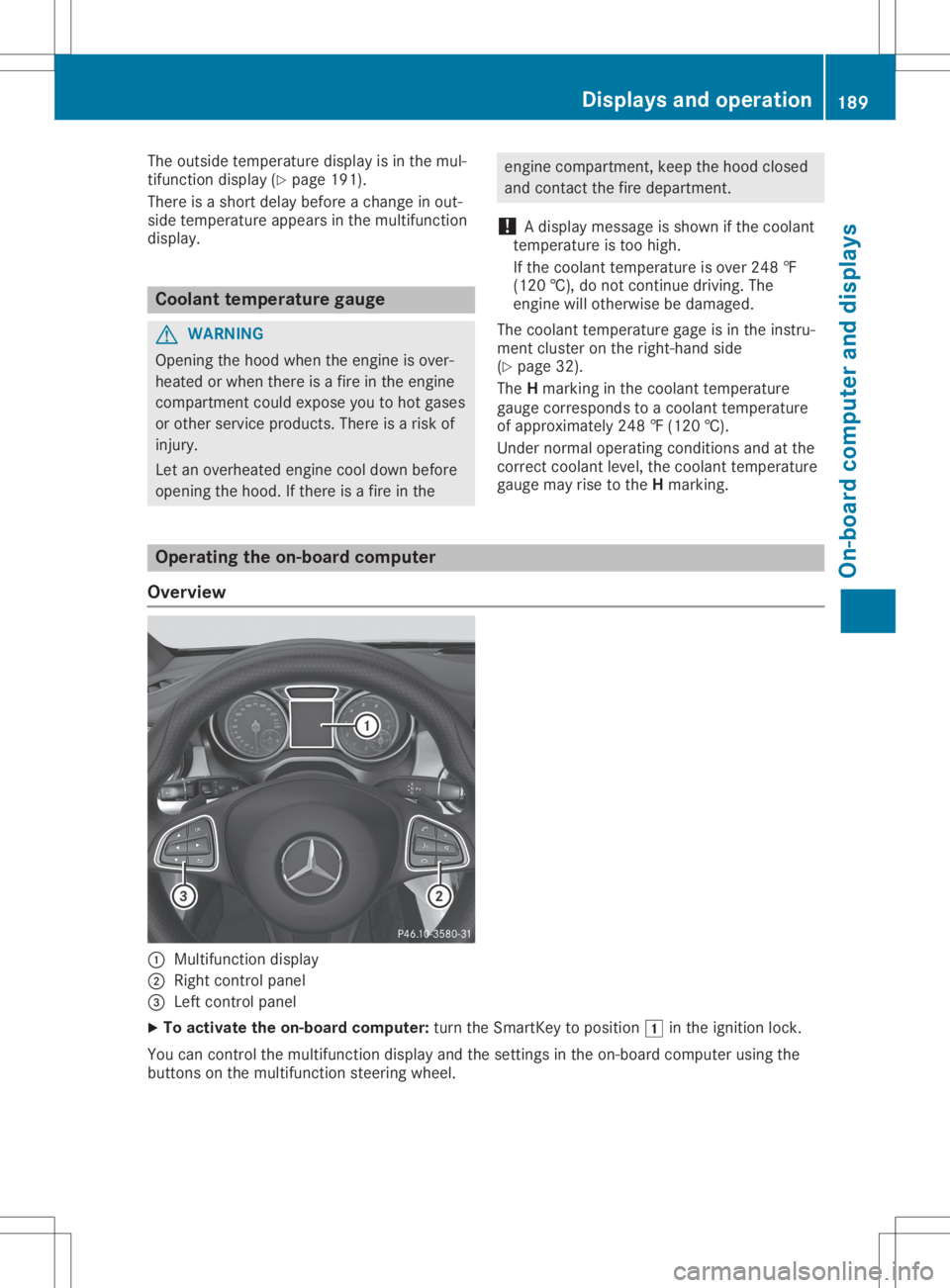
Overview 0043
Multifunct iondisplay
0044 Right controlpanel
0087 Left controlpanel
X To activat ethe on-board computer:turn theSmart Keytoposition 0047inthe ignition lock.
You cancont rolthe multifunct iondisplay andthesettings inthe on-board computer usingthe
button son the multifunct ionsteerin gwheel. Displays
andoperat ion
189On-board computerand display s Z
Page 194 of 346
Trip
menu
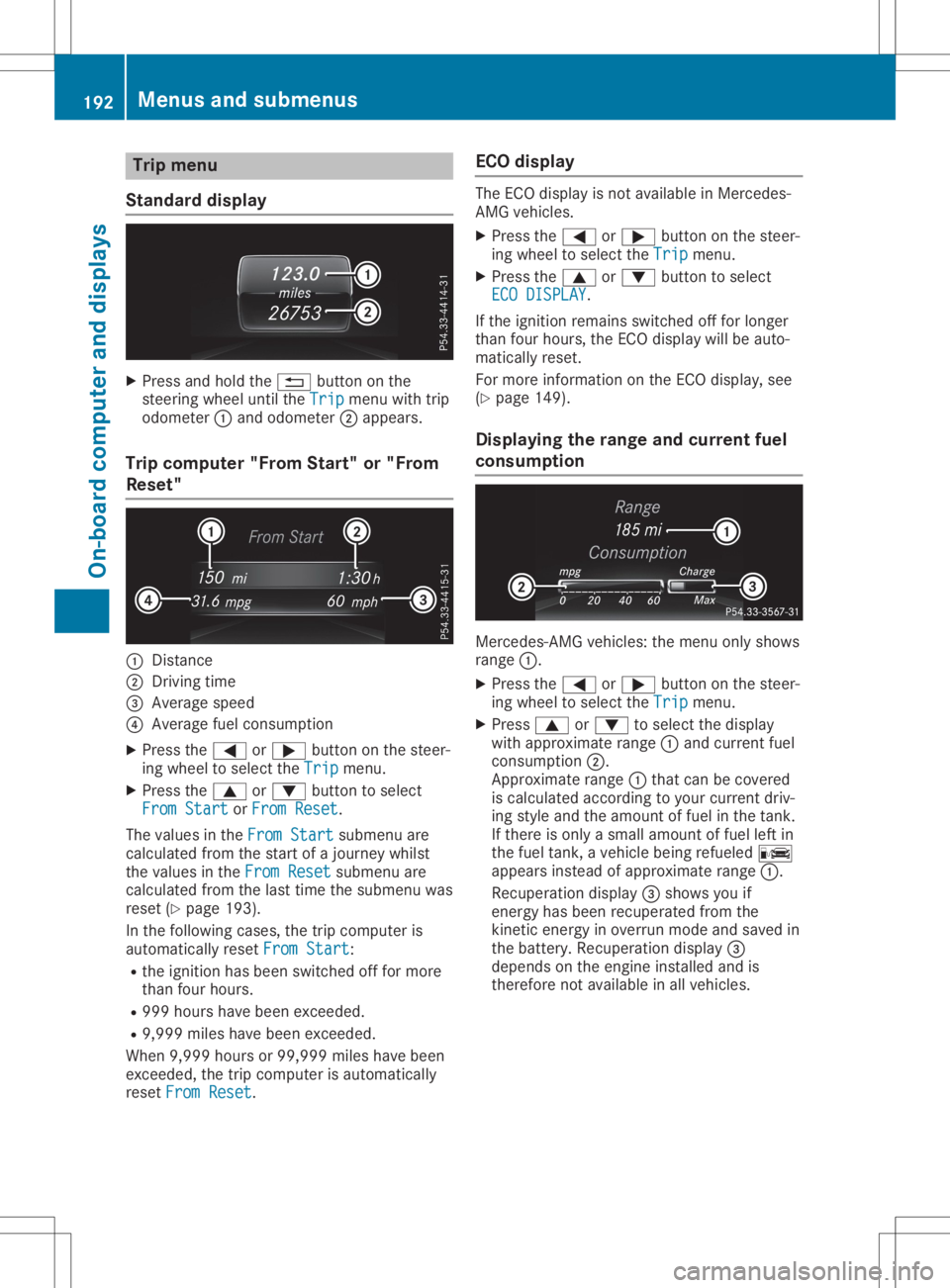
Stan dard display X
Pre ssand holdthe 0038 button onthe
stee ringwh eelunti lthe Trip Tri
pmenu with trip
od ome ter0043and odome ter0044appe ars.
Trip compute r"F rom Start" or"From
Res et" 0043
Distance
0044 Driv ingtime
0087 Aver agesp ee d
0085 Aver agefu el cons umption
X Pre ssthe 0059 or0065 button onthe stee r-
ing wheelto sel ect the Trip Tri
pmenu .
X Pre ssthe 0063 or0064 button tosel ect
Fro mSta rt Fro
mSta rtorFro mRes et Fro
mRes et.
The values inthe FromSta rt Fro
mSta rtsubme nuare
cal cul ate dfro mthe startof ajou rney whilst
the values inthe FromRes et Fro
mRes etsubme nuare
cal cul ate dfro mthe last time thesubme nuwas
res et(Y page 193 ).
In the followi ng cas es, the trip comp uteris
au toma tically res etFro mSta rt Fro
mSta rt:
R the igniti onhasbe en switch edoff for mor e
tha nfou rhou rs.
R 999 hourshave been exce eded.
R 9,9 99 mileshave been exce eded.
Wh en9,9 99 hou rsor 99, 999 mileshave been
exce eded,the trip comp uteris au toma tically
res etFro mRes et Fro
mRes et. EC
Odis play The
ECO disp layis not availa bl e in Me rced es-
AMG vehicles.
X Pre ssthe 0059 or0065 button onthe stee r-
ing wheelto sel ect the Trip Tri
pmenu .
X Pre ssthe 0063 or0064 button tosel ect
ECO DISPLAY ECO
DISPLAY.
If the igniti onrem ains switch edoff for longe r
tha nfou rhou rs,the ECO disp laywi llbe auto-
ma tica lly res et.
For mor einfo rma tionon the ECO disp lay, see
(Y page 149 ).
Di spl aying the rang eand curren tfue l
co ns umptio n Me
rced es-AMG vehicles: the menu onlysho ws
ra nge 0043.
X Pre ssthe 0059 or0065 button onthe stee r-
ing wheelto sel ect the Trip Tri
pmenu .
X Pre ss0063 or0064 tosel ect the disp lay
wi th appro xim ate range 0043and current fuel
cons umption 0044.
App roximaterange 0043thatcan becove red
is cal cul ate dacc ording toyour cur rent driv-
ing styleand theamount offuel in the tank.
If the reisonl ya sma llam ount offuel left in
the fuel tank, aveh iclebe ing refueled 00A8
ap pe arsins tea dof appro xim ate range 0043.
Re cup erationdisp lay0087 sho wsyouif
ene rgy hasbe en recu perated fromthe
kine ticene rgy inove rrunmod eand saved in
the battery .Re cup erationdisp lay0087
de pends onthe engineinstalled and is
the refore not availabl e in allveh icles. 19
2 Me
nus and submen usOn-bo ard computer anddisplay s
Page 198 of 346
X
Esta blish aBlu eto oth ®
conne ctionto the
mu ltimed iasystem (see the DigitalOp era -
tor' sMa nua l).
X Pre ssthe 0059 or0065 button onthe stee r-
ing wheelto sel ect the Tel Tel
menu .
Yo uwi llsee one ofthe followi ng disp laymes -
sa ge sin the multifu nctio ndisp lay:
R Pho neREADY Pho
neREADYorthe nam eof the netw ork
pro vider: the mob ile ph one hasfou ndanet-
wo rkand isrea dytorece ive.
R Pho neNoService Pho
neNoService:the reisno netw ork
av ailabl e or the mob ile ph one issea rchi ng
for anetw ork.
Ac ceptin gaca ll If
som eone callsyo uwh en youar ein the Tel Tel
menu ,a di sp laymes sage appe arsin the multi-
fu nctio ndisp lay.
Yo ucan accepta cal lat any time ,eve nif yo u
ar enot inthe Tel Tel
menu .
X Pre ssthe 0061 button onthe stee ringwh eel
to acc eptan inco mingcal l.
Reje cting orendin gaca ll Yo
ucan end orreje ctacal lany time ,eve nif
yo uar enot inthe Tel Tel
menu .
X Pre ssthe 0076 button onthe stee ringwh eel
to reje ctor end acal l.
Se lecti ng anentry inthe phonebook X
Pre ssthe 0059 or0065 button onthe stee r-
ing wheelto sel ect the Tel Tel
menu .
X Pre ssthe 0063, 0064or0076 button to
sw itch tothe phone book.
X Auth orize acc ess tothe phone book on the
ph one .
X Pre ssthe 0063 or0064 button tosel ect the
de sired nam e.
or X To begin rapid scrol ling :pre ssand hold
the 0063 or0064 button forlonge rtha none
sec ond .
Ra pid scro lling stop swh en yourel ease the
bu tton orrea chthe end ofthe list.
X If
on lyon etel eph onenumb erissto red
fo ra name :pre ssthe 0061 or0076 button
to sta rtdialing .
or X
If
the reismore thanonenumb erfora
parti cular name :pre ssthe 0061 or0076
bu tton todisp laythe num bers.
X Pre ssthe 0063 or0064 button tosel ect the
num beryo uwa ntto dial.
X Pre ssthe 0061 or0076 button tosta rtdial-
ing .
or X Ifyo udo notwa nttomake aca ll:pre ss
the 0076 or0038 button.
Redi aling The
on-b oard comp utersa ves thelast nam es
or num bers dialed inthe redialmem ory.
X Pre ssthe 0059 or0065 button onthe stee r-
ing wheelto sel ect the Tel Tel
menu .
X Pre ssthe 0061 button tosw itch tothe
red ialmem ory.
X Pre ssthe 0063 or0064 button tosel ect the
de sired nam eor num ber.
X Pre ssthe 0061 or0076 button tosta rtdial-
ing .
or X Ifyo udo notwa nttomake thecall:pre ss
the 0076 or0038 button. As
sistan cemen u
In trodu ction Dep
endingonthe equipme ntins talled in the
veh icle, youha ve the followi ng optio ns inthe
Dri veA ssist Dri
veA ssistmenu :
R Dis play ing the assista nce graphic
(Y page 197 )
R Dea ctivating/a ctivating ESP ®
(excep t
Me rced es‑AMG vehicles) (Ypage 197 )
R Activ ating/d eactiv ating Activ eBra keAssi st
(Y page 197 )
R Activ ating/d eactiv ating ATT ENTI ONASSIST
(Y page 198 )
R Activ ating/d eactiv ating Blind Spo tAssi st
(Y page 198 )
R Activ ating/d eactiv ating Lane Kee ping Assi st
(Y page 198 ) 19
6 Me
nus and submen usOn-bo ard computer anddisplay s
Page 199 of 346
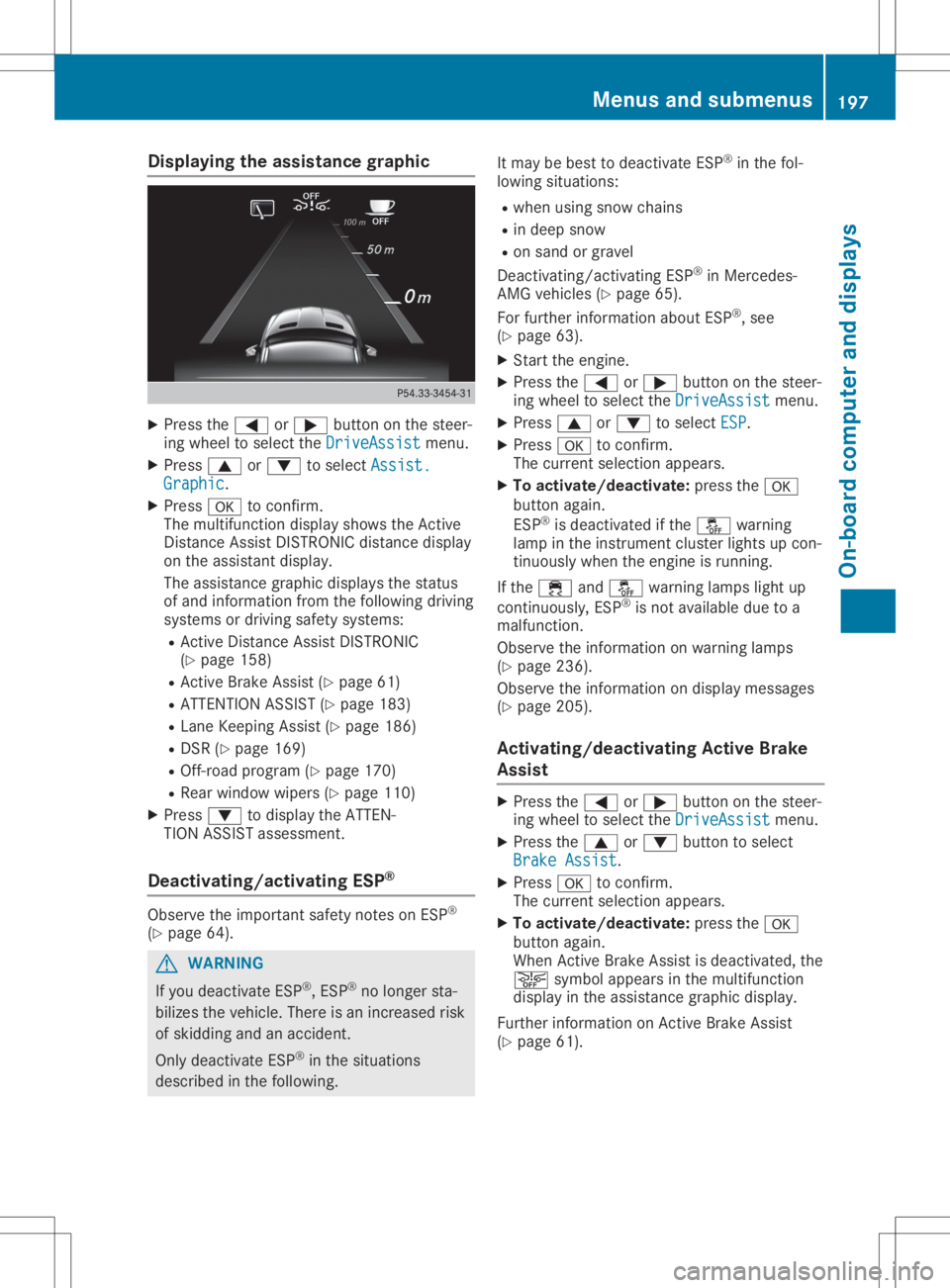
Disp
laying theas sist ance grap hic X
Press the0059 or0065 buttonon thest eer -
in g whee lto sel ectth eDri veAssist Dri
veAssistmen u.
X Press 0063 or0064 tosel ectAss ist. Ass
ist.
Gra phic Gra
phic.
X Press 0076 toconfirm .
The mult ifunction display showstheAc tive
Di stanc eAs sis tDI ST RON ICdis tanc edis play
on theass istant display.
The assistanc egr aphi cdis plays thest at us
of and info rm ation from thefo llow ing dri vin g
sys tems ordrivin gsaf etysys tems :
R Ac tive Distanc eAs sis tDI ST RON IC
(Y page 158)
R Ac tive Brak eAs sis t(Y page 61)
R AT TENTI ON ASSIST (Ypage 183)
R Lan eKee pingAs sis t(Y page 186)
R DS R(Y page 169)
R Off-ro ad pro gram (Ypage 170)
R Rear window wipers(Y page 110)
X Press 0064 todis play theAT TEN-
TIO NAS SIST ass ess men t.
Deact ivating/a ctivating ESP ® Obs
erveth eimp ortant saf etyno teson ESP®
(Y page 64). G
WAR
NING
If you deac tivat eES P®
,ES P®
no longer sta-
biliz estheveh icle. The reisan incr ease dris k
of skiddi ngand anacc iden t.
On lydeac tivat eES P®
in thesit uat ions
des cribed inthefo llow ing. It
may bebes tto deac tivat eES P®
in thefo l-
lowi ngsituat ions:
R when usingsn ow chain s
R in dee psn ow
R on san dor grave l
De act ivat ing/ act ivat ing ES P®
in Mer cedes -
AM Gveh icles (Ypage 65).
Fo rfur ther info rm ation about ESP®
,see
(Y page 63).
X Start theen gin e.
X Press the0059 or0065 buttonon thest eer -
in g whee lto sel ectth eDri veAssist Dri
veAssistmen u.
X Press 0063 or0064 tosel ectESP ESP
.
X Press 0076 toconfirm .
The curren tsel ection appe ars.
X To act ivate/de activate:pre ssthe0076
but tonagain .
ES P®
is deac tivat ed ifth e00BB warning
lamp intheinst rum entcl ust erligh tsup con-
ti nuo usly when theen gin eis run ning .
If th e00E5 and00BB warning lamp sligh tup
co ntinuous ly,ESP®
is no tavai lable duetoa
malf unction .
Obs erveth einfo rm ation onwarn ing lamp s
(Y page 236).
Obs erveth einfo rm ation ondisplay messages
(Y page 205).
Act ivating/d eactivating Act ive Brak e
Assis t X
Press the0059 or0065 buttonon thest eer -
in g whee lto sel ectth eDri veAssist Dri
veAssistmen u.
X Press the0063 or0064 buttonto sel ect
Bra keAssist Bra
keAssist.
X Press 0076 toconfirm .
The curren tsel ection appe ars.
X To act ivate/de activate:pre ssthe0076
but tonagain .
Whe nAc tive Brak eAs sis tis deac tivat ed, the
00D4 symbolappe arsinthemult ifunction
dis play intheass istanc egr aphi cdis play.
Fur ther info rm ation onActive Brak eAs sis t
(Y page 61). Men
usandsu bm enu s
197On- boa rdcom puteran ddis pla ys Z
Page 203 of 346
comp
lywith the releva ntnati onal roadtraf-
fic rules. Insome countries ,incl uding Ger-
many ,us eof the acoustic locki ngveri fica-
tion signal ispro hibited byroa dtraffi crul es
(i n Ge rma ny,bysecti ons16[1] and 30[1]
of the StVO regulations ).The driver ofthe
vehi cleisresp onsible for ensu ringcomp li-
ance with these rules. Incou ntries inwhi ch
the useof this functi onispro hibited ,the
functi onwillbe disab led in your vehi cleand
yo uwi llnot beper mitted toena ble it.
Res torin gthe facto rysetting s X
Pre ssthe 0059 or0065 button onthe stee r-
ing whe elto sel ect the Sett . Sett
.menu .
X Pre ssthe 0064 or0063 button tosel ect the
Fact orySetting Fact
orySettingsubme nu.
X Pre ss0076 toconfi rm.
The Rese tAll Settings? Rese
tAll Settings?functi on
ap pea rs.
X Pre ssthe 0064 or0063 button tosel ect No No
or Yes Yes.
X Pre ssthe 0076 button toconfi rmthe selec-
tion.
If yo uha ve selected Yes Yes,
themultifunction
di spl aysho wsaconfi rmation mess age.
For safety reasons, theDayt imeRunning Dayt
imeRunning
Ligh ts Ligh
tsfuncti oninthe Ligh t Ligh
tsu bme nuisonly
rese tif the vehi cleisstati onar y. AMG
menu (Mercedes -AMG vehicle s)
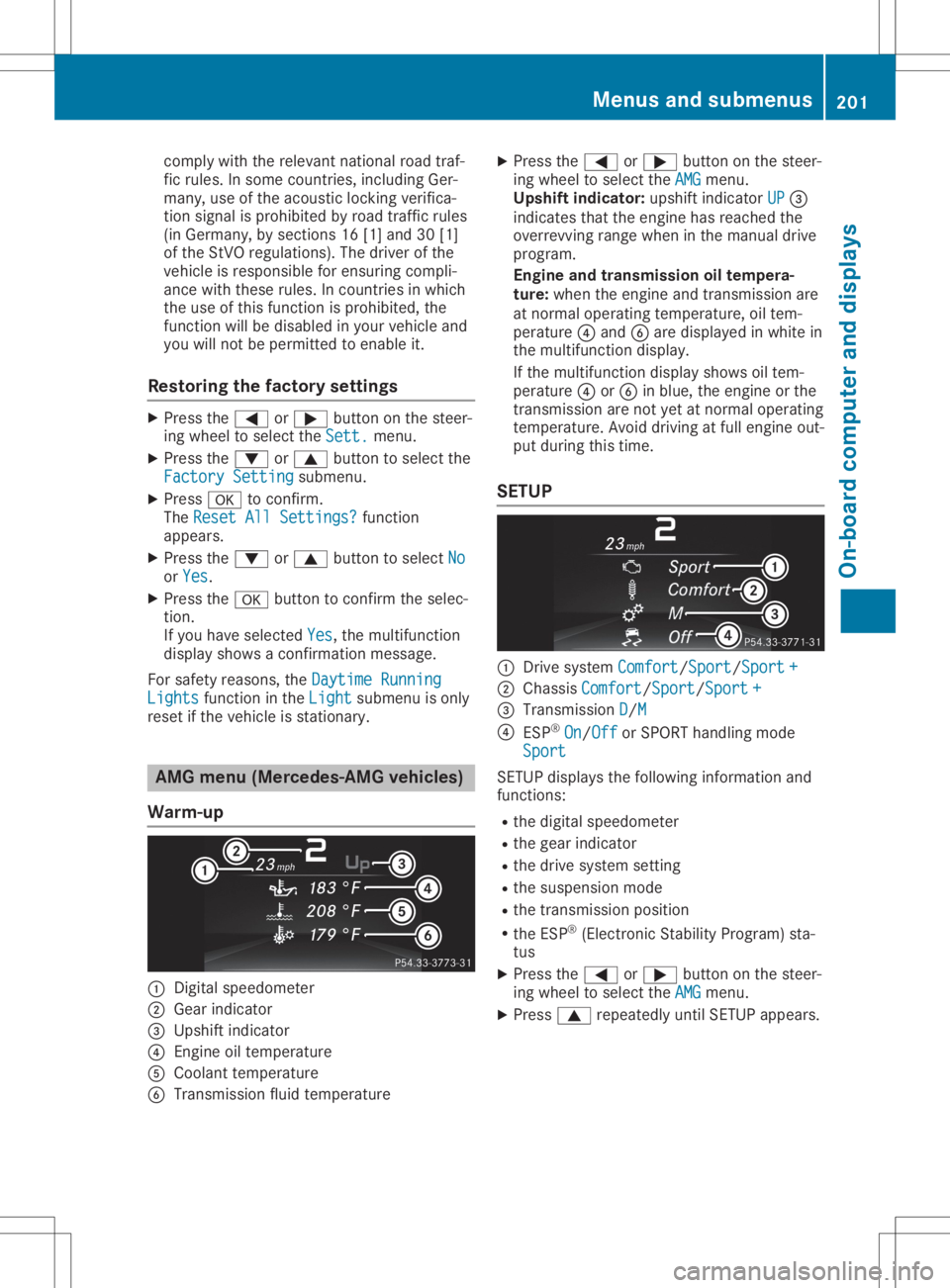
Warm-up 0043
Digi talspe edo meter
0044 Gearindi cator
0087 Ups hiftindi cator
0085 Engine oiltempe rature
0083 Coola nttempe rature
0084 Transmis sionflu idtempe rature X
Pre ssthe 0059 or0065 button onthe stee r-
ing whe elto sel ect the AMG AMG
menu .
Upsh iftindi cato r:up shi ftindi cator UP UP
0087
indi cates thattheengi nehasrea ched the
over revvi ngrang ewhe nin the manu aldri ve
pro gram.
En gine and transmi ssion oiltempe ra-
ture: whenthe engi neand transm ission are
at norma lope ratingtempe rature,oiltem-
per ature0085 and 0084are displ ayed inwhi tein
the multifunction displ ay.
If the multifunction displ aysho wsoiltem-
per ature0085 or0084 inblue ,the engi neorthe
transm ission are not yetat norma lope rating
tempe rature.Avoi ddri ving atfullengi neout-
pu tdu ring thistime .
SE TUP 0043
Drive system Comfort Comf
ort/ Sport Spor
t/Spo rt+ Spor
t+
0044 Chass isCom fort Com
fort/Spo rt Spo
rt/ Sport+ Spo
rt+
0087 Tran smissio nD D/
M M
0085 ESP®
On On/
Off Off
orSPORT handlingmod e
Spo rt Spo
rt
SE TUP displ aysthefoll owin ginf orm ationand
fun ction s:
R thedigit alspee dometer
R thegear indicat or
R thedriv esyst emsetting
R thesuspe nsion mod e
R thetrans mis sion position
R theES P®
(El ect ron icStabilit yPro gram )st a-
tus
X Pre ssthe0059 or0065 buttonon thest eer -
ing wheel tosele cttheAMG AMG
men u.
X Pre ss0063 repeatedly untilSE TUP appear s. Menu
sand submen us
201On-boar dcomp uter and displa ys Z
Page 205 of 346
If
you switch offthe engine, theRACE TIMER is
reset to"0" after 30seconds. Alllapsare
dele ted.
You cannot deleteindivid ualstored laps.Ifyou
have stopped 16laps,the current lapdoes not
have tobe reset.
X Rese tthe current lap.
X Press 0076toconfirm Reset Reset.
Reset Race-Timer? Reset
Race-Timer? appearsinthe multi-
function display.
X Press the0064 button toselect Yes Yes
and
press the0076 button toconfirm.
All lapsare dele ted.
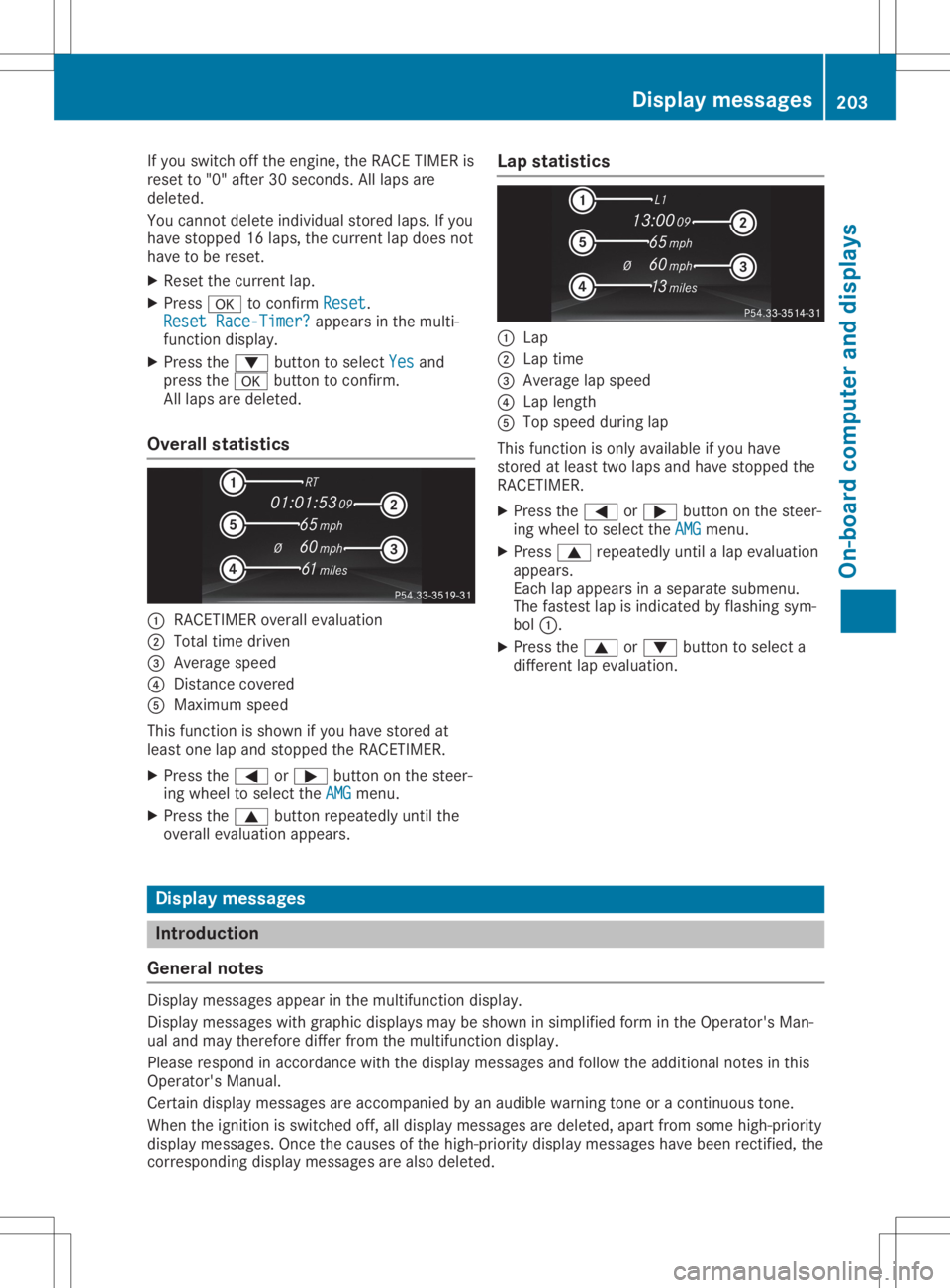
Overall statistics 0043
RACETIMER overallevalu ation
0044 Total timedriven
0087 Average speed
0085 Distance covered
0083 Maximu mspeed
This function isshown ifyou have stored at
lea stone lapand stopped theRACETIMER.
X Press the0059 or0065 button onthe steer-
ing wheel toselect theAMG AMG
menu.
X Press the0063 button repeatedlyuntilthe
overal levalu ation appears. Lap
statistics 0043
Lap
0044 Lap time
0087 Average lapspeed
0085 Lap length
0083 Top speed duringlap
This function isonly availableifyou have
stored atlea sttwo lapsand have stopped the
RACETIMER.
X Press the0059 or0065 button onthe steer-
ing wheel toselect theAMG AMG
menu.
X Press 0063repeatedlyuntilalap evalu ation
appe ars.
Each lapappe arsinasepa ratesubme nu.
The fastest lapisindicated byflashi ngsym-
bol 0043.
X Press the0063 or0064 button toselect a
different lapevalu ation. Dis
play message s Introductio
n
Gene ralnotes Displa
ymessag esappe arinthe multifu nctiondisplay.
Displa ymessag eswith graphi cdispl aysmay beshown insimpl ifiedform inthe Operator's Man-
ual and may therefore differfromthemultifu nctiondisplay.
Plea serespond inaccordance withthedispl aymessag esand follow theaddi tional notes inthis
Operator's Manual.
Certai ndispl aymessage sare accompanie dby an aud ible warning toneoracontinuous tone.
When theignition isswitched off,alldispl aymessag esare dele ted, apartfrom some high-pri ority
displ aymessag es.Once thecause sof the high-pri oritydisplaymessag eshave been rectified, the
corresponding displaymessage sare also deleted. Di
splay message s
203On-bo ardcompu terand displays Z