mirror MERCEDES-BENZ GLA 2020 User Guide
[x] Cancel search | Manufacturer: MERCEDES-BENZ, Model Year: 2020, Model line: GLA, Model: MERCEDES-BENZ GLA 2020Pages: 346, PDF Size: 17.58 MB
Page 98 of 346
Rear
seat head restraints Adjus
tingtherear seat head restrain t
hei ght X
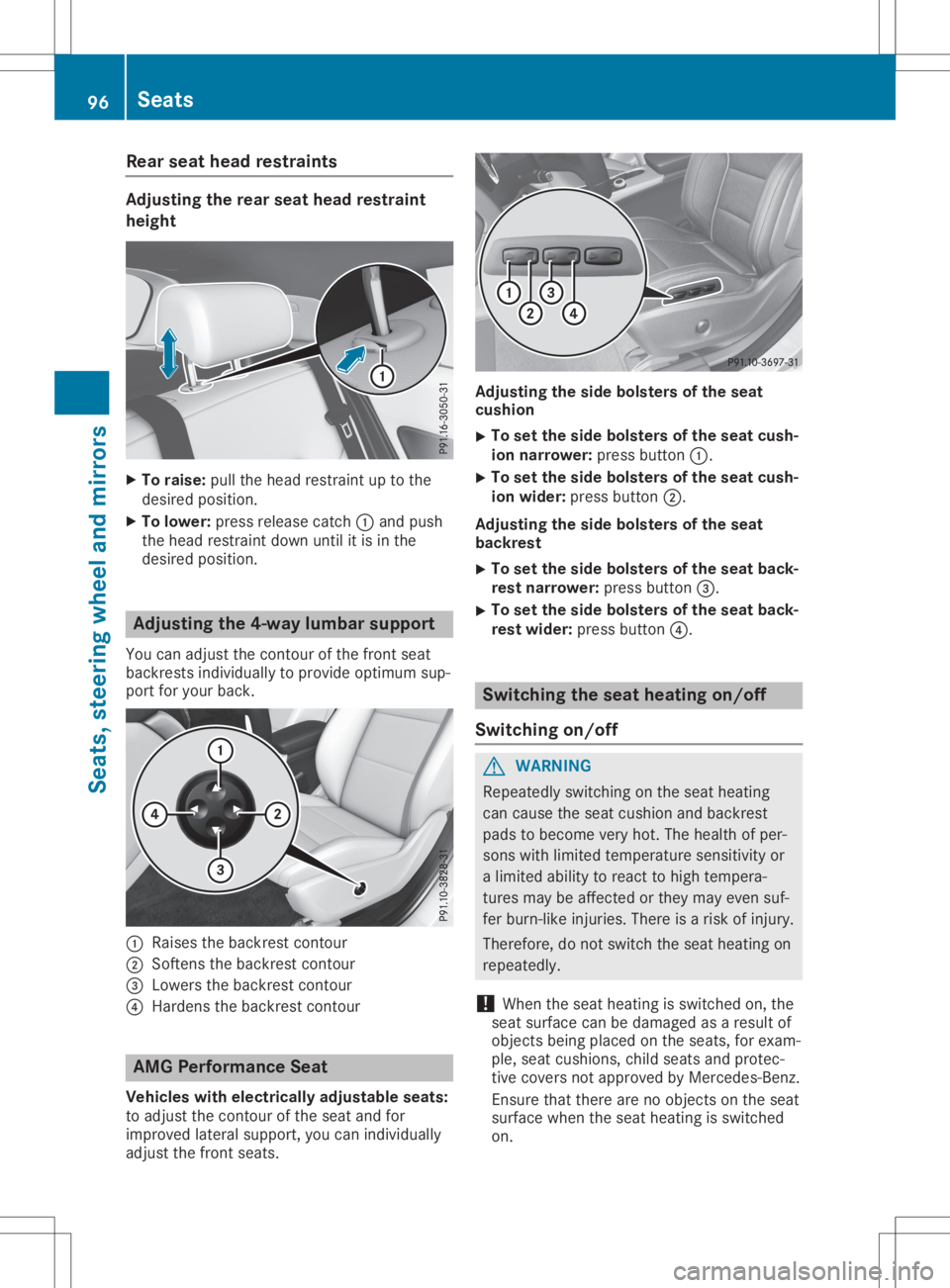
To rais e:pullthe headres trai ntup tothe
des iredpos ition.
X To lowe r:pre ssrelease catch 0043and push
the headres trai ntdow nunti lit is in the
des iredpos ition. Adjus
tingthe4-waylumb arsuppo rt
Yo ucan adjust thecontou rof the front seat
ba ckrests individu ally to pro videopti mum sup-
por tfor your back. 0043
Raise sthe backrest contou r
0044 Softens thebackrest contou r
0087 Low ersthe backrest contou r
0085 Hard ensthebackrest contou r AMG
Performan ceSeat
Vehi cles with elec tric allyadjustab leseats:
to adjust thecontou rof the seatand for
imp rove dlatera lsu pp ort, youcan individu ally
ad just thefront seats. Adjus
tingtheside bolsters ofthe seat
cus hion
X To
setthe side bolsters ofthe seat cus h-
io n narro wer:pre ssbutton 0043.
X To
setthe side bolsters ofthe seat cus h-
io n wi der: pressbutton 0044.
Adjus tingtheside bolsters ofthe seat
bac kres t
X To
setthe side bolsters ofthe seat bac k-
res tnarro wer:pre ssbutton 0087.
X To
setthe side bolsters ofthe seat bac k-
res twi der: pressbutton 0085. Sw
itchin gthe seat heati ngon/o ff
Sw itchin gon /o ff G
WARNI
NG
Re pea tedl yswi tching onthe seathea ting
can causethe seatcus hionand backrest
pa ds tobec ome veryhot.Thehealthofper -
sons with limite dtemp erature sensitivity or
a limite dab ility torea ctto hig htemp era-
ture smay beaffected orthey mayevensu f-
fer burn-li keinju ries.The reisaris kof inju ry.
The refo re,donot switch the seathea ting on
rep eatedl y.
! Whe
nthe seathea ting isswi tched on,the
sea tsu rfa ce can bedamag edasares ultof
obje ctsbeing place don the seats,for exa m-
pl e, sea tcus hions, childsea tsand protec-
tive cove rsnot appro ved byMer cedes-Be nz.
Ensur ethat there arenoobje ctsonthe seat
su rfa ce when the seathea ting isswi tched
on. 96
Se
atsSe ats, steering wheeland mirrors
Page 99 of 346
The
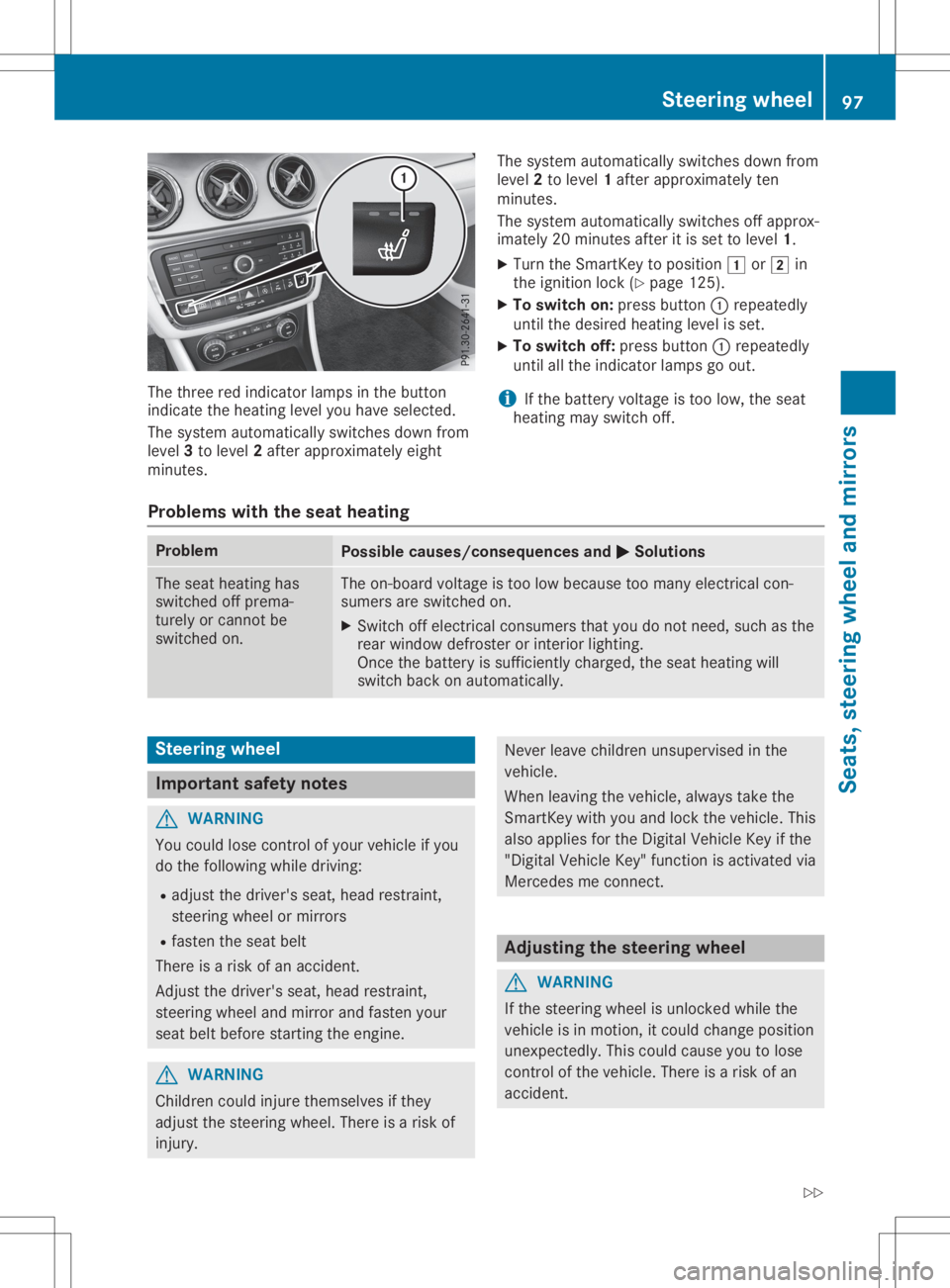
three redindicator lampsinthe button
indicate theheating levelyouhave selected.
The system automatically switchesdownfrom
level 3to level 2after approximately eight
minutes. The
system automatically switchesdownfrom
level 2to level 1after approximately ten
minutes.
The system automatically switchesoffapprox-
imately 20minutes afteritis set tolevel 1.
X Turn theSmart Keytoposition 0047or0048 in
the ignition lock(Ypage 125).
X To switch on:press button 0043repeatedly
until thedesired heating levelisset.
X To switch off:press button 0043repeatedly
until allthe indicator lampsgoout.
i If
the battery voltage istoo low, theseat
heating mayswitch off.
Problems withtheseat heating Problem
Possible
causes/conse quencesand0050 0050
Solutions The
seat heating has
switched offprema-
turely orcann otbe
switched on. The
on-board voltageistoo low because toomany electric alcon-
sumers areswitched on.
X Switch offelectric alconsumer sthat youdonot need, suchasthe
rear window defrosteror inter iorlighting.
Once thebattery issufficient lycharged, theseat heating will
switch backonautomatically. Steering
wheel Import
antsafety notes G
WARNIN
G
You could losecontrolofyour vehicle ifyou
do the following whiledriving:
R adjust thedriver's seat,head restraint,
steerin gwheel ormirrors
R fasten theseat belt
There isarisk ofan accident .
Adjust thedriver's seat,head restraint,
steerin gwheel andmirror andfasten your
seat beltbefore startingthe engine. G
WARNIN
G
Children couldinjure themselves ifthey
adjust thesteerin gwheel. Thereisarisk of
injury. Never
leavechildren unsupervised inthe
vehicle.
When leaving thevehicle, alwaystake the
Smart Keywith youand lock thevehicle. This
also applies forthe Digital Vehicle Keyifthe
"Digital Vehicle Key"functionisactivated via
Mercedes meconn ect. Adjust
ingthe steering wheel G
WARNIN
G
If the steerin gwheel isunlocked whilethe
vehicle isin motion ,it could change position
unexpect edly.Thiscould cause youtolose
cont rolofthe vehicle. Thereisarisk ofan
accident . Steering
wheel
97Seats,steering wheelandmirrors
Z
Page 100 of 346
Befor
estarti ngoff, make surethe stee ring
whe elislocke d.Neve runl ock thestee ring
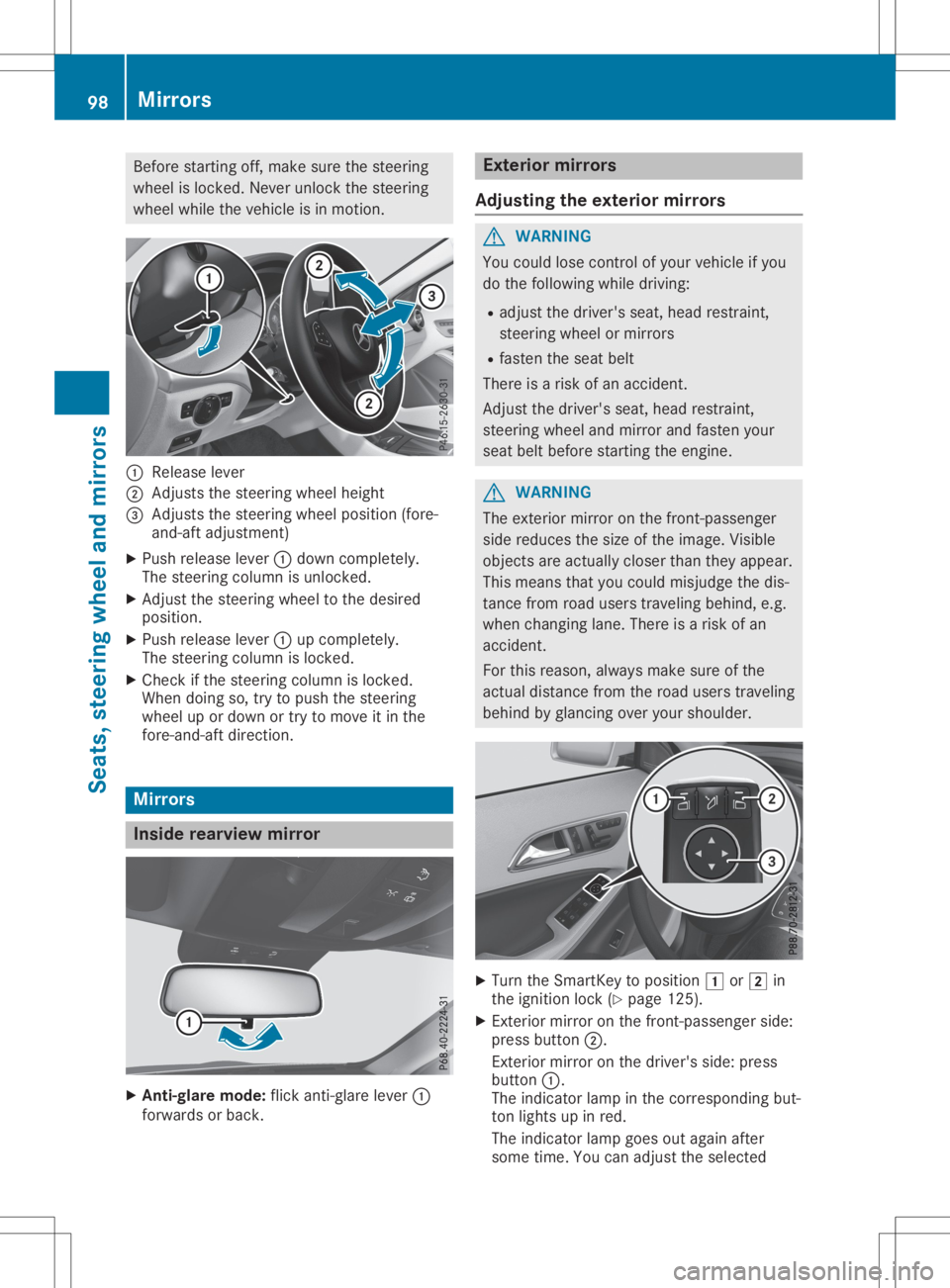
whe elwhi lethe vehi cleisin motio n. 0043
Relea selever
0044 Adjus tsthe stee ring wheelhei ght
0087 Adjus tsthe stee ring wheelpos ition(for e-
and -aft adjustme nt)
X Pu sh release lever0043 dow ncompl etely.
The stee ring columnisunl ocked .
X Adjus tthe stee ring wheelto the desired
pos ition.
X Pu sh release lever0043 upcompl etely.
The stee ring columnislocke d.
X Ch eck ifthe stee ring columnislocke d.
Whe ndoi ng so, trytopush the stee ring
whe elup ordow nor try tomove itin the
fore -and-a ftdirectio n. Mirrors
In
side rearvi ewmirror X
An ti-gl aremode :fli ck anti-g lare lev er0043
forw ardsor back. Exte
riormirrors
Adjusti ngthe exte riormirrors G
WARNI
NG
You couldlos econtrol ofyour vehi cleifyo u
do the follow ing whiledri ving:
R ad just thedriver' ssea t,hea drestra int,
stee ring wheelor mirr ors
R fas ten theseatbel t
The reisarisk ofan acci dent.
Adjus tthe driver' ssea t,hea drestra int,
stee ring wheeland mirrorand fasten your
sea tbel tbef ore starti ngthe engi ne. G
WARNI
NG
The exteri ormirr oron the front-pa ssenger
sid ered uce sthe size ofthe image. Visible
obje ctsare actu ally clos erthan theyappea r.
Thi smea nsthat youcou ldmis judg ethe dis-
tance fromroaduse rstrave ling beh ind, e.g.
whe nchang inglane. Thereisarisk ofan
acci dent.
For this reason, alwa ysmake sureof the
actu aldistance fromtheroaduse rstrave ling
beh indbyglancing overyour shou lder. X
Tu rn the SmartKe yto pos ition0047 or0048 in
the ignition lock (Ypage 125 ).
X Exterio rmirr oron the front-pa ssenger side:
pre ssbutton 0044.
Exterio rmirr oron the driver' ssid e:pre ss
bu tton 0043.
The indicator lamp inthe corre sponding but-
ton lights upinred .
The indicator lamp goesou tag ain afte r
some time.Youcanadjust theselected 98
MirrorsSe
ats, stee ring wheeland mirrors
Page 101 of 346
ext
erior mirror usingbutton 0087aslong as
the indicat orlamp islit.
X Press button 0087up, down, ortothe right or
left until youhave adjusted theexterior mir-
ror tothe corr ectposition .You should have
a good overview oftraff iccon ditions .
The convex exterior mirror sprovide alarger
field ofvision.
Aft erthe engine hasbeen started,the exterior
mirror sare automatic allyheated atlow out-
side temper atures. Heatingtakes amaximum
of ten minutes .
i You
canalso heat upthe exterior mirror s
manually byswitchin gon the rear window
defrost er.
Folding theexterior mirrorsin or out
electrically This
function isonly available inCanada. X
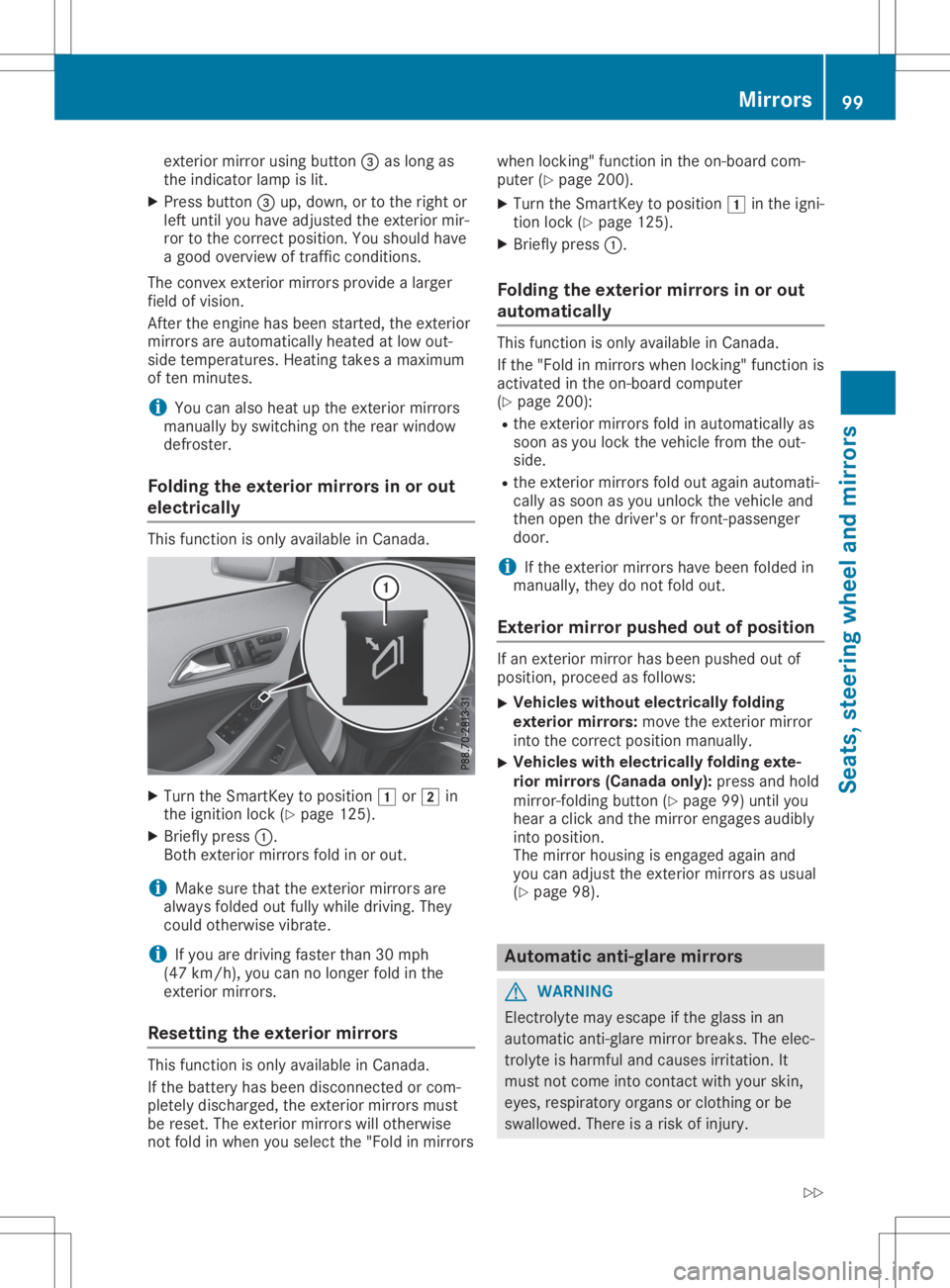
Turn theSmart Keytoposition 0047or0048 in
the ignition lock(Ypage 125).
X Briefly press0043.
Bot hext erior mirror sfold inor out.
i Make
surethattheexterior mirror sare
alway sfolded outfully while driving. They
could otherwisevibrate.
i If
you aredriving fasterthan30mph
(47 km/ h),you can nolonger foldinthe
ext erior mirror s.
Resett ingthe exterior mirrors This
function isonly available inCanada.
If the batter yhas been discon nectedorcom-
pletely discharged, theexterior mirror smust
be reset. Theexterior mirror swill other wise
not fold inwhen youselect the"Fold inmirror swhen
locking"func tion inthe on-board com-
puter (Ypage 200).
X Turn theSmart Keytoposition 0047inthe igni-
tion lock (Ypage 125).
X Briefly press0043.
Folding theexterior mirrorsin or out
aut omat ically This
function isonly available inCanada.
If the "Fold inmirror swhen locking"func tion is
activat edinthe on-board comput er
(Y page 200):
R the exterior mirror sfold inautomatic allyas
soon asyou lock thevehicle fromtheout-
side.
R the exterior mirror sfold outagain automati-
cally assoon asyou unlock thevehicle and
then open thedriver's orfron t-passenger
door.
i If
the exterior mirror shave been folded in
manually, theydonot fold out.
Exterior mirror push edout ofposition If
an ext erior mirror hasbeen pushed outof
position ,proceed asfollows:
X Vehicles
withoutelectrically folding
exterior mirrors: move theexterior mirror
into thecorr ectposition manually.
X Vehicles
withelectrically foldingexte-
rior mirrors (Canada only):pressandhold
mirror -foldin gbutton (Ypage 99)until you
hear aclick andthemirror engages audibly
into position .
The mirror housing isengaged againand
you can adjust theexterior mirror sas usual
(Y page 98). Automa
ticanti- glare mirrors G
WARN
ING
Elect rolyte mayescape ifthe glass inan
automatic anti-glare mirror breaks. Theelec-
trolyt eis harmful andcauses irritation.It
must notcome intocontact with your skin,
eyes, respirator yorgans orcloth ingorbe
swallowed. Thereisarisk ofinjury. Mirr
ors
99Seats, steering wheelandmirrors
Z
Page 102 of 346
If
you come intocontact withtheelectro-
lyte, observe thefollow ing:
R Rinse offthe electroly tefrom yourskin
immedi atelywithwater.
R Immedia telyrinse theelectroly teout of
you reyes thoroughl ywith clean water.
R Ifthe electroly teisswal lowe d,immedi -
ately rinse yourmouth outthoroughl y.Do
not induce vomiting.
R Ifelectroly tecomes intocontact withyour
skin orhair orisswal lowe d,seek medica l
attention immediately.
R Immedia telychange outofclothing which
has come intocontact withelectroly te.
R Ifan allergic reaction occurs,seekmedi-
cal attention immediately.
The "Automatic anti-glaremirrors"function is
only availableifthe vehicle isequi pped with
the "Mirro rspackage ".
The rear-view mirrorandtheexterior mirroron
the driver's sideautoma ticallygointo anti-
glare mode if:
R the ignition isswitched onand
R incident lightfrom headlampsstrikes the
sensor inthe rear-view mirror
The mirrors donot gointo anti-glare modeif
reverse gearisengaged orifthe interior light-
ing isswitched on. Parking
positionfor the exterio rmir-
ror onthe front-passenge rside
Setting andstoring theparking posi-
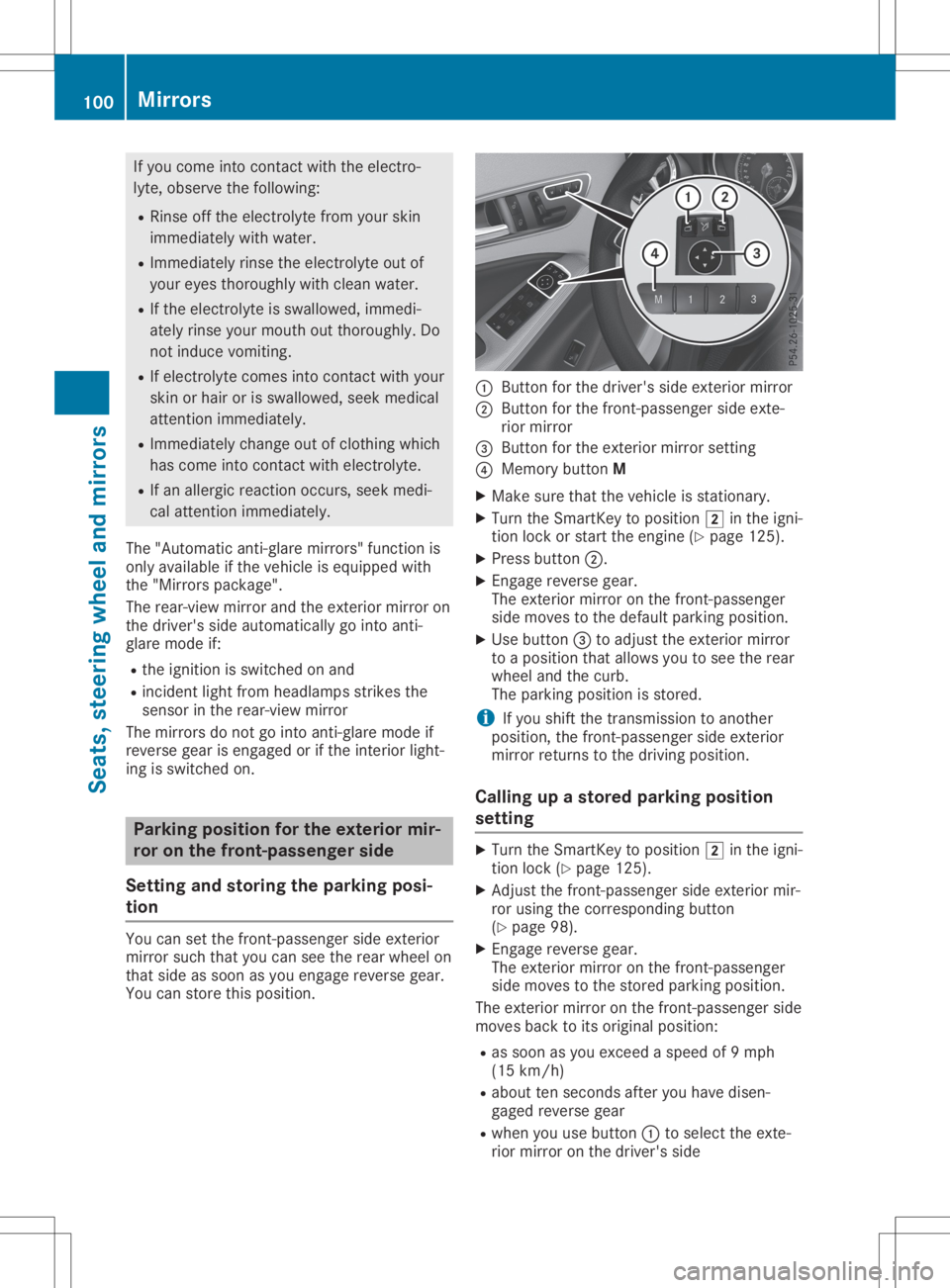
tion You
cansetthe front-passenger sideexterior
mirror suchthatyoucan seetherear wheel on
that side assoon asyou engage reverse gear.
You canstore thispositio n. 0043
Button forthe driver's sideexterior mirror
0044 Button forthe front-passenger sideexte-
rior mirror
0087 Button forthe exterior mirrorsetting
0085 Memory buttonM
X Make surethatthevehicle isstationary .
X Turn theSmartKey topositio n0048 inthe igni-
tion lock orstart theengine (Ypage 125).
X Press button 0044.
X Engage reverse gear.
The exterior mirroronthe front-passenger
side moves tothe defau ltparking position.
X Use button 0087toadjust theexterior mirror
to apositio nthat allows youtosee therear
wheel andthecurb.
The parking positionis stored.
i If
you shift thetransmission toanother
positio n,the front-passenger sideexterior
mirror returns tothe driving position.
Call ingupastored parking position
setting X
Turn theSmartKey topositio n0048 inthe igni-
tion lock (Ypage 125).
X Adjust thefront-passenger sideexterior mir-
ror using thecorresponding button
(Y page 98).
X Engage reverse gear.
The exterior mirroronthe front-passenger
side moves tothe stored parking position.
The exterior mirroronthe front-passenger side
moves backtoits origina lpositio n:
R as soon asyou exceed aspeed of9mph
(15 km/h )
R abou tten seconds afteryouhave disen-
gage dreverse gear
R when youusebutton 0043toselect theexte-
rior mirror onthe driver's side 100
MirrorsSeats,
steerin gwhe eland mirrors
Page 103 of 346
Memory
function Important
safetynotes G
WARNING
If you usethememory function onthe driv-
er's side whiledrivi ng,you couldlose con-
trol ofthe vehicl eas aresu ltof the adju st-
ments being made .There isarisk ofan acci-
dent.
Only usethememory function onthe driv-
er's side when thevehicl eis stationa ry. G
WARNING
When thememory function adjuststhe seat,
you and other vehicleoccupa nts–parti cu-
larl ychild ren–coul dbecome trapped.There
is arisk ofinjury .
Whil ethe memory function ismaking adjust-
ments, makesurethatnoone hasany body
parts inthe swee pof the seat. Ifsomeb ody
become strappe d,immed iatelyrele ase the
memory function position button. The
adju stment process isstoppe d. G
WARNING
Chi ldre ncoul dbecome trappedifthey acti-
vate thememory function, particularlywhen
unattended .There isarisk ofinjury .
Never leavechild renunsu pervi sedinthe
vehicl e.
When leaving thevehicl e,alw aystake the
SmartKey withyouand lock thevehicl e.This
als oapp liesfor the Digita lVehi cleKey ifthe
"Digi talVehi cleKey" function isactiva tedvia
Mercede sme connect.
The memory function canbeuse dat any time,
e.g. even when theSmartKey isnot inthe igni-
tion lock. Storing
settings
With thememory function, youcan store upto
three different settings, e.g.forthree different
peop le.
The followi ngsettings arestored asasingl e
memory preset: R
Seat andbackrest position
R Driver's side:posi tion ofthe exterior mirrors
on the drive r'sand front-passeng erside s X
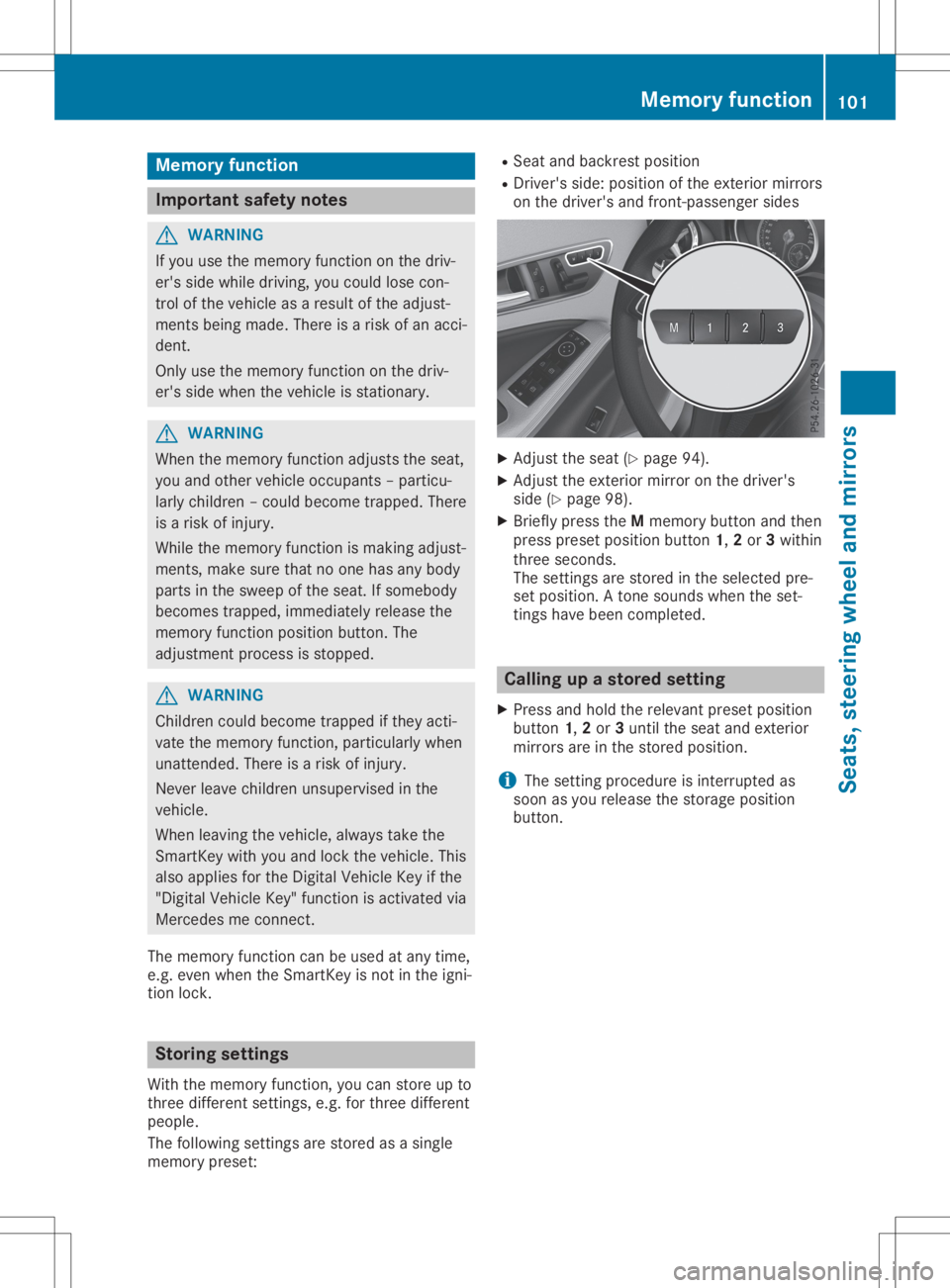
Adjust theseat (Ypag e94).
X Adjust theexterior mirroronthe drive r's
side (Ypag e98) .
X Briefl ypress theMmemory buttonandthen
press presetposi tion button 1,2or 3withi n
three seconds.
The settings arestored inthe sele cted pre-
set posi tion. Atone sound swhen theset-
tings havebeen comple ted. Call
ingupastored setting
X Press andhold therelevant prese tposi tion
button 1,2or 3until theseat andexterior
mirrors areinthe stored position.
i The
setting procedureisinterrup tedas
soon asyou release thestorage position
button. Memory
function
101Seats, steering wheeland mirrors Z
Page 180 of 346
Once
youhave exited theparking spacecom-
pletely, thesteering wheelismoved tothe
straight-ahead position.Youhear atone and
the Active Parking AssistFinished Active
Parking AssistFinished mes-
sage appea rson the multifunction display.You
will then have tosteer andmerge intotraffic
on your own. Active Parking Assistisstill avail -
able. Youcantake overthesteering beforethe
vehicle hasexited theparking spacecom-
pletely. Thisisuseful ,for example whenyou
recognize thatitis alrea dypossible topull out
of the parking space.
Cance lingActive Parking Assist X
Stop themovement ofthe multifunction
steering wheelorsteer yoursel f.
Act ive Parking Assistwillbecanceled at
once. TheActive Parking AssistCan‐ Active
Parking AssistCan‐
celed celed
message appearsinthe multifunction
displa y.
or X Press thePARKTRONIC button
(Y page 173).
Act ive Parking Assistisswitched offand
Act ive Parking Assistisimmediately can-
celed. TheActive Parking AssistCan‐ Active
Parking AssistCan‐
celed celed
message appearsinthe multifunction
displa y.
Act ive Parking Assistiscanceled automaticall y
if:
R the electric parking brakeisengaged
R transmission position005Disselected
R parking usingActive Parking Assistisno
longer possible
R you aredriving fasterthan6mph (10km/h )
R awheel spins,ESP®
intervenes orfails. In
such cases the00E5 warning lamplights up
in the instrument cluster
A warning tonesounds. Theparking symbol
disapp earsandthemultifunction display
shows theActive Parking AssistCan‐ Active
Parking AssistCan‐
celed celed
message.
When Active Parking Assistiscanceled, you
must steer andbrake againyoursel f.
If asystem malfunction occurs,thevehicle is
braked toastandstill. Todrive on,depress the
accelerator again. Rear
view camera
General notes Rear
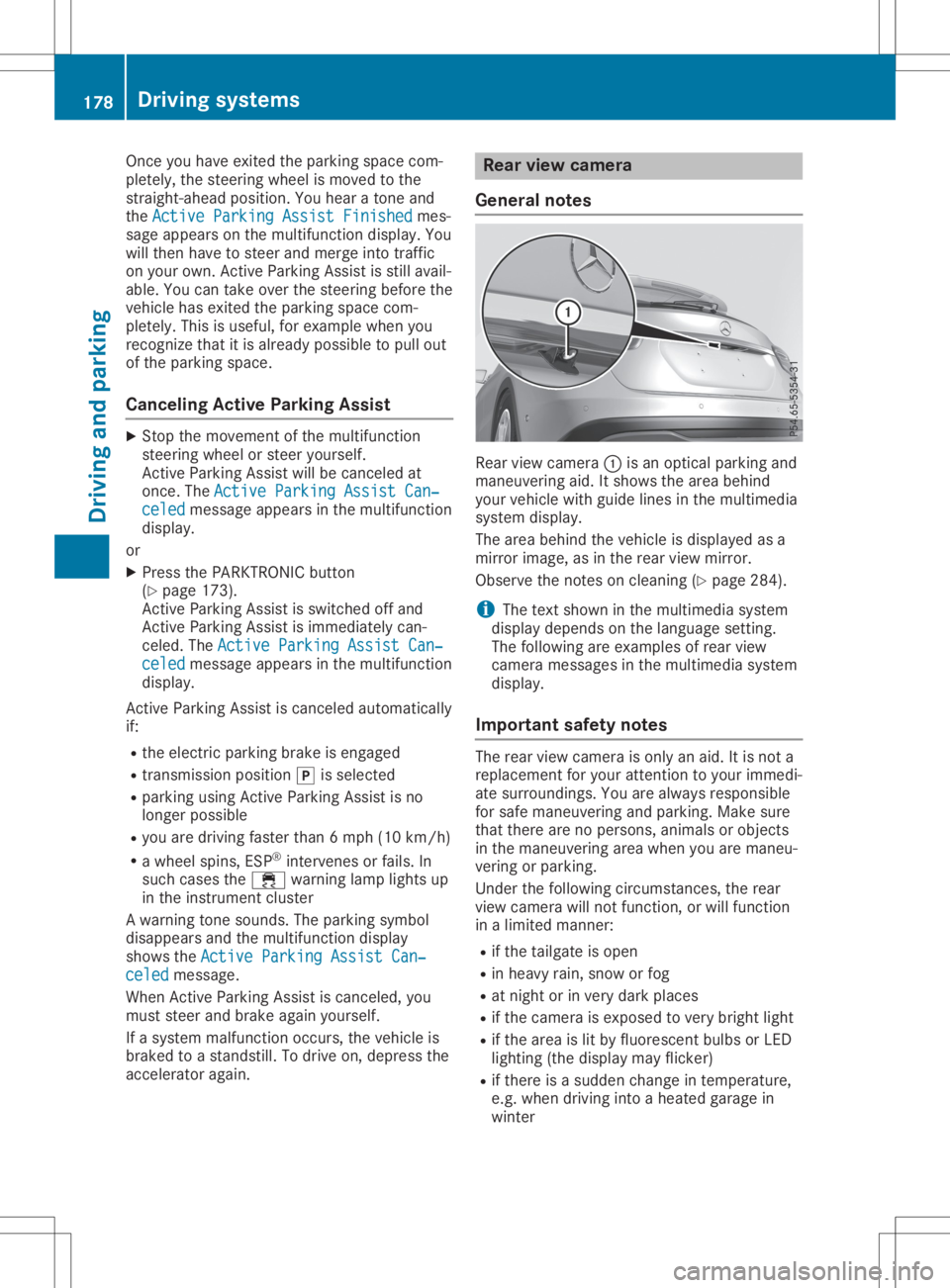
viewcamera 0043isan optical parking and
maneuvering aid.Itshows thearea behind
your vehicle withguide linesinthe multimedia
system display.
The area behind thevehicle isdispla yedasa
mirror image, asinthe rear view mirror.
Observe thenotes oncleaning (Ypage 284).
i The
text shown inthe multimedia system
displa ydepends onthe langua gesetting.
The followi ngare examples ofrear view
camera messages inthe multimedia system
displa y.
Importa ntsafety notes The
rear view camera isonly anaid. Itis not a
replacement foryour attent iontoyour immedi-
ate surroundings. Youarealwa ysresponsible
for safe maneuvering andparking. Makesure
that there arenopersons, animalsorobjects
in the maneuvering areawhen youaremaneu-
vering orparking.
Under thefollowi ngcircumstances, therear
view camera willnotfunction, orwill function
in alimited manner:
R ifthe tailgate isopen
R in heavy rain,snow orfog
R at night orinvery dark places
R ifthe camera isexposed tovery bright light
R ifthe area islit by fluorescent bulbsorLED
lighting (thedispla ymay flicker)
R ifthere isasudden changeintemperature,
e.g. when driving intoaheated garagein
winter 178
Driving
systemsDriving andparking
Page 181 of 346
R
ifthe camer alens isdirt yor obst ructed.
Obser vethe noteson clean ing
(Y page 284)
R ifthe rear ofyour vehic leisdamaged. Inthis
case, havethecamer aposit ionand setting
chec kedataqualified specialist workshop.
The field ofvision andotherfunc tionsof the
rear view camer amay berest ricteddue to
addition alacc essor iesonthe rear ofthe vehi-
cle (e.g. licenseplate holder ,rear bicyc le
rack ).
i The
contrast ofthe display maybeaffec -
ted bythe sudden presenceof sunligh tor
oth erlight sourc es,e.g. when exitinga
garage. Payparticular attent ion inthis situa-
tion .
i If
usability issever elyrest ricted, e.g. due
to pixel errors,have thedisplay repairedor
replac ed.
Activa ting/d eactivating therea rview
cam era X
To acti vate:make surethattheSmar tKey
is in posit ion0048inthe ignit ionlock .
X Make surethattheActi vationbyRgear Acti
vationbyRgear
func tion isselec tedinthe multim ediasys-
tem ;see theDigit alOperat or'sManual.
X En gage reversegear.
The area behin dthe vehic leisshown with
guide linesinthe multim ediasystemdis-
play.
The image fromthe rear view camer ais
available throughout themane uverin gproc -
ess.
To deact ivate:the rear view camer adeact i-
vate sif you shift thetransm ission to005D or
aft erdrivin gfor wards ashor tdist ance.
The innersegme ntsof the warnin gindic ator
are displayed inred ifthe reisacom plete sys-
tem failure. Theindic atorlamp inthe
PARK TRONIC buttonlight sup.
If the syst emfails atthe rear ofthe vehic le:
R the rear segme ntsare shown inred when
back ingup.
R the rear segme ntsare hidden whendriving
for wards. Messa
gesinthemu ltim edia system
disp lay The
rear view camer amay show adist orted
view ofobst acles, showtheminc orre ctly or
not atall. The rear view camer adoes notshow
obje ctsin the followin gposit ions:
R very closeto the rear bumper
R under therear bumper
R in the area immed iatelyabove thetailgat e
handle
! Obj
ectsnot atgroun dlevel mayappear to
be furt her away thantheyact ually are,e.g.:
R the bumper ofapark edvehic le
R the drawbar ofatrailer
R the ball couplin gof atrailer towhitch
R the rear sectionofan HGV
R aslant edpost
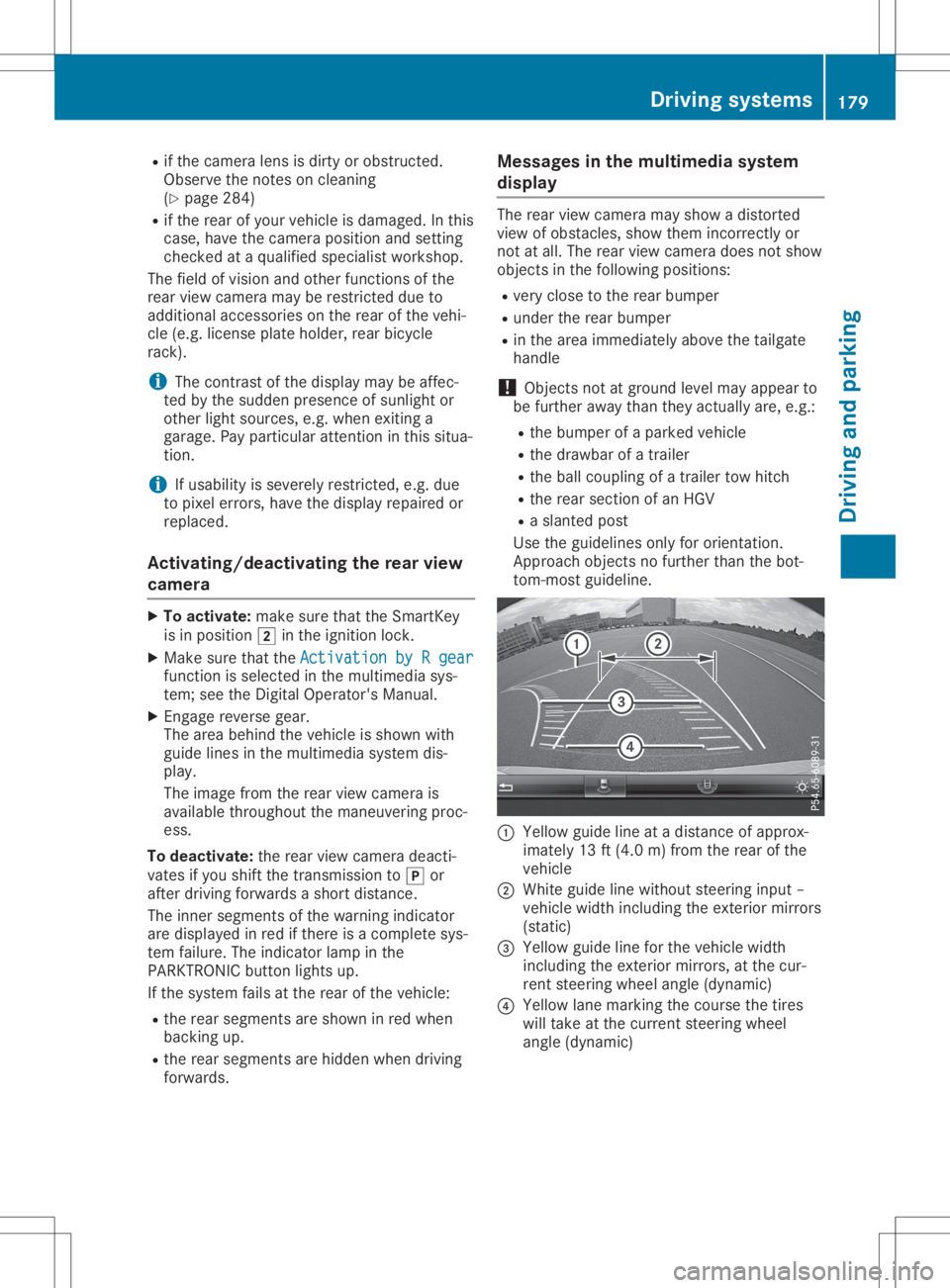
Use theguideline sonly fororien tation.
Appr oach objectsno furt her than thebot-
tom -most guideline . 0043
Yellow guidelineatadist anceof approx -
imate ly13 ft(4. 0m) fromthe rear ofthe
vehic le
0044 Whit eguide linewitho utste erin ginput –
vehic lewidth including theexterior mirrors
(st atic )
0087 Yellow guidelineforthe vehic lewidth
inc luding theexterior mirrors, atthe cur-
ren tste erin gwheel angle(dynamic )
0085 Yellow lanemark ingthe cour sethe tires
will takeat the curr entsteerin gwheel
angle (dynamic ) Driving
systems
179Driving andparking Z
Page 182 of 346
0083
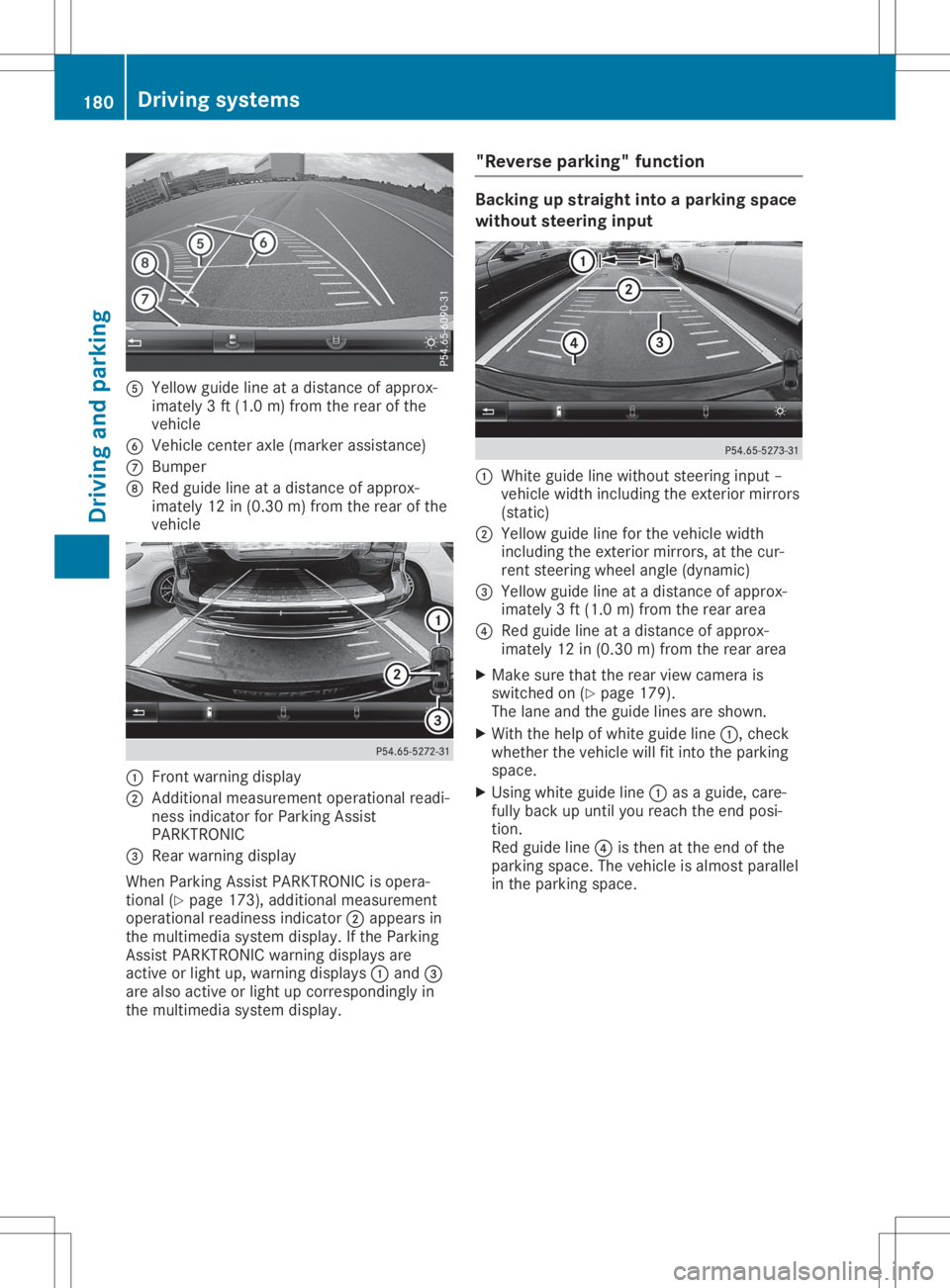
Yellow guidelineatadistan ceofapprox -
imate ly3ft (1. 0m) from therear ofthe
vehic le
0084 Vehic lecen teraxle (mark erassist ance)
006B Bumper
006C Red guide lineatadistan ceofapprox -
imate ly12 in(0. 30 m)from therear ofthe
vehic le 0043
Frontwarnin gdisplay
0044 Addit ional measurem entoperat ionalreadi-
ness indicatorforPark ingAssist
PARKT RONIC
0087 Rear warnin gdisplay
When ParkingAssistPARKT RONIC isopera-
tion al(Y page 173),addition almeasurem ent
operat ionalreadin essindic ator0044appears in
the multim ediasyste mdisplay. Ifthe Park ing
Ass istPARKT RONIC warningdisplays are
act ive orlight up,warnin gdisplays 0043and 0087
are also active orlight upcor respon dinglyin
the multim ediasyste mdisplay. "Rever
separking" funct ion Ba
cking upstraight intoapa rking space
withou tsteer inginpu t 0043
Whit eguide linewithout steerin ginput –
vehic lewidth including theexterior mirrors
(stat ic)
0044 Yellow guidelineforthe vehic lewidth
inc luding theexterior mirrors, atthe cur-
ren tste erin gwheel angle(dynamic )
0087 Yellow guidelineatadistan ceofapprox -
imate ly3ft (1. 0m) from therear area
0085 Red guide lineatadistan ceofapprox -
imate ly12 in(0. 30 m)from therear area
X Make surethattherear view camer ais
switc hedon(Ypage 179).
The lane andtheguide linesareshown .
X With thehelp ofwhite guide line0043,chec k
wheth erthe vehic lewill fitintothe park ing
space.
X Usin gwhite guide line0043asaguide, care-
fully back upunt ilyou reach theend posi-
tion .
Red guide line0085isthe nat the end ofthe
park ingspace. Thevehic leisalmost parallel
in the park ingspace. 180
Driving
systemsDriving andparking
Page 184 of 346
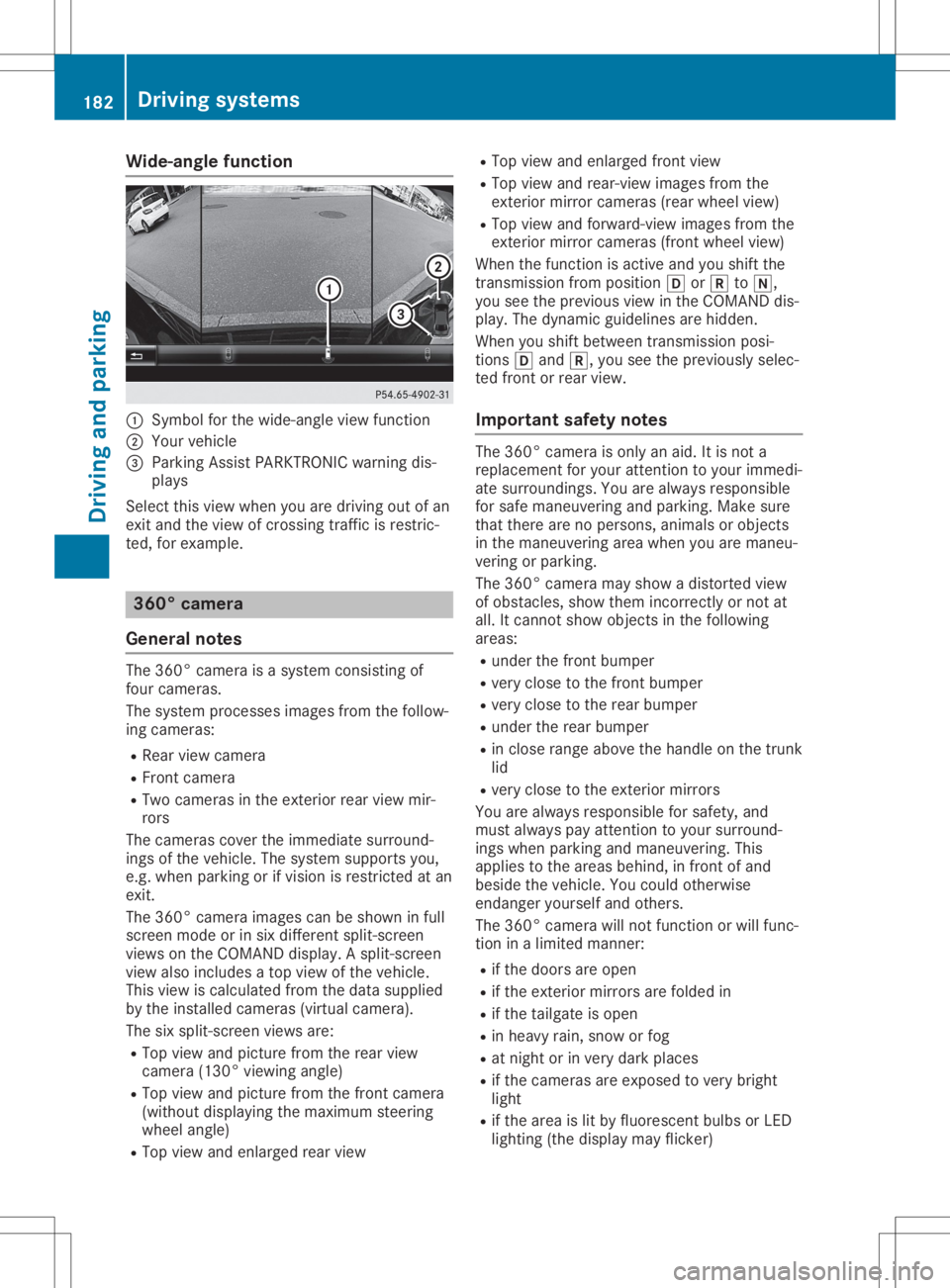
Wide-ang
lefuncti on 0043
Symbo lfor the wide-angl eview function
0044 You rvehicl e
0087 Parki ngAssist PARKTR ONICwarning dis-
pla ys
Select thisview whenyou aredrivi ngout ofan
exit and theview ofcrossing trafficisrestric-
ted, forexamp le. 360
°camera
Gene ralnote s The
360° camera isasyste mconsisting of
four camera s.
The syste mprocess esima ges from thefollow-
ing camera s:
R Rea rview camera
R Front camera
R Two camera sin the exterior rearview mir-
rors
The camera scover theimmed iatesurro und-
ings ofthe vehicl e.The syste msup ports you,
e.g. when parkingorifvisi onisrestricted atan
exit.
The 360° camera images can beshow nin full
screen modeorinsix diffe rent split-screen
view son the COMAND display.A spli t-screen
view alsoinclu desatop view ofthe vehicl e.
This view iscalcu latedfrom thedata supplied
by the instal ledcamera s(virtu alcamera ).
The sixspli t-screen viewsare:
R Top view andpicture fromtherear view
camera (130°viewingangl e)
R Top view andpicture fromthefront camera
(wi thout displaying the maximu msteering
whee langl e)
R Top view andenlarged rearview R
Top view andenlarged front view
R Top view andrear-vi ewima ges from the
exterior mirrorcamera s(rea rwhe elview )
R Top view andforwa rd-view images from the
exterior mirrorcamera s(front wheelview )
When thefunction isactive andyoushift the
transmiss ionfrom position 005Bor005E to005C,
you seetheprevi ousview inthe COMAND dis-
pla y.The dyna micguidel ines arehidd en.
When youshift betwe entransmiss ionposi -
tions 005Band 005E,you seetheprevi ouslysele c-
ted front orrear view.
Important safetynotes The
360° camera isonly anaid.It is not a
repl aceme ntfor you rattention toyou rimmed i-
ate surro undings. Youarealwaysrespo nsible
for safe maneu veringandparki ng.Make sure
that there arenoperso ns,anima lsor objects
in the maneu veringareawhenyou aremaneu -
vering orparki ng.
The 360° camera mayshow adistorte dview
of obsta cles,show themincorrectly ornot at
all .It cannot showobjects inthe followi ng
area s:
R under thefront bump er
R very close tothe front bump er
R very close tothe rear bump er
R under therear bump er
R in close range abovethe handl eon the trunk
lid
R very close tothe exterior mirrors
You arealwaysrespo nsiblefor safe ty,and
must alwayspay attention toyou rsurro und-
ings whenparki ngand maneu vering. This
app liesto the area sbehi nd,infront ofand
besi dethe vehicl e.You couldotherw ise
endang eryou rself andothers.
The 360° camera willnot function orwil lfunc-
tion inalimi ted manner:
R ifthe doors areopen
R ifthe exterior mirrorsarefoldedin
R ifthe tailgate isopen
R in hea vyrain, snow orfog
R at night orinvery dark places
R ifthe camera sare expose dto very bright
lig ht
R ifthe area islit by fluo rescent bulbsorLED
lig hting (thedisplaymay flicker) 182
Driv
ingsyste msDrivingand parking