tailgate MERCEDES-BENZ GLA 2020 User Guide
[x] Cancel search | Manufacturer: MERCEDES-BENZ, Model Year: 2020, Model line: GLA, Model: MERCEDES-BENZ GLA 2020Pages: 346, PDF Size: 17.58 MB
Page 85 of 346
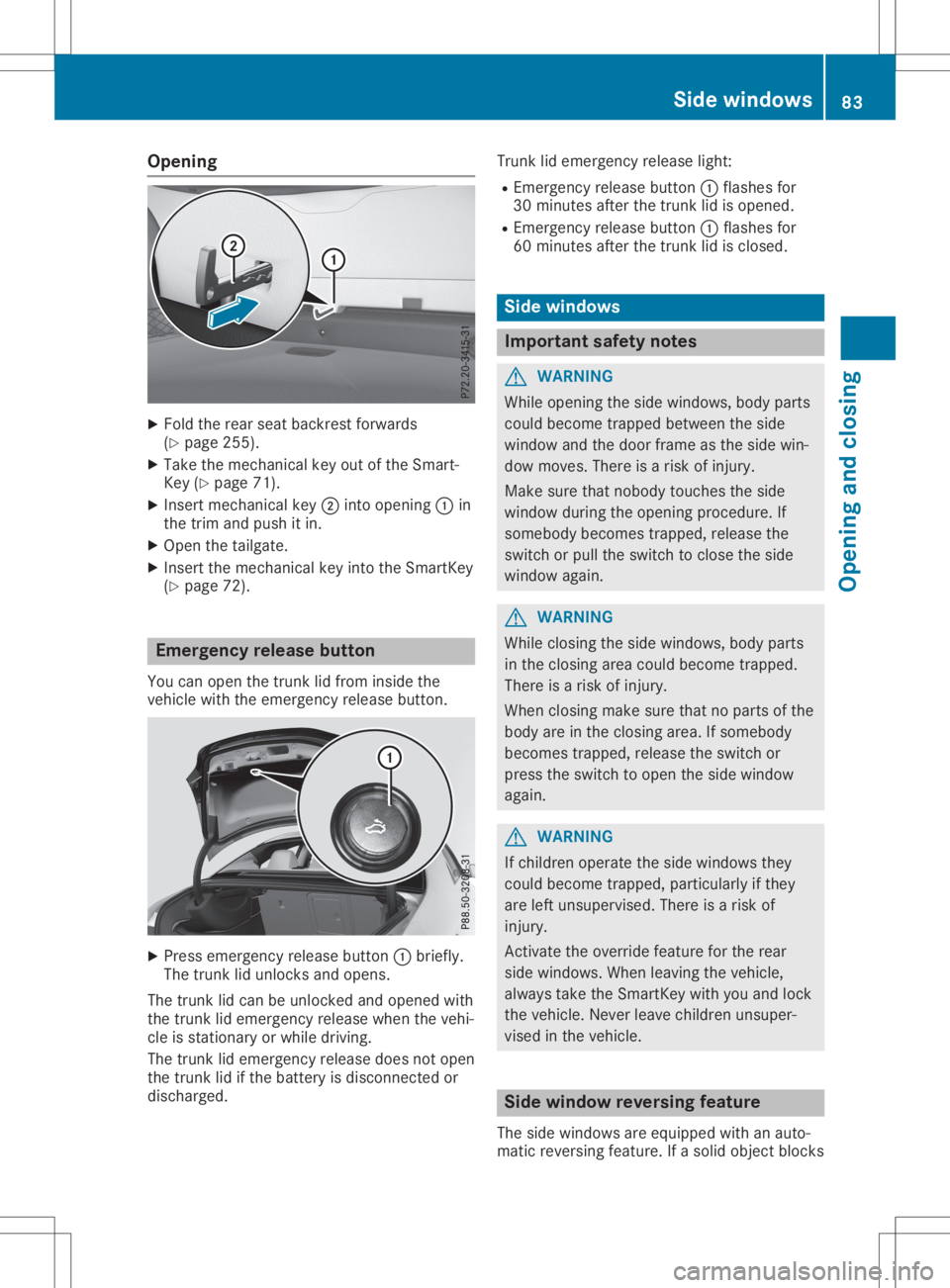
Opening
X
Fold therear seat backr estforwards
(Y page 255).
X Take themechan icalkey outofthe Smart -
Key (Ypage 71).
X Inser tmechan icalkey 0044into opening 0043in
the trim andpush itin.
X Open thetailgate.
X Inser tthe mechan icalkey into theSmart Key
(Y page 72). Emergency
releasebutton
You canopen thetrun klid from inside the
vehicle withtheemergen cyrelease button. X
Press emergen cyrelease button0043briefly.
The trunklid unlock sand opens.
The trunklid can beunlock edand opened with
the trun klid emergen cyrelease whenthevehi-
cle isstat ionary orwhile driving.
The trunklid emergen cyrelease doesnotopen
the trun klid ifthe batter yis discon nectedor
discharged. Trunk
lidemergen cyrelease light:
R Emer gencyrelease button0043flashes for
30 minut esafter thetrun klid isopened.
R Emer gencyrelease button0043flashes for
60 minut esafter thetrun klid isclosed. Side
windows Impor
tantsafet ynotes G
WARN
ING
While opening theside windows, bodyparts
could become trappedbetween theside
window andthedoor frame asthe side win-
dow moves. Thereisarisk ofinjur y.
Make surethatnobody touches theside
window duringtheopening procedure. If
somebody becomestrapped,releasethe
switch orpull theswitch toclose theside
window again. G
WARN
ING
While closing theside windows, bodyparts
in the closing areacould become trapped.
There isarisk ofinjur y.
When closing makesurethatnoparts ofthe
body areinthe closing area.Ifsomebody
becomes trapped,releasetheswitch or
press theswitch toopen theside window
again. G
WARN
ING
If children operatetheside windows they
could become trapped, particularly ifthey
are left unsupervised. Thereisarisk of
injur y.
Act ivate theoverride featureforthe rear
side windows. Whenleaving thevehicle,
alway stake theSmart Keywith youand lock
the vehicle. Neverleavechildren unsuper-
vised inthe vehicle. Side
window reversing feature
The side windows areequipped withanauto-
matic revers ingfeature. Ifasolid objec tblocks Side
windows
83Openingandclosi ng Z
Page 180 of 346
Once
youhave exited theparking spacecom-
pletely, thesteering wheelismoved tothe
straight-ahead position.Youhear atone and
the Active Parking AssistFinished Active
Parking AssistFinished mes-
sage appea rson the multifunction display.You
will then have tosteer andmerge intotraffic
on your own. Active Parking Assistisstill avail -
able. Youcantake overthesteering beforethe
vehicle hasexited theparking spacecom-
pletely. Thisisuseful ,for example whenyou
recognize thatitis alrea dypossible topull out
of the parking space.
Cance lingActive Parking Assist X
Stop themovement ofthe multifunction
steering wheelorsteer yoursel f.
Act ive Parking Assistwillbecanceled at
once. TheActive Parking AssistCan‐ Active
Parking AssistCan‐
celed celed
message appearsinthe multifunction
displa y.
or X Press thePARKTRONIC button
(Y page 173).
Act ive Parking Assistisswitched offand
Act ive Parking Assistisimmediately can-
celed. TheActive Parking AssistCan‐ Active
Parking AssistCan‐
celed celed
message appearsinthe multifunction
displa y.
Act ive Parking Assistiscanceled automaticall y
if:
R the electric parking brakeisengaged
R transmission position005Disselected
R parking usingActive Parking Assistisno
longer possible
R you aredriving fasterthan6mph (10km/h )
R awheel spins,ESP®
intervenes orfails. In
such cases the00E5 warning lamplights up
in the instrument cluster
A warning tonesounds. Theparking symbol
disapp earsandthemultifunction display
shows theActive Parking AssistCan‐ Active
Parking AssistCan‐
celed celed
message.
When Active Parking Assistiscanceled, you
must steer andbrake againyoursel f.
If asystem malfunction occurs,thevehicle is
braked toastandstill. Todrive on,depress the
accelerator again. Rear
view camera
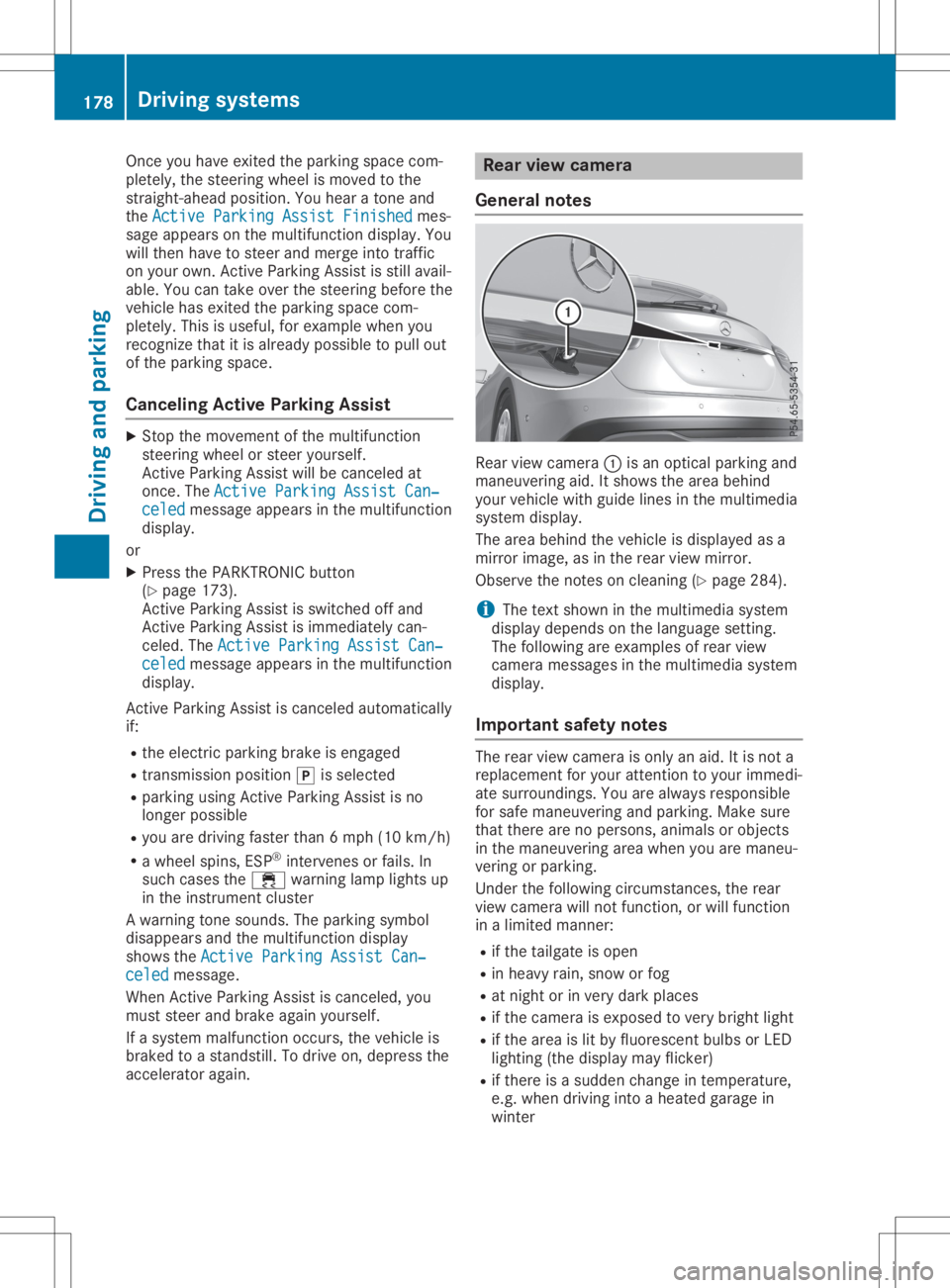
General notes Rear
viewcamera 0043isan optical parking and
maneuvering aid.Itshows thearea behind
your vehicle withguide linesinthe multimedia
system display.
The area behind thevehicle isdispla yedasa
mirror image, asinthe rear view mirror.
Observe thenotes oncleaning (Ypage 284).
i The
text shown inthe multimedia system
displa ydepends onthe langua gesetting.
The followi ngare examples ofrear view
camera messages inthe multimedia system
displa y.
Importa ntsafety notes The
rear view camera isonly anaid. Itis not a
replacement foryour attent iontoyour immedi-
ate surroundings. Youarealwa ysresponsible
for safe maneuvering andparking. Makesure
that there arenopersons, animalsorobjects
in the maneuvering areawhen youaremaneu-
vering orparking.
Under thefollowi ngcircumstances, therear
view camera willnotfunction, orwill function
in alimited manner:
R ifthe tailgate isopen
R in heavy rain,snow orfog
R at night orinvery dark places
R ifthe camera isexposed tovery bright light
R ifthe area islit by fluorescent bulbsorLED
lighting (thedispla ymay flicker)
R ifthere isasudden changeintemperature,
e.g. when driving intoaheated garagein
winter 178
Driving
systemsDriving andparking
Page 184 of 346
Wide-ang
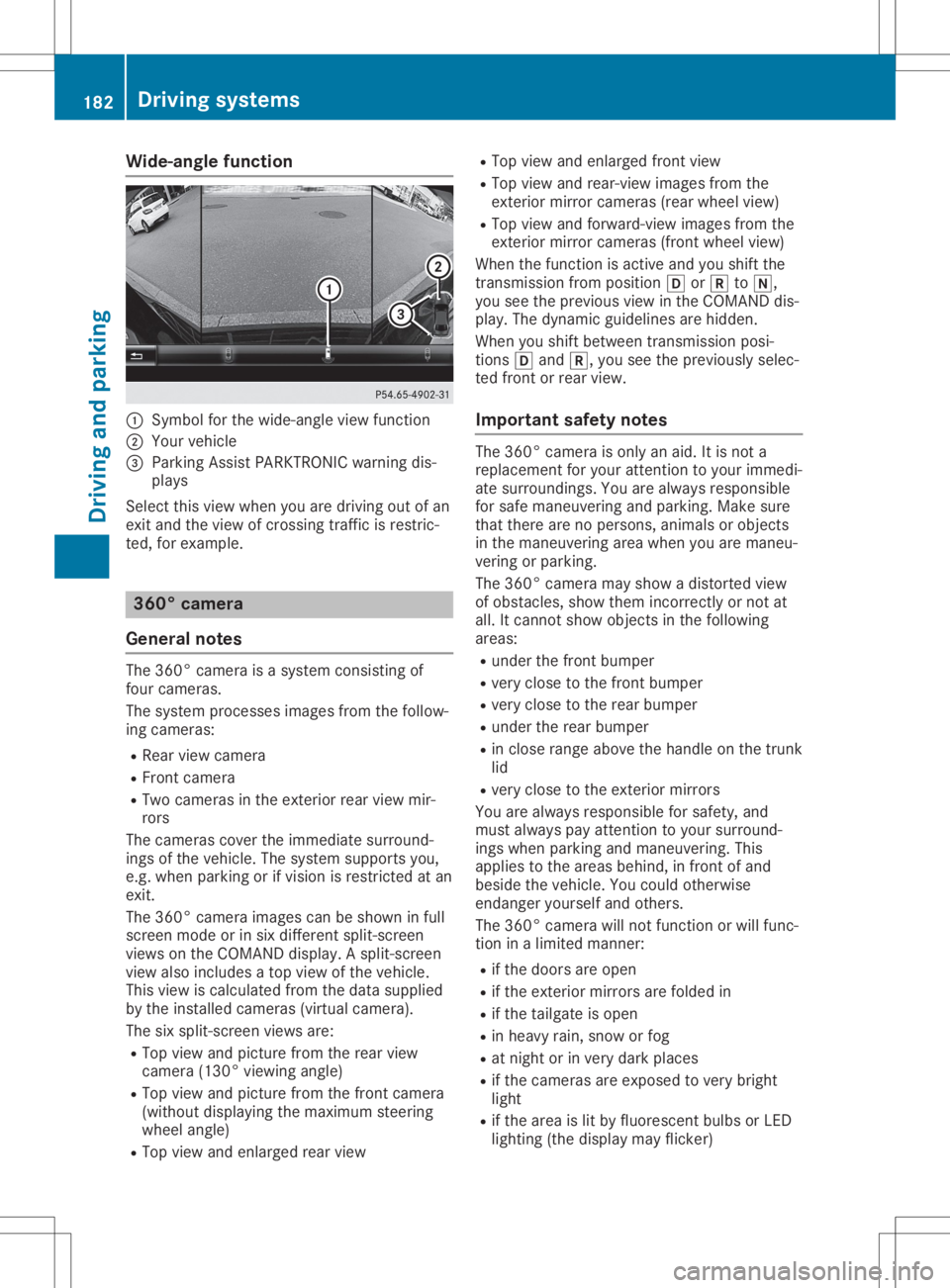
lefuncti on 0043
Symbo lfor the wide-angl eview function
0044 You rvehicl e
0087 Parki ngAssist PARKTR ONICwarning dis-
pla ys
Select thisview whenyou aredrivi ngout ofan
exit and theview ofcrossing trafficisrestric-
ted, forexamp le. 360
°camera
Gene ralnote s The
360° camera isasyste mconsisting of
four camera s.
The syste mprocess esima ges from thefollow-
ing camera s:
R Rea rview camera
R Front camera
R Two camera sin the exterior rearview mir-
rors
The camera scover theimmed iatesurro und-
ings ofthe vehicl e.The syste msup ports you,
e.g. when parkingorifvisi onisrestricted atan
exit.
The 360° camera images can beshow nin full
screen modeorinsix diffe rent split-screen
view son the COMAND display.A spli t-screen
view alsoinclu desatop view ofthe vehicl e.
This view iscalcu latedfrom thedata supplied
by the instal ledcamera s(virtu alcamera ).
The sixspli t-screen viewsare:
R Top view andpicture fromtherear view
camera (130°viewingangl e)
R Top view andpicture fromthefront camera
(wi thout displaying the maximu msteering
whee langl e)
R Top view andenlarged rearview R
Top view andenlarged front view
R Top view andrear-vi ewima ges from the
exterior mirrorcamera s(rea rwhe elview )
R Top view andforwa rd-view images from the
exterior mirrorcamera s(front wheelview )
When thefunction isactive andyoushift the
transmiss ionfrom position 005Bor005E to005C,
you seetheprevi ousview inthe COMAND dis-
pla y.The dyna micguidel ines arehidd en.
When youshift betwe entransmiss ionposi -
tions 005Band 005E,you seetheprevi ouslysele c-
ted front orrear view.
Important safetynotes The
360° camera isonly anaid.It is not a
repl aceme ntfor you rattention toyou rimmed i-
ate surro undings. Youarealwaysrespo nsible
for safe maneu veringandparki ng.Make sure
that there arenoperso ns,anima lsor objects
in the maneu veringareawhenyou aremaneu -
vering orparki ng.
The 360° camera mayshow adistorte dview
of obsta cles,show themincorrectly ornot at
all .It cannot showobjects inthe followi ng
area s:
R under thefront bump er
R very close tothe front bump er
R very close tothe rear bump er
R under therear bump er
R in close range abovethe handl eon the trunk
lid
R very close tothe exterior mirrors
You arealwaysrespo nsiblefor safe ty,and
must alwayspay attention toyou rsurro und-
ings whenparki ngand maneu vering. This
app liesto the area sbehi nd,infront ofand
besi dethe vehicl e.You couldotherw ise
endang eryou rself andothers.
The 360° camera willnot function orwil lfunc-
tion inalimi ted manner:
R ifthe doors areopen
R ifthe exterior mirrorsarefoldedin
R ifthe tailgate isopen
R in hea vyrain, snow orfog
R at night orinvery dark places
R ifthe camera sare expose dto very bright
lig ht
R ifthe area islit by fluo rescent bulbsorLED
lig hting (thedisplaymay flicker) 182
Driv
ingsyste msDrivingand parking
Page 259 of 346
Stowage
wellunder thecargo com-
par tment floor
Import antsafety notes G
WARNING
If you drive when thecargo compartmen t
floor isopen, object scould beflung around,
thus strikin gvehicle occupants. Thereisa
risk ofinjury, particularly inthe event ofsud-
den braking orasudden changeindirection.
Always closethecargo compartmen tfloor
before ajourney.
! The
maximum loadcapacity ofthe stow-
age well under thecargo compartmen tfloor
is 55 lbs (25 kg).
There isastowage areaforTIREFIT, thevehi-
cle tool kit,afolding box,etc.underneath the
cargo compartmen tfloor.
Opening/c losingthecargo compar t-
ment floor X
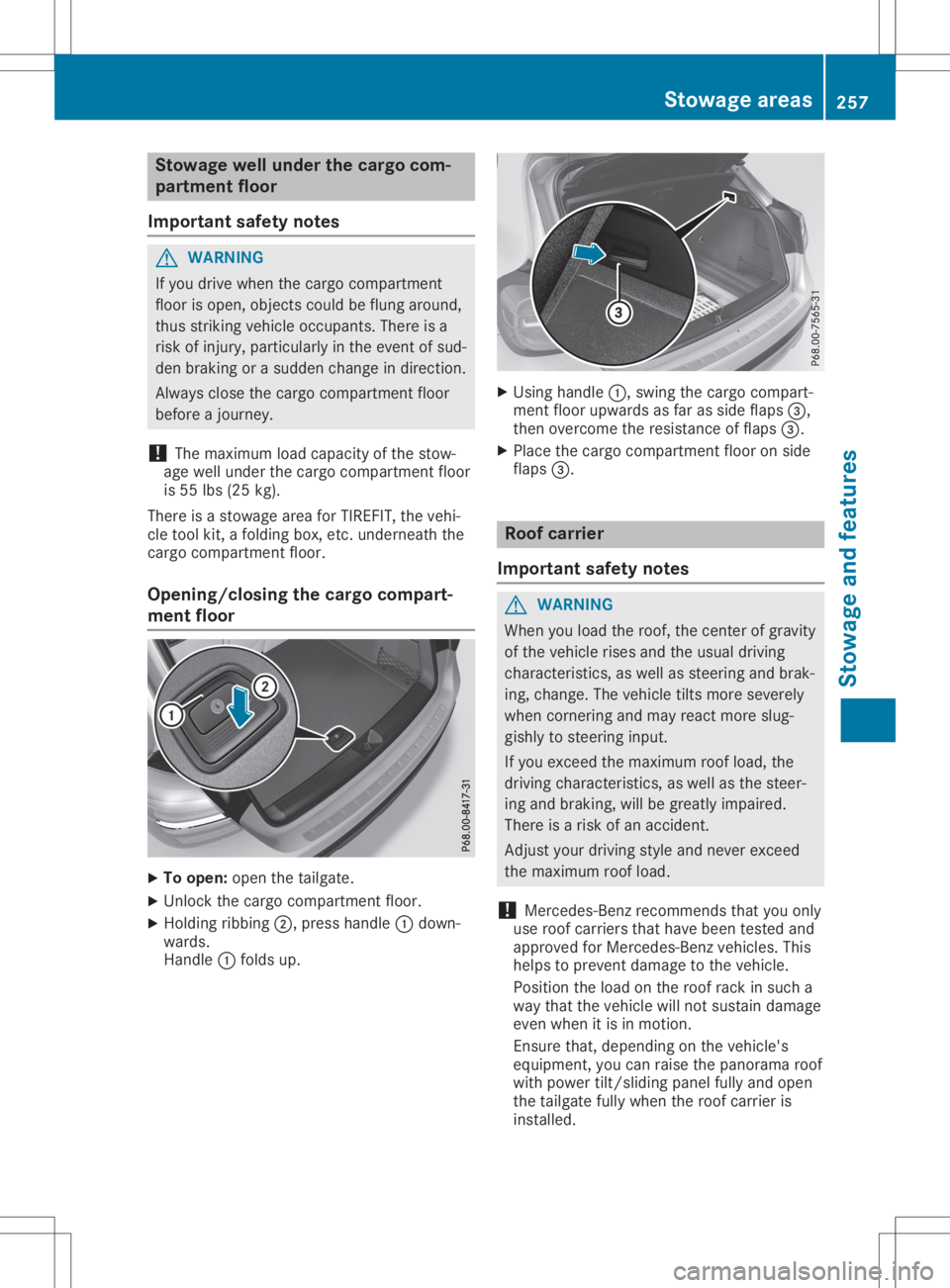
To open: openthetailgate.
X Unlock thecargo compartmen tfloor.
X Holding ribbing0044,press handle 0043down-
wards.
Handle 0043folds up. X
Using handle 0043,swing thecargo compart-
ment floorupwa rdsasfar asside flaps 0087,
then overcome theresistance offlaps 0087.
X Place thecargo compartmen tfloor onside
flaps 0087. Roof
carrier
Import antsafety notes G
WARNING
When youload theroof, thecent erofgravity
of the vehicle risesandtheusual driving
characterist ics,aswell assteering andbrak-
ing, change. Thevehicle tiltsmore severely
when corner ingand may react more slug-
gishly tosteering input.
If you exceed themaximum roofload, the
driving characterist ics,aswell asthe steer-
ing and braking, willbegreatly impaired.
There isarisk ofan accident.
Adjust yourdriving styleandnever exceed
the maximum roofload.
! Mercedes-B
enzrecommen dsthat youonly
use roof carriers thathave been tested and
approved forMercedes-B enzvehicles. This
helps toprevent damage tothe vehicle.
Position theload onthe roof rack insuch a
way that thevehicle willnotsustain damage
even when itis in motion.
Ensure that,depending onthe vehicle's
equipment, youcan raise thepanorama roof
with power tilt/sliding panelfullyandopen
the tailgate fullywhen theroof carrier is
installed. Stowage
areas
257Stowage andfeatu res Z
Page 290 of 346
so,
cont actyour local waste disposa lcom-
pany. Vehicle
toolkit
General notes Vehicles
withaTIREFIT kit:the TIREFIT kitis
located inthe stowage wellunder thecargo
compartment floor.
Vehicles withatire-change toolkit:the tire-
change toolkitisin the stowage wellunder
the cargo compartment floor.
Apart fromcertain country-specific variations,
the vehicles arenot equip pedwith atire-
change toolkit.Some toolsforchanging a
wheel arespecific tothe vehicle. Formore
information onwhich tirechanging toolsare
required andapproved toperform awheel
change onyour vehicle, consultaqual ified
speciali stworkshop.
Tools required forchanging awheel may
include, forexample:
R Jack
R Wheel chock
R Lug wrench
R Alignment bolt
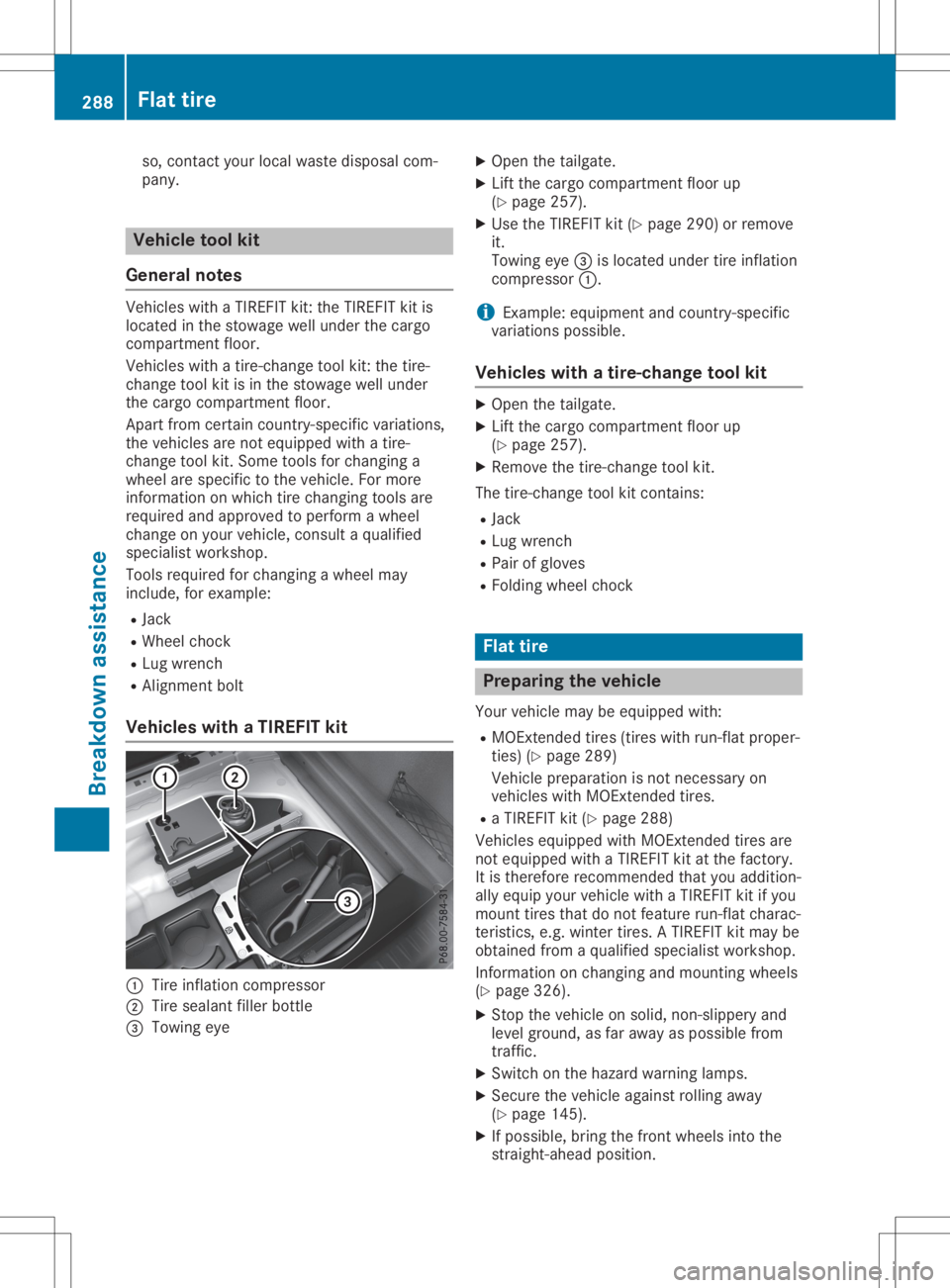
Vehicle swith aTIREFIT kit 0043
Tire inflation compressor
0044 Tire seala ntfiller bottle
0087 Towing eye X
Open thetailgate.
X Lift the cargo compartment floorup
(Y page 257).
X Use theTIREFIT kit(Ypage 290)orremove
it.
Towing eye0087islocated undertireinflation
compressor 0043.
i Example:
equipment andcountry-specific
variations possible.
Vehicle swith atire-change toolkit X
Open thetailgate.
X Lift the cargo compartment floorup
(Y page 257).
X Remove thetire-change toolkit.
The tire-change toolkitcont ains:
R Jack
R Lug wrench
R Pair ofgloves
R Folding wheelchock Flat
tire Prepar
ingthe vehicl e
Your vehicle maybeequip pedwith:
R MOExt ended tires(tires withrun-flat proper-
ties) (Ypage 289)
Vehicle preparation isnot necessary on
vehicles withMOExt ended tires.
R aTIREFIT kit(Ypage 288)
Vehicles equippedwith MOExt ended tiresare
not equip pedwith aTIREFIT kitatthe factory.
It is therefore recommended thatyouaddition-
ally equip yourvehicle withaTIREFIT kitifyou
mount tiresthatdonot feature run-flat charac-
teristics, e.g.winter tires.ATIREFIT kitmay be
obtained fromaqual ified speciali stworkshop.
Information onchanging andmounting wheels
(Y page 326).
X Stop thevehicle onsolid, non-slippery and
level ground, asfar awa yas possible from
traffic.
X Switch onthe hazard warning lamps.
X Secure thevehicle againstrolling away
(Y page 145).
X Ifpossible ,bring thefront wheels intothe
straight-ahead position.288
Flat
tireBreakdown assistance
Page 334 of 346
exceed
thevehicle's maximum designspeed
of 50 mph (80km/ h).
You should regularly checkthepressure ofthe
emergen cyspare wheel, particularly priorto
long trips, andcorrectthe pressure asneces -
sary (Ypage 308). Thevalue onthe wheel is
valid.
Sno wchains mustnotbemount edon emer-
genc yspare wheels. General
notes
You canaskforinfor mation regarding permit-
ted emergen cyspare wheels atan authorized
Mercedes- BenzCenter .
An emergen cyspare wheel mayalsobemoun-
ted against thedirect ionofrotat ion.Observe
the time restriction onuse aswell asthe
speed limitation specifiedonthe emergen cy
spare wheel.
Replace thetires after sixyears atthe latest,
regardless ofwear. Thisalso applies tothe
emergen cyspare wheel.
Tire pressure losswarning system(Can-
ada only): aslong asyou aredriving withthe
emergen cyspare wheel mounted,the tire
pressure losswarning systemcannotfunc tion
reliably. Onlyrestar tthe tire pressure loss
warning systemwhenthedefect ivewheel has
been replaced withanew wheel.
Vehicles withtirepressure monitor (USA
only): afteranemergen cyspare wheel has
been mount ed,the system maystilldisplay
the tire pressure ofthe removed wheelfora
few minutes .The value displayed forthe
mount edemergen cyspare wheel isnot the
same asthe curren ttire pressure ofthe emer-
genc yspare wheel. Removing
theemergency spare
wheel Vehicles
withthe"Minispare" emergencyspare
wheel
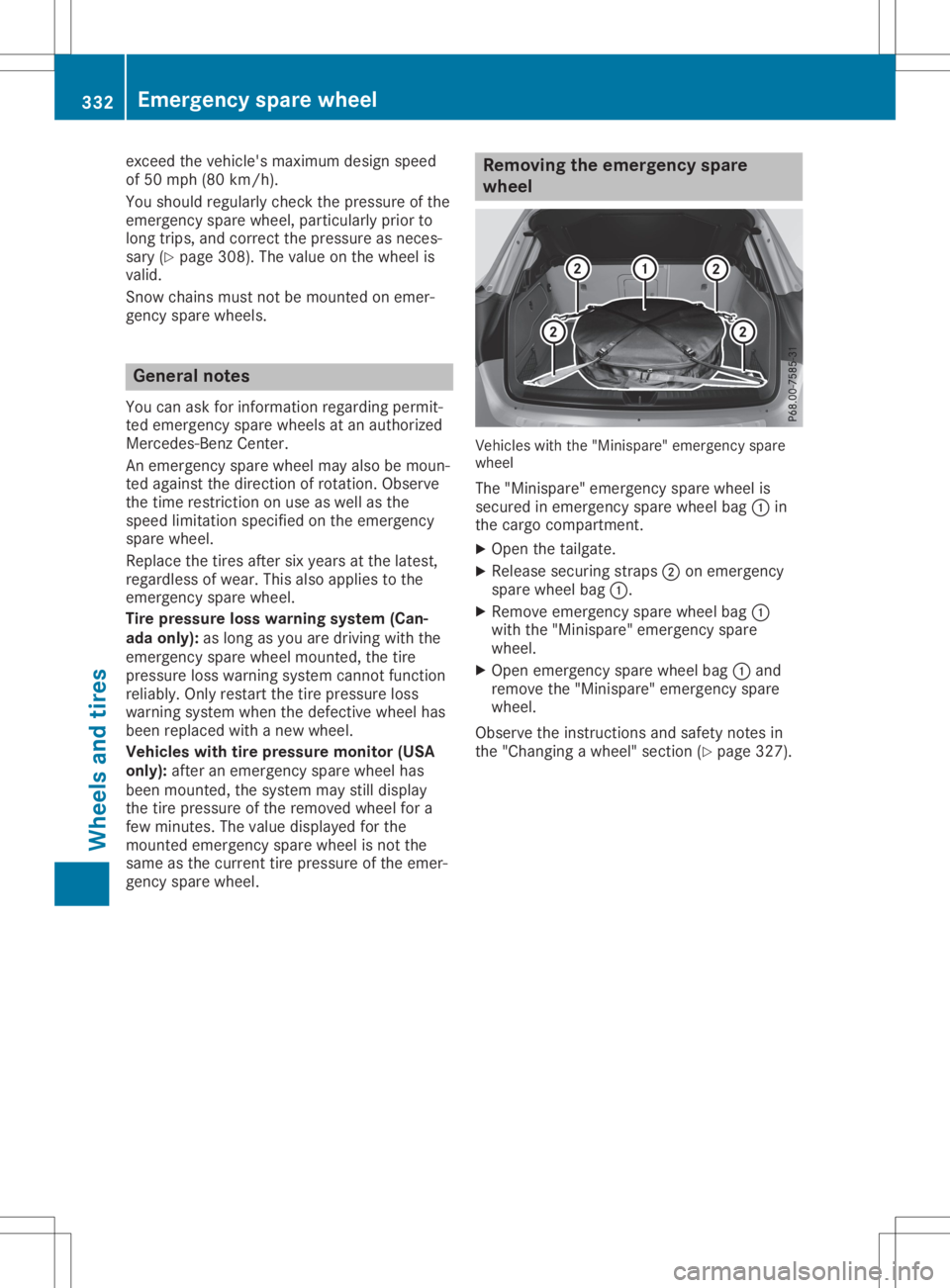
The "Minispare" emergencyspare wheel is
secured inemergen cyspare wheel bag0043in
the cargo compart ment.
X Open thetailgate.
X Release securing straps0044onemergen cy
spare wheel bag0043.
X Remove emergen cyspare wheel bag0043
with the"Minispare" emergencyspare
wheel.
X Open emergen cyspare wheel bag0043and
remove the"Minispare" emergencyspare
wheel.
Observe theinstruct ions andsafety notesin
the "Changing awheel" section(Ypage 327). 332
Emergency
sparewheelWheels andtires