wheel MERCEDES-BENZ GLA 2020 Workshop Manual
[x] Cancel search | Manufacturer: MERCEDES-BENZ, Model Year: 2020, Model line: GLA, Model: MERCEDES-BENZ GLA 2020Pages: 346, PDF Size: 17.58 MB
Page 170 of 346
i
If
RACE START isused repea tedlywithin a
short period oftime, itis only available
aga inafter thevehicle hasbeen driven a
certain distance. AMG
adapt ivesport suspensi onsys-
tem
Gene ralnotes The
electronical lycontrolled dampingsystem
works continuously .This improves driving
safety andride comfort.
The dampi ngistuned individ uallyto each
wheel anddepends on:
R you rdriving style,e.g.sporty
R the road surface condition, e.g.bumps
R you rindivid ualselection ofSport orCom-
fort
The suspe nsion setting isadjusted usingthe
corresponding buttoninthe center console.
i The
mode canalso beset using theAMG
DYNAMIC SELECTcontroller (Ypage 133).
Each timeyoustart theengine withtheSmart-
Key orthe Start/St opbutton, Comfort mode
is activated. Forfurther information about
starting theengine, see(Ypage 125).
Sport mode The
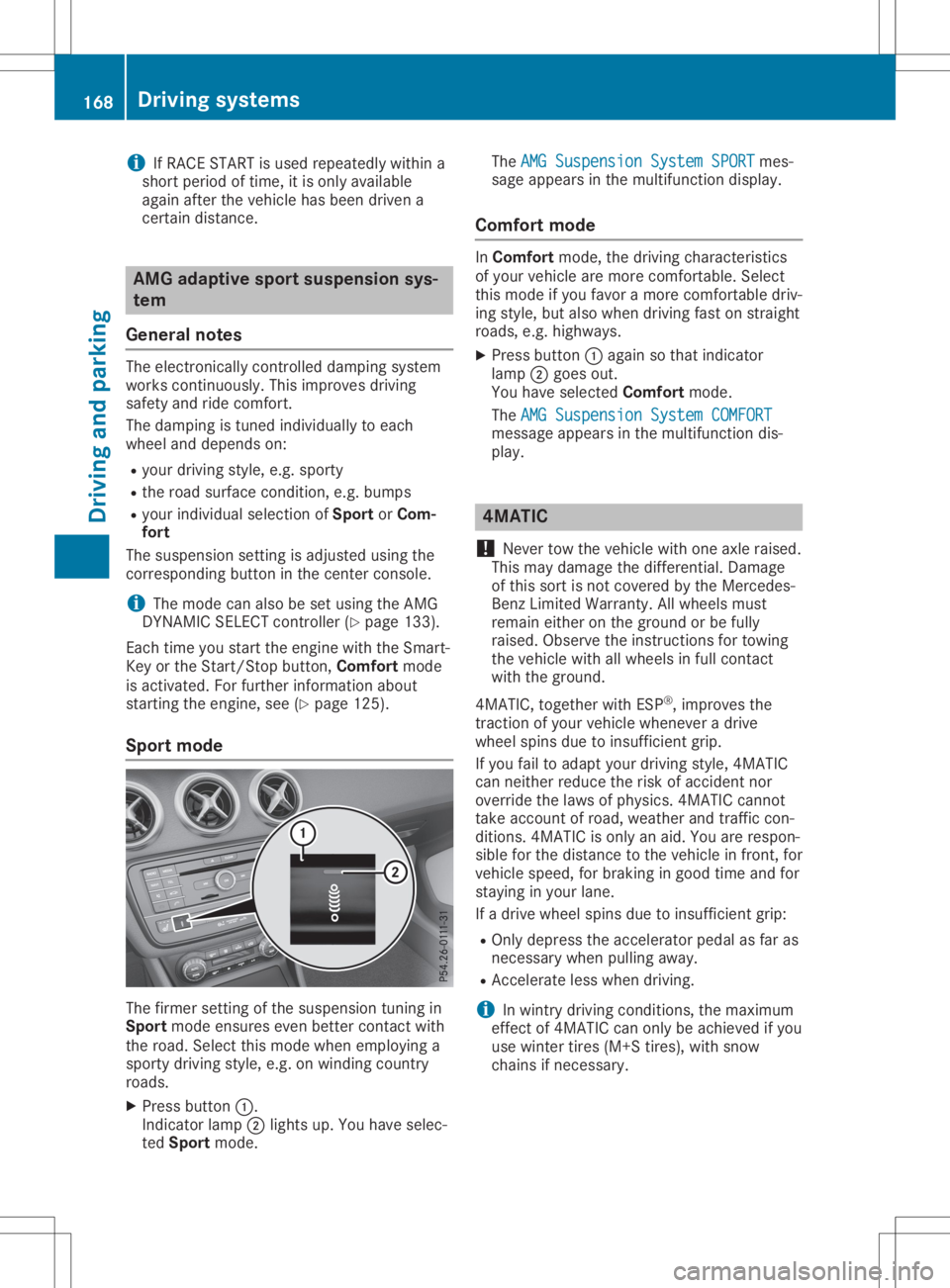
firmer setting ofthe suspe nsion tuning in
Sport modeensures evenbetter contact with
the road. Select thismode whenemploy inga
sporty driving style,e.g.onwindi ngcountry
roads.
X Press button 0043.
Indicator lamp0044lights up.You have selec-
ted Sport mode. The
AMG Suspension SystemSPORT AMG
Suspension SystemSPORTmes-
sage appearsinthe multifu nctiondisplay.
Comfort mode In
Comfort mode,thedriving characteristics
of you rvehicle aremore comfortable. Select
this mode ifyou favor amore comfortable driv-
ing style, butalso when driving fastonstraight
roads, e.g.highw ays.
X Press button 0043aga inso that indicator
lamp 0044goes out.
You have selected Comfort mode.
The AMG Suspension SystemCOMFORT AMG
Suspension SystemCOMFORT
messag eappe arsinthe multifu nctiondis-
pla y. 4MATIC
! Never
towthevehicle withoneaxle raise d.
This may dama gethe differentia l.Damage
of this sort isnot covered bythe Mercedes-
Benz Limited Warranty.Allwheel smust
remain eitheronthe ground orbe fully
raise d.Observe theinstructions fortowing
the vehicle withallwheel sin full contact
with theground.
4MATIC, togetherwithESP®
,improves the
traction ofyou rvehicle whenever adrive
wheel spinsduetoinsufficie ntgrip.
If you failtoada ptyou rdriving style,4MATIC
can neither reducetherisk ofaccident nor
override thelawsof phys ics.4MATIC cannot
take account ofroad, weather andtraffic con-
ditions. 4MATIC isonly anaid.You arerespon-
sibl efor the distance tothe vehicle infront, for
vehicle speed,for braking ingood timeandfor
stayi nginyou rlane.
If adrive wheel spinsduetoinsufficie ntgrip:
R Only depres sthe accelera torpeda las far as
necessary whenpulling away.
R Accelerate lesswhen driving.
i In
wintry driving conditions, themaximum
effect of4MATIC canonly beachieve difyou
use winter tires(M+S tires),with snow
chains ifnecessary . 168
Drivi
ngsystemsDrivi ngand parking
Page 176 of 346
Problems
withParking AssistPARKTRONIC Problem
Possible
causes/co nsequences and0050 0050
Solutions Only
thered segments
in the Parking Assist
PARKTRONIC warning
display sare lit.You also
hear awarning tonefor
approximately twosec-
onds.
Parking Assist
PARKTRONIC isthen
deactivated andthe
indicator lamponthe
PARKTRONIC button
lights up. Parking
AssistPARKTRONIC hasmalfunction edand hasbeen deac-
tivated.
X Ifproblems persist,haveParking AssistPARKTRONIC checkedat
a quali fiedspecialist workshop. Only
thered segments
in the Parking Assist
PARKTRONIC warning
display sare lit.Parking
Assist PARKTRONIC is
then deactivated. The
Parking AssistPARKTRONIC sensorsaredirty orthere isinter-
ferenc e.
X Clean theParking AssistPARKTRONIC sensors(Ypage 283).
X Switch theignition backon. The
problem maybecaused byan extern alsource ofradio orultra-
sound waves.
X Check tosee ifParking AssistPARKTRONIC worksatadifferent
location. Active
Parking Assist
General notes Act
ive Parking Assistisan electron icparking
aid with ultrasound. Itmeasures theroad on
both sides ofthe vehicle. Aparking symbol
indicates asuitable parkingspace.Active
steering intervention andbrake application
can assist youduring parking andwhen exiting
a parking space.Youcanalso stilluse Parking
Assist PARKTRONIC (Ypage 171).
Import antsafety notes Act
ive Parking Assistismerely anaid. Itis not
a replacement foryour atten tiontoyour imme-
diate surroundings. Youarealwa ysresponsi-
ble forsafe maneuvering, parkingandexiting a
parking space.Makesurethatthere areno
persons, animalsorobject sin the maneuver-
ing area when youaremaneuvering orparking.
When Parking AssistPARKTRONIC isdeactiva-
ted, Active Parking Assistisalso unavaila ble. G
WARNING
While parking orpulli ngout ofaparking
space, thevehicle swingsoutand candrive
onto areas ofthe oncomin glane. Thiscould
cause youtocollide withother roadusers or
object s.There isarisk ofan accident.
Pay atten tiontoother roadusers orobject s.
Stop thevehicle ifnecessary orcancel the
Act ive Parking Assistparking procedure.
! If
they cannot beavoided, driveover
obstacles suchascurbs slowly andatan
obtuse angle.Otherwise, youmay damage
the wheels ortires.
Act ive Parking Assistmaypossibly indicate
parking spaceswhicharenot suitable forpark-
ing, forexample:
R where parking orstopping isprohibited
R in front ofdriveways orentr ances andexits
R on unsuitable surfaces 174
Driving
systemsDriving andparking
Page 178 of 346
R
tha tar epa rallel to the directi onoftra vel
and atleas t39.5 in(1.0 m)longer thanyo ur
veh icle
R at right ang lesto the directi onoftrav eland
at leas t39.5 in(1.0 m)wid ertha nyo ur veh i-
cle
Wh endrivin gat spee ds below 19 mph
(30 km/h ),yo uwi llse epa rki ng symbo l0044 as
a sta tus indicator inthe instrument cluste r.
Wh enapa rki ng space hasbe en detecte d,an
ar row towards the right or the left also
ap pe ars. By default, Activ ePa rki ng Assi stonl y
di sp lays parki ng space son the front-
pa sse nge rsi de .Pa rki ng space son the driver 's
si de aredisp laye das soo nas the turnsigna l
on the driver 'sside isacti vated .Wh enparki ng
on the driver 'sside ,thi smu strem ain acti vated
unti lyo uconfi rmthe useof Activ ePa rki ng
Assi stby pre ssing the 0076 button onthe mul-
tifu nctio nste ering wheel.The syste mautoma t-
ica lly de term ineswh eth erthe parki ng space is
pa rallel or atright-a nglestothe directi onof
tra vel .
A pa rki ng space isdisp laye dwh ile yo uar e
dri vin gpa st it, and untilyo uar eap pro xim ately
50 ft(15 m)awa yfrom it.
Pa rki ng G
WA
RNI NG
If yo uleav ethe driver 'sseat wh en the vehi-
cle isonl ybe ing braked bythe Parki ng Pack-
ag ewi th rea rvi ew camer a,itcou ldrol l
aw ay:
R ifthe reisama lfunc tionin the syste mor
in the voltag esu pp ly
R ifthe electr icalsy ste minthe enginecom -
pa rtme nt,the batter yor the fuse sar e
tam pered with
R ifthe batter yis disco nnecte d
R ifthe vehicleis ac cel era ted ,e.g .by aveh i-
cle occu pant
Th ere isarisk ofan accid ent.
Bef ore leav ing the vehicle, alwa yssecu re it
ag ainst rolling away.
i If
Acti veParki ng Ass istde tects obsta cles,
Acti veParki ng Ass istbra kes automa tically
wh ile the vehicleis pa rki ng. Youar eres pon-
si bl e for braking ingo od tim e. X
Stop thevehiclewh en the parki ng space
sy mbo lsho wsthe desired parki ng spacein
the instrumen tclu ste r.
X Shi ftthe transmi ssion topositio n005E.
Th eSta rtParkingAss ist? Sta
rtParkingAss ist?Yes :OK Yes
:OK No: No:
0038 message appe arson the multifu ncti on
di sp lay.
X To canc elthe proc edure:pressthe 0038
bu tton onthe multifu ncti onsteering wheel
or pullaw ay.
or X To
park using Activ ePark ingAs sist:
pre ssthe 0076 button onthe multifu ncti on
ste ering wheel.
Th ePar kingAss ist Active Acceler‐ Par
kingAss ist Active Acceler‐
ate andBrake ate
andBrakeObs erveSur roundings Obs
erveSur roundings
mes sage appe arson the multifu ncti ondis-
pl ay .
X Let goofthe multifu ncti onsteering wheel.
X Ba ck up the vehicle, be ing readytobra keat
al ltim es.Wh enbackin gup ,dri ve atasp ee d
be low ap pro xim ately6mph (10km/h ).Oth -
erw ise, Acti veParki ng Ass istwi llbe can-
cel ed.
Acti veParki ng Ass istbra kes thevehicleto a
sta nds tillwh en the vehicleap pro ache sthe
rea rbo rde rof the parki ng space.
Ma neu vering maybe req uired intig ht park-
ing spaces.
Th ePar kingAss ist Active Select Par
kingAss ist Active Select
DOb serveSurroundings DOb
serveSurroundings message appe ars
on the multifu ncti ondisp lay.
X Shi ftthe transmi ssion topositio n005B while
the vehicleis sta tionar y.
Acti veParki ng Ass istim med iatel yste ers in
the otherdirec tion.
Th ePar kingAss ist Active Acceler‐ Par
kingAss ist Active Acceler‐
ate andBrake ate
andBrakeObs erveSur roundings Obs
erveSur roundings
mes sage appe arson the multifu ncti ondis-
pl ay .
i Yo
uwi llac hieve thebest res ults by waiting
for the steering pro ced ureto com plete
be for epu lling away.
X Dri veforwa rds and berea dytobra keatall
tim es.
Acti veParki ng Ass istbra kes thevehicleto a
sta nds tillwh en the vehicleap pro ache sthe
fro ntborde rof the parki ng space.
Ma neu vering maybe req uired intig ht park-
ing spaces. 17
6 Dr
ivi ng system sDrivi ng andparki ng
Page 179 of 346
The
Parking AssistActiveSelectR Parking
AssistActiveSelectR
Observe Surrounding s Observe
Surrounding smessage appearson
the multifunct iondisplay .
As soon asthe parking procedure iscomplete,
the Active Parking AssistFinished Active
Parking AssistFinished mes-
sage appears andawarning tonesounds. The
vehicle isnow parked.
The vehicle iskept station arywithout the
driver having todepress thebrake pedal. The
braking effectiscanceled whenyoudepress
the accelerator pedal.
Act ive Parking Assistnolonger supports you
with steerin ginter ventions andbrake applica-
tions. When Active Parking Assistisfinished,
you must steer andbrake againyourself.
Act ive Parking Assistisstill availabl e.
Parking tips:
R The way your vehicle ispositioned inthe
parking spaceafterparking isdependent on
various factors.These include theposition
and shape ofthe vehicles parkedinfront
and behind itand thecondit ionsofthe loca-
tion. Itmay bethe case thatActive Parking
Assist guides youtoofarinto aparking
space, ornot farenough intoit.Insome
cases, itmay alsolead youacross oront o
the curb. Ifnecessary, canceltheparking
procedure withActive Parking Assist.
R You canalso preselect transmission position
005B. The vehicle redirect sand does notdrive
as far into theparking space.Should the
trans mission changetakeplace tooearly,
the parking procedure iscanceled. Asensi-
ble parking position cannolonger beach-
ieved fromthisposition.
Exiting apar king space In
order thatActive Parking Assistcansupport
you when exitingthe parking space:
R you need tohave parked usingActive Park-
ing Assist .
R the border ofthe parking spacemustbe
high enough atthe front andtherear. A
curb stoneis too small, forexample.
R the border ofthe parking spacemustnotbe
too wide, asthe position ofthe vehicle must
not exceed anangle of45° tothe start ing
position asitis maneuvered intotheparking
space.
R amaneuvering distanceofat least 3.3ft
(1.0 m)must beavailabl e. Act
ive Parking Assistcanonly assist youwith
exitin gaparking spaceifyou have parked the
vehicle parallel tothe direction oftravel using
Act ive Parking Assist.
i If
Act ive Parking Assistdetectsobstacles,
Act ive Parking Assistbrakes automatically
while thevehicle isexitin gthe parking
space. Youareresponsible forbraking in
good time.
X Start theengine.
X Release theelectric parking brake.
X Switch onthe turn signal inthe direction
you willdrive outofthe parking space.
X Shift thetrans mission toposition 005Bor005E.
The Start Parking Assist? Start
Parking Assist?Yes:OK Yes:
OKNo: No:
0038 message appearsonthe multifunct ion
display .
X To cancel theprocedur e:press the0038
button onthe multifunct ionsteerin gwheel
or pull away .
or X To
exit apar king space usingActive
Park ingAssist: pressthe0076 button on
the multifunct ionsteerin gwheel.
The Parking AssistActiveAcceler‐ Parking
AssistActiveAcceler‐
ate andBrake ate
andBrake Observe Surrounding s Observe
Surrounding s
message appearsonthe multifunct iondis-
play.
X Let goofthe multifunct ionsteerin gwheel.
X Pull away ,being ready tobrake atall times.
Do not exceed amaximum speedofapprox-
imately 6mph (10km/ h)when exitinga
park ingspac e.Otherwis e,Ac tivePark ing
As sist willbecan cele d.
X Dep endingonthemess ageoras requir ed,
shif tth etransm ission toposit ion005Bor005E.
Ac tivePark ingAssist imme diatelysteers in
th eoth erdirec tion.The Park ingAssist Park
ingAssist
Acti veAcce lerateand Brake Acti
veAcce lerateand BrakeObse rve Obse
rve
Surr oundings Surr
oundings messageappears onthe
mult ifunction display.
i You
willachie vethebest result sby waitin g
for thest eerin gproc edure tocom plete
befo repulling away.
If you back upafteract ivat ion, thest eerin g
wheel ismov edtothest raight -aheadposi-
tio n.
X Dr ive forwards andreverse asprom ptedby
th eAc tivePark ingAssist warn ingdisplays,
seve raltim esifnec essar y. Drivin
gsyst ems
177Driving andparking Z
Page 180 of 346
Once
youhave exited theparking spacecom-
pletely, thesteering wheelismoved tothe
straight-ahead position.Youhear atone and
the Active Parking AssistFinished Active
Parking AssistFinished mes-
sage appea rson the multifunction display.You
will then have tosteer andmerge intotraffic
on your own. Active Parking Assistisstill avail -
able. Youcantake overthesteering beforethe
vehicle hasexited theparking spacecom-
pletely. Thisisuseful ,for example whenyou
recognize thatitis alrea dypossible topull out
of the parking space.
Cance lingActive Parking Assist X
Stop themovement ofthe multifunction
steering wheelorsteer yoursel f.
Act ive Parking Assistwillbecanceled at
once. TheActive Parking AssistCan‐ Active
Parking AssistCan‐
celed celed
message appearsinthe multifunction
displa y.
or X Press thePARKTRONIC button
(Y page 173).
Act ive Parking Assistisswitched offand
Act ive Parking Assistisimmediately can-
celed. TheActive Parking AssistCan‐ Active
Parking AssistCan‐
celed celed
message appearsinthe multifunction
displa y.
Act ive Parking Assistiscanceled automaticall y
if:
R the electric parking brakeisengaged
R transmission position005Disselected
R parking usingActive Parking Assistisno
longer possible
R you aredriving fasterthan6mph (10km/h )
R awheel spins,ESP®
intervenes orfails. In
such cases the00E5 warning lamplights up
in the instrument cluster
A warning tonesounds. Theparking symbol
disapp earsandthemultifunction display
shows theActive Parking AssistCan‐ Active
Parking AssistCan‐
celed celed
message.
When Active Parking Assistiscanceled, you
must steer andbrake againyoursel f.
If asystem malfunction occurs,thevehicle is
braked toastandstill. Todrive on,depress the
accelerator again. Rear
view camera
General notes Rear
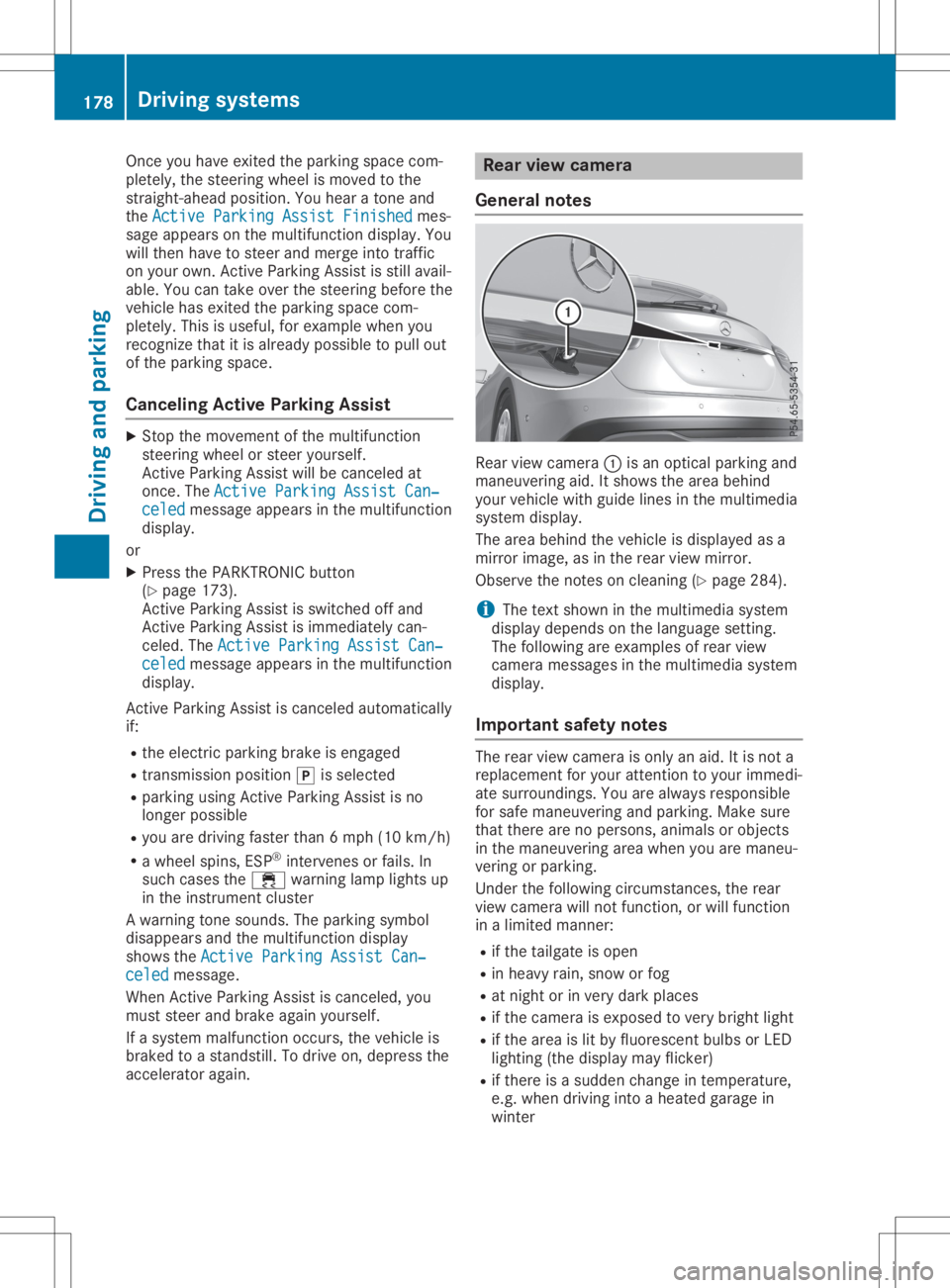
viewcamera 0043isan optical parking and
maneuvering aid.Itshows thearea behind
your vehicle withguide linesinthe multimedia
system display.
The area behind thevehicle isdispla yedasa
mirror image, asinthe rear view mirror.
Observe thenotes oncleaning (Ypage 284).
i The
text shown inthe multimedia system
displa ydepends onthe langua gesetting.
The followi ngare examples ofrear view
camera messages inthe multimedia system
displa y.
Importa ntsafety notes The
rear view camera isonly anaid. Itis not a
replacement foryour attent iontoyour immedi-
ate surroundings. Youarealwa ysresponsible
for safe maneuvering andparking. Makesure
that there arenopersons, animalsorobjects
in the maneuvering areawhen youaremaneu-
vering orparking.
Under thefollowi ngcircumstances, therear
view camera willnotfunction, orwill function
in alimited manner:
R ifthe tailgate isopen
R in heavy rain,snow orfog
R at night orinvery dark places
R ifthe camera isexposed tovery bright light
R ifthe area islit by fluorescent bulbsorLED
lighting (thedispla ymay flicker)
R ifthere isasudden changeintemperature,
e.g. when driving intoaheated garagein
winter 178
Driving
systemsDriving andparking
Page 181 of 346
R
ifthe camer alens isdirt yor obst ructed.
Obser vethe noteson clean ing
(Y page 284)
R ifthe rear ofyour vehic leisdamaged. Inthis
case, havethecamer aposit ionand setting
chec kedataqualified specialist workshop.
The field ofvision andotherfunc tionsof the
rear view camer amay berest ricteddue to
addition alacc essor iesonthe rear ofthe vehi-
cle (e.g. licenseplate holder ,rear bicyc le
rack ).
i The
contrast ofthe display maybeaffec -
ted bythe sudden presenceof sunligh tor
oth erlight sourc es,e.g. when exitinga
garage. Payparticular attent ion inthis situa-
tion .
i If
usability issever elyrest ricted, e.g. due
to pixel errors,have thedisplay repairedor
replac ed.
Activa ting/d eactivating therea rview
cam era X
To acti vate:make surethattheSmar tKey
is in posit ion0048inthe ignit ionlock .
X Make surethattheActi vationbyRgear Acti
vationbyRgear
func tion isselec tedinthe multim ediasys-
tem ;see theDigit alOperat or'sManual.
X En gage reversegear.
The area behin dthe vehic leisshown with
guide linesinthe multim ediasystemdis-
play.
The image fromthe rear view camer ais
available throughout themane uverin gproc -
ess.
To deact ivate:the rear view camer adeact i-
vate sif you shift thetransm ission to005D or
aft erdrivin gfor wards ashor tdist ance.
The innersegme ntsof the warnin gindic ator
are displayed inred ifthe reisacom plete sys-
tem failure. Theindic atorlamp inthe
PARK TRONIC buttonlight sup.
If the syst emfails atthe rear ofthe vehic le:
R the rear segme ntsare shown inred when
back ingup.
R the rear segme ntsare hidden whendriving
for wards. Messa
gesinthemu ltim edia system
disp lay The
rear view camer amay show adist orted
view ofobst acles, showtheminc orre ctly or
not atall. The rear view camer adoes notshow
obje ctsin the followin gposit ions:
R very closeto the rear bumper
R under therear bumper
R in the area immed iatelyabove thetailgat e
handle
! Obj
ectsnot atgroun dlevel mayappear to
be furt her away thantheyact ually are,e.g.:
R the bumper ofapark edvehic le
R the drawbar ofatrailer
R the ball couplin gof atrailer towhitch
R the rear sectionofan HGV
R aslant edpost
Use theguideline sonly fororien tation.
Appr oach objectsno furt her than thebot-
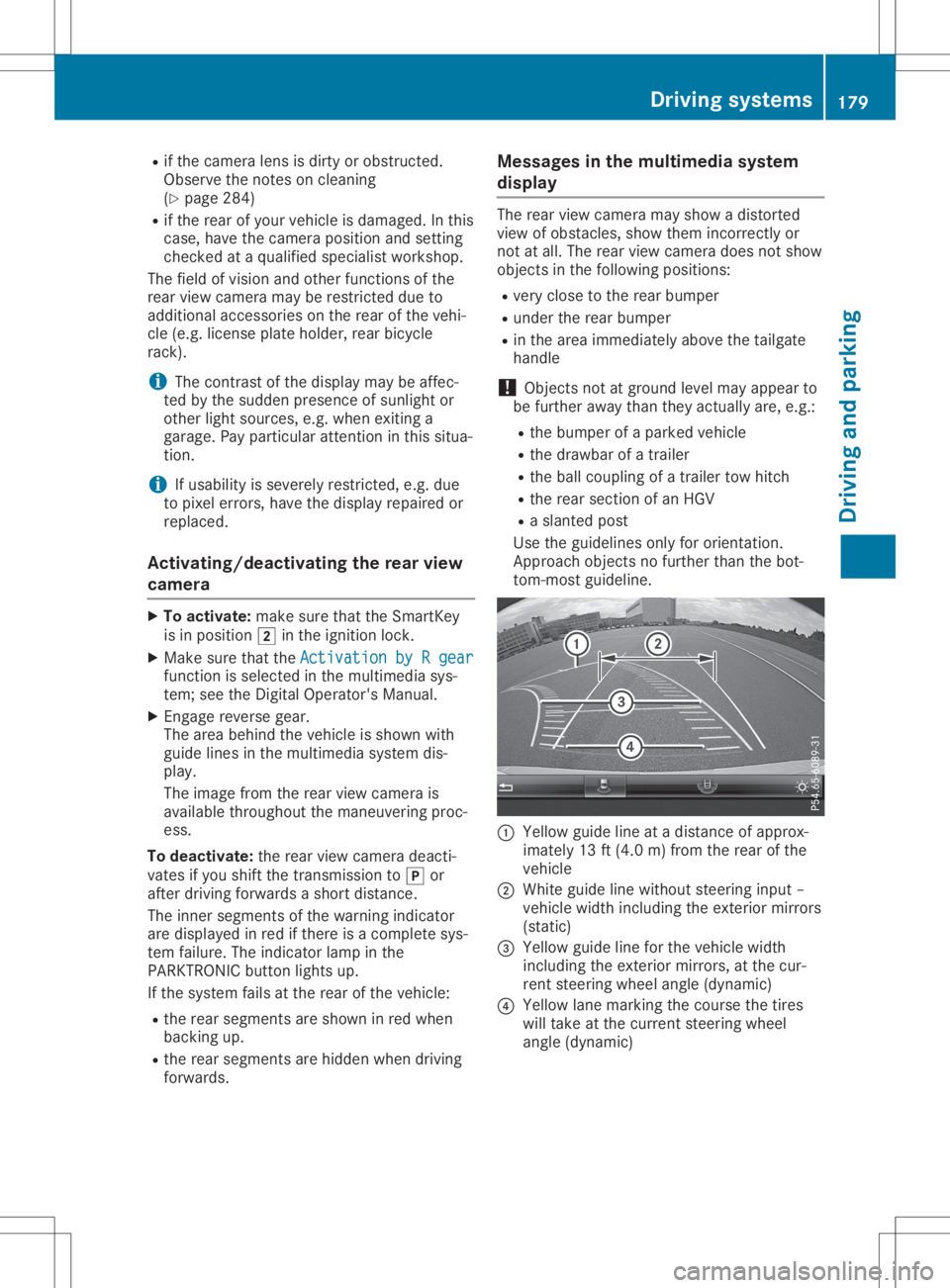
tom -most guideline . 0043
Yellow guidelineatadist anceof approx -
imate ly13 ft(4. 0m) fromthe rear ofthe
vehic le
0044 Whit eguide linewitho utste erin ginput –
vehic lewidth including theexterior mirrors
(st atic )
0087 Yellow guidelineforthe vehic lewidth
inc luding theexterior mirrors, atthe cur-
ren tste erin gwheel angle(dynamic )
0085 Yellow lanemark ingthe cour sethe tires
will takeat the curr entsteerin gwheel
angle (dynamic ) Driving
systems
179Driving andparking Z
Page 182 of 346
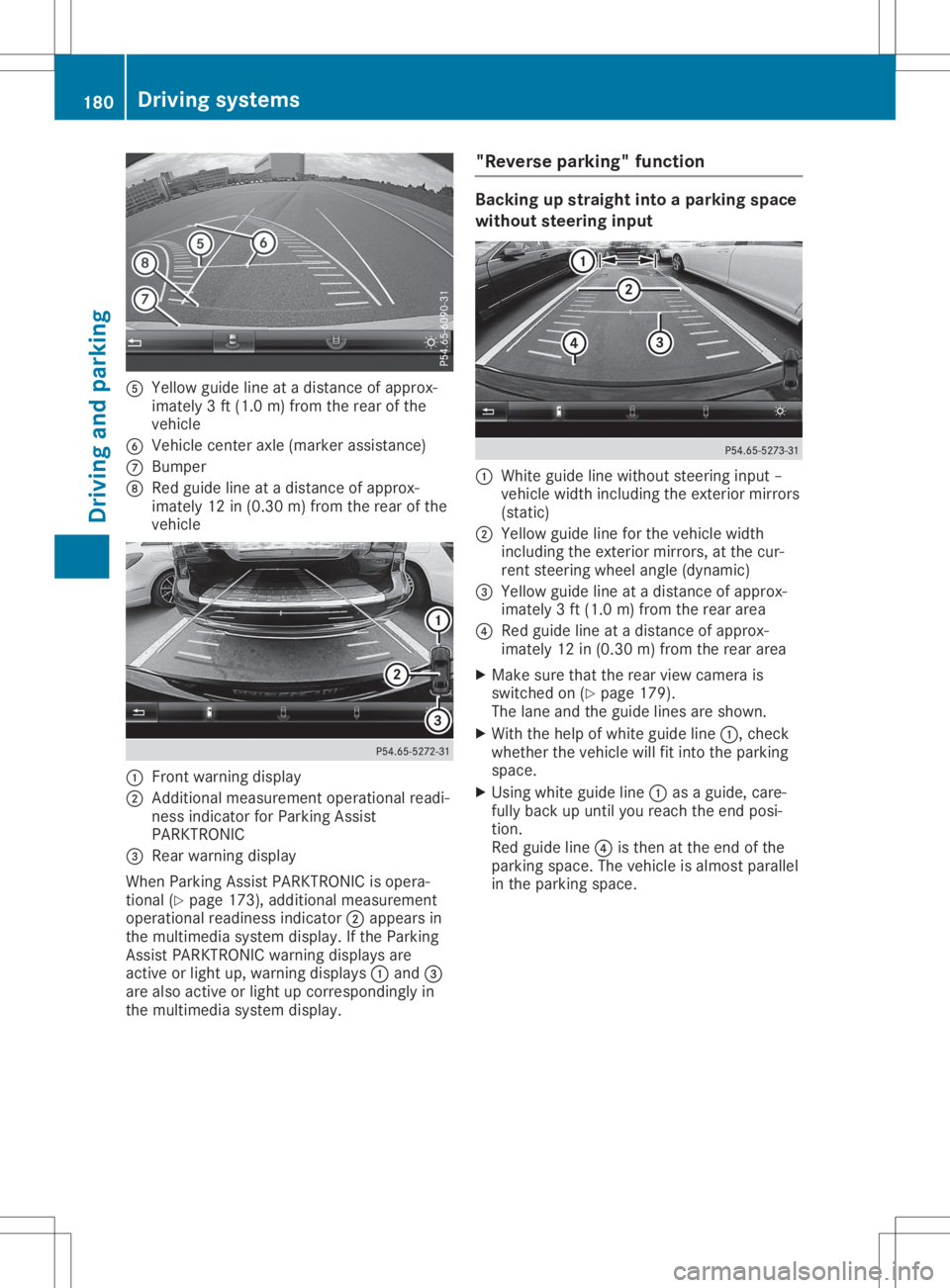
0083
Yellow guidelineatadistan ceofapprox -
imate ly3ft (1. 0m) from therear ofthe
vehic le
0084 Vehic lecen teraxle (mark erassist ance)
006B Bumper
006C Red guide lineatadistan ceofapprox -
imate ly12 in(0. 30 m)from therear ofthe
vehic le 0043
Frontwarnin gdisplay
0044 Addit ional measurem entoperat ionalreadi-
ness indicatorforPark ingAssist
PARKT RONIC
0087 Rear warnin gdisplay
When ParkingAssistPARKT RONIC isopera-
tion al(Y page 173),addition almeasurem ent
operat ionalreadin essindic ator0044appears in
the multim ediasyste mdisplay. Ifthe Park ing
Ass istPARKT RONIC warningdisplays are
act ive orlight up,warnin gdisplays 0043and 0087
are also active orlight upcor respon dinglyin
the multim ediasyste mdisplay. "Rever
separking" funct ion Ba
cking upstraight intoapa rking space
withou tsteer inginpu t 0043
Whit eguide linewithout steerin ginput –
vehic lewidth including theexterior mirrors
(stat ic)
0044 Yellow guidelineforthe vehic lewidth
inc luding theexterior mirrors, atthe cur-
ren tste erin gwheel angle(dynamic )
0087 Yellow guidelineatadistan ceofapprox -
imate ly3ft (1. 0m) from therear area
0085 Red guide lineatadistan ceofapprox -
imate ly12 in(0. 30 m)from therear area
X Make surethattherear view camer ais
switc hedon(Ypage 179).
The lane andtheguide linesareshown .
X With thehelp ofwhite guide line0043,chec k
wheth erthe vehic lewill fitintothe park ing
space.
X Usin gwhite guide line0043asaguide, care-
fully back upunt ilyou reach theend posi-
tion .
Red guide line0085isthe nat the end ofthe
park ingspace. Thevehic leisalmost parallel
in the park ingspace. 180
Driving
systemsDriving andparking
Page 183 of 346
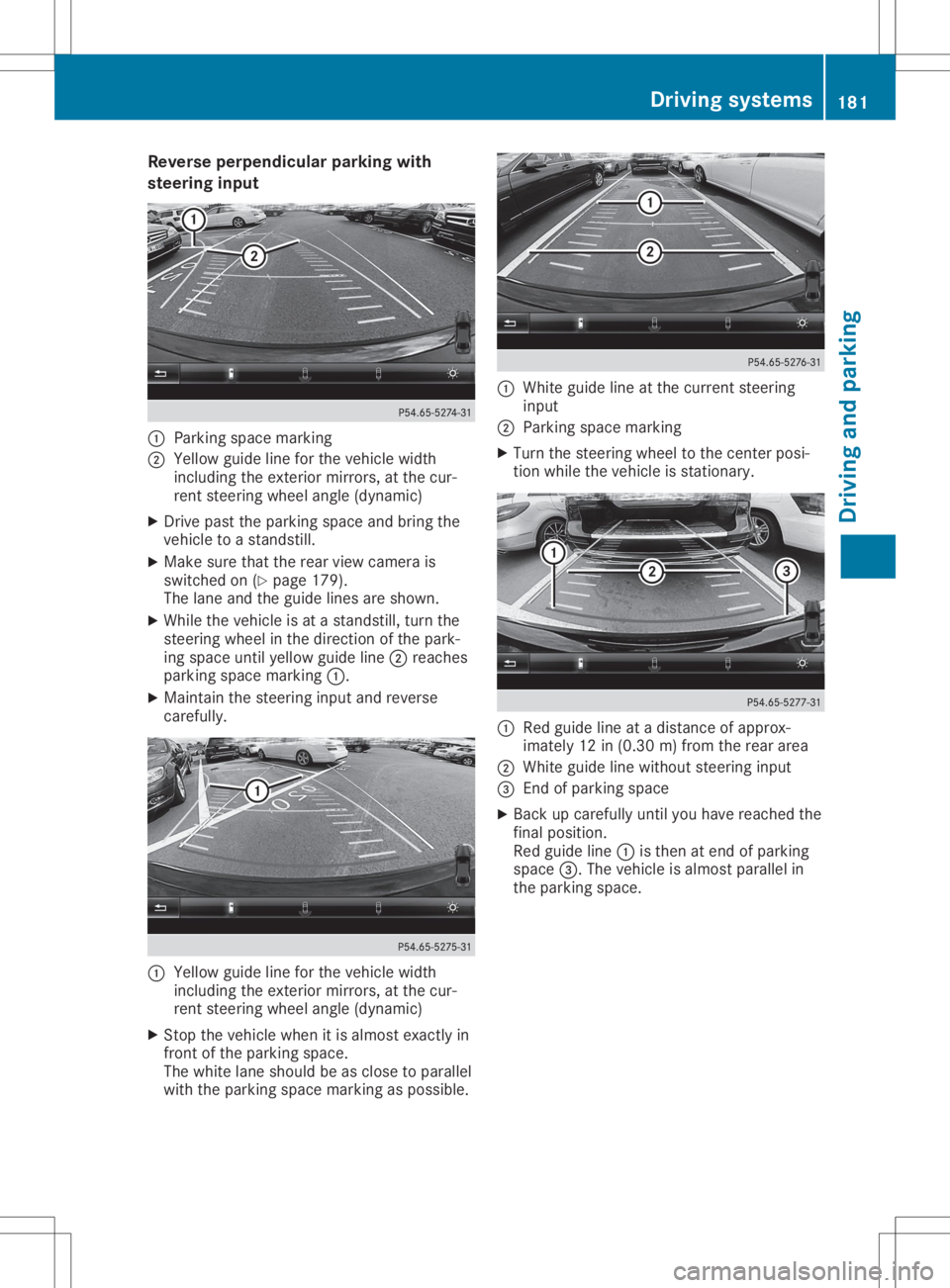
Reve
rseperpe ndicularparkin gwi th
ste ering input 0043
Parking spacemar king
0044 Yellow guide line for the vehi clewidth
incl uding the exteri ormirr ors, atthe cur-
rent steering wheelang le(dyna mic)
X Drive past the parking spaceand bring the
vehi cletoastand still.
X Ma kesure that therearvie wcame rais
swi tched on(Ypage 179 ).
The lane and theguide lines areshown.
X Whi lethe vehi cleisat astand still,turn the
stee ring wheelin the directi onofthe park-
ing spaceunti lye llow guide line 0044 reaches
pa rking spacemar king 0043.
X Ma inta inthe stee ring inputand reverse
care fully. 0043
Yellow guide line for the vehi clewidth
incl uding the exteri ormirr ors, atthe cur-
rent steering wheelang le(dyna mic)
X Stop thevehi clewhe nit is almost exactly in
front ofthe parking space.
The whitelane sho uld be asclo setoparal lel
wi th the parking spacemar king aspos sible. 0043
Whiteguide line atthe curr entstee ring
inp ut
0044 Parking spacemar king
X Tu rn the stee ring wheelto the center posi-
tion whilethe vehi cleisstati onary. 0043
Redgu ide line atadi stance ofappro x-
ima tely 12in(0.30 m)from the rearar ea
0044 Whiteguide line withou tste ering input
0087 End ofparki ng space
X Bac kup car efully unti lyo uha ve rea che dthe
fin alpo sitio n.
Re dgu ide line 0043 isthe nat end ofparki ng
sp ace 0087.The vehicleis almos tpa rallel in
the parki ng space . Dr
ivi ng system s
181Drivi ng andparki ng Z
Page 184 of 346
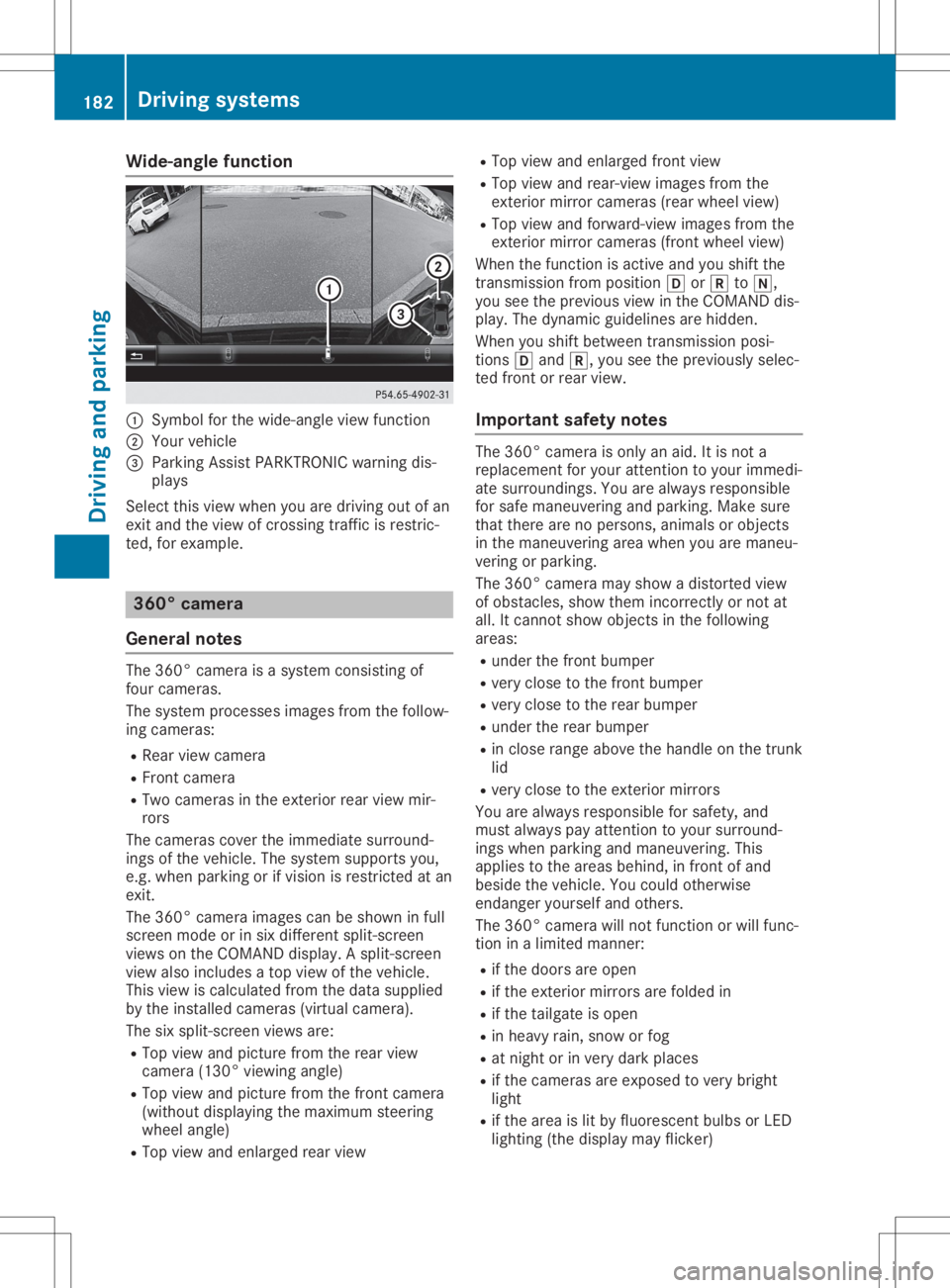
Wide-ang
lefuncti on 0043
Symbo lfor the wide-angl eview function
0044 You rvehicl e
0087 Parki ngAssist PARKTR ONICwarning dis-
pla ys
Select thisview whenyou aredrivi ngout ofan
exit and theview ofcrossing trafficisrestric-
ted, forexamp le. 360
°camera
Gene ralnote s The
360° camera isasyste mconsisting of
four camera s.
The syste mprocess esima ges from thefollow-
ing camera s:
R Rea rview camera
R Front camera
R Two camera sin the exterior rearview mir-
rors
The camera scover theimmed iatesurro und-
ings ofthe vehicl e.The syste msup ports you,
e.g. when parkingorifvisi onisrestricted atan
exit.
The 360° camera images can beshow nin full
screen modeorinsix diffe rent split-screen
view son the COMAND display.A spli t-screen
view alsoinclu desatop view ofthe vehicl e.
This view iscalcu latedfrom thedata supplied
by the instal ledcamera s(virtu alcamera ).
The sixspli t-screen viewsare:
R Top view andpicture fromtherear view
camera (130°viewingangl e)
R Top view andpicture fromthefront camera
(wi thout displaying the maximu msteering
whee langl e)
R Top view andenlarged rearview R
Top view andenlarged front view
R Top view andrear-vi ewima ges from the
exterior mirrorcamera s(rea rwhe elview )
R Top view andforwa rd-view images from the
exterior mirrorcamera s(front wheelview )
When thefunction isactive andyoushift the
transmiss ionfrom position 005Bor005E to005C,
you seetheprevi ousview inthe COMAND dis-
pla y.The dyna micguidel ines arehidd en.
When youshift betwe entransmiss ionposi -
tions 005Band 005E,you seetheprevi ouslysele c-
ted front orrear view.
Important safetynotes The
360° camera isonly anaid.It is not a
repl aceme ntfor you rattention toyou rimmed i-
ate surro undings. Youarealwaysrespo nsible
for safe maneu veringandparki ng.Make sure
that there arenoperso ns,anima lsor objects
in the maneu veringareawhenyou aremaneu -
vering orparki ng.
The 360° camera mayshow adistorte dview
of obsta cles,show themincorrectly ornot at
all .It cannot showobjects inthe followi ng
area s:
R under thefront bump er
R very close tothe front bump er
R very close tothe rear bump er
R under therear bump er
R in close range abovethe handl eon the trunk
lid
R very close tothe exterior mirrors
You arealwaysrespo nsiblefor safe ty,and
must alwayspay attention toyou rsurro und-
ings whenparki ngand maneu vering. This
app liesto the area sbehi nd,infront ofand
besi dethe vehicl e.You couldotherw ise
endang eryou rself andothers.
The 360° camera willnot function orwil lfunc-
tion inalimi ted manner:
R ifthe doors areopen
R ifthe exterior mirrorsarefoldedin
R ifthe tailgate isopen
R in hea vyrain, snow orfog
R at night orinvery dark places
R ifthe camera sare expose dto very bright
lig ht
R ifthe area islit by fluo rescent bulbsorLED
lig hting (thedisplaymay flicker) 182
Driv
ingsyste msDrivingand parking
Page 186 of 346
Imp
ortant safety notes AT
TENTI ON ASSIST ison lyan aid tothedriv er.
It mig htnotalways recogn izefatigue or
inc reas inginatten tiven ess intime orfail to
rec ogn izethem atall. The systemisno ta sub-
st itute forawell- restedand attentive driv er.
The function alit yof ATTENTI ON ASSIST is
res trict ed and warn ingsmay bedelaye dor not
oc cur atall:
R ifth elen gthof thejo urn eyisless than
appr oximat ely30min utes
R ifth eroad cond ition ispoor ,e. g. ifth esur -
fac eis une ven orifth ere arepothole s
R ifth ere isast ron gside wind
R ifyou have adopt edaspo rty driv ingstyle
wit hhigh cornerin gspee dsorhigh rates of
acc eler ation
R ifyou arepredom inantly driv ingslow erthan
37 mph (60km/h) orfas terth an 125mph
(20 0km/ h)
R ifthe timehas been setincorre ctly
R in act ive drivin gsituat ions,such aswhen
you chan gelanes orchan geyour speed
ATTE NTIO NAS SIS Tis reset when youcontinue
your journey and startsassess ingyour tired-
nes sagain if:
R you switc hoff the engin e
R you takeoff your seatbeltandopen the
drive r'sdoor, e.g.forachan geofdrive rsor
to tak eabreak
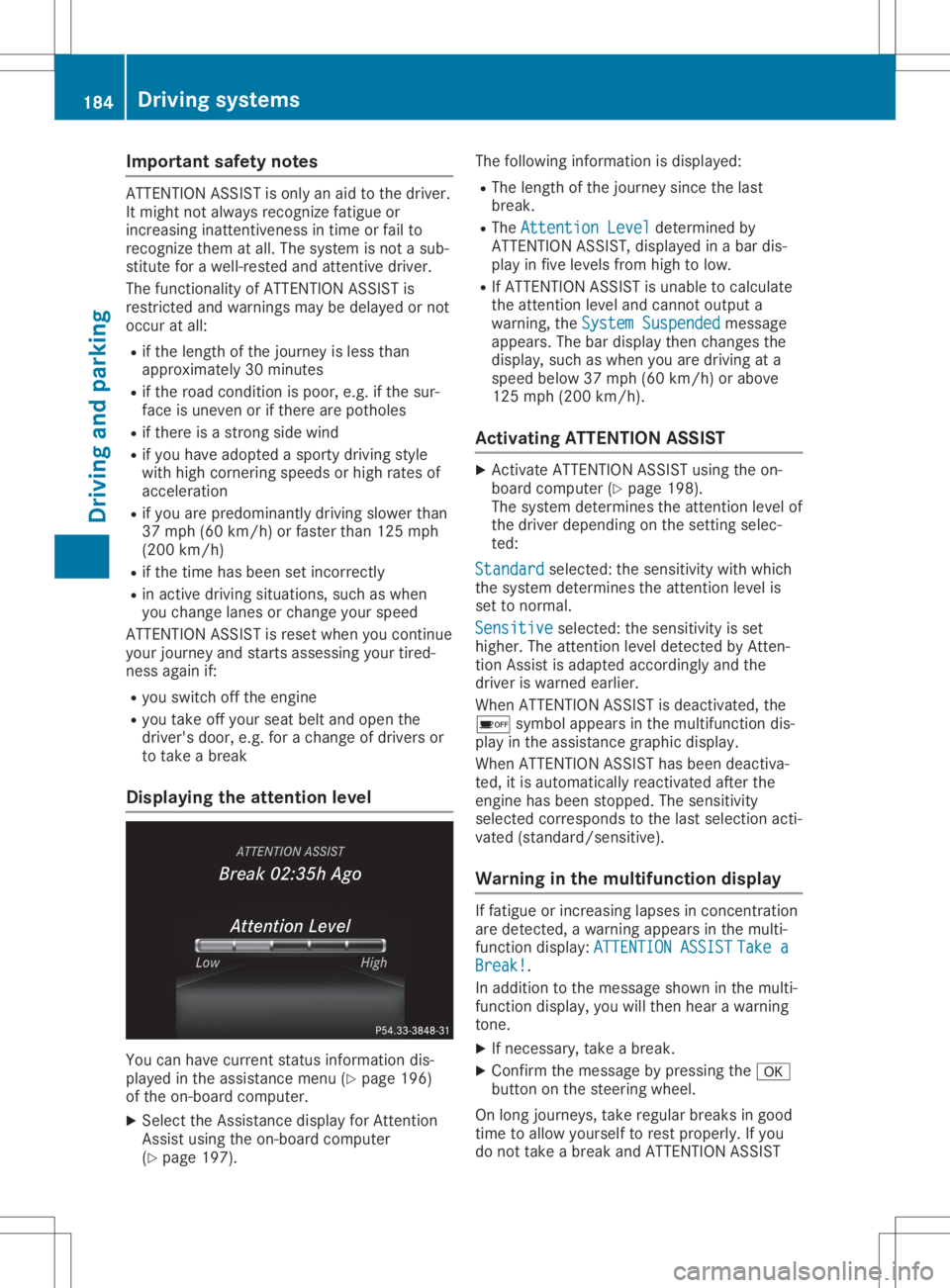
Displa yingtheat tent ionlevel You
canhave currentstatusinformat iondis-
played inthe assist ancemen u(Y page 196)
of the on-board computer .
X Selec tthe Assistan cedisplay forAtten tion
Ass istusing theon-board computer
(Y page 197). The
followin ginf ormat ionisdisplayed:
R The lengt hof the jour ney sincethe last
break .
R The Atte ntionLeve l Atte
ntionLeve ldete rmin edby
ATTE NTIO NAS SIS T,displayed inabar dis-
play infive levels fromhigh tolow.
R IfATTE NTIO NAS SIS Tis unable tocalc ulate
the attent ion level andcannot output a
warnin g,the Syst emSusp ended Syst
emSusp endedmess age
appears. Thebardisplay thenchan gesthe
display, suchaswhen youaredrivin gat a
speed below37mph (60km /h)or above
125 mph (200 km/h).
Activa tingATTENT ION ASSIST X
Ac tivate ATTE NTIO NAS SIS Tusing theon-
board computer (Ypage 198).
The systemdete rmin esthe attent ion level of
the drive rdepen dingonthe settingselec -
ted:
Stan dard Stan
dard selected:thesensitiv itywith which
the syst emdete rmin esthe attent ion level is
set tonor mal.
Sens itive Sens
itiveselec ted:thesensitiv ityisset
higher .The attent ion level detected byAtten -
tion Assistisadapted accordin glyand the
drive ris warne dearlier.
When ATTENTIO NAS SIS Tis deact ivated, the
00D7 symbol appears inthe multif unction dis-
play inthe assist ancegraphic display.
When ATTENTIO NAS SIS Thas been deact iva-
ted, itis autom atically react ivatedafterthe
engin ehas been stopped. Thesensitiv ity
selec tedcorrespo ndstothe last selec tionacti-
vate d(st andard /sensitive).
War ning inthemu ltifunct iondisp lay If
fat igue orinc reasin glapses incon centration
are dete cted, awarnin gappears inthe multi-
func tion display: ATTENTIONASSI ST ATTE
NTIONASSI STTake a Take
a
Brea k! Brea
k!.
In addition tothe mess ageshown inthe multi-
func tion display, youwillthenhear awarnin g
ton e.
X Ifnec essary, takeabreak .
X Conf irmthemess agebypress ingthe 0076
butt ononthe steerin gwheel.
On long journeys, takeregular breaksin good
tim eto allow yourself torest proper ly.Ifyou
do not takeabreak andATTE NTIO NAS SIS T 184
Driving
systemsDriving andparking