ECU MERCEDES-BENZ GLA 2020 Repair Manual
[x] Cancel search | Manufacturer: MERCEDES-BENZ, Model Year: 2020, Model line: GLA, Model: MERCEDES-BENZ GLA 2020Pages: 346, PDF Size: 17.58 MB
Page 251 of 346
Connect
ingamob ilephone
X One- telep hone mode:selec tCon nectas Con
nectas
New MainPho ne New
MainPho ne.
X Two- telep hone mode:selec tCon nectas Con
nectas
Add itionalPho ne Add
itionalPho newhen amobi lephon eis
already connected.
X Aut
horization usingSecur eSim plePair -
ing:
A cod eis displayed inthemult imedi asys-
tem andonthemobi lephon e.
X Conf irmcodeon themobi lephon e.Dep end-
ing onthemobi lephon eused, confirm the
con nectionto themult imedi asyst emand
for thePBA Pand MAPBluet ooth®
prof iles.
The prom pttocon firm may takeup totwo
min utes tobe displayed (seetheman ufac-
tur er'soper atingins truct ions).
X Ifth ecod esare differen t:selec tNo No
on the
mult imedi asyst em.
The proc essiscan cele d.
Repeat authorizatio n.
or X Aut
horization byente ringapa sskey
(pa sscod e):enterany one-to six tee n-digit
num bersequen cewhic hyou have chosen
yourse lfint oth epassk eyinput menu.
X Pres s0054 tocon firm.
X En ter and confirm thepassk eyon the
mobi lephon e.Dep endingonthemobi le
phon eused, confirm thecon nectionto the
mult imedi asyst emand forthePBA Pand
MA PBluet ooth®
prof iles. Theprom ptto
con firm may takeup totwo minutes tobe
displayed (seetheman ufacturer'soper ating
ins truct ions).
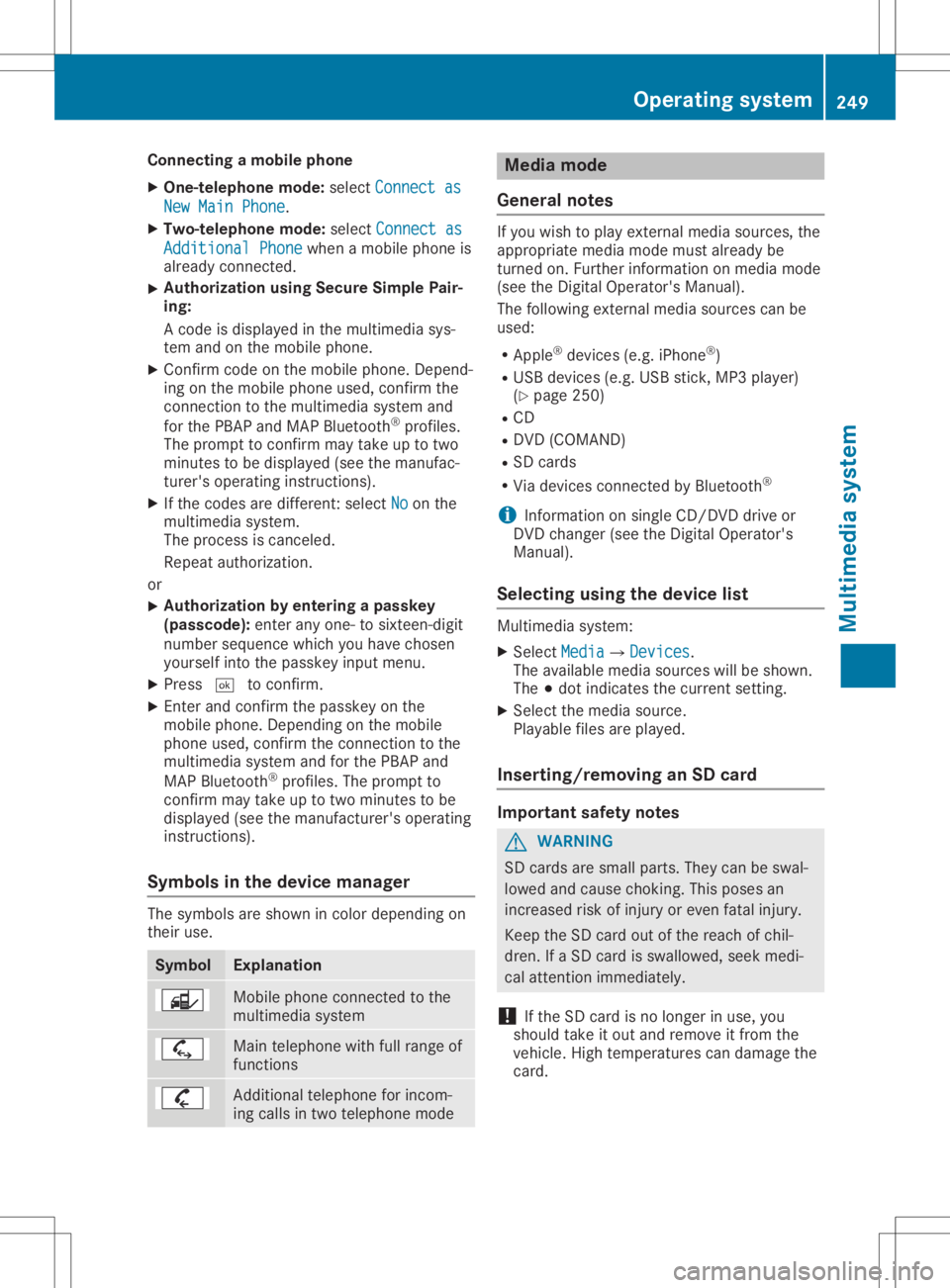
Sym bols inthedev icemanager The
symbo lsare shown incolo rdepen dingon
th eir use. Sym
bol Expl
anation Mobile
phonecon nected tothe
mult imedi asyst em Main
telephon ewith fullrangeof
fun ction s Add
itional telephon efor incom-
ing calls intwo telephon emode Med
iamod e
Gener alnotes If
you wish toplay extern almedia sources,th e
appro priatemedia modemustalready be
tur ned on.Further inform ationon media mode
(see theDig ital Oper ator'sMan ual).
The follo wing extern almedia sourcescan be
used:
R App le®
devic es(e.g.iPhon e®
)
R US Bdevic es(e.g.US Bstick ,MP3 player)
(Y page 250)
R CD
R DV D(COMA ND)
R SD cards
R Via devic escon nected byBluet ooth®
i In
for mat iononsingle CD/ DVDdriv eor
DV Dchan ger(see theDig ital Oper ator's
Man ual).
Select ingusin gth edev icelist Mult
imedi asyst em:
X Sele ctMed ia Med
ia007B Devices Dev
ices.
The available mediasourceswillbeshown .
The 003Bdot indicatesthecur ren tset ting.
X Sele ctthemedia source.
Playable filesareplayed.
Inser ting/rem ovinganSD card Imp
ortant safety notes G
WAR
NING
SD cardsare small parts.They canbeswal-
lowed andcause choking.This poses an
inc reas edrisk ofinjury oreven fatalinj ury.
Keep theSD cardout ofthereac hof chi l-
dren .If aSD cardis swallowe d,seek medi-
cal attent ion imm ediat ely.
! If
th eSD cardis no longer inuse, you
should takeit out and remove itfro mthe
veh icle.High temperat urescandamage the
car d. Oper
ating syst em
249Multim edia system Z
Page 253 of 346
Load
ingguid elines G
WAR
NING
If obj ect s,luggage orloads arenot secured
or not secured sufficiently, they could slip,
tip over orbe flun garoun dand thereb yhit
veh icle occupant s.Ther eis arisk ofinjury,
part icular lyin theeven tof sudden braking
or asudden changeindirec tion.
Always store object sso that they can not be
flun garoun d.Sec ure object s,luggage or
loads againstslippin gor tipping beforethe
jo urn ey. G
DANG
ER
Combus tioneng inesemit poiso nous
exh aust gases suchascar bon mon oxide.
Ex haust gases canentertheveh icle interio r
if th etailg ateisopen while theeng ineis
run ning,espec iallyifth eveh icle isin
mot ion.Ther eis arisk ofpoiso ning.
Always switchoff theeng inebefo reopen ing
th etailg ate. Neverdriv ewith thetailg ate
open . G
WAR
NING
The exhaust tailpipe andtailpipe trim can
bec ome veryhot .If you com eint ocon tact
with these partsof theveh icle,you could
burn yourse lf.Ther eis arisk ofburn s.
Always bepart icular lycar eful andsuper vise
chi ldren closely aroun dth eexh aust pipeand
th eexh aust pipetrims. Allowthese com po-
nen tsto coo ldown beforetouchin gth em.
The handlingchar acteris ticsof aladen vehicle
are depen denton thedist ribut ionoftheload
with intheveh icle.
Obse rvethefollo wing noteswhen loadin gand
tr ans port ingaload:
R Nev erexc eed themax imum permissible
gro ssveh icle mass orthegro ssaxle weight
rat ing fortheveh icle (includin gocc upant s).
The values arespec ified ontheveh icle iden - tif
icat ion plat eon theB- pillar ofthedriv er's
door .
R The cargocom partmen tis thepref erred
place tocar ryobj ect s.
R Posit ionheavy loadsasfar forward asposs i-
ble and aslow down inthecar gocom part-
men tas poss ible.
R The load must notprot rude above theupper
edge oftheseat backrests.
R Always placetheload again sttherear or
fro ntseat backrests.Mak esure that the
seat backrestsare securely lockedinto
place .
R Always placetheload behin dunoc cupie d
seat sif poss ible.
R Use thecar gotie-do wn rings and theparc el
net sto trans port loads andluggage .
R Use cargotie-do wn rings and fastening
mat erials appropriatefor theweight and
siz eof theload.
R The maximum loadcapac ityofthest owage
well unde rth ecar gocom partmen tfloo ris
55 lbs (25 kg).
R Se cure the load with sufficiently stron gand
wear- resistant tie-do wns .Pad sharpedges
for prot ection.
! Do
notposit iontheload ononepart ofthe
fold ingcargocom partmen tfloo ron ly. The
max imum loadcapac ityofthefold ingcargo
com partmen tfloo ris 22 0lbs (100kg ).Di s-
tri bu te the weight evenlyto avoid damagin g
th ecar gocom partmen tfloo r.Place asolid
board undertheload ifnec essar y.Please
not eth at theload onthecar gocom part-
men tfloo rwill beincrease dwhen theload
is lashed down. St
owage areas St
owage spaces
Imp ortant safety notes G
WAR
NING
If you transp ortobject sin thevehic leint e-
rior and these arenot adequat elysecured,
th ey could sliporbe flun garoun dand
th ereby strik evehic leocc upant s.In addi-
tio n,cup holder s,open stowage spacesand
mobile phonebrac ketsmay notalways be St
owage areas
251Stowage andfeatures
Z
Page 254 of 346
able
tohold theobj ect splace din them in
th eeven tof an acc iden t.Ther eis arisk of
inj ury, particular lyin theeven tof shar p
brak ingorsudden chang esofdire ction .
R Always stow object sin suc haway that
th ey can notbe tossed about inthese or
simi larsituatio ns.
R Always makesure that obj ect sdo notpro-
tr ude outofthest owage spaces,luggage
net sor stowage nets.
R En sure that clo sable stowage spacesare
shut beforebegin ningyour journ ey.
R Always stow and secure heav y,hard ,poin -
te d, shar p-edged, fragile orlarge object s
in thecar gocom partmen t.
Obse rveth eloadin gguideli nes(Ypage 251).
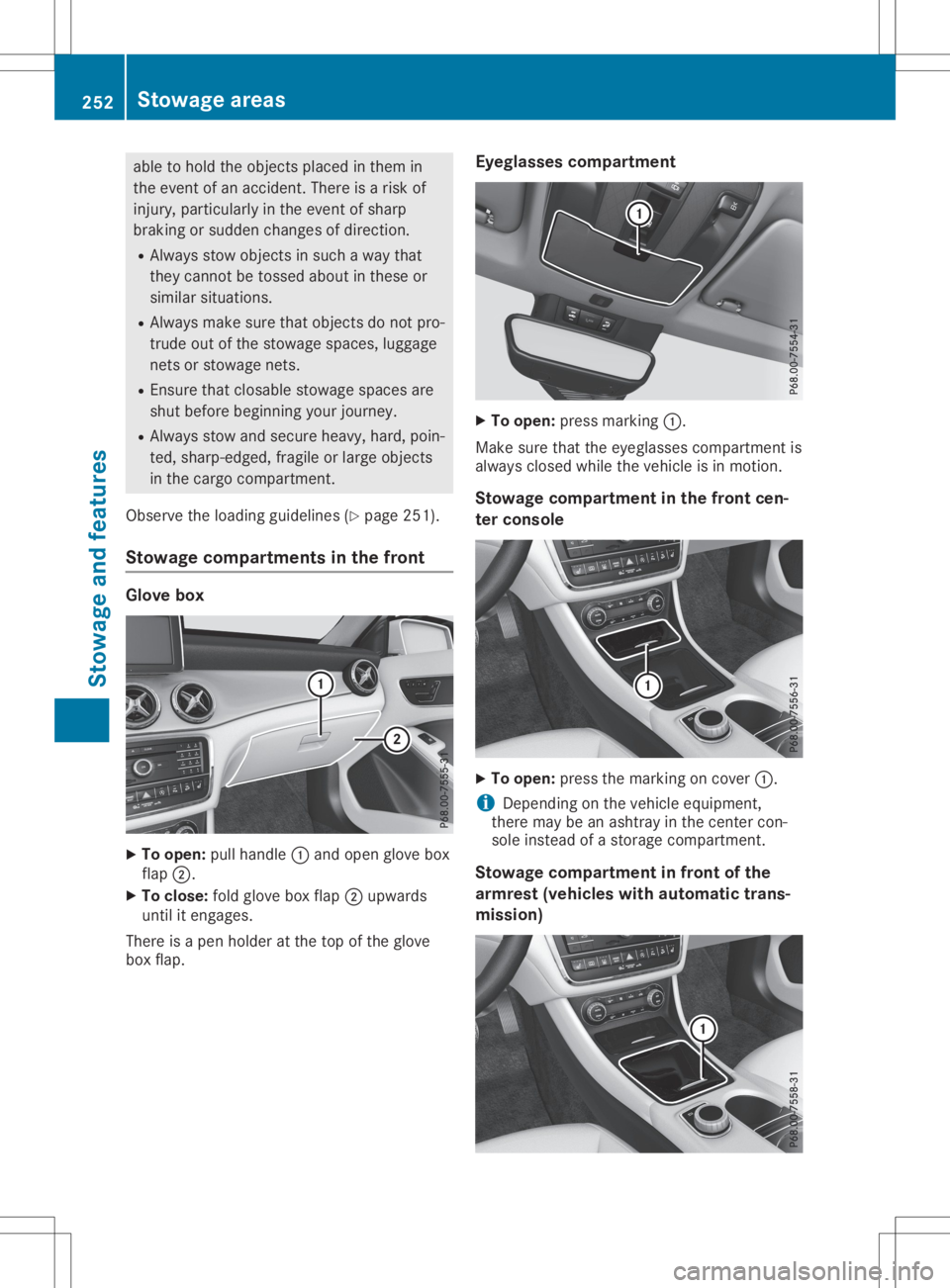
St owage compartm ent sin thefront Glove
box X
To open :pull handle0043and open glovebox
flap 0044.
X To close: foldglovebox flap 0044upwards
unt ilit eng ages.
Ther eis apen holde rat theto pof theglov e
box flap. Eyegla
ssescomp artm ent X
To open :pres smar king0043.
Mak esure that theeyeglas sescom partmen tis
always closed while theveh icle isin mot ion.
St owage compartm ent inthefront cen-
ter console X
To open :pres sth emar kingon cov er0043.
i De
pen dingon theveh icle equipm ent,
th ere may beanasht rayinthecen tercon -
sole instead ofast orag ecom partmen t.
St owage compartm ent infront ofthe
ar mr est (vehi cleswith autom atic trans -
mis sion) 252
St
owage areasSt owage andfeatures
Page 256 of 346
X
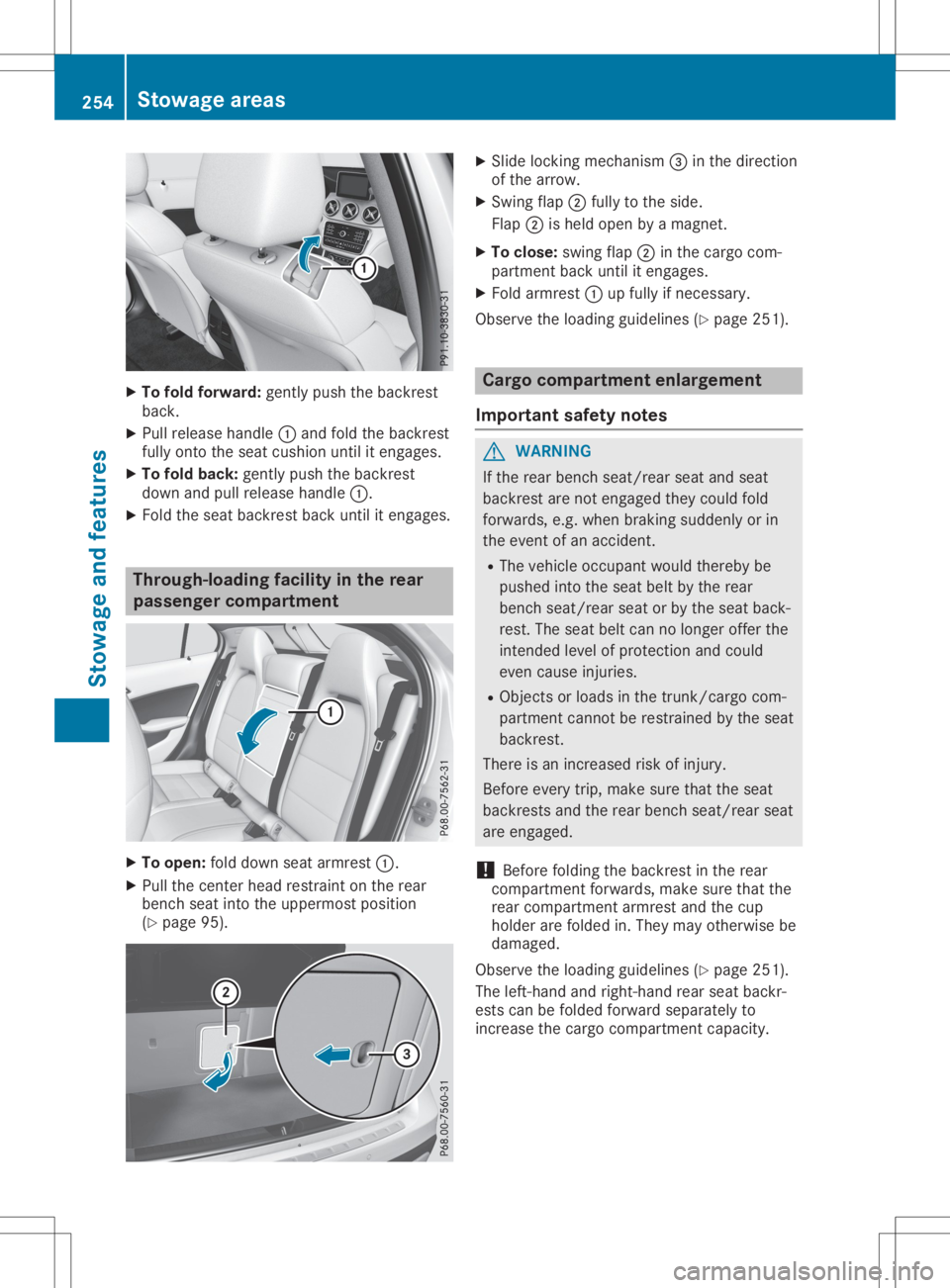
To foldforw ard:gentl ypu sh the backres t
ba ck.
X Pu llrel ease handl e0043 and foldthe backres t
ful lyonto theseatcus hion unti lit enga ges.
X To foldbac k:gentl ypu sh the backres t
do wn and pullrel ease handl e0043.
X Fol dthe seatba ckres tba ck unti lit enga ges. Throu
gh-loadi ngfac ility inthe rear
pass engerco mpartmen t X
To ope n:folddo wn seatarm rest0043.
X Pu llthe cente rhea dres trai nton the rear
be nch seatinto theuppermos tpo sitio n
(Y page 95). X
Sli de locking mechanism 0087inthe directi on
of the arrow .
X Swi ngflap0044 fullyto the side .
Fla p0044 ishel dop en byama gnet.
X To clos e:sw ing flap0044 inthe cargocom-
pa rtment back unti lit enga ges.
X Fol darm rest0043 upfullyifnece ssary.
Obs erve theload ing guideline s(Y page 251 ). Carg
oco mpartmen ten larg eme nt
Impo rtant safetynotes G
WAR
NING
If the rearbe nch seat/rea rsea tand seat
ba ckres tare not enga gedthey couldfol d
forw ards,e.g .wh en bra king sudd enl yor in
the eventofan acci dent.
R The vehicleoccu pant wo uld ther ebybe
pu she dinto theseatbe ltby the rear
be nch seat/rea rsea tor by the seatba ck-
res t.The seatbe ltcan nolonger offerthe
inte ndedlevel ofpro tecti onand could
eve ncau seinju ries.
R Obje ctsorload sin the trunk/ cargocom-
pa rtment cannotbe res trai ned bythe seat
ba ckres t.
The reisan incre ased riskof inju ry.
Befo reeve rytrip ,ma kesure tha tthe seat
ba ckres tsand therearbe nch seat/rea rsea t
are enga ged.
! Befo
refolding the backres tin the rear
comp artmentforw ards,ma kesure tha tthe
rea rcomp artmentarm restand thecup
hol derare foldedin. The yma yothe rwisebe
da ma ged .
Obs erve theload ing guideline s(Y page 251 ).
The left-ha ndand right-ha ndrea rsea tba ckr-
ests canbefoldedforw ardseparatelyto
incre asethe cargocomp artmentcapacity. 25
4 Sto
wage areasSto wag ean dfe ature s
Page 258 of 346
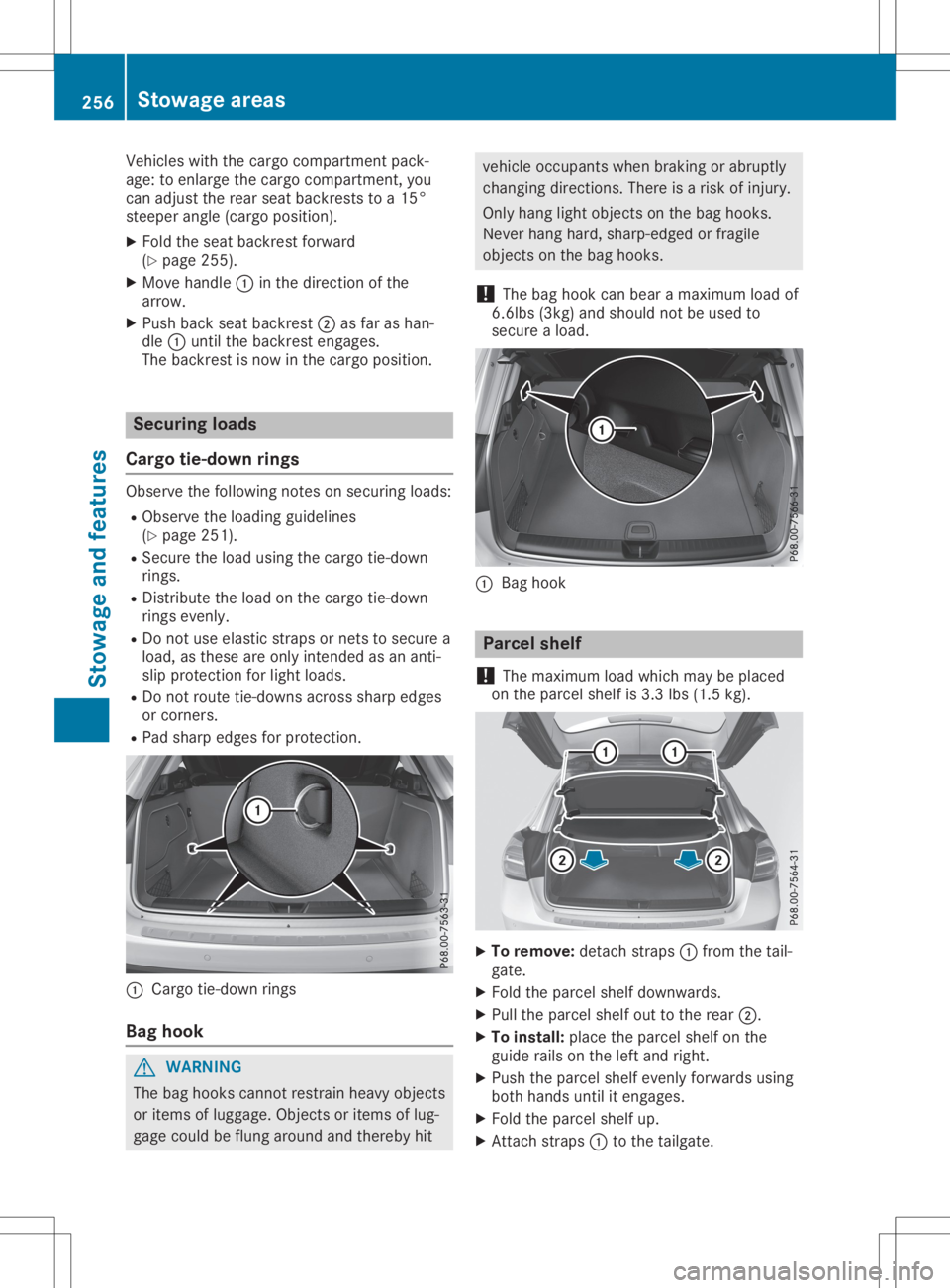
Vehicles
withthecargo compartment pack-
age: toenlarge thecargo compartment, you
can adjust therear seat backrests toa15°
steeper angle(cargo position).
X Fold theseat backrest forward
(Y page 255).
X Move handle 0043inthe direction ofthe
arrow.
X Push backseatbackrest 0044asfar ashan-
dle 0043until thebackrest engages.
The backrest isnow inthe cargo position. Securing
loads
Cargo tie-down rings Observe
thefollow ingnotes onsecuring loads:
R Observe theload ingguid elines
(Y page 251).
R Secure theload using thecargo tie-down
rings.
R Distribute theload onthe cargo tie-down
rings evenly.
R Do not use elastic strapsornets tosecure a
load ,as these areonly intended asan anti-
slip protection forlight loads.
R Do not route tie-downs acrosssharpedges
or corners.
R Pad sharp edges forprotection. 0043
Cargo tie-down rings
Bag hook G
WARNING
The bag hooks cannot restrain heavyobjects
or items oflugga ge.Objects oritems oflug-
gage could beflung around andthereby hit vehicle
occupants whenbraking orabrup tly
changing directions. Thereisarisk ofinjury.
Only hang lightobjects onthe bag hooks.
Never hanghard, sharp-edged orfragile
objects onthe bag hooks.
! The
bag hook canbear amaximum loadof
6.6lbs (3kg)andshould notbeused to
secure aload . 0043
Bag hook Parcel
shelf
! The
maximum loadwhich maybeplaced
on the parcel shelfis3.3 lbs(1.5kg). X
To remove: detachstraps0043from thetail-
gate.
X Fold theparcel shelfdownwa rds.
X Pull theparcel shelfouttothe rear 0044.
X To install: placetheparcel shelfonthe
guid erails onthe left and right.
X Push theparcel shelfevenly forwards using
both hands untilitengages.
X Fold theparcel shelfup.
X Att ach straps 0043tothe tailga te. 256
Stowage
areasStowage andfeatur es
Page 260 of 346
You
willfindinf ormat iononthe maxim umroof
load inthe "Techn icaldata" section
(Y page 341).
An incorre ctly secur edroof carrierorroof load
may becom edetac hedfrom thevehic le.You
must therefo reensur ethat youobserv ethe
roof carriermanuf acturer's installation instruc-
tion s.
Att aching theroof carrier X
Sec ure theroof carriertothe roof rails. In
doing so,observ ethe manuf acturer's instal-
lation instruct ions . Featu
res Cup
holder
Imp ortant safet ynotes G
WARN
ING
The cup holder cannot hold acon tain er
secur ewhilst traveling .If you useacup
holder whilsttraveling ,the contain ermay be
flung around andliquid maybespilled. The
vehic leocc upant smay comeint ocon tact
with theliquid andifit is hot ,the ymay be
scalded. Youmay bedistr actedfrom the
tr affic condition sand youcould losecontrol
of the vehic le.There isarisk ofan accid ent
and injury.
Only usethecup holder whenthevehic leis
stat ionar y.Only usethecup holder forcon -
tain ersofthe right size.Always closethe
con tain er,part icularly ifthe liquid ishot . G
WARN
ING
The heatin gelemen tsof the cup holder can
becom every hot.You could burnyourself on
the m.
There isarisk ofinjury.
Do not touc hthe hot heatin gelemen tsof
the cup holder. Alwaysmakesurethatchil-
dren cannot acce ssthe hot heatin gele-
men tsof the cup holder. Neverleavechil-
dren unsuper visedinthe vehic le. G
WARN
ING
If you transpo rtobje ctsin the vehic leint e-
rior and theseare not adequately secured,
the ycould sliporbe flung around and
the reby strike vehic leocc upant s.In addi-
tion ,cup holders ,open stowage spaces and
mobile phonebrack etsmay notalways be
able tohold theobje ctsplaced inthe min
the even tof an accid ent.There isarisk of
inj ury, particularly inthe even tof sharp
brak ingorsudden changesofdirec tion.
R Always stowobje ctsin such away that
the ycan not betos sed about inthe seor
similar situations.
R Always makesurethatobjectsdo not pro-
tr ude outofthe stowage spaces ,luggage
net sor sto wage nets.
R En sure thatclosable stowage spaces are
shut befor ebeginn ingyour journey.
R Always stowand secur eheavy, hard,poin-
ted, sharp- edged, fragileorlarge objects
in the cargo compartmen t.
! Only
usethecup holders forcon tain ersof
the right sizeandwhich havelids.The
drin kscould otherwise spill.
Obser vethe loading guidelines (Ypage 251).
The stowage compartmen tsinthe doors pro-
vide space forbott les:
R fron t:capacit yup to34 fl.oz. (1.0 l)
R rear: capacit yup to17 fl.oz. (0.5 l)
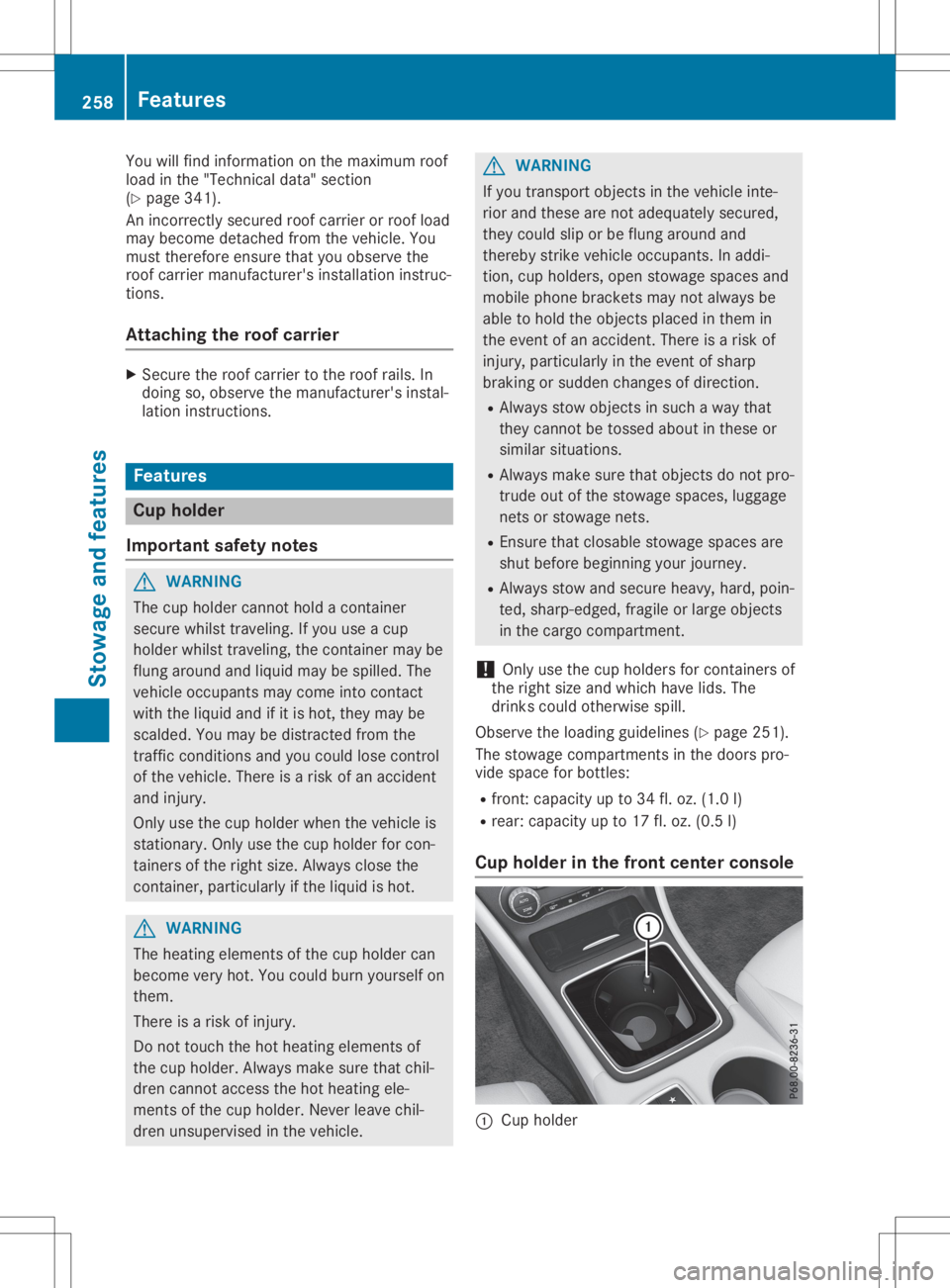
Cup holder inthefront center console 0043
Cup holder 258
Featu
resStowage andfeatures
Page 261 of 346
The
cup holder andtherubber matunderneath
can beremoved forcleaning. Cleanthemwith
clean, lukewarm wateronly.
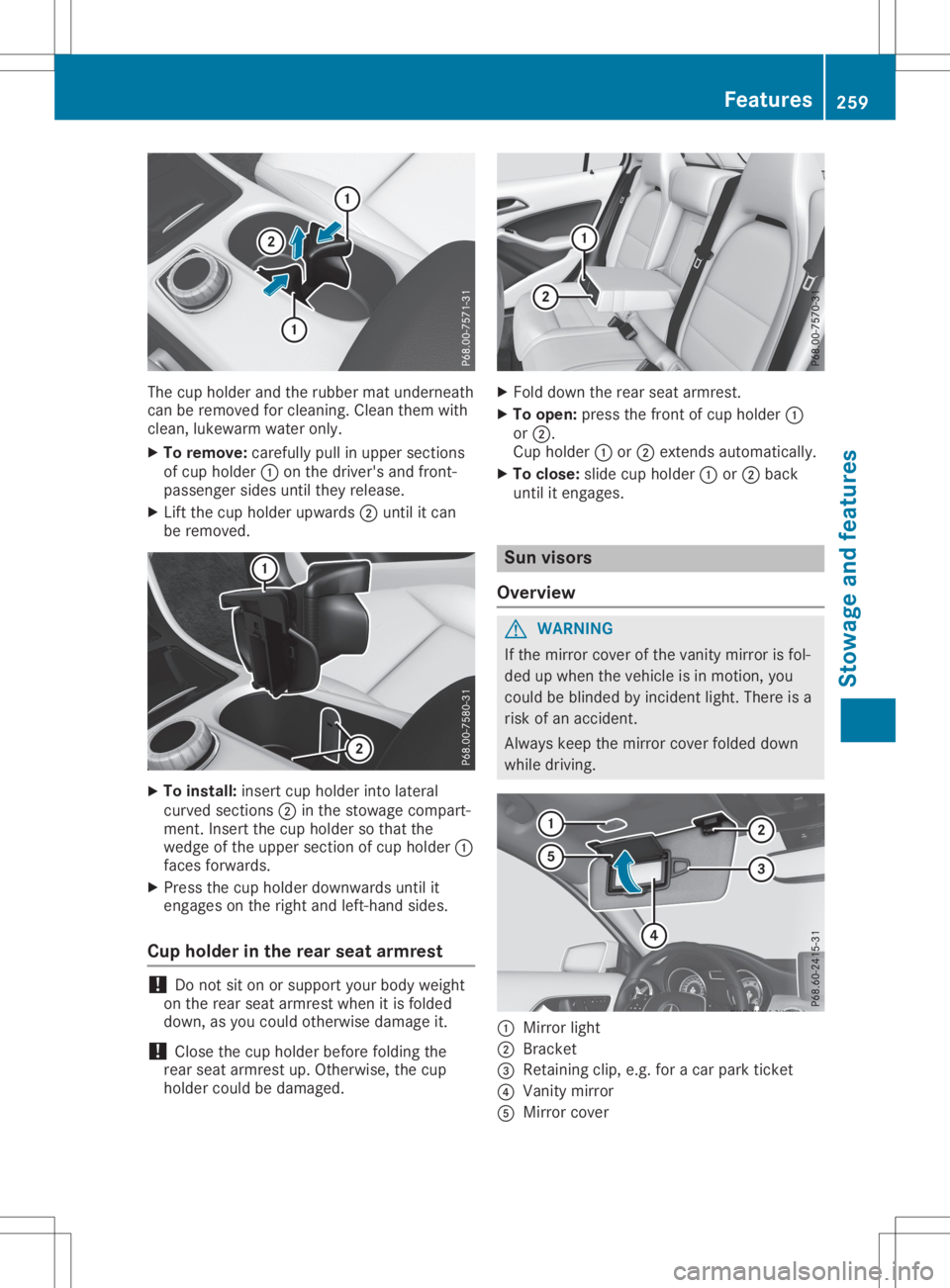
X To remove: carefullypullinupper section s
of cup holder 0043onthe driver's andfront -
passenger sidesuntiltheyrelease.
X Lift the cup holder upwards 0044until itcan
be removed. X
To install: insertcupholder intolateral
curved sections0044 inthe stowage compart-
ment .Insert thecup holder sothat the
wedge ofthe upper section ofcup holder 0043
faces forwards.
X Press thecup holder downwards untilit
engages onthe right andleft-hand sides.
Cup holder inthe rear seat armrest !
Do
not siton orsupport yourbody weight
on the rear seat armrest whenitis folded
down, asyou could otherwise damageit.
! Close
thecup holder before folding the
rear seat armrest up.Otherwise, thecup
holder couldbedamaged. X
Fold down therear seat armrest.
X To open: pressthefront ofcup holder 0043
or 0044.
Cup holder 0043or0044 exten dsautomatically.
X To close: slidecupholder 0043or0044 back
until itengages. Sun
visors
Overview G
WARNIN
G
If the mirror coverofthe vanity mirror isfol-
ded upwhen thevehicle isin motion ,you
could beblinded byincident light.There isa
risk ofan accident .
Always keepthemirror coverfolded down
while driving. 0043
Mirror light
0044 Brack et
0087 Retaining clip,e.g.foracar park ticket
0085 Vanity mirror
0083 Mirror cover Featur
es
259Stowage andfeatu res Z
Page 264 of 346
The
system isavailabl eif:
R ithas been activated andisoperational
R the correspon dingmobile phonenetwork is
availabl efor trans mittingdata tothe Cus-
tomer Center
R aservice subscription isavailabl e
R the start erbattery issufficient lycharged
i Deter mining thelocation ofthe vehicle on
a map isonly possible if:
R GPS reception isavailabl e
R the vehicle position canbeforwarded to
the Customer AssistanceCenter
The Mercedes meconnec tsystem To
adjust thevolume duringacall, proceed as
follows:
X Press the0081 or0082 button onthe multi-
funct ionsteerin gwheel.
or X Use themultimedia system'svolumecon-
trol.
The system offersvarious services, e.g.:
R Automat icand manual emergenc ycall
R Roadside Assistancecall
R MB Info call
USA only: youcan find inform ationanda
description ofall availabl efeatures under
"Owners Online"athtt p:// www.mbusa.com.
System self-test Aft
eryou have switched onthe ignition, the
system carriesoutaself-diagnosis.
A malfunct ioninthe system hasbeen detec-
ted ifone ofthe following occurs:
R The indicator lampinthe SOS button does
not come onduring thesystem self-test.
R The indicator lampinthe 0052 Roadside
Assist ancecallbutton doesnotlight updur-
ing self-diagnosis ofthe system.
R The indicator lampinthe 00D9 MBInfo call
button doesnotlight upduring self-diagno-
sis ofthe system. R
The indicator lampinone ormore ofthe fol-
lowing buttonscont inues tolight upred
after thesystem self-diagnosis:
- SOS button
- 0052 Roadside Assistancecallbutton
- 00D9 MBInfo callbutton
R Aft erthe system self-diagnosis, theInoper‐ Inoper‐
ative ative
orService NotActivated Service
NotActivated mes-
sage appears inthe multifunct iondisplay .
If amalfunct ionisindicated asoutlined above,
the system maynotoperate asexpect ed.In
the event ofan emergenc y,help willhave to
be summoned byother means.
Have thesystem checkedatthe nearest
Mercedes- BenzServic eCenter orcont actthe
following servicehotlines:
R USA: Mercedes- BenzCustomer Assistance
Center at1-8 00-FOR-ME RCedes
(1-80 0-367-6372 )or 1-86 6-990-9007
R Canada: Customer Serviceat
1-88 8-923-8367
Emergency call Import
antsafety notes G
WARNING
It can bedangerous toremain inthe vehicle,
even ifyou have pressed theSOS button in
an emergenc yif:
R you seesmoke insideoroutside ofthe
vehicle, e.g.ifthere isafire after anacci-
dent
R the vehicle ison adangerous sectionof
road
R the vehicle isnot visible orcann oteasily
be seen byother roadusers, particularly
when darkorinpoor visibility conditions
There isarisk ofan accident andinjury.
Leave thevehicle immediately inthis orsim-
ilar situations assoon asitis safe todo so.
Move toasafe location alongwithother
vehicle occupant s.In such situations, secure
the vehicle inaccordanc ewith national regu-
lations, e.g. with awarning triangle.
A license agreement mustbeinplace inorder
to activate theMercedes meconn ectservice.
Make surethatyour system isactivated and 262
Featur
esStowage andfeatu res
Page 265 of 346
operational.
Toregister, pressthe00D9 MB
Info callbutton .If any ofthe steps mentioned
are not carried out,thesystem maynotbe
activated.
If you have questions abouttheactivation ,
cont actone ofthe following telephone hot-
lines:
R USA: Mercedes-B enzCustomer Assistance
Center at1-80 0-FOR-MERCedes
(1-80 0-367-6372)or1-86 6-990-9007
R Canada: Customer Serviceat
1-88 8-923-8367
General notes
An emergenc ycall isdialed automatically ifan
air bag orEmergen cyTensionin gDevice istrig-
gered.
i You
cann otend anautomatically triggered
emergenc ycall yourself.
An emergenc ycall can also beinitiated man-
ually .
As soon asthe emergenc ycall has been initi-
ated, theindicator lampinthe SOS button
flashes. Themultifunct iondisplay showsthe
Connecting Call Connecting
Callmessage.
The audio output ismuted.
Once theconn ection hasbeen made, the
Call Connected Call
Connected messageappearsinthe mul-
tifunc tiondisplay .
All important informationonthe emergenc yis
transm itted,forexample:
R Current location ofthe vehicle (asdeter-
mined bythe GPS system)
R Vehicle identificat ionnumber
R Infor mation onthe severity ofthe accident
Short lyafter theemergenc ycall has been initi-
ated, avoice connection isautomatically
established betweentheCustomer Assistance
Center andthevehicle occupant s.
R Ifthe vehicle occupant sare responsive, the
Mercedes-B enzCustomer AssistanceCenter
attempt sto get more informat iononthe
emergenc y.
R Ifthere isno response fromthevehicle
occupant s,an ambulance isimmediately
sent tothe vehicle
If no voice connection canbeestablished to
the Mercedes-B enzCustomer AssistanceCen-
ter, thesystem hasbeen unable toinitiate an
emergenc ycall. This
canoccur, forexample, ifthe relevant
mobile phonenetwork isnot availa ble.The
indicator lampinthe SOS button flashes con-
tinuously.
The Call Failed Call
Failed message appearsinthe
multifunct iondisplay andmust beconf irmed.
In this case, summon assistance byother
means.
Making anemergency call X
To
initiate anemergency callmanua lly:
press cover 0043briefly toopen.
X Press SOSbutton 0044briefly.
The indicator lampinSOS button 0044flashes
until theemergenc ycall isconc luded.
X Wait foravoice connection tothe
Mercedes-B enzCustomer AssistanceCen-
ter.
X Aft erthe emergenc ycall, close cover 0043.
i If
the mobile phonenetwork isunavailabl e,
Mercedes meconn ectisnot able tomake
an emergenc ycall. Ifyou leave thevehicle
immediately afterpressing theSOS button ,
you donot know ifMercedes meconn ect
has successfully madetheemergenc ycall.
In this case, alwayssummon assistance by
other means. Featur
es
263Stowage andfeatu res Z
Page 268 of 346
Within
theframework ofthis service, you
receive aprofession aland reliable formofnav-
igation support withouthavingtoleave your
vehicle.
The custom erservice represen tativefinds a
suitable routedepending onyour vehicle's cur-
rent position andthedesired destinat ion.You
will then beguided livethrough thecurren t
route section.
Search andSend General
notes
i To
use "Search &Send", yourvehicle must
be equipped withMercedes meconn ectand
a navigation system.Additionally,a
Mercedes meconn ectservice subscript ion
must becomplet ed.
"Search &Send" isadestinat ionentryservice.
A destinat ionaddress foundonGoogle Maps™
can betran sferred viaMercedes meconn ect
direct lyto your vehicle's navigation system.
Specifying andsending thedestinat ion
add ress
X Go tothe website http://
<005A005A005A001100500044005300560011004A00520052004A004F00480011
0046[ omand enteradestina-
tion address intotheentryfield.
X To
send thedestinat ionadd ress tothe e-
mail address ofyour Mercedes mecon-
nect account: clickthecorr esponding but-
ton onthe website.
i Ex
ample:
If you select 'Sendto vehicle' andthen
'Mercedes- Benz',the destinat ionaddress
will besent toyour vehicle.
X Ifthe "Send" dialogwindow appears: in
the corr esponding fieldenterthe e-mail
address thatyouspecified whensettingup
your Mercedes meconn ectaccount .
X Click "Send".
i Inf
ormation onspecific comman dssuch as
"Address entry" or"Send" canbefound on
the website.
Calling updestinat ionadd resses
X Switc hon the ignition .
The destinat ionaddress isloaded intothe
vehicle's navigation system. A
display message appears,askingwhether
navigation shouldbestart ed.
X Select Yes Yes
byturn ing00790052007A orsliding 009500520096
the cont roller andconf irmwith 0098.
The system calculates theroute andsubse-
quently startsthe route guidance withthe
address entered.
i If
you select No No,
the address canbesaved
in the address book.
i If
you have sentmore thanonedestin ation
address, eachindividual destinationmust be
conf irmed separately.
i Dest
ination addresses areloaded inthe
same orderasthe order inwhich theywere
sent .
If you have multiple Mercedes- Benzvehicles
with Mercedes meconn ectand active
Mercedes meconn ectaccount s:
If multiple vehicles areregister edunder the
same e-mail address, thedestin ationwillbe
sent toall the vehicles.
Vehicle remoteopening You
canusethevehicle remoteopening ifyou
have unintentionally locked yourvehicle anda
replacement SmartKeyisnot available.
The vehicle canbeunlock edbythe Mercedes-
Benz Customer AssistanceCenter .
The vehicle canbeimmediately unlocked
remot elywithin fourdays ofthe ignition being
turn edoff. Afterthis time, theremot eunlock -
ing may bedelayed by15 to60 minutes .Aft er
30 days, thevehicle cannolonger be
unlock edremot ely.
X Contac tthe following servicehotlines :
R USA: Mercedes- BenzCustomer Assis-
tanc eCenter at1-8 00-FOR-ME RCedes
(1-8 00-367- 6372 )or 1-86 6-990-9007
R Canada: Customer Serviceat
1-88 8-923-8367
You willbeasked foryour password.
X Return toyour vehicle atthe time agreed
upon withtheMercedes-B enzCustomer
Assist anceCenter. 266
Featur
esStowage andfeatu res