phone MERCEDES-BENZ GLA-Class 2015 X156 Owner's Manual
[x] Cancel search | Manufacturer: MERCEDES-BENZ, Model Year: 2015, Model line: GLA-Class, Model: MERCEDES-BENZ GLA-Class 2015 X156Pages: 374, PDF Size: 6.85 MB
Page 3 of 374
Welcome to the world of Mercedes-Benz
We urge you to read this Operator's Manual
carefully and familiarize yourself with the
vehicle before driving. For your own safety
and a longer vehicle life, follow the instruc-
tions and warning notices in this manual.
Ignoring them could result in damage to the
vehicle or personal injury to you or others.
Vehicle damage caused by failure to follow
instructions is not covered by the Mercedes-
Benz Limited Warranty.
The equipment or product designation of your
vehicle may vary depending on:
R model
R order
R country specification
R availability
Mercedes-Benz therefore reserves the right
to introduce changes in the following areas:
R design
R equipment
R technical features
The equipment in your vehicle may therefore
differ from that shown in the descriptions and illustrations.
The following are integral components of the vehicle:
R Operator's Manual
R Maintenance Booklet
R Equipment-dependent supplements
Keep these documents in the vehicle at all
times. If you sell the vehicle, always pass all
documents on to the new owner.
You can also use the GLA Guide smartphone
app: Apple
®
iOS Android™
Please note that the Mercedes-Benz Guides
App may not yet be available in your country.
The technical documentation team at
Daimler AG wishes you safe and pleasant
motoring.
Mercedes-Benz USA, LLC
Mercedes-Benz Canada, Inc.
A Daimler Company
1565843700 É1565843700IËÍ
Page 13 of 374
F
Filler cap see Fuel filler flap
Filling capacities (Technical data) ...3 61
Flat tire MOExtended tires .......................... 307
Preparing the vehicle ..................... 306
TIREFIT kit ...................................... 308
Floormats .......................................... .290
Fog lamps Extended range .............................. 114
Switching on/off ........................... 111
Front fog lamps
Display message ............................ 236
Switching on/off ........................... 111
Front-passenger seat
Folding the backrest forward/
back ............................................... 269
Fuel
Additives ........................................ 363
Consumption statistics .................. 207
Displaying the current consump-
tion ................................................ 208
Displaying the range ..................... .208
Driving tips ................................... .163
Flexible fuel vehicles ..................... .363
Fuel gauge ....................................... 33
Grade (gasoline) ............................ 362
Important safety notes .................. 362
Premium-grade unleaded gaso-
line ................................................. 362
Problem (malfunction) ................... 159
Refueling ........................................ 157
Tank content/reserve fuel ............. 362
Fuel filler flap
Opening ......................................... 158
Fuel level
Calling up the range (on-board
computer) ...................................... 208
Fuel tank
Capacity ........................................ 362
Problem (malfunction) ................... 159
Fuses
Allocation chart ............................ .322
Before changing ............................ .321 Fuse box in the engine compart-
ment .............................................. 321
Fuse box in the front-passenger
footwell .......................................... 322
Important safety notes .................. 320
see Fuses G
Garage door opener Clearing the memory ..................... 289
General notes ................................ 286
Important safety notes .................. 286
Opening/closing the garage door .. 288
Programming (button in the rear-
view mirror) ................................... 286
Gear indicator (on-board com-
puter, AMG vehicles) ......................... 218
Gear or selector lever (cleaning
guidelines) ......................................... 303
Genuine parts ...................................... 23
Glove box .......................................... .267 H
Handbrake see Parking brake
Handling control system
see ESP ®
(Electronic Stability Program)
Hands-free system
see Mobile phone
Hazard warning lamps
Display message ............................ 251
Notes ............................................. 113
Headlamps
Cleaning system (notes) ................ 366
Fogging up ..................................... 115
see Lights
Head restraints
Adjusting ......................................... 98
Adjusting (electrically) ..................... 99
Adjusting (manually) ........................ 99
Adjusting (rear) .............................. 100
General notes .................................. 99
Heating
see Climate control Index
11
Page 16 of 374
Mirrors
see Exterior mirrors
see Rear-view mirror
see Vanity mirror (in the sun visor)
Mobile phone
Menu (on-board computer) ............ 211
see Telephone
Model type
see Vehicle identification plate
Modifying the programming
(SmartKey) ........................................... 77
MOExtended tires .............................. 307
Mounting wheels Lowering the vehicle ...................... 351
Mounting a new wheel ................... 351
Preparing the vehicle .................... .348
Raising the vehicle ......................... 349
Removing a wheel .......................... 351
Securing the vehicle against roll-
ing away ........................................ 349
MP3
Operation ....................................... 211
see separate operating instructions
Multifunction display
Function/notes ............................ .206
Permanent display ......................... 216
Multifunction steering wheel
Operating the on-board computer .. 205
Overview .......................................... 35 N
Navigation Menu (on-board computer) ............ 209
see separate operating instructions
Notes on breaking-in a new vehi-
cle ....................................................... 142 O
Occupant Classification System
(OCS) Conditions ....................................... 51
Faults ............................................... 55 Operation ......................................... 51
System self-test ............................... 53
Occupant safety
Automatic measures after an acci-
dent ................................................. 58
Children in the vehicle ..................... 58
Important safety notes .................... 43
Pets in the vehicle ........................... 64
OCS
Conditions ....................................... 51
Faults ............................................... 55
Operation ......................................... 51
System self-test ............................... 53
Off-road driving
Approach/departure angle ............ 369
Checklist after driving off-road ...... 170
Checklist before driving off-road .... 169
General information ....................... 169
Important safety notes .................. 168
Maximum gradient climbing abil-
ity ................................................. .369
Maximum water depth ................... 369
Traveling uphill ............................... 170
Off-road program ............................... 186
Off-road system DSR ............................................... 184
Off-road 4ETS .................................. 69
Off-road ABS ................................... .65
Off road drive program .................. 186
Off-road ESP ®
..................................72
Oil
see Engine oil
On-board computer
AMG menu .....................................2 18
Assistance menu ........................... 213
Audio menu ................................... 210
Convenience submenu .................. 218
Displaying a service message ....... .297
Display messages .......................... 221
DISTRONIC PLUS ........................... 179
Factory settings submenu ............. 218
Important safety notes .................. 204
Instrument cluster submenu .......... 215
Lighting submenu .......................... 216
Menu overview .............................. 207
Message memory .......................... 221
Navigation menu ............................ 209 14
Index
Page 17 of 374
Operation ....................................... 205
RACETIMER ................................... 219
Service menu ................................. 215
Settings menu ...............................2 15
Standard displa y............................ 207
Telephone menu ............................ 211
Trip menu ...................................... 207
Vehicle submenu ........................... 217
Video DVD operation ..................... 211
On-board diagnostic interface
see Diagnostics connection
Opening and closing the side trim
panels ................................................. 119
Operating safety Declaration of conformity ................ 27
Important safety notes .................... 26
Operating system
see On-board computer
Operator's Manual
Vehicle equipment ........................... 24
Outside temperature display ........... 205
Overhead control panel ...................... 38
Override feature Rear side window s........................... 64 P
Paint code number ............................ 360
Paintwork (cleaning instructions) ... 299
Panic alarm .......................................... 42
Panorama roof with power tilt/
sliding panel
Important safety notes .................... 90
Operating ......................................... 91
Problem (malfunction) ..................... 94
Reversing feature ............................. 91
Parcel net ........................................... 269
Parcel shelf ........................................ 271
Parking ............................................... 159
Important safety notes .................. 159
Parking brake ................................ 160
Position of exterior mirror, front-
passenger side ............................... 105
Rear view camera .......................... 194
see Active Parking Assist
see PARKTRONIC Parking aid
Active Parking Assist ..................... 189
see Exterior mirrors
see PARKTRONIC
Parking assistance
see PARKTRONIC
Parking brake
Display message ............................ 224
Electric parking brake .................... 160
Warning lamp ................................. 259
see Parking brake
Parking lamps
Switching on/of f........................... 112
PARKTRONIC
Deactivating/activating ................. 188
Driving system ............................... 186
Function/note s............................. 186
Important safety notes .................. 186
Problem (malfunction) ................... 189
Range of the sensors ..................... 187
Warning display ............................. 188
PASSENGER AIR BAG
Indicator lamps ................................ 43
PASSENGER AIR BAG indicator
lamp
Problem (malfunction) ................... 233
Permanent all-wheel drive
see 4MATIC (permanent all-wheel drive)
Pets in the vehicle ............................... 64
Plastic trim (cleaning instruc-
tions) .................................................. 303
Power washers .................................. 299
Power windows see Side windows
Program selector button .................. 152
Protection against theft ATA (Anti-Theft Alarm system )......... 73
Immobilizer ...................................... 72
see ATA (Anti-Theft Alarm system)
Protection of the environment
General notes .................................. 23
Pulling away
Automatic transmission ................. 144 Q
Qualified specialist workshop ........... 28 Index
15
Page 21 of 374
TELEAID
Call priority .................................... 281
Downloading destinations
(COMAND) ..................................... 281
Downloading routes ....................... 285
Emergency call .............................. 278
General notes ................................ 277
Geo fencing ................................... 285
Locating a stolen vehicle ............... 284
MB info call button ....................... .280
Remote vehicle locking .................. 283
Roadside Assistance button .......... 280
Search & Send ............................... 282
Self-test ......................................... 278
Speed alert ................................... .285
System .......................................... 278
Triggering the vehicle alarm ........... 285
Vehicle remote malfunction diag-
nosis .............................................. 284
Vehicle remote unlocking .............. 283
Telephone
Accepting a call ............................ .212
Display message ............................ 251
Menu (on-board computer) ............ 211
Number from the phone book ....... .212
Redialing ........................................ 212
Rejecting/ending a call ................. 212
Temperature
Coolant .......................................... 204
Coolant (on-board computer,
AMG vehicles) ................................ 218
Engine oil (on-board computer,
AMG vehicles) ................................ 218
Outside temperature ..................... .205
Setting (climate control) ................ 133
Through-loading ................................ 269
Time see separate operating instructions
Timing (RACETIMER) ......................... 219
Tiredness assistant see ATTENTION ASSIST
TIREFIT kit .......................................... 308
Tire pressure Calling up (on-board computer) ..... 332
Checking manually ........................ 331
Display message ............................ 245
Important safety notes .................. 332 Maximum ....................................... 330
Notes ............................................. 329
Not reached (TIREFIT) .................... 310
Reached (TIREFIT) .......................... 310
Recommended ............................... 328
see Tire pressure
Tire pressure loss warning sys-
tem
General notes ................................ 331
Important safety notes .................. 331
Restarting ...................................... 331
Tire pressure monitor
Checking the tire pressure elec-
tronically ........................................ 334
Function/notes ............................ .332
General notes ................................ 332
Restarting ...................................... 334
Warning lamp ................................. 263
Warning message .......................... 334
Tires
Aspect ratio (definition) ................. 346
Average weight of the vehicle
occupants (definition) .................... 345
Bar (definition) ............................... 345
Changing a wheel .......................... 347
Characteristics .............................. 345
Checking ........................................ 325
Curb weight (definition) ................. 346
Definition of terms ......................... 345
Direction of rotatio n...................... 348
Display message ............................ 245
Distribution of the vehicle occu-
pants (definition) ............................ 347
DOT, Tire Identification Number
(TIN) ............................................... 344
DOT (Department of Transporta-
tion) (definition) ............................. 345
GAWR (Gross Axle Weight Rating)
(definition) ..................................... 345
General notes ................................ 352
GVW (Gross Vehicle Weight) (def-
inition) ........................................... 346
GVWR (Gross Vehicle Weight Rat-
ing) (definition) .............................. 346
Important safety notes .................. 324
Increased vehicle weight due to
optional equipment (definition) ...... 345
Information on driving .................... 324 Index
19
Page 37 of 374
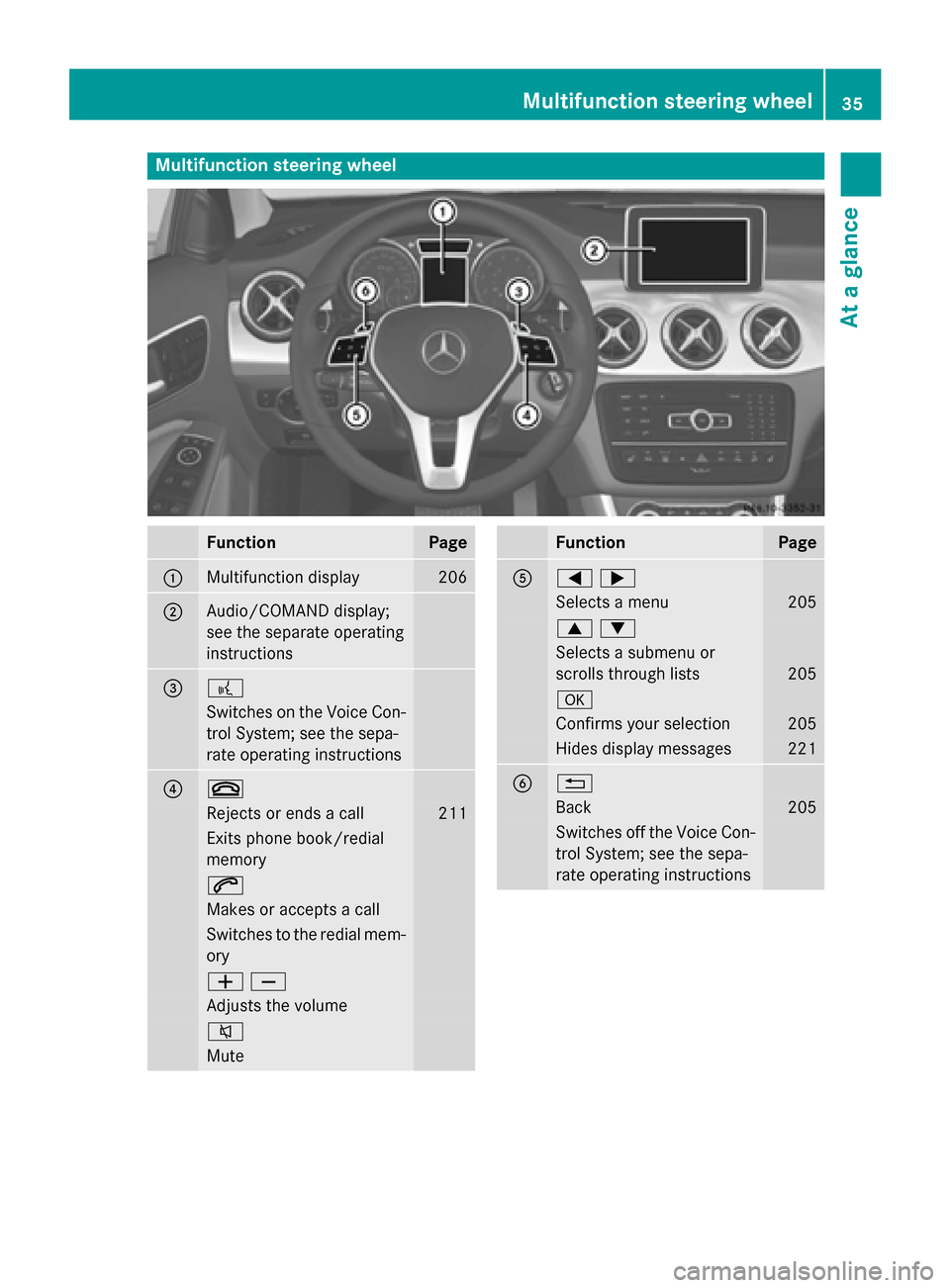
Multifunction steering wheel
Function Page
0043
Multifunction display 206
0044
Audio/COMAND display;
see the separate operating
instructions 0087 0059
Switches on the Voice Con-
trol System; see the sepa-
rate operating instructions 0085 0076
Rejects or ends a call 211
Exits phone book/redial
memory
0061
Makes or accepts a call
Switches to the redial mem-
ory 00810082
Adjusts the volume
0063
Mute Function Page
0083
00590065
Selects a menu 205
00630064
Selects a submenu or
scrolls through lists
205
0076
Confirms your selection 205
Hides display messages 221
0084 0038
Back 205
Switches off the Voice Con-
trol System; see the sepa-
rate operating instructions Multifunction steering wheel
35At a glance
Page 75 of 374
X
To activate: remove the SmartKey from
the ignition lock.
X To deactivate: switch on the ignition.
When leaving the vehicle, always take the
SmartKey with you and lock the vehicle. The
engine can be started by anyone with a valid
SmartKey that is left inside the vehicle.
i The immobilizer is always deactivated
when you start the engine.
In the event that the engine cannot be star- ted (yet the vehicle's battery is charged),
the system is not operational. Contact an
authorized Mercedes-Benz Center or call
1-800-FOR-MERCedes (in the USA) or
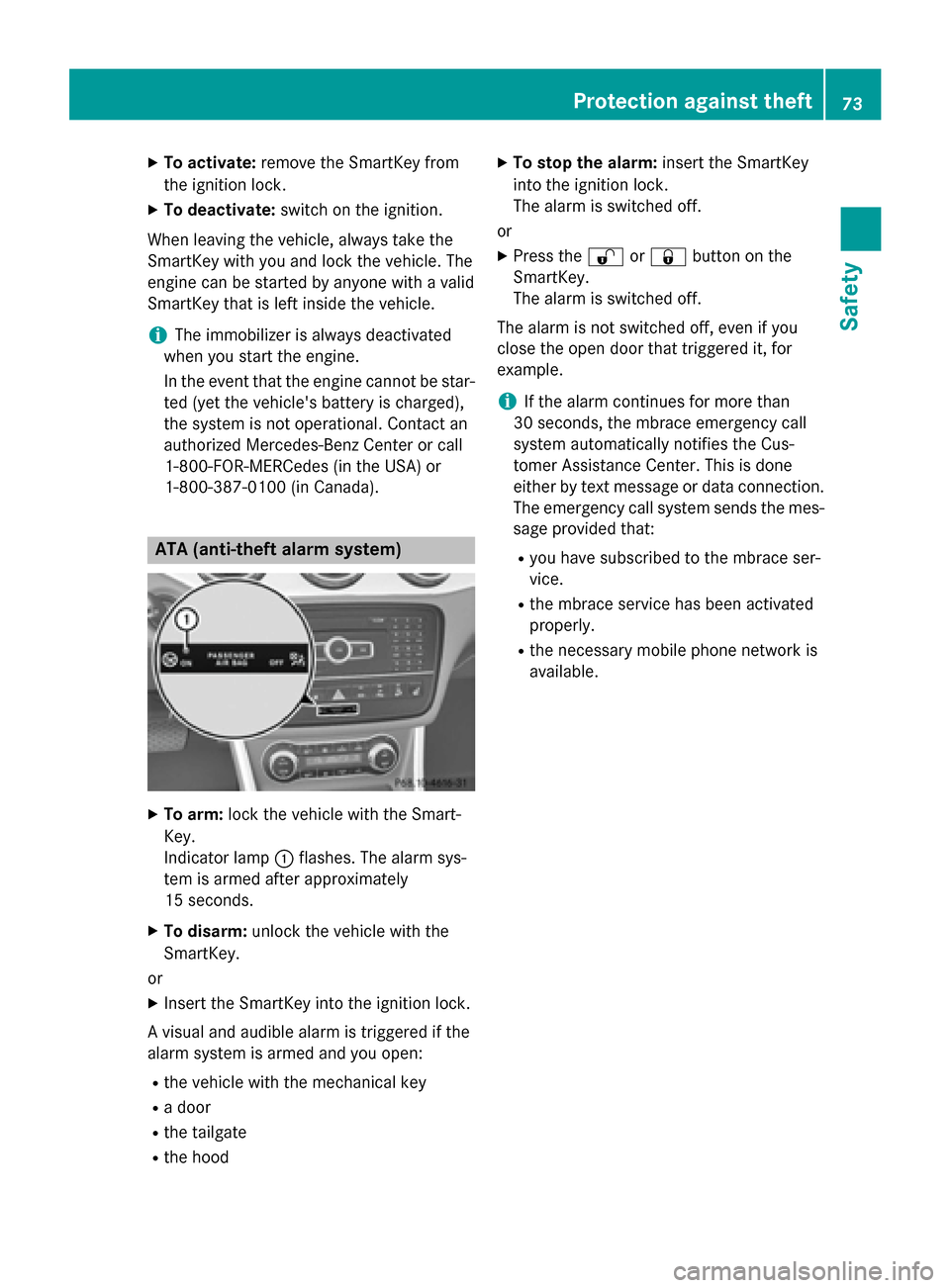
1-800-387-010 0(in Canada). ATA (anti-theft alarm system)
X
To arm: lock the vehicle with the Smart-
Key.
Indicator lamp 0043flashes. The alarm sys-
tem is armed after approximately
15 seconds.
X To disarm: unlock the vehicle with the
SmartKey.
or
X Insert the SmartKey into the ignition lock.
A visual and audible alarm is triggered if the
alarm system is armed and you open:
R the vehicle with the mechanical key
R a door
R the tailgate
R the hood X
To stop the alarm: insert the SmartKey
into the ignition lock.
The alarm is switched off.
or X Press the 0036or0037 button on the
SmartKey.
The alarm is switched off.
The alarm is not switched off, even if you
close the open door that triggered it, for
example.
i If the alarm continues for more than
30 seconds, the mbrace emergency call
system automatically notifies the Cus-
tomer Assistance Center. This is done
either by text message or data connection.
The emergency call system sends the mes- sage provided that:
R you have subscribed to the mbrace ser-
vice.
R the mbrace service has been activated
properly.
R the necessary mobile phone network is
available. Protection against theft
73Safety Z
Page 78 of 374
Useful information
i This Operator's Manual describes all
models and all standard and optional equip- ment of your vehicle available at the time of
publication of the Operator's Manual.
Country-specific differences are possible.
Please note that your vehicle may not be
equipped with all features described. This
also applies to safety-related systems and
functions.
i Read the information on qualified special-
ist workshops (Y page 28). SmartKey
Important safety notes
G
WARNING
If children are left unsupervised in the vehicle, they could:
R open the doors, thus endangering other
people or road users.
R get out and disrupt traffic.
R operate the vehicle's equipment.
Additionally, children could set the vehicle in
motion if, for example, they:
R release the parking brake.
R shifting the automatic transmission out of
park position P
R Start the engine.
There is a risk of an accident and injury.
When leaving the vehicle, always take the
SmartKey with you and lock the vehicle. Never
leave children or animals unattended in the
vehicle. Always keep the SmartKey out of
reach of children. G
WARNING
If you attach heavy or large objects to the
SmartKey, the SmartKey could be uninten-
tionally turned in the ignition lock. This could
cause the engine to be switched off. There is a risk of an accident. Do not attach any heavy or large objects to the
SmartKey. Remove any bulky key rings before
inserting the SmartKey into the ignition lock.
! Keep the SmartKey away from strong
magnetic fields. Otherwise, the remote
control function could be affected.
Strong magnetic fields can occur in the
vicinity of powerful electrical installations.
Do not keep the SmartKey: R with electronic devices, e.g. a mobile
phone or another SmartKey
R with metallic objects, e.g. coins or metal
foil
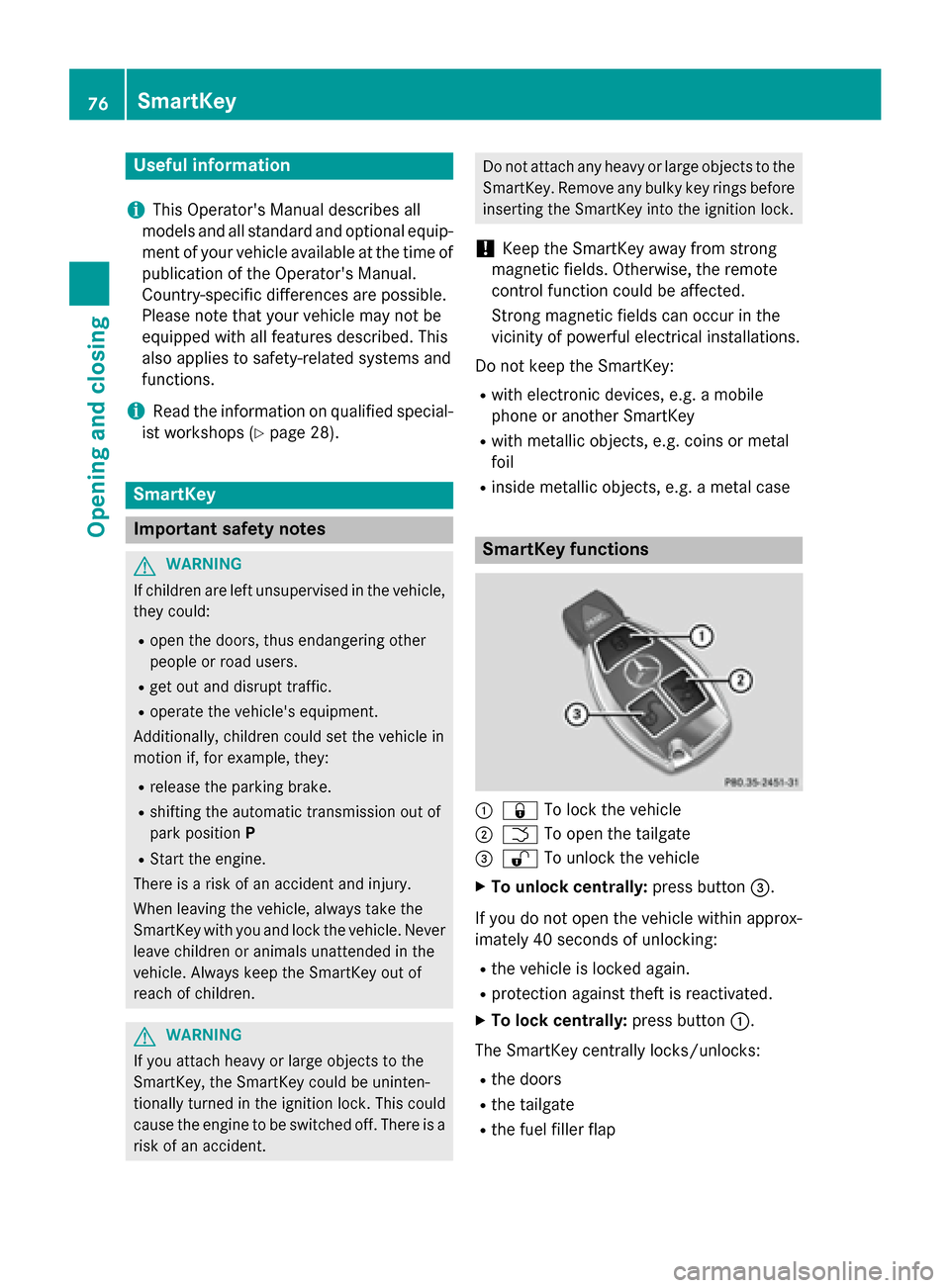
R inside metallic objects, e.g. a metal case SmartKey functions
0043
0037 To lock the vehicle
0044 0054 To open the tailgate
0087 0036 To unlock the vehicle
X To unlock centrally: press button0087.
If you do not open the vehicle within approx-
imately 40 seconds of unlocking: R the vehicle is locked again.
R protection against theft is reactivated.
X To lock centrally: press button0043.
The SmartKey centrally locks/unlocks: R the doors
R the tailgate
R the fuel filler flap 76
SmartKeyOpening and closing
Page 164 of 374
If the transmission is in position
R, the tailgate
must be closed.
If your seat belt is not fastened, the following conditions must be fulfilled to automatically
release the electric parking brake:
R the driver's door is closed.
R you have shifted out of transmission posi-
tion Por you have previously driven faster
than 2 mph (3 km/h).
i Ensure that you do not depress the accel-
erator pedal unintentionally. Otherwise the
parking brake will be released and the vehi-
cle will start to move.
Emergency braking The vehicle can also be braked during an
emergency by using the electric parking
brake.
X While driving, push handle 0043of the electric
parking brake (Y page 160).
i The vehicle is braked for as long as han-
dle 0043of the electric parking brake is
pressed. The longer electric parking brake
handle 0043is depressed, the greater the
braking force.
During braking:
R a warning tone sounds
R the Release park. brake Release park. brake message
appears
R the red 0049(USA only) or 0024(Canada
only) indicator lamp in the instrument clus- ter flashes
When the vehicle has been braked to a stand- still, the electric parking brake is engaged. Parking the vehicle for a long period
If you leave the vehicle parked for longer than
four weeks, the battery may be damaged by
exhaustive discharging. If you leave the vehicle parked for longer than
six weeks, the vehicle may suffer damage as a result of lack of use.
X Visit a qualified specialist workshop and
seek advice.
i You can obtain information about trickle
chargers from a qualified specialist work-
shop. Driving tips
General notes
Important safety notes G
WARNING
If you switch off the ignition while driving,
safety-relevant functions are only available
with limitations, or not at all. This could affect, for example, the power steering and the brake
boosting effect. You will require considerably
more effort to steer and brake. There is a risk of an accident.
Do not switch off the ignition while driving. G
WARNING
If you operate mobile communication equip-
ment while driving, you will be distracted from traffic conditions. You could also lose controlof the vehicle. There is a risk of an accident.
Only operate this equipment when the vehicleis stationary.
Observe the legal requirements for the coun- try in which you are driving. Some jurisdic-
tions prohibit the driver from using a mobile
phone while driving a vehicle.
If you make a call while driving, always use
hands-free mode. Only operate the telephone
when the traffic situation permits. If you are
unsure, pull over to a safe location and stop
before operating the telephone.
Bear in mind that at a speed of only 30 mph
(approximately 50 km/h), the vehicle covers
a distance of 44 ft (approximately 14 m) per
second. 162
Driving tipsDriving and parking
Page 199 of 374
X
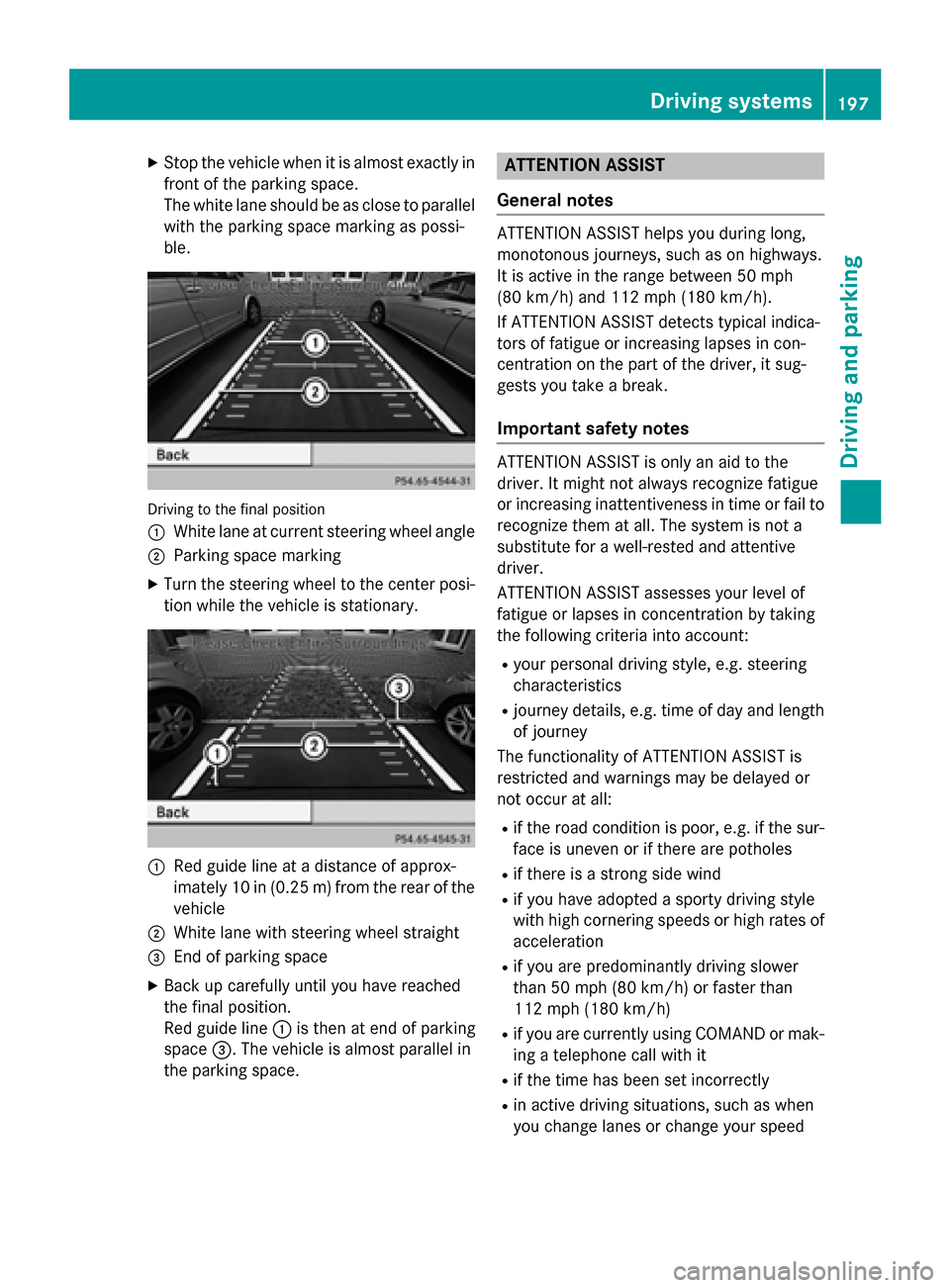
Stop the vehicle when it is almost exactly in
front of the parking space.
The white lane should be as close to parallel with the parking space marking as possi-
ble. Driving to the final position
0043
White lane at current steering wheel angle
0044 Parking space marking
X Turn the steering wheel to the center posi-
tion while the vehicle is stationary. 0043
Red guide line at a distance of approx-
imately 10 in (0.25 m) fromthe rear of the
vehicle
0044 White lane with steering wheel straight
0087 End of parking space
X Back up carefully until you have reached
the final position.
Red guide line 0043is then at end of parking
space 0087. The vehicle is almost parallel in
the parking space. ATTENTION ASSIST
General notes ATTENTION ASSIST helps you during long,
monotonous journeys, such as on highways.
It is active in the range between 50 mph
(80 km/h) and 112 mph (180 km/h).
If ATTENTION ASSIST detects typical indica-
tors of fatigue or increasing lapses in con-
centration on the part of the driver, it sug-
gests you take a break.
Important safety notes ATTENTION ASSIST is only an aid to the
driver. It might not always recognize fatigue
or increasing inattentiveness in time or fail to recognize them at all. The system is not a
substitute for a well-rested and attentive
driver.
ATTENTION ASSIST assesses your level of
fatigue or lapses in concentration by taking
the following criteria into account:
R your personal driving style, e.g. steering
characteristics
R journey details, e.g. time of day and length
of journey
The functionality of ATTENTION ASSIST is
restricted and warnings may be delayed or
not occur at all:
R if the road condition is poor, e.g. if the sur-
face is uneven or if there are potholes
R if there is a strong side wind
R if you have adopted a sporty driving style
with high cornering speeds or high rates of
acceleration
R if you are predominantly driving slower
than 50 mph (80 km/h) or faster than
112 mph (180 km/h)
R if you are currently using COMAND or mak-
ing a telephone call with it
R if the time has been set incorrectly
R in active driving situations, such as when
you change lanes or change your speed Driving systems
197Driving and parking Z