cruise control MERCEDES-BENZ GLA-Class 2016 X156 User Guide
[x] Cancel search | Manufacturer: MERCEDES-BENZ, Model Year: 2016, Model line: GLA-Class, Model: MERCEDES-BENZ GLA-Class 2016 X156Pages: 390, PDF Size: 8.37 MB
Page 191 of 390
If these conditions are fulfilled, your vehicle is
accelerated. Acceleration will be interrupted
if changing lanes takes too long or if the dis-
tance between your vehicle and the vehicle in
front becomes too small.
Stopping
GWARNING
When leaving the vehicle, even if it is braked
only by DISTRONIC PLUS, it could roll away if:
Rthere is a malfunction in the system or in
the voltage supply.
RDISTRONIC PLUS has been deactivated
with the cruise control lever, e.g. by a vehi-
cle occupant or from outside the vehicle.
Rthe electrical system in the engine com-
partment, the battery or the fuses have
been tampered with.
Rthe battery is disconnected.
Rthe accelerator pedal has been depressed, e.g. by a vehicle occupant.
There is a risk of an accident.
If you wish to exit the vehicle, always turn off
DISTRONIC PLUS and secure the vehicle
against rolling away.
For further information on deactivating
DISTRONIC PLUS (
Ypage 190).
If DISTRONIC PLUS detects that the vehicle in
front is stopping, it brakes your vehicle until it is stationary.
Once your vehicle is stationary, it remains
stationary and you do not need to depress the
brake.
iAfter a time, the electric parking brake
secures the vehicle and relieves the service
brake.
iDepending on the specified minimum dis-
tance, your vehicle will come to a standstill
at a sufficient distance behind the vehicle in
front. The specified minimum distance is
set using the control on the cruise control
lever. When DISTRONIC PLUS is activated, the
transmission is shifted automatically to posi-
tion
Pif:
Rthe driver's seat belt is not fastened and the
driver's door is open.
Rthe engine is switched off, unless it is auto- matically switched off by the ECO start/
stop function.
The electric parking brake secures the vehicle
automatically if DISTRONIC PLUS is activated
when the vehicle is stationary and:
Ra system malfunction occurs.
Rthe power supply is not sufficient.
If a malfunction in the electric parking brake
occurs, then the transmission may also be
shifted into position Pautomatically.
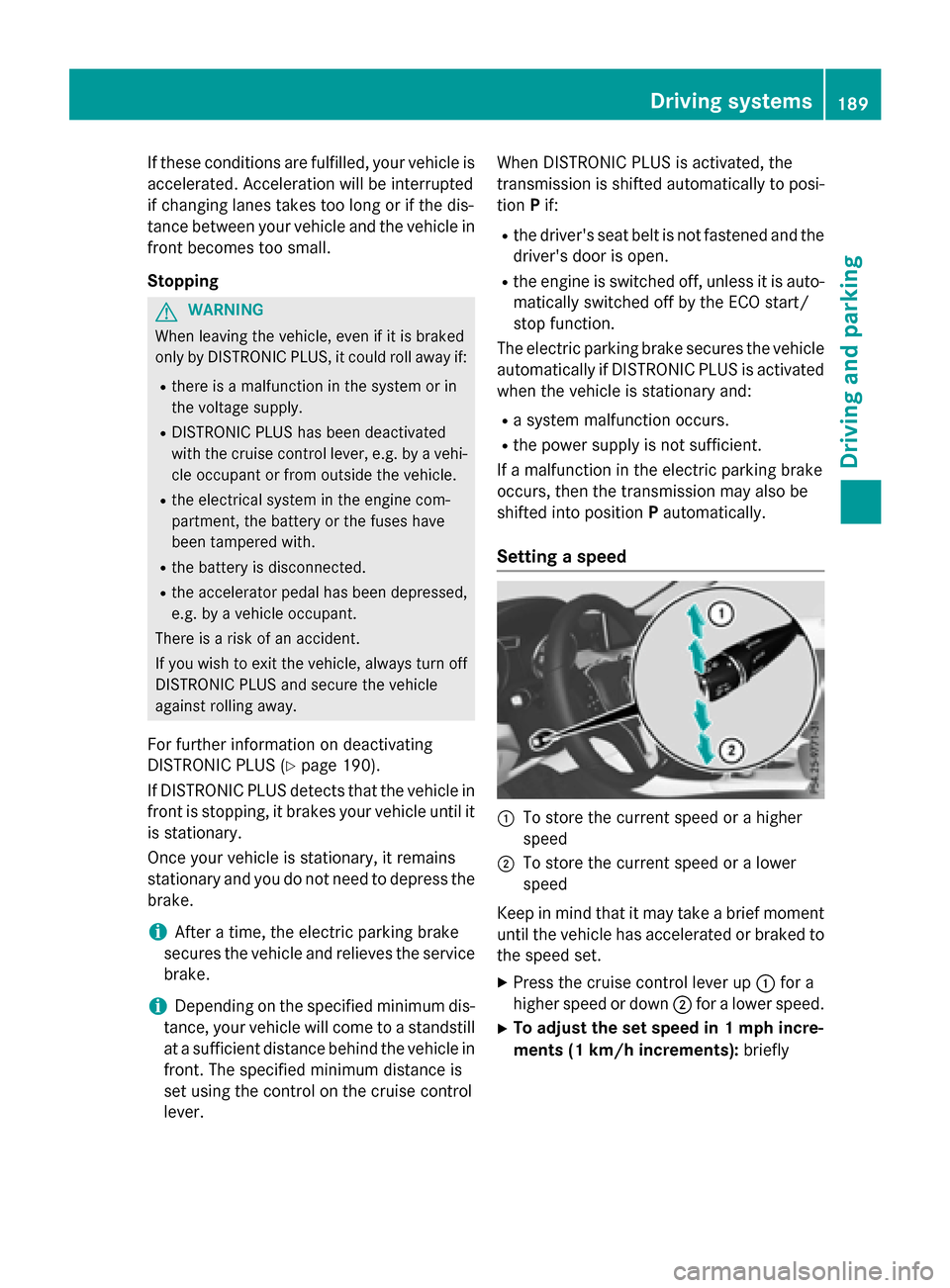
Setting a speed
:To store the current speed or a higher
speed
;To store the current speed or a lower
speed
Keep in mind that it may take a brief moment
until the vehicle has accelerated or braked to
the speed set.
XPress the cruise control lever up :for a
higher speed or down ;for a lower speed.
XTo adjust the set speed in 1 mph incre-
ments (1 km/h increments): briefly
Driving systems189
Driving and parking
Z
Page 192 of 390
press the cruise control lever up:or
down ?to the pressure point.
The last stored speed increases or decrea-
ses in 1 mph (1 km/h) increments.
XTo adjust the set speed in 5 mph incre-
ments (10 km/h increments): briefly
press the cruise control lever up :or
down ?to the pressure point.
The last stored speed increases or decrea-
ses in 5 mph (10 km/h) increments.
iDISTRONIC PLUS is not deactivated if you
depress the accelerator pedal. If you accel-
erate to overtake, DISTRONIC PLUS
adjusts the vehicle's speed to the last
speed stored after you have finished over-
taking.
Setting the specified minimum distance
You can set the specified minimum distance
for DISTRONIC PLUS by varying the time span
between one and two seconds. With this func-
tion, you can set the minimum distance that
DISTRONIC PLUS keeps to the vehicle in
front, dependent on vehicle speed. You can
see this distance in the multifunction display
(
Ypage 191).
iMake sure that you maintain the mini-
mum distance to the vehicle in front as
required by law. Adjust the distance to the vehicle in front if necessary.
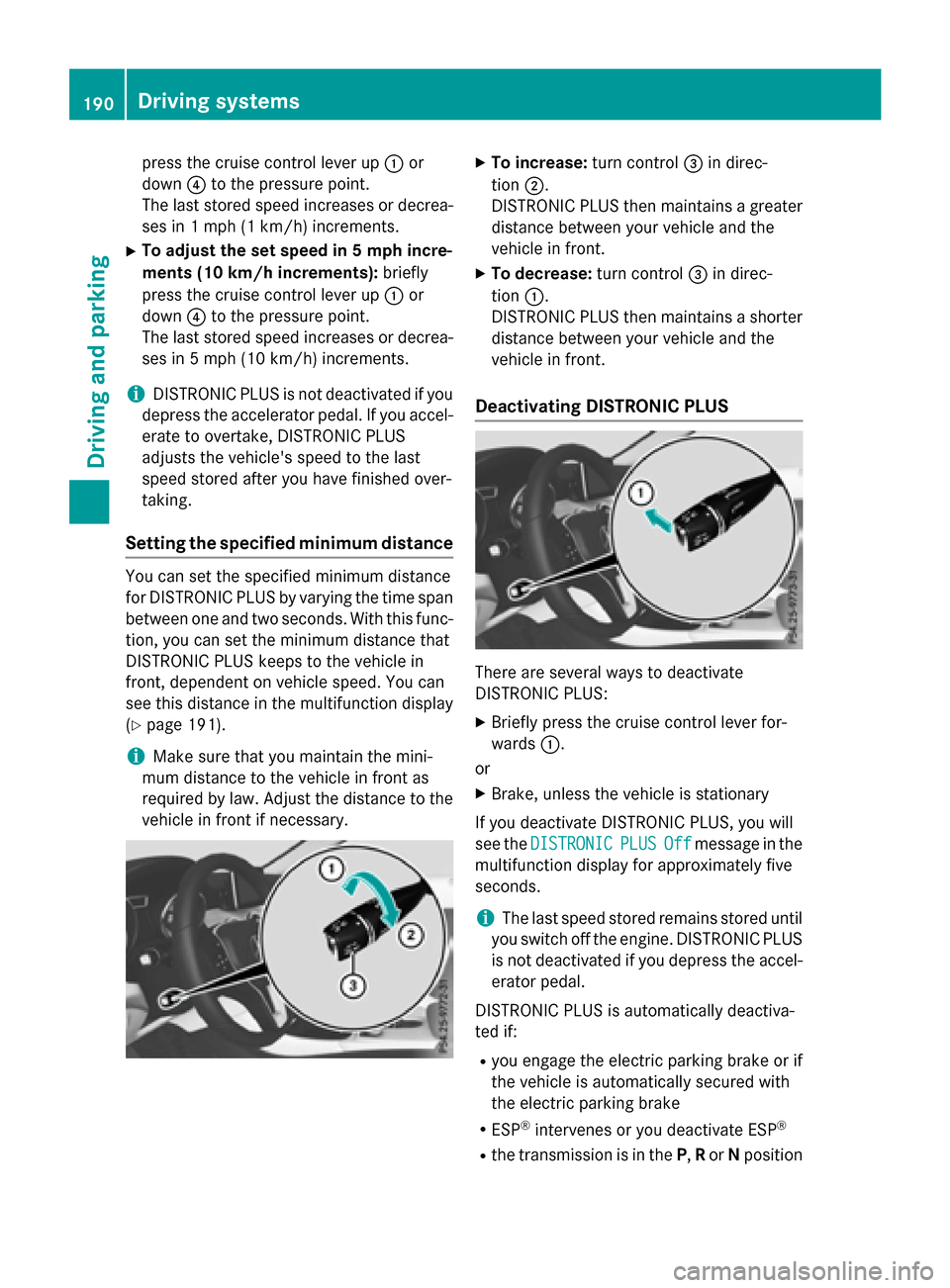
XTo increase: turn control=in direc-
tion ;.
DISTRONIC PLUS then maintains a greater
distance between your vehicle and the
vehicle in front.
XTo decrease: turn control=in direc-
tion :.
DISTRONIC PLUS then maintains a shorter
distance between your vehicle and the
vehicle in front.
Deactivating DISTRONIC PLUS
There are several ways to deactivate
DISTRONIC PLUS:
XBriefly press the cruise control lever for-
wards :.
or
XBrake, unless the vehicle is stationary
If you deactivate DISTRONIC PLUS, you will
see the DISTRONIC
PLUSOffmessage in the
multifunction display for approximately five
seconds.
iThe last speed stored remains stored until
you switch off the engine. DISTRONIC PLUS
is not deactivated if you depress the accel-
erator pedal.
DISTRONIC PLUS is automatically deactiva-
ted if:
Ryou engage the electric parking brake or if
the vehicle is automatically secured with
the electric parking brake
RESP®intervenes or you deactivate ESP®
Rthe transmission is in the P,Ror Nposition
190Driving systems
Driving and parking
Page 200 of 390
Activating/deactivating DSR
If you activateDS Rand no spee dhas been
set ,th evehicl edecelerate sto 3mph
(6 km/ h).
Yo u can only activate DSR when driving at
speeds below 20 mph (30 km/h).
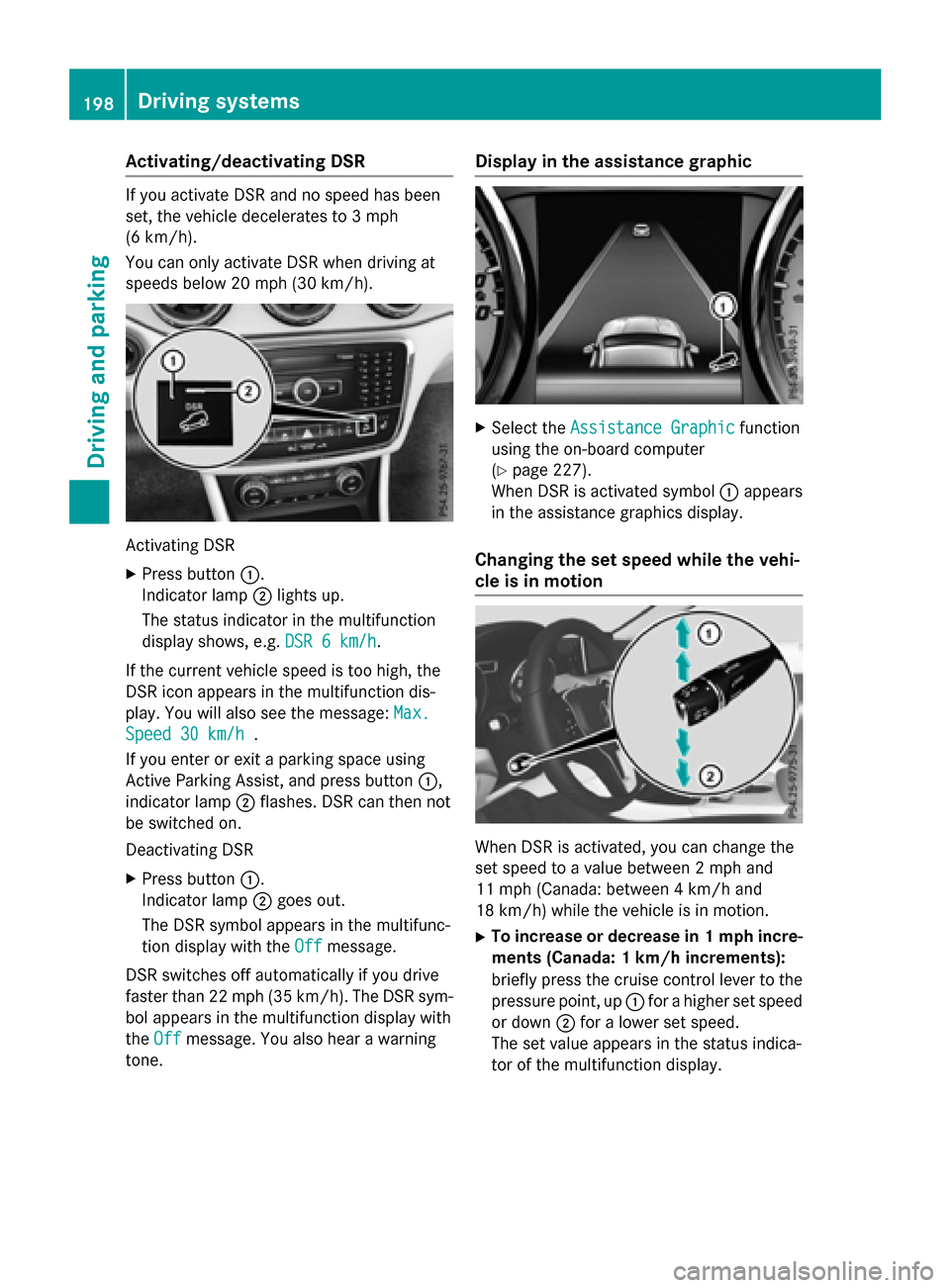
Activating DSR
XPress button :.
Indicator lamp ;lights up.
The status indicator in the multifunction
display shows, e.g. DSR 6 km/h
.
If the current vehicle speed is too high, the
DSR icon appears in the multifunction dis-
play. You will also see the message: Max.
Speed 30 km/h.
If you enter or exit a parking space using
Active Parking Assist, and press button :,
indicator lamp ;flashes. DSR can then not
be switched on.
Deactivating DSR
XPress button :.
Indicator lamp ;goes out.
The DSR symbol appears in the multifunc-
tion display with the Off
message.
DSR switches off automatically if you drive
faster than 22 mph (35 km/h). The DSR sym-
bol appears in the multifunction display with
the Off
message. You also hear a warning
tone.
Display in the assistance graphic
XSelect the Assistance Graphicfunction
using the on-board computer
(
Ypage 227).
When DSR is activated symbol :appears
in the assistance graphics display.
Changing the set speed while the vehi-
cle is in motion
When DSR is activated, you can change the
set speed to a value between 2 mph and
11 mph (Canada: between 4 km/h and
18 km/h) while the vehicle is in motion.
XTo increase or decrease in 1 mph incre- ments (Canada: 1 km/h increments):
briefly press the cruise control lever to the
pressure point, up :for a higher set speed
or down ;for a lower set speed.
The set value appears in the status indica-
tor of the multifunction display.
198Driving systems
Driving and parking
Page 223 of 390
Multifunction display
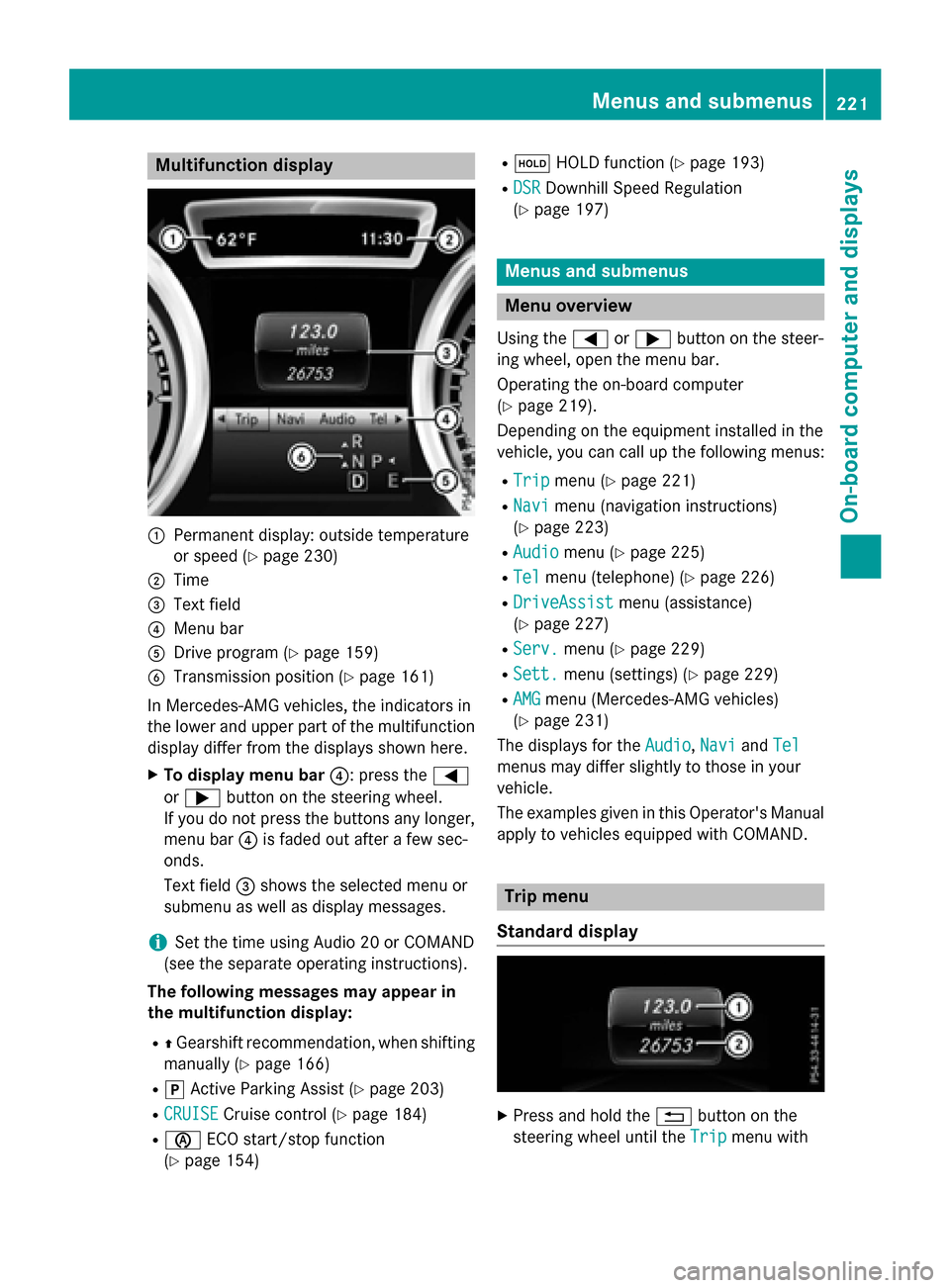
:Permanent display: outside temperature
or speed (
Ypage 230)
;Time
=Text field
?Menu bar
ADrive program (Ypage 159)
BTransmission position (Ypage 161)
In Mercedes-AMG vehicles, the indicators in
the lower and upper part of the multifunction display differ from the displays shown here.
XTo display menu bar ?: press the=
or ; button on the steering wheel.
If you do not press the buttons any longer,
menu bar ?is faded out after a few sec-
onds.
Text field =shows the selected menu or
submenu as well as display messages.
iSet the time using Audio 20 or COMAND
(see the separate operating instructions).
The following messages may appear in
the multifunction display:
RZ Gearshift recommendation, when shifting
manually (
Ypage 166)
Rj Active Parking Assist (Ypage 203)
RCRUISECruise control (Ypage 184)
Rè ECO start/stop function
(
Ypage 154)
Rë HOLD function (Ypage 193)
RDSRDownhill Speed Regulation
(
Ypage 197)
Menus and submenus
Menu overview
Using the =or; button on the steer-
ing wheel, open the menu bar.
Operating the on-board computer
(
Ypage 219).
Depending on the equipment installed in the
vehicle, you can call up the following menus:
RTripmenu (Ypage 221)
RNavimenu (navigation instructions)
(
Ypage 223)
RAudiomenu (Ypage 225)
RTelmenu (telephone) (Ypage 226)
RDriveAssistmenu (assistance)
(
Ypage 227)
RServ.menu (Ypage 229)
RSett.menu (settings) (Ypage 229)
RAMGmenu (Mercedes-AMG vehicles)
(
Ypage 231)
The displays for the Audio
,Naviand Tel
menus may differ slightly to those in your
vehicle.
The examples given in this Operator's Manual
apply to vehicles equipped with COMAND.
Trip menu
Standard display
XPress and hold the %button on the
steering wheel until the Trip
menu with
Menus and submenus221
On-board computer and displays
Z
Page 231 of 390
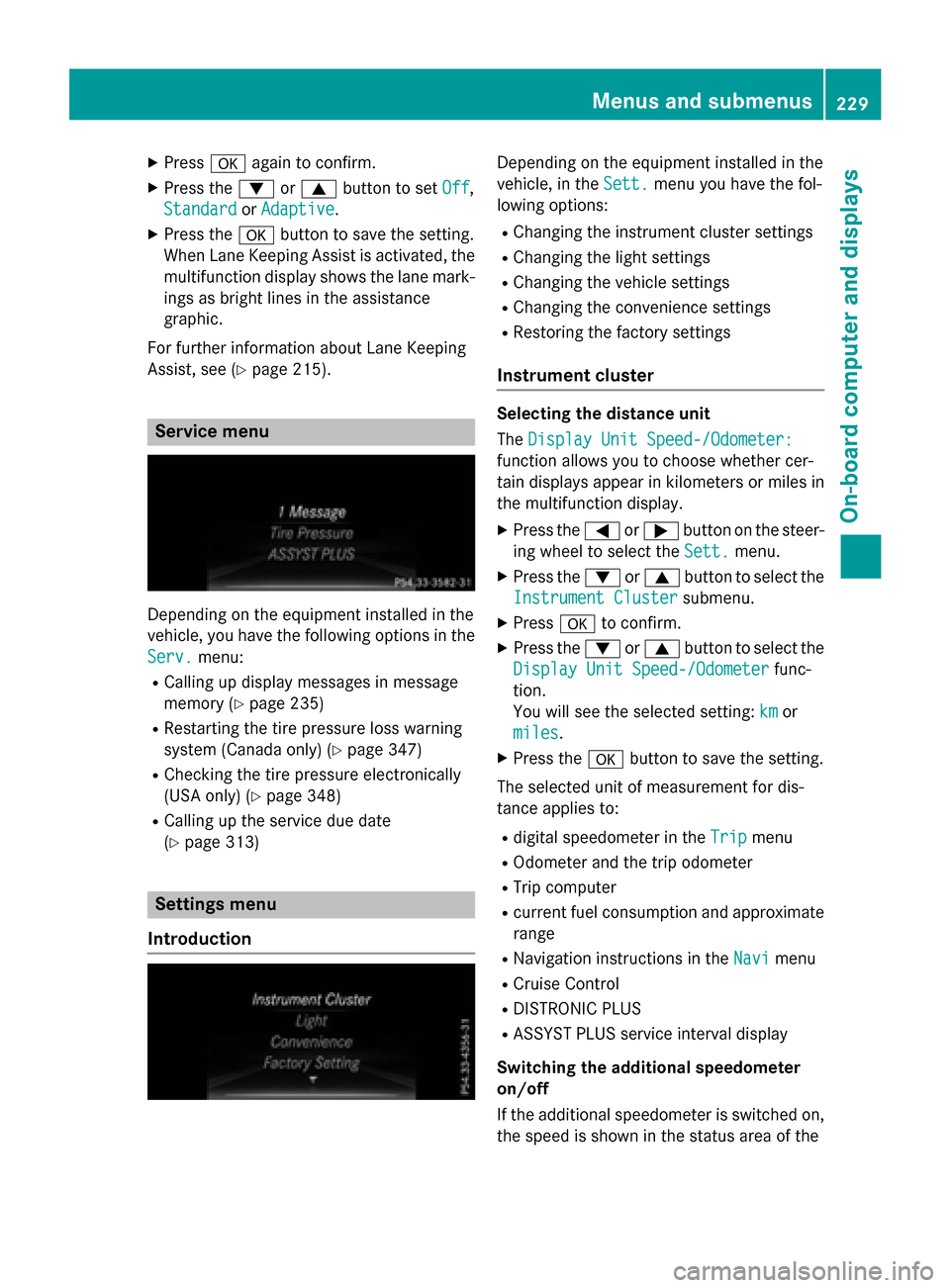
XPressaagain to confirm.
XPress the :or9 button to set Off,
Standard
or Adaptive.
XPress the abutton to save the setting.
When Lane Keeping Assist is activated, the
multifunction display shows the lane mark-
ings as bright lines in the assistance
graphic.
For further information about Lane Keeping
Assist, see (
Ypage 215).
Service menu
Depending on the equipment installed in the
vehicle, you have the following options in the
Serv.
menu:
RCalling up display messages in message
memory (
Ypage 235)
RRestarting the tire pressure loss warning
system (Canada only) (
Ypage 347)
RChecking the tire pressure electronically
(USA only) (
Ypage 348)
RCalling up the service due date
(
Ypage 313)
Settings menu
Introduction
Depending on the equipment installed in the
vehicle, in the Sett.
menu you have the fol-
lowing options:
RChanging the instrument cluster settings
RChanging the light settings
RChanging the vehicle settings
RChanging the convenience settings
RRestoring the factory settings
Instrument cluster
Selecting the distance unit
The Display Unit Speed-/Odometer:
function allows you to choose whether cer-
tain displays appear in kilometers or miles in
the multifunction display.
XPress the =or; button on the steer-
ing wheel to select the Sett.
menu.
XPress the:or9 button to select the
Instrument Cluster
submenu.
XPress ato confirm.
XPress the :or9 button to select the
Display Unit Speed-/Odometer
func-
tion.
You will see the selected setting: km
or
miles
.
XPress the abutton to save the setting.
The selected unit of measurement for dis-
tance applies to:
Rdigital speedometer in the Tripmenu
ROdometer and the trip odometer
RTrip computer
Rcurrent fuel consumption and approximate
range
RNavigation instructions in the Navimenu
RCruise Control
RDISTRONIC PLUS
RASSYST PLUS service interval display
Switching the additional speedometer
on/off
If the additional speedometer is switched on, the speed is shown in the status area of the
Menus and submenus229
On-board computer and displays
Z
Page 259 of 390
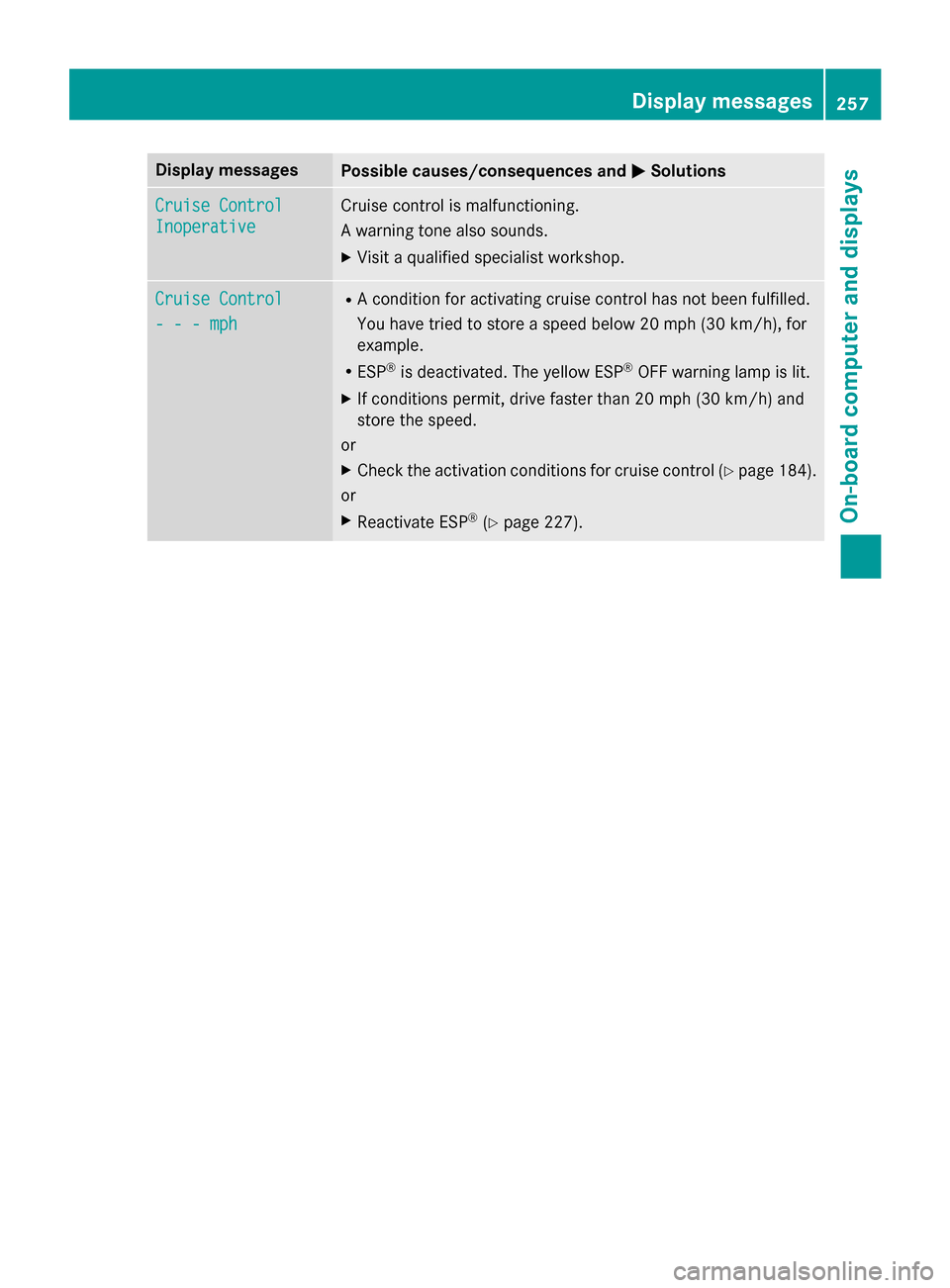
Display messagesPossible causes/consequences andMSolutions
Cruise Control
Inoperative
Cruisecontrol is malfunctioning.
A warnin gtone also sounds.
XVisit aqualified specialist workshop .
Cruise Control
- - -mph
RAcondition fo ractivatin gcruise control has no tbeen fulfilled .
You hav etried to store aspeed belo w20 mph (30 km/h), fo r
example.
RES P®is deactivated. The yello wES P®OF Fwarnin glamp is lit .
XIf condition spermit ,drive faste rthan 20 mph (30 km/h)and
store the speed.
or
XCheck the activation conditions for cruise control (Ypage 184).
or
XReactivate ESP®(Ypage 227).
Display messages257
On-board computer and displays
Z
Page 274 of 390
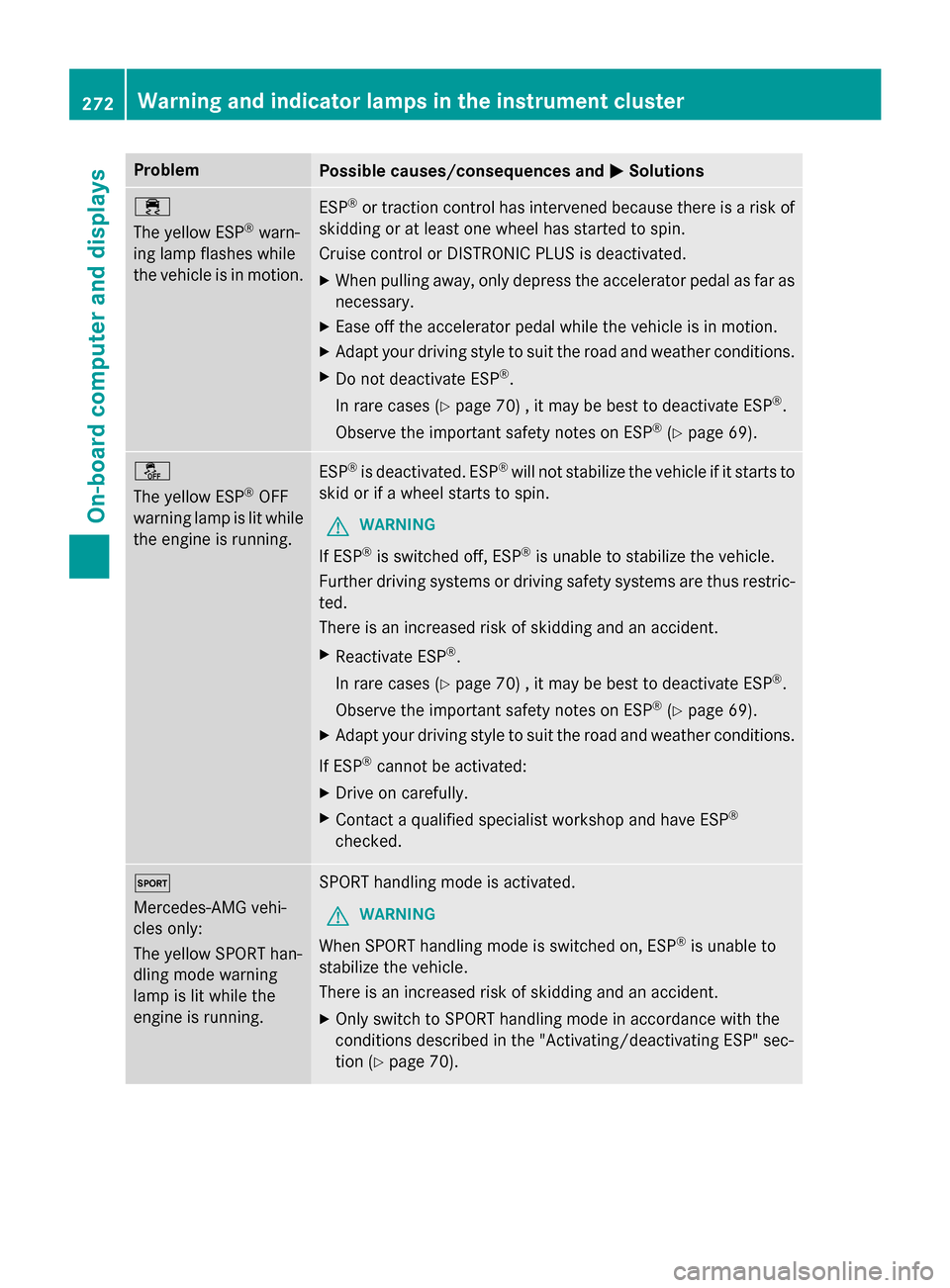
ProblemPossible causes/consequences andMSolutions
÷
The yellow ESP
®warn-
ing lamp flashes while
the vehicle is in motion.
ESP®or traction control has intervened because there is a risk of
skidding or at least one wheel has started to spin.
Cruise control or DISTRONIC PLUS is deactivated.
XWhen pulling away, only depress the accelerator pedal as far as
necessary.
XEase off the accelerator pedal while the vehicle is in motion.
XAdapt your driving style to suit the road and weather conditions.
XDo not deactivate ESP®.
In rare cases (
Ypage 70) , it may be best to deactivate ESP®.
Observe the important safety notes on ESP
®(Ypage 69).
å
The yellow ESP
®OFF
warning lamp is lit while
the engine is running.
ESP®is deactivated. ESP®will not stabilize the vehicle if it starts to
skid or if a wheel starts to spin.
GWARNING
If ESP®is switched off, ESP®is unable to stabilize the vehicle.
Further driving systems or driving safety systems are thus restric-
ted.
There is an increased risk of skidding and an accident.
XReactivate ESP®.
In rare cases (
Ypage 70) , it may be best to deactivate ESP®.
Observe the important safety notes on ESP
®(Ypage 69).
XAdapt your driving style to suit the road and weather conditions.
If ESP
®cannot be activated:
XDrive on carefully.
XContact a qualified specialist workshop and have ESP®
checked.
M
Mercedes-AMG vehi-
cles only:
The yellow SPORT han-
dling mode warning
lamp is lit while the
engine is running.SPORT handling mode is activated.
GWARNING
When SPORT handling mode is switched on, ESP®is unable to
stabilize the vehicle.
There is an increased risk of skidding and an accident.
XOnly switch to SPORT handling mode in accordance with the
conditions described in the "Activating/deactivating ESP" sec-
tion (
Ypage 70).
272Warning and indicator lamps in the instrument cluster
On-board computer and displays