warning MERCEDES-BENZ GLA-Class 2017 X156 Owners Manual
[x] Cancel search | Manufacturer: MERCEDES-BENZ, Model Year: 2017, Model line: GLA-Class, Model: MERCEDES-BENZ GLA-Class 2017 X156Pages: 390, PDF Size: 8.37 MB
Page 181 of 390
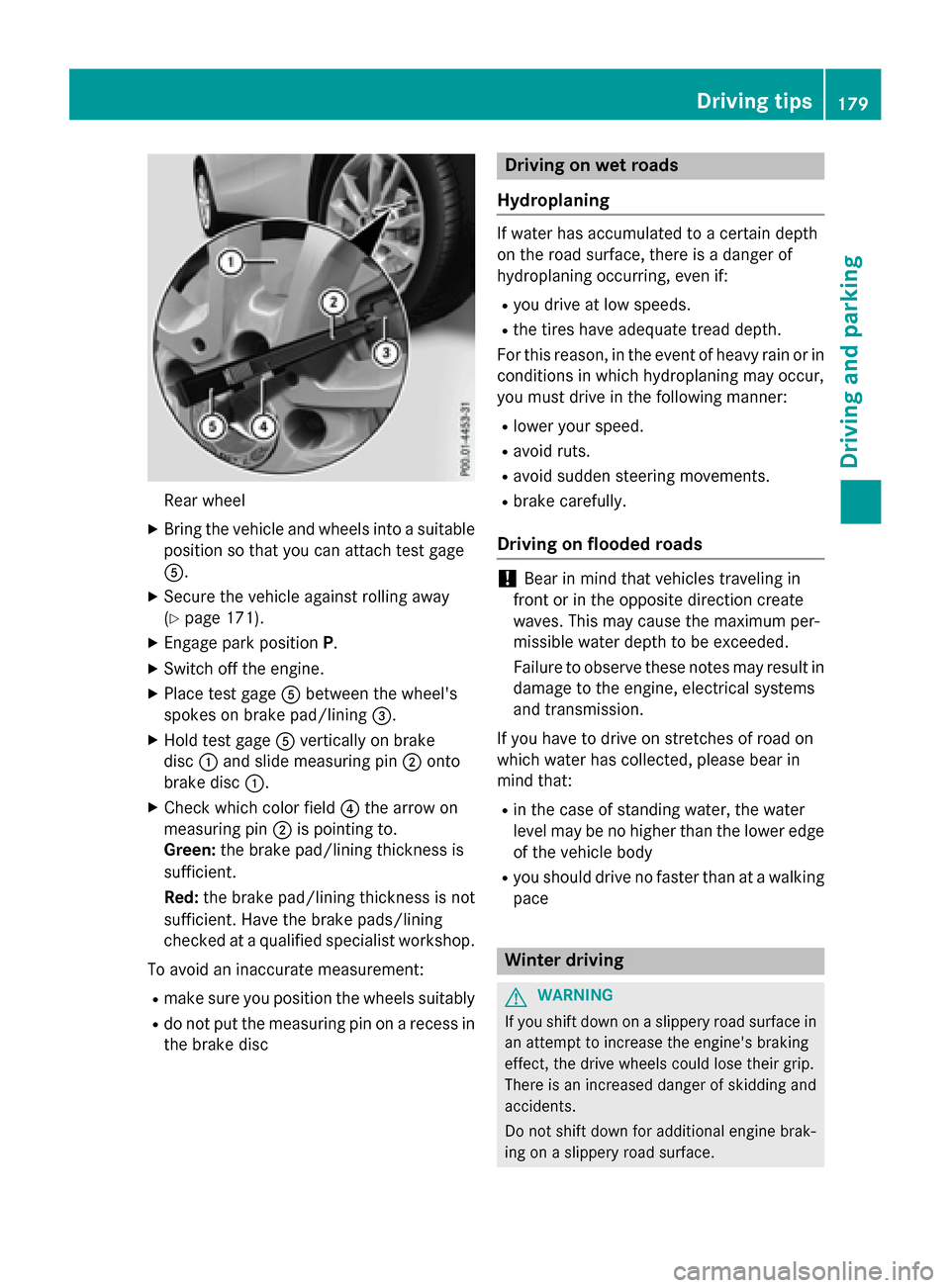
Rear wheel
XBringth evehicl eand wheels into asuitable
position so that you can attach test gage
A.
XSecur eth evehicl eagainst rollin gaway
(
Ypage 171).
XEngage park position P.
XSwitchoff th eengine.
XPlac etest gage Abetween th ewheel's
spoke son brak epad/linin g=.
XHold test gage Averticall yon brak e
disc :and slid emeasurin gpin ;onto
brak edisc :.
XChec kwhic hcolor field ?thearrow on
measurin gpin ;is pointing to .
Green: thebrak epad/linin gthickness is
sufficient.
Red :th ebrak epad/linin gthickness is no t
sufficient. Hav eth ebrak epads/lining
checke dat aqualified specialist workshop .
To avoid an inaccurat emeasurement:
Rmak esur eyou position th ewheels suitably
Rdo no tput th emeasurin gpin on arecess in
th ebrak edisc
Driving on wet road s
Hydroplaning
If water has accumulated to acertain dept h
on th eroa dsurface, there is adanger of
hydroplanin goccurring, eve nif:
Ryou drive at low speeds .
Rthetires hav eadequat etread depth.
Fo rthis reason ,in th eevent of heav yrain or in
condition sin whic hhydroplanin gmay occur ,
you mus tdrive in th efollowin gmanner:
Rlower your speed.
Ravoid ruts.
Ravoid sudden steerin gmovements.
Rbrak ecarefully.
Driving on flooded road s
!Bear in mindthat vehicles travelin gin
fron tor in th eopposit edirection creat e
waves. This may caus eth emaximum per -
missibl ewater dept hto be exceeded .
Failure to observ ethese note smay result in
damag eto th eengine, electrical systems
and transmission .
If you hav eto drive on stretches of roa don
whic hwater has collected, pleas ebear in
min dthat:
Rin th ecas eof standin gwater, th ewater
level may be no higher than th elower edge
of th evehicl ebody
Ryou should drive no faste rthan at awalkin g
pac e
Winter drivin g
GWARNING
If you shift down on aslipper yroa dsurfac ein
an attemp tto increase th eengine's brakin g
effect, th edrive wheels could lose their grip.
There is an increase ddanger of skiddin gand
accidents .
Do no tshift down for additional engin ebrak -
in g on aslipper yroa dsurface.
Driving tips179
Driving and parking
Z
Page 185 of 390
Otherwise, your vehicle could be damaged
or bottom out and get stuck.
Observe the following rules when driving
along ruts in off-road terrain or on roads with
loose gravel:
RActivate the off-road program
(
Ypage 157).
RAvoid high engine speeds.
RShift to a lower gear using the left-hand
steering wheel paddle shifter.
RDrive slowly.
RWhere ruts are too deep, drive with the
wheels of one side on the center grassy
area, if possible.
Traveling uphill
Approach/departure angle
GWARNING
If you drive on a steep incline at an angle or
turn when driving on an incline, the vehicle
could slip sideways, tip and rollover. There is a risk of an accident.
Always drive on a steep incline in the line of
fall (straight up or down) and do not turn the
vehicle.
RObserve the warnings for off-road driving
(
Ypage 180).
RFollow the line of fall when driving on slopes
and steep inclines.
RBefore driving on extreme uphill and down-
hill gradients, select the off-road program
(
Ypage 157).
RDrive slowly.
RAccelerate gently and make sure that the
wheels are gripping.
RAvoid high engine speeds, except when
driving on sandy and muddy routes with
high driving resistance.
RUse the left-hand steering wheel paddle
shifter to shift to a lower gear appropriate
to the gradient.
RUse the left-hand steering wheel paddle
shifter to shift into a lower gear in good time
on long and steep downhill gradients.
Hill start assist will aid you when pulling away
on a hill. For further information about hill
start assist, see (
Ypage 153).
Do not switch to transmission position N
when driving off-road. If you try to brake the
vehicle using the service brake, you could
lose control of the vehicle. If the gradient is
too steep for your vehicle, drive back down in
reverse gear.
Always observe the approach/departure
angle values (
Ypage 384).
Maximum gradient-climbing capability
Always observe the maximum gradient climb- ing ability values (
Ypage 384).
Hilltops
When driving up an uphill gradient, slightly
reduce pressure on the accelerator immedi-
ately before reaching the brow of the hill.
Make use of the vehicle's own impetus to
travel over the brow.
This style of driving prevents:
Rthe vehicle from lifting off the ground on thebrow of a hill
Rthe vehicle from traveling too quickly downthe other side
Driving downhill
RDrive slowly.
RDo not drive at an angle down steep
inclines. Steer into the line of fall and drivewith the front wheels aligned straight. Oth-
erwise, the vehicle could slip sideways, tip
and rollover.
RShift to a lower gear using the left-hand
steering wheel paddle shifter before tack-
ling steep downhill gradients.
Driving tips183
Driving and parking
Z
Page 187 of 390
Storing, maintaining and calling up a
speed
Storing and maintaining the current
speed
You can store the current speed if you are
driving faster than 20 mph (30 km/h).
XAccelerate the vehicle to the desired
speed.
XBriefly press the cruise control lever up:
or down ?.
XRemove your foot from the accelerator
pedal.
Cruise control is activated. The vehicle
automatically maintains the stored speed.
iCruise control may be unable to maintain
the stored speed on uphill gradients. The
stored speed is resumed when the gradient
evens out. Cruise control maintains the
stored speed on downhill gradients by
automatically applying the brakes.
Storing the current speed or calling up the
last stored speed
GWARNING
If you call up the stored speed and it differs
from the current speed, the vehicle acceler-
ates or decelerates. If you do not know the
stored speed, the vehicle could accelerate or brake unexpectedly. There is a risk of an acci-
dent.
Pay attention to the road and traffic condi-
tions before calling up the stored speed. If you
do not know the stored speed, store the
desired speed again.
XBriefly pull the cruise control lever towards
you =.
XRemove your foot from the accelerator
pedal.
The first time cruise control is activated, it
stores the current speed or regulates the
speed of the vehicle to the previously
stored speed.
Setting a speed
Keep in mind that it may take a brief moment
until the vehicle has accelerated or braked to
the speed set.
XPress the cruise control lever up :for a
higher speed or down ?for a lower speed.
XTo adjust the set speed in 1 mph incre-
ments (1 km/h increments): briefly
press the cruise control lever up :or
down ?to the pressure point.
The last stored speed increases or decrea-
ses in 1 mph (1 km/h) increments.
XTo adjust the set speed in 5 mph incre-
ments (10 km/h increments): briefly
press the cruise control lever up :or
down ?to the pressure point.
The last stored speed increases or decrea-
ses in 5 mph (10 km/h) increments.
iCruise control is not deactivated if you
depress the accelerator pedal. For exam-
ple, if you accelerate briefly to overtake,
cruise control adjusts the vehicle's speed
to the last speed stored after you have fin- ished overtaking.
Deactivating cruise control
There are several ways to deactivate cruise
control:
XBriefly press the cruise control lever for-
wards =.
or
XBrake.
Cruise control is automatically deactivated if:
Rthe vehicle is secured with the electric
parking brake
Ryou are driving at less than 20 mph
(30 km/h)
RESP®intervenes or you deactivate ESP®
Ryou shift the transmission to position N
while driving
If cruise control is deactivated, you will hear a
warning tone. You will see the Cruise con‐
Driving systems185
Driving and parking
Z
Page 188 of 390
trol Offmessage in the multifunction dis-
play for approximately five seconds.
iWhen you switch off the engine, the last
speed stored is cleared.
DISTRONIC PLUS
General notes
DISTRONIC PLUS regulates the speed and
automatically helps you maintain the dis-
tance to the vehicle detected in front. Vehi-
cles are detected with the aid of the radar
sensor system. DISTRONIC PLUS brakes
automatically to avoid exceeding the set
speed or to maintain the designated distance
from the vehicle in front.
Change into a lower gear in good time on long
and steep downhill gradients. This is espe-
cially important if the vehicle is laden. By
doing so, you will make use of the braking
effect of the engine. This relieves the load on
the brake system and prevents the brakes
from overheating and wearing too quickly.
If DISTRONIC PLUS detects that there is a risk
of a collision, you will be warned visually and
acoustically. DISTRONIC PLUS cannot pre-
vent a collision without your intervention. An
intermittent warning tone will then sound and the distance warning lamp will light up in the
instrument cluster. Brake immediately in
order to increase the distance to the vehicle
in front or take evasive action provided it is
safe to do so.
DISTRONIC PLUS operates in range between
0 mph (0 km/h) and 120 mph (200 km/h).
Do not use DISTRONIC PLUS while driving on
roads with steep gradients.
Important safety notes
GWARNING
DISTRONIC PLUS does not react to:
Rpeople or animals
Rstationary obstacles on the road, e.g. stop- ped or parked vehicles
Roncoming and crossing traffic
As a result, DISTRONIC PLUS may neither give
warnings nor intervene in such situations.
There is a risk of an accident.
Always pay careful attention to the traffic sit- uation and be ready to brake.
GWARNING
DISTRONIC PLUS cannot always clearly iden-
tify other road users and complex traffic sit-
uations.
In such cases, DISTRONIC PLUS may:
Rgive an unnecessary warning and then
brake the vehicle
Rneither give a warning nor intervene
Raccelerate or brake unexpectedly
There is a risk of an accident.
Continue to drive carefully and be ready to
brake, in particular when warned to do so by
DISTRONIC PLUS.
GWARNING
DISTRONIC PLUS brakes your vehicle with up to 50% of the maximum possible deceleration.
If this braking force is insufficient, DISTRONIC
PLUS warns you visually and audibly. There isa risk of an accident.
In such cases, apply the brakes yourself and
try to take evasive action.
!If DISTRONIC PLUS or the HOLD function
is activated, the vehicle brakes automati-
cally in certain situations.
186Driving systems
Driving and parking
Page 191 of 390
If these conditions are fulfilled, your vehicle is
accelerated. Acceleration will be interrupted
if changing lanes takes too long or if the dis-
tance between your vehicle and the vehicle in
front becomes too small.
Stopping
GWARNING
When leaving the vehicle, even if it is braked
only by DISTRONIC PLUS, it could roll away if:
Rthere is a malfunction in the system or in
the voltage supply.
RDISTRONIC PLUS has been deactivated
with the cruise control lever, e.g. by a vehi-
cle occupant or from outside the vehicle.
Rthe electrical system in the engine com-
partment, the battery or the fuses have
been tampered with.
Rthe battery is disconnected.
Rthe accelerator pedal has been depressed, e.g. by a vehicle occupant.
There is a risk of an accident.
If you wish to exit the vehicle, always turn off
DISTRONIC PLUS and secure the vehicle
against rolling away.
For further information on deactivating
DISTRONIC PLUS (
Ypage 190).
If DISTRONIC PLUS detects that the vehicle in
front is stopping, it brakes your vehicle until it is stationary.
Once your vehicle is stationary, it remains
stationary and you do not need to depress the
brake.
iAfter a time, the electric parking brake
secures the vehicle and relieves the service
brake.
iDepending on the specified minimum dis-
tance, your vehicle will come to a standstill
at a sufficient distance behind the vehicle in
front. The specified minimum distance is
set using the control on the cruise control
lever. When DISTRONIC PLUS is activated, the
transmission is shifted automatically to posi-
tion
Pif:
Rthe driver's seat belt is not fastened and the
driver's door is open.
Rthe engine is switched off, unless it is auto- matically switched off by the ECO start/
stop function.
The electric parking brake secures the vehicle
automatically if DISTRONIC PLUS is activated
when the vehicle is stationary and:
Ra system malfunction occurs.
Rthe power supply is not sufficient.
If a malfunction in the electric parking brake
occurs, then the transmission may also be
shifted into position Pautomatically.
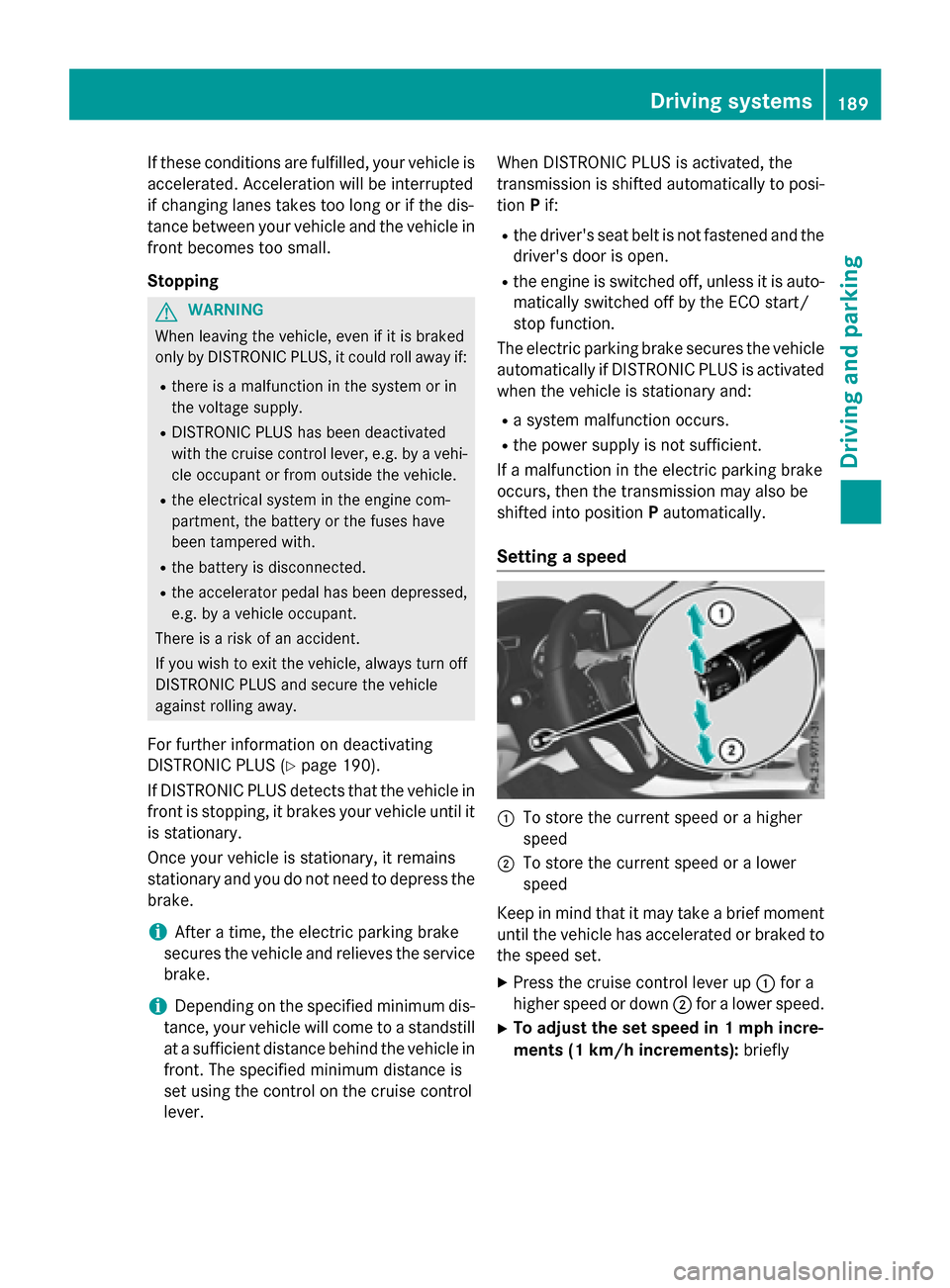
Setting a speed
:To store the current speed or a higher
speed
;To store the current speed or a lower
speed
Keep in mind that it may take a brief moment
until the vehicle has accelerated or braked to
the speed set.
XPress the cruise control lever up :for a
higher speed or down ;for a lower speed.
XTo adjust the set speed in 1 mph incre-
ments (1 km/h increments): briefly
Driving systems189
Driving and parking
Z
Page 195 of 390
detected vehicle turns a corner and reveals
an obstacle or stationary vehicle, DISTRONIC
PLUS will not brake for these.
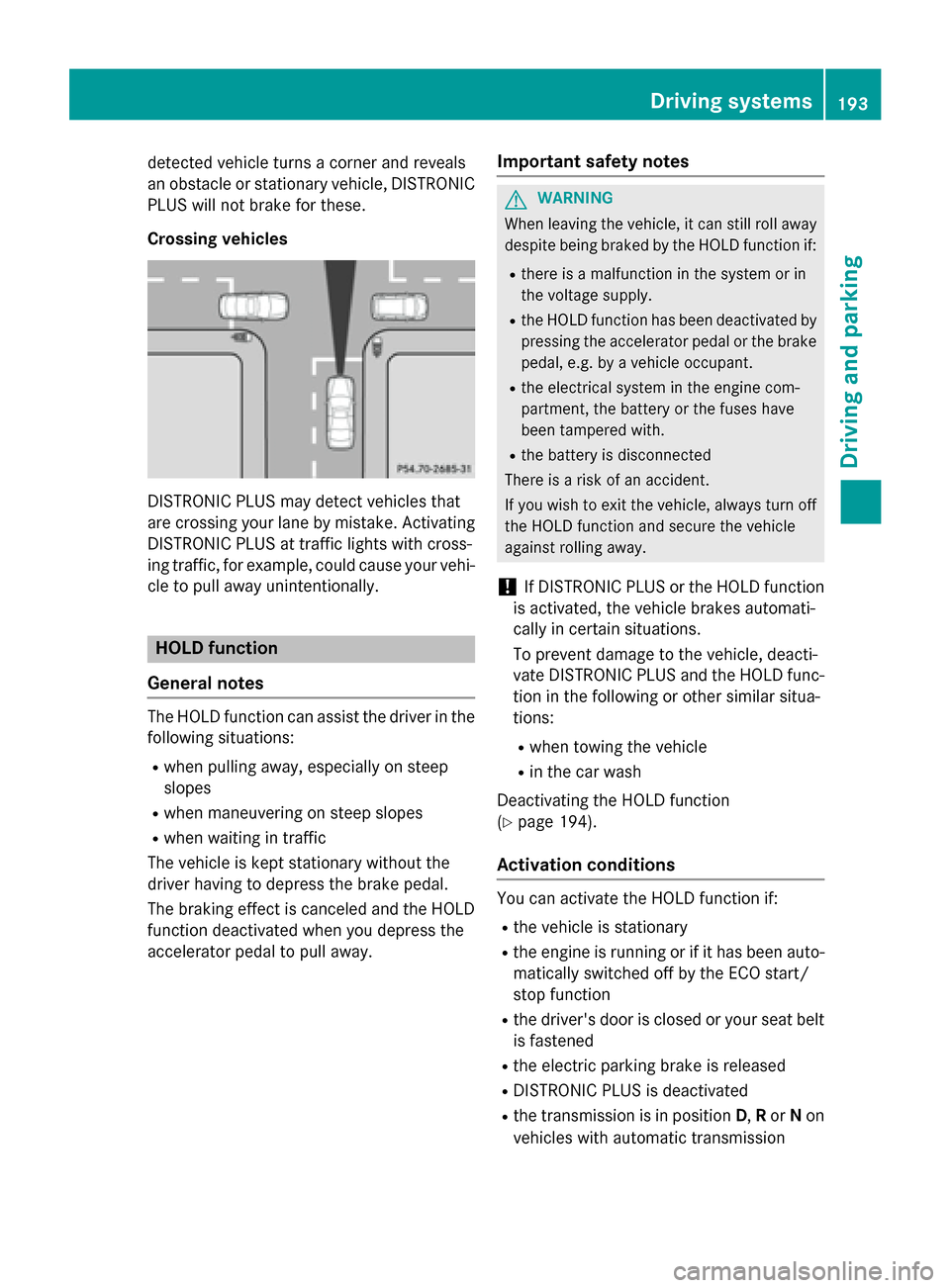
Crossing vehicles
DISTRONIC PLUS may detect vehicles that
are crossing your lane by mistake. Activating
DISTRONIC PLUS at traffic lights with cross-
ing traffic, for example, could cause your vehi-
cle to pull away unintentionally.
HOLD function
General notes
The HOLD function can assist the driver in the
following situations:
Rwhen pulling away, especially on steep
slopes
Rwhen maneuvering on steep slopes
Rwhen waiting in traffic
The vehicle is kept stationary without the
driver having to depress the brake pedal.
The braking effect is canceled and the HOLD
function deactivated when you depress the
accelerator pedal to pull away.
Important safety notes
GWARNING
When leaving the vehicle, it can still roll away despite being braked by the HOLD function if:
Rthere is a malfunction in the system or in
the voltage supply.
Rthe HOLD function has been deactivated by
pressing the accelerator pedal or the brake
pedal, e.g. by a vehicle occupant.
Rthe electrical system in the engine com-
partment, the battery or the fuses have
been tampered with.
Rthe battery is disconnected
There is a risk of an accident.
If you wish to exit the vehicle, always turn off the HOLD function and secure the vehicle
against rolling away.
!If DISTRONIC PLUS or the HOLD function
is activated, the vehicle brakes automati-
cally in certain situations.
To prevent damage to the vehicle, deacti-
vate DISTRONIC PLUS and the HOLD func-
tion in the following or other similar situa-
tions:
Rwhen towing the vehicle
Rin the car wash
Deactivating the HOLD function
(
Ypage 194).
Activation conditions
You can activate the HOLD function if:
Rthe vehicle is stationary
Rthe engine is running or if it has been auto-
matically switched off by the ECO start/
stop function
Rthe driver's door is closed or your seat belt
is fastened
Rthe electric parking brake is released
RDISTRONIC PLUS is deactivated
Rthe transmission is in position D,Ror Non
vehicles with automatic transmission
Driving systems193
Driving and parking
Z
Page 197 of 390
XDepress the brake pedal firmly with your
left foot and keep the brake pedal
depressed.
XShift the transmission to positionD.
XUse the DYNAMIC SELECT button to select
the Sdrive program (
Ypage 157).
XQuickly depress the accelerator pedal fully.
XTake your foot off the brake, but keep the
accelerator pedal depressed.
The vehicle pulls away at maximum accel-
eration.
iActivate ESP®as soon as the acceleration
process has ended. ESP®will otherwise not
be able to stabilize the vehicle if the vehicle
starts to skid or a wheel starts to spin.
Canceling start-off assist
XRemove your foot from the accelerator
pedal.
XReactivate ESP.
RACE START (AMG vehicles)
Important safety notes
iRACE START must not be used on normal
roads. RACE START must only be activated and used on dedicated road circuits, out-
side of public road use.
iRACE START is only available in
Mercedes‑AMG vehicles.
GWARNING
If you use RACE START, individual tires may
start to spin and the vehicle could skid.
Depending on the selected ESP
®mode, there
is an increased risk of skidding and having an accident. Make sure that no persons, animals
or obstacles are within range of the vehicle.
RACE START enables optimal acceleration
from a standing start. For this, a suitably high-
grip road surface is required, along with the
tires and vehicle being in proper operating
condition.
iObserve the safety notes on driving safety
systems (
Ypage 65).
Be sure to read the safety notes and infor-
mation on ESP
®(Ypage 69).
Conditions for activation
You can activate RACE START if:
Rthe doors, hood and the trunk lid are
closed.
Rthe engine is running and the transmission,
all-wheel drive clutch and the engine are at operating temperature.
Rthe steering wheel is in the straight-ahead
position.
Rthe vehicle is stationary and the brake
pedal is depressed (left foot).
Rthe transmission is in position D.
Rdrive program S,S+ orRACE is selected
(
Ypage 158).
Activating RACE START
XDepress the brake pedal with your left foot
and keep it depressed.
XPull and hold both steering wheel paddle
shifters.
XThe RACE START Confirm: Paddle UP
Cancel: Paddle DOWNmessage appears
in the multifunction display.
XRelease both steering wheel paddle shift-
ers.
iIf the activation conditions are no longer
fulfilled, RACE START is canceled. The
RACE START Not Possible See Opera‐
tor's Manualmessage appears in the
multifunction display.
XTo cancel: pull the left steering wheel pad-
dle shifter (
Ypage 166).
or
XTo confirm: pull the right steering wheel
paddle shifter (
Ypage 166).
The RACE START Available Depress
gas pedalmessage appears in the multi-
function display.
Driving system s195
Driving an d parking
Z
Page 199 of 390
XPress button:again so that indicator
lamp ;goes out.
You have selected Comfort mode.
The AMG Suspension System COMFORT
message appears in the multifunction dis-
play.
4MATIC
!
Never tow the vehicle with one axle
raised. This may damage the differential.
Damage of this sort is not covered by the
Mercedes-Benz Limited Warranty. All
wheels must remain either on the ground or be fully raised. Observe the instructions for
towing the vehicle with all wheels in full
contact with the ground.
4MATIC, together with ESP
®, improves the
traction of your vehicle whenever a drive
wheel spins due to insufficient grip.
If you fail to adapt your driving style, 4MATIC
can neither reduce the risk of accident nor
override the laws of physics. 4MATIC cannot
take account of road, weather and traffic con- ditions. 4MATIC is only an aid. You are
responsible for the distance to the vehicle in
front, for vehicle speed, for braking in good
time and for staying in your lane.
If a drive wheel spins due to insufficient grip:
ROnly depress the accelerator pedal as far as
necessary when pulling away.
RAccelerate less when driving.
iIn wintry driving conditions, the maximum
effect of 4MATIC can only be achieved if
you use winter tires (M+S tires), with snow
chains if necessary.
DSR
General notes
iDSR (Downhill Speed Regulation) is only
available for vehicles with the Off-Road
Engineering package. DSR is an aid to assist you when driving down-
hill. It keeps the speed of travel at the speed
selected on the on-board computer. The
steeper the downhill gradient, the greater the
DSR braking effect on the vehicle. When driv-
ing on flat stretches of road or on an uphill
gradient, the DSR braking effect is minimal or
nonexistent.
DSR controls the vehicle’s speed when it is
activated and the transmission is in position
D
,R or N. You can drive at a higher or a lower
speed than that set on the on-board computer
at any time by accelerating or braking.
Important safety notes
GWARNING
If the speed driven and the set speed deviate and you activate DSR on a slippery road sur-
face, the wheels may lose traction. There is an
increased danger of skidding and accidents.
Before switching DSR on, please take into
consideration the road surface and the differ- ence between driving speed and the set
speed.
If you fail to adapt your driving style, DSR can
neither reduce the risk of accident nor over-
ride the laws of physics. DSR cannot take
account of road, weather and traffic condi-
tions. DSR is only an aid. You are responsible
for the distance to the vehicle in front, for
vehicle speed, for braking in good time and for
staying in your lane.
You are always responsible for keeping con-
trol of the vehicle and for assessing whether
the downhill gradient can be managed. DSR
may not always be able to keep to the set
speed, depending on road surface and tire
conditions. Select a set speed suitable for the
prevailing conditions and when necessary,
apply the brakes manually.
Further information about "Driving off-road"
(
Ypage 180).
Driving systems197
Driving and parking
Z
Page 200 of 390
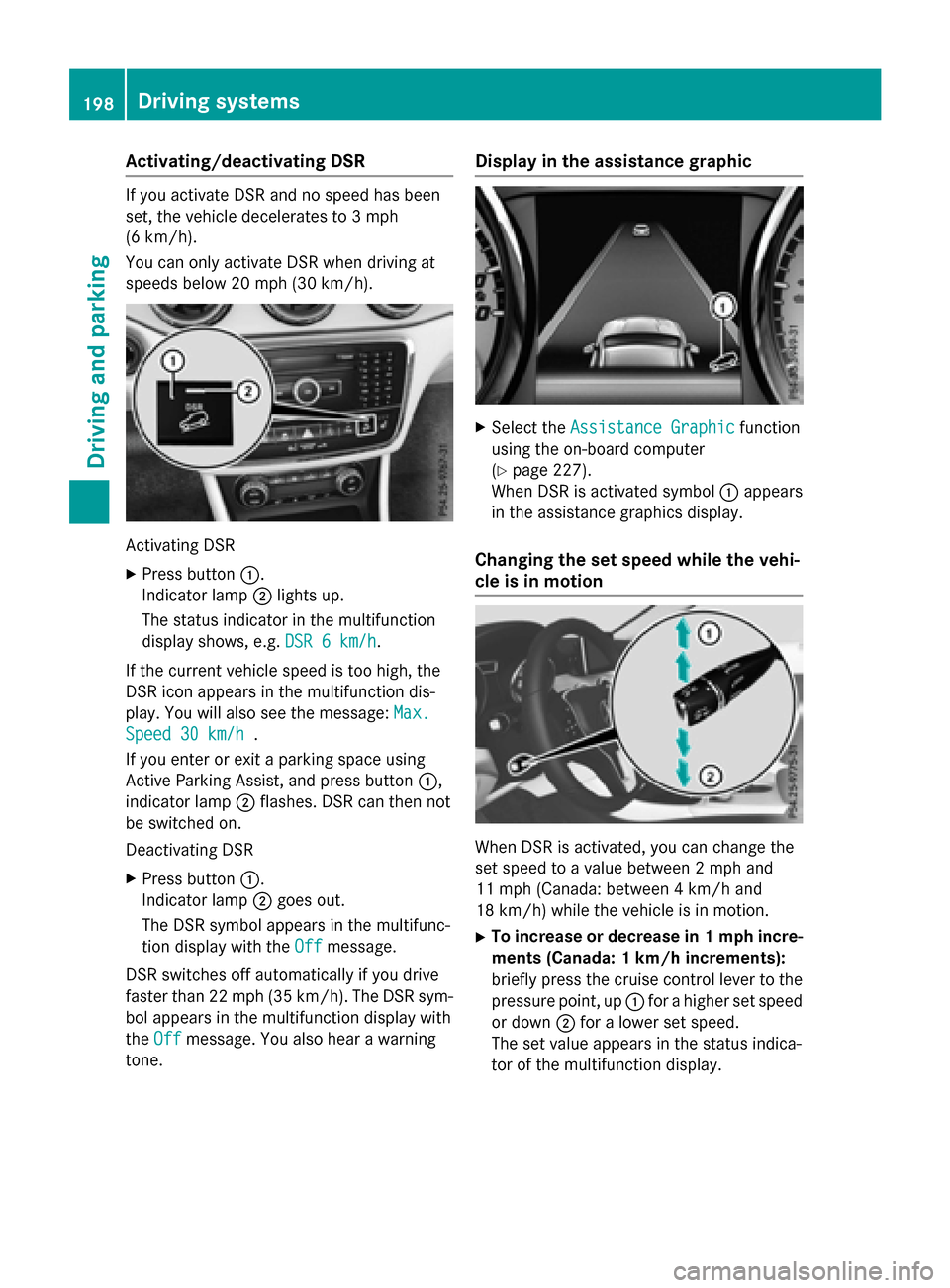
Activating/deactivating DSR
If you activateDS Rand no spee dhas been
set ,th evehicl edecelerate sto 3mph
(6 km/ h).
Yo u can only activate DSR when driving at
speeds below 20 mph (30 km/h).
Activating DSR
XPress button :.
Indicator lamp ;lights up.
The status indicator in the multifunction
display shows, e.g. DSR 6 km/h
.
If the current vehicle speed is too high, the
DSR icon appears in the multifunction dis-
play. You will also see the message: Max.
Speed 30 km/h.
If you enter or exit a parking space using
Active Parking Assist, and press button :,
indicator lamp ;flashes. DSR can then not
be switched on.
Deactivating DSR
XPress button :.
Indicator lamp ;goes out.
The DSR symbol appears in the multifunc-
tion display with the Off
message.
DSR switches off automatically if you drive
faster than 22 mph (35 km/h). The DSR sym-
bol appears in the multifunction display with
the Off
message. You also hear a warning
tone.
Display in the assistance graphic
XSelect the Assistance Graphicfunction
using the on-board computer
(
Ypage 227).
When DSR is activated symbol :appears
in the assistance graphics display.
Changing the set speed while the vehi-
cle is in motion
When DSR is activated, you can change the
set speed to a value between 2 mph and
11 mph (Canada: between 4 km/h and
18 km/h) while the vehicle is in motion.
XTo increase or decrease in 1 mph incre- ments (Canada: 1 km/h increments):
briefly press the cruise control lever to the
pressure point, up :for a higher set speed
or down ;for a lower set speed.
The set value appears in the status indica-
tor of the multifunction display.
198Driving systems
Driving and parking
Page 203 of 390
The sensors may not detect snow and other
objects that absorb ultrasonic waves.
Ultrasonic sources such as an automatic
car wash, the compressed-air brakes on a
truck or a pneumatic drill could cause
PARKTRONIC to malfunction.
PARKTRONIC may not function correctly on
uneven terrain.
PARKTRONIC is activated automatically when
you:
Rswitch on the ignition
Rshift the transmission to position D,Ror N
Rrelease the electric parking brake
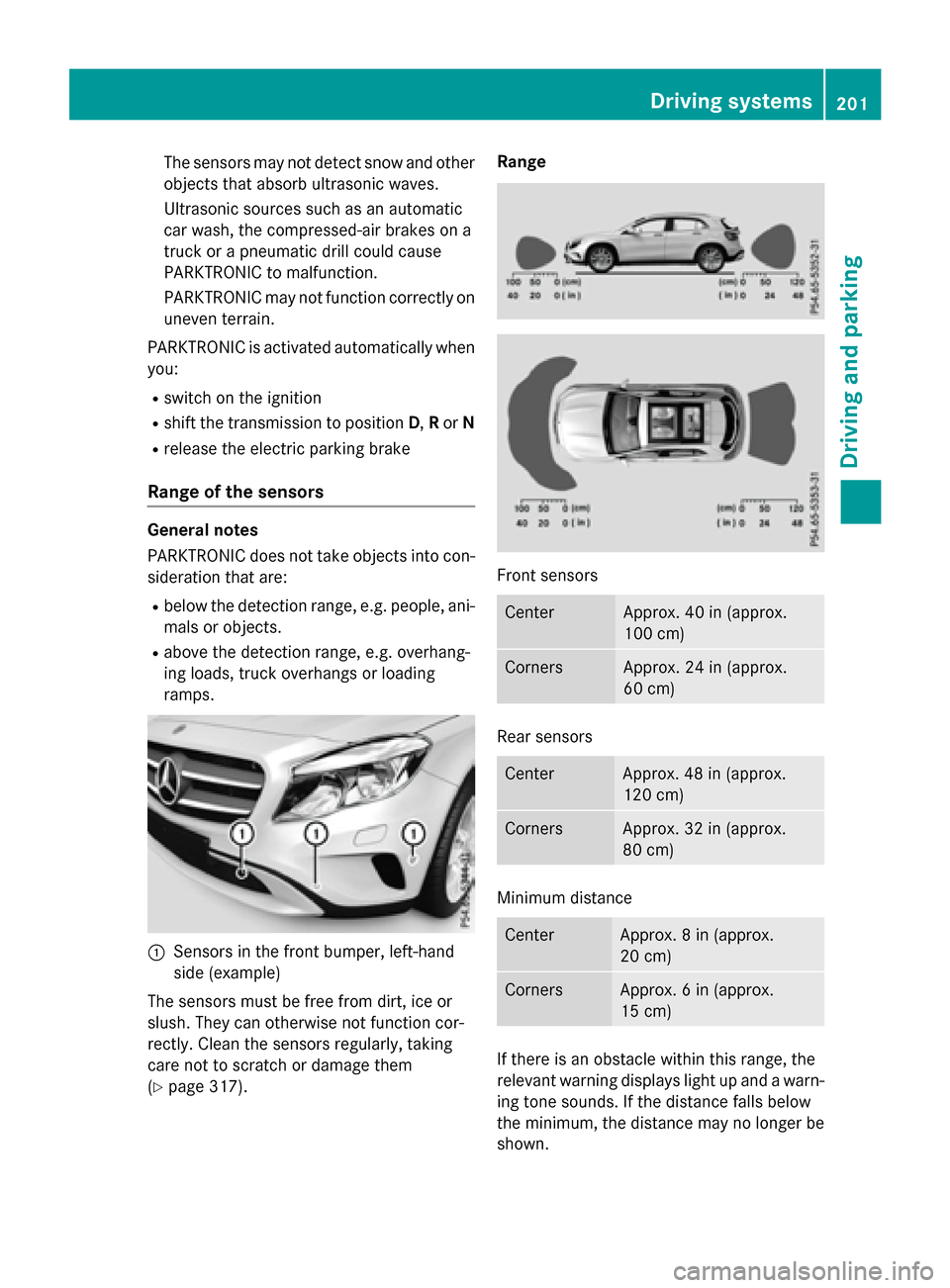
Range of the sensors
General notes
PARKTRONIC does not take objects into con-
sideration that are:
Rbelow the detection range, e.g. people, ani-
mals or objects.
Rabove the detection range, e.g. overhang-
ing loads, truck overhangs or loading
ramps.
:Sensors in the front bumper, left-hand
side (example)
The sensors must be free from dirt, ice or
slush. They can otherwise not function cor-
rectly. Clean the sensors regularly, taking
care not to scratch or damage them
(
Ypage 317). Range
Front sensors
CenterApprox. 40 in (approx.
100 cm)
CornersApprox. 24 in (approx.
60 cm)
Rear sensors
CenterApprox. 48 in (approx.
120 cm)
CornersApprox. 32 in (approx.
80 cm)
Minimum distance
CenterApprox. 8 in (approx.
20 cm)
CornersApprox. 6 in (approx.
15 cm)
If there is an obstacle within this range, the
relevant warning displays light up and a warn-
ing tone sounds. If the distance falls below
the minimum, the distance may no longer be
shown.
Driving systems201
Driving and parking
Z