engine MERCEDES-BENZ GLA-Class 2017 X156 Owner's Manual
[x] Cancel search | Manufacturer: MERCEDES-BENZ, Model Year: 2017, Model line: GLA-Class, Model: MERCEDES-BENZ GLA-Class 2017 X156Pages: 390, PDF Size: 8.37 MB
Page 224 of 390
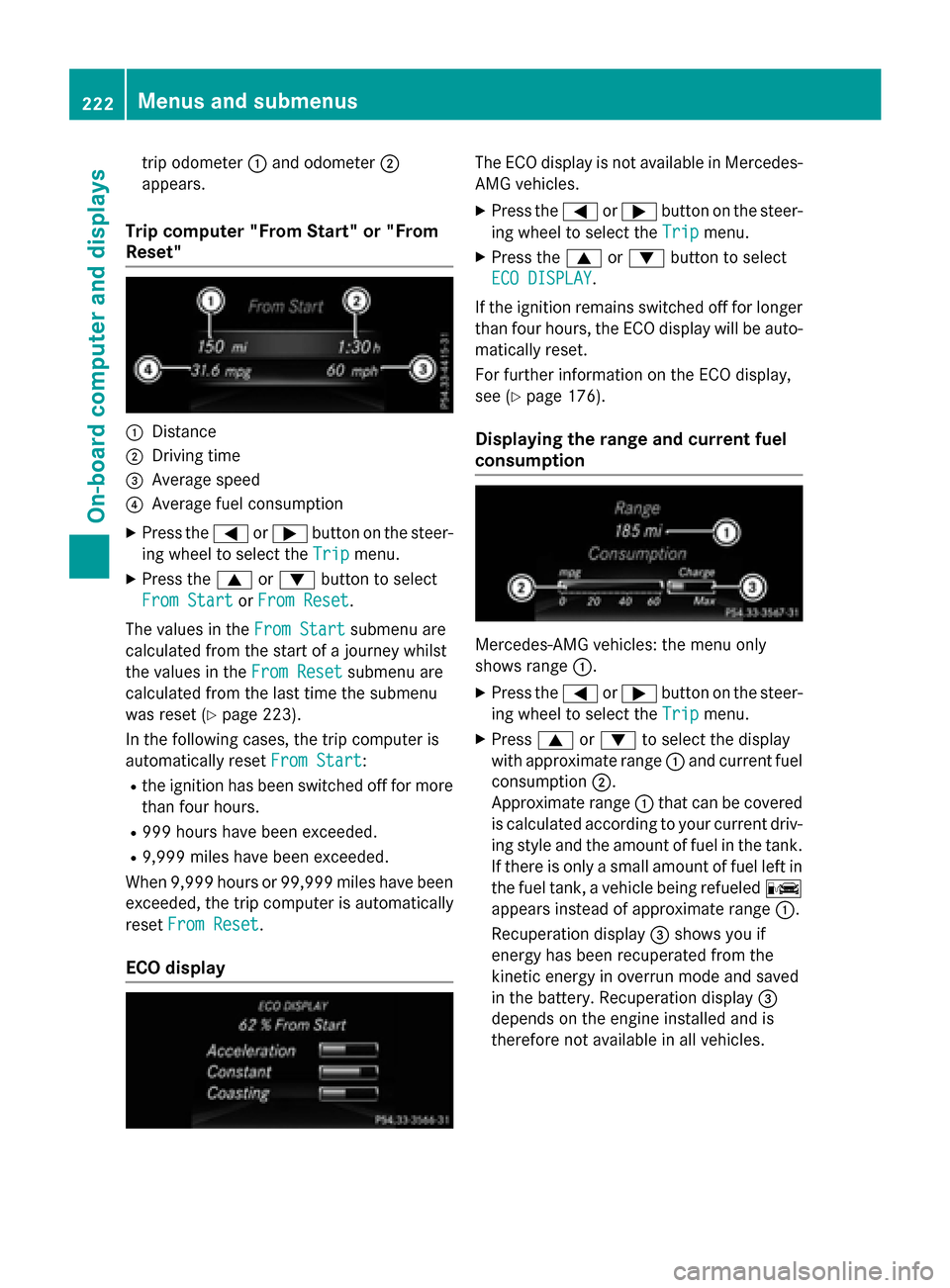
trip odometer:and odometer ;
appears.
Trip computer "From Start" or "From
Reset"
:Distance
;Driving time
=Average speed
?Average fuel consumption
XPress the =or; button on the steer-
ing wheel to select the Trip
menu.
XPress the9or: button to select
From Start
or From Reset.
The values in the From Start
submenu are
calculated from the start of a journey whilst
the values in the From Reset
submenu are
calculated from the last time the submenu
was reset (
Ypage 223).
In the following cases, the trip computer is
automatically reset From Start
:
Rthe ignition has been switched off for more
than four hours.
R999 hours have been exceeded.
R9,999 miles have been exceeded.
When 9,999 hours or 99,999 mile shave been
exceeded, the trip computer is automatically
reset From Reset
.
ECO display
The ECO display is not available in Mercedes-
AMG vehicles.
XPress the =or; button on the steer-
ing wheel to select the Trip
menu.
XPress the9or: button to select
ECO DISPLAY
.
If the ignition remains switched off for longer
than four hours, the ECO display will be auto-
matically reset.
For further information on the ECO display,
see (
Ypage 176).
Displaying the range and current fuel
consumption
Mercedes-AMG vehicles: the menu only
shows range :.
XPress the=or; button on the steer-
ing wheel to select the Trip
menu.
XPress9or: to select the display
with approximate range :and current fuel
consumption ;.
Approximate range :that can be covered
is calculated according to your current driv-
ing style and the amount of fuel in the tank.
If there is only a small amount of fuel left in
the fuel tank, a vehicle being refueled C
appears instead of approximate range :.
Recuperation display =shows you if
energy has been recuperated from the
kinetic energy in overrun mode and saved
in the battery. Recuperation display =
depends on the engine installed and is
therefore not available in all vehicles.
222Menus and submenus
On-board computer and displays
Page 230 of 390
It may be best to deactivate ESP®in the fol-
lowing situations:
Rwhen using snow chains
Rin deep snow
Ron sand or gravel
Deactivating/activating ESP
®in Mercedes-
AMG vehicles (
Ypage 70).
For further information about ESP
®, see
(
Ypage 69).
XStart the engine.
XPress the =or; button on the steer-
ing wheel to select the DriveAssist
menu.
XPress9or: to select ESP.
XPressato confirm.
The current selection appears.
XTo activate/deactivate: press thea
button again.
ESP
®is deactivated if the åwarning
lamp in the instrument cluster lights up
continuously when the engine is running.
If the ÷ andå warning lamps light up
continuously, ESP
®is not available due to a
malfunction.
Observe the information on warning lamps
(
Ypage 271).
Observe the information on display messages
(
Ypage 236).
Activating/deactivating COLLISION
PREVENTION ASSIST PLUS
XPress the =or; button on the steer-
ing wheel to select the DriveAssist
menu.
XPress the9or: button to select
Collision Prevent. Assist
.
XPress ato confirm.
The current selection appears.
XTo activate/deactivate: press thea
button again.
When COLLISION PREVENTION ASSIST
PLUS is deactivated, the æsymbol
appears in the multifunction display in the
assistance graphic display. For further information about COLLISION
PREVENTION ASSIST PLUS, see (
Ypage 66).
Activating/deactivating ATTENTION
ASSIST
XPress the
=or; button on the steer-
ing wheel to select the DriveAssist
menu.
XPress the9or: button to select
Attention Assist
.
XPress ato confirm.
The current selection appears.
XPress ato confirm.
XPress the :or9 button to set Off,
Standard
or Sensitive.
XPress the abutton to save the setting.
When ATTENTION ASSIST is deactivated,
the é symbol appears in the multifunc-
tion display in the assistance graphics dis-
play.
For further information about ATTENTION
ASSIST, see (
Ypage 211).
Activating/deactivating Blind Spot
Assist
XPress the =or; button on the steer-
ing wheel to select the DriveAssist
menu.
XPress the9or: button to select
Blind Spot Assist
.
XPress ato confirm.
The current selection appears.
XTo activate/deactivate: press thea
button again.
For further information about Blind Spot
Assist, see (
Ypage 213).
Activating/deactivating Lane Keeping
Assist
XPress the =or; button on the steer-
ing wheel to select the DriveAssist
menu.
XPress the9or: button to select
Lane Keeping Assist
.
XPress ato confirm.
The current selection appears.
228Menus and submenus
On-board computer and displays
Page 233 of 390
XPress the:or9 button to select the
Acoustic Lock
function.
If the Acoustic
Lockfunction is activated,
the multifunction display shows the &
symbol in orange.
XPress the abutton to save the setting.
Convenience
Switching the fold-in mirrors when lock-
ing feature on/off
This function is only available in Canada.
This function is only available when the vehi-
cle is equipped with the electrical fold-in func-
tion.
When you activate the Auto.
MirrorFold‐
ingfunction, the exterior mirrors are folded
in when the vehicle is locked. If you unlock the
vehicle and then open the driver's or front-
passenger door, the exterior mirrors fold out
again.
If you have switched on the Auto. Mirror
Foldingfunction and you fold in the exterior
mirrors using the button on the door
(
Ypage 109), they will not fold out automat-
ically. The exterior mirrors can then only be
folded out using the button on the door.
XPress the =or; button on the steer-
ing wheel to select the Sett.
menu.
XPress the:or9 button to select the
Convenience
submenu.
XPress ato confirm.
XPress the :or9 button to select the
Auto. Mirror Folding
function.
If the Auto. Mirror Folding
function is
switched on, the multifunction display
shows the exterior mirror in orange.
XPress the abutton to save the setting.
Restoring the factory settings
XPress the =or; button on the steer-
ing wheel to select the Sett.
menu.
XPress the:or9 button to select the
Factory Setting
submenu.
XPress ato confirm.
The Reset All Settings?
function
appears.
XPress the :or9 button to select No
orYes.
XPress the abutton to confirm the selec-
tion.
If you have selected Yes
, the multifunction
display shows a confirmation message.
For safety reasons, the Daytime Running
Lightsfunction in theLightsubmenu is only
reset if the vehicle is stationary.
AMG menu (Mercedes-AMG vehicles)
WARMUP
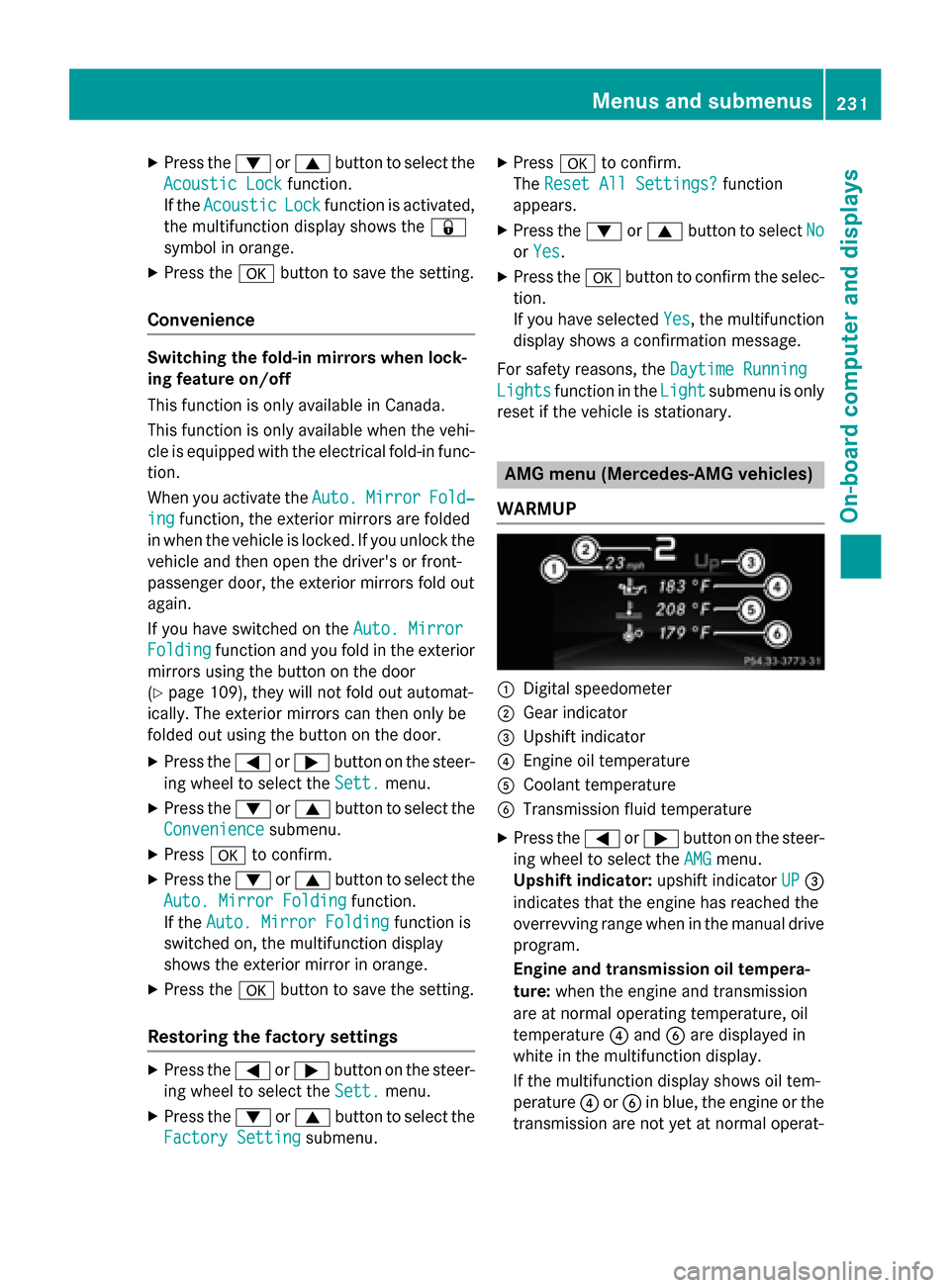
:Digital speedometer
;Gear indicator
=Upshift indicator
?Engine oil temperature
ACoolant temperature
BTransmission fluid temperature
XPress the =or; button on the steer-
ing wheel to select the AMG
menu.
Upshift indicator: upshift indicatorUP
=
indicates that the engine has reached the
overrevving range when in the manual drive
program.
Engine and transmission oil tempera-
ture: when the engine and transmission
are at normal operating temperature, oil
temperature ?and Bare displayed in
white in the multifunction display.
If the multifunction display shows oil tem-
perature ?orB in blue, the engine or the
transmission are not yet at normal operat-
Menus and submenus231
On-board computer and displays
Z
Page 234 of 390
ing temperature. Avoid driving at full engine
output during this time.
SETUP
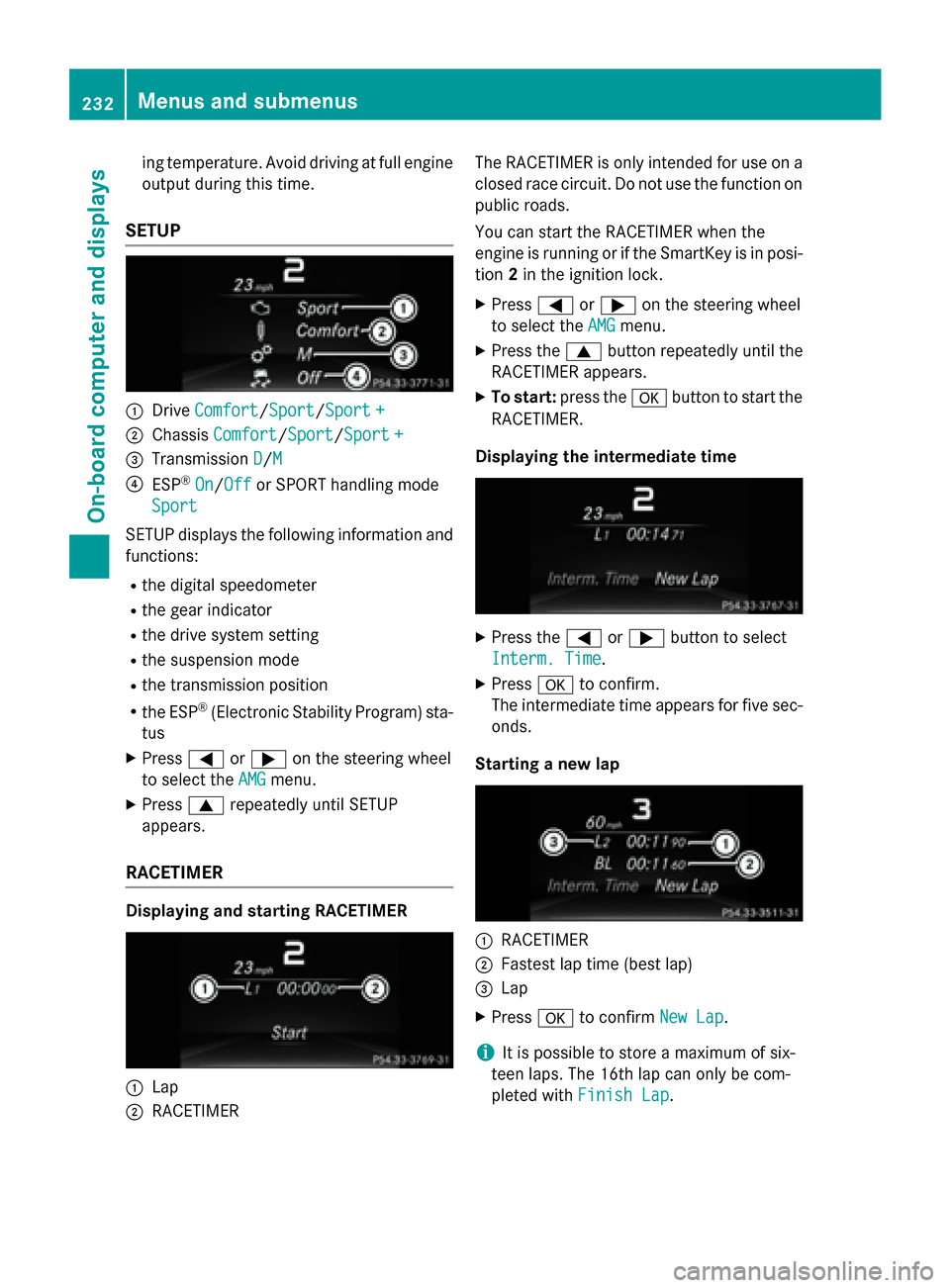
:DriveComfort/Sport/Sport +
;Chassis Comfort/Sport/Sport +
=Transmission D/M
?ESP®On/Offor SPORT handling mode
Sport
SE TUP displays the following information and
functions:
Rthe digit al speedometer
Rthe gear indicator
Rthedrive system setting
Rthe suspension mode
Rthe transmission position
Rthe ESP®(Electronic Stability Program) sta-
tus
XPress =or; on the steering wheel
to select the AMG
menu.
XPress9repeatedly until SE TUP
appears.
RACETIMER
Displaying and starting RACETIMER
:Lap
;RACE TIMER The
RACE TIMER isonly intended for use on a
closed race circuit. Do not use the function on
public roads.
You can start the RACETIMER when the
engine isrunning or ifthe SmartKey is inposi-
tion 2in the ignit ion lock.
XPress=or; on the steering wheel
to select the AMG
menu.
XPress the9button repeatedly unt ilthe
RACE TIMER appears.
XTo star t:press the abutton to start the
RACETIMER.
Displaying the intermedia tetime
XPress the =or; button to select
Interm. Time
.
XPress ato confirm.
The intermediate time appears for five sec- onds.
Starting a new lap
:RACE TIMER
;Fastest lap time (best lap)
=Lap
XPress ato confirm New Lap.
iIt ispossible to store a maximum of six-
teen laps. The 16th lap can only be com-
pleted with Finish Lap
.
232Menus and submenus
On-board computer and displays
Page 235 of 390
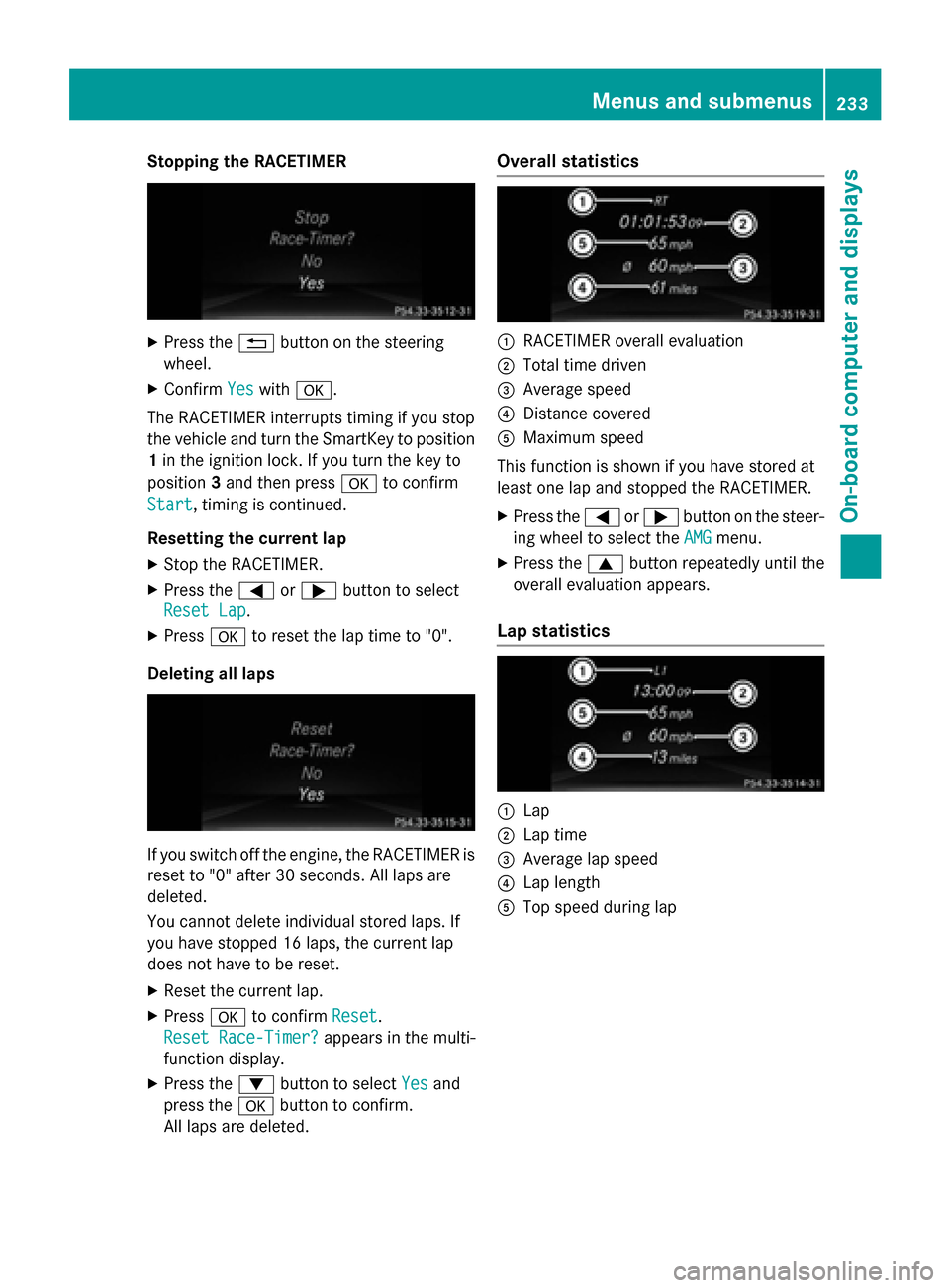
Stopping the RACETIMER
XPress the%button on the steering
wheel.
XConfirm Yeswitha.
The RACETIMER interrupts timing if you stop
the vehicle and turn the SmartKey to position
1 in the ignition lock. If you turn the key to
position 3and then press ato confirm
Start
, timing is continued.
Resetting the current lap
XStop the RACETIMER.
XPress the =or; button to select
Reset Lap
.
XPress ato reset the lap time to "0".
Deleting all laps
If you switch off the engine, the RACETIMER is
reset to "0" after 30 seconds. All laps are
deleted.
You cannot delete individual stored laps. If
you have stopped 16 laps, the current lap
does not have to be reset.
XReset the current lap.
XPress ato confirm Reset.
Reset Race-Timer?
appears in the multi-
function display.
XPress the :button to select Yesand
press the abutton to confirm.
All laps are deleted.
Overall statistics
:RACETIMER overall evaluation
;Total time driven
=Average speed
?Distance covered
AMaximum speed
This function is shown if you have stored at
least one lap and stopped the RACETIMER.
XPress the =or; button on the steer-
ing wheel to select the AMG
menu.
XPress the9button repeatedly until the
overall evaluation appears.
Lap statistics
:Lap
;Lap time
=Average lap speed
?Lap length
ATop speed during lap
Menus and submenus233
On-board computer and displays
Z
Page 243 of 390
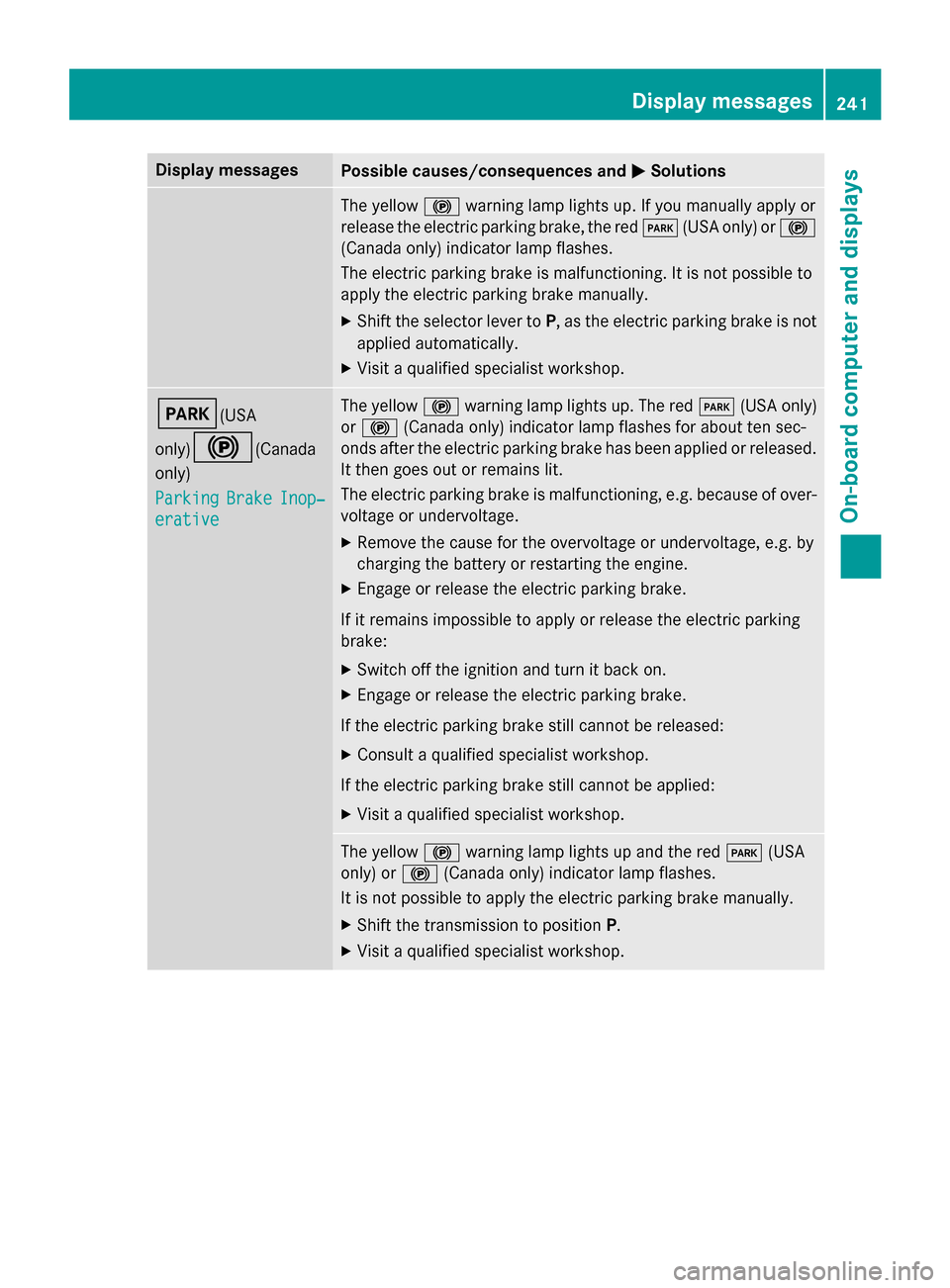
Display messagesPossible causes/consequences andMSolutions
The yellow! warnin glamp lights up. If you manually apply or
release th eelectric parkin gbrake, th ered F (USAonly) or !
(Canada only) indicato rlamp flashes .
The electric parkin gbrak eis malfunctioning. It is no tpossibl eto
apply th eelectric parkin gbrak emanually.
XShift th eselector lever to P,as th eelectric parkin gbrak eis no t
applied automatically.
XVisit aqualified specialist workshop .
F(USA
only)
!(Canada
only)
Parkin g
BrakeInop‐
erative
The yello w! warnin glamp lights up. The red F(USAonly)
or ! (Canada only) indicato rlamp flashes fo rabout te nsec -
onds after th eelectric parkin gbrak ehas been applied or released.
It then goe sout or remain slit .
The electric parkin gbrak eis malfunctioning, e.g. because of over-
voltag eor undervoltage.
XRemove th ecaus efo rth eovervoltage or undervoltage, e.g. by
chargin gth ebattery or restarting th eengine.
XEngage or release th eelectric parkin gbrake.
If it remain simpossible to apply or release th eelectric parkin g
brake:
XSwitc hof fth eignition and tur nit bac kon .
XEngage or release th eelectric parkin gbrake.
If th eelectric parkin gbrak estill canno tbe released:
XConsult aqualified specialist workshop .
If th eelectric parkin gbrak estill canno tbe applied:
XVisit aqualified specialist workshop .
The yellow! warnin glamp lights up and th ered F (USA
only) or !(Canada only) indicato rlamp flashes .
It is no tpossibl eto apply th eelectric parkin gbrak emanually.
XShift th etransmissio nto position P.
XVisit aqualified specialist workshop .
Display messages241
On-board computer and displays
Z
Page 244 of 390
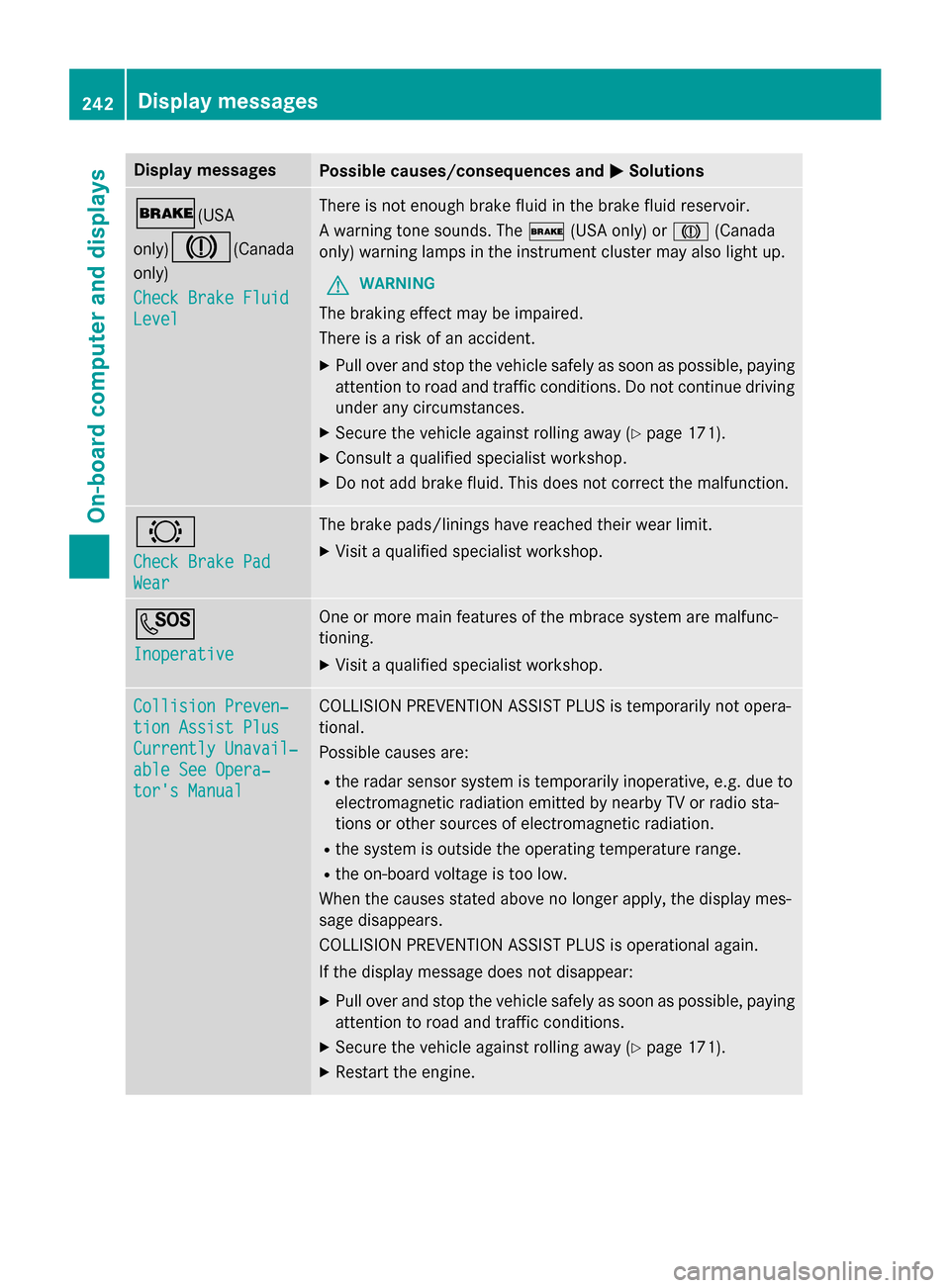
Display messagesPossible causes/consequences andMSolutions
$(USA
only)
J(Canada
only)
Check Brake Fluid
Level
There is no tenough brak eflui din th ebrak eflui dreservoir .
A warnin gtone sounds. The $(USAonly) or J(Canada
only) warnin glamp sin th einstrumen tcluster may also ligh tup.
GWARNIN G
The brakin geffec tmay be impaired.
There is aris kof an accident.
XPull ove rand stop th evehicl esafely as soo nas possible, payin g
attention to roa dand traffic conditions. Do no tcontinue drivin g
under any circumstances.
XSecur eth evehicl eagainst rollin gaway (Ypage 171).
XConsult aqualified specialist workshop .
XDo notadd brak efluid. This does no tcorrec tth emalfunction .
#
Check Brake Pad
Wear
The brak epads/lining shav ereached their wear limit.
XVisit aqualified specialist workshop .
G
Inoperative
Oneor mor emain features of th embrace system are malfunc -
tioning.
XVisit aqualified specialist workshop .
Collision Preven‐
tionAssist Plu s
Currently Unavail‐
ableSee Opera‐
tor's Manual
COLLISION PREVENTION ASSIST PLU Sis temporarily no topera-
tional.
Possibl ecauses are:
Rth erada rsensor system is temporarily inoperative, e.g. due to
electromagnetic radiation emitted by nearby TV or radi osta-
tion sor other source sof electromagnetic radiation .
Rthesystem is outside th eoperating temperature range.
Rth eon-boar dvoltag eis to olow.
Whe nth ecauses state dabov eno longer apply, th edisplay mes -
sage disappears.
COLLISION PREVENTION ASSIST PLU Sis operational again .
If th edisplay message does no tdisappear :
XPull overand stop th evehicl esafely as soo nas possible, payin g
attention to roa dand traffic conditions.
XSecur eth evehicl eagainst rollin gaway (Ypage 171).
XRestart th eengine.
242Display messages
On-board computer and displays
Page 245 of 390
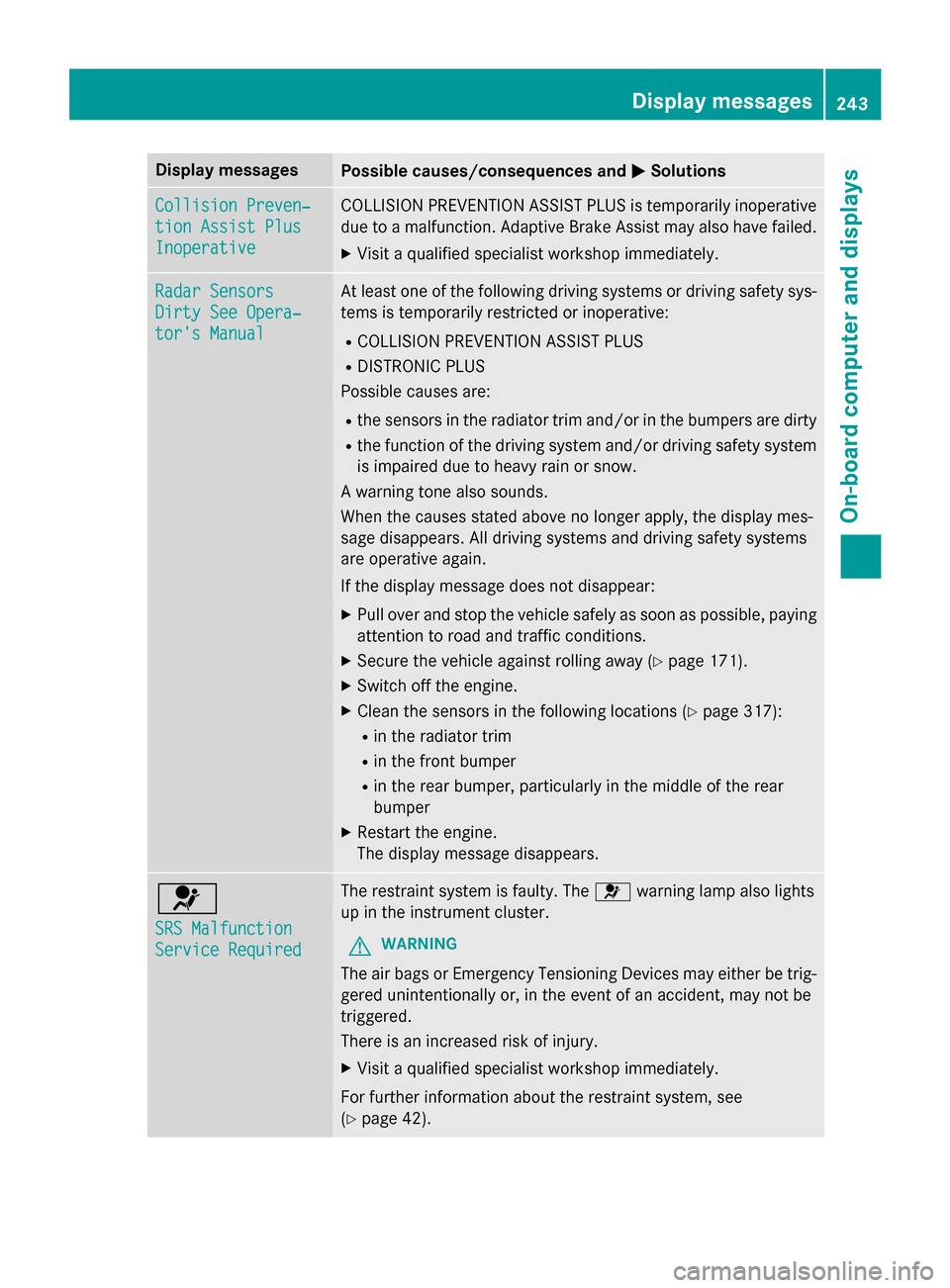
Display messagesPossible causes/consequences andMSolutions
Collision Preven‐
tionAssist Plu s
Inoperative
COLLISION PREVENTION ASSIST PLU Sis temporarily inoperative
due to amalfunction .Adaptive Brake Assis tmay also hav efailed.
XVisit aqualified specialist workshop immediately.
Radar Sensor s
Dirty See Opera‐
tor's Manual
At leaston eof th efollowing drivin gsystems or drivin gsafet ysys-
tems is temporarily restricted or inoperative:
RCOLLISION PREVENTION ASSIST PLU S
RDISTRONIC PLUS
Possibl ecauses are:
Rth esensor sin th eradiato rtrim and/o rin th ebumpers are dirty
Rth efunction of th edrivin gsystem and/o rdrivin gsafet ysystem
is impaire ddue to heav yrain or snow.
A warnin gtone also sounds.
Whe nth ecauses state dabov eno longer apply, th edisplay mes -
sage disappears. Al ldrivin gsystems and drivin gsafet ysystems
are operative again .
If th edisplay message does no tdisappear :
XPull overand stop th evehicl esafely as soo nas possible, payin g
attention to roa dand traffic conditions.
XSecur eth evehicl eagainst rollin gaway (Ypage 171).
XSwitchof fth eengine.
XClean th esensor sin th efollowing location s (Ypage 317):
Rin theradiato rtrim
Rin th efron tbumper
Rin th erear bumper, particularl yin th emiddle of th erear
bumper
XRestart th eengine.
The display message disappears.
6
SRS Malfunction
Servic eRequired
The restrain tsystem is faulty. The 6warnin glamp also lights
up in th einstrumen tcluster.
GWARNIN G
The air bags or Emergency Tensioning Devices may either be trig-
gered unintentionally or, in th eevent of an accident, may no tbe
triggered .
There is an increase dris kof injury.
XVisit aqualified specialist workshop immediately.
Fo rfurther information about th erestrain tsystem, see
(
Ypage 42) .
Display messages243
On-board computer and displays
Z
Page 253 of 390
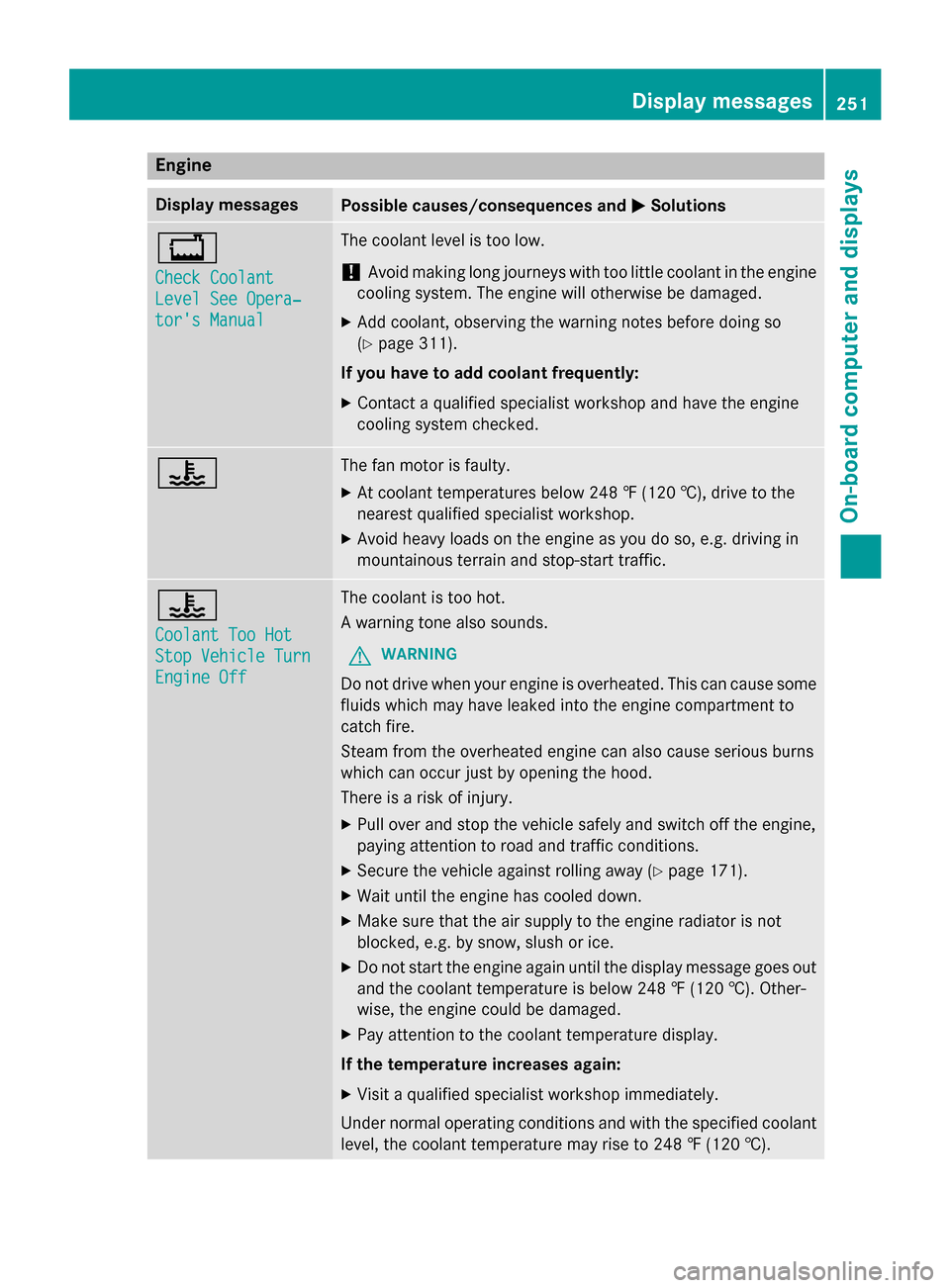
Engine
Display messagesPossible causes/consequences andMSolutions
+
Check Coolant
Level See Opera‐
tor's Manual
The coolant level is too low.
!Avoid making long journeys with too little coolant in the engine
cooling system. The engine will otherwise be damaged.
XAdd coolant, observing the warning notes before doing so
(
Ypage 311).
If you have to add coolant frequently:
XContact a qualified specialist workshop and have the engine
cooling system checked.
?The fan motor is faulty.
XAt coolant temperatures below 248 ‡ (120 †), drive to the
nearest qualified specialist workshop.
XAvoid heavy loads on the engine as you do so, e.g. driving in
mountainous terrain and stop-start traffic.
?
Coolant Too Hot
Stop Vehicle Turn
Engine Off
The coolant is too hot.
A warning tone also sounds.
GWARNING
Do not drive when your engine is overheated. This can cause some
fluids which may have leaked into the engine compartment to
catch fire.
Steam from the overheated engine can also cause serious burns
which can occur just by opening the hood.
There is a risk of injury.
XPull over and stop the vehicle safely and switch off the engine,
paying attention to road and traffic conditions.
XSecure the vehicle against rolling away (Ypage 171).
XWait until the engine has cooled down.
XMake sure that the air supply to the engine radiator is not
blocked, e.g. by snow, slush or ice.
XDo not start the engine again until the display message goes out
and the coolant temperature is below 248 ‡ (120 †). Other-
wise, the engine could be damaged.
XPay attention to the coolant temperature display.
If the temperature increases again:
XVisit a qualified specialist workshop immediately.
Under normal operating conditions and with the specified coolant
level, the coolant temperature may rise to 248 ‡ (120†) .
Displa y messages251
On-board computer and displays
Z
Page 254 of 390
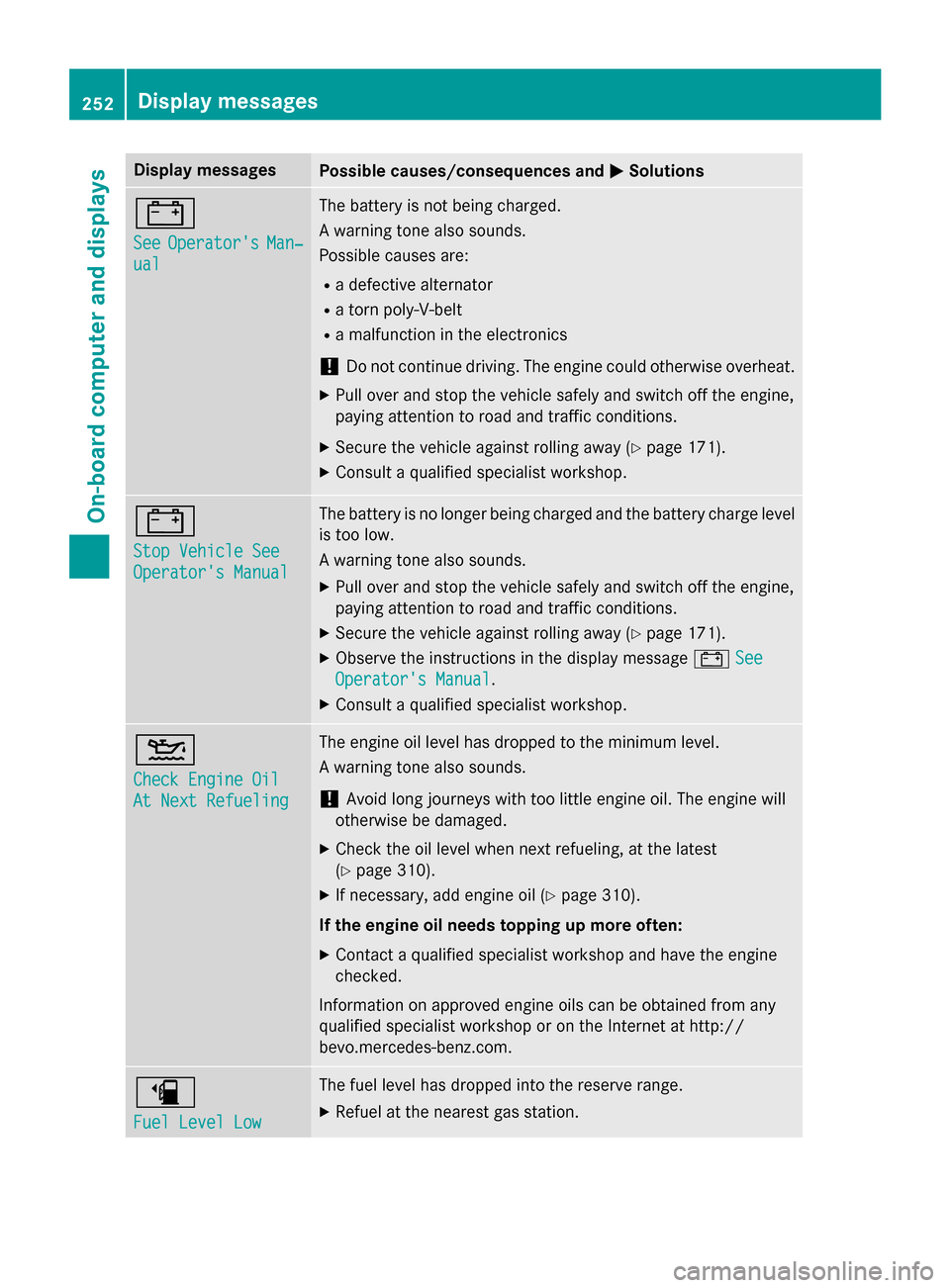
Display messagesPossible causes/consequences andMSolutions
#
SeeOperator'sMan‐
ual
The battery is no tbein gcharged.
A warnin gtone also sounds.
Possibl ecauses are:
Radefective alternato r
Ratorn poly-V-belt
Ramalfunction in th eelectronics
!Do no tcontinue driving. The engin ecould otherwise overheat .
XPull overand stop th evehicl esafely and switch of fth eengine,
payin gattention to roa dand traffic conditions.
XSecur eth evehicl eagainst rollin gaway (Ypage 171).
XConsult aqualified specialist workshop .
#
StopVehicl eSee
Operator' sManual
The battery is no longer bein gcharged and th ebattery charg elevel
is to olow.
A warnin gtone also sounds.
XPull ove rand stop th evehicl esafely and switch of fth eengine,
payin gattention to roa dand traffic conditions.
XSecur eth evehicl eagainst rollin gaway (Ypage 171).
XObserv eth einstruction sin th edisplay message #See
Operator' sManual.
XConsult aqualified specialist workshop .
4
Check Engine Oil
At NextRefueling
The engin eoil level has dropped to th eminimum level.
A warnin gtone also sounds.
!Avoid lon gjourneys wit hto olittl eengin eoil. The engin ewill
otherwise be damaged.
XChec kth eoil level when next refueling, at th elatest
(
Ypage 310).
XIf necessary, add engin eoil (Ypage 310).
If th eengin eoil need stopping up more often:
XContac t aqualified specialist workshop and hav eth eengin e
checked.
Information on approve dengin eoils can be obtained from any
qualified specialist workshop or on th eInternet at http:/ /
bevo.mercedes-benz.co m.
æ
Fuel Level Low
The fuel level has dropped into the reserve range.
XRefuel at the nearest gas station.
252Display messages
On-board computer and displays