Mount MERCEDES-BENZ GLA-Class 2017 X156 User Guide
[x] Cancel search | Manufacturer: MERCEDES-BENZ, Model Year: 2017, Model line: GLA-Class, Model: MERCEDES-BENZ GLA-Class 2017 X156Pages: 390, PDF Size: 8.37 MB
Page 224 of 390
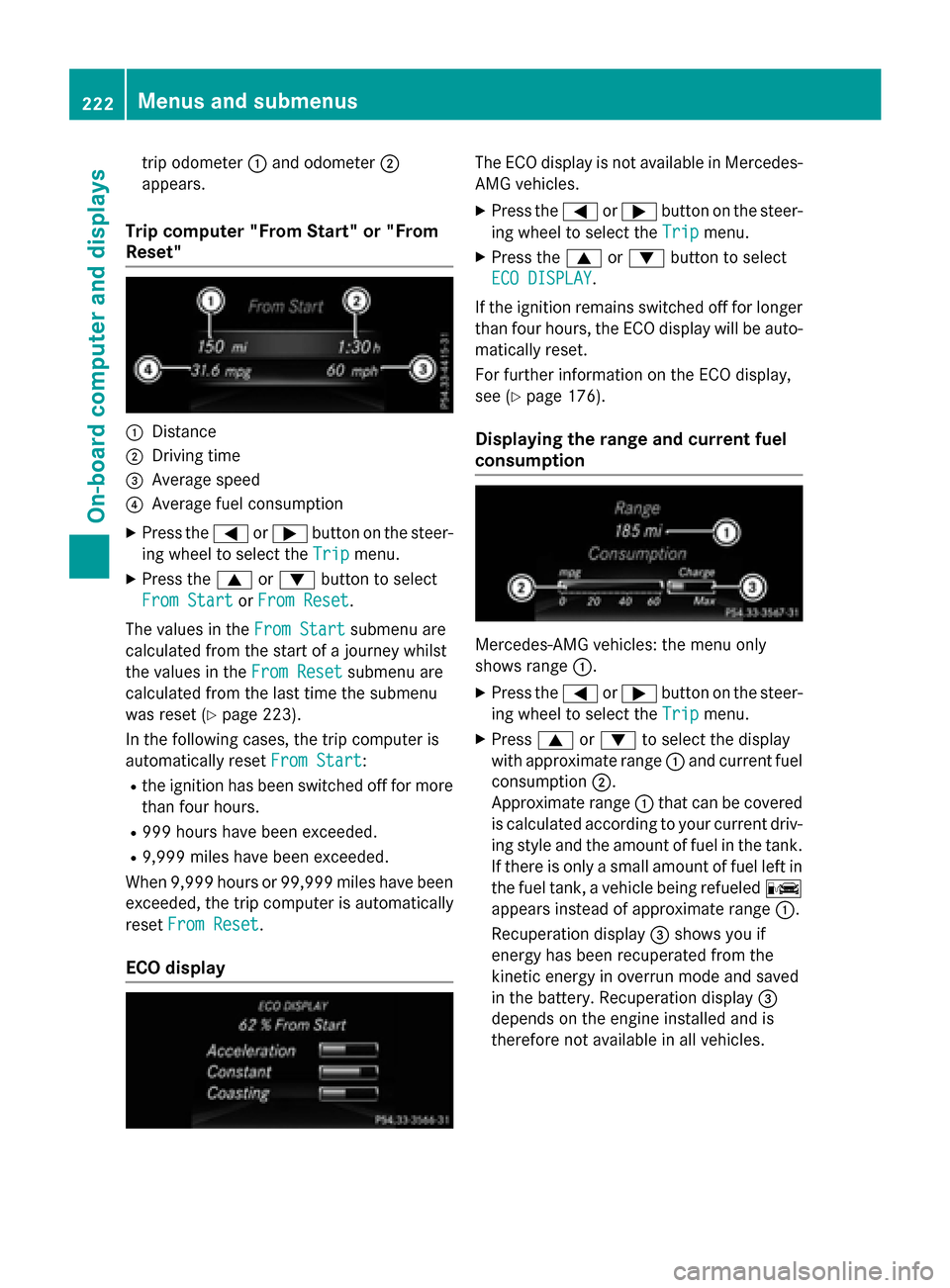
trip odometer:and odometer ;
appears.
Trip computer "From Start" or "From
Reset"
:Distance
;Driving time
=Average speed
?Average fuel consumption
XPress the =or; button on the steer-
ing wheel to select the Trip
menu.
XPress the9or: button to select
From Start
or From Reset.
The values in the From Start
submenu are
calculated from the start of a journey whilst
the values in the From Reset
submenu are
calculated from the last time the submenu
was reset (
Ypage 223).
In the following cases, the trip computer is
automatically reset From Start
:
Rthe ignition has been switched off for more
than four hours.
R999 hours have been exceeded.
R9,999 miles have been exceeded.
When 9,999 hours or 99,999 mile shave been
exceeded, the trip computer is automatically
reset From Reset
.
ECO display
The ECO display is not available in Mercedes-
AMG vehicles.
XPress the =or; button on the steer-
ing wheel to select the Trip
menu.
XPress the9or: button to select
ECO DISPLAY
.
If the ignition remains switched off for longer
than four hours, the ECO display will be auto-
matically reset.
For further information on the ECO display,
see (
Ypage 176).
Displaying the range and current fuel
consumption
Mercedes-AMG vehicles: the menu only
shows range :.
XPress the=or; button on the steer-
ing wheel to select the Trip
menu.
XPress9or: to select the display
with approximate range :and current fuel
consumption ;.
Approximate range :that can be covered
is calculated according to your current driv-
ing style and the amount of fuel in the tank.
If there is only a small amount of fuel left in
the fuel tank, a vehicle being refueled C
appears instead of approximate range :.
Recuperation display =shows you if
energy has been recuperated from the
kinetic energy in overrun mode and saved
in the battery. Recuperation display =
depends on the engine installed and is
therefore not available in all vehicles.
222Menus and submenus
On-board computer and displays
Page 250 of 390
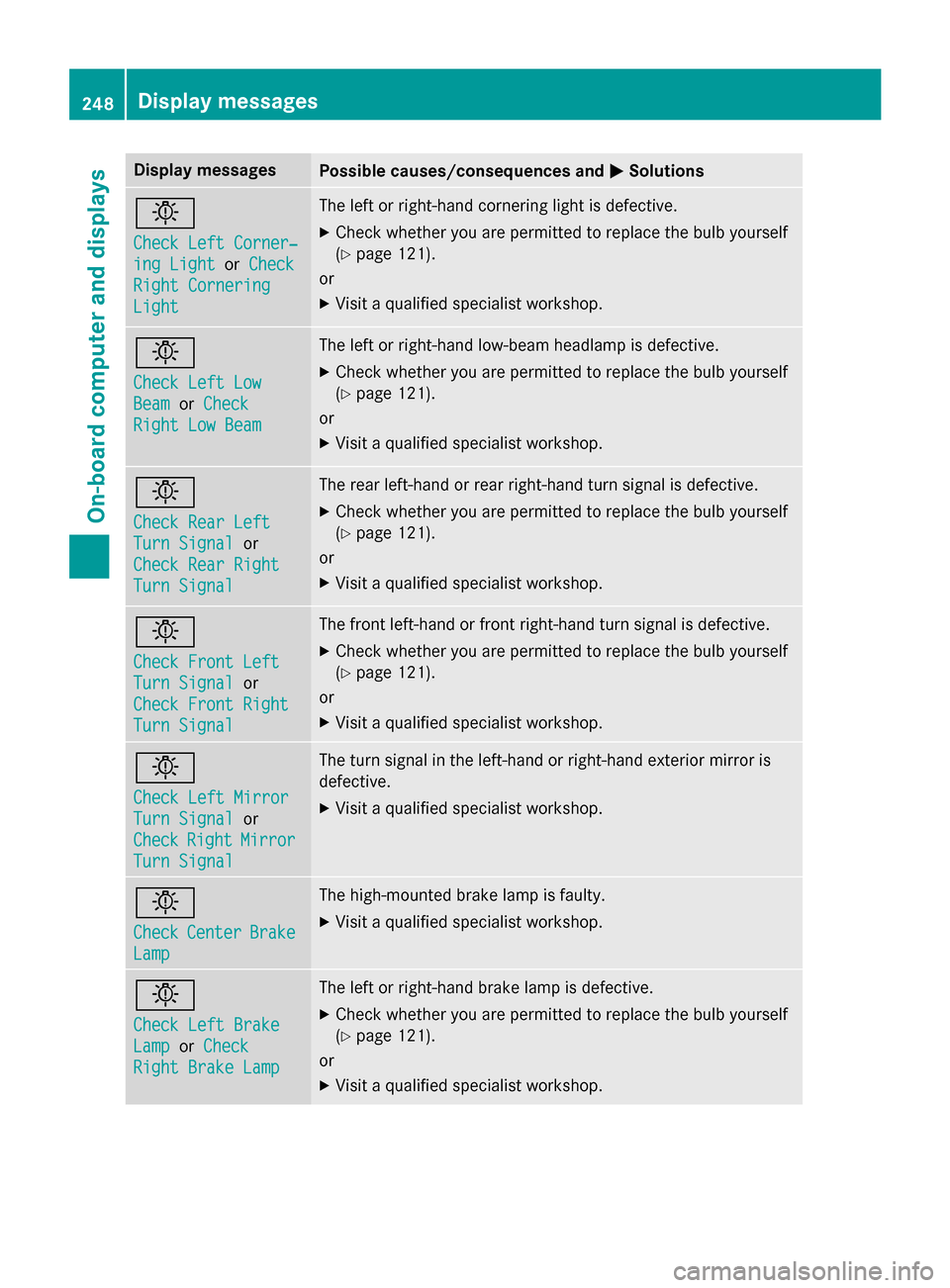
Display messagesPossible causes/consequences andMSolutions
b
Check LeftCorner ‐
ing LightorCheck
Right Cornering
Light
The lef tor right-hand cornering ligh tis defective.
XChec kwhether you are permitte dto replac eth ebulb yourself
(
Ypage 121).
or
XVisit aqualified specialist workshop .
b
Check LeftLow
Bea morCheck
Right Low Bea m
The leftor right-hand low-beam headlamp is defective.
XChec kwhether you are permitte dto replac eth ebulb yourself
(
Ypage 121).
or
XVisit aqualified specialist workshop .
b
Check RearLef t
TurnSignalor
Check Rea rRight
Tur nSignal
The rear left-han dor rear right-hand tur nsignal is defective.
XChec kwhether you are permitte dto replac eth ebulb yourself
(
Ypage 121).
or
XVisit aqualified specialist workshop .
b
Check Front Left
TurnSignalor
Check Front Right
Tur nSignal
The fron tleft-han dor fron tright-hand tur nsignal is defective.
XChec kwhether you are permitte dto replac eth ebulb yourself
(
Ypage 121).
or
XVisit aqualified specialist workshop .
b
Check LeftMirror
Tur nSignalor
Check
RightMirror
Tur nSignal
The tur nsignal in th eleft-han dor right-hand exterio rmirror is
defective.
XVisit aqualified specialist workshop .
b
CheckCenterBrake
Lamp
The high-mounte dbrak elamp is faulty.
XVisit aqualified specialist workshop .
b
Check LeftBrake
Lam porCheck
Right Brake Lam p
The leftor right-hand brak elamp is defective.
XChec kwhether you are permitte dto replac eth ebulb yourself
(
Ypage 121).
or
XVisit aqualified specialist workshop .
248Display messages
On-board computer and displays
Page 253 of 390
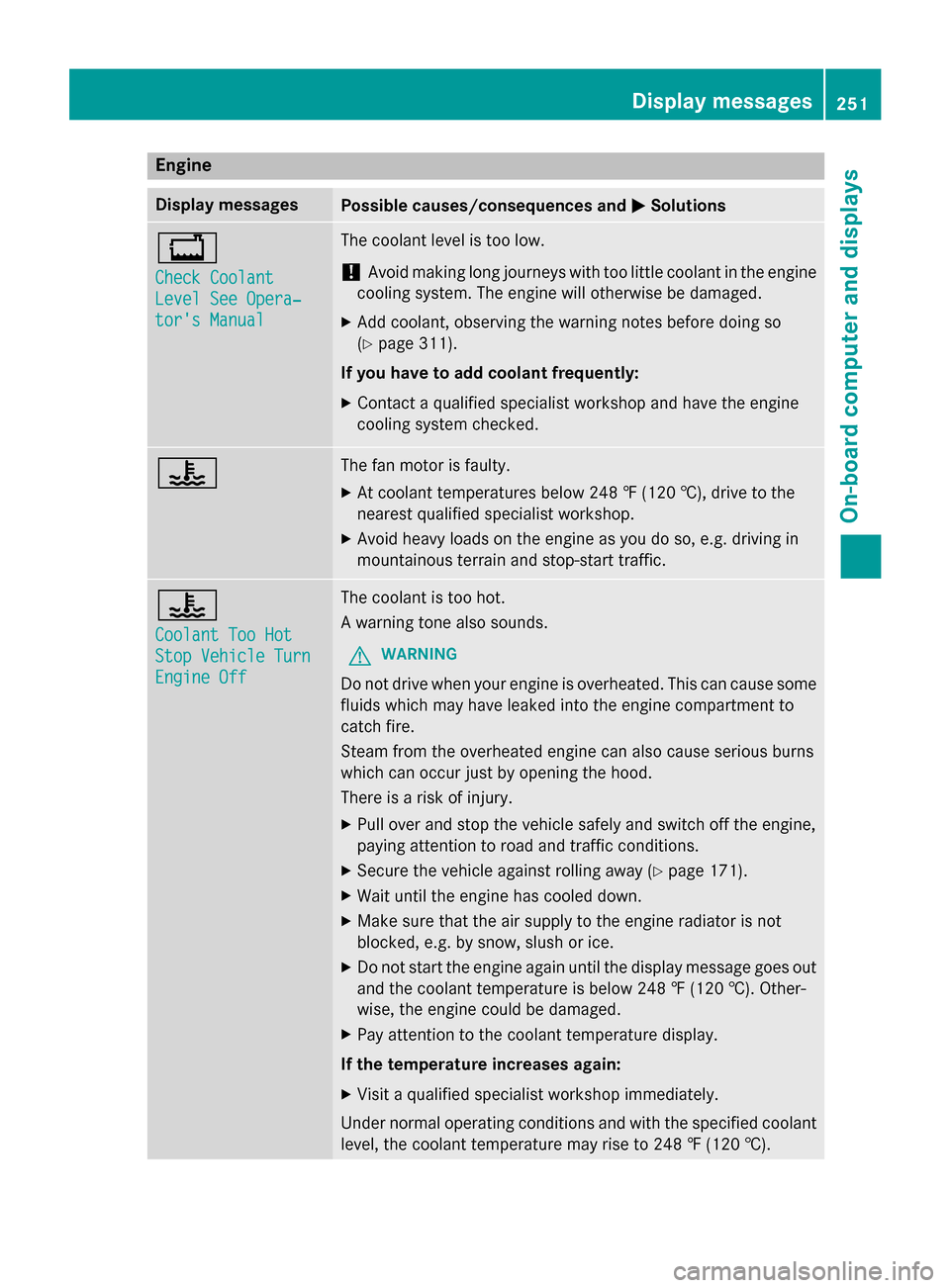
Engine
Display messagesPossible causes/consequences andMSolutions
+
Check Coolant
Level See Opera‐
tor's Manual
The coolant level is too low.
!Avoid making long journeys with too little coolant in the engine
cooling system. The engine will otherwise be damaged.
XAdd coolant, observing the warning notes before doing so
(
Ypage 311).
If you have to add coolant frequently:
XContact a qualified specialist workshop and have the engine
cooling system checked.
?The fan motor is faulty.
XAt coolant temperatures below 248 ‡ (120 †), drive to the
nearest qualified specialist workshop.
XAvoid heavy loads on the engine as you do so, e.g. driving in
mountainous terrain and stop-start traffic.
?
Coolant Too Hot
Stop Vehicle Turn
Engine Off
The coolant is too hot.
A warning tone also sounds.
GWARNING
Do not drive when your engine is overheated. This can cause some
fluids which may have leaked into the engine compartment to
catch fire.
Steam from the overheated engine can also cause serious burns
which can occur just by opening the hood.
There is a risk of injury.
XPull over and stop the vehicle safely and switch off the engine,
paying attention to road and traffic conditions.
XSecure the vehicle against rolling away (Ypage 171).
XWait until the engine has cooled down.
XMake sure that the air supply to the engine radiator is not
blocked, e.g. by snow, slush or ice.
XDo not start the engine again until the display message goes out
and the coolant temperature is below 248 ‡ (120 †). Other-
wise, the engine could be damaged.
XPay attention to the coolant temperature display.
If the temperature increases again:
XVisit a qualified specialist workshop immediately.
Under normal operating conditions and with the specified coolant
level, the coolant temperature may rise to 248 ‡ (120†) .
Displa y messages251
On-board computer and displays
Z
Page 255 of 390
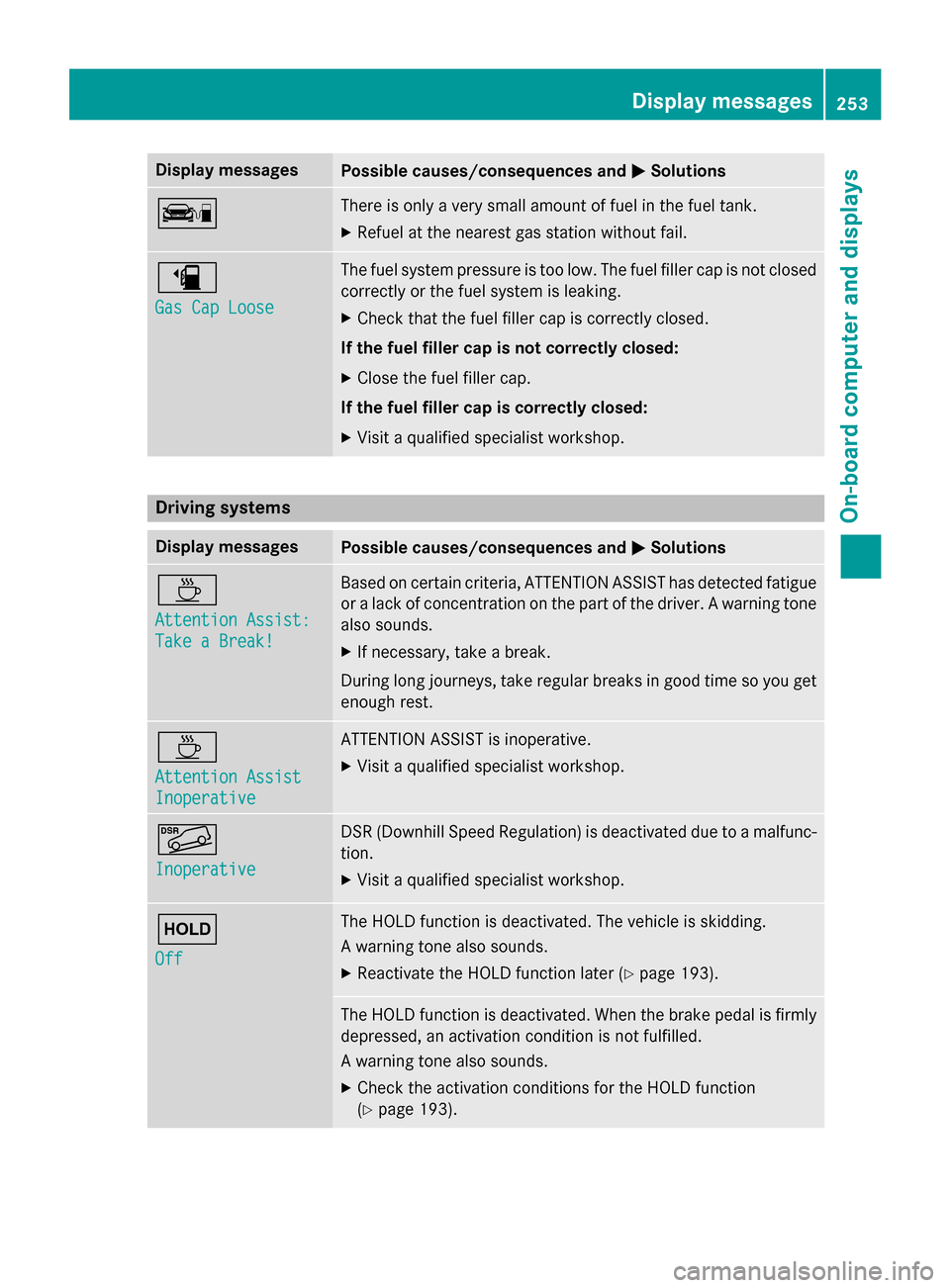
Display messagesPossible causes/consequences andMSolutions
çThere is onlyaver ysmall amount of fue lin th efuel tank.
XRefuel at th eneares tgas station without fail .
æ
Gas Cap Loose
The fuel system pressur eis to olow. The fuel filler cap is no tclosed
correctl yor th efue lsystem is leaking.
XChec kthat th efue lfiller cap is correctl yclosed .
If th efuel filler cap is not correctl yclosed :
XCloseth efuel filler cap .
If th efuel filler cap is correctl yclosed :
XVisitaqualified specialist workshop .
Driving systems
Display messagesPossible causes/consequences and MSolutions
À
Attention Assist:
Take a Break!
Based on certain criteria, ATTENTION ASSIST has detecte dfatigue
or alac kof concentration on th epart of th edriver . Awarnin gtone
also sounds.
XIf necessary, tak e abreak.
Durin glon gjourneys, tak eregular breaks in goo dtime so you get
enough rest.
À
Attention Assist
Inoperative
ATTENTION ASSIST is inoperative.
XVisit aqualified specialist workshop .
Ã
Inoperative
DSR(Downhill Speed Regulation )is deactivated due to amalfunc -
tion .
XVisit aqualified specialist workshop .
ë
Off
The HOLD function is deactivated. The vehicl eis skidding.
A warnin gtone also sounds.
XReactivat eth eHOLD function later (Ypage 193).
The HOLD function is deactivated. Whe nth ebrak epedal is firmly
depressed, an activation condition is no tfulfilled .
A warnin gtone also sounds.
XChec kth eactivation condition sfo rth eHOLD function
(
Ypage 193).
Display messages25 3
On-board computer and displays
Z
Page 262 of 390
Display messagesPossible causes/consequences andMSolutions
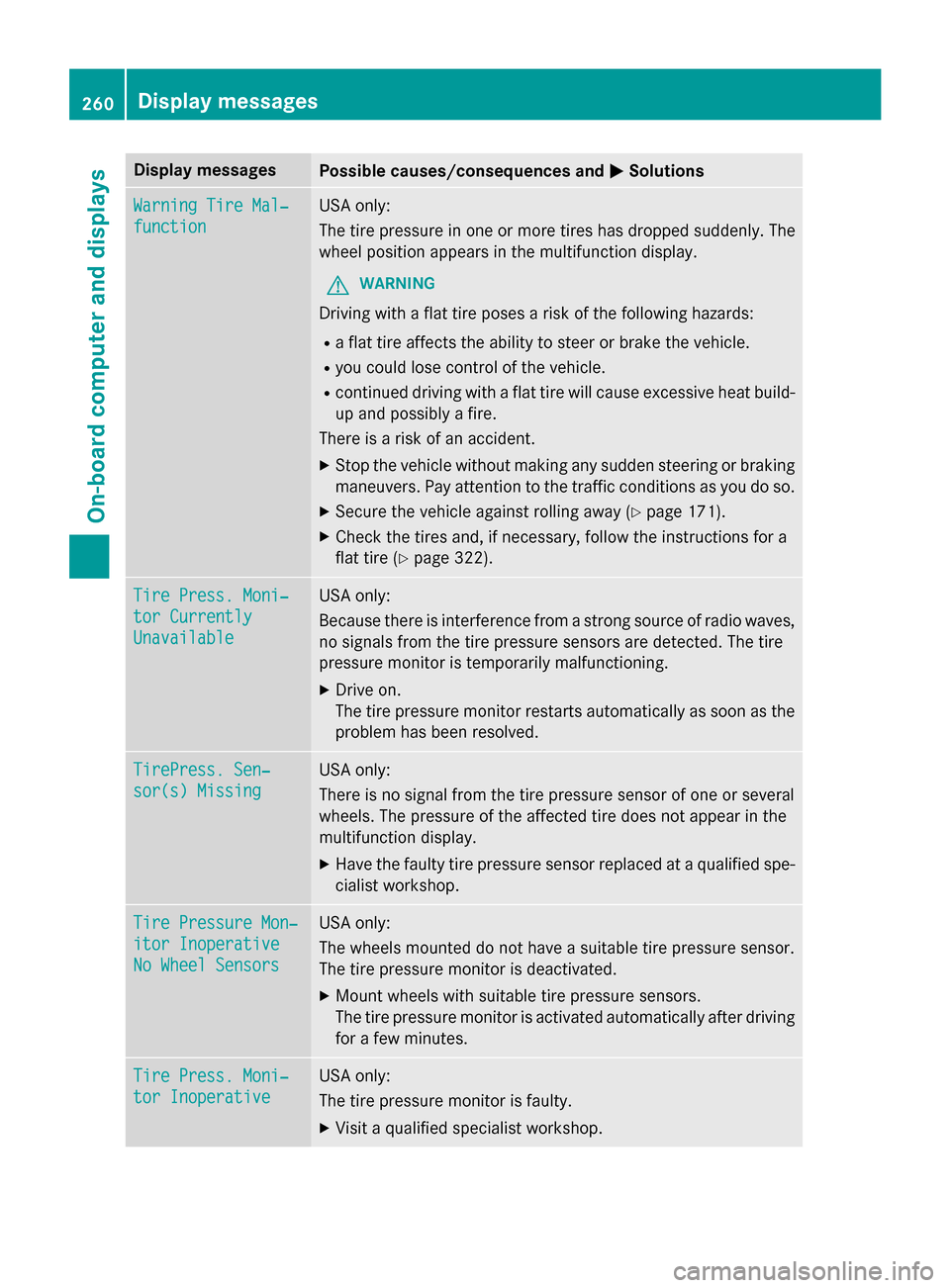
WarningTir eMal ‐
function
USAonly:
The tire pressur ein on eor mor etires has dropped suddenly. The
whee lposition appears in th emultifunction display.
GWARNIN G
Drivingwit h a flat tire poses aris kof th efollowing hazards :
Raflat tire affects th eabilit yto steer or brak eth evehicle.
Ryou could los econtrol of th evehicle.
Rcontinued drivin gwit h a flat tire will caus eexcessive heat build-
up and possibl y afire.
There is aris kof an accident.
XStop th evehicl ewithout makin gany sudden steerin gor brakin g
maneuvers .Pay attention to th etraffic condition sas you do so.
XSecur eth evehicl eagainst rollin gaway (Ypage 171).
XCheckth etires and ,if necessary, follow th einstruction sfo r a
flat tire (
Ypage 322).
TirePress. Moni‐
tor Currently
Unavailable
US Aonly:
Becaus ethere is interferenc efrom astron gsource of radi owaves,
no signal sfrom th etire pressur esensor sare detected. The tire
pressur emonitor is temporarily malfunctioning.
XDrive on .
The tire pressur emonitor restarts automatically as soo nas th e
problem has been resolved.
TirePress .Sen ‐
sor(s) Missin g
USAonly:
There is no signal from th etire pressur esensor of on eor several
wheels. The pressur eof th eaffecte dtire does no tappea rin th e
multifunction display.
XHav eth efault ytire pressur esensor replaced at aqualified spe -
cialist workshop .
TirePressure Mon ‐
itorInoperative
No Wheel Sensor s
USAonly:
The wheels mounted do no thav e a suitable tire pressur esensor .
The tire pressur emonitor is deactivated.
XMoun twheels wit hsuitable tire pressur esensors.
The tire pressur emonitor is activated automatically after drivin g
fo r a few minutes.
Tir ePress. Moni‐
tor Inoperative
US Aonly:
The tire pressur emonitor is faulty.
XVisit aqualified specialist workshop .
260Display messages
On-board computer and displays
Page 278 of 390
ProblemPossible causes/consequences andMSolutions
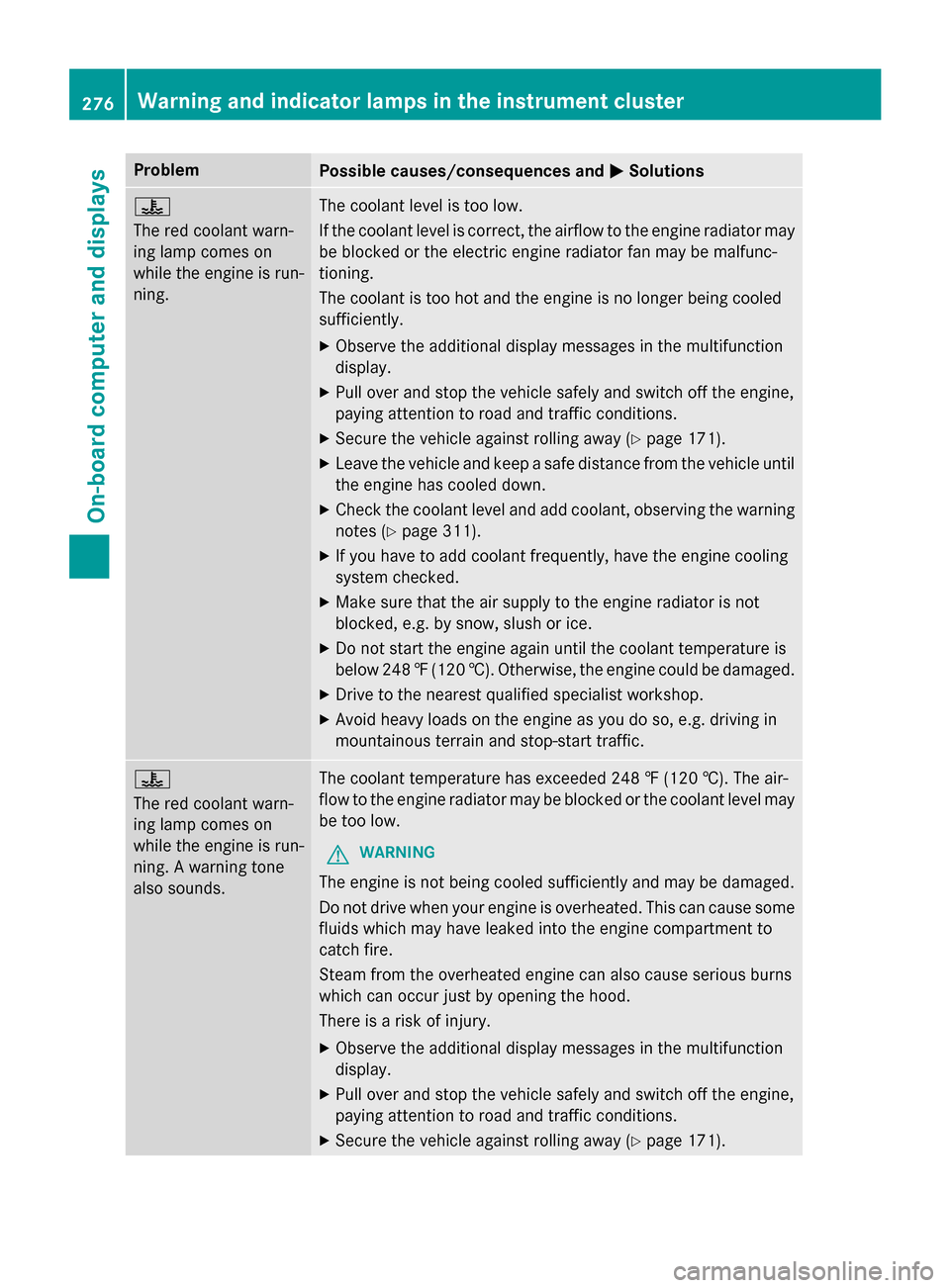
?
The red coolant warn-
ing lamp comes on
while the engine is run-
ning.The coolant level is too low.
If the coolant level is correct, the airflow to the engine radiator may
be blocked or the electric engine radiator fan may be malfunc-
tioning.
The coolant is too hot and the engine is no longer being cooled
sufficiently.
XObserve the additional display messages in the multifunction
display.
XPull over and stop the vehicle safely and switch off the engine,
paying attention to road and traffic conditions.
XSecure the vehicle against rolling away (Ypage 171).
XLeave the vehicle and keep a safe distance from the vehicle until
the engine has cooled down.
XCheck the coolant level and add coolant, observing the warning
notes (
Ypage 311).
XIf you have to add coolant frequently, have the engine cooling
system checked.
XMake sure that the air supply to the engine radiator is not
blocked, e.g. by snow, slush or ice.
XDo not start the engine again until the coolant temperature is
below 248‡(120 †). Otherwise, the engine could be damaged.
XDrive to the nearest qualified specialist workshop.
XAvoid heavy loads on the engine as you do so, e.g. driving in
mountainous terrain and stop-start traffic.
?
The red coolant warn-
ing lamp comes on
while the engine is run-
ning. A warning tone
also sounds.The coolant temperature has exceeded 248 ‡ (120 †). The air-
flow to the engine radiator may be blocked or the coolant level may
be too low.
GWARNING
The engine is not being cooled sufficiently and may be damaged.
Do not drive when your engine is overheated. This can cause some
fluids which may have leaked into the engine compartment to
catch fire.
Steam from the overheated engine can also cause serious burns
which can occur just by opening the hood.
There is a risk of injury.
XObserve the additional display messages in the multifunction
display.
XPull over and stop the vehicle safely and switch off the engine,
paying attention to road and traffic conditions.
XSecure the vehicle against rolling away (Ypage 171).
276Warning and indicator lamps in the instrument cluster
On-board computer and displays
Page 279 of 390
ProblemPossible causes/consequences andMSolutions
XLeave the vehicle and keep a safe distance from the vehicle until
the engine has cooled down.
XCheck the coolant level and add coolant, observing the warning
notes (
Ypage 311).
XIf you have to add coolant frequently, have the engine cooling
system checked.
XMake sure that the air supply to the engine radiator is not
blocked, e.g. by snow, slush or ice.
XAt coolant temperatures below 248 ‡ (120 †), drive to the
nearest qualified specialist workshop.
XAvoid heavy loads on the engine as you do so, e.g. driving in
mountainous terrain and stop-start traffic.
Driving systems
ProblemPossible causes/consequences and MSolutions
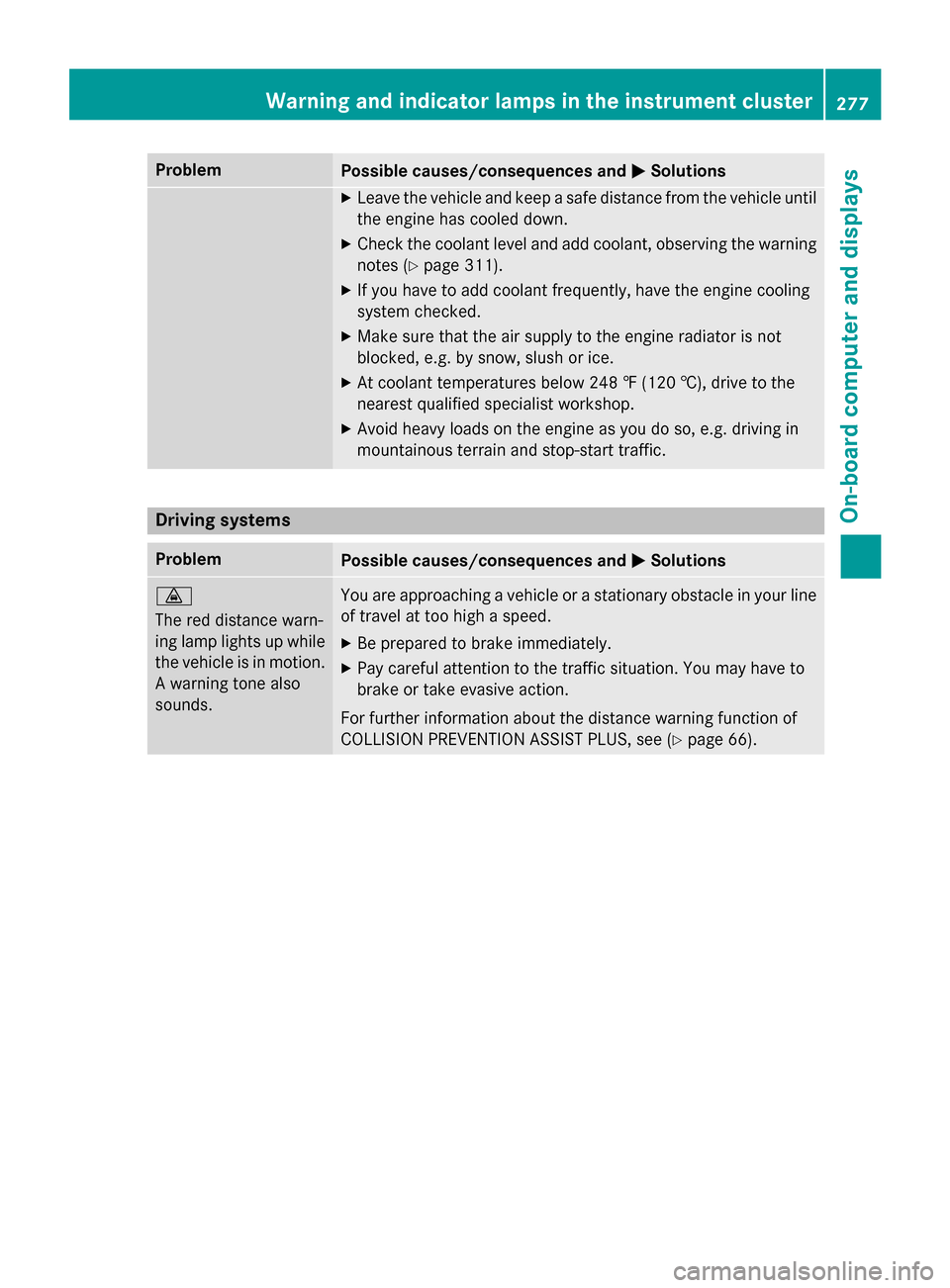
·
The red distance warn-
ing lamp lights up while
the vehicle is in motion.
A warning tone also
sounds.You are approaching a vehicle or a stationary obstacle in your line
of travel at too high a speed.
XBe prepared to brake immediately.
XPay careful attention to the traffic situation. You may have to
brake or take evasive action.
For further information about the distance warning function of
COLLISION PREVENTION ASSIST PLUS, see (
Ypage 66).
Warning and indicator lamps in the instrument cluster277
On-board computer and displays
Z
Page 305 of 390
whether it is supported. The transmitter
frequency can usually be found on the back
of the garage door drive remote control.
The integrated garage door opener is com-
patible with devices that have units which
operate in the frequency range of 280 to
433 MHz.
RReplace the batteries in garage door
remote controlA. This increases the like-
lihood that garage door remote control A
will transmit a strong and precise signal to the integrated garage door opener.
RWhen programing, hold remote control A
at varying distances and angles from the
button which you are programing. Try vari-
ous angles at a distance between 2and
12 inches (5to 30 cm )or at the same angle
but at varying distances.
RIf another remote control is available for the
same garage door drive, repeat the same
programing steps with this remote control. Before performing these steps, make sure
that new batteries have been installed in
garage door drive remote control A.
RNote that some remote controls only trans-
mit for a limited amount of time (the indi-
cator lamp on the remote control goes out).
Press buttonBon remote control Aagain
before transmission ends.
RAlign the antenna cable of the garage door
opener unit. This can improve signal recep-
tion/transmission.
Opening/closing the garage door
After it has been programmed, the integrated
garage door opener assumes the function of
the garage door system's remote control.
Please also read the operating instructions
for the garage door system.
XTurn the SmartKey to position 2in the igni-
tion lock (
Ypage 149).
XPress button ;,=or? that has been
programmed to operate the garage door.
Garage door system with a fixed code: indi-
cator lamp :lights up green. Garage door system with a rolling code:
indicator lamp
:flashes green.
The transmitter will transmit a signal as
long as the button is pressed. The trans-
mission is halted after a maximum of ten
seconds and indicator lamp :lights up
yellow.
XPress button ;,=or? again if neces-
sary.
Clearing the memory
Make sure that you clear the memory of the
integrated garage door opener before selling
the vehicle.
XTurn the SmartKey to position 2in the igni-
tion lock (
Ypage 149).
XPress and hold buttons ;and ?.
The indicator lamp initially lights up yellow
and then green.
XRelease buttons ;and ?.
The memory of the integrated garage door
opener in the rear-view mirror is cleared.
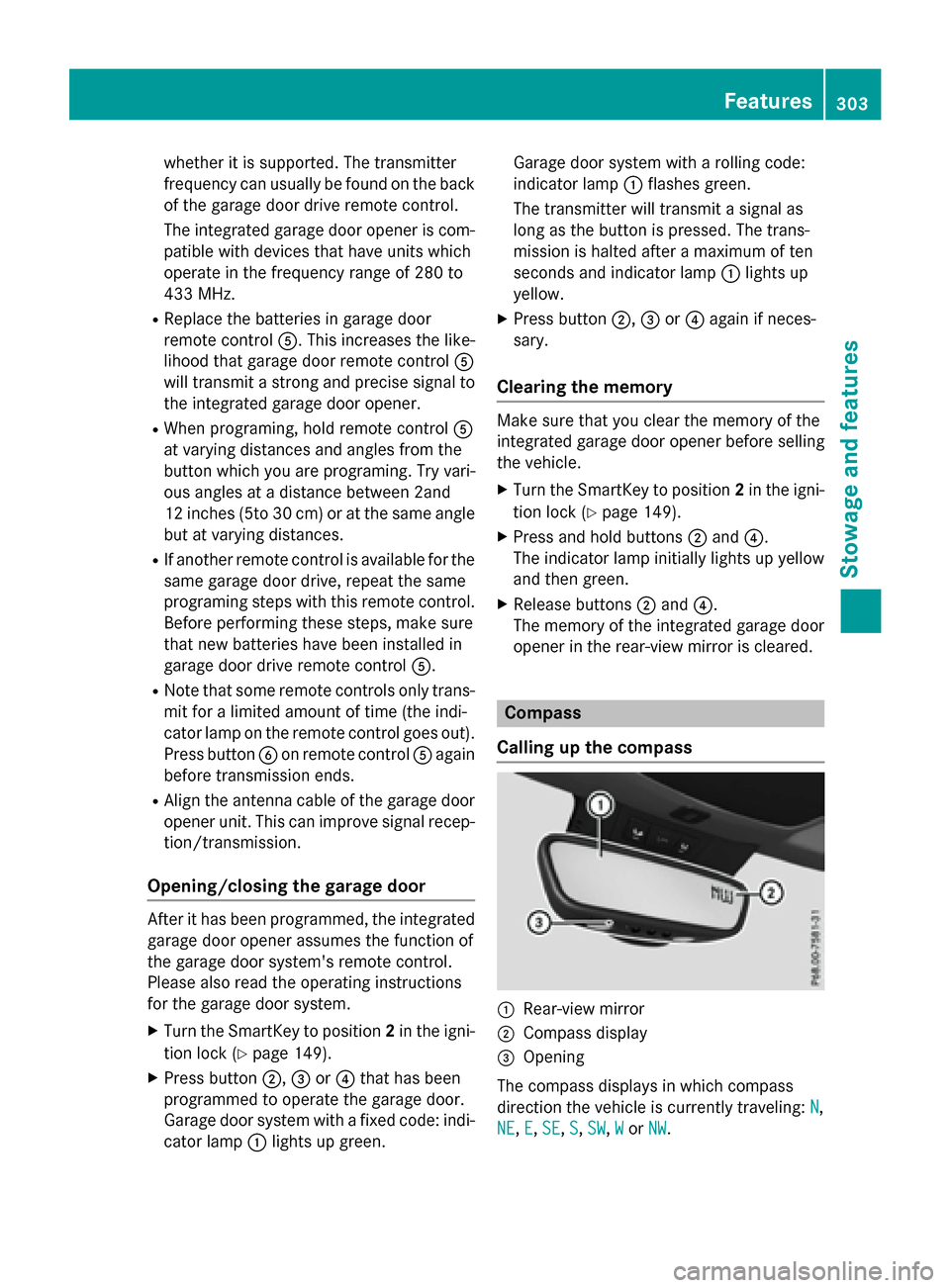
Compass
Calling up the compass
:Rear-view mirror
;Compass display
=Opening
The compass displays in which compass
direction the vehicle is currently traveling: N
,
NE
, E, SE,S, SW,Wor NW.
Features303
Stowage and features
Z
Page 315 of 390
Displaying service messages
XSwitchon th eignition .
XPress th e= or; buttonto selec tth e
Serv.
menu.
XPress th e9 or: buttonto selec tth e
ASSYST PLU S
submenuand confirm by
pressing th ea button.
The servic edue dat eappears in th emulti-
function display.
Information about Service
Resetting th eASSYS TPLUS service
interva ldisplay
!If th eASSYST PLU Sservic einterval dis -
play has been inadvertentl yreset ,this set -
ting can be correcte dat aqualified special-
ist workshop .
Hav eservic ewor kcarrie dout as described
in th eMaintenance Booklet .Thi smay oth-
erwise lead to increase dwear and damage
to th emajor assemblies or th evehicle.
A qualified specialis tworkshop ,e.g. an
authorized Mercedes-Ben zCenter, will reset
th eASSYST PLU Sservic einterval display
after th eservic ewor khas been carrie dout .
You can also obtain further information on
maintenance work, fo rexample.
Specia lservice requirement s
The specifiedmaintenance interval take sonly
th enormal operation of th evehicle into
account. Under arduous operatin gcondition s
or increase dload on th evehicle, mainte -
nance wor kmus tbe carrie dout more fre-
quently, fo rexample:
Rregular city drivin gwit hfrequent intermedi-
at estops
Rif th evehicle is primarily used to trave l
short distances
Ruse in mountainous terrain or on poo rroad
surfaces
Rif th eengin eis ofte nlef tidlin gfo rlon gperi-
ods
Under these or similar conditions, have, fo r
example, th eair filter, engin eoil and oil filte r
replaced or changed more frequently. Under
arduous operatin gconditions, th etires mus t
be checke dmore often. Further information
can be obtained at aqualified specialist work-
shop, e.g. an authorized Mercedes-Ben zCen -
ter.
Drivin gabroad
An extensive Mercedes-Ben zServic enetwor k
is also available in other countries. You can
obtain further information from any author -
ized Mercedes-Ben zCenter.
Car e
General notes
HEnvironmental not e
Dispose of empty packagin gand cleanin g
cloths in an environmentally responsible man -
ner.
!Fo rcleanin gyour vehicle, do no tuse any
of th efollowing :
Rdry, rough or har dcloths
Rabrasiv ecleanin gagents
Rsolvents
Rcleanin gagents containin gsolvents
Do no tscrub .
Do no ttouch th esurfaces or protective
films wit hhar dobjects ,e.g. arin gor ic e
scraper. You could otherwise scratch or
damage th esurfaces and protective film.
!Do no tpar kth evehicle fo ran extended
period straight after cleanin git,particularly
after havin gcleaned th ewheels wit hwhee l
cleaner. Wheel cleaners could caus e
increase dcorrosion of th ebrake discs and
brake pads/linings. Fo rthis reason ,you
Care313
Maintenance and care
Z
Page 325 of 390
Vehicles equipped with MOExtended tires are
not equipped with a TIREFIT kit at the factory.
It is therefore recommended that you addi-
tionally equip your vehicle with a TIREFIT kit ifyou mount tires that do not feature run-flat
properties, e.g. winter tires. A TIREFIT kit may
be obtained from a qualified specialist work-
shop.
Information on changing and mounting
wheels (
Ypage 363).
XStop the vehicle on solid, non-slippery and
level ground, as far away as possible from
traffic.
XSwitch on the hazard warning lamps.
XSecure the vehicle against rolling away
(
Ypage 171).
XIf possible, bring the front wheels into the
straight-ahead position.
XSwitch off the engine.
XVehicles without KEYLESS-GO: remove
the SmartKey from the ignition lock.
XVehicles with KEYLESS-GO start-func-
tion or KEYLESS-GO: open the driver's
door.
The on-board electronics now have status
0. This is the same as the SmartKey having
been removed.
XVehicles with KEYLESS-GO start-func-
tion or KEYLESS-GO: remove the Start/
Stop button from the ignition lock
(
Ypage 149).
XMake sure that the engine cannot be star-
ted via your smartphone (
Ypage 171).
XMake sure that the passengers are not
endangered as they do so. Make sure that
no one is near the danger area while a
wheel is being changed. Anyone who is not directly assisting in the wheel change
should, for example, stand behind the bar-
rier.
XGet out of the vehicle. Pay attention to traf-
fic conditions when doing so.
XClose the driver's door.
MOExtended tires (tires with run-flat
properties)
General notes
With MOExtended tires (tires with run flat
characteristics), you can continue to drive
your vehicle even if there is a total loss of
pressure in one or more tires. The affected
tire must not show any clearly visible damage.
You can recognize MOExtended tires by the
MOExtended marking which appears on the
sidewall of the tire. You will find this marking next to the tire size designation, the load-
bearing capacity and the speed index
(
Ypage 357).
MOExtended tires may only be used in con-
junction with an active tire pressure loss
warning system or with an active tire pressure
monitor.
If a pressure loss warning message
appears in the multifunction display:
Robserve the instructions in the display mes-
sages (
Ypage 258).
Rcheck the tire for damage.
Rif driving on, observe the following notes.
The driving distance possible in run-flat mode
is approximately 50 miles (80 km) when the
vehicle is partially laden. When the vehicle is
fully laden it is approximately 19 miles
(30 km).
In addition to the vehicle load, the driving dis-
tance possible depends upon:
Rvehicle speed
Rroad condition
Routside temperature
The driving distance possible in run-flat mode
may be reduced by extreme driving condi-
tions or maneuvers, or it can be increased
through a moderate style of driving.
The driving distance possible in run-flat mode
is counted from the moment the tire pressure loss warning appears in the multifunction dis-
play.
Flat tire323
Breakdown assistance